Google announced the rollout of new generative AI capabilities for Demand Gen campaigns in Google Ads today.
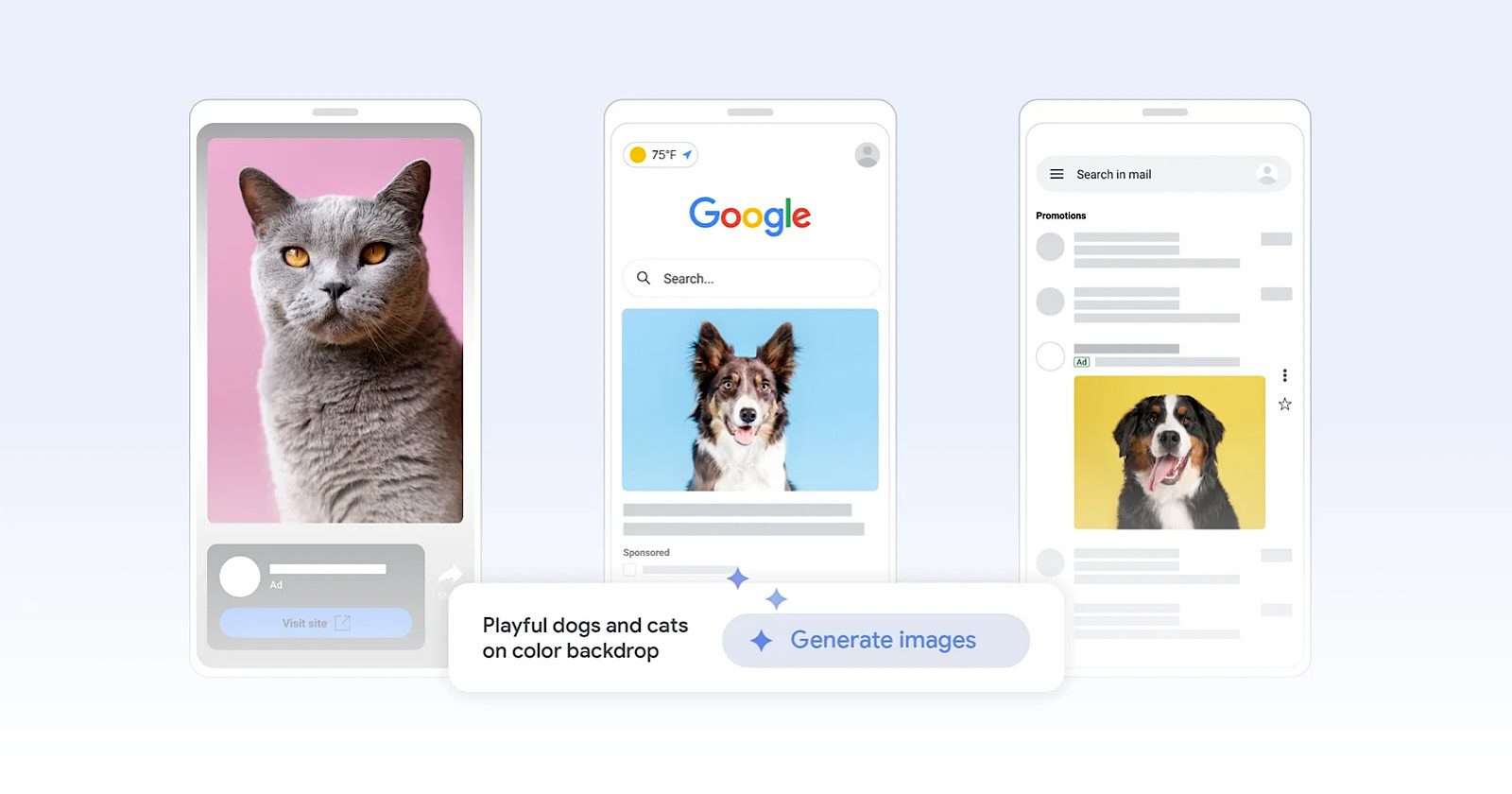
The tools, powered by Google’s artificial intelligence, will allow advertisers to create high-quality image assets using text prompts in just a few steps.
The AI-powered creative features aim to enhance visual storytelling to help brands generate new demand across Google’s platforms, including YouTube, YouTube Shorts, Discover, and Gmail.
Michael Levinson, Vice President and General Manager of Social, Local, and Vertical Ads at Google, stated in the announcement:
“Advertisers need to diversify their creative strategy with multi-format ads to keep audiences engaged and deliver results. With generative image tools, you can now test new creative concepts more efficiently – whether it’s experimenting with new types of images or simply building your creatives from scratch.”
How It Works
Starting today, the generative image tools are rolling out globally to advertisers in English, with more languages coming later this year.
Advertisers can provide text prompts to generate original, high-quality images tailored to their branding and marketing needs.
For example, an outdoor lifestyle brand selling camping gear could use a prompt like “vibrantly colored tents illuminated under the Aurora Borealis” to create engaging visuals targeting customers interested in camping trips to Iceland.
Additionally, a “generate more like this” feature allows advertisers to generate new images inspired by their existing high-performing assets.
Responsible AI Development
In the announcement, Google emphasized its commitment to developing generative AI technology responsibly, with principles in place for fairness, privacy, and security.
The company states:
“On top of making sure advertising content adheres to our long-standing Google Ads policies, we also employ additional technical measures to ensure generative image tools in Google Ads produce novel and unique content. Google AI will never create two identical images.”
All generated images will include identifiable markings, such as an open-standard markup and an invisible digital watermark resistant to manipulations like screenshots and filters.
Creative Best Practices
To accompany the new AI tools, Google released a “Creative Excellence Guide” with the following best practices for building Demand Gen campaigns:
Use a combination of videos and images to engage audiences at different stages of the buyer journey.
Provide Google with a variety of assets in different aspect ratios to maximize reach across inventory.
Utilize high-quality, high-resolution visuals to build brand trust and inspire action.
Adopt a test-and-learn strategy, evaluating performance metrics to optimize creatives.
Why SEJ Cares
Generative AI for Demand Gen campaigns represents a potentially valuable new capability for Google Ads advertisers.
By leveraging AI to streamline creative production, brands can experiment with a broader array of visual concepts.
This positions them to better engage audiences in Google’s premium ad environments, such as YouTube, Discover, and Gmail.
How This Can Help You
For brands, generative AI tools open up new creative possibilities with a level of image sophistication that was previously time-and resource-intensive to produce.
The ability to iterate rapidly on visual ideas can lead to more impactful ad creative.
Small businesses and agencies operating with leaner teams can now create a high volume of diverse, on-brand image assets with minimal design resources.
Additionally, the “Generate more like this” functionality allows advertisers to expand on existing assets while maintaining a consistent look and feel.
Brands need to approach this technology responsibly and strategically, however.
While Google has implemented safeguards, advertisers should still apply human oversight, creativity, and brand governance when using AI-generated assets.
Featured Image: blog.google/products/ads-commerce/, April 2024.
In an email sent to Google Ads advertisers this week, the company announced a change coming to search ads.
Effective May 31, 2024, ad customizers will stop serving for expanded text ads (ETAs) and Dynamic Search Ads (DSAs).
The notification reads in part:
“On May 31, 2024, existing ad customizers for text ads, expanded text ads and Dynamic Search Ads will stop serving (after this date they will only be able to serve with their default value).”
For advertisers leveraging customizers with their text ads or DSAs, Google recommends “transitioning to responsive search ads and creating ad customizers for responsive search ads by May 31, 2024.”
Reactions Within The Search Marketing Community
News of the impending change sparked discussion among paid search professionals.
Navah Hopkins shared the Google announcement on LinkedIn along with her take:
“I’ve never been a huge fan of customizers (both anecdotally and when looking at large data sets), but I respect that they do work for some advertisers.
If you’re currently running ad customizers on your DSA or ETAs – now is the time to build them out as RSAs so you can gradually move to the new format.”
Hopkins clarified that the customizers will cease serving text ads and DSAs, not the ad types.
“If you didn’t bother with [customizers]…keep calm and carry on with your amazing human augmented creative segmentation!”
The Writing On The Wall For Text Ads
Google’s push for responsive search ads (RSAs) as the go-to search ad format has been apparent for some time.
In 2021, Google shared that RSAs would become the only search ad type advertisers could create or edit in standard search campaigns.
The following year, in June 2022, Google stopped allowing advertisers to create or edit expanded text ads within any of its surfaces—a clear sign that RSAs were taking over as the primary ad unit.
Many marketers have invested in responsive search ads over the past couple of years, and this latest move seems to be another step in that continued shift.
For those still leveraging custom ad text with their text ads and DSAs, the clock is ticking to rebuild those customized experiences with responsive search ads instead.
FAQ
How does Google Ads’ change regarding ad customizers impact advertisers?
To maintain personalized advertising experiences, Google Ads advertisers now need to:
Transition their existing ad customizers to responsive search ads (RSAs) by the May 31 deadline.
Rebuild customized ad experiences within the RSA format, which offers dynamic customization capabilities.
Adapt to a new ad landscape where RSAs are becoming the primary format for search ads.
What are the steps for advertisers to transition from ETAs to RSAs?
Advertisers must take proactive measures to ensure a smooth transition from expanded text ads to responsive search ads:
Review current ad campaigns using ETAs and identify which utilize ad customizers.
Create new responsive search ads that implement customizers before the deadline.
Test and optimize these RSAs for performance against current ETAs to ensure minimal disruption.
Gradually phase out ETAs in favor of RSAs to become accustomed to the new format.
Why is Google pushing for a transition to responsive search ads?
Google’s push towards responsive search ads is rooted in adaptability and efficiency. The transition reflects an effort to:
Simplify ad creation while maximizing reach and relevance across different search queries.
Employ a more automated approach to ad optimization using machine learning algorithms.
Streamline the ad platform by focusing on a single, more effective ad type that can adjust to user queries and device types.
Whether you are new to paid media or reevaluating your efforts, it’s critical to review your performance and best practices for your overall PPC marketing program, accounts, and campaigns.
Revisiting your paid media plan is an opportunity to ensure your strategy aligns with your current goals.
Reviewing best practices for pay-per-click is also a great way to keep up with trends and improve performance with newly released ad technologies.
As you review, you’ll find new strategies and features to incorporate into your paid search program, too.
Here are 10 PPC best practices to help you adjust and plan for the months ahead.
1. Goals
When planning, it is best practice to define goals for the overall marketing program, ad platforms, and at the campaign level.
Defining primary and secondary goals guides the entire PPC program. For example, your primary conversion may be to generate leads from your ads.
You’ll also want to look at secondary goals, such as brand awareness that is higher in the sales funnel and can drive interest to ultimately get the sales lead-in.
2. Budget Review & Optimization
Some advertisers get stuck in a rut and forget to review and reevaluate the distribution of their paid media budgets.
To best utilize budgets, consider the following:
Reconcile your planned vs. spend for each account or campaign on a regular basis. Depending on the budget size, monthly, quarterly, or semiannually will work as long as you can hit budget numbers.
Determine if there are any campaigns that should be eliminated at this time to free up the budget for other campaigns.
Is there additional traffic available to capture and grow results for successful campaigns? The ad platforms often include a tool that will provide an estimated daily budget with clicks and costs. This is just an estimate to show more click potential if you are interested.
If other paid media channels perform mediocrely, does it make sense to shift those budgets to another?
For the overall paid search and paid social budget, can your company invest more in the positive campaign results?
3. Consider New Ad Platforms
If you can shift or increase your budgets, why not test out a new ad platform? Knowing your audience and where they spend time online will help inform your decision when choosing ad platforms.
Go beyond your comfort zone in Google, Microsoft, and Meta Ads.
Here are a few other advertising platforms to consider testing:
LinkedIn: Most appropriate for professional and business targeting. LinkedIn audiences can also be reached through Microsoft Ads.
TikTok: Younger Gen Z audience (16 to 24), video.
Pinterest: Products, services, and consumer goods with a female-focused target.
Snapchat: Younger demographic (13 to 35), video ads, app installs, filters, lenses.
Recently, trends in search and social ad platforms have presented opportunities to connect with prospects more precisely, creatively, and effectively.
Don’t overlook newer targeting and campaign types you may not have tried yet.
Video: Incorporating video into your PPC accounts takes some planning for the goals, ad creative, targeting, and ad types. There is a lot of opportunity here as you can simply include video in responsive display ads or get in-depth in YouTube targeting.
Performance Max: This automated campaign type serves across all of Google’s ad inventory. Microsoft Ads recently released PMAX so you can plan for consistency in campaign types across platforms. Do you want to allocate budget to PMax campaigns? Learn more about how PMax compares to search.
While exploring new features, check out some hidden PPC features you probably don’t know about.
5. Revisit Keywords
The role of keywords has evolved over the past several years with match types being less precise and loosening up to consider searcher intent.
For example, [exact match] keywords previously would literally match with the exact keyword search query. Now, ads can be triggered by search queries with the same meaning or intent.
A great planning exercise is to lay out keyword groups and evaluate if they are still accurately representing your brand and product/service.
Review search term queries triggering ads to discover trends and behavior you may not have considered. It’s possible this has impacted performance and conversions over time.
Critical to your strategy:
Review the current keyword rules and determine if this may impact your account in terms of close variants or shifts in traffic volume.
Brush up on how keywords work in each platform because the differences really matter!
Review search term reports more frequently for irrelevant keywords that may pop up from match type changes. Incorporate these into match type changes or negative keywords lists as appropriate.
6. Revisit Your Audiences
Review the audiences you selected in the past, especially given so many campaign types that are intent-driven.
Automated features that expand your audience could be helpful, but keep an eye out for performance metrics and behavior on-site post-click.
Remember, an audience is simply a list of users who are grouped together by interests or behavior online.
Therefore, there are unlimited ways to mix and match those audiences and target per the sales funnel.
In-market and custom intent: Searches and online behavior signaling buying cues.
Remarketing: Advertisers website visitors, interactions with ads, and video/ YouTube.
Note: This varies per the campaign type and seems to be updated frequently, so make this a regular check-point in your campaign management for all platforms.
7. Organize Data Sources
You will likely be running campaigns on different platforms with combinations of search, display, video, etc.
Looking back at your goals, what is the important data, and which platforms will you use to review and report? Can you get the majority of data in one analytics platform to compare and share?
Millions of companies use Google Analytics, which is a good option for centralized viewing of advertising performance, website behavior, and conversions.
8. Reevaluate How You Report
Have you been using the same performance report for years?
It’s time to reevaluate your essential PPC key metrics and replace or add that data to your reports.
There are two great resources to kick off this exercise:
Your objectives in reevaluating the reporting are:
Are we still using this data? Is it still relevant?
Is the data we are viewing actionable?
What new metrics should we consider adding we haven’t thought about?
How often do we need to see this data?
Do the stakeholders receiving the report understand what they are looking at (aka data visualization)?
Adding new data should be purposeful, actionable, and helpful in making decisions for the marketing plan. It’s also helpful to decide what type of data is good to see as “deep dives” as needed.
9. Consider Using Scripts
The current ad platforms have plenty of AI recommendations and automated rules, and there is no shortage of third-party tools that can help with optimizations.
Scripts is another method for advertisers with large accounts or some scripting skills to automate report generation and repetitive tasks in their Google Ads accounts.
Luckily, you don’t need a Ph.D. in computer science — there are plenty of resources online with free or templated scripts.
10. Seek Collaboration
Another effective planning tactic is to seek out friendly resources and second opinions.
Much of the skill and science of PPC management is unique to the individual or agency, so there is no shortage of ideas to share between you.
You can visit the Paid Search Association, a resource for paid ad managers worldwide, to make new connections and find industry events.
Preparing For Paid Media Success
Strategies should be based on clear and measurable business goals. Then, you can evaluate the current status of your campaigns based on those new targets.
Your paid media strategy should also be built with an eye for both past performance and future opportunities. Look backward and reevaluate your existing assumptions and systems while investigating new platforms, topics, audiences, and technologies.
Also, stay current with trends and keep learning. Check out ebooks, social media experts, and industry publications for resources and motivational tips.
If you haven’t set up a 2024 game plan, you’re not alone. Many search engine marketers and PPC professionals are late, or just terrified of what is to come this year.
I recognize most of us have still not recovered from the dumpster fire that was 2020 (just look at my beloved NY Jets as an example), but you can work through that later.
But one thing it didn’t do for us was give us much guidance for 2024.
Recession fears are largely gone, the presidential election is looming, interest rates are high (yes, that does play into your planning), and cookie deprecation has actually started.
Take a moment to accept that 2024 is going to be a rollercoaster. Have a cup of coffee, and let’s dig into what you need to know for this year.
Pro tip: Plan for at least three seasons:
Pre-Election (January-August).
Election (September-November 5th).
Post-Election (November 6th-December).
Within that, you can add your seasonality (and if your peak season is in that election period season, get ready for a ride).
How Strategic Planning Typically Goes In Search Marketing
Disclaimer: Normally, this process applies if you’re working toward the same game plan as the prior year – without dramatic, sweeping changes. But in 2024, we throw in new macro factors that will throw you some curveballs.
The most common way New Year search planning happens is by examining historical data. Here, you examine YoY growth in costs per click – in addition to annual search activity growth – to estimate necessary budgets.
But when Google search produces abnormally high cost-per-click (CPCs) in Q2 of 2022, you must adjust for unexpected changes the following year after completing four fiscal quarters to offset it.
The search engine does all of this, so you end up with behavior for Google Ads, Bing Ads (because I refuse to call it Microsoft), Meta (yes, paid social is more or less paid search these days), and other non-typical platforms (e.g., Yelp, TikTok, Nextdoor, Pinterest, Amazon, etc).
You examine seasonal, monthly, and even day-of-week behavior across all your campaign segments, including Product Listing Ads (PLAs), Performance Max, brand, non-brand, high volume, etc.
Once this is done, you look for front and back-end traffic variances over the past two years.
But you should also revisit data from 2020 and 2016 (if available), specifically during the election season, to see if there is any other abnormal activity. You’ll need to account for variances like that in your planning.
You’re looking for highs or lows caused by time or macro factors that often repeat annually or are a one-and-done scenario.
We call this a “Forensic Lookback” – think of international impacts such as world events, major hurricanes, Supreme Court rulings, etc.
If you look at your 2023 data and find an out-of-character pattern in the numbers that cannot be attributed to a change you made, then see if the date when the data behavior changed correlates to any major event.
You’re probably keeping a close eye on impression share data (especially impression share lost); this will be helpful to correlate alongside your peak and low seasons.
Cross-reference it with total impressions and investment. Remember, this is valid for search, Google Display Network (GDN), and Shopping only – not eligible for PMax or social.
Net-net, the valuation of impression share, should be devalued if you’re already running Performance Max.
Then, you apply expected growth, increase in spend, etc., across 365 days, flexing up or down for recurring seasonal (and your anticipated adjustment for the election cycle), quarterly, monthly, weekly, or daily events.
And boom! Your anticipated needs and delivery for 2024 are all put together in a nice, neat little package.
Except you forgot about the increased adoption of Performance Max and its unpredictability.
If you don’t have one inherited campaign, you can still use the performance planner, but take it with a grain of salt because it is more accurate with historical data. This is all a nice way of saying, “Launch with a predetermined budget, but make funds fluid between search/PLA/PMax.”
Separately, you’ll do traffic estimates via reach planner for YouTube and Meta, and use historical data cross-planning with estimated audience sizes the platform pushes out to you.
What Keeps Seasoned Pros Up At Night When Planning For 2024?
2020 and 2023 hindsight will provide 2024 foresight.
Unless you don’t care about anything or operate in a vertical that is somewhat immune to macro factors (I used to say worm farming was immune to these factors, but courtesy of inflation and homesteading booms, it’s not the case anymore).
So, at least we know some of what we’re facing this year and how to plan for potential impact.
These include, but are not limited to:
Residual impact from the pandemic: Deeper pushed into the work-from-home model, which hampered verticals such as apparel and dining.
Recovery from the pandemic: Travel demand surged, exceeding pre-pandemic levels.
Interest rates: High-interest rates led to a massive drop in loan-based marketing and indirectly negatively affected automotive sales. Inversely, this positively impacted retail financial marketing, such as checking and savings accounts.
Election season: This hit some verticals more than others, as politicians ran ads that targeted key terms in adjacent/halo categories, such as Medicare/insurance, healthcare, and law.
Non-market related incidents: Wars, mass shootings, political fighting, and court rulings immediately cause brand safety concerns and may limit what is possible to advertise near for display, social, and video.
Non-traditional SEM adjacent advertising: The continued evolution and adoption of elements, such as Performance Max in Google (and soon in Bing) and YouTube, make your search forecasting more difficult.
Planning Search For 2024, Step By Step
So, what are you supposed to do now?
Don’t panic, but you need to get to it as soon as possible.
Depending on your vertical, you may need to account for collateral impact from the election, which we’ll note in later steps.
For those of you who are exclusive search and/or PLAs, this will be a bit easier.
For users of any of the following, there is a bit more legwork: PMax, GDN/Microsoft Audience Network (MSAN), and YouTube.
For those who are search-dominant or exclusive, I recommend the following steps, provided you are keeping the same objectives.
1. Pull January to August data from 2023 over 2022.
2. If you lost impression share due to budget, identify which campaigns and months.
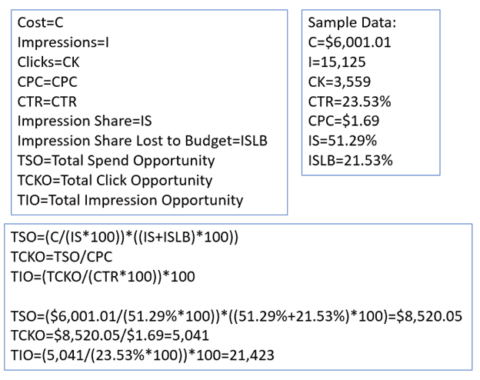
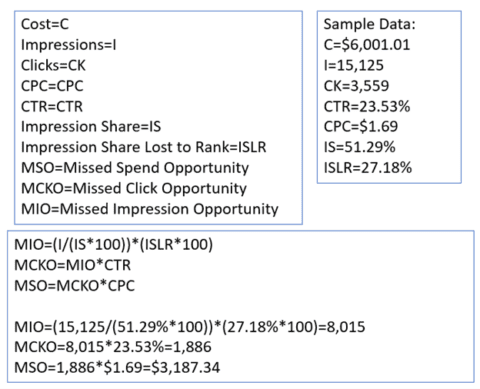
Then, determine the opportunity if you weren’t underfunded. (See the fun little equation below.)
Calculation Of Actual Impression Share Data for Budget by author, November 2021
3. Take it a step further.
You can calculate the missed opportunity due to missed impression share due to rank.
I first learned about this formula in PPC Math Made Easy by Rachel Law in 2019, and I find it pretty accurate.
Calculation Of Actual Impression Share Data for Rank by author, November 2021
4. Add total opportunity if you were underfunded to missed opportunity due to rank.
You got what you should’ve had for this year.
5. Review average CPC growth for the past two years by month.
Apply that growth to your CPC and cost (not impressions or clicks, though). I had a habit of annual growth of 3% to 5%.
6. Review January to August 2020 over 2019 growth/activity change (for election year impact).
Compare, and if there is incremental growth over the 2023 vs. 2022 percentage, raise your anticipated metrics.
This will help account for the incremental impact of the election.
Note: If there is a dip in the performance, I play the conservative side and don’t forecast metrics going down to avoid being shy about funds later.
7. Repeat Steps 1 through 6 for September through election day.
This is what I am calling “Election Impact.”
8. Repeat Steps 1 through 6 for the day after the election through New Year.
This rechecks your numbers. It also helps account for the peak shopping season.
9. Add the three timeframes together, and you have your budget.
If you change optimization strategies, roll out new creative, etc. – those that allow for flexible range variances – where you give the CPCs a variance, which leads to providing a budget range vs. that of a single number.
Now, Performance Max is a bit unpredictable.
For those inheriting campaigns, it is always good to review performance (especially on brand and PLAs) before PMax was involved and after it was involved.
This will give you a direction on its potential impact. Then, look at the historical spend by day over time to try and see if you can determine a baseline for spend.
The real kicker is that, back in 2020, PMax wasn’t a thing. So, the historical impact of events such as the election can’t be overlaid on it.
I look at growths in search CPC, YouTube cost-per-view (CPVs)/cost-per-thousand-impressions (CPMs), and GDN CPMs and look for commonalities. Then, apply that anticipated growth to the cost per interaction to try and back into my numbers.
Yes, this is very dirty math. But it also reiterates that impression share doesn’t carry the same weight in search/Display/YouTube as it once did because PMax is in there.
Lastly, I dig into GDN/MSAN and YouTube. These are a bit easier to anticipate because they have an impression share.
You can use a similar formula to search (Steps 1 to 9), but you’ll definitely want to shave some cost off the top to account for PMax (if you use it).
If you aren’t inheriting campaigns for MSAN/GDN/YouTube, then I recommend using Reach Planner for YouTube planning.
For GDN/MSAN, build audience targets, do the math for the population within your market (if it isn’t nationwide), and give yourself a test budget to work with and run with it from there.
Like that, you have a 2024 that attempts to account for the current state of society and its foreseeable transition and restlessness for later in the year.
Tips For SEM Planning In An Election Year
Now, that is all well and good – unless you are handling one of the verticals prone to be affected by interest rates, elections, and social issues (basically anything that can be politicized).
Your process will be similar but not entirely the same. This adjustment is applied to Step 7 in the prior section.
Determine the total opportunity that should’ve been with impression share lost in 2023. Then, scale CPC/CPM/CPV for two years and in 2020 for pre-election (call it June to August) vs. election (September to Election day 2020).
This delta should be applied to your earlier forecasts, providing the growth rate exceeded
Note: If you’re doing 3% to 5% annual growth, scale for year-on-year (i.e., a compounded 5% CPC for two years comes out to a 10.25% growth rate).
But let’s say election season causes the increase to 7% instead of 5%; then you’ll utilize that for one of your two years.
Once I Have My Traffic Numbers, What Should I Do Now?
Well, you could do nothing. But that would be a terrible idea.
Instead, apply historically normalized (follow data history from above to find “normalized”) post-click performance data, such as conversion rate (CVR), cost per acquisition (CPA), etc., to your delivery numbers. This will give you your expected back-end performance for the year.
But remember to exercise caution here.
Apparently, all it takes is civil unrest from an election, a pandemic, new fears of economic collapse, or a return of the murder hornets – and your hard-planned approach to budget and strategy will need to be redone.
If there’s only one thing you take away from this, expect the back half of the year to be a wild ride.
A-Z successful lead generation strategy: By understanding your target audience, providing value, and optimizing your approach based on data and feedback, you can develop a comprehensive lead generation strategy that drives consistent results for your business.
Major pitfalls in lead generation: Learn what not to do in PPC and what you should be doing instead. Make sure you’re steering clear of common mistakes and not missing out on valuable opportunities to nurture and convert your leads.
Navigate Google’s recommendations: Good vs. Bad: Understand the difference between best practices that align with Google’s guidelines and bad tactics that can result in penalties or lower search rankings. It’s essential to stay informed about algorithm updates and focus on long-term success strategies.
This webinar isn’t just for marketers – if you’re a home service contractor looking to boost your online impact, you’ll want to tune in as well.
Join Redesign’s Chris Sosnowski as he shares examples of how they’ve managed to turn underperforming accounts into success stories.
You’ll gain valuable insights to help you transform your business and start dominating your market.
Register now and learn how to profitably scale lead generation campaigns in 2024.
And be sure to stick around for the live Q&A session, following the presentation. Chris will be answering all your most burning questions.
If you can’t attend the live event, sign up anyway and we’ll send you a copy of the recording.
Google has changed how it defines top ads in search results.
In a public service announcement on X (formerly Twitter), Ginny Marvin, the Google Ads Liaison, stated:
“To better reflect how ads can appear in Google Search today, we’ve updated the definition of top ads.”
An FYI: To better reflect how ads can appear in Google Search today, we’ve updated the definition of top ads. Note that this is a definitional change (as ads can appear above the organic result or below for certain queries) and doesn’t affect how performance metrics are…
This update is a definitional change and does not affect how performance metrics are calculated.
The updated definition, reflected in a Google Help Center page, now reads:
“Top ads are adjacent to the top organic search results. Top ads are generally above the top organic results, although they may show below the top organic results on certain queries. Placement of top ads is dynamic and may change based on the user’s search.”
Understanding Top & Absolute Top Metrics
Google’s support page provides further insight into top and absolute top metrics, which are a set of prominence metrics that give advertisers a sense of their ads’ placement on the page.
The two key metrics are:
Search top impression rate – “Impr. (Top) %”
Search absolute top impression rate “Impr. (Abs. Top) %”
Search top impression share (Search top IS) and Search absolute top impression share (Search abs. top IS) help advertisers understand the opportunity for their ads to improve triggering among top ads or in the first position among top ads.
Unlike average position, these metrics don’t reflect the order of ads compared to other ads but the actual placement of ads on the SERPs.
Why SEJ Cares
This update is essential for advertisers and marketers who rely on Google Ads to reach their target audience.
Understanding the placement of ads on the search results page can help advertisers optimize their campaigns and improve their click-through rates (CTR).
By knowing the difference between top and absolute top metrics, advertisers can make informed decisions about their bidding strategies and ad placement goals.
How This Could Help You
As an advertiser, you can use these metrics to set your bids to increase the percentage of your ads that either show anywhere among top ads or at the first position among top ads.
By monitoring your Search top impression share and Search absolute top impression share, you can identify opportunities to improve your ad placement and drive more traffic to your website.
Additionally, understanding the metrics related to lost impression share due to budget or Ad Rank can help you identify areas for improvement in your campaign management.
Optimizing your budget and Ad Rank can increase your chances of appearing among the top ads and improve your overall campaign performance.
In Summary
Google’s definition of top ads now includes the possibility of ads appearing below the top organic results for specific queries.
Top and absolute top metrics provide insight into ad placement on the search results page, helping advertisers monitor performance.
Advertisers can use these metrics to set bid targets, identify budget limitations, improve Ad Rank, and conduct competitive analysis to refine their advertising strategies.
Google announced the release of the 2023 Ads Safety Report to demonstrate its commitment to safe and transparent advertising for users and businesses.
The ad safety report shares progress on how Google enforces advertiser and publisher policies and the key trend in 2023: generative AI.
Read on for insights shared within the report and what they mean for advertisers.
Advertiser Policy Enforcement Insights
The main driver of increased ad enforcement has been, without a doubt, generative AI.
While traditional machine learning models are still trained to detect and alert of ad policy violations, Google is leveraging its generative AI tool, Gemini, for ad safety tools.
According to the ad safety report, more than 90% of publisher page enforcement used machine learning models and LLMs (large language models) in 2023.
Another staggering metric reported was the number of bad ads stopped in 2023: 5.5 billion.
The top five policies Google enforced the most in 2023 include:
Abusing the ad network
Trademark
Personalized ads
Financial services
Legal requirements.
Another key trend in 2023 was the rise of scams and fraud across online platforms.
Digital marketing isn’t sheltered from these types of scams, which is why Google took the following measures to combat these threats:
The Limited Ads Serving policy launched in November 2023. The policy intends to protect users by limiting the reach of lesser-known advertisers who don’t have an established track record of good ad behavior.
Updated the misrepresentation policy in late 2023. The policy enables a more swift response from Google to suspend accounts of bad actors.
Google blocked over 1 billion ads for violating the “abusing the ad network” policy.
Almost 7 Billion Ads Restricted in 2023
Another component of ad safety comes in the way of restricting or limiting ads.
According to Google’s report, they restricted 6.9 billion ads in the following content areas:
Legal requirements
Financial services
Gambling and games
Adult content
Copyright
Healthcare and medicine
Alcohol
Now, restricting ads doesn’t mean they were entirely blocked. The categories listed above can be shown to users but on a much more limited basis.
Google Invests in Election Integrity
Each election year, users are inundated with countless political advertisements.
2024 is, and will be, no different.
Per the ad safety report, Google takes the following measures to ensure voter trust in the ad content they’re viewing:
Identity verification process
Transparency requirements for election ads
Restrictions on how election advertisers can target their ads
Must include a “paid for” disclosure in their ads
Publisher Enforcement Insights
The other aspect of Google’s ad safety report includes enforcing restrictions on publishers who monetize their content.
In 2023, over 2 billion pages were taken action against by Google.
The top five areas Google enforced restrictions the most included:
Sexual content
Dangerous or derogatory content
Weapons promotion and sales
Shocking content
Online gambling
Conclusion
As the use of generative AI continues to increase, the industry will likely see an increase in ad fraud and more restrictions.
While AI and machine learning increasingly detect ad disapproval, advertisers must remain proactive in monitoring their accounts for potential false red flags.
If you’re a new advertiser on Google this year, it’s important to note that, due to Google’s ad safety policies, your ads may be limited while it learns who you are as an advertiser.
Not all conversions are equal. For businesses that generate leads closed by a sales team, one of the most overlooked methods of unlocking a new tier of Google Ads performance is offline conversion tracking.
By uploading data from a customer database that matches the online click identifier, businesses can tell Google which conversions went on to become paying customers. And Google can use its vast stores of data to identify the shared traits among those conversions to find more people like them.
While ecommerce businesses have the benefit of conversions being clear-cut product sales that can only be impacted by two events (returns and exchanges), lead-generation conversions do not generate any revenue when they take place.
This opens up questions such as:
What is the value of a form submission or phone call?
How do you track those conversions through to their conclusion (won vs. lost)?
How do you deal with the 90-day window to upload offline conversions when sales cycles are longer?
Every business has different needs. So, in this guide to offline conversion tracking, I’ll provide frameworks that will allow you to find the answers to these questions. We’ll cover:
How to implement offline conversion tracking.
What a typical offline conversion setup looks like.
When the sales funnel and offline conversions meet.
How to integrate your CRM with Google Ads.
The role of Enhanced Conversions as paid media evolves.
Why Offline Conversions Are Worth The Effort
Offline conversions are growing in popularity with all types of advertisers.
For ecommerce, it lets you factor in events that might change the value of a sale, such as returns and exchanges.
Lead generation businesses (like SaaS and home contractors) get to tell Google which online conversions ended up becoming revenue-contributing customers.
Other advantages of implementing offline conversion tracking include:
Being able to build more accurate campaigns that reflect true business goals, such as targeting a location or audience group that’s more likely to convert.
Allowing you to include or exclude instances where a conversion changed after its final interaction with Google’s pixel: Closing a sale offline (e.g. via a sales representative and CRM); transactions that ended up as returns (up to 30 days after the original sale); a sale made to a repeat or returning customer; a sale made to a first-time customer; an online sale that wasn’t recorded by Google.
Reduced reliance on attribution models to determine optimization paths.
Directing bidding and targeting algorithms to go after the most valuable leads based on past keyword, demographic, device, and time of day data.
Optimizing for profit by bidding to value on margins and final conversions.
Here are some things to keep in mind as you put it in place.
Fundamentals
It helps you visualize your sales funnel to Google: Leads getting qualified, turning into deals, and generating revenue.
It requires basic conversion tracking to be set up, i.e., at least one conversion event.
There’s a 90-day window starting from the online conversion, during which you can import offline conversions: use it or lose it. If your sales cycle lasts longer than that, use the qualification data you have or study historical data to determine patterns that indicate someone is likely to close a deal.
Setup
There are three ways to bring offline conversions into your Google Ads account.
1 . Offline Conversion Imports
Manually import offline conversion data from a number of sources.
Depending on where the conversion originated, Google uses different identifiers to match your offline conversion with its online one.
Conversions from clicks use:
Google Click Identifier (GCLID).
Enhanced Conversions for leads.
Conversions from calls use:
Import phone call conversions.
2. SalesForce And HubSpot
Two of the most popular CRM tools on the market have native integrations with Google Ads.
Once this is set up, you can create rules to automatically send your funnel conversion events back into Google Ads as offline imports.
3. Zapier
For all other CRMs and other types of customer database tools, you’ll need to set up an integration via Zapier.
Setting up offline conversions involves more than just feeding information back to Google.
Here’s some advice on how paid media teams (especially agencies) can deal with the friction that can manifest during the process.
Getting Access To Client Data
When we onboard a new lead-gen client, what I like to do is ask them for access to their CRM and customer data.
This could be HubSpot, SalesForce, or another tool that needs to be connected through Zapier. I also look for call tracking, chatbots, and landing pages.
After that, it’s a two-step process:
Make sure that all the leads are landing in their CRM.
Sending the qualified lead back to Google Ads.
CRM Integration
There’s no “best” CRM for Google Ads, and we typically can work with whatever a client uses.
That being said, I’ve been recommending HubSpot to clients who didn’t have a CRM before our involvement.
It has a free plan, scales well, and connects to Google Ads natively.
Once that’s in place, we make sure the converted leads are landing in HubSpot or whichever platform they’re using.
With conversion actions set up in Google Ads, we sync those back to the ads platform – one event for each step of the milestone.
If we track phone calls, form submissions, and chats as conversion events, each of those will drop the lead into the CRM with a GCLID.
Value-based Bidding
Once a lead progresses from prospect to marketing-qualified or sales-qualified lead, we’ll send that as another conversion action back to Google Ads.
This tells Google that the lead it got just turned into a more valuable asset.
We assign the prospect a primary value of 10 and send it back to Google Ads.
After a conversation with the client, we know that booking a qualifying call or consultation is a good thing. Those leads get a value of 30, and we send it back to Google Ads.
After the consultation, the client sends out a proposal. We send that as another step and mark it as a value of 50.
Finally, the sales team closes the contract. We use the real revenue value if we have it. Otherwise, we use something close to it.
As these values populate in Google Ads against the different milestones, we start to use target return on ad spend (ROAS) bidding for lead-gen.
Working With Clients
When clients are hesitant to share access to tools and information, it can limit an agency’s potential to deliver results.
As part of our sales process, we tell prospects that we can manage Google Ads without this support, and our focus will be leads – but if they want to focus on quality leads, this is what we’ll need from them.
Most of them are okay with sharing what we ask for; sometimes, we’ll need to sign an NDA.
But generally, clients are happy to do what will be more profitable, especially since we do the heavy lifting of setup and maintenance.
Working With Client-side Sales Teams
If you’re using offline conversions, you have to be in sync with the sales team, whose job is to turn leads into deals.
During a kickoff call, we try to understand what their sales process looks like.
What are their touchpoints?
How do they qualify leads?
What are common objections?
This allows us to map out the offline conversion funnel properly, and it identifies gaps in messaging and process.
We look for what might improve close rates and then pass that on as a recommendation.
Offline Conversions: A Faster Path To PPC Profit
While it takes time and effort to implement offline conversion tracking correctly, doing so pays dividends long after the process is complete and automated.
With more of Google Ads campaign management being handled by the platform itself – such as real-time bidding and keyword matching – high-quality data is often the difference between average and above-average results.
In today’s digital advertising ecosystem, it’s the closest thing an account has to a tailored suit: something that allows it to enjoy the perfect fit (or as close to it as possible).
However, the biggest advantage of offline conversions is not found in metrics like CPC and ROAS. It’s the ability to generate a higher percentage of ad conversions that require less effort, time, and money to turn into revenue.
In other words, offline conversion tracking increases the long-term profitability of most ad campaigns by a noticeable degree.
Every year, it seems like this year will be the biggest year of change for PPC management, especially for B2B businesses.
But this year, this claim is more than hyperbole.
The growth in artificial intelligence (AI) and a continued emphasis on data privacy are reverberating across our industry, leaving many advertisers wondering what to do in this time of change.
In this article, I will outline three PPC strategies your B2B business can use to navigate these changes and stay ahead of the curve in 2024.
3 PPC Strategies To Try In 2024
1. Use Video Marketing For More Than Brand Awareness
Video continues to grow in importance as an asset for marketing and advertising campaigns. Whereas video may have been a “nice to have” before, it’s practically required in 2024.
We’re also expanding how we use video in advertising for our B2B clients. Previously, we primarily used videos to grow awareness.
We still do this, of course.
Case in point: We recently re-engaged with a former client. Their prior ad agency focused narrowly on search keywords and conversions, doing little to build awareness.
As a result of this approach, our former client had all but lost their branded search traffic and the precious leads that came with it.
When we took over the management of their account again, we set about turning this around.
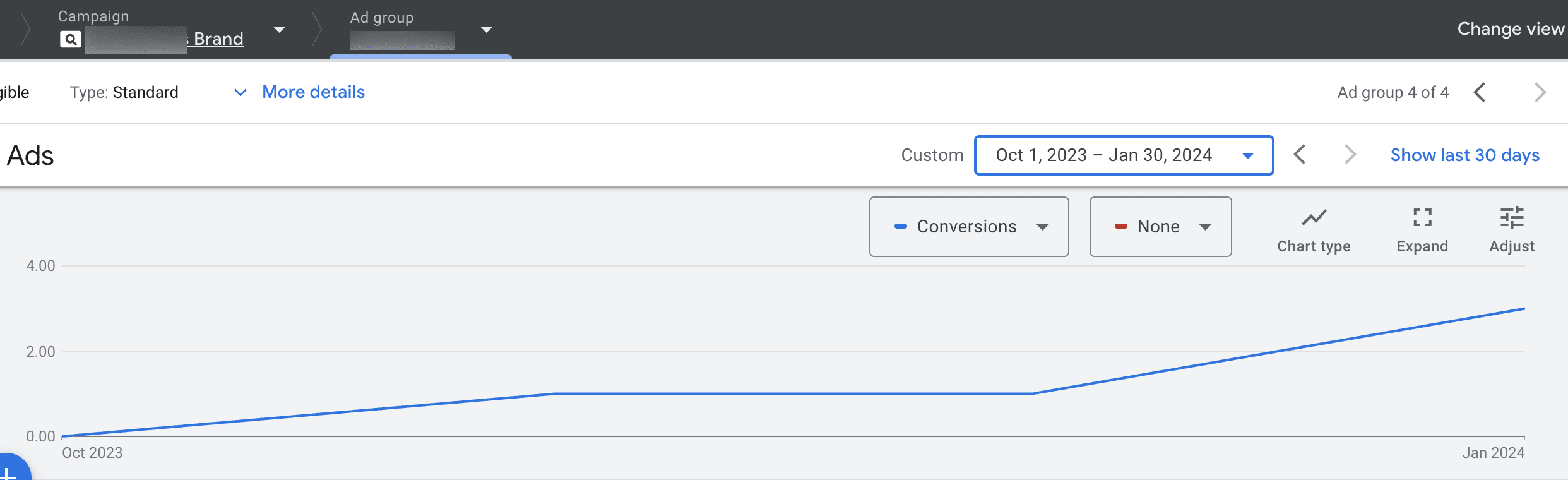
The total monthly budget for this account is under $10,000. We took a small amount of this budget to drive brand awareness.
We created a $25 per day campaign budget for video ads, turning it off on weekends to make the budget go a little further.
After only two months, we’re already starting to see brand traffic trickle in again:
Screenshot from author, February 2024
While video continues to work well for growing brand awareness, it’s capable of doing much more.
For example, our client has some wonderful video assets that showcase how their robotics products work.
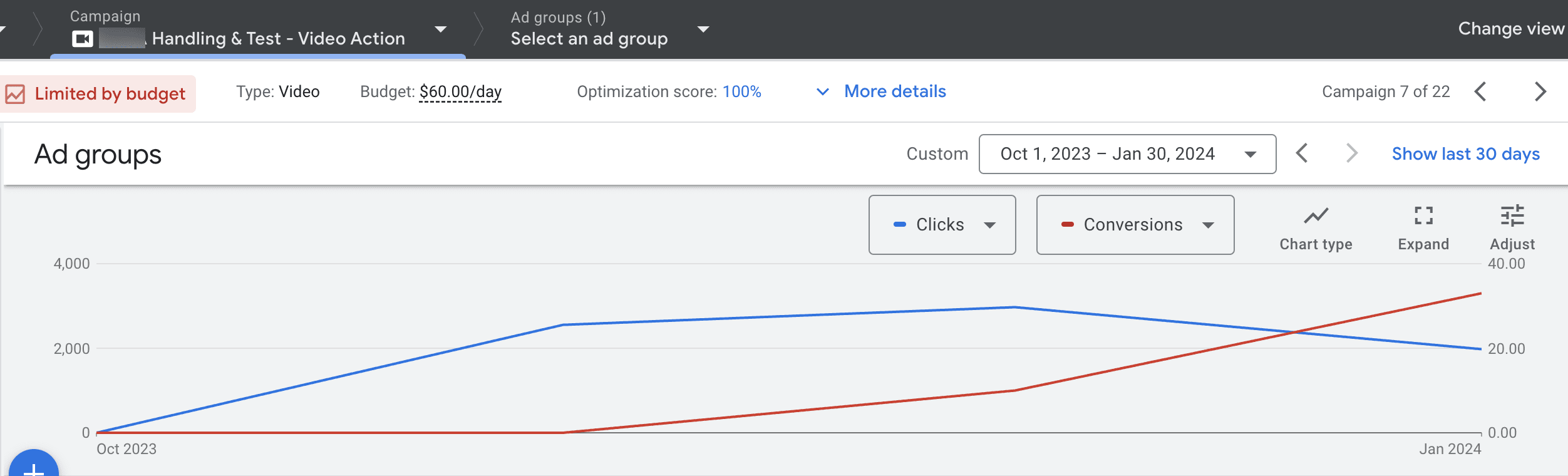
We started to use those videos in our advertising – and we are all very pleased with the low cost of impressions and the number of people who watch the entire video, click through, and complete a form.
So, not just brand awareness – but also conversions!
You can see in this screenshot how clicks and conversions increased over just a few months:
Screenshot from author, February 2024
Video assets also lend themselves well to repurposing across your marketing and advertising channels. This is not a one-and-done asset!
2. Continue To Test AI-powered Campaigns And Creative Tools
As mentioned earlier, AI is having a profound impact on our industry – one that will only continue to grow.
Now stay with me. Even if you tried PMax last year and decided to pause it, it might be time to test again.
That’s what my team and I are currently doing.
Without question, some of our B2B clients had issues with PMax last year, especially when it came to lead quality. In some cases, we decided that the low volume of leads and/or the poor return on investment (ROI) didn’t warrant us keeping PMax campaigns live.
But it’s a new year with a new opportunity to test these AI-driven ads again.
We have more information about PMax today than we did before. I also have faith that Google is working to improve this campaign type, so it’s worth taking for another trial run.
Frankly, AI-powered campaigns are the way of the future. They’re not going anywhere.
It’s worth getting on board early so that you can get the best out of these campaigns as they develop. And if your competitors resist, that creates new opportunities for you.
On a related topic, this is also the right time to explore the ground-changing opportunities of AI-powered creative tools.
AI is making it possible for complete design novices to repurpose (and sometimes create from scratch) valuable marketing assets that you can use in your advertising.
These tools could soon put to rest the objection that you “don’t have any assets that you can use.”
3. Don’t Forget The Classics
With all this talk about AI and video marketing, it’s easy to forget about tried-and-true strategies that have served us well in the past and are just as important today.
To highlight just one of them: incorporating trust signals on landing pages.
Trust signals, such as customer testimonials, can move undecided buyers from “no” to “yes” and are essential if your brand is not well known.
You might think this strategy is obvious. But just last week, a new startup client showed us the draft of their landing page, which they were very proud of.
The page looked great, with persuasive marketing copy and consistent branding. But something important was missing: No trust signals.
You can talk all day long about how great your product or service is. But that marketing copy will never carry the same weight as the words of your customers, describing their experience of working with you.
Reminder: Important Updates For Those Advertising In The EU And UK
Before I wrap this up, there are important updates that you shouldn’t overlook as you contemplate strategy for this year.
Consent Mode enables you to get consent from users to maintain tag-based audience remarketing functionality, for example.
Lookalike audiences for Demand Gen and other audience-based collection issues will also start to crop up.
This is a rapidly evolving area. I recommend following Google Ads product liaison Ginny Marvin on X to get the latest news. Be sure to check out her February 13 post, where she talks about Consent Mode.
Don’t Get Left Behind In 2024
As always, the world of PPC is changing – but parts of it remain the same.