As a business owner or digital marketer, understanding your local search ranking on Google is crucial for attracting nearby customers and increasing your online visibility.
With so many consumers using search engines to find local products and services, optimizing for local search has become a key component of any successful SEO strategy.
In this article, we’ll explore various methods to check your local ranking on Google, ensuring that your business stays competitive in your target market.
Why Do Search Results Vary By Location?
Google prioritizes local relevance in its search results to provide users with the most helpful information based on their location.
The search engine uses various factors to determine a user’s location, including:
Device location (via Wi-Fi, cell phone triangulation, or GPS).
Labeled places on Google Maps.
Home address linked to the user’s Google account.
Previous activity across Google products.
IP address.
Google uses these factors to determine your location and provide search results that are relevant to your area. This means you and your neighbor might see different search results even if you search for the same thing.
Since most people only look at the first page of search results, ranking well in local searches is essential, especially if your business relies on customers visiting your physical location.
Optimizing your website is essential to ensuring your business appears in local searches. But how can you tell if it’s working?
It would be very time-consuming to travel to different places just to check how well you rank in various locations.
Fortunately, Google provides a way to check your local rankings without leaving your office. Here’s a guide on how to do it:
Add A Local Parameter To Your Search
Google has a useful search parameter feature that allows you to search for local businesses in a specific area, even if you’re not physically there. To do this, add “&near=cityname” to the end of the search URL.
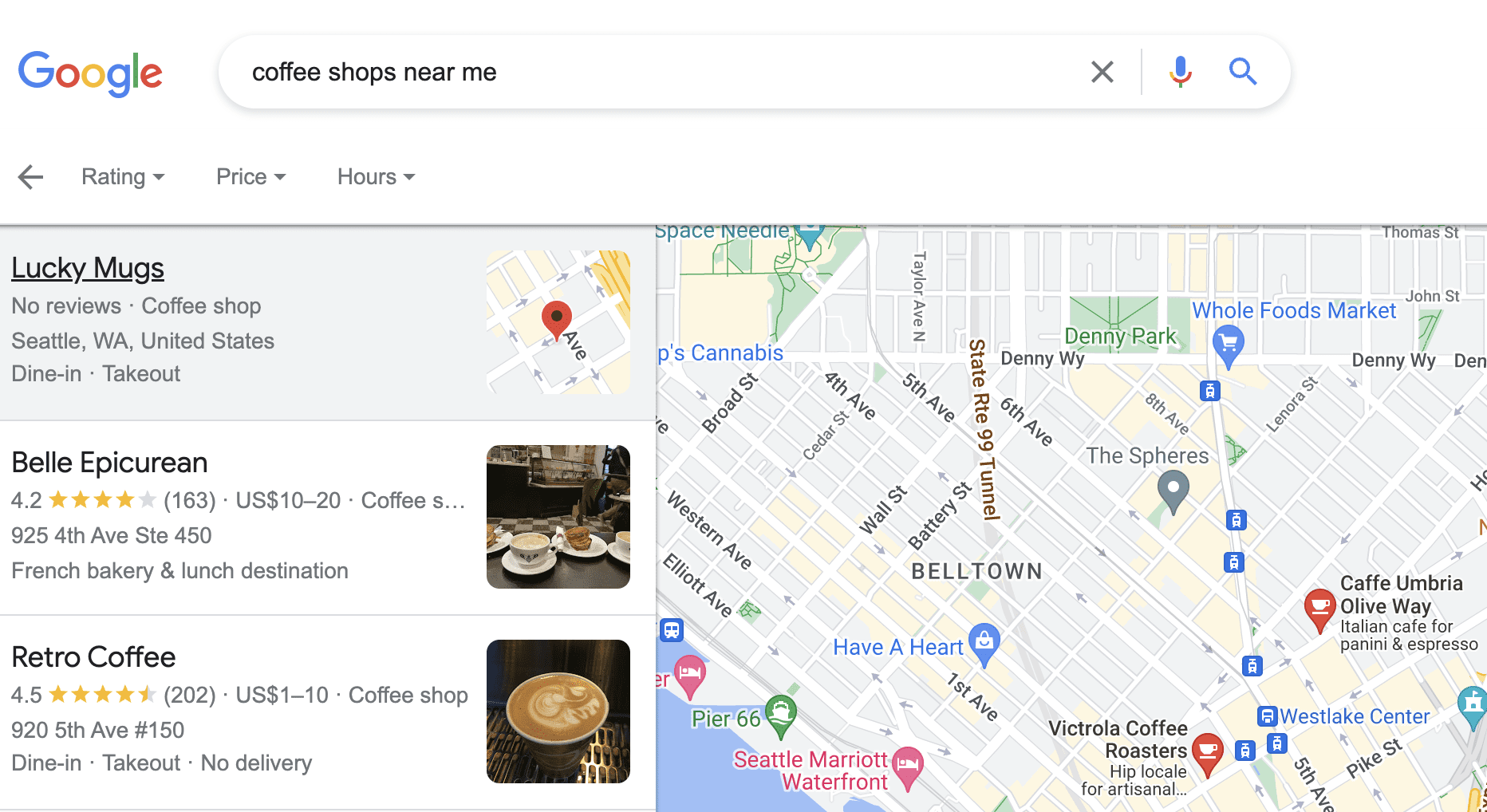
For instance, let’s say you’re in Kansas City and want to see how a coffee shop chain called “Jitters” compares to its competitors in Seattle. You can start by searching for “coffee shops near me” on Google.
When the search results appear, look at the URL in your browser’s address bar. It will be pretty long, but don’t worry about that. Just scroll to the very end of the URL and add “&near=Seattle” (without the quotes).
Hit enter, and Google will show you the search results as if you were in Seattle. This way, you can quickly check out the local competition for Jitters in Seattle without traveling there yourself.
Screenshot from search for [coffee shops near me], Google, March 2024
Change Your Regional Settings
You can manually change regional settings on Google to view search results at a country level.
This gives you search results on a country level rather than providing results from your IP address or other sources.
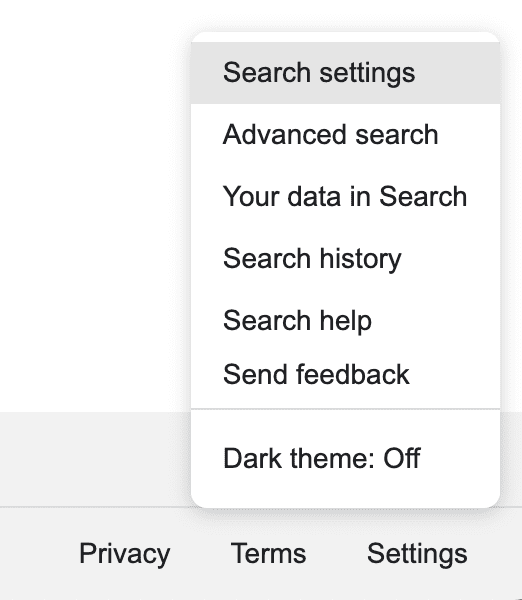
To do this, click Settings on the bottom right corner of Google.com and select Search Settings. This will send you to the Search Settings page (obviously).
Screenshot from Google.com, March 2024.
Scroll to the bottom, and you’ll see a list of Region Settings.
Choose the region you want to use for search and save the settings. You’ll now see search results from the country you chose.
Continuing our coffee shop example, let’s say Jitters just opened a location in Lisbon. You’ll select Portugal as your region, allowing you to check the rankings of the new Portuguese beanery.
Note: If you don’t add the local parameter discussed earlier to the search URL, you’ll continue to see results based on your current location.
Manage Your Work & Home Locations On Google Maps
Google’s local search is helpful because it uses machine learning to identify the places you often visit, such as your home and workplace.
It learns your commuting patterns, which can save you time and give you more relevant search results.
It can be challenging, though. Sometimes, Google might think you work at a job you left a while ago. But it’s easy to set your home and work locations manually.
You can set and change your home and work locations in Google Maps. This lets you search for things using phrases like [near home] or [near work].
To do this, open Google Maps and click on the Menu. Then click Your Places and choose Locations. Select Work or Home and type in the address. Click Save, and you’re good to go.
Now, when you search, you can add [near home] or [near work] to find things close to either of those locations.
Delete Location History In Your Google Account Activity Controls
Google’s apps and devices often track where you go in the background if location services are turned on.
For instance, if Google sees that you often go to a martial arts gym, it’ll guess that when you search for something related to “boxing,” you probably mean the sport, not cardboard boxes.
You can delete this history manually or switch the tracking off.
Go to the Location History part of your Google account, and you can turn it on or off with a click. You can also choose which devices you want it to track. If you want to erase all or some of your location history, you can do that from your browser or Google Maps.
Remember that deleting this info means you’ll lose some personalized features, like suggestions based on where you’ve been, traffic updates, and auto-created Google Photo albums.
Override Your Location With Google Chrome Developer Tools
If you know your way around tech, you can also use developer tools in the Chrome browser to trick Google into thinking you’re somewhere else. This lets you see how search results look from different places.
To do this, open up DevTools and then open a command prompt. Click on Show Sensors and press enter.
Under Geolocations, pick one of the listed cities or choose Custom Location. If you select Custom Location, you can type in specific longitude and latitude coordinates.
You can also select Location Unavailable to see your site’s appearance when Google doesn’t know where someone is.
Change Location Settings On Your Device
Some smartphones and tablets have a setting that allows you to change your virtual location.
For devices that don’t have this option, there are other ways to trick your phone into thinking you’re somewhere else.
The simplest method is to download an app to change your GPS location. These apps are available for iPhones (from the App Store) and Android devices (from Google Play).
Most of these apps work by connecting to a different network provider, making your device believe it’s in your chosen location.
This way, when you search, the results will be based on the new location you’ve selected, not your actual physical location.
Experiment With Google Ads Preview And Diagnosis Tool
But that’s not all – this tool has another cool feature that allows you to simulate Google searches from various locations.
To use this feature, open the tool and look for the Location dropdown menu. Click on it, and you can enter any location, a whole country, a specific city, or even a precise zip code.
This way, you can get a broad overview or a detailed look at how your ads perform in different places.
Another great thing about this tool is switching between desktop and mobile views.
This helps you ensure that your ads look good and perform well on both devices, which is crucial since more and more people are using their smartphones to browse the web.
View Local Search Results With Valentin.app
Valentin.app is a simple and free website that lets you see how websites rank on Google for specific keywords in a particular location.
All you need to do is enter the keywords you want to check, choose the region and language, and provide an address. The website will convert the address into coordinates and send all the information to Google.
It then opens a new tab showing you the Google search results for that location, as if you were searching from there yourself.
You don’t need any other tools or data to use Valentin.app.
Use A VPN To Change Your Location
You can remove location data from your search results by changing your device’s location settings.
The most common and easiest way to do this is by using a virtual private network (VP).
VPNs connect your device to a remote server before your connection goes to the internet. By masking your device, they can help get around frustrating location-based restrictions and hide your activity from ISPs and public networks.
They’re also a great way to get search results as if you were in a different location.
The only downside is that most VPNs have limited IP locations from which to choose. If you want to see exactly how your coffee shop ranks in searches made in Vancouver, you might be out of luck.
Automate With Local Rank Checking Tools
Keeping an eye on how your business appears in local search results is pretty simple when you only have a few locations.
But imagine if our fictional coffee shop, Jitters, gets bought out by a bigger company that wants to expand the brand internationally.
Suddenly, you’re faced with the daunting task of monitoring local search results for all 315 locations worldwide.
Trying to handle that manually would be a nightmare! Luckily, there are tools out there designed specifically for this situation.
These tools, known as rank checkers, can automatically perform local searches and create reports for you.
With this information at your fingertips, you can quickly pinpoint where to focus your SEO efforts for maximum impact.
Some of these you may be familiar with include:
Location Is Everything
Google search results can vary depending on who is searching, where they are located, and what device they are using.
Since Google prioritizes local search results, ensuring your business shows up for people in your area is crucial. This is true whether you’re handling a single location or managing a website for a business with several branches.
The good news is that you don’t need to be physically present in that area to check what local users see in their search results.
There are a few different methods for checking your rankings from various locations, each with pros and cons.
Regardless of which method you think works best for you, you can’t ignore the ability to adjust your SEO to focus on customers within a specific region.
More Resources:
FAQ
Why is local search ranking important for businesses?
Having your business rank well in local search results is essential because it significantly impacts how easily potential customers in your area can find you.
Most people use search engines to search for products and services nearby. So, if your business shows up at the top of those local search results, you’re more likely to get people coming into your store, making purchases, and becoming aware of your brand within the community.
When you optimize your business for local SEO, you have a better chance of attracting customers who are explicitly looking for what you have to offer, which often translates to more sales and a better return on your investment.
What factors does Google consider for local search relevance?
Google uses multiple methods to determine a searcher’s location, such as:
Pinpointing your device’s location through Wi-Fi, cell phone towers, or GPS.
Checking any places you’ve labeled on Google Maps, like your home or work address.
Looking at the home address connected to your Google Account.
Google also considers your previous interactions and activities across various Google services to better understand your preferences. Additionally, your IP address provides a general idea of your geographic location.
By combining all these factors, Google can:
Deliver search results that are most relevant to you based on location.
Offer personalized suggestions tailored to your needs and proximity.
Ensure that you receive the most helpful and localized information possible
A post in the r/SEO subreddit by Google’s Danny Sullivan that was meant to dispel a misinformed observation was apparently removed by a moderator with zero explanation and then it returned. This isn’t an isolated incident, posts by John Mueller have also been removed without explanation, giving a perception that the r/SEO moderation is biased against Google to the point of actual hostility.
This isn’t the first time that a Googler’s posts have been removed. It’s happened to John Mueller, too.
It was bad enough that the original post misrepresented what SearchLiaison had said but it was even worse that a moderator would remove a post by a Google representative that corrected the misinformation.
The question has to be asked, what value does the r/SEO subreddit have if it doesn’t allow Google representatives to respond to misinformation and to offer help?
Redditor Misinterprets Google
The original post was about one statement that was taken out of context of a much larger tweet by SearchLiaison.
The context that went over the Redditor’s head was that SearchLiaison was recommending that if publishers do things that they do it for their readers and not because they read somewhere that it’s good for ranking.
Here’s the context:
” You want to do things that make sense for your visitors, because what “shows Google” you have a great site is to be… a great site for your visitors not to add things you assume are just for Google.
Doing things you think are just for Google is falling behind what our ranking systems are trying to reward rather than being in front of them.”
SearchLiaison listed things that SEOs do because they think Google is going to rank it better.
“- Something saying an “expert” reviewed the content because someone mistakenly believes that ranks them better
– Weird table-of-content things shoved at the top because who knows, along the way, somehow that became a thing I’m guessing people assume ranks you better
– The page has been updated within a few days, or even is fresh on the exact day, even though the content isn’t particularly needing anything fresh and probably someone did some really light rewrite and fresh date because they think that “shows Google” you have fresh content and will rank better.”
The Redditor commented:
“To me, it was a silly thing for Search Liaison to say because it is really lame to believe that using a TOC or not would make any difference to SERP ranking.
If you take his point further of not showing to Google, you might remove breadcrumbs, internal links and related posts. In other words, anything that is of SEO value.
So it was really nonsensical advice from Google.
But I’m sure many bloggers will take it as gospel and, in desperation, remove TOCs from their sites.”
Of course, as most anyone who is objective can see, SearchLiaison wasn’t advising anyone to remove their Table Of Contents from their articles. He was just recommending to do what’s best for your users, which makes sense. If your users hate the table of content then it’s a good idea to remove it because it doesn’t make a difference to Google.
And that advice was actually a gift because it helps people avoid wasting time doing things that might annoy readers which is never a good thing to do.
r/SEO Subreddittors Upvote Misinformation
The weird thing about that thread is that the misinformation gets upvoted and people who actually understand what’s going on are ignored.
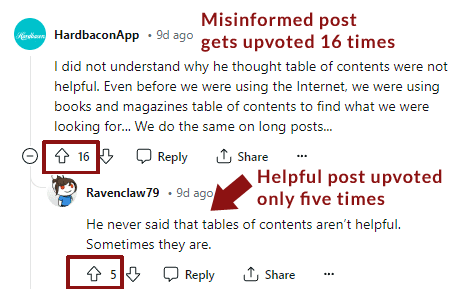
Here’s an example of a post that totally misunderstands what SearchLiaison posted and repeats the misinformation and receives sixteen upvotes while someone with the correct understanding is upvoted only five times.
This unhelpful post received 16 upvotes:
“I did not understand why he thought table of contents were not helpful. Even before we were using the Internet, we were using books and magazines table of contents to find what we were looking for… We do the same on long posts…”
And this got only five upvotes:
“He never said that tables of contents aren’t helpful. Sometimes they are.”
Danny Sullivan’s Post Is Restored
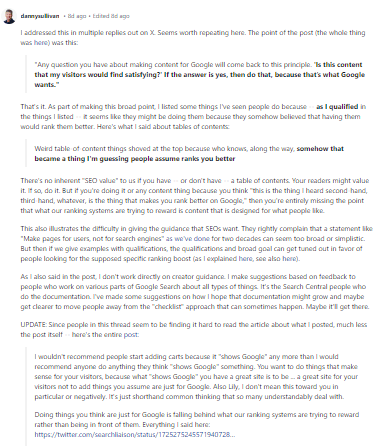
Danny’s post in the r/SEO subreddit was subsequently restored. It was a thoughtful 1,120 word response. Why would a moderator for an r/SEO subreddit delete that? There is no good reason to delete it and easily at least a hundred good reasons to keep Danny’s post.
Partial Screenshot Of Danny’s 1,200 Word Response
John Mueller’s Posts Were Also Deleted
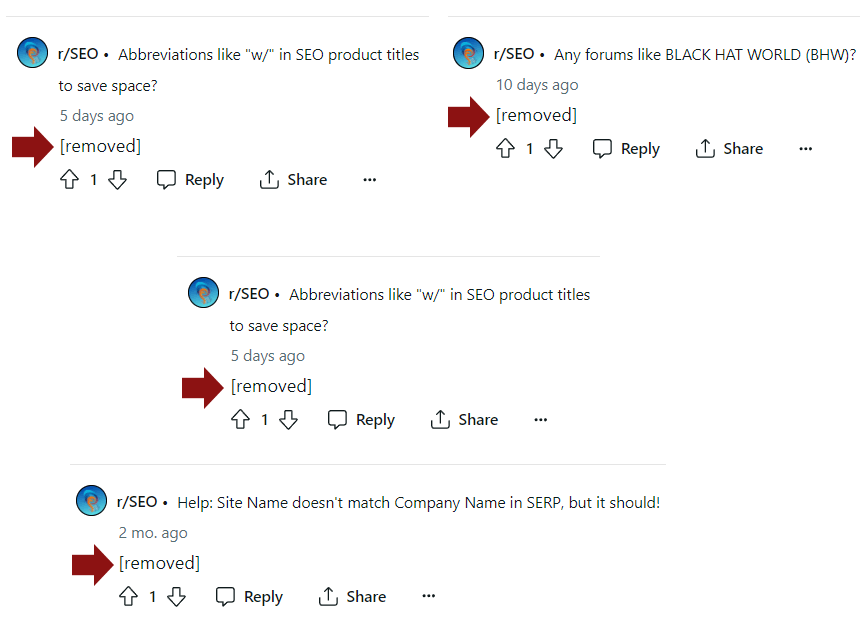
Myself and others who write about SEO have noticed that John Mueller’s posts have gone missing, too. It’s been a practice at Search Engine Journal to take a snapshot of Mueller’s posts when writing about them because they tended to occasionally disappear.
Composite Image Of Four Of John Mueller’s Removed Posts
Is The R/SEO Subreddit Broken?
The inexcusable removal of posts by Danny Sullivan and John Mueller create the perception that the r/SEO subreddit moderating team is biased against Google and do not welcome their contributions.
Did the moderators remove those posts because they are biased against Google? Did they remove the posts out of a misguided anti-spam link rule?
Whatever the reason for the action against the Googler’s it’s a very bad look for the r/SEO subreddit.
In a recent statement on LinkedIn, Google Analyst Gary Illyes shared his mission for the year: to figure out how to crawl the web even less.
This comes on the heels of a Reddit post discussing the perception that Google is crawling less than in previous years.
While Illyes clarifies that Google is crawling roughly the same amount, he emphasizes the need for more intelligent scheduling and a focus on URLs that are more likely to deserve crawling.
Illyes’ statement aligns with the ongoing discussion among SEO professionals about the concept of a “crawl budget,” which assumes that sites must stay within a limited number of pages that search engines can crawl daily to get their pages indexed.
However, Google’s Search Relations team recently debunked this misconception in a podcast, explaining how Google prioritizes crawling based on various factors.
Crawling Prioritization & Search Demand
In a podcast published two weeks ago, Illyes explained how Google decides how much to crawl:
“If search demand goes down, then that also correlates to the crawl limit going down.”
While he didn’t provide a clear definition of “search demand,” it likely refers to search query demand from Google’s perspective. In other words, if there is a decrease in searches for a particular topic, Google may have less reason to crawl websites related to that topic.
Illyes also emphasized the importance of convincing search engines that a website’s content is worth fetching.
“If you want to increase how much we crawl, then you somehow have to convince search that your stuff is worth fetching, which is basically what the scheduler is listening to.”
Although Illyes didn’t elaborate on how to achieve this, one interpretation could be to ensure that content remains relevant to user trends and stays up to date.
Focus On Quality
Google previously clarified that a fixed “crawl budget” is largely a myth.
Instead, the search engine’s crawling decisions are dynamic and driven by content quality.
As Illyes put it:
“Scheduling is very dynamic. As soon as we get the signals back from search indexing that the quality of the content has increased across this many URLs, we would just start turning up demand.”
The Way Forward
Illyes’ mission to improve crawling efficiency by reducing the amount of crawling and bytes on wire is a step towards a more sustainable and practical web.
As he seeks input from the community, Illyes invites suggestions for interesting internet drafts or standards from IETF or other standards bodies that could contribute to this effort.
“Decreasing crawling without sacrificing crawl-quality would benefit everyone,” he concludes.
Why SEJ Cares
Illyes’ statement on reducing crawling reinforces the need to focus on quality and relevance. SEO isn’t just about technical optimizations but also about creating valuable, user-centric content that satisfies search demand.
By understanding the dynamic nature of Google’s crawling decisions, we can all make more informed choices when optimizing our websites and allocating resources.
How This Can Help You
With the knowledge shared by Illyes, there are several actionable steps you can take:
Prioritize quality: Focus on creating high-quality, relevant, and engaging content that satisfies user intent and aligns with current search demand.
Keep content current: Regularly update and refresh your content to ensure it remains valuable to your target audience.
Monitor search demand trends: Adapt your content strategy to address emerging trends and topics, ensuring your website remains relevant and worthy of crawling.
Implement technical best practices: Ensure your website has a clean, well-structured architecture and a robust internal linking strategy to facilitate efficient crawling and indexing.
As you refine your SEO strategies, remember the key takeaways from Illyes’ statements and the insights Google’s Search Relations team provided.
With these insights, you’ll be equipped to succeed if and when Google reduces crawling frequency.
Google’s John Mueller answered a question about whether the March Core Update was finished and whether it’s okay to begin fixing things in response to the update.
Core Update Question On Reddit
The person asking the question wanted to know if the core update was finished because they’ve experienced a 60% loss in traffic and they were waiting for the update to finish before fixing things to make it rank again.
“People advised me against making drastic changes to my blogs while the core update was ongoing. Unfortunately, I’ve experienced a significant loss, about 60% of my traffic, and now I’m determined to restore these numbers. Do you have any tips for me? It appears that my pages, including (purchased) backlinks, have been most adversely affected!”
The advice that the Redditor received about waiting until after an update is finished before attempting to fix things is good advice… most of the time.
March 2024 Core Algorithm Update Is Not Over
Core algorithm updates are changes to the entire range of algorithms that are a part of search. The ranking part of the algorithm is a part of what constitutes as Google’s Core Algorithm. And the ranking system itself is made up of multiple other components that are related to understanding search queries and webpages, weighting different factors depending on the context and meaning of the search query, relevance, quality, and page experience, among many other factors.
There are also spam related systems such as RankBrain. The core algorithm is comprised of many things and the March 2024 Core Update is a particularly complex one which may explain why it’s taking so long.
John Mueller responded by first acknowledging that the March Core Update is not over yet.
He explained:
“No, it’s not complete. It’ll be labeled complete when it’s finished rolling out.”
Should You Wait Until The Update Is Over?
Mueller next addresses the part of the question that is about whether the person should wait until the update is over to fix their site.
He answered:
“Regardless, if you have noticed things that are worth improving on your site, I’d go ahead and get things done. The idea is not to make changes just for search engines, right? Your users will be happy if you can make things better even if search engines haven’t updated their view of your site yet.”
John Mueller makes a valid point that any time is the right to time to fix shortcomings that are discovered after a website self-assessment.
I’ve been working as a search marketer for 25 years, far longer than John Mueller ever has, so from that perspective I know that rankings tend to shift throughout an algorithm update. It’s not unusual that catastrophic ranking changes are reversed by the time an update is finished. “Fixing” something before the update has finished risks changing something that isn’t broken or in need of fixing.
However in this specific instance John Mueller’s advice to go ahead and fix what’s broken is absolutely correct because a problem the Redditor mentioned, paid links, is quite likly a contributing factor to the negative change in their rankings.
Optimizing For People
Mueller’s next advice is to focus on optimizing the website for people and not search engines. The emphasis of Mueller’s response was to encourage optimizing for “users” which means site visitors.
The remainder of Mueller’s response:
“Also, while I don’t know your site, one thing you can do regardless of anything is to work out how you can grow alternate sources of traffic, so that when search engines revamp their opinion of your site, you’ll have less strong fluctuations (make things more independent of search engines).
And, once you go down this path, you’ll probably also notice that you focus more on building out value for users (because you want them to come & visit & recommend on their own) – which is ultimately what search engines want too.”
Mueller’s response has a lot of merit because optimizing for people will align with how Google ranks websites. It’s an approach to SEO that I call User Experience SEO. User experience SEO is anticipating how content affects the user’s experience and satisfaction.
Using these principles I was able to anticipate by several years everything that was in Google’s Reviews Update. My clients with review websites were not caught by surprise by that update because I had anticipated everything in that update so they were ready for it when it happened.
Optimizing for people is not a shallow “make your site awesome” or “content is king” slogan. Optimizing for people is an actionable strategy for how to create and optimize websites with strong ranking power.
The recent U.S. government anti-trust lawsuit against Google made clear that the Navboost signal which tracks user interaction signals is a powerful ranking factor. Google responds to user interaction signals and one of the best ways of creating user interaction signals (as described in the Navboost Patent) is to create websites that cultivate positive responses.
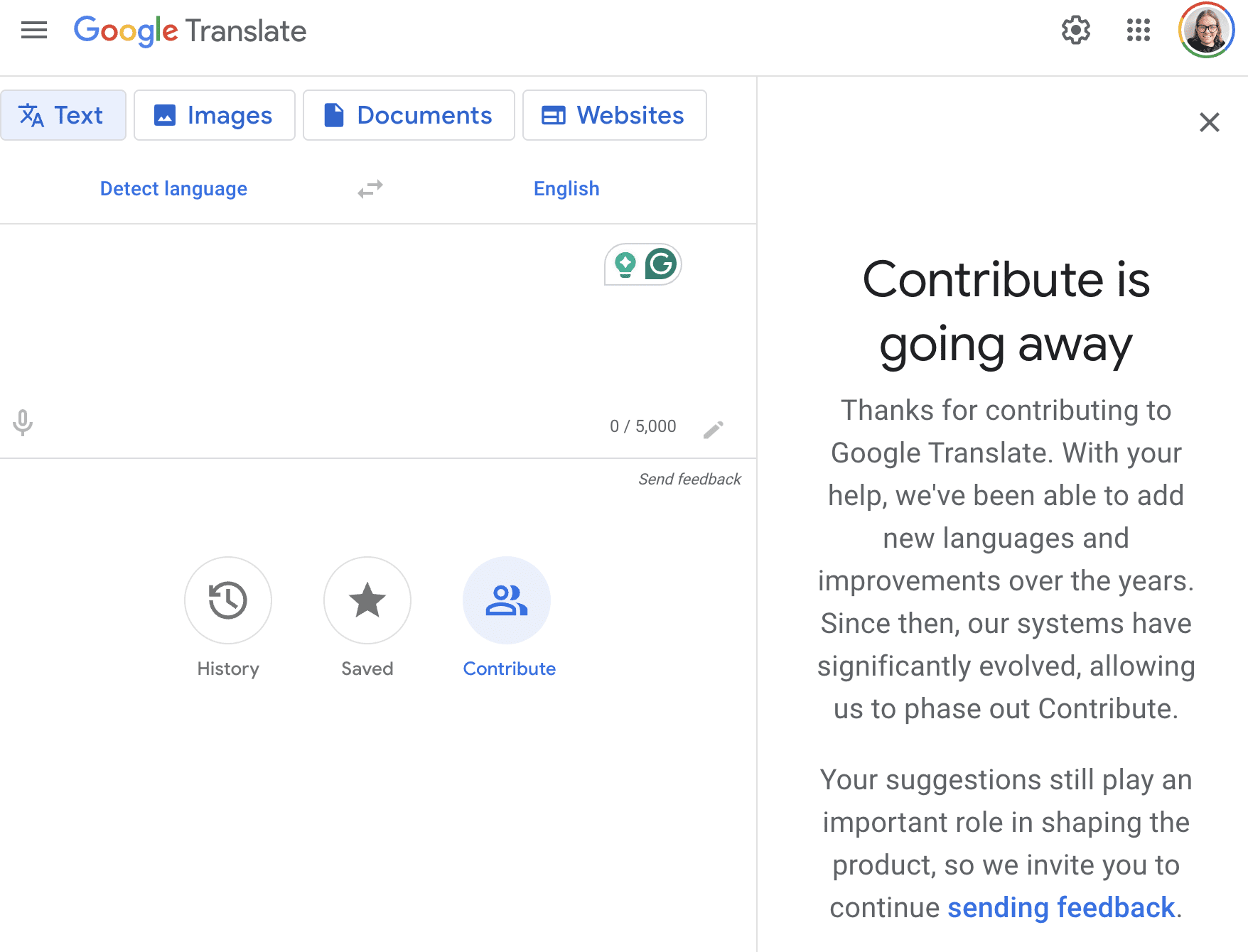
Google announced that it’s shutting down the Contribute feature for Google Translate, which allowed users to suggest translations to improve the tool’s quality.
The decision comes as Google Translate has seen significant advancements in recent years, mainly due to the evolution and learning of its underlying systems.
The Launch Of The Contribute Feature
Launched in 2014, the Contribute feature was designed to leverage the knowledge of language enthusiasts and native speakers to enhance translations for the 80 languages supported by Google Translate.
Users could participate in the Translate Community by generating new translations, rating existing ones, and providing feedback on improving the service.
In a statement, Google acknowledged the value of user contributions, saying, “When Contribute first launched, real speakers often provided helpful translation suggestions when Translate missed the mark.”
However, Google believes that the improvements made to the service have removed the need for this feature.
Now. when navigating to translate.google.com and clicking on Contribute, you’ll see a message about its discontinuation:
New System For User Feedback
Moving forward, Google Translate users can provide feedback directly through the Android and iOS apps and on the desktop version when they feel a translation could be improved.
Google believes this new system will maintain the quality of the service while reducing the reliance on the Contribute feature.
When the feature was first introduced, it was seen as an innovative way to engage users and tap into the collective knowledge of language communities worldwide.
As Google Translate matured, the company developed machine learning techniques, such as neural machine translation, which greatly enhanced the accuracy and fluency of translations.
These technological advancements allow Google to provide higher-quality translations without relying as much on user contributions.
Looking Ahead
While the Contribute feature may be gone, Google remains committed to delivering accurate and reliable translations.
Google’s innovation in language technology means Translate will continue to be a valuable tool for breaking down language barriers and facilitating global communication.
FAQ
How does Google plan to maintain the quality of its translations after discontinuing the Contribute feature?
Google intends to sustain the quality of its translation services through the following means:
Continued advancement in machine learning, including neural machine translation technology, enables higher-quality translations.
Implement a new feedback system where users can report translation issues directly via Google Translate’s Android and iOS apps and the desktop version.
What was the original purpose of Google Translate’s Contribute feature, and how has it evolved?
The Contribute feature was established with these objectives and has evolved as follows:
Launched in 2014 to engage language enthusiasts and native speakers in enhancing translation quality for 80 languages.
Provided a platform for users to suggest new translations, rate existing ones, and offer optimization feedback.
It evolved with Google’s language technology to the point where user-generated contributions became less critical due to improved machine learning techniques.
Boost your skills with Growth Memo’s weekly expert insights. Subscribe for free!
In There Is No Spoon, I covered Google’s growing emphasis on user satisfaction as key to success in SEO.
The most important key to success with Google Search is to have content that’s meant to please people, rather than to be whatever you might have heard that ‘Google wants.’ For example, people sometimes write content longer than is helpful to their readers because they’ve heard somewhere that ‘Google wants’ long content.
Given that user behavior is fundamental, we need to ask ourselves what drives and influences how people behave.
We pride ourselves on being reasonable apex predators, but the majority of our actions come closer to horny monkeys. Another example is one of a human riding an elephant. The human can give direction but quickly learns who’s really in control when the elephant has an impulse to do something else.
Image Credit: Lyna ™
The elephant rider example stems from the most comprehensive modern piece of research about online consumer psychology titled “The Messy Middle.”
The study is from 2020, but it couldn’t be more timely as it gives us a blueprint for what Google is rewriting its SEO guide around impacting user behavior.
What We Missed About The Messy Middle
Researchers at Google partnered with a research agency to figure out how users buy products in 2020. They observed 310,000 purchase journeys across 1,000 people, 31 categories, and 10 simulations.
The conclusion: There is no straight line between trigger and purchase. Instead of a straight line, users oscillate between exploration and evaluation until they find the ideal product. The middle is messy. The findings are critical updates to our operating systems.
Americans spend about 7.5 hours online every day, with one out of three minutes spent on social media.
Every year, the time goes up, and so does potential exposure to purchase triggers and information for evaluation. We might not realize it, but we constantly float around inspiration and information about products we could or want to buy.
A lot has been written about The Messy Middle, but most articles miss three critical points. The findings suggest:
Different ways of doing SEO.
Severe limitations of attribution models.
The need to merge conversion rate optimization (CRO) and SEO.
Messy Ways Of Thinking About SEO
The Messy Middle is more than a cool new way of saying “funnel.”
We’ve been operating for a long time with the outdated model of linear purchase journeys.
The Messy Middle suggests new ways of thinking about internal linking, content creation, and success metrics that are closer to reality.
For example, internal linking is often built around tops (related articles) or funnel stages (next step).
But since customers loop around exploration and evaluation, we should offer paths to evaluation, exploration and purchase by linking internally to high- and low-intent pages so visitors can choose the next step based on their information gap.
We should build out cornerstone pages with information about the product, reviews, and FAQs, and highlight them in the top nav to make sure users find all the information they need on our site in the evaluation stage.
Instead of TOFU/MOFU/BOFU, we should structure content creation around high- and low-intent topics to simplify information foraging, a concept introduced by The Messy Middle study that reflects the idea of collecting as much information as possible before making a purchase.
The classic mental model is “Our conversion rates are good, so let’s focus on growing the top of the funnel.”
What if we replaced that model with “Let’s focus on providing customers all the information they need to increase the chances they buy our product.“?
The latter means publishing as much information about a product as possible in an accessible way.
For example, many SaaS companies do a poor job of explaining what a product does and how users can use it. They don’t build content around use cases or what they do and how it works.
High intent is often signaled by certain query modifiers, as highlighted in the research:
“Ideas.”
“Best.”
“Difference between.”
“Cheap.”
“Deals.”
“Reviews.”
“Discount codes,” “deals,” “offer,” “sale.”
Lastly, the idea of category heuristics – numbers customers focus on to simplify decision-making, like megapixels for cameras – offers a path to specify user behavior optimization.
An ecommerce store selling cameras, for example, should optimize its product cards to prioritize category heuristics visually.
Granted, you first need to gain an understanding of the heuristics in your categories, and they might vary based on the product you sell. I guess that’s what it takes to be successful in SEO these days.
Measure The Middle
The Messy Middle varies in length by product and industry, making it hard to generalize. But we can conclude that many of the attribution models and metrics we use are no longer aligned with how people use the internet.
If you’ve ever dealt with revenue attribution at enterprise companies, you know what I’m talking about.
It’s barely possible to measure conversion touchpoints across long time horizons, devices, and channels unless you have a very refined and groomed system – which 99% of companies don’t have. And even if you can measure touchpoints, patterns are hard to see. It’s easy and dangerous to interpret the data based on your own preferences.
The Messy Middle offers a different approach: presence gaps. Instead of trying to figure out where to be, try to be everywhere.
It’s more important to understand where your competitors are, and you’re not since the research found that customers are way more likely to choose alternatives when they have them. The surround sound approach seems intuitive but is a very different approach to what’s happening at companies today.
Surround sound doesn’t mean to do everything, but to carefully observe where competitors are and to pull even. Examples could be review sites, forums, and social platforms. Anything that could trigger a purchase intent or serve during research is fair game.
Depending on your category, price comparison engines, social media platforms, video, news, and niche content such as gaming or technology sites may be equally important when maintaining parity of brand presence.
Recurring visits and the average number of visits until conversion reflect user behavior and improvements better than bounce rate or pages per visit since users hop around so much.
They might view a product on their phones while on the bus, then come home and read reviews on their laptop, and buy through direct visits weeks later when they’re reminded by an out-of-home display ad. Have fun mapping that customer journey.
Human biases are subconscious tendencies to make decisions. For example, the elephant might choose a path different from that of the human based on hunger or fear.
Biases can affect whether users:
Search for our brand.
Click on our results.
Stay/return to the site.
Convert.
In marketing, we love to exploit scarcity. When biases are overexploited, they turn into dark design patterns.
The classic example is a little banner saying, “Only two rooms left at this hotel. Book now to save your room!” But the study shows that scarcity is actually one of the least effective biases.
The Messy Middle introduces six core biases for online purchases, but there are hundreds:
Social proof: Following the behavior of others, e.g., through ratings and reviews (the most powerful bias by far tested in the study).
Category heuristics: Evaluating products with a few key metrics, like megapixels for a camera, to simplify the decision (second most powerful bias).
Authority bias: Shortcut decisions by asking or looking at authorities (especially when buying complex or expensive products).
Scarcity bias: Time/quantity/access limited.
Power of now: Wanting things instantly.
Power of free: People prefer free stuff.
We know that reviews are important for many reasons – one of them being Search Generative Experience (SGE) and AI search engines. But do we leverage them in our copy and be creative enough? Do we provide guidance in content briefs to include social proof, mention category heuristics, and list statements from authorities?
Biases, especially in combination, can be a way to compete with established sites in search. For example, you could beat incumbents by having better reviews, influencers, and fee offers, and by doing a better job of highlighting key evaluation numbers and fast shipping/access.
Reality Check
How well do the numbers we measure reflect user behavior really? I’d argue: not well – and I’ve been guilty of doubling down on numbers myself. But maybe it’s impossible to map customer journeys accurately.
Maybe all we can measure and influence is what we invest in, such as being visible, assisting visitors throughout exploration/evaluation, and monitoring conversions.
We’re more emotional animals and make more decisions from our gut than we like to admit.
We took a few days off last week at the Ritz in Lisbon. In a beautiful playroom, they have a trampoline, an inflatable castle, and little BWM Bobby Cars. Why BMW? Because BMW knows that brand recognition starts as early as 1-2 years of age.
In that vein, RIP to Daniel Kahneman, one of the two inventors of behavioral economics.
With all the options on the market, deciding which SEO tools you want to use can be a bit overwhelming.
There are many tools for keyword research, competitive analysis, keyword rankings, and all the other tasks we complete as SEO pros.
The number of SEO tools available continues to grow, and it can be challenging to determine which is best for you.
That answer depends on many factors, including budget, team size, and the structure of your business and website.
Do you run a blog or an ecommerce store? Are you at an agency or in-house?
The list goes on, and you don’t want all those options to give you analysis paralysis.
Google Keyword Planner is one of the most common keyword research tools and has been around for quite a long time.
The benefit of using Google Keyword Planner for keyword research is that it is free and uses Google data.
If you don’t know what to use, Keyword Planner is a safe pick that can provide value to just about anyone.
This article will walk you through how to leverage Keyword Planner for your keyword research needs.
What Is Google Keyword Planner?
Google Keyword Planner is a free tool that assists digital marketers in their research efforts, most commonly for search campaigns, both paid and organic.
It highlights various types of “keywords” or “search phrases and terms” related to your business.
Keyword Planner estimates the monthly search volume for specific keywords and the cost of targeting them with a paid campaign.
While Keyword Planner’s original intent was for paid search campaigns, the tool is valuable beyond search engine marketing (SEM).
SEO pros have been dipping into this free tool for years as a free resource for keyword research.
Why Use Google Keyword Planner For SEO?
Google Keyword Planner offers the ability to look for keyword insights for free.
Many tools require a paid subscription, but Keyword Planner is a free alternative that allows you to conduct keyword research.
Keyword Planner has many benefits, including finding new keywords related to your objective and determining how many times consumers search for these each month.
Suppose you don’t have access to any paid tools yet. In that case, Keyword Planner can help you identify what is essential in a keyword research tool so you know what features to look for when shopping around later.
How To Get Started With Google Keyword Planner For SEO
Now, let’s walk through the steps to getting Keyword Planner set up – and getting you one step closer to your keyword research goals.
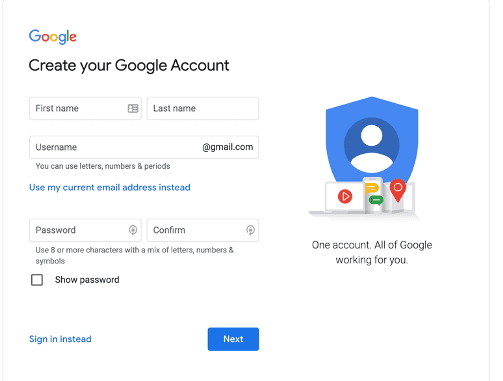
1. Create An Account
First and foremost, you need to have a Google account to leverage Google Keyword Planner.
If you already have an account, you will need to log in.
Image from Google, February 2024
2. Log In
Once you have created your new account, log into Keyword Planner.
3. Choose A Task
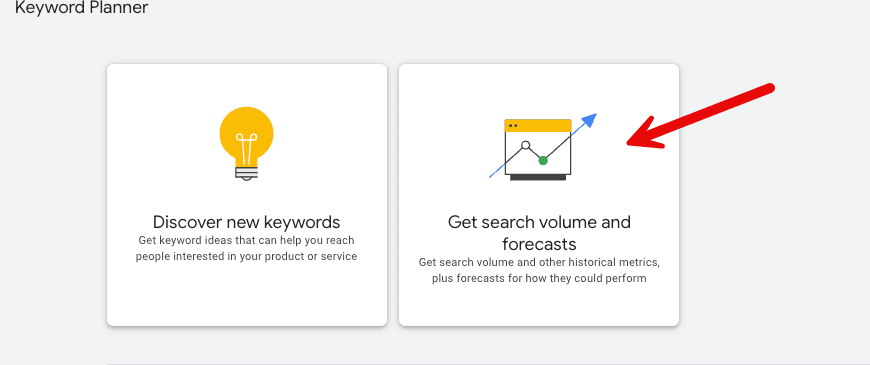
Upon logging into Keyword Planner, you will be presented with two options: “Discover new keywords” and “Get search volume and forecasts.”
If you are unsure which option you are looking for, jump in and try one!
Mining The Data For Strategies
Discovering new keywords is a great option when you want to expand the keywords, phrases, or topics you cover for your domain.
You can also use a domain’s URL to help filter out suggestions that don’t match your business well. This means that the domain you use will filter out any keywords that are a service/product you don’t offer.
This will provide you with ideas for related keywords, the monthly search volume, how much demand has changed year-over-year, the level of competition, and the cost per click (CPC).
You have the option to broaden your search to include other keywords to give you more diverse keyword ideas.
You can also narrow it down to the desired criteria for location, language, and time frames.
If you want to get even more granular, depending on your search topics, you will be given the option to refine based on options like brand or non-brand, new or used.
1. Discovering New Keywords
Let’s walk through an example.
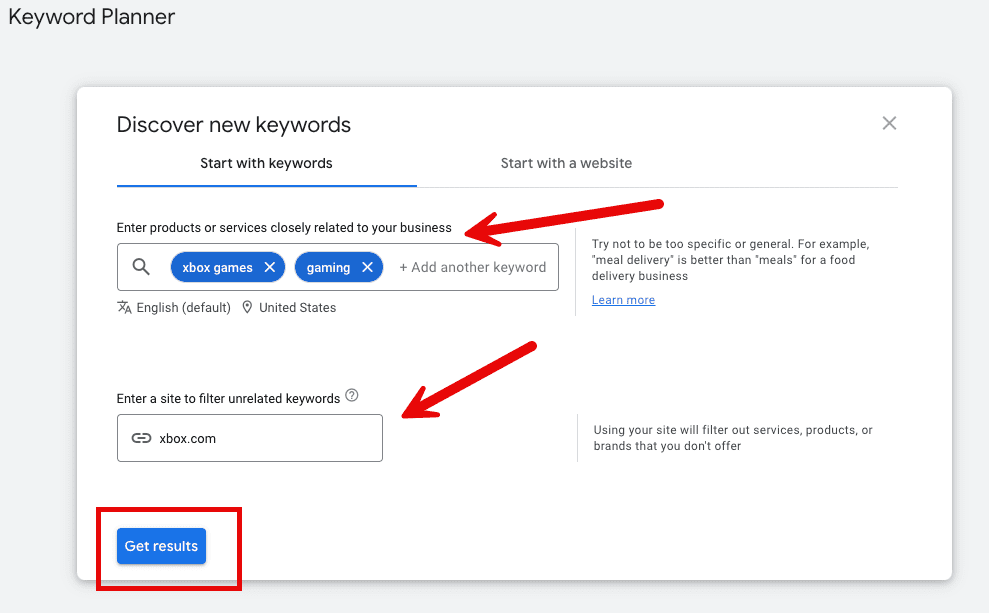
You are looking for new opportunities to target for Xbox.com in terms of gaming. You start with products or services closely related to your business, such as “Xbox games” and “gaming.”
You will then use xbox.com as the site to filter out unrelated keywords and run the results.
Screenshot from Keyword Planner, February 2024
2. Location
Now, let’s take your results and narrow them down even further.
By default, it is filtered to the United States and the last 12 month’s timeframe.
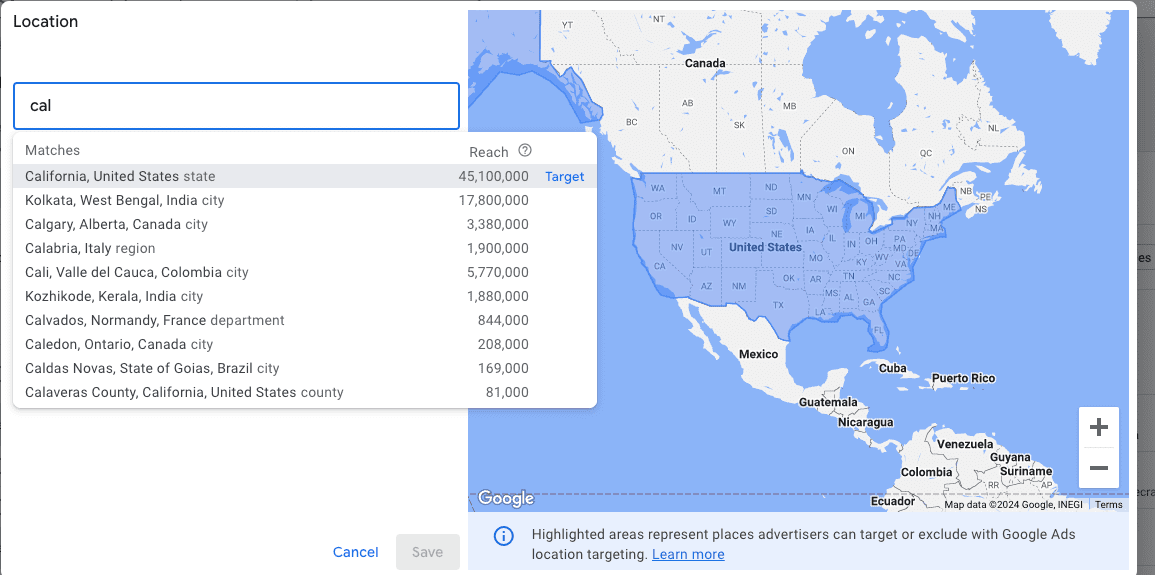
You are going to narrow down your location, which also allows you to see the “reach” in different locations.
Reach is defined as the estimate of how many people are interested in the topics you choose on specific sites. It is based on the number of signed-in users visiting Google sites, so keep in mind that demand could be much higher.
Screenshot from Keyword Planner, February 2024
You will change your location to California, giving you opportunities to reach your California audience.
Using location could show significant shifts in keywords, but it also may not. This depends on your product or service.
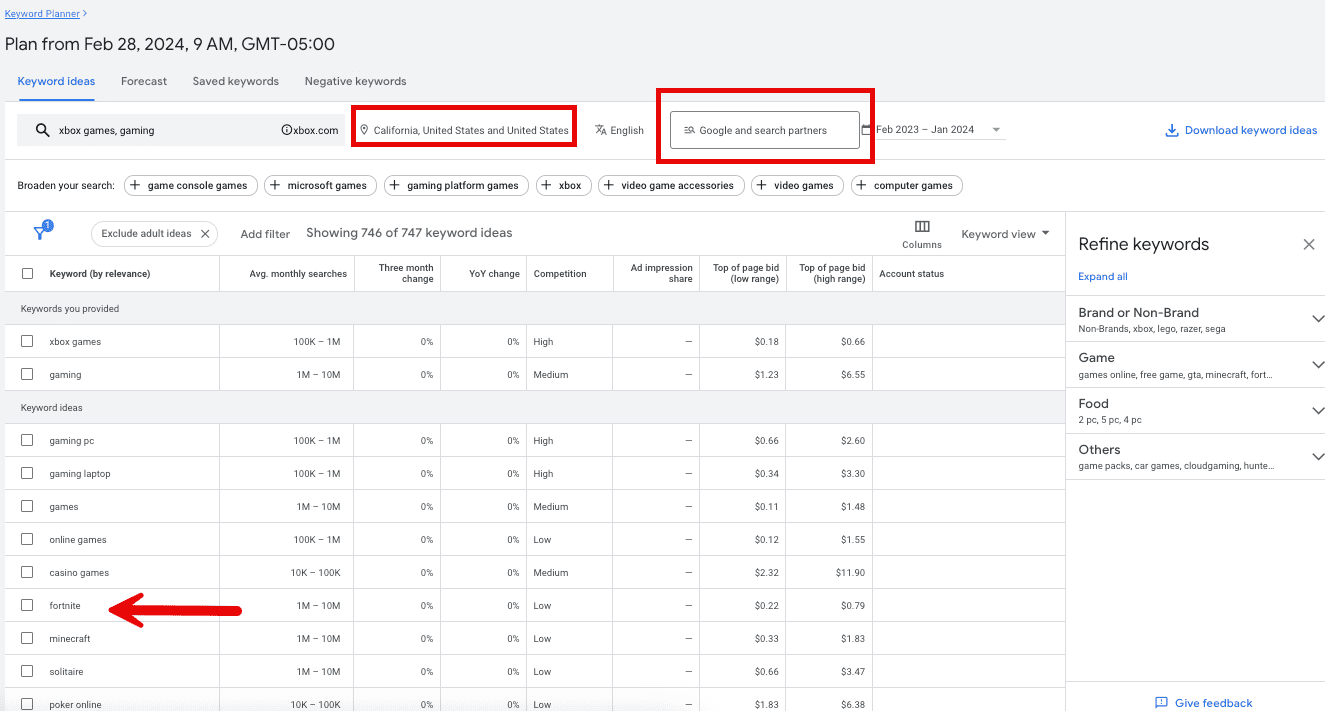
There are other filters available, but for this scenario, I will mention the dropdown where it defaults to “Google.” You can change this to Google and Search Partners.
These sites partner with Google to show advertisements and free products, such as YouTube.
Expanding your research to partner sites can be a great opportunity if you are wondering about overall reach or planning to pursue topics from angles other than just written content – like video.
When you look at the keyword ideas, they are sorted by relevance. Keep in mind the top keywords might not be your greatest opportunity.
In this example, you can take a look at the average monthly searches, the three-month change, year-over-year changes, and competition to get you started for SEO strategy purposes.
The first set of keyword ideas is very broad, or head terms, with a lot of volume, pretty flat YoY, and high-medium competition.
So, as you scroll down and keep an eye on the fields we outlined above, some opportunities stick out here.
3. High Volume Broad Vs. Narrowing
First, Fortnite.
Fortnite is a popular video game played across many gaming consoles.
Remember, it filters results based on Xbox.com and its products and services. This could be an excellent opportunity to pursue if you haven’t maximized it yet.
It shows an average demand of 1-10 million per month for California alone, stable demand over the last year, and low competition!
From here, you would dive deeper into Fortnite to decide what strategy and tactics would allow us to perform well in the space.
Screenshot from Keyword Planner, February 2024
4. Seasonal Opportunities
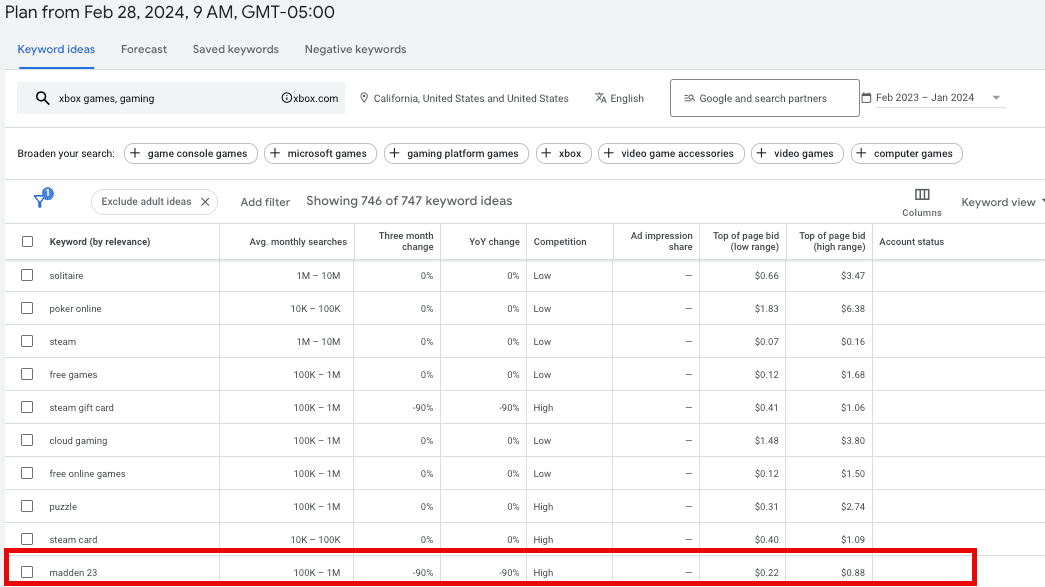
The second stand-out opportunity is for another game on the list, “Madden 23.”
Pretend that, for the sake of this exercise, you are not familiar with this popular game franchise. Seeing the monthly demand of 10,000 to 100,000, a year-over-year decline in interest of ~90%, and high competition.
These data points could lead you to look into Madden 24 and preparing a strategy around this topic, year after year.
Remember, keyword and topic research doesn’t have to yield net new ideas every time. There are events, products, services, etc., that occur on a cadence, so leverage that knowledge and those reoccurring opportunities.
Screenshot from Keyword Planner, February 2024
5. Refine Even Further: Brand, Game, And Others
You can also leverage the “refine keywords” to add another layer.
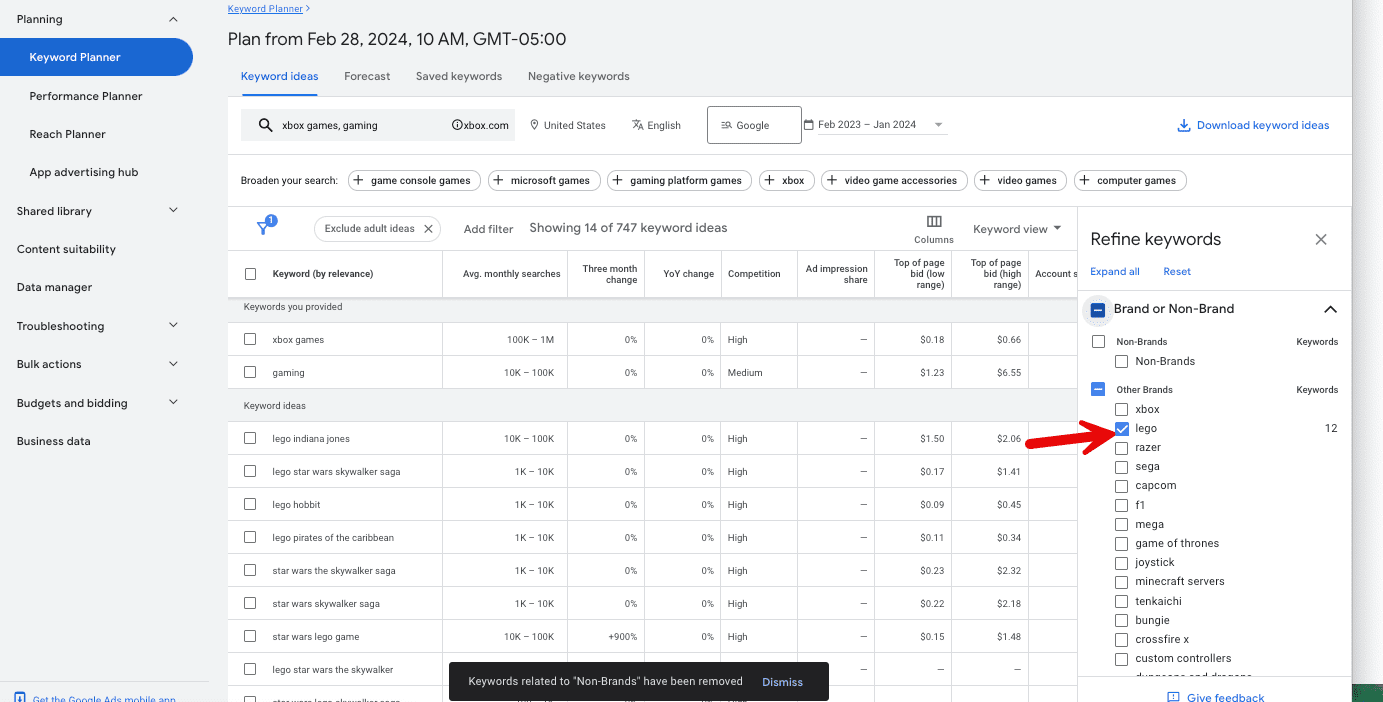
For this use case, you can filter opportunities by brand or non-brand, game, food, and others. You will filter by brand and choose “Lego.”
Screenshot from Keyword Planner, February 2024
As you can see, your results get even more granular and present you with specific opportunities around “lego.”
Leveraging the logic we discussed in example two, we see a trend for the “Star Wars Lego game,” which has increased by 900% in the last three months. This indicates that this is a hot topic and an opportunity for you to capitalize on.
You can also leverage the “game” filter in this example, similar to “brand.” The filtering opportunities aren’t perfect, but they can definitely help form strategies when appropriately leveraged.
Bonus Strategies & Tips
1. Save Money!
Everyone likes to save money, so why not use that data point to help form a strategy?
One of the columns we can leverage for this in Discover Keywords is the “top of page bid (high range).” Sort by this column to view the most expensive keywords first.
You can then evaluate this list in partnership with your partners in SEM for any costly keywords that are a priority for the brand.
Once you identify these, you can decide how to better capitalize on these keywords in the organic search landscape, whether to improve ranking, gain a featured snippet, drive higher click-through rates, etc.
2. Export Your Data
While there are many ways to expand and filter the data, there is also a way to export it to share with your team or manipulate it in an Excel file in a way that benefits you.
Select “download keyword ideas” and choose Google Sheets or CSV file format.
3. Unlock The Exact Data
If you have used Google Keyword Planner over the years, you know Google hasn’t been open to sharing exact search volumes, which can be frustrating, as a range might be from 1,000 to 10,000 searches per month.
There is a new “trick” to unlock the exact search volume when you need it in Keyword Planner. Leveraging the “Get search volume and forecasts,” we used “discover new keywords” for the example above, so we’re changing gears.
Screenshot from Keyword Planner, February 2024
From there:
Enter your keyword in square brackets.
Navigate to the Forecast tab.
Click the arrow to show the graph.
Look for the highest cost on the graph and click on it.
Look at the impressions column.
Knowing you selected the highest cost, your impression volume should directionally show search volume per month.
This may seem like a lengthy process and can be a bit tricky, so if you have access to other tools for exact search volume, that would be great. However, if you don’t, this can be very helpful.
4. Understand Your Audience
For international and national brands, don’t rule out the value that exists in localization strategies. I am not referring to just having a Google Business Profile for your brand; what I mean is knowing your audience and crafting strategies for them.
Go to the saved keywords tab and select the keyword you would like to use. If you don’t have any saved keywords, add one and name the group.
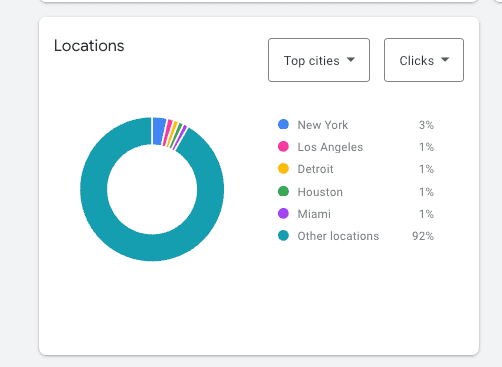
Once this is saved, navigate to the forecast tab and scroll down to the locations module. You can view this by region, state, county, etc.
Continuing with our example above, for the term “Fortnite,” the top city is New York City. But Miami is in the top 5; you may consider targeting Miami as one of your opportunities to grow.
That could be a variety of things, but if your goals are to increase awareness and bring people to your website, you may explore written content about Fortnite with contextual information relevant to Miami.
Outside of SEO, you may decide to connect with an influencer with a high presence in Miami. The list can go on forever.
Screenshot from Keyword Planner, February 2024
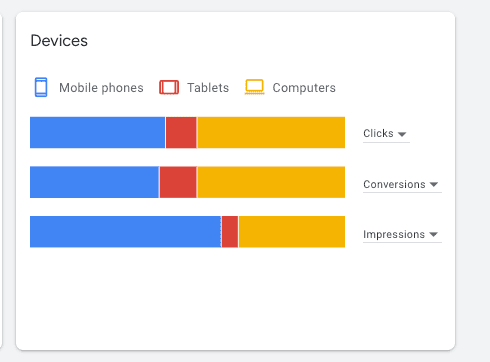
You can also leverage the Device section to adjust or optimize strategies you have in place.
For the term Fortnite, we see that most impressions may happen on mobile phones. Still, actual clicks and conversions happen at a higher rate on desktops.
Does that change your strategy in terms of how you create SEO content? Maybe not. Could it change how you align your calls to action on your experience? It could.
Screenshot from Keyword Planner, February 2024
Both are great examples of ways to leverage Keyword Planner for SEO, but they should be taken to the next level to drive results.
Final Thoughts
There are many ways to leverage Keyword Planner for various marketing channels besides its initial creation, which focused on the PPC space.
The opportunity to leverage the tool lies in the “how” you use it and the data it provides. We reviewed how to get started, use the functionalities, and leverage that data for strategy.
As an SEO professional, I always recommend using tools to complement each other rather than using only one. However, not everyone has access to various tools.
You can form an entire SEO strategy by leveraging only Google Keyword Planner and maybe some other acquisition strategies as well.
If you are in a position where you can leverage different tools, I recommend reading about these keyword research tools.
ChatGPT announced that as of today it is rolling out the ability for anyone to use it without having to sign up or log into the service. Aside from some missing features, the exact same functionality is available in the free service that was previously available to users who signed up for a free account.
Mainstream media is going to talk about how it uses data for training but that’s not the big news here. What’s significant is that it is one step in the direction of eating Google’s lunch by fulfilling Google’s own mission statement that prescribes organizing “the world’s information and make it universally accessible and useful.”
Use ChatGPT Instantly
OpenAI is rolling out availability of ChatGPT 3.5 to the public on an instant basis without having to sign in or register with the service. Using ChatGPT is now as easy as using a search engine like Google.
The announcement explained:
“Starting today, you can use ChatGPT instantly, without needing to sign-up. We’re rolling this out gradually, with the aim to make AI accessible to anyone curious about its capabilities.”
Shared Content May Be Used For Training
OpenAI noted that content that’s shared in ChatGPT may be used for training the model but that there is a way to turn this off through the Settings.
But at the moment there is no clear way to access those settings for turning off using the content for training in the instant ChatGPT.
The official statement on data use:
“We may use what you provide to ChatGPT to improve our models for everyone. If you’d like, you can turn this off through your Settings – whether you create an account or not. Learn more about how we use content to train our models and your choices in our Help Center.”
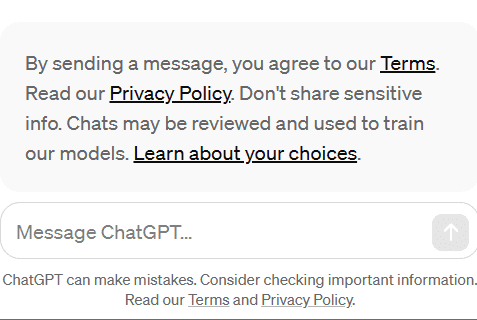
There is also a notice beneath the chat window:
“By sending a message, you agree to our Terms. Read our Privacy Policy. Don’t share sensitive info. Chats may be reviewed and used to train our models. Learn about your choices.”
Using Instant ChatGPT Means Agreement For Data Use
Additional Safeguards
OpenAI also announced additional guardrails to keep the free version safer than the other versions. For example, OpenAI said that is is blocking output from a wider range of topics.
What’s Missing In The Free Account
OpenAI listed the benefits of creating a free or paid account which are not available in the instant chat version.
Unavailable features:
Cannot save or review chat history
Cannot share chats
No access to voice instructions
No access to custom instructions
Prelude To Competing Against Google?
The obvious question is if this is a step in the direction of creating an alternative to using a search engine, replacing Google’s business model with an entirely new way to find information.
Free instant chat fulfills Google’s mission statement to “organize the world’s information and make it universally accessible and useful” in a way that Google search does not. So it’s not an unreasonable question to ask.
Google’s John Mueller answered a question on Reddit about backlinks and suggested that overfocusing on links could be a waste of time, a statement that fits a pattern from Google over the past six months.
Backlink Checkers Prioritize Their Crawls Differently
The person asking the question wanted to know why backlink checkers show different backlinks and without consensus, particularly for this site which was “relatively new” but fully indexed.
Backlink checkers aren’t choosing a site and the backlinks. They crawl the web and create a map of the link relationships between sites. The tools also prioritize what they crawl because the web is huge, so not everything gets crawled, much less included in their index.
This is what was asked:
“I have a couple backlinks on google search console on the “external links” page and I know recently I have gotten a few more.
However, on Ahrefs it says I have none. Is there a reason? My website is relatively new but I feel like that should not matter because everything is indexed and working properly. Is there a reason?”
Counting Links Is Subjective
Mueller said that there’s no “objective” way to count links, which may be a reference to the fact that every tool has to make a choice of what they crawl and include in their index.
He answered:
“There’s no objective way to count links on the web, and every tool collects its own data from crawling, which every tool does differently, so there will always be differences.”
More Important Things For Websites
Mueller’s answer first addressed not focusing on link counts and that search engines are able to discover webpages in ways other than links.
He answered:
“My recommendation would be not to focus so much on the absolute count of links. There are many ways that search engines can discover websites, such as with sitemaps.”
In the last part of his answer begins talking about links and appears to downplay them.
Mueller commented:
“There are more important things for websites nowadays, and over-focusing on links will often result in you wasting your time doing things that don’t make your website better overall.”
It’s pretty clear that he’s not talking about backlink counts anymore. He’s talking about links.
Google Has Signaled That Links Are Less Important
Over the past six months Google has been saying and hinting that links are less important than they used to be. Google’s update coincided with four changes to their documentation that downplayed the role of links, including the removing the word “important” in a sentence about links as a ranking factor. Everything else in the sentence remained the same, they only removed the word “important” from the documentation.
Before:
“Google uses links as an important factor in determining the relevancy of web pages.”
After:
Google uses links as a factor in determining the relevancy of web pages.
The first express statement that a Googler made was at PubCon Austin last fall where Gary Illyes stated that links aren’t even in the top 3 of ranking factors.
“…it’s something where I imagine, over time, the weight on the links at some point will drop off a little bit as we can figure out a little bit better how the content fits in within the context of the whole web.”