In an SEO Office Hours podcast, Google’s John Mueller answered the question of how to get more product rich results to show in the search results. John listed four things that are important in order to get rich results for product listings.
Product Rich Results
Product search queries can trigger rich results that presents products in a visually rich manner that Google refers to as Search Experiences.
Google product search experiences can include:
Product snippets that include ratings, reviews, price, and whether availability information.
Visual representations of products
Knowledge panel with vendors and products
Product images in Google Images search results
Result enhancements (reviews, shipping information, etc.)
John Mueller Answers Question About Product Rich Results
The person asking the question wanted to know how to get more “product snippets in Search Console” which confused Mueller because product snippets are displayed in the search results, not search console. So Mueller answered the question in the context of search results.
This is the question:
“How to increase the number of product snippets in Search Console?”
John Mueller explained that there were four things to get right in order to qualify for product rich results.
Mueller answered:
“It’s not really clear to me what exactly you mean… If you’re asking about product rich results, these are tied to the pages that are indexed for your site. And that’s not something which you can change by force.
It requires that the page be indexed, that the page has valid structured data on it, and that our systems have determined that it’s worth showing this structured data.”
So, according to John Mueller, these are the four things to get right to qualify for product rich results:
Page must be indexed
The page has valid structured data
Google’s systems determine that it’s worth showing
Submit a product feed
1. Page Indexing
Getting a page indexed (and ranked) can be difficult for some search queries. People who come to me with this kind of problem tend to have content quality issues that can be traced back to using outdated SEO strategies like copying what’s already ranking in the SERPs but making it “better” which often results in content that’s not meaningfully different than what Google is already ranking.
Content quality on the page level and on the site level are important. Focusing on content that has that little extra, like better images, helpful graphs, or content that’s more concise, all of that is so much better than focusing on keywords and entities.
2. Valid Structured Data
This is another area that explains why some sites lose their rich results or fail to get them altogether. Google changes their structured data recommendations and usually the structured data plugins will update to conform to the new guidelines. But I’ve seen examples where that doesn’t happen. So when there’s a problem with rich results, go to Google’s Rich Results Test tool first.
It’s also important to be aware that getting the structured data correct is not a guarantee that Google will show rich results for that page, it’s just makes the page qualified to show in the rich results.
3. How Does Google Determine Something’s Worth Showing?
This is the part that Google doesn’t talk about. But if you’re read about reviews systems, quality guidelines, Google’s SEO starter guide and maybe even the Search Quality Raters Guidelines then that should be more than enough information to inform any question about content quality.
Google doesn’t say why they may decline to show an image thumbnail as a rich result or why they’ll not show a product in the rich results. My opinion is that debugging the issue is more productive if the problem is reconceptualized as a content quality issue. Images are content, if it’s on the page, even if it’s not text, it’s content. Evaluate all of the content in terms of how the images or products or whatever might look like in the search results. Does it look good as a thumbnail? Is the content distinctive or helpful or useful, etc.?
4. Merchant Feed
John Mueller lastly said that the merchant feed is another way to get products from a website to show as a rich result in Google.
Mueller answered:
“There’s also the possibility to submit a feed to your merchant center account, to show products there. This is somewhat separate, and has different requirements which I’ll link to. Often a CMS or platform will take care of these things for you, which makes it a bit easier.”
While John Mueller listed four ways to get product rich results, Google Search Experiences, it’s not always as easy as 1, 2, 3, and 4. There are always nuances to be aware of.
Listen to the Google SEO Office Hours podcast at the 7:00 minute mark:
In its earlier days, Google relied heavily on plain text data and backlinks to establish rankings through periodic monthly refreshes (then known as the Google Dance).
Since those days, Google Search has become a sophisticated product with a plethora of algorithms designed to promote content and results that meet a user’s needs.
To a certain extent, a lot of SEO is a numbers game. We focus on:
We might also include third-party metrics, such as search visibility or the best attempt at mimicking PageRank. But for the most part, we default to a core set of quantitative metrics.
That’s because these metrics are what we are typically judged by as SEO professionals – and they can be measured across competitor websites (through third-party tools).
Clients want to rank higher and see their organic traffic increasing, and by association, leads and sales will also improve.
When we choose target keywords, there is the tendency and appeal to go after those with the highest search volumes, but much more important than the keyword’s search volume is the intent behind it.
There is also a tendency to discount any search phrase or keyword that has a low or no search volume based on the fallacy of it offering no “SEO value,” but this is very niche-dependent. It requires an overlay of business intelligence to understand if these terms have no actual value.
This is a key part of the equation often overlooked when producing content. It’s great that you want to rank for a specific term, but the content has to be relevant and satisfy the user intent.
The Science Behind User Intent
In 2006, a study conducted by the University of Hong Kong found that at a primary level, search intent can be segmented into two search goals.
A user is specifically looking to find information relating to the keyword(s) they have used.
A user is looking for more general information about a topic.
A further generalization can be made, and intentions can be split into how specific the searcher is and how exhaustive the searcher is.
Specific users have a narrow search intent and don’t deviate from this, whereas an exhaustive user may have a wider scope around a specific topic(s).
Lagun and Agichtein (2014) explored the complexity and extent of the “task” users aim to achieve when they go online. They used eye-tracking and cursor movements to better understand user satisfaction and engagement with search results pages.
The study found significant variations in user attention patterns based on task complexity (the level of cognitive load required to complete the task) and the search domain (e.g., results relating to health and finance may be more heavily scrutinized than sneaker shopping).
Search engines are also making strides in understanding both search intents. Google’s Hummingbird and Yandex’s Korolyov and Vega are just two examples.
Google & Search Intent
Many studies have been conducted to understand the intent behind a query, and this is reflected by the types of results that Google displays.
In the presentation, Haahr explains basic theories on how a user searching for a specific store (e.g., Walmart) is most likely to look for their nearest Walmart store, not the brand’s head office in Arkansas.
The Search Quality Rating Guidelines echo this in Section 3, detailing the “Needs Met Rating Guidelines” and how to use them for content.
The scale ranges from Fully Meets (FullyM) to Fails to Meet (FailsM) and has flags for whether the content is porn, foreign language, not loading, or is upsetting/offensive.
The raters are critical not only of the websites they display in web results but also of the special content result blocks (SCRB), a.k.a. Rich Snippets, and other search features that appear in addition to the “10 blue links.”
One of the more interesting sections of these guidelines is 13.2.2, titled “Examples of Queries that Cannot Have Fully Meets Results.”
Within this section, Google details that “Ambiguous queries without a clear user intent or dominant interpretation” cannot achieve a Fully Meets rating.
Its example is the query [ADA], which could be the American Diabetes Association, the American Dental Association, or a programming language devised in 1980. As there is no dominant interpretation of the internet or the query, no definitive answer can be given.
A 2011 paper looked at the potential for using community-based question-answering (CQA) platforms to improve user satisfaction in web search results.
The study collected data from an unnamed search engine and an unnamed CQA website, and used machine learning models to predict user satisfaction. Data points used to try and predict satisfaction included:
Textual features (e.g., length of the answer, readability).
User/author features (e.g., reputation score of the answerer).
Community features (e.g., number of votes).
The study found that factors such as the clarity and completeness of answers were crucial predictors of user satisfaction.
Due to the diversity of language, many queries have more than one meaning. For example, [apple] can either be a consumer electrical goods brand or a fruit.
Google handles this issue by classifying the query by its interpretation. The interpretation of the query can then be used to define intent.
Query interpretations are classified into the following three areas:
Dominant Interpretations
The dominant interpretation is what most users mean when they search for a specific query.
Google search raters are told explicitly that the dominant interpretation should be clear, even more so after further online research.
Common Interpretations
Any given query can have multiple common interpretations. Google’s example in its guidelines is [mercury] – which can mean either the planet or the element.
In this instance, Google can’t provide a result that “Fully Meets” a user’s search intent, but instead, it produces results varying in both interpretation and intent (to cover all bases).
Minor Interpretations
A lot of queries will also have less common interpretations, and these can often be locale-dependent.
It can also be possible for minor interpretations to become dominant interpretations should real-world events force enough public interest in the changed interpretation.
Do – Know – Go
Do, Know, Go is a concept that search queries can be segmented into three categories: Do, Know, and Go.
These classifications then, to an extent, determine the type of results that Google delivers to its users.
Do (Transactional Queries)
When users perform a “do” query, they want to achieve a specific action, such as purchasing a specific product or booking a service. This is important to ecommerce websites, for example, where a user may be looking for a specific brand or item.
Device action queries are also a form of a “do” query and are becoming more and more important, given how we interact with our smartphones and other technologies.
In 2007, Apple launched the first iPhone, which changed our relationship with handheld devices. The smartphone meant more than just a phone. It opened our access to the internet on our terms.
Obviously, before the iPhone, we had 1G, 2G, and WAP – but it was really 3G that emerged around 2003 and the birth of widgets and apps that changed our behaviors, increasing internet accessibility and availability to large numbers of users.
Device Action Queries & Mobile Search
In May 2015, mobile search surpassed desktop search globally in the greater majority of verticals. Fast forward to 2024, 59.89% of traffic comes from mobile and tablet devices.
Increased internet accessibility also means that we can perform searches more frequently based on real-time events.
As a result, Google currently estimates that 15% of the queries it handles daily are new and have never been seen before.
This is in part due to the new accessibility that the world has and the increasing smartphone and internet penetration rates seen globally.
Mobile devices are gaining increasing ground not only in how we search but also in how we interact with the online sphere. In fact, 95.6% of global internet users aged 16-64 access the internet through a mobile device.
One key understanding of mobile search is that users may not also satisfy their query via this device.
In my experience, working across a number of verticals, a lot of mobile search queries tend to be more focused on research and informational, moving to a desktop or tablet at a later date to complete a purchase.
According to Google’s Search Quality Rating Guidelines:
“Because mobile phones can be difficult to use, SCRBs can help mobile phone users accomplish their tasks very quickly, especially for certain Know Simple, Visit in Person, and Do queries.”
Mobile is also a big part of Google Search Quality Guidelines, with the entirety of Section 2 dedicated to it.
Know (Informational Queries)
A “know” query is an informational query, where the user wants to learn about a particular subject.
Know queries are closely linked to micro-moments.
In September 2015, Google released a guide to micro-moments, which are happening due to increased smartphone penetration and internet accessibility.
Micro-moments occur when a user needs to satisfy a specific query there and then, and these often carry a time factor, such as checking train times or stock prices.
Because users can now access the internet wherever, whenever, there is the expectation that brands and real-time information are also accessible, wherever, whenever.
Micro-moments are also evolving. Know queries can vary from simple questions like [how old is tom cruise] to broader and more complex queries that don’t always have a simple answer.
Know queries are almost always informational in intent. They are neither commercial nor transactional in nature. While there may be an aspect of product research, the user is not yet at the transactional stage.
A pure informational query can range from [how long does it take to drive to London] to [gabriel macht imdb].
To a certain extent, these aren’t seen in the same importance as direct transactional or commercial queries – especially by ecommerce websites. Still, they provide user value, which is what Google looks for.
For example, if a user wants to go on holiday, they may start with searching for [winter sun holidays europe] and then narrow down to specific destinations.
Users will research the destination further, and if your website provides them with the information they’re looking for, there is a chance they will also inquire with you.
Featured Snippets & Clickless Searches
Rich snippets and special content results blocks (i.e., featured snippets) have been a main part of SEO for a while now, and we know that appearing in an SCRB area can drive huge volumes of traffic to your website.
On the other hand, appearing in position zero can mean that a user won’t click through to your website, meaning you won’t get the traffic and the chance to have them explore the website or count towards ad impressions.
That being said, appearing in these positions is powerful in terms of click-through rate and can be a great opportunity to introduce new users to your brand/website.
Go (Navigational Queries)
“Go” queries are typically brand or known entity queries, where a user wants to go to a specific website or location.
If a user is specifically searching for Kroger, serving them Food Lion as a result wouldn’t meet their needs as closely.
Likewise, if your client wants to rank for a competitor brand term, you need to make them question why Google would show their site when the user is clearly looking for the competitor.
This is also a consideration to make when going through rebrand migrations, as well as what connotations and intent the new term has.
Defining Intent Is One Thing, User Journeys Another
For a long time, the customer journey has been a staple activity in planning and developing both marketing campaigns and websites.
While mapping out personas and planning how users navigate the website is important, it’s also necessary to understand how users search and what stage of their journey they are at.
The word journey often sparks connotations of a straight path, and a lot of basic user journeys usually follow the path of landing page > form or homepage > product page > form. This same thinking is how we tend to map website architecture.
We assume that users know exactly what they want to do, but mobile and voice search have introduced new dynamics to our daily lives, shaping our day-to-day decisions and behaviors almost overnight.
These micro-moments directly question our understanding of the user journey. Users no longer search in a single manner, and because of how Google has developed in recent years, there is no single search results page.
We can determine the stage the user is at through the search results that Google displays and by analyzing proprietary data from Google Search Console, Bing Webmaster Tools, and Yandex Metrica.
The Intent Can Change, Results & Relevancy Can, Too
Another important thing to remember is that search intent and the results that Google displays can also change – quickly.
An example of this was the Dyn DDoS attack that happened in October 2016.
Before the attack, searching for terms like [ddos] or [dns] produced results from companies like Incapsula, Sucuri, and Cloudflare.
These results were all technical and not appropriate for the newfound audience discovering and investigating these terms.
What was once a query with a commercial or transactional intent quickly became informational. Within 12 hours of the attack, the search results changed and became news results and blog articles explaining how a DDoS attack works.
This is why it’s important to not only optimize for keywords that drive converting traffic, but also those that can provide user value and topical relevance to the domain.
While intent can change during a news cycle, the Dyn DDoS attack and its impact on search results also teach us that – with sufficient user demand and traction – the change in intent can become permanent.
How Could AI Change Intent & User Search Behavior
After reviewing client Search Console profiles and looking at keyword trends, we saw a pattern emerging over the past year.
With a home electronics client, the number of queries starting with how/what/does has increased, expanding on existing query sets.
For example, where historically the query would be [manufacture model feature], there is an increase in [does manufacturer model have feature].
For years, a regular search query has followed a fairly uniform pattern. From this pattern, Google has learned how to identify and determine intent classifiers.
To do this, Google must annotate the query, and an annotator has a number of elements from a language identifier, stop-word remover, confidence values, and entity identifier.
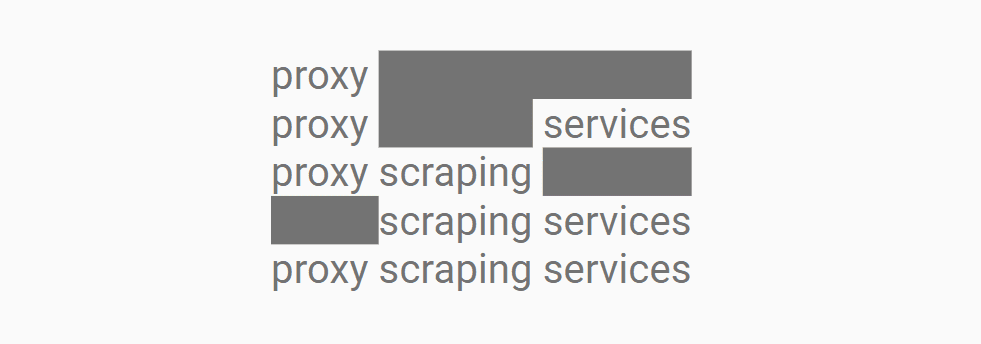
This is because, as the above image demonstrates, the query [proxy scraping services] also contains a number of other queries and permutations. While these haven’t been explicitly searched for, the results for [proxy services], [scraping services], and [proxy scraping services] could have significant levels of overlap and burden the resources required to return three separate results as one.
This matters because AI and changing technologies have the potential to change how users perform searches. It is in part because we need to provide additional context to LLMs to satisfy our needs.
As we need to be explicit in what we’re trying to achieve, our language naturally becomes more conversational and expansive, as covered in Vincent Terrasi’s ChatGPT prompt guide.
If this trend becomes mainstream, how Google and search engines process the change in query type could also change current SERP structures.
Machine Learning & Intent Classification
The other side to this coin is how websites producing different (and more) content can influence and change search behavior.
How platforms market new tools and features will also influence these changes. Google’s big, celebrity-backed campaigns for Circle to Search are a good example of this.
As machine learning becomes more effective over time – and this, coupled with other Google’s algorithms, can change search results pages.
This may also lead Google to experiment with SCRBs and other SERP features in different verticals, such as financial product comparisons, real estate, or further strides into automotive.
Google updated their documentation for the Google Labs Google Notes experiment to remind users that Notes will go away at the end of July 2024 and showed how to download notes content, with a final deadline beyond which it will be impossible to retrieve it.
Google Notes
Notes is an experimental feature in Google Labs that lets users annotate search results with their ideas and experiences. The idea behind it is to make search more helpful and improve the quality of the search results through the opinions and insights of real people. It’s almost like Wikipedia where members of the public curate topics.
Google eventually decided that the Notes feature had undergone enough testing and they decided that their are shutting down Google Notes, a decision announced in April 2024.
Update To Documentation
The official documentation was updated to make it clear that Notes is shutting down at the end of July and that users who wish to download their data can do us with their Google Takeout, a Google Accounts feature that allows users to export their content from their Google Account. Google Takeout allows Google Account holders to export data from Google Calendar, Google Drive, Google Photos, a total of up to 56 kinds of content can be exported.
Google’s Search Central document changelog explains:
“A note about Notes
What: Added a note about the status of Notes to the Notes documentation.
Why: Notes is winding down at the end of July 2024.”
This is the new announcement:
“Notes is winding down at the end of July 2024. If you created a note, your notes content is available to download using Google Takeout through the end of August 2024.”
Check out the updated Google Notes documentation here:
Managed WordPress web host WP Engine announced that they are acquiring NitroPack, a leading SaaS website performance optimization solution. The acquisition of of NitroPack by WP Engine demonstrates their continued focus on improving site performance for clients.
NitroPack
NitroPack is a relatively pricey but well regarded site performance solution that has for years been known as a leader. WP Engine and NitroPack formed a partnership in 2023 that would power WP Engine’s PageSpeed Boost product that is offered internally to customers. The NitroPack team will now become integrated within WP Engine this month, July.
There are no immediate plans to change the pricing options for NitroPack so it’s safe to say that it will continue to be a standalone product. WP Engine commented to Search Engine Journal that there will be no immediate changes in services pricing or billing for current NitroPack customers.
“We have no immediate plans to change the pricing options for NitroPack products.
Today NitroPack works with page builders and other hosting providers and that will continue to be available. In the coming months, we will continue to leverage NitroPack to enhance additional functionality to Page Speed Boost for WP Engine’s customers.”
What the acquisition means for WP Engine customers is that WP Engine will continue to leverage NitroPack’s technology to add even more functionalities to their PageSpeed Boost product.
The WP Engine spokesperson said that these new integrations will be coming to WP Engine PageSpeed Boost in a matter of months.
They shared:
“In the coming months, we will continue to leverage NitroPack’s strength to enhance additional functionality to Page Speed Boost.”
Google’s Gary Illyes answered a question about a ranking preference given to sites that use country level domain names and explained how that compares to non-country domain names. The question occurred in the SEO Office Hours podcast.
ccTLD Aka Country Code Domain Names
Domain names that are specific to countries are called ccTLDs (Country Code Top Level Domains). These are domain names that target specific countries. Examples of these ccTLDs are .de (Germany), .in (India) and .kr (Korea). These kinds of domain names don’t target specific languages, they only target Internet users in a specific country.
Some ccTLDs are treated by Google for ranking purposes as if they are regular Generic Top Level Domains (gTLDs), which are domains that are not specific to a country. A popular example is .io, which technically is a ccTLD (pertaining to the British Indian Ocean Territory) but because of how it’s used, Google treats it like a regular gTLD (generic top level domain).
Ranking Boosts For ccTLDs
The question that Gary Illyes answered was about the ranking boost given to ccTLDs.
This is the question:
“When a Korean person searches Google in Korean, does a com.kr domain or a .com domain do better?”
Gary Illyes answered:
“Good question. Generally speaking the local domain names, in your case .kr, tend to do better because Google Search promotes content local to the user.”
A lot of people want to rank better in a specific country and one of the best practices for doing that is to register a domain name that is specific to the country. Google will give it a ranking boost over other sites that are not explicitly targeting a specific country.
Gary continued his answer by explaining the ranking boost of a ccTLD over a generic top level domain (gTLD), like .com, .net and so on.
This is Gary’s explanation:
“That’s not to say that a .com domain can’t do well, it can, but generally .kr has a little more benefit, albeit not too much. “
Targeting Country Versus Targeting Language
Lastly, Gary mentioned that targeting a user’s language has more impact than the domain name.
He continued his answer:
“If the language of a site matches the user’s query language, that probably has more impact than the domain name itself.”
A benefit of targeting a language is that a site is able regardless of the country that a user is searching from whereas the country code top level domain name targets a country.
Something that Gary didn’t mention is that using a ccTLD can inspire user trust from searchers whose country matches the country that the domain name is targeting and because of that searchers on Google may be more inclined to click on a search result that uses the geotargeted ccTLD.
If a user is in Korea they may feel that a .kr domain is meant specifically for them. If a searcher is in Australia they may feel more inclined to click on a .au domain name.
Listen to the podcast answer from the 3:35 minute mark:
From SEO to FID to INP – these are some of the more common ones you will run into when it comes to page speed.
There’s a new metric in the mix: INP, which stands for Interaction to Next Paint. It refers to how the page responds to specific user interactions and is measured by Google Chrome’s lab data and field data.
What, Exactly, Is Interaction To Next Paint?
Interaction to Next Paint, or INP, is a new Core Web Vitals metric designed to represent the overall interaction delay of a page throughout the user journey.
For example, when you click the Add to Cart button on a product page, it measures how long it takes for the button’s visual state to update, such as changing the color of the button on click.
If you have heavy scripts running that take a long time to complete, they may cause the page to freeze temporarily, negatively impacting the INP metric.
Here is the example video illustrating how it looks in real life:
Notice how the first button responds visually instantly, whereas it takes a couple of seconds for the second button to update its visual state.
How Is INP Different From FID?
The main difference between INP and First Input Delay, or FID, is that FID considers only the first interaction on the page. It measures the input delay metric only and doesn’t consider how long it takes for the browser to respond to the interaction.
In contrast, INP considers all page interactions and measures the time browsers need to process them. INP, however, takes into account the following types of interactions:
Any mouse click of an interactive element.
Any tap of an interactive element on any device that includes a touchscreen.
The press of a key on a physical or onscreen keyboard.
What Is A Good INP Value?
According to Google, a good INP value is around 200 milliseconds or less. It has the following thresholds:
Threshold Value
Description
200
Good responsiveness.
Above 200 milliseconds and up to 500 milliseconds
Moderate and needs improvement.
Above 500 milliseconds
Poor responsiveness.
Google also notes that INP is still experimental and that the guidance it recommends regarding this metric is likely to change.
How Is INP Measured?
Google measures INP from Chrome browsers anonymously from a sample of the single longest interactions that happen when a user visits the page.
Each interaction has a few phases: presentation time, processing time, and input delay. The callback of associated events contains the total time involved for all three phases to execute.
If a page has fewer than 50 total interactions, INP considers the interaction with the absolute worst delay; if it has over 50 interactions, it ignores the longest interactions per 50 interactions.
When the user leaves the page, these measurements are then sent to the Chrome User Experience Report called CrUX, which aggregates the performance data to provide insights into real-world user experiences, known as field data.
Long tasks that can block the main thread, delaying user interactions.
Synchronous event listeners on click events, as we saw in the example video above.
Changes to the DOM cause multiple reflows and repaints, which usually happens when the DOM size is too large ( > 1,500 HTML elements).
How To Troubleshoot INP Issues?
First, read our guide on how to measure CWV metrics and try the troubleshooting techniques offered there. But if that still doesn’t help you find what interactions cause high INP, this is where the “Performance” report of the Chrome (or, better, Canary) browser can help.
Go to the webpage you want to analyze.
Open DevTools of your Canary browser, which doesn’t have browser extensions (usually by pressing F12 or Ctrl+Shift+I).
Switch to the Performance tab.
Disable cache from the Network tab.
Choose mobile emulator.
Click the Record button and interact with the page elements as you normally would.
Stop the recording once you’ve captured the interaction you’re interested in.
Throttle the CPU by 4x using the “slowdown” dropdown to simulate average mobile devices and choose a 4G network, which is used in 90% of mobile devices when users are outdoors. If you don’t change this setting, you will run your simulation using your PC’s powerful CPU, which is not equivalent to mobile devices.
It is a highly important nuance since Google uses field data gathered from real users’ devices. You may not face INP issues with a powerful device – that is a tricky point that makes it hard to debug INP. By choosing these settings, you bring your emulator state as close as possible to the real device’s state.
Here is a video guide that shows the whole process. I highly recommend you try this as you read the article to gain experience.
What we have spotted in the video is that long tasks cause interaction to take longer and a list of JavaScript files that are responsible for those tasks.
If you expand the Interactions section, you can see a detailed breakdown of the long task associated with that interaction, and clicking on those script URLs will open JavaScript code lines that are responsible for the delay, which you can use to optimize your code.
Performance report: main thread
Performance report: long task example.
In the Source tab, it shows delays caused by specific lines of JavaScript code.
A total of 321 ms long interaction consists of:
Input delay: 207 ms.
Processing duration: 102 ms.
Presentation delay: 12 ms.
Below in the main thread timeline, you’ll see a long red bar representing the total duration of the long task.
Underneath the long red taskbar, you can see a yellow bar labeled “Evaluate Script,” indicating that the long task was primarily caused by JavaScript execution.
In the first screenshot time distance between (point 1) and (point 2) is a delay caused by a red long task because of script evaluation.
What Is Script Evaluation?
Script evaluation is a necessary step for JavaScript execution. During this crucial stage, the browser executes the code line by line, which includes assigning values to variables, defining functions, and registering event listeners.
Users might interact with a partially rendered page while JavaScript files are still being loaded, parsed, compiled, and evaluated.
When a user interacts with an element (clicks, taps, etc.) and the browser is in the stage of evaluating a script that contains an event listener attached to the interaction, it may delay the interaction until the script evaluation is complete.
This ensures that the event listener is properly registered and can respond to the interaction.
In the screenshot (point 2), the 207 ms delay likely occurred because the browser was still evaluating the script that contained the event listener for the click.
This is where Total Blocking Time (TBT) comes in, which measures the total amount of time that long tasks (longer than 50 ms) block the main thread until the page becomes interactive.
If that time is long and users interact with the website as soon as the page renders, the browser may not be able to respond promptly to the user interaction.
It is not a part of CWV metrics but often correlates with high INPs. So, in order to optimize for the INP metric, you should aim to lower your TBT.
What Are Common JavaScripts That Cause High TBT?
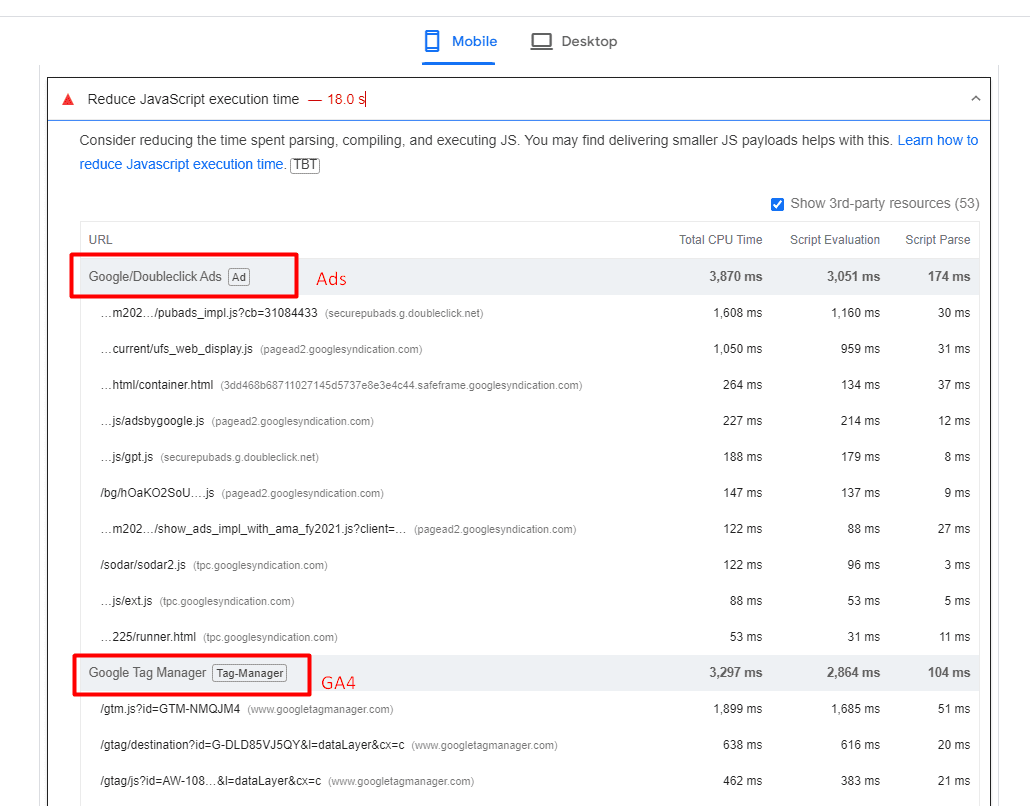
Analytics scripts – such as Google Analytics 4, tracking pixels, google re-captcha, or AdSense ads – usually cause high script evaluation time, thus contributing to TBT.
An example of a website where ads and analytics scripts cause high JavaScript execution time.
One strategy you may want to implement to reduce TBT is to delay the loading of non-essential scripts until after the initial page content has finished loading.
Another important point is that when delaying scripts, it’s essential to prioritize them based on their impact on user experience. Critical scripts (e.g., those essential for key interactions) should be loaded earlier than less critical ones.
Improving Your INP Is Not A Silver Bullet
It’s important to note that improving your INP is not a silver bullet that guarantees instant SEO success.
Instead, it is one item among many that may need to be completed as part of a batch of quality changes that can help make a difference in your overall SEO performance.
Google’s Gary Illyes answered a question about the SEO value of hierarchically ordering heading elements (H1, H2, etc.). His answer offered an insight into the actual value of heading elements for digital marketing.
Heading Elements
In simple terms, HTML Elements are the building blocks of a web page and they all have their place much like the foundation and a roof of a home have their places in the overall structure.
Heading elements communicate the topic and subtopics of a web page and are literally a list of topics when a page is viewed just by their headings.
The World Wide Web Consortium (W3C), which defines HTML, describes headings like this:
“HTML defines six levels of headings. A heading element implies all the font changes, paragraph breaks before and after, and any white space necessary to render the heading. The heading elements are H1, H2, H3, H4, H5, and H6 with H1 being the highest (or most important) level and H6 the least.
Headers play a related role to lists in structuring documents, and it is common to number headers or to include a graphic that acts like a bullet in lists.”
Strictly speaking, it is absolutely correct to order headings according to their hierarchical structure.
What Google Says About Headings
The person asking the question commented that the SEO Starter Guide recommends using heading elements in “semantic” order for people who use screen readers (devices that translate text into spoken words) but that otherwise it’s not important for Google. The person asking the question wanted to know if the SEO Starter Guide was out of date because an SEO tool had a different recommendation.
Gary narrated the submitted question:
“I recently read on the SEO starter guide that “Having headings in semantic order is fantastic for screen readers, but from Google Search perspective, it doesn’t matter if you’re using them out of order.”
Is this correct because an SEO tool told me otherwise.”
It’s a good question because it makes sense to use heading elements in a way that shows the hierarchical importance of different sections of a web page, right?
Here’s Gary’s response:
“We update our documentation quite frequently to ensure that it’s always up to date. In fact the SEO starter guide was refreshed just a couple months back to ensure it’s still relevant, so what you read in the guide is as accurate as it can get.
Also, just because a non-Google tool tells you something is good or bad, that doesn’t make it relevant for Google; it may still be a good idea, just not necessarily relevant to Google.”
Is It Relevant For Google?
The official HTML standards are flexible about the use of headings.
“A heading element briefly describes the topic of the section it introduces. Heading information may be used by user agents, for example, to construct a table of contents for a document automatically.”
“The heading elements are H1, H2, H3, H4, H5, and H6 with H1 being the highest (or most important) level and H6 the least.”
The official HTML5 specifications for headings state that the hierarchical ordering is implied but that in both cases the headings communicate the start of a new section within a web page. Also, while the official standards encourage “nesting” headings for subtopics but that’s a “strong” encouragement and not a rigid rule.
“The first element of heading content in an element of sectioning content represents the heading for that section. Subsequent headings of equal or higher rank start new (implied) sections, headings of lower rank start implied subsections that are part of the previous one. In both cases, the element represents the heading of the implied section.
Sections may contain headings of any rank, but authors are strongly encouraged to either use only h1 elements, or to use elements of the appropriate rank for the section’s nesting level.”
That last part of the official standards is quite explicit that users are “encouraged” to only use H1 elements, which might sound crazy to some people, but that’s the reality. Still, that’s just an encouragement, not a rigid rule.
So as you can see, Google’s usage of heading elements appear to be in line with the official standards because the standards allow for deviation, except for accessibility reasons.
The SEO tool is correct that the proper use of heading elements is to put them into hierarchical order. But the tool is incorrect in saying that it’s better for SEO.
This means that H1 is the most important heading for screen readers but it’s not the most important for Google. When I was doing SEO in 2001, the H1 was the most important heading element. But that hasn’t been the case for decades.
For some reason, some SEO tools (and SEOs) still believe that H1 is the most important heading for Google. But that’s simply not correct.
Listen to the SEO Office Hours Podcast at the 13:17 minute mark:
In a recent session of Google’s SEO office-hours Q&A, the Search Relations team addressed a common concern among business owners: how to determine if an SEO agency is actively optimizing your website.
The Business Owner’s Question
The discussion was prompted by a business owner who asked:
“If I have an agency that is managing our organic SEO on a monthly basis, how can I tell if anyone has been actively optimizing? I have a suspicion that the agency has not been optimized out of site for years.”
Google’s Response
In response, John Mueller, a Search Relations team member, shared his experience collaborating with an agency on Google’s Search Central content.
Key Points from Mueller’s Advice
Regular Meetings: Hold frequent discussions with the SEO agency to review their work.
Progress Reports: Request reports that detail the site’s progress over time.
Future Planning: Discussing upcoming work helps ensure the agency addresses your needs.
Client Education: Clients should have a basic understanding of SEO work to better evaluate the agency’s efforts.
While acknowledging that increased engagement requires additional time from both parties, Mueller believes it’s worth the effort.
This allows you to check if the SEO agency is meeting your needs. However, he notes that you need to have some trust in your relationship with the agency.
Resources For SEO Education
To assist businesses in managing their SEO efforts, Mueller pointed to two valuable resources:
Google’s guide on hiring an SEO provides insights into the selection process.
The SEO starter guide offers a foundational understanding of SEO principles.
Mueller’s Full Response
“This is a great question. When we worked with an SEO agency for some of the Search Central content, we had regular meetings to discuss the work that they did, to look at reports about the site’s progress, and to discuss any upcoming work. This did require a bit more time, both from them and from us, but I found it very insightful. I think it helps to lightly understand the kind of work that an agency would do, so that you can confirm that they’re doing what you expect them to do, and even then there’s a component of trust involved. We have a page about hiring an SEO which has some insights, and there’s our SEO starter guide, which can explain a bit more. And also, perhaps some folks from the SEO industry can comment on how they’d help a client understand how they’re spending their time.”
Previous Discussions On SEO Hiring
This advice from Mueller echoes a similar discussion he initiated last year, where he sought recommendations on what businesses should look for when hiring SEO consultants.
The conversation among industry experts highlighted key factors such as experience, customization, transparency, and adherence to ethical practices.
For more insights on choosing the right SEO professional, refer to our previous coverage of that discussion.
When To Seek Professional SEO Help
For businesses unsure about when to seek professional SEO help, here’s an article that outlines five critical situations that warrant hiring an SEO expert.
These include when Google isn’t indexing your site, during site migrations or redesigns, when organic traffic drops significantly, to reverse manual actions, and when current SEO strategies aren’t yielding results.
This information complements Mueller’s advice by helping businesses recognize when professional intervention is necessary.
For the SEO industry, the Google documents leak offered an important view behind the scenes. Although the leak was not a blueprint of how the algorithm worked, there was considerable confirmation that SEO professionals were right about many elements of the algorithm.
From all the analysis and discussion following the leak, the one insight that got my attention was how important the brand is.
“Brand matters more than anything else … If there was one universal piece of advice I had for marketers seeking to broadly improve their organic search rankings and traffic, it would be: “Build a notable, popular, well-recognized brand in your space, outside of Google search.”
Mike King echoed this statement with the following observation:
“All these potential demotions can inform a strategy, but it boils down to making stellar content with strong user experience and building a brand, if we’re being honest.”
Mordy Oberstein, who is an advocate for building a brand online, posted on X (Twitter):
“I am SO happy that the SEO conversation has shifted to thinking about “brand.”
It’s not the first time that “brand” has been mentioned in SEO. We began to talk about this around 2012 after the impact of Panda and Penguin when it first became apparent that Google’s aim was to put more emphasis on brand.
Compounding this is the introduction of AI, which has accelerated the importance of taking a more holistic approach to online marketing with less reliance on Google SERPs.
When I spoke to Pedro Dias, he said, “We need to focus more than ever on building our own communities with users aligned to our brands.”
As someone who had 15 years of offline experience in marketing, design, and business before moving into SEO, I have always said that having this wide knowledge allows me to take a holistic view of SEO. So, I welcome the mindset shift towards building a brand online.
“I am SO happy that the SEO conversation has shifted to thinking about “brand” (a lot of which is the direct result of @randfish’s & @iPullRank’s great advice following the “Google leaks”).
As someone who has straddled the brand marketing and SEO world for the better part of 10 years – branding is A LOT harder than many SEOs would think and will be a HUGE adjustment for many SEOs.”
Following his X/Twitter post, I reached out to Mordy Oberstein, Head of SEO Brand at Wix, to have a conversation about branding and SEO.
What Do SEO Pros Need To Know About ‘Brand’ To Make The Mindset Shift?
I asked Mordy, “In your opinion, what does brand and building a brand mean, and can SEO pros make this mindset shift?”
Mordy responded, “Brand building basically means creating a connection between one entity and another entity, meaning the company and the audience.
It’s two people meeting, and that convergence is the building of a brand. It’s very much a relationship. And I think that’s what makes it hard for SEOs. It’s a different way of thinking; it’s not linear, and there aren’t always metrics that you can measure it by.
I’m not saying you don’t use data, or you don’t have data, but it’s harder to measure to tell a full story.
You’re trying to pick up on latent signals. A lot of the conversation is unconscious.
It’s all about the micro things that compound. So, you have to think about everything you do, every signal, to ensure that it is aligned with the brand.
For example, a website writes about ‘what is a tax return.’ However, if I’m a professional accountant and I see this on your blog, I might think this isn’t relevant to me because you’re sending me a signal that you’re very basic. I don’t need to know what a tax return is; I have a master’s degree in accounting.
The latent signals that you’re sending can be very subtle, but this is where it is a mindset shift for SEO.”
I recalled a recent conversation with Pedro Dias in which he stressed it was important to put your users front and center and create content that is relevant to them. Targeting high-volume keywords is not going to connect with your audience. Instead, think about what is going to engage, interest, and entertain them.
I went on to say that for some time, the discussion online has been about SEO pros shifting away from the keyword-first approach. However, the consequences of moving away from a focus on traffic and clicks will mean we are likely to experience a temporary decline in performance.
How Does An SEO Professional Sell This To Stakeholders – How Do They Measure Success?
I asked Mordy, “How do you justify this approach to stakeholders – how do they measure success?”
Mordy replied, “I think selling SEO will become harder over time. But, if you don’t consider the brand aspect, then you could be missing the point of what is happening. It’s not about accepting lower volumes of traffic; it’s that traffic will be more targeted.
You might see less traffic right now, but the idea is to gain a digital presence and create digital momentum that will result in more qualified traffic in the long term.”
Mordy went on to say, “It’s going to be a habit to break out of, just like when you have to go on a diet for a long-term health gain.
The ecosystem will change, and it will force change to our approach. SEOs may not have paid attention to the Google leak documents, but I think they will pay attention as the entire ecosystem shifts – they won’t have a choice.
I also think C-level will send a message that they don’t care about overall traffic numbers, but do care about whether a user appreciates what they are producing and that the brand is differentiated in some way.”
How Might The Industry Segment And What Will Be The Important Roles?
I interjected to make the point that it does look a lot like SEO is finally making that shift across marketing.
Technical SEO will always be important, and paid/programmatic will remain important because it is directly attributable.
For the rest of SEO, I anticipate it merges across brand, SEO, and content into a hybrid strategy role that will straddle those disciplines.
What we thought of as “traditional SEO” will fall away, and SEO will become absorbed into marketing.
In response, Mordy agreed and thought that SEO traffic is part of a wider scope or part of a wider paradigm, and it will sit under brand and communications.
An SEO pro that functions as part of the wider marketing and thinks about how we are driving revenue, how we are driving growth, what kind of growth we are driving, and using SEO as a vehicle to that.
The final point I raised was about social media and whether that would become a more combined facet of SEO and overall online marketing.
Mordy likened Google to a moth attracted to the biggest digital light.
He said, “Social media is a huge vehicle for building momentum and the required digital presence.
For example, the more active I am on social media, the more organic branded searches I gain through Google Search. I can see the correlation between that.
I don’t think that Google is ignoring branded searches, and it makes a semantic connection.”
SEO Will Shift To Include Brand And Marketing
The conversation I had with Mordy raised an interesting perspective that SEO will have to make significant shifts to a brand and marketing mindset.
The full impact of AI on Google SERPs and how the industry might change is yet to be realized. But, I strongly recommend that anyone in SEO consider how they can start to take a brand-first approach to their strategy and the content they create.
I suggest building and measuring relationships with audiences based on how they connect with your brand and moving away from any strategy based on chasing high-volume keywords.
Think about what the user will do once you get the click – that is where the real value lies.
Get ahead of the changes that are coming.
Thank you to Mordy Oberstein for offering his opinion and being my guest on IMHO.
Organizations typically are a mixture of orientations that impact all aspects of the business from operations, finance, and marketing and sales functions.
This also means it can influence the marketing technology stack, and subsequently, these decisions can impact the performance of marketing channels, including SEO.
When organizations determine the technologies they want to use to build their stack, there are several different objectives and criteria that stakeholders look to satisfy.
Regardless of a stakeholder’s objectives, the overall objective is for the Martech stack to significantly contribute to the success and performance of the business, either directly or indirectly.
This happens directly through acting as a vehicle to drive customer acquisition and conversion or indirectly as a mechanism to improve operational performances.
What Is A Martech Stack?
A marketing technology stack (Martech stack) is the collective noun for an organization group of software, hardware, and tools purchased (or utilized) by the business to monitor and improve marketing performance, monitor and enable sales activities, and improve other business functions such as speed of order fulfillment through to errorless payment gateways.
Typical Martech stacks are compromised of software and technology designed to achieve different tasks and objectives such as:
Data analytics tools (warehousing, visualization)
CRMs
Teamwork and project management tools (JIRA, Trello)
Payment gateways & order fulfillment/dispatch
Anecdotally most Martech decisions are led by engineering and infrastructure teams, but influenced by marketing, sales, community, and C-level.
So why is this important to SEO?
A lot of these decisions impact SEO, or potential SEO performance, so it is important that given the opportunity to contribute to these discussions, we do. We must ask the right questions and put forward the right arguments to make the case for, and make the business aware of, the potential impact on SEO performance.
CMOs (and organizations) typically engage with SEOs to achieve one or more of the following objectives:
To improve organic search visibility for business-relevant non-branded queries at various stages of the decision funnel.
To improve the stability and visibility of desired messaging for branded queries.
To work with other departments within the business and improve the user experience and conversion rate of the website for all web traffic.
Not all of the Martech stack will impact SEO performance, and not all arguments are worth having.
If an organization utilizes Salesforce CRM and the tooling is firmly established, moving to Salesforce Commerce Cloud or Experience Cloud as a website platform isn’t likely going to be a decision you will be able to influence – but is one you need to be aware to ensure things like the SEO migration and out-of-the-gate strategy are geared for success.
When Can Martech Decisions Impact SEO?
So how can the Martech stack impact SEO?
Let’s take a look at some common situations in which the business might make Martech decisions that could impact SEO either positively or negatively.
Integrations With Sales CRMs & CRM Led Decision-Making
Sales-oriented organizations tend to base a large number of their technology decision-making around improving sales enablement.
As a result, you see website technologies closely tied to sales CRMs, such as Salesforce and Hubspot.
While both of these are good platforms, websites designed with too much of the influence coming from the sales orientation are often designed to try and funnel a user to completing a sales action, such as downloading a marketing asset, completing a contact form, or requesting a demo as soon as possible.
This direct funnel approach to page templates, and content, doesn’t always create the best environment for organic search. Whilst the pages are hyperfocused on user conversion, they don’t always hold the value proposition and messaging that search engines are looking to rank for all queries.
The conflict you find here with heavy sales orientation is that the client will want these conversion pages to rank for all the high search volume queries, regardless of the funnel stage.
Being able to influence and highlight the need for content and a user experience that caters for and helps satisfy the different reasons as to why a user visits your website (not only just to get in touch) is vital to long-term organic success.
C-Level Led Platform Decisions
In an ideal world, CMOs and CTOs work together to identify and fill gaps in the Martech stack, prioritizing customer-centric technologies that act as enablers to marketing, sales, and operations functions.
Most CMOs/CTOs have their preferred suite of tools and platforms, and they build their playbooks that they take when they move roles, and some of these plays have stack dependencies.
Another time this can happen is when an organization gets a new CMO or Marketing Director, and at their previous company, they’ve used another platform or technology.
In the SaaS space, I see this happen a lot with new CMOs and CTOs wanting to champion a form of headless or React/Nuxt website build in place of the incumbent technology, and similarly, in ecommerce I see this happen a lot when a CMO or CTO inherits a stack they’re not familiar with, and will prefer familiarly regardless of how the existing platform is performing.
Depending on the size of the organization these changes vary in terms of overall disruption. For example, moving from a performant established Salesforce Commerce Cloud build to a Shopify build will bring with it changes in CRM, order management, and development team (who will need to get used to the business), but from an SEO perspective, a forced change in URL structures and other dynamic onsite elements, as Shopify doesn’t have Einstein or Lightning.
As well as highlighting the change variables that will impact SEO performance – and their associated short and long-term risks – this is also an opportunity to utilize SEO data to inform the new site build architecture and use data (to try to ensure) the new stack meets the needs of marketing teams and your audience.
Adopting Technologies For Competitive Advantage
There is also the drive for businesses to continuously identify and adopt emerging technologies to find a competitive advantage over their competition. A 2019 Gartner study found that 68% of CTOs actively invest in emerging technologies to gain a competitive edge.
Outside of personal preference, CMOs/CTOs also decide to make these changes for product, financial, and operational reasons.
Where this is the case, whilst the marketing (and SEO) variables are heavily considered, there is generally an overriding attitude that marketing is the most adaptable and innovative stakeholder in this mix.
Technologies For UX & Legal Compliance
Many website page load and speed issues are caused by third-party tools and software, and these are typically tools for user experience monitoring and AB testing.
Organizations may deploy these technologies in ways that slow down site loading times, negatively affect user experience, and potentially violate data privacy regulations.
From experience, a lot of issues with these tools will be picked up early into an SEO partnership through a baseline technical overview, and once resolved the problem is solved.
But when the business is looking to introduce these tools, SEOs must be consulted as part of the implementation and deployment process.
Outside of UX and AB testing tools, issues can also be caused by the implementation of cookie consent banners and other accessibility tools. With the European Accessibility Act coming into force in 2025, we’re likely going to see these sorts of issues on the rise as organizations adopt third-party accessibility tools.
As these tools often introduce and load scripts, outside of degrading page load speeds, in some instances, the implementations can cause the
to close prematurely or create infinite internal linking traps.
Educating stakeholders on best practices for integrating these tools is crucial to maintaining optimal website performance and adhering to consent requirements.
How SEO Can Influence Martech Decisions
While SEO is just one marketing channel, it could be argued its success is the most influenced by the technology decisions that a business makes.
Acknowledging that the stack significantly impacts SEO, a large number of decisions are still made independently of the SEO (and marketing) teams.
Mostly all businesses take elements of each different orientation to be successful, and this means maximizing customer experience. SEO can provide key data that offers insights into the user journey and how users interact and discover the website.
Arming CMOs and CTOs with the foresight and knowledge that these decisions could negatively impact the performance of what could be their biggest traffic-driving channel.