How To Create a Certified Fast Website To Compete In 2025

This post was sponsored by Bluehost. The opinions expressed in this article are the sponsor’s own.

Imagine clicking on a website only to wait several seconds for it to load.

Frustrating, right?

Your prospective customers think so, too.

In a world where attention spans are shrinking, even a one-second delay can lead to lost visitors, lower rankings, and missed revenue opportunities.

Research finds that B2C websites that load in one second or less have conversion rates three times higher than those that load in five seconds or more.

Conversion rates are 2.5 times higher for B2C websites that load in one second or less.

In other words, speed is no longer a luxury.

Speed is a necessity.

A fast-loading website enhances user experience, boosts SEO rankings, and drives higher conversions.

And with search engines and consumer expectations continuing to evolve, businesses must prioritize performance to stay ahead of the competition.

Implementing the right strategies ensures that websites remain fast, competitive, and ready for the demands of 2025.

A trusted partner like Bluehost provides the robust infrastructure, advanced caching mechanisms, and built-in performance enhancements needed to help websites reach peak efficiency.

1. How To Select The Right Hosting Plan

A website’s performance starts with selecting the right hosting plan. The plan should align with the site’s current and future needs to effectively accommodate growth and traffic fluctuations.

Assess Your Website’s Needs

Before settling on a hosting plan, it’s crucial to evaluate key factors like traffic expectations, content types, and scalability.

For example, websites with heavy multimedia content require more resources than text-based sites, and anticipated visitor numbers influence server capacity needs.

Additionally, selecting a plan that supports future growth ensures smooth scaling without performance bottlenecks.

Match Your Website’s Needs To What The Host Provides

Different hosting solutions cater to different website requirements, ranging from budget-friendly shared hosting to more robust, performance-driven plans. Bluehost offers multiple hosting options tailored to various business needs.

Shared Hosting can work well for smaller websites with moderate traffic, offering a cost-effective way to get started.

Bluehost’s VPS hosting offers more power and flexibility by providing dedicated resources, making it an excellent choice for growing websites that need additional performance.

For large-scale websites demanding maximum speed and control, our dedicated hosting plans deliver exclusive server access with top-tier performance for optimal speed and scalability.

2. Implement Caching Mechanisms

Caching is an essential tool for optimizing website speed by reducing the need to load the same data repeatedly. By storing frequently accessed files, caching decreases server load, enhances response times, and ensures visitors experience faster page loads.

Websites that effectively utilize caching experience better performance, lower bounce rates, and improved search rankings.

Use Built-In Caching Features

For instance, Bluehost provides multiple caching mechanisms to enhance website performance, such as PHP APC (Alternative PHP Cache). A powerful opcode caching system, PHP APC improves database query speed and optimizes PHP script execution, ensuring that frequently accessed data is retrieved faster.

On the other hand, edge caching minimizes latency by delivering content from servers closest to the user, reducing server response times and improving load speeds.

Bluehost makes it easy to use caching to enhance website speed. Caching can be enabled directly through the Bluehost control panel, ensuring seamless implementation.

Additionally, Bluehost is powered by Dell rack-mount servers, which use AMD EPYC chips, DDR5 RAM, and ultrafast NVMe storage. With caching plugins like W3 Total Cache or WP Rocket, your web pages will load faster, improving the user experience, SEO, traffic, and conversion rates.

3. Absolutely Leverage Content Delivery Networks (CDNs)

Another way to speed up websites is to examine how content is delivered to users. A Content Delivery Network (CDN) enhances website performance by distributing content across multiple servers worldwide. This reduces latency and ensures visitors load pages faster, regardless of location.

CDNs minimize the physical distance between the server and the user by caching static assets like images, stylesheets, and scripts at various data centers worldwide. This results in load times and reduced bandwidth usage.

Beyond speed improvements, CDNs also enhance website security by protecting against DDoS attacks, traffic spikes, and malicious bots. Some CDNs offer additional features, such as image optimization, automated compression, and firewall rules, that further improve performance and security.

CDNs & Bluehost

Bluehost offers built-in CDN solutions, including Cloudflare integration, to help websites achieve optimal performance and security.

Activating a CDN through Bluehost’s dashboard is straightforward, and configuring settings that best suit a website’s needs significantly improves speed and reliability.

4. Optimize Images & Media

Impact of Media Files on Load Times

Large images and unoptimized videos can significantly slow down a website. Why? High-resolution media files require more bandwidth and processing power, leading to slower page loads and a poorer user experience.

This is particularly problematic for mobile users and those with slower internet connections since heavy media files can take significantly longer to load, frustrating visitors and increasing bounce rates.

Additionally, media files that are not optimized can consume excessive server resources, potentially affecting overall website performance. If too many large files are loaded simultaneously, the hosting environment can strain, causing slowdowns for all users.

Image- and media-based slowdowns are widespread on websites that rely heavily on visual content, such as e-commerce platforms, portfolios, and media-heavy blogs.

Reducing file sizes, choosing appropriate formats, and leveraging compression techniques can greatly enhance website speed while maintaining visual quality.

How To Size Images The Right Way

First, while it may be common and easy to do, avoid using the width and height attributes in HTML to resize images since this forces the browser to scale the image, increasing load times and decreasing performance.

Instead, resize images before uploading them using graphic editing tools such as Photoshop, GIMP, or online compression services. Scaling images improperly can lead to pixelation and a stretched appearance, negatively impacting user experience.

By resizing images to their intended display size before uploading, websites can significantly reduce the amount of data a browser needs to process, resulting in faster page loads and a more visually appealing layout.

Appropriately resized images will also have a higher visual quality because they are sized for the right display dimensions.

How To Compress Images For Better Website Performance

Compressing images using tools like Squoosh, TinyPNG, or plugins like Smush helps reduce file sizes without sacrificing quality.

Implementing lazy loading ensures that off-screen images and videos only load when needed, reducing initial load times and enhancing overall site performance.

5. Minimize Plugins & External Scripts

How To Discover Your Plugins’ Usage

Overloading a website with excessive plugins and external scripts can severely impact performance. Therefore, it’s essential to regularly assess installed plugins and remove outdated, redundant, or unnecessary ones.

Limiting the number of external scripts running on a page can also help reduce loading times and improve efficiency.

How To Choose Efficient Plugins

Selecting the right plugins is crucial for maintaining website performance. First, look for lightweight, well-coded plugins that prioritize speed and efficiency.

Then, regularly auditing your plugins and removing outdated or redundant ones can prevent conflicts and minimize resource usage.

Bluehost provides hosting environments tailored for WordPress users, ensuring compatibility with essential caching, security, and SEO plugins.

By hosting your website on a reliable platform like Bluehost, you can benefit from a stable infrastructure that complements the best WordPress plugins. This will help you enhance functionality without compromising speed.

6. Tips For Compression, Minification & Technical Tweaks

Additional technical optimizations, in addition to caching and CDNs, can further improve site speed and performance. Compression and minification techniques help reduce file sizes, while other backend optimizations ensure web pages load efficiently.

Implementing these strategies can significantly improve desktop and mobile user experiences.

Benefits Of Compression

Reducing the size of HTML, CSS, and JavaScript files significantly improves page speed. Compressed files require less bandwidth and load faster, creating a smoother user experience.

Effortless Compression & Technical Optimization With Bluehost

Bluehost makes compression easy. GZIP compression can be enabled via Bluehost’s control panel or by modifying the .htaccess file.

Plugins like Autoptimize help minify code by removing unnecessary characters, ensuring that files remain lightweight and optimized for performance.

Utilizing ETags & Expires Headers

Another important aspect of page speed optimization involves using ETags and expired headers, which help streamline browser requests and improve overall efficiency.

These settings instruct a visitor’s browser on how to handle cached content, preventing unnecessary reloads and reducing the number of requests made to the server.

ETags (Entity Tags) are used by browsers to determine whether cached resources have been modified since the last visit. If the content remains unchanged, the browser loads the local copy instead of downloading it again, minimizing bandwidth usage and speeding up load times.

On the other hand, expired headers specify a timeframe for when specific resources should be refreshed.

By setting an appropriate expiration date for static files like images, CSS, and JavaScript, web developers can ensure that repeat visitors are not unnecessarily reloading content that has not changed.

For example, a website logo that remains consistent across pages can be cached efficiently so that users do not have to download it every time they navigate the site.

Properly configuring these settings enhances website performance, particularly for sites with recurring visitors. It prevents redundant data transfers and reduces the workload on the browser and server.

Many hosting providers, including Bluehost, offer tools and support to help website owners implement these optimizations effectively. This ensures a faster and more seamless user experience.

7. Regularly Monitor & Execute Maintenance

Practice Continuous Performance Assessment

Technology changes and slows down. Websites are no exception.

Therefore, websites should undergo regular performance assessments to ensure they’re continually optimized for the best user experience.

Routine speed testing helps identify areas where performance can be improved, whether by addressing slow-loading elements, optimizing server response times, or refining backend processes.

Various tools can assist in performance evaluation. Google PageSpeed Insights, for example, provides detailed reports on website speed and offers specific recommendations for improvements.

Lighthouse, a Google open-source tool, analyzes performance, accessibility, and SEO, helping site owners fine-tune their pages.

Beyond automated tools, ongoing monitoring through website analytics platforms, such as Google Analytics, can offer valuable insights into user behavior.

High bounce rates and low engagement metrics may indicate slow performance, guiding further refinements.

Businesses running ecommerce platforms or large applications should consider integrating application performance monitoring (APM) tools to track performance bottlenecks in real time.

Maintenance Tips

Regular updates to website software, regardless of the platform used, are essential for security and performance.

Content management systems (CMS) like WordPress, Joomla, and Drupal require frequent updates to core files, themes, and plugins to prevent compatibility issues and vulnerabilities. Similarly, frameworks and libraries for custom-built sites must be kept up to date to ensure efficiency and security.

Database optimization is another crucial maintenance task. Over time, databases accumulate redundant data, slowing down query execution.

Periodic optimizations, such as removing unused tables, cleaning up post revisions, and properly indexing databases, can enhance efficiency.

Server maintenance is equally important. Websites hosted on dedicated or VPS servers should have automated backups, uptime monitoring, and log analysis configured.

Cloud-based hosting solutions like Bluehost Cloud provide performance-tracking tools that can help identify and mitigate slowdowns at the infrastructure level, a 100% uptime SLA, and more to ensure websites run smoothly.

Lastly, implementing a proactive security strategy ensures ongoing performance stability. Regular malware scans, security patches, and SSL certificate renewals help prevent vulnerabilities that could slow down or compromise a website.

Security plugins and firewalls, such as Cloudflare, add an extra layer of protection while minimizing unwanted traffic that could strain server resources.

That’s what makes Bluehost the superior choice. We offer automated backups, performance monitoring tools, and dedicated 24/7 support professionals who can help keep your website running at peak efficiency.

And with a range of hosting plans tailored to different needs, Bluehost ensures that your website will remain fast, secure, and scalable as it grows.

Building a certified fast website in 2025 requires strategic hosting, caching, content delivery, and ongoing maintenance.

Leveraging Bluehost’s robust hosting plans, integrated CDN, and performance optimization tools ensures your website remains fast, competitive, and ready for the evolving digital landscape.

Bluehost’s hosting solutions provide an easy and reliable way to optimize performance.


Image Credits

Featured Image: Image by Bluehost. Used with permission.
WooCommerce Rebrand Offers Lessons For Gaining Competitive Edge via @sejournal, @martinibuster

An interview with WooCommerce shows that their recent rebrand is a strategic refresh, offering lessons for businesses and search marketers on how to stay relevant and competitive.

A Business Refresh

A recently announced rebrand by WooCommerce is far more than a logo update; it’s part of an evolution of their platform that demonstrates the strategic value of reassessing user expectations to stay competitive.

A spokesperson from WooCommerce agreed:

“Exactly: the brand update reflects our broader evolution toward a more integrated platform. While the visual changes are noticeable, they represent our shift toward making WooCommerce more powerful out of the box while maintaining the flexibility of open source.”

From Evolution To A Refresh

WooCommerce has been on a steady evolution from a plugin to a platform. And even though it’s referred to itself as a platform for awhile now, the evolution from plugin to platform is speeding up because of an internal WooCommerce initiative called More In Core. Announced in 2024, More In Core is a shift to a WooCommerce experience that provides a more complete ecommerce experience straight of the box, delivering the core functionalities that most ecommerce sites need without needing to install additional plugins.

One of the examples, from October 2024, is the Brand Plugin integration, which used to be a premium plugin but is now a standard feature of the platform itself. The Brand feature enables store owners to create a taxonomy based on brands.

A WooCommerce spokesperson explained:

“While ‘More in Core’ is an internal name we use (we’re excited about these improvements!), our goal isn’t simply adding more features — it’s about thoughtfully building a comprehensive commerce platform that delivers the essential tools that the majority of merchants need out of the box, reducing plugin conflict and management, increasing the depth of integration between platform features, and freeing builders and sellers to focus on other parts of their business.

We’re starting by integrating Woo-owned extensions, like Brands. This isn’t about removing opportunities for third-party developers — we remain committed to a vibrant ecosystem where developers can build and grow on our platform. We’re carefully considering which features are truly essential for most merchants and integrating them in ways that maintain the flexibility WooCommerce is known for.

Looking ahead to 2025, merchants and developers can expect continued thoughtful and deep integration of key features, continued performance improvements across product and order management in particular, and a streamlined user experience that’s leveraging more and more of WordPress’ modern admin designs.”

User Experience And UI

Focusing on the user is a great place to start a business refresh. Do site visitors use your site the same way? Are there emerging trends to consider?

I asked WooCommerce if there were any any specific UX and UI improvements implemented as part of their recent February 2025 brand refresh. They answered:

“The brand refresh aligns with ongoing work to make WooCommerce more intuitive. We’re focusing first on improving core experiences in the admin interface and store management — the essential interactions our merchants use daily.

More specifically, we’re rolling out improvements to the payments onboarding and configuration experience.

We’re creating a new commerce-optimized starter theme with a set of creative variations available out of the box. We’re iterating rapidly on the WooCommerce Analytics product we just released in beta, and collaborating directly with the community on new capabilities around order status and fulfillment management.”

Lessons For Search Marketers

I asked about how their brand refresh fits into a larger strategy in order to find out what others can learn about doing something like this for their own brands and websites. I asked them for what lessons search marketers could learn from their experience and they described a process that identified stakeholders from the ecosystem to the users, user expectations set by competitors and wrapping all of that into creating their refresh.

The WooCommerce spokesperson shared:

“Our rebrand considered the multiple groups that make up our ecosystem: builders who create stores for clients, developers who create products and extensions, merchants who run their businesses on WooCommerce, hosts who help connect us to a larger set of customers, and contributors to our open source platform. The key was researching each group to understand how they interact with WooCommerce differently: developers building businesses on our platform, merchants managing daily operations, builders creating client sites, and contributors enhancing the core platform.

And of course we also had to factor in the current landscape. What other ecommerce platforms look like, what other technology companies look like — and how can we stand out. All that, plus we needed to make sure it felt true to Woo: that it aligned with our open-source roots, what we believe in, and what the platform does. We’re incredibly proud of what our in-house design and marketing teams accomplished here; it’s a great demonstration of the team we’ve assembled and what they’re capable of.

For search marketers, there’s a valuable lesson here about understanding your different audience segments and how they interact with your product or service. Just as we needed to consider how our brand speaks to builders versus merchants versus developers, search marketers need to consider how different user groups search for and interact with their content. It’s about creating a cohesive message that resonates across audiences while addressing their specific needs and pain points.”

Priorities For A Refresh

Some people like the flexibility of only activating needed functionalities because of concerns about the performance hit that comes from feature bloat. My understanding is that there are ways to turn off unneeded functionalities, is that true? Would turning them off be as simple as a toggle (a module UI), or would they have to jump into the code to do that?

How does one go about deciding what what’s best for the user? At what point do you say, not enough people need this?

WooCommerce offered the following useful insights:

“We’re being very thoughtful about considering what features become part of core WooCommerce. We started by looking at our own premium extensions that provide essential commerce functionality — features that most merchants need to run their businesses effectively.

This isn’t about adding features just to add them, and it’s definitely not about limiting opportunities for third-party developers who are crucial to our ecosystem. We recognize that some merchants and builders need specific features that our extensions don’t offer — and that’s the power of WooCommerce. At the same time, we also recognize that having to manage multiple extensions for simple functions, like brands, can create pain points.

Instead, it’s about providing a solid foundation that both merchants and developers can build upon. Features can be easily enabled or disabled through the admin interface so merchants can keep their sites lean and fast. This modular approach means stores can use what they need while developers can continue to innovate and extend the platform in new ways, relying on robust core functionality that’s always available.

When evaluating what becomes part of core, we look at how essential the feature is for most merchants — what they need to get a store online, selling, shipping, and getting paid — plus how it fits into the broader WooCommerce ecosystem. And of course for anything we add into core, performance is top of mind for our product teams.

Our goal is to strengthen the platform’s foundation while maintaining the openness and flexibility that makes WooCommerce so powerful. In some cases we’re looking at opening up new capabilities via lower level changes, without necessarily dictating how those capabilities should be used. Order statuses are a good example here: adding separate statuses for fulfillment and payment enables all sorts of new functionality, even if we don’t immediately require all solutions to leverage both.”

Focus On Performance

Adding more features or code to a site can degrade performance, something WooCommerce considered as part of the initiative. Adding needed functions helped make the entire platform more stable which ended up helping performance.

An example that WooCommerce shared was last year’s introduction of High-Performance Order Storage (HPOS), an optimized way to store customer order information that increases store website performance over the traditional ways of handling the same data.

The spokesperson answered:

“Performance remains fundamental to our approach. When we consider adding features to core, we’re actually making a thoughtful trade-off: for functionality that most merchants need, having it built-in and optimized is often more performant than requiring an additional plugin. This can reduce complexity and potential conflicts while improving overall site performance.

Our team ensures that as we integrate features, we’re doing so in a way that maintains or improves site speed. HPOS is a prime example — we’re rebuilding fundamental structures to improve scalability. Each feature addition is carefully evaluated for its performance impact, and we’re committed to keeping WooCommerce fast and efficient. We’re also currently in the middle of a performance review across all of our main functionalities to see where we can make improvements ahead of adding anything new.

For 2025, our focus is on thoughtfully enhancing WooCommerce’s essential capabilities while maintaining the open ecosystem that lets developers build innovative solutions for merchants, and improving the quality of our user experience from end to end. The goal isn’t to add more for the sake of more — it’s about providing a solid, performant foundation that benefits merchants, builders, and developers, and raising the bar for everyone.”

Should You Consider A Business Refresh?

What WooCommerce is doing is a reminder that settling on a strategy and moving forward year after year isn’t enough; consumer needs and the ways they interact online are constantly evolving. Taking inventory of emerging trends and user expectations is a sound practice for keeping an enterprise fresh and relevant—especially important right now as the Internet undergoes one of the most significant transformations in decades. Ultimately, consumers, not competitors, should drive your strategy. Identifying better ways to interact with users, customers, and site visitors can help position you as the disruptor rather than the disrupted.

Featured Image by Shutterstock/insta_photos

WordPress Foundation Suffers Setback In Trademark Application via @sejournal, @martinibuster

The WordPress Foundation suffered a setback in its attempt to trademark the phrases ‘Managed WordPress’ and ‘Hosted WordPress,’ which could have allowed them to demand licensing fees for their use. An organization called Unprotected.org published documents showing it successfully petitioned the U.S. Patent Office to deny the trademarks.

The Uprotected.org website published:

“We have successfully made a petition to the U.S. Patent and Trademark Office (USPTO) against both trademark applications for “Managed WordPress” and “Hosted WordPress”.

They then quoted the United States Patent Office decision:

“Applicant must disclaim the wording “MANAGED” because it is merely descriptive of an ingredient, quality, characteristic, function, feature, purpose, or use of applicant’s goods and services.

…This wording appears in the identification of goods and services. Thus, the wording merely describes applicant’s goods and services because applicant provides software for managing content on a website.”

Next Steps

The WordPress Foundation has three months to file a response, according to the documentation:

“Response deadline. File a response to this nonfinal Office action within three months of the “Issue date” below to avoid abandonment of the application.”

The Register quoted the owner of Unprotected.org:

“This represents a great victory for the WordPress ecosystem, and we will continue to fight until there is accountability and a change in leadership…”

They went on to promote Joost de Valk as a new leader. Joost de Valk himself has to date promoted the idea of a change in the leadership structure of the WordPress open source project, with Matt Mullenweg still playing a role.

Featured Image by Shutterstock/alpin78

WordPress SEO Myths Busted: What You Really Need To Know via @sejournal, @cshel

WordPress powers over 40% of websites globally – and why would it not? It is relatively easy to use and has expansive options when it comes to plugins and pre-built themes.

But even though WordPress has been in active development and use for more than 20 years, misconceptions about WordPress SEO are rampant and many site owners are confused about what truly drives rankings.

Because I can’t respond to every single misconception that pops up on X (Twitter) or Reddit, I would like to clear up some of the confusion by busting the more pervasive myths and sharing actionable insights based on my experience.

Whether you’re an old pro or running your first site, I hope you leave with clarity and confidence in your WordPress SEO strategy.

Myth #1: WordPress Is Going Away Or Shutting Down

The Reality: Despite the current public debate about governance, I *assure* you – WordPress isn’t going anywhere.

It remains a robust, community-driven platform with a massive global user base.

WordPress’ open-source nature makes it incredibly flexible and free to use, but open-source also means that discussions about its future direction happen publicly and, sometimes, loudly.

Here’s what you need to know:

  • WordPress Isn’t Going Away Anytime Soon: The core functionality of WordPress remains stable and widely supported. The infrastructure is backed by millions of contributors, developers, and users.
  • What If There’s a Fork? Forks happen in open-source projects more often than you might think. Some are a bigger deal than others. If you’ve heard this mentioned and it made you nervous because you don’t really know what it means, please be assured there is no reason for panic. A fork happens when developers create a new version by branching off from the original project. While this sounds dramatic, forks typically prioritize compatibility to retain users. Most plugins will remain compatible in the early stages, and developers often create tools to make transitions seamless.
  • The Bottom Line: There’s no immediate reason to leave WordPress. Any major changes will take time, and you’ll have plenty of notice. Whether the ecosystem stays unified or forks, your investment in WordPress remains secure.

Focus on what matters: a solid SEO strategy, fast performance, and user-centric content. These fundamentals will serve you well no matter what.

Myth #2: WordPress Is SEO-Friendly By Default

The Reality: WordPress gives you a strong foundation, but it’s not set-it-and-forget-it. Even out of the box, there are configurations to set.

Some SEO needs may require a plugin if your theme doesn’t offer built-in support and you’re not comfortable modifying the code yourself.

Once you’ve got all of the configurations set, and you’ve set up your plugins and configured those, there will still be on-page and content SEO that is done as you’re writing the content.

You can’t install WordPress and then stop thinking about SEO forever.

  • Permalinks And Metadata: I always update permalinks to create clean, descriptive URLs. Titles, meta descriptions, and alt text for images need to be provided and optimized, too.
  • Plugins Are Helpful, Not Magical: I use Yoast to handle metadata defaults and sitemaps efficiently, but even the best plugin is only as good as the strategy behind it. Anything can be misconfigured, so make sure you understand the settings you’re being asked to define.
  • Content Structure Matters: High-quality content and a logical site architecture remain crucial.
  • Themes Can Make or Break SEO: A poorly coded theme can undo the built-in SEO advantages WordPress provides. Many users choose WordPress for the variety of prebuilt themes, but picking one that supports your SEO efforts is critical. A bad theme can tank your rankings – and that’s not WordPress’s fault.

Myth #3: An SEO Plugin Will Guarantee High Rankings

The Reality: SEO plugins are like a compass – they point the way, but you still have to do the hiking.

  • Know The Basics: Plugins can’t replace good keyword research or content strategy. Are you targeting keywords just because they have high search volume, or because they’re terms your users are actually searching for? Most sites make money on conversions, not raw traffic, so attracting the right traffic is essential.
  • Answer User Questions: Do you know what questions your users are asking? Is your content helping them make decisions, use your product, or solve their problems? If not, your content strategy needs work – and that’s not WordPress’s fault.
  • Use Suggestions Wisely: Just because a plugin gives you a green light doesn’t mean your content will automatically rank. Think of the green light as a progress indicator, not a guarantee of success. I use these recommendations as helpful guidelines, but they don’t replace solid market research or a content strategy tailored to your audience. Without that foundation, you could end up with a grammatically correct, SEO-optimized article about a topic no one cares about – or one that blends into an already saturated space. That’s not the plugin’s fault; it’s a reminder that SEO tools support your efforts but can’t create demand or originality for you.

Ultimately, there’s no magic SEO bullet – not in plugins, not in content management systems, and certainly not in shortcuts.

Myth #4: Performance And Speed Don’t Matter That Much

The Reality: Core Web Vitals are an indication of performance, and page speed itself significantly affects user experience and the ability of bots and crawlers to access your site.

But this doesn’t mean hitting specific scores will guarantee a top ranking. Instead, it’s about ensuring your site provides a great experience while optimizing speed and performance.

  • Stay In Control With Manual Updates: Running manual updates ensures you’re not reliant on automatic processes, which can sometimes fail or get delayed. Knowing how to handle updates helps you prevent vulnerabilities from outdated plugins or themes.
  • Remove Unused Plugins And Themes: Unused plugins and themes can create security risks, even if they’re inactive. Regularly cleaning your site minimizes potential attack vectors and keeps your installation lightweight.
  • Run Performance Audits: Audits can help identify performance bottlenecks, detect plugins or scripts that slow down your site, and catch issues before they affect user experience. SEO isn’t set-it-and-forget-it; monitoring your site’s health is crucial for staying competitive.

Myth #5: Content-Length Is More Important Than Quality

The Reality: Search engines care about providing accurate, useful answers and user satisfaction, not arbitrary word counts. It’s baffling that this myth still persists today.

Does this mean that you should stop doing long-form content? No. This means that different types of answers and information naturally call for different amounts of content.

The point is to provide as much quantity (number of words) as is necessary to accomplish the mission. Extra word count for the sake of extra word count is counterproductive.

  • Intent First: I focus on answering user questions directly. There is zero need to add filler details and backstories just to increase the word count. Provide information if the information is necessary and useful to the reader. If your reader is looking for details on how to fix their bicycle chain, they do not need a history lesson on the invention of the bicycle.
  • Avoid Fluff: Write enough to cover the topic thoroughly, but avoid padding your content for length. Even if you’re not adding unnecessary details and information to your article, make sure you avoid fluffing out the sentences to increase word count, too. When I say “fluffing,” I mean taking a sentence that can be perfectly expressed in five words and expanding it to 25 words unnecessarily. For example: “The cat sat quietly” becomes “The small, furry feline creature chose to sit still in an unmoving manner on the comfortable spot by the window.”

Myth #6: Backlinks Are All You Need For SEO Success

The Reality: Backlinks help, but they’re not a magic SEO bullet, just as I mentioned earlier.

It’s like getting glowing recommendations for a restaurant that serves bad food – those referrals won’t save it from bad reviews if the dining experience is poor.

  • Balance Your Efforts: Link-building should be paired with strong technical SEO and high-quality content.
  • Don’t Neglect User Experience: Sites that are hard to navigate or slow to load will struggle, even with strong backlinks.
  • Content Matters: Backlinks can’t compensate for irrelevant or low-value content.
  • Technical SEO Is Critical: Technical SEO plays a vital role in making backlinks work for your site. If search engines can’t easily crawl and index your pages because of poor technical structure, those backlinks won’t be able to pass authority effectively or improve your rankings.

Key Takeaways For WordPress SEO In 2025

SEO has evolved dramatically over the past year, especially with the rise of AI-driven search results, pulling from authoritative sites that provide real value and context.

With Google facing competition from AI-powered engines like Bing’s integration with OpenAI, it’s more important than ever to expand your approach and adapt to the shifting landscape.

1. Ongoing Maintenance Beats Default Settings

  • Regular Auditing Is Essential: Even with WordPress’s built-in features, active maintenance is key. Periodically review your SEO settings, content structure, and performance to ensure your site remains optimized.
  • Understand Plugin Limitations: Plugins offer great guidance but are not a replacement for thoughtful strategy. Pay attention to plugin settings and adapt them to your goals rather than relying solely on default configurations.

2. Make Use Of WordPress Plugins Thoughtfully

  • Enhance Content Optimization: You can certainly use plugins for guidance and to manage some of the technical SEO jobs, but no plugin can do *all* the work, especially when it comes to content. Content can be optimized, but optimized content that isn’t adding value or providing useful information still isn’t going to perform well.
  • Simplify Tasks: AI enhancements are all the rage in WordPress plugins and themes, but don’t let the AI make decisions without your oversight and input – strategy is still a human task.

3. Don’t Rely Solely On Google

  • Broaden Search Strategy: Pay attention to Bing’s integration with AI-powered tools and other emerging engines.
  • New Search Experiences: Be ready to adapt as search engines experiment with interfaces and AI.

4. Prioritize Security And Updates

  • Update Regularly: Keep plugins, themes, and core files updated to avoid vulnerabilities.
  • Remove Unnecessary Plugins: Keep your plugin directory clean to reduce security risks.

To Sum It Up

WordPress remains a powerful tool, but success requires adaptability.

Don’t let internal debates distract you from building a fast, secure, user-friendly site. Focus on proven strategies, stay flexible, and be ready for emerging SEO trends.

Whether it’s Google, Bing, or the next big thing, you’ll be ready. Audit your site’s speed, usability, and content strategy today.

Use plugins and tools to simplify optimization – but never forget the human touch in your SEO strategy.

More Resources:


Featured Image: JuIsIst/Shutterstock

WordPress Leader Mullenweg Silences Joost De Valk via @sejournal, @martinibuster

Matt Mullenweg, co-creator of WordPress, posted a statement on X (formerly Twitter) announcing that Joost de Valk was no longer speaking at WordCamp Asia and was persona non grata for having “stabbed” him when he was vulnerable and betraying his confidence. Mullenweg cited statements by de Valk to prove his point, but those statements were presented without their full context, which significantly altered their meaning.

Joost de Valk Removed From WordCamp Asia

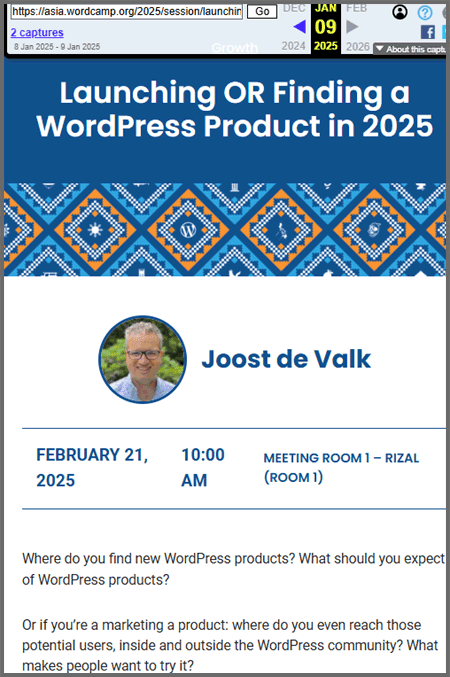
Joost de Valk, creator of the Yoast SEO plugin was scheduled to speak at WordCamp Asia on February 21st but was removed from the schedule. He had been scheduled to speak on the topic of marketing WordPress products. A post on X by Matt Mullenweg explaining why he was removed suggests that de Valk was removed on orders by Mullenweg.

Screenshot Of Joost De Valk’s WordCamp Asia Speaker Agenda

Mullenweg: Joost “Stabbed Me When I Was Down”

Matt Mullenweg posted an explanation of why Joost was removed from the WordCamp Asia schedule, with his motivation being to get ahead of any “drama” stirred up by de Valk, although at the time of writing Joost has been silent about the removal on both X and his blog.

Mullenweg posted:

“Before he tries to make more drama about not being at WordCamp Asia, I just wanted to say that I feel @jdevalk stabbed me when I was down, betrayed confidence, tried to take advantage of a situation for personal clout and influence.

I have given him hundreds of hours of my time and more access than almost anyone in the WP community, including admin access on Google Analytics, a marketing leadership position, and more. This trust was betrayed.

His previous contributions do not “make up” for this behavior, nor has he apologized or taken any conciliatory action. This deeply saddens me.

Because of this, I will not interact with him any further or participate with anything he’s involved with, he’s persona non grata.”

The term persona non grata means that a person is unwelcome. It’s use originated in diplomatic contexts but is now used for any situation where a person is no longer welcome.

Out Of Context Citations

Mullenweg followed up with another post with citations of statements  published by Joost de Valk that Mullenweg characterize de Valk is trying to “stage a coup” of WordPress.

He continued:

He’s trying to claim he didn’t want to fork or stage a coup, but wrote:

‘I think it’s time to let go of the cult and change project leadership.’

‘But it’s clear now, that we can no longer have him be our sole leader’

‘I’m already talking to several hosts about this, and would welcome anyone who wants to join these conversations, so we’re not duplicating work.’

‘I’m here, and willing to lead through this transition. I do have the time, the energy and the money needed to fund myself doing it.’

X is a micro-blogging format that limited how much context Mullenweg could post.  It’s helpful to see those statements in context in order to fully understand them.

For example, the quote in which Joost references the “cult” nature of WordPress leadership takes on a different meaning when viewed in its full context.

Here’s the out of context version:

“I think it’s time to let go of the cult and change project leadership.”

The full version of the passage makes it clear that de Valk is merely suggesting the creation of a board (later on detailing that it’s a board with Matt involved in a leadership position).

The full statement:

“I’ve spoken to many slightly outside of our industry over the past months about what was happening and several people, independent of each other, described WordPress as ‘a cult’ to me. And I understand why.

I think it’s time to let go of the cult and change project leadership. I’ve said it before: we need a ‘board’. “

Joost later explains that he isn’t advocating for removal of Matt from leadership but rather giving a voice to all stakeholders, including Matt’s.

He wrote:

“I’m still, to this day, very thankful for what Matt has created. I would love to work with him to fix all this. But it’s clear now, that we can no longer have him be our sole leader, although I’d love it if we could get him to be among the leaders.”

The reality is that Joost was never arguing for a change in leadership. From September to December Joost had largely limited his opinion to suggesting that there should be more transparency about how much of the trademark licensing fee goes to support the WordPress project.  Rather than stabbing Mullenweg when he was down and calling for a coup, Joost was more cautious and circumspect in his public remarks.

It was only in December that he published his “Breaking the Status Quo” blog post where he openly advocated that Mullenweg consider a change in governance that reflected the voices of more than one stakeholder, with Mullenweg still in a position of control. Joost was not leading the call for change, others had already been doing that for months. Joost was lending his (considerable) voice to a movement that was already asking for change in how the WordPress project is governed.

Response To Mullenweg’s Post

Responses to his post were muted because the ability to respond was limited to those he mentions or is following. @arniepalmer responded by explaining that events look far differently from his perspective, pointing out that de Valk was not trying to seize leadership of WordPress away from Mullenweg but discussing a way to expand leadership beyond just one person.

He wrote:

“Matt, I can see how you could be offended by someone who has an opinion on how things in WordPress leadership could be improved and mention that project leadership needs a change. Especially when you have led the project for so many years. However, in my opinion, @jdevalk was engaging in a discussion for a wider solution, not a fork, not a takeover, just a start over with you still being A leader – which is again, in my opinion, essential.

I am saddened that Joost has been excluded from @wcasia2025 as it could have been an opportunity for you and him to discuss options in person. An opportunity to build bridges and even if no solution is reached, the effort has been seen to be made to not exclude those that have differing opinions on how this community driven project moves forward. Criticism of leadership is never a pleasant situation for anyone. I believe a walk back on this is possible and as tickets (including airline and hotels) are already booked for all concerned, booking a meeting room is the smallest of concerns here.”

Joost de Valk Is Ousted And Silenced?

Some time ago, I asked someone how a civil war in his country started. His nutshell explanation was that for decades, citizens, students, and unions had demanded change, but one by one, the government sealed off every avenue for dialogue. Rather than gaining control, it built pressure to the breaking point, leaving no other outlet for change, which eventually came.

Joost de Valk has not made a statement (or drama) about his ouster from WordCamp or his new “persona non grata” status with Mullenweg. It’s unclear what attempting to silence de Valk has accomplished.

Featured Image by Shutterstock/Ollyy

How WordPress Hot Nacho Scandal Shapes WP Engine Dispute via @sejournal, @martinibuster

In a recent interview, Matt Mullenweg referenced three scandals and controversies from his past that have been long forgotten to show how it’s possible that the WP Engine scandal will also be forgotten. One of the examples he cited, the Hot Nacho Scandal, led Google to ban WordPress.org, caused Mullenweg to be rebuked by influential tech leaders, and resulted in his shaming in the mainstream media.

The Hot Nacho Scandal, named for a software company called Hot Nacho, was an intense event for Matt Mullenweg that shows what he endured in the past and may help explain his attitude toward the WP Engine scandal today.

Matt Recalls Three Forgotten Controversies

In a part of the interview where Matt downplays the current WP Engine (WPE) dispute he cited three scandals and controversies from the past ten to twenty years to show how he’s made mistakes and also how he has not shied away from an aggressive attention-getting defense of the WordPress open source project and yet with time it’s mostly been forgotten. He cited three controversies as examples of how the WP Engine controversy can also be forgotten with time, perhaps giving an insight into Matt’s thinking about it.

He cited three incidents:

1. The 2005 Hot Nacho Scandal

2. The 2007 Easter Theme Massacre

3. The Chris Pearson Thesis Conflict

The Thesis controversy is relatively recent but the other two go back almost two decades. The Hot Nacho incident was intense not unlike the situation Mullenweg finds himself to day with WP Engine and may explain where he gets his strength to carry on in the fight with WP Engine.

Matt said:

“You know, some of these previous controversies that got mainstream media coverage, you know CNN, I had this Hot Nacho scandal in the first couple years of WordPress or the Thesis fight or the Easter Massacre of themes, like all these things I’m mentioning you probably haven’t heard of.

It used to be like half my Wikipedia page, now it’s not. Today if you go to my Wikipedia page, their PR firm has a whole paragraph about this. I think in 5 years maybe it’ll be a sentence or not even on there at all.

So it’s not my first rodeo. Sometimes you have to fight to protect your open source ideals and the community and and your trademark. “

The Hot Nacho Scandal

The Hot Nacho scandal is named after an SEO software company that paid Matt Mullenweg to host web pages on WordPress.org, which resulted in Google banning the WordPress.org website.

Mullenweg was still working at CNET at the time and working on WordPress on the side when the scandal broke. The news was featured in publications such as Ars Technica, eWeek, MSNBC, Slashdot, and The Register.

A March 31, 2005 article published in The Register featured the lurid article title, “Blog star ‘fesses up to payola spam scam” and describes the shocking transaction that Mullenweg arranged with an SEO software company:

“Matt Mullenweg, founder of the popular open source weblog software WordPress, and CNET employee, has admitted to gaming the web’s search engines by hosting tens of thousands of “articles” that contain hidden, paid-for keywords.

Mullenweg hosted at least 160,000 pieces of “content” on his site wordpress.org which use a cloaking technique to hide keywords such as “asbestos”, “debit consolidation” and “mortgages”. Mullenweg was paid a flat fee by Hot Nacho Inc., which creates software for search engine gamers to use.”

Rebuked By Jason Kottke

Jason Kottke is a widely respected blogger who is known as a pioneer of independent publishing.  So it must have been disappointing to Matt Mullenweg to be the recipient of harsh criticism from someone like Kottke, who wrote:

“WordPress is using its high Page Rank to game Google AdWords. This stinks like last week’s fish. Is WordPress and wordpress.org an open source project like we’ve all been told or is it a company? Either way, contributing to spam noise on the web is annoying.”

Hot Nacho Explains His Side

The founder of the Hot Nacho company explained that they were developing an SEO writing software and wanted to test it on WordPress.org. Matt agreed to accept payment to host the articles, cloaking the links to them so site visitors wouldn’t see them. It wasn’t sophisticated cloaking either. Mullenweg simply used CSS to push the links off-screen.

The Hot Nacho founder published an explanation and begged the world to not harshly judge Mullenweg:

“For my part, I invariably place some advertising on such pages because I’m also not corporate sponsored… It was a blunder that Matt used invisible links to connect to the Articles collection. It wasn’t necessary and I’m sure he regrets having done it that way. But please cut the guy some slack. …Sure, it was a mistake, but it was motivated by the fact that he’s a really good guy.”

Matt Mullenweg himself wrote:

“Knowing what I knew then, I would probably make the same decision; knowing what I know now I wouldn’t even consider it. Not thinking through all the ramifications was a big mistake. So was not having more community dialog from the beginning, which would have caught this earlier. I am extremely sorry for both, and it won’t happen again.”

The upside to the Hot Nacho Scandal was that WordPress received more donations in four days than it had in the previous entire year.

Transformative Event

The Hot Nacho Scandal may have been a formative experience for a young Mullenweg. It exposed him to intense criticism, rebuke and anonymous threats. According to Mullenweg at the time, he said that what others say doesn’t matter as much as what you do and acknowledged that he was developing a thicker skin.

Understanding what the Hot Nacho Scandal was helps put some context to how Mullenweg is approaching the WP Engine Conflict today.

Matt Mullenweg Expects WP Engine Dispute Resolution Soon via @sejournal, @martinibuster

Matt Mullenweg downplayed his dispute with WP Engine, saying it’s not as big a deal as people are making it out to be and shared that he believes it will all be over in a few months.

Matt Compares Himself To Standing Up To Bullies

The podcast host expressed surprise at how harshly Matt went after WP Engine, expressing that he never figured Matt to be the kind of person who would go after someone else so hard, that it didn’t seem to fit his idea of the kind of person Matt Mullenweg was in his mind. Matt responded that he thought that was kind of funny because he’s actually that guy.

The podcast host commented:

“I’ve read a lot about Matt’s work. I don’t know Matt and I’ve listened to him, he doesn’t seem like someone who would ever like insult someone and I was actually surprised that you were going as hard as you were. And I guess your perspective is like, they’re coming after everything I made or they don’t contribute, whatever. But I was actually surprised that you were you you were pissed off and I didn’t think that you would be the type of guy that would come off pissed off…”

Matt smiled as he explained that he feels obliged to stand up for WordPress, like someone standing up to a playground bully.

He explained:

“…so just like a schoolyard bully, you kind of have to stand up for yourself. So it’s kind of funny because you say you don’t think of me as doing this but actually if you look at the history of WordPress there have been maybe four or five times in the history where I had this kind of villain arc … like we had a fight to protect our principles and the sustainability and the future of WordPress.”

Matt Says People Will Forget About WP Engine Dispute

Matt compared the current dispute with WP Engine with previous controversies as a way to note how those were forgotten and one day the WP Engine conflict will also be forgotten.

Mullenweg continued:

“You know, some of these previous controversies that got mainstream media coverage, you know CNN, I had this Hot Nacho scandal in the first couple years of WordPress or the Thesis fight or the Easter Massacre of themes, like all these things I’m mentioning you probably haven’t heard of.

It used to be like half my Wikipedia page, now it’s not. Today if you go to my Wikipedia page, their PR firm has a whole paragraph about this.

I think in 5 years maybe it’ll be a sentence or not even on there at all.”

Mullenweg Downplays WP Engine Dispute

Matt sought to portray WP Engine as not that big a company and ultimately people are making a bigger deal about the dispute than it actually is.

He said:

“And they’re a web host which people think is the largest but actually you know probably the sixth or seventh largest WordPress web host. There’s a lot of bigger ones and they’re a single digit percentage of all the WordPresses in the world. They probably have like 700,000 800,000 or something.

People have made this into a bigger deal than it really is.”

Mullenweg Expects Fight To Be Over In Months

Lastly, Mullenweg expressed the opinion that it was his duty to stand up and fight and that he expected the WP Engine dispute to be behind him within a few months although he did acknowledge that there are many angry people.

The characterization that the dispute will be over within a few months is startling because it seems to suggest that there is something going on behind the scenes or that he would simply prevail and get his way. Mullenweg didn’t explain what he meant by that comment and the podcast hosts didn’t ask him to elaborate.

Mullenweg said,

“So it’s not my first rodeo. Sometimes you have to fight to protect your open source ideals and the community and and your trademark.

By the way, I expect this to resolve in the next few months. Although it’s easy to find like, if you go on Reddit or Twitter, I get a lot of hate.”

At this point Matt explained the conflict from his point of view, painting himself as the victim who was forced to go on the attack, narrating a sequence of events that generally isn’t how most people experienced it. He painted WP Engine’s side as the aggressor and characterized the public rebuke he gave of WP Engine at WordCamp as a “presentation.”

Mullenweg explained:

“Some of the people are uncomfortable with you know us having to to fight protect ourselves. You know WP Engine took some, a very aggressive legal action. So it turned out when we thought we were sort of good faith negotiating they were preparing a legal case to attack us because you know 3 days after I give this presentation they launched this huge lawsuit with Quinn Emanuel it’s kind of like the one of the biggest nastiest law firms.”

Where Were The Hard Questions?

One of the podcast hosts solicited the WordPress communities on Reddit and Twitter for questions that he could ask Matt Mullenweg. The community responded with many questions but the podcast hosts largely refrained from asking those user submitted questions, which to be fair were pretty hard-hitting and inherently presupposed things about Mullenweg.

Watch the podcast interview:

Featured Image by Shutterstock/supercaps

Elementor Rolls Out WordPress AI Site Planner via @sejournal, @martinibuster

Elementor released a free to use standalone AI app called Site Planner that enables users to create a website in a step by step process beginning with the most general concept of the site and ending with a complete website design down to the individual page elements. I gave it a try and was stunned by how easy and fast it was to create a website.

Intuitive Approach To Site Building

Elementor’s application of AI features an intuitive and attractive user interface, everything feels to have been considered so that at no point does one feel the need to read instructions. The questions asked at the start of the process establish a general overview of what the site is about, necessary pages, what the goals are and so on.

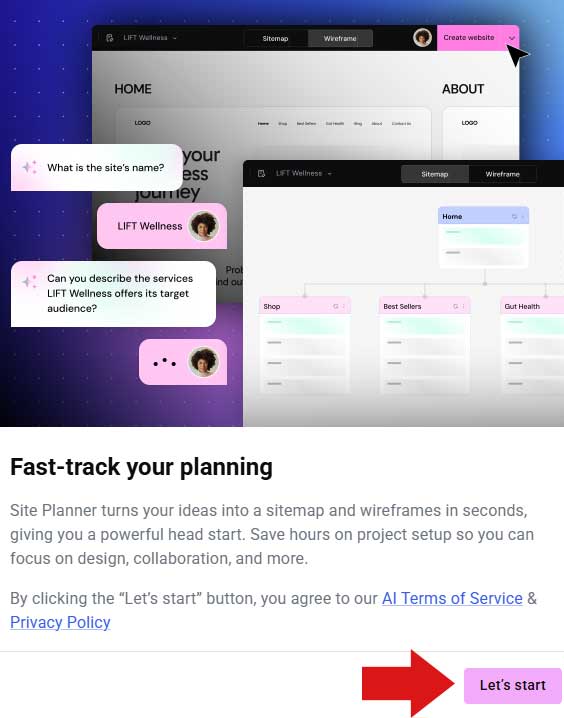
Getting started is as simple as clicking a start button, the first hint that building a site with Elementor is going to be easy.

Screenshot Of Start Of AI Site Building App

Collaborative Capabilities

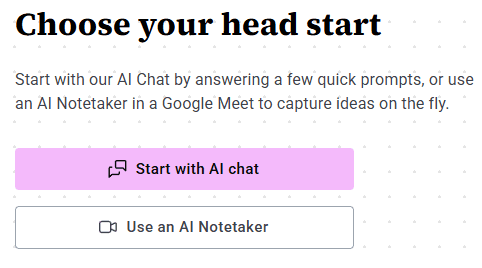
The site design process can be a designer working with a client or multiple stakeholders in a company working together to roll out the next iteration of a website. Elementor’s Site Planner app recognizes this reality and offers users the option to collaborate over Google Meet or proceed alone with the AI as one of the first steps of the process.

Screenshot Of Collaboration Option

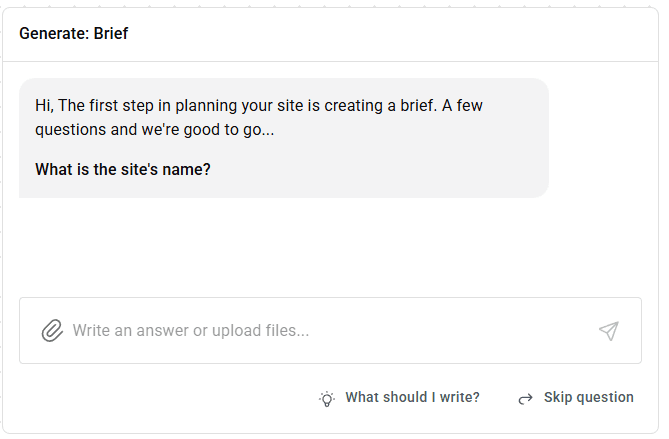
Generate A Website Brief

A website brief is a document that outlines the goals and expectations of a web design project. It serves as a road map and plan that guides the stakeholders through the planning and development stages of the project.

Elementor’s AI Site Planner app smartly begins with asking the right questions for putting together a website brief that serves as the backbone of what is to be created.

The site planner generates a website brief describing what the website project is and once that’s approved Elementor creates what it refers to as a sitemap, a site diagram or site architecture diagram that provides a high-level overview of the different pages and how they’re interlinked.

It then generates a wireframe of the entire site that can be zoomed in to edit individual sections of a website at an overview level, to “fine-tune” the layout.

This is how Elementor describes the process:

1 Brief
From Vision -> Brief
Start an AI-led conversation and get your project off the ground. Watch your ideas, descriptions, and notes transform before your eyes into a proper website brief.

2 Sitemap
From Brief -> Sitemap
AI Site Planner instantly maps out all your key pages and creates a complete sitemap in minutes, not hours. Easily shuffle or edit pages to fit your vision.

3 Wireframe
From Sitemap -> Wireframe
Get your first draft in minutes. Watch AI turn your sitemap into content-filled wireframes in a click.

Elementor AI Site Planner

The Elementor AI Site Planner is in my opinion a successful implementation of AI for planning a website. Read the full announcement.

Site Planner by Elementor AI – Generate Professional Sitemaps & Wireframes in Minutes

Featured Image by Shutterstock/Net Vector

WordPress Shakeup Signaled By 3 Recent Events via @sejournal, @martinibuster

Three unrelated things happened in the world of WordPress and Content Management Systems which may point the direction of how content is published on the web. Two of the developments are directly related to WordPress and has the feel of pieces falling into place.

WordPress Parallel Community

There is movement to build a parallel community and infrastructure  to WordPress. The goal is to bring stability to WordPress and ensure that it continues to be the world’s most popular content management system.  Recent events related to the Automattic and Mullenweg dispute with WP Engine have given rise to actions that may in time wrest control of WordPress away from Automattic and Matt Mullenweg.

Alternative WordPress Community: Piece One

This second approach of creating an alternative WordPress community gained major support from GoDaddy in the form of a half million dollar donation to the non-profit The WP Community Collective, a group whose goal is to support an independent WordPress open source ecosystem.

GoDaddy explained:

“GoDaddy …just invested a half-million dollars in the WordPress community through a donation to The WP Community Collective, an initiative focused on funding and empowering WordPress contributors. This monetary support will be directed towards providing financial, operational and promotional support within the greater WordPress community.

The WP Community Collective contribution by GoDaddy… aims to strengthen open source communities by providing resources for designers, developers and other contributors who make the internet work.”

What makes the GoDaddy funding interesting is that one of the investors in GoDaddy, BlackRock, is also an investor in Automattic. BlackRock recently lowered the value of their stake in Automattic, which is said to currently be less than one percent.

Second News: Post Status WordPress Community Becomes A Non-Profit

The second piece of the alternative WordPress community is in the form of an investment made by Joost de Valk in an actual WordPress business community that was founded 15 years ago. Joost is turning it into a non-profit and setting it up with a governance board.

According to the announcement:

“…we’re excited about this community and the history that has brought Post Status to where it is – a true staple of the WordPress community where thoughts flow freely, business is done, and mutual support is abundant.

…Over the past few months, it’s become very clear that Post Status is an enormously important place for the community to come together and discuss all things WordPress. A place with light moderation, but also with true freedom of speech (within the boundaries of treating everyone with respect) and the freedom to have different opinions.

We want to enshrine those freedoms even more. That’s why we (Marieke and myself) will be buying Post Status”

Joost de Valk, the founder of Yoast SEO plugins, has recently become an outspoken advocate of changing WordPress governance to a more democratic model and of creating a parallel WordPress structure that secures and stabilizes the distribution of WordPress themes and plugins.

Third Development: Federated WordPress Directories

There have been ongoing discussions across the WordPress community about decentralizing plugin and theme distribution so that WordPress.org, which is controlled by Automattic and Matt Mullenweg, is no longer the sole source. Decentralization would remove that control by distributing software through multiple channels.

Karim Marucchi (LinkedIn profile), well known in the WordPress community as a leader in enterprise WordPress development, wrote about securing the supply chain in reference to making the availability of plugin and themes secure and trustworthy.

He wrote:

“Securing the Supply Chain & Start Modernization
The first step is to act on what Joost called Federated And Independent Repositories. It is absolutely imperative that we show the world that we have supply chain security. To create a community Plugin, we should immediately form a collaboration group between independent contributors, multiple hosting companies, agencies, and the broader product community within our ecosystems. Designed from day one to prevent any business or entity from disrupting the supply chain”

 Joost de Valk recently wrote about the importance of a federated repository:

“We need to supplement WordPress.org updates with other sources, so that what happened to Advanced Custom Fields, can’t happen again. Lots of hosts are currently experimenting with or already putting in place mirrors of WordPress.org. This creates issues: download and active install statistics are no longer reliable, for instance.

Just having mirrors of WordPress.org also doesn’t really solve the problem of a single party controlling our single update server. For that, we need to make sure that those mirrors federate with each other, and share each others data and, as Karim suggested, allow for independent plugins and themes to be hosted there, outside of the wordpress.org repository. I call this: Federated and Independent Repositories, in short: FAIR.

I’m already talking to several hosts about this, and would welcome anyone who wants to join these conversations, so we’re not duplicating work.”

There is now a project called AspirePress that aims to decentralize WordPress which has been gathering momentum. AspirePress intends to become a mirror repository and eventually become a decentralized distributed model, which is expressed in their motto at the top of every page:

“Decentralize. Distribute. Democratize.”

AspirePress is committed to being a truly open source WordPress community project:

“AspirePress is a community-driven open-source project aimed at providing resources and tools to improve the lives of WordPress developers everywhere. We are focused on building a package mirror to freely distribute plugins and themes to WordPress users, no matter who or where they are.”

AspirePress is an example of people in the WordPress community taking steps to decentralize WordPress so that one entity can’t unilaterally take over someone else’s plugin and replace it with their own as Automattic and Matt Mullenweg did to WP Engine’s highly popular ACF plugin which was completely replaced with a renamed version controlled by Automattic.

Challenges And Evolution Within The WordPress Community

Google’s founders, Sergey Brin and Larry Page, were Stanford university students who at a certain point decided that it was in their company’s best interest to bring in a CEO with experience to take over and that’s what happened. Google’s founders still remained involved in the company but CEO seat was filled by someone else who was trustworthy. Google’s one of the largest and most influential companies in the world and is an example of founders who successfully relinquished control to more experienced hands. So it’s not like there is no precedent of a company founder who successfully handed control to someone else in order to grow the company.

There are other examples in the open source community as well:

  • The Joomla! CMS is an open source fork of the Mambo CMS.
  • Originally developed by Netscape, Mozilla became the Mozilla Foundation, an independent entity committed to open-source ideals.
  • The Python programming language was developed by Guido van Rossum and who remained the “benevolent dictator” until he handed control to a Steering Council governance model in 2018.
  • MariaDB, a fork of MySQL (after it was acquired by Oracle) is managed by the MariaDB Foundation.

These examples of successful transitions in for-profit and open-source organizations demonstrate that change in leadership and control can lead to growth. The three developments discussed in this article reflect the gradual shifts occurring in WordPress, a platform that supports thousands of jobs and generates billions in revenue worldwide. Stakeholders invested in WordPress’s stability may see these developments as steps toward that goal.

Featured Image by Shutterstock/Black Salmon

Should You Still Use WordPress? via @sejournal, @alexmoss

The last year has been quite eventful within the WordPress ecosystem, marked by discussions and disputes that have prompted some to question the long-term sustainability of the platform and consider exploring alternative solutions.

However, when you dive deeper into these concerns, they pale in comparison to WordPress’s enduring strengths as a product and its unmatched versatility in the CMS space.

Market Share Is Sustained

The first version of WordPress was released on May 27, 2003. Its unique architecture, combined with it being open source, saw a surge in popularity – now dominating (as of December 2024) 43.7% of the CMS market share.

This growth has also been steady despite the emergence of other CMSs including Shopify, Wix and Squarespace. But none of these are open-source.

Not “Just Another” CMS

WordPress’ unique architecture, which allows plugin and theme extendibility, combined with the power of open-source, means it can scale far beyond the blogging platform it was originally.

This means themes could be built for end-users without them having to necessarily understand HTML or CSS and plugins made by third-party developers that could extend and scale the core platform in limitless ways.

Over the years, I’ve built so much with WordPress, including forums, job boards, educational and learning-based portals, ecommerce sites, communities, comparison engines, and scaled themes.

Our clients have ranged from people performing small side hustles and launching startups to managing hundreds of installs on a custom-built server for scaling sites for different global regions and building custom APIs using WordPress to scale activity.

No other CMS provides this flexibility – with any alternatives only doing so with a huge cost and technical debt.

Extendibility [Mostly] Without Limits

While I’ve been involved in building many things with WordPress, the concept of third-party plugins paved the way for trusted extendability within the CMS.

The emergence of free and premium plugins in the WordPress ecosystem has created its own niche, with over 59,000 free plugins available within the official directory – and this does not include the thousands of plugins available away from the repo.

When I discovered WordPress in 2009, I realized it wasn’t just a blogging platform – and, more importantly, it was the most cooperative to SEO best standards. I published my first of numerous plugins in October 2010.

In 2013, I co-founded an agency with WordPress development as one of its core offerings where we have worked on thousands of WordPress sites. Whenever we received an inquiry or pitched for anything to build, WordPress was always the CMS that provided the best solution.

It’s also so easy to get started with WordPress, and I advise anyone who wants to extend their knowledge to do so through experimentation (I talked about it at BrightonSEO a couple of months ago)

A Truly Passionate Community

Another reason I loved WordPress was when I discovered that the community’s massive support helped the CMS progress.

Like the SEO community, the WordPress community is extremely engaging and supportive, not just to help solve issues and help develop the CMS overall, but also there’s a lot of support for people’s professional and personal development.

Away from the extensive resources that WordPress provides through its documentation and forums, the WordPress community thrives all year round through its WordCamp meetups worldwide and participates in other communities, including WordPress chat and PostStatus. There are also numerous podcast series to follow, including Do the Woo, WP Product Talk, and WP Builds.

This community is extremely supportive and resilient to changes, which in turn helps the development of WordPress core, which has been instrumental in shaping the future of website creation, production, and improvement.

The community also gives back in ways I haven’t seen in other verticals.

You Own Your Site And Data

You’d think this would be obvious, but it isn’t. Remember, WordPress is open source. Not only does this mean that the core product is completely free and supported by the community, as already mentioned, but it is also your property.

To now compare this to Shopify, Wix, and Squarespace – these other CMS platforms own your site!

While people may believe there are inherent risks with WordPress, I’d ask you what would happen to your site if, for example, Shopify were to close business tomorrow.

The answer is simple – your site would cease to exist. Then what? If WordPress were to stop development forever from today, you’d still be in the same position and still have your website, content, and data – all of it. What do the other CMSs offer?

As another layer of freedom and risk mitigation, the choice of using WordPress as a CMS is also independent of where you choose to host it.

If for whatever reason you want to migrate your site from one host to another you have the freedom to do so whereas closed source platforms not only own the website you produce with them, but also the server where it resides.

Do The Recent WP ‘Disagreements’ Present A Risk To WordPress?

TLDR – no. The situation does not affect the functionality of WordPress as a CMS. WordPress remains a stable, reliable, and widely used platform, with no indication that its long-term sustainability is at risk. The CMS itself is unaffected and continues to thrive. If you want to read more about the current discussions and disagreements impacting WP leadership, you can read articles such as this and this to gain more insight.

Other Options?

Still skeptical about WordPress? OK, what are your other options?

While other CMS platforms can perhaps be a good alternative to a “standard informational site”, or a site that has no customization requirements at all from the normal out-of-the-box functionality (which eventually happens for every site that starts to scale in any way), you have to make very informed decisions about whether it’s actually worth it – and what the problem is that you believe you’re solving.

Some questions I’d ask myself:

  • Is the CMS open source? If not, what do I own?
  • Is there a strong form of community and support?
  • Does it play nicely with third-party connections and APIs you intend to use?
  • Can you scale the site in the way you want?
  • Can you truly control output on the front end?
  • Does it adhere to SEO best practices?

If any of the answers above are a “no” then you need to understand the risks of those issues before considering any migration, as you may find that the risks of the alternative outweigh anything that WordPress would.

A couple of months ago, I decided to research several open-source CMSs to see if any other platform could compete with WordPress and its capabilities. Unsurprisingly, nothing came close.

TL;DR

WordPress is here to stay and is still the CMS I’d advise in 99% of cases.

It’s safe, supported, robust, future-proof, and open source.

Whilst other CMS platforms can offer some solutions to smaller or simpler sites, I am yet to be truly convinced that they pose any considerable risk to their future or their role in the future of websites.

More resources: 


Featured Image: Krakenimages.com/Shutterstock