10Web, an AI website-building platform, launched Vibe for WordPress, an AI-based site builder that works natively with WordPress. Vibe for WordPress aims to simplify and scale the process of creating websites.
Conversational AI WordPress Development
Vibe for WordPress enables users to build websites by explaining what they need in conversational language. It generates a working WordPress site that can be refined in chat, in the drag-and-drop visual editor, or in code mode. This process links AI-generated prototypes with WordPress’s live environment, minimizing manual setup or reliance on outside CMS tools.
Features and Integration
According to 10Web, Vibe connects to the WordPress backend, offering access to plugins, WooCommerce for e-commerce, user management, and built-in SEO tools. The hosted stack includes CDN, SSL, and backups, making each project ready for production. It is open source, so developers can modify or migrate code freely.
By combining AI-based frontend building with the WordPress backend, 10Web positions Vibe as a bridge between flexible AI creation and open-source infrastructure.
10Web describes the benefits:
“Unlimited Frontend Freedom — Build any layout, interaction, or animation—no drag-and-drop limits.
Real WordPress Backend — Plugins, auth, content models, and WooCommerce (soon) baked in.
Prompt → Website — Generate full sites from a prompt, then refine via chat or direct code.
Flexible Delivery — Use the platform today; API, self-hosted, and white-label are on the roadmap.”
Future Roadmap and Availability
Planned updates include WooCommerce support for ecommerce, Custom Post Type support, Figma or screenshot-based prompts, API, self-hosted, and the ability to white label it.
Heads up! Black Friday is almost here, and if you still haven’t prepared, it’s time to act fast. The clock is ticking, but you can still make meaningful updates that count. This article covers practical and straightforward last minute Black Friday tips to help you make quick, effective changes to your eCommerce store. Even with just a few days left, there’s still room to attract customers and make the most of the biggest shopping event of the year.
Table of contents
Key takeaways
Act quickly to implement last minute Black Friday tips for maximizing eCommerce sales
Focus on essentials such as clear offers, optimized checkout processes, and engaging email campaigns to boost conversions
Leverage social media to build anticipation, share customer stories, and create urgency with time-sensitive posts
Consider quick SEO fixes to enhance visibility, like updating meta titles and refreshing content for Black Friday
Utilize tools like Yoast SEO for enhanced performance and structured data to ensure your deals stand out in search results
Did you know?
Numbers show that Black Friday 2024 broke all records, as U.S. shoppers spent a staggering $ 10.8 billion online, representing a 10.2 percent increase from 2023. These numbers prove one thing: it is never too late to take action and grab your share of the Black Friday rush.
The must-dos (essentials you can’t miss)
The fastest way to put your Black Friday campaign on pilot mode is by focusing on a few essentials that make an immediate difference. These must-do, last minute Black Friday tips are your quick wins, helping you cover the basics, build momentum, and set up the foundation for a successful marketing campaign.
Make your offers crystal clear
When shoppers land on your website, your Black Friday deals should be impossible to miss. Highlight your best offers right on the homepage or add a static banner so visitors see them immediately. The clearer your offers are, the easier it is for customers to take action.
One of the most innovative ways to increase engagement is by using countdown timers. They build urgency, encourage faster decisions, and make shoppers feel like they’re part of something time-sensitive. The Diamond Store saw this in action when they added a live countdown clock to their 24-hour Black Friday email campaign. The result? A 400% higher conversion rate compared to their previous emails.
Forever 21 shows all the offers clearly on the homepage
For WordPress users, OptinMonster is a quick way to get started. It lets you create dynamic floating bars and banners with countdowns, all through a simple drag-and-drop builder.
If you’re using Shopify, the Essential Countdown Timer Bar app works perfectly for creating announcement bars or cart countdowns to drive urgency and prevent cart abandonment.
Check your checkout
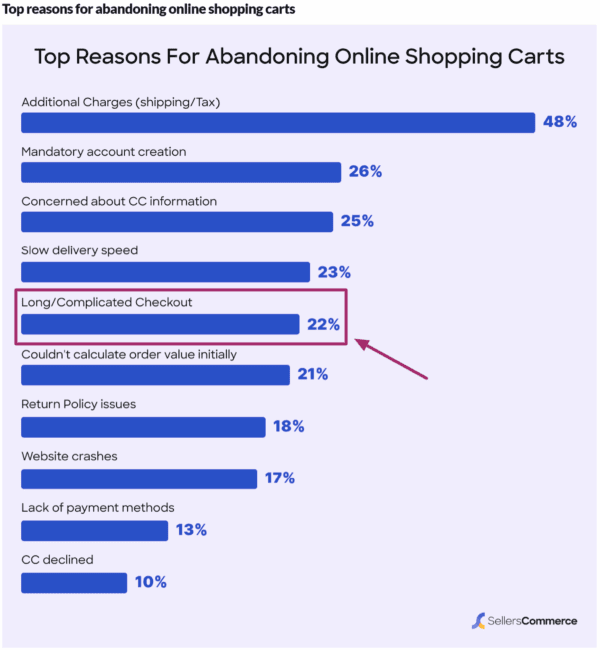
Did you know a long or confusing checkout process is one of the biggest reasons shoppers abandon their carts, especially during high-traffic days like Black Friday? That’s the last thing you want when every second counts.
Before the rush begins, take a few minutes to go through your own checkout process on both desktop and mobile. Place a test order just like a customer would. Verify that your discount codes are applied correctly, your payment options load smoothly, and the overall flow feels quick and effortless.
Ask a few friends, family members, or even teammates to try it too. Fresh eyes often spot friction points you might miss, such as unclear buttons, confusing forms, or slow-loading pages.
Trust also plays a huge role. Ensure your checkout page displays secure payment badges and recognizable gateways, such as PayPal, Apple Pay, or Stripe. When shoppers feel confident their payment is safe, they’re far more likely to hit “Buy now.”
And one last tip: keep it simple. The fewer distractions and clicks, the smoother the path to purchase. That’s precisely what drives conversions during a last minute Black Friday rush.
Send a simple email to your list
Black Friday emails have been shown to generate 33 percent higher conversion rates than regular marketing messages. That alone makes it one of the smartest last minute Black Friday tips to focus on. When time is short, your existing customer base is your best asset. They already trust your brand and are far more likely to act quickly on your offers.
Keep your email focused and straightforward. Start with a subject line that clearly highlights your best deal or most significant discount. For example, in the screenshot below, you can see how the key offer or discount is prominently displayed in the subject line, while the body reinforces the offer with a clear call to action.
Inside the email, make your main offer impossible to miss. Emphasize the key benefits of your product or service, and include a direct call to action that takes users straight to your Black Friday sale page. Make it visually engaging by adding a countdown timer or a short GIF that brings energy and urgency to the message.
Remember, this isn’t about crafting a perfect campaign. It’s about getting the right message to the right people at the right time. A simple, well-timed email can make a real difference in your Black Friday sales.
Promote on social media channels
Social media continues to play a significant role in Black Friday success. It has seen a 7 percent year-over-year increase in traffic, now driving around 10 percent of all global mobile traffic referrals during the holiday season. Your audience is already scrolling, searching, and shopping, so this is your opportunity to be where they are.
In these last few days, your social media strategy should focus on building anticipation and trust. If you have customer review videos, testimonials, or any user-generated content, start sharing them now. Boosting these posts or running quick ad campaigns featuring real customer stories can help you build credibility fast. People are far more likely to buy when they see genuine experiences from others.
You can also collaborate with a micro-influencer or a brand advocate who already has a connection with your target audience. Even a brief post, story, or reel from them can draw attention to your sale and help you gain visibility.
If you are short on time, focus only on your most active platform, whether that is Instagram, Facebook, TikTok, or LinkedIn. Post your best offer as a pinned post or a story highlight and use countdown stickers or short video snippets to create a sense of urgency.
Lastly, remember to engage. Reply to comments, answer questions, and reshare posts from happy customers. Small interactions can make your brand feel more approachable and help you stand out during the Black Friday rush.
If you haven’t touched your SEO yet, don’t worry. There’s still time to make a few quick updates that can help your store appear in the search results. These last minute Black Friday SEO tweaks can enhance visibility, attract the right audience, and might give your deals a competitive edge.
Start with your meta titles and meta descriptions. Add words like Black Friday 2025, sale, or deal to your titles so searchers know what to expect. For example, instead of ‘Women’s handbags – Classic collection,’ you can try ‘Black Friday 2025 deals on women’s handbags.’ Keep it relevant, natural, and clear.
Next, check your product and landing pages. Make sure they’re up to date with current pricing, stock status, and offers. Highlight the discounts in your product descriptions, and, if possible, include keywords that shoppers might search for, such as ‘best Black Friday deals’ or ‘holiday gift offers.’
Another smart move is to reuse your existing content. If you already have an older Black Friday or holiday gift guide, simply refresh it for 2025 by updating the year, offers, and internal links. It’s a fast way to keep your content relevant without having to start from scratch.
Lastly, take a minute to review your page experience. A fast, mobile-friendly site can make or break your Black Friday sales. Run a quick check using Google’s PageSpeed Insights and fix anything that’s slowing your pages down. Even minor improvements can help increase conversions.
These quick wins may not replace a comprehensive Black Friday SEO strategy. However, they can still make your website more discoverable and help you capture traffic from shoppers actively seeking deals.
The nice-to-dos (if you have a little more time)
Okay, so the must-dos can help you frame a solid last minute marketing campaign. But if you’ve managed to check those off quickly and still have a little time on your hands, don’t stop there. The following few ideas may seem optional, but they can give your campaign the extra boost it needs to capture more attention, convert hesitant shoppers, and capitalize on the Black Friday rush.
Run simple retargeting ads
Don’t let potential buyers slip away after visiting your store. Retargeting ads help remind them of products they viewed or added to their carts, increasing the chances of conversion. Even a short, time-bound campaign with strong visuals and clear CTAs can make a difference during the Black Friday rush.
Bundle products or create quick gift sets
Shoppers love convenience, especially during the holidays. Bundling complementary products or creating quick gift sets can simplify decision-making and increase your average order value. Highlight these as limited-time deals to develop a sense of urgency and drive faster sales.
Add live chat or quick support options
Many customers abandon their carts when questions go unanswered. Adding a live chat feature helps resolve last minute queries instantly and keeps buyers engaged throughout the checkout process. Tools like Tidio and LiveChat integrate seamlessly with both WordPress and Shopify, making setup quick and easy.
Make your Black Friday deals shine with Yoast SEO for free!
Getting your offers in front of the right people starts with how your website appears and performs in search results. That’s where Yoast SEO can be a real game-changer during the Black Friday rush.
Here’s how:
Write SEO-friendly content
With Yoast SEO, you can create content that both readers and search engines understand. With Yoast SEO’s real-time feedback:
Get instant insights on keyword use, density, and placement
Optimize your product titles and descriptions to highlight key offers
Ensure your content maintains the right balance between keywords and readability
Improve readability
Shoppers move fast during Black Friday. Keep them engaged with content that is easy to read and skim. Yoast helps you:
Simplify long sentences and paragraphs
Use better transitions for a smoother flow
Maintain a consistent tone and structure throughout your content
Help search engines crawl your site efficiently
Visibility depends on how easily search engines can crawl and index your site. With Yoast SEO, you can:
Automatically generate XML sitemaps to guide crawlers
Use SEO-friendly breadcrumbs to create a clear site structure
Ensure your most important Black Friday pages are indexed correctly
Prepare your website for the future of search
AI-powered search is transforming the way people discover brands and deals online. The llms.txt feature in Yoast SEO helps you:
Communicate directly with AI systems, such as ChatGPT
Control how your content is accessed and cited by large language models
Enhance the likelihood of your offers being accurately represented in AI-driven summaries and recommendations
Want your Black Friday products to stand out in search with details like price, stock status, and ratings? That’s where structured data comes in. It helps search engines understand your products better and display them as rich results.
With the Yoast WooCommerce SEO plugin, this process becomes effortless. It automatically adds product-specific structured data to your pages, so your deals are clearer and more clickable in search results. This gives your listings the best chance to shine when shoppers are scanning for quick, trustworthy deals during the Black Friday rush.
Buy WooCommerce SEO now!
Unlock powerful features and much more for your online store with Yoast WooCommerce SEO!
Final thoughts: simple moves, big impact
As the countdown begins, remember that success isn’t about doing more but doing what matters most. It’s easy to get caught up in ambitious plans, such as redesigning your website, launching new products, or building influencer partnerships, but those time-intensive ideas rarely deliver quick results when the clock is ticking.
Instead, focus on achievable actions that create immediate impact. Refresh your existing content, refine your offers, and utilize tools like Yoast SEO to optimize your pages efficiently. A few smart tweaks to your product descriptions, meta titles, or site speed can often drive better conversions than a full-scale overhaul.
The key to winning Black Friday isn’t scale, it’s strategy. Work with what you already have, double down on proven tactics, and use every minute wisely. That’s how you turn last minute prep into lasting results.
Ahad Qureshi
I’m a Computer Science grad who accidentally stumbled into writing—and stayed because I fell in love with it. Over the past six years, I’ve been deep in the world of SEO and tech content, turning jargon into stories that actually make sense. When I’m not writing, you’ll probably find me lifting weights to balance my love for food (because yes, gym and biryani can coexist) or catching up with friends over a good cup of chai.
An advisory was issued for the popular WPBakery plugin that’s bundled in thousands of WordPress themes. The vulnerability enables authenticated attackers to inject malicious scripts that execute when someone visits an affected page.
WPBakery Plugin
WPBakery is a drag-and-drop page builder plugin for WordPress that enables users to easily create custom layouts and websites without writing code. WPBakery is frequently bundled with premium themes. Theme developers license it so that they can bring the power of a drag and drop page builder functionality to their WordPress themes.
WPBakery Vulnerability
The WPBakery Page Builder WordPress plugin was discovered to have insufficient input sanitization and output escaping in it’s Custom JS module.
Insufficient input sanitization and output escaping are flaws that enable attackers to upload malicious code into a website and cause the affected site to output malicious code. In general, this can lead to vulnerabilities such as Cross-Site Scripting (XSS) and SQL Injection.
Input Sanitization filters uploaded user data before it is stored or processed by the plugin.
Output Escaping converts characters that have HTML meanings into safe output before it is displayed on a web page. This prevents executable code from outputting onto a live web page and affecting users.
This flaw enables attackers with contributor-level access or higher to inject arbitrary scripts to affected websites. The vulnerability affects WPBakery plugin versions up to and including version 8.6.1.
Users of the plugin are encouraged to update to the latest version of WPBakery, which is currently version 8.7.
Featured Image by Shutterstock/3d artwork wallpaper
Two critical vulnerabilities were identified in the WP Travel Engine, travel booking plugin for WordPress that’s installed on more than 20,000 websites. Both vulnerabilities enable unauthenticated attackers to obtain virtually complete control of a website and are rated 9.8 on the CVSS scale, very close to the highest possible score for critical flaws.
WP Travel Engine
The WP Travel Engine is a popular WordPress plugin used by travel agencies to enable users to plan itineraries, select from different packages, and book any kind of vacation.
Improper Path Restriction (Path Traversal)
The first vulnerability comes from improper file path restriction in the plugin’s set_user_profile_image function
Because the plugin fails to validate file paths, unauthenticated attackers can rename or delete files anywhere on the server. Deleting a file such as wp-config.php disables the site’s configuration and can allow remote code execution. This flaw can enable an attacker to stage a remote code execution attack from the site.
Local File Inclusion via Mode Parameter
The second vulnerability comes from improper control of the mode parameter, which lets unauthenticated users include and run arbitrary .php files
This enables an attacker to run malicious code and and access sensitive data. Like the first flaw, it has a CVSS score of 9.8 and is rated as critical because it allows unauthenticated code execution that can expose or damage site data.
Recommendation
Both vulnerabilities affect versions up to and including 6.6.7. Site owners using WP Travel Engine should update the plugin to the latest version as soon as possible. Both vulnerabilities can be exploited without authentication, so prompt updating is recommended to prevent unauthorized access.
WP Engine filed a Second Amended Complaint against Automattic and Matt Mullenweg in response to the September 2025 court order that dismissed several counts but gave WP Engine an opportunity to amend and fix issues in its earlier filing. Although Mullenweg blogged last month that the ruling was a “significant milestone,” that’s somewhat of an overstatement because the court had, in fact, dismissed the counts related to antitrust and monopolization with leave to amend, allowing WP Engine to amend and refile its complaint, which it has now done.
WP Engine Versus Automattic Is Far From Over
In last month’s court order, two claims were dismissed outright because of technical issues, not because they lacked merit.
Two Claims That Were Dismissed
Count 4, Attempted Extortion: WP Engine’s lawyers cited a section of the California Penal Code for Attempted Extortion. The Penal Code is criminal law intended for use by prosecutors and cannot serve as the basis for a civil claim.
Count 16, Trademark Misuse, was also dismissed on the technical ground that trademark misuse can only be raised as a defense.
The remaining counts that were dismissed last month were dismissed with leave to amend, meaning WP Engine could correct the identified flaws and refile. WP Engine’s amended complaint shows that Automattic and Matt Mullenweg still have to respond to WP Engine’s claims and that the lawsuit is far from over.
Six Counts Refiled
WP Engine refiled six counts to cure the flaws the judge identified in the September 2025 court order, including its Computer Fraud and Abuse Act claim (Count 3).
Count 3: Computer Fraud and Abuse Act (CFAA)
Count 12: Attempted Monopolization (Sherman Act)
Count 13: Illegal Tying (Sherman Act)
Count 14: Illegal Tying (Cartwright Act)
Count 15: Lanham Act Unfair Competition
Count 16: Lanham Act False Advertising
Note: In the amended complaint, Count 16 is newly numbered; the previous Count 16 (Trademark Misuse) was dismissed without leave to amend.
How Second Amended Complaint Fixes Issues
The refiled complaint adds further allegations and examples to address the shortcomings identified by the judge in the previous ruling. One major change is the inclusion of clearer market definitions and more detailed allegations of monopoly power.
Clearer Market Definition
The September 2025 order found that WP Engine’s earlier complaint did not adequately define the relevant markets, and the judge gave WP Engine an opportunity to amend. The amended complaint dedicates about 27 pages to defining and describing multiple relevant markets.
WP Engine’s filing now identifies four markets:
Web Content Management Systems (CMS) Market: Encompassing both open-source and proprietary CMS platforms for website creation and management, with alleged monopoly power concentrated in the WordPress ecosystem.
WordPress Web Hosting Services Market: Consisting of hosting providers that specialize in WordPress websites, where Automattic is alleged to influence competition through its control of WordPress.org and trademark enforcement.
WordPress Plugin Distribution Market: Focused on the distribution of plugins through the WordPress.org repository, which WP Engine alleges Automattic controls as an essential and exclusive channel for visibility and access.
WordPress Custom Field Plugin Market: A narrower segment centered on Advanced Custom Fields (ACF) and similar plugins that provide custom field functionality, where WP Engine claims Automattic’s actions directly suppressed competition.
By defining these markets in greater detail over 27 pages, WP Engine addresses the court’s earlier finding that its market definitions were inadequately supported and insufficiently specific.
New Allegations Of Monopoly Power
The September 2025 court order found that WP Engine had not plausibly alleged Automattic’s monopoly power or exclusionary conduct, and allowed WP Engine to amend its complaint.
The amended filing adds detailed assertions intended to show Automattic’s dominance:
Automattic allegedly controls access to the official WordPress plugin and theme repositories, which are essential for visibility and functionality within the WordPress ecosystem.
Matt Mullenweg’s dual roles as Automattic’s CEO and his control over WordPress.org’s operations are alleged to enable coordinated market exclusion.
The complaint cites WordPress’s scale, powering more than 40 percent of global websites, and argues that Automattic exercises significant influence over this ecosystem through its control of WordPress.org and related trademarks.
These new assertions are meant to show that Automattic’s influence over WordPress.org translates into measurable market power, addressing the court’s finding that WP Engine had not yet made that connection.
Expanded Exclusionary Conduct Examples
The court found that WP Engine framed Automattic’s control of WordPress.org and the WordPress trademarks too vaguely to plausibly show exclusionary conduct or resulting antitrust injury.
The amended complaint addresses this by detailing how Automattic and Matt Mullenweg allegedly used threats and actions involving WordPress.org access and distribution to:
Block or restrict WP Engine’s access to WordPress.org resources and community channels.
Impose conditions on access to WordPress trademarks and resources through alleged threats and leverage.
Pressure plugin developers and partners not to collaborate or integrate with WP Engine’s products.
Establish an alleged de facto tying arrangement, linking participation in the WordPress.org ecosystem to compliance with Automattic’s control over governance and distribution.
Together, these examples illustrate how WP Engine is attempting to turn previously vague claims of control into specific allegations of exclusionary conduct.
Abundance Of Evidence
Mullenweg sounded upbeat in his response to the September 2025 ruling:
“Just got word that the court dismissed several of WP Engine and Silver Lake’s most serious claims — antitrust, monopolization, and extortion have been knocked out!”
But WP Engine’s Second Amended Complaint makes it clear that those “serious claims” were dismissed with leave to amend, have since been refiled, and are not yet knocked out.
The amended complaint is 175 pages long, perhaps reflecting the comprehensive scope necessary to address the issues the court identified in the September 2025 order. None of this means WP Engine is winning; it simply means the ball is back in play. That outcome directly contradicts Mullenweg’s earlier claim that the antitrust, monopolization, and extortion counts had been “knocked out.”
Builderius WordPress website builder announced the ability to develop sites using GraphQL together with AI. The new functionality enables developers to use the power of GraphQL with the assistance of AI.
Why GraphQL
GraphQL can be a more efficient way to fetch data than traditional approaches in WordPress, using visual query builders, PHP, or REST API. It enables websites, or in this case Builderius, a visual builder for WordPress, to fetch only the specific data they need in one request, reducing the inefficiencies of how dynamic data is typically fetched within WordPress. Unlike the WordPress REST API, which delivers fixed sets of data from multiple endpoints, GraphQL gives developers more control and efficiency by returning exactly what’s asked for in a single query.
AI-Assisted Learning Setup
Builderius provides schema documentation and setup instructions that enable AI tools (like Claude or ChatGPT) to function as teaching assistants for learning GraphQL. Users are able to learn GraphQL through step-by-step project work as the AI guides them, explaining, structuring, and improving queries. This approach helps users learn GraphQL concepts while applying them in actual WordPress projects, supporting both productivity and ongoing learning.
Builderius is providing schema documentation and configuration guides that enable AI tools to act as interactive learning partners for getting started using GraphQL within Builderius. Instead of merely generating code, the AI integration helps users understand the structure and reasoning behind queries, enabling them to apply GraphQL concepts effectively in real development work. This approach blends hands-on learning with practical application, helping developers become proficient while building dynamic WordPress sites.
According to Builderius:
“Once configured, you can simply start new conversations by asking what you want to build. The AI will remember its role and your learning progression across all chats in the project.
…Your AI will explain the relationship between built-in WordPress queries, custom GraphQL queries, and dynamic data tags. You’ll understand how data flows from your queries into your visual layouts, with concrete examples.”
Hostinger announced a new AI-agent optimization feature that makes any WordPress website AI-agent-friendly, optimizing websites to provide the best experience for humans using AI agents to compare products, plan vacations, and perform other tasks that are part of a user’s information and consumer journey.
Agentic Web
The Agentic Web is a new reality of the Internet based on reducing friction for Agentic AI. Agentic AI refers to AI bots that go out into the web to complete tasks on behalf of humans.
The original version of the web was optimized as a platform for interactions with people. The Agentic Web is optimized for interactions with AI agents. What makes the Agentic Web possible is a collection of protocols and standards that make it easy for a person’s AI agent to crawl and complete tasks on websites.
Consumers are increasingly relying on AI for their information needs, and this includes product research. Just as websites had to become mobile-friendly to keep up with how users were consuming information, informational and e-commerce websites also need to begin considering how to capture that audience comprised of AI agents working on behalf of consumers.
Hostinger’s Web2Agent
Hostinger announced a new feature called Web2Agent. Web2Agent makes WordPress websites Agentic AI friendly with a single click. Web2Agent also works on Hostinger’s proprietary website builder.
According to Hostinger:
“Web2Agent is an experimental feature developed and operated by Hostinger. It transforms your website into a fully AI-compatible agent that can be easily discovered, understood, and accessed by AI tools. It currently works best with Claude, Cursor and tools supporting MCP protocol and we’re working on integrating it with ChatGPT, Gemini, and other autonomous AI agents.
As the internet shifts toward an agent-driven future, this feature helps position your website as a first-class participant in that ecosystem – intelligent, accessible, and interoperable.”
Enabling Web2Agent makes websites ready for interaction with AI while also respecting robots.txt and conforming to LLMs.txt.
Hostinger explains that it currently works with the MCP protocol and with any other tools and apps that connect to that protocol. It will be adding more protocols in the near future.
An internal dispute within the WordPress core contributor team spilled into the open, causing major confusion among people outside the organization. The friction began with a post from more than a week ago and culminated in a remarkable outburst, exposing latent tensions within the core contributor community.
Mary Hubbard Announcement Triggers Conflict
The incident seemingly began with a September 15 announcement by Mary Hubbard, the Executive Director of WordPress. She announced a new Core Program Team that is meant to improve how Core contributor groups coordinate with each other and improve collaboration between Core contributor teams. But this was just the trigger for the conflict, which was actually part of a longer-term friction.
“The goal of this team is to strengthen coordination across Core, improve efficiency, and make contribution easier. It will focus on documenting practices, surfacing roadmaps, and supporting new teams with clear processes.
The Core Program Team will not set product direction. Each Core team remains autonomous. The Program Team’s role is to listen, connect, and reduce friction so contributors can collaborate more smoothly.”
That announcement was met with the following response by a member of the documentation team (Jenni McKinnon), which was eventually removed:
“For the public record: This Core Program Team announcement was published during an active legal and procedural review that directly affects the structural governance of this project.
I am not only subject to this review—I am one of the appointed officials overseeing it under my legal duty as a recognized lead within SSRO (Strategic Social Resilience Operations). This is a formal governance, safety, and accountability protocol—bound by national and international law—not internal opinion.
Effective immediately: • This post and the program it outlines are to be paused in full. • No action is to be taken under the name of this Core Program Team until the review concludes and clearance is formally issued. • Mary Hubbard holds no valid authority in this matter. Any influence, instruction, or decision traced to her is procedurally invalid and is now part of a legal evidentiary record. • Direction, oversight, and all official governance relating to this matter is held by SSRO, myself, and verified leadership under secured protocol.
This directive exists to protect the integrity of WordPress contributors, prevent governance sabotage, and ensure future decisions are legally and ethically sound.
Further updates will be provided only through secured channels or when review concludes. Thank you for respecting this freeze and honoring the laws and values that underpin open source.”
The post was followed by astonishment and questions in various Slack and Facebook WordPress groups. The roots of the friction begin with events from a week ago centered on documentation team participation.
Documentation Team Participation
A September 10 post by documentation team member Estela Rueda informed the Core contributor community that the WordPress 6.9 release squad is experimenting with a smaller team that excludes documentation leads, with only a temporary “Docs Liaison” in place. Her post explained why this exclusion is a problem, detailed the importance of documentation in the release cycle, and urged that a formal documentation lead role be reinstated in future releases.
“The release team does not include representation from the documentation team. Why is this a problem? Because often documentation gets overlooked in release planning and project-wide coordination: Documentation is not a “nice-to-have,” it is a survival requirement. It’s not something we might do if someone has time; it’s something we must do — or the whole thing breaks down at scale. Removing the role from the release squad, we are not just sending the message that documentation is not important, we are showing new contributors that working on docs will never get them to the top of the credits page, therefore showing that we don’t even appreciate contributing to the Docs.”
Jenni McKinnon, who is a member of the docs team, responded with her opinions:
“This approach isn’t in line with genuine open-source values — it’s exclusionary and risks reinforcing harmful, cult-like behaviors.
By removing the Docs Team from the release squad under the guise of “reducing overhead,” this message sends a stark signal: documentation is not essential. That’s not just unfair — it actively erodes the foundations of transparency, contributor morale, and equitable participation.”
She added further comments, culminating in the post below that accused WordPress Executive Director Mary Hubbard of being behind a shift toward “top-down” control:
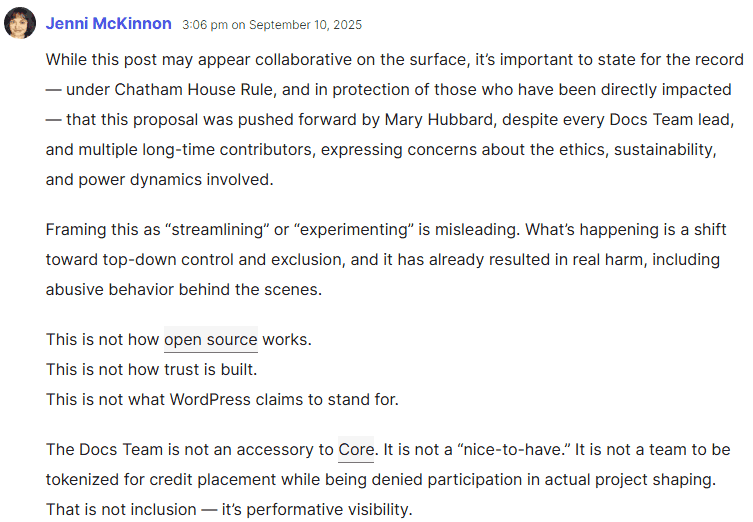
“While this post may appear collaborative on the surface, it’s important to state for the record — under Chatham House Rule, and in protection of those who have been directly impacted — that this proposal was pushed forward by Mary Hubbard, despite every Docs Team lead, and multiple long-time contributors, expressing concerns about the ethics, sustainability, and power dynamics involved.
Framing this as ‘streamlining’ or ‘experimenting’ is misleading. What’s happening is a shift toward top-down control and exclusion, and it has already resulted in real harm, including abusive behavior behind the scenes.”
Screenshot Of September 10 Comment
Documentation Team Member Asked To Step Away
Today’s issue appears to have been triggered by a post from earlier today announcing that Jenni McKinnon was asked to “step away.”
“The Documentation team’s leadership has asked Jenni McKinnon to step away from the team.
Recent changes in the structure of the WordPress release squad started a discussion about the role of the Documentation team in documenting the release. While the team was working with the Core team, the release squad, and Mary Hubbard to find a solution for this and future releases, Jenni posted comments that were out of alignment with the team, including calls for broad changes across the project and requests to remove certain members from leadership roles.
This ran counter to the Documentation team’s intentions. Docs leadership reached out privately in an effort to de-escalate the situation and asked Jenni to stop posting such comments, but this behaviour did not stop. As a result, the team has decided to ask her to step away for a period of time to reassess her involvement. We will work with her to explore rejoining the team in the future, if it aligns with the best outcomes for both her and the team.”
And that post may have been what precipitated today’s blow-up in the comments section of Mary Hubbard’s post.
Zooming Out: The Big Picture
What happened today is an isolated incident. But some in the WordPress community have confided their opinion that the WordPress core technical debt has grown larger and expressed concern that the big picture is being ignored. Separately, in comments on her September 10 post (Docs team participation in WordPress releases), Estela Rueda alluded to the issue of burnout among WordPress contributors:
“…the number of contributors increases in waves depending on the releases or any special projects we may have going. The ones that stay longer, we often feel burned out and have to take breaks.”
Taken together, to an outsider, today’s friction contributes to the appearance of cracks starting to show in the WordPress project.
The judge overseeing the legal battle between WP Engine versus Automattic and Matt Mullenweg issued a ruling that fully dismissed two of WP Engine’s claims, allowed several to proceed, and gave WP Engine the chance to amend others.
Nine Claims Allowed To Proceed – One Partially Survives
Counts 1 & 2
Count 1: Intentional Interference with Contractual Relations
Count 2: Intentional Interference with Prospective Economic Advantage
Those two counts survived the motion to dismiss. That means WP Engine can try to prove that Automattic/Mullenweg interfered with its contracts and business opportunities. This shows that the judge didn’t throw out WP Engine’s entire “you’re sabotaging our business” approach. If WP Engine wins on these counts they could be eligible to receive damages.
In total, the judge’s order allowed nine claims to proceed and one to partially survive.
These are the remaining claims that survived and are allowed to proceed:
CFAA Unauthorized Access (Count 19): Tied to allegations that Automattic and Mullenweg covertly replaced WP Engine’s ACF plugin with their own SCF plugin on customer sites without authorization.
Unfair Competition (Count 5) Connected to claims that Automattic’s conduct, including unauthorized plugin replacement and trademark issues, amounted to unlawful and unfair business practices under California law.
Defamation (Count 9) & Trade Libel (Count 10) Statements on WordPress.org alleging WP Engine offered a “cheap knock-off” of WordPress and that WP Engine delivered a “bastardized simulacra of WordPress’s GPL code.”
Slander (Count 11): Based on public remarks Mullenweg made at WordCamp US and in a livestreamed interview where Mullenweg described WP Engine as “parasitic” and damaging to the open-source community.
Lanham Act (Count 17: Unfair Competition) & Lanham Act (Count 18: False Advertising) Automattic and Mullenweg filed a motion to partially dismiss these counts but the motion was not granted, so these two counts move forward.
This is the claim that partially survived:
Promissory Estoppel (Count 6) This is based on specific promises, such as free plugin hosting on wordpress.org, which the court found definite enough to proceed, while broader statements like “everyone is welcome” were too vague to support the claim.
Two Claims Dismissed With Leave To Amend
The judge dismissed two of the claims with “leave to amend,” which means the court found an issue with how WP Engine pleaded their claims. The claims were not legally sufficient, but the judge gave WP Engine the option to update its complaint to fix the problems. If WP Engine amends successfully, those claims can return to the case.
The two claims dismissed with leave to amend are:
1. Antitrust claims of monopolization, attempted monopolization, and illegal tying (Sherman Act & Cartwright Act).
On the antitrust claims, the Court found WP Engine failed to define a relevant market, stating:
“…consumers entering the WordPress ecosystem by electing a WordPress web content management system would know they were locked-in to WordPress aftermarkets. Mullenweg’s purported deception and extortionate acts did not change that fundamental operating principle of the WordPress marketplace.”
2. CFAA extortion claim (Count 3): WP Engine alleged Automattic threatened to block wordpress.org access and demanded licensing fees.
Regarding the extortion claims, WP Engine alleged that Automattic and Mullenweg violated the Computer Fraud and Abuse Act (CFAA) by threatening to block WP Engine’s access to wordpress.org and demanding licensing fees.
The Court dismissed this claim with leave to amend, finding the allegations did not sufficiently establish “extortion” under CFAA standards. The judge noted that merely threatening to block access, even coupled with demands for licensing, did not meet the statutory requirements as pled. However, WP Engine has been given time to amend the complaint (“with leave to amend”).
Count 4 Count 4 was dismissed because the California Penal Code allows government prosecutors to bring criminal charges for attempted extortion, but it does not give private parties like WP Engine the right to sue under that statute. The dismissal was not about whether Automattic’s conduct could be considered extortion but about whether WP Engine had the legal authority to use that law in a civil case.
Count 16 The court dismissed Count 16 because trademark misuse is only recognized as a defense, not as a lawsuit that can be filed on its own. WP Engine may still raise trademark misuse later if Automattic tries to enforce trademarks against it.
The exact wording is:
“With no authority from WPEngine that authorizes pleading declaratory judgment of trademark misuse as a standalone cause of action rather than an affirmative defense, the Court GRANTS Defendants’ motion to dismiss Count 16, without prejudice to WPEngine asserting it as an affirmative defense if appropriate later in this litigation.”
Post By Matt Mullenweg About The Ruling
Automattic CEO and WordPress co-founder posted an upbeat blog post about the court ruling that offered a simplified summary of the court order, which is fine, but simplification can leave out details. He’s right that the decision narrows the case and that the attempted extortion claim is out for good.
He wrote:
“…the court dismissed several of WP Engine and Silver Lake’s most serious claims — antitrust, monopolization, and extortion have been knocked out!”
The attempted extortion under California Penal Code (Count 4) was indeed “knocked out.” But the Computer Fraud and Abuse Act (CFAA) extortion claim (Count 3) was dismissed with leave to amend, meaning WP Engine has the opportunity to try again.
The antitrust and monopolization claims (Counts 12–15) were also dismissed but with leave to amend, meaning they too are not permanently gone.
His post is technically correct.
But the simplification leaves out what the judge allowed to move forward:
Automattic’s motion to dismiss Count 1 (intentional interference with contractual relations) and Count 2 (intentional interference with prospective economic relations) were denied, and both will move forward, potentially making WP Engine eligible to receive damages if they win on these counts.
Then there are the others that are moving forward:
CFAA (Count 19): This is significant. It alleges Automattic covertly swapped WP Engine’s widely-used ACF plugin with its own SCF plugin on customer sites without consent. The court found these allegations plausible enough to move forward
Unfair Competition (Count 5): Connected to claims that Automattic’s conduct, including unauthorized plugin replacement and trademark issues, amounted to unlawful and unfair business practices under California law. (The court specifically pointed to the surviving CFAA and Lanham Act claims as the legal basis for letting this proceed.)
Defamation (Count 9) & Trade Libel (Count 10): Based on statements on WordPress.org alleging WP Engine offered a “cheap knock-off” of WordPress and that WP Engine delivered a “bastardized simulacra of WordPress’s GPL code.”
Slander (Count 11): Grounded in public remarks Mullenweg made at WordCamp US and in a livestreamed interview where he described WP Engine as “parasitic” and damaging to the open-source community.
Lanham Act (Count 17: Unfair Competition) & Lanham Act (Count 18: False Advertising): Defendants sought partial dismissal, but the court declined. Both counts remain live and move forward.
One of the strengths of WordPress is its extensibility. You can run everything from e-shops and booking systems to massive WordPress multisites from one instance of WordPress.
Another is that it’s a database and robust PHP-based programming language, which means that running a bunch of updates on a site is remarkably straightforward.
In this post, I’m going to present three different ways to bulk update WordPress.
A quick word of caution before starting to look at this: Things like misaligned fields or plugin conflicts could result in unintended results, so if you’re doing any large-scale updates, be sure to back up beforehand.
Also, for the content updates, it’s worth running a small test. Ten or so posts as a tester is a good way to start, before running it through the entire site.
1. How To Bulk Update Content On A WordPress Website
Simple Changes To Existing Content
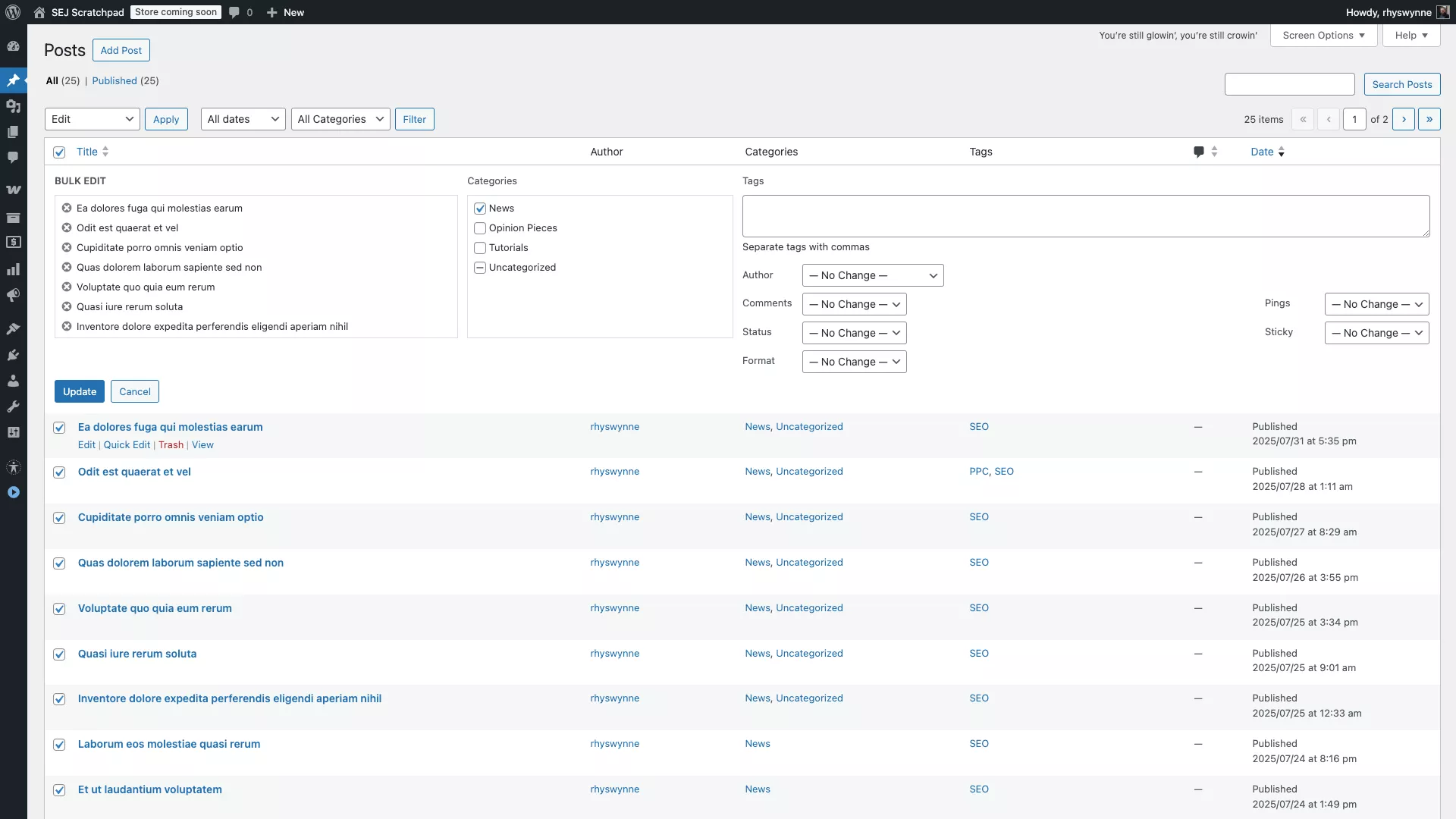
If you want to make simple changes to existing content, such as bulk change the author, status, or taxonomies on a number of pieces of content, one thing you can do is use WordPress’ pre-existing bulk editing component.
From the edit posts/pages page, you can tick individual posts and pages and select “Edit.”
From there, you can set all posts’ categories, tags, statuses, and other information quickly and easily. Once done, click the “Update” button.
Screenshot from WordPress, August 2025
Please note: This will replace all categories, but tags will be added. This is probably the most common way of editing content, which you probably already know about!
Importing And Exporting Content
Let’s say you want to bulk add WordPress content on a WordPress website.
The most common version is that you want to import a set of blog posts, or indeed, you have a list of products within a spreadsheet that you want to import into a system like WooCommerce; it depends on where you’re importing from.
If you’re combining a WordPress export and importing it into another blog, the best way is to use the default WordPress Importer plugin.
If you’re moving content between WordPress sites, use the default WordPress Importer. It reads WXR (.xml) export files and can optionally download and import file attachments.
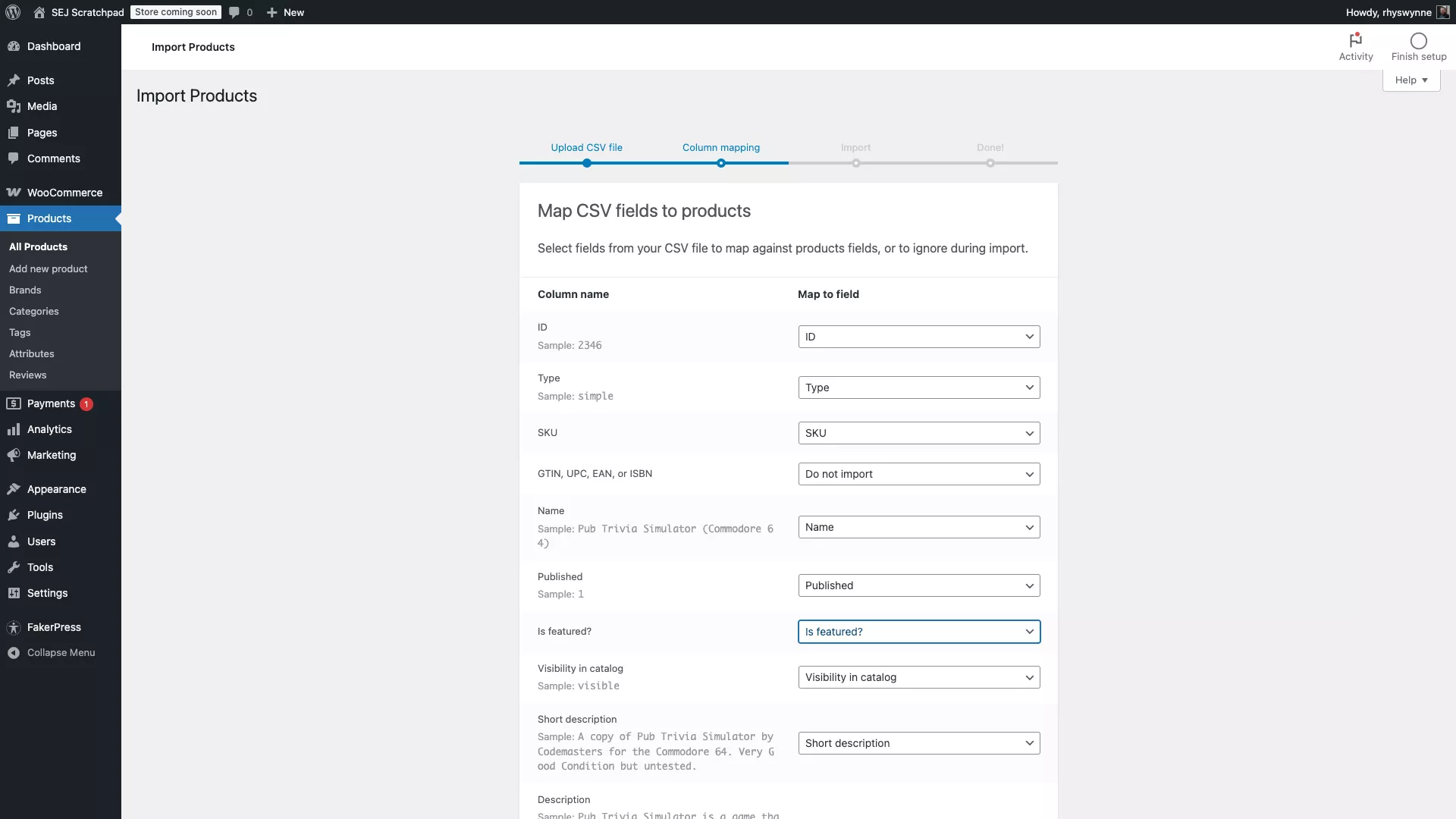
If you are using WooCommerce, then the best course of action would be to use the default WooCommerce product importer.
It’s pretty robust and can take a standard CSV, XML file, or spreadsheet and import it. You can map these fields to WooCommerce fields, which is a bit more work.
Screenshot from WordPress, August 2025
For WooCommerce products, use the built-in Product CSV Importer/Exporter and map your columns to product fields.
Should you be importing content from a non-standard source (like a CSV or a feed), a great plugin to use is WP All Import.
For non-standard sources (CSV, XML, Excel, Google Sheets), WP All Import can map fields to any post type and even run custom PHP during import. Add-ons cover ACF, Yoast, and WooCommerce.
It’s a freemium plugin, with the premium version allowing integrations with ACF, Yoast & WooCommerce. To talk through the power of WP All Import is a blog post in itself. However, I can share a common usage.
Say you wish to update all blog posts with new standardised title tags, you can use the companion plugin WP All Export to export all post data.
Then, within Excel or Google Sheets, you can change individual values, and then use WP All Import to import the blog posts back in.
2. How To Handle Bulk Plugin Updates On A WordPress Website
Of course, behind the scenes – and one of the most common tasks with WordPress blogs – is making sure that plugins are all up to date.
Keeping plugins up to date is a crucial task in keeping your site secure and running smoothly. Thankfully, if you only have one site, it’s very easy to do a bulk update.
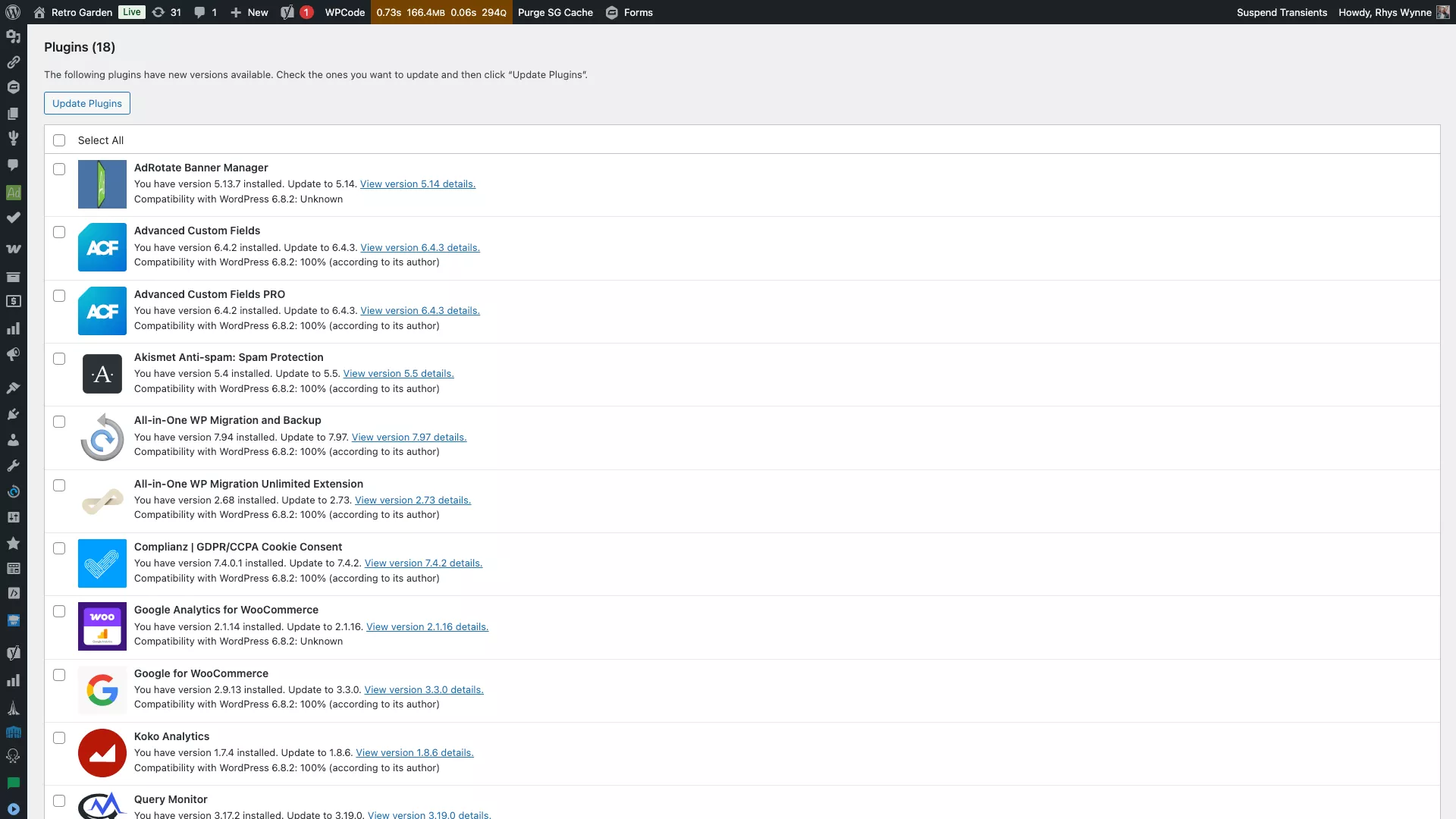
Log in to your WordPress site as an administrator, and under Dashboard, there’s a heading entitled “Updates.” Click it to take you to the updates screen.
Screenshot from WordPress, August 2025
Scroll down a bit, and you should have a list of plugins towards the bottom that need an update. Similarly to the bulk editing, there will be a checkbox next to each element.
Select all checkboxes for the plugins you wish to update (and – in all reality – you’d want to make sure you select all plugins).
Click “Update Plugins,” and then all plugins will be brought up to date!
Your site is unlikely to break even with a large number of backups. However, in the extremely unlikely event the site breaks after updating a bunch of plugins, there are ways to recover, which you can read in the article “How Do You Resolve A Plugin Conflict.” Go to the log files and deactivate the plugin via FTP.
Alternatively, here are a few other techniques to do bulk updates successfully:
Update in small batches (e.g. split by functionality, or by letter). Update, reload key pages, then move on.
Back up and test on staging before production.
If you use a maintenance dashboard like ManageWP, run Safe Updates (it creates a restore point, runs the updates, visually compares pages, and rolls back if something looks wrong).
WordPress Command Line Interface (WP-CLI) lets you preview or update plugins individually:
Preview: wp plugin update yoast-seo --dry-run
Update one: wp plugin update yoast-seo
Update all (use with care): wp plugin update --all
3. How To Handle Bulk Plugin Updates On Multiple WordPress Websites
That’s all fine for one WordPress site. However, if you are managing multiple WordPress sites, then it can be a bit time-consuming to handle plugin updates on multiple WordPress sites.
In that article, I shared a number of WordPress maintenance dashboard services that exist, which will allow you to log in and update multiple WordPress sites from one singular location.
Here are some of the most popular:
Although each of these platforms has premium offerings that vary with cost and features, they also offer plugin and theme updates for free.
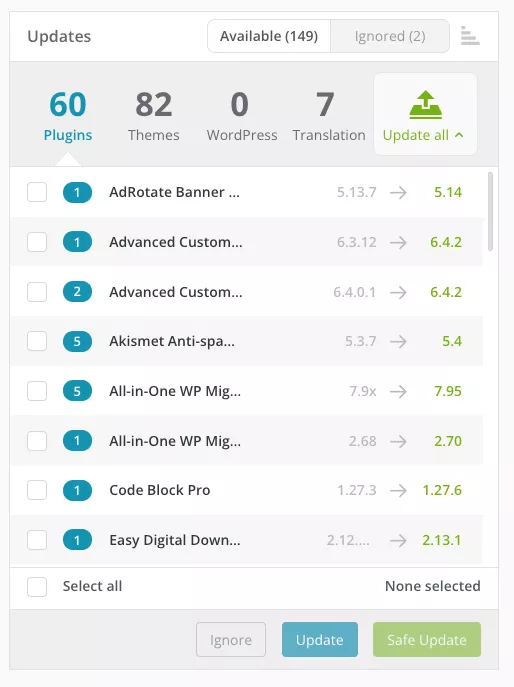
I use ManageWP, so once you connect your site to ManageWP, you should see a dashboard with the number of plugin updates you need to do spread over a number of sites. Simply click “Update All” to update all plugins on all installations. Alternatively you can tick the checkboxes and “Update” to select individual plugins to install.
Screenshot from WordPress, August 2025.
You can also filter by sites and severity of updates within ManageWP. There is a premium option to do a “safe” update, which will allow you to run an update, check the site, and roll back if anything breaks.
There’s a good selection of ways to carry out bulk updates within WordPress. There are also command-like tools like WP CLI (mentioned above) to build scripts to run on sites. However, that is worth an article in itself.
To bulk update all plugins in WP CLI, you can use this command:
wp plugin update --all
This will update all plugins on an individual site and you can expand that to a script to run on multiple sites.
WP CLI is so powerful and really should be used for agencies to manage multiple websites quickly and easily.
Wrapping Up: Bulk Updates For A Smooth-Running WordPress Site
WordPress makes it straightforward to handle bulk updates, whether you’re tweaking content, importing products, or keeping plugins in check.
Across the built-in tools and available plugins, there’s a solution for just about every scenario. The key is to test changes in small batches and always keep a backup handy.
With a little prep, you can save hours of manual work and keep your site (or sites) running smoothly and efficiently.