Yoast SEO free vs Premium: why upgrading is worth it

Do you want to take your site’s SEO to the next level? Yoast SEO Premium can help you out! But there is also a free version of Yoast SEO. So, what exactly is the difference between the free version of Yoast SEO and Yoast SEO Premium? How do these two compare? And is Yoast SEO Premium worth it? Let’s uncover the ten reasons why you should buy Yoast SEO Premium today!

Table of contents

Yoast SEO free vs premium: what is the difference?

Do you want to compare the main differences between Yoast SEO Free and Premium? This table will give you quick insights:

Yoast SEO Free

Find other ways to optimize your website for SEO

No comprehensive SEO solution. You’d need to find other ways to optimize your website, especially if you have a local business, a news website, or if you have a lot of videos.

No AI

You have to manually optimize all your content yourself.

No AI

You have to manually write and optimize all your SEO titles and meta descriptions yourself.

Only 1 keyword per page

Optimize for one keyword per post or page.

No redirect manager

Forgetting to set up a redirect results in visitors hitting a 404 page, which displeases both them and Google.

You need to guess which links would work best

Identify which pages to link to for improved rankings, for both new and existing pages on your site.

No preview of your page on social media

Without a preview of social snippets, you’re left guessing and hoping for the best.

No support

No support
You can help yourself with our extensive knowledge database.

Manually edit robots.txt file

Manually edit your robots.txt file to block AI bots, at the risk of making mistakes.

No free access to the Yoast SEO Google Docs add-on

Transferring draft content from Google Docs to your website for SEO optimization slows your workflow and makes collaboration with internal and external teams more time-consuming.

Yoast SEO Premium vs Yoast SEO Free

Includes Local SEO, Video SEO, and News SEO plugins

Yoast SEO Premium provides everything you need to improve your website’s visibility, whether you’re a business owner, publisher, agency, or content creator.

Find other ways to optimize your website for SEO

No comprehensive SEO solution. You’d need to find other ways to optimize your website, especially if you have a local business, a news website, or if you have a lot of videos.

(Beta) Get AI-powered suggestions to optimize your content

Get optimization suggestions and apply changes instantly with Yoast’s AI features, saving you time and ensuring your content is search engine-friendly. This feature is currently in beta.

No AI

You have to manually optimize all your content yourself.

(Beta) Get high-quality titles and meta descriptions with Yoast AI

Yoast’s AI helps you craft optimized SEO titles and meta descriptions for search and social, boosting your CTR while saving you time.

No AI

You have to manually write and optimize all your SEO titles and meta descriptions yourself.

Optimize for up to five keyword synonyms by adding variants

Include up to four keyword synonyms for a broader reach, and receive a complete SEO analysis for each one.

Only 1 keyword per page

Optimize for one keyword per post or page.

Automatic redirects: so no more dead links or 404 errors

Effortlessly redirect old or renamed pages to maintain satisfaction for both your visitors and Google.

No redirect manager

Forgetting to set up a redirect results in visitors hitting a 404 page, which displeases both them and Google.

Get real-time suggestions for internal links

As you write, you’ll receive suggestions for internal links to other pages, which Google favors and can boost your ranking.

You need to guess which links would work best

Identify which pages to link to for improved rankings, for both new and existing pages on your site.

Preview your page on Facebook and Twitter/X

You have complete control over your page’s social media appearance, ensuring it entices users to click.

No preview of your page on social media

Without a preview of social snippets, you’re left guessing and hoping for the best.

24/7 support

Our helpful and expert support team is ready to assist you with any questions via email or live chat.

No support

No support
You can help yourself with our extensive knowledge database.

Safeguard your content from being used to train AI bots

Easily protect your intellectual property and data privacy by blocking AI bots from scraping your content with a simple toggle.

Manually edit robots.txt file

Manually edit your robots.txt file to block AI bots, at the risk of making mistakes.

Includes 1 free seat to the Yoast SEO Google Docs add-on

Create and optimize your SEO content in Google Docs with Yoast’s guidance, ideal for teamwork with internal and external partners. Enjoy 1 free seat, valued at $5/month.

No free access to the Yoast SEO Google Docs add-on

Transferring draft content from Google Docs to your website for SEO optimization slows your workflow and makes collaboration with internal and external teams more time-consuming.

What are the benefits of Yoast SEO Premium?

For over fifteen years, Yoast SEO has provided small businesses, bloggers, marketers, and online and offline stores with almost everything they need to compete in the search results. Over the years, we made the plugin better and better — following feedback from users, through thorough research and insights from insiders at the search engines. Today, Yoast SEO is run by a team of passionate SEO experts and built by very talented developers.

While the free version of Yoast SEO gives you a lot of tools to help you do well in the search results, Yoast SEO Premium makes many tasks much easier. It saves precious time that you can invest in other ways. Yoast SEO Premium also gives you additional tools, like, for instance, Local SEO, AI features, internal linking suggestions, and the redirect manager. You can use all of these tools to build an impressive site structure. All of this helps make your site a great fit for users and search engines alike. As such, Yoast SEO Premium is a wise investment.

Buy Yoast SEO Premium now!

Unlock powerful features and much more for your WordPress site with the Yoast SEO Premium plugin!

1: Yoast SEO Premium comes with amazing AI features

Yoast SEO Premium now offers AI-powered features that streamline your SEO tasks. With Yoast AI Generate, you can create engaging titles and meta descriptions effortlessly. Choose from multiple options or generate more until you find the perfect fit. Meanwhile, Yoast AI Optimize provides smart suggestions to enhance your existing content, ensuring SEO best practices are met with just a click. These tools integrate smoothly into your workflow, saving you time and effort while keeping your content search-engine friendly. Available for WordPress and Shopify, these features help you maintain control over your content’s final look and feel.

2: Yoast SEO Premium comes with all add-ons

Yoast SEO Premium now includes various separate add-ons, such as News, Video, and Local SEO, in one convenient package. This comprehensive suite enhances your optimization capabilities without needing additional purchases. However, the WooCommerce SEO add-on is not included and is available separately. Enjoy a streamlined experience to boost your site’s performance across different content types and media.

3: Yoast SEO Premium is a time-saver

One of the most important things you need to remember about SEO is that it is never done. There’s always more to do, better content to write, or fixes to make. Luckily, there’s a WordPress SEO plugin that’s glad to be of assistance. As you might know, Yoast SEO is not a set-it-and-forget-it kind of tool. You need to work with it, whether it’s improving your content or building your site structure. In the free version, you still need to do much of the work yourself. Yoast SEO Premium comes with a number of AI tools that can save you lots of time.

4: Use Yoast SEO in Google Docs

The Yoast SEO Google Docs add-on allows you to draft and optimize your SEO content directly within Google Docs. This tool is ideal for seamless collaboration with both internal teams and external partners. You can work on content, refine it, and ensure it aligns with SEO best practices, all without leaving your document. This efficiency streamlines your workflow and enhances team cooperation. Plus, Yoast SEO Premium includes one user seat for this add-on, typically valued at $5 per seat.

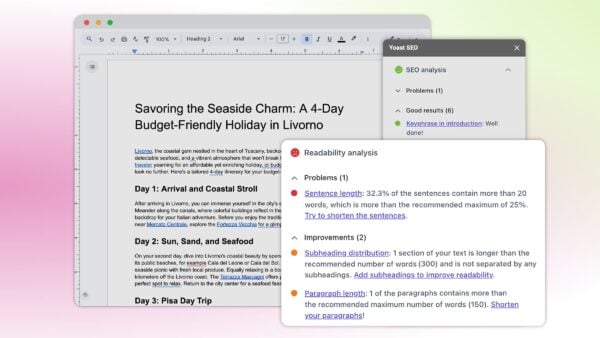
You can enjoy the same Yoast SEO analyses in Google Docs

5: Makes doing site maintenance easier

If working on your site is turning into a day job, you might need some help! Premium makes site maintenance easier. For one, Premium comes with a stale cornerstone content finder that reminds you to update your most important content.

Another tool that helps you work on your pages is the redirect manager. Whenever you make changes to pages or URLs, this tool makes sure to add a redirect for you. All you have to do is say where the new URL needs to lead. With the redirect manager, you can also fix your 404 errors in no time. No developer necessary. It’s so helpful that 58% of Premium users praise the redirect manager as the best feature in Yoast SEO Premium!

Building a solid site structure is one of the quickest routes to success. Making your content easily accessible to users and search engines helps them both make sense of your site. Yoast SEO Premium comes with a number of tools that help you build relevant links that can build a solid foundation for your site structure. Our plugin comes with internal linking blocks, an orphaned content finder and a targeted internal linking suggestion tool.

With the internal linking suggestions, relevant content will automatically be suggested while you’re writing your new content. There’s no need to remember that all those posts are pages!

But don’t just take our word for it, here’s what Andrew Evans from Intellifluence says about the internal linking tool:

While the free Yoast SEO plugin offers many great features, the Premium version takes things to the next level. The internal linking suggestions feature ensures our blog is organized in a cohesive manner. It also ensures that link equity passes to other posts. This feature alone saves a tremendous amount of time as the plugin suggests links as we write. As the site grows, this feature only becomes more valuable! If you’ve ever tried to develop an interlinking strategy for an established blog, you’ll know exactly what I mean…

Andrew Evans

7: An advanced language analysis that makes writing more natural

Yoast SEO is famous for its SEO and readability analyses — a.k.a. the colored traffic lights. The feedback these analyses give you helps you produce a great piece of content that adheres to a range of SEO best practices. This works splendidly, but Premium makes this process a lot more natural and flexible.

Premium has a very smart feature called word forms support. This innovative language analysis looks not only at the exact match of the focus keyphrase you enter but also at all the grammatical forms of that word. If you use, for instance, “decoration”, we will find word forms like “decorated” and “decorates” in your text as well, just like Google does. The words don’t even have to be in the same order when your focus keyphrase consists of more than one word.

Search engines get smarter every day, and context is key in SEO. They use the context in which a keyword appears to determine what a text is about. Synonyms and related terms, therefore, are more important than ever. In the free version of Yoast SEO, you can only add a single focus keyphrase. The plugin uses this to help you optimize your post. Yoast SEO Premium has more tricks up its sleeve, making it a much smarter solution. What is that?

Well, you can add a number of synonyms and related keyphrases to your post. By using these, you can make your content come alive. The Premium analysis makes sure that you use these synonyms and related keyphrases correctly in your post. Awesome, right? You can even use the Semrush integration to gather data and trends about your related keyphrases. Premium users can add the related keyphrases Semrush uncovers for you to their post with a single mouse click.

9: Boost AI visibility while maintaining control

Yoast SEO introduces AI-focused features such as llms.txt and AI bot blockers to protect your site’s content and maintain data privacy. The llms.txt file helps AI tools understand your site’s structure and important content. Meanwhile, the AI bot blocker feature lets you safeguard your intellectual property with a simple toggle, preventing AI bots from scraping your content for training purposes. This ensures that your valuable information remains secure and under your control.

10: 24/7 access to our world-class support team

What if you run into issues with the plugin? It would be good if you could contact a real person to help you figure out what the problem is. Luckily, if you sign up for Yoast SEO Premium, you get just that: Premium support. Our helpful support staff is available around the clock to get you up and running in no time.

An incredible bonus: free access to Yoast SEO Academy

Every Yoast SEO Premium subscription comes with complimentary access to Yoast SEO Academy. This is a big deal. We don’t just provide you with the number one WordPress SEO plugin to help you do well in search engines — we also supply many hours of instructional material. We offer several of our courses free of charge to get you started with the basics. But when you sign up for Yoast SEO Premium, you get access to all our SEO courses! Learn about Yoast SEO, SEO copywriting, keyword research, structured data, ecommerce SEO, and many other topics related to SEO!

Invest in Yoast SEO Premium: it pays off!

You see, there are many good reasons to get a Yoast SEO Premium subscription today. A Premium subscription can save you lots of time and gives you access to incredible tools that make working on your site easier and more fun. Plus, you’ll get unrestricted access to Yoast SEO Academy for hundreds of hours of SEO training. And, of course, you get to contact our support team if you should ever run into a problem.

How much does Yoast SEO Premium cost?

You can buy Yoast SEO Premium for $118.80 excluding VAT per year, or €118.80/£118.80 per year, depending on where you are in the world. For this, you not only get Yoast SEO Premium, all the additional plugins like Local SEO and Video SEO, and its awesome tools, but you also get a year of support, updates, and access to all our Yoast SEO Academy courses. Check out all of our products here.

Get Yoast SEO Premium now!

Convinced? Make sure to grab your copy!

Buy Yoast SEO Premium now!

Unlock powerful features and much more for your WordPress site with the Yoast SEO Premium plugin!

WordPress Trademark Applications Rejected By USPTO via @sejournal, @martinibuster

The United States Patent and Trademark Office has rejected the WordPress Foundation’s applications for trademarks on the phrases “Managed WordPress” and “Hosted WordPress.” But WordPress isn’t walking away just yet.

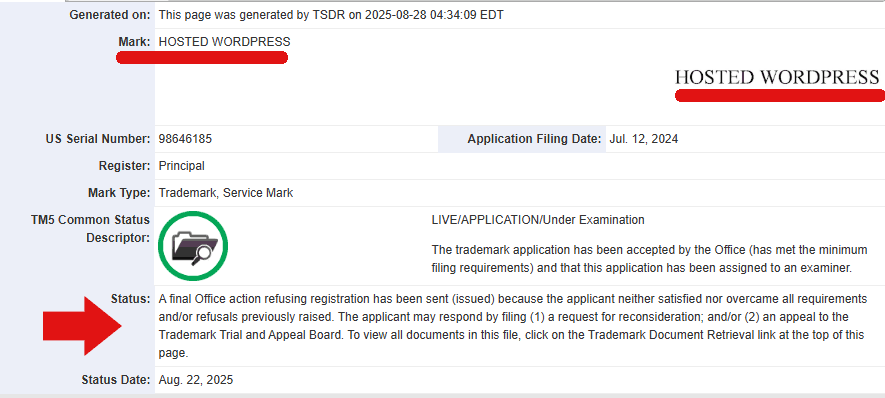
The Trademark Office published the following notice for the “Hosted WordPress” trademark application:

“A final Office action refusing registration has been sent (issued) because the applicant neither satisfied nor overcame all requirements and/or refusals previously raised….

SUMMARY OF ISSUES MADE FINAL that applicant must address:

• Disclaimer Requirement

• Identification of Goods and Services

• Applicant Domicile Requirement

DISCLAIMER REQUIREMENT Applicant must disclaim the wording ‘MANAGED’ because it is merely descriptive of an ingredient, quality, characteristic, function, feature, purpose, or use of applicant’s goods and services….

Applicant may respond by submitting a disclaimer in the following format: No claim is made to the exclusive right to use ‘MANAGED’ apart from the mark as shown.”

Screenshot of Document Close-Up

The USPTO also found that the WordPress Foundation’s description of goods and services is too vague and overly broad, especially regarding the phrase “website development software,” and asks them to clarify whether it is downloadable (Class 9) or offered as online services (Class 42). The USPTO suggested acceptable wording that they can adopt, as long as it accurately reflects what they provide.

The Trademark Office also issued the following response for the trademark application for Managed WordPress:

“DISCLAIMER REQUIREMENT
Applicant must disclaim the wording ‘MANAGED’ because it is merely descriptive of an ingredient, quality, characteristic, function, feature, purpose, or use of applicant’s goods and services…. Applicant may respond by submitting a disclaimer in the following format:

No claim is made to the exclusive right to use ‘MANAGED’ apart from the mark as shown.”

The Process Is Not Over

The WordPress Foundation is continuing its efforts to obtain trademarks for both “Managed WordPress” and “Hosted WordPress.” It has filed a Request for Reconsideration after Final Action for each trademark application, which asks the USPTO to reconsider its refusals based on amendments, arguments, or evidence. These requests are a final procedural step before an appeal, although they are not themselves appeals.

Common Hosting Defenses Ineffective Against WordPress Threats via @sejournal, @martinibuster

Patchstack published a case study that examined how well Cloudflare and other general firewall and malware solutions protected WordPress websites from common vulnerability threats and attack vectors. The research showed that while general solutions stopped threats like SQL injection or cross-site scripting, a dedicated WordPress security solution consistently stopped WordPress-specific exploits at a significantly higher rate.

WordPress Vulnerabilities

Due to the popularity of the WordPress platform, WordPress plugins and themes are a common focus for hackers, and vulnerabilities can quickly be exploited in the wild. Once proof-of-concept code is public, attackers often act within hours, leaving website owners little time to react.

This is why it is critical to be aware of the security provided by a web host and of how effective those solutions are in a WordPress environment.

Methodology

Patchstack explained their methodology:

“As a baseline, we have decided to host “honeypot” sites (sites against which we will perform controlled pentesting with a set of 11 WordPress-specific vulnerabilities) with 5 distinct hosting providers, some of which have ingrained features presuming to help with blocking WordPress vulnerabilities and/or overall security.

In addition to the hosting provider’s security measures and third-party providers for additional measures like robust WAFs or other patching providers, we have also installed Patchstack on every site, with our test question being:

  • How many of these threats will bypass firewalls and other patching providers to ultimately reach Patchstack?
  • And will Patchstack be able to block them all successfully?”

Testing process

Each website was set up the same way, with identical plugins, versions, and settings. Patchstack used a “exploitation testing toolkit” to run the same exploit tests in the same order on every site. Results were checked automatically and by hand to see if attacks were stopped, and whether the block came from the host’s defenses or from Patchstack.

General Overview: Hosting Providers Versus Vulnerabilities

The Patchstack case study tested five different configurations of security defenses, plus Patchstack.

1. Hosting Provider A Plus Cloudflare WAF

2. Hosting Provider B + Firewall + Monarx Server and Website Security

3. Hosting Provider C + Firewall + Imunify Web Server Security

4. Hosting Provider D + ConfigServer Firewall

5. Hosting Provider E + Firewall

The result of the testing showed that the various hosting infrastructure defenses failed to protect the majority of WordPress-specific threats, catching only 12.2% of the exploits. Patchstack caught 100% of all exploits.

Patchstack shared:

“2 out of the 5 hosts and their solutions failed to block any vulnerabilities at the network and server levels.

1 host blocked 1 vulnerability out of 11.

1 host blocked 2 vulnerabilities out of 11.

1 host blocked 4 vulnerabilities out of 11.”

Cloudflare And Other Solutions Failed

Solutions like Cloudflare WAF or bundled services such as Monarx or Imunify failed to consistently address WordPress specific vulnerabilities.

Cloudflare’s WAF stopped 4 of 11 exploits, Monarx blocked none, and Imunify did not prevent any WordPress-specific exploits. Firewalls such as ConfigServer, which are widely used in shared hosting environments, also failed every test.

These results show that while those kinds of products work reasonably well against broad attack types, they are not tuned to the specific security issues common to WordPress plugins and themes.

Patchstack is created to specifically stop WordPress plugin and theme vulnerabilities in real time. Instead of relying on static signatures or generic rules, it applies targeted mitigation through virtual patches as soon as vulnerabilities are disclosed, before attackers can act.

Virtual patches are mitigation for a specific WordPress vulnerability. This offers protection to users while a plugin or theme developer can create a patch for the flaw. This approach addresses WordPress flaws in a way hosting companies and generic tools can’t because they rarely match generic attack patterns, so they slip past traditional defenses and expose publishers to privilege escalation, authentication bypasses, and site takeovers.

Takeaways

  • Standard hosting defenses fail against most WordPress plugin vulnerabilities (87.8% bypass rate).
  • Many providers claiming “virtual patching” (like Monarx and Imunify) did not stop WordPress-specific exploits.
  • Generic firewalls and WAFs caught some broad attacks (SQLi, XSS) but not WordPress-specific flaws tied to plugins and themes.
  • Patchstack consistently blocked vulnerabilities in real time, filling the gap left by network and server defenses.
  • WordPress’s plugin-heavy ecosystem makes it an especially attractive target for attackers, making effective vulnerability protection essential.

The case study by Patchstack shows that traditional hosting defenses and generic “virtual patching” solutions leave WordPress sites vulnerable, with nearly 88% of attacks bypassing firewalls and server-layer protections.

While providers like Cloudflare blocked some broad exploits, plugin-specific threats such as privilege escalation and authentication bypasses slipped through.

Patchstack was the only solution to consistently block these attacks in real time, giving site owners a dependable way to protect WordPress sites against the types of vulnerabilities that are most often targeted by attackers.

According to Patchstack:

“Don’t rely on generic defenses for WordPress. Patchstack is built to detect and block these threats in real-time, applying mitigation rules before attackers can exploit them.”

Read the results of the case study by Patchstack here.

Featured Image by Shutterstock/tavizta

Inspiro WordPress Theme Vulnerability Affects Over 70,000 Sites via @sejournal, @martinibuster

A vulnerability advisory was published for the Inspiro WordPress theme by WPZoom. The vulnerability arises due to a missing or incorrect security validation that enables an unauthenticated attacker to launch a Cross-Site Request Forgery (CSRF) attack.

Cross-Site Request Forgery (CSRF)

A CSRF vulnerability in the context of a WordPress site is an attack that relies on a user with admin privileges clicking a link, which in turn leverages that user’s credentials to execute a malicious action. The vulnerability has been assigned a CVSS threat rating of 8.1.

The advisory issued by Wordfence WordPress security company warned:

“This makes it possible for unauthenticated attackers to install plugins from the repository via a forged request granted they can trick a site administrator into performing an action such as clicking on a link.”

The vulnerability affects Inspiro theme versions up to and including 2.1.2. Users are advised to update their theme to the latest version.

Featured Image by Shutterstock/Kazantseva Olga

WordPress Contact Form 7 Redirection Plugin Vulnerability Hits 300k Sites via @sejournal, @martinibuster

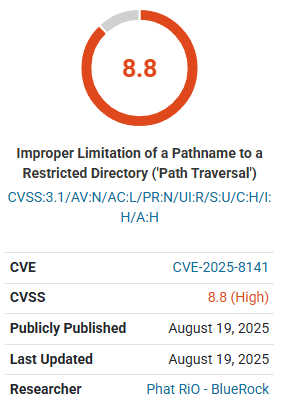
A vulnerability advisory was issued for a WordPress Contact Form 7 add-on plugin that enables unauthenticated attackers to “easily” launch a remote code execution. The vulnerability is rated high (8.8/10) on the CVSS threat severity scale.

Screenshot from Wordfence advisory showing 8.8 CVSS severity rating

Redirection for Contact Form 7 plugin

The vulnerability affects the Redirection for Contact Form 7 WordPress plugin, which is installed on over 300,000 websites. The plugin extends the functionality of the popular Contact Form 7 plugin. It enables a website publisher not only to redirect a user to another page but also to store the information in a database, send email notifications, and block spammy form submissions.

The vulnerability arises in a plugin function. WordPress functions are PHP code snippets that provide specific functionalities. The specific function that contains the flaw is called the delete_associated_files function. That function contains an insufficient file path validation flaw, which means it does not validate what a user can input into the function that deletes files. This flaw enables an attacker to specify a path to a file to be deleted.

Thus, an attacker can specify a path (such as ../../wp-config.php) and delete a critical file like wp-config.php, clearing the way for a remote code execution (RCE) attack. An RCE attack is a type of exploit that enables an attacker to execute malicious code remotely (from anywhere on the Internet) and gain control of the website.

The Wordfence advisory explains:

“This makes it possible for unauthenticated attackers to delete arbitrary files on the server, which can easily lead to remote code execution when the right file is deleted (such as wp-config.php).”

The vulnerability affects all versions of the plugin up to and including version 3.2.4. Users of the affected plugin are advised to update the plugin to the latest version.

Featured Image by Shutterstock/Everyonephoto Studio

Critical Vulnerability Affects Tutor LMS Pro WordPress Plugin via @sejournal, @martinibuster

An advisory was issued about a critical vulnerability in the popular Tutor LMS Pro WordPress plugin. The vulnerability, rated 8.8 on a scale of 1 to 10, allows an authenticated attacker to extract sensitive information from the WordPress database. The vulnerability affects all versions up to and including 3.7.0.

Tutor LMS Pro Vulnerability

The vulnerability results from improper handling of user-supplied data, enabling attackers to inject SQL code into a database query. The Wordfence advisory explains:

“The Tutor LMS Pro – eLearning and online course solution plugin for WordPress is vulnerable to time-based SQL Injection via the ‘order’ parameter used in the get_submitted_assignments() function in all versions up to, and including, 3.7.0 due to insufficient escaping on the user supplied parameter and lack of sufficient preparation on the existing SQL query. “

Time-Based SQL Injection

A time-based SQL injection attack is one in which an attacker determines whether a query is valid by measuring how long the database takes to respond. An attacker could use the vulnerable order parameter to insert SQL code that delays the database’s response. By timing these delays, the attacker can deduce information stored in the database.

Why This Vulnerability Is Dangerous

While exploitation requires authenticated access, a successful exploitation of the flaw could be used to access sensitive information. Updating to the latest version, 3.7.1 or higher is recommended.

Featured Image by Shutterstock/Ollyy

Vulnerability In 3 WordPress File Plugins Affects 1.3 Million Sites via @sejournal, @martinibuster

An advisory was issued for three WordPress file management plugins that are affected by a vulnerability that allows unauthenticated attackers delete arbitrary files. The three plugins are installed in over 1.3 million websites.

Outdated Version Of elFinder

The vulnerability is caused by outdated versions of the elFinder file manager, specifically versions 2.1.64 and earlier. These versions contain a Directory Traversal vulnerability that allows attackers to manipulate file paths to reach outside the intended directory. By sending requests with sequences such as example.com/../../../../, an attacker could make the file manager access and delete arbitrary files.

Affected Plugins

Wordfence named the following three plugins as affected by this vulnerability:

1. File Manager WordPress Plugin
Installations: 1 Million

2. Advanced File Manager – Ultimate WP File Manager And Document Library Solution
Installations: 200,000+

3. File Manager Pro – Filester
Installations: 100,000+

According to the Wordfence advisory, the vulnerability can be exploited without authentication, but only if a site owner has made the file manager publicly accessible, which mitigates the possibility of exploitation. That said, two of the plugins indicated in their changelogs that an attacker needs at least a subscriber level authentication, the lowest level of website credentials.

Once exploited, the flaw allowed deletion of arbitrary files. Users of the named WordPress plugins should consider updating to the latest versions.

Featured Image by Shutterstock/Lili1992

WordPress Contact Form Entries Plugin Vulnerability Affects 70K Websites via @sejournal, @martinibuster

A vulnerability advisory was issued for a WordPress plugin that saves contact form submissions. The flaw enables unauthenticated attackers to delete files, launch a denial of service attack, or perform remote code execution. The vulnerability was given a severity rating of 9.8 on a scale of 1 to 10, indicating the seriousness of the issue.

Database for Contact Form 7, WPForms, Elementor Forms Plugin

The Database for Contact Form 7, WPForms, Elementor Forms, also apparently known as the Contact Form Entries Plugin, saves contact form entries into the WordPress database. It enables users to view contact form submissions, search them, mark them as read or unread, export them, and perform other functions. The plugin has over 70,000 installations.

The plugin is vulnerable to PHP Object Injection by an unauthenticated attacker, which means that an attacker does not need to log in to the website to launch the attack.

A PHP object is a data structure in PHP. PHP objects can be turned into a sequence of characters (serialized) in order to store them and then deserialized (turned back into an object). The flaw that gives rise to this vulnerability is that the plugin allows an unauthenticated attacker to inject an untrusted PHP object.

If the WordPress site also has the Contact Form 7 plugin installed, then it can trigger a POP chain during deserialization.

According to the Wordfence advisory:

“This makes it possible for unauthenticated attackers to inject a PHP Object. The additional presence of a POP chain in the Contact Form 7 plugin, which is likely to be used alongside, allows attackers to delete arbitrary files, leading to a denial of service or remote code execution when the wp-config.php file is deleted.”

All versions of the plugin up to and including 1.4.3 are vulnerable. Users are advised to update their plugin to the latest version, which as of this date is version 1.4.5.

Featured Image by Shutterstock/tavizta

LLM SEO Optimization Techniques: (including llms.txt)

Table of Contents

  1. How to Make Your Content Visible in the Age of AI Search
  2. What Are LLMs and Why Should You Care?
  3. The New Way of Searching
  4. SEO vs. GEO vs. AEO vs. LLMO: Are We Just Rebranding SEO?
  5. Key LLM SEO Optimization Techniques
  6. Bonus Strategies for LLM Optimization
  7. The Role of llms.txt: Giving AI Search All the Right Signals
  8. LLM Optimization vs. Traditional SEO
  9. Common Mistakes to Avoid
  10. Tools and Resources to Get Started
  11. Conclusion

How to make your content visible in the age of AI search 

So, what exactly is LLM Optimization? Well, the answer to that question depends on who you ask. For example, if you ask a machine learning engineer, they’ll tell you it’s all about tweaking prompts and token limits to get better performance from a large language model. In fact, Iguazio actually defines LLM optimization as improving the way models respond, which means smarter, faster, and with more contextual recognition.    

If, on the other hand, you are a content strategist or SEO enthusiast, LLM optimization will mean something completely different to you and that is making sure that your content shows up in AI-generated search results. And, that needs to be true no matter whether you’re talking to ChatGPT, searching with Perplexity, or scanning Google’s new AI Mode for answers. Some call this ChatGPT SEO or Generative Engine Optimization. 

So, if you fall into the latter of those two groups, ie: the people who want their content and product pages to be seen and clicked, then this article is for you. And, if you’d like to read on, we’ll show you why LLM optimization in an AI-search landscape isn’t some sort of luxury option; it’s an absolute necessity. 

What are LLMs and why should you care? 

AI engineers train Large Language models on huge amounts of text and data to generate answers, summaries, code, and human-like language. They’ve read everything (not just the Classics) and that includes blogs, news articles and your website.   

The reason that’s important is that LLMs don’t crawl your website in real time like Search Engines do. What they do is read it, learn from it and when someone asks them a question, they try to recall what they saw and rephrase it into an answer. If your site shows up as the answer, “Great” but if not, you’ve got a visibility problem. 

The new way of searching 

Search is not just about Google anymore. Also, it’s not as if just one other thing has come to dominate which means we’re left with a rather messy mix of Perplexity answers, Chat GPT chats, Gemini summaries and voice assistants reading out answers while we try to do two tasks at once. 

In short, people aren’t just searching, they’re conversing and if your content can’t hold its own in this environment then you’re missing out on visibility, traffic, and the ability to build trust.  We’ll walk you through exactly how to fix that.   

Read more: How to optimize content for AI LLM comprehension using Yoast’s tools 

SEO vs. GEO vs. AEO vs. LLMO: Are we just rebranding SEO? 

If you’ve been wondering whether you now need four different strategies for SEO (Search Engine Optimization), GEO (Generative Engine Optimization), AEO (Answer Engine Optimization), and LLMO (Large Language Model Optimization), relax, it’s not as big a deal as you might think. You see, despite all the buzzwords, the core of optimization hasn’t changed much. 

All four terms point to the same central goal: making your content more findable, quotable, and credible in machine-generated output regardless of whether that comes from Google’s AI Overviews, ChatGPT, or an answer box on Bing. 

So, should you overhaul your entire content strategy to ‘do LLMO’? 

Not really. At least, not yet. 

Most of what boosts your presence in LLMs is already what SEO professionals have been doing for years. Structured content, semantic clarity, topical authority, entity association, clean internal linking, it’s all classic SEO.  

Where they slightly diverge: 

SEO (Search Engine Optimization)  Relies on backlinks and site architecture to establish authority 
GEO (Generative Engine Optimization  Puts extra emphasis on unlinked brand mentions and semantic association 
AEO (Answer Engine Optimization)  Focuses on being the single best, most concise, and sourceable response to a specific query 
LLMO (Large Language Model Optimization)  Leans into optimizing content not just for people or search crawlers but for LLMs reading in chunks, skipping JavaScript, and relying on embeddings and grounding datasets  

But the thing is: you don’t need four different playbooks. All you need is one solid SEO foundation. In fact, this point is backed up by Google’s Gary Illyes who confirmed that AI Search does not require specialized optimization, saying that “AI SEO” is not necessary and that standard SEO is all that is needed for both AI Overviews and AI Mode. 

  • Focus more on entity mentions, not just links 
  • Treat your core site pages (home, pricing, about) and PDFs as important LLM fuel.
  • Remember that AI crawlers don’t render JavaScript, so client-side content might be invisible   
  • Think about how LLMs process structure (chunking, context, citations), not just how humans skim it 

So, if you’ve already been investing in foundational SEO, you’re already doing most of what GEO, AEO, and LLMO ae all about. That’s why not every new acronym needs you to have a whole rethink on your efforts. Sometimes, it’s just like SEO. 

Key LLM SEO optimization techniques 

Now that we know LLMs aren’t crawling our site but are understanding it, we need to think a little differently about how we create and construct content and for more on this, you may find this article extremely insightful. This is not about cramming in keywords or trying to play the algorithm, it’s about clarity, structure and credibility because these are the things LLMs care about when deciding what to quote, summarize or ignore. Below are some techniques that will help your content stay visible now that people are using generative search.   

The bar has been raised on the quality of content  

LLMs love clarity. The more natural and specific your language is, the easier it is for them to understand and reuse your content. That means not using jargon, avoiding ambiguity and instead, focusing on writing like you’re explaining something to a colleague. 

To give an exact example: 

Don’t Say: 

“Our innovative tool revolutionizes the digital landscape for modern businesses.” 

Instead Say: 

“The Yoast SEO plugin for WordPress helps businesses to improve their website’s visibility and appear inn search results 

Use Structure, Chunked Formatting

Chunked formatting means breaking your content into small pieces (chunks) of informatin that are easy to understand and remember. LLMs tend to prioritize the most easily digestible content construction – which means your headings, bullet points, and clearly defined sections must do a lot of heavy lifting. Not only does organizing your content like this help people to skim read, but it also helps machines understand what each section is about.  

Structuring your content like this will help: 

  • Write clear, descriptive H2s and 3s 
  • Use bullet points that can provide standalone value 
  • Include summaries and tables to give quick overviews 

Be Factual, Transparent, and Authoritative 

Just like Google, LLMs need to trust that your content is reliable before they start taking you seriously. This means you need to show your working out, quote sources, reveal authors, and follow the principles of E-E-A-T. Experience, Expertise, Authority, and Trust. 

Follow these E-E-A-T principles 

To do this: 

  • Include an author bio and credentials if possible (include a link to actual author bios and social profiles) 
  • Name your sources when you use claims or statistics 
  • Share real experiences if possible “As a small business owner…” 

The more real, relatable and trustworthy your content looks, the more AI will like it.  

Optimize for Summarization 

LLMs won’t quote your entire blog post; they’ll only use snippets. Your job is to make those snippets irresistible. Start with strong lead sentences so that each paragraph begins with a clear point followed by context. Also, it’s a good idea to front-load your content. Don’t save your best bits for the end.  

As a reminder: 

  • Start each section with what you want the key takeaway to be 
  • Keep paragraphs short and self-contained 
  • Create standalone summary paragraphs as these often get quoted in AI generated answers 

Use Schema 

Behind every great summary is a structured content model. That’s where Schema markup comes in and to help the AI understand your content, you need to speak in a certain way.   

Read more about schema markup 

To make things clear, use: 

  • Article for blog content 
  • FAQPage for questions and answers 
  • HowTo for instructions 
  • Author and Person for writer’s bio
  • WebPage for generic content 

Bonus strategies for LLM optimization

Once you’ve got the basics completed, like clear writing, structure and trust signals, there’s still more you can do to give your content the best shot at visibility. These bonus strategies focus on how to make your site even more AI-friendly by anticipating how LLMs interpret and reuse information. 

Use Explicit Context and Clear language 

Humans have an incredible ability to be able to ‘fill in the blanks’ and still ‘get the message’ even if the information they got was vague or unclear. One of the biggest differences between humans and LLMs? Humans can infer meaning from vague references. LLMs on the other hand… well, let’s just say that it doesn’t come naturally to them. 

In any case, the point is that if your article mentions “this tool” or “our product” without any context, an LLM might miss the connection entirely. The result? You’re left out of the answer, even if you’re the best source. 

So, to give your content the clarity it deserves: 

  • Use the full product or brand name, like “Yoast SEO plugin for WordPress,” not just “Yoast” 
  • Define technical or niche terms before using them 
  • Avoid vague language (“this page,” “the above section,” “click here”) 

You don’t need to be repetitive, but you do need to be explicit rather than implicit.  

Leverage FAQs and Conversational Formats 

LLMs love FAQs because they’re direct, predictable, and easy to quote. They closely match real user intent and provide high-value snippets that tools like Perplexity and Gemini can pull from without much guesswork. 

How to use the FAQ block in WordPress 

That said, there’s an important limitation to keep in mind if you’re using the Yoast SEO FAQ block in Gutenberg

You cannot use H2 or H3 heading tags inside the FAQ block. 
The block creates its own question-answer formatting using custom HTML, which is great for structured data (FAQ Page schema), but it doesn’t support native heading tags which limits your ability to optimize AI readability and skimmability. 

So, if your goal is to appear in AI-generated summaries or answer boxes, where headings like “What is LLM SEO?” make it easy for AI to quote your content, you might be better off using manual formatting

Here’s how to get the best of both worlds: 

  • STEP 1: Use H2 or H3 tags for each question (e.g., “What is llms.txt?”) and write a clear, short answer beneath it. This improves LLM visibility but doesn’t generate structured FAQ schema. 
  • Step 2: Use the Yoast FAQ block for schema support but know that it won’t give you a proper heading structure. 

 Ultimately, the more your FAQs resemble natural, searchable questions — and are structured in a way that both humans and AI can easily parse — the more likely they are to be featured in answers. 

Enhance Trust with Freshness Signals  

Just like search engines, some LLMs give preference to newer content, but remember that we need to talk to them in a certain way to get the best out of them. 

Older content can be overlooked. Worse, it can be quoted incorrectly if something has changed since you last hit publish. 

Make sure your pages include: 

  • A clear “last updated” timestamp (can we get a picture of what one would look like for clarification?) 
  • Regular reviews for accuracy 
  • Changelogs or update notes if applicable (especially for software or plugin content) 

It doesn’t have to be complicated, even a simple “Last updated: June 2025” can help both readers and AI systems trust that your content is current.  

How to keep content fresh 

Prioritize Author Visibility and Credibility 

Today, we’re entering a phase where who wrote your content is just as important as what it says. That means you need to highlight author visibility and put effort into signaling real-world experience. 

Here’s how: 

  • Include author bios in WordPress with credentials and links to their professional profiles 
  • Use Person schema to formally associate the content with a specific individual 
  • Weave in relevant experience (“As an SEO consultant who works with SaaS brands…”) 

Remember, LLMs are more likely to trust, quote, and amplify expert-authored content. 

Use Internal Linking Strategically 

Think of internal linking as your site’s nervous system. It helps both humans and LLMs understand what’s important, how topics relate, and where to go next. 

But internal linking isn’t just about SEO hygiene anymore — it’s also a way to establish topic authority and help LLMs build a map of your expertise. 

Do: 

  • Cluster related articles together (e.g., link from “LLM Optimization” to “Schema Markup for SEO”) 
  • Use descriptive anchor text like “read our full guide to Schema markup,” not just “click here” 
  • Ensure every piece of content supports a broader narrative 

Our internal linking feature is available for free with a Yoast SEO Premium plugin. 

The role of llms.txt. Giving AI search all the right signals 

Now let’s talk about one of the most recent developments in LLM visibility; a little file called llms.txt

Think of it as a sibling to robots.txt, but instead of guiding search engines, it tells AI tools how they’re allowed to interact with your content. Note: llms.txt is still an evolving standard, and support across AI tools may vary, but it’s a smart step toward asserting control 

With llms.txt, you can: 

  • Define how your content may be reused or summarized 
  • Set clear expectations around attribution, licensing 

It’s not just about protection, it’s about being proactive as AI usage accelerates. 

Even better: Yoast now offers llms.txt integration right inside the plugin, so you don’t need to mess around with code or server settings. If you want to future-proof your site’s visibility (and your IP), this is where you start. 

The llms.txt feature is available for both free and premium customers.   

LLM Optimization vs Traditional SEO: 

LLM Optimization and SEO are part of the same family, but they serve different functions and require slightly different thinking. 

Let’s compare: 

Traditional SEO  LLM Optimization 
Crawled and ranked by bots  Read, remembered, and reused by AIs 
Emphasizes keywords  Emphasizes context and clarity 
   
Optimizes for SERPs  Optimizes for AI-generated summaries and answers 

The takeaway? You can’t ignore either. One brings traffic; the other boosts brand visibility within AI responses. 

And considering that 42% of users now start their research with an LLM (not Google), you’ll want to be found in both places. 

Common Mistakes to Avoid 

Even well-meaning content creators fall into holes. So, take a look at the tips below to avoid any mishaps that could damage your LLM visibility: 

  • Writing like a robot or allowing a robot to write for you (ironically, not appreciated by robots) 
  • Leaving your content undated and unchanged for years 
  • Publishing posts without any author information or editorial standards 
  • Ignoring internal links or leaving orphaned pages 
  • Using vague headings or anchor text like “read more” or “this article” 

If your content looks generic, outdated, or anonymous, it won’t earn any trust. And, without trust, it won’t get quoted. 

 Tools and Resources to Get Started 

Search used to be about visibility within SERPs. But now, it’s also about being seen in summaries, answers, snippets, and chats. LLMs aren’t just shaping the future of search; they’re shaping how your brand is perceived to both humans and robots alike. 

To stand out: 

  • Write with clarity and context 
  • Structure for humans and machines 
  • Cite your expertise and show your authors 
  • Use tools like Yoast and llms.txt to signal your intent 

Future-proof your visibility with Yoast SEO. From llms.txt integration to schema support, Yoast gives you all the tools you need to speak AI’s language and dominate both generative answers and search engines. Get started with Yoast SEO Premium now and make it easy for AI to say something accurate, useful, and… ideally, about you. 

2025 Core Web Vitals Challenge: WordPress Versus Everyone via @sejournal, @martinibuster

The Core Web Vitals Technology Report shows the top-ranked content management systems by Core Web Vitals (CWV) for the month of June (July’s statistics aren’t out yet). The breakout star this year is an e-commerce platform, which is notable because shopping sites generally have poor performance due to the heavy JavaScript and image loads necessary to provide shopping features.

This comparison also looks at the Interaction to Next Paint (INP) scores because they don’t mirror the CWV scores. INP measures how quickly a website responds visually after a user interacts with it. The phrase “next paint” refers to the moment the browser visually updates the page in response to a user’s interaction.

A poor INP score can mean that users will be frustrated with the site because it’s perceived as unresponsive. A good INP score correlates with a better user experience because of how quickly the website performs.

Core Web Vitals Technology Report

The HTTP Archive Technology Report combines two public datasets:

  1. Chrome UX Report (CrUX)
  2. HTTP Archive

1. Chrome UX Report (CrUX)
CrUX obtains its data from Chrome users who opt into providing usage statistics reporting as they browse over 8 million websites. This data includes performance on Core Web Vitals metrics and is aggregated into monthly datasets.

2. HTTP Archive
HTTP Archive obtains its data from lab tests by tools like WebPageTest and Lighthouse that analyze how pages are built and whether they follow performance best practices. Together, these datasets show how websites perform and what technologies they use.

The CWV Technology Report combines data from HTTP Archive (which tracks websites through lab-based crawling and testing) and CrUX (which collects real-user performance data from Chrome users), and that’s where the Core Web Vitals performance data of content management systems comes from.

#1 Ranked Core Web Vitals (CWV) Performer

The top-performing content management system is Duda. A remarkable 83.63% of websites on the Duda platform received a good CWV score. Duda has consistently ranked #1, and this month continues that trend.

For Interaction to Next Paint scores, Duda ranks in the second position.

#2 Ranked CWV CMS: Shopify

The next position is occupied by Shopify. 75.22% of Shopify websites received a good CWV score.

This is extraordinary because shopping sites are typically burdened with excessive JavaScript to power features like product filters, sliders, image effects, and other tools that shoppers rely on to make their choices. Shopify, however, appears to have largely solved those issues and is outperforming other platforms, like Wix and WordPress.

In terms of INP, Shopify is ranked #3, at the upper end of the rankings.

#3 Ranked CMS For CWV: Wix

Wix comes in third place, just behind Shopify. 70.76% of Wix websites received a good CWV score. In terms of INP scores, 86.82% of Wix sites received a good INP score. That puts them in fourth place for INP.

#4 Ranked CMS: Squarespace

67.66% of Squarespace sites had a good CWV score, putting them in fourth place for CWV, just a few percentage points behind the No. 3 ranked Wix.

That said, Squarespace ranks No. 1 for INP, with a total of 95.85% of Squarespace sites achieving a good INP score. That’s a big deal because INP is a strong indicator of a good user experience.

#5 Ranked CMS: Drupal

59.07% of sites on the Drupal platform had a good CWV score. That’s more than half of sites, considerably lower than Duda’s 83.63% score but higher than WordPress’s score.

But when it comes to the INP score, Drupal ranks last, with only 85.5% of sites scoring a good INP score.

#6 Ranked CMS: WordPress

Only 43.44% of WordPress sites had a good CWV score. That’s over fifteen percentage points lower than fifth-ranked Drupal. So WordPress isn’t just last in terms of CWV performance; it’s last by a wide margin.

WordPress performance hasn’t been getting better this year either. It started 2025 at 42.58%, then went up a few points in April to 44.93%, then fell back to 43.44%, finishing June at less than one percentage point higher than where it started the year.

WordPress is in fifth place for INP scores, with 85.89% of WordPress sites achieving a good INP score, just 0.39 points above Drupal, which is in last place.

But that’s not the whole story about the WordPress INP scores. WordPress started the year with a score of 86.05% and ended June with a slightly lower score.

INP Rankings By CMS

Here are the rankings for INP, with the percentage of sites exhibiting a good INP score next to the CMS name:

  1. Squarespace 95.85%
  2. Duda 93.35%
  3. Shopify 89.07%
  4. Wix 86.82%
  5. WordPress 85.89%
  6. Drupal 85.5%

As you can see, positions 3–6 are all bunched together in the eighty percent range, with only a 3.57 percentage point difference between the last-placed Drupal and the third-ranked Shopify. So, clearly, all the content management systems deserve a trophy for INP scores. Those are decent scores, especially for Shopify, which earned a second-place ranking for CWV and third place for INP.

Takeaways

  • Duda Is #1
    Duda leads in Core Web Vitals (CWV) performance, with 83.63% of sites scoring well, maintaining its top position.
  • Shopify Is A Strong Performer
    Shopify ranks #2 for CWV, a surprising performance given the complexity of e-commerce platforms, and scores well for INP.
  • Squarespace #1 For User Experience
    Squarespace ranks #1 for INP, with 95.85% of its sites showing good responsiveness, indicating an excellent user experience.
  • WordPress Performance Scores Are Stagnant
    WordPress lags far behind, with only 43.44% of sites passing CWV and no signs of positive momentum.
  • Drupal Also Lags
    Drupal ranks last in INP and fifth in CWV, with over half its sites passing but still underperforming against most competitors.
  • INP Scores Are Generally High Across All CMSs
    Overall INP scores are close among the bottom four platforms, suggesting that INP scores are relatively high across all content management systems.

Find the Looker Studio rankings for here (must be logged into a Google account to view).

Featured Image by Shutterstock/Krakenimages.com