We’re excited to announce that Yoast AI Optimize is now also available when using the Classic Editor in WordPress!
You’ve finished your copy, great! But those pesky Yoast SEO Analysis lights aren’t all green and you have to make manual changes. That’s where Yoast AI Optimize comes in. With Yoast SEO Premium, you can now get AI-powered suggestions right inside your Classic Editor to help fine-tune your content.
What is Yoast AI Optimize?
Yoast AI Optimize brings smart, targeted SEO support into your writing flow. It gives AI-powered suggestions for specific assessments in the Yoast SEO analysis, such as length, structure, and keyphrase distribution. You’ll see exactly where improvements can be made and get quick, editable suggestions to help you fix them. You can quickly apply or dismiss them; the final decision always remains yours.
Benefits:
Get real-time AI suggestions that help improve SEO and readability
Edit suggestions to match your style and tone of voice
Apply or dismiss suggestions easily without breaking your writing flow
Use it in both the Classic and Block editors with Yoast SEO Premium
Supports optimization for:
Keyphrase in introduction
Keyphrase distribution
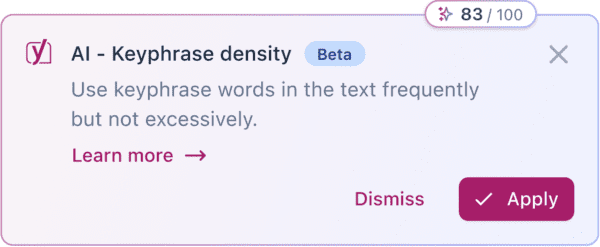
Keyphrase density
Sentence length
Paragraph length
Whether you’re using the Classic Editor or sticking with the Block Editor, Yoast AI Optimize helps you improve your SEO score faster, without losing the personal touch.
If you’re curious to know how we built this feature, check out our developer blog post with all the behind the scenes.
Ready to optimize smarter? Update to Yoast SEO Premium to try AI Optimize in the Classic Editor today!
Beth is Product Marketing Manager at Yoast. Before joining the company, she honed her digital marketing and project management skills in various in-house and agency environments.
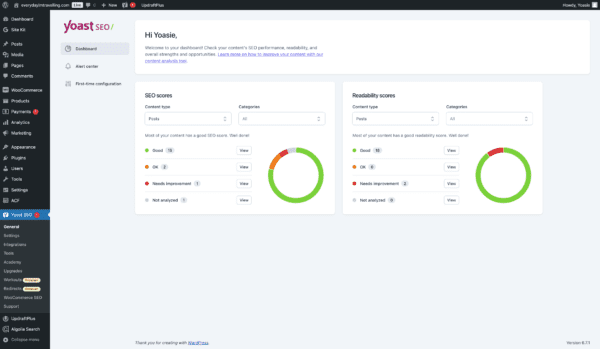
With the new Yoast SEO Dashboard, you can see how your site is doing at a glance. Instead of hunting through pages, you’ll find all your key metrics in one place. It’s easy to spot which posts need attention, see where you can improve, and figure out what to tackle first so you can spend more time refining your content and less time searching for data.
We know it can be challenging to improve your content when you have to dig through every post and page. That’s why we created a dashboard that instantly shows your site SEO Perfomance. It streamlines the process so you can focus on what matters: making your content shine.
What you get from the Yoast SEO Dashboard:
Top-level overview of your SEO: see critical insights at a glance without hunting through individual pages
Filterable views of SEO and readability scores: quickly spot where you can make the most significant improvements
Designed for clarity and direction, our dashboard makes it easy to check in, prioritize your next steps, and enhance your content strategy immediately. It’s straightforward, efficient, and all about helping you work smarter.
How to access the Yoast SEO Dashboard:
To access the Yoast SEO Dashboard, you just need to:
Ensure your Yoast SEO is up-to-date: In your WordPress admin area, go to “Plugins” and update Yoast SEO to the latest version
Navigate to the Dashboard: Click on “Yoast SEO” in your WordPress sidebar to land on the dashboard, or click on “Dashboard”
Explore your insights: Review the overview, filter your scores, and start working through your task list
Ready to see how much simpler managing your SEO can be? Get Yoast SEO today and let your new dashboard guide you toward better performance.
Carl Henry Addoumieh
When I first started working in marketing, Yoast SEO was the first plugin I used. Today, I work with the tool that I depended on the most. I’m Carl Henry, my background is in SaaS growth marketing with a focus on content. I like basketball, padel, painting, and gaming.
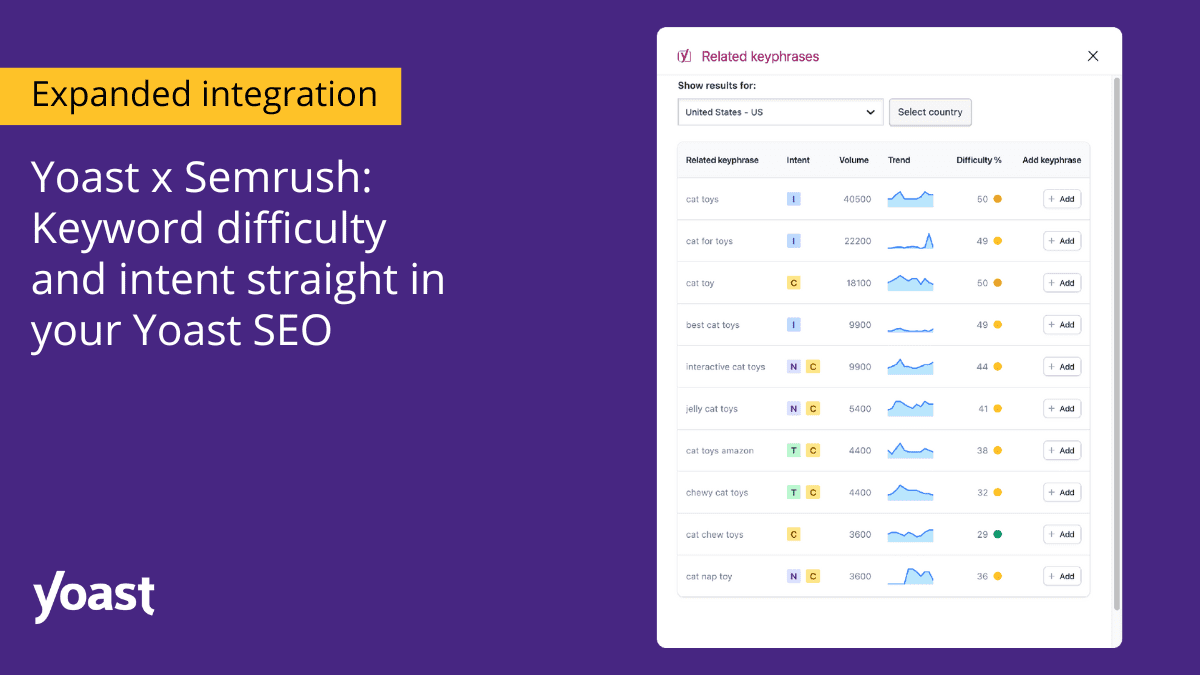
Take your content strategy to the next level with expanded Semrush insights in the Yoast SEO plugin! Simplify your SEO process and focus on what matters the most: crafting and optimizing content that resonates and ranks. The Yoast Semrush integration means all Yoast SEO users can access keyword intent, and keyword difficulty and track and analyze up to four keywords. All powered by Semrush—seamlessly integrated into Yoast’s focus keyphrase section.
Keyword difficulty and intent:
Make your keyword choices smarter with data-driven insights:
Keyword difficulty shows how challenging it is to rank for a specific keyword, helping you focus on keywords that are within reach and maximize your chances of ranking.
Keyword intent, or search intent, reveals whether users searching for a keyword are looking for information, products, or services. This gives you the context to create content that genuinely connects with their needs.
These insights empower you to shape content that ranks and resonates—right from Yoast SEO’s analysis section.
Terms can sometimes be overwhelming, so the Yoast team prepared a comprehensive glossary with all the SEO terms you need to build and implement an SEO strategy successfully.
Get started
Click “Get related keyphrases” below the focus keyphrase box to get started. If you haven’t activated your Yoast Semrush integrations, you will be redirected to the Semrush login page. Afterward, you will instantly see keyword insights in the related keyphrases section. This makes adapting your content strategy seamless, allowing you to make quick, data-driven adjustments as you write.
Get started in simple steps:
Click “Get related keyphrases” below the focus keyphrase box.
If you haven’t activated your Yoast Semrush integrations, you will be redirected to the Semrush login page.
You will instantly see keyword insights in the related keyphrases section.
This makes adapting your content strategy seamless, allowing you to make quick, data-driven adjustments as you write. To learn more about activating your integrations within Yoast SEO, visit our help center.
About Yoast Semrush integration
Expanded Semrush insights are available at no additional cost to all users with a Semrush account. Just update your plugin and enjoy the data you need to rank higher, right next to your keywords—effortless, real-time SEO insights, all within Yoast!
Integrate your Semrush account into your Yoast SEO and boost your ranking with valuable data within the plugin. Directly bringing comprehensive keyword research tools to your fingertips without switching platforms. Learn more about the Yoast Semrush integration.
Today we’re welcoming Yoast AI Optimize to our family of AI features. The AI features are designed to make SEO tasks easier than ever by harnessing the power of AI. The tool is perfect for marketing professionals, freelance writers, and content strategists. This brand new feature ensures your carefully-crafted content is search engine friendly.
What does Yoast AI Optimize do?
You have finished drafting your copy, and you are relatively happy with the results. Great! Until you realize that there’s a lot of manual tweaking needed to implement the suggestions in the Yoast SEO analysis. We get it, reworking copy is not the most interesting part of blogging. In fact, internal research informed us that optimizing content for SEO is the most tedious and challenging part of the content creation process. At the same time, our customers know how important this final stage can be to gaining visibility in the SERPS. So we found a solution. This is where Yoast AI Optimize steps in to help your content over the ‘SEO’ finish line.
How you can access the new feature
Easily recognizable by the color fade and signature sparkle icon, Yoast AI Optimize is automatically available to all our Yoast SEO Premium customers. To access, customers must have updated to the most recent version, 23.2 and granted consent to use AI.
Where you can use Yoast AI Optimize
Currently you can optimize three of the assessments in the Yoast SEO Analysis; Keyphrase in introduction, Keyphrase distribution and Keyphrase density. Just click on the sparkly icon next to the assessment to receive the AI-powered suggestions.
Pricing and usage
You can look out from behind your fingers, there are no additional or hidden costs! That said, we know you will all understand that to continue offering sustainable innovation using AI, we must consider fair ways to maintain our current pricing. For this reason, we have introduced the spark counter which keeps track of how many interactions you have with our AI features.
At the moment there is no limit on the number of sparks you can generate. Currently, the counter is set to 100, but you may surpass this limit without issue for now. Of course, the general Yoast AI rate limits apply. The counter resets on the first day of every calendar month. Our internal research on usage tells us that this number will not pose a challenge for the vast majority of our customers, allowing for flexible and uninhibited use across all our AI features.
What are sparks and how do they work?
A spark is defined as a single click on a button of one of Yoast SEO’s AI features. In practice, this means that when you click ‘Use AI’ to generate five example meta descriptions, this would be considered one spark. Should you regenerate another five, this would be another single spark.
You can find the spark counter at the top of the dismiss or apply modals which pop up whenever you interact with the feature within the Yoast SEO analysis sidebar.
The new signature colors help you know when you interact with AI
Kai van Grunsven, UX Designer at Yoast, comments on how the UX team created awareness around when our customers interact with artificial intelligence in line with our core ethical values. The spark counter applies to all Yoast’s AI features. Naturally, this is also fully responsive on mobile.
“As a UX designer, my goal was to give our AI features distinct branding that stands out and integrates seamlessly into our UI. I used a ‘sparkles’ icon and a gradient transitioning from Yoast’s purple to indigo to enhance AI buttons and the spark counter. This familiar icon and modern color scheme help users recognize and engage with our AI features effortlessly, ensuring a visually engaging and intuitive experience for our customers.”
Limitations
Yoast AI Optimize, like all other AI features, is currently in beta. This means you may experience limitations when using the tool. For transparency, these are listed below.
Yoast AI Optimize is only available for texts up to around 1000 words. For longer texts, the button will be inactive.
Yoast AI Optimize is only available for the Block editor. It can optimize content in the following blocks: Paragraph, Heading, List, and Table block. Content from other blocks cannot be optimized.
Yoast AI Optimize currently is available for the following SEO checks: Keyphrase in Introduction, Keyphrase Density, Keyphrase Distribution. For keyphrase density, we only support the case in which the keyphrase is underused. If the keyphrase is overused, we do not provide the Yoast AI Optimize feature.
You can only accept or reject all suggestions. It is not currently possible to accept parts of a suggestion.
For longer texts, it might take up to a minute for AI Optimize to produce a result.
Provide feedback on the new beta feature
Yoast AI Optimize is currently in beta, with this in mind, we value your feedback to make it even better. Your insights and suggestions will help us refine and enhance the AI-powered title and meta description generation feature. To help shape this tool’s future and contribute to your SEO strategy’s success, please provide feedback here.
Try out Yoast AI Optimize today
Upgrade to Yoast SEO Premium to unlock the full potential of our AI features! Gain access to all our advanced tools, including the award-nominated Yoast AI Generate and the powerful Yoast AI Optimize. Streamline your processes and receive SEO-ready suggestions at a click when you upgrade to the latest version, 23.2.
Beth is the Product Marketeer at Yoast. Before joining the company, she honed her digital marketing and project management skills in various in-house and agency environments.