Optimize your content directly inside Google Docs. Yoast SEO’s new Google Docs add-on provides real-time SEO and readability analyses in your writing environment, eliminating the need for multiple apps or CMS logins. You’ll produce fully optimized content faster, collaborate smoothly, and deliver content your audience and search engines love.
Here’s why you’ll love it:
Speed up your content workflow by collaborating and optimizing seamlessly in your existing Google Docs environment, reducing back-and-forth revisions.
Eliminate unnecessary CMS access, ideal for freelancers and agencies managing multiple client relationships without extra logins.
Easily export WordPress-ready content or quickly copy optimized text to your CMS, instantly ensuring your content is publish-ready. Gain immediate visibility into your content’s performance with clear, actionable insights for SEO and readability, saving you valuable time.
Yoast SEO Google Docs Add-on features:
Alongside the ability to work across multiple accounts on the same document and export in WP-compatible format or copy to your own CMS, you’ll get:
Yoast SEO Analysis:
Yoast SEO analysis helps you easily optimize your content so search engines can understand and rank it better. The Yoast traffic light system scans your texts, providing practical feedback on your keyword usage, content structure, and overall optimization. This gives you actionable insights on optimizing your content for better SEO.
Yoast Readability Analysis:
Yoast Readability analysis ensures you create content that your audience loves. It checks key readability aspects such as sentence length, paragraph structure, use of headings, and more. This gives you a straightforward insight into improving readability, making your content accessible to wider audiences, and keeping your audience engaged and on your page for longer.
You get one free linked Google account! You can directly add a Google account to MyYoast and download the Yoast SEO Google add-on. Learn more at by visiting our help article how to get started with the Google Docs add-on.
Pricing
Yoast SEO Premium includes access to one Google account, with additional accounts available for just $60 per year (or $5 per month) per account.
Activate the Google Docs add-on today and streamline your content optimization instantly.
When I first started working in marketing, Yoast SEO was the first plugin I used. Today, I work with the tool that I depended on the most. I’m Carl Henry, my background is in SaaS growth marketing with a focus on content. I like basketball, padel, painting, and gaming.
Increased usage of AI is changing how people discover businesses and services online. While your website may be optimized for traditional search engines, large language models (LLMs) process your website’s information differently. Our new feature, llms.txt offers to bridge the gap. Yoast SEO generates a file that highlights the most important, up-to-date content on your website as an invitation for LLMs to get the right picture. It’s automatic, requires no technical setup, and is ready in one click.
Helping AI understand your website
Unlike search engines that regularly crawl and index websites, LLMs like ChatGPT and Google Gemini work differently. They don’t store website content for future use. Instead, they gather information in real time when responding to user queries.
This means LLMs often only access a small portion of a website while looking for answers. This is especially true for large websites such as news platforms or ecommerce stores. This can lead to incomplete or even inaccurate AI-generated responses. Not ideal if you’re aiming to improve your visibility in LLM-generated answers as part of your marketing strategy.
The llms.txt file gives LLMs a suggested, pre-prepared slice of your website, highlighting your most important and up-to-date content.
Think of it like a helpful guide at the entrance of a large department store. Imagine you’re walking in looking for socks. Someone greets you and hands you a store map that highlights where the socks are, along with other key departments like shoes, checkout, and customer service. You don’t have to use the map, you can wander around on your own, but it makes it much easier to quickly find what you’re looking for.
In the same way, this file helps LLMs quickly identify the most relevant and useful parts of your website. While the models can still explore other areas, giving them clear guidance increases the chances that they’ll surface the right information in their responses.
How is it different from robots.txt?
robots.txt
Tells bots what not to access
Focuses on permission
Used for search engine indexing and crawling
Supported by traditional search engines
llms.txt
Suggests what AI should read
Focuses on guidance and clarity
Helps AI answer user questions more accurately
Designed for large language models like ChatGPT
How does Yoast SEO llms.txt work?
When you turn the feature on, it automatically generates an llms.txt file for your website, using a mix of relevant website data. It draws from:
Your most recently updated content
Technical SEO elements like your sitemap for context
Descriptions you’ve added about your website
This offers large language models a website summary to understand what your website is about and what content is most important.
Managing your llms.txt file
The plugin automatically creates and maintains the llms.txt file for you, refreshing every week. You can preview the file to ensure it accurately reflects your brand and prioritizes the right content before implementation.
Want full control or prefer to manage it yourself? Learn how to manually add an llms.txt file to your website by visiting our developer documentation.
At Yoast, our mission is SEO for everyone
Setting up an llms.txt file manually may only be accessible to a technical few. By automating the process, we make it easier for all website owners to benefit from this new technology, without needing to dive into code.
At Yoast, we believe that everyone should have a say in how their content is seen and used. Especially as AI plays a bigger role in how people discover information online. That’s why we’ve introduced this feature as opt-in, so you can decide if and when it makes sense for your website. We’ve seen early signs that this is something more website owners are starting to think about.
Just as robots.txt tries to help search engines understand what to index, llms.txt suggests which parts of your website large language models should pay attention to.If you’d like to see what an llms.txt file looks like in practice, you can view the live version on yoast.com.
Beth is Product Marketing Manager at Yoast. Before joining the company, she honed her digital marketing and project management skills in various in-house and agency environments.
Ever feel frustrated having to jump between different apps just to check your site’s SEO performance? We’ve simplified things for you. Yoast now seamlessly integrates insights from Site Kit by Google (Google Analytics and Search Console) right into your Yoast Dashboard, giving you one clear view to manage your website’s SEO effectively.
Here’s why you’ll love this:
Connect once, get instant clarity: Easily link your Yoast Dashboard and Site Kit by Google just once, avoiding multiple logins and complex workflows.
Instantly see where to focus your efforts: Efficiently recognize your best opportunities to boost visibility and rankings, allowing you to prioritize SEO tasks effectively.
Stay effortlessly informed: The Yoast Dashboard integration with Site Kit by Google connects your analytics and search data seamlessly in one place, so you can quickly see important metrics like organic traffic, impressions, clicks, and bounce rates without switching tabs.
How to connect your Site Kit by Google to the Yoast SEO Dashboard
Update your Yoast plugin to the latest version.
Go to your Yoast Dashboard in WordPress.
Follow the steps in the Site Kit installation widget.
Start reviewing insights directly in your Yoast Dashboard.
Connect Site Kit by Google to your Yoast Dashboard today and simplify your SEO workflow!
Disclaimer!
Please note that we’re rolling out this new feature in phases. This means that you might not see the Site Kit integration in your Yoast Dashboard yet. Eventually, this integration will be available to everyone, so stay tuned!
When I first started working in marketing, Yoast SEO was the first plugin I used. Today, I work with the tool that I depended on the most. I’m Carl Henry, my background is in SaaS growth marketing with a focus on content. I like basketball, padel, painting, and gaming.
As AI-driven search engines rewrite the rules of content visibility, one thing is clear: optimization isn’t dead — it’s evolving. Large language models (LLMs) like ChatGPT, Google’s Gemini, and Perplexity AI don’t just retrieve web pages; they synthesize answers. And your content? It only gets included if it’s clear, relevant, and easy to extract. The good news? If you’re already using the Yoast SEO plugin, you have some of the most critical tools for this new era baked right into your workflow.
Table of contents
Learn how to structure content for AI
In this post, I’ll walk through how LLMs evaluate and extract content — and how Yoast SEO’s content analysis features, particularly the Flesch Reading Ease score and green light checks, can help you structure your writing for AI retrieval, not just human readers.
And more importantly, I want to clarify a common misconception: Yoast SEO isn’t about “chasing green lights.” It’s about helping you become a better, clearer communicator. Green lights aren’t the end goal—they’re indicators that you’re aligning your content with the kinds of clarity and structure that serve both readers and AI systems. In a world where LLMs decide what gets surfaced and summarized, being a better writer is your best competitive advantage.
Even if AI search doesn’t dominate your vertical today, it will. The best time to prepare was years ago. The second-best time is right now. Consider this your SEO shade tree: start planting.
What AI search wants from your content
Forget rankings — AI search is about retrievability and clarity. LLMs ingest and parse content based on:
Literal surface-level term matching (yes, keywords still matter)
Structural formatting cues like headings, lists, and bullet points
Clarity of ideas — one idea per paragraph, one purpose per section
Prompt alignment — using the same terminology your audience would use
Even the smartest LLM will skip your content if it’s overly complex, meandering, or fails to mention the query terms directly. That means no more hiding your key points in paragraph five. No more cute, clever intros that never get to the point. The models are pulling excerpts, not reading for nuance.
This is where Yoast SEO shines. Its features, often seen as basic hygiene, are perfectly aligned with what makes content usable by AI.
The Flesch Reading Ease score is more important than ever
In a world of AI Overviews and synthesized summaries, readability is a superpower.
The Flesch Reading Ease score — included in the Yoast SEO content analysis — doesn’t just help human readers skim your content. It helps machines parse and interpret it.
LLMs prefer:
Shorter sentences
Simple phrasing
One idea per paragraph
These are the exact factors the Flesch score evaluates. So when Yoast flags your content as difficult to read, it’s not nitpicking — it’s showing you what might keep your article out of an AI Overview.
Pro tip: When possible, aim for a Flesch score above 60, especially for top-of-funnel or FAQ-style content you want to be quoted or summarized.
And let’s be clear: this doesn’t mean your content has to be simplistic or dumbed down. It just needs to be accessible. Plainspoken, not generic. Direct, not dull. Think of it as writing for a global audience — or a machine that doesn’t have time for interpretive poetry.
You can find the Flesch reading score in Yoast SEO Insights in your sidebar — this is the score for the post you are reading now
Don’t ignore those green lights (Even when you think you know better)
I’ll be honest: I’ve been one of the worst offenders when it comes to ignoring those green lights. I like long sentences. I enjoy prose that meanders a little if it means delivering a point with style. And I’ve spent enough of my career writing professionally that being told how to write by a plugin occasionally rubbed me the wrong way.
But here’s the thing I’ve come to accept: it’s not that the plugin is trying to replace your voice or artistry. It’s that it’s trying to ensure your work can be understood, parsed, and surfaced—especially by machines.
It is absolutely still possible to create highly visible content that doesn’t earn a green light for sentence structure or reading ease. I’ve done it. But those pieces need to be intentional. They need to be structured so that the core ideas—the “meat” of the argument—aren’t buried in the longest paragraph of the article or expressed only in dense, lyrical blocks of text.
If you want to break the rules, fine. But make sure you know where the lines are before you step over them. The art is still welcome—it just has to be thoughtfully placed.
Yoast’s content checks aren’t arbitrary — they’re aligned with how both humans and machines understand text. In fact, many of the green-light criteria align shockingly well with what LLMs are known to favor:
Subheadings every 300 words = easier segmentation and extraction
Introductory paragraph present = good for AI frontloading
Paragraph length = one idea per chunk, which is LLM-friendly
Sentence length limits = fewer chances for parsing failure
In other words: the green light checklist is not just “SEO best practice.” It’s an LLM comprehension checklist in disguise.
And while experienced writers might feel tempted to override these warnings with “but this sounds better to me,” it’s worth considering how much clearer your writing becomes when you follow them. Especially when writing for an audience that might include an algorithm.
Not every traffic light for individual checks has to be green — just make sure the overall lights are
Structuring for LLMs: A Yoast-assisted framework
If you want your content to get pulled into AI-generated answers, try this simple structure — and let Yoast SEO help enforce it:
Start with a TL;DR or definition: Use short, declarative sentences. Bonus if you can bold the key phrase or structure it as a definition. LLMs love to latch onto clear, answer-style content.
Use subheadings to divide your points: Make sure each section answers one specific question or explains one concept. Headings serve as cues for both readers and models.
Use bulleted or numbered lists: Yoast SEO will warn you if a list is too long without proper formatting. LLMs love well-structured lists because they can be directly extracted.
Echo the query language: Use the exact phrases people search for. This helps the AI match your content to user prompts. Literal matching still matters.
End with a clear summary or CTA: AI often pulls from intros or conclusions. Don’t waste them. Reinforce your main point and point readers toward next steps.
Even if you’re writing complex thought leadership content, this structure ensures your brilliance is actually understood and surfaced.
You don’t need Schema if your structure is clear — but it helps
Structured data is still valuable, especially for establishing context and disambiguating entities. But Yoast SEO users should remember: if your page is poorly written or confusing, schema won’t save it.
LLMs cite content that is:
Logically segmented
Written in plain, direct language
Free of interruptions, overlays, or unrelated diversions
Yoast SEO helps you get there — not just with schema tools, but with live readability feedback during writing.
It’s also worth noting that while structured data might support AI understanding, it’s the structure of the writing that matters most for inclusion in AI responses. LLMs pull paragraphs and list items, not rich snippets. If you want to be quoted, you have to be quotable.
TL;DR: Use Yoast SEO to make your content AI-ready
In the age of AI search, optimization means:
Writing like a human, formatting like a machine
Saying things plainly
Echoing how people phrase questions
Structuring content so it can be lifted and used
Yoast SEO’s content analysis isn’t just a checklist — it’s an AI visibility strategy. That little green light might be your ticket to being the source LLMs choose to summarize.
Don’t fall into the trap of writing for the plugin. Use the plugin to write better for people and machines. That shift in mindset makes all the difference.
And as LLMs continue to power more and more of the search experience, from Google AI Overviews to tools like ChatGPT Browse, that visibility is worth more than position #1 ever was. Start now. You’ll be glad you did.
Carolyn Shelby is an expert in SEO and AI, specializing in enterprise and technical SEO and optimizing web architectures. She views SEO and AI as powerful tools to narrate a brand’s journey, aligning content with core values to engage and convert audiences. Her approach is both data-driven and distinctly human, using straightforward, innovative methods to achieve real results.
Getting our SEO plugin up and running should be quick and stress-free. That is why we are introducing a simpler installation flow that takes just a few clicks. If you have ever felt confused about installing plugins, this new option is here to help you.
Click the install button and follow the on-screen prompts
Complete the setup, and you are all set
Because everything is more user-friendly, you will save time and avoid the usual guesswork. This improved flow is perfect for new users and anyone who does not feel comfortable around zip files or manual uploads.
Installation should be the easiest part of your SEO journey. Try it today by heading to the Yoast SEO Free page and trying the plugin. You will be optimizing your site in no time.
Get Yoast SEO today and join the 13+million websites using Yoast.
When I first started working in marketing, Yoast SEO was the first plugin I used. Today, I work with the tool that I depended on the most. I’m Carl Henry, my background is in SaaS growth marketing with a focus on content. I like basketball, padel, painting, and gaming.
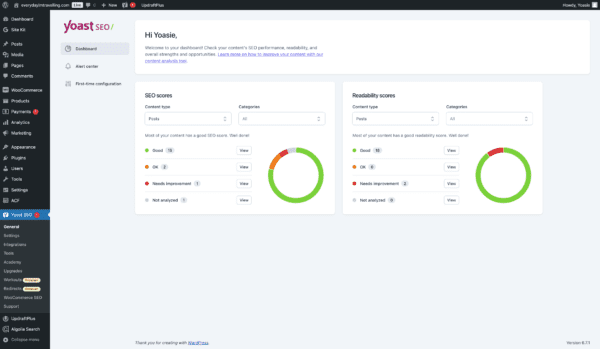
With the new Yoast SEO Dashboard, you can see how your site is doing at a glance. Instead of hunting through pages, you’ll find all your key metrics in one place. It’s easy to spot which posts need attention, see where you can improve, and figure out what to tackle first so you can spend more time refining your content and less time searching for data.
We know it can be challenging to improve your content when you have to dig through every post and page. That’s why we created a dashboard that instantly shows your site SEO Perfomance. It streamlines the process so you can focus on what matters: making your content shine.
What you get from the Yoast SEO Dashboard:
Top-level overview of your SEO: see critical insights at a glance without hunting through individual pages
Filterable views of SEO and readability scores: quickly spot where you can make the most significant improvements
Designed for clarity and direction, our dashboard makes it easy to check in, prioritize your next steps, and enhance your content strategy immediately. It’s straightforward, efficient, and all about helping you work smarter.
How to access the Yoast SEO Dashboard:
To access the Yoast SEO Dashboard, you just need to:
Ensure your Yoast SEO is up-to-date: In your WordPress admin area, go to “Plugins” and update Yoast SEO to the latest version
Navigate to the Dashboard: Click on “Yoast SEO” in your WordPress sidebar to land on the dashboard, or click on “Dashboard”
Explore your insights: Review the overview, filter your scores, and start working through your task list
Ready to see how much simpler managing your SEO can be? Get Yoast SEO today and let your new dashboard guide you toward better performance.
Carl Henry Addoumieh
When I first started working in marketing, Yoast SEO was the first plugin I used. Today, I work with the tool that I depended on the most. I’m Carl Henry, my background is in SaaS growth marketing with a focus on content. I like basketball, padel, painting, and gaming.
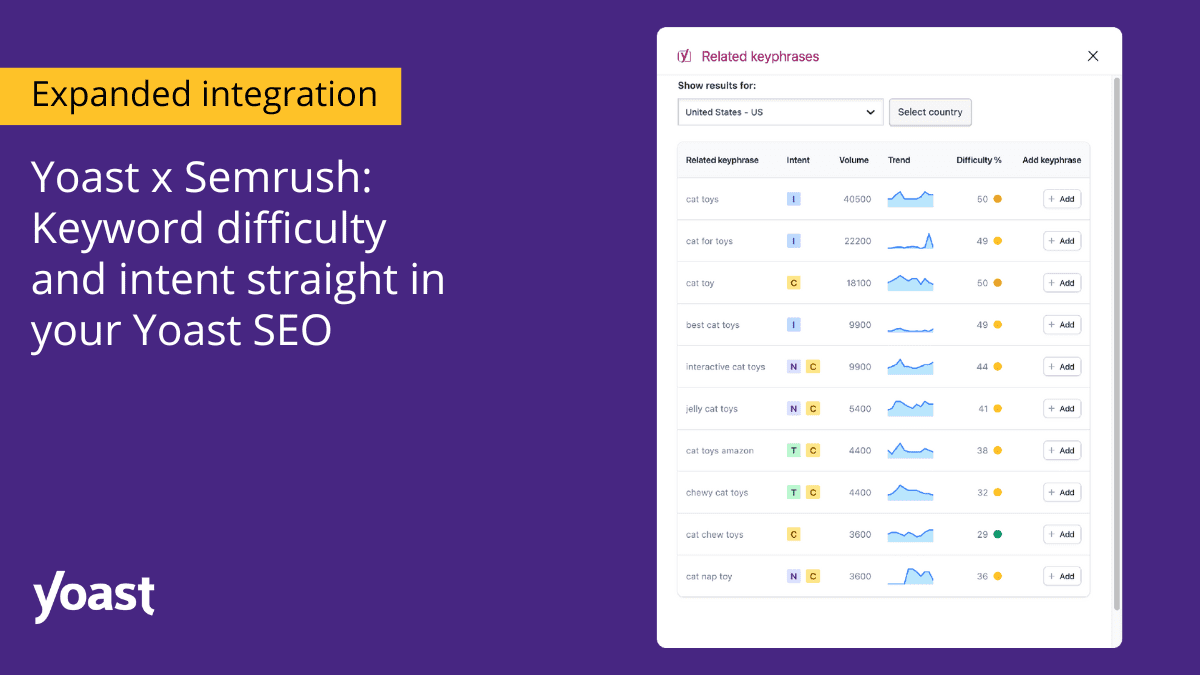
Take your content strategy to the next level with expanded Semrush insights in the Yoast SEO plugin! Simplify your SEO process and focus on what matters the most: crafting and optimizing content that resonates and ranks. The Yoast Semrush integration means all Yoast SEO users can access keyword intent, and keyword difficulty and track and analyze up to four keywords. All powered by Semrush—seamlessly integrated into Yoast’s focus keyphrase section.
Keyword difficulty and intent:
Make your keyword choices smarter with data-driven insights:
Keyword difficulty shows how challenging it is to rank for a specific keyword, helping you focus on keywords that are within reach and maximize your chances of ranking.
Keyword intent, or search intent, reveals whether users searching for a keyword are looking for information, products, or services. This gives you the context to create content that genuinely connects with their needs.
These insights empower you to shape content that ranks and resonates—right from Yoast SEO’s analysis section.
Terms can sometimes be overwhelming, so the Yoast team prepared a comprehensive glossary with all the SEO terms you need to build and implement an SEO strategy successfully.
Get started
Click “Get related keyphrases” below the focus keyphrase box to get started. If you haven’t activated your Yoast Semrush integrations, you will be redirected to the Semrush login page. Afterward, you will instantly see keyword insights in the related keyphrases section. This makes adapting your content strategy seamless, allowing you to make quick, data-driven adjustments as you write.
Get started in simple steps:
Click “Get related keyphrases” below the focus keyphrase box.
If you haven’t activated your Yoast Semrush integrations, you will be redirected to the Semrush login page.
You will instantly see keyword insights in the related keyphrases section.
This makes adapting your content strategy seamless, allowing you to make quick, data-driven adjustments as you write. To learn more about activating your integrations within Yoast SEO, visit our help center.
About Yoast Semrush integration
Expanded Semrush insights are available at no additional cost to all users with a Semrush account. Just update your plugin and enjoy the data you need to rank higher, right next to your keywords—effortless, real-time SEO insights, all within Yoast!
Integrate your Semrush account into your Yoast SEO and boost your ranking with valuable data within the plugin. Directly bringing comprehensive keyword research tools to your fingertips without switching platforms. Learn more about the Yoast Semrush integration.