5 Ways To Prove The Real Value Of SEO In The AI Era via @sejournal, @wburton27

As SEO evolves with AI optimization, generative engine optimization, and answer engine optimization, brands and marketers must rethink their SEO strategies to stay competitive.

Instead of focusing solely on traditional SEO strategies and tactics, you need to be visible in AI-powered search and answer engines.

Showing the value of SEO in this new world means showcasing how optimized, structured, and intent-driven content can maximize visibility across generative platforms.

It can also enhance user trust and drive qualified engagement in a world where AI chatbots and platforms interpret a user’s intent, retrieve relevant information, and generate clear and concise answers.

In today’s competitive AI-powered results, it can be difficult to maximize your visibility.

With SEO becoming more challenging and the search engine results constantly changing to incorporate AI results, what metrics do you need to track, and how can you show the value of SEO in today’s AI-powered search results?

Let’s explore.

Proving The Value Of SEO

Proving SEO value depends on your client or prospective client’s goals and what will move the needle for them to get visibility in the search engine results pages (SERPs) and in AI chatbots and platforms.

This could include local search, app store optimization, content marketing, technical optimization, AI Overviews, etc.

That said, you must show performance improvements and drive revenue to secure more funding and make your client successful.

In my experience, here are some of the best metrics to track and measure to prove the SEO value in an AI world:

1. Monitor AI Results

With AI Overviews and generative AI changing SEO, it is important to track visibility as we move from ranking to relevance.

AI Overviews are not expected to go anywhere. During I/O 2025, Google announced that AI Overviews were expanding to over 200 countries and more than 40 languages.

AI Mode is now available to all users in the United States without the need to opt in via Search Labs.

To track AI Overviews:

Identify Which Queries Trigger AI Overviews

You can use tools like ZipTie.dev or Semrush to track which of your top-performing queries show AI Overviews and whether your site is included in those summaries.
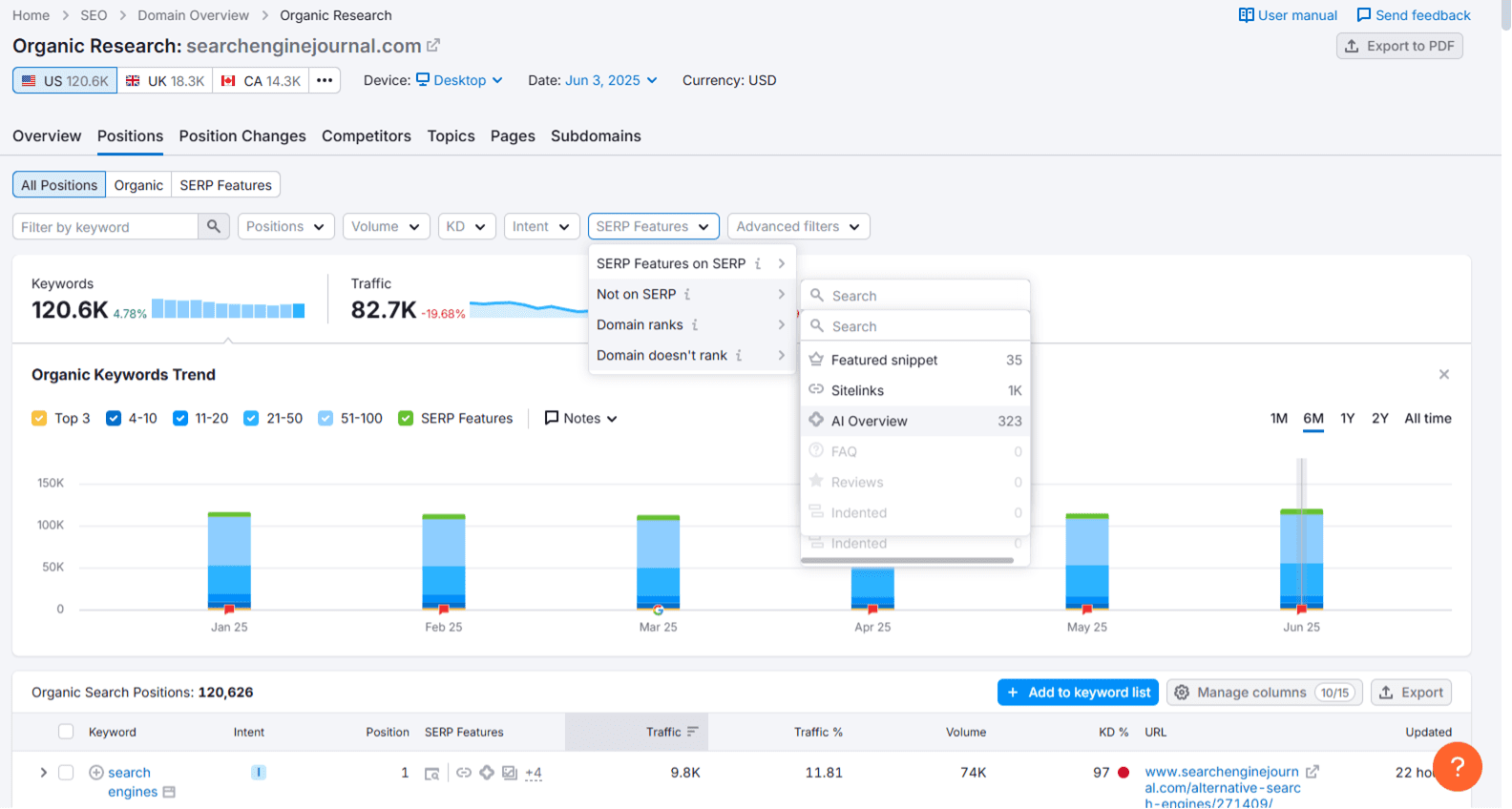
Track which of your top-performing queries show AI Overviews Screenshot from Semrush, June 2025

Track AI Overview Queries

Once you have a list of queries that your site does or doesn’t appear in for an AI Overview,  you should track those queries using keyword tracking tools and compare your traffic pre- and post-AI rollouts.

Strategize To Optimize Your Content For AI Overviews

Segment your traffic based on content type, as many informational queries are experiencing a decline in traffic due to users obtaining answers directly from AI Overviews.

This will help you identify which areas are most impacted and plan your strategy to optimize queries that have the potential to show AI Overviews.

Consider server-side analytics solutions (e.g., Writesonic’s AI Traffic Analytics) to track AI crawler visits, see which pages are accessed, and monitor trends over time.

2. Track AI Brand Mentions

Since AI platforms process information differently than traditional search engines, getting mentioned in ChatGPT, Perplexity, Claude, or Google’s AI Mode for relevant queries is a must.

AI platforms like ChatGPT and Google’s AI Overview generate answers from a mix of training data and some real-time retrieval, depending on the platform and setup.

In my experience, brands that are frequently mentioned across various platforms, including PR, blogs, social media, news coverage, YouTube forums (such as Reddit and Quora), and authoritative sites, tend to be mentioned by AI.

To track AI mentions, several tools like Brand24, Brand Radar from Ahrefs, and Mention.com use AI to monitor online conversations across various platforms, leveraging large datasets to provide insights into your brand’s perception and those of your competitors.

It’s imperative that you find out if your brand is mentioned, what people are saying about your brand (both positive and negative), what queries are used to describe it, and which websites mention your brand.
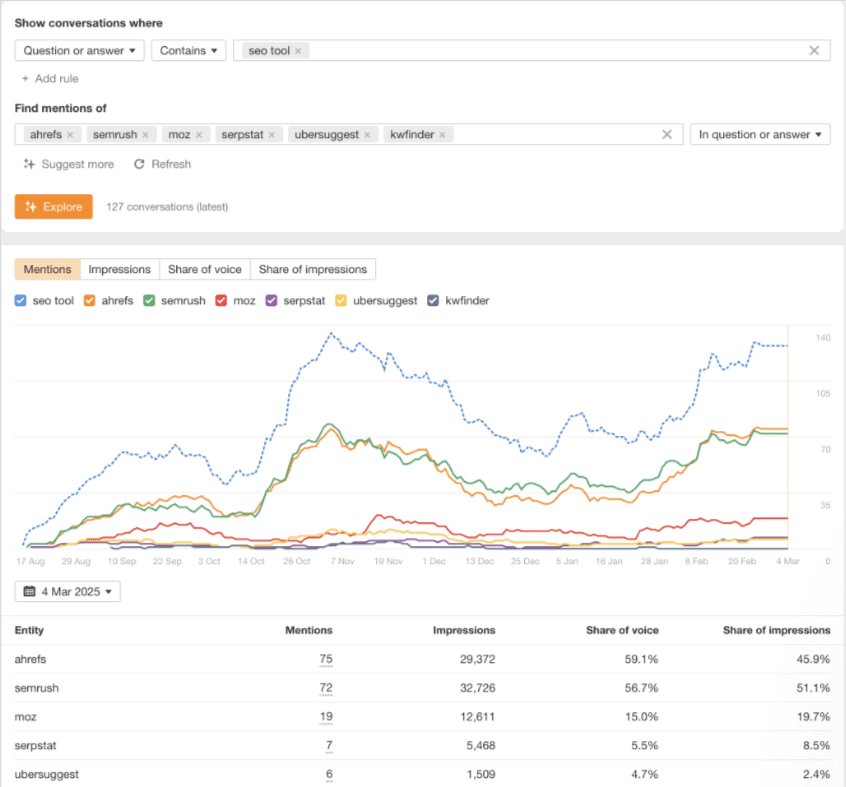
Brand Radar: AhrefsScreenshot from Brand Radar, Ahrefs, June 2025

3. Track AI Citations/References

Checking to see if your website is cited by large language models (LLMs) can help brands and marketers understand how their content is being used by AI and assess their brand’s authority and visibility.

Ahrefs now offers a free tool that tracks when your website is cited in the answers generated by AI-powered search tools like Google AIO, ChatGPT, and Perplexity. AI citations count how often a domain was linked in AI results.

Pages show how many unique URLs from this domain were linked.
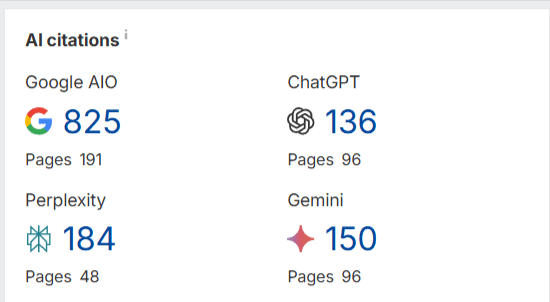
AI CitationsScreenshot from Ahrefs, June 2025

This is one of my favorite audit tools to look to see if there are any citations in any brand that we’re reviewing.

If Ahrefs adds trend analysis to track whether you’re gaining more citations in Google AIO, ChatGPT, and other platforms over time, it would be a valuable way to assess whether your strategies are working.

4. Tracking Branded Searches

It’s extremely important to track your branded searches in this new SEO AI era. AI-powered search results are personalized, and LLMs like Gemini and ChatGPT, to name a few, heavily consider user intent and context.

Having strong brand signals could improve entity recognition, which can improve your visibility for related queries.

Tracking how AI-generated answers (e.g., featured snippets or AI Overviews) treat your brand helps you optimize for entity-driven SEO.

In the AI SEO era, where search engines prioritize context, trust, and relevance, tracking branded searches could inform you to refine strategies that help defend your SERP presence and maximize conversions.

Here are some tips to help enhance branded visibility:

  • Create unique, authoritative, and factual, conversational content because AI models prioritize reliable and accurate information. Focus on content that demonstrates expertise and includes verifiable data.
  • Structure content for AI readability by using clear headings (H1, H2, H3), bullet lists, numbered lists, and data tables. Also, create concise paragraphs that directly answer questions.
  • Leverage schema markup like Organization, Product, Service, FAQPage, and Review to provide structured data that AI models can easily understand and reference.
  • Build brand authority and expertise by getting consistent citations, mentions on authoritative third-party sites, and positive reviews, to contribute to AI’s perception of your brand’s credibility.
  • Optimize conversational queries by creating content that directly answers “who, what, why, and how” in your niche.
  • Be active on platforms like Reddit and Quora, where AI models often pull information. SEO becomes “Search Engine Everywhere.”
  • Regularly review your AI visibility data, identify gaps, and adjust your content and SEO strategies based on insights.

5. Tracking AI Mode Metrics

AI Traffic In GSC

Google has recently provided some data in GSC for tracking AI Mode and marketers can track clicks, impressions, and positions.

According to Google:

AI Mode groups the user’s question into subtopics and searches for each one simultaneously, and users can go deeper.

If a user asks a follow-up question within AI Mode, they are essentially performing a new query. All impression, position, and click data in the new response are counted as coming from this new user query.

AI Traffic In GA4

While Google Analytics 4 doesn’t explicitly label AI traffic, you can look for patterns. Create custom reports with “Session source/medium” and apply regex filters for known AI domains (e.g., .*ChatGPT.*|.*perplexity.*|.*openai.*|.*bard.*).

For specific content you hope AI will cite, create unique URLs with UTM parameters (e.g., utm_source=chatgpt, utm_medium=ai). This can help attribute some traffic directly.

If you can get more conversions from AI Overviews, like Ahrefs did, when it found that AI search visitors converted at a rate 23 times higher than traditional organic search traffic, despite representing only 0.5% of total website visits, then you will have discovered a conversion goldmine that makes AI optimization not just worthwhile, but essential for staying competitive.

Final Thoughts

The SEO landscape has shifted from optimizing search engines and traditional search to optimizing for AI-powered chatbots and solutions, such as ChatGPT, Perplexity, Claude, Google’s AI Overviews, and potentially OpenAI’s web browser “in the coming weeks,” according to Reuters.

Google may face increased pressure and potentially lose market share if OpenAI launches an AI-powered web browser that challenges Google Chrome, changing how users access web content.

OpenAI has 500 million weekly active users of ChatGPT and could disrupt a key component of rival Google’s ad-money source.

SEO is no longer about ranking on the first page of Google.

It’s about being relevant and visible across multiple AI platforms, getting mentioned in generative responses, and demonstrating value through AI-focused metrics outside of the traditional metrics like rankings and traffic.

Brands and marketers that prove the SEO value in this new era can deliver immediate, measurable value while building momentum for larger investments in the future.

More Resources:


Featured Image: Roman Samborskyi/Shutterstock
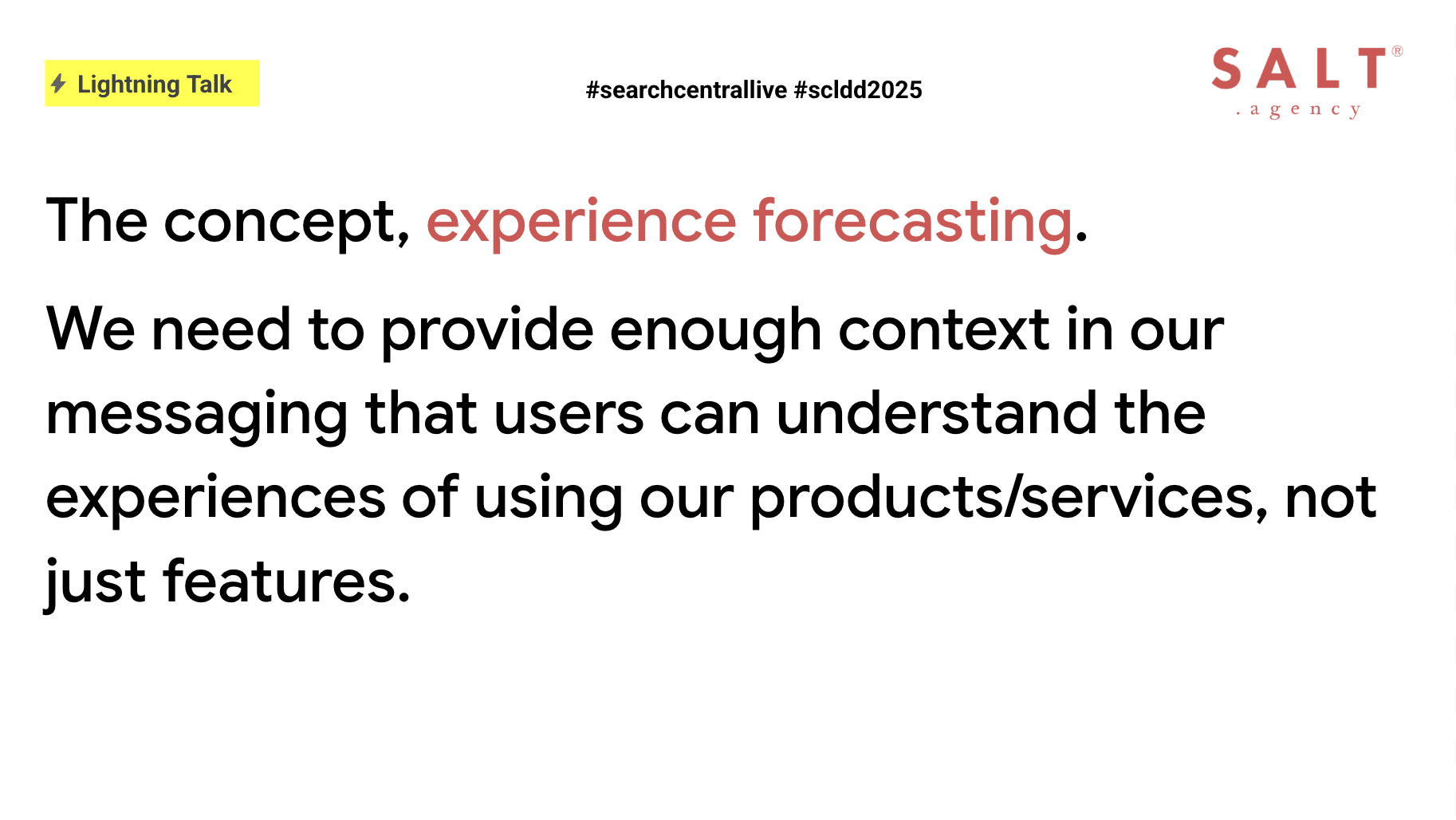
Experience Forecasting: Content That Enables & Adds Value In The Modern Search World via @sejournal, @TaylorDanRW

Too often in our content and messaging, we default to listing features in a succession of brief, disconnected claims rather than showing readers how those features will make a genuine difference in their lives.

As a result, they are left to fill in the gaps themselves, often choosing to skim and move on rather than engage with that cold list of facts.

It’s common for us to focus heavily on features, then expect our audience to understand how those features directly impact them.

Instead, by describing a scenario in which users experience the benefits of the features, you invite the user to picture themselves using the features as part of their day-to-day life. That mental rehearsal is what sparks genuine interest.

In this article, we examine how to transition from “we have X” to “you will Y” and why this shift is more crucial than ever in today’s AI-driven search landscape.

This article serves as a summary of my talk at Google Search Central Live: Deep Dive Asia Pacific, delivered July 25, 2025.

The Rise Of AI Overviews And The Need For Context

As search engines now showcase AI Overviews or AI Mode snippets that extract passages of our copy into results pages and dashboard panels, those bite-sized answers may earn clicks.

However, every sentence must stand alone, or risk having nuance stripped out.

Headlines should hint at benefits, subheads need to frame outcomes, and meta descriptions become miniature forecasts rather than mere summaries.

Because Overviews appear outside the full context of the page it’s taken from, every word must carry weight and meaning on its own.

By weaving context and emotional hooks directly into key sentences, we can direct AI tools to lift passages that still resonate and invite deeper exploration.

Image from author, July 2025

Defining Experience Forecasting

Experience forecasting is the practice of writing so vividly that readers can mentally rehearse using your product or service.

For a city break tours website, you might describe stepping off the train into Barcelona’s Gothic Quarter, following a curated walking tour that reveals hidden plazas, tantalizes with local tapas bars, and culminates in sunset views over the Mediterranean.

At the same time, for invoicing software, you could paint a picture of logging in to discover that overdue invoices have been sent automatically, payments are tracked in real time, and tax reports appear at the click of a button, allowing finance teams to close their books in minutes rather than hours.

In both cases, readers will imagine themselves in those moments of discovery and relief.

This technique relies on three complementary elements: scene setting through sensory details, emotional framing to highlight feelings such as relief and confidence, and a tangible payoff that demonstrates results like time saved or stress reduced.

Guiding Users Through Ambiguous Journeys

Because many search queries begin in a zone of uncertainty, questions such as how to plan a trip to Italy, what constitutes a healthy breakfast, or which tools best serve remote teams indicate that readers are exploring.

If your page opens with a laundry list of features, this will risk causing them to bounce.

Instead, guiding users with a vivid scenario immediately captures their attention by giving them a vision of success, such as picturing themselves strolling cobblestone streets in Rome on a custom itinerary that balances must‑see landmarks with hidden cafés.

By meeting readers at this exploratory stage, we can transform passive browsers into engaged readers who refine their own goals as they proceed.

Demonstrating that we understand their uncertainty builds trust, and previewing what success looks like shapes intent.

Forecastable Messaging In Action

We can tap into sensory memory and create an experience that sticks in the mind by describing the balcony, the sea, and the espresso.

By transforming before:

“A luxury hotel on the Amalfi Coast, with complimentary breakfast.”

To after:

“Wake up on your private balcony as the sun glints off the Tyrrhenian Sea, sip fresh Italian espresso while planning your morning adventure, and join us for a complimentary breakfast of flaky pastries and locally sourced cheeses, providing fuel for a day of discovery.”

If an AI tool then lifts a fragment of our description, such as “sipping fresh Italian espresso, while planning your morning adventure,” that phrasing still has the power to entice because it hints at both flavor and purpose.

Vivid details, such as “a private balcony overlooking the Tyrrhenian Sea” and “locally sourced cheeses,” can broaden our semantic footprint.

This helps to capture long-tail queries around experiences rather than generic hotel terms, which could ultimately increase the likelihood that readers move from casual browsing to booking.

Image from author, July 2025

Forecasting Against The Funnel

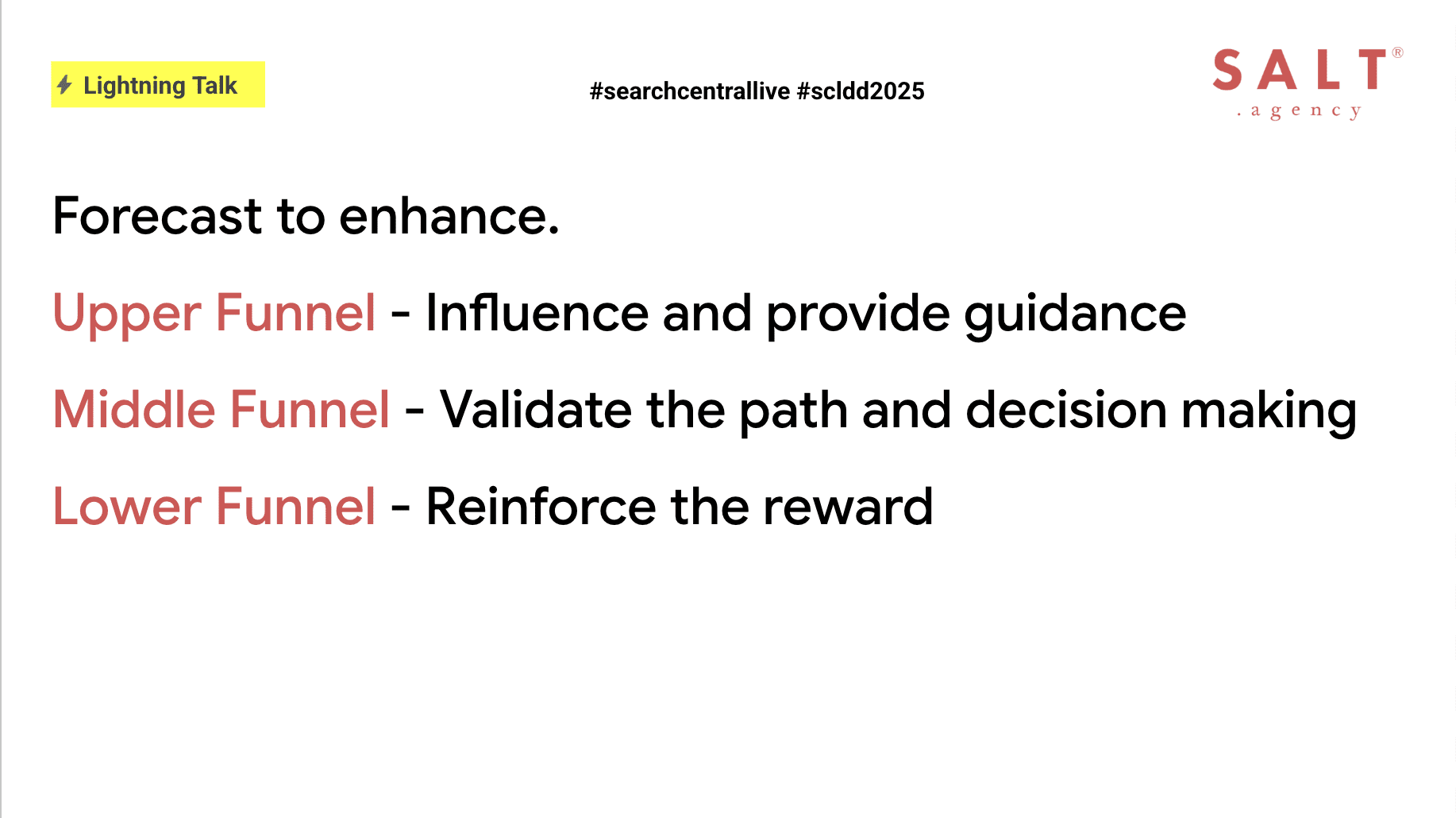
Experience forecasting can enhance every stage of the funnel by sparking curiosity and building emotional hooks at the awareness stage.

Creating broad scenarios with narrative case studies, such as “imagine your team collaborating seamlessly from anywhere,” can help to validate decisions at the consideration stage, which can improve click-through rates and time on page.

Introducing reminders of the end reward at the conversion stage can help close a deal, such as offering free cancellation up to 24 hours before arrival, alongside a claim that customers save an average of $5,000 in their first year, to increase completion rates and purchase conversions.

For example, validations, such as “When Acme Corp adopted our platform, they cut project delays by 30%,” encourage readers to imagine comparable gains.

→ Read more: How To Write Content For Each Stage Of Your Sales Funnel

Ensuring Purpose, Expertise, And Originality

Strong forecasting rests on three pillars:

  1. Purpose, which means that every piece must address a clear user need, whether helping readers choose, compare, or commit, and stating that objective up front.
  2. Showcasing expertise, by linking claims to real-world proof, such as data points, practitioner quotes, or firsthand anecdotes, and providing sources for assertions like “instant setup in five minutes.”
  3. Originality, which involves avoiding clichés by grounding imagery in authentic capabilities and experiences that only you can deliver.

Key Questions For Content Creators

Before publishing, use a comprehensive checklist that confirms:

  • The problem being addressed is stated in relatable terms.
  • Each paragraph includes sensory or emotional details to help readers imagine the outcome.
  • Claims are supported by data, case studies, or user quotes.
  • The angle differs from competitors through fresh insights.
  • Section openers carry meaning when read in isolation.
  • Forecast tactics align with key metrics such as click-through rate, time on page, or form completions.
  • The narrative guides readers naturally from uncertainty to clarity and action.
Image from author, July 2025

Final Thoughts

As search engines and AI continue to evolve, our copy must do more.

Transport readers into scenarios where they feel the benefit by weaving sensory details into every line.

This helps us stand out from the homogeneous, safe content that a lot of the internet has been built on.

Back up claims with evidence and constantly ask how effectively each sentence enables readers to imagine their success.

This helps to align with neural search models, feeding inclusion in AI Overviews, which then drives meaningful business results such as clicks and conversions.

Ultimately, words become experiences; experiences become results.

More Resources:


Featured Image: Dan Taylor/SALT.agency

Google Search Central APAC 2025: Everything From Day 3 via @sejournal, @TaylorDanRW

Google Search Central Asia Pacific 2025 focused on three pillars over the three days.

The theme for day one was crawling, and day two of the event focused on indexing, with a big announcement about the new Google Trends API entering alpha.

Day three picked up from there, diving into how Google actually returns search results.

The serving infrastructure encompasses query understanding, result retrieval, index selection, ranking, and feature application, including rich results, before presenting them to the user.

Google Search Central APAC 2025Image from author, July 2025

Making Sense Of User Queries

Cherry Prommawin provided a detailed explanation of how Google interprets users’ queries.

Not all queries are straightforward.

In languages like Chinese or Japanese, there are no spaces between words, so Google has to learn where words start and end by looking at past queries and documents. This is known as segmenting, and not all languages require this.

After that, it removes stopwords unless they’re part of a meaningful phrase or entity, like “The Lord of the Rings.”

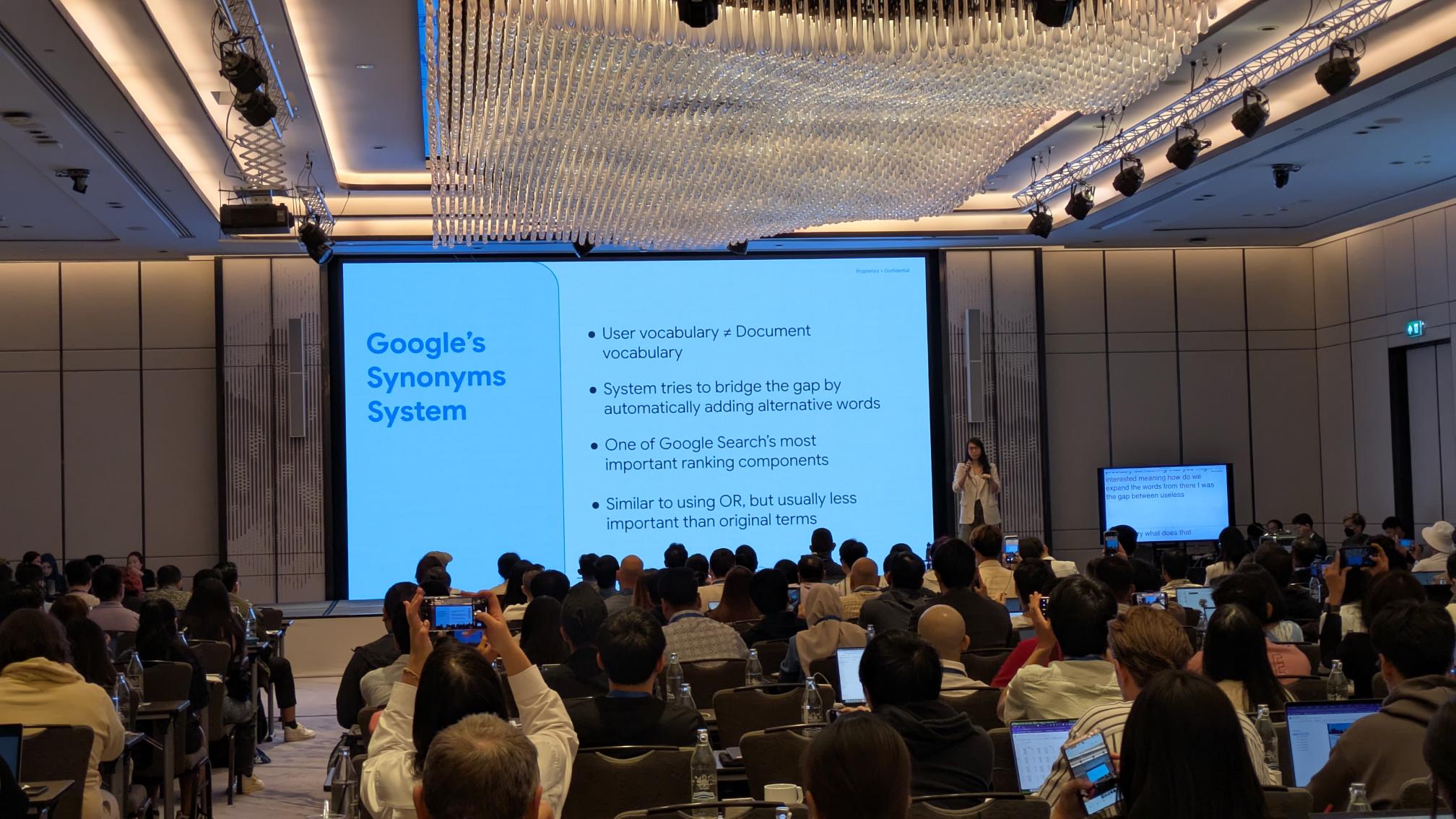
Then, it expands the query to include synonyms across all languages to better match what the user is actually looking for (see image above).

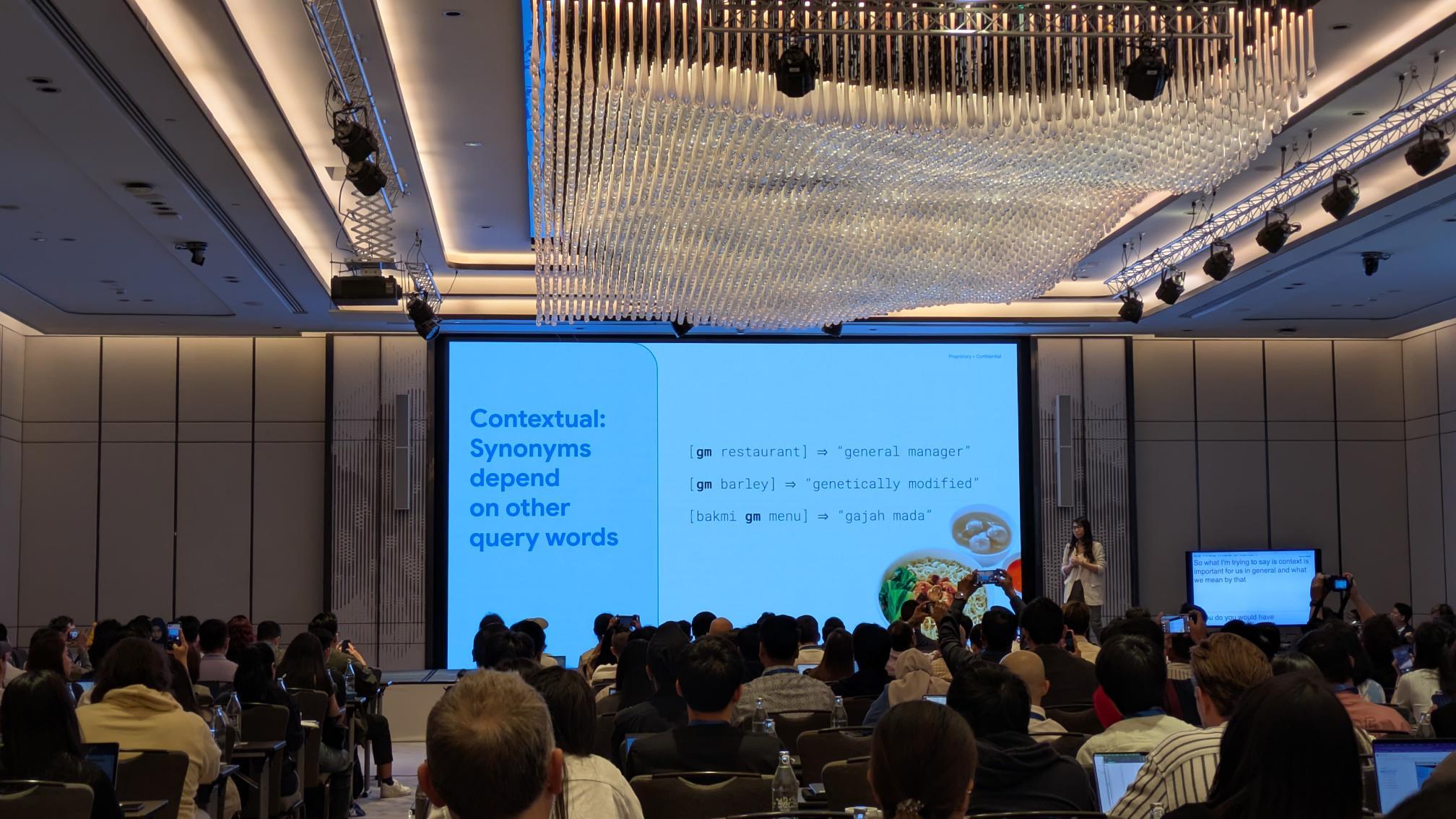
Context plays a significant role in how Google understands and responds to queries. A crucial aspect of this is the utilization of contextual synonyms.

Google Search Central APAC 2025Image from author, July 2025

These aren’t like the typical synonyms you’d find in an English dictionary. Instead, they’re created to help return better search results, based on how words are used in real-world searches and content.

Google might learn that people searching for “car hire” often click on pages that say “rental car,” so it treats the two terms as similar in the right context. This is what Google refers to as “siblings.”

These relationships are mostly invisible to users, but they help connect queries to the most relevant information, even when the exact words don’t match.

Google Search Central APAC 2025Image from author, July 2025

How Google Understands Quality

Alfin Hotario Ho provided a clear explanation of how Google evaluates quality in search results.

Quality is just one of many signals Google uses when ranking pages, but it’s an important one.

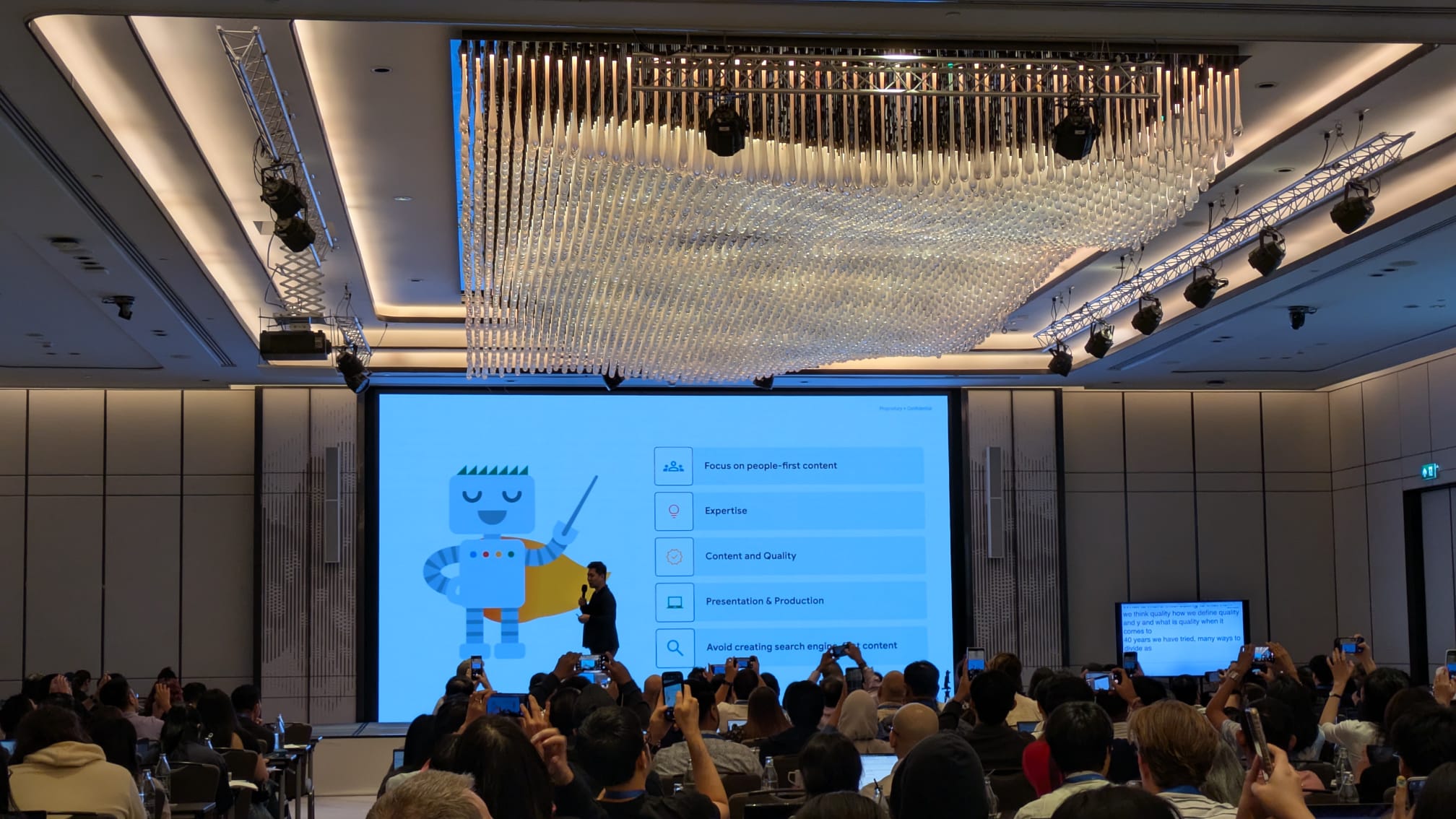
Over the years, Google has attempted to define what “quality” means, and it consistently returns to five key points:

  1. Focus on people-first content.
  2. Expertise.
  3. Content and quality.
  4. Presentation and production.
  5. Avoid creating search engine-first content.
Google Search Central APAC 2025Image from author, July 2025

Ho highlighted the Quality Rater Guidelines as a useful resource. These guidelines don’t directly influence ranking, but they help explain how Google measures whether its systems are performing well.

When the guidelines change, they reflect updates in Google’s thinking about what constitutes good content.

There are four main pillars of quality in the guidelines:

  1. Effort: Content should be made for people, not search engines. It should clearly show time, skill, and first-hand knowledge.
  2. Originality: The content should offer something new – original research, fresh analysis, or reporting that goes beyond what’s already out there.
  3. Talent or Skill: It should be well-written or produced free from obvious errors, and show a strong level of craft. You also don’t need to be an expert in something, as long as you can demonstrate verifiable first-hand experience.
  4. Accuracy: It must be factually correct, supported by evidence, and consistent with expert or public consensus when possible.

Other key takeaways from Ho’s session include:

  • From E-E-A-T (Experience, Expertise, Authoritativeness, and Trustworthiness), it is clear that trust matters most.
  • Even if a topic isn’t about health, money, or safety (Your Money or Your Life), Google still prioritizes trustworthy content.
  • If a page strongly disagrees with general expert opinion, it may be seen as less reliable overall.
  • Lots of 404 or noindex pages on a website are not a quality issue. 404 is a technical issue, as is the “noindex” tag.
Google Search Central APAC 2025Image from author, July 2025

What Are Quality Updates?

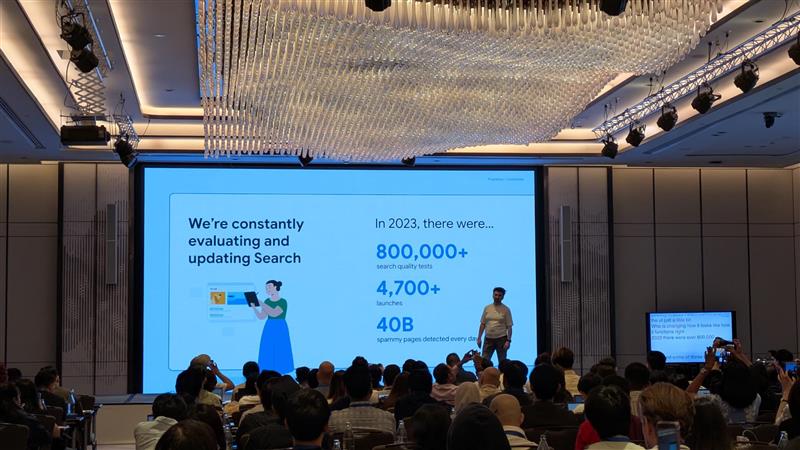
Google updates its search systems for three primary reasons: to support new content formats, to enhance content quality, or to combat spam.

These updates help ensure that people receive useful and relevant results when they search.Supporting New Content Formats

As new content types become more popular, such as short videos or interactive visuals, users start to expect to find them in search results.

If enough people show interest, Google may launch new features to match that demand.

This could include new filters or information views in the results. These updates help keep Search useful and aligned with how people want to explore information.

Improving Content Breadth And Relevance

The internet is constantly growing, and many topics become saturated. That makes it harder to find the best content.

To improve this, Google rolls out core updates. These updates don’t target specific websites or pages.

Instead, they improve how Google ranks content across the web with the overarching goal of surfacing higher-quality results overall.

Combating Low-Quality And Spam Content

Some people try to game the system with low-effort content. Google isn’t perfect, and spammers look for gaps to exploit.

In response, Google launches targeted updates that adjust how its systems detect spam or low-quality signals. These changes aim to remove poor content from search results.

Recovering From Google Updates

Core Updates

You’re technically not penalized, so technically there’s no recovery like with spam updates.

Google recommends that you should:

Continue doing a great job, look at what your competitors are doing better, and learn from sites that are doing better than you.

Spam Updates

Remove the type of spam that Google has mentioned in its blog communications.

Caveats On Structured Data Usage

Google addressed some common myths surrounding structured data, particularly its connection to serving and ranking.

None of these are new, but the reiteration has been based on continued questions around the impact and value of adding structured data.

Not A Direct Ranking Factor

Adding structured data to your site won’t directly improve your rankings. But, it can make your listings more attractive in search results, which might lead to more clicks.

That added engagement could help your site over time.

No Guarantees

Just because you’ve added structured data doesn’t mean Google will show rich results. The algorithms decide when and where it makes sense to display them.

Google Can Add Rich Results On Its Own

Even without structured data, Google may still display enhanced results, such as your site name or breadcrumbs, if it can infer that information from your page content.

It Needs Ongoing Maintenance

Structured data isn’t a one-time task. You should check it regularly to ensure it remains accurate and error-free.

Keeping it up to date helps you stay eligible for enhanced search features.

That’s all from Google Search Central Live in Thailand. There have been a lot of insights and a big announcement over the last three days.

I recommend that SEOs review the last three articles and digest what Google has said. Then, consider how they can apply that to their strategies for 2025.

More Resources:


Featured Image: Dan Taylor/SALT.agency

ChatGPT Appears To Use Google Search As A Fallback via @sejournal, @martinibuster

Aleyda Solís conducted an experiment to test how fast ChatGPT indexes a web page and unexpectedly discovered that ChatGPT appears to use Google’s search results as a fallback for web pages that it cannot access or that are not yet indexed on Bing.

According to Aleyda:

I’ve run a simple but straightforward to follow test that confirms the reliance of ChatGPT on Google SERPs snippets for its answers.

Created A New Web Page, Not Yet Indexed

Aleyda created a brand new page (titled “LLMs.txt Generators”) on her website, LearningAISearch.com. She immediately tested ChatGPT (with web search enabled) to see if it could access or locate the page but ChatGPT failed to find it. ChatGPT responded with the suggestion that the URL was not publicly indexed or possibly outdated.

She then asked Google Gemini about the web page, which successfully fetched and summarized the live page content.

Submitted Web Page For Indexing

She next submitted the web page for indexing via Google Search Console and Bing Webmaster Tools. Google successfully indexed the web page but Bing had problems with it.

After several hours elapsed Google started showing results for the page with the site: operator and with a direct search for the URL. But Bing continued to have trouble indexing the web page.

Checked ChatGPT Until It Used Google Search Snippet

Aleyda went back to ChatGPT and after several tries it gave her an incomplete summary of the page content, mentioning just one tool that was listed on it. When she asked ChatGPT for the origin of that incomplete snippet it responded that it was using a “cached snippet via web search””, likely from “search engine indexing.”

She confirmed that the snippet shown by ChatGPT matched Google’s search result snippet, not Bing’s (which still hadn’t indexed it).

Aleyda explained:

“A snippet from where?

When I followed up asking where was that snippet they grabbed the information being shown, the answer was that it had “located a cached snippet via web search that previews the page content – likely from search engine indexing.”

But I knew the page wasn’t indexed yet in Bing, so it had to be … Google search results? I went to check.

When I compared the text snippet provided by ChatGPT vs the one shown in Google Search Results for the specific Learning AI Search LLMs.txt Generators page, I could confirm it was the same information…”

Not An Isolated Incident

Aleyda’s article on her finding (Confirmed: ChatGPT uses Google SERP Snippets for its Answers [A Test with Proof]) links to someone else’s web page that summarizes a similar experience where ChatGPT used a Google snippet. So she’s not the only one to experience this.

Proof That Traditional SEO Remains Relevant For AI Search

Aleyda also documented what happened on a LinkedIn post where Kyle Atwater Morley shared his observation:

“So ChatGPT is basically piggybacking off Google snippets to generate answers?

What a wake-up call for anyone thinking traditional SEO is dead.”

Stéphane Bureau shared his opinion on what’s going on:

“If Bing’s results are insufficient, it appears to fall back to scraping Google SERP snippets.”

He elaborated on his post with more details later on in the discussion:

“Based on current evidence, here’s my refined theory:

When browsing is enabled, ChatGPT sends search requests via Bing first (as seen in DevTools logs).

However, if Bing’s results are insufficient or outdated, it appears to fall back to scraping Google SERP snippets—likely via an undocumented proxy or secondary API.

This explains why some replies contain verbatim Google snippets that never appear in Bing API responses.

I’ve seen multiple instances that align with this dual-source behavior.”

Takeaway

ChatGPT was initially unable to access the page directly, and it was only after the page began to appear in Google’s search results that it was able to respond to questions about the page. Once the snippet appeared in Google’s search results, ChatGPT began referencing it, revealing a reliance on publicly visible Google Search snippets as a fallback when the same data is unavailable in Bing.

What would be interesting to see is whether the server logs held a clue as to whether ChatGPT attempted to crawl the page and, if so, what error code was returned in response to the failure to retrieve the data. It’s curious that ChatGPT was unable to retrieve the page, and though it probably doesn’t have any bearing on the conclusions, it would still contribute to making the conclusions feel more complete to have that last bit of information crossed off.

Nevertheless, it appears that this is yet more proof that standard SEO is still applicable for AI-powered search, including for ChatGPT Search. This adds to recent comments by Gary Illyes that confirms that there is no need for specialized GEO or AEO in order to rank well in Google AI Overviews and AI Mode.

Featured Image by Shutterstock/Krakenimages.com

America’s AI watchdog is losing its bite

Most Americans encounter the Federal Trade Commission only if they’ve been scammed: It handles identity theft, fraud, and stolen data. During the Biden administration, the agency went after AI companies for scamming customers with deceptive advertising or harming people by selling irresponsible technologies. With yesterday’s announcement of President Trump’s AI Action Plan, that era may now be over. 

In the final months of the Biden administration under chair Lina Khan, the FTC levied a series of high-profile fines and actions against AI companies for overhyping their technology and bending the truth—or in some cases making claims that were entirely false.

It found that the security giant Evolv lied about the accuracy of its AI-powered security checkpoints, which are used in stadiums and schools but failed to catch a seven-inch knife that was ultimately used to stab a student. It went after the facial recognition company Intellivision, saying the company made unfounded claims that its tools operated without gender or racial bias. It fined startups promising bogus “AI lawyer” services and one that sold fake product reviews generated with AI.

These actions did not result in fines that crippled the companies, but they did stop them from making false statements and offered customers ways to recover their money or get out of contracts. In each case, the FTC found, everyday people had been harmed by AI companies that let their technologies run amok.

The plan released by the Trump administration yesterday suggests it believes these actions went too far. In a section about removing “red tape and onerous regulation,” the White House says it will review all FTC actions taken under the Biden administration “to ensure that they do not advance theories of liability that unduly burden AI innovation.” In the same section, the White House says it will withhold AI-related federal funding from states with “burdensome” regulations.

This move by the Trump administration is the latest in its evolving attack on the agency, which provides a significant route of redress for people harmed by AI in the US. It’s likely to result in faster deployment of AI with fewer checks on accuracy, fairness, or consumer harm.

Under Khan, a Biden appointee, the FTC found fans in unexpected places. Progressives called for it to break up monopolistic behavior in Big Tech, but some in Trump’s orbit, including Vice President JD Vance, also supported Khan in her fights against tech elites, albeit for the different goal of ending their supposed censorship of conservative speech. 

But in January, with Khan out and Trump back in the White House, this dynamic all but collapsed. Trump released an executive order in February promising to “rein in” independent agencies like the FTC that wage influence without consulting the president. The next month, he started taking that vow to—and past—its legal limits.

In March, he fired the only two Democratic commissioners at the FTC. On July 17 a federal court ruled that one of those firings, of commissioner Rebecca Slaughter, was illegal given the independence of the agency, which restored Slaughter to her position (the other fired commissioner, Alvaro Bedoya, opted to resign rather than battle the dismissal in court, so his case was dismissed). Slaughter now serves as the sole Democrat.

In naming the FTC in its action plan, the White House now goes a step further, painting the agency’s actions as a major obstacle to US victory in the “arms race” to develop better AI more quickly than China. It promises not just to change the agency’s tack moving forward, but to review and perhaps even repeal AI-related sanctions it has imposed in the past four years.

How might this play out? Leah Frazier, who worked at the FTC for 17 years before leaving in May and served as an advisor to Khan, says it’s helpful to think about the agency’s actions against AI companies as falling into two areas, each with very different levels of support across political lines. 

The first is about cases of deception, where AI companies mislead consumers. Consider the case of Evolv, or a recent case announced in April where the FTC alleges that a company called Workado, which offers a tool to detect whether something was written with AI, doesn’t have the evidence to back up its claims. Deception cases enjoyed fairly bipartisan support during her tenure, Frazier says.

“Then there are cases about responsible use of AI, and those did not seem to enjoy too much popular support,” adds Frazier, who now directs the Digital Justice Initiative at the Lawyers’ Committee for Civil Rights Under Law. These cases don’t allege deception; rather, they charge that companies have deployed AI in a way that harms people.

The most serious of these, which resulted in perhaps the most significant AI-related action ever taken by the FTC and was investigated by Frazier, was announced in 2023. The FTC banned Rite Aid from using AI facial recognition in its stores after it found the technology falsely flagged people, particularly women and people of color, as shoplifters. “Acting on false positive alerts,” the FTC wrote, Rite Aid’s employees “followed consumers around its stores, searched them, ordered them to leave, [and] called the police to confront or remove consumers.”

The FTC found that Rite Aid failed to protect people from these mistakes, did not monitor or test the technology, and did not properly train employees on how to use it. The company was banned from using facial recognition for five years. 

This was a big deal. This action went beyond fact-checking the deceptive promises made by AI companies to make Rite Aid liable for how its AI technology harmed consumers. These types of responsible-AI cases are the ones Frazier imagines might disappear in the new FTC, particularly if they involve testing AI models for bias.

“There will be fewer, if any, enforcement actions about how companies are deploying AI,” she says. The White House’s broader philosophy toward AI, referred to in the plan, is a “try first” approach that attempts to propel faster AI adoption everywhere from the Pentagon to doctor’s offices. The lack of FTC enforcement that is likely to ensue, Frazier says, “is dangerous for the public.”

Trump’s AI Action Plan is a distraction

On Wednesday, President Trump issued three executive orders, delivered a speech, and released an action plan, all on the topic of continuing American leadership in AI. 

The plan contains dozens of proposed actions, grouped into three “pillars”: accelerating innovation, building infrastructure, and leading international diplomacy and security. Some of its recommendations are thoughtful even if incremental, some clearly serve ideological ends, and many enrich big tech companies, but the plan is just a set of recommended actions. 

The three executive orders, on the other hand, actually operationalize one subset of actions from each pillar: 

  • One aims to prevent “woke AI” by mandating that the federal government procure only large language models deemed “truth-seeking” and “ideologically neutral” rather than ones allegedly favoring DEI. This action purportedly accelerates AI innovation.
  • A second aims to accelerate construction of AI data centers. A much more industry-friendly version of an order issued under President Biden, it makes available rather extreme policy levers, like effectively waiving a broad swath of environmental protections, providing government grants to the wealthiest companies in the world, and even offering federal land for private data centers.
  • A third promotes and finances the export of US AI technologies and infrastructure, aiming to secure American diplomatic leadership and reduce international dependence on AI systems from adversarial countries.

This flurry of actions made for glitzy press moments, including an hour-long speech from the president and onstage signings. But while the tech industry cheered these announcements (which will swell their coffers), they obscured the fact that the administration is currently decimating the very policies that enabled America to become the world leader in AI in the first place.

To maintain America’s leadership in AI, you have to understand what produced it. Here are four specific long-standing public policies that helped the US achieve this leadership—advantages that the administration is undermining. 

Investing federal funding in R&D 

Generative AI products released recently by American companies, like ChatGPT, were developed with industry-funded research and development. But the R&D that enables today’s AI was actually funded in large part by federal government agencies—like the Defense Department, the National Science Foundation, NASA, and the National Institutes of Health—starting in the 1950s. This includes the first successful AI program in 1956, the first chatbot in 1961, and the first expert systems for doctors in the 1970s, along with breakthroughs in machine learning, neural networks, backpropagation, computer vision, and natural-language processing.

American tax dollars also funded advances in hardware, communications networks, and other technologies underlying AI systems. Public research funding undergirded the development of lithium-ion batteries, micro hard drives, LCD screens, GPS, radio-frequency signal compression, and more in today’s smartphones, along with the chips used in AI data centers, and even the internet itself.

Instead of building on this world-class research history, the Trump administration is slashing R&D funding, firing federal scientists, and squeezing leading research universities. This week’s action plan recommends investing in R&D, but the administration’s actual budget proposes cutting nondefense R&D by 36%. It also proposed actions to better coordinate and guide federal R&D, but coordination won’t yield more funding.

Some say that companies’ R&D investments will make up the difference. However, companies conduct research that benefits their bottom line, not necessarily the national interest. Public investment allows broad scientific inquiry, including basic research that lacks immediate commercial applications but sometimes ends up opening massive markets years or decades later. That’s what happened with today’s AI industry.

Supporting immigration and immigrants

Beyond public R&D investment, America has long attracted the world’s best researchers and innovators.

Today’s generative AI is based on the transformer model (the T in ChatGPT), first described by a team at Google in 2017. Six of the eight researchers on that team were born outside the US, and the other two are children of immigrants. 

This isn’t an exception. Immigrants have been central to American leadership in AI. Of the 42 American companies included in the 2025 Forbes ranking of the 50 top AI startups, 60% have at least one immigrant cofounder, according to an analysis by the Institute for Progress. Immigrants also cofounded or head the companies at the center of the AI ecosystem: OpenAI, Anthropic, Google, Microsoft, Nvidia, Intel, and AMD.

“Brain drain” is a term that was first coined to describe scientists’ leaving other countries for the US after World War II—to the Americans’ benefit. Sadly, the trend has begun reversing this year. Recent studies suggest that the US is already losing its AI talent edge through the administration’s anti-immigration actions (including actions taken against AI researchers) and cuts to R&D funding.

Banning noncompetes

Attracting talented minds is only half the equation; giving them freedom to innovate is just as crucial.

Silicon Valley got its name because of mid-20thcentury companies that made semiconductors from silicon, starting with the founding of Shockley Semiconductor in 1955. Two years later, a group of employees, the “Traitorous Eight,” quit to launch a competitor, Fairchild Semiconductor. By the end of the 1960s, successive groups of former Fairchild employees had left to start Intel, AMD, and others collectively dubbed the “Fairchildren.” 

Software and internet companies eventually followed, again founded by people who had worked for their predecessors. In the 1990s, former Yahoo employees founded WhatsApp, Slack, and Cloudera; the “PayPal Mafia” created LinkedIn, YouTube, and fintech firms like Affirm. Former Google employees have launched more than 1,200 companies, including Instagram and Foursquare.

AI is no different. OpenAI has founders that worked at other tech companies and alumni who have gone on to launch over a dozen AI startups, including notable ones like Anthropic and Perplexity.

This labor fluidity and the innovation it has created were possible in large part, according to many historians, because California’s 1872 constitution has been interpreted to prohibit noncompete agreements in employment contracts—a statewide protection the state originally shared only with North Dakota and Oklahoma. These agreements bind one in five American workers.

Last year, the Federal Trade Commission under President Biden moved to ban noncompetes nationwide, but a Trump-appointed federal judge has halted the action. The current FTC has signaled limited support for the ban and may be comfortable dropping it. If noncompetes persist, American AI innovation, especially outside California, will be limited.

Pursuing antitrust actions

One of this week’s announcements requires the review of FTC investigations and settlements that “burden AI innovation.” During the last administration the agency was reportedly investigating Microsoft’s AI actions, and several big tech companies have settlements that their lawyers surely see as burdensome, meaning this one action could thwart recent progress in antitrust policy. That’s an issue because, in addition to the labor fluidity achieved by banning noncompetes, antitrust policy has also acted as a key lubricant to the gears of Silicon Valley innovation. 

Major antitrust cases in the second half of the 1900s, against AT&T, IBM, and Microsoft, allowed innovation and a flourishing market for semiconductors, software, and internet companies, as the antitrust scholar Giovanna Massarotto has described.

William Shockley was able to start the first semiconductor company in Silicon Valley only because AT&T had been forced to license its patent on the transistor as part of a consent decree resolving a DOJ antitrust lawsuit against the company in the 1950s. 

The early software market then took off because in the late 1960s, IBM unbundled its software and hardware offerings as a response to antitrust pressure from the federal government. As Massarotto explains, the 1950s AT&T consent decree also aided the flourishing of open-source software, which plays a major role in today’s technology ecosystem, including the operating systems for mobile phones and cloud computing servers.

Meanwhile, many attribute the success of early 2000s internet companies like Google to the competitive breathing room created by the federal government’s antitrust lawsuit against Microsoft in the 1990s. 

Over and over, antitrust actions targeting the dominant actors of one era enabled the formation of the next. And today, big tech is stifling the AI market. While antitrust advocates were rightly optimistic about this administration’s posture given key appointments early on, this week’s announcements should dampen that excitement. 

I don’t want to lose focus on where things are: We should want a future in which lives are improved by the positive uses of AI. 

But if America wants to continue leading the world in this technology, we must invest in what made us leaders in the first place: bold public research, open doors for global talent, and fair competition. 

Prioritizing short-term industry profits over these bedrock principles won’t just put our technological future at risk—it will jeopardize America’s role as the world’s innovation superpower. 

Asad Ramzanali is the director of artificial intelligence and technology policy at the Vanderbilt Policy Accelerator. He previously served as the chief of staff and deputy director of strategy of the White House Office of Science and Technology Policy under President Biden.

Botched Unsubscribes Harm Email Delivery

Email is a communications panacea, connecting businesses to customers and prospects for transactions, offers, and content, provided the messages reach the inbox.

Gmail, Yahoo Mail, and other webmail companies don’t simply deliver every message to the recipient’s inbox. They instead sort, rate, and even block messages based on multiple signals.

The goal of those services is to provide a quality inbox experience for their customers.

Honor Unsubscribes

Unfortunately, even well-meaning businesses can send the wrong email signal.

For example, since leading webmail firms began requiring one-click unsubscribe functionality for large marketing and subscription email lists, some businesses have not properly honored those unsubscribe requests, even when they remove the subscriber in question.

The scenario can work like this.

  • An online shop has two email lists: marketing and editorial (newsletter).
  • Subscribers can opt in to one or both lists.
  • The sending email address, e.g., hi@somestore.com, is the same for both lists.
  • A recipient unsubscribes from the marketing list.
  • The store removes the contact from the marketing list immediately, but continues to send the newsletter, since the store considers it separate.
  • Gmail and Yahoo Mail receive messages from the same sending address, and believe the business has not honored the unsubscribe request.

This subtle failure to “honor” unsubscribes can lead to relatively lower IP and domain sending reputations that, in turn, direct the business’s messages to the promotions tab or worse, the spam tab.

Here’s how to manage one-click unsubscribes for multiple lists from a single domain.

Sending Address

The simplest remedy is changing the email sending “from” address.

For example, an online boutique could send marketing emails from offers@example-boutique.com, and content (editorial) from newsletter@example-boutique.com.

Segregating the sending addresses will help the webmail company distinguish the shop’s various opt-in lists.

The requirement of one-click unsubscribes and unsubscribe headers doesn’t apply to transactional messages, but using a distinct sending address such as orders@example-boutique.com ensures a merchant doesn’t lose access to receipts or shipping notices due to missed marketing unsubscribes.

Unsubscribe Headers

An email “header” precedes the message body and includes info about the sender and recipient. It tracks the delivery path and provides authentication results from SPF, DKIM, and DMARC checks. It may also include additional content, such as how to unsubscribe.

Every bulk email sent, whether the message is marketing or editorial, should include unsubscribe headers like the following:

  • List-Unsubscribe:
  • List-Unsubscribe-Post: List-Unsubscribe=One-Click

The “List-Unsubscribe” header instructs the webmail provider where to send the unsubscribe request and identifies the subscriber with either an email address or a unique identifier.

The list parameter — e.g., “list=marketing” — is optional, but will help the provider distinguish between a marketing and newsletter list. Thus if it receives an email message with the list parameter set to “newsletter,” Gmail will recognize it as distinct from the “marketing” list.

Finally, “List-Unsubscribe-Post” enables the one-click unsubscribe feature found at the top of some email messages.

List-ID for Clarity

To communicate even more clearly to webmail providers, businesses can employ the “List-ID” header.

This optional field assigns a persistent identifier that associates the message sent with a specific list.

The header takes the form:

List-ID: "Weekly Newsletter" 

The List-ID can clarify the purpose of each message if, say, two email broadcasts share an address or are otherwise difficult to distinguish. Senders managing multiple lists can rely on the added List-ID transparency for improved compliance and visibility.

Most email marketing platforms — e.g., Klaviyo, Mailchimp — allow custom List-ID headers, but many do not. Hence merchants wanting to try this tactic are dependent on their platform’s capabilities.

Postmaster Tools

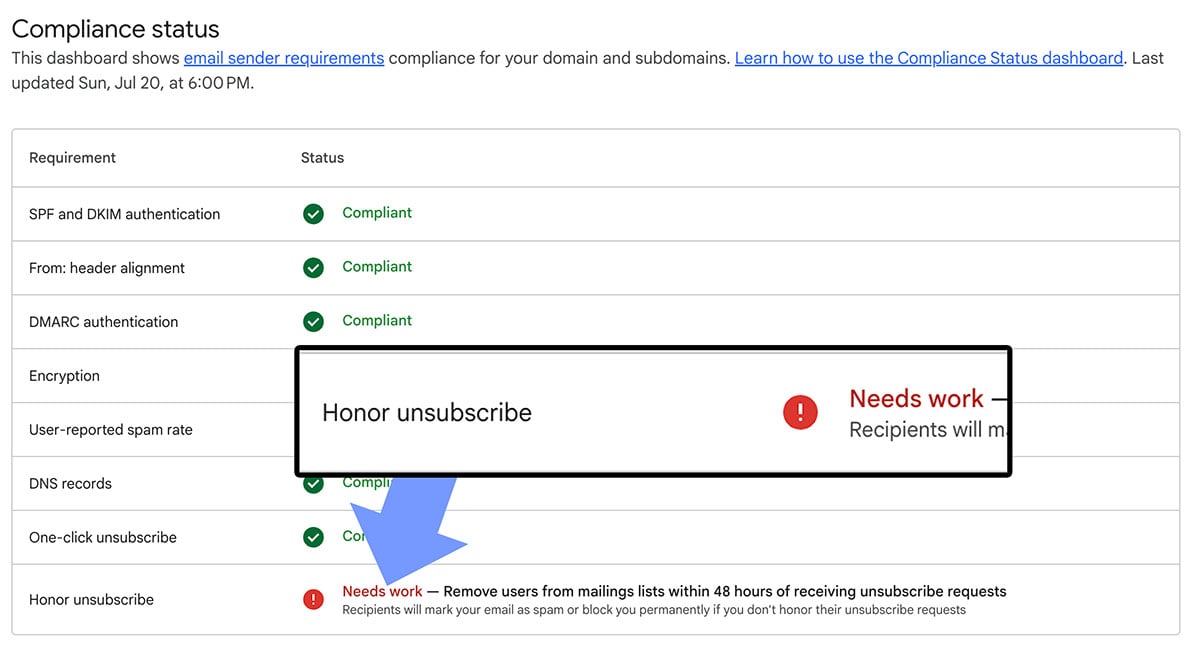
Once the one-click unsubscribe feature and various sending addresses are in place, email senders should monitor Gmail’s Postmaster Tools, checking the compliance status indicator labeled “Honor Unsubscribe.”

Gmail will change the status to “Needs Work” if it detects subscribers are receiving mail after opting out, indicating a problem with how the business manages the messages.

This compliance report in Postmaster Tools pertains to a business that maintained multiple lists but did not communicate them to Gmail. The result was a ding to the company’s sending reputation.

Precision Pays

Merchants with multiple lists who treat unsubscribes seriously will likely maintain deliverability and preserve customer trust.

The key is ensuring that webmail providers understand the business has multiple lists and properly handles unsubscribe requests.

Validity of Pew Research On Google AI Search Results Challenged via @sejournal, @martinibuster

Questions about the methodology used by the Pew Research Center suggest that its conclusions about Google’s AI summaries may be flawed. Facts about how AI summaries are created, the sample size, and statistical reliability challenge the validity of the results.

Google’s Official Statement

A spokesperson for Google reached out with an official statement and a discussion about why the Pew research findings do not reflect actual user interaction patterns related to AI summaries and standard search.

The main points of Google’s rebuttal are:

  • Users are increasingly seeking out AI features
  • They’re asking more questions
  • AI usage trends are increasing visibility for content creators.
  • The Pew research used flawed methodology.

Google shared:

“People are gravitating to AI-powered experiences, and AI features in Search enable people to ask even more questions, creating new opportunities for people to connect with websites.

This study uses a flawed methodology and skewed queryset that is not representative of Search traffic. We consistently direct billions of clicks to websites daily and have not observed significant drops in aggregate web traffic as is being suggested.”

Sample Size Is Too Low

I discussed the Pew Research with Duane Forrester (formerly of Bing, LinkedIn profile) and he suggested that the sampling size of the research was too low to be meaningful (900+ adults and 66,000 search queries). Duane shared the following opinion:

“Out of almost 500 billion queries per month on Google and they’re extracting insights based on 0.0000134% sample size (66,000+ queries), that’s a very small sample.

Not suggesting that 66,000 of something is inconsequential, but taken in the context of the volume of queries happening on any given month, day, hour or minute, it’s very technically not a rounding error and were it my study, I’d have to call out how exceedingly low the sample size is and that it may not realistically represent the real world.”

How Reliable Are Pew Center Statistics?

The Methodology page for the statistics used list how reliable the statistics are for the following age groups:

  • Ages 18-29 were ranked at plus/minus 13.7 percentage points. That ranks as a low level of reliability.
  • Ages 30–49 were ranked at plus/minus 7.9 percentage points. That ranks in the moderate, somewhat reliable, but still a fairly wide range.
  • Ages 50–64 were ranked at plus/minus 8.9 percentage points. That ranks as a moderate to low level of reliability.
  • Age 65+ were ranked at at plus/minus 10.2 percentage points, which is firmly in the low range of reliability.

The above reliability scores are from Pew Research’s Methodology page. Overall, all of these results have a high margin of error, making them statistically unreliable. At best, they should be seen as rough estimates, although as Duane says, the sample size is so low that it’s hard to justify it as reflecting real-world results.

Pew Research Results Compare Results In Different Months

After thinking about it overnight and reviewing the methodology, an aspect of the Pew Research methodology that stood out is that they compared the actual search queries from users during the month of March with the same queries the researchers conducted in one week in April.

That’s problematic because Google’s AI summaries change from month to month. For example, the kinds of queries that trigger an AI Overview changes, with AIOs becoming more prominent for certain niches and less so for other topics. Additionally user trends may impact what gets searched on which itself could trigger a temporary freshness update to the search algorithms that prioritize videos and news.

The takeaway is that comparing search results from different months is problematic for both standard search and AI summaries.

Pew Research Ignores That AI Search Results Are Dynamic

With respect to AI overviews and summaries, these are even more dynamic, subject to change not just for every user but to the same user.

Searching for a query in AI Overviews then repeating the query in an entirely different browser will result in a different AI summary and completely different set of links.

The point is that the Pew Research Center’s methodology where they compare user queries with scraped queries a month later are flawed because the two sets of queries and results cannot be compared, they are each inherently different because of time, updates, and the dynamic nature of AI summaries.

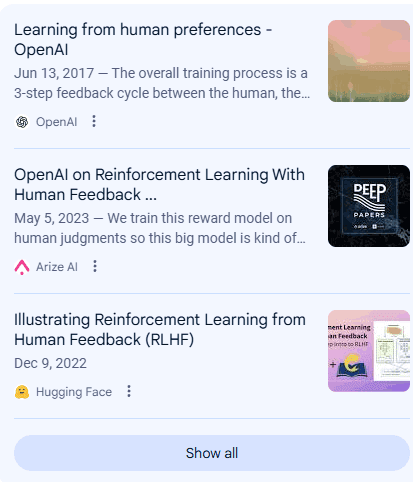
The following screenshots are the links shown for the query, What is the RLHF training in OpenAI?

Google AIO Via Vivaldi Browser

Screenshot shows links to Amazon Web Services, Medium, and Kili Technology

Google AIO Via Chrome Canary Browser

Screenshot shows links to OpenAI, Arize AI, and Hugging Face

Not only are the links on the right hand side different, AI summary content and the links embedded within that content are also different.

Could This Be Why Publishers See Inconsistent Traffic?

Publishers and SEOs are used to static ranking positions in search results for a given search query. But Google’s AI Overviews and AI Mode show dynamic search results. The content in the search results and the links that are shown are dynamic, showing a wide range of sites in the top three positions for the exact same queries. SEOs and publishers have asked Google to show a broader range of websites and that, apparently, is what Google’s AI features are doing. Is this a case of be careful of what you wish for?

Featured Image by Shutterstock/Stokkete

Web Guide: Google’s New AI Search Experiment via @sejournal, @MattGSouthern

Google has launched Web Guide, an experimental feature in Search Labs that uses AI to reorganize search results pages.

The goal is to help you find information by grouping related links together based on the intent behind your query.

What Is Web Guide?

Web Guide replaces the traditional list of search results with AI-generated clusters. Each group focuses on a different aspect of your query, making it easier to dive deeper into specific areas.

According to Austin Wu, Group Product Manager for Search at Google, Web Guide uses a custom version of Gemini to understand both your query and relevant web content. This allows it to surface pages you might not find through standard search.

Here are some examples provided by Google:

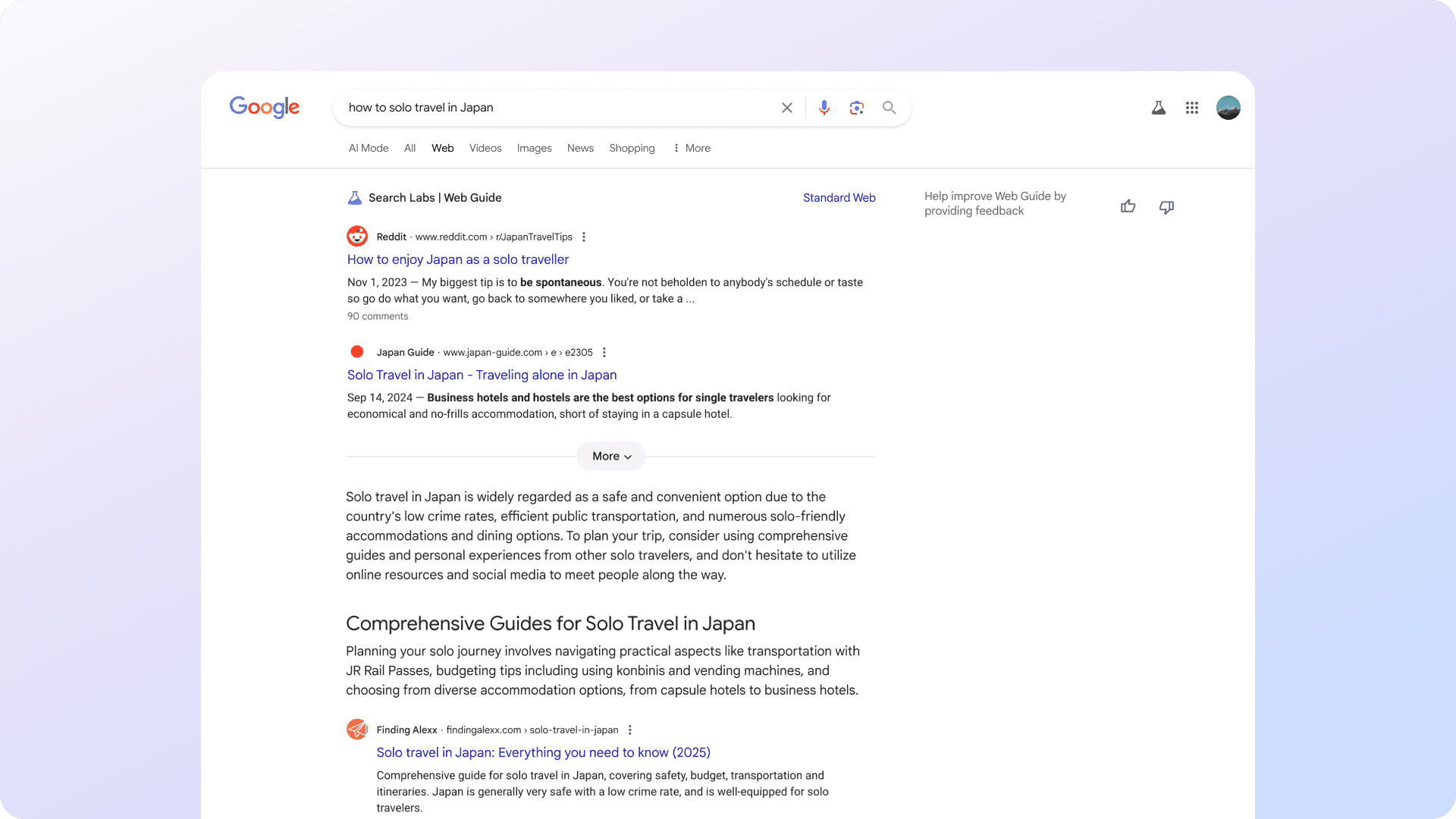
Screenshot from labs.google.com/search/experiment/34, July 2025.

How It Works

Behind the scenes, Web Guide uses the familiar “query fan-out” technique.

Instead of running one search, it issues multiple related queries in parallel. It then analyzes and organizes the results into categories tailored to your search intent.

This approach gives you a broader overview of a topic, helping you learn more without needing to refine your query manually.

When Web Guide Helps

Google says Web Guide is most useful in two situations:

  • Exploratory searches: For example, “how to solo travel in Japan” might return clusters for transportation, accommodations, etiquette, and must-see places.
  • Multi-part questions: A query like “How to stay close with family across time zones?” could bring up tools for scheduling, video calls, and relationship tips.

In both cases, Web Guide aims to support deeper research, not just quick answers.

How To Try It

Web Guide is available through Search Labs for users who’ve opted in. You can access it by selecting the Web tab in Search and switching back to standard results anytime.

Over time, Google plans to test AI-organized results in the All tab and other parts of Search based on user feedback.

How Web Guide Differs From AI Mode

While Web Guide and AI Mode both use Google’s Gemini model and similar technologies like query fan-out, they serve different functions within Search.

  • Web Guide is designed to reorganize traditional search results. It clusters existing web pages into groups based on different aspects of your query, helping you explore a topic from multiple angles without generating new content.
  • AI Mode provides a conversational, AI-generated response to your query. It can break down complex questions into subtopics, synthesize information across sources, and present a summary or interactive answer box. It also supports follow-up questions and features like Deep Search for more in-depth exploration.

In short, Web Guide focuses on how results are presented, while AI Mode changes how answers are generated and delivered.

Looking Ahead

Web Guide reflects Google’s continued shift away from the “10 blue links” model. It follows features like AI Overviews and the AI Mode, which aim to make search more dynamic.

Because Web Guide is still a Labs feature, its future depends on how people respond to it. Google is taking a gradual rollout approach, watching how it affects the user experience.

If adopted more broadly, this kind of AI-driven organization could reshape how people find your content, and how you need to optimize for it.


Featured Image: Screenshot from labs.google.com/search/experiment/34, July 2025. 

What is Google AI Mode? 

Google AI Mode is search with a brain. It uses AI to answer questions directly, so it’s no longer about just blue links. Type, talk, or upload a photo, and it gives you a useful summary plus follow-ups. Here’s how it works and why it matters. 

Table of contents

Say hello to Google’s AI Mode

Google AI Mode is a feature in Search that uses generative AI to deliver full, conversational answers instead of just showing a list of links. It breaks questions into parts, pulls information from across the web, and presents a direct, useful response at the top of the results page. 

This new feature doesn’t replace traditional search just yet, but it does build on it. As a result, it changes how people explore information and how content gets surfaced. 

Are you curious about how this works? Check out the video below to see Google AI Mode in action while planning an autumn trip to Banff, Canada.

Search becomes a lot smarter 

AI Mode handles different types of input, not just text. You can type a question, say it out loud, or upload a photo, and it works out what you mean. That flexibility makes it easier to search however and whenever it makes sense, whether you’re speaking into your phone, typing at your desk, or pointing your camera at something you want to learn more about. 

It also uses what Google calls query fan-out. That means it quietly rewrites your question into a bunch of related ones and looks for answers across those variations. Ask something broad, like “best credit card for travel,” and the system may branch off behind the scenes, looking at fees, perks, user reviews, and so on. 

AI Mode also pays attention to context. It keeps your previous queries in mind and follows the thread. You can ask follow-ups and get refined answers without starting from scratch. 

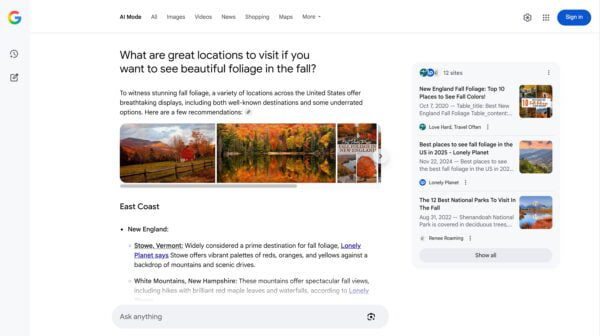
An example of a search in Google AI Mode

How Google AI Mode works in practice 

Using Google AI Mode feels different from standard search, and that shows up in how it delivers answers. 

When someone asks a question, AI Mode doesn’t just take the words at face value—it tries to understand the intent behind them. It rewrites the query in several different ways behind the scenes, each one focused on a specific angle.  

For example, a search like “what are the best places to travel in fall” might also trigger more specific questions in the background, like “pleasant weather and fewer crowds,” “fall foliage and scenic beauty,” or “unique experiences and cultural events.” AI Mode runs all of those in parallel, scans multiple online sources for useful information, and pieces together a response that covers what the user likely meant, even if they didn’t spell it out. 

The response doesn’t look like a typical search results page. Instead of a list of links, users see a short summary stitched together from different sources. It reads more like an answer than a directory and can include images, maps, and more. 

With AI Mode, you can also keep the conversation going. You could ask follow-up suggestions like “compare destinations in Canada,” “check visa requirements for Canada,” or “see average weather in British Columbia”. It helps users toward the next thing they might want to know without making them start over. The video at the top of this article shows this in practice.

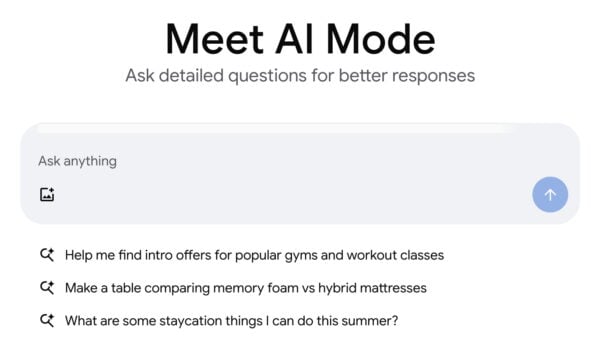
The opening screen of Google’s AI Mode where you enter your questions

Behind the scenes, AI Mode uses passage-level retrieval. Rather than ranking entire pages, it scans individual sections, like a single paragraph, list, or sentence, to find the parts that answer specific pieces of the question.  

That means a well-written section buried halfway down a product guide or FAQ could be surfaced, even if the full page wouldn’t normally show up high in the results.  

This alone could make us rethink visibility. It’s less about a page’s overall ranking and more about whether any part of it directly addresses what someone is asking. 

The focus of content is changing 

AI Mode shifts how content gets discovered. It’s less about ranking in the traditional sense and more about providing answers that are both useful and directly relevant to what someone is asking. 

The system is looking for content that fits into a specific response. That means structure matters, like clear headings, focused sections, and formatting that makes key points easy to extract. But usefulness on its own doesn’t guarantee visibility. The content has to align with the intent of the query in a very specific way. 

Covering a topic from different angles helps. It gives your content more chances to match how people frame their questions, even when those questions vary in wording, detail, or focus. Visibility often depends not just on quality, but on precision. 

Google AI Mode does several searches at the same time, while also looking at a large number of sites

What does Google AI Mode mean for SEO? 

Google AI Mode could shift what we aim for. Visibility now depends on whether your content can deliver value right away, often in small, specific pieces. Google’s pulling answers from across the web: a sentence from one page, a stat from another, maybe a checklist from a support article. 

That might feel limiting, but it opens up opportunities. If others are still optimizing for old patterns, there’s space to improve. Recognizing this shift early can give your brand a real advantage. 

It also rewards a stronger understanding of how people search. Pages, tools, and features that directly answer real questions and make that answer easy to find stand a better chance of getting picked up. 

Find out how to optimize your content for AI LLM comprehension using Yoast’s tools.

Google added an AI Mode button to its search homescreen

Where it’s going 

Google is folding AI Mode into regular search experiences. On some questions, especially ones that ask for a comparison, a definition, or a plan, it’s already showing AI-generated results first. 

That approach is expanding. More queries will likely trigger this kind of response over time, which means the way content gets surfaced will keep shifting. Long, keyword-heavy pages won’t offer the same payoff they once did. What works now is content that’s clear, helpful, and flexible enough to match how people explore a topic. 

Chances are, AI Mode isn’t a side feature for long. It’s looking more and more like the future of Google Search. 

How to access Google AI Mode 

AI Mode is rolling out now in the U.S. and India. If you’re using Google Search or the Google app, you’ll start to see a new AI Mode tab either at the top of the results page or right in the search bar. This gives you access to more advanced AI responses, improved reasoning, and a deeper view of web content through follow-up questions and linked sources. 

If you don’t see AI Mode yet, it’s likely still rolling out. Expect it to appear automatically soon. Once it shows up, you can use it without any special sign-up or activation. Once Google figures out monetization, we’ll see it roll out AI Mode to more countries soon. 

You can also access it from search results. If Google thinks your query fits, a “Try in AI Mode” option may appear automatically. Trying it out firsthand gives the clearest insight into how responses are built and how your content appears. 

Meet Google’s AI Mode 

Google AI Mode signals a shift in how search works. It’s not just about rankings anymore. It’s about how helpful your content is and how easily it can be used to respond to real questions. 

This change gives SEO and content teams a reason to look at their work differently. Clear structure, focused writing, and alignment with how people search all play a bigger role in visibility. 

It’s a good time to step back, reassess what’s working, and explore areas you may have overlooked. For many, this is a chance to improve useful content, refine formats, and meet search expectations in new ways.