YouTube has announced that Posts will now appear in the Shorts feed. This change allows users to see and interact with Posts while watching short videos.
How the Feature Works
You can now see Posts while scrolling through Shorts on YouTube.
In the screenshot below, you can see that the layout keeps the same vertical aspect ratio. While scrolling, the video gets smaller, using half the screen for Posts.
Screenshot from: YouTube.com/CreatorInsider, June 2025.
You can like and comment on these Posts without stopping your video.
See more about it in YouTube’s video announcement:
Background on YouTube Posts
YouTube has had posts as part of its creator toolkit for several years. These posts let channel owners share polls, quizzes, GIFs, text updates, images, and videos.
Posts are found in a special tab on the creator’s channel. They can also show up on subscribers’ homepages or in their subscription feeds.
Potential New Exposure
This update gives creators a new way to reach their YouTube audience with posts.
Further, this gives creators a way to reach Shorts viewers without creating vertical videos.
If you only publish traditional long-form content on your channel, you can potentially get into the Shorts feed by publishing text or images.
Looking Ahead
With this update, YouTube is experimenting with combining other content types with its most popular features.
It’s possible that YouTube is making this change because it’s competing with Instagram and TikTok, which mix videos with different types of content. Combining content formats has the potential to boost user engagement and keep people on YouTube longer.
For creators, this provides an additional distribution channel with a bare minimum cost to entry. Writing a text post may now get you in the same feed as a fully produced Short.
YouTube hasn’t announced specifics for how Posts will be selected or how often they’ll appear. Creators will have to do their own testing to see how this impacts visibility.
Google’s John Mueller used a clever technique to show the publisher of an educational site how to diagnose their search performance issues, which were apparently triggered by a domain migration but were actually caused by the content.
Site With Ranking Issues
Someone posted a plea for help on the Bluesky social network to help their site recover from a site migration gone wrong. The person associated with the website attributed the de-indexing directly to the site migration because there was a direct correlation between the two events.
SEO Insight An interesting point to highlight is that the site migration preceded the de-indexing by Google but it’s not the cause. The site migration is not the cause for the de-indexing. The migration is what set a chain of events into action that led to the real cause, which as you’ll see later on is low quality content. A common error that SEOs and publishers make is to stop investigating upon discovering the most obvious reason for why something is happening. But the most obvious reason is not always the actual reason, as you’ll see further on.
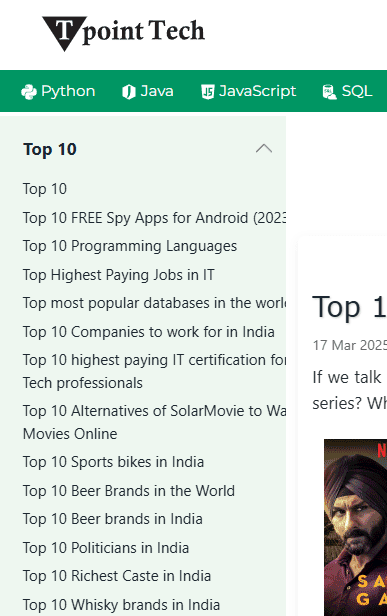
Sudden Deindexing & Traffic Drop after Domain Migration (from javatpoint.com to tpointtech.com) – Need Help”
Google’s John Mueller answered their plea and suggested they do a site search on Bing with their new domain, like this:
site:tpointtech.com sexy
And when you do that Bing shows “top ten list” articles about various Indian celebrities.
Google’s John Mueller also suggested doing a site search for “watch online” and “top ten list” which revealed that the site is host to scores of low quality web pages that are irrelevant to their topic.
A screenshot of one of the pages shows how abundant the off-topic web pages are on that website:
Where Did Irrelevant Pages Come From?
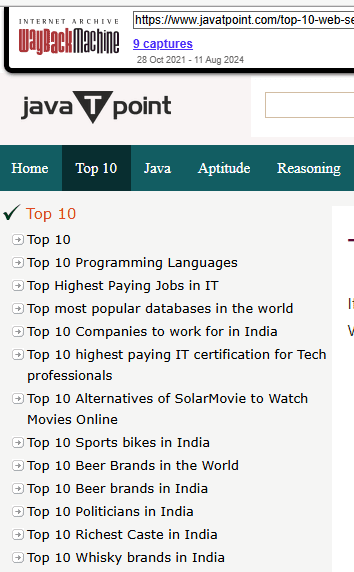
The irrelevant pages originated from the original domain, Javatpoint.com, from which they migrated. When they migrated to Tpointtech they also brought along all of that low quality irrelevant content as well.
Here’s a screenshot of the original domain, demonstrating that the off-topic content originated on the old domain:
Google’s John Mueller posted:
“One of the things I noticed is that there’s a lot of totally unrelated content on the site. Is that by design? If you go to Bing and use [site:tpointtech.com watch online], [site:tpointtech.com sexy], [site:tpointtech.com top 10] , similarly probably in your Search Console, it looks really weird.”
Takeaways
Bing Is Useful For Site Searches Google’s John Mueller showed that Bing can be useful for identifying pages that Google is not indexing which could then indicate a content problem.
SEO Insight The fact that Bing continues to index the off topic content may highlight a difference between Google and Bing. The domain migration might be showing one of the ways that Google identifies the motivation for content, whether the intent is to rank and monetize rather than create something useful to site visitors. An argument could be made that the wildly off-topic nature of the content betrays the “made-for-search-engines” motivation that Google cautions against.
Irrelevant Content A site generally has a main topic, with branching related subtopics. But in general the main topic and subtopics relate to each other in a way that makes sense for the user. Adding wildly off-topic content low quality content betrays an intent to create content for traffic, something that Google explicitly prohibits.
Past Performance Doesn’t Predict Future Performance There’s a tendency on the part of site publishers to shrug about their content quality because it seems to them that Google likes it just fine. But that doesn’t mean the content is fine, it means that it hasn’t become an issue yet. Some problems are dormant and when I see this in site reviews and generally say that this may not be a problem now but it could become a problem later so it’s best to be proactive about it now.
Given that the search performance issues occurred after the site migration but the irrelevant content was pre-existing it appears that the effects of the irrelevant content were muted by the standing the original content had. Nevertheless the irrelevant content was still an issue, it just hadn’t hatched into an issue yet. Migrating the site to a new domain forced Google to re-evaluate the entire site and that’s when the low quality content became an issue.
Content Quality Versus Content Intent It’s possible for someone to make a case that the content, although irrelevant, was high quality and shouldn’t have made a difference. What calls attention to me is that the topics appear to signal an intent to create content for ranking and monetization purposes. It’s hard to argue that the content is useful for site visitors to an educational site.
Expansion Of Content Topics Lastly there’s the issue of whether it’s a good idea to expand the range of topics that a site is relevant for. A television review site can expand to include reviews of other electronics like headphones and keyboards and it’s especially smoother if the domain name doesn’t set up the wrong expectation. That’s why domains with the product types in them are so limiting because they presume the publisher will never achieve so much success that they’ll have to expand the range of topics.
Google now supports structured data that allows businesses to show loyalty program benefits in search results.
Businesses can use two new types of structured data. One type defines the loyalty program itself, while the other illustrates the benefits members receive for specific products.
Here’s what you need to know.
Loyalty Structured Data
When businesses use this new structured data for loyalty programs, their products can display member benefits directly in Google. This allows shoppers to view the perks before clicking on any listings.
Google recognizes four specific types of loyalty benefits that can be displayed:
Loyalty Points: Points earned per purchase
Member-Only Prices: Exclusive pricing for members
Special Returns: Perks like free returns
Special Shipping: Benefits like free or expedited shipping
This is a new way to make products more visible. It may also result in higher clicks from search results.
The announcement states:
“… member benefits, such as lower prices and earning loyalty points, are a major factor considered by shoppers when buying products online.”
Details & Requirements
The new feature needs two steps.
First, add loyalty program info to your ‘Organization’ structured data.
Then, add loyalty benefits to your ‘Product’ structured data.
Bonus step: Check if your markup works using the Rich Results Test tool.
With valid markup in place, Google will be aware of your loyalty program and the perks associated with each product.
Important implementation note: Google recommends placing all loyalty program information on a single dedicated page rather than spreading it across multiple pages. This helps ensure proper crawling and indexing.
Multi-Tier Programs Now Supported
Businesses can define multiple membership tiers within a single loyalty program—think bronze, silver, and gold levels. Each tier can have different requirements for joining, such as:
This flexibility allows businesses to create sophisticated loyalty structures that match their existing programs.
Merchant Center Takes Priority
Google Shopping software engineers Irina Tuduce and Pascal Fleury say this feature is:
“… especially important if you don’t have a Merchant Center account and want the ability to provide a loyalty program for your business.”
It’s worth reiterating: If your business already uses Google Merchant Center, keep using that for loyalty programs.
In fact, if you implement both structured data markup and Merchant Center loyalty programs, Google will prioritize the Merchant Center settings. This override ensures there’s no confusion about which data source takes precedence.
Looking Ahead
The update seems aimed at helping smaller businesses compete with larger retailers, which often have complex Merchant Center setups.
Now, smaller sites can share similar information using structured data, including sophisticated multi-tier programs that were previously difficult to implement without Merchant Center.
Small and medium e-commerce sites without Merchant Center accounts should strongly consider adopting this markup.
Last week, I sent out an update on my marketplace SEO issue, and it would be a complete miss if I didn’t do the same for the topic of product-led SEO, because they’re directly related.
In this issue, you’ll get:
A thorough look at what product-led SEO is, what it isn’t, and where it’s valuable.
Three primary modalities of product-led SEO.
Three real-world current examples, with notes about why they’re working in the current search landscape.
The top watch-outs for product-led SEO programs based on modality.
And premium subscribers will get access to:
My guiding checklist for product-led SEO and
An interactive assessment landing in your inbox this week that will guide you in creating a high-level plan to refine your product-led approach. Sign up for full access so you don’t miss out.
Also, a quick thanks to Amanda Johnson, who partnered with me on this one. Boost your skills with Growth Memo’s weekly expert insights. Subscribe for free!
Some companies, not all, can take a hyperscalable approach to organic growth: product-led SEO.
While most sites drive SEO traffic through company-generated content (i.e., content libraries), product-led SEO allows certain sites to scale landing pages with content that comes out of the product.
In this post, I highlight five different examples and types of product-led SEO.
Guidance here has also been fully updated to reflect the recent changes in search, including the impact of AIOs, AI Mode, and LLMs, as well as how these changes affect a product-led SEO approach.
The term product-led SEO (or PLSEO for short) was first coined by Eli Schwartz in his book of the same name.
PLSEO is an organic growth strategy where your SEO practices are focused on improving the discoverability, adoption, and user experience of your product itself within search results, instead of focusing on growing organic visibility through traditional content marketing efforts.
In plain terms, the content comes from your product instead of writers.
A few examples:
TripAdvisor: millions of programmatic pages supported by reviews (UGC).
Uber Eats: millions of programmatic pages supported by restaurants (inventory).
Zillow: millions of programmatic pages supported by properties (inventory).
The key distinction from marketing-led SEO is that a product or growth team considers SEO in the development of the product itself, surfacing user-generated content or other inventory directly into (Google) Search.
Unlike company-generated content, product-led SEO leverages user interactions, integrations, or data to create content.
It’s an aggregator strategy, meaning it only works for companies that “aggregate” (think: collect and group) goods like reviews, suppliers, locations, and more.
Product-led SEO has been quite the buzz, especially amongst SaaS companies, but it often gets misunderstood.
Product-led SEO is not:
Dependent on manually crafting every landing or content page: Unlike traditional SEO approaches, where each landing page is carefully crafted by content teams, product-led SEO often uses programmatic or automated methods to generate large volumes of pages directly from product, inventory, or user data.
Solely focused on targeting queries for marketing angles: While typical SEO practices might start with creating content around keyword research or audience-based query discovery, product-led SEO begins with in-product signals (e.g., what users build or interact with) and surfaces that as content.
Relying on fixed pages: Traditional SEO often involves creating a finite set of cornerstone assets or topic clusters, expanding content from there. Product-led SEO, however, continually scales as the product (or user base) grows – each new UGC, integration, or product addition automatically adds indexable pages.
Some companies carry out a product-led SEO strategy with user-generated content (UGC), while others might use integrations or apps.
Here, I’m going to provide a look into three primary modalities of product-led SEO – and with three real-world, current examples.
UGC-driven PLSEO (like Figma, Traveladvisor, or Cameo): Community members create new assets – design files, shout-out profiles, wikis, etc. – and each submission spawns its own landing page. Over time, these pages accumulate long-tail keyword coverage without editorial teams writing each one.
Supply-driven PLSEO (like Zapier, IMDb): In this model, the product itself “supplies” data – integrations, API endpoints, or statistical datasets – that automatically translate into SEO pages.
Locale-driven PLSEO (like Doordash, Booking.com, or Zillow): As listings go live or update (a new restaurant, a hotel’s availability), a corresponding city- or neighborhood-specific page is generated. These pages capture “near me” and other local keywords.
A site might choose to employ multiple modalities, depending on its offerings, but I’ll also dive into what approach may work best based on your business type or goals.
Important note before you dive in: All marketplaces are product-led SEO plays, but not all product-led SEO plays are marketplaces. For a deep dive into marketplace SEO practices, check out Effective Marketplace SEO is more like Product Growth.
With UGC-based PLSEO, user contributions (templates, profiles, reviews) become the primary SEO fuel.
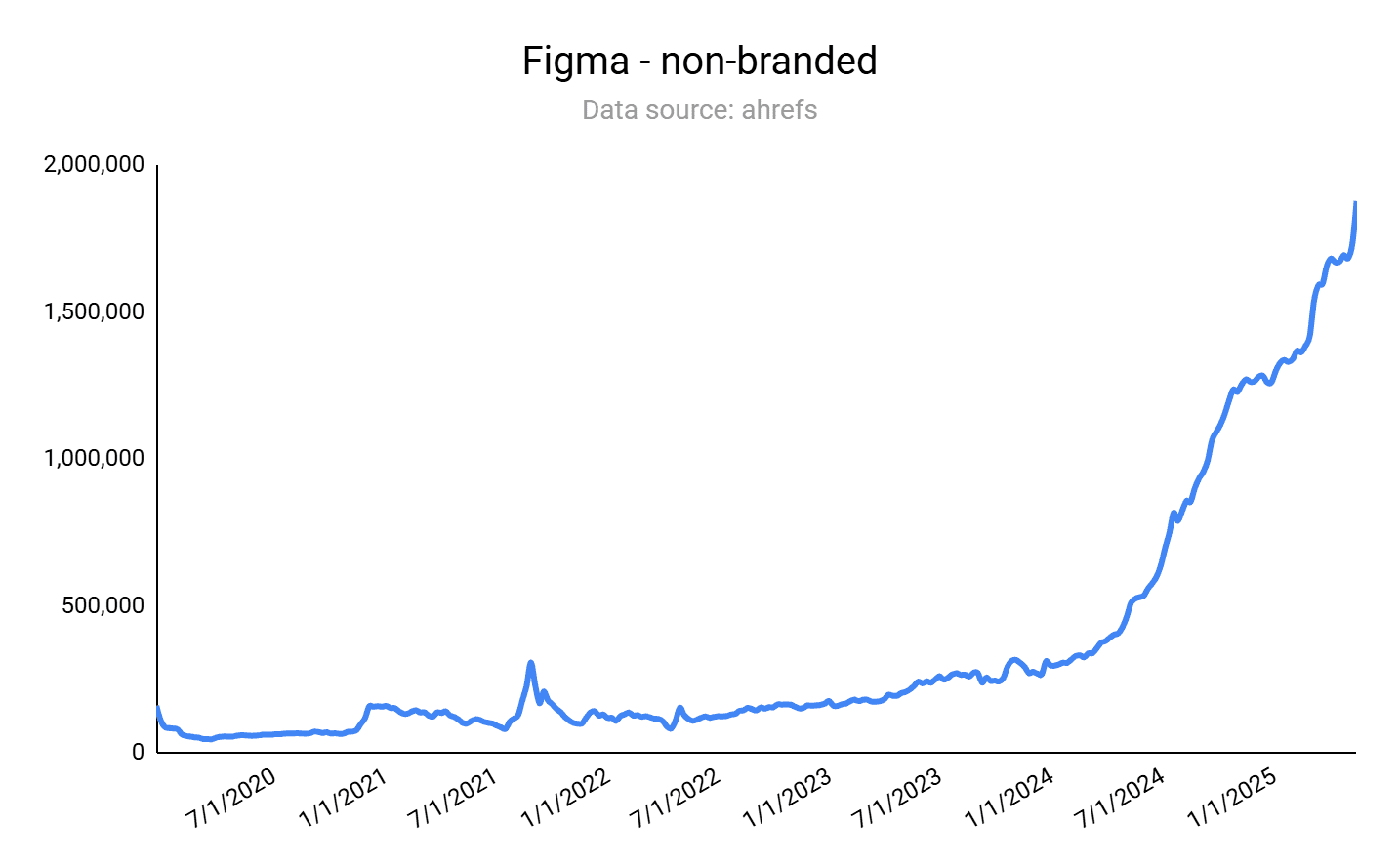
Design tool Figma is an archetypal example of an SEO aggregator that drives product-led SEO through user-generated content.
The scaling mechanism for Figma is the community, where users can upload and sell templates for all sorts of use cases, from mobile app design to GUI templates.
As you can see in the screenshot below, Figma’s organic traffic is exploding.
Image Credit: Kevin Indig
If you do a quick check of Figma in your preferred SEO tool, you’ll notice the following:
The main URL shows that, globally, Figma’s organic rankings and traffic have held or grown slightly since the intense changes across the search landscape.
The organic rankings and traffic of the /community/ and /templates/ subdirectories have either held or increased, depending on the particular country.
The number of total pages on the site has stayed about the same.
What this likely means:
For Figma, its UGC product-led SEO approach is holding strong after the increase of LLM chat use for search, along with Google’s AI Overviews and AI Mode.
This SEO approach is difficult to replicate, which creates a growth loop for Figma that is hard to compete with.
A UGC-driven approach helps overcome current search challenges. Figma has a countless number of helpful kits and templates that AI-driven search and LLMs can rely on in their sourcing and recommendations. (A quick search of “what are the best free UI kits?” in ChatGPT gave me a list of 10 recommendations, and seven were from Figma. In Google’s AI Mode, I received two to three “best of” lists that were just Figma free kits.)
Notion or Typeshare follow the same approach:
With knowledge management software Notion, users can create their own wikis and allow Google to index specific pages, or whole workspaces.
Typeshare is a social posting tool that automatically adds social content to a mini blog that users can decide to index in Search.
Top Use Cases For UGC Product-Led SEO
This type of SEO excels for sites and businesses that can continuously scale content based on what users contribute or interact with, including:
SaaS companies where users can create their own templates, designs, or workflows to share and sell.
Code snippet sharing sites or platforms.
Knowledge-sharing forums or wiki platforms (like the HubSpot Community).
Review and recommendation aggregators – marketplaces like G2 and TripAdvisor.
For supply-driven product-led SEO, remember: The product itself “supplies” data. That’s the content that produces pages for optimization.
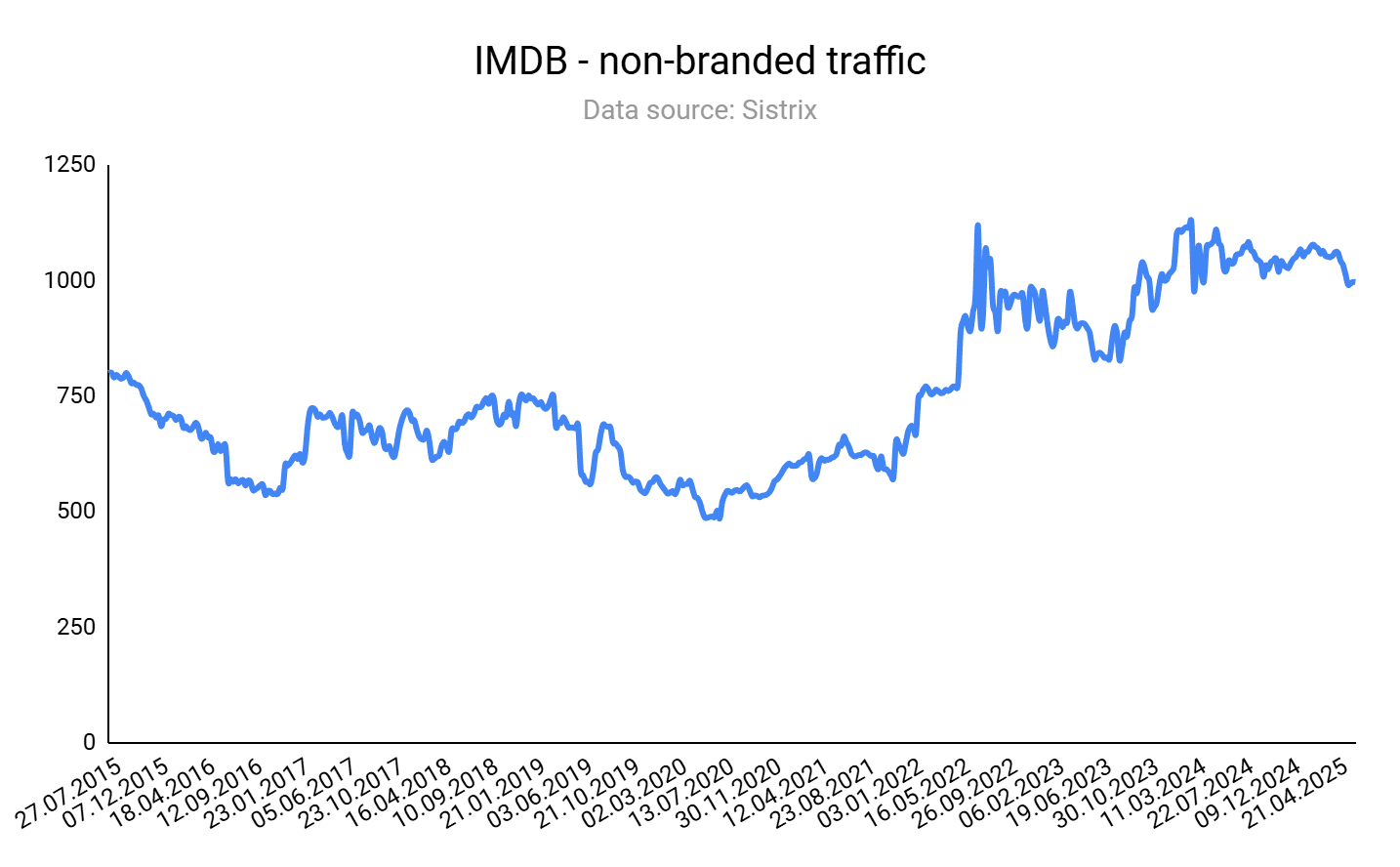
An excellent B2C example of this (and a site that you’re likely familiar with already) is IMDb.
IMDb’s massive repository of movie and TV metadata – cast lists, release dates, ratings, and filming locations – produces SEO pages that rank for film enthusiasts’ long-tail queries.
Whenever new data (e.g., “new Netflix release 2025”) is ingested via AWS Data Exchange or partner feeds, IMDb’s platform auto-generates or updates the corresponding title page, ensuring fresh content for searches like “when is [Movie Title] coming out on streaming?”
Plus, IMDb benefits from a boost with a side of UGC from user ratings and commentary.
This data-supply-driven approach turns product updates into continuous SEO signals.
Image Credit: Kevin Indig
If you do a quick check of IMDb in your preferred SEO tool, you’ll notice:
The main URL shows that, globally, IMDb organic rankings and traffic have held or grown slightly since the intense changes across the search landscape.
The organic rankings and traffic of the /boxoffice/ and /calendar/ subdirectories have either held, increased, or even skyrocketed, depending on the particular country.
The number of total pages on the site has decreased slightly in the last 12 months, by about 23%.
What this likely means:
For IMDb, its supply-driven product-led SEO approach is holding strong after the increase of LLM chat use for search, along with Google’s AI Overviews and AI Mode.
This SEO approach is difficult for other sites to replicate, which creates a growth loop for IMDb that is hard to compete with. IMDb’s global data supply is robust and hard to beat.
A supply-driven approach helps overcome current search challenges. Because IMDb is responsive to date-driven, rating-driven data changes, it provides an excellent source of updated, live information for traditional searching and LLMs to surface in conversation-based searches.
Top Use Cases For Supply-Driven Product-Led SEO
This type of PLSEO excels when you have unique, defensible datasets and a templating system to publish pages at scale, capturing long-tail and high-intent queries without manual content creation.
Examples of orgs that could benefit from this modality include:
Security and vulnerability databases that can auto-publish advisory pages for each newly discovered vulnerability (like Snyk).
Real-time pricing and compensation sites (think Glassdoor or fintech rate comparison sites).
SaaS products that collect user behavior or performance metrics (e.g., “Average page load times for Shopify stores”).
The locale-driven PLSEO modality leverages hyperlocal or geo-specific inventory – restaurants, homes, hotels – to create SEO pages for every location or zip code.
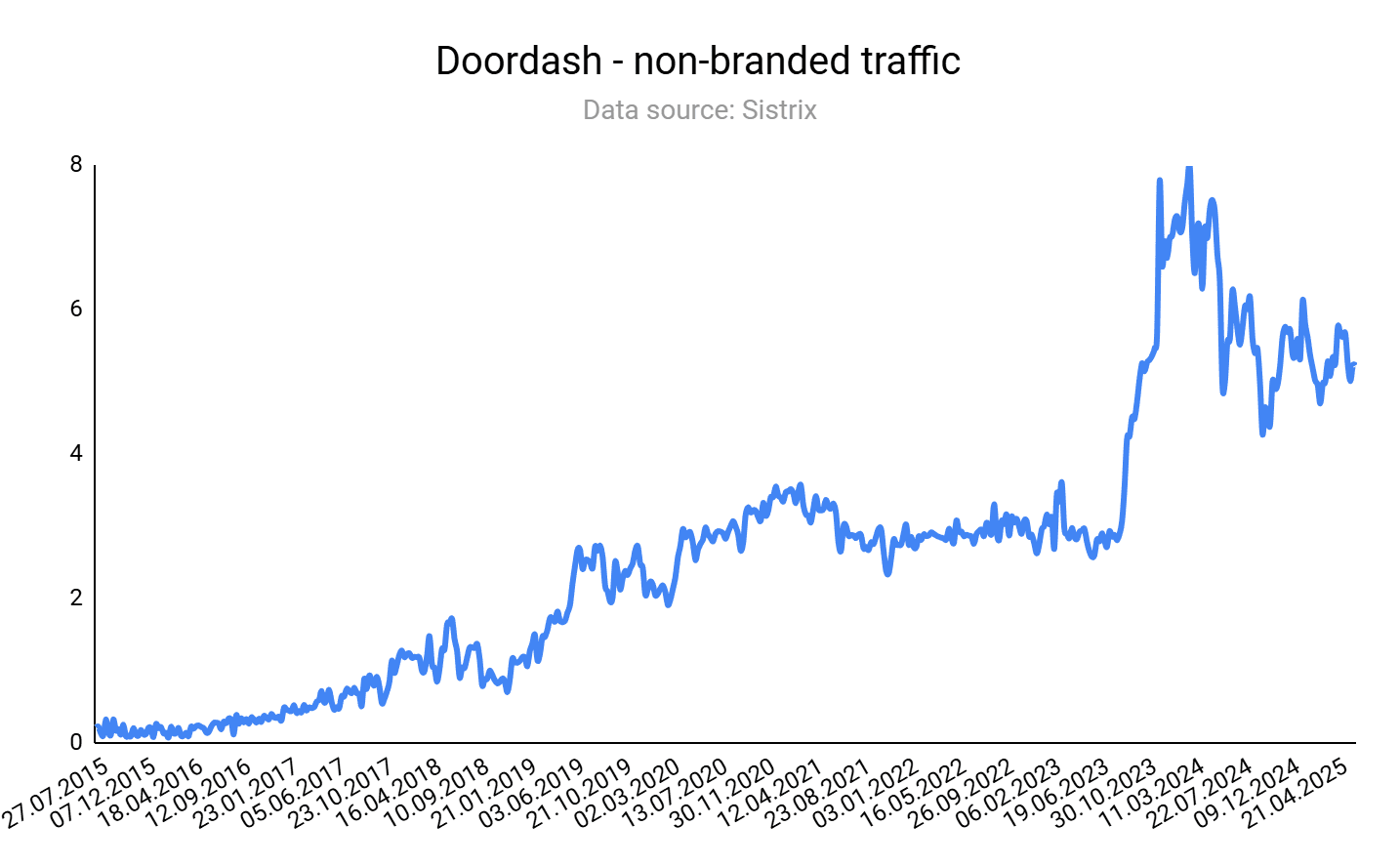
Food delivery service Doordash scales organic traffic by aggregating restaurants and types of food, similar to Uber Eats or Instacart.
Image Credit: Kevin Indig
Since food delivery has a strong local intent, near me queries are essential. Doordash addresses that with an extensive list of city pages.
The right page layout and content are key for sites that scale through product inventory.
Doordash’s city pages contain restaurants, text, and FAQ.
Restaurant pages themselves follow a similar pattern: They cover meals to order, reviews, and FAQ.
Another important factor? Internal linking. City pages link to nearby cities; restaurant pages to restaurants in the same city.
Doordash has also created pages for schools (order near a campus), hotels (order near a hotel), and zip codes to cover all possible user intentions.
Other examples of product inventory-driven sites are real estate site Zillow or coupon code site Retailmenot.
If you do a quick check of Doordash in your preferred SEO tool, you’ll notice:
The main URL shows Doordash’s organic rankings and traffic have declined significantly and then held in the U.S. market, but have grown slightly since January 2025 in some global markets.
It has reduced its total number of pages by ~30%.
What this likely means:
For Doordash, its product inventory, product-led SEO approach is holding strong after the increase of LLM chat use for search, along with Google’s AI Overviews and AI Mode.
Part of this sustained presence (despite a challenging SEO landscape) is likely due to investment in the brand, expanding globally, and reducing unimportant pages and topics to their business.
I predict that search engines and LLMs will continue to give favor to hyperlocal content, which is hard to match.
These product inventory sites that are centered on location (like Doordash, Zillow) or millions of products have the right infrastructure to do it well.
This particular approach to product-led SEO can work well for businesses that can programmatically generate search-ready pages from their product or listing inventory, including:
Food delivery & local ordering platforms.
Real estate marketplaces.
Ecommerce retailers with expansive catalogs.
Travel & accommodation aggregators.
Automotive listing portals.
While product-led SEO can drive the creation of SEO growth loops around your business – ones that are difficult for your competitors to replicate – this approach doesn’t come without some big challenges.
Keep the following in mind:
1. Sites using PLSEO approaches need to watch out for SEO hygiene, spam, and site maintenance issues.
Inventory changes (menus, listings, hours, availability) on the site can keep content fresh – an advantage for both classic SEO and potential LLM training inputs.
However, the hygiene and maintenance required to keep these pages functioning and accurate are significant. Don’t employ this practice without the proper infrastructure in place to maintain it over time.
And if you rely on UGC? It’s mission-critical to have smart QA processes and spam filters in place to ensure content quality.
2. SEO aggregators, especially marketplaces, have been significantly impacted by the rollouts of AI-based search.
PLSEO is not exempt from the impact of Google’s AIOs, AI Mode, and LLM-based search. In actuality, many aggregator marketplaces have been disproportionally affected.
One of the biggest challenges, especially for product-led UGC SEO plays, is that all your hard work may go unclicked.
Creating systems to do this kind of SEO at scale is labor-intensive.
It’s highly likely that AIOs, AI Mode, and LLMs will reference the user generated content without you earning the organic traffic for it.
However, building a strong, trusted brand through community, publication mentions, and shared links can earn more mentions in LLMs.
Because I recently reworked my in-depth guide to marketplace SEO, I’m going to save you some extra scrolling here.
If you’re interested in the best use cases and how to approach marketplace SEO from a product growth mindset, take a leap over here for some great examples and a full framework: Effective Marketplace SEO is more like Product Growth.
3. Don’t cut corners on the depth of information provided in favor of scaling.
For many sites, the key to scaling product-led SEO is deploying a programmatic approach.
But programmatic landing pages should still contain a depth of information, have strong technical SEO, and engaging content with sufficient user value.
If you don’t have these resources and practices in place, along with the proper processes to maintain pages over time, then it’s likely programmatic SEO isn’t for your org.
With the rise of AI-based search, LLMs like ChatGPT, as well as Google’s AI Overviews and AI Mode, are moving toward understanding and presenting information in more conversational and context-rich formats, which programmatic pages often lack.
Another watch-out? If these programmatic pages are highly templated with lots of elements, they’re often a lot for a human reader to take in at once. And that can lead to poor UX if not done correctly.
4. Future challenge: A web surfed by AI agents.
While it’s likely we don’t need to be worried about this today, we need to start brainstorming how to adapt our content creation for what the web could look like tomorrow.
In what ways would your product-led SEO approach need to change to adapt to AI agent traffic, while also prioritizing human UX?
If users start using queries and commands like “order my favorite dish from the Indian food restaurant I went to last month and have it delivered,” or “give me 3 for-sale listings of 2 bed, 2 bath condos in my area that I didn’t review last week,” to send an AI agent to your site, how would your PLSEO practices need to adapt?
What about PLSEO practices that surface unique integrations, templates, and workflows?
If AI agents become users of products and software themselves – and therefore also have the ability to generate their own apps, integrations, and product workflows as needed – humans, and even their AI counterparts, then skip the need for this search entirely. (Brands that solely rely on these types of searches could say goodbye to organic traffic and visibility.)
I don’t have the answers here – I’d argue no one does right now. So, no need for immediate alarm or dramatic changes.
But it’s important to start investing time and testing to consider what your brand may need to change for an AI agent future.
Adopting a product-led SEO strategy can unlock substantial growth – and growth that holds and is sustained despite the increase in AI-based search – but it’s not a one-size-fits-all solution.
When executed well, PLSEO turns your product (or product data) into an ever-expanding library of SEO assets.
Instead of relying solely on a content team to crank out new blog posts or landing pages, you leverage in-product signals – user contributions, integrations, inventory feeds – to automatically spawn indexable pages.
But before starting or reworking your product-led SEO program, you need to have the right motions in place. For this SEO approach, there are many essential moving parts – and each one is important.
Featured Image: Paulo Bobita/Search Engine Journal
“I’m reaching out for help with a puzzling issue in Google Analytics 4 (GA4). We’ve experienced a sudden and unexplained surge in traffic over a four-day period, but surprisingly, Google Search Console (GSC) doesn’t show any corresponding data.
The anomaly is specific to organic search traffic, and it’s only affecting our main page. I’d greatly appreciate any insights you can offer on what might be causing this discrepancy.”
Why GA4 And GSC Report Different Traffic Numbers
It’s a very interesting and common question about data from Google Analytics 4 and Google Search Console.
They are both Google products, so you could assume their data would be consistent. However, it isn’t, and for very good reasons.
Let’s take a look at the differences between the two.
Traffic Mediums
Google Analytics measures user interactions with a digital property. It is highly customizable and can even accept data inputs.
Google Search Console provides an overview of your website’s performance in Google Search.
This means that Google Analytics 4 is measuring traffic from all types of sources, including paid search campaigns, email newsletters, display ads, and direct visits.
Google Search Console is far narrower in scope, as it only reports on Google Search traffic.
Organic Sources
Another key difference to remember is that when reporting on organic traffic, Google Analytics will look at all sources marked as “organic search,” which includes other search engines like Bing, Naver, and Yandex.
This means that unless you instruct Google Analytics 4 to filter the organic search sources to only Google, you will see vastly different numbers between the two programs.
Clicks And Sessions
The two most comparable metrics are Google Analytics 4’s “sessions” and Google Search Console’s “clicks.” However, they are not identical metrics.
A “session” in GA4 is counted when a user either opens your app in the foreground or views a page of your website. A session, by default, lasts only 30 minutes, although this can be altered through your configuration of GA4.
A “click” in Google Search Console is counted when a user clicks on a link displayed in Google Search (across web, images, or video, and including News and Discover).
Reasons For Higher GSC Clicks Than GA4 Sessions
As you can imagine, these small but critical differences in the technical ways these two metrics are counted can have a significant impact on the end volumes reported.
There are other reasons that can impact the final numbers.
Typically, we see Google Search Console’s “clicks” being higher than Google Analytics’ organic “sessions” from Google.
Let’s assume a user clicks on an organic search listing on Google Search and arrives at the webpage it links to. What would be registered in different scenarios?
Cookies
This is a differentiating factor that is becoming more prominent as laws surrounding cookie policies change.
GA4 requires cookies to be accepted in order to track a user’s interaction with a website, whereas GSC doesn’t.
This means that a user might click on an organic search result in Google Search, which registers as a “click” in Google Search Console, arrive on the webpage, but not accept cookies. It means there would be one click registered in Google Search Console but no session registered in Google Analytics 4.
JavaScript
GA4 won’t work if JavaScript is blocked on the website, whereas GSC doesn’t rely on your site’s code to track clicks, but is based on search engine-side data. Therefore, will continue to register clicks.
If JavaScript is blocked in some way, this would again result in a click being registered on Google Search Console, but no session being registered in Google Analytics 4.
Ad Blockers
If the user is utilizing an ad blocker, it may well suppress Google Analytics 4, preventing the session from being registered.
However, since Google Search Console is not affected by ad blockers, it will still register the click.
Tracking Code
Google Analytics 4 only tracks pages that have the GA4 tracking code installed on them.
If the URL the user clicks on from Google Search results does not contain the tracking code, Google Search Console will still register the click, but Google Analytics will not register the session.
Filters And Segments
GA4 allows filtering and segments to be set up that can discount some visits or reclassify them as coming from another source or medium.
Google Search Console does not allow this. It means that if the user clicks on a URL and displays some behavior that gets it caught in a filter, then Google Analytics may not count that session, or may reclassify it as coming from a source other than Google.
In that instance, Google Search Console would register the click, but Google Analytics 4 may not register the session, or may register it as a different source or medium.
Similarly, if your GA4 account has segments set up and these are not properly managed during the reporting process, you may find that you are only reporting on a subset of your Google organic data, even if the full data has been captured correctly by Google Analytics 4.
Why GA4 Might Report More Sessions Than GSC Clicks
In your case, you’ve mentioned that you have seen a surge in organic search traffic to your main page only. Let’s look at some of the potential reasons that might be the case.
Semantics
I want to start by looking at the technicalities. You haven’t specified what metric you are using to determine “traffic” in Google Analytics 4.
For example, if you are using “page views,” then that would not be a closely comparable metric to Google Search Console “clicks,” as there can be several page views per session.
However, if you are looking at “sessions,” that is more comparable.
Also, you haven’t specified whether you have filtered down to look at just Google as the source of the organic traffic, or if you might be including other search engines as sources as well.
That would mean you are likely getting much higher sessions reported in Google Analytics, as Google Search Console only reports on Google clicks.
Tracking Issues
I would start by looking at the way tracking has been set up on your site. It could be that you have incorrectly set up cross-domain tracking, or there is something causing your tracking code to fire twice, only on the homepage.
This could be causing inflated sessions to be recorded in your Google Analytics 4 account.
Multiple Domains
The way you have set up your Google Analytics 4 properties may be quite different from your Google Search Console account.
In GA4, it’s possible to combine multiple domains under one view, whereas in GSC, you cannot.
So, for example, if you have a brand with multiple ccTLDs like example.com, example.fr, example.co.uk, then you will have these set out as separate properties in Google Search Console.
In Google Analytics 4, however, it’s possible to combine all these websites to show an overall brand’s website traffic.
It might not be obvious at first glance when looking at your homepage’s traffic, as you’ll likely only see one row with “/” as the reported URL.
When you add “hostname” as an additional column in those reports, you will be shown a breakdown of each ccTLD’s homepage, rather than a combined homepage row.
In this instance, it might be that you are viewing the Google Search Console account for one of your ccTLDs, e.g., example.com, whereas when you look at your Google Analytics 4 traffic, you may be viewing a row detailing the combined ccTLDs’ homepages’ traffic.
Length Of A Standard Session
Google Search Console tracks clicks from Google Search. It doesn’t go much beyond that initial journey from SERP to webpage. As such, it is really reporting on how users got to your webpage from an organic search.
Google Analytics 4 is looking at user behavior on your site, too. This means it will continue to track a user as they navigate around your site.
As mentioned, by default, Google Analytics 4 will only track a session for 30 minutes unless another interaction occurs.
If a user navigated to your website, landed on the homepage, and then took a phone call for an hour, they might be shown as languishing on your homepage for 30 minutes.
Then, when they come back to their computer and navigate from your homepage to another page, it will count as a second session starting.
It is most likely that in this scenario, the second session would be attributed to direct/none, but there may be cases where Google Analytics 4 is able to identify the previous referral source.
However, it is unlikely that this would cause the sudden spike in organic traffic that you have noticed on your homepage.
Bots Mimicking Google
It might well be that Google Analytics 4 is being forced to classify landing page traffic incorrectly as coming from an organic search source due to bot traffic spoofing the referral information of a search engine.
Google Search Console is better at filtering out this fake traffic due to the way it records interactions from Google Search to your website.
If there is a surge of bots visiting your homepage with this fake Google referrer, they may be incorrectly counted by Google Analytics 4 as genuine visitors from Google Search.
Misclassified UTMs
UTM tracking is often used within paid media campaigns to assign value to different campaigns more accurately.
It enables marketers to specify the medium, source, and campaign from which the traffic came if it clicked on their advert. However, mistakes happen, and quite often, UTMs are set up incorrectly, which alters the attribution of traffic irrevocably.
In this instance, if a member of your team was testing a new campaign, or perhaps using a UTM as part of an internal split test, they may have incorrectly specified “organic” as the medium instead of the correct value.
As such, when a user clicks on the advert or participates in the split test, their visit may be misattributed as organic instead of the correct source.
If your team is testing something and has used an incorrect UTM, this would explain a sudden surge in organic traffic to your homepage.
UTMs do not affect Google Search Console in this way, so the traffic that is misattributed in Google Analytics 4 would not register in Google Search Console as an organic click.
In Summary
There are a myriad of reasons why Google Analytics 4 may be reporting a different volume of homepage sessions than Google Search Console reports homepage clicks.
When using these two data sources, it’s best to recognize that they report on similar but not exactly the same metrics.
It is also wise to recognize that Google Analytics 4 can be highly customized, but improper setup may lead to data discrepancies.
It is best to use these two tools in conjunction when working on SEO to give you the widest possible view of your organic search performance.
More Resources:
Featured Image: Paulo Bobita/Search Engine Journal
AI tools are everywhere — from chatbots that answer customer questions to language models that summarize everything from documentation to legal text. But if you’ve ever asked a model like ChatGPT to explain your site, your product, or your API, the results might not feel quite right. In fact, sometimes they’re way off. And no, that’s not your fault.
The disconnect between websites and LLMs
Large language models (LLMs) like ChatGPT, Claude, or Gemini are trained to understand a wide range of content. But when they try to interpret your website at runtime, that is, when someone is actively asking them a question, they run into a few core problems:
HTML is noisy. Navigation bars, cookie banners, modal popups, and analytics scripts clutter the page.
Context windows are limited. Most websites are too large for an LLM to process all at once.
Important details are spread across multiple pages or hidden in tables, code blocks, or comments.
Markdown docs may exist, but the model often can’t locate them, or even know they exist.
So, when you ask an AI tool to “explain what this company does” or “summarize this library API”, it often gets stuck. It either skips key context or grabs the wrong signals from cluttered markup.
It’s not bad intent; it’s a design limitation.
Why it’s not your SEO’s fault, either
You’ve probably invested time and effort into search engine optimization. Maybe your robots.txt and sitemap.xml are in place. You’ve got meta tags, structured data, and clean internal links. Good, but LLMs don’t always work like Google.
Traditional SEO helps your site get found. However, it doesn’t guarantee that AI tools will understand what a human user would. That’s where a new proposal comes in.
Meet llms.txt: A simple way to help AI understand your site
A growing number of developers and AI researchers are adopting a lightweight, human-readable standard called llms.txt.
What is llms.txt?
llms.txt is a plain Markdown file placed at the root of your site that provides language models with a summary of your project and direct links to clean, LLM-readable versions of important pages. It’s designed for inference-time use, helping AI tools quickly understand a site’s structure, purpose, and content without relying on cluttered HTML or metadata intended for search engines.
What it does:
Gives a short summary of your site or project
Links to clean, LLM-ready Markdown versions of key pages
Helps AI tools find exactly what matters, without parsing messy HTML
Is it widely supported? Not yet
Right now, no major LLM provider officially supports llms.txt. Tools like GPTBot (OpenAI), Claude (Anthropic), and Google’s AI crawlers don’t reference or follow it as part of their crawling behavior. Some companies like Anthropic publish llms.txt files themselves, but there’s no evidence that any crawler is actively using them in retrieval or training.
Still, it’s a low-effort, no-risk addition that helps prepare your site for a future where structured LLM access becomes more standardized. And LLM-facing tools, or even your own AI agents, can make use of it today.
Example use cases:
A dev library links to .md-formatted API docs and usage examples.
A university site highlights course descriptions and academic policies.
A personal blog offers a simplified timeline of key projects or topics.
You control the content and the structure. LLMs benefit from curated, LLM-aware context. And users asking questions about your site get better answers.
Using our Yoast SEO plugin?
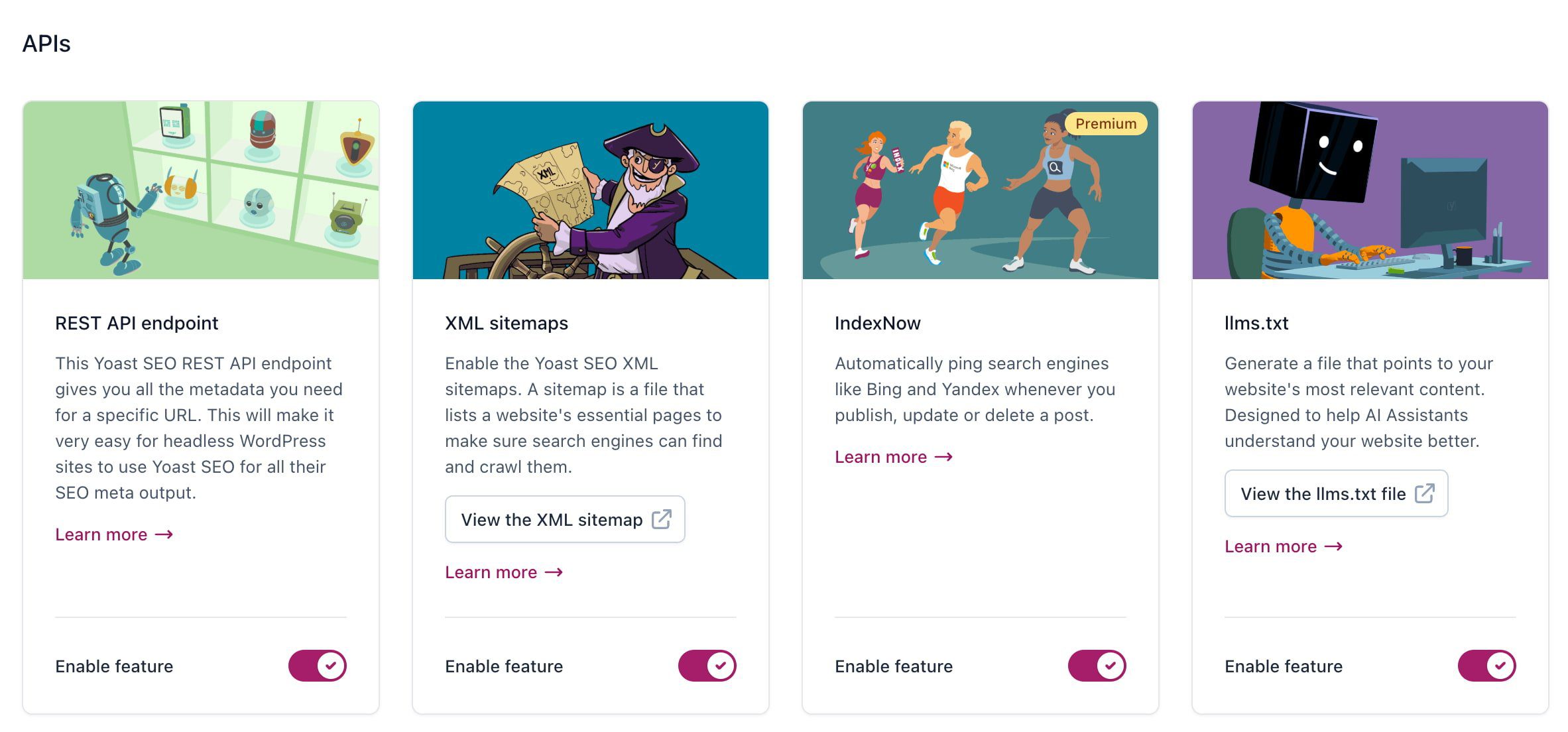
If you’re already using our Yoast SEO (free or Premium) plugin, generating a llms.txt file is easy. Just enable the feature in your settings, and the plugin will automatically create and serve a complete llms.txt file for your site. You can view it anytime at yourdomain.com/llms.txt.
Get Yoast SEO Premium
Unlock powerful SEO insights with our Premium plugin, including advanced content features, AI optimization tools, and real-time data built for the next generation of search.
An LLM-friendly web isn’t the same as a Google-friendly web
This doesn’t replace SEO. Think of llms.txt as a companion to robots.txt. It tells AI bots: “Here’s the good stuff. Skip the noise.”
Sitemaps help crawlers find everything. llms.txt tells LLMs what to focus on.
It’s especially useful for:
Developers and open-source maintainers
Product marketers looking to reduce support load
Teams that want chatbots to pull answers from docs, not guess
You don’t need a new CMS or tech stack
All this requires is creating two things:
A basic llms.txt file in Markdown
Ideally, you’d also have Markdown versions (.html.md) of key pages included alongside the originals, with the same URL plus .md added.
No new tools, plugins, or frameworks needed, although some ecosystems are already adding support.
Here’s an example of a file automatically built by Yoast SEO, as it has an llms.txt generator built in:
Generated by Yoast SEO v25.3, this is an llms.txt file, meant for consumption by LLMs. This is the [sitemap](https://everydayimtravelling.com/sitemap_index.xml) of this website.

# everydayimtravelling.com: Stories from our travels

## Posts
- [Test video](https://everydayimtravelling.com/test-video/)
- [A Journey Through Portugal’s Wine Country: A Suggested Wine Tour Route](https://everydayimtravelling.com/a-wine-tour-through-portugal/)
- [Travel essentials for backpackers FAQ](https://everydayimtravelling.com/travel-essentials-for-backpackers-faq/)

## Pages
- [Checkout](https://everydayimtravelling.com/checkout/)
- [Contact us](https://everydayimtravelling.com/contact-us/)
- [How we started this blog](https://everydayimtravelling.com/pagina-harry-potter/)
- [My account](https://everydayimtravelling.com/my-account/)
- [Cart](https://everydayimtravelling.com/cart/)

## Categories
- [Europe](https://everydayimtravelling.com/category/europe/)
- [Asia](https://everydayimtravelling.com/category/asia/)
- [South America](https://everydayimtravelling.com/category/south-america/)
- [Food](https://everydayimtravelling.com/category/food/)
- [Western Europe](https://everydayimtravelling.com/category/europe/west-europe/)

## Tags
- [Budget](https://everydayimtravelling.com/tag/budget/)
Yoast SEO has an llms.txt generator onboard; you can find it in the API settings
Helping AI help you
So, if AI is misinterpreting your website, producing erroneous summaries, or skipping critical content, there’s a reason, and it’s fixable.
It’s not always your copy. Not your design or your metadata. It’s just that these language tools need a little guidance. In the future, llms.txt could be the way to give it to them, and you do so on your terms.
Do you need help creating an llms.txt file or converting your existing content to Markdown for LLMs? Yoast SEO can automatically generate an llms.txt file for you.
Edwin is an experienced strategic content specialist. Before joining Yoast, he worked for a top-tier web design magazine, where he developed a keen understanding of how to create great content.
Increased usage of AI is changing how people discover businesses and services online. While your website may be optimized for traditional search engines, large language models (LLMs) process your website’s information differently. Our new feature, llms.txt offers to bridge the gap. Yoast SEO generates a file that highlights the most important, up-to-date content on your website as an invitation for LLMs to get the right picture. It’s automatic, requires no technical setup, and is ready in one click.
Helping AI understand your website
Unlike search engines that regularly crawl and index websites, LLMs like ChatGPT and Google Gemini work differently. They don’t store website content for future use. Instead, they gather information in real time when responding to user queries.
This means LLMs often only access a small portion of a website while looking for answers. This is especially true for large websites such as news platforms or ecommerce stores. This can lead to incomplete or even inaccurate AI-generated responses. Not ideal if you’re aiming to improve your visibility in LLM-generated answers as part of your marketing strategy.
The llms.txt file gives LLMs a suggested, pre-prepared slice of your website, highlighting your most important and up-to-date content.
Think of it like a helpful guide at the entrance of a large department store. Imagine you’re walking in looking for socks. Someone greets you and hands you a store map that highlights where the socks are, along with other key departments like shoes, checkout, and customer service. You don’t have to use the map, you can wander around on your own, but it makes it much easier to quickly find what you’re looking for.
In the same way, this file helps LLMs quickly identify the most relevant and useful parts of your website. While the models can still explore other areas, giving them clear guidance increases the chances that they’ll surface the right information in their responses.
How is it different from robots.txt?
robots.txt
Tells bots what not to access
Focuses on permission
Used for search engine indexing and crawling
Supported by traditional search engines
llms.txt
Suggests what AI should read
Focuses on guidance and clarity
Helps AI answer user questions more accurately
Designed for large language models like ChatGPT
How does Yoast SEO llms.txt work?
When you turn the feature on, it automatically generates an llms.txt file for your website, using a mix of relevant website data. It draws from:
Your most recently updated content
Technical SEO elements like your sitemap for context
Descriptions you’ve added about your website
This offers large language models a website summary to understand what your website is about and what content is most important.
Managing your llms.txt file
The plugin automatically creates and maintains the llms.txt file for you, refreshing every week. You can preview the file to ensure it accurately reflects your brand and prioritizes the right content before implementation.
Want full control or prefer to manage it yourself? Learn how to manually add an llms.txt file to your website by visiting our developer documentation.
At Yoast, our mission is SEO for everyone
Setting up an llms.txt file manually may only be accessible to a technical few. By automating the process, we make it easier for all website owners to benefit from this new technology, without needing to dive into code.
At Yoast, we believe that everyone should have a say in how their content is seen and used. Especially as AI plays a bigger role in how people discover information online. That’s why we’ve introduced this feature as opt-in, so you can decide if and when it makes sense for your website. We’ve seen early signs that this is something more website owners are starting to think about.
Just as robots.txt tries to help search engines understand what to index, llms.txt suggests which parts of your website large language models should pay attention to.If you’d like to see what an llms.txt file looks like in practice, you can view the live version on yoast.com.
Beth is Product Marketing Manager at Yoast. Before joining the company, she honed her digital marketing and project management skills in various in-house and agency environments.
This is today’s edition of The Download, our weekday newsletter that provides a daily dose of what’s going on in the world of technology.
How a 1980s toy robot arm inspired modern robotics
—Jon Keegan
As a child of an electronic engineer, I spent a lot of time in our local Radio Shack as a kid. While my dad was locating capacitors and resistors, I was in the toy section. It was there, in 1984, that I discovered the best toy of my childhood: the Armatron robotic arm.
Described as a “robot-like arm to aid young masterminds in scientific and laboratory experiments,” it was a legit robotic arm. And the bold look and function of Armatron made quite an impression on many young kids who would one day have a career in robotics. Read the full story.
If you’re interested in the future of robots, why not check out:
+ Will we ever trust robots? If most robots still need remote human operators to be safe and effective, why should we welcome them into our homes? Read the full story.
+ How AI models let robots carry out tasks in unfamiliar environments. Read the full story.
+ China’s EV giants are betting big on humanoid robots. Technical know-how and existing supply chains give Chinese electric-vehicle makers a significant head start in the sector. Read the full story.
Why we still need AM radio
The most reliable way to keep us informed in times of disaster is being threatened. Check out Ariel Aberg-Riger’s beautiful visual story illustrating AM radio’s importance in uncertain times.
Both of these stories are from the most recent edition of our print magazine, which is all about how technology is changing creativity. Subscribe now to get future copies before they land.
The must-reads
I’ve combed the internet to find you today’s most fun/important/scary/fascinating stories about technology.
1 Protestors set Waymo robotaxis alight in Los Angeles The groups clashed with police over the Trump administration’s immigration raids. (LA Times $) + Much of the technology that fuels deportation orders is error-ridden. (Slate $) + Immigrants are using a swathe of new apps to stay ahead of deportation. (Rest of World)
2 What’s next for Elon Musk and Donald Trump A full breakdown in relations could be much worse for Musk in the long run. (NY Mag $) + Trump’s backers are rapidly turning on Musk, too. (New Yorker $) + The biggest winner from their fall out? Jeff Bezos. (The Information $)
3 DOGE used an inaccurate AI tool to terminate Veteran Affairs contacts Its code frequently produced glaring mistakes. (ProPublica) + Undeterred, the department is on a hiring spree. (Wired $) + Can AI help DOGE slash government budgets? It’s complex. (MIT Technology Review)
4 Europe’s shrinking forests could cause it to miss net-zero targets Its trees aren’t soaking up as much carbon as they used to. (New Scientist $) + Inside the controversial tree farms powering Apple’s carbon neutral goal. (MIT Technology Review)
5 OpenAI wants to embed ChatGPT into college campuses The ultimate goal? A personalized AI account for every student. (NYT $) + Meanwhile, other universities are experimenting with tech-free classes. (The Atlantic $) + ChatGPT is going to change education, not destroy it. (MIT Technology Review)
6 Chinese regulators are pumping the brakes on self-driving cars They’re developing a new framework to assess the safety of autonomous features. (FT $) + The country’s robotaxis are rapidly catching up with the west. (Rest of World) + How China is regulating robotaxis. (MIT Technology Review)
7 Desalination is finally becoming a reality Removing salt from seawater is one way to combat water scarcity. (WSJ $) + If you can make it through tons of plastic, that is. (The Atlantic $)
8 We’re getting better at fighting cancer Deaths from the disease in the US have dropped by a third since 1991. (Vox) + Why it’s so hard to use AI to diagnose cancer. (MIT Technology Review)
9 Teenage TikTokers’ skin regimes offer virtually no benefit And could even be potentially harmful. (The Guardian) + The fight for “Instagram face” (MIT Technology Review)
10 Tech’s layoff groups are providing much-needed support Workers who have been let go by their employers are forming little communities. (Insider $)
Quote of the day
“Every tech company is doing similar things but we were open about it.”
—Luis von Ahn, chief executive of the language-learning app Duolingo, tells the Financial Times that his company is far from the only one adopting an AI-first strategy.
One more thing
How to break free of Spotify’s algorithm
Since the heyday of radio, the branding of sound has evolved from broad genres like rock and hip-hop to “paranormal dark cabaret afternoon” and “synth space,” and streaming has become the default.
Meanwhile, the ritual of discovering something new is now neatly packaged in a 30-song playlist. The only rule in music streaming is personalization.
What we’ve gained in convenience, we’ve lost in curiosity. But it doesn’t have to be this way. Read the full story.
—Tiffany Ng
We can still have nice things
A place for comfort, fun and distraction to brighten up your day. (Got any ideas? Drop me a line or skeet ’em at me.)
Google introduced “fan-out” search results in a March 2025 blog post announcing AI Mode, its expanded version of AI Overviews. The term is new, but the concept is not.
Google’s algorithm has long moved beyond merely matching keywords. It now interprets what searchers are looking for. This intent-based approach is also known as thematic or semantic search.
Similarly, AI Mode “fans out” beyond searchers’ initial queries to address likely follow-ups. A single AI Mode response could include what once required multiple searches. Google’s March post included an example of a searcher seeking the best smartwatch for sleep tracking. An AI Mode answer could fan out to address related topics, such as explaining sleeping heart rates.
Yet keyword research remains essential. The words and phrases of prospects reveal their needs and shopping journeys.
And optimizing those keywords is crucial for citations and sources in AI Overviews. One tactic is to use Gemini, Google’s AI chatbot that powers Overviews and AI Mode.
Here’s how.
Use Gemini
First, generate keywords.
For existing pages, access Search Console’s “Performance” > “Queries” tab. Enter the URL for the “Page” filter to limit the query report for that content. Then download the final report as a CSV file.
In Gemini, upload the keyword file and enter the following prompt:
Here’s my target keyword list. What are the fan-out subqueries or facets related to these topics?
I uploaded a CSV file of approximately 500 keywords related to “website maintenance costs.” Gemini’s response, below, was very helpful. (I’ve bolded words for emphasis.) Answering many of its questions would enhance a website maintenance article.
Primary Topic: Website Maintenance and Running Costs Core Query Theme: “How much does it cost to maintain/run a website?” Fan-out Subqueries/Facets:
1. Cost Breakdown & Components
“What are the typical recurring costs for a website?”
“How much does website hosting cost per month/year?”
“What is the average cost of a domain name?”
“How much should I budget for website security (SSL, firewalls)?”
“What are the costs associated with website content updates or management?”
“What is the cost of website development or new feature implementation?”
“Are there hidden costs of website ownership?”
“Cost of plugins, themes, or extensions for platforms like WordPress.”
2. Factors Influencing Cost
“What factors increase or decrease website maintenance costs?”
“How does the type of website (e-commerce, blog, portfolio) impact running costs?”
“Is a custom-built website more expensive to maintain than a template-based one?”
“Does the frequency of updates influence maintenance expenses?”
“What’s the difference in cost between DIY website maintenance and hiring a professional?”
3. Importance & Benefits of Maintenance
“Why is website maintenance important for security?”
“How does regular maintenance improve website performance and speed?”
“What role does website maintenance play in SEO (Search Engine Optimization)?”
“How does maintenance impact user experience and conversions?”
“What are the risks of not maintaining a website?”
4. Types of Maintenance
“What does website technical maintenance involve?”
“What is included in website security maintenance?”
“What is content maintenance for a website?”
“What is ‘preventative maintenance’ for a website?”
5. Solutions & Services
“What are common website maintenance packages or plans?”
“What tools are available for website maintenance (monitoring, backups)?”
“Should I use a website maintenance service or do it myself?”
“Comparison of website maintenance services and their pricing.”
6. Comparative Analysis & Alternatives
“How do website maintenance costs compare across different platforms (WordPress, Shopify, Wix, Squarespace)?”
“Is it cheaper to rebuild a website than to maintain an old one?”
“What are the long-term costs of a website?”
“Cost of maintaining a small business website vs. a large enterprise site.”
7. Related Services & Value
“Does website maintenance include SEO or marketing services?”
“What is the ROI (Return on Investment) of regular website maintenance?”
Gemini’s Reasoning
For the best prompts, run Gemini and open the “Show thinking” option (available in 2.5 Pro). Then follow Gemini’s logic to understand how it treats your core topic.
For example, I entered this prompt and then clicked “Show thinking”:
Where to buy designer shoes online. I’d like to be able to try them on.
Gemini’s “Show thinking” option explains how it treats a core topic. Click image to enlarge.
Gemini’s reasoning was eye-opening in terms of how it can help shoppers. (Words are bolded by me.)
I’m starting my search for online designer shoe retailers with “try before you buy” programs. I’m also looking for luxury stores with free returns and exchanges, focusing on options with the best return policies for my needs.
Compiling program details
My focus is now on compiling a detailed list of “try before you buy” options for designer shoes. I’m actively comparing return policies, specifically looking at restocking fees and shipping costs across various retailers and personal styling services. The goal is to identify the best value and flexibility for trying on shoes at home. I am ready to start compiling a list of top options for the user.
Expanding search scope
I’ve moved beyond the initial “try before you buy” focus. Subscription services, like JustFab and ShoeDazzle, emerged, though their designer offerings might be limited. My focus also shifted to retailers with liberal return policies, essentially facilitating home try-ons. DSW, Nordstrom, and Zappos surfaced as promising. I’m now also exploring personal styling services that include home try-on components.
Refining search criteria
I’ve moved on to the second part of the plan: detailing the specific “try-on” policies. I’m focusing on costs, trial periods, and brand selections for each retailer and service. I’m structuring the information into “Try Before You Buy,” “Retailers with Free Returns,” and “Personal Styling Services” to ensure clarity. I’m now investigating the designer shoe selection for services like Stitch Fix and Wantable.
Gemini suggested options beyond the initial prompt:
“Try Before You Buy”
“Retailers with Free Returns”
“Personal Styling Services”
It also generated a comparison chart of options meeting one or more of those options:
Gemini suggested options beyond the initial prompt and generated a comparison chart. Click image to enlarge.
Note Gemini’s sources and citations from ecommerce brands. Thus to appear in AI Overviews, work on your site’s content explaining core values and needs of prospects, such as shipping, returns, unique products, free virtual help with installation, and more.
Additional Tools
Ultimately, adjust your content based on your knowledge of the niche and target audience. Third-party keyword tools can help brainstorm (i) related queries to expand your keyword list and (ii) related questions of the problems behind the queries.
Google’s John Mueller answered a question about a site that received millions of Googlebot requests for pages that don’t exist, with one non-existent URL receiving over two million hits, essentially DDoS-level page requests. The publisher’s concerns about crawl budget and rankings seemingly were realized, as the site subsequently experienced a drop in search visibility.
NoIndex Pages Removed And Converted To 410
The 410 Gone server response code belongs to the family 400 response codes that indicate a page is not available. The 404 response means that a page is not available and makes no claims as to whether the URL will return in the future, it simply says the page is not available.
The 410 Gone status code means that the page is gone and likely will never return. Unlike the 404 status code, the 410 signals the browser or crawler that the missing status of the resource is intentional and that any links to the resource should be removed.
The person asking the question was following up on a question they posted three weeks ago on Reddit where they noted that they had about 11 million URLs that should not have been discoverable that they removed entirely and began serving a 410 response code. After a month and a half Googlebot continued to return looking for the missing pages. They shared their concern about crawl budget and subsequent impacts to their rankings as a result.
Mueller at the time forwarded them to a Google support page.
Rankings Loss As Google Continues To Hit Site At DDOS Levels
Three weeks later things have not improved and they posted a follow-up question noting they’ve received over five millions requests for pages that don’t exist. They posted an actual URL in their question but I anonymized it, otherwise it’s verbatim.
The person asked:
“Googlebot continues to aggressively crawl a single URL (with query strings), even though it’s been returning a 410 (Gone) status for about two months now.
In just the past 30 days, we’ve seen approximately 5.4 million requests from Googlebot. Of those, around 2.4 million were directed at this one URL: https://example.net/software/virtual-dj/ with the ?feature query string.
We’ve also seen a significant drop in our visibility on Google during this period, and I can’t help but wonder if there’s a connection — something just feels off. The affected page is: https://example.net/software/virtual-dj/?feature=…
The reason Google discovered all these URLs in the first place is that we unintentionally exposed them in a JSON payload generated by Next.js — they weren’t actual links on the site.
We have changed how our “multiple features” works (using ?mf querystring and that querystring is in robots.txt)
Would it be problematic to add something like this to our robots.txt?
Disallow: /software/virtual-dj/?feature=*
Main goal: to stop this excessive crawling from flooding our logs and potentially triggering unintended side effects.”
Google’s John Mueller confirmed that it’s Google’s normal behavior to keep returning to check if a page that is missing has returned. This is Google’s default behavior based on the experience that publishers can make mistakes and so they will periodically return to verify whether the page has been restored. This is meant to be a helpful feature for publishers who might unintentionally remove a web page.
Mueller responded:
“Google attempts to recrawl pages that once existed for a really long time, and if you have a lot of them, you’ll probably see more of them. This isn’t a problem – it’s fine to have pages be gone, even if it’s tons of them. That said, disallowing crawling with robots.txt is also fine, if the requests annoy you.”
Caution: Technical SEO Ahead
This next part is where the SEO gets technical. Mueller cautions that the proposed solution of adding a robots.txt could inadvertently break rendering for pages that aren’t supposed to be missing.
He’s basically advising the person asking the question to:
Double-check that the ?feature= URLs are not being used at all in any frontend code or JSON payloads that power important pages.
Use Chrome DevTools to simulate what happens if those URLs are blocked — to catch breakage early.
Monitor Search Console for Soft 404s to spot any unintended impact on pages that should be indexed.
John Mueller continued:
“The main thing I’d watch out for is that these are really all returning 404/410, and not that some of them are used by something like JavaScript on pages that you want to have indexed (since you mentioned JSON payload).
It’s really hard to recognize when you’re disallowing crawling of an embedded resource (be it directly embedded in the page, or loaded on demand) – sometimes the page that references it stops rendering and can’t be indexed at all.
If you have JavaScript client-side-rendered pages, I’d try to find out where the URLs used to be referenced (if you can) and block the URLs in Chrome dev tools to see what happens when you load the page.
If you can’t figure out where they were, I’d disallow a part of them, and monitor the Soft-404 errors in Search Console to see if anything visibly happens there.
If you’re not using JavaScript client-side-rendering, you can probably ignore this paragraph :-).”
The Difference Between The Obvious Reason And The Actual Cause
Google’s John Mueller is right to suggest a deeper diagnostic to rule out errors on the part of the publisher. A publisher error started the chain of events that led to the indexing of pages against the publisher’s wishes. So it’s reasonable to ask the publisher to check if there may be a more plausible reason to account for a loss of search visibility. This is a classic situation where an obvious reason is not necessarily the correct reason. There’s a difference between being an obvious reason and being the actual cause. So Mueller’s suggestion to not give up on finding the cause is good advice.

 Screenshot from: YouTube.com/CreatorInsider, June 2025.