Ultimate PPC Campaign Optimization: 6 New Ways To Easily Run Dozens Of PPC Campaigns For Different Sectors via @sejournal, @CallRail

Tip #1. Boost Relevance: Use Industry-Specific Conversion Signals To Customize Google Ads Messaging

Increasing clicks is as easy as increasing how relevant your ads are to your potential customers.

Sounds easy, but when you’re managing different brands, many industries, or multiple brick-and-mortar locations, it can quickly become difficult to understand exactly what each individual person needs.

What’s New That You Should Change & Try

Google Ads Responsive Search Ads and Assets (Structured Snippets) now allow faster VOC-driven testing.

Voice-of-customer (VOC) insights from tools like CallRail reveal what customers actually say before converting.

Now, you can use this real language to supercharge your ad messaging.

Is This Change Worth It?

Yes.

When you align your ad messaging with what your customers actually say, you boost ad relevance, increase clickthrough rates, and lower your cost per lead by matching real search intent.

You’ll see:

  • Higher relevance: This is crucial in paid advertising is critical because it directly impacts three major outcomes: cost, performance, and customer experience.
  • Lower Costs: Ad platforms like Google Ads reward high relevance with better quality scores, which can lower your cost per click (CPC) and help you win better ad placements without paying a premium.
  • Higher Engagement: When your ads match exactly what users are searching for or thinking about, you naturally boost clickthrough rates (CTR) because the ad feels more useful and timely.
  • Better Conversion Rates: Relevant ads lead to more qualified traffic, meaning users are more likely to take action once they land on your site, whether that’s calling, booking, or buying.
  • Improved Brand Trust: Ads that clearly resonate with real customer language and needs feel authentic, which strengthens brand credibility over time.

Which Industries Benefit Most From This PPC Engagement Boosting Technique?

  • Legal Services: Top keywords we’ve identified for you are [free consult] & [local attorney]
  • Home Services: [emergency repair] & [same-day service] are great seed keywords for this industry.
  • Medical/Dental: [accepts insurance] & [licensed doctor] are good starting points for PPC keyword lists.

Your industry not listed? See other industry insights here.

How did we discover those seed keywords?

By analyzing customer responses, transcripts, and chats for true language keywords that your customers are likely typing into search or ChatGPT.

How To Find Your Best PPC Conversion Signals

Effort Manual Method CallRail
Time Required High Low
Accuracy Depends on human analysis Automated and precise
Insights Available CTRs, keyword performance CTRs, keyword-level call tracking, automated trends
Effort Intensive Minimal

Manual Method For Finding PPC Conversion Signals

  • Analyze Campaign Data: Manually review metrics like click-through rates (CTR), conversion rates, and cost per conversion to evaluate performance.
  • Identify High-Performing Keywords: Manually analyze calls to find and optimize keywords driving the best results while excluding irrelevant terms.
  • Track User Behavior: Use tools like Google Analytics to observe user actions, such as pages visited or time on site, before converting.
  • Tie Conversions to Campaign Factors: Manually connect conversion data to specific ads, keywords, or timeframes for insights.
  • Challenges: Time-intensive, prone to human error, and limited in precision without advanced tools.

CallRail Method for Finding PPC Conversion Signals

  • Call Tracking: Easily and quickly track inbound calls back to specific ads, campaigns, or keywords to identify high-performing strategies.
  • Keyword-Level Attribution: Automatically pinpoint which keywords drive calls or form submissions without manual effort.
  • Automated Insights: Leverage AI-generated call transcripts, summaries, and data to detect patterns, trends, and high-performing campaigns effortlessly.
  • Integrations: Connect with platforms like Google Ads or HubSpot to centralize and streamline conversion tracking.
  • Key Benefits: Saves time, eliminates guesswork, provides precise and actionable insights to optimize PPC campaigns effectively.

The Manual Way:

  1. Spend hours manually analyzing call transcripts for high-intent phrases.
  2. Create tightly themed ad groups based on these phrases.
  3. Constantly refine keyword match types to match real search behavior (favor phrase match for accuracy).
  4. Use dynamic keyword insertion carefully to keep VOC language in ads.

Easy Way With CallRail: 

  1. Use CallRail’s free trial to extract VOC insights.
  2. Insert VOC themes into responsive search ad headlines and structured snippets.

Tip #2. Save Time: Automate Campaign Creation With Pre-Built Google Ads Templates & CRM Signals

Launching campaigns faster without sacrificing quality can transform how efficiently your agency operates.

Is This Change Worth It?

Absolutely.

When you automate campaign creation, your team gets more time back to focus on strategy instead of setup.

It means:

  • Faster launches.
  • Fewer errors.
  • Campaigns that are tailored more precisely to your clients’ real needs.

What’s New That You Should Change & Try

Google Ads Customer Match and Microsoft Ads Customer Match now enable direct CRM syncing to personalize campaigns automatically.

You can dynamically create or adjust campaigns based on real customer behavior without manual uploads.

Why Do This

Automating your campaign setup drastically reduces your manual workload, speeds up your time-to-market, and helps your team personalize campaigns at scale across locations or services.

Which Industries Benefit Most From This Time-Saving PPC Technique?

  • Franchise & Multi-Location Retail
  • Home Services (HVAC, plumbing, roofing)
  • B2B SaaS with structured sales pipelines

How To Set Up Automated PPC Campaign Launching

The Manual Way:

  1. Build templated campaign structures with core keywords, ads, and extensions.
  2. Pre-create negative keyword lists to prevent budget waste.
  3. Use shared audiences and budgets across locations.

Easy Way With CallRail:

  1. Connect CallRail and your CRM to automatically trigger ad group or campaign launches.

Tip #3. Maximize ROI: Make Budget Optimization Dynamic With Real-Time Call Quality Feedback

Prioritizing ad spend on only the highest quality leads gives you better results without raising your budget.

Is This Change Worth It?

Definitely.

Budget optimization with real-time PPC feedback ensures that you’re spending on what actually drives value: qualified leads.

It’s one of the fastest ways to improve ROI and prove your worth to your clients.

What’s New That You Should Change & Try

Google Ads Offline Conversion Imports and Enhanced Conversions for Leads now allow you to sync call quality and CRM outcomes directly into Google Ads bidding models.

Why Do This

Prioritizing your budget based on high-quality leads maximizes your ROI, eliminates wasted ad spend, and delivers more valuable outcomes for your business or agency.

Which Industries Benefit Most From This Budget Optimization Technique

  • Healthcare & Dental Clinics
  • Legal & Financial Services
  • Auto Services

How To Optimize Your Budget Based On Real-Time Call Quality

Manual Way:

  • Score calls manually within your CRM for quality.
  • Adjust campaign-level bid adjustments or device-level bidding based on quality trends.
  • Create automated rules to pause poor-performing keywords or boost strong ones.

Easy Way With CallRail:

  1. Use call scoring to automatically sync quality signals.
  2. Set Google Ads offline conversion imports to trigger budget shifts based on call outcomes.

Tip #4: Boost Engagement: Use Enhanced Click-to-Call Campaigns With Visual SERP Signals

Visual and call-first strategies make it easier for customers to connect and convert faster.

Is This Change Worth It?

Yes, especially if your audience is mobile-first.

Adding call-focused enhancements and visuals doesn’t just boost engagement—it shortens the path between search and conversion, making it easier for ready-to-buy users to reach you.

What’s New That You Should Change & Try

Google Ads Call Ads, Image Extensions, and Microsoft Ads Multimedia Ads now create visually compelling, mobile-first experiences optimized for immediate customer action.

Why Do This

Upgrading your ads with richer visuals and call-driven formats helps you drive higher engagement on mobile, improve click-to-call rates, and accelerate customer connections.

Which Industries Benefit Most From This Engagement-Boosting Technique

  • Restaurants & Local Retail
  • Urgent Services (locksmiths, HVAC repair)
  • Senior Services (assisted living, home care)

How To Enhance Your Click-to-Call Campaigns

Manual Way:

  • Add call extensions and image extensions to mobile ads.
  • Schedule call ads during business hours only.
  • Use structured snippets highlighting key services.

Easy Way With CallRail:

  1. Integrate CallRail click-to-call tracking.
  2. Analyze peak call times and optimize ad schedules accordingly.

Tip #5: Smarter Targeting: Layer First-Party Lead Journey Data Into Performance Max Campaigns

Bringing offline lead intelligence into your campaigns boosts targeting precision and conversion rates.

Is This Change Worth It?

Absolutely.

Using your first-party data to influence Performance Max campaigns gives you more control, better targeting, and higher returns, especially in a world where third-party cookies are disappearing.

What’s New That You Should Change & Try

Google Ads Performance Max campaigns now support Customer Value Mode (2024 smart bidding innovation) to better optimize for high-value leads.

Why Do This

Feeding your first-party lead journey data into campaigns improves your targeting precision, nurtures your prospects at the right moment, and increases your conversion rates while lowering acquisition costs.

Which Industries Benefit Most From This Smart Targeting Strategy

  • Real Estate
  • Home Improvement & Contractors
  • Higher Education & Vocational Schools

How To Layer Lead Journey Data Into Your Performance Max Campaigns

Manual Way:

  1. Export CRM lead journey stages manually.
  2. Create custom audience segments inside Google Ads.
  3. Build distinct asset groups based on customer intent (“researching,” “ready to buy”).

Easy Way With CallRail:

  1. Use CallRail to sync call outcomes and CRM data into Google Ads.
  2. Automate audience signal feeding to Performance Max.

Tip #6: Lower CPCs: Run Campaigns By Location With Local Keyword + Phone Call Clustering

Geo-targeted strategies help you win more conversions while keeping your ad costs low.

Is This Change Worth It?

Definitely.

Location-based clustering lets you dominate profitable micro-markets without blowing your budget. It’s one of the smartest ways to lower CPCs and outmaneuver bigger competitors.

What’s New That You Should Change & Try

Google Ads Location Extensions, Dynamic Location Insertion, and Microsoft Ads Location Extensions now provide better local customization tools, enhanced by AI call tracking.

Why Do This

Using hyperlocal targeting based on real-world call and keyword data helps you increase your relevance, lower your CPCs, and dramatically improve your local conversion rates.

Which Industries Benefit Most From This Geo-Targeting Upgrade

  • Multi-Location Healthcare
  • Legal Services in competitive markets
  • Home Services (regional licensing differences)

How To Run Localized Campaigns With Call Clustering

Manual Way:

  1. Segment geo-targeted campaigns by ZIP code.
  2. Analyze location performance reports weekly.
  3. Use ad customizers to insert city/region names dynamically into ad copy.

Easy Way With CallRail:

  1. Leverage CallRail’s AI keyword clustering to identify top-performing regions.
  2. Automatically adjust geographic targeting based on call conversion trends.

Scale Smart, Not Wide

Scaling PPC for your SMB clients across different sectors is no longer about throwing more campaigns against the wall and hoping something sticks. It’s about smarter personalization, automation, and quality-driven optimizations.

Tangible PPC elements like keywords, ad groups, budget rules, and conversion actions remain critical to long-term success, especially when fueled by clean first-party data.

By implementing even 1–2 of these new methods per client vertical, you can reduce your manual work, improve your lead quality, and drive better outcomes for your agency and your clients.

Ready to future-proof your PPC strategy?

Start with data. Start with automation. And start by refining the tangible parts of your campaigns to dominate every sector you serve.

Telling Better Stories With SEO Data To Show Business Impact via @sejournal, @TaylorDanRW

In data-heavy organizations, SEO remains one of the most misunderstood areas at the executive level.

This isn’t because of a lack of information but because much of that information lacks clarity or relevance.

SEO teams regularly produce dashboards, audits, and detailed reports, yet these rarely answer the business questions executives care about.

Charts showing keyword shifts or small traffic gains often miss the point when leadership asks:

  • Where are we winning?
  • Where are we losing?
  • How does this impact revenue, risk, or market share?

The data must go beyond numbers for SEO to matter in the boardroom. It needs to tell a story that connects performance with business goals.

That means moving past surface-level metrics and focusing on insights that highlight opportunities, reveal competitive threats, and align with strategic priorities.

The aim isn’t to simplify SEO for executives but to elevate it. The goal is to turn it into a strategic narrative showing how organic search supports business growth.

The Core Issue: Data Without Context Gets Ignored

Most SEO reports are designed for technical teams, not business leaders. They are filled with keyword rankings, crawl errors, and technical diagnostics.

While necessary for day-to-day operations, these metrics often fail to explain why they matter to the business.

Executives are not looking for lessons in structured data or site architecture. They want to know what’s driving growth, where the risks are, and how they compare to competitors.

When SEO data is not tied to business outcomes, it becomes noise. In environments where attention is limited, that noise gets overlooked.

The missing piece is context. The SEO lead in an enterprise organization isn’t just responsible for collecting data. Their role is to shape that data into a story that informs business decisions.

That story should show how organic search impacts revenue, reduces paid advertising costs, or reveals shifting customer demand. Without this lens, even strong SEO results can go unnoticed.

What Executives Want From SEO Reporting

SEO reporting often turns into a list of disconnected metrics instead of a focused business narrative.

SEO reporting needs to speak about growth, risk, efficiency, and competitive advantage to be effective with executives. Here’s how that approach looks in action:

Business Alignment

Executives want to see how SEO contributes to the outcomes they are accountable for, such as acquiring customers, entering new markets, or reducing spending.

They don’t need to know how many keywords rank in the top 10. They want to see how organic traffic is supporting entry into a new vertical or how it’s helping reduce paid media dependency.

Tie SEO outcomes to business goals.

For example, instead of reporting a 20% rise in non-brand clicks, frame it as a surge in qualified visits to key product pages.

Show how that growth aligns with a wider initiative like expanding mid-market presence or improving retention through better content.

Competitive Intelligence

SEO offers a view into competitors’ digital activity that few other channels can match. Executives want to understand how their brand stacks up in search and what competitors do differently.

Good reporting highlights shifts in search share, gaps in content coverage, and emerging competitors in valuable categories.

Rather than simply reporting your ranking changes, provide insight into where rivals are gaining ground. This makes SEO a forward-looking tool that helps guide competitive strategy.

Risk Awareness

Organic traffic may seem like a stable channel. Still, it can be affected by algorithm changes, technical issues, or outdated content. Executives need early warnings about threats to performance.

Call out signals like declining rankings in high-value areas, growing dependence on branded search, or performance drops after site changes. Emphasize what’s at stake.

For example, losing visibility in a critical product line could mean lost revenue if left unaddressed. When framed in business terms, SEO risks become easier to act on.

Efficiency Indicators

Executives are focused on return. They want to know where SEO is most effective, where resources might be wasted, and how to make smarter investments.

Show which content types perform best, which SEO initiatives save paid media costs, or where organic traffic delivers stronger conversion rates than other channels.

Also, identify low-performing assets that need improvement. Help leadership see SEO as a lever for both growth and efficiency.

Transforming SEO Data Into Strategic Stories

Once you understand what matters to executives, you must convert SEO data into a straightforward, actionable narrative.

Reports alone don’t drive decisions. Stories do.

A strong SEO narrative follows a few simple steps:

Start With The Business Challenge

Open with a relevant issue. Is visibility falling in a key market? Is a high-growth segment being missed?

Begin with a problem or opportunity that has business importance.

Support It With The Right Data

Bring in the SEO metrics that matter. Use only what moves the story forward, such as search demand, ranking trends, or traffic shifts. Keep it focused and easy to follow.

Use Visuals For Clarity

Executives don’t want dense tables. Use simple visuals like charts or comparisons that make the insight immediately clear. It should take seconds to grasp the message.

Link To Commercial Impact

Explain how SEO performance connects to business outcomes.

For example, a drop in rankings for a key category might affect the pipeline, or a rise in organic visibility might reduce paid search spending. Linking revenue, cost, or growth goals is obvious.

End With Clear Recommendations

Conclude with what needs to happen. What should be prioritized? What is the potential upside or downside? Provide a clear path to action instead of just analysis.

SEO Storytelling Is A Strategic Skill

The strength of an SEO program isn’t just in how much data it captures. It lies in how clearly that data is used to influence business decisions.

At the enterprise level, SEO reflects market signals, customer intent, and competitive shifts. When framed correctly, it becomes a strategic advantage.

Executives don’t need to understand the technical details. They need to know how SEO supports their goals. Your role is to connect the dots between search behavior and business impact.

When SEO reporting stops being a technical summary and starts becoming a business insight engine, it earns its place at the table.

More Resources:


Featured Image: Gorodenkoff/Shutterstock

How To Write Better Ad Copy When Google Ads Uses AI-Assisted Features via @sejournal, @LisaRocksSEM

Almost every major ad platform now offers some form of AI-generated copy.

While these tools can speed up the process of launching campaigns, they often create headlines and descriptions that lack the creativity or relevance needed to get results.

In this article, we will focus on how to get the most from Google Ads AI-assisted features without letting automation take over your messaging.

You’ll learn how the system generates copy, why common AI-suggested assets miss the mark, and what you can do to guide the platform toward better results.

I will walk you through how to strategically use the AI-powered automatically created assets in Google Ads while ensuring your manual assets (the copy you enter yourself) are central to your message.

AI features can be valuable, but only when your inputs are structured and strategic. Without that, the result is often generic ads that underperform or confuse your audience.

Starting Out

Google’s automation provides suggestions and can also generate ad copy for you.

When Automatically Created Assets (ACA) are enabled, Google uses your landing page, existing ads, ad group keywords and other available business information to generate new headlines and descriptions for Responsive Search Ads and Performance Max campaigns.

These AI-generated assets are designed to work alongside your manual inputs to improve relevance and performance.

While this sounds like sci-fi magic, it raises a bigger question: How do you make sure your ads still reflect your strategy?

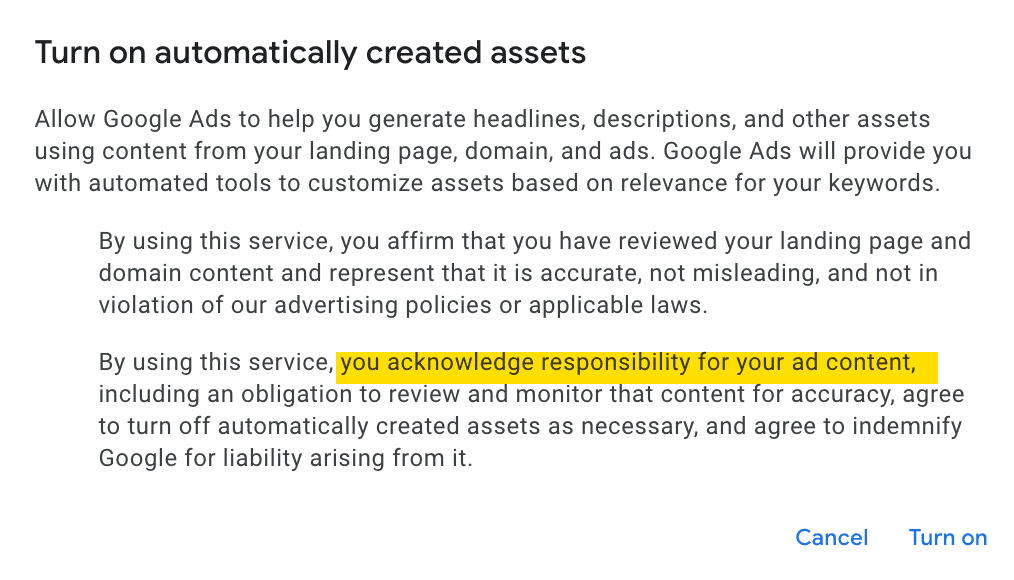
Before you even get started with ad copy, there’s another sign that underscores how imperfect automated ad creation can be: the opt-in disclaimer for automatically created assets.

When you enable this setting in Google Ads, Google asks you to confirm that your landing page is accurate and not misleading.

You accept legal responsibility for anything the AI produces based on your content.

The fact that this disclaimer exists highlights a critical truth: Google’s automation is helpful, but not foolproof. This reinforces why your ad copy still matters.

opt-in disclaimer for automatically created assets in Google AdsScreenshot from Google Ads, April 2025

View Ideas And Ad Strength Indicator

As you build your Responsive Search Ad (RSA), Google Ads gives real-time feedback using the “Ad Strength” indicator.

RSAs are designed to allow Google’s machine learning to automatically test various combinations of headlines and descriptions to determine the most effective combinations.

The Ad Strength indicator directly encourages a diverse pool of these assets for testing. This feature provides suggestions like:

  • Add more headlines.
  • Include popular keywords in your headlines.
  • Make your headlines more unique.
  • Make your descriptions more unique.
Responsive Search Ad (RSA) in Google Ads showing Ad Strength indicator and view ideasScreenshot from Google Ads, April 2025

These prompts are designed to help test different combinations, but they do not always help write a better ad.

In fact, when you click into “view ideas,” there are several suggestions and topics that are not customized and very inaccurate, such as “buy online” or “huge inventory” for non-ecommerce advertisers.

Ad Strength prompts are the very first feedback advertisers see when creating this type of ad. Because they appear so early in the process, these suggestions can influence how advertisers write headlines and descriptions.

It is easy to fall into the trap of writing for the score. That’s why it’s important to remember you are writing for performance, not for a scorecard. A great ad does not always get an “Excellent” score.

Use Ad Strength as a guide, but make sure your copy decisions are based on the campaign’s goal.

Enter A Strong Final URL, A.k.a. Landing Page

Your final URL is the ad’s landing page, and it influences how Google scans your site to generate AI copy suggestions.

The AI suggestions are directly influenced by the content on your landing page. Keeping your page clear, relevant, and updated is key.

If your landing page is too general, vague, or lacking clear headlines, Google may pull weak suggestions into your ad setup.

Google has built several AI-powered features around landing page content to streamline ad creation.

Automatically Created Assets (ACA) are available in both Search and Performance Max campaigns, and they pull copy directly from your site to generate new headlines and descriptions.

In Performance Max, the Asset Generation tool goes a step further.

Once you enter a URL, Google’s AI builds out relevant text and even image assets.

The new Conversational Experience lets advertisers provide a URL and have the AI suggest full campaign elements, including keywords, headlines, and ad descriptions.

These tools all rely heavily on landing page content, which is why it’s crucial to control what Google sees and how it reflects your offer.

Review And Refine Prefilled Headlines

Google often preloads suggested headlines based on your landing page, ad group keywords, and other headlines. These suggestions can save time, but they are not strategic suggestions.

To build ads, you need a strong foundation. Each headline should serve a clear purpose to communicate value and stand out in a competitive search landscape. Here’s how I structure it:

  • Keywords: These headlines should align with the user’s search terms. They reinforce ad relevance and signal to the searcher that your ad matches their intent.
  • Benefit or Feature: These highlight what the user will gain. Benefits answer the “what’s in it for me?” question, while features describe core elements of your product or service. This type of headline is essential for differentiating your offer.
  • Product Name: This tells users exactly what you’re promoting. It’s especially helpful when you offer multiple solutions, SKUs, or services. Helps filter clicks to the most relevant traffic.
  • Call to Action (CTA): These guide the next step, like “Start Your Trial” or “Get a Free Demo.” Action-oriented copy gives users direction and adds urgency.
  • Brand Name: Including your brand name can provide clarity and drive trust even if it’s not served on branded search terms.

Your goal is to cover a range of message types without being repetitive. Each headline should serve a distinct role so searchers are enticed to click and Google can test a variety of combinations.

Avoid simply accepting all of Google’s suggestions or making small reworded variations of the same idea. Start with this framework, then refine.

More Ideas, More Problems

When writing headlines, you’ll see a “View Ideas” link next to Google’s suggestions. Clicking it opens the “More Ideas” panel that is positioned as a smart tool powered by AI.

In reviewing the interface across several client accounts, this was my direct experience.

The “Top Keywords” section may include terms related to your business, but they were often pulled from unrelated ad groups or even included competitor names, which could create trademark issues.

This creates confusion and risks serving ads with misleading or legally questionable content.

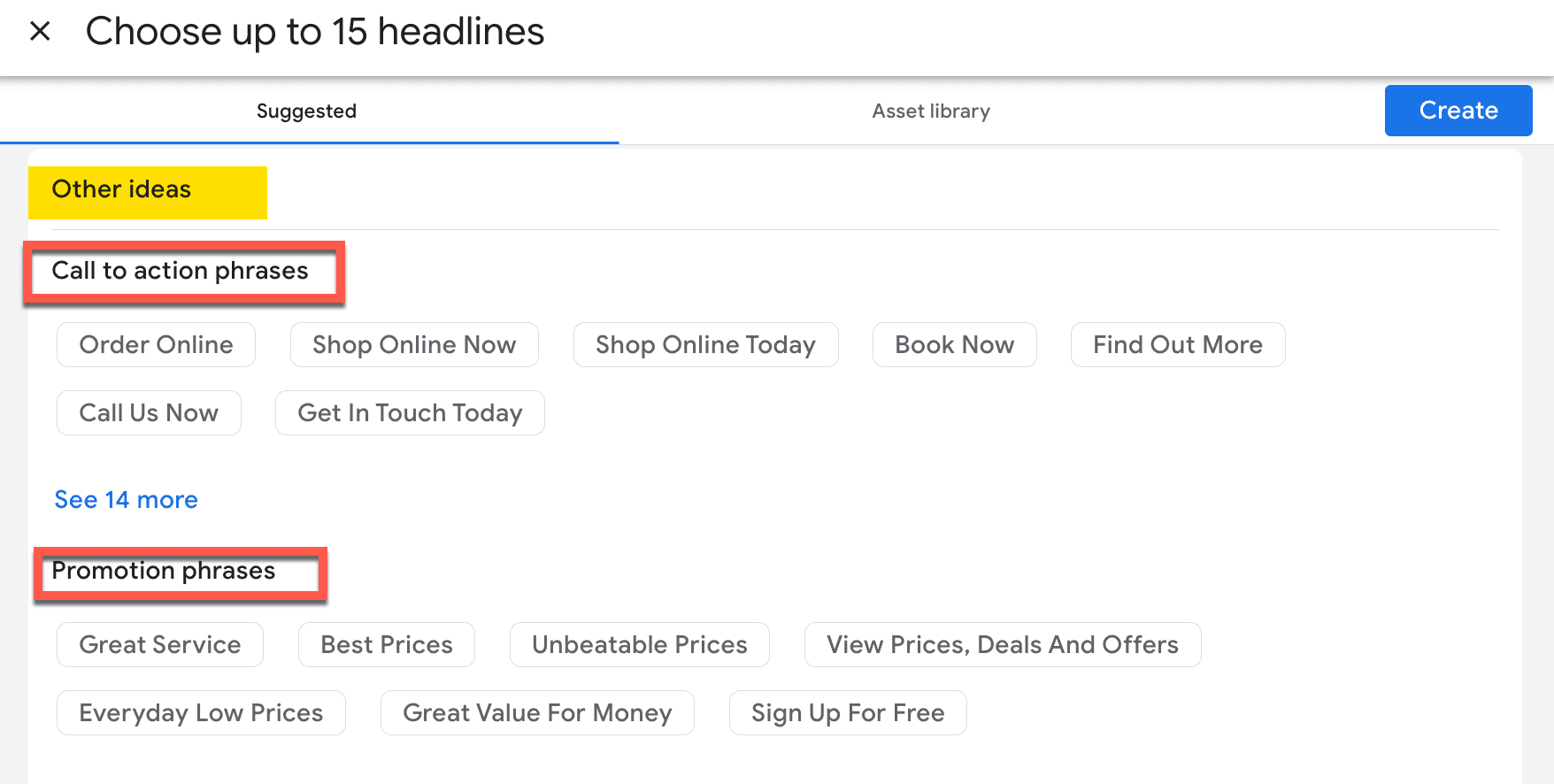
The “Other Ideas” and “Call to Action Phrases” sections typically feature a preprogrammed list of standard CTAs or promotional lines like “Book Now” or “Find Out More.”

In one recent example, the real client’s CTA was “Free Sample,” yet none of the suggestions matched that intent.

Not only were the options inaccurate, but they also lacked any customization for the business. These don’t appear to be AI-generated, but they feel like a generic list applied across all advertisers.

Screenshot of toher ideas for Google Ads copyScreenshot from Google Ads, April 2025

The danger here is that less experienced users may assume these suggestions are optimized or personalized because they are provided by Google. In reality, they can cause issues that mislead your audience.

Descriptions Should Add Value, Not Just Repeat Headlines

When viewing the “View Ideas” panel for descriptions, Google notes these suggestions are based on your final URL and other ads in your ad group.

In reviewing this across multiple client accounts, I’ve seen these suggestions really fall short.

Many are just reworded headlines or very short descriptions that don’t take advantage of the full 90-character limit. This misses an opportunity to add meaningful context or differentiation.

Descriptions should use a similar framework to headlines, but with more room for details. Each one should:

  • Support a headline: Add detail to the benefit, feature, or CTA introduced above.
  • Highlight a specific value prop: Clarify what the product or service actually delivers.
  • Add urgency or emotional appeal: Address the fear of missing out (FOMO), time savings, ease of use, or competitive edge.
  • Answer an unspoken question: Like “What’s in it for me?” or “How does this work?”

Your goal is to create descriptions that do the work of pushing a searcher one step closer to clicking by offering a richer understanding of the offer.

Bonus Feature: Conversational Experience In Google Ads

Google is currently testing a new feature called Conversational experience, available within the ad creation interface for some advertisers.

This AI-powered assistant is designed to provide contextual help based on where you are in your Google Ads workflow.

The chat tool can suggest ad copy ideas, recommend keywords, and answer support questions. It functions much like a chatbot with campaign context, offering real-time support during ad creation.

While it sounds helpful, it’s important to note that the feature is still under development.

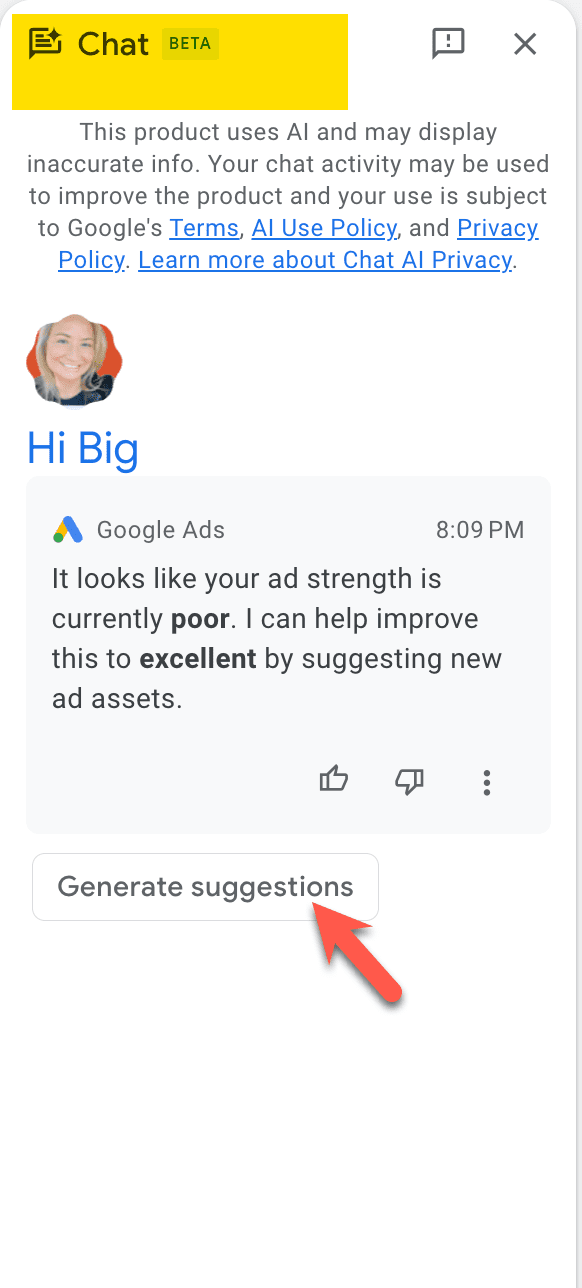
When I tested this tool in ad creation mode, the chat alerted me that my Ad Strength was “Poor” and offered to help improve it to “Excellent.”

After clicking the “Generate Suggestions” button, the AI provided headline and description ideas, but they were exactly the same as those found in the standard “View Ideas” panel.

This reinforces the importance of reviewing suggestions critically, even when they come from new tools within the platform.

Google clearly states that the AI may return inaccurate or outdated information, warning users to verify anything the chat suggests.

The feature also notes that your interactions may be used to improve the product, meaning your chat activity can contribute to training the model.

Screenshot chat beta help in google adsScreenshot from Google Ads, April 2025

Conclusion: How To Get The Best Out Of Automated AI Settings

If you are going to use Google’s automated AI settings, you need to guide them. Google’s AI is only as effective as the inputs and oversight you provide.

To get the best results:

  • Start with a strong landing page and a clear final URL.
  • Write your manual assets using a headline and description framework that includes keywords, product clarity, benefits, and brand identity.
  • Use the Ad Strength prompts and suggested ideas as checkpoints, not directives.
  • Review all automatically created assets for accuracy, relevance, and legal risk.

Automation can scale your efforts, but it’s your strategy that makes them convert. Think of AI as a content expander, not a content creator.

More Resources:


Featured Image: Stock-Asso/Shutterstock

Google Disputes News That Search Engine Use Is Falling via @sejournal, @martinibuster

Google took the unusual step of issuing a response to news reports that AI search engines and chatbots were causing a decline in traditional search engine use, directly contradicting testimony given by an Apple executive in the ongoing U.S. government antitrust lawsuit against Google.

Apple Testimony That Triggered Stock Sell-Off

Google’s stock price took a steep dive on the news that people were turning away from traditional search engines, dropping by 7.51% on Wednesday. What triggered the stock sell-off was testimony by Eddy Cue, Apple’s senior vice president of services, who testified that search engine use by users of Apple’s Safari browser declined for the first time last month, expressing his opinion that a technological shift is underway that is undercutting the use of traditional search engines.

Early AI Adopters Turning Away From Google?

There is a view in Silicon Valley that Google Search is legacy technology. A recent episode of the Y Combinator show featured the host sharing that their Google search traffic has dropped by 15% and that he attributes that to AI use in both Google and chatbots. He explained that if you want to see the future you look to the early adopters, commenting that everyone he knows in Silicon Valley uses ChatGPT to get answers and that Google Search is defacto legacy technology.

The host described how 25 years ago the early adopters were using Google but that now, Google Search feels weird to him.

He said:

“People are now switching their behavior to where your default action if you’re looking for information is, you know ChatGPT or perplexity, or one of these things, and even just, you know, observing my own behavior. I’ll use Google mostly for kind of navigational. Like, if I’m just looking for a specific website and I know it’s going to give the same thing, but it’s starting to have that weird kind of, like legacy website, like I’m using eBay or something.”

Google’s Statement

Google’s statement was short and to the point, with no accompanying images to make it look like a blog post. Google’s statement could even be seen as terse.

Here’s what Google published:

“Here’s our statement on this morning’s press reports about Search traffic.

We continue to see overall query growth in Search. That includes an increase in total queries coming from Apple’s devices and platforms. More generally, as we enhance Search with new features, people are seeing that Google Search is more useful for more of their queries — and they’re accessing it for new things and in new ways, whether from browsers or the Google app, using their voice or Google Lens. We’re excited to continue this innovation and look forward to sharing more at Google I/O.”

AI Revolution: What Nobody Else Is Seeing

Here’s the video of the Y Combinator show that offers a peek at how people in Silicon Valley relate to Google Search. The part I quoted is at about the 24 minute mark.

Featured Image by Shutterstock/Framalicious

This patient’s Neuralink brain implant gets a boost from generative AI

Last November, Bradford G. Smith got a brain implant from Elon Musk’s company Neuralink. The device, a set of thin wires attached to a computer about the thickness of a few quarters that sits in his skull, lets him use his thoughts to move a computer pointer on a screen. 

And by last week he was ready to reveal it in a post on X.

“I am the 3rd person in the world to receive the @Neuralink brain implant. 1st with ALS. 1st Nonverbal. I am typing this with my brain. It is my primary communication,” he wrote. “Ask me anything! I will answer at least all verified users!”

Smith’s case is drawing interest because he’s not only communicating via a brain implant but also getting help from Grok, Musk’s AI chatbot, which is suggesting how Smith can add to conversations and drafted some of the replies he posted to X. 

The generative AI is speeding up the rate at which he can communicate, but it also raises questions about who is really talking—him or Musk’s software. 

“There is a trade-off between speed and accuracy. The promise of brain-computer interface is that if you can combine it with AI, it can be much faster,” says Eran Klein, a neurologist at the University of Washington who studies the ethics of brain implants. 

Smith is a Mormon with three kids who learned he had ALS after a shoulder injury he sustained in a church dodgeball game wouldn’t heal. As the disease progressed, he lost the ability to move anything except his eyes, and he was no longer able to speak. When his lungs stopped pumping, he made the decision to stay alive with a breathing tube.

Starting in 2024, he began trying to get accepted into Neuralink’s implant study via “a campaign of shameless self-promotion,” he told his local paper in Arizona: “I really wanted this.”

The day before his surgery, Musk himself appeared on a mobile phone screen to wish Smith well. “I hope this is a game changer for you and your family,” Musk said, according to a video of the call.

“I am so excited to get this in my head,” Smith replied, typing out an answer using a device that tracks his eye movement. This was the technology he’d previously used to communicate, albeit slowly.

Smith was about to get brain surgery, but Musk’s virtual appearance foretold a greater transformation. Smith’s brain was about to be inducted into a much larger technology and media ecosystem—one of whose goals, the billionaire has said, is to achieve a “symbiosis” of humans and AI.

Consider what unfolded on April 27, the day Smith  announced on X that he’d received the brain implant and wanted to take questions. One of the first came from “Adrian Dittmann,” an account often suspected of being Musk’s alter ego.

Dittmann: “Congrats! Can you describe how it feels to type and interact with technology overall using the Neuralink?”

Smith: “Hey Adrian, it’s Brad—typing this straight from my brain! It feels wild, like I’m a cyborg from a sci-fi movie, moving a cursor just by thinking about it. At first, it was a struggle—my cursor acted like a drunk mouse, barely hitting targets, but after weeks of training with imagined hand and jaw movements, it clicked, almost like riding a bike.”

Another user, noting the smooth wording and punctuation (a long dash is a special character, used frequently by AIs but not as often by human posters), asked whether the reply had been written by AI. 

Smith didn’t answer on X. But in a message to MIT Technology Review, he confirmed he’d used Grok to draft answers after he gave the chatbot notes he’d been taking on his progress. “I asked Grok to use that text to give full answers to the questions,” Smith emailed us. “I am responsible for the content, but I used AI to draft.”

The exchange on X in many ways seems like an almost surreal example of cross-marketing. After all, Smith was posting from a Musk implant, with the help of a Musk AI, on a Musk media platform and in reply to a famous Musk fanboy, if not actually the “alt” of the richest person in the world. So it’s fair to ask: Where does Smith end and Musk’s ecosystem begin? 

That’s a question drawing attention from neuro-ethicists, who say Smith’s case highlights key issues about the prospect that brain implants and AI will one day merge.

What’s amazing, of course, is that Smith can steer a pointer with his brain well enough to text with his wife at home and answer our emails. Since he’d only been semi-famous for a few days, he told us, he didn’t want to opine too much on philosophical questions about the authenticity of his AI-assisted posts. “I don’t want to wade in over my head,” he said. “I leave it for experts to argue about that!”

The eye tracker Smith previously used to type required low light and worked only indoors. “I was basically Batman stuck in a dark room,” he explained in a video he posted to X. The implant lets him type in brighter spaces—even outdoors—and quite a bit faster.

The thin wires implanted in his brain listen to neurons. Because their signals are faint, they need to be amplified, filtered, and sampled to extract the most important features—which are sent from his brain to a MacBook via radio and then processed further to let him move the computer pointer.

With control over this pointer, Smith types using an app. But various AI technologies are helping him express himself more naturally and quickly. One is a service from a startup called ElevenLabs, which created a copy of his voice from some recordings he’d made when he was healthy. The “voice clone” can read his written words aloud in a way that sounds like him. (The service is already used by other ALS patients who don’t have implants.) 

Researchers have been studying how ALS patients feel about the idea of aids like language assistants. In 2022, Klein interviewed 51 people with ALS and found a range of different opinions. 

Some people are exacting, like a librarian who felt everything she communicated had to be her words. Others are easygoing—an entertainer felt it would be more important to keep up with a fast-moving conversation. 

In the video Smith posted online, he said Neuralink engineers had started using language models including ChatGPT and Grok to serve up a selection of relevant replies to questions, as well as options for things he could say in conversations going on around him. One example that he outlined: “My friend asked me for ideas for his girlfriend who loves horses. I chose the option that told him in my voice to get her a bouquet of carrots. What a creative and funny idea.” 

These aren’t really his thoughts, but they will do—since brain-clicking once in a menu of choices is much faster than typing out a complete answer, which can take minutes. 

Smith told us he wants to take things a step further. He says he has an idea for a more “personal” large language model that “trains on my past writing and answers with my opinions and style.”  He told MIT Technology Review that he’s looking for someone willing to create it for him: “If you know of anyone who wants to help me, let me know.”

The Download: Neuralink’s AI boost, and Trump’s tariffs

This is today’s edition of The Download, our weekday newsletter that provides a daily dose of what’s going on in the world of technology.

This patient’s Neuralink brain implant gets a boost from generative AI

Last November, Bradford G. Smith got a brain implant from Elon Musk’s company Neuralink. The device, a set of thin wires attached to a miniscule computer that sits in his skull, lets him use his thoughts to move a computer pointer on a screen. And by last week he was ready to reveal it in a post on X.

Smith’s case is drawing interest because he’s not only communicating via a brain implant but also getting help from Grok, Musk’s AI chatbot. The generative AI is speeding up the rate at which he can communicate, but it also raises questions about who is really talking—him or Musk’s software. Read the full story.

—Antonio Regalado

MIT Technology Review Narrated: How Trump’s tariffs could drive up the cost of batteries, EVs, and more

The Trump administration’s hostile trade plans threaten to slow the shift to cleaner industries, boost inflation, and stall the economy.

This is our latest story to be turned into a MIT Technology Review Narrated podcast, which we’re publishing each week on Spotify and Apple Podcasts. Just navigate to MIT Technology Review Narrated on either platform, and follow us to get all our new content as it’s released.

The must-reads

I’ve combed the internet to find you today’s most fun/important/scary/fascinating stories about technology.

1 NSO Group has been ordered to pay Meta $167 million
After the Israeli firm’s spyware was used to hack journalists, activists, and politicians. (NYT $)
+ The firm has been implicated in abusive surveillance before. (Reuters)

2 OpenAI plans to reduce the fraction of its revenue Microsoft receives
It told investors it plans to slash the shared revenue from 20% to 10%. (The Information $)
+ Its for-profit U-turn is not yet a done deal. (Bloomberg $)+ We still don’t know a lot about OpenAI’s structure. (Economist $)

3 The Trump administration is axing the Energy Star program
The project certifies the energy efficiency of home appliances in the US. (WP $)

4 The US Justice Department wants Google to sell its ad businesses
But Google claims it’s not technically feasible. (WSJ $)
+ The judge says he’ll rule on the remedies by August. (The Information $)

5 Grok AI is undressing women on X
That’s what happens when you create AI models without proper guardrails. (404 Media)
+ Text-to-image AI models can be tricked into generating nude images. (MIT Technology Review)

6 Private investors are prepared to plow billions into Europe’s defense industry
They’re stepping up to fill gaps that governments can’t fund. (FT $)
+ The US is likely to strike a weapons deal in Riyadh next week. (Semafor)
+ Phase two of military AI has arrived. (MIT Technology Review)

7 Can anyone stop Starlink?
The speed of its total dominance of the satellite sector is unprecedented. (The Atlantic $)
+ The world’s next big environmental problem could come from space. (MIT Technology Review)

8 Amazon’s new robot has a sense of touch
To help it grab items in the e-retail giant’s warehouses. (The Guardian)
+ The Vulcan robot could end up shouldering more manufacturing work in the future. (Wired $)
+ Will we ever trust robots? (MIT Technology Review)

9 Argentina is investing big in nuclear-powered AI data centers
In an effort to attract big tech firms from overseas. (Rest of World)
+ Meanwhile, the Zaporizhzhia nuclear power plant in Ukraine is still not operational. (IEEE Spectrum)
+ China built hundreds of AI data centers to catch the AI boom. Now many stand unused. (MIT Technology Review)

10 RIP prompt engineering
The hottest job of 2023 is quickly fizzling out. (Fast Company $)

Quote of the day

“I think upper class households will be able to have something that makes your Roomba look like a total joke.”

—Reddit cofounder Alexis Ohanian believes that advanced robot domestic helpers are imminent, Insider reports.

One more thing

Is this the end of animal testing?

Animal studies are notoriously bad at identifying human treatments. Around 95% of the drugs developed through animal research fail in people, but until recently there was no other option.

Now organs on chips, also known as microphysiological systems, may offer a truly viable alternative. They’re triumphs of bioengineering, intricate constructions furrowed with tiny channels that are lined with living human tissues that expand and contract with the flow of fluid and air, mimicking key organ functions like breathing, blood flow, and peristalsis, the muscular contractions of the digestive system.

It’s only early days, but if they work as hoped, organs on chips could solve one of the biggest problems in medicine today. Read the full story.

—Harriet Brown

We can still have nice things

A place for comfort, fun and distraction to brighten up your day. (Got any ideas? Drop me a line or skeet ’em at me.)

+ If you enjoyed this year’s Met Gala theme, check out this fascinating history of the Black dandy in art.
+ 2025 is shaping up to be a great year for literature.
+ The good news is that GTA VI finally has a release date—but it’s over a year away.
+ Chocolate pie for breakfast? I could be convinced.

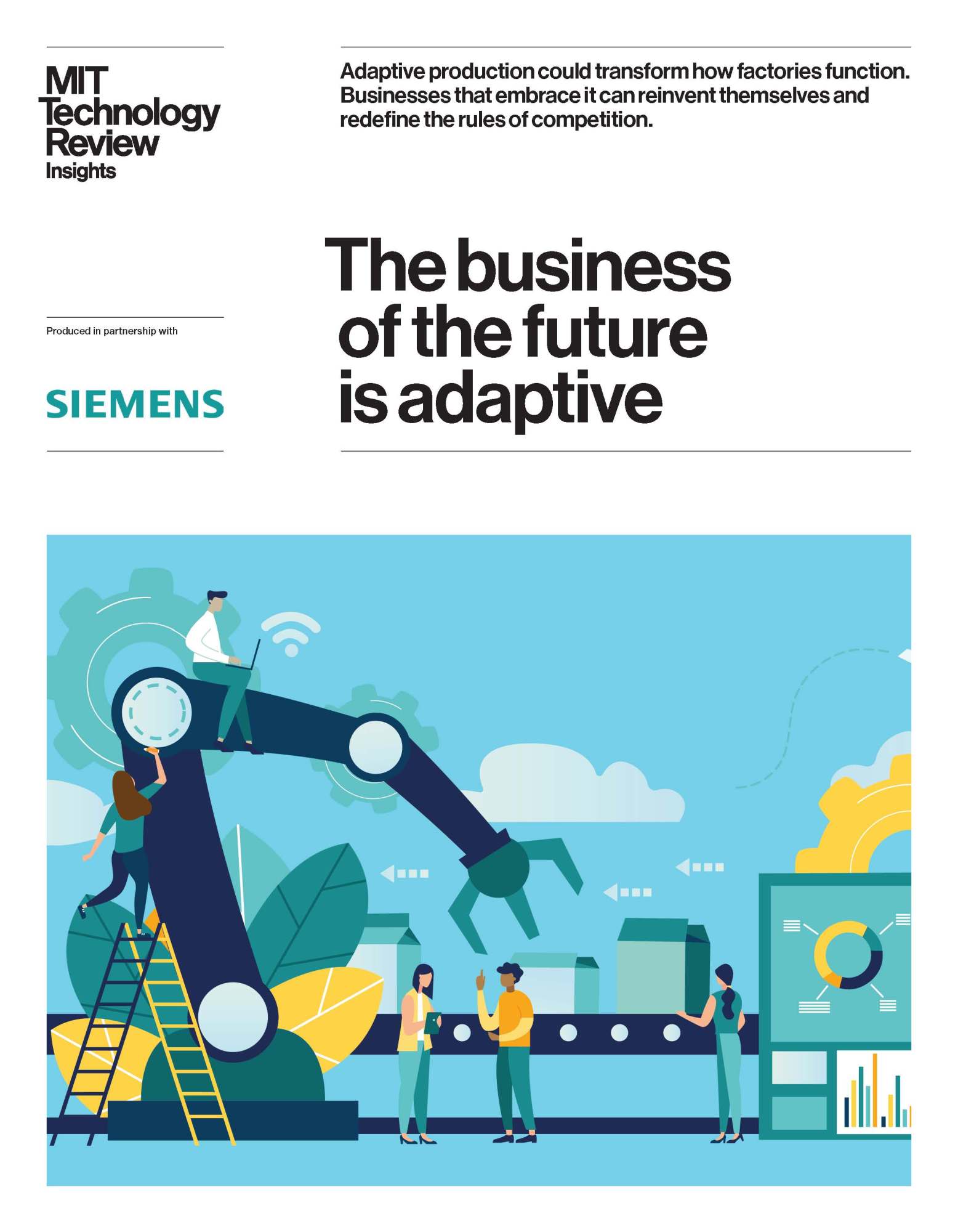
The business of the future is adaptive

Manufacturing is in a state of flux. From supply chain disruptions to rising costs, tougher environmental regulations, and a changing consumer market, the sector faces a series of competing challenges.

But a new way of operating offers a way to tackle complexities head-on: adaptive production hardwires flexibility and resilience into the enterprise, drawing on powerful tools like artificial intelligence, digital twins, and robotics. Taking automation a step further, adaptive production allows manufacturers to respond in real time to demand fluctuations, adapt to supply chain disruptions, and autonomously optimize operations. It also facilitates an unprecedented level of personalization and customization for regional markets.

Time to adapt

The journey to adaptive production is not just about addressing today’s pressures, like rising costs and supply chain disruptions—it’s about positioning businesses for long-term success in a world of constant change. “In the coming years,” says Jana Kirchheim, director of manufacturing for Microsoft Germany, “I expect that new key technologies like copilots, small language models, high-performance computing, or the adaptive cloud approach will revolutionize the shop floor and accelerate industrial automation by enabling faster adjustments and re-programming for specific tasks.” These capabilities make adaptive production a transformative force, enhancing responsiveness and opening doors to systems with increasing autonomy—designed to complement human ingenuity rather than replace it.

These advances enable more than technical upgrades—they drive fundamental shifts in how manufacturers operate. John Hart, professor of mechanical engineering and director of MIT’s Center for Advanced Production Technologies, explains that automation is “going from a rigid high-volume, low-mix focus”—where factories make large quantities of very few products—“to more flexible high-volume, high-mix, and low-volume, high-mix scenarios”—where many product types can be made in custom quantities. These new capabilities demand a fundamental shift in how value is created and captured.

Download the full report.

This content was produced by Insights, the custom content arm of MIT Technology Review. It was not written by MIT Technology Review’s editorial staff.

This content was researched, designed, and written entirely by human writers, editors, analysts, and illustrators. This includes the writing of surveys and collection of data for surveys. AI tools that may have been used were limited to secondary production processes that passed thorough human review.

Roundtables: A New Look at AI’s Energy Use

Wednesday, May 21, 2025

Big Tech’s appetite for energy is growing rapidly as adoption of AI accelerates. But just how much energy does even a single AI query use? And what does it mean for the climate? Join editor in chief Mat Honan, senior climate reporter Casey Crownhart, and AI reporter James O’Donnell for a conversation exploring AI’s energy demands now and in the future.

Going live on May 21st at 18:30 GMT / 1:30 PM ET / 10:30 AM PT

Related Content:

Speakers

Mat Honan
Editor in Chief
Casey Crownhart
Climate Reporter
James O'Donnell, AI reporter
James O’Donnell
AI Reporter
5 Content Marketing Ideas for June 2025

Sunday, June 15, 2025, is Father’s Day in the U.S. and an important retail holiday. So why not focus your June content marketing on dads?

Content marketing is the act of creating, publishing, and promoting content to attract, engage, and retain customers. It’s foundational for marketing on search engines, generative AI platforms, social media sites, and lifecycle engagement.

Unfortunately, content marketing requires a seemingly insatiable demand for new or updated articles, posts, videos, and podcasts. Here are five content marketing ideas — all related to Father’s Day — that your company can use for June 2025.

Father’s Day Behind the Scenes

Image of a male at a desk design a t-shirt on a computer

Behind-the-scenes content humanizes a business and builds trust.

As your business prepares for Father’s Day, consider sharing that activity through articles, videos, and social media posts.

For example, produce an article about how your team selects products, and address items sourced for Father’s Day. Or, if your company sells print-on-demand products, make a video showing your design team at work. How do they generate design ideas? How do they create those designs? Any funny designs?

Behind-the-scenes content works well for several reasons. It can humanize a brand and thereby build trust and authenticity. It can differentiate products, emphasizing the work that goes into them. And it can address shopper concerns by explaining processes, choices, and even quality.

How-to Guides

Photo of a male teenager preparing food in a residential kitchen.

A teenager making dinner for dad is a fun Father’s Day gift.

Sometimes, the best gift for a dad on Father’s Day is providing a service or doing a task.

Think of it as chore coupons children sometimes give parents. The child draws a Father’s Day card and includes hand-made coupons “redeemable” for chores.

Taking the idea a step further, content marketers can develop how-to guides describing how to complete a task or offer a service as a Father’s Day present. The guide should be closely related to the products a store sells.

For example, an online store that sells cleaning supplies might publish a how-to guide for scrubbing a barbeque grill for dad. An automotive shop could offer a guide for vehicle waxing, and a kitchen supply shop could provide a guide for teens to make dinner for dad.

Take some inspiration from these articles.

Interactive Gift Ideas

Screenshot of AI-generated code on a computer.

AI-generated code has made interactive content creation much easier.

Use artificial intelligence to generate an interactive quiz — “What Kind of Dad Do I Have?” — that suggests gifts.

For example, an online shop specializing in wines from Italy could prompt the AI with something like this:

Generate a JavaScript gift recommendation tool for my online shop specializing in value Italian wines.

The tool should start with a form asking users several questions about their dad, including favorite foods, cocktails, etc. The tool should then recommend three wines that would make excellent Father’s Day gifts.

The JavaScript needs to be self-contained for embedding in a Shopify store.

You might even ask the AI to integrate a live product feed via Shopify’s Storefront API or to include product images.

The script will likely not be perfect initially, but a development team could have the interactive guide up in no time.

Father’s Day Checklist

Photo of a dad with two young children on a golf course.

A checklist for planning a Father’s Day golf outing could include product recommendations.

Checklists are actionable, easy to read, and problem-solving. They save time when performing a task.

Content marketers can use checklists in blog posts, email newsletters, or video scripts. Father’s Day checklists should be particular to the products a shop sells, and can focus on entertainment, utility, or driving sales.

For example, an online golf retailer might publish “The Golf Checklist for Dads Who Play to Win.”

Whether an article or video, the checklist could start with a section celebrating a golf-loving dad. Next, a series of check box items focuses on a Father’s Day golf outing, such as:

  • Upgraded gear,
  • Stylish apparel,
  • Outdoor essentials,
  • T-time reservation,
  • Gift card.

Each item might include a short description and a few recommended products.

Father’s Day Trivia

Photo of a dad, mom, and three young children

Put a smile on dad’s face with a little Father’s Day trivia.

Trivia, fun facts, or “did you know” content can be a top-of-the-funnel tactic to attract visitors or encourage social media engagement.

Here, content marketers produce content such as a listicle titled “10 Surprising Father’s Day Facts.” It might include when Father’s Day was officially recognized in the United States (1972).

Next, take each trivia item and produce a short video for YouTube, Instagram, or similar. In the video’s comments, link back to the original article.

Apple May Add AI Search Engines to Safari As Google Use Drops via @sejournal, @MattGSouthern

Apple is reportedly planning to redesign Safari to focus on AI search engines.

According to recent testimony in the Google antitrust case, this comes as the company prepares for possible changes to its profitable Google deal.

Apple Signals Shift In Search Strategy

Eddy Cue, Apple’s senior vice president of services, testified that Safari searches dropped for the first time last month.

He believes users are choosing AI tools over regular search engines. This change happens as courts decide what to do after Google lost its antitrust case in August.

Per a report from Bloomberg, Cue testified:

“You may not need an iPhone 10 years from now as crazy as it sounds. The only way you truly have true competition is when you have technology shifts. Technology shifts create these opportunities. AI is a new technology shift, and it’s creating new opportunities for new entrants.”

AI Search Providers May Replace Traditional Search

Cue believes AI search providers such as OpenAI, Perplexity AI, and Anthropic will eventually replace traditional search engines like Google.

“We will add them to the list — they probably won’t be the default,” Cue said, noting Apple has already talked with Perplexity.

Currently, Apple offers ChatGPT as an option in Siri and plans to add Google’s Gemini later this year.

Cue admitted that these AI search tools need to improve their search indexes. However, he said their other features are “so much better that people will switch.”

“There’s enough money now, enough large players, that I don’t see how it doesn’t happen,” he said about the shift from standard search to AI-powered options.

Context: Google’s Antitrust Battle Timeline

This testimony comes during a key moment in the case against Google:

  • August 2024: Judge Mehta ruled Google broke antitrust law through exclusive search deals
  • October 2024: DOJ proposed remedies targeting search distribution, data usage, search results, and advertising
  • December 2024: Google offered counter-proposals to loosen search deals
  • March 2025: DOJ filed revised proposals, including possibly forcing Google to sell Chrome

The $20 Billion Question

The core issue is Google’s deal with Apple, worth a reported $20 billion per year, that makes Google the default search engine on Safari.

While expecting changes to this deal, Cue admitted he has “lost sleep over the possibility of losing the revenue share from their agreement.”

We learned about this payment during the trial. In 2022, Google paid Apple $20 billion to be Safari’s default search engine.

Last year, they expanded their partnership to add Google Lens to the Visual Intelligence feature on new iPhones.

Proposed Remedies & Responses

The DOJ’s latest filing suggests several significant changes:

  • Making Google sell off Chrome
  • Limiting Google’s payments for default search placement
  • Stopping Google from favoring its products in search results
  • Making Google’s advertising practices more transparent

Google has criticized these proposals, calling them a “radical interventionist agenda” that would “break a range of Google products.”

Instead, Google suggests letting browser companies deal with multiple search engines and giving device makers more freedom about which search options are preloaded.

What This Means

If Apple shifts Safari toward AI, prepare for significant changes in search.

It’s not a stretch to say the outcome could reshape search competition and digital marketing for years.


Featured Image: Bendix M/Shutterstock