Google Confirms Robots.txt Can’t Prevent Unauthorized Access via @sejournal, @martinibuster

Google’s Gary Illyes confirmed a common observation that robots.txt has limited control over unauthorized access by crawlers. Gary then offered an overview of access controls that all SEOs and website owners should know.

Common Argument About Robots.txt

Seems like any time the topic of Robots.txt comes up there’s always that one person who has to point out that it can’t block all crawlers.

Gary agreed with that point:

“robots.txt can’t prevent unauthorized access to content”, a common argument popping up in discussions about robots.txt nowadays; yes, I paraphrased. This claim is true, however I don’t think anyone familiar with robots.txt has claimed otherwise.”

Next he took a deep dive on deconstructing what blocking crawlers really means. He framed the process of blocking crawlers as choosing a solution that inherently controls or cedes control to a website. He framed it as a request for access (browser or crawler) and the server responding in multiple ways.

He listed examples of control:

  • A robots.txt (leaves it up to the crawler to decide whether or not to crawl).
  • Firewalls (WAF aka web application firewall – firewall controls access)
  • Password protection

Here are his remarks:

“If you need access authorization, you need something that authenticates the requestor and then controls access. Firewalls may do the authentication based on IP, your web server based on credentials handed to HTTP Auth or a certificate to its SSL/TLS client, or your CMS based on a username and a password, and then a 1P cookie.

There’s always some piece of information that the requestor passes to a network component that will allow that component to identify the requestor and control its access to a resource. robots.txt, or any other file hosting directives for that matter, hands the decision of accessing a resource to the requestor which may not be what you want. These files are more like those annoying lane control stanchions at airports that everyone wants to just barge through, but they don’t.

There’s a place for stanchions, but there’s also a place for blast doors and irises over your Stargate.

TL;DR: don’t think of robots.txt (or other files hosting directives) as a form of access authorization, use the proper tools for that for there are plenty.”

Use The Proper Tools To Control Bots

There are many ways to block scrapers, hacker bots, search crawlers, visits from AI user agents and search crawlers. Aside from blocking search crawlers, a firewall of some type is a good solution because they can block by behavior (like crawl rate), IP address, user agent, and country, among many other ways. Typical solutions can be at the server level with something like Fail2Ban, cloud based like Cloudflare WAF, or as a WordPress security plugin like Wordfence.

Read Gary Illyes post on LinkedIn:

robots.txt can’t prevent unauthorized access to content

Featured Image by Shutterstock/Ollyy

New and Classic Books on Web Accessibility

A website accessible to consumers with disabilities is both good for business and legally compliant. Here are eight new and time-honored books to help ensure your ecommerce site meets modern accessibility standards.

Books for Web Accessibility

 Web Accessibility Cookbook: Creating Inclusive Experiences by Manuel Matuzovic

Cover of Web Accessibility Cookbook

Web Accessibility Cookbook

Released just last week and already an Amazon bestseller in the “Web Services” category, this hefty tome provides step-by-step recipes to help front-end developers build key website components in an accessible manner. The author, an experienced developer and consultant, explains the “why” and the “how” of creating an inclusive front-end for your site.

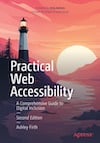
Practical Web Accessibility: A Comprehensive Guide to Digital Inclusion (Second Edition) by Ashley Firth

Cover of Practical Web Accessibility

Practical Web Accessibility

This updated edition of an Amazon bestseller explains how to find and fix website accessibility issues and improve a site for all users — not just those with disabilities. It offers tools and checklists to help ensure your site is compliant and ready for the modern, inclusive web.

 A11Y Unraveled: Become a Web Accessibility Ninja by Dimitris Georgakas

Cover of A11Y Unraveled

A11Y Unraveled

Georgakas clearly and concisely reviews the fundamentals of web accessibility. He breaks down web design components, explains “what helps with what,” and provides plenty of examples. The book focuses on WCAG 2.1 and 2.2 guidelines and provides an overview of the laws that govern website accessibility in various parts of the world.

 Universal Principles of UX: 100 Timeless Strategies to Create Positive Interactions between People and Technology by Irene Peyrera

Cover of Universal Principles of UX

Universal Principles of UX

This encyclopedic, heavily illustrated book is near the top of Amazon’s lists for “User Experience and Website Usability” and “Business Research and Development.” It presents the core principles for thinking about UX through real-world case studies. Each principle is presented in a convenient two-page format: definitions, examples, and guidelines are on the left page, and example images and explanatory graphics are on the right.

A handy pocket version with the same two-page format is coming in September.

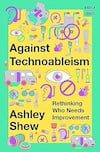
Against Technoableism: Rethinking Who Needs Improvement by Ashley Shew

Cover of Against Technoableism

Against Technoableism

Though not specifically about web design, this new 176-page manifesto in the Norton Stories series challenges conventional thinking about technology and disability. It is already widely acclaimed. Shew, an associate professor at Virginia Tech, researches how disability is represented in technological narrative and imagination.

Building For Everyone: Expand Your Market With Design Practices From Google’s Product Inclusion Team by Annie Jean-Baptiste

Cover of Building For Everyone

Building For Everyone

A practical guide to the strategies developed and used by Google’s innovative Product Inclusion and Equity team, “Building for Everyone” covers the best processes and practices for limiting risk and boosting profitability through inclusive design, with case studies from across industries. The author is Google’s product inclusion head and the founder of the EquityArmy community of innovators who are passionate about making the world more inclusive through design.

A Web for Everyone: Designing Accessible User Experiences by Sarah Horton and Whitney Quesenbery, with Foreword by Aaron Gustafson

Cover of A Web for Everyone

A Web for Everyone

Even though web technology changes rapidly, design and accessibility principles are timeless. This book is widely recommended, including by Steve Krug, author of the classic web usability bible, “Don’t Make Me Think.”

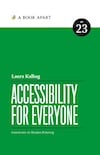
Accessibility for Everyone by Laura Kalbag

Cover of Accessibility for Everyone

Accessibility for Everyone

Designing with accessibility in mind makes your site more inclusive for everyone, regardless of disability experience. Kalbag explains how to plan, evaluate, and test accessible design and write clear copy, create well-structured information architecture, and design thoughtfully.

Accessibility trends in 2024

Accessibility is still as important as ever in 2024. Not just because it makes your website accessible to everyone, ensuring you’ll be able to reach your entire audience, but also because Google thinks accessibility is important. After all, they want to provide helpful content to their users. And what’s more helpful than content that everyone can access and read? So let’s take a look at some interesting accessibility trends emerging in 2024. They might be of interest to your website.

What is accessibility?

Let’s briefly get on the same page. The goal of digital accessibility is to ensure that all users, regardless of their abilities, can perceive, understand, navigate, and interact with your website.

For more in-depth information, we have a post on how to improve the accessibility of your website.

Why is accessibility important?

There are many reasons, but (we think) these are the three most important ones:

  • Firstly, because Google thinks it’s important too. On their website, they state that “Everyone should be able to access and enjoy the web. We’re committed to making that a reality.” 
  • Secondly, because if you’re not thinking about accessibility, you could be neglecting a huge part of your audience. Which means you could be missing out on engagement and SEO opportunities. 
  • Thirdly, because the European Accessibility Act has a deadline for compliance of June 28th, 2025. It means websites and apps need to be compliant with WCAG 2.1 AA ruling. This applies to all organizations selling to EU customers by the way; not just companies that are located in Europe.

A bit of context about people’s needs

We all know that the pandemic changed people’s shopping habits. Everyone was ordering things online. After the pandemic, however, people didn’t revert back to their old shopping habits. They still order online a lot, but people also want the option to visit a store. Meaning: they want the best of both worlds. As a business, it’s good to keep this in mind. 

Let’s go over some emerging trends in the field of accessibility. 

A new demographic?

When you think of ‘old people’, you might picture a white-haired person who has no idea how to turn on the computer at the library. But that’s not true anymore! 

A lot of people who will soon retire have spent the last 20 years working with computers (in the workplace). And they probably want to continue using technology as they get older. But as people get older, their vision or mobility for example might worsen. Which means they’ll need websites and apps to be accessible. 

New assistive technology

If you’ve done research on accessibility, you’re probably familiar with screen readers. They help people with visual impairments to use a website or app. But the world is slowly moving on as technology keeps evolving.

Take SeeingAI, for example. It’s a smartphone app that narrates the world around you. It helps with describing photos, identifying products in the supermarket, and much more.

The SeeingAI app scanning a letter – photo by Microsoft

And we can’t forget about eye tracking technology, which has been part of assistive technologies for people with disabilities for years. With the announcement of Apple Vision Pro, it’s clear that huge steps have already been made. 

Picture of a woman wearing the Apple Vision Pro glasses.
The Apple Vision Pro – photo by NBC News

A more involved AI tool

Since AI technologies are booming, it’s not a leap to consider that a personalized AI interface will be developed soon. Think of a tool that finds the information you’re looking for from multiple websites and apps, then presents it back to you in an interface which suits you best. 

But in order for this tool to work, your website needs to be accessible and easy to crawl.

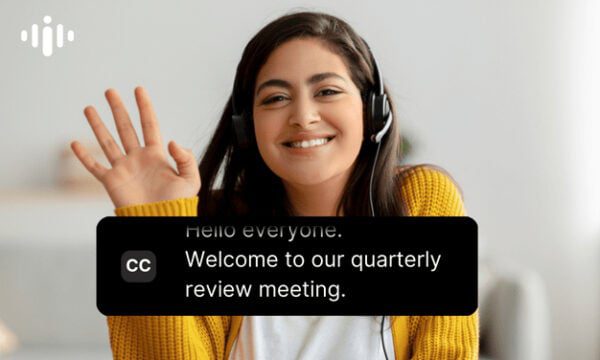
AI-powered captioning

To stay in the realm of AI, AI-driven captioning tools are becoming more accurate and reliable too. Now, you can offer real-time transcription for videos, webinars, and live streams. Which means you’ll be able to engage with everyone in your audience, including users with hearing impairments.

Picture of a woman smiling. Closed captions are on the picture. The captions read: Welcome to our quarterly review meeting.
An example of Interprefy, a tool that offers live closed captions.

More and better voice technology

We can’t talk about new assistive technologies and not mention voice-controlled technologies and interfaces. These can be especially useful for people with mobility impairments. 

But it can also be helpful for people who get easily overwhelmed or anxious while doing certain tasks, such as banking. Imagine a voice-controlled interface that asks you what you want, then gives you the results. That does sound more relaxing than navigating hundreds of functions and capabilities on a small screen, doesn’t it?

Read more: Voice-to-text: The future of search? »

Should you keep up with all the trends?

It’s good to remember that your business doesn’t need to be compatible with all these new tools and technologies. However, we think it can only benefit your brand. By showing users that you care about their needs, you’ll create a bigger and more loyal audience. 

While it might sound like a lot of work to become compatible with these new tools, it doesn’t have to be. Since most tools use some type of machine learning, it’s good to get your website basics in order. Make sure your site has a sitemap, and a clear and logical site structure. Luckily, if you use the Yoast SEO plugin, we take care of the sitemap for you! 

Once you’re done polishing your basics, it might be interesting to see if you can change the way you present your content. Perhaps you can try a new assistive technology and see how well it works with your website. If the answer is ‘not so great’, it might be worth changing things up.

Keep reading: Why accessibility is important (in the time of AI) »

Coming up next!

Google Ads Experiencing Outage Impacting Key Features via @sejournal, @MattGSouthern

Google Ads is currently experiencing a widespread outage that has affected several components of its platform.

The incident, which began on August 1, 2024, at 15:27 UTC, has left many advertisers unable to access vital tools and reports.

According to the Google Ads Status Dashboard, multiple features are currently unavailable:

  1. Report Editor
  2. Dashboards
  3. Saved Reports
  4. Products, Product Groups, and Listing Groups pages

The issue spans the Google Ads web interface, API, and Google Ads Editor, indicating a comprehensive system-wide problem.

Ginny Marvin, Google’s Ads Liaison, addressed the situation in a public statement:

“We’re actively looking into an issue with Google Ads. Report Editor, Dashboards, and Saved Reports in the Google Ads web interface are currently down. The Products, Product Groups, and Listing Groups pages are down across the web interface, API, and Google Ads Editor. Thank you for your patience. We will provide an update as soon as we have more information.”

Impact On Advertisers

This outage will likely disrupt Google Ads advertisers’ daily operations.

Without access to the Report Editor, Dashboards, and Saved Reports, marketers may struggle to analyze campaign performance, make data-driven decisions, or present client results.

Inability to access the Products, Product Groups, and Listing Groups pages is concerning for ecommerce advertisers who use these features to manage their product feeds and shopping campaigns.

Further, the API outage means that third-party tools and custom integrations dependent on Google Ads data may also be affected, potentially causing a ripple effect.

What Advertisers Can Do

While Google works to resolve the issue, advertisers are advised to:

  1. Monitor the Google Ads Status Dashboard for real-time updates
  2. Document any discrepancies or issues noticed in campaigns during this period
  3. Prepare alternative reporting methods using previously exported data if available
  4. Communicate with clients about potential delays in reporting or campaign adjustments

As of the latest update at 7:38 p.m. UTC on August 1, 2024, Google has not provided an estimated time for resolution.

The company affirms it’s actively investigating the problem and will provide updates as more information becomes available.


Featured Image: eamesBot/Shutterstock

Google Clarifies Autocomplete Functionality Amid User Concerns via @sejournal, @MattGSouthern

Google’s Communications team recently took to X to clarify its Search Autocomplete feature following user complaints and misconceptions.

Autocomplete’s Purpose & Functionality

Addressing claims of search term censorship Google stated:

“Autocomplete is just a tool to help you complete a search quickly.”

Google notes that users can always search for their intended queries regardless of Autocomplete predictions.

Recent Issues Explained

Google acknowledged two specific problems that had sparked user concerns.

Addressing lack of predictions for certain political queries, Google says:

“Autocomplete wasn’t providing predictions for queries about the assassination attempt against former President Trump.”

Google claims this was due to”built-in protections related to political violence” that were outdated.

The company said it’s working on improvements that are “already rolling out.”

Google also addressed missing autocomplete predictions for some political figures.

Google described this as:

“… a bug that spanned the political spectrum, also affecting queries for several past presidents, such as former President Obama.”

The issue extended to other queries like “vice president k,” which showed no predictions.

Google confirmed it’s “made an update that has improved these predictions across the board.”

Algorithmic Nature Of Predictions

Google emphasized the algorithmic basis of its prediction and labeling systems, stating:

“While our systems work very well most of the time, you can find predictions that may be unexpected or imperfect, and bugs will occur,”

The company noted that such issues are not unique to their platform, stating:

“Many platforms, including the one we’re posting on now, will show strange or incomplete predictions at various times.”

Commitment To Improvement

The thread concluded with a pledge from Google to address issues as they arise:

“For our part, when issues come up, we will make improvements so you can find what you’re looking for, quickly and easily.”

Broader Context

This explanation from Google comes at a time when tech companies face increasing scrutiny over their influence on information access.

This incident also highlights the broader debate about algorithmic transparency in tech.

While autocomplete might seem like a background feature, it significantly impacts what people search for and the websites they visit.


Featured Image: Galeh Nur Wihantara/Shutterstock

Google Chrome Adds Visual Search, Tab Compare, & Smart History via @sejournal, @MattGSouthern

Google has announced three features for its Chrome browser, which will roll out in the coming weeks.

These additions, incorporating Google’s AI and Gemini models, offer new ways to interact with web content and manage browsing history.

Desktop Integration Of Google Lens

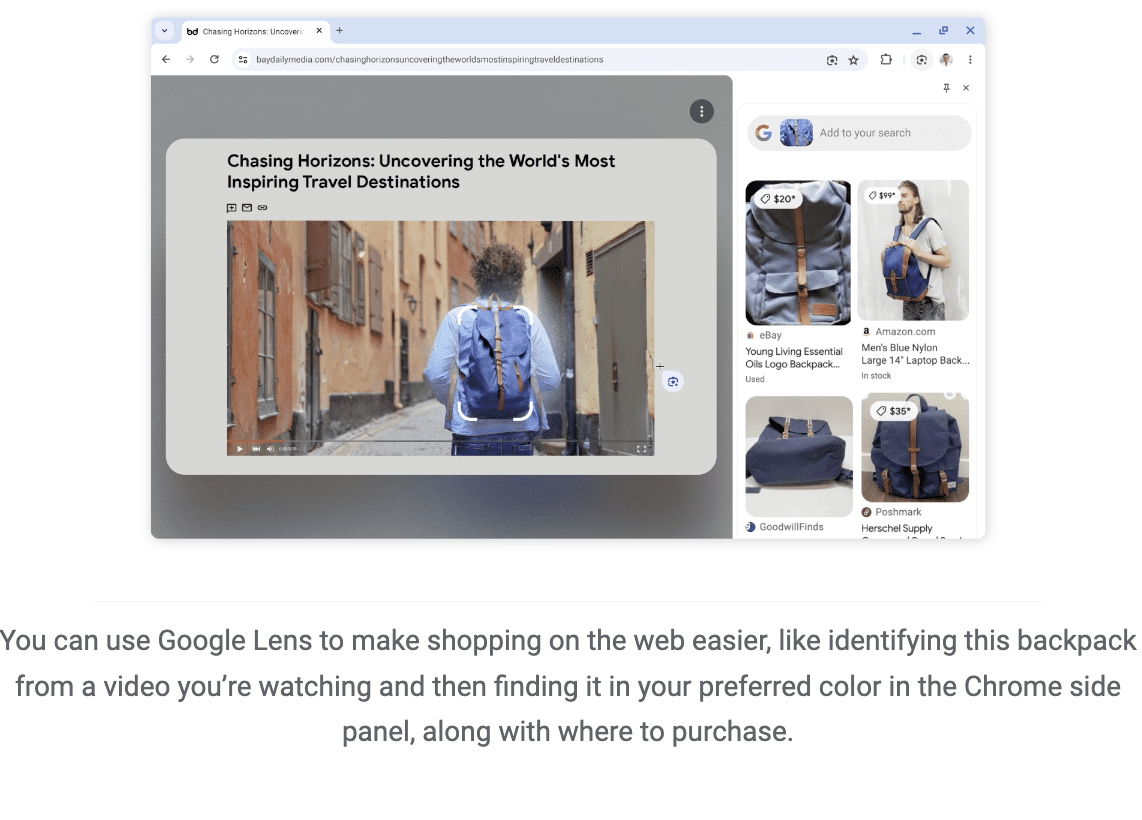
The first update brings Google Lens, previously a mobile-only feature, to the desktop version of Chrome. This tool allows you to search and ask questions about visual content on webpages.

You can activate Lens via an icon in the address bar or through the right-click menu, then select areas of a page to initiate a visual search.

Results appear in a side panel, where users can refine searches or ask follow-up questions.

Screenshot from blog.google.com, August 2024.

Tab Compare For Product Research

A new feature called Tab Compare is being introduced, initially for U.S. users.

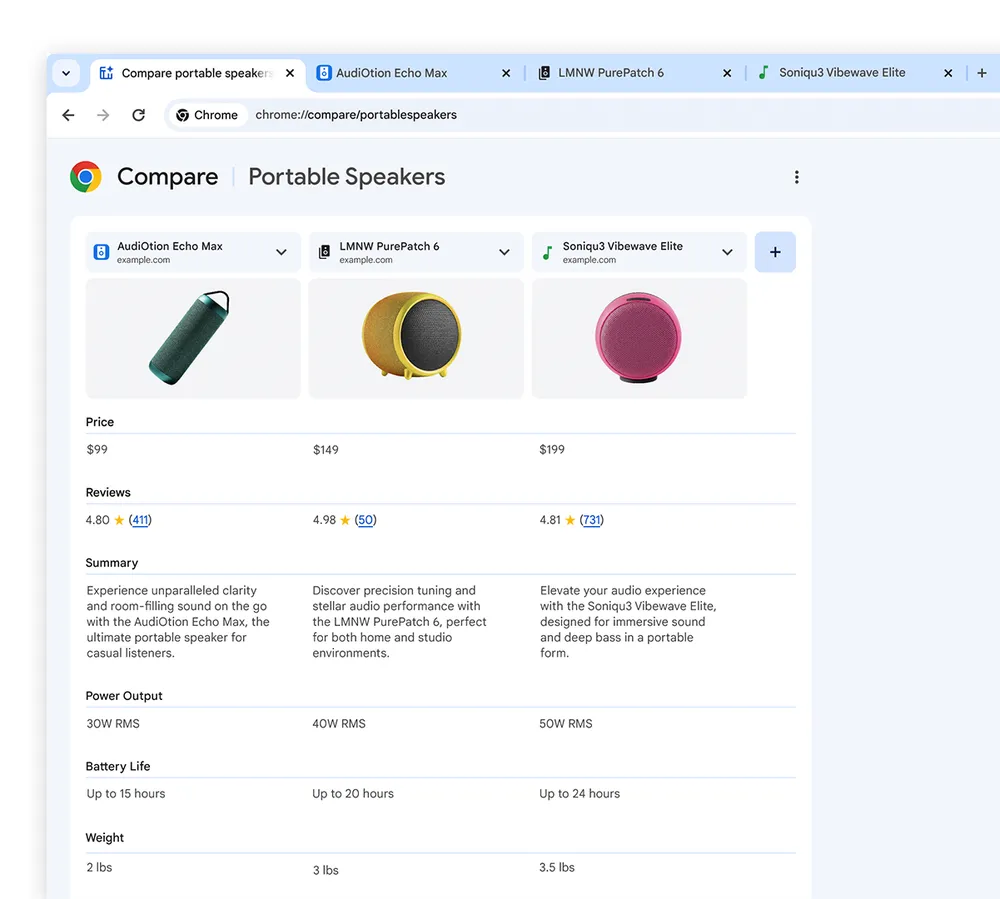
This tool generates an AI-powered overview of products from multiple open tabs, compiling information such as specifications, features, prices, and ratings into a single comparison table.

The feature is designed to streamline online shopping research, though its effectiveness in real-world scenarios remains to be seen.

Screenshot from blog.google.com, August 2024.

Natural Language Processing For Browser History

Google is updating Chrome’s history feature with natural language processing capabilities.

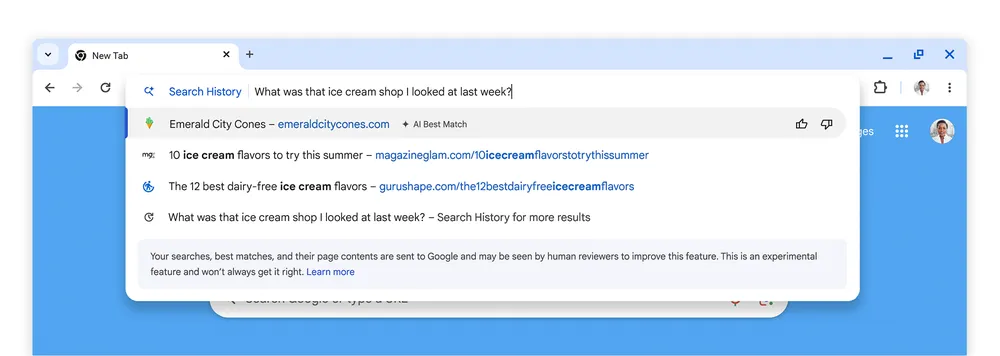
This will allow users to search their browsing history using conversational queries, such as “What was that ice cream shop I looked at last week?”

Google states that this feature will be optional and can be turned on or off in the browser settings.

Screenshot from blog.google.com, August 2024.

Privacy Considerations

While these features promise enhanced functionality, they also raise potential privacy concerns.

Google assures that the enhanced history search will not include data from incognito mode browsing. However, the extent of data collection and processing required for these AI features is unclear from the announcement.

Broader Context

These updates show AI’s growing role in browsers. As tech companies race to add advanced features, we see trade-offs between functionality and privacy, with potential ripple effects on web usage and ecommerce.

Parisa Tabriz, Vice President of Chrome, hints at more AI features in the pipeline, signaling a broader push to weave AI into browsing tools.

The rollout starts stateside and will be phased. As always, performance and user uptake will be the success metrics.

Google Introduces INP Improvement For Publisher Tag Ads Library via @sejournal, @MattGSouthern

Google has released an update to its Publisher Tag Ads Library, introducing a new feature to improve Interaction to Next Paint (INP) scores.

The update focuses on yielding during out-of-viewport ad slot insertions when using Single Request Architecture (SRA).

INP Improvement: Focus On Ad Loading Efficiency

The new feature allows for more strategic ad loading, particularly for ad slots not immediately visible to users.

The ad library prioritizes more immediate content and interactions by yielding to these out-of-viewport insertions, potentially improving INP scores.

Gilberto Cocchi was first to notice this update:

New adYield Config Option Introduced

Google has also introduced an adYield Config option, giving publishers additional control over ad loading behavior.

This setting allows publishers to extend yielding to all ad slots, including those within the viewport, offering more flexibility in managing site performance.

Potential Impact On INP Scores

The update may affect INP scores, a Core Web Vital metric that measures page responsiveness to user interactions.

Lower INP scores generally indicate better performance, which can influence search engine rankings and user experience.

Upcoming August CrUX Report

The full impact of this update will become more apparent with the release of the next Chrome User Experience (CrUX) report, expected on September 10th.

This report will provide data on INP measurements across websites using the updated Google Publisher Tag Ads Library.

It should provide concrete data on how this update affects real-world INP scores.

INP’s Relevance For Publishers

Since its introduction as a Core Web Vital, INP has become an important metric.

It reflects a site’s responsiveness to user actions and can influence user engagement.

As Google continues emphasizing page experience in ranking systems, INP improvements could affect search visibility.

Implementing The New Feature

Publishers can access this new functionality by updating their Google Publisher Tag implementation.

The adYield Config options are detailed in the library’s documentation. Google advises testing various configurations to determine the best setup for individual site needs.

This update to the Google Publisher Tag Ads Library represents efforts needed to address the balance between ad delivery, site performance, and user experience in digital publishing.

FAQ

How does the new Google Publisher Tag Ads Library update improve Interaction to Next Paint (INP) scores?

This update improves smart ad loading, especially for ads off-screen. It prioritizes visible content and user interactions to boost INP scores, potentially helping SEO.

The new adYield Config lets publishers extend ad-yielding to all ad slots, including visible ones, for better performance control.

What is the adYield Config option, and how does it benefit publishers?

Google’s new adYield Config setting gives publishers better control over ad loading. It extends yield to all ad slots, even those immediately visible.

Key benefits:

  • More ad loading control
  • Flexible performance management
  • Potential UX and page responsiveness boost

This could indirectly improve INP scores and search visibility.

What is the potential impact of the Google Publisher Tag Ads Library update on INP scores?

This update aims to boost INP scores by delaying ad insertions outside the visible screen area. Better INP scores mean more responsive pages, which can impact search rankings and user experience. Publishers who use this update might see better search visibility.

The full impact will be shown in the next CrUX report, due September 10th.


Featured image: se_vector/Shutterstock

Video Advertising Metrics & Brand Advertising With Greg Jarboe via @sejournal, @theshelleywalsh

Last week Greg Jarboe wrote an article for SEJ covering insights from the 2024 IAB Digital Video Ad Spend & Strategy Report which was the second part of a two-part report.

The first part reported that overall spending on digital video advertising in the U.S. is projected to grow 16% and that in the last four years, the share of ad spend has shifted to 52% of the total market share in the U.S.

US Digital video ad revenues are expected to reach $63 billion in 2024.

From the second part of the report, what stood out was the shift in measurement metrics for video from reach to business outcomes. According to Cintia Gabilan, IAB’s VP of the Media Center:

“But now business outcomes are the most important metrics to assess success, with reach and frequency coming in second. However, measurement is not yet where it needs to be. Two-thirds of buyers cite issues across nine key areas of measurement.”

Alphabet (Google) has also just announced their quarterly earnings – and out of this was the insight that Brand advertising – rather than direct response is driving YouTube revenue.

To discuss this and to throw insight into why this is important and why he was “shocked” about these changes, I reached out to Greg to get his thoughts.

Greg started out as a director of corporate communications in the 90s when websites were called “new media.”

And, he has worked with video marketing since the mid-2000s. He has followed the development and uptake of video in online marketing and SEO for the last 15 years.

Why Video Advertising Metrics Have Shifted

I asked Greg why he was shocked that brand advertising is driving YouTube revenue and then, why he was shocked about the shift in video advertising metrics.

Greg said,

“I’ve been following this trend for at least 15 years, if not longer, and it was one of those things where I wondered how come nobody else saw this.

Too many American brands and agencies were still hung up on the television era and all the metrics they used were just fine for measuring TV reach and frequency.

They might have occasionally layered in a bit of engagement if they were sophisticated because they knew online video allowed for likes, shares, or comments. But they were mostly using what I would call marketing outputs to measure their success.

Back then, a few of us Pioneers were saying no, focusing on business outcomes. But, that sort of advice wasn’t being taken up very often. Now, suddenly, a majority of brands and agencies are using business outcomes to measure success.

My theory is that a majority are now using the ability in YouTube to set your business goal for your video ad campaign. Amongst the available settings are awareness and consideration, website traffic, leads, or sales.

So, if you let artificial intelligence say ‘okay, if that’s your goal then here’s where we want to display your video ad’, then you are focusing on business outcomes. Not because you have taken advice about making that choice, but because you’re allowing AI to give you the best practice and make that choice for you.

I’m shocked that people are finally doing the right thing, but I’m suspicious that they don’t know they’re doing the right thing or why. They are simply taking advantage of the new AI capabilities that Google is rolling out.”

Why Video Advertising Revenue Is Shifting To Brand Advertising

I then asked Greg to explain why brand advertising is shifting more revenue to YouTube.

Greg said,

“Connected Television (CTV) has basically swept aside linear TV, and more than half of the ad dollars have now moved to CTV. When you’re advertising on CTV, your goal is awareness or consideration. This shift is probably as big as the advent of mobile advertising was 15 or more years ago.

Connected Television is now shifting ad dollars. What this means is that a lot of advertisers, both on the client and agency sides, are now using AI to steer money that used to go from terrestrial TV to YouTube. YouTube has huge reach in the UK as well as the US, and that’s brand advertising.”

The conversation shifted to TikTok, which is now dominant among emerging demographics like Gen Z. If it doesn’t become outright banned in the US, TikTok is going to continue to have a growing influence over audiences.

I asked Greg, how we can start to embrace this shift in measurement metrics for TikTok? How can we apply business outcomes to TikTok?

Greg responded by saying,

“TikTok shared research, that highlighted the buyer journey as a loop rather than a straight line. Everyone knows the customer journey is not a straight line, but TikTok emphasized the looping process, including discovery and consideration phases.

Too many marketers still work with the metaphor of the sales funnel, which was invented in 1924. The customer journey does not travel straight down a funnel; it loops.

SEOs and content marketers must understand where the customer needs to find their content during discovery and evaluation modes.

This means creating content that captures interest and builds a relationship over time until the customer decides to do business with them.”

I asked Greg,

“How can SEOs and content marketers produce the kind of content needed for this process?”

His response was that this was hard. He went on to say that digital marketers need to unlearn what they have learned, and that’s really hard for marketing professionals to do because it’s not how things worked last year.

Greg said,

“But it’s not last year anymore. The really good agencies, brands, marketers, SEOs, and others are constantly adapting.

One of the things I learned when writing my book, “YouTube and Video Marketing,” is that the landscape changes constantly. I had to go back and revise early chapters before I could turn back to writing later chapters.”

Greg’s final advice was to avoid using books as a source of learning:

“The book publishing process is too slow; any book you pick up is probably already outdated. Stick to fresh information from online industry news publishers to stay updated.”

Unlearn Everything You Knew Before And Learn Again

If video advertisers are inadvertently selecting the goals for their campaigns through AI, or if they are actively making that choice, video advertising is finally shifting to be focused on business outcomes.

It appears that the industry might be moving away from the historical influence of television-era metrics and becoming more sophisticated with their measurement.

What marketers need to consider is that everything they have relied on previously is now changing. What worked last year is no longer working.

We are seeing this across the entire spectrum of SEO and online marketing with everything in flux as the influence of AI integrates and becomes established.

The advice is to unlearn what you relied on before and learn again and don’t rely on outdated information.

Everything is changing faster than it can be printed so make sure you turn to sources that are as up-to-date as possible.

Thank you to Greg Jarboe for offering his opinion and being my guest on IMHO.

More resources:  


Featured Image by author

Ask An SEO: Should I Delete My GBP If I Am Selling My Product Nationwide?

This week’s Ask an SEO question is from Ursula, who asks:

Should a small business with a local office (more workshop than sales office) and a Google Business Profile listing delete the GBP listing if they want to focus on selling their product nationwide?

Great question, Ursula! I hear this question all the time at conferences and online, but it’s not a simple answer. Like everything with SEO, it depends.

If you were asking in person, I’d first ask what kind of business we’re talking about – it’s possible that they’re not eligible for a Google Business Profile (GBP) in the first place.

Which Businesses Are Eligible For A Google Business Profile?

Any time you have questions about Google Business Profiles, it’s best to check the guidelines to see if there’s an answer buried somewhere in there.

Google keeps an updated list of GBP guidelines in the Help Center that explain eligibility requirements and rules that businesses should follow.

Most people don’t realize that not every business qualifies for a Business Profile. According to the GBP Guidelines,

“To qualify for a Business Profile, a business must make in-person contact with customers during its stated hours.”

Obviously, there’s more to it than that, but this statement is the most important element of the eligibility section. If a business doesn’t do face-to-face business with customers during the stated business hours, it’s not eligible for a GBP.

Brick-and-mortar locations are clearly eligible, but service-based businesses like plumbers or electricians are also eligible. Doing face-to-face business with customers at the customers’ locations still counts. Barring a few specific exceptions, that’s the main qualification that businesses need to pass.

In this specific case, we don’t know what type of business Ursula was asking about, so let’s walk through the two options.

I’m leaning towards saying that the business isn’t even eligible for a GBP.

Since Ursula said “more workshop than sales office,” that leads me to infer that sales don’t really happen at this location. If that’s the case, then they’re not eligible and can’t have a GBP.

The guidelines list several examples of ineligible businesses, including “brands, organizations, artists, and other online-only businesses.”

On the other hand, if they do sell their products at this location but also sell online to the rest of the country (or even the world), then they’d be eligible for a single GBP at this workshop/sales location.

You can’t use a Regus or other coworking space – the location must be separate for your business, not a shared space. You need permanent signage for the business, and your staff needs to be present during posted hours of operation.

So What? Couldn’t You Set Up A GBP Anyway?

Pretty much every time someone finds out they aren’t allowed to have a Google Business Profile, they ask why they shouldn’t set one up anyway.

Actually, it’s a really bad idea.

First of all, Google stopped using postcard verification and now exclusively uses video verification. Part of that verification process will include proving that you meet the guidelines – so if you’re not eligible in the first place, it’s going to be incredibly difficult to get verified.

Over the last few years, Google has become more aggressive in enforcing the GBP Guidelines.

Anything that looks suspicious (and even some activities that are completely benign) can cause a suspension. So, even if you happen to have a profile that you’re not eligible to have, it’s likely that you’ll get suspended in the near future.

Once that happens, if you’re not eligible for a GBP, you won’t be able to get your profile reinstated.

Will A GBP Hinder Nationwide Visibility?

The second half of Ursula’s question is the most important bit. She asked if they should delete the Google Business Profile if they’re trying to concentrate on selling nationally.

As I walk through this part of the answer, I’m assuming that the business is eligible for a GBP (since if they aren’t eligible, this part of the answer won’t matter anyway).

Taking a bit of a step back, local SEO isn’t only Google Business Profiles, as most people assume. Google has multiple algorithms in play, and whenever a search query has local intent, the local algorithm will be used to display the search results.

The local algorithm displays localized search results in four areas:

  • The Map Pack (or as it’s sometimes called, the “Local Pack”) – The local map with 3 search results either below the map or to the left, typically displayed above the organic results on the SERP.
  • The Local Finder – The page you see if you click “more locations” under the Map Pack. It displays every search result in the area that matches the intent of the query (instead of only the top three).
  • Google Maps – The results on Google Maps are powered by the local algorithm. While it looks like the same interface as the Local Finder, Google Maps typically has a narrower radius of results than the Local Finder since it’s more likely that the user will drive to the location.
  • Organic search results – The results below the map pack are still localized and powered by the local algorithm.

Local SEO and traditional SEO aren’t mutually exclusive. The same business or website can optimize for both algorithms and achieve great visibility on both sides.

So what should Ursula do? Nothing, really!

If the business is eligible for a GBP but also sells products nationwide, the GBP won’t hinder its nationwide visibility.

But What About Showing Up In The Map Pack?

If we assume that the business is eligible for a GBP and I gave Ursula that answer, it’s pretty likely that either she or her boss will come back with a question next: “Well, how do we show up in the Map Pack in other cities?”

You can’t show up in a Map Pack if you don’t have a GBP – so keep that in mind. If the important queries that matter to your business have local intent and a Map Pack is displayed, you won’t be able to show in those Map Pack results. Period.

You’ll still be able to target the localized organic results below the Map Pack though, so concentrate your efforts there. Create awesome content that answers potential customers’ questions, but create multiple iterations for each big market you’re targeting.

Let’s say you sell blue widgets. You’d need a stellar blue widget page for the main menu of the site, and that’s likely going to be optimized around the city where the store is located. You’d then have several other uniquely written versions of the page, and each individual page would be optimized for a different target city.

With the right internal architecture and some solid SEO, you can get your site to show up in multiple cities, even though you don’t have a GBP in any of those cities.

TL;DR Summary

Having a Google Business Profile for your single location will not affect your ability to appear nationwide in search results – but realize that you’ll only appear in the Map Pack for the city where you’re located.

Also, always remember to check the GBP guidelines for any questions about eligibility or what you’re allowed to do with your profile

More resources: 


Featured Image: Paulo Bobita/Search Engine Journal

What Are Google’s Core Topicality Systems? via @sejournal, @martinibuster

Topicality in relation to search ranking algorithms has become of interest for SEO after a recent Google Search Off The Record podcast mentioned the existence of Core Topicality Systems as a part of the ranking algorithms, so it may be useful to think about what those systems could be and what it means for SEO.

Not much is known about what could be a part of those core topicality systems but it is possible to infer what those systems are. Google’s documentation for their commercial cloud search offers a definition of topicality that while it’s not in the context of their own search engine it still provides a useful idea of what Google might mean when it refers to Core Topicality Systems.

This is how that cloud documentation defines topicality:

“Topicality refers to the relevance of a search result to the original query terms.”

That’s a good explanation of the relationship of web pages to search queries in the context of search results. There’s no reason to make it more complicated than that.

How To Achieve Relevance?

A starting point for understanding what might be a component of Google’s Topicality Systems is to start with how search engines understand search queries and represent topics in web page documents.

  • Understanding Search Queries
  • Understanding Topics

Understanding Search Queries

Understanding what users mean can be said to be about understanding the topic a user is interested in. There’s a taxonomic quality to how people search in that a search engine user might use an ambiguous query when they really mean something more specific.

The first AI system Google deployed was RankBrain, which was deployed to better understand the concepts inherent in search queries. The word concept is broader than the word topic because concepts are abstract representations. A system that understands concepts in search queries can then help the search engine return relevant results on the correct topic.

Google explained the job of RankBrain like this:

“RankBrain helps us find information we weren’t able to before by more broadly understanding how words in a search relate to real-world concepts. For example, if you search for “what’s the title of the consumer at the highest level of a food chain,” our systems learn from seeing those words on various pages that the concept of a food chain may have to do with animals, and not human consumers. By understanding and matching these words to their related concepts, RankBrain understands that you’re looking for what’s commonly referred to as an “apex predator.”

BERT is a deep learning model that helps Google understand the context of words in queries to better understand the overall topic the text.

Understanding Topics

I don’t think that modern search engines use Topic Modeling anymore because of deep learning and AI. However, a statistical modeling technique called Topic Modeling was used in the past by search engines to understand what a web page is about and to match it to search queries. Latent Dirichlet Allocation (LDA) was a breakthrough technology around the mid 2000s that helped search engines understand topics.

Around 2015 researchers published papers about the Neural Variational Document Model (NVDM), which was an even more powerful way to represent the underlying topics of documents.

One of the most latest research papers is one called, Beyond Yes and No: Improving Zero-Shot LLM Rankers via Scoring Fine-Grained Relevance Labels. That research paper is about enhancing the use of Large Language Models to rank web pages, a process of relevance scoring. It involves going beyond a binary yes or no ranking to a more precise way using labels like “Highly Relevant”, “Somewhat Relevant” and “Not Relevant”

This research paper states:

“We propose to incorporate fine-grained relevance labels into the prompt for LLM rankers, enabling them to better differentiate among documents with different levels of relevance to the query and thus derive a more accurate ranking.”

Avoid Reductionist Thinking

Search engines are going beyond information retrieval and have been (for a long time) moving in the direction of answering questions, a situation that has accelerated in recent years and months.  This was predicted in 2001 paper that titled,  Rethinking Search: Making Domain Experts out of Dilettantes where they proposed the necessity to engage fully in returning human-level responses.

The paper begins:

“When experiencing an information need, users want to engage with a domain expert, but often turn to an information retrieval system, such as a search engine, instead. Classical information retrieval systems do not answer information needs directly, but instead provide references to (hopefully authoritative) answers. Successful question answering systems offer a limited corpus created on-demand by human experts, which is neither timely nor scalable. Pre-trained language models, by contrast, are capable of directly generating prose that may be responsive to an information need, but at present they are dilettantes rather than domain experts – they do not have a true understanding of the world…”

The major takeaway is that it’s self-defeating to apply reductionist thinking to how Google ranks web pages by doing something like putting an exaggerated emphasis on keywords, on title elements and headings. The underlying technologies are rapidly moving to understanding the world, so if one is to think about Core Topicality Systems then it’s useful to put that into a context that goes beyond the traditional “classical” information retrieval systems.

The methods Google uses to understand topics on web pages that match search queries are increasingly sophisticated and it’s a good idea to get acquainted with the ways Google has done it in the past and how they may be doing it in the present.

Featured Image by Shutterstock/Cookie Studio