SEO died as a traffic channel the moment pipeline stopped following page views. Traffic is either down for many sites, or its growth nowhere near reflects growth rates of 2019-2022, but demos and pipeline are up for brands that shifted from chasing clicks to building authority.
What you’ll get in today’s memo:
Why traffic and pipeline decoupled.
What brand strength actually means in AI search.
How to reframe SEO with executives.
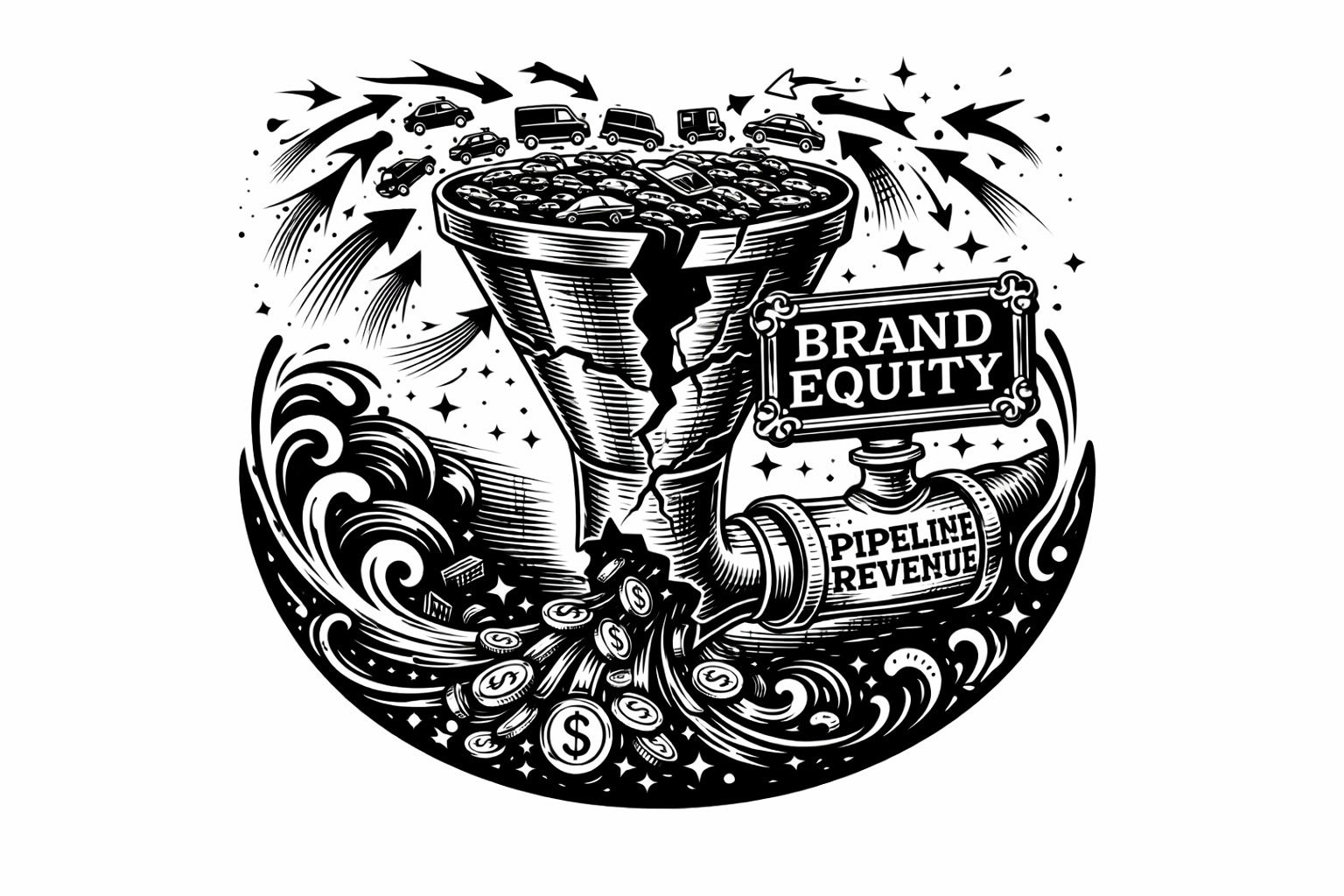
The old funnel has holes. Traffic and pipeline no longer move together. (Image Credit: Kevin Indig)
Boost your skills with Growth Memo’s weekly expert insights. Subscribe for free!
1. We’ve Hit Peak Search Volume For Traditional Queries
Image Credit: Kevin IndigImage Credit: Kevin IndigImage Credit: Kevin Indig
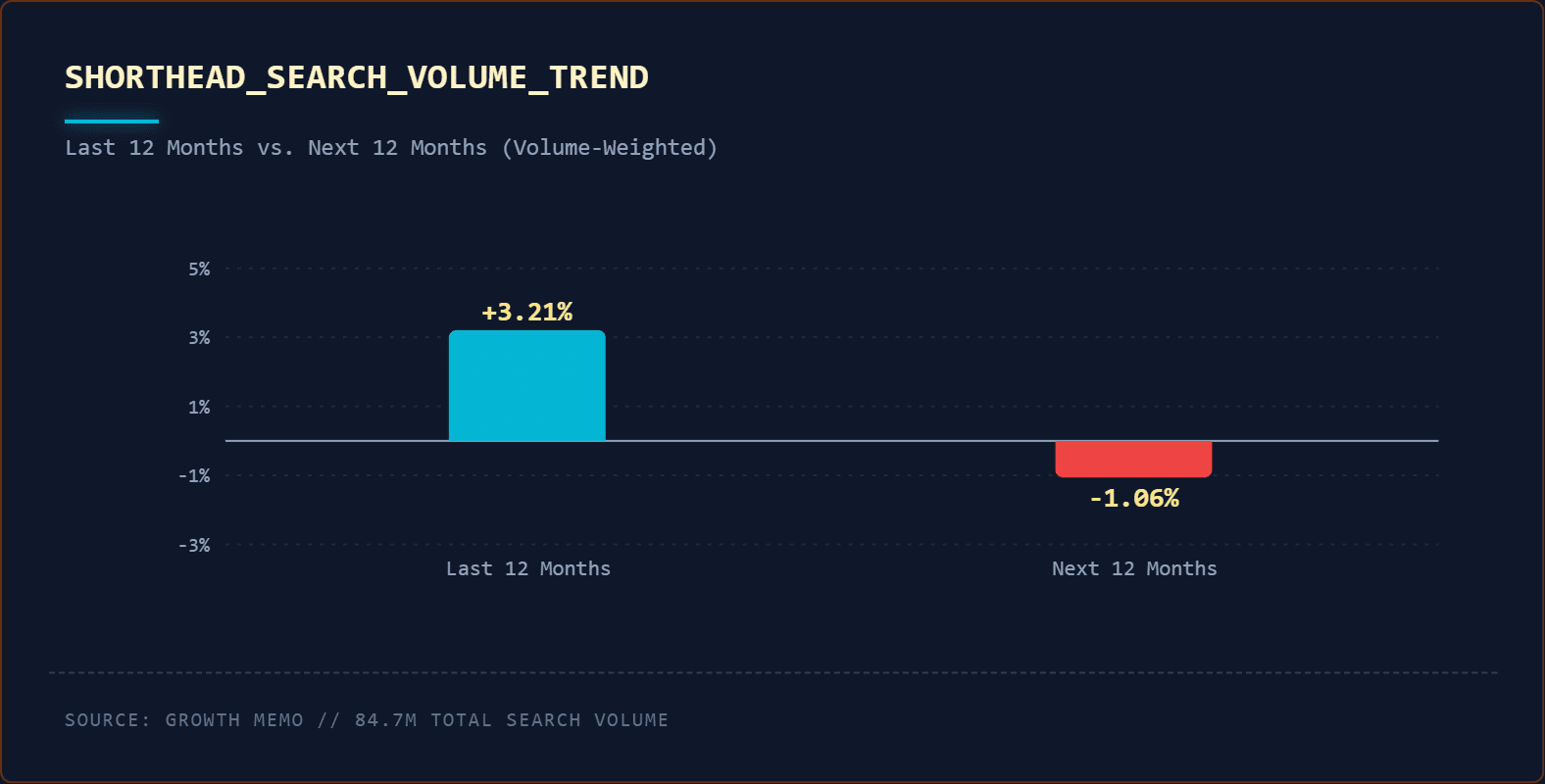
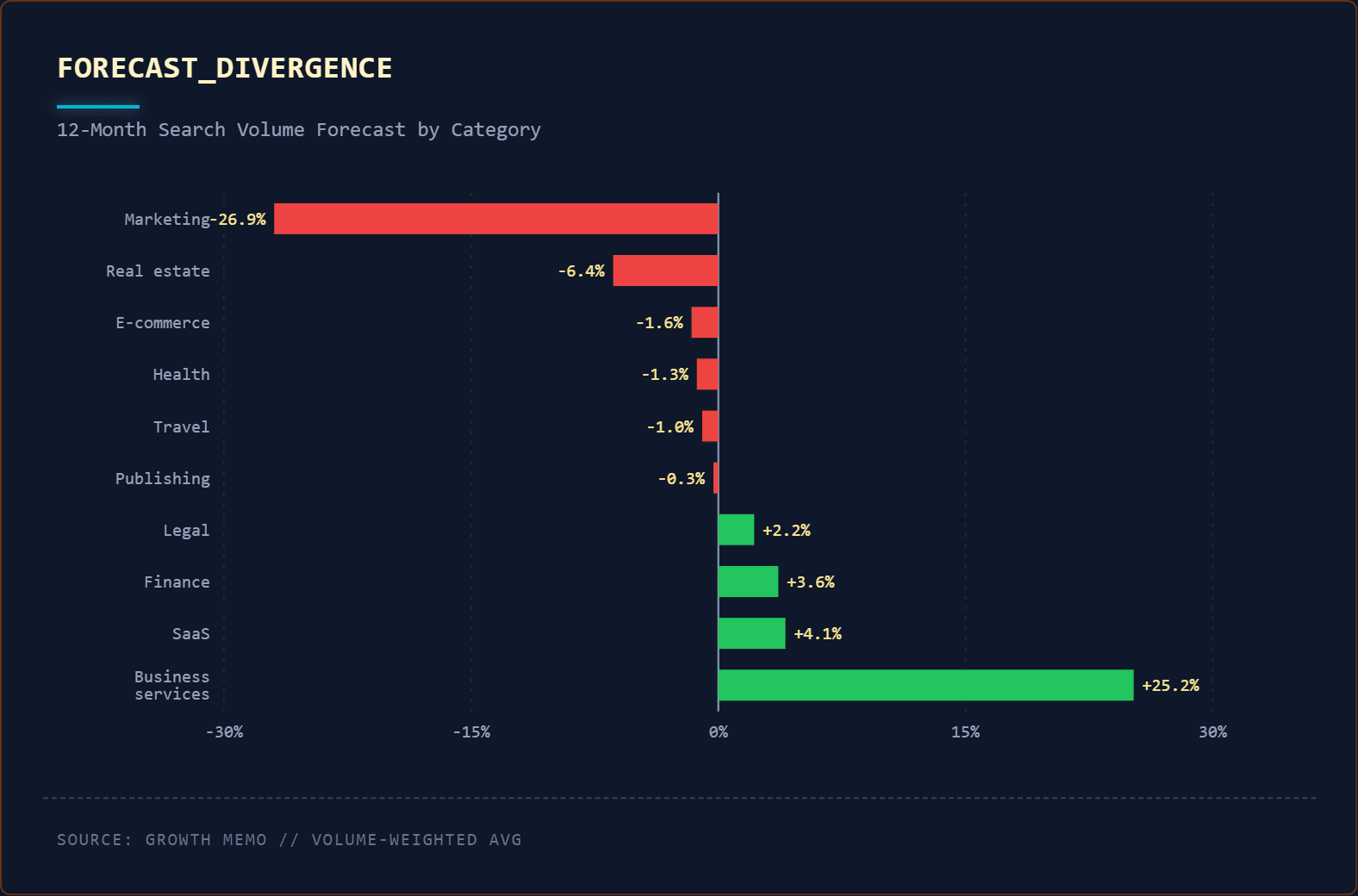
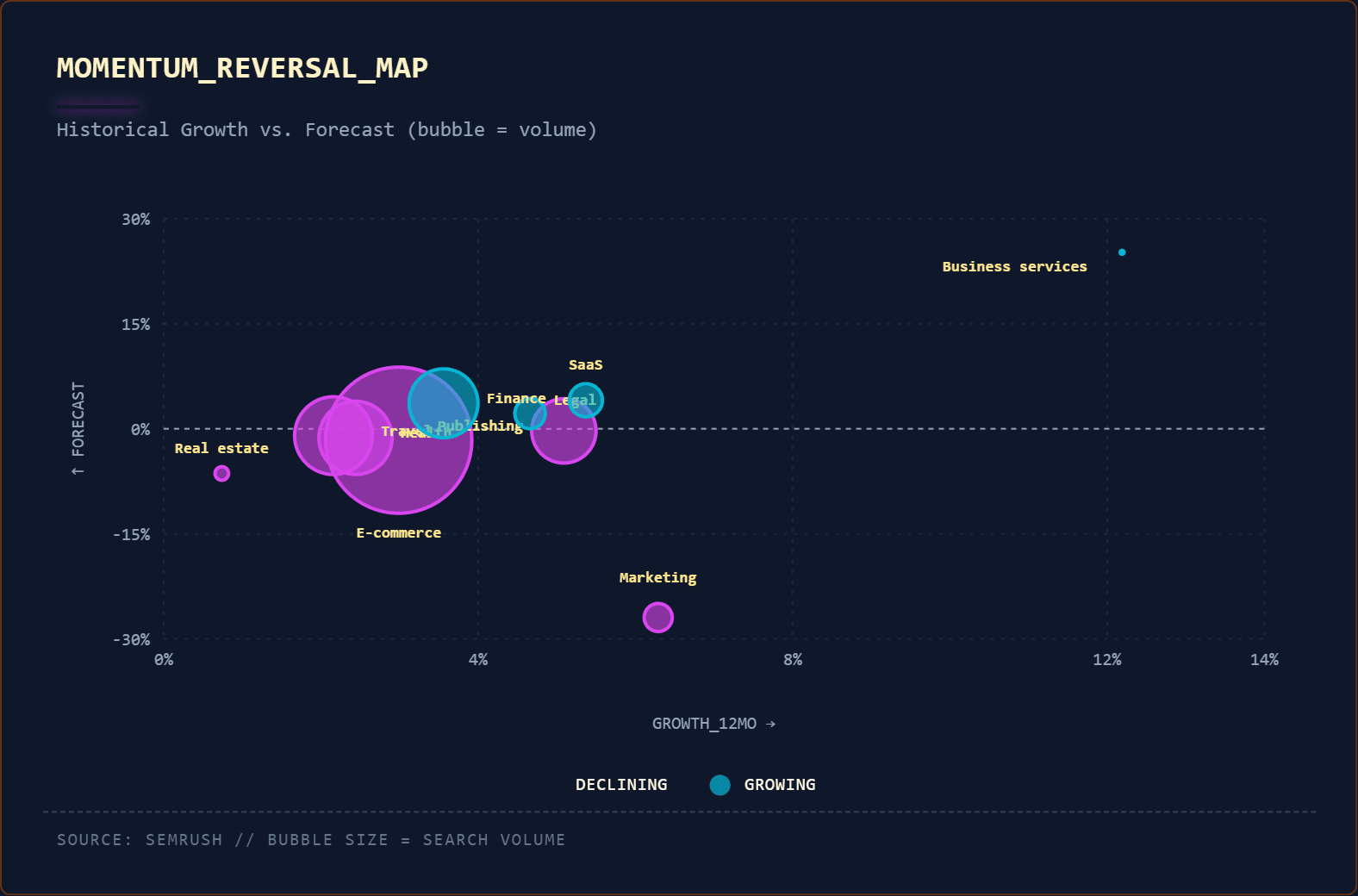
Short-head keyword demand is in permanent decline and likely contributing to slowed traffic growth or decline.
An analysis of roughly 10,000 short-head keywords shows that collective search volume grew only 1.2% over the last 12 months and is forecasted to decline by 0.74% over the next 12 months.
Two forces are driving it:
Fragmentation into long-tail: Demand did not disappear; it atomized into thousands of specific queries.
Bypass behavior: More users start in AI interfaces (AIOs, AI Mode, ChatGPT) instead of classic search.
This shift is irreversible for four structural reasons:
1. AI Overviews are here to stay. Google’s revenue model depends on keeping users inside the SERP. Zero-click search protects Google’s ad business. The company is not reverting to the 10 blue links.
2. LLM outputs are preferred starting points. Many users have conditioned themselves to expect direct answers. The behavior change is complete.
3. Zero-click is now the default expectation. Clicking through now feels like friction, not value. If the answer or solution isn’t easily acquired, the search experience failed.
4. Content supply exploded. There is significantly more content competing for the same queries than three years ago. AI-generated articles, Reddit threads, YouTube videos, and newsletters all compete for visibility. Even if visibility or “rankings” hold, CTR collapses under the weight of infinite options.
Optimizing for traffic growth in this environment is like optimizing for fax machine usage in 2010. The channel is structurally shifting – the products that people use to find answers have fundamentally changed.
2. Traffic And Pipeline Decoupled Because AI Ate The Click
The correlation between organic traffic and pipeline has broken. But it takes a bit more work to convince stakeholders and executives. We’re seeing this across the industry.
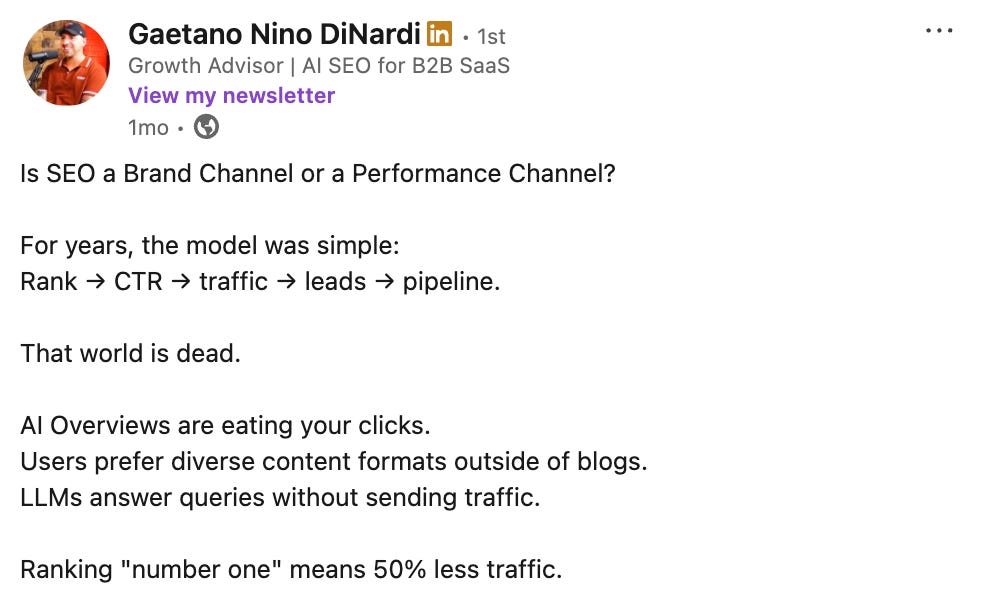
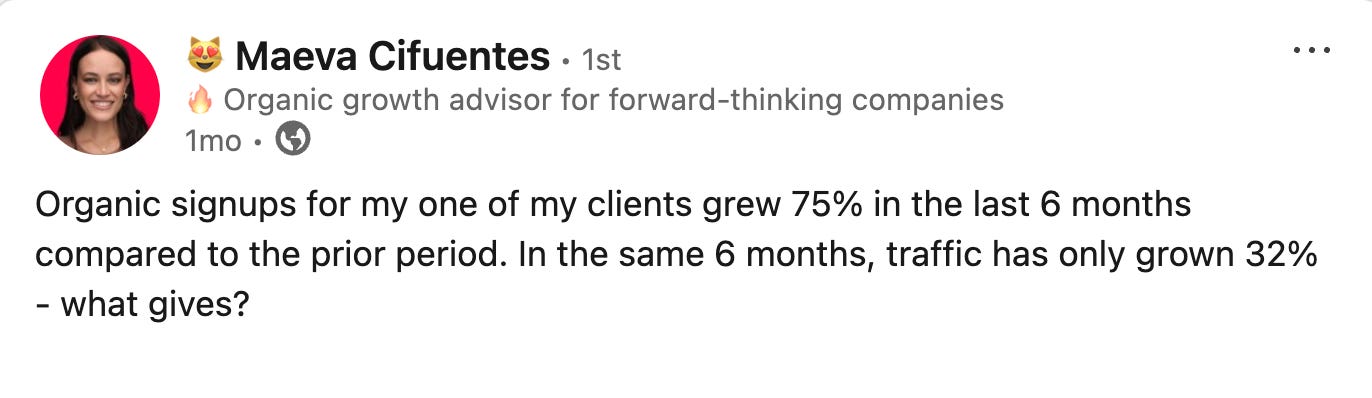
In December, Maeva Cifuentes reported traffic growth of 32% for one of her clients, while signups grew 75% over the same six-month period. Her post was in response to one from Gaetano DiNardi, who found no correlation between traffic and pipeline across multiple B2B SaaS companies he advises. Maeva’s client data shows you can grow pipeline 2.3x faster than traffic. Gaetano’s data shows you can grow pipeline while traffic stays flat or even declines.
Image Credit: Kevin Indig
The classic SEO model assumed a linear relationship: More rankings meant more clicks, more clicks meant more traffic, more traffic meant more leads.
Alternatively, AI answers queries without sending clicks. The Growth Memo AI Mode Study found that when the search task was informational and non-transactional, the number of external clicks to sources outside the AI Mode output was nearly zero across all user tasks. Users get the information they need – directly in their interface of choice – without ever visiting your site.
But buying intent didn’t disappear with the clicks.
SEO creates influence. It can still shape which brands buyers trust. It just doesn’t deliver the click anymore.
Education happens inside the AI interface. Brand selection happens after. Your traffic vanished, but the demand for your product/services didn’t.
This explains why Maeva noted she has clients whose traffic is declining, but demos are growing by double digits month-over-month.
Image Credit: Kevin Indig
The SEO work didn’t stop working. The measurement broke. Teams optimized for clicks are being judged on a metric that no longer predicts business outcomes.
3. Strong Brands Still Win In AI Search, But “Brand Strength” Has A New Definition
In AI search, performance depends less on “more pages” and more on whether AI systems can confidently understand, trust, and cite you for a specific audience and context.
Brand strength in AI search has four components:
Topical Authority: Complete ownership of the conceptual map (see topic-first SEO), not just keyword coverage.
ICP Alignment: Answers tailored to specific buyer questions, prioritizing relevance over volume. Read Personas are critical for AI search to learn more.
Third-Party Validation: Citations from category-defining sources matter more than high-DA links (see the data in How AI weighs your links).
Positioning Clarity: LLMs must recognize what a brand is known for. Vague positioning gets skipped; sharp positioning gets cited (covered in State of AI Search).
SEO teams that are structured for traffic optimization are now misaligned with business outcomes.
The conversation you need to have is “traffic and pipeline decoupled, here’s the data proving it, and here’s what we’re measuring instead.”
Move from keyword-first workflows to ICP-first workflows. Start with ICP research (what questions do your buyers ask and where do they ask them), positioning (what are you known for), and omnichannel distribution (SEO + Reddit + YouTube + earned media). SEO is no longer a standalone channel. It’s one input in a brand-building system.
Move from traffic reporting to influence reporting. Stop leading stakeholder conversations with sessions, impressions, and rankings. Report on brand lift (are more people searching for you by name?), pipeline influence (what percentage of demos started with organic touchpoints?), and LLM visibility rates (how often do AI systems mention your brand vs cite your content?).
4. The Uncomfortable Question: If SEO Doesn’t Drive Traffic Anymore, What Does It Do?
Here’s what SEO actually does and always did: It shapes mental availability and brand recognition, builds topic/category authority, frames the problem (and the solution), and reduces buyer uncertainty.
Traffic was a proxy for those things. The click was the observable action, but the trust was the outcome that mattered.
LLM-based search has removed the click but kept the trust-building. Users still learn from your content. It just happens inside an LLM interface instead of on your domain. Your content can still influence which brands buyers trust. Yes, it’s harder to measure because it’s invisible to analytics. But the outcome – buyers choosing your brand when they’re ready to buy – is the same.
SEO influences brand preference within the category. When buyers are in-market and researching solutions, SEO determines whether your brand is in the consideration set and whether AI systems recommend you.
Traffic was never the point. It was just the easiest thing to measure.
Featured Image: Paulo Bobita/Search Engine Journal
I recently spoke with Jesse Dwyer of Perplexity about SEO and AI search about what SEOs should be focusing on in terms of optimizing for AI search. His answers offered useful feedback about what publishers and SEOs should be focusing on right now.
AI Search Today
An important takeaway that Jesse shared is that personalization is completely changing
“I’d have to say the biggest/simplest thing to remember about AEO vs SEO is it’s no longer a zero sum game. Two people with the same query can get a different answer on commercial search, if the AI tool they’re using loads personal memory into the context window (Perplexity, ChatGPT).
A lot of this comes down to the technology of the index (why there actually is a difference between GEO and AEO). But yes, it is currently accurate to say (most) traditional SEO best practices still apply.”
The takeaway from Dwyer’s response is that search visibility is no longer about a single consistent search result. Personal context as a role in AI answers means that two users can receive significantly different answers to the same query with possibly different underlying content sources.
While the underlying infrastructure is still a classic search index, SEO still plays a role in determining whether content is eligible to be retrieved at all. Perplexity AI is said to use a form of PageRank, which is a link-based method of determining the popularity and relevance of websites, so that provides a hint about some of what SEOs should be focusing on.
However, as you’ll see, what is retrieved is vastly different than in classic search.
I followed up with the following question:
So what you’re saying (and correct me if I’m wrong or slightly off) is that Classic Search tends to reliably show the same ten sites for a given query. But for AI search, because of the contextual nature of AI conversations, they’re more likely to provide a different answer for each user.
Jesse answered:
“That’s accurate yes.”
Sub-document Processing: Why AI Search Is Different
Jesse continued his answer by talking about what goes on behind the scenes to generate an answer in AI search.
He continued:
“As for the index technology, the biggest difference in AI search right now comes down to whole-document vs. “sub-document” processing.
Traditional search engines index at the whole document level. They look at a webpage, score it, and file it.
When you use an AI tool built on this architecture (like ChatGPT web search), it essentially performs a classic search, grabs the top 10–50 documents, then asks the LLM to generate a summary. That’s why GPT search gets described as “4 Bing searches in a trenchcoat” —the joke is directionally accurate, because the model is generating an output based on standard search results.
This is why we call the optimization strategy for this GEO (Generative Engine Optimization). That whole-document search is essentially still algorithmic search, not AI, since the data in the index is all the normal page scoring we’re used to in SEO. The AI-first approach is known as “sub-document processing.”
Instead of indexing whole pages, the engine indexes specific, granular snippets (not to be confused with what SEO’s know as “featured snippets”). A snippet, in AI parlance, is about 5-7 tokens, or 2-4 words, except the text has been converted into numbers, (by the fundamental AI process known as a “transformer”, which is the T in GPT). When you query a sub-document system, it doesn’t retrieve 50 documents; it retrieves about 130,000 tokens of the most relevant snippets (about 26K snippets) to feed the AI.
Those numbers aren’t precise, though. The actual number of snippets always equals a total number of tokens that matches the full capacity of the specific LLM’s context window. (Currently they average about 130K tokens). The goal is to completely fill the AI model’s context window with the most relevant information, because when you saturate that window, you leave the model no room to ‘hallucinate’ or make things up.
In other words, it stops being a creative generator and delivers a more accurate answer. This sub-document method is where the industry is moving, and why it is more accurate to be called AEO (Answer Engine Optimization).
Obviously this description is a bit of an oversimplification. But the personal context that makes each search no longer a universal result for every user is because the LLM can take everything it knows about the searcher and use that to help fill out the full context window. Which is a lot more info than a Google user profile.
The competitive differentiation of a company like Perplexity, or any other AI search company that moves to sub-document processing, takes place in the technology between the index and the 26K snippets. With techniques like modulating compute, query reformulation, and proprietary models that run across the index itself, we can get those snippets to be more relevant to the query, which is the biggest lever for getting a better, richer answer.
Btw, this is less relevant to SEO’s, but this whole concept is also why Perplexity’s search API is so legit. For devs building search into any product, the difference is night and day.”
Dwyer contrasts two fundamentally different indexing and retrieval approaches:
Whole-document indexing, where pages are retrieved and ranked as complete units.
Sub-document indexing, where meaning is stored and retrieved as granular fragments.
In the first version, AI sits on top of traditional search and summarizes ranked pages. In the second, the AI system retrieves fragments directly and never reasons over full documents at all.
He also described that answer quality is constrained by context-window saturation, that accuracy emerges from filling the model’s entire context window with relevant fragments. When retrieval succeeds at saturating that window, the model has little capacity to invent facts or hallucinate.
Lastly, he says that “modulating compute, query reformulation, and proprietary models” is part of their secret sauce for retrieving snippets that are highly relevant to the search query.
Featured Image by Shutterstock/Summit Art Creations
Search has changed dramatically, including local search. Search engines and AI systems now incorporate semantic understanding to generate citations and results. To gain semantic understanding, they need to know which topics appear in the content and how they relate to one another so that they can identify your areas of authority.
For brands with multiple locations, this shift can create challenges. Search engines often misinterpret place names or the services a location offers, which can lead to the wrong landing page appearing for a near-me query. At the same time, it gives local SEOs a new opportunity to add needed semantic clarity.
To support clarity and semantic understanding, SEOs should adopt an entity SEO approach. The topics, also known as entities, are like keywords with multiple dimensions. When defined within your content and with schema markup, entities can bring clarity to AI and search engines.
In Microsoft’s recent article titled “Optimizing Your Content for Inclusion in AI Search Answers,” Krishna Madhavan, Bing’s Principal Product Manager, stated:
“Schema can label your content as a product, review, FAQ, or event, turning plain text into structured data that machines can interpret with confidence.”
This semantic understanding is what adds clarity to AI.
With more than 47 locations, one of our clients, Brightview Senior Living, needed a way to scale SEO across dozens of markets. Entity linking helped them do exactly that. Their strategy shows what SEOs can start doing today to gain clarity, authority, and better local performance.
Why Entity Linking Matters For Local SEO Today
In the world of Entity SEO, search engines now look beyond keywords for:
What entities are mentioned on a page.
How those entities relate to the user’s search queries.
Whether the content provides meaningful context and clarity.
Entities include locations, services, products, people, or anything else with a definable meaning. But identifying an entity is only the first step. Search engines also need to understand the entity’s context, which is where properties in schema markup come in and help disambiguate what the entity actually represents.
When you optimize a page, you describe its main entity. By using the schema.org vocabulary, you can leverage its properties to provide search engines and AI with a structured way to understand the entity.
For example, if you’re describing a location, you’d define the physical location as a LocalBusiness entity, using schema properties to describe the business and its service area, and then define the properties that map to the content on the page to describe it.
Now that you’ve defined the entity using properties, it’s time to add entity linking.
There are two types of entity linking: external entity linking and internal entity linking.
Internal Entity linking is the process of linking to internal entities on your website. External Entity linking is the process of linking entities on your site to their definitions in authoritative knowledge bases such as Wikipedia, Wikidata, or industry-specific glossaries. This is done using schema.org properties such as “sameAs”, “mentions”, “areaServed”, and more. Note that entity linking can use any properties within schema.org.
Today, we’ll focus on external entity linking.
By linking the entities mentioned in your website content to authoritative external sources, you provide search engines with clear, explicit definitions. This reduces ambiguity, improves the relevance of your rankings, and can help your content’s performance in AI summaries and intent-based search experiences.
For organizations looking to optimize for local search, place-based entity linking is particularly impactful.
Brightview’s Challenge: Scaling Hyperlocal SEO Across 47+ Communities
Brightview Senior Living’s marketing team was responsible for performance across more than 47 community pages, each with its own name, local context, and service mix. Search engines often struggled to interpret these pages correctly, especially when the location name overlapped with a more prominent city elsewhere.
A prime example was Phoenix, Maryland, being confused with Phoenix, Arizona. This kind of misunderstanding can derail visibility for queries such as “assisted living near me” or “assisted living in Phoenix.”
To improve search engines’ understanding of what Brightview offered and where, they needed a future-proof strategy grounded in semantic clarity.
The Solution: Place-Based And Topical Entity Linking At Scale
Brightview shifted from keyword-first SEO to entity-first SEO. Their strategy focused on identifying the entities that defined each location and service offering, then linking them to authoritative definitions to eliminate ambiguity.
1. Disambiguating Place Names
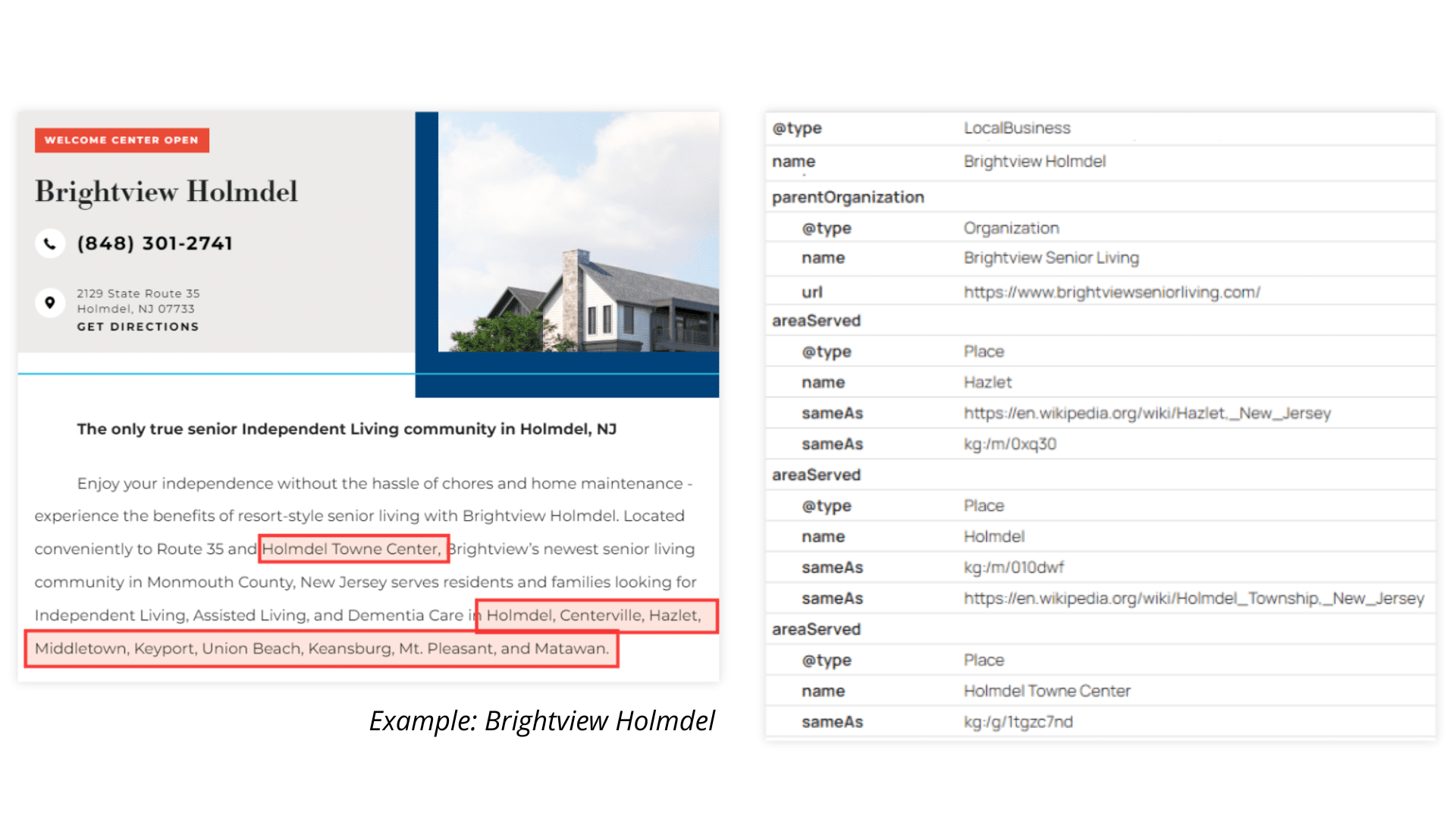
On each community page, Brightview explicitly defined the location entity and linked it to its authoritative source. For example:
Using mentions within the schema markup to identify the specific place referenced on the community page.
Using areaServed on community pages to clarify the geographic region that the location serves.
Using sameAs to link each location entity to authoritative sources like Wikipedia, Wikidata, and Google’s Knowledge Graph to disambiguate places with similar or identical names.
Image from author, December 2025
This resolved issues such as the Phoenix, Maryland, confusion by telling search engines exactly which Phoenix the content referred to. It also provided a clear geographic signal for near me and geo-modified queries.
2. Mapping Key Services As Entities
Brightview applied entity linking to core service terms, including assisted living and independent living. These concepts were linked to authoritative sources using “sameAs” and “mentions”.
This helped Brightview show up more consistently for non-branded, high-intent searches like “assisted living communities” or “independent living options,” which are critical touchpoints early in the customer journey.
By linking assisted living to a known entity, search engines recognized Brightview’s content as authoritative on the topic. This moved Brightview beyond brand-dependent queries and into the realm of broader, category-level search visibility.
3. Scaling Entity Linking Across All Content Types
Entity linking was applied across community pages, blog posts, and informational resources. This built a connected content knowledge graph that reinforced Brightview’s authority across both topics and locations that mattered most to their organization.
The result was a site where search engines could clearly understand what each page was about, what locations it represented, and how those pages related to Brightview’s broader expertise.
By disambiguating locations and services, Brightview made it easier for AI systems to return correct answers when users searched for care options in specific regions.
The Result: Stronger Local Visibility And More Accurate Search Interpretation
After implementing entity linking, Brightview saw measurable gains in both local and non-branded visibility.
Stronger Non-Branded Search Performance
Non-branded queries often indicate users who have not yet chosen a provider and who are actively evaluating options.
By clearly defining their service entities using schema markup, Brightview achieved:
25% increase in clicks for non-branded queries featuring the “assisted living” entity.
30% increase in impressions for those same queries.
This shift shows how entity linking helps organizations rank for what they do and where they do it, not just who they are.
Higher Discoverability For Community Pages
With place-based external entity linking in place, Brightview’s community pages performed better for high-intent local searches. Search engines better understood the connection between each community and its service area.
Across community pages, Brightview saw:
16% year-over-year increase in clicks (despite industry-wide drops in clicks).
26 % year-over-year increase in impressions.
Pages that used clear, linked location data were more reliably served for near-me and city-based queries.
Stable CTR Despite Industry Declines
As AI Overviews reshape the SERP with zero-click search, many brands have seen their click-through rate drop. Brightview’s CTR remained strong relative to benchmarks. Clear entity definitions helped search engines and AI models surface their content accurately, even as the search landscape shifted.
Ryan Pitcheralle, Brightview’s SEO consultant, noted that the strength of their schema markup implementation was a direct driver of performance. As he put it, their results showed “complete causation, not just correlation. This is why we’ve stayed competitive in clickthrough rate and performance while everyone else is sliding.”
How To Use Entity Linking Strategically
Entity linking is not only a technical tactic. It is a strategic opportunity to clarify what your organization should be known for. Here is how to apply it effectively.
1. Identify The Entities That Define Your Authority
Your website contains many entities, but you do not need to link them all. Focus on the ones that support clarity and strategic differentiation.
For example:
Locations you want to rank for.
Core service offerings.
Product categories.
Regulated terms or industry definitions.
Topics you want to be recognized as authoritative on.
Consistently linking these entities signals to search engines where your expertise lies.
2. Build A Connected Content Knowledge Graph
Entity linking is a key part of creating a content knowledge graph that shows search engines the relationships between your locations, offerings, resources, and brand. Your content knowledge graph helps machines infer meaning, understand context, and deliver more accurate results about your organization that can make or break conversions.
3. Prioritize Place-Based Entity Linking If You Have Multiple Locations
Local search hinges on clarity. Search engines need explicit signals about:
Which location your page refers to.
What services are available there.
Which geographic region that page serves.
Place-based entity linking provides that clarity and increases your chances of ranking for geo-modified and near-me queries.
4. Prepare For AI Search
AI search experiences rely on correctly interpreted entities. When locations, services, and concepts are linked to authoritative sources, AI systems can return more accurate, helpful answers and are more likely to reference your content correctly.
Entity Linking Is A Clear Path To Local SEO Accuracy
Brightview’s success shows that entity linking is a practical, high-impact way to strengthen local search performance. By clarifying locations, services, and key concepts, you can help search engines and AI systems understand exactly what your content represents.
Entity linking improves semantic accuracy and builds the foundation for long-term authority. For SEO and marketing leaders, it is one of the most actionable ways to prepare for the future of semantic and AI-driven search.
New data from BrightEdge shows how finance-related queries perform on AI Overviews, identifying clear areas that continue to show AIO while Google is pulling back from others. The deciding factor is whether the query benefits from explanation and synthesis versus direct data retrieval or action.
AI Overviews In Finance Are Query-Type Driven
Finance queries with an educational component, such as “what is” queries trigger a high level of AI Overviews, generating and AIO response as high as 91% of the time.
According to the data:
Educational queries (“what is an IRA”): 91% have AI Overviews
Rate and planning queries: 67% have AI Overviews
Stock tickers and real-time prices: 7% have AI Overviews
Examples of finance educational queries that generate AI Overviews:
ebitda meaning
how does compound interest work
what is an IRA
what is dollar cost averaging
what is a derivative
what is a bond
Finance Queries Where AIO Stays Out
Two areas where AIO stays out are local type queries or queries where real-time accuracy are of the essence. Local queries were initially a part of the original Search Generative Experience results in 2023, showing AI answers 90% of the time. That dropped to about 10% of the time.
The data also shows that “brand + near me” and other “near me” queries are dominated by local pack results and Maps integrations.
Tool and real-time information needs are no longer triggering AI Overviews. Finance calculator queries only shows AI Overviews 9% of the time. Other similar queries show no AI Overviews at all such as:
401k calculator
compound interest calculator
investment calculator
mortgage calculator
The BrightEdge data shows that these real-time data topics do not generate AIO or generate a low amount:
Individual stock tickers: 7% have AI Overviews
Live price queries: Traditional results dominate
Market indices: Low AI coverage
Examples of queries Google AI generally keeps out of:
AAPL stock
Tesla price
dow jones industrial average today
S&P 500 futures
Takeaway
The direction Google takes for virtually anything search related depends on user feedback and the ability to show relevant results. It’s not uncommon for some in SEO to underestimate the power of implicit and explicit user feedback as a force that moves Google’s hands on when to show certain kinds of search features. Thus it may be that users are not satisfied with synthesized answers for real-time, calculator and tool, and local near me types of queries.
AIO Stays Out Of Brand Queries
Another area where AI Overviews are rarely if ever shown are finance queries that have a brand name as a component of the query. Brand login queries show AIO only zero to four percent of the time. Brand navigational queries do not show any AI search results.
Where AI Overviews Dominates Finance Results
The finance queries where AIO tends to dominate are those with an educational or explanatory intent, where users are seeking to understand concepts, compare options, or receive general guidance rather than retrieve live data, use tools, or complete a navigational task.
The data shows AIO dominating these kinds of queries:
Retirement planning queries: 61% have AI Overviews.
Tax-related queries: 55% have AI Overviews.
Takeaway
As previously noted, Google doesn’t arbitrarily decide to show AI answers based on its judgments. User behavior and satisfaction signals play a large role. The fact that AI answers dominates these kinds of answers shows that AIO tends to satisfy users for these kinds of finance queries with a strong learning intent. This means that showing up as a citation for these kinds of queries requires carefully crafting content with a high level of precise answers. In my opinion, I think that a focus on creating content that is unique and doing it on a predictable and regular basis sends a signal of authoritativeness and trustworthiness. Definitely stay away from tactic of the month approaches to content.
Visibility And Competition Takeaways
Educational and guidance content have a high visibility in AI responses, not just organic rankings. Visibility increasingly depends on being cited or referenced. It may be useful to focus not just on text content but to offer audio, image, and video content. Not only that, but graphs and tables may be useful ways of communicating data, anything that can be referenced as an answer or to support the answer may be useful.
Traditional ranking factors still hold for high-volume local, tool, and real-time data queries. Live prices, calculators, and local searches continue to operate under conventional SEO factors.
Finance search behavior is increasingly segmented by intent and topic. Each query type follows a different path toward AI or organic results. The underlying infrastructure is still the same classic search which means that focusing on the fundamentals of SEO plus expanding beyond simple text content to see what works is a path forward.
James LePage, Dir Engineering AI, co-lead of the WordPress AI Team, described the future of the Agentic AI Web, where websites become interactive interfaces and data sources and the value add that any site brings to their site becomes flattened. Although he describes a way out of brand and voice getting flattened, the outcome for informational, service, and media sites may be “complex.”
Evolution To Autonomy
One of the points that LePage makes is that of agentic autonomy and how that will impact what it means to have an online presence. He maintains that humans will still be in the loop but at a higher and less granular level, where agentic AI interactions with websites are at the tree level dealing with the details and the humans are at the forest level dictating the outcome they’re looking for.
LePage writes:
“Instead of approving every action, users set guidelines and review outcomes.”
He sees agentic AI progressing on an evolutionary course toward greater freedom with less external control, also known as autonomy. This evolution is in three stages.
He describes the three levels of autonomy:
What exists now is essentially Perplexity-style web search with more steps: gather content, generate synthesis, present to user. The user still makes decisions and takes actions.
Near-term, users delegate specific tasks with explicit specifications, and agents can take actions like purchases or bookings within bounded authority.
Further out, agents operate more autonomously based on standing guidelines, becoming something closer to economic actors in their own right.”
AI Agents May Turn Sites Into Data Sources
LePage sees the web in terms of control, with Agentic AI experiences taking control of how the data is represented to the user. The user experience and branding is removed and the experience itself is refashioned by the AI Agent.
He writes:
“When an agent visits your website, that control diminishes. The agent extracts the information it needs and moves on. It synthesizes your content according to its own logic. It represents you to its user based on what it found, not necessarily how you’d want to be represented.
This is a real shift. The entity that creates the content loses some control over how that content is presented and interpreted. The agent becomes the interface between you and the user.
Your website becomes a data source rather than an experience.”
Does it sound problematic that websites will turn into data sources? As you’ll see in the next paragraph, LePage’s answer for that situation is to double down on interactions and personalization via AI, so that users can interact with the data in ways that are not possible with a static website.
These are important insights because they’re coming from the person who is the director of AI engineering at Automattic and co-leads the team in charge of coordinating AI integration within the WordPress core.
AI Will Redefine Website Interactions
LePage, who is the co-lead of WordPress’s AI Team, which coordinates AI-related contributions to the WordPress core, said that AI will enable websites to offer increasingly personalized and immersive experiences. Users will be able to interact with the website as a source of data refined and personalized for the individual’s goals, with website-side AI becoming the differentiator.
He explained:
“Humans who visit directly still want visual presentation. In fact, they’ll likely expect something more than just content now. AI actually unlocks this.
Sites can create more immersive and personalized experiences without needing a developer for every variation. Interactive data visualizations, product configurators, personalized content flows. The bar for what a “visit” should feel like is rising.
When AI handles the informational layer, the experiential layer becomes a differentiator.”
That’s an important point right there because it means that if AI can deliver the information anywhere (in an agent user interface, an AI generated comparison tool, a synthesized interactive application), then information alone stops separating you from everyone else.
In this kind of future, what becomes the differentiator, your value add, is the website experience itself.
How AI Agents May Negatively Impact Websites
LePage says that Agentic AI is a good fit for commercial websites because they are able to do comparisons and price checks and zip through the checkout. He says that it’s a different story for informational sites, calling it “more complex.”
Regarding the phrase “more complex,” I think that’s a euphemism that engineers use instead of what they really mean: “You’re probably screwed.”
Judge for yourself. Here’s how LePage explains websites lose control over the user experience:
“When an agent visits your website, that control diminishes. The agent extracts the information it needs and moves on. It synthesizes your content according to its own logic. It represents you to its user based on what it found, not necessarily how you’d want to be represented.
This is a real shift. The entity that creates the content loses some control over how that content is presented and interpreted. The agent becomes the interface between you and the user. Your website becomes a data source rather than an experience.
For media and services, it’s more complex. Your brand, your voice, your perspective, the things that differentiate you from competitors, these get flattened when an agent summarizes your content alongside everyone else’s.”
For informational websites, the website experience can be the value add but that advantage is eliminated by Agentic AI and unlike with ecommerce transactions where sales are the value exchange, there is zero value exchange since nobody is clicking on ads, much less viewing them.
Alternative To Flattened Branding
LePage goes on to present an alternative to brand flattening by imagining a scenario where websites themselves wield AI Agents so that users can interact with the information in ways that are helpful, engaging, and useful. This is an interesting thought because it represents what may be the biggest evolutionary step in website presence since responsive design made websites engaging regardless of device and browser.
He explains how this new paradigm may work:
“If agents are going to represent you to users, you might need your own agent to represent you to them.
Instead of just exposing static content and hoping the visiting agent interprets it well, the site could present a delegate of its own. Something that understands your content, your capabilities, your constraints, and your preferences. Something that can interact with the visiting agent, answer its questions, present information in the most effective way, and even negotiate.
The web evolves from a collection of static documents to a network of interacting agents, each representing the interests of their principal. The visiting agent represents the user. The site agent represents the entity. They communicate, they exchange information, they reach outcomes.
This isn’t science fiction. The protocols are being built. MCP is now under the Linux Foundation with support from Anthropic, OpenAI, Google, Microsoft, and others. Agent2Agent is being developed for agent-to-agent communication. The infrastructure for this kind of web is emerging.”
What do you think about the part where a site’s AI agent talks to a visitor’s AI agent and communicates “your capabilities, your constraints, and your preferences,” as well as how your information will be presented? There might be something here, and depending on how this is worked out, it may be something that benefits publishers and keeps them from becoming just a data source.
AI Agents May Force A Decision: Adaptation Versus Obsolescence
LePage insists that publishers, which he calls entities, that evolve along with the Agentic AI revolution will be the ones that will be able to have the most effective agent-to-agent interactions, while those that stay behind will become data waiting to be scraped .
He paints a bleak future for sites that decline to move forward with agent-to-agent interactions:
“The ones that don’t will still exist on the web. But they’ll be data to be scraped rather than participants in the conversation.”
What LePage describes is a future in which product and professional service sites can extract value from agent-to-agent interactions. But the same is not necessarily true for informational sites that users depend on for expert reviews, opinions, and news. The future for them looks “complex.”
It was early evening in Berlin, just a day before Christmas Eve, when Josephine Ballon got an unexpected email from US Customs and Border Protection. The status of her ability to travel to the United States had changed—she’d no longer be able to enter the country.
At first, she couldn’t find any information online as to why, though she had her suspicions. She was one of the directors of HateAid, a small German nonprofit founded to support the victims of online harassment and violence. As the organization has become a strong advocate of EU tech regulations, it has increasingly found itself attacked in campaigns from right-wing politicians and provocateurs who claim that it engages in censorship.
It was only later that she saw what US Secretary of State Marco Rubio had posted on X:
For far too long, ideologues in Europe have led organized efforts to coerce American platforms to punish American viewpoints they oppose. The Trump Administration will no longer tolerate these egregious acts of extraterritorial censorship.
Rubio was promoting a conspiracy theory about what he has called the “censorship-industrial complex,” which alleges widespread collusion between the US government, tech companies, and civil society organizations to silence conservative voices—the very conspiracy theory HateAid has recently been caught up in.
Then Undersecretary of State Sarah B. Rogers posted on X the names of the people targeted by travel bans. The list included Ballon, as well as her HateAid co-director, Anna Lena von Hodenberg. Also named were three others doing similar or related work: former EU commissioner Thierry Breton, who had helped author Europe’s Digital Services Act (DSA); Imran Ahmed of the Center for Countering Digital Hate, which documents hate speech on social media platforms; and Clare Melford of the Global Disinformation Index, which provides risk ratings warning advertisers about placing ads on websites promoting hate speech and disinformation.
It was an escalation in the Trump administration’s war on digital rights—fought in the name of free speech. But EU officials, freedom of speech experts, and the five people targeted all flatly reject the accusations of censorship. Ballon, von Hodenberg, and some of their clients tell me that their work is fundamentally about making people feel safer online. And their experiences over the past few weeks show just how politicized and besieged their work in online safety has become. They almost certainly won’t be the last people targeted in this way.
Ballon was the one to tell von Hodenberg that both their names were on the list. “We kind of felt a chill in our bones,” von Hodenberg told me when I caught up with the pair in early January.
But she added that they also quickly realized, “Okay, it’s the old playbook to silence us.” So they got to work—starting with challenging the narrative the US government was pushing about them.
Within a few hours, Ballon and von Hodenberg had issued a strongly worded statement refuting the allegations: “We will not be intimidated by a government that uses accusations of censorship to silence those who stand up for human rights and freedom of expression,” they wrote. “We demand a clear signal from the German government and the European Commission that this is unacceptable. Otherwise, no civil society organisation, no politician, no researcher, and certainly no individual will dare to denounce abuses by US tech companies in the future.”
Those signals came swiftly. On X, Johann Wadephul, the German foreign minister, called the entry bans “not acceptable,” adding that “the DSA was democratically adopted by the EU, for the EU—it does not have extraterritorial effect.” Also on X, French president Emmanuel Macron wrote that “these measures amount to intimidation and coercion aimed at undermining European digital sovereignty.” The European Commission issued a statement that it “strongly condemns” the Trump administration’s actions and reaffirmed its “sovereign right to regulate economic activity in line with our democratic values.”
Ahmed, Melford, Breton, and their respective organizations also made their own statements denouncing the entry bans. Ahmed, the only one of the five based in the United States, also successfully filed suit to preempt any attempts to detain him, which the State Department had indicated it would consider doing.
But alongside the statements of solidarity, Ballon and von Hodenberg said, they also received more practical advice: Assume the travel ban was just the start and that more consequences could be coming. Service providers might preemptively revoke access to their online accounts; banks might restrict their access to money or the global payment system; they might see malicious attempts to get hold of their personal data or that of their clients. Perhaps, allies told them, they should even consider moving their money into friends’ accounts or keeping cash on hand so that they could pay their team’s salaries—and buy their families’ groceries.
These warnings felt particularly urgent given that just days before, the Trump administration had sanctioned two International Criminal Court judges for “illegitimate targeting of Israel.” As a result, they had lost access to many American tech platforms, including Microsoft, Amazon, and Gmail.
“If Microsoft does that to someone who is a lot more important than we are,” Ballon told me, “they will not even blink to shut down the email accounts from some random human rights organization in Germany.”
“We have now this dark cloud over us that any minute, something can happen,” von Hodenberg added. “We’re running against time to take the appropriate measures.”
Helping navigate “a lawless place”
Founded in 2018 to support people experiencing digital violence, HateAid has since evolved to defend digital rights more broadly. It provides ways for people to report illegal online content and offers victims advice, digital security, emotional support, and help with evidence preservation. It also educates German police, prosecutors, and politicians about how to handle online hate crimes.
Once the group is contacted for help, and if its lawyers determine that the type of harassment has likely violated the law, the organization connects victims with legal counsel who can help them file civil and criminal lawsuits against perpetrators, and if necessary, helps finance the cases. (HateAid itself does not file cases against individuals.) Ballon and von Hodenberg estimate that HateAid has worked with around 7,500 victims and helped them file 700 criminal cases and 300 civil cases, mostly against individual offenders.
For 23-year-old German law student and outspoken political activist Theresia Crone, HateAid’s support has meant that she has been able to regain some sense of agency in her life, both on and offline. She had reached out after she discovered entire online forums dedicated to making deepfakes of her. Without HateAid, she told me, “I would have had to either put my faith into the police and the public prosecutor to prosecute this properly, or I would have had to foot the bill of an attorney myself”—a huge financial burden for “a student with basically no fixed income.”
In addition, working alone would have been retraumatizing: “I would have had to document everything by myself,” she said—meaning “I would have had to see all of these pictures again and again.”
“The internet is a lawless place,” Ballon told me when we first spoke, back in mid-December, a few weeks before the travel ban was announced. In a conference room at the HateAid office in Berlin, she said there are many cases that “cannot even be prosecuted, because no perpetrator is identified.” That’s why the nonprofit also advocates for better laws and regulations governing technology companies in Germany and across the European Union.
On occasion, they have also engaged in strategic litigation against the platforms themselves. In 2023, for example, HateAid and the European Union of Jewish Students sued X for failing to enforce its terms of service against posts that were antisemitic or that denied the Holocaust, which is illegal in Germany.
This almost certainly put the organization in the crosshairs of X owner Elon Musk; it also made HateAid a frequent target of Germany’s far right party, the Alternative für Deutschland, which Musk has called “the only hope for Germany.” (X did not respond to a request to comment on this lawsuit.)
HateAid gets caught in Trump World’s dragnet
For better and worse, HateAid’s profile grew further when it took on another critical job in online safety. In June 2024, it was named as a trusted flagger organization under the Digital Services Act, a 2022 EU law that requires social media companies to remove certain content (including hate speech and violence) that violates national laws, and to provide more transparency to the public, in part by allowing more appeals on platforms’ moderation decisions.
Trusted flaggers are entities designated by individual EU countries to point out illegal content, and they are a key part of DSA enforcement. While anyone can report such content, trusted flaggers’ reports are prioritized and legally require a response from the platforms.
The Trump administration has loudly argued that the trusted flagger program and the DSA more broadly are examples of censorship that disproportionately affect voices on the right and American technology companies,like X.
When we first spoke in December, Ballon said these claims of censorship simply don’t hold water: “We don’t delete content, and we also don’t, like, flag content publicly for everyone to see and to shame people. The only thing that we do: We use the same notification channels that everyone can use, and the only thing that is in the Digital Services Act is that platforms should prioritize our reporting.” Then it is on the platforms to decide what to do.
Nevertheless, the idea that HateAid and like-minded organizations are censoring the right has become a powerful conspiracy theory with real-world consequences. (Last year, MIT Technology Reviewcovered the closure of a small State Department office following allegations that it had conducted “censorship,” as well as an unusual attempt by State leadership to access internal records related to supposed censorship—including information about two of the people who have now been banned, Medford and Ahmed, and both of their organizations.)
HateAid saw a fresh wave of harassment starting last February, when 60 Minutes aired a documentary on hate speech laws in Germany; it featured a quote from Ballon that “free speech needs boundaries,” which, she added, “are part of our constitution.” The interview happened to air just days before Vice President JD Vance attended the Munich Security Conference; there he warned that “across Europe, free speech … is in retreat.” This, Ballon told me, led to heightened hostility toward her and her organization.
Fast-forward to July, when a report by Republicans in the US House of Representatives claimed that the DSA “compels censorship and infringes on American free speech.” HateAid was explicitly named in the report.
All of this has made its work “more dangerous,” Ballon told me in December. Before the 60 Minutes interview, “maybe one and a half years ago, as an organization, there were attacks against us, but mostly against our clients, because they were the activists, the journalists, the politicians at the forefront. But now … we see them becoming more personal.”
As a result, over the last year, HateAid has taken more steps to protect its reputation and get ahead of the damaging narratives. Ballon has reported the hate speech targeted at her—“More [complaints] than in all the years I did this job before,” she said—as well as defamation lawsuits on behalf of HateAid.
All these tensions finally came to a head in December. At the start of the month, the European Commission fined X $140 million for DSA violations. This set off yet another round of recriminations about supposed censorship of the right, with Trump calling the fine “a nasty one” and warning: “Europe has to be very careful.”
Just a few weeks later, the day before Christmas Eve, retaliation against individuals finally arrived.
Who gets to define—and experience—free speech
Digital rights groups are pushing back against the Trump administration’s narrow view of what constitutes free speech and censorship.
“What we see from this administration is a conception of freedom of expression that is not a human-rights-based conception where this is an inalienable, indelible right that’s held by every person,” says David Greene, the civil liberties director of the Electronic Frontier Foundation, a US-based digital rights group. Rather, he sees an “expectation that… [if] anybody else’s speech is challenged, there’s a good reason for it, but it should never happen to them.”
Since Trump won his second term, social media platforms have walked back their commitments to trust and safety. Meta, for example, ended fact-checking on Facebook and adopted much of the administration’s censorship language, with CEO Mark Zuckerberg telling the podcaster Joe Rogan that it would “work with President Trump to push back on governments around the world” if they are seen as “going after American companies and pushing to censor more.”
Have more information on this story or a tip for something else that we should report? Using a non-work device, reach the reporter on Signal at eileenguo.15 or tips@technologyreview.com.
And as the recent fines on X show, Musk’s platform has gone even further in flouting European law—and, ultimately, ignoring the user rights that the DSA was written to protect. In perhaps one of the most egregious examples yet, in recent weeks X allowed people to use Grok, its AI generator, to create nonconsensual nude images of women and children, with few limits—and, so far at least, few consequences. (Last week, X released a statement that it would start limiting users’ ability to create explicit images with Grok; in response to a number of questions, X representative Rosemarie Esposito pointed me to that statement.)
For Ballon, it makes perfect sense: “You can better make money if you don’t have to implement safety measures and don’t have to invest money in making your platform the safest place,” she told me.
“It goes both ways,” von Hodenberg added. “It’s not only the platforms who profit from the US administration undermining European laws … but also, obviously, the US administration also has a huge interest in not regulating the platforms … because who is amplified right now? It’s the extreme right.”
She believes this explains why HateAid—and Ahmed’s Center for Countering Digital Hate and Melford’s Global Disinformation Index, as well as Breton and the DSA—have been targeted: They are working to disrupt this “unholy deal where the platforms profit economically and the US administration is profiting in dividing the European Union,” she said.
The travel restrictions intentionally send a strong message to all groups that work to hold tech companies accountable. “It’s purely vindictive,” Greene says. “It’s designed to punish people from pursuing further work on disinformation or anti-hate work.” (The State Department did not respond to a request for comment.)
And ultimately, this has a broad effect on who feels safe enough to participate online.
Ballon pointed to research that shows the “silencing effect” of harassment and hate speech, not only for “those who have been attacked,” but also for those who witness such attacks. This is particularly true for women, who tend to face more online hate that is also more sexualized and violent. It’ll only be worse if groups like HateAid get deplatformed or lose funding.
Von Hodenberg put it more bluntly: “They reclaim freedom of speech for themselves when they want to say whatever they want, but they silence and censor the ones that criticize them.”
Still, the HateAid directors insist they’re not backing down. They say they’re taking “all advice” they have received seriously, especially with regard to “becoming more independent from service providers,” Ballon told me.
“Part of the reason that they don’t like us is because we are strengthening our clients and empowering them,” said von Hodenberg. “We are making sure that they are not succeeding, and not withdrawing from the public debate.”
“So when they think they can silence us by attacking us? That is just a very wrong perception.”
Martin Sona contributed reporting.
Correction: This article originally misstated the name of Germany’s far right party.
Today marks an inflection point for enterprise AI adoption. Despite billions invested in generative AI, only 5% of integrated pilots deliver measurable business value and nearly one in two companies abandons AI initiatives before reaching production.
The bottleneck is not the models themselves. What’s holding enterprises back is the surrounding infrastructure: Limited data accessibility, rigid integration, and fragile deployment pathways prevent AI initiatives from scaling beyond early LLM and RAG experiments. In response, enterprises are moving toward composable and sovereign AI architectures that lower costs, preserve data ownership, and adapt to the rapid, unpredictable evolution of AI—a shift IDC expects 75% of global businesses to make by 2027.
The concept to production reality
AI pilots almost always work, and that’s the problem. Proofs of concept (PoCs) are meant to validate feasibility, surface use cases, and build confidence for larger investments. But they thrive in conditions that rarely resemble the realities of production.
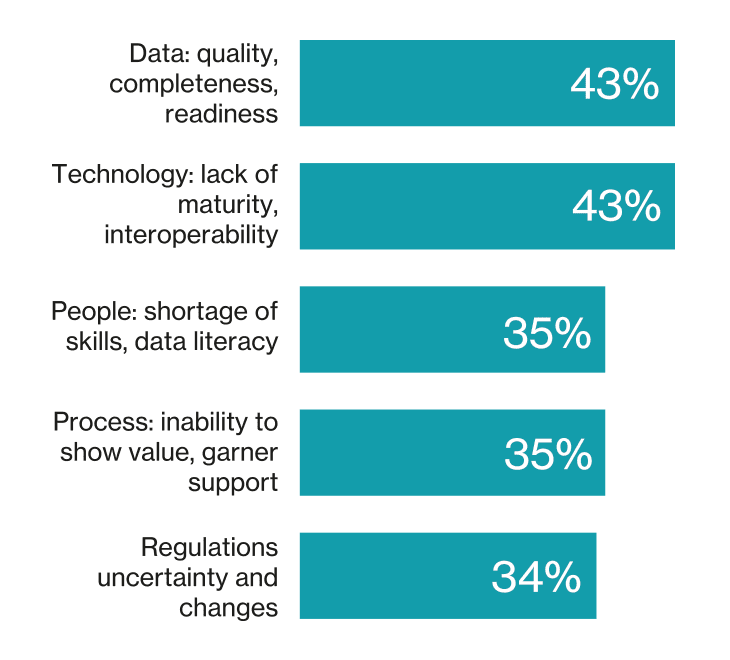
Source: Compiled by MIT Technology Review Insights with data from Informatica, CDO Insights 2025 report, 2026
“PoCs live inside a safe bubble” observes Cristopher Kuehl, chief data officer at Continent 8 Technologies. Data is carefully curated, integrations are few, and the work is often handled by the most senior and motivated teams.
The result, according to Gerry Murray, research director at IDC, is not so much pilot failure as structural mis-design: Many AI initiatives are effectively “set up for failure from the start.”
This is today’s edition of The Download, our weekday newsletter that provides a daily dose of what’s going on in the world of technology.
What it’s like to be banned from the US for fighting online hate
Just before Christmas the Trump administration dramatically escalated its war on digital rights by banning five people from entering the US. One of them, Josephine Ballon, is a director of HateAid, a small German nonprofit founded to support the victims of online harassment and violence. The organization is a strong advocate of EU tech regulations, and so finds itself attacked in campaigns from right-wing politicians and provocateurs who claim that it engages in censorship.
EU officials, freedom of speech experts, and the five people targeted all flatly reject these accusations. Ballon told us that their work is fundamentally about making people feel safer online. But their experiences over the past few weeks show just how politicized and besieged their work in online safety has become. Read the full story.
—Eileen Guo
TR10: AI companions
Chatbots are skilled at crafting sophisticated dialogue and mimicking empathetic behavior. They never get tired of chatting. It’s no wonder, then, that so many people now use them for companionship—forging friendships or even romantic relationships.
72% of US teenagers have used AI for companionship, according to a study from the nonprofit Common Sense Media. But while chatbots can provide much-needed emotional support and guidance for some people, they can exacerbate underlying problems in others—especially vulnerable people or those with mental health issues.
And, if you want to learn more about what we predict for AI this year, sign up to join me for our free LinkedIn Live event tomorrow at 12.30pm ET.
Why inventing new emotions feels so good
Have you ever felt “velvetmist”?
It’s a “complex and subtle emotion that elicits feelings of comfort, serenity, and a gentle sense of floating.” It’s peaceful, but more ephemeral and intangible than contentment. It might be evoked by the sight of a sunset or a moody, low-key album.
If you haven’t ever felt this sensation—or even heard of it—that’s not surprising. A Reddit user generated it with ChatGPT, along with advice on how to evoke the feeling. Don’t scoff: Researchers say more and more terms for these “neo-emotions” are showing up online, describing new dimensions and aspects of feeling. Read our story to learn more about why.
—Anya Kamenetz
This story is from the latest print issue of MIT Technology Review. If you haven’t already, subscribe now to receive the next edition as soon as it lands (and benefit from some hefty seasonal discounts too!)
The must-reads
I’ve combed the internet to find you today’s most fun/important/scary/fascinating stories about technology.
1 Ads are coming to ChatGPT For American users initially, with plans to expand soon. (CNN) + Here’s how they’ll work. (Wired $)
2 What will we be able to salvage after the AI bubble bursts? It will be ugly, but there are plenty of good uses for AI that we’ll want to keep. (The Guardian) + What even is the AI bubble? (MIT Technology Review)
3 It’s almost impossible to mine Greenland’s natural resources It has vast supplies of rare earth elements, but its harsh climate and environment make them very hard to access. (The Week)
4 Iran is now 10 days into its internet shutdown It’s one of the longest and most extreme we’ve ever witnessed. (BBC) + Starlink isn’t proving as helpful as hoped as the regime finds ways to jam it. (Reuters $) + Battles are raging online about what’s really going on inside Iran. (NYT $)
5 America is heading for a polymarket disaster Prediction markets are getting out of control, and some people are losing a lot of money. (The Atlantic $) + They were first embraced by political junkies, but now they’re everywhere. (NYT $)
6 How to fireproof a city Californians are starting to fight fires before they can even start. (The Verge $) + How AI can help spot wildfires. (MIT Technology Review)
7 Stoking ‘deep state’ conspiracy theories can be dangerous Especially if you’re then given the task of helping run one of those state institutions, as Dan Bongino is now learning. (WP $) + Why everything is a conspiracy now. (MIT Technology Review)
8 Why we’re suddenly all having a ‘Very Chinese Time’ It’s a fun, flippant trend—but it also shows how China’s soft power is growing around the globe. (Wired $)
9 Why there’s no one best way to store information Each one involves trade-offs between space and time. (Quanta $)
10 Meat may play a surprising role in helping people reach 100 Perhaps because it can assist with building stronger muscles and bones. (New Scientist $)
Quote of the day
“That’s the level of anxiety now – people watching the skies and the seas themselves because they don’t know what else to do.”
—A Greenlander tells The Guardian just how seriously she and her fellow compatriots are taking Trump’s threat to invade their country.
One more thing
KATHERINE LAM
Inside a romance scam compound—and how people get tricked into being there
Gavesh’s journey started, seemingly innocently, with a job ad on Facebook promising work he desperately needed.
Instead, he found himself trafficked into a business commonly known as “pig butchering”—a form of fraud in which scammers form close relationships with targets online and extract money from them. The Chinese crime syndicates behind the scams have netted billions of dollars, and they have used violence and coercion to force their workers, many of them trafficked like Gavesh, to carry out the frauds from large compounds, several of which operate openly in the quasi-lawless borderlands of Myanmar.
Big Tech may hold the key to breaking up the scam syndicates—if these companies can be persuaded or compelled to act. Read the full story.
—Peter Guest & Emily Fishbein
We can still have nice things
A place for comfort, fun and distraction to brighten up your day. (Got any ideas? Drop me a line or skeet ’em at me.)
+ Blue Monday isn’t real (but it is an absolute banger of a track.) + Some great advice here about how to be productive during the working day. + Twelfth Night is one of Shakespeare’s most fun plays—as these top actors can attest. + If the cold and dark gets to you, try making yourself a delicious bowl of soup.
Google released another Core Update to its search algorithm over the holidays. It was the most comprehensive update of 2025.
Google changes its algorithm frequently. Some are more widespread than others. Unlike Spam Updates, Core Updates generally do not penalize but, instead, alter how the algorithm treats certain queries and their intent.
For example, a Core Update may result in more “best of” listings (rather than product categories) in search results. Ecommerce sites may lose traffic, but not because of anything they’ve done, so no fix is required.
Yet a Core Update may result in higher rankings for certain types of content, which could prompt merchants to add those pages.
Core Updates can elevate a wide range of queries. The recent holiday update lowered the listings of large publishers and elevated niche sites. Search Engine Journal reported that Macy’s rankings decreased, while those of Columbia, The North Face, and Fragrance Market increased.
Content helpfulness
Google’s infamous Helpful Content algorithm is now part of its Core Updates and can, in theory, target an “unhelpful” site.
Google provides guidelines to human evaluators for what makes content helpful. It’s the best indicator for search optimizers as to Google’s definition of that term. To paraphrase from the guidelines:
Websites should place the most useful portions at the top of a page.
The amount of effort, originality, and skill determines the quality of the content.
Avoid unnecessary fluff or “filler” content that obscures what visitors are looking for.
Use clear titles and headings that inform, not oversell.
If a Core Update resulted in lost traffic, scrutinize your content helpfulness and on-page engagement.
How to recover
It’s often difficult to know why a Core Update lowered a site’s rankings. To diagnose, I typically start with the helpfulness of its pages and its overall engagement.
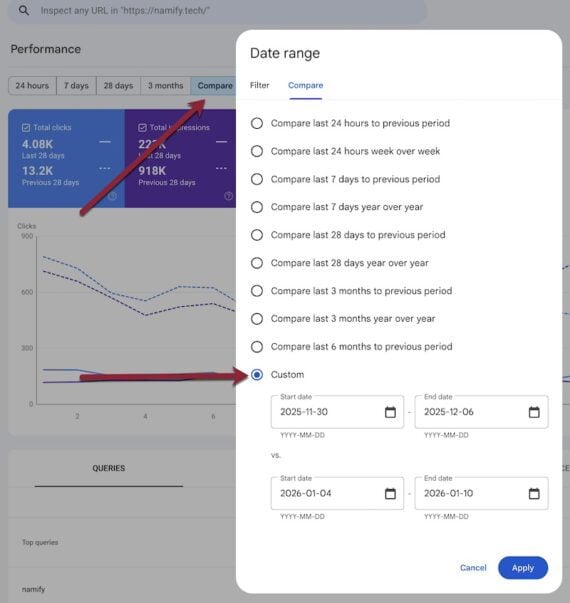
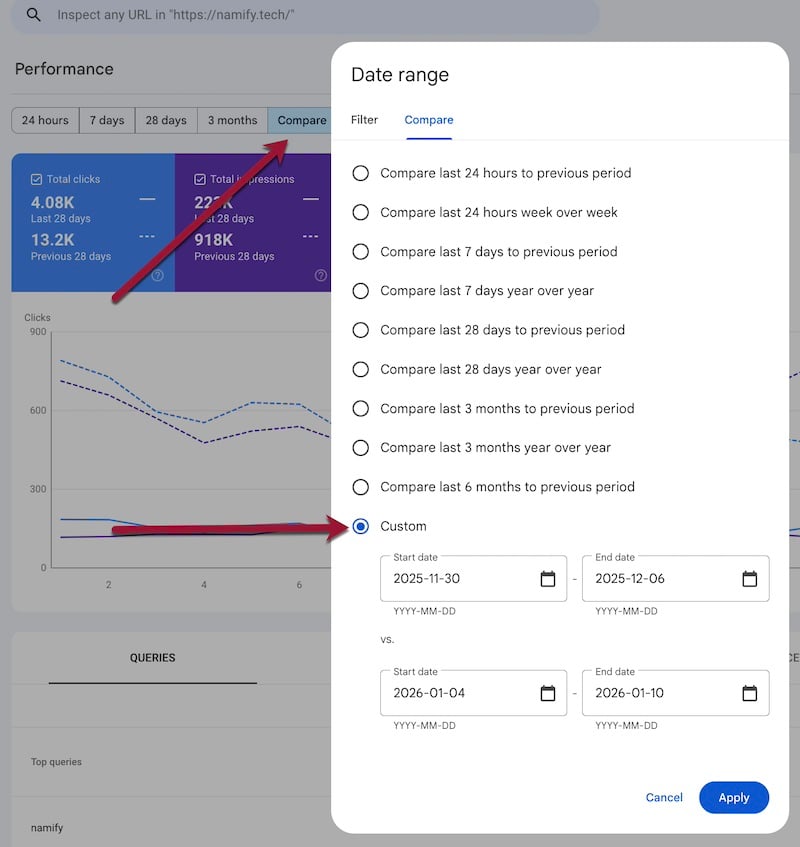
The first step is always to identify what was lost. Search Console will reveal the impacted queries:
Go to the full “Performance” report.
Choose “Compare” in the “More” filter.
Choose “Custom” and set start and end dates to expose the week before the change (early December for the most recent update) and the week after (beginning of January). Click “Apply.”
Sort the ensuing “Queries” column and the “Clicks Difference” column to see queries that now generate fewer clicks.
Select a before and after date range in Search Console to identify queries that generate fewer organic clicks.
Next, manually search Google for each affected query to determine if results shifted broadly or only for your page. The appearance of many new listings that answer a query in a new way may indicate a broad shift.
Semrush provides monthly snapshots of ranking URLs for each query. Refer to its archive to see how your overall SERPs have changed. If you see a widespread shift (i.e., 80% of listings are new for a given query), there is likely no fix needed. It’s Google changing its algorithm.
If only your site is downranked, most definitely look at the impacted pages and how to make them more helpful and engaging, such as:
Move the main portion, such as a quick answer to a search query, to the top.
Improve page structure and subheadings.
Remove ads, such as intrusive pop-ups, that block users from interacting with a page.
Add jump-to links that help visitors navigate the page.
Include social proof on the page.
Show the author’s name and bio.
Link to trusted sources.
Add helpful images and videos.
Update the page with recent data, trends, and stats (with sources).
Add explanatory sections, such as FAQs and definitions, tailored to the page’s purpose.
Helpfulness is subjective and vague. Nonetheless, consider your target audience and tailor your content accordingly.
Google announces only substantial Core Updates, those that affect many users. Lesser, unannounced updates occur more often and can result in recoveries.
To generate the most value from Discover, view it through an entity-focused lens. People, places, organisations, teams, et al.
Your best chance of success in Discover with an individual article is to make sure it outperforms its expected performance early. So share, share, share.
Then analyze the type of content you create. What makes it clickable? What resonates? What headline and image combination works?
High CTR is key for success, but “curiosity gap” headlines that fail to deliver kill long-term credibility. User satisfaction trumps clickiness over time.
Discover isn’t a completely black box. We have a decent idea of how it works and can reverse engineer more value with some smart analysis.
Yes, there’s always going to be some surprises. It’s a bit mental at times. But we can make the most of the platform without destroying our credibility by publishing articles about vitamin B12 titled:
“Outlive your children with this one secret trick the government don’t want you to know about.”
Key Tenets Of Discover
Before diving in headfirst, let’s check the depth of the pool.
“Sustained presence on search helps maintain your status as a trustworthy publisher.”
Discover feeds off fresh content. While evergreen content pops up, it is very closely related to the news.
More lifestyle-y, engaging content tends to thrive on the clickless platform.
Just like news, Discover is very entity, click, and early engagement driven.
The personalized platform groups cohorts of people together. If you satiate one, more of that cohort will likely follow.
If your content outperforms its predicted early-stage performance, it is more likely to be boosted.
Once the groups of potentially interested doomscrollers have been saturated, content performance naturally drops off.
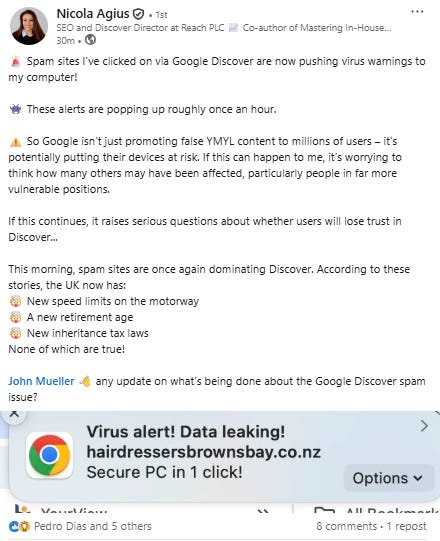
Obviously, loads of people know how to game the system and have become pretty rich by doing so. If you want to laugh and cry in equal measure, see the state of Google’s spam problems here.
No sign of it being fixed either (Image Credit: Harry Clarkson-Bennett)
Most algorithms follow the Golden Hour Rule. Not to be confused with the golden shower rule, it means the first 60 minutes after posting determine whether algorithms will amplify or bury your content.
If you want to go viral, your best bet is to drive early stage engagement.
What Data Points Should You Analyze?
This is focused more on how you, as an SEO or analyst, can get more value out of the platform. So, let’s take conversions and click/impression data as read. We’re going deeper. This isn’t amateur hour.
I think you need to track the below and I’ll explain why.
CTR.
Entities.
Subfolders.
Authorship.
Headlines and images.
Content type (just a simple breakdown of news, how-tos, interviews, evergreen guides, etc.).
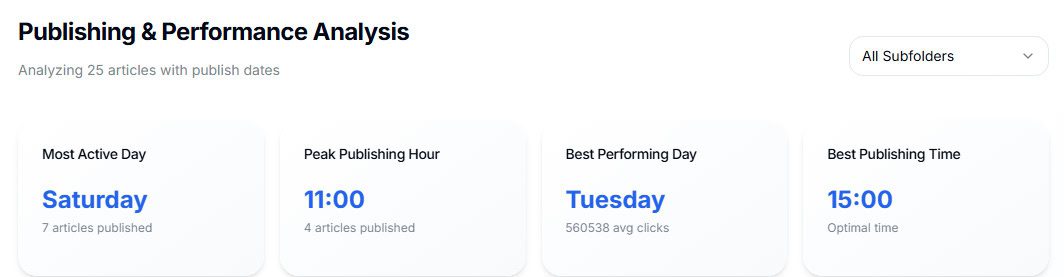
Publishing performance.
You need to already get traffic from Discover to generate value from this analysis. If you don’t, revert back to creating high-quality, unique content in your niche(s) and push it out to the wider world.
Create great content and get the right people sharing it.
Worth noting you can’t accurately identify Discover traffic in analytics platforms. You have to accept some of it will be mis-attributed. Most companies make an educated guess of sorts, using a combination of Google and mobile/android to group it together.
CTR
CTR is one of the foundational metrics of news SEO, Top Stories, Discover, and almost any form of real-time SEO. It is far more prevalent in news than traditional SEO because the algorithm is making decisions about what content should be promoted in almost real time.
Evergreen results are altered continuously, based on much longer-term engagement.
This is weighted alongside some kind of traditional Navboost engagement data – clicks, on-page interactions, session duration, et al. – to associate a clickable headline and image with content that serves the user effectively.
It’s also one of the reasons why clickbait has (broadly) started to die a death. Like rampant AI slop, even the mouth breathers will tire of it eventually.
To get the most out of CTR, you need to combine it with:
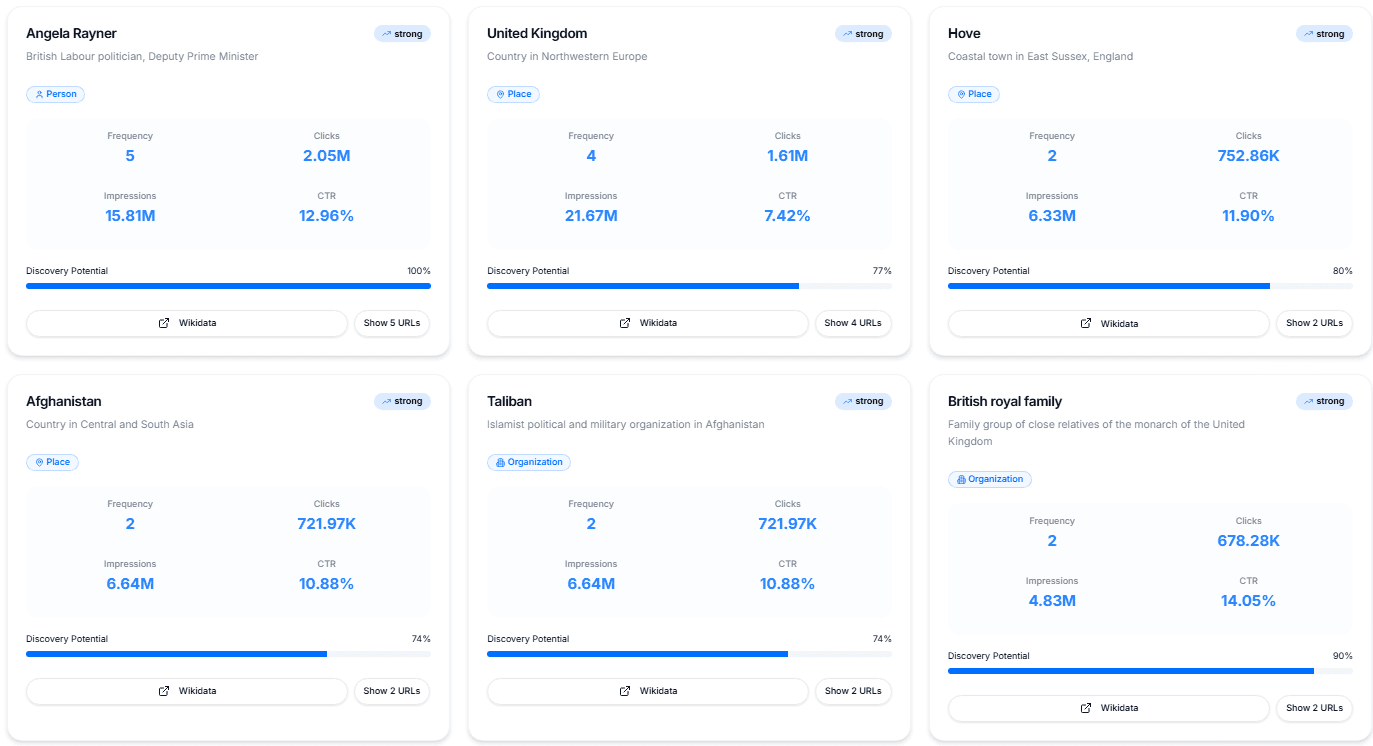
Individual entity analysis based on the title and page content is perfect for Discover (Image Credit: Harry Clarkson-Bennett)
While it isn’t as easy to just frontload headlines with relevant entities to get traffic anymore, there’s still a real value in analyzing performance at an entity level.
Particularly in Discover.
You want to know what people, places, and organizations (arguably, these three make up 85%+ of all entities you need to care about) drive value for you and users in Discover.
To run proper entity analysis you cannot do this manually. At least not well or at scale.
You can then extract the entity from the page in question (the title), disambiguate using the on page content (this helps you assess whether ‘apple’ is the computing company, the fruit or an idiotic celebrities daughter) and confirm it with WikiData or Google’s Knowledge Graph.
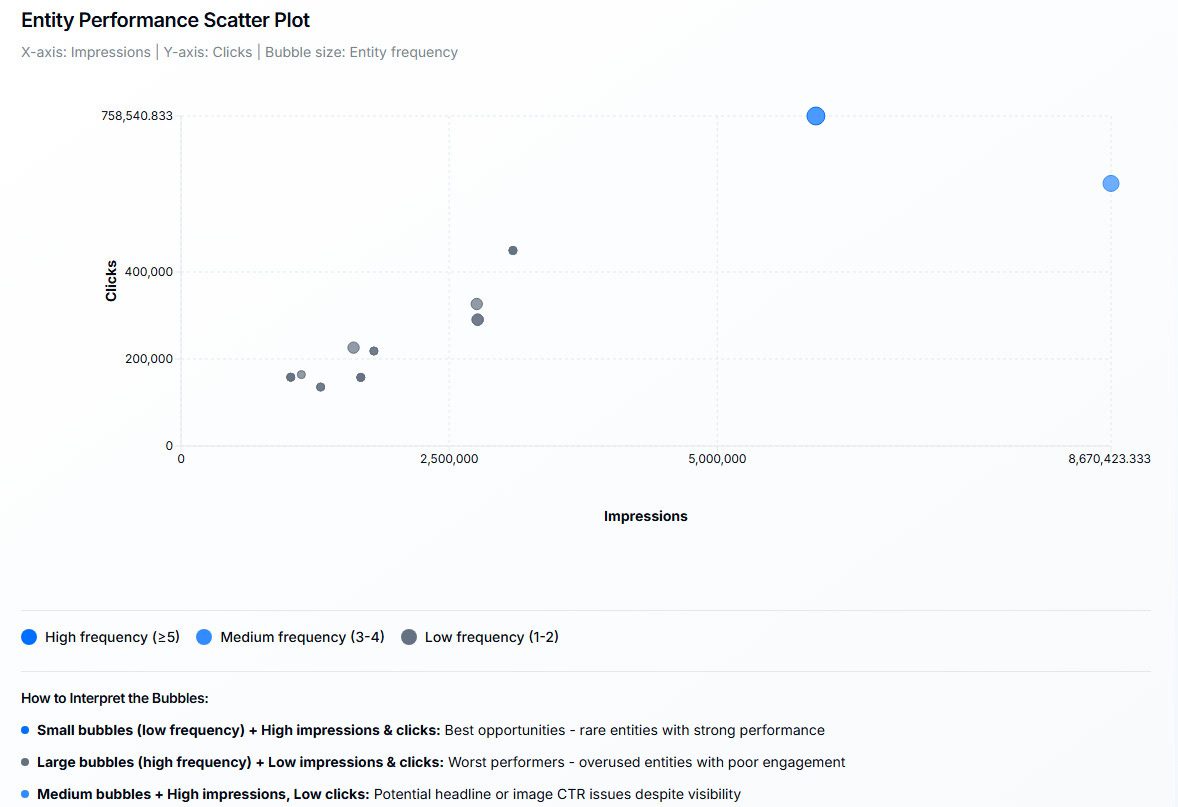
Bubble charts are a fantastic way of quickly visualizing opportunities for content, not just for Discover (Image Credit: Harry Clarkson-Bennett)
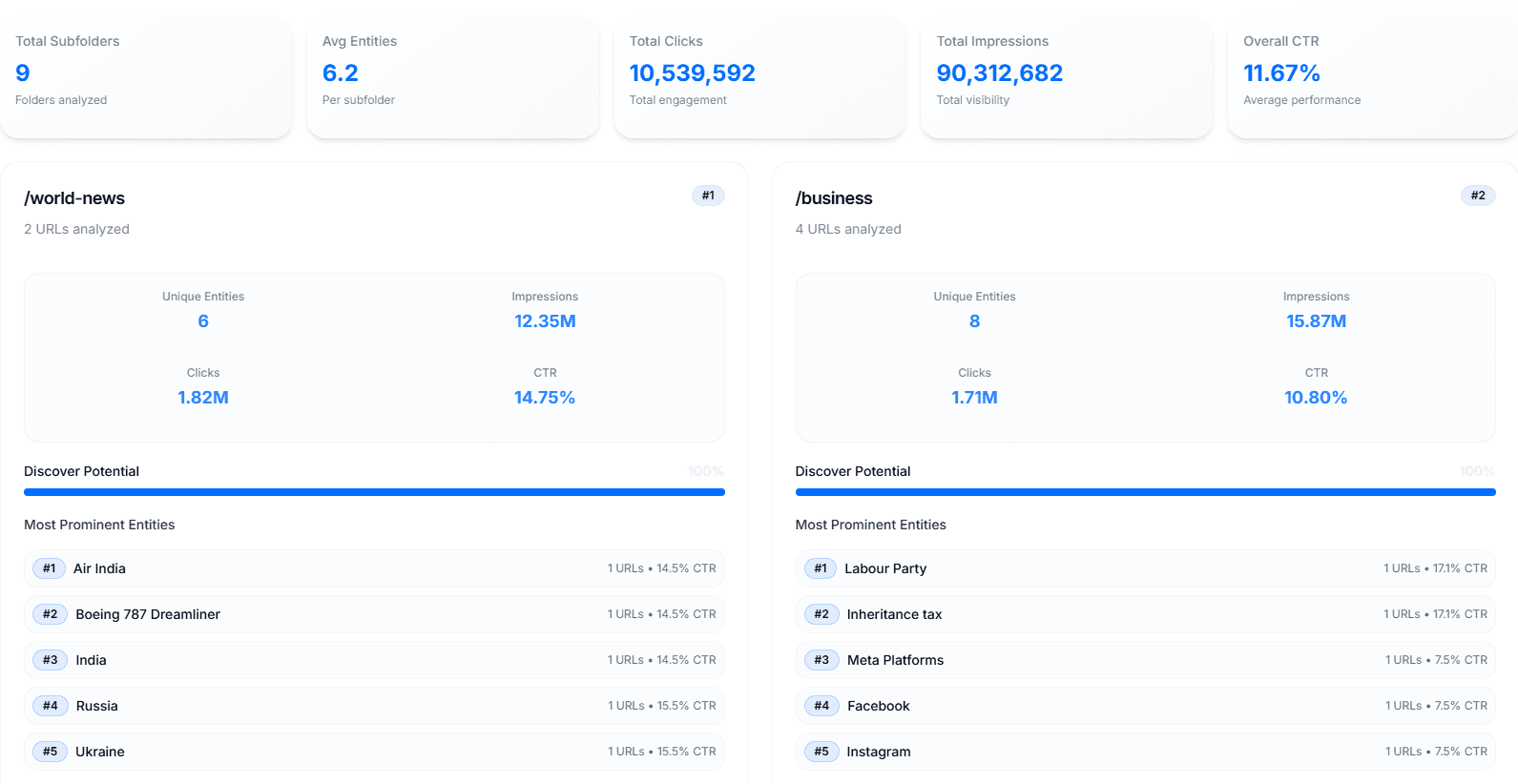
Subfolder
Relatively straightforward, but you want to know which subfolders tend to generate more impressions and clicks on average in Discover. This is particularly valuable if you work on larger sites with a lot of subfolders and high content production.
I like to break down entity performance at a subfolder level like so (Image Credit: Harry Clarkson-Bennett)
You want to make sure that everything you do maximizes value.
This becomes far more valuable when you combine this data with the type of headline and entities. If you begin to understand the type of headline (and content) that works for specific subfolders, you can help commissioners and writers make smarter decisions.
Subfolders that tend to perform better in Discover give individual articles a better chance of success.
Generate a list of all of your subfolders (or topics if your site isn’t setup particularly effectively) and tracking clicks, impressions and CTR over time. I’d use total clicks, impressions and CTR and an average per article as a starting point.
Authorship
Google tracks authorship in search. No ifs, no buts. The person who writes the content has significance when it comes to E-E-A-T, and good, reliable authorship makes a difference.
How much significance, I don’t know. And neither do you.
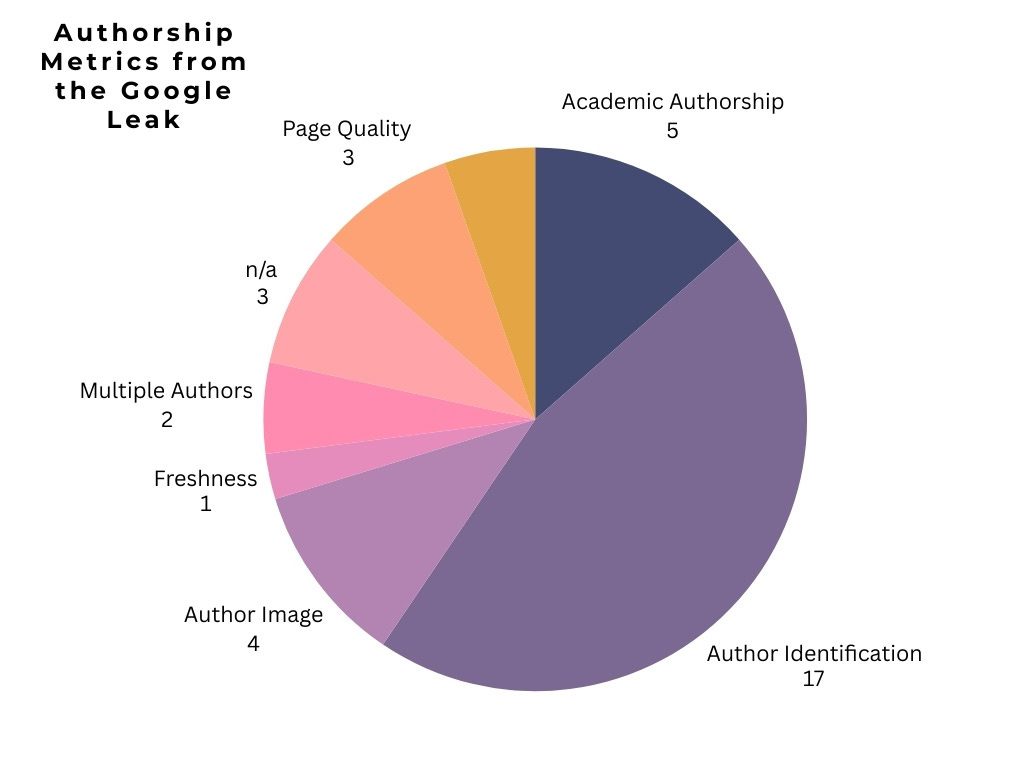
In breaking down all metrics from the leak that mention the word “author,” the below is how Google perceives and values authorship. As always, this is an imperfect science, but it’s interesting to note that of the 35 categories I reviewed, almost half are related just to identifying the author.
Not just who authored the article, but how clear is their online footprint (Image Credit: Harry Clarkson-Bennett)
Disambiguation is one of the most important components of modern-day search. Semantic SEO. Knowledge graphs. Structured data. E-E-A-T. A huge amount of this is designed to counter false documents, AI slop, and misinformation.
So, it’s really important for search (and Discover) that you provide undeniable clarity.
For Discover specifically, you should see authors through the prism of:
How many articles have they written that make it onto Discover (and that perform in Search)?
What topic/entities do they perform best with?
Ditto headline type.
Headline Type
This is a really good way of viewing the type of content that tends to perform for you. For example, you want to know whether curiosity gap headlines work well for you and whether headlines with numbers have a higher or lower CTR on average.
Do headlines with celebrities in the headline work well for you?
Does this differ by subfolder?
Do first-person headlines have a higher CTR in Money than in News?
These are all questions and hypotheses that you should be asking. Although you can’t scrape Discover directly (trust me, I’ve tried), you can hypothesize which H1, page title, and OG title is the clickiest.
The top headline is a list that piques my curiosity (although I’d add in a number here), and the bottom is more of a straight “how-to.” (Image Credit: Harry Clarkson-Bennett)
What’s interesting in this example is that “how-to” headlines are not portrayed as very Discover-friendly. But it’s the concept that sells it. It’s different.
Start by defining all the types of headlines you use – curiosity gap, localized, numbered lists, questions, how-to or utility type, emotional trigger, first person, et al. – and analyze how effective each one is.
Use a machine learning model (you can absolutely use ChatGPT’s API) to categorize each headline.
Train the model to identify place names, numbers, questions, and first-person style patterns.
Verify the quality of the categorization.
Break this down by subfolder, author, entity, or anything else you choose.
Worth noting that there are five different headlines you and Google can and should be using to determine how content is perceived. Discover is known to use the OG title more frequently than traditional search.
It’s an opportunity to create a “clickier” headline than you would typically use in the H1 or page title.
Images
Images fall into a similar category as headlines. They’re crucial. You can’t definitively prove which image gets pulled through into Discover. But as long as your featured image is 1200 px wide, it’s safe-ish to assume this is the one that’s used.
CTR is arguably the single biggest factor in determining early success. Continued success, I believe, is more Navboost-related – more traditional-ish engagement.
And CTR in Discover is determined by two things:
The headline.
The image.
Well, two things in your control. You could be pedantic and say, “Ooo, your brand is an important factor in CTR, actually. Psychologically, people always click on…”
And I’d tell you to bore off. We’re talking about an individual article. We’ve done a significant amount of image testing and know that in straight news, people like seeing people looking sad. They like real-ness.
In money, they like people looking at the camera, looking happy. It makes them feel safe in a financial decision.
People looking evocatively miserable, looking directly at the camera. Probably clickable, but you need to test (Image Credit: Harry Clarkson-Bennett)
Stupid, I know. But we’re not an intelligent race. Sure, there are a few outliers. Galileo. Einstein. Noel Edmonds. But the rest of us are just trying not to throw stuff at each other outside Yates’s on a Friday night.
It is actually why clickbait headlines have worked for years. It works until it doesn’t.
You’ll need to upload a set of images to help train the model, and please don’t take it as gospel. Check the outputs. For the basics – whether people are present, where they’re looking, color schemes, etc. – great. For more nuanced decisions like trustworthiness or emotional meaning, you’ll need to do that yourself.
Worth noting that lots of publishers trial badges and logos on images. And for good reason. Images with logos consistently click higher for larger brands (to the best of my knowledge), and if you’re a paywalled site, but have set live blogs to free, it’s worth telling people.
You should breakdown this image analysis into:
Human presence and gaze.
Facial expression.
Emotional resonance.
Composition and framing.
Colour schemes.
Photo-type.
Then you can use machine learning to bucket photos into groups to help determine CTR. For example, people directly looking at a camera + smiling could be one bucket. Not looking at a camera + scowling.
Publishing Performance
The more you publish, the more this matters.
Large newsrooms run analysis on publishing volumes, times, and content freshness fairly consistently and at a desk-level. If you only have 50 or fewer articles per month making it into Discover, you probably don’t need to do this.
But if we’re talking about hundreds or thousands of articles, these insights can be really useful to commissioners.
I would focus on:
Publishing days.
Publishing times.
Content freshness.
Republishing vs. publishing.
Breaking things down at a subfolder level is always crucial (Image Credit: Harry Clarkson-Bennett)Day of the week data is always useful for larger publishers to get the most value out of their publishing (Image Credit: Harry Clarkson-Bennett)Image Credit: Harry Clarkson-Bennett
Your output should give really clear guidance to desks, commissioners, and publishers around when is best to publish for peak Discover performance.
We never make direct recommendations solely for Discover for a number of reasons. Discover is a highly volatile platform and one that does reward nonsense. It can lead you down the garden path with all sorts of thin, curiousity gap style content if you just follow the numbers.
And it has limited direct impact on your bottom line.
How Do You Tie This All Together?
You need a clear set of goals. Goals that help you deliver analysis that directly impacts the value of your content in Discover. When you set your analysis, focus on elements you have more control over.
For example, you might not be able to control what commissioners choose to publish, but you can change the headline (H1, title, and/or OG) and image prior to publish.
Set a clear goal around conversions and traffic.
Understand what you have more control over.
Deliver insights at a desk or subfolder level.
Understanding whether your role is more strategic or tactical is crucial. Strategic roles are more advisory in nature. You can offer some thoughts and advice on the type of headlines and entities to avoid or choose, but you may not be able to change them.
Tactical roles mean you have more say in the implementation of change. Headlines, publish times, entity targeting, etc.