OpenAI has quietly added Shopify as a third-party search partner to help power their shopping search, which shows shopping-rich results. The addition of Shopify was not formally announced, but quietly tucked into OpenAI ChatGPT search documentation.
Shopify Is An OpenAI Search Partner
Aleyda Solís (LinkedIn profile) recently noticed that OpenAI had updated their Search documentation to add Shopify to the list of third party search providers.
“Ecommerce sites: I’ve found that Shopify is listed along with Bing as a ChatGPT third-party search provider! OpenAI added Shopify along with Bing as a third-party search provider in their ChatGPT Search documentation on May 15, 2025; a couple of weeks after their enhanced shopping experience was announced on April 28.”
OpenAI Is Showing Merchants From Multiple Platforms
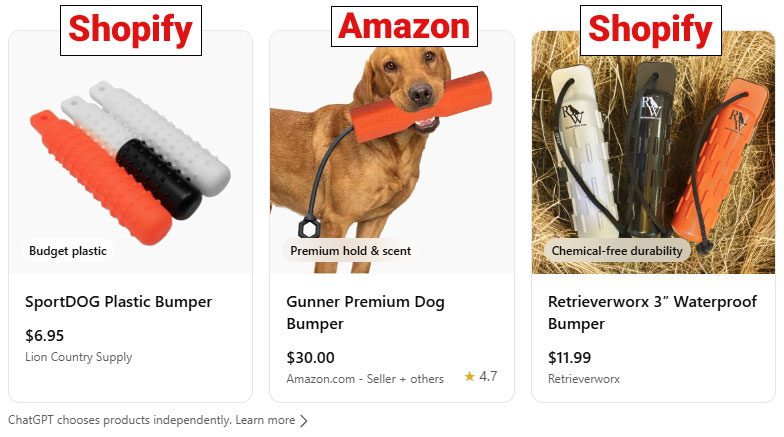
OpenAI shopping search is returning results from a variety of platforms. For example, a search for hunting dog supplies returns sites hosted on Shopify but also Turbify (formerly Yahoo Stores)
Screenshot Showing Origin Of OpenAI Shopping Rich Results
The rich results with images were sourced from Shopify and Amazon merchants for this specific query.
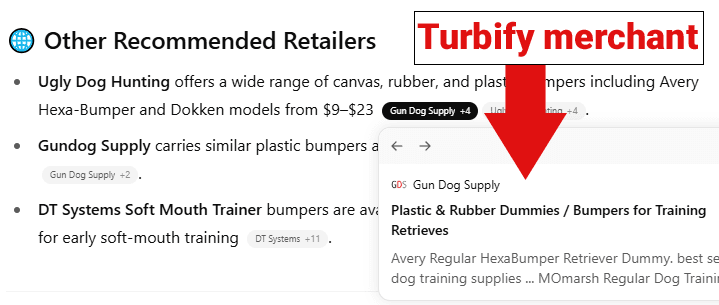
At least one of the shopping results listed in the Recommended Sellers is a merchant hosted on the Turbify ecommerce platform:
Screenshot Of OpenAI Recommended Retailers With Gun Dog Supply, Hosted On Turbify Platform
OpenAI Shopping Features
OpenAI recently rolled out shopping features for ChatGPT Search. Products are listed like search results and sometimes as rich results with images and other shopping related information like review stars.
ChatGPT Search uses images and structured metadata related to prices and product description, presumably Schema structured data although it’s not explicitly stated. ChatGPT may generate product titles, descriptions, and reviews based on the data received from third-party websites and sometimes may generate summarized reviews.
Merchants are ranked according to how the merchant data is received from third-party data providers, which at this point includes Bing and Shopify.
Ecommerce stores that aren’t on Shopify can apply to have their products included in OpenAI’s shopping results. Stores that want to opt in must not be opted out of OpenAI’s web crawler, OAI-SearchBot .
Anyone with experience selling on Amazon will tell you that the most important part of your business is making sure that you stay in stock.
Inventory stockouts not only lose the incremental sales, but also impact your organic rankings and diminish your advertising efforts.
Managing inventory levels has become more complex as Amazon has rolled out several programs that penalize sellers for both holding too much and too little inventory.
Mismanagement of inventory levels can also influence your capacity limits, directly impacting the amount of inventory that Amazon will allow you to send into the Fulfillment by Amazon (FBA) program.
There are also fees for excess or low inventory that can hurt your bottom line as a business owner.
There are specific tips and tactics for determining and maintaining your ideal inventory levels on FBA, which include understanding:
Capacity Limits & Inventory Performance Index (IPI).
Storage Fees.
Low Inventory Fees.
Placement Fees.
Capacity Limits And IPI Scores
Inventory Performance Index
This is the primary metric that Amazon uses to determine how well you control your inventory levels over time.
This directly impacts what Amazon will allow you for FBA capacity limits. Meaning, if your score is low, Amazon may limit the amount of inventory you are allowed to store at FBA warehouses.
This metric is a 12-week rolling average, and it factors in four main components to calculate your score: Excess Inventory %, Stranded Inventory %, Sell-Through Rate, and In-Stock Rate.
Excess Inventory
Amazon considers an item to have excess inventory “if it has over 90 days of supply based on the forecasted demand.”
Excess inventory percentages help sellers plan when to restock or remove inventory from FBA.
This is one of the most critical factors influencing IPI as it measures where a seller’s profitability may take a hit due to storage fees and holding costs for slow-moving FBA inventory.
Stranded Inventory
This component refers to products unavailable for sale due to listing issues.
It occurs when your listing doesn’t meet Amazon guidelines, pending compliance or hazmat issues, or when a listing error prevents the listing from showing as active.
In these instances, your products become stranded and unable to move while incurring FBA storage fees.
Sell-Through Rate
Amazon calculates sell-through as “units shipped over the past 90 days divided by the average number of units on hand in their fulfillment centers during that time period.”
This is a key component to utilize when forecasting how much inventory should be in FBA at all times.
Sell-through will be your guide to a balanced inventory, avoiding stockouts, and preventing excessive fees.
In-Stock Rate
Amazon looks at the percentage of time your products have been in stock during the past 30 days, with additional weight given to items that have sold more units over the past 60 days.
If you maintain a high in-stock rate, it will result in fewer lost sales.
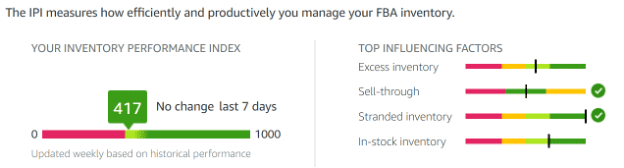
Amazon uses the IPI score to grade how effectively you manage your FBA inventory utilization. (Screenshot from Amazon, April 2025)
How does your IPI score impact your available storage volume?
Amazon dictates your storage capacity limits based on your IPI score and sales performance, so maintaining healthy inventory levels will improve your overall account standing.
Total Capacity Limit
This refers to the amount of inventory you can ship to Amazon’s FBA warehouses and the overall maximum number of units you can store at Amazon’s fulfillment centers at any particular time.
Capacity limits are reviewed and adjusted monthly. Any changes for the next month will be announced on the third Monday.
Accounts active for less than 39 weeks are not subject to these restrictions, as Amazon will use this period to determine how much capacity your FBA business needs as you grow.
It is important to note that this is only true for those accounts on the Professional Seller Plan; those with the Individual Seller Plan are limited to 15 cubic feet per month.
Your total storage usage includes all the units currently stored at Amazon, any units in route, and all shipments, including those that have been prepared but not yet sent to Amazon.
Available Inventory: Sellable items stored in fulfillment centers and ready to be shipped to customers.
Inbound Units: Inventory shipped but not yet received at an Amazon fulfillment center.
Reserved Units: Units tied to pending customer shipments; items in transit between fulfillment centers after initial receipt. Units undergoing review, investigation, or are currently in the receiving process before being made available for sale.
Unfulfillable Inventory: Items marked unsellable due to damage, customer returns deemed unsellable, or expired/defective inventory.
What Can Sellers Do To Improve Their IPI score?
You can’t improve what you can’t track, so the first step is always to monitor your inventory metrics.
You can find your IPI and capacity limits by going to the Seller Central top-left menu > Inventory > FBA Inventory. On the next screen, click on Inventory > Inventory Performance.
Your IPI score will be displayed at the top left of the page. Below, you can see a breakdown of the four main elements of IPI.
Your storage capacity will be listed at the bottom of the page, under the small gray box labeled “Capacity Monitor.”
You can view your Inventory Performance Index through this path on Amazon. (Screenshot from Amazon, April 2025)
Improving Your IPI
IPI Score on Amazon. In the bottom middle, you see the Capacity Monitor. (Screenshot from Amazon, April 2025)
Increasing your IPI score on Amazon can take two to 12 weeks, so planning with enough time is essential to success.
If your IPI is below the 400 limit that Amazon requires, you need to start taking aggressive action today.
It is important to highlight that Amazon’s system does not weigh each influencing factor equally when determining your IPI score.
Excess inventory and sell-through rate are the parameters that have the most significant impact on IPI.
In contrast, stranded inventory and restock rates can play a minor role in the overall score.
You will get more traction by prioritizing the first two components rather than spreading your efforts equally across all four elements.
The minimum threshold for a healthy IPI is a score of 400. However, Amazon can increase or decrease the minimum IPI at any time.
For example, during the height of the pandemic, Amazon changed the minimum IPI to 500, but it has been reduced back to 400 since then.
For this reason, we advise our clients to aim for a total IPI of at least 50 points over the current IPI requirement.
Some product mixes make maintaining a high IPI easier than others. For example, suppose you are a small brand with few products that move consistently. In that case, your IPI will generally tend to be higher.
Recommended Actions To Improve IPI
Excess Inventory
Remove slow-moving items; excess inventory is generally one of the top two reasons your IPI score could be low.
Screenshot from Amazon, April 2025
The first step to addressing excess inventory is to pull back inventory you don’t expect to sell.
Focus on SKUs that have gone out of fashion or merchandise experiencing a significant demand drop, like seasonal products.
If you don’t expect to sell a product within three months, you should pull back the inventory to sell on a different channel by creating a removal order.
Run the numbers and consider promotions on low-selling SKUs; sometimes it makes more sense to discount and/or advertise certain products to help them sell faster rather than recalling inventory from Amazon.
While Amazon is great at logistics and moving items through its process, it isn’t great at returning items to sellers. If possible, we want to proactively take action to avoid pulling back inventory and risking damage.
Remember, you may need to create a case with Seller Support to claim reimbursement for damaged or lost units that were part of a removal order.
Optimizing a listing that is not moving can also help increase the sell-through rate.
Evaluate your detail pages and look for opportunities to optimize. Review your reviews and returns and address them in your bullet points, images, and A+ to increase conversions and sell-through rate.
Sell-Through Rate
Prioritize sending fast-moving items to FBA. Amazon looks at this to identify whether the items you’re selling are things customers want to purchase.
The way that we improve the sell-through rate is to send in small shipments of items that will sell out very quickly.
Suppose you’re currently using LTL (Less Than Truckload) or FTL (Full Truckload). In that case, we recommend moving to small parcel shipments during this process to send more frequent shipments without going out of stock for long periods.
As you’re restocking items, you want to prioritize those that will move quickly, sending small quantities of items that will sell out as soon as they arrive or shortly after.
This increases your overall sell-through rate and significantly impacts your overall IPI.
It is vital that, no matter how fast you think a product will move through as you send these products in, you’re testing small batches to make sure that things will sell at the pace you anticipate.
Stranded Inventory
Inventory held in FBA warehouses and unavailable for sale affects your overall IPI.
Fixing stranded inventory can make a slight difference. However, if you need to move your IPI significantly, this component will not make a considerable difference.
It would be best to address stranded inventory weekly or bi-weekly, depending on your general sell-through rate.
In-Stock Rate
This is probably the most frustrating metric of the IPI because Amazon tells you that you can’t restock items because they’re not selling fast enough.
At the same time, it’s trying to encourage you to ensure you stay in stock.
We have found that this metric is given very little weight, and you’re better off focusing on the two key metrics: excess inventory and sell-through rate.
As you work to increase your overall IPI, it is essential to remember that it can take several weeks to improve.
You must give the IPI enough time to move before determining whether your actions are making a difference. It can be tempting to check your IPI often. However, your IPI score is only recalculated once a week.
Suppose you need to raise your IPI quickly or by a significant amount. In that case, you may need to take overly aggressive actions in pruning your inventory and pumping fast-moving items through your account to increase your score to the required amount.
If you have to bid for a capacity increase, you should only do this if you have the data to support being able to sell through that higher quantity of items, so you do not incur extra fees.
Additional Options To Combat Low IPI And Storage Capacity Issues
Some brands we work with have focused on selling their fastest-moving SKUs.
At the same time, they utilize third-party sellers to carry their slower-moving items while they work on increasing their averages.
We have several reliable third-party resellers to whom we can refer our clients if it’s ever an issue.
Suppose you don’t want to utilize third-party sellers. In that case, the alternative is to increase your total number of Merchant Fulfilled offerings.
Remember, Merchant Fulfilled offerings generally don’t compete well against FBA offers, so watch your competition to determine feasibility.
Another step you can take is to allocate your FBA warehouse space to items with the highest margin and smallest dimensional size, as they are highly profitable and sell quickly.
Leaving items with lower profitability or moving slower through Merchant Fulfilled (MF).
Expanding Capacity Limits
Suppose you’re currently experiencing a capacity limit. In that case, Amazon can increase your capacity limit for a specific period of time by submitting a request, subject to Amazon’s approval.
It is important to remember that if the storage limit increase request gets approved, your account is subject to paying a “reservation fee” for each cubic foot of capacity requested, and it will be charged at the end of the specified period.
This fee is subject to a credit depending on your sales achieved during the period (performance credits are earned at $0.15 for every dollar of sales you generate using the additional capacity).
Inventory Stock-Based Fees
As margins are tighter than ever, understanding how Amazon fees are calculated is crucial to profitably planning inventory levels on the marketplace.
When inventory levels are managed effectively, these fees usually make up a very small percentage of the costs to sell on Amazon.
However, when too much or too little inventory is sent, these fees can skyrocket.
Storage Fees
Amazon wants inventory turned in four to six weeks on average.
When sellers send in too much inventory, it can take up valuable space in the FBA warehouse. Amazon first started to combat this with storage fees.
The storage fees [gated link] are made up of the “Base Monthly Storage Fee” and the “Storage Utilization Fee” (formerly known as the Long Term Storage Fee).
Base Monthly Storage Fee
This fee is charged for all inventory at the fulfillment centers. It is calculated by the cubic foot at the ASIN level. The cost of the fee is variable by:
Time of Year.
Size Tier of the ASIN.
Hazmat Status (Dangerous Goods Program).
Exempted Status (new sellers, sellers with less than 25 cubic feet of storage, and SKUs in the FBA New Selection program).
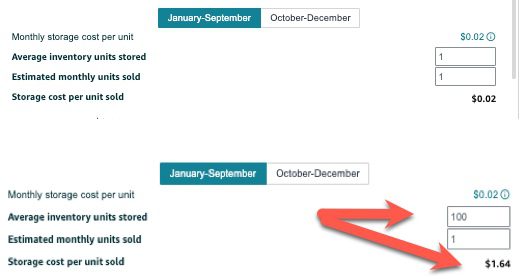
Amazon now shows you the estimated storage fees in their FBA revenue calculator. You can see that the longer you plan to store inventory, the more expensive storage becomes. (Screenshot from Amazon, April 2025)
Storage Utilization Fee
For items that are at the FBA warehouses aged over 30 days, you are charged a storage utilization fee that is calculated by the number of units aged over 30 days by the size of the item in cubic feet, at a fee that is determined by:
Size Tier.
Storage Utilization Ratio.
Hazmat Status (Dangerous Goods Program).
Exempted Status (new sellers, sellers with less than 25 cubic feet of storage, and SKUs in the FBA New Selection program).
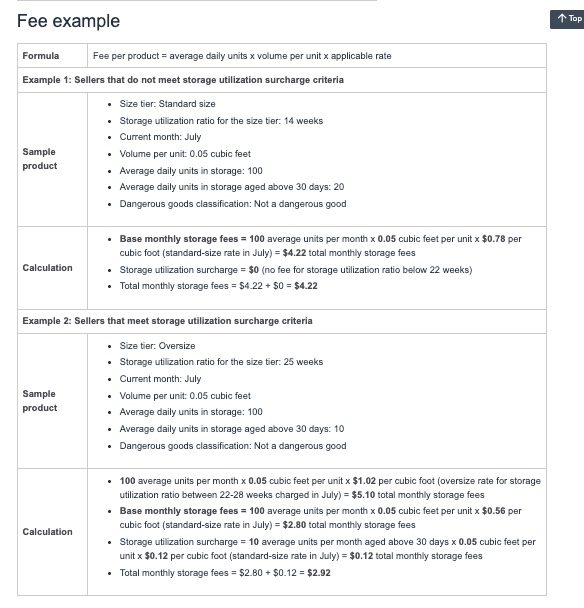
Here is an example of fees provided by Amazon for a total of 100 units on one ASIN:
When inventory is managed to have an average of four to six weeks, the storage fees are usually much less than those of traditional 3PL warehouses.
As Amazon implemented these policies (as well as the IPI/Capacity policies below), sellers started to focus on maintaining as little inventory on Amazon as possible.
This meant that Amazon started to see products out of stock more often. To combat this, Amazon instituted a new fee called the “Low Inventory Level Fee.”
Screenshot from Amazon Seller Central Support, giving an example of storage fees (April 2025).
The longer the inventory is at Amazon, the more you will be charged per cubic foot for excess inventory fees.
Low Inventory Level Fee
The low inventory fee [gated link] is designed to ensure that Amazon has popular products in stock, ready for customers to buy.
These fees are rarely applied as long as inventory levels are managed to that four to six weeks mark. However, you need to understand how they work, especially if you have high-velocity items at Amazon.
If Amazon sees that you have less than 28 days of inventory available based on both your sales velocity over the last 30 and 90 days, they will charge a per-unit fee for each item you sell on Amazon FBA. This fee is assessed on a weekly level.
Fast-moving items can get very expensive. This means it is just as important to have adequate inventory at Amazon as it is to avoid overstocking.
Calculating Inventory Needs
As we work with our clients for inventory restock recommendations, we look at the sell-through rate at the 30- and 90-day sales velocity and cross-reference that with previous year’s sales on Amazon.
We also look for events in previous years, such as stockouts, significant external factors like being featured on TV or having a large influencer, and occasionally external factors like weather temperatures for seasonal items.
Excess inventory should be called back, disposed of, or pushed with ads/promotions to keep inventory levels healthy.
From Amazon’s perspective, it wants to ensure that customers have favorable shopping experiences and quickly get the products they want. This means ensuring that the products most likely to be sold are available.
Amazon looks at how you have managed inventory in the past and whether customers are purchasing your products to determine how much space is allocated to you.
The better Amazon feels you are at managing your space at Amazon’s FBA warehouses, the more storage space you will be allowed.
Monitoring Inventory Matters
To succeed on the platform, you must take an active role in your Amazon inventory management.
In prior years, simply avoiding restocks was enough. However, these new requirements require a greater focus on monitoring your sell-through rate and storage utilization on Amazon.
More Resources:
Featured Image: PeopleImages.com – Yuri A/Shutterstock
WordPress is a popular choice when it comes to building ecommerce websites. Currently, over 4 million live stores are powered by WooCommerce, which runs on the WordPress platform.
The platform offers countless benefits for online sellers. So, it’s easy to see why so many ecommerce merchants choose WordPress for their business.
But, is it really the best choice for your business?
Let’s review some of WordPress’s pros and cons before making that decision.
WordPress For Ecommerce
Many big brand, successful ecommerce websites run on WordPress. But, should you trust WordPress’s capabilities to run an online store?
WordPress has some very obvious benefits for ecommerce sellers, but that’s not to say there are no downsides. You have to keep both the benefits and the downsides in mind before deciding whether or not you want to move forward with WordPress.
The Benefits
WordPress has a tight-knit, supportive community and lots of help available for whoever needs it.
The platform also empowers its users with powerful performance-tracking insights and optimization opportunities, which are not the only benefits of using WordPress for ecommerce.
There are more:
No Transaction Costs
If you are building an ecommerce store, you will be making some transactions on the website.
Some website builders and ecommerce platforms keep a percentage of every transaction that happens on the website as a fee. WordPress does not do that.
When using WordPress, you only have to pay the payment processing fee to your payment gateway provider. The website builder won’t charge anything.
This may make selling online using WordPress more cost-effective, especially for smaller businesses.
Besides that, WordPress also integrates seamlessly with numerous payment gateways apart from the most popular ones. You can use PayPal and Stripe, but WordPress also supports other, less popular, regional payment gateways.
WordPress Is Free
There’s no monthly subscription involved when it comes to WordPress.
You have to pay for the hosting, domain, and added functionality, but getting started is free.
This is unlike other platforms, which have a flat fee that you have to pay upfront before you can even get a feel for the platform.
Enhanced Customization
Your website needs to be visually appealing and stand out from the crowd. This will help you reinforce your unique brand identity and deliver a more memorable experience.
Unfortunately, many ecommerce platforms offer cookie-cutter websites that have the same layout and visual look and feel. This can make it harder for your brand to stand out and be unique.
WordPress, however, has thousands of themes that allow you to customize your site according to your business’s unique personality.
When you build a WordPress website, you also get access to the source code. This enables you to take your customization beyond simply adjusting the theme and transform every aspect of the website. The only requirement: development expertise.
WordPress also has thousands and thousands of plugins. These plugins can help you not just customize your website however you want, but also offer functionality that boosts the experience your business delivers online.
Website Ownership
Lots of hard work and resources have gone into launching your ecommerce store. You want to keep it under your ownership and wish to reserve the right to move it whenever you want to.
With WordPress, this is possible.
You have complete ownership of the website you build using WordPress. This includes the website content, as well as all its data and files, and you can use them as you please.
Flexibility In Hosting Options
Many popular ecommerce platforms provide managed hosting, which is great, but it can get problematic when your business grows or your priorities and goals evolve.
WordPress offers hosting as well, but it also allows you to buy hosting from third-party providers, so you can host your website wherever you want.
This flexibility in hosting options allows you to switch hosting providers as your business grows.
Not being tied to one hosting provider also allows you to take your website elsewhere if performance drops because of server issues on the host’s side.
Scalability
Your ecommerce business will eventually grow. It will attract more traffic and you’ll make more sales, so you need a website that can grow with you and support your plans.
With numerous plugins and hosting flexibility, WordPress offers the scalability you need when running a fast-growing business.
SEO-Friendly
About 33% of all traffic to ecommerce websites comes from organic searches. You know what this means: You cannot skip SEO when optimizing your website.
As amazing as your SEO strategy may be, it needs your ecommerce platforms support it.
The good thing about WordPress is that it has features and plugins to support your SEO efforts and boost its outcomes.
Marketing Integrations
SEO is just one part of your marketing strategy. There are other tactics you need to implement to maintain your growth trajectory.
WordPress supports numerous marketing integrations to help your email and social media marketing efforts.
It also has plugins for customer engagement and social proof to make sure your ecommerce store has everything it needs to generate value.
The Downsides
As amazing as WordPress may be for ecommerce, it has some downsides that you need to know before deciding whether you want to use it for your ecommerce store.
WordPress Is Not Very User-Friendly
Getting started on WordPress is free. It may be simple, too. However, running a successful ecommerce store on WordPress requires technical expertise.
There’s a learning curve involved in doing anything more than logging into WordPress to get started.
Support is available, and you can easily access hundreds of tutorials and help blogs, but learning to build a WordPress website from scratch with online tutorials requires time and effort.
Needs Regular Updates
WordPress’s core software, as well as the plugins, all get frequent updates. In most cases, you have to install these updates manually to make sure your website is up-to-date.
Failing to follow these updates can make your website more vulnerable to threats and increase the risk of it getting hacked or ransomed.
If you own or manage a WordPress website, you will have to spend time tracking all these updates and installing them promptly to avoid the risk of exploitation.
Securing The Website Is Your Responsibility
WordPress’s popularity and the large number of themes and plugins an average website uses make WordPress websites more vulnerable to security breaches.
While WordPress has a security team that constantly checks for security vulnerabilities in the core software and releases patches and updates, you have to install these updates on time to secure your website and avoid the risk of hacking.
Nearly 70% of WordPress websites run the latest version of the software, so 30% are at risk of vulnerabilities.
Manually tracking updates all the time and installing them is labor-intensive. That is why many business owners fall short and end up running a website that is more at risk of an attack.
Plugins Can Create Problems
WordPress plugins help you customize your website and offer enhanced functionalities, but they also have their own set of problems.
For one, installing too many plugins can bloat the code of your website and slow it down. In the ecommerce world, every second that your website fails to load properly means missed business.
Second, just like the core software, plugins also get security patches and updates that need to be installed.
Falling short on this end can lead to plugins introducing backdoor pathways into your website that malicious actors can exploit.
Even if you are all caught up on the updates, the plugins, unless thoroughly vetted before download, can be sketchy and make your website more vulnerable to attacks.
Plugins were responsible for 97% of all new security vulnerabilities in WordPress websites.
WordPress Is Not An Ecommerce Platform
WordPress is a content management system. It can support ecommerce websites, but it is not built to do that.
Other ecommerce platforms like Shopify and BigCommerce are built to help you sell online.
This is why WordPress may have some limitations when it comes to ecommerce, especially if compared with other big ecommerce players.
That’s not to say WordPress can’t do ecommerce. It can. You’ll just have to research and add a variety of plugins and manage the website well to maximize your chances of success.
WordPress Vs. Shopify And BigCommerce
Shopify and BigCommerce are also popular choices for building ecommerce websites.
How does WordPress fare against them? Is it better? Is it worse?
The truth is Shopify and BigCommerce are both managed platforms. They are designed to help people with no coding knowledge build and launch their ecommerce websites easily.
This is why, while WordPress may have a learning curve, Shopify and BigCommerce are both more user-friendly and easier to use.
However, WordPress still leads in customization and flexibility. Shopify and BigCommerce both have themes and apps with upgraded functionality and visual appeal, but they are limited compared to WordPress.
Final Word
WordPress has all that you need to build an ecommerce store. It supports payment gateways, has no transaction fee, and offers many plugins, but all of these benefits come with some downsides.
Managing a WordPress website can be time-consuming. There may be a learning curve involved, and if you slack on updates, your website may develop security vulnerabilities.
So, the choice between WordPress and some other managed ecommerce platform comes down to your business, goals, and priorities.
If you have the technical expertise and resources to dedicate to managing, maintaining, and updating a WordPress site, it may be a good option for you.
If you want a platform that makes building and running an ecommerce platform a breeze, you may want to look into other options.
Google is changing its Merchant Center rules. These updates will roll out in two phases and affect how sellers list products in Shopping ads and free listings.
The changes impact instalment pricing, energy labels, member pricing, and US sales tax information.
Immediate Changes (Starting April 8)
Three key changes are now in effect:
1. New Instalment Pricing Rules
Google no longer allows the [price] attribute to be used for deposits on installment products.
Sellers must use the [downpayment] sub-attribute within the [installment] attribute. The [price] attribute must show what customers pay when paying in full upfront.
2. Updated Energy Labels:
For EU countries, Google replaced the energy efficiency class attributes with the broader [certification] attribute.
This supports both new and old EU energy labels. Norway, Switzerland, and the UK still use the original energy attributes.
3. Better Delivery Options:
Google added more delivery details at the product level. New attributes include [carrier_shipping] and options to specify business days for handling and transit. These help show more accurate delivery times in ads and listings.
Changes Starting July 1
More changes are coming on July 1:
Member Pricing Updates
Google will stop allowing member prices in the regular [price] or [sale_price] attributes. This applies worldwide for both paid and free membership programs.
Instead, use the [loyalty_program] attribute. Products that don’t follow this rule might be disapproved after July 1.
No More US Sales Tax Requirements
Google will stop requiring US sellers to provide sales tax information through the [tax] and [tax_category] attributes or Merchant Center settings.
Products previously rejected for missing tax information may start appearing in results, which could affect your ad spending.
Google notes that US sellers must still submit tax information until July 1.
What These Changes Mean for Sellers
These updates will require changes to how you structure product data.
If you offer payment plans, the new rules clarify how to show full payment versus installment options. This helps shoppers understand pricing better.
The energy label changes for EU countries match current regulations and give more options for showing graphical labels.
The member pricing change will affect many retailers. You must use the loyalty program attribute instead of regular price fields if you offer loyalty discounts.
Once the sales tax requirement ends, US sellers will benefit from simpler feeds, which may fix some common disapproval issues.
Getting Your Merchant Center Ready
To keep your listings working well:
Check your feeds for any outdated attributes
Update installment pricing right away
EU sellers: switch to the new certification attribute for energy labels
Change how you handle loyalty pricing before July 1
Watch for improved performance of listings that were previously disapproved for tax issues
Google notes:
“With this change, offers currently disapproved for missing tax information may begin to receive traffic.”
By adapting to these changes early, you can avoid disruptions to your Shopping ads and listings while benefiting from better product data and delivery information.
Wix announced Automations, a new automation builder that enables businesses to create and manage custom actions, like sending emails based on customer activity. Users are able to create these automations with an easy-to-use visual interface and track their performance from a dashboard.
Wix Automations Is Powerful But Easy To Use
There are four key features:
Intuitive Automation Design Simplifies the process of creating advanced automations.
Advanced Customization Supports conditions and formulas for creating highly customizable automations.
Centralized Automation Management Users can track key metrics, adjust settings in real time, and manage all automations, no matter which apps they’re connected to.
Email Automation Insights Provides detailed reporting on email success rates and engagement which enables businesses to fine-tune their email messaging.
The new Automations feature integrates with Wix Services, so businesses can use customer data to set up personalized automations like custom discounts based on what customers buy.
A user-friendly interface makes it easy to click and build advanced automations based on site visitor actions. Wix Automations supports conditions and formulas for creating customizable automations. What makes Wix Automations powerful is that these features enables users to easily set up complex, multi-step actions.
For example, a customer purchase can be the trigger to check a condition, such as whether the total is over $50. If the condition is met, a formula calculates a 10% discount, and the automation sends the customer an email with a discount code for a future purchase.
According to the press release:
“The builder’s clear and intuitive design makes it easier than ever to build and manage automations, significantly improving efficiency by streamlining and automating tasks and, ultimately, enhancing overall user experience.
With the addition of conditions and formulas, the automations builder now allows users to create more accurate, highly tailored workflows that adapt to their business needs allowing businesses to operate more smoothly and effectively.”
Google has launched its Vision Match feature for all mobile users in the United States, following a successful test run in Google Labs.
This tool solves an everyday challenge for shoppers: turning a specific idea into products that can be purchased.
Google research indicates that more than half of shoppers have difficulty finding particular clothing items when they know what they want.
The Vision Match feature allows users to describe a clothing item in natural language. It then uses AI to generate an image and find similar products.
Screenshot from: blog.google/products/shopping/ai-vision-match-ar-beauty-virtual-try-on/, March 2025.
You can access this feature by searching for a garment and scrolling to the “Can’t find it? Create it” prompt.
Alternatively, navigate to the “Create & shop” option in the Shopping tab’s left panel.
New AR Tools Leverage Gemini AI Models
Google is enhancing its augmented reality beauty features with Gemini AI models.
US shoppers can now virtually try on complete makeup looks inspired by celebrities, influencers, and beauty trends rather than testing individual products.
This allows consumers to search for terms like “spring makeup” or specific celebrity looks and see how multiple makeup products appear on their faces.
According to Google’s research, more than half of Americans who use makeup actively seek online inspiration.
Users can access this feature by tapping “See the looks on you” when browsing relevant search results, followed by “Try it on” to initiate the virtual experience.
Virtual Try-On Expands
Google has expanded its virtual try-on feature to include pants and skirts from hundreds of brands. The enhancement allows shoppers to visualize how these garments look on diverse body types, from XXS to XXL.
Screenshot from: blog.google/products/shopping/ai-vision-match-ar-beauty-virtual-try-on/, March 2025.
Google updated its machine learning models to generate complete looks, when previously they were limited to generating tops only. Shoppers can access this feature by looking for items with a “try on” badge in Google Search or the Shopping tab on mobile and desktop platforms.
Looking Ahead
The announcements come as competition in the visual search and virtual try-on space intensifies.
According to Google’s internal data, over a billion shopping interactions occur on Google daily. These tools aim to help consumers make more confident purchasing decisions.
Featured Image: Screenshot from: blog.google/products/shopping/ai-vision-match-ar-beauty-virtual-try-on/, March 2025.
In this edition of Ask An SEO, we’re addressing a question about the impact of AI Overviews on search engine results pages, particularly for ecommerce store owners looking to stay competitive:
“Do you think that AI Overviews or AI will disrupt SERPs with Google PLAs? And, as someone with a small ecommerce store selling clothing, what can I do to keep ahead with the introduction of gen AI apps?”
That’s a great question! It’s an issue many ecommerce site owners have been grappling with since AI Overviews started rolling out last May.
The big concern is that Google’s generative AI summaries – which appear right at the top of the SERPs – will eat into your traffic.
If people can get answers to their questions without visiting your website, this could lead to a steep decline in customers.
However, while this new trend might at first seem worrying, I don’t think the level of disruption will be as big as it first appears, particularly for ecommerce stores. AI Overviews might also present opportunities to climb up the rankings, too.
Do note that the picture is a bit less clear with the likes of ChatGPT or Microsoft’s Copilot – these apps don’t yet provide links to sources in their answers, but they also aren’t used for search anywhere near as much as Google.
Will AI Disrupt SERPs With Google PLAs?
Generative AI is clearly one of the most disruptive technologies to emerge in years, and there are almost daily breakthroughs.
So, I’ve tried to answer the questions raised, but there’s obviously a big caveat: Things are changing fast, and we can’t make any predictions with certainty.
But to respond to the first part of the question about whether AI will disrupt SERPs, my instinct would be: “Not that much (probably!).”
First things first, research from BrightEdge (as reported in Search Engine Journal in November) found that AI Overviews are becoming more stable and aligning more closely with organic search results.
The citation links that appear alongside AI Overviews increasingly show links to websites that also appear in the top 10 results.
For example, if you were searching [how long to bake a loaf of bread], AI Overviews would typically synthesize answers from baking websites that already appear on page one.
As well as listing the websites in the SERP, AI Overviews will provide links to those pages in the “citation” area, too.
Screenshot from search for [how long to bake a loaf of bread], Google, February 2025
The appearance of AI Overviews at the top of the page has altered the look and feel of the search experience. But since Google still provides links to relevant pages in its answers, the underlying principles of ranking haven’t actually changed.
The effect of AI Overviews on Product Listing Ads (PLAs) was also asked. For the first few months after AI Overviews came out, this was a bit unclear. However, as of last October, we now have a better idea of how it’ll work.
Google announced it would begin injecting ads into AI Overviews (typically as a carousel below the text). At the time of writing, this doesn’t seem to have been fully rolled out.
But the example Google gave was of a searcher asking, [how do I get a grass stain out of jeans?]. Below the AI Overview, a carousel shows a number of related grass stain removal products.
Screenshot from blog.google, February 2025
Screenshot from blog.google, February 2025
If you pay for PLAs, then it’s likely that they will start to appear in these kinds of responses.
AI Overviews Aren’t ‘Competing’ With Ecommerce Stores
The inquirer also mentioned they run a small ecommerce store selling clothing. They may well be concerned about what AI Overviews mean for their existing ads and product pages.
Well, research from Ahrefs suggests the kind of content they likely have on their website probably isn’t competing with AI Overviews.
Ahrefs studied hundreds of thousands of searches that produced an AI Overview.
The vast majority of searches that returned an overview were informational searches (who, where, when, why, etc.) – less than 6% were commercial in nature, and less than 5% were transactional.
This suggests that a limited proportion of search intent that gets answered by AI Overviews is related to the kinds of things sold on the site.
Basically, AI Overviews answers longer tail questions like [how to style a bucket hat].
But if someone just searches [bucket hat], they’ll be shown PLAs and organic SERP results – not a generative AI response.
AI Overviews Could Help You Leapfrog Competitors
As I mentioned above, AI Overviews provide citation links to websites that also rank in the top 10 organic results.
However, an analysis from Surfer SEO suggests this only happens 52% of the time. For the other 48% of sources, websites further down the rankings (some of which may be quite obscure) can get a link right at the top of the SERPs if their content helps inform Google’s AI.
This means that, even if your website doesn’t currently rank on page one, you could still get page one levels of traffic if your content is referred to by Google.
What Can You Do To Stay Ahead As AI Becomes More Widespread?
With the same caveats mentioned above regarding the pace of change in this field, I think there are a handful of things you can do to keep getting traffic to an ecommerce store.
My first tip is simply to keep following the best practices. Sorry, I know it’s not very exciting! But the fact is, creating useful, original, accurate, and reliable content – in line with Google’s Helpful Content Update – is still the way to go.
Given that over half of the sources cited in AI Overviews also appear organically in the top 10 results of SERPs, this tells us that producing quality content remains the best way of ranking.
I’m guessing the inquirer has a fashion niche. If so, providing personalized styling ideas, seasonal fashion tips, guides to choosing the right hat/jacket/dress/jeans, etc., will all help increase the chances of winning traffic.
Another unexciting (but still reliable) tip is to follow good ecommerce “hygiene.”
Keep the product schema up to date and accurate, and provide detailed attribute tables that tell Google and other search engines what the site is about. I know, it’s hardly groundbreaking stuff. But it will help feed the algorithm and make the website more likely to appear in searches.
For product detail pages (PDPs), I’d also recommend focusing on unique product descriptions (like highlighting things about the design, the fabric, or how to style it). These are things that AI can’t figure out yet, and which the competitors may not have written about.
On that note, I’d also strongly recommend human curation when writing content.
As impressive as ChatGPT and others are, they can only regurgitate information that already exists.
To describe new products, features, or styles, you need a human to do it. Of course, generative AI can certainly help get the ball rolling if you’re staring at a blank page, but it needs your expert touch, too.
I hope this helped. Clearly, search is going through a period of massive change.
But ultimately, by following the best practices and focusing on quality, helpful content, you’ll continue to give yourself the best chances of attracting traffic and converting customers.
More Resources:
Featured Image: Paulo Bobita/Search Engine Journal
Hackers are actively exploiting a vulnerability to inject an obfuscated script into Magento-based eCommerce websites. The malware is loaded via Google Tag Manager, allowing them to steal credit card numbers when customers check out. A hidden PHP backdoor is used to keep the code on the site and steal user data.
The credit card skimmer was discovered by security researchers at Sucuri who advise that the malware was loaded from a database table, cms_block.content. The Google Tag Manager (GTM) script on a website looks normal because the malicious script is coded to evade detection.
Once the malware was active it would record credit card information from a Magento ecommerce checkout page and send it to an external server controlled by a hacker.
Sucuri security researchers also discovered a backdoor PHP file. PHP files are the ‘building blocks’ of many dynamic websites built on platforms like Magento, WordPress, Drupal, and Joomla. Thus, a malware PHP file, once injected, can operate within the content management system.
This is the PHP file that researchers identified:
./media/index.php.
According to the advisory published on the Sucuri website:
“At the time of writing this article, we found that at least 6 websites were currently infected with this particular Google Tag Manager ID, indicating that this threat is actively affecting multiple sites.
eurowebmonitortool[.]com is used in this malicious campaign and is currently blocklisted by 15 security vendors at VirusTotal.”
VirusTotal.com is a crowdsourced security service that provides free file scanning and acts as an aggregator of information.
Sucuri advises the following steps for cleaning an infected website:
“Remove any suspicious GTM tags. Log into GTM, identify, and delete any suspicious tags.
Perform a full website scan to detect any other malware or backdoors.
Remove any malicious scripts or backdoor files.
Ensure Magento and all extensions are up-to-date with security patches.
Regularly monitor site traffic and GTM for any unusual activity.”
A new study analyzing 5,000 Google Shopping keywords sheds light on the factors that correlate with higher rankings.
The research, conducted by Jeff Oxford, Founder of 180 Marketing, reveals trends that could help ecommerce stores improve their visibility in Google’s free Shopping listings.
Amazon Dominates Google Shopping
Amazon ranks in the #1 position for 52% of Google Shopping searches, outpacing Walmart (6%) and Home Depot (3%).
Beyond Amazon’s dominance, the study found a strong correlation between website authority and rankings, with higher-ranking sites often belonging to well-established brands.
Takeaway: Building your brand and earning trust is vital to ranking well on Google Shopping.
Backlinks, Reviews, & Pricing
The study identified several trends that separate higher-ranking pages from the rest:
Referring Domains: Product pages in the top two positions had more backlinks than lower-ranking pages. Interestingly, most product pages analyzed (98%) had no backlinks at all.
Customer Reviews: Product pages with customer reviews ranked higher, and stores with star ratings below 3.5 struggled to rank well.
Pricing: Lower-priced products tended to rank higher, with top-performing listings often featuring prices below the category average.
Takeaway: Building backlinks, collecting customer reviews, and offering competitive pricing can make a difference.
Meta Descriptions A Top Signal
Among on-page factors, meta descriptions had the strongest correlation with rankings.
Pages that included exact-match keywords in their meta descriptions consistently ranked higher.
While keyword usage in title tags and H1 headers showed some correlation, the impact was much smaller.
Takeaway: Optimize meta descriptions and product copy with target keywords to improve rankings.
Structured Data Findings
Structured data showed mixed results in the study.
Product structured data had little to no correlation with rankings, and Amazon, despite dominating the top spots, doesn’t use structured data on its product pages.
However, pages using review structured data performed better.
Takeaway: Focus on collecting customer reviews and using review structured data, which appears more impactful than product structured data.
Shipping & Returns Scores
Google Shopping evaluates stores on shipping, returns, and website quality metrics.
The study found that stores with “Exceptional” or “Great” scores for shipping and returns were more likely to rank higher, especially in the top 10 positions.
Takeaway: Prioritize fast shipping and clear return policies to boost your Google Shopping scores.
What Does This Mean?
According to these findings, success in Google Shopping correlates with strong customer reviews, competitive pricing, and fast service.
Optimizing for traditional SEO—like backlinks and well-written metadata—can benefit both organic search and Shopping rankings.
Retailers should prioritize the customer experience, as Google’s scoring for shipping, returns, and website quality affects visibility.
Lastly, remember that correlation doesn’t equal causation—test changes thoughtfully and focus on delivering value to your customers.
A new iStock 2025 Marketing Trends report finds declining consumer trust in social media and influencers, emphasizing the importance of relatability over perfection for marketers and businesses.
Trust For Marketing Success
The iStock report finds that 81% of consumers don’t trust content on social media. Nevertheless they still trust visual platforms like TikTok and Instagram Reels for discovery and inspiration. In terms of influence, 64% of consumers trust businesses over celebrities and influencers, particularly brands that align with their values (58%).
Authenticity And Real-User Content (RUC)
iStock’s data shows that consumer perception of influencer “realness” has declined, with 67% of people trusting traditional advertising over sponsored influencer posts. iStock is recommending what it calls Real-User Content (RUC), images and videos that project realness. Video content was highlighted by iStock as a strong trend that consumers should consider as more consumers turn to video content for learning and inspiration.
iStock recommends that marketers focus on being “real, truthful, and original” as the key to building trust. While authenticity is important, iStock is emphasizing offering real stories and being relatable as opposed to content that reflects virtually unattainable perfection.
They write:
“This change is affecting how people interact with visual content, especially on social media. Despite people’s lack of trust, they still find these platforms valuable, 82% of users still go to places like TikTok, Instagram Reels, and YouTube Shorts for video content to learn something new or get inspiration. In other words, people want the benefits of social media, without the negative effects. This shift has also made video-driven social search more popular, where platforms focused on video are no longer just for scrolling —they’ve become places to search and discover. In 2025, to succeed, you need to speak directly to your audience, this approach will always be more effective than a flood of generic posts.”
The report recommends radical honesty by showing the company in ways that include imperfect moments. iStock’s 2025 Marketing Trends report shows an approach to connecting with consumers in a way that reflects qualities of realness that people are looking for in the content they consume.
Read iStock’s report:
Crack the Code on Trust: 2025 Marketing Insights for Small Businesses