We have been testing Google’s newest “Ask For Me” Search Lab test.
It is quick, easy, and impressive technology to request local quotes, but it is not at all clear that it is good for small businesses.
At the end of January, Rose Yao, a product lead at Google, announced a new Search Lab test (“Ask for Me”) that uses Google Duplex to automate calls to local businesses “to find out what they charge for a service and when it’s available.”
It’s testing in two categories to start: automotive service/repair and nail salons. And we just got access.
When your search query falls within one of the two test categories (e.g., oil change), the Ask for Me module appears under the Local Pack with a large call to action that encourages users to “Get started.”
Ask for Me Module, CTA (Screenshot from search, Google, February 2025)
The Ask For Me Experience
It then asked what service I needed and gave me a list of 20, from factory-scheduled maintenance to vehicle leaks. I chose “oil change” and provided complete details about my car’s make, model, year, and mileage.
I indicated my desired scheduling and preferred communication method (email or SMS) – and we were off to the races.
It took me 96 seconds, but I wasn’t clear on all of the choices. In practice, it takes less than one minute once you are familiar with the process.
What Happened After Submitting A Form?
From the time I submitted the form, it took 17 minutes to receive a response.
I was given a summary of prices and availability from the three businesses that answered the phone. Additionally, I was notified that five businesses couldn’t be reached.
Screenshot from search, Google, February 2025
Google called eight of the top nine listings in the Local Finder. The one not called was Walmart.
The businesses that responded were ranked second, third, and seventh on the Finder list.
In a second test, requesting a tire purchase and installation, Google called 11 businesses.
Six of those answered and provided information. Five of the calls went unanswered. Exactly how many locations Google will call is still TBD.
If you call after hours, Google will send back an email indicating that it will call once the businesses are open.
Screenshot of author’s email, February 2025
How This Could Be A Problem For SMBs
Google Duplex was launched in 2018, using AI “for conducting natural conversations to carry out “real world” tasks over the phone.”
That year, Google implemented a similar solution for restaurant reservations, allowing users to click a reservation button and let Google handle the process. That system is beneficial for both the user and the restaurant.
However, “Ask for Me” is different. It functions more like a Request for Proposal (RFP), letting users quickly contact multiple repair shops with minimal effort.
Even worse, it effectively pits one shop against another, which, if it were to become widely adopted, could drive auto repair shop profits down.
The product also creates additional work for local businesses.
Until auto repair shops adopt automation and bots to handle these calls, staff will be burdened with calls that take just as long as regular ones – but with less direct customer interaction and a lower chance of closing a sale.
In a nutshell, here’s what’s wrong from a business point of view (POV):
Businesses learn nothing about the potential customer.
Callers learn nothing but price and availability about the business.
Local services become further commodified.
There are obvious spam implications: local black hats using Ask for Me calling to waste a competitor’s time.
In addition, this puts pressure on local merchants to “low ball” when Google calls and potentially do a “bait and switch” when the customer actually appears.
Only A Test
As I noted in our most recent podcast, the Ask for Me test is dramatically more limited than most Google tests.
Normally, Google releases its early work on some percentage of searchers (e.g., 1%). Then, if successful, it will show the test to 10%, and so on, until a full rollout.
In this case, the user has to opt in via Search Labs, which will significantly limit the test’s scope. Unless this is a PR ploy, it would appear that Ask for Me is not ready for even a 1% rollout.
How To Opt Out From Ask For Me Duplex Calls
Businesses can opt out of receiving these calls, but the process is somewhat complicated and requires a verified profile.
To opt out of Google Duplex calls for your business, you can:
Go to your Business Profile. Select the three-dot menu.
Select Business Profile settings.
Select Advanced settings.
Under “Google Assistant calls,” turn off “Bookings from customers” or “Automated calls.”
Screenshot from Google Business Profile, February 2025
While those obsessed with efficiency may see the appeal, I’m not convinced this will actually be efficient in practice.
It looks more like a battle of attrition, with Google generating more calls and businesses wasting time quoting prices – only to lose sales to the lowest bidder.
In the process, a lot of time is wasted.
More Resources:
Featured Image: PeopleImages.com – Yuri A/Shutterstock
Travelers today can effortlessly browse through countless vacation rental options with only a few clicks. With so much competition, a strong online presence is critical to success in the vacation rental space.
With competition from large players like VRBO, Airbnb, and Booking.com, small local vendors can not solely rely on word-of-mouth or local listings. You need a robust SEO strategy to capture the attention of potential guests and drive direct bookings.
We’re going to dive into local and travel SEO for vacation rentals, to apply advanced techniques to improve online authority and visibility in order to drive more valuable traffic and bookings.
We’ll explore how to optimize a vacation rental business’ web presence, leverage the powerful Google Travel platform, and implement proven strategies to stand out in a crowded online travel market.
Keyword Research
Before you embark on any optimization efforts, you need to understand what the target audience is searching for and what authority may already exist on these topics.
Start by simply conducting searches on the keywords prospective renters would use to find your targeted vacation rentals.
Then, conduct more robust research via common SEO platforms to include competitor analysis and rank tracking to understand what, if any, visibility already exists.
Rather than broadly targeting keywords like “vacation rentals in California,” narrow your focus to your specific location (“oceanfront rentals in San Diego”), property type (“luxury villas in St Barts”), or amenities (“pet-friendly cabins with hot tubs in Big Bear”).
Be sure to pay attention to long-tail keywords. Longer, more specific phrases may have lower individual search volume, but they often indicate higher intent and can drive highly qualified traffic to a website.
On-Page Optimization
Look to fine-tune the vacation rental website’s content and structure to make it easily understandable and accessible to search engines.
This includes optimizing various elements to improve the website’s visibility and ranking for relevant keywords.
Title Tags
Adding the business/brand name to the end of a page title can help with brand recognition online, but is not mandatory.
Example: For a mountain cabin in Telluride, your title tag could be “Cozy Mountain Cabin in Telluride, CO | BusinessName.”
Meta Descriptions
Well-written meta descriptions are your opportunity to “promote” the vacation rental and should highlight key features.
Example: “Escape to this charming cabin with stunning mountain views, a private hot tub, and direct access to the slopes. Perfect for families and couples seeking a relaxing getaway.”
Heading Tags (H1, H2, Etc.)
Structure your content with clear, structured, hierarchical headings and subheadings incorporating relevant keywords.
This not only improves readability for users, but also helps search engines understand the hierarchy and context of the content.
A well-optimized vacation rental category page will include sections addressing any and all questions renters may have prior to renting. Section headings may include:
H1 – Vacation Rentals in [Location]
H2 – Types of Vacation Rentals Available
H3 – Pet-Friendly Rentals
H3 – Family Rentals
H3 – Large Group Rentals
H2 – Why Book A Vacation Rental with Us
H2 – Best Time to Visit [Location]
H2 – How To Book a Vacation Rental
H2 – Vacation Rental Amenities
H3 – Indoor Features
H3 – Outdoor Amenities
H2 – Top Things to Do Near the Vacation Rental
H2 – FAQs
H3 – Question and Answer 1
H3 – Question and Answer 2
Image Optimization
Property images are a key component of any successful vacation rental listing as they enable visitors to get a feel for the property and entice them to book.
Images used in online property listings must find a balance between quality and size in order to appeal to prospective renters, while also loading quickly on mobile devices.
Where possible, the WebP image file format can be used to maximize this balance.
Content Optimization
Focus on providing valuable information, answering all of the questions customers may have about vacation rentals.
Consider all of the things a user would want to know when booking a weekend or family getaway. Keyword research will be critical to helping identify the questions people are actually asking online.
Structured Data/Schema
Structured data is a means to appear in Google Vacation Rentals, which will be touched upon further below.
All vacation rental businesses are local in nature, and, as such, there may be an opportunity to create and optimize a Google Business Profile (GBP) for each location. This free profile is as, if not more, important than the website, though your website is, of course, where final booking typically happens.
A GBP can and should contain all primary contact information, business details, rental property information, photos, videos, and content relevant to prospective guests.
Most importantly, the GBP is the primary place where guests can leave reviews, which should be monitored and responded to on a regular basis. Read more below.
Don’t forget regular updates should be posted to GBP to demonstrate the business’ level of engagement with its customers.
These updates can be property overviews, feature highlights, useful blog posts on planning or booking a stay, photo tours, special offers, or anything else,which will add value for the renting audience.
Screenshot of LaCasa Vacations LLC Google Business Profile, January 2025
Online Reviews
All vacation rental guests should be encouraged to leave positive reviews on the Google Business Profile, TripAdvisor, Yelp, and other relevant travel review websites.
Positive reviews not only build trust with new potential guests, but also contribute to your SEO efforts as they signal.
Regardless of the tone, all reviews should be responded to in a timely manner to further demonstrate the level of engagement the business has with its customers.
Negative reviews naturally need a prompt and effective response to both diffuse the situation and show how the business effectively handles customer service issues.
A prompt response to a positive review is an opportunity to further showcase customer communication and to gently ask for referrals.
NAP Consistency In Local And Travel Industry Directories
Research and ensure primary business information (name, address, phone number) is consistent across all accessible online directories and citation sources.
This will help to improve local search visibility and ensure accurate information is displayed to potential guests, wherever they may encounter your business.
There are tools like SOCi or Yext to help centrally manage business information across listings for businesses with multiple locations, or relevant directory listings can be identified via the search results.
Google Vacation Rentals: A Powerful Platform For Visibility
More specifically, Google Vacation Rentals is a prominent platform for showcasing properties directly in search results.
By obtaining and optimizing your listings on this platform, vacation rental companies can increase visibility, attract more guests, and drive direct bookings.
Screenshot from Google Vacation Rentals, January 2025
While there is no “fee” to appear in Google Vacation Rentals, the listings are dominated by Google integration partners who submit properties via a Hotels API feed and the aforementioned large travel players. Integration partners have at least 5,000 properties and have been approved by Google, so this is not an option for every business.
Here’s how to get started with Google Vacation Rentals:
1. Choose a Software Partner: Google Vacation Rentals integrates with various property management systems (PMS) and channel managers. Select a software partner who meets the needs of the rental company and connects with Google Vacation Rentals.
2. Create and maintain Google Business Profile: As noted above, this is a crucial component for managing and optimizing online presence across Google, including Google Maps and Google Search.
3. Connect the PMS/Channel Manager: Once a software partner has been chosen and GBP has been configured, connect the PMS or channel manager to Google Vacation Rentals. This will enable the seamless management of listings and the ability to keep property availability and pricing updated.
4. Optimize Google Vacation Rental Listings: Provide comprehensive and accurate information about each rental, including high-quality photos, detailed descriptions, and competitive pricing. Highlight each property’s unique features and amenities to attract potential guests.
5. Manage Reviews: Respond to guest reviews promptly and professionally, demonstrating a commitment to customer satisfaction. Positive reviews and even negative reviews with quick, effective responses can significantly influence booking decisions, so actively manage the business’s online reputation.
Recommended Strategies For Optimizing Google Vacation Rental Listings:
Professional Photography
Invest in high-quality photos showcasing each property’s best features and create a strong first impression.
Create unique, engaging photos: Use a wide-angle lens to capture the spaciousness of the living room or highlight unique features like a fireplace, hot tub, or outdoor patio with close-up shots.
Number of images to use: Aim for at least 20 high-quality photos showcasing all aspects of the property.
Photo captions, alt text, and image filenames: Be sure to add descriptive captions to all photos to provide context and highlight key features. For example: “Relax on this exquisite private balcony with stunning ocean views.”
For an SEO boost, incorporate relevant keywords into both the alt text and filenames used for each image.
This may seem like a tedious task but it can pay off when it comes to having your images stand out in search results.
Detailed Descriptions
Craft compelling descriptions to entice potential guests and highlight the unique selling points of your property and the vacation destination.
Incorporate target keywords: Use relevant keywords naturally throughout the property’s description, e.g., If your property has a hot tub, include phrases like “private hot tub,” “relaxing hot tub,” or “hot tub with mountain views.”
Structure and formatting: Use bullet points, headings, and subheadings to break up text and improve the readability of your descriptions, particularly if they are lengthy.
Storytelling: Use descriptive language to paint a picture of the guest experience at the property, e.g., “Imagine waking up to the sound of waves crashing on the shore and enjoying your morning coffee on the oceanfront balcony.”
Highlight nearby attractions and provide useful information about the surrounding area to further entice prospective customers to choose your destination for their next travel adventure.
Competitive Pricing
Research competitors and set competitive prices to attract guests, while maximizing revenue.
All consumers, regardless of their income or location, are price-sensitive.
Pricing strategies: Consider different pricing strategies like dynamic pricing based on vacation rental supply and demand, seasonal pricing during peak and off-peak seasons, and discounts for longer stays or last-minute bookings.
Clearly state your value proposition: Be sure to highlight the unique value proposition of each rental, even if yours is not the cheapest option. For example, you may state, “While our rates may be slightly higher than some competitors, we offer prime locations, luxurious amenities, and exceptional guest service.”
Guest Communication
Respond to inquiries promptly and provide excellent customer service to encourage positive reviews. Be proactive in communicating with guests, answer their questions thoroughly, and address any concerns they may have.
Response times: Set realistic expectations for response times (which you can comfortably adhere to) in your listing, e.g., “We respond to all inquiries within 24 hours.”
Personalized communication: Tailor your communication, wherever possible, to each guest’s needs and preferences.
Pre-stay information: Consider sending guests a welcome email with helpful information about the property, its amenities, services available, and the surrounding area.
SEO Is A Marathon, Not A Sprint
You’ve likely heard this before, and please remember SEO is an ongoing process requiring focus, dedication, consistency, and adaptation, as the recent introduction of AI search clearly demonstrates.
To summarize, the key components to having vacation rentals consistently appear at the top of organic search engine results are:
A clear understanding of audience needs/desires informing in-depth keyword research.
An optimized website.
An optimized Google Business Profile.
Optimized Google Travel Vacation Rental listings.
Consistent, prompt client communications and customer service.
By implementing the strategies outlined in this guide, a strong online presence, the attraction of qualified guests, and maximized booking revenues can be achieved.
SEO is not a magic bullet, but a long-term investment, which can yield sustainable results.
Embrace the journey, stay informed about the latest SEO trends, put the needs of the vacation rental audience at the front of all efforts, and continuously refine the approach to optimization backed by data to achieve lasting success.
A Googler published an update to let businesses know that the ongoing outage is almost over and that most businesses that have lost review counts should have seen them return to pre-outage levels. Businesses that continue to experience a review outage should see their problem resolved within a matter of days.
“13-Feb-2025 Update Most affected profiles now display accurate ratings and reviews. However, while we have made significant progress, some profiles may still experience a temporary lower count. These profiles should recover to pre-issue levels over the next few days. No reviews were unpublished due to this issue. If your review count does not return to the level it was before this issue in the next few days, please contact support.”
What Went Wrong?
An outage occurred that resulted in local business profiles reviews completely removed or showing less than normal. This caused considerable distress because businesses rely on their good reputations for businesses and it makes it harder for consumers to judge whether to visit a store, restaurant or service.
If you’ve already walked a long mile in your local SEO shoes, chances are you have plenty of lived experiences that allow you to predict some of the responses to large-scale local business review surveys.
It’s affirming to see, for example, that 85% of our respondents place a degree of trust in local business reviews, and 92% now believe that brands responding to reviews have become part of offering good customer service.
Consumers are also seeking review content across a wide variety of platforms, including traditional local business listings like Google Business Profiles, social media sites like Instagram, and other localized online spaces.
You could have made an educated guess about stats like these, but pay attention to the data in this survey that contains genuine surprises.
Statistics that challenge your biases provide critical learning moments that can feed into your local search marketing strategy.
Unexpected data points can also help you earn buy-in from decision-makers for local SEO initiatives you want to explore.
I’d like to share six local business review findings from our survey of 1,200+ North American consumers that taught me something new, plus one stat I accurately predicted and that I want to be sure is accessible to anyone involved in marketing local brands.
1. Young Consumers Are Surprisingly Patient When It Comes To Owner Responses To Reviews
Screenshot from GatherUp, January 2025
I was genuinely surprised to discover that consumers aged 45 to 60 have the highest expectations when it comes to review response time frames, with 46% of them expecting to hear back from businesses within one day.
I wrongly supposed that our youngest demographic would have the least patience because they have grown up in an era of such intense automation.
Brands that primarily serve youthful consumers are constantly told that all processes must be made as frictionless as possible to avoid abandonment and loss.
Still, this survey question reveals that – at least when it comes to owner responses to reviews – 18- to 29-year-olds are the dominant group that will tolerate reviews taking one or more weeks to receive a reply.
The best practice remains to respond to all incoming reviews as quickly as you possibly can.
If your consumer base is young, there could be other elements of your local search marketing and brand-consumer communications that require more urgent action.
2. Word-Of-Mouth Recommendations Are Far More Trusted Than Reviews
Screenshot from GatherUp, January 2025
The survey found that just 31% of consumers trust online local business reviews as much as they do personal recommendations from family and friends.
This stat will come as a genuine shocker to anyone who has concluded from other surveys over the past couple of decades that most people trust reviews as much as they do word-of-mouth (WOM) referrals.
It’s vital to know that 45% of your consumer base is likely to rely more trustingly on whether the people they know in real life think your business is worth trying than they do on the sentiment of online strangers.
This finding emphasizes the critical need for customer service standards that inspire consumers to recommend your brand to their circle.
Formal loyalty programs should be strongly considered in your local search marketing strategy.
3. Review Reading Is On The Rise
Screenshot from GatherUp, January 2025
Due to our tech-driven society’s fascination with the latest new thing, I might have thought this survey would yield signs that the review honeymoon could be over.
After all, local business reviews are now more than 20 years old, and the internet is increasingly full of distractions that could supplant the quiet habit of perusing review content.
As it turns out, I couldn’t be more wrong.
A significant 59% of consumers report spending more time reading local business reviews than they did five years ago.
We can theorize about whether this uptrend might be the result of the COVID-19 pandemic causing more dependence on the web, the outrageous cost of remote shipping prompting consumers to search for local alternatives, or other contributing factors.
Whatever the cause, the narrative you need to take to your next local search marketing strategy session is that the value of reviews is on the rise, meaning reputation management deserves priority resources.
It’s important to note that Google continues to invest in highlighting review content, both on Google Business Profiles and in other formats like the bonus text snippets called local justifications that can appear in local packs and Maps. Google clearly thinks that reviews matter.
4. Are Star Ratings Less Important Than You Think?
Image from GatherUp, January 2025
My gut would tell me that the overall star rating of local businesses on listings like Google Business Profiles would be the ultimate factor determining whether a particular business gets chosen by a consumer for a transaction. The data says otherwise.
Just 23% of respondents stated that they looked at the overall star rating of brands the last time they consulted reviews.
This pales in comparison to the 67% who focused on the most recent reviews, and the 50% who prioritized looking at the lowest-star reviews first.
This is a takeaway I find so surprising that it is challenging to construct any other narrative surrounding it than this: Modern consumers have realized that average ratings include all of the reviews a business has ever received, and that this may not be reflective of current quality.
The public is smart if they are trying to find out how fellow consumers feel about a business today, this week, or this month, instead of how a brand has performed historically.
The learning here is obvious: A successful reputation management program is one that delivers a steady stream of fresh, incoming review content.
If your review river is stagnating, you need to find whatever is damming it and remove those obstacles to ensure that your community can quickly access recent sentiment about your brand.
5. Only A Minority Of Review Readers Are Interested In Responses That Detail Brand Improvements
Screenshot from GatherUp, January 2025
In the past, I’ve recommended local business clients be certain that their owner responses to negative reviews include a detailed explanation of the improvements they’ve made to ensure that other customers don’t experience the same problem the reviewer encountered.
For example, if an unhappy reviewer mentioned that their pizza was delivered cold, I would have typically advised the brand to analyze whether this sentiment about cold food was emergent and uptrending, and then to make an operational fix.
I would have counseled them to respond to all such negative reviews with the information that the business had invested in new insulated carrier bags, or what have you.
Now, seeing that just 34% of review readers highly value this type of explanation, I may alter my best practice advice in a particular use case.
I am frequently asked by large multi-location enterprises about how to prioritize review responses when dealing with hundreds or thousands of incoming reviews.
I have seen some marketers suggest that the business should only respond to negative reviews to make scaling more manageable, but I remain leery of this advice because surveys like this one confirm for me that 73% of consumers appreciate being thanked by the business for their positive feedback.
Instead, if scaling review management is necessitating a shortcut at the moment, you might experiment with limiting the text of your owner responses to negative reviews to a sincere apology and contact information for in-person resolution, rather than taking extra time to describe operational improvements.
6. Instagram Is Definitely In The Local Business Reputation Game
Screenshot from GatherUp, January 2025
I hear a lot of grief from small business owners about Instagram’s algorithm, and though I use the platform fairly frequently, I find its formatting a bit of a mess.
These are biases on my part that led to my surprise that 52% of modern consumers are relying on this social media space for local business recommendations.
Of course, your vertical comes into play here. Business models that relate to pleasure (think restaurants, bakeries, travel) have an advantage in the Instagram community.
If you are marketing a legal firm or a plumbing franchise, this particular social sphere could be a hard one to make headway in.
My overall takeaway from responses to this question is that a growing number of platforms are influencing local purchasing decisions. It’s not enough to manage your reputation on Google, Yelp, or TripAdvisor.
You need a presence and a fandom on whichever platforms are favored by the towns and cities you serve to maximize the referrals your brand receives around the web.
7. The One Stat I Don’t Want You To Miss!
Image from GatherUp, January 2025
92% of consumers now consider owner responses to reviews as part and parcel of providing good customer service.
This is the statistic that did not surprise me, but which I had never seen codified by any other local business review survey.
It confirms for me the advice I’ve been giving small-to-enterprise brands for many years now that creating the best possible online consumer experiences is as crucial to building a strong reputation as what happens within premise walls.
Your customers’ online and offline experiences with your company work in concert to form their opinions and determine whether they will come to you for repeat transactions, recommend you to others, and speak well of you socially.
Given this, timely, professional, accountable owner responses to reviews must be seen as a top-tier activity in your local search marketing strategy.
Few brands are large enough to safely be able to ignore a customer who is trying to communicate with them via a review.
Monopolies and near-monopolies who are getting away with review neglect are also likely leaving profits on the table because, even if a town has only one hardware franchise, fabric store branch, or supermarket, remote fulfillment is now at the fingertips of most consumers, thanks to the internet.
It’s my hope that this statistic will cut through so many of the tantalizing shortcuts to real customer service that are on offer today.
There is no more vital or lucrative focus for local brands of any size than ensuring that they are in a trustworthy, responsive, and reliable relationship with their customer base.
Smart brands will put this at the heart of their marketing strategy.
Summing Up
Surveys matter to the local SEO industry because they both confirm hypotheses and challenge biases, offering the opportunity to base strategy on data instead of guesses.
This useful survey taught me not to undervalue the patience of the youngest consumers and to encourage my clients to earn more WOM recommendations because they are more trusted than online equivalents.
Also, it taught me that online distractions aren’t getting in the way of review reading, fresh review content is more important than ever, shorter responses to negative reviews may be acceptable in some cases, and Instagram needs to be thought of as a dominant player in the local business reputation milieu.
It also confirmed my long-suspected but up-to-now unproven theory that owner responses must be seen as integral to providing good customer service.
If you’re marketing a brand that is not yet bringing its A-game to reputation management, you can share the following tips to help it rapidly improve, based on additional findings of this survey:
Begin collecting email and SMS contact info at the time of service so that you can request reviews. 83% of your customers will be at least somewhat responsive to your requests for their reviews.
Train staff to ask for reviews in person at the time of service. 47% of customers prefer this form of request.
Respond to all incoming reviews in a timely fashion. 73% of consumers appreciate being thanked for positive feedback, and 79% expect your response to their complaints.
Respond to negative reviews with an apology and an offer to make things right. 73% of unhappy customers will be willing to give your business a second chance if your owner response solves their problems.
Avoid engaging in any form of review fraud. Only 14% of people will give your business a try if your local business profiles get stamped with a review spam warning.
My final tip: A good large-scale review survey should inspire you to conduct a smaller one of your own within your unique consumer base.
Polling customers on a regular basis is the best way to spot new trends, behaviors, and opportunities. The better you know the preferences and habits of your community, the better prepared you’ll be to serve.
You can read the full survey results here from GatherUp.
Google confirmed an outage in business profile reviews that has resulted in missing reviews for many local business profiles and is working toward fixing the problem.
Google Business Profile
Google Business Profiles are a way for local businesses to add their business to Google and have it show up in local search and Google Maps. It also allows businesses to manage how their site shows up in search, enabling Google to show accurate information about hours, website, contact information, images and reviews.
The reviews is a feature that allows users to share their experiences with businesses. It’s a useful way for businesses to increase earnings through positive word of mouth.
GBP Reviews Outage
Google Business Profile reviews have gone missing, which is bad news for businesses because of how influential reviews are for building trust.
A Googler acknowledged the outage and committed to updating the community about fixes to the system. She did however ask businesses to read their guidelines about reviews, which could be seen as implying that some businesses with missing reviews may have had reviews removed for a reason.
She wrote:
“GBP Review Count Known Issue Update
Known Issue We’re aware of an issue affecting some Google Business Profiles, causing some profiles to show lower-than-actual review counts due to a display issue. The reviews themselves have not actually been removed. We’re working hard to resolve this and restore accurate review counts as quickly as possible. We appreciate your patience and will share updates on this thread as they become available.
Before reporting missing reviews, please note that there are several reasons why reviews may be removed from maps. Usually, missing reviews are removed for policy violations like spam or inappropriate content.
Read more about our Review policy guidelines here before proceeding. You can also refer to the Help Center Article for more information.”
This is a developing story, this article will be updated with additional information once it becomes available.
As someone who knows a lot of local business owners, I know how important it is to get customers through your doors.
While traditional marketing methods like flyers and newspaper ads still have their place, the digital era has opened up incredible new ways to reach local audiences and drive foot traffic, thanks to PPC advertising.
PPC platforms like Google Ads offer fairly granular geographic targeting options, allowing you to show ads only to people in the area(s) you serve. However, effective local PPC goes beyond setting a radius around your store location.
You can drastically improve your campaigns by leveraging advanced strategies and features to bring more local customers to your business.
Get Granular With Location Targeting
The foundation of any local PPC campaign is location targeting. Most marketers know the basics, like targeting by country, state, city, or ZIP code. But did you know you can get even more granular than that?
Consider targeting popular shopping areas or entertainment districts near you for retail stores and restaurants.
B2B brands can focus on commercial zones or even specific office buildings (if large enough). The key is to consider where your ideal customers spend time and tailor your targeting accordingly.
You can even set different bid adjustments for different locations.
For example, if your base bid is $1.00 and you set a +20% bid adjustment for a high-performing neighborhood, Google will multiply your base bid by 1.2 (the 20% bid adjustment), allowing you to bid up to $1.20 for clicks from that area.
This tells Google you’re willing to pay more for clicks from locations that consistently drive better results.
Alternatively, you can use negative bid adjustments to scale back spend in lower-performing areas.
Hyperlocal Search Ads With Location Extensions
Google Ads location extensions allow your address and even directions to appear alongside your search ads.
When a user searches for a relevant local query, like [plumber near me], your ad can show your address, hours, phone number, and star rating.
Searchers can click your ad to get directions on Google Maps, drastically increasing the odds they visit you in person.
For location extensions to work, you must connect your Google Ads account with your Google Business Profile listing. Make sure your GBP info is complete and up-to-date.
Adding photos can make your listing stand out even more.
Google Local Service Ads: A Game-Changer For Service Businesses
Local Service Ads (LSAs) are available for over 100 service-based businesses in select countries worldwide, including Canada and all U.S. markets.
LSAs have now become crucial for local marketing success. These ads appear at the very top of Google search results – a position that even regular PPC ads can’t guarantee anymore.
Two Types Of LSA Verification:
1. Google Guaranteed
Primarily for home services.
Features a green checkmark with a circle.
Includes up to $2,000 in job guarantees for customers.
Higher requirements for insurance and licensure.
2. Google Screened
For professional services (lawyers, real estate agents, medical professionals).
Builds trust through verification.
No job guarantee.
Available for diverse businesses, including law firms, funeral homes, schools, and veterinary services.
Both types of verification involve a thorough process that businesses must undergo to prove their credibility and establish a trustworthy service for customers.
It begins with background checks that look into the history of the business and its owners. Businesses are also required to have at least $250,000 in general liability insurance for financial protection.
License verification is another crucial step, confirming that the business complies with local regulations and holds the necessary credentials to operate.
Finally, businesses are subject to regular reviews and compliance checks to guarantee they consistently meet industry standards and remain reputable over time.
Where LSAs Appear:
Top of search results (typically in two to three packs, expandable to eight, then 20).
Inside Google Maps (iOS app currently, likely expanding to Android).
Mobile search results.
During peak conversion times.
Within the local business finder map.
Key Performance Factors:
Smart bid and budget management.
The 3 R’s: Radius, Responsiveness, and Reviews.
Quick adoption of new features.
High-quality photo uploads.
Proper job booking management within the platform.
When asked what his number one tip would be, LSA expert Anthony Higman said, “Make sure you set up a profile if you’re in an eligible LSA category because it is becoming a necessity for local-based marketing strategies.”
We spoke together about Direct Business Search and I found it interesting when Higman said this, “Direct Business Search (DBS) is LSA’s branded search ad. So, you will show up for a branded search and that green checkmark will appear next to your ad.”
He went on to say, “This feature is new (so many are not fully utilizing it yet), and it’s completely within policy to double serve on your branded search campaign.
This means you can have a DBS with the green checkmark on top of your regular paid search ad. The caveat is that Google determines Direct Business Search leads by asking the customer to press 1 on their phone.
If they don’t press one before the call disconnects, you can be charged the full price of the lead. So tread carefully.”
Incorporate First-Party Data
Do you have a list of previous customer addresses, emails, or phone numbers?
With Customer Match Lists, you can upload this first-party data to Google Ads and create targeted campaigns for people who have already engaged with your business.
Since these folks are familiar with your brand, they’re more likely to visit you again, especially with the right offer.
This works particularly well for local businesses running seasonal promotions or trying to re-engage past customers who haven’t visited in a while.
Just be sure to follow Google’s policies regarding customer data usage and privacy.
Measuring Offline Conversions
Marketers have long struggled to connect digital ads to physical store visits. However, Google offers pretty good offline conversion tracking.
If you collect customer info at the point of sale, like an email or loyalty card number, you can import that data back into Google Ads.
Google then cross-references it with users who saw or clicked one of your search ads. This allows you to track things like in-store purchases or appointment bookings back to the PPC keywords and ads that drove them.
For larger retailers, Google also offers store visit conversions, which uses anonymized location history data to estimate how many users visited your location after engaging with an ad.
While it may not be perfect, these metrics provide valuable insight into how your local PPC efforts translate to real-world results.
Bringing It All Together
Driving foot traffic with paid ads requires a multifaceted approach.
You can create a local search presence that gets more customers through the door by combining precise location targeting, Google Business Profile optimizations, Local Services Ads, first-party data, and offline conversion tracking.
It’s important to remember to continually test, measure, and optimize based on what’s working.
Like any initiative, local campaigns succeed through a commitment to iterative improvement.
Even the smallest local businesses can become local search superstars with some savvy and elbow grease.
Google has launched a new tool called “Ask For Me” that uses AI to help you make phone calls to local businesses.
“Ask For Me” is designed to streamline the process of calling multiple businesses to compare quotes and schedule appointments.
This feature is being rolled out first for auto repair shops and nail salons, and following this initial experiment, it may expand to other businesses.
“Ask For Me” is available to people in the United States who opt-in via Google’s Seach Labs.
How “Ask For Me” Works
If you’re located in the US, you can opt-in via the landing page.
Here’s what it looks like:
Screenshot from: labs.google.com/search/experiment/26, January 2025.
Clicking the toggle button will activate the “Try it out” button.
Screenshot from: labs.google.com/search/experiment/26, January 2025.
Clicking “Try it out” will send you to a list of example queries to try.
Screenshot from: labs.google.com/search/experiment/26, January 2025.
You can also manually enter queries like “oil change near me” or “nail salons nearby,” and look for the “Ask For Me” option.
Then, you’ll see a “Get Started” button, which prompts you to provide more details about your desired service.
Google’s AI will call local businesses on your behalf and summarize the results. This saves time by combining service quotes and scheduling options in one place.
Pilot Program
The pilot program focuses on auto services and nail salons. You can search for an oil change or a nail appointment, enter your preferences, and let Google handle the calls.
This feature uses the same technology as Google Duplex, which helps with restaurant reservations and updating business listings on Search and Maps.
Opt-Out Option
The “Ask For Me” feature is still in the testing phase, so it may not be available to everyone.
Businesses can choose not to receive automated calls if they prefer. Participating businesses will be informed about automated calls.
AI Data and Privacy Considerations
Like other AI tools, Google monitors and tracks how you use it. This includes your feedback, queries, and other engagement data.
Google says it uses human reviewers to check the quality of its AI-generated results.
All automated calls and data collection are explained to the person who receives the call.
What’s Next?
After opting in through Search Labs, search for “oil change near me” to test it out. You might get placed on a waitlist due to limited capacity, but once approved, you can experience how AI handles calls.
Google is starting to roll out an AI-based Q&A feature to Google Business Profiles (GBP) on Google Maps for mobile.
This feature will very likely replace Google Q&A, which has silently gone missing on some listings.
The “Ask Maps about this place” AI feature was first announced in late October 2024, along with a number of other Google Maps AI enhancements, but has not been widely available or visible.
At the time, Google also noted that “you’ll also see similar experiences in the coming months on Search – including AI-powered review summaries and the option to ask detailed questions about places.”
Currently, the feature is available on the Google Maps app, buried on the profile in the Overview tab, beneath the basic business NAP details and the review summaries.
How Does It Work?
Ask Maps allows users to input open-ended questions into a query box. While it offers and suggests pre-formed queries tailored to the business, users can also ask specific questions.
Pre-formed queries can differ significantly by business location (for multi-location businesses), with businesses sharing minimal overlap. And sometimes, similarly formulated questions might deliver slightly different answers.
The query field allows for compound questions. Although, the more you ask, the more likely you will be told that there isn’t enough information about this place to answer your question.
Screenshot from Google Search, January 2025
Ask Maps often, but not always, suggests six pre-formed queries – a kind of local version of People Also Ask – to help the searcher more quickly get their potential questions answered.
Some listings have no questions, and a few have two to four of these suggested queries.
These pre-formed queries vary by location, with even locations tied to the same brand sharing minimal overlap.
In looking at four or five different store locations, there were only a few of these questions that were duplicated.
Screenshot from Google Search, January 2025
We were curious about whether the review corpus or previous Q&A answers were used to generate these pre-formed queries.
We downloaded and analyzed reviews and Q&A content using N-grams, word clouds, and ChatGPT. We found virtually no correlation between the existing Google Q&A or review content and the pre-formed queries presented.
Obviously, a searcher can ask any question of the AI.
As mentioned, however, if Google does not have enough data from the listing attributes, reviews, the business website, or trusted third-party sites, the user will be told: “There’s not enough information about this place.”
Not Every Category
Unlike the soon-to-be legacy Q&A feature, Ask Maps excludes some business categories and is only available in U.S.-based locations.
In our review, the feature wasn’t present on profiles for most healthcare providers, counseling, social services, pregnancy care, and drug rehab centers, although we did find it on dentist profiles.
The feature was also not visible on highly distressed and spammy categories like moving companies, locksmiths, and garage door listings. It was available in categories that are less spam-filled, like HVAC, roofers, and electricians.
Profiles of businesses in legally regulated categories like marijuana dispensaries, tobacco, guns, or dating services did have the feature.
The primary category of the listing determines whether the feature appears or not.
YMCA locations in my area each have slightly different categories, and the one with social services as the primary category did not have Ask Maps, while all the others did.
Screenshot from Google Search, January 2025
Where Does The Information Come From?
Google says:
“All of these features are made possible thanks to Gemini’s powerful creation, reasoning and summarization capabilities — grounded in our trusted data about 250 million places around the world and insights from the Maps community.”
In answering Ask Maps questions, Google appears to rely first on content in the business profile, GBP reviews, and the business website before it will access third-party content.
When Google had images from GBP image uploads relevant to the answer, those were included as well.
While the source for these images, in the example we saw, was represented as the business website, the images all came from Google Business Profile.
Screenshot from Google Search, January 2025
Ask Maps will go out to third-party web sources if needed to answer a question, and the site is trusted.
In the following example, we asked about issues that customers had experienced with this dealership, and the response referenced Carfax.com and Facebook.
Oddly, Ask Maps is currently unable to answer product inventory questions even when Google clearly has the inventory uploaded to Merchant Center, and it shows elsewhere on the profile.
Screenshot from Google Search, January 2025
Reviews From The Web
It’s obvious that consumers value reviews, and Ask Maps gives them access to both summary of the worst and best of Google reviews, as well as reviews from around the web.
The query below, asking about Barbara Oliver Jewelry’s “rating around the internet,” surfaced the review summary (using Local schema) directly from her website with additional data from Facebook.
However, despite numerous attempts, it would not surface her Yelp reviews.
Screenshot from Google Search, January 2025
Your Website As Data Source
The following video demonstrates Ask Maps’ ability, in many situations, to answer questions that previously required a visit to a business website.
On the Barbara Oliver jewelry profile, we asked, “What’s involved in custom ring design?” and got back a 118-word answer that referenced multiple sections and pages from the Barbara Oliver website.
Google Q&A Deprecation
Clearly, this feature is a major improvement upon Google Q&A, which rolled out in early 2018. Most Q&A answers are user-generated and often repetitive, contradictory, or inaccurate.
Initially, the feature was highly visible on the Business Profile in search, although it has moved down the page more recently.
A contributor in the Google support forums was recently told that the current Q&A feature is being deprecated.
As communicated in our previous email, the Q&A feature is no longer available to any of our users, regardless of their location. Additionally, there is no support link or method through which you can verify this information independently. Please note that this update aligns with Google’s new guidelines. As per these changes, profiles that are updated in accordance with the latest requirements will not have a Q & A option available.
This has yet to be formally confirmed by Google. But it makes sense given that Ask Maps, once it rolls out more widely and to search, does a significantly better job of answering questions than Q&A could ever hope to. Ask Maps does so by using a limited number of reliable sources.
At the moment, Ask Maps is U.S. only. In its current form, it probably violates EU DMA regulations and highlights the massive self-preferencing occurring with Google Local.
It’s, therefore, unlikely to come to Europe anytime soon. Although, it is likely to show up elsewhere soon.
Local Marketing Strategy Response
Google continues to move down the path of more dynamic AI-generated content on your Google Business Profile.
While this behavior changes dramatically by vertical, there is every reason not just to treat your profile as your new homepage but to up your game in that regard.
In a practical sense, it doesn’t really matter whether your leads come directly from Google or from your website as long as they are coming in. And when you can gain an edge by feeding Google, you should.
Website
As the example above demonstrates, Google answers user questions with substantial and meaningful responses.
My colleague David Mihm has long argued that your website content is perhaps best viewed as a feed for search and now AI engines.
You need to be sure that your site has a properly siloed structure and content.
The content must answer all important customer questions about your business. This includes not just what you do, but how and where and how well you do it.
It should show as well as tell, by providing imagery and video on top of text.
Reviews
Given the ability of tools like Ask Maps to summarize your reviews from both Google and from around the web, it’s more important than ever to both diversify your review content and highlight them on one of Ask Maps’ most trusted sources: your website.
Photographs
We have long championed original, high-quality photography (and video) on both your website and GBP.
It leads to increased engagement (a ranking signal) and increased conversions (the ultimate goal). And your photos need to be regularly updated at both places for maximum benefit.
There is no more economical way to get higher returns than great photographs and video.
Social Profiles
Google first looks at GBP data, then reviews, and then the business website. But if the question cannot be answered there, it will then start pulling in information from your social accounts.
Facebook and LinkedIn were common in our testing, and you should be sure that they are up-to-date and accurately reflect your products, services, and reputation.
Citations
Google has long relied on web references (a.k.a. citations) – non-linked branded mentions – from around the web to understand local entities.
This can be seen very clearly in the screen below, where we asked if the business owner supported local volunteer organizations.
Both a news article and the Facebook page for one of the organizations she works with were referenced.
This type of sourcing is also a great research tool to understand the types and sources of valuable citations for your business.
These types of searches should be done for your direct competitors as well to provide additional ideas on where you might be able to get these references.
Screenshot from Google Search, January 2025
The Future Of Local
The growing “zero-click” behaviors in Google Local inevitably lead to declining traffic for small business websites. These types of changes will continue unless the government steps in to regulate it as a monopoly.
For some sectors, like publishing, which depends on traffic for ad sales, this is a potential death knell – in local. However, traffic losses can often be replaced with more leads from GBP if you play Google’s game.
As frustrating as it is sometimes, we think that the game is still worth playing. The leads generated can be significant. But the types of content and signals Google needs these days to rank you well (branding, reviews, engagement, etc.), you should be doing regardless.
That game is increasingly verticalized on Google – or at least user behaviors are.
For small, mobile, local businesses operating without a fixed storefront, navigating the world of local SEO can feel like charting uncharted territory.
Service area businesses (SABs) – think plumbers, electricians, mobile pet groomers, and the like – face unique challenges in establishing a strong online presence.
However, by understanding the nuances of local SEO for service area businesses and implementing the right strategies, you can effectively target your service areas and reach more customers than ever before.
This comprehensive guide will delve into the intricacies of local SEO for SABs, providing valuable insights, strategies, and best practices to help you effectively target your coverage area and maximize your online visibility to drive more local traffic and business.
Understanding Service Area Businesses
Service area businesses are those which travel to their customers’ locations to provide services.
Unlike traditional brick-and-mortar businesses, SABs don’t rely on foot traffic or a fixed storefront. Instead, their service area boundaries define their primary markets.
Common examples of SABs include:
Plumbers.
Electricians.
HVAC technicians.
Roofer.
Mobile pet groomers.
House cleaning services.
Mobile paramedical services.
Landscapers.
Challenges And Opportunities For SABs In Local SEO
SABs face unique challenges in local SEO due to the absence of a physical address to promote and establish authority for.
All local businesses have the challenge of establishing their localness and E-E-A-T, as found in Google’s Search Quality Raters Guidelines, and without a clearly defined base of operations, this can become a little more difficult.
However, this also presents opportunities to expand the business’ reach beyond a single location.
Challenges
No storefront to attract local foot traffic: SABs can’t rely on traditional local SEO tactics like optimizing a Google Business Profile listing with a physical address pinned to a Google Map, thereby more naturally appearing in searches “near me,” which has become a very common local consumer query. However, read on, as GBP optimizations are still possible and highly recommended.
Competition from businesses with storefronts: SABs often compete with both established businesses with a physical presence and other SABs in a local market.
Clearly defining, targeting, and establishing authority within the desired service area: Accurately defining and targeting the service area is crucial for SABs to reach the right customers. However, this means having to prove to Google your business is effectively able to reach customers across a potentially wide service area, which may cross into the “territory” of multiple other service area businesses.
Opportunities:
Wider reach: SABs can naturally target a broader geographic area compared to businesses with a fixed location.
Flexibility: SABs can adjust their service areas based on customer demand and expanding business goals.
Cost-effectiveness: SABs can typically operate with lower overhead costs compared to businesses with physical storefronts.
To overcome the stated challenges and capitalize on the opportunities, SABs need to implement effective local SEO strategies.
This means ensuring they are incorporating and optimizing content in the areas where customers are searching.
According to a 2023 Brightlocal study, the top five most trusted platforms consumers use to find information about local businesses are Google (66%), Google Maps (45%), business websites (36%), Facebook (32%), and Yelp (32%). We’ll review if and how to address each as a key organic channel.
Here are some key strategies to consider:
1. You Can And Must Still Optimize Your Google Business Profile
For many businesses, a GBP is as, if not more, important than their corporate website.
A Think with Google study from 2019 points out “60% of smartphone users have contacted a business directly using the search results (e.g., “click to call” option)” and this has no doubt only continued to increase.
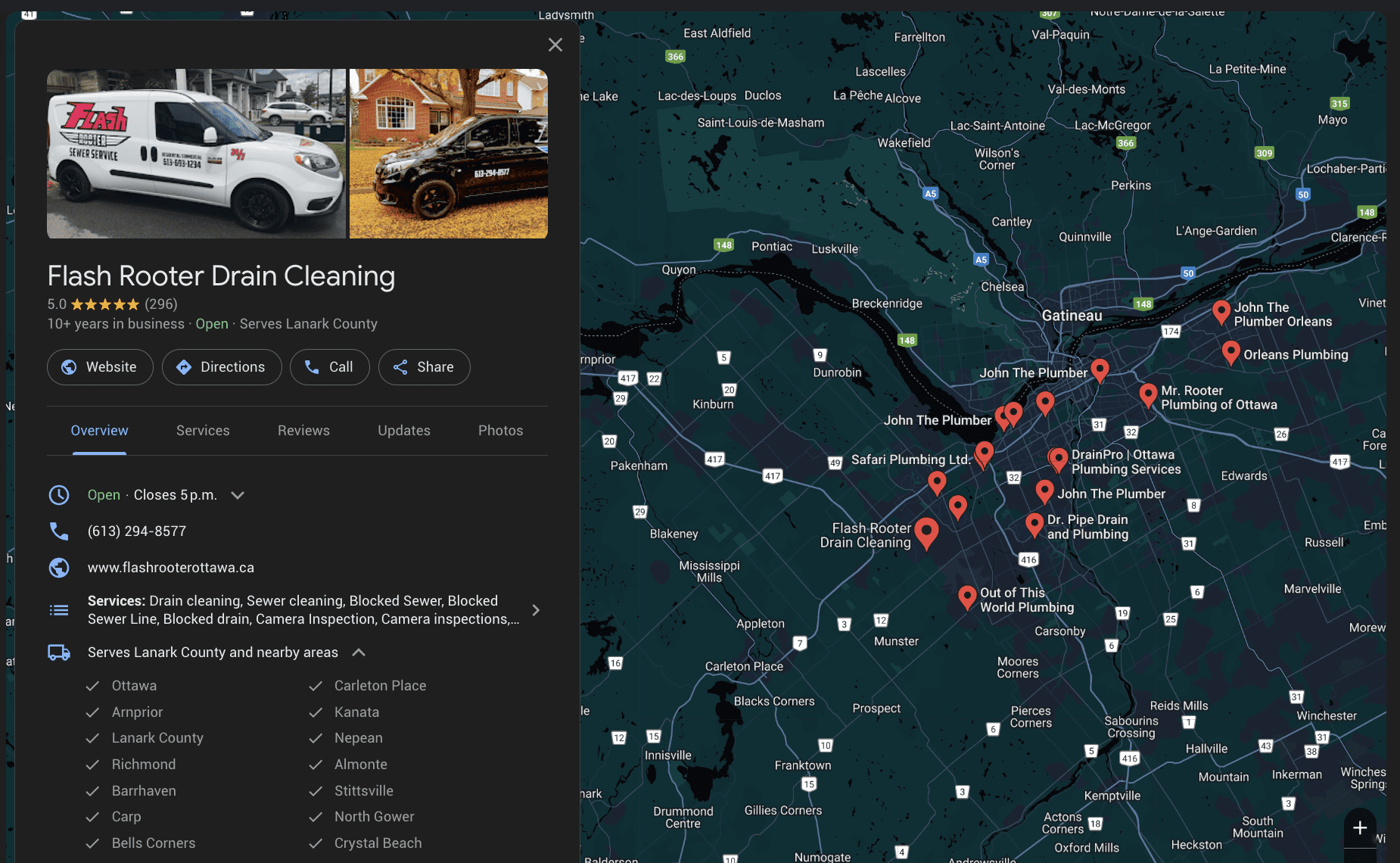
Screenshot from Google Business Profile, November 2024
While SABs don’t have a physical storefront, they can still leverage GBP to enhance online visibility. Here’s how:
Create A GBP Profile
Even without a storefront, you must create a GBP profile and select the “service-area business” option.
Under this option, you will add but hide your address and then select up to 20 service areas you cover based on city or postal code.
“The boundaries of your overall area should not extend farther than about 2 hours of driving time from where your business is based.”
If your service area does extend beyond two hours of driving time, you would be well advised to consider setting up another GBP with a primary address closer than two hours away.
Choose Only Relevant Categories
Select primary and secondary categories from those provided in GBP that most accurately reflect the services you offer.
Do not select a subcategory if you do not offer the service, but would like to be found by people searching for the service.
This is a common mistake many businesses make, which can backfire by diluting their authority.
Complete Your Entire Profile
Fill out all of the relevant sections of your GBP profile, including your business name, phone number, website, service areas, hours of operation, social links, payment options, accessibility, amenities, languages supported, and photos (i.e., logo, interior, exterior, product, etc).
Keep in mind that you are trying to provide your audience with every possible detail regarding your business and don’t want to exclude anyone by leaving out key information.
You may also find you are able to gain business by indicating you belong to or service a particular demographic.
Encourage And Promptly Respond To Customer Reviews
Positive reviews or even prompt and effective responses to negative reviews can significantly boost your local ranking and build trust with potential customers.
For service-area businesses needing to “prove” their coverage, it is important to gain reviews from customers across the defined service area.
So, if you’ve included 10 specific areas you service within a two-hour driving distance, you should be looking to obtain reviews from satisfied customers in each of those areas.
This will help to establish the “localness” described above.
Pro Tip: Don’t be afraid to ask customers to provide Google reviews that reference the specific service they received and the location where they received it. For example, “We were so pleased ABC Roofing Company was able to repair our roof in [location] on time and on budget!”
Post Content Regularly
GBP provides all businesses the opportunity to easily post content regarding their services, promotions, and links to external content like blog posts, events, etc., which is quite often underutilized.
This feature enables businesses to demonstrate engagement with their customers and authority on the topics they want to be found for.
If you are a local business creating content on a regular basis to share to social channels or via an email newsletter, sharing this content via GBP as well is a must.
2. Build A Solid, Mobile-Friendly Web Presence With Local SEO In Mind
While GBP is a primary landing place for many local searchers, a local business website still serves an important role as an online storefront and information resource.
When it comes to SABs and local SEO, here are a few specific considerations:
Create Location-Specific Pages
If you serve multiple areas, create dedicated pages for each location with unique, relevant content, contact information, and locally oriented keywords.
For example, if you offer specific services in different areas or have specific mobile technicians dedicated to specific service areas, be sure to call this out.
Another good tactic is to embed a Google map of the specific service area into its dedicated location page.
Be careful not to simply duplicate content across your location pages by incorporating something unique into each.
Locally Optimize Your Website Pages And Content
Use relevant local keywords throughout your localized website pages, including in your page titles, headings, meta descriptions, and image alt tags.
Ensure Mobile-Friendliness
This should go without saying, but it’s essential today for all businesses to have a responsive website.
According to Statista, in 2023, 58.67% of all website traffic worldwide came from mobile phones.
Much like reviews, for SABs, this means identifying and obtaining listings in relevant directories in each of the applicable service areas.
Again, the goal is to show Google the business operates in the area, so there should be an online presence in the area.
Pro Tip: When deciding which local directories you should appear in for free, or especially for a fee, conduct a few Google searches on the keywords you want to be found for and see if these directories appear. If they don’t, then they likely won’t add much value to you.
Alternatively, you can simply ask the directory to provide statistics on how much traffic/business you can expect to receive through them based on similar businesses they have worked with in the past.
3. Local Link Building
Building high-quality, relevant local backlinks can significantly improve your website’s authority and local search ranking. Here’s how:
Engage in community involvement:Sponsor local events, participate in community forums, and build relationships with local organizations to earn backlinks. Note: Links from your website (perhaps in a Local Events section) can also provide a signal to Google of your localness.
4. Leverage Service-Area Focused Content Marketing And Social Media
Modern SEO, beyond website structure and relevant backlinking, is very much about creating valuable and informative content to answer all of the questions your target audience has about your services, thereby establishing your business as a trusted resource in the eyes of your customers and search engines.
Here are a few local content marketing recommendations to further help build authority:
Create local, topically relevant content: Publish blog posts, articles, and guides addressing local issues, events, or topics related to the services you offer and of interest to your target audience. Again, as a service area business, try to identify topics specific to the various areas serviced and link from this content to the specific location pages on the website. Some examples of this type of content may include:
Blog posts about local events or community initiatives.
Case studies featuring customers from your different service areas.
Promote your content locally: Creating content is just half the battle. As noted above, content can be shared via your GBP, as well as via social media (provided you’ve established an online following), local online communities (e.g., Nextdoor, Facebook Groups), and email newsletters to reach the widest potential audience. Relevant, local, social SAB content may include:
Before-and-after photos of completed projects in different service areas.
Customer testimonials.
Behind-the-scenes glimpses of the business in action at different locations.
Regularly monitoring and tracking your local SEO performance is essential to understand which content and channels are working or not, to identify areas for improvement, and to measure the overall effectiveness of your strategies.
There are five primary areas a local SAB should focus on when considering performance.
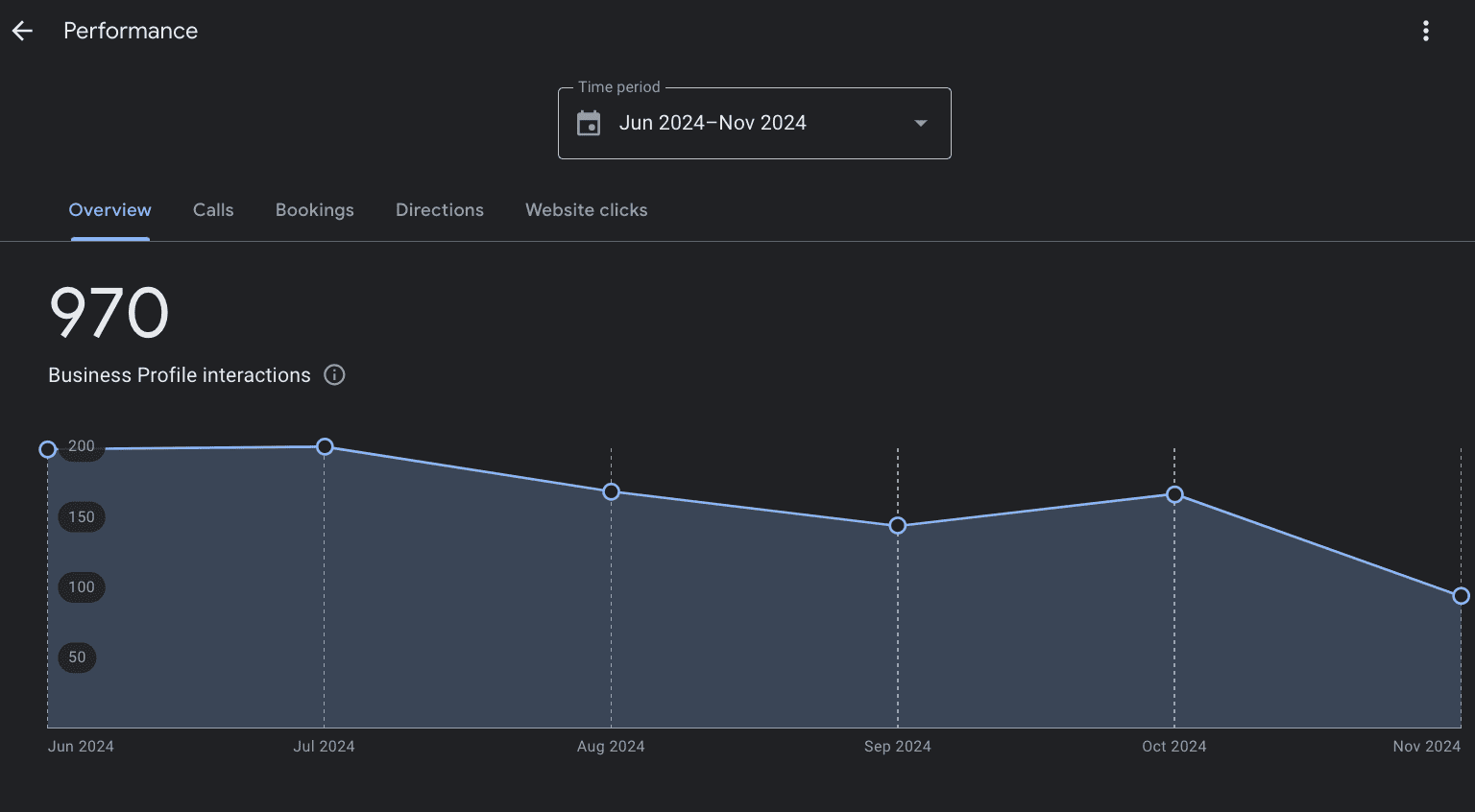
Analyze your GBP insights: Regularly review your GBP’s performance, including views, searches, clicks, messages, and calls, to understand how users find and engage with your profile.
Screenshot from Google Business Profile, November 2024
Use Google Analytics: Track the sources of your website traffic, performance of your landing pages, user behavior, and conversions to understand how users find and interact with your content. Use this information to focus your SEO and content marketing efforts.
Monitor your local rankings: Use rank tracking tools to monitor and optimize your website’s position in the local Map Pack and organic search results for relevant keywords.
Track your social media reach and engagement: All social media networks offer tools to measure the reach and engagement of your presence and individual posts. Pay attention to who your most engaged followers are and be sure to engage with them.
Creating and sharing relevant content to answer all of your customer’s questions.
Monitoring your performance to see what’s working and what isn’t.
With all of this in mind, do not try to over-extend your reach, as it will be difficult to convince Google you are truly “local” if your service areas are beyond the two-hour driving time range.
Google has updated its Business Profile rules for service-area businesses that sell age-restricted products.
Now, businesses selling alcohol, cannabis, weapons, and similar items must have a physical storefront to maintain their Google Business Profile.
We were alerted to this update by Stefan Somborac on X:
Google actually uses the phrase “Businesses associated with…” not “Businesses selling…”, which significantly broadens how this new change can be applied.
“Businesses associated with products or services that require the customer to be a certain minimum age, like alcohol, cannabis, or weapons, aren’t permitted as service-area businesses without a storefront.”
This is a notable change in how Google handles business listings for delivery and mobile services.
The policy outlines two main types of businesses:
Service-area businesses: These companies deliver to customers but do not have a physical business location.
Hybrid businesses: These operations have a physical location and offer delivery or mobile services.
Service Area Limitations
Google maintains its existing restrictions on service areas, including:
A maximum of 20 service areas per business
Service boundaries limited to approximately 2 hours of driving time from the business base
Service areas must be defined by city, postal code, or specific geographic region rather than radius
Impact On Businesses
This update affects certain types of businesses:
Mobile alcohol delivery services
Cannabis delivery services
Weapons dealers without a physical store
Vendors of age-restricted products that only deliver
The new rules require these businesses to have a physical storefront to keep their Google Business Profiles.
This change aims to ensure proper age checks and compliance with sensitive product and service regulations.
What This Means
The policy update addresses concerns about selling age-restricted products through delivery-only businesses.
This change mainly impacts new delivery services for cannabis and alcohol, which have grown in some cities.


 Ask for Me Module, CTA (Screenshot from search, Google, February 2025)
 Screenshot from search, Google, February 2025
 Screenshot of author’s email, February 2025
 Screenshot from Google Business Profile, February 2025