Web Guide: Google’s New AI Search Experiment via @sejournal, @MattGSouthern

Google has launched Web Guide, an experimental feature in Search Labs that uses AI to reorganize search results pages.

The goal is to help you find information by grouping related links together based on the intent behind your query.

What Is Web Guide?

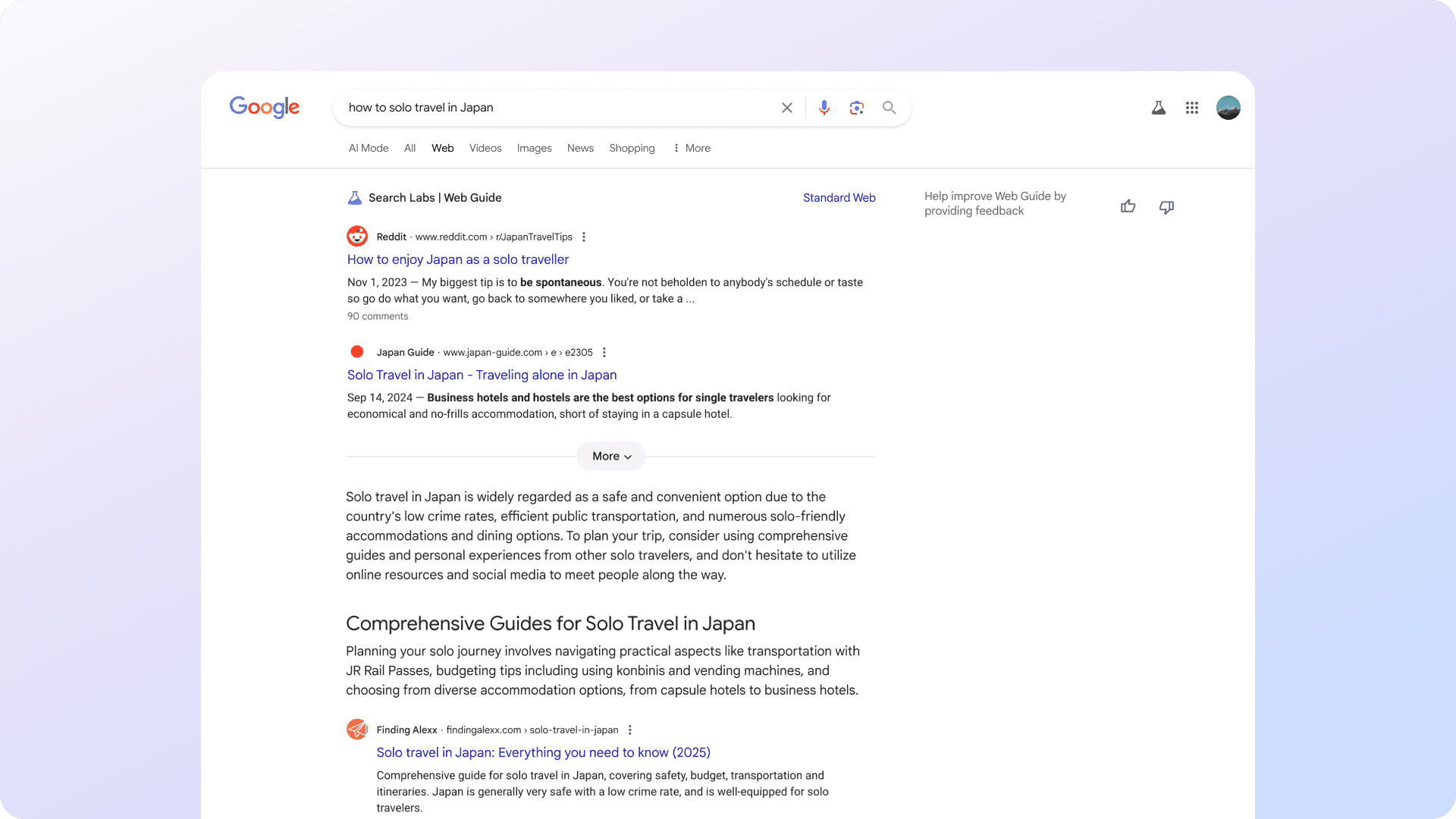
Web Guide replaces the traditional list of search results with AI-generated clusters. Each group focuses on a different aspect of your query, making it easier to dive deeper into specific areas.

According to Austin Wu, Group Product Manager for Search at Google, Web Guide uses a custom version of Gemini to understand both your query and relevant web content. This allows it to surface pages you might not find through standard search.

Here are some examples provided by Google:

Screenshot from labs.google.com/search/experiment/34, July 2025.

How It Works

Behind the scenes, Web Guide uses the familiar “query fan-out” technique.

Instead of running one search, it issues multiple related queries in parallel. It then analyzes and organizes the results into categories tailored to your search intent.

This approach gives you a broader overview of a topic, helping you learn more without needing to refine your query manually.

When Web Guide Helps

Google says Web Guide is most useful in two situations:

  • Exploratory searches: For example, “how to solo travel in Japan” might return clusters for transportation, accommodations, etiquette, and must-see places.
  • Multi-part questions: A query like “How to stay close with family across time zones?” could bring up tools for scheduling, video calls, and relationship tips.

In both cases, Web Guide aims to support deeper research, not just quick answers.

How To Try It

Web Guide is available through Search Labs for users who’ve opted in. You can access it by selecting the Web tab in Search and switching back to standard results anytime.

Over time, Google plans to test AI-organized results in the All tab and other parts of Search based on user feedback.

How Web Guide Differs From AI Mode

While Web Guide and AI Mode both use Google’s Gemini model and similar technologies like query fan-out, they serve different functions within Search.

  • Web Guide is designed to reorganize traditional search results. It clusters existing web pages into groups based on different aspects of your query, helping you explore a topic from multiple angles without generating new content.
  • AI Mode provides a conversational, AI-generated response to your query. It can break down complex questions into subtopics, synthesize information across sources, and present a summary or interactive answer box. It also supports follow-up questions and features like Deep Search for more in-depth exploration.

In short, Web Guide focuses on how results are presented, while AI Mode changes how answers are generated and delivered.

Looking Ahead

Web Guide reflects Google’s continued shift away from the “10 blue links” model. It follows features like AI Overviews and the AI Mode, which aim to make search more dynamic.

Because Web Guide is still a Labs feature, its future depends on how people respond to it. Google is taking a gradual rollout approach, watching how it affects the user experience.

If adopted more broadly, this kind of AI-driven organization could reshape how people find your content, and how you need to optimize for it.


Featured Image: Screenshot from labs.google.com/search/experiment/34, July 2025. 

Google Launches AI-Powered Virtual Try-On & Shopping Tools via @sejournal, @MattGSouthern

Google unveiled three new shopping features today that use AI to enhance the way people discover and buy products.

The updates include a virtual try-on tool for clothing, more flexible price tracking alerts, and an upcoming visual style inspiration feature powered by AI.

Virtual Try-On Now Available Nationwide

Following a limited launch in Search Labs, Google’s virtual try-on tool is now available to all U.S. searchers.

The feature lets you upload a full-length photo and use AI to see how clothing items might look on your body. It works across Google Search, Shopping, and even product results in Google Images.

Tap the “try it on” icon on an apparel listing, upload a photo, and you’ll receive a visualization of yourself wearing the item. You can also save favorite looks, revisit past try-ons, and share results with others.

Screenshot from: blog.google/products/shopping/back-to-school-ai-updates-try-on-price-alerts, July 2025.

The tool draws from billions of apparel items in its Shopping Graph, giving shoppers a wide range of options to explore.

Smarter Price Alerts

Google is also rolling out an enhanced price tracking feature for U.S. shoppers.

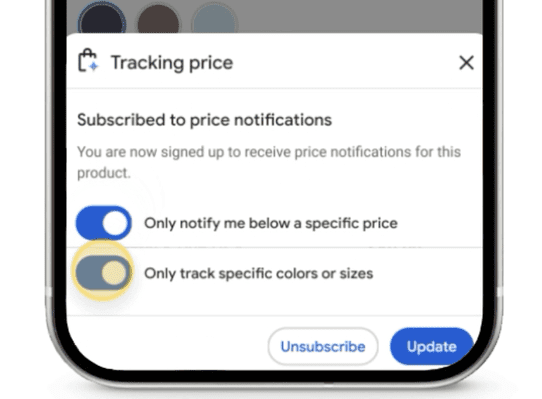
You can now set alerts based on specific criteria like size, color, and target price. This update makes it easier to track deals that match your exact preferences.

Screenshot from: blog.google/products/shopping/back-to-school-ai-updates-try-on-price-alerts, July 2025.

AI-Powered Style Inspiration Arrives This Fall

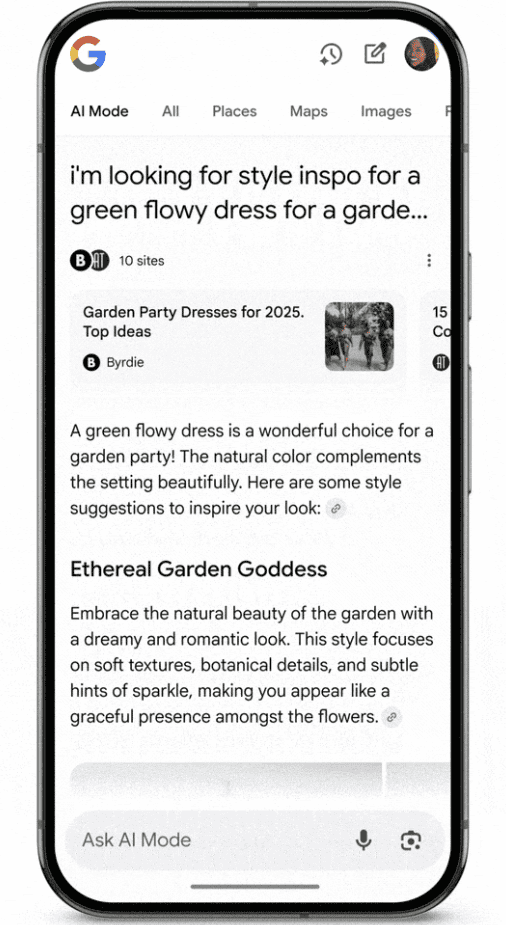
Later in 2025, Google plans to launch a new shopping experience within AI Mode, offering outfit and room design inspiration based on your query.

This feature uses Google’s vision match technology and taps into 50 billion products indexed in the Shopping Graph.

Screenshot from: blog.google/products/shopping/back-to-school-ai-updates-try-on-price-alerts, July 2025.

What This Means for E-Commerce Marketers

These updates carry a few implications for marketers and online retailers:

  • Improve Product Images: With virtual try-on now live, high-quality and standardized apparel images are more likely to be included in AI-driven displays.
  • Competitive Pricing Matters: The refined price alert system could influence purchase behavior, especially as consumers gain more control over how they track product deals.
  • Optimize for Visual Search: The upcoming inspiration features suggest a growing role for visual-first shopping. Retailers should ensure their product feeds contain rich attribute data that helps Google’s systems surface relevant items.

Looking Ahead

Google’s suite of AI-powered shopping features can help create more personalized and interactive retail experiences.

For search marketers, these tools offer new ways to engage, but also raise the bar in terms of presentation and data quality.

For e-commerce teams, staying competitive may require rethinking how products are priced, presented, and positioned within Google’s growing suite of AI-enhanced tools.


Featured Image: Roman Samborskyi/Shutterstock

Google Says You Don’t Need AEO Or GEO To Rank In AI Overviews via @sejournal, @martinibuster

Google’s Gary Illyes confirmed that AI Search does not require specialized optimization, saying that “AI SEO” is not necessary and that standard SEO is all that is needed for both AI Overviews and AI Mode.

AI Search Is Everywhere

Standard search, in the way it used to be with link algorithms playing a strong role, no longer exists. AI is embedded within every step of the organic search results, from crawling to indexing and ranking. AI has been a part of Google Search for ten years, beginning with RankBrain and expanding from there.

Google’s Gary Illyes made it clear that AI is embedded within every step of today’s search ranking process.

Kenichi Suzuki (LinkedIn Profile) posted a detailed summary of what Illyes discussed, covering four main points:

AI Search features use the same infrastructure as traditional search

  1. AI Search Optimization = SEO
  2. Google’s focus is on content quality and is agnostic as to how it was created
  3. AI is deeply embedded into every stage of search
  4. Generative AI has unique features to ensure reliability

There’s No Need For AEO Or GEO

The SEO community has tried to wrap their minds around AI search, with some insisting that ranking in AI search requires an approach to optimization so distinct from SEO that it warrants its own acronym. Other SEOs, including an SEO rockstar, have insisted that optimizing for AI search is fundamentally the same as standard search. I’m not saying that one group of SEOs is right and another is wrong. The SEO community collectively discussing a topic and reaching different conclusions is one of the few things that doesn’t change in search marketing.

According to Google, ranking in AI Overviews and AI Mode requires only standard SEO practices.

Suzuki shared why AI search doesn’t require different optimization strategies:

“Their core message is that new AI-powered features like AI Overviews and AI Mode are built upon the same fundamental processes as traditional search. They utilize the same crawler (Googlebot), the same core index, and are influenced by the same ranking systems.

They repeatedly emphasized this with the phrase “same as above” to signal that a separate, distinct strategy for “AI SEO” is unnecessary. The foundation of creating high-quality, helpful content remains the primary focus.”

Content Quality Is Not About How It’s Created

The second point that Google made was that their systems are tuned to identify content quality and that identifying whether the content was created by a human or AI is not part of that quality assessment.

Gary Illyes is quoted as saying:

“We are not trying” to differentiate based on origin.”

According to Kenichi, the objective is to:

“…identify and reward high-quality, helpful, and reliable content, regardless of whether it was created by a human or with the assistance of AI.”

AI Is Embedded Within Every Stage Of Search

The third point that Google emphasized is that AI plays a role at every stage of search: crawling, indexing, and ranking.

Regarding the ranking part, Suzuki wrote:

“RankBrain helps interpret novel queries, while the Multitask Unified Model (MUM) understands information across various formats (text, images, video) and 75 different languages.”

Unique Processes Of Generative AI Features

The fourth point that Google emphasized is to acknowledge that AI Overviews does two different things at the ranking stage:

  1. Query Fan-Out
    Generates multiple queries in order to provide deeper answers to queries, using the query fan-out technique.
  2. Grounding
    AI Overviews checks the generated answers against online sources to make sure that they are factually accurate, a process called grounding.

Suzuki explains:

“It then uses a process called “grounding” to check the generated text against the information in its search index, a crucial step designed to verify facts and reduce the risk of AI ‘hallucinations.’”

Takeaways:

AI SEO vs. Traditional SEO

  • Google explicitly states that specialized “AI SEO” is not necessary.
  • Standard SEO practices remain sufficient to rank in AI-driven search experiences.

Integration of AI in Google Search

  • AI technology is deeply embedded across every stage of Google’s organic search: crawling, indexing, and ranking.
  • Technologies like RankBrain and the Multitask Unified Model (MUM) are foundational to Google’s current search ranking system.

Google’s Emphasis on Content Quality

  • Content quality assessment by Google is neutral regarding whether humans or AI produce the content.
  • The primary goal remains identifying high-quality, helpful, and reliable content.

Generative AI-Specific Techniques

  • Google’s AI Overviews employ specialized processes like “query fan-out” to answer queries thoroughly.
  • A technique called “grounding” is used to ensure factual accuracy by cross-checking generated content against indexed information.

Google clarified that there’s no need for AEO/GEO for Google AI Overviews and AI Mode. Standard search engine optimization is all that’s needed to rank across both standard and AI-based search. Content quality remains an important part of Google’s algorithms, and they made a point to emphasize that they don’t check whether content is created by a human or AI.

Featured Image by Shutterstock/Luis Molinero

Google: AI Overviews Drive 10% More Queries, Per Q2 Earnings via @sejournal, @MattGSouthern

New data from Google’s Q2 2025 earnings call suggests that AI features in Search are driving higher engagement.

Google reported that AI Overviews contribute to more than 10% additional queries for the types of searches where they appear.

With AI Overviews now reaching 2 billion monthly users, this is a notable shift from the early speculation that AI would reduce the need to search.

AI Features Linked to Higher Query Volume

Google reported $54.2 billion in Search revenue for Q2, marking a 12% increase year-over-year.

CEO Sundar Pichai noted that both overall and commercial query volumes are up compared to the same period last year.

Pichai said during the earnings call:

“We are also seeing that our AI features cause users to search more as they learn that Search can meet more of their needs. That’s especially true for younger users.”

He added:

“We see AI powering an expansion in how people are searching for and accessing information, unlocking completely new kinds of questions you can ask Google.”

This is the first quarter where Google has quantified how AI Overviews impact behavior, rather than just reporting usage growth.

More Visual, Conversational Search Activity

Google highlighted continued growth in visual and multi-modal search, especially among younger demographics. The company pointed to increased use of Lens and Circle to Search, often in combination with AI Overviews.

AI Mode, Google’s conversational interface, now has over 100 million monthly active users across the U.S. and India. The company plans to expand its capabilities with features like Deep Search and personalized results.

Language Model Activity Is Accelerating

In a stat that received little attention, Google disclosed it now processes more than 980 trillion tokens per month across its products. That figure has doubled since May.

Pichai stated:

“At I/O in May, we announced that we processed 480 trillion monthly tokens across our surfaces. Since then we have doubled that number.”

The rise in token volume shows how quickly AI is being used across Google products like Search, Workspace, and Cloud.

Enterprise AI Spending Continues to Climb

Google Cloud posted $13.6 billion in revenue for the quarter, up 32% year-over-year.

Adoption of AI tools is a major driver:

  • Over 85,000 enterprises are now building with Gemini
  • Deal volume is increasing, with as many billion-dollar contracts signed in the first half of 2025 as in all of last year
  • Gemini usage has grown 35 times compared to a year ago

To support growth across AI and Cloud, Alphabet raised its projected capital expenditures for 2025 to $85 billion.

What You Should Know as a Search Marketer

Google’s data challenges the idea that AI-generated answers are replacing search. Instead, features like AI Overviews appear to prompt follow-up queries and enable new types of searches.

Here are a few areas to watch:

  • Complex queries may become more common as users gain confidence in AI
  • Multi-modal search is growing, especially on mobile
  • Visibility in AI Overviews is increasingly important for content strategies
  • Traditional keyword targeting may need to adapt to conversational phrasing

Looking Ahead

With Google now attributing a 10% increase in queries to AI Overviews, the way people interact with search is shifting.

For marketers, that shift isn’t theoretical, it’s already in progress. Search behavior is leaning toward more complex, visual, and conversational inputs. If your strategy still assumes a static SERP, it may already be out of date.

Keep an eye on how these AI experiences roll out beyond the U.S., and watch how query patterns change in the months ahead.


Featured Image: bluestork/shutterstock

Google Makes It Easier To Talk To Your Analytics Data With AI via @sejournal, @MattGSouthern

Google has released an open-source Model Context Protocol (MCP) server that lets you analyze Google Analytics data using large language models like Gemini.

Announced by Matt Landers, Head of Developer Relations for Google Analytics, the tool serves as a bridge between LLMs and analytics data.

Instead of navigating traditional report interfaces, you can ask questions in plain English and receive responses instantly.

A Shift From Traditional Reports

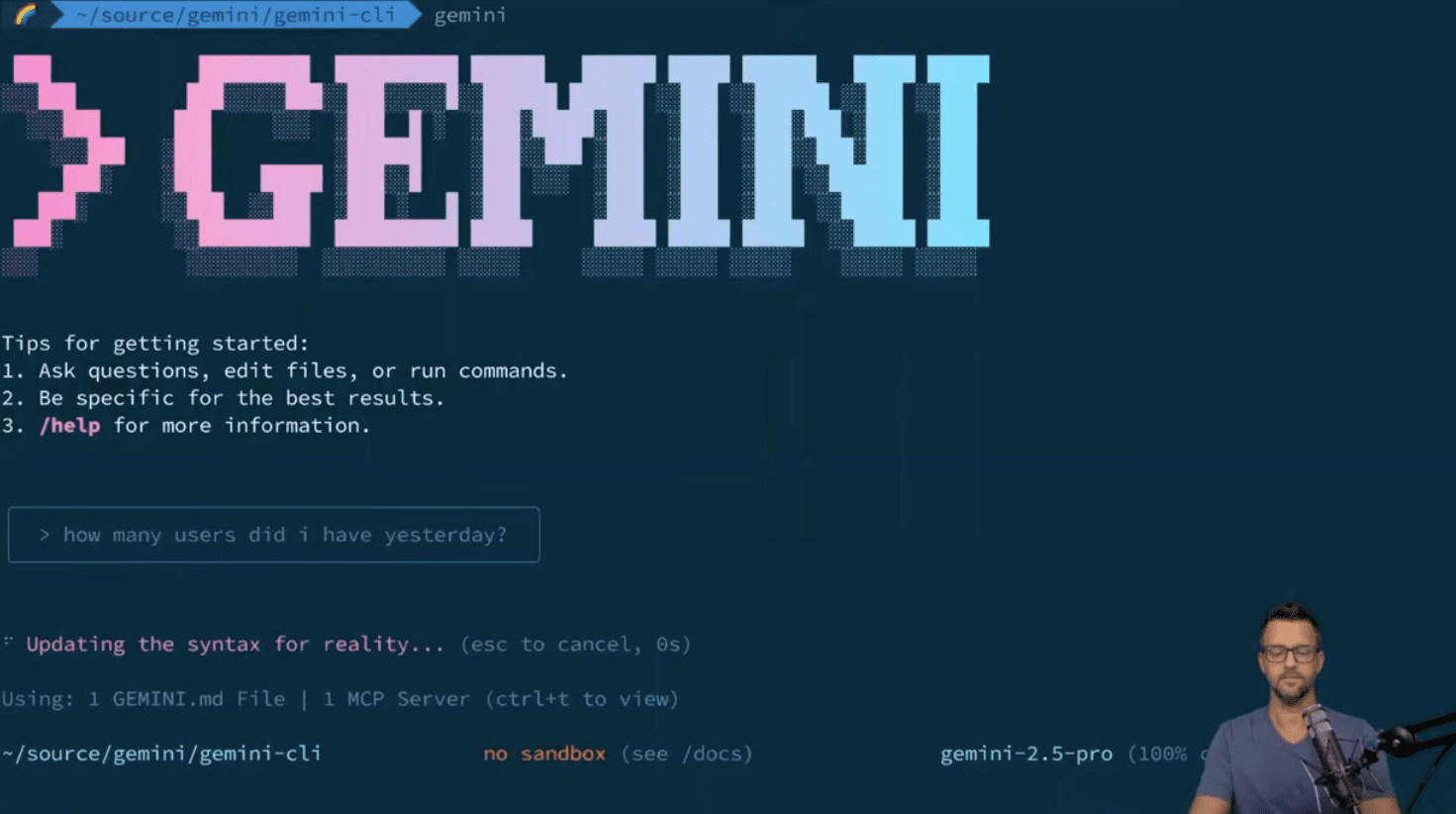
The MCP server offers an alternative to digging through menus or configuring reports manually. You can type queries like “How many users did I have yesterday?” and get the answer you need.

Screenshot from: YouTube.com/GoogleAnalytics, July 2025.

In a demo, Landers used the Gemini CLI to retrieve analytics data. The CLI, or Command Line Interface, is a simple text-based tool you run in a terminal window.

Instead of clicking through menus or dashboards, you type out questions or commands, and the system responds in plain language. It’s like chatting with Gemini, but from your desktop or laptop terminal.

When asked about user counts from the previous day, the system returned the correct total. It also handled follow-up questions, showing how it can refine queries based on context without requiring additional technical setup.

You can watch the full demo in the video below:

What You Can Do With It

The server uses the Google Analytics Admin API and Data API to support a range of capabilities.

According to the project documentation, you can:

  • Retrieve account and property information
  • Run core and real-time reports
  • Access standard and custom dimensions and metrics
  • Get links to connected Google Ads accounts
  • Receive hints for setting date ranges and filters

To set it up, you’ll need Python, access to a Google Cloud project with specific APIs enabled, and Application Default Credentials that include read-only access to your Google Analytics account.

Real-World Use Cases

The server is especially helpful in more advanced scenarios.

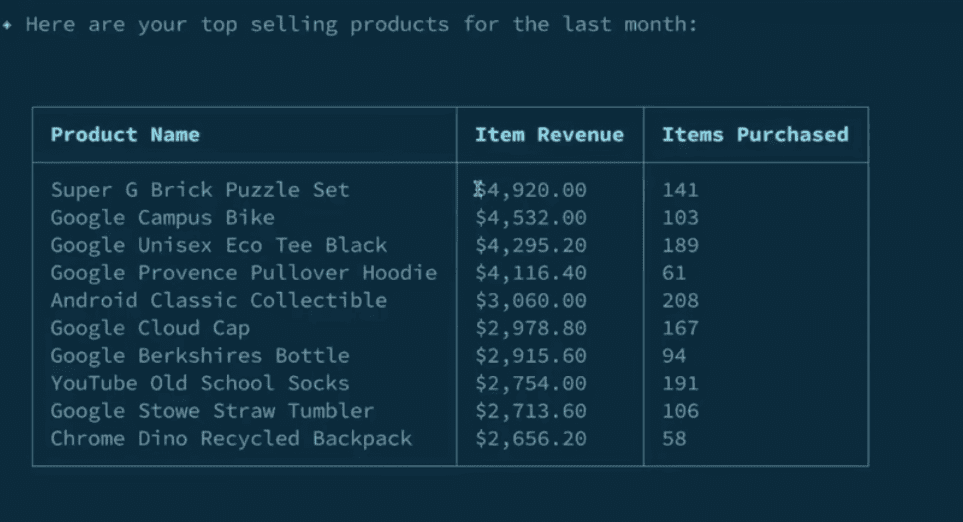
In the demo, Landers asked for a report on top-selling products over the past month. The system returned results sorted by item revenue, then re-sorted them by units sold after a follow-up prompt.

Screenshot from: YouTube.com/GoogleAnalytics, July 2025.

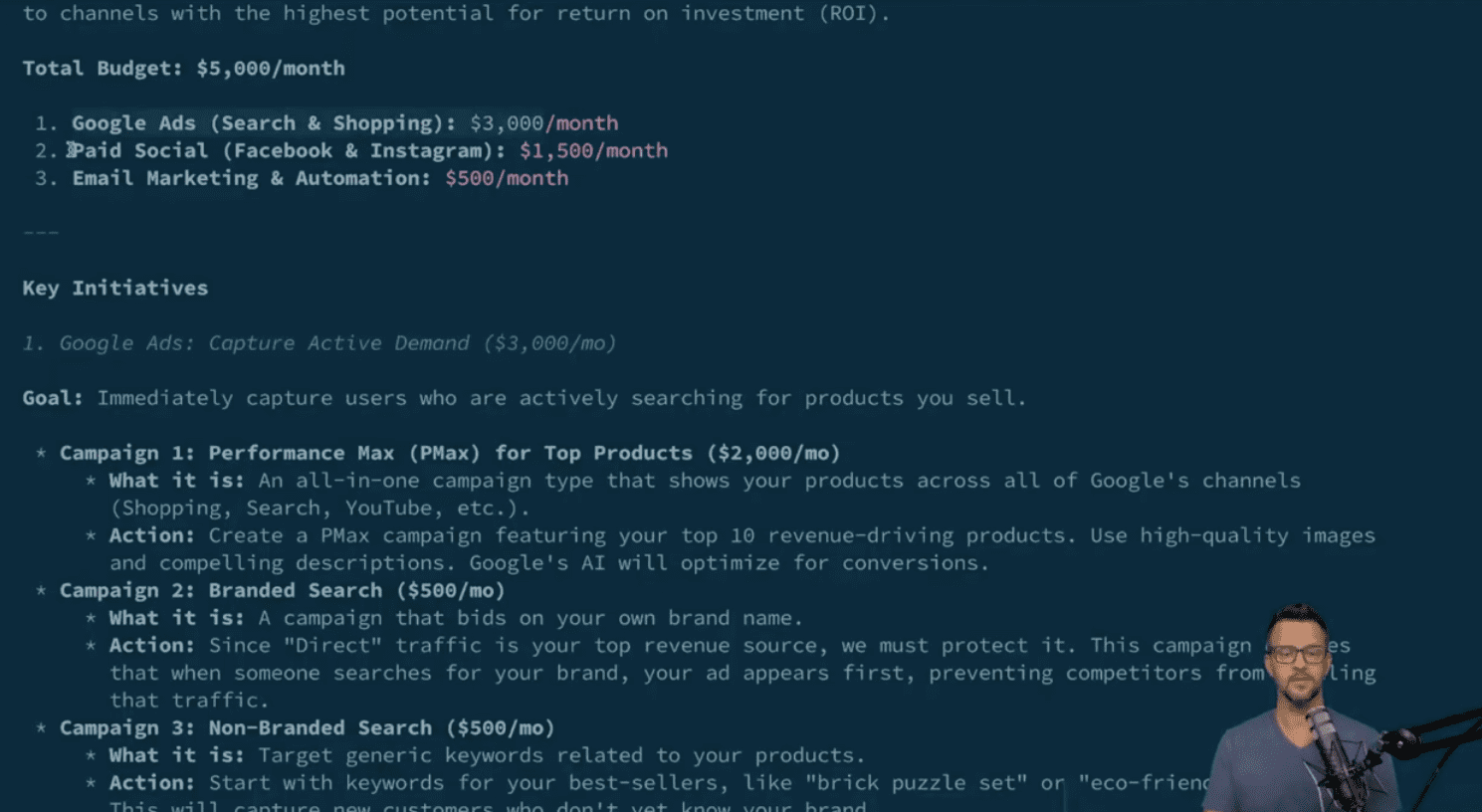
Later, he entered a hypothetical scenario: a $5,000 monthly marketing budget and a goal to increase revenue.

The system generated multiple reports, which revealed that direct and organic search had driven over $419,000 in revenue. It then suggested a plan with specific budget allocations across Google Ads, paid social, and email marketing, each backed by performance data.

Screenshot from: YouTube.com/GoogleAnalytics, July 2025.

How To Set It Up

You can install the server from GitHub using a tool called pipx, which lets you run Python-based applications in isolated environments. Once installed, you’ll connect it to Gemini CLI by adding the server to your Gemini settings file.

Setup steps include:

  • Enabling the necessary Google APIs in your Cloud project
  • Configuring Application Default Credentials with read-only access to your Google Analytics account
  • (Optional) Setting environment variables to manage credentials more consistently across different environments

The server works with any MCP-compatible client, but Google highlights full support for Gemini CLI.

To help you get started, the documentation includes sample prompts for tasks like checking property stats, exploring user behavior, or analyzing performance trends.

Looking Ahead

Google says it’s continuing to develop the project and is encouraging feedback through GitHub and Discord.

While it’s still experimental, the MCP server gives you a hands-on way to explore what natural language analytics might look like in the future.

If you’re on a marketing team, this could help you get answers faster, without requiring dashboards or custom reports. And if you’re a developer, you might find ways to build tools that automate parts of your workflow or make analytics more accessible to others.

The full setup guide, source code, and updates are available on the Google Analytics MCP GitHub repository.


Featured Image: Mijansk786/Shutterstock

Google Shares SEO Guidance For State-Specific Product Pricing via @sejournal, @MattGSouthern

In a recent SEO Office Hours video, Google addressed whether businesses can show different product prices to users in different U.S. states, and what that means for search visibility.

The key point: Google only indexes one version of a product page, even if users in different locations see different prices.

Google Search Advocate John Mueller stated in the video:

“Google will only see one version of your page. It won’t crawl the page from different locations within the U.S., so we wouldn’t necessarily recognize that there are different prices there.”

How Google Handles Location-Based Pricing

Google confirmed it doesn’t have a mechanism for indexing multiple prices for the same product based on a U.S. state.

However, you can reflect regional cost differences by using the shipping and tax fields in structured data.

Mueller continued:

“Usually the price difference is based on what it actually costs to ship this product to a different state. So with those two fields, maybe you could do that.”

For example, you might show a base price on the page, while adjusting the final cost through shipping or tax settings depending on the buyer’s location.

When Different Products Make More Sense

If you need Google to recognize distinct prices for the same item depending on state-specific factors, Google recommends treating them as separate products entirely.

Mueller added:

“You would essentially want to make different products in your structured data and on your website. For example, one product for California specifically, maybe it’s made with regards to specific regulations in California.”

In other words, rather than dynamically changing prices for one listing, consider listing two separate products with different pricing and unique product identifiers.

Key Takeaway

Google’s infrastructure currently doesn’t support state-specific price indexing for a single product listing.

Instead, businesses will need to adapt within the existing framework. That means using structured data fields for shipping and tax, or publishing distinct listings for state variants when necessary.

Hear Mueller’s full response in the video below:

Pew Research Confirms Google AI Overviews Is Eroding Web Ecosystem via @sejournal, @martinibuster

Pew Research Center tracked real web browsing behavior and confirmed what many publishers and SEOs have claimed: AI Overviews does not send traffic back to websites. The results show that the damage caused by AI summaries to the web ecosystem is as bad as or worse than is commonly understood.

Methodology

The Pew Research study tracked over 900 adults who consented to installing an online browsing tracker to record their browsing behavior in the month of March 2025. The dataset contains 68,879 unique Google search queries, and a total of 12,593 queries triggered an AI summary.

Confirmed: Google AI Search Is Eroding Referral Traffic

The tracked user data confirms publisher complaints about a drop in referral traffic caused by AI search results. Google users who encounter an AI search result are less likely to click on a link and visit a website than users who see only a standard search result.

Only 8% of users who encountered an AI summary clicked a link (in the AI summary or the standard search results) to visit a website. Users who only saw a standard search result tended to click to visit a website 15% of the time, nearly twice as many as users who viewed an AI summary.

Users rarely click a link within an AI summary. Only 1% of users clicked an AI summary link and visited a website.

AI Summaries Cause Less Web Engagement

In a recent interview, Google’s CEO Sundar Pichai pushed back on the notion that AI summaries have a negative impact on the web ecosystem. He said that the fact that there is more content being created on the web than at any other time is proof that the web ecosystem is thriving. He said that

“So, generally there are more web pages… I think people are producing a lot of content, and I see consumers consuming a lot of content. We see it in our products.”

Pichai also insisted that people are consuming content across multiple forms of content (video, images, text) and that publishers today should be presenting content within more than just one format.

However, contrary to what Google’s CEO said, AI is not encouraging users to consume more content, it’s having the opposite effect. The Pew research data shows that AI summaries cause users to engage less with web content.

According to the research findings:

Users End Their Browsing Session

“Google users are more likely to end their browsing session entirely after visiting a search page with an AI summary than on pages without a summary.

This happened on 26% of pages with an AI summary, compared with 16% of pages with only traditional search results.”

Users Refrain From Clicking On Traditional Search Links

It also says that users tended to not click on a traditional search result when faced with an AI summary:

“Users who encountered an AI summary clicked on a traditional search result link in 8% of all visits. Those who did not encounter an AI summary clicked on a search result nearly twice as often (15% of visits).”

Only 1% Click Citation Links In AI Summaries

Users who see an AI summary overwhelmingly do not click the citations to the websites that the AI summary links to.

The report shows:

“Google users who encountered an AI summary also rarely clicked on a link in the summary itself. This occurred in just 1% of all visits to pages with such a summary.”

This confirms what publishers and SEOs have been saying to Google over and over again: Google AI Overviews robs publishers of referral traffic. Rob is a strong word but given the context that Google is using web content to “synthesize” an answer to a search query that does not result in a referral click, the word “rob” is what inevitably comes to mind to a publisher or SEO who worked hard to create the content.

Another startling fact shared in research is that almost 66% of users either browsed somewhere else on Google or completely bailed on Google without clicking a link to visit a website. In other words, nearly 66% of Google’s users do not click a link to visit the web ecosystem.

The report explains:

“…the largest share of Google searches in our study resulted in the user either browsing elsewhere on Google or leaving the site entirely without clicking a link in the search results. Around two-thirds of all searches resulted in one of these actions.”

Wikipedia, YouTube And Reddit Dominate Google Searches

Google has been holding publisher events and Search Central Live events all around the world to listen to publisher feedback and to promise that Google will work harder to surface a greater variety of content. I know that the Googlers at these events are not lying, but those promises of surfacing more high-quality content are subverted by the grim facts presented in the Pew research of actual users.

One of the biggest complaints is that Reddit and Wikipedia dominate the search results. The research validates publisher and SEO concerns because it shows that not only are Reddit and Wikipedia the most commonly cited websites, but Google’s own YouTube ranks among the top three most cited web destinations.

The report explains:

“The most frequently cited sources in both Google AI summaries and standard search results are Wikipedia, YouTube and Reddit. These three sites are the most commonly linked sources in AI summaries and standard search results alike.

Collectively, they accounted for 15% of the sources that were listed in the AI summaries we examined. They made up a similar share (17%) of the sources listed in standard search results.”

The report also shows:

  • “Wikipedia links are somewhat more common in AI summaries than in standard search pages”
  • “YouTube links are somewhat more common in standard search results than in AI summaries.”

These Are The Facts

Pew Research’s study of over 68,000 search queries from the browsing habits of over 900 adults reveals that Google’s AI summaries sharply reduce clicks to websites, with just 8% of users clicking any link and only 1% engaging with citations in AI answers.

Users encountering AI summaries are more likely to end their sessions or stay within Google’s ecosystem rather than visiting independent websites. This confirms publisher and SEO concerns that AI-driven search erodes web traffic and concentrates attention on a few dominant platforms like Wikipedia, Reddit, and YouTube.

These are the facts. They show that SEOs and publishers are right that AI Overviews is siphoning traffic out of the web ecosystem.

Featured Image by Shutterstock/Asier Romero

WP Engine’s AI Toolkit Vectorizes WordPress Sites For Smart Search via @sejournal, @martinibuster

WP Engine announced the release of its AI Toolkit, a way to easily integrate advanced AI search and product recommendations into WordPress websites, plus a Managed Vector Database that enables developers to easily integrate AI features directly into websites.

Smart Search AI

WP Engine’s AI Toolkit helps WordPress site owners improve search and content visibility without requiring a steep technical learning curve. Smart Search AI is easily enabled in just a few clicks. Once activated, it syncs with WordPress content, including:

  • Posts
  • Pages
  • Tags
  • Metadata
  • Custom fields

Smart Search AI converts a website’s content into a vector format to deliver faster, more useful search results. The system combines natural-language and keyword search to help contextualize queries and guide visitors to what they need, which may help reduce bounce rates and support higher conversions.

AI-Powered Recommendations

The AI-powered recommendations feature uses past and current user session data to suggest products or content that is relevant to the user. This helps increase shopping sales and keeps readers engaged with content. The system runs efficiently without slowing down the website and uses flat-rate pricing with no overage fees. It’s suited for eCommerce, media, and any site focused on driving sales and engagement through personalized experiences.

Managed Vector Database

WP Engine’s Managed Vector Database is a service that simplifies building AI features directly into WordPress websites. Designed for developers, agencies, and site owners, it removes the need to manage tasks like data extraction, embedding creation, and content updates. Developers can start building content-based AI apps and functionalities immediately, because the system automatically processes and trains on their WordPress content without additional setup.

Integrated with WordPress, the database keeps AI outputs aligned with current site content without extra work. It enables developers to connect WordPress data directly to chatbot frameworks or APIs, and it also makes AI features accessible to non-technical creators or site owners. This enables creators to focus on building meaningful experiences without getting bogged down in technical setup.

Read more about WP Engine’s AI Toolkit:

WP Engine Launches AI Toolkit Empowering Website Owners to Drive Engagement and Growth

Featured Image by Shutterstock/Ground Picture

Google Says It Could Make Sense To Use Noindex Header With LLMS.txt via @sejournal, @martinibuster

Google’s John Mueller answered a question about llms.txt related to duplicate content, stating that it doesn’t make sense that it would be viewed as duplicate content, but he also stated it could make sense to take steps to prevent indexing.

LLMs.txt

Llms.txt is a proposal to create a new content format standard that large language models can use to retrieve the main content of a web page without having to deal with other non-content data, such as advertising, navigation, and anything else that is not the main content. It offers web publishers the ability to provide a curated, Markdown-formatted version of the most important content. The llms.txt file sits at the root level of a website (example.com/llms.txt).

Contrary to some claims made about llms.txt, it is not in any way similar in purpose to robots.txt. The purpose of robots.txt is to control robot behavior, while the purpose of llms.txt is to provide content to large language models.

Will Google View Llms.txt As Duplicate Content?

Someone on Bluesky asked if llms.txt could be seen by Google as duplicate content, which is a good question. It could happen that someone outside of the website might link to the llms.txt and that Google might begin surfacing that content instead of or in addition to the HTML content.

This is the question asked:

“Will Google view LLMs.txt files as duplicate content? It seems stiff necked to do so, given that they know that it isn’t, and what it is really for.

Should I add a “noindex” header for llms.txt for Googlebot?”

Google’s John Mueller answered:

“It would only be duplicate content if the content were the same as a HTML page, which wouldn’t make sense (assuming the file itself were useful).

That said, using noindex for it could make sense, as sites might link to it and it could otherwise become indexed, which would be weird for users.”

Noindex For Llms.txt

Using a noindex header for the llms.txt is a good idea because it will prevent the content from entering Google’s index. Using a robots.txt to block Google is not necessary because that will only block Google from crawling the file which will prevent it from seeing the noindex.

Featured Image by Shutterstock/Krakenimages.com

Google CTRs Drop 32% For Top Result After AI Overview Rollout via @sejournal, @MattGSouthern

A new study from GrowthSRC Media finds that click-through rates (CTRs) for Google’s top-ranking search result have declined from 28% to 19%. This 32% drop correlates with the expansion of AI Overviews, a feature that now appears across a wide range of search results.

Position #2 experienced an even steeper decline, with CTRs falling 39% from 20.83% to 12.60% year-over-year.

The research analyzed more than 200,000 keywords from 30 websites across ecommerce, SaaS, B2B, and EdTech industries. Here are more highlights from the study.

Key Findings

According to the report, AI Overviews appeared for just 10,000 keywords in August 2024. By May 2025, that number had grown to over 172,000.

This expansion followed the March core update and was confirmed during Google’s full U.S. rollout announcement at the I/O developer conference.

These developments appear to contrast with comments from Google CEO Sundar Pichai, who said in a Decoder interview with The Verge:

“If you put content and links within AI Overviews, they get higher click-through rates than if you put it outside of AI Overviews.”

CTRs Shift Downward and Upward

While top positions saw notable declines, the study observed a 30.63% increase in CTRs for positions 6 through 10 compared to the previous year. This suggests that users may be scrolling past AI-generated summaries to find original sources further down the page.

Across positions 1 through 5, the study reported an average CTR decline of 17.92%. The analysis focused on approximately 74,000 keywords ranking in the top 10.

Major Publishers Report Similar Trends

The findings align with reports from major publishers. Carly Steven, SEO and editorial ecommerce director at MailOnline, told attendees at the WAN-IFRA World News Media Congress that CTRs drop when AI Overviews are present.

As reported by Press Gazette, Steven explained:

“On desktop, when we are ranking number one in organic search, [CTR] is about 13% on desktop and about 20% on mobile. When there is an AI Overview present, that drops to less than 5% on desktop and 7% on mobile.”

MailOnline’s broader data showed CTRs falling by 56.1% on desktop and 48.2% on mobile for keywords with AI Overviews.

Ecommerce Affected by Product Widgets

The study also highlighted changes in ecommerce performance tied to Google’s Product Widgets.

Widgets like “Popular Products” and “Under [X] Price” began appearing more frequently from November 2024 onward, especially in categories such as home care, fashion, and beauty.

These widgets open a Google Shopping interface directly within search results, which may reduce clicks to traditional organic listings.

Methodology

GrowthSRC analyzed year-over-year data from Google Search Console across clients in multiple industries, focusing on changes before and after the full rollout of AI Overviews and Product Widgets.

The dataset included queries, clicks, impressions, CTRs, and average positions.

Data was segmented by content type, including product pages, collection pages, and blog posts. Additional keyword data from Ahrefs helped determine which queries triggered AI Overviews or Product Widgets.

What This Means

Mahendra Choudhary, Partner at GrowthSRC Media, encouraged SEO professionals to reconsider traditional performance benchmarks:

“With lower clicks to websites from informational content becoming the new normal, this is the perfect time to let your clients and internal stakeholders know that chasing website traffic as a KPI should be thought of differently.”

He recommends shifting focus toward brand visibility in social search, geographic relevance, mentions in LLM outputs, and overall contribution to revenue or leads.

This shift may require:

  • Tracking engagement beyond clicks, such as on-site conversions, branded search growth, or assisted conversions.
  • Diversifying content distribution across platforms like YouTube, TikTok, and Reddit, where users often bypass traditional search.
  • Investing in high-authority content at the top of the funnel to build brand awareness, even if direct clicks decline.

These strategies can help ensure SEO continues to drive measurable value as user behavior evolves.

Looking Ahead

The decline in organic CTRs for top positions highlights how search behavior is changing as AI-generated content plays a larger role in discovery.

Adapting to this environment may involve placing less emphasis on rankings alone and focusing more on how visibility supports broader business goals.

As zero-click search becomes more common, understanding where users are engaging, and where they aren’t, will be essential to maintaining visibility.


Featured Image: Roman Samborskyi/Shutterstock