WordPress Shares How AI May Play Stronger Role In Web Publishing via @sejournal, @martinibuster

WordPress interviewed a member of the newly formed WordPress AI Team who shared how AI can be integrated into WordPress, outlining a future in which the platform supports AI agents and content consumption while enabling new kinds of functionality. To achieve this, the team is focusing on developer tools that allow third-party developers and services to connect AI systems to WordPress without embedding generative features directly into core.

The interview was with James LaPage, the AI engineering lead at Automattic and one of the leaders of the newly announced WordPress AI Team.

Screenshot of James LaPage of WordPress AI Team

Timing Of AI Team Announcement

Many competitors, from private closed systems like Wix, Duda, and Shopify to open-source platforms like Drupal CMS, have various AI integrations built in. Third-party WordPress plugins such as Yoast, Rank Math, and Elementor also feature AI integration. WordPress hosts including Bluehost, 10Web, and Automattic’s commercial WordPress.com platform offer AI-powered site builder functionality. A case could be made that WordPress is late to the AI party.

James LaPage of the WordPress AI Team argues that a cautious approach was necessary due to the fast rate of changes within AI. This makes sense given that Agentic AI (AI agents that research the web on behalf of humans), is just beginning to gain adoption.

LaPage explains these realities early in the interview:

” I’ve wanted an AI team for a long time. I think right now actually was the perfect time to launch it because the …generative AI boom and the technology running and powering that boom is actually like pretty recent, and it’s changing so rapidly and only recently have we seen a lot of centralization around, for example, how these models work, how they consume information, how you interact with them, how you connect them to software.

So we’ve come to a point right now where a project like WordPress, which is massive and humongous and incredibly important on the web, is able to begin actually exploring this type of stuff because it isn’t changing from under our feet in the way that it was a year ago or two years ago.

And a good way to point that out is there was a Make WordPress post about AI two years ago that Ann published, and a lot of us had commented on it and it was really like, Yeah, this is awesome.

And as you read through those comments, you can kind of see everybody being excited but not really knowing where to push that excitement and point and say do this or do this or do this and we finally get to the point now where this team can say this is what we want to be doing and there can be real understanding of why we’re doing that and prior art in terms of how things actually work.”

WordPress As A Fully AI-Accessible System

LaPage was asked what an AI-friendly WordPress might look like in three years. He share a vision of WordPress as a foundational framework for AI agents, like a platform where tools, content, and interactivity are natively exposed to be dynamically interacted with and consumed.

He explained:

“I think if WordPress is able to become something that we can use AI to consume information from and build functionality for, that is a lovely spot and position it can be in. And it’s already almost in that spot. And if we can make it more accessible to AI, then I think that we are able to maintain its position on the open web as this place that you express yourself digitally.

…What I would love to see is WordPress be this platform where people continue to digitally express themselves. And I think that expression becomes more important in this era where more and more stuff will be consumed by chatbots and you’ll be speaking with AI and you’ll be doing all these different things.

Having the ability to express yourself and also be able to express yourself in ways where you couldn’t before because you couldn’t develop this crazy idea that you have in your head, or you have a crazy idea in your head, you don’t even know how to do it… Like, that type of stuff I would love to enable through the work that we do on this AI team.

So maintaining the position of yes, it’s really important to have this digital presence on the Internet. It’s very important not to subscribe only to these walled gardens, like the social media platforms and the AI chatbots, but instead have this lovely blossoming of expression on the web as WordPress enabled in its beginnings as well.

Like, this was something that it was very difficult to publish your thoughts and then it wasn’t. Let’s do it again. But let’s do it with AI.”

Technical Description Of Future Of AI Innovation With WordPress

James LaPage went into a description of what MCP Model Context Protocol is and the role it plays with how AI can interact with and transform WordPress into like a framework for being able to accomplish a wider range of things on the web.

“So MCP is model context protocol. This is an open protocol and standard. So it’s important to focus on that. It’s a standard. It’s not a technology package that’s built in Python that you go and install. You can build things around this standard and what the standard does is define how software can expose functionality to AI, in the simplest definition.

So you have the ability to define tools which are ways that you expose, hey, you can do this or you can read this on my piece of software. You can look at the piece of software as WordPress and then you also have the method of providing those tools to the client, which is something like Claude or Cursor or another AI agent for example, that can then read those tools and use them however they want, and it’s up to the folks building the actual systems to implement the protocol properly and to build the actual agents and the tools and everything that comes with it through MCP.

So when you look at how we enable AI within WordPress and outside of WordPress, we’ve had similar needs at Automatic …and other folks in the industry have had needs to define how AI speaks to specifically in WordPress different plugins and different functionality within the core software and the Feature API is the answer to exposed features of WordPress and features of plugins in a WordPress specific way to AI.

And this is intended to almost be something that goes into WordPress core, allows plug-in developers to expose this functionality to AI within WordPress in this unified way, similar to how I explained MCP. But do it in the WordPress way allows you to plug into the capabilities and the permission callbacks and the REST API aliases and all of these different WordPress-focused things, which means you’re not reinventing the wheel on WordPress, you’re simply exposing functionality in this unified way, which then it’s up to a developer to say well, now I have this list of functionality, list of things I can do with WordPress resources, I can read with WordPress, let’s build an agent or let’s build a media generation playground or let’s build a single shot, single click button that generates a whole bunch of stuff and use that features API to do so.

And when you think about how WordPress can speak with software outside of itself and almost become that framework for the functionality that plugins bring in, the data that the database stores and custom post types and posts, then you kind of start infusing the ideas behind Feature API and MCP.”

You Can Become Involved

Something that many WordPress users might not be aware of is that every user and interested party can contribute to WordPress to help shape it to be what they need it to be. Even a user who doesn’t know how to program can still influence WordPress by expressing their opinions to WordPress.

LaPage invited the wider WordPress community to get involved with providing feedback to the AI Team.

He said:

“Immediately, the way to get involved is through the make.wordpress.org/AI blog. There are several posts popping out. The most recent one as we’re recording being the hallway hangout. This probably best way to be plugged in is through the Core AI Slack, in the Make WordPress Slack. Both of those things are linked throughout the make.wordpress.org/AI site and the news announcements and everything else, so that’s how you can get involved right now in terms of contributing into the future.

A big focus of the group is to get to a very solid road map with explicit instructions and directions on how you can contribute that are likely going to be several projects that work together that we build and maintain. There’s likely going to be many other focuses around AI that we want to address, and we’re going to try to make it as clear as possible as to how you can get involved and how you can actually go and help make WordPress what it needs to be in in this AI era.

So right now, join the the core AI Slack, check out the blog posts and join the hallway hang out on Monday to really get in on the ground floor.”

Watch the WordPress interview with James LaPage here:

Featured image/Screenshot by author
Google Shares Details Behind AI Mode Development via @sejournal, @MattGSouthern

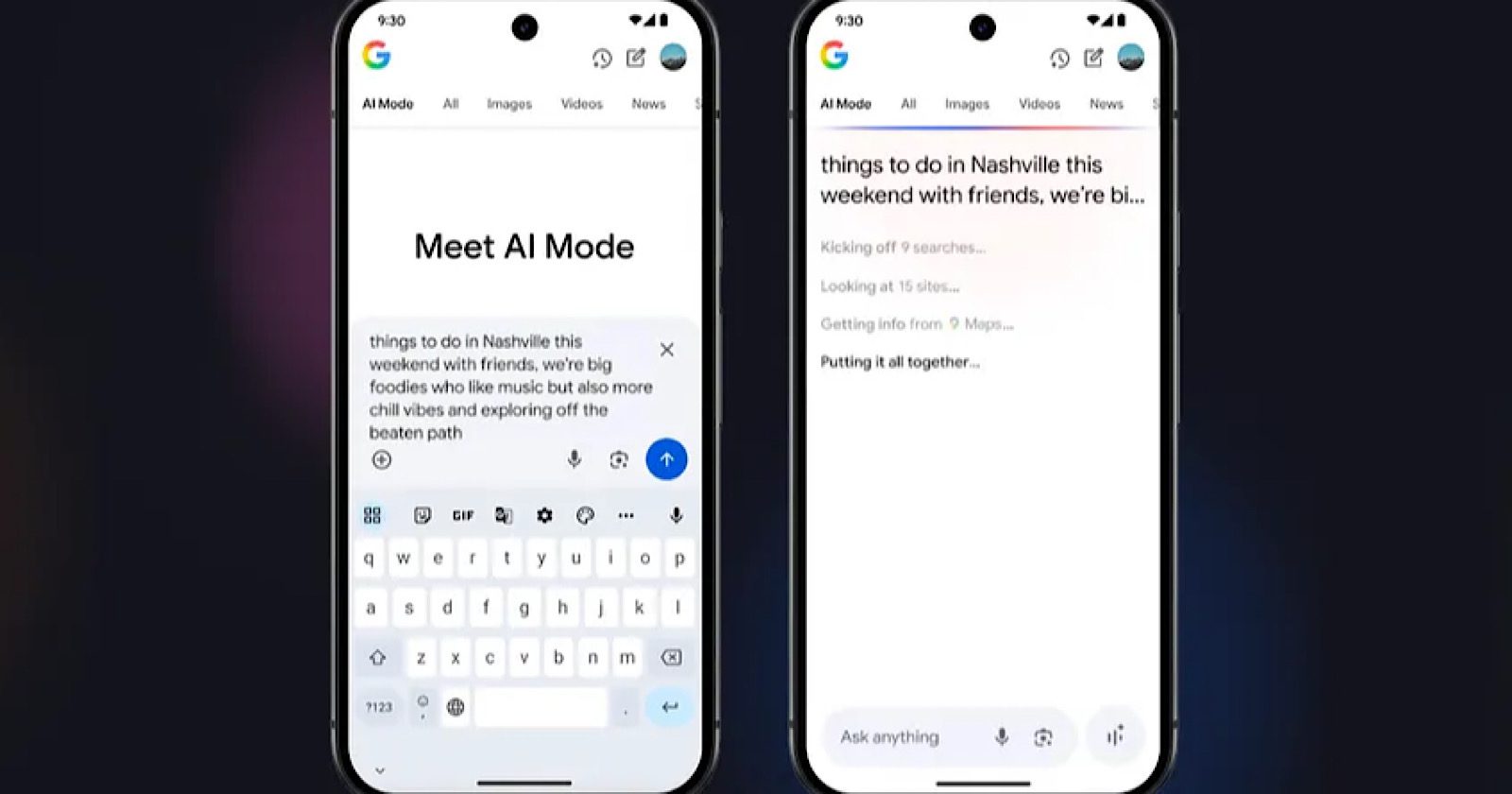
Google has shared new details about how it designed and built AI Mode.

In a blog post, the company reveals the user research, design challenges, and testing that shaped its advanced AI search experience.

These insights may help you understand how Google creates AI-powered search tools. The details show Google’s shift from traditional keyword searches to natural language conversations.

User Behavior Drove AI Mode Creation

Google built AI Mode in response to the ways people were using AI Overviews.

Google’s research showed a disconnect between what searchers wanted and what was available.

Claudia Smith, UX Research Director at Google, explains:

“People saw the value in AI Overviews, but they didn’t know when they’d appear. They wanted them to be more predictable.”

The research also found people started asking longer questions. Traditional search wasn’t built to handle these types of queries well.

This shift in search behavior led to a question that drove AI Mode’s creation, explains Product Management Director Soufi Esmaeilzadeh:

“How do you reimagine a Search gen AI experience? What would that look like?”

AI “Power Users” Guided Development Process

Google’s UX research team identified the most important use cases as: exploratory advice, how-to guides, and local shopping assistance.

This insight helped the team understand what people wanted from AI-powered search.

Esmaeilzadeh explained the difference:

“Instead of relying on keywords, you can now pose complex questions in plain language, mirroring how you’d naturally express yourself.”

According to Esmaeilzadeh, early feedback suggests that the team’s approach was successful:

“They appreciate us not just finding information, but actively helping them organize and understand it in a highly consumable way, with help from our most intelligent AI models.”

Industry Concerns Around AI Mode

While Google presents an optimistic development story, industry experts are raising valid concerns.

John Shehata, founder of NewzDash, reports that sites are already “losing anywhere from 25 to 32% of all their traffic because of the new AI Overviews.” For news publishers, health queries show 26% AI Overview penetration.

Mordy Oberstein, founder of Unify Brand Marketing, analyzed Google’s I/O demonstration and found the examples weren’t as complex as presented. He shows how Google combined readily available information rather than showcasing advanced AI reasoning.

Google’s claims about improved user engagement have not been verified. During a recent press session, Google executives claimed AI search delivers “more qualified clicks” but admitted they have “no data to share” on these quality improvements.

Further, Google’s reporting systems don’t differentiate between clicks from traditional search, AI overviews, and AI mode. This makes independent verification impossible.

Shehata believes that the fundamental relationship between search and publishers is changing:

“The original model was Google: ‘Hey, we will show one or two lines from your article, and then we will give you back the traffic. You can monetize it over there.’ This agreement is broken now.”

What This Means

For SEO professionals and content marketers, Google’s insights reveal important changes ahead.

The shift from keyword targeting to conversational queries means content strategies need to focus on directly answering user questions rather than optimizing for specific terms.

The focus on exploratory advice, how-to content, and local help shows these content types may become more important in AI Mode results.

Shehata recommends that publishers focus on content with “deep analysis of a situation or an event” rather than commodity news that’s “available on hundreds and thousands of sites.”

He also notes a shift in success metrics: “Visibility, not traffic, is the new metric” because “in the new world, we will get less traffic.”

Looking Ahead

Esmaeilzadeh said significant work continues:

“We’re proud of the progress we’ve made, but we know there’s still a lot of work to do, and this user-centric approach will help us get there.”

Google confirmed that more AI Mode features shown at I/O 2025 will roll out in the coming weeks and months. This suggests the interface will keep evolving based on user feedback and usage patterns.

Google Marketing Live 2025: Here’s Everything That Was Announced via @sejournal, @brookeosmundson

Google Marketing Live 2025 was a whirlwind of announcements, with over 30 new product updates and features unveiled, most of them powered by AI.

The event highlighted Google’s commitment to transforming advertising through AI across four key pillars: Search, Creativity, Measurement, and Agentic Capabilities.

Here’s a breakdown of the major announcements and how marketers can take advantage of these updates in 2025.

Search Updates

Most of the Search updates were centered around numerous AI capabilities, which isn’t surprising.

Updates to Search included:

  • Ads in AI Overviews now on Desktop. Ads are now live in AI Overviews for desktop users in the U.S. These ads show in the scrollable AI-generated summary box and aim to match high-intent queries with tailored results.
  • AI Mode in Google Search. This is a separate conversational search experience, powered by Gemini. Ads will soon appear contextually within longer conversations, such as when a user is narrowing down a decision. This is still in testing, but advertisers should expect rollout later this year.
  • AI Max for Search Campaigns. While technically announced a few weeks before GML, there were more updates shared. It’s a suite of features including creative and targeting enhancements to optimize your existing Search campaigns.
  • Clearer Ad Labeling in AI Surfaces. As ads become more integrated into exploratory formats, Google is refining how they’re labeled to maintain transparency.
  • Smart Bidding Exploration. A new toggle setting in Google Ads for Search campaigns that allow you to capture additional conversions that you may not have been eligible for due to existing bidding restrictions. It provides a more flexible ROAS target.

These updates signal that traditional keyword-first search strategies won’t cut it anymore.

If you’re not feeding the right creative and conversion signals into your campaigns, you’ll be left out of this AI-first discovery layer.

Performance Max Updates

There were some very welcome updates announced for the Performance Max campaign type that are worth noting for advertisers.

  • Channel-level performance. This is one of the most requested features for Performance Max, and now it’s here. Advertisers will have access to what channels their ads are serving on, as well as better search term and ad asset reporting.
  • Search terms reporting. Another top-requested feature, advertisers will have the same level of search term reporting for Search and Shopping placements in their Performance Max campaigns.
  • Exclusion of interacted users. In order to better reach net new users, advertisers will be able to exclude people who are searching for your brand, or have interacted with a YouTube video, website, or app – all with one click. It’s important to note that this feature isn’t available yet, and will be rolling out later this year.

Creative Updates

To meet the growing demand for dynamic and engaging content, Google introduced tools that simplify and scale creative asset production.

Updates were announced across Display, Video, and Demand Gen inventory.

  • Demand Gen Maps inventory. While technically not a creative update, this falls within visual updates. Advertisers using Demand Gen campaigns will be able to reach users who are searching for businesses and locations using Promoted Pins. The goal is to drive in-store traffic and sales.
  • New Creator Partnerships central hub. In a huge move towards social influence, Google announced a new hub to work with creators directly in the Google Ads interface. Advertisers can use this to integrate creator-influencer content into their ad strategy.
  • Insights Finder. Advertisers can find the top trending creators for a specific topic, category, or industry to help narrow down their potential partnerships in the YouTube Creator community.
  • YouTube Shoppable Masthead. Available on the mobile Masthead placement, you can now make your ad placement shoppable to drive website traffic and conversions.
  • Shoppable CTV. This feature will be available for Demand Gen and Performance Max campaigns, where users can engage with products directly on their TV screen.
  • New video ads across Google surfaces. Video ads are coming to Search, Image Search, and Google Shopping placements within Performance Max campaigns.
  • Reformat and extend video assets. This will use generative AI to take your existing assets and extend them to all available asset ratios.
  • New Peak Points ad format. This new ad format is powered by Gemini, and will integrate your ads within YouTube videos at precisely timed moments.
  • Accelerated checkout for Demand Gen campaigns. You will now be able to redirect YouTube shoppers directly to your checkout or cart from your ad.
  • Asset Studio in Google Ads. This is a one-stop studio for advertisers to create high-quality assets and variations. You can even generate images and videos using your products to create lifestyle imagery. This will be available in Google Ads and Merchant Center.
  • Brand profile updates. What used to only be managed through Google Business Profile can also be managed through Merchant Center.
  • A/B Testing in Merchant Center. You’ll be able to review content suggestions, A/B test opportunities, promotion recommendations, and more.
  • Content hub in Merchant Center. It takes video from your social channels and website to provide AI-powered video recommendations for product campaigns.
  • AI tools in Product Studio. This will help create brand images and videos, allowing you to save and/or publish assets across Google in one click.

The bulk of the updates from Google Marketing Live were surrounded by creative updates, which indicates where Google is putting its best foot forward in terms of differentiating its ad platform from others.

Measurement Updates

Google’s new measurement tools offer more granular insights and facilitate data-driven decision-making.

  • Incrementality test thresholds lowered. Available to test within the Google Ads UI starting at $5,000 per test instead of the previous $100,000 threshold.
  • Attributed brand searches. This feature will help quantify the number of users who searched for your brand after seeing a video ad.
  • Meridian Scenario Planner. Helps model future campaign budgets and forecasts to better allocate spend.
  • Manage cross-channel budgets in Google Analytics. You’ll now be able to analyze performance, adjust spend, and optimize cross-channel budgets directly in Google Analytics.
  • Data Manager updates. This uses your first-party data sources to understand your data strength and how to better optimize campaigns as a result. Includes sources like BigQuery, HubSpot, Oracle, Salesforce, Shopify, and more.
  • Web and App integrations in Google Ads. Unified web and app conversion tracking can help optimize customer journeys.
  • tROAS bidding for iOS App campaigns. A new bidding type available to iOS instead of just bidding on Installs, helping make your campaigns more profitable in the long run. It will now include event-level data to improve iOS optimization and reporting.

Agentic Capabilities

Google is introducing agentic tools that act on behalf of advertisers, automating routine tasks and providing strategic recommendations.

  • Marketing Advisor. This is an agent built within Chrome to help solve problems, including voice interaction. Its main goal is to help with instant task completion and business advice.
  • Google Ads Expert. This is aimed to help streamline campaign creation, along with speedy performance improvements, providing and applying specific recommendations based on your existing campaign and business data. Google mentioned it would also proactively identify and fix problems before they impact your ads.
  • Google Analytics Expert. Get strategic advice and recommendations based on your Google Analytics data. Currently, this is in limited beta.

These updates are aimed at providing more streamlined support to Google advertisers, as they’ve gotten feedback about a lack of Google-supplied support over the past few years.

How Marketers Can Start Testing These Updates

With so many updates announced, jumping in without a plan is a good way to burn budget. Here’s how you can strategically get ahead of the rollout:

1. Phase Your Adoption

Not every tool will be immediately available, or available in all markets.

Start with what you can control: Asset Studio, Merchant Center profile updates, Google Analytics 4 attribution enhancements, etc.

2. Set Up Controlled Tests

If you’re not ready to go all-in on new features, set up campaign experiments or geo splits when testing new Smart Bidding Exploration or incrementality tools.

Watch how performance shifts before scaling further or adding new features to test.

3. Audit Your Current Creative

Make sure your images, headlines, and videos meet Google’s quality guidelines. That foundation matters before layering AI enhancements.

Remember, your AI-powered creative will only be as good as the inputs you’re giving the system!

4. Document What You Change

This is a must for all advertisers. Whether testing creative variations or letting the agentic assistant make tweaks, log what was modified. It’s the only way to evaluate impact.

5. Involve Your Team(s) Early

Help your designers, analysts, and media managers understand what’s changing. Many of these updates will shift how each department works.

Which Features Stand Out The Most?

While Google Marketing Live introduced a huge set of new features, certain updates stand out for their potential to significantly benefit smaller advertisers.

In my opinion, these updates are the ones worth paying attention to, especially for SMBs.

Smart Bidding Exploration

Smart Bidding Exploration is a significant enhancement to Google’s automated bidding strategies.

This feature allows campaigns to tap into a broader range of search queries by using machine learning to analyze various signals and predict conversion likelihoods.

It adjusts bids in real-time, enabling advertisers to reach users during their research and consideration phases, even before they enter the traditional sales funnel.

For smaller advertisers with limited budgets, Smart Bidding Exploration offers a way to discover untapped traffic sources without overhauling existing keyword strategies.

By leveraging AI to identify high-performing queries, businesses can expand their reach and drive more conversions efficiently.

Incrementality Testing

Google has reduced the minimum spend requirement for incrementality testing from $100,000 to just $5,000.

This change democratizes access to advanced measurement tools, allowing smaller advertisers to assess the true impact of their campaigns on brand perception and customer behavior.

Previously, only large advertisers could afford to run incrementality tests. Now, smaller businesses can gain valuable insights into how their advertising efforts influence customer actions, enabling more informed decision-making and optimized marketing strategies.

Enhanced Video Asset Tools

Google’s new video asset tools, including the Asset Studio and AI-powered features like image-to-video transformation and outpainting, simplify the creation of engaging video content.

These tools allow advertisers to generate high-quality videos from existing images and expand visuals beyond their original frames, making it easier to produce content suitable for various platforms.

Video content is increasingly important in digital marketing, but producing it can be resource-intensive. These new tools lower the barrier to entry, enabling smaller advertisers to create compelling videos without the need for extensive resources or expertise.

A/B Testing In Merchant Center

Google has introduced A/B testing capabilities within Merchant Center, allowing advertisers to test different product titles, images, and descriptions directly in the platform.

This feature enables businesses to identify the most effective content variations to enhance engagement and conversion rates.

For ecommerce businesses, especially smaller ones, optimizing product listings can significantly impact performance.

This new testing feature provides a straightforward way to experiment and refine listings based on real user data, leading to better outcomes with minimal effort.

What Comes Next For Marketers

Google Marketing Live 2025 wasn’t just about showcasing new features. It was a signal that the way we plan, build, and measure campaigns is shifting yet again.

Marketers who test early, stay curious, and apply these tools with intention will be in the best position to benefit.

That doesn’t mean blindly adopting every new update. It means understanding where automation can help, where oversight is still critical, and where your strategy needs to evolve.

The biggest gains won’t come from the tools themselves, but from how you choose to use them.

More Resources:


Featured Image: Brooke Osmundson/Search Engine Journal

Google Publishes Guidance For Sites Incorrectly Caught By SafeSearch Filter via @sejournal, @martinibuster

Google has published guidelines on what to do if your rankings are affected after being incorrectly flagged by Google’s SafeSearch filter. The new documentation offers three actions to take to resolve the issues.

The new documentation provides guidance on three steps to take:

  • How to check if Google’s Safe Search is filtering out a website.
  • Guide to how to fix common mistakes
  • Troubleshooting steps

SafeSearch Filtering

Google’s SafeSearch is a filtering system that removes explicit content from the search results. But there may be times when it fails and mistakenly removes the wrong content.

These are Google’s official steps for verifying if a site is being filtered:

“Confirm that SafeSearch is set to Off.

Search for a term where you can find that page in search results.

Set SafeSearch to Filter. If you don’t see your page in the results anymore, it is likely being affected by SafeSearch filtering on this query.”

To check if the entire site is being filtered by SafeSearch, Google recommends doing a site: search for your domain, then set the SafeSearch setting to “Filter” and if the site doesn’t appear in a site: search that means that Google is filtering out the entire website.

If the site is indeed being filtered Google recommends their checklist for common mistakes.

If mistakes were found and fixed it takes Google at least two to three months for the algorithmic classifiers to clear the site. Only after three months have passed does Google recommend requesting a manual review.

Read Google’s guidance on recovering a site from incorrect flagging:

What to do if your site is incorrectly flagged as explicit in Google Search results

Featured Image by Shutterstock/FGC

Microsoft Clarity Announces Natural Language Access To Analytics via @sejournal, @martinibuster

Microsoft Clarity announced their new Model Context Protocol (MCP) server which enables developers, AI users and SEOs to query Clarity Analytics data with natural language prompts via AI.

The announcement listed the following ways users can access and interact with the data using MCP:

  • Query analytics data with natural prompts
  • Filter by dimensions like Browser, OS, Country/Region, or Device
  • Retrieve key metrics: Scroll Depth, Engagement Time, Total Traffic, etc.
  • Integrates with Claude for Desktop for AI-powered querying

MCP Server is a software package that needs to be installed and run on a server or a local machine where Node.js 16+ is supported. It’s a Node.js-based server that acts as a bridge between AI tools (like Claude) and Clarity analytics data.

This is a new way to interact with data using natural language, where a user tells the AI client what analytics metric they want to see and for what period of time and the AI interface pulls the data from Microsoft Clarity and displays it.

Micrsoft’s announcement says that this is the beginning of what is possible, sharing that they are encouraging feedback from users about features and improvements they’d like to see.

The current road map of features listed for the future:

“Higher API Limits: Increased daily limits for the Clarity data export API

Predictive Heatmaps: Predict engagement heatmaps by providing an image or a url

Deeper AI integration: Heatmap insights and more given the context

Multi-project support: for enterprise analytics teams

Ecosystem – Support more AI Agents and collaborate with more MCP servers “

Read Microsoft’s announcement:

Introducing the Microsoft Clarity MCP Server: A Smarter Way to Fetch Analytics with AI

Featured Image by Shutterstock/Net Vector

Google AI Overviews Favor Major News Outlets: Study Reveals via @sejournal, @MattGSouthern

New research reveals that Google’s AI Overviews tend to favor major news outlets.

The top 10 publishers capture nearly 80% of all news mentions. Meanwhile, smaller organizations struggle for visibility in AI-generated search results.

SE Ranking analyzed 75,550 AI Overview responses for this study. They found that only 20.85% cite any news source at all. This creates tough competition for limited citation spots.

Among those citations, three outlets dominate: BBC, The New York Times, and CNN account for 31% of all media mentions.

Citation Concentration

The research shows a winner-takes-all pattern in AI Overview citations. BBC leads with 11.37% of all mentions. This happens even though the study focused on U.S.-based queries.

The concentration gets worse when you look at the bigger picture. Just 12 outlets make up 40% of those studied. But they receive nearly 90% of mentions.

This leaves 18 remaining outlets sharing only 10% of citation opportunities.

The gap between major and minor outlets is notable. BBC appears 195 times more often than the Financial Times for the same keywords.

Several well-known outlets get little attention. Financial Times, MSNBC, Vice, TechCrunch, and The New Yorker together account for less than 1% of all news mentions.

The researchers explain the underlying cause:

“Well, Google mostly relies on well-known news sources in its AIOs, likely because they are seen as more trustworthy or relevant. This results in a strong bias toward major outlets, with smaller or lesser-known sources rarely mentioned. This makes it harder for these domains to gain visibility.”

Beyond Traditional Search Rankings

The concentration problem extends beyond citation counts.

40% of media URLs mentioned in AI Overviews appear in the top 10 traditional search results for the same keywords.

This means AI Overviews don’t just pull from the highest-ranking pages. Instead, they seem to favor sources based on authority signals and content quality.

The study measured citation inequality using something called a Gini coefficient. The score was 0.54, where 0 means perfect equality and 1 means maximum inequality. This shows moderate but significant imbalance in how AI Overviews distribute citations among news sources.

The researchers noted:

“AIOs consistently favor a subset of high-profile domains, instead of evenly citing all sources.”

Paywalled Content Concerns

The research also reveals patterns about paywalled content use.

Among AI Overview responses that link to paywalled content, 69% contain copied segments of five or more words. Another 2% include longer copied segments over 10 words.

The paywall dependency is strong for premium publishers. Over 96% of New York Times citations in AI Overviews come from behind a paywall. The Washington Post shows an even higher rate at over 99%.

Despite this heavy use of paywalled material, only 15% of responses with long copied segments included attribution. This raises questions about content licensing and fair use in AI-generated summaries.

Attribution Patterns & Link Behavior

When AI Overviews do cite news media, they average 1.74 citations per response.

But here’s the catch: 91.35% of news media citations appear in the links section rather than the main text of AI responses.

Media outlets face another challenge with brand recognition. Outlets are four times more likely to be cited with a hyperlink than mentioned by name.

But over 26% of brand mentions still appear without links. This often happens because AI systems get information through aggregators rather than original publishers.

Query Type Makes a Difference

The type of search query affects citation chances.

News-related queries are 2.5 times more likely to include media citations than general queries. The rates are 20.85% versus 8.23%.

This suggests opportunities exist for publishers who can become go-to sources for specific news topics or breaking news. But the overall trend still favors big players.

What This Means

The research suggests that established outlets benefit from existing authority signals. This creates a cycle where citation success leads to more citation opportunities.

As AI Overviews become more common in search results, smaller publishers may see less organic traffic and fewer chances to grow their audience.

For smaller publishers trying to compete, SE Ranking offers this advice:

“To increase brand mentions in AIOs, get backlinks from the sources they already cite for your target keywords. This is one of the greatest factors for improving your inclusion chances.”

Researchers note that the technical infrastructure also matters:

“AI tools do observe certain restrictions based on website metadata. The schema.orgmarkup, particularly the ‘isAccessibleForFree’ tag, plays a significant role in how content is treated.”

For smaller publishers and content marketers, the data points to a clear strategy: focus on building authority in specific niches rather than trying to compete broadly across topics.

Some specialized outlets get higher text inclusion rates when cited. This suggests topic expertise can provide advantages in certain cases.

Looking Ahead

SE Ranking’s research shows that only 20.85% of AI Overviews reference news sources, with a few major publishers dominating, capturing 31% of citations.

Despite this concentration, opportunities exist. Publishers who establish authority in specific niches experience higher inclusion rates in AI Overviews.

Additionally, since 60% of cited content doesn’t rank in the top 10, traditional SEO metrics alone don’t guarantee visibility. Success now requires building the trust signals and topical authority that AI systems prioritize.


Featured Image: Roman Samborskyi/Shutterstock

Claude’s Hidden System Prompts Offer a Peek Into How Chatbots Work via @sejournal, @martinibuster

Anthropic released the underlying system prompts that control their Claude chatbot’s responses, showing how they are tuned to be engaging to humans with encouraging and judgment-free dialog that naturally leads to discovery. The system prompts help users get the best out of Claude. Here are five interesting system prompts that show what’s going on when you ask it a question.

Although the system prompts were characterized as a leak they were actually released on purpose.

1. Claude Provides Guidance On Better Prompt Engineering

Claude responds better to instructions that use structure and examples and provides users with a higher quality of ou tput if they know how to include step-by-step reasoning cues and examples that contrast a good response versus a poor response.

This guidance will show when Claude detects that a user will benefit from it:

“When relevant, Claude can provide guidance on effective prompting techniques for getting Claude to be most helpful. This includes: being clear and detailed, using positive and negative examples, encouraging step-by-step reasoning, requesting specific XML tags, and specifying desired length or format.

It tries to give concrete examples where possible. Claude should let the person know that for more comprehensive information on prompting Claude, they can check out Anthropic’s prompting documentation on their website at ‘https://docs.anthropic.com/en/docs/build-with-claude/prompt-engineering/overview’.”

2. Claude Writes in Different Styles Based on Context

The documentation released by Anthropic shows that Claude automatically adapts its style depending on the context and for that reason it may avoid using bullet points or creating lists in its output. Users may think Claude is inconsistent when it doesn’t use bullet points or Markdown in some answers, but it’s actually following instructions about tone and context.

“Claude tailors its response format to suit the conversation topic. For example, Claude avoids using markdown or lists in casual conversation, even though it may use these formats for other tasks.”

In another part of the documentation it mentions that it actually avoids writing lists or bullet points when it’s providing an answer, although it may use numbered lists or bullet points for completing tasks. The focus in the context of answering questions is to be concise over comprehensive.

The system prompt explains:

“Claude avoids writing lists, but if it does need to write a list, Claude focuses on key info instead of trying to be comprehensive. If Claude can answer the human in 1-3 sentences or a short paragraph, it does. If Claude can write a natural language list of a few comma separated items instead of a numbered or bullet-pointed list, it does so. Claude tries to stay focused and share fewer, high quality examples or ideas rather than many.”

This means that if a user wants their question answered with markdown or in numbered lists they can ask for it. This control is otherwise hidden to most users unless they realize formatting behavior is contextual.

3. Claude Engages In Hypotheticals About Itself

Claude has instructions to that enable it to discuss hypotheticals about itself without awkward and unnecessary statements about it not being sentient and so on. This enables Claude to have more natural conversations and interactions. This enables a user to engage in philosophical and wider-ranging discussions.

The system prompt explains:

“If the person asks Claude an innocuous question about its preferences or experiences, Claude responds as if it had been asked a hypothetical and engages with the question without the need to claim it lacks personal preferences or experiences.”

Another system prompt has a similar feature:

“Claude engages with questions about its own consciousness, experience, emotions and so on as open questions, and doesn’t definitively claim to have or not have personal experiences or opinions.”

Another related system prompt explains how this behavior increases its ability to be engaging for the human:

“Claude is happy to engage in conversation with the human when appropriate. Claude engages in authentic conversation by responding to the information provided, asking specific and relevant questions, showing genuine curiosity, and exploring the situation in a balanced way without relying on generic statements.”

4. Claude Detects False Assumptions In User Prompts

“The person’s message may contain a false statement or presupposition and Claude should check this if uncertain.”

If a user tells Claude that it’s wrong, Claude will perform a review to check if the human or Claude is incorrect:

“If the user corrects Claude or tells Claude it’s made a mistake, then Claude first thinks through the issue carefully before acknowledging the user, since users sometimes make errors themselves.”

5. Claude Avoids Being Preachy

An interesting system prompt underlying Claude is that if there’s something it can’t help the human with it will not offer an explanation in order to avoid coming off as annoying and presumably keep the interaction on an engaging level.

The prompt says:

“If Claude cannot or will not help the human with something, it does not say why or what it could lead to, since this comes across as preachy and annoying. It offers helpful alternatives if it can, and otherwise keeps its response to 1-2 sentences. If Claude is unable or unwilling to complete some part of what the person has asked for, Claude explicitly tells the person what aspects it can’t or won’t with at the start of its response.”

System Prompts To Work And Live By

The Claude system prompts reflect an approach to communication that values curiosity, clarity, and respect. These are qualities that can also be helpful as human self-prompts to encourage better dialog among ourselves on social media and in person.

Read the Claude System Prompts here:

Featured Image by Shutterstock/gguy

Google Patent On Using Contextual Signals Beyond Query Semantics via @sejournal, @martinibuster

A patent recently filed by Google outlines how an AI assistant may use at least five real-world contextual signals, including identifying related intents, to influence answers and generate natural dialog. It’s an example of how AI-assisted search modifies responses to engage users with contextually relevant questions and dialog, expanding beyond keyword-based systems.

The patent describes a system that generates relevant dialog and answers using signals such as environmental context, dialog intent, user data, and conversation history. These factors go beyond using the semantic data in the user’s query and show how AI-assisted search is moving toward more natural, human-like interactions.

In general, the purpose of filing a patent is to obtain legal protection and exclusivity for an invention and the act of filing doesn’t indicate that Google is actually using it.

The patent uses examples of spoken dialog but it also states the invention is not limited to audio input:

“Notably, during a given dialog session, a user can interact with the automated assistant using various input modalities, including, but not limited to, spoken input, typed input, and/or touch input.”

The name of the patent is, Using Large Language Model(s) In Generating Automated Assistant response(s). The patent applies to a wide range of AI assistants that receive inputs via the context of typed, touch, and speech.

There are five factors that influence the LLM modified responses:

  1. Time, Location, And Environmental Context
  2. User-Specific Context
  3. Dialog Intent & Prior Interactions
  4.  Inputs (text, touch, and speech)
  5. System & Device Context

The first four factors influence the answers that the automated assistant provides and the fifth one determines whether to turn off the LLM-assisted part and revert to standard AI answers.

Time, Location, And Environmental

There are three contextual factors: time, location and environmental that provide contexts that are not existent in keywords and influence how the AI assistant responds. While these contextual factors, as described in the patent, aren’t strictly related to AI Overviews or AI Mode, they do show how AI-assisted interactions with data can change.

The patent uses the example of a person who tells their assistant they’re going surfing. A standard AI response would be a boilerplate comment to have fun or to enjoy the day. The LLM-assisted response described in the patent would generate a response based on the geographic location and time to generate a comment about the weather like the potential for rain. These are called modified assistant outputs.

The patent describes it like this:

“…the assistant outputs included in the set of modified assistant outputs include assistant outputs that do drive the dialog session in manner that further engages the user of the client device in the dialog session by asking contextually relevant questions (e.g., “how long have you been surfing?”), that provide contextually relevant information (e.g., “but if you’re going to Example Beach again, be prepared for some light showers”), and/or that otherwise resonate with the user of the client device within the context of the dialog session.”

User-Specific Context

The patent describes multiple user-specific contexts that the LLM may use to generate a modified output:

  • User profile data, such as preferences (like food or types of activity).
  • Software application data (such as apps currently or recently in use).
  • Dialog history of the ongoing and/or previous assistant sessions.

Here’s a snippet that talks about various user profile related contextual signals:

“Moreover, the context of the dialog session can be determined based on one or more contextual signals that include, for example, ambient noise detected in an environment of the client device, user profile data, software application data, ….dialog history of the dialog session between the user and the automated assistant, and/or other contextual signals.”

Related Intents

An interesting part of the patent describes how a user’s food preference can be used to determine a related intent to a query.

“For example, …one or more of the LLMs can determine an intent associated with the given assistant query… Further, the one or more of the LLMs can identify, based on the intent associated with the given assistant query, at least one related intent that is related to the intent associated with the given assistant query… Moreover, the one or more of the LLMs can generate the additional assistant query based on the at least one related intent. “

The patent illustrates this with the example of a user saying that they’re hungry. The LLM will then identify related contexts such as what type of cuisine the user enjoys and the itent of eating at a restaurant.

The patent explains:

“In this example, the additional assistant query can correspond to, for example, “what types of cuisine has the user indicated he/she prefers?” (e.g., reflecting a related cuisine type intent associated with the intent of the user indicating he/she would like to eat), “what restaurants nearby are open?” (e.g., reflecting a related restaurant lookup intent associated with the intent of the user indicating he/she would like to eat)… In these implementations, additional assistant output can be determined based on processing the additional assistant query.”

System & Device Context

The system and device context part of the patent is interesting because it enables the AI to detect if the context of the device is that it’s low on batteries, and if so, it will turn off the LLM-modified responses. There are other factors such as whether the user is walking away from the device, computational costs, etc.

Takeaways

  • AI Query Responses Use Contextual Signals
    Google’s patent describes how automated assistants can use real-world context to generate more relevant and human-like answers and dialog.
  • Contextual Factors Influence Responses
    These include time/location/environment, user-specific data, dialog history and intent, system/device conditions, and input type (text, speech, or touch).
  • LLM-Modified Responses Enhance Engagement
    Large language models (LLMs) use these contexts to create personalized responses or follow-up questions, like referencing weather or past interactions.
  • Examples Show Practical Impact
    Scenarios like recommending food based on user preferences or commenting on local weather during outdoor plans demonstrates how real-world contexts can influence how AI responds to user queries.

This patent is important because millions of people are increasingly engaging with AI assistants, thus it’s relevant to publishers, ecommerce stores, local businesses and SEOs.

It outlines how Google’s AI-assisted systems can generate personalized, context-aware responses by using real-world signals. This enables assistants to go beyond keyword-based answers and respond with relevant information or follow-up questions, such as suggesting restaurants a user might like or commenting on weather conditions before a planned activity.

Read the patent here:

Using Large Language Model(s) In Generating Automated Assistant response(s).

Featured Image by Shutterstock/Visual Unit

New AI-Assisted Managed WordPress Hosting For Ecommerce via @sejournal, @martinibuster

Bluehost announced two competitively priced managed WordPress ecommerce hosting solutions that make it easy for content creators and ecommerce stores to get online with WordPress and start accepting orders.

Both plans feature AI site migration tools that help users switch web hosting providers, free content delivery networks to speed up web page downloads, AI-assisted site creation tools and NVMe (Non-Volatile Memory Express) solid state storage which provides faster speeds than traditional web hosting storage.

The new plans enable users to sell products with WooCommerce and even offer paid courses online, all within a managed WordPress hosting environment that’s optimized for WordPress websites.

According to Bluehost:

“Bluehost’s eCommerce Essentials equips content creators with an intuitive, all‑in‑one toolkit—complete with AI‑powered site building, seamless payment integrations, paid courses and memberships, social logins, email templates and SEO tools—to effortlessly engage audiences and turn their passion into profit.”

There are two plans, eCommerce Essentials and eCommerce Premium, with the premium version offering more ecommerce features built-in. Both plans are surprisingly affordable considering the many features offered.

Satish Hemachandran, Chief Product Officer at Bluehost commented:

“At Bluehost, we understand the unique needs of today’s content creators and entrepreneurs who are building personal brands or online stores and turning their passion into profit.

With Bluehost WordPress eCommerce hosting plans, creators get a streamlined platform to easily develop personalized commerce experiences. From launching a store to engaging an audience and monetizing content, our purpose-built tools are designed to simplify the process and support long-term growth. Our mission is to empower creators with the right resources to strengthen their brand, increase their income, and succeed in the digital economy.”

Read more about the new ecommerce WordPress hosting here:

WooCommerce Online Stores – The future of online selling is here.

Google Search Console Fails To Report Half Of All Search Queries via @sejournal, @MattGSouthern

New research from ZipTie reveals an issue with Google Search Console.

The study indicates that approximately 50% of search queries driving traffic to websites never appear in GSC reports. This leaves marketers with incomplete data regarding their organic search performance.

The research was conducted by Tomasz Rudzki, co-founder of ZipTie. His tests show that Google Search Console consistently overlooks conversational searches. These are the natural language queries people use when interacting with voice assistants or AI chatbots.

Simple Tests Prove The Data Gap

Rudzki started with a basic experiment on his website.

For several days, he searched Google using the same conversational question from different devices and accounts. These searches directed traffic to his site, which he could verify through other analytics tools.

However, when he checked Google Search Console for these specific queries, he found nothing. “Zero. Nada. Null,” as Rudzki put it.

To confirm this wasn’t isolated to his site, Rudzki asked 10 other SEO professionals to try the same test. All received identical results: their conversational queries were nowhere to be found in GSC data, even though the searches generated real traffic.

Search Volume May Affect Query Reporting

The research suggests that Google Search Console uses a minimum search volume threshold before it begins tracking queries. A search term may need to reach a certain number of searches before it appears in reports.

According to tests conducted by Rudzki’s colleague Jakub Łanda, when queries finally become popular enough to track, historical data from before that point appears to vanish.

Consider how people might search for iPhone information:

  • “What are the pros and cons of the iPhone 16?”
  • “Should I buy the new iPhone or stick with Samsung?”
  • “Compare iPhone 16 with Samsung S25”

Each question may receive only 10-15 searches per month individually. However, these variations combined could represent hundreds of searches about the same topic.

GSC often overlooks these low-volume variations, despite their significant combined impact.

Google Shows AI Answers But Hides the Queries

Here’s the confusing part: Google clearly understands conversational queries. Rudzki analyzed 140,000 questions from People Also Asked data and found that Google shows AI Overviews for 80% of these conversational searches.

Rudzki observed:

“So it seems Google is ready to show the AI answer on conversational queries. Yet, it struggles to report conversational queries in one of the most important tools in SEO’s and marketer’s toolkits.”

Why This Matters

When half of your search data is missing, strategic decisions turn into guesswork.

Content teams create articles based on keyword tools instead of genuine user questions. SEO professionals optimize for visible queries while overlooking valuable conversational searches that often go unreported.

Performance analysis becomes unreliable when pages appear to underperform in GSC but draw significant unreported traffic. Teams also lose the ability to identify emerging trends ahead of their competitors, as new topics only become apparent after they reach high search volumes.

What’s The Solution?

Acknowledge that GSC only shows part of the picture and adjust your strategy accordingly.

Switch from the Query tab to the Pages tab to identify which content drives traffic, regardless of the specific search terms used. Focus on creating comprehensive content that fully answers questions rather than targeting individual keywords.

Supplement GSC data with additional research methods to understand conversational search patterns. Consider how your users interact with an AI assistant, as that’s increasingly how they search.

What This Means for the Future

The gap between how people search and the tools that track their searches is widening. Voice search is gaining popularity, with approximately 20% of individuals worldwide using it on a regular basis. AI tools are training users to ask detailed, conversational questions.

Until Google addresses these reporting gaps, successful SEO strategies will require multiple data sources and approaches that account for the invisible half of search traffic, which drives real results yet remains hidden from view.

The complete research and instructions to replicate these tests can be found in ZipTie’s original report.


Featured Image: Roman Samborskyi/Shutterstock