How To Choose The Right Bid Strategy For Lead Generation Campaigns via @sejournal, @adsliaison

Welcome back to our series on getting started with value-based bidding for lead gen marketers!

We’ve discussed evaluating whether it makes sense for your business, setting your data strategy, and assigning the right values for your conversions.

Now, we’re going to cover the final step before activating your value-based bidding strategy: choosing the right bid strategy for your lead generation campaigns.

The big benefit of value-based bidding is that it allows you to prioritize conversions that are most likely to drive higher revenue or achieve your specific business goals, such as sales, profit margins, or customer lifetime value.

By assigning different values to different conversion actions, you gain greater control over your bidding strategy and optimize for conversions that deliver the most significant impact.

Whether it’s a purchase, a lead, or a specific action on your website, value-based bidding ensures that your bids reflect the true worth of each conversion, enabling you to maximize your return on investment (ROI).

The bidding strategy you select to optimize for value depends on a few factors. Check out this two-minute video for a quick overview, and then keep reading to dive deeper.

Which Value-Based Bidding Strategy Should You Choose?

With value-based bidding, Smart Bidding predicts the value of a potential conversion with each auction.

  • If the bid strategy determines that an impression is likely to generate a conversion with high value, it will place a higher bid.
  • If this bid strategy determines that the impression isn’t likely to generate a high-value conversion, it’ll place a lower bid.

Value-based bidding can use data from all of your campaigns, including the conversion values you are reporting, to optimize performance.

It also uses real-time signals, such as device, browser, location, and time of day, and can adjust bids based on whether or not someone is on one of your remarketing lists.

To start bidding for value, ensure the following:

  • Measure at least two unique conversion values optimized for your business.
  • Have at least 15 conversions at the account level in the past 30 days. (Note: Demand Gen should have at least 50 conversions in the past 35 days, with at least 10 in the last seven days or 100 conversions in the past 35 days.)

You’ve got two bidding strategy options to tell Google how you want to optimize for value:

  • Maximize conversion value.
  • Maximize conversion value with a target ROAS.

Here’s a quick way to think about each before we dig in further:

Maximize conversion value Target ROAS
Goal Maximize conversion values for a specific budget. Maximize conversion values for a target return on ad spend.
When
  • Your priority is to maximize value and spend the budget.
  • You don’t have a specific ROI target.
  • You have a specific ROI target.

Maximize Conversion Value

This option focuses on maximizing conversion value within a defined budget.

It’s suited for advertisers who prioritize driving the highest possible value within a specific allocated budget.

Advertisers often start with this before moving to a target ROAS strategy.

Maximize Conversion Value At A Target ROAS

This option allows you to set a specific target return on ad spend (ROAS) and instructs Google Ads to optimize your bids to achieve that target while maximizing conversion value.

Target ROAS: Why Your Budget Should Be Uncapped

When bidding with a target ROAS, your campaign budget should not be limited or capped.

That may sound scary at first, but let me reassure you that it doesn’t mean you don’t have control over your campaign spend!

Your ROAS target is the lever that manages your spend.

With a target ROAS, you’re telling Google to optimize for value at that specific target rather than find as much value within a specific budget.

So, when your budget is limited, it potentially prevents the system from having the flexibility to find the next conversion at your target.

Setting Your ROAS Targets

You can choose whether to use a recommended target ROAS or set your own.

When setting ROAS targets, use the last 30 days’ return on ad spend as a benchmark.

Google’s target ROAS recommendations are calculated based on your actual ROAS over the last few weeks.

This recommendation excludes performance from the last few days to account for conversions that may take more than a day to complete following an ad click or interaction (such as an engaged view).

You can find more details on target ROAS here.

Get Started With An Experiment

While you can launch value-based bidding directly, you may want to start with a small test using a campaign experiment. This allows you to compare the performance of value-based bidding against your existing bidding strategy and make data-driven decisions.

You have two options to create a campaign experiment:

One-Click Experiment From Recommendations Page

You may see suggestions on implementing value-based bidding on your Recommendations page.

The recommendation to “Bid more efficiently with Maximize conversion value” will show if our simulations identify that your account is measuring two or more unique conversion values and will likely benefit from this strategy.

From this recommendation, you can create a one-click experiment to test the impact of value-based bidding on a specific campaign.

Custom Experiment

You also have the option to create a more tailored experiment to test value-based bidding in your campaign.

Be sure to choose a campaign that receives sufficient traffic and conversions to generate statistically significant results.

Configure the experiment to use value-based bidding, while the original campaign continues to use your existing bidding strategy.

See the instructions here to set up a custom experiment.

How To Jumpstart Value-Based Bidding

You can employ strategies to jumpstart the system, such as initially setting a low ROAS target or starting with Maximize conversion value without a ROAS target.

If you opt to start with Maximize conversion value without a target, be sure that your budgets are aligned with your daily spend goals.

Allow A Ramp-Up Period Before You Optimize

Once you’ve launched value-based bidding, give the system a ramp-up period of two weeks or three conversion cycles. This allows Google Ads to learn and optimize your bids effectively.

When measuring performance, be sure to exclude this initial period from your analysis to obtain accurate insights.

We’ve now covered all the basics for getting started with value-based bidding.

In our last segment, we’ll discuss monitoring and optimizing your performance to drive value for your business.

More resources:


Featured Image: Sammby/Shutterstock
Performance Max For Lead Generation: Advanced Strategies And Pitfalls To Avoid

Since its launch in 2021, Google’s Performance Max (PMax) campaigns have revolutionized how we approach cross-channel advertising.

But while this AI-powered campaign has been a game-changer for many, particularly in ecommerce, its application for lead generation comes with unique challenges and opportunities.

I thought this would be a good time to share advanced strategies for leveraging PMax in lead generation campaigns. We’ll also identify common pitfalls and reveal how to maximize your results.

The Lead Gen Challenge: Quality Over Quantity

Unlike ecommerce, where a purchase marks a clear end to the customer journey, lead generation is just the beginning.

This fundamental difference creates a significant hurdle for PMax campaigns, presenting unique challenges that require advanced strategies.

Menachem Ani, founder of JXT Group, explains the core issue:

“Unlike e-commerce, where a purchase signifies the ‘end’ of the transaction, lead creation is the beginning of the sales process—and just because someone fills out a form doesn’t make them a quality lead.”

The challenge lies in teaching Google’s algorithm to distinguish between high-quality and low-quality leads.

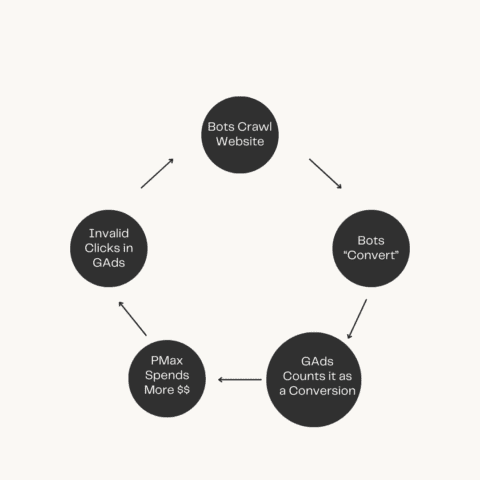
Without this crucial information, PMax campaigns can fall into what some marketers call the “feedback loop of doom” – optimizing for quantity over quality and potentially flooding your pipeline with unqualified leads.

Feedback Loop of Doom | Performance MaxImage from author, September 2024

Another critical factor in determining whether PMax suits your lead generation efforts is Google’s understanding of your business and website.

PMax heavily relies on your website content when targeting users. If Google misinterprets your service offerings, your campaigns are likely to underperform.

To assess Google’s comprehension of your business, try this simple test: Input your website URL into the Search Terms section of Google’s Keyword Planner.

Review the generated keywords and evaluate their relevance to your services. This exercise can provide valuable insights into how well Google understands your business, which is crucial for PMax’s success in lead generation campaigns.

Cracking The Code: Strategies For Success

1. Harness The Power Of Offline Conversion Tracking (OCT)

The key to success with PMax for lead generation lies in feeding Google’s algorithm with quality data. This means implementing robust OCT.

Cathryn Stormont, a freelance consultant, emphasizes:

“To make Performance Max for lead generation work, it is vital to instruct Google on the outcome. If you don’t, it will seek to bring in as many submissions as possible – regardless of the quality.”

Action steps:

  • Integrate your CRM system with Google Ads.
  • Import offline conversion data, either manually or automatically.
  • Define what a qualified lead is for your business and make the form difficult to complete.*
  • Set qualified leads as your primary conversion point.

* You can do this by adding several qualifying questions, setting up confirmation pages for qualified leads versus unqualified leads, and only counting the qualified leads.

2. Leverage Cross-Campaign Optimization

Use data from successful campaigns across other channels to inform your PMax strategy. This is especially useful when dealing with limited data in new PMax campaigns.

Practical tips:

  • Incorporate broader themes and topics related to your products or services as asset signals rather than specific keywords. For example, if you sell home renovation products, use signals like “home improvement,” “interior design,” or “home renovations” instead of specific product keywords.

Note: It’s important to understand that PMax uses these signals differently than traditional keyword targeting. The goal is to help Google understand your potential customers’ broader context and interests, not to target specific search terms.

  • Collaborate with your sales and marketing teams to incorporate insights from persona studies and campaign success stories

3. Rethink Your Campaign Structure

It’s vital to understand PMax’s strengths and limitations. Performance Max excels at capturing existing demand but struggles with generating new demand.

To leverage this characteristic effectively, consider implementing an advanced tactic:

Run a PMax campaign alongside a separate Search campaign that targets high-quality, intent-driven search keywords. This approach allows you to:

  • Use traditional Search campaigns to capture high-intent traffic based on specific keywords.
  • Let PMax excel at what it does best: Remarketing to this high-quality traffic and working on converting them.

Action steps:

  • Identify your highest-performing, intent-driven keywords from historical data.
  • Create a focused Search campaign using these keywords.
  • Set up a complementary PMax campaign.
  • Ensure your audience settings allow PMax to remarket to users interacting with your Search ads.
  • Monitor both campaigns closely, adjusting budget allocation based on performance.

This strategy lets you maintain control over your highest-value search terms while leveraging PMax’s optimization and remarketing capabilities. It creates precise targeting of traditional Search and the broad reach and AI-driven optimization of PMax.

Remember, viewing these campaigns as complementary rather than competitive is key. Doing so can create a more comprehensive and effective lead generation strategy that captures high-intent traffic and then nurtures it effectively toward conversion.

4. Harness The Power Of First-Party Data

Your first-party data is gold for PMax campaigns. It provides Google with clear signals about who is genuinely interested in your products or services.

Steps to implement:

  • Add high-value customer lists from your CRM.
  • Utilize existing remarketing lists.
  • If compliant with privacy regulations, import contacts who have engaged with your email campaigns.

5. Strategic Exclusions

While PMax limits our control compared to traditional search campaigns, we can still guide the algorithm by telling it where not to show our ads.

Tactics to consider:

  • Exclude poor-performing keywords and placements at the account level.
  • Use Google’s Insights reports to identify and exclude irrelevant search terms and placements.

Pitfalls To Avoid

1. Neglecting Lead Scoring

Not all leads are created equal. Implement a lead scoring system in your CRM and feed this data back to Google. This allows the algorithm to optimize for lead quality, not just quantity.

2. Ignoring The Full Funnel

Remember that lead generation is just the start. Track and optimize for downstream metrics like qualified leads, meetings set, and eventual sales.

3. Over-Reliance On Automation

While PMax is highly automated, it still requires human oversight and strategic input. Review performance regularly, adjust audience signals, and refine your creative assets.

4. Neglecting Creative Assets

PMax relies heavily on your creative input. Ensure you provide a diverse range of high-quality assets, including compelling ad copy, eye-catching images, and engaging videos.

5. Leverage Negative Keywords And URL Controls

While Performance Max limits traditional keyword targeting, Google now allows advertisers to use negative keyword lists in these campaigns.

This feature is crucial for lead generation efforts, serving two essential purposes:

  • Brand Protection: Create a list of your branded keywords and exclude them in PMax. As Brooke Osmundson explains, “At the very minimum, create a list of targeted brand keywords and exclude them in PMax. This allows your tried-and-true search campaign to run and optimize per usual, without PMax cannibalizing any existing efforts”.
  • Competitor Exclusion: You can also exclude competitor brand terms if you believe Google might show your ads for these searches inappropriately.

Additionally, pay close attention to URL settings. Consider disabling URL Expansion in your PMax settings, as this will help you retain control over what landing pages are used. For lead generation, sending users to the right landing page is crucial for lead quality.

If you choose to keep URL Expansion enabled, be sure to exclude irrelevant pages like blogs, recruitment pages, or ‘About’ sections to maintain control over the user journey.

These controls allow you to shape your PMax campaign more precisely, ensuring it complements your existing strategies and maintains the quality of your lead generation efforts.

6. Overlooking Placement And Asset Control

Reviewing the display placements and excluding irrelevant websites from showing your ads is essential. Typically, gaming sites and kids’ apps are the first things you want to exclude.

Also, be wary of Google’s automatically created assets. At my PPC agency, Hop Skip Media, we’ve seen instances where Google automatically creates YouTube videos of inferior quality. Make sure you turn those off and review assets regularly.

7. Misunderstanding Google’s Comprehension Of Your Business

Before fully committing to PMax for lead generation, assess whether Google accurately understands your business and website content.

You can do this by inputting your website URL into the Search Terms section of the Keyword Planner and evaluating the relevance of the generated keywords.

If there’s a significant mismatch, PMax may need help to target the right audience for your lead generation efforts.

8. Neglecting To Define And Track Quality Leads

Make your lead generation forms more discriminating by including qualifying questions.

Set up separate confirmation pages for qualified and unqualified leads, and only count qualified leads when firing your conversion pixel. This approach helps ensure that PMax optimizes for quality leads rather than just quantity.

By avoiding these pitfalls and implementing the strategies we’ve discussed, you can significantly improve the effectiveness of your Performance Max campaigns for lead generation.

Remember, the key is continually providing Google’s algorithm with high-quality data and maintaining strategic oversight of your campaigns.

The Future Of PMax For Lead Gen

Like anything in Google Ads, Performance Max for lead generation is not a set-it-and-forget-it solution. It requires a strategic approach, continuous optimization, and a deep understanding of your lead qualification process.

By implementing offline conversion tracking, leveraging first-party data, structuring campaigns thoughtfully, and avoiding common pitfalls, you can harness the power of Google’s AI to generate more leads and better leads.

As Google continues to refine and improve Performance Max, we can expect even more sophisticated targeting and optimization capabilities.

The marketers who will succeed are those who stay ahead of the curve, continuously testing, learning, and adapting their strategies.

Remember, the goal isn’t just to fill your funnel – it’s to fill it with suitable leads. With these advanced strategies, you’re well-equipped to make Performance Max a powerful tool in your lead generation arsenal.

More resources: 


Featured Image: Vitalii Vodolazskyi/Shutterstock

Assigning The Right Conversion Values To Make Value-Based Bidding Work For Lead Gen via @sejournal, @adsliaison

Last week, we tackled setting your data strategy for value-based bidding.

The next key is to assign the right values for the conversion actions that are important to your business.

We know this step is often seen as trickier for lead gen-focused businesses than, say, ecommerce businesses.

How much is a whitepaper download, newsletter signup, or online quote request worth to your business? While you may not have exact figures, that’s OK. What you do know is they aren’t all valued equally.

Check out the quick 2-minute video in our series below, and then keep reading as we dive deeper into assigning conversion values to optimize your value-based bidding strategy.

Understanding Conversion Values

First, let’s get on the same page about what “conversion value” means.

A conversion refers to a desired action taken by a user, such as filling out a lead form, making a purchase, or signing up for a newsletter.

Conversion value is simply a numerical representation of how much each of these conversions is worth to your business.

Estimating The Value Of Each Conversion

Ideally, you’d have a precise understanding of how much revenue each conversion generates.

However, we understand that this is not always feasible.

In such cases, it’s perfectly acceptable to use “proxy values” – estimations that align with your business priorities.

The important thing is to ensure that these proxy values reflect the relative importance of different conversions to your business.

For example, a whitepaper download may indicate less “value” than a product demo registration based on what you understand about your past customer acquisition efforts.

Establishing Proxy Values

Let’s explore some scenarios to illustrate how you might establish proxy values.

Take the event florist example mentioned in the video. You’ve seen that clients who provide larger guest counts or budgets in their online quote requests tend to result in more lucrative events.

Knowing this, you can assign higher proxy values to these leads compared to those with smaller guest counts or budgets.

Similarly, if you’re an auto insurance advertiser, you might leverage your existing lead scoring system as a basis for proxy values. Leads with higher scores, indicating a greater likelihood of a sale, would naturally be assigned higher values.

You don’t need to have exact value figures to make value-based bidding effective. Work with your sales and finance teams to help identify the key factors that influence lead quality and value.

This will help you understand which conversion actions indicate a higher likelihood of becoming a customer – and even which actions indicate the likelihood of becoming a higher-value customer for your business.

Sharing Conversion Values With Google Ads

Once you’ve determined the proxy values for your conversion actions, you’ll need to share that information with Google Ads. This enables the system to prioritize actions that drive the most value for your business.

To do this, go to the Summary tab on the Conversions page (under the Goals icon) in your account. From there, you can edit your conversion actions settings to input the value for each. More here.

As I noted in the last episode, strive for daily uploads of your conversion data, if possible, to ensure Google Ads has the most up-to-date information by connecting your sources via Google Ads Data Manager or the Google Ads API.

Fine-Tuning With Conversion Value Rules

To add another layer of precision, you can utilize conversion value rules.

Conversion value rules allow you to adjust the value assigned to a conversion based on specific attributes or conditions that aren’t already indicated in your account. For example, you may have different margins for different types of customers.

Instead of every lead form submission having the same static value you’ve assigned, you can tell Google Ads which leads are more valuable to your business based on three factors:

  • Location: You might adjust conversion values based on the geographical location of the user. For example, if users in a particular region tend to convert at a higher rate or generate more revenue.
  • Audience: You can tailor conversion values based on specific audience segments, such as first-party data or Google audience lists.
  • Device: Consider adjusting conversion values based on the device the user is using. Perhaps users on mobile devices convert at a higher rate – you could increase their conversion value to reflect that.

When implementing these rules, your value-based bidding strategies (maximize conversion value with an optional target ROAS) will take them into account and optimize accordingly.

Conversion value rules can be set at the account or campaign levels. They are supported in Search, Shopping, Display, and Performance Max campaigns.

Google Ads will prioritize showing your ads to users predicted to be more likely to generate those leads you value more.

Conversion Value Rules And Reporting

These rules also impact how you report conversion value in your account.

For example, you may value a lead at $5, but know that these leads from Californian users are typically worth twice as much. With conversion value rules, you could specify this, and Google Ads would multiply values for users from California by two and report that accordingly in the conversion volume column in your account.

Additionally, you can segment your conversion value rules in Campaigns reporting to see the impact by selecting Conversions, then Value rule adjustment.

There are three segment options:

  • Original value (rule applied): Total original value of conversions, which then had a value rule applied.
  • Original value (no rule applied): Total recorded value of conversions that did not have a value rule applied.
  • Audience, Location, Device, or No Condition: The net adjustment when value rules were applied.

You can add the conversion value rules column to your reporting as well. These columns are called “All value adjustment” and “Value adjustment.”

Also note that reporting for conversion value rules applies to all conversions, not just the ones in the ‘conversions’ column.

Conversion Value Rule Considerations

You can also create more complex rules by combining conditions.

For example, if you observe that users from Texas who have also subscribed to your newsletter are exceptionally valuable, you could create a rule that increases their conversion value even further.

When using conversion value rules, keep in mind:

  • Start Simple: Begin by implementing a few basic conversion value rules based on your most critical lead attributes.
  • Additive Nature of Rules: Conversion value rules are additive. If multiple rules apply to the same user, their effects will be combined.
  • Impact on Reporting: The same adjusted value that’s determined at bidding time is also used for reporting.
  • Regular Review for Adjustment: As your business evolves and you gather more data, revisit your conversion values and rules to ensure they remain aligned with your goals.

Putting The Pieces Together

Assigning the right values to your conversions is a crucial step in maximizing the effectiveness of your value-based bidding strategies.

By providing Google Ads with accurate and nuanced conversion data, you empower the system to make smarter decisions, optimize your bids, and ultimately drive more valuable outcomes for your business.

Up next, we’ll talk about determining which bid strategy is right for you. Stay tuned!

More resources: 


Featured Image: BestForBest/Shutterstock

How To Set A Winning Data Strategy For Value-Based Bidding via @sejournal, @adsliaison

Value-based bidding is only as successful as the inputs you provide. It’s not just about having data; it’s about having the right data.

In last week’s article of this value-based bidding series, we looked at how to determine whether this strategy will be a good fit for your business.

Now, we’re going to dig into the steps needed to ensure you’ve got the right data foundation for value-based bidding to be effective in this second video of our series.

Once you’ve got your data foundation established, the other key piece is telling Google what your goals are. You need to set clear goals so that Google’s AI knows what to aim for.

It may sound a bit daunting at first, but with a few steps, you can ensure your value-based bidding campaigns are firing on all cylinders.

Step 1: Tighten Up Your Tracking

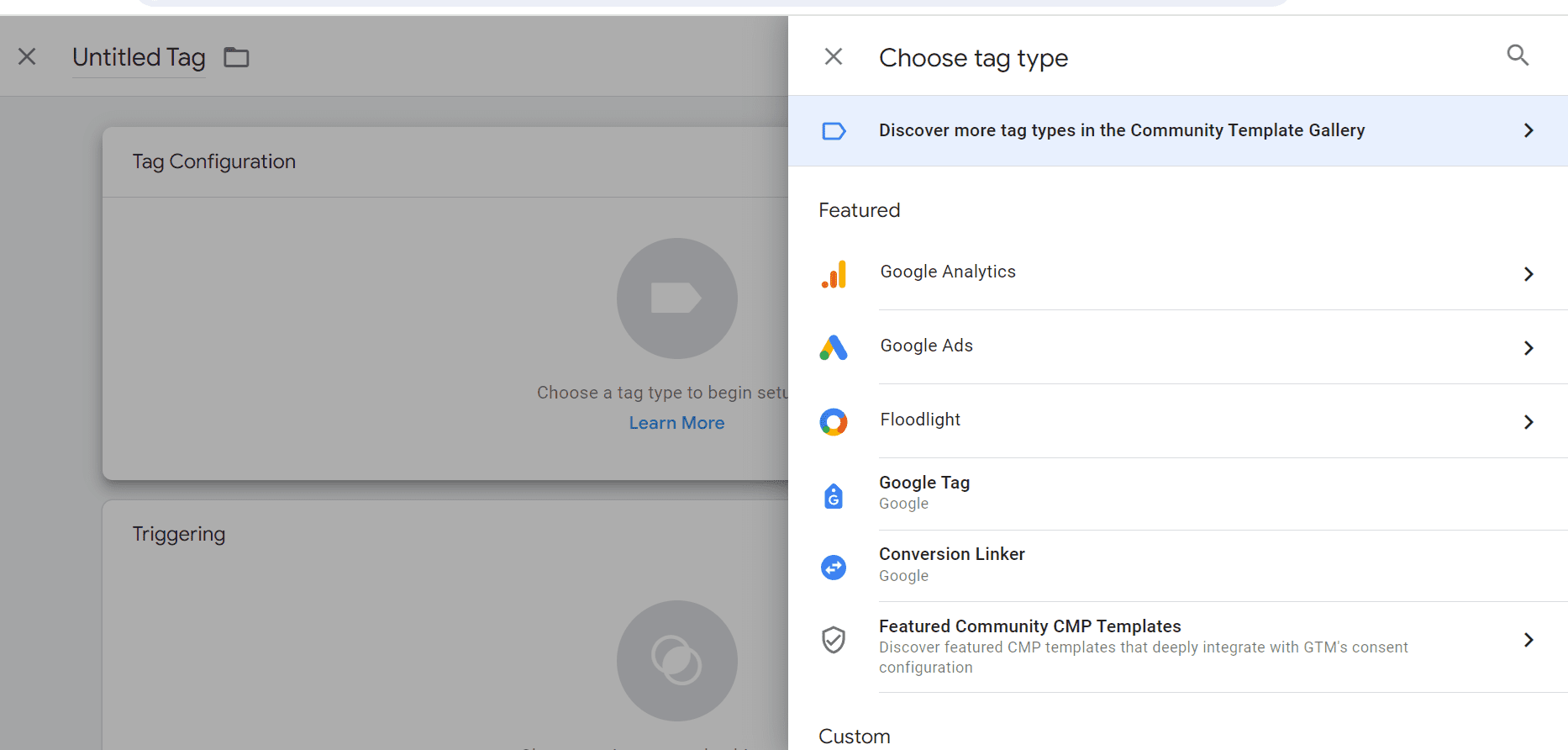
The first order of business is to make sure your Google Tag or Google Tag Manager is properly installed and configured across your website.

This little snippet of code is responsible for measuring crucial information about user interactions, particularly those important lead form submissions to be used as your initial conversion action.

Step 2: Share Offline Conversion Data

Not all valuable customer interactions happen online.

Phone calls and other offline conversion events are often just as important in your lead generation efforts.

Each stage of the offline sales cycle – lead, marketing qualified lead, sales qualified lead, closed deal, etc. – has a certain value for your business.

Sharing this offline conversion event data back into your campaigns helps drive your value-based bidding strategy to find more of the conversions you value most.

Enhanced Conversions for Leads: Now, let’s dive a bit deeper. The most durable method for sharing offline sales conversion data is enhanced conversions for leads.

Enhanced conversions for leads allows you to attribute offline conversions back to your Google Ads campaigns. When a user submits a form on your site, it sends back hashed lead information that you specify, such as an email address.

You then store that lead in your CRM or database, and when that lead converts or completes a further action, you upload that hashed lead information for Google to match it back to the ad that drove the lead (auto-tagging is required).

If you’re currently using offline conversion import (OCI) to bring in your offline data, we recommend transitioning to enhanced conversions for leads for several reasons: It’s privacy-safe and can provide more accurate measurement, supports cross-device conversions and engaged-view conversions, and is easier to implement because you don’t need to make any modifications to your lead forms or CRM systems to receive a GCLID.

You can implement enhanced conversions for lead using the Google tag or with Google Tag Manager – more on making this switch here.

Google Ads Data Manager: Google Ads Data Manager is designed to make it easier to import and activate your offline conversion and first party-data in one central location.

You’ll find “Data manager” under the Tools icon in your Google Ads account. This is where you can connect your first-party data sources, such as BigQuery, Google Cloud, HTTPS, HubSpot, Snowflake, Google Sheets and more via a direct partner connection or Zapier.

Note, if you don’t see your preferred data source listed among the featured products, be sure to click “Search all” to find more options.

Configure your data sources to ensure that all your conversion data, regardless of where it originates, is feeding into Google’s AI.

You can also access and configure your Google tag from Data Manager.

Step 3: Use Data-Driven Attribution

As you know, the customer journey is rarely linear. People might visit your website several times from various sources and interact with your brand on multiple channels before finally submitting a lead, signing up for your newsletter, or becoming a customer.

A data-driven attribution model takes all of these touchpoints into account, assigning credit to each interaction based on its actual contribution to the conversion.

It looks at conversions from your website and Google Analytics from Search, Shopping, YouTube, Display and Demand Gen ads, and determines which keywords, ads and campaigns have the most impact on your goals.

The benefit of this approach to attribution, especially when using value-based bidding strategies, is that it gives Google’s AI a more nuanced understanding of what’s driving results than a last-click or other static attribution model.

This means the system can make better-informed decisions about where and how to allocate your ad spend to find more conversion value based on your goals.

Setting The Right Goals

Now that you’ve got the right data flowing in, it’s time to tell Google’s AI what to focus on.

While you can – and should – track a variety of actions within Google Ads, when it comes to bid optimization, it’s important to choose a single, primary goal and focus on one single stage of the customer journey.

Ideally, your primary goal should be the action that’s closest to the end of the customer journey where you have sufficient conversion volume.

You’ll want to make sure this action occurs at least 15 times per month at the account level so that Google’s AI has enough data to work with.

Additionally, the shorter the conversion delay (the time between an ad click and the conversion), the better.

That doesn’t mean that if you have a long sales cycle and relatively low closed-deal conversion volume you can’t use value-based bidding.

You’ll just need to look at other actions your potential customers take that have more volume and a shorter conversion delay. This could be a lead form submission, a product demo request, a free trial sign-up, etc.

Keep The Data Fresh

Lastly, you want to be sure to upload your conversion data to Google Ads frequently, preferably on a daily basis.

This ensures that Google AI always has the most up-to-date information, allowing it to make the most accurate predictions and optimizations.

Again, you can upload this data by connecting your sources in Data Manager or the Google Ads API.

What’s Next

We’ve covered a lot of ground, from ensuring you’re capturing the right data to setting clear goals for Google’s AI.

Next week, we’ll get into actually assigning values to your conversions, a crucial step in maximizing the return on your ad spend and bidding to value.

More resources: 


Featured Image: BestForBest/Shutterstock

How To Consider The 4 Ps Of Marketing In Ecommerce & Paid Media via @sejournal, @MenachemAni

The 4 Ps of marketing. Marketing mix. Marketing fundamentals.

Whatever you call them, these elements determine your luck at the high-stakes table of e-commerce:

  • Product.
  • Price.
  • Place.
  • Promotion.

Get these right, and you’ll create a loyal fanbase that you can count on for repeat orders, high lifetime value, and customer advocacy.

Neglect or miscalculate them, and they’ll derail your entire process, have an adverse effect on revenue and margin, and allow competitors to overtake you.

Here’s how to consider each of these principles in the context of ecommerce and paid media.

Product

As in every business, your product is fundamental to ecommerce success. Even the most amazing marketing campaigns can’t compensate for a broken product or lack of product-market fit.

Think of brands that cycle through many advertising agencies over the course of a year.

Chances are they tend to blame poor planning, subpar campaign execution, or some other deficiency common to all those agencies. The most likely solution is that their product just doesn’t resonate with consumers.

Statistically, it’s extremely unlikely for a brand to go through multiple agencies and for all of them to be poor at their craft. When this does happen, it’s usually the agency evaluation process that needs work.

There’s a reason marketers talk about product-market fit over and over.

A product that solves a problem and marketing that puts it in front of the right people are core fundamentals and work like gears in a complex system. Take one out, and the whole process will grind to a halt.

Pricing

Pricing is such an intrinsic part of ecommerce and paid media in general.

If you think people who see your ad aren’t also searching for competitors and doing comparison shopping, your performance numbers will confirm otherwise.

So before you start chasing clicks or even setting budgets, your merchandising play needs to be as accurate as possible.

Consider both absolute pricing and competitiveness to make sure that your product is positioned where you want it to be while still capable of being profitable against your manufacturing and procurement processes.

Google Merchant Center has a price benchmarks feature. It looks at your product feed and shows you how your products compare to other products, brands, and categories of similar natures.

This is highly useful data that can help determine if you’ve priced your products correctly or whether they even fit in the market.

The last thing you want to do is spend thousands on ads only to realize that you got too ambitious or too conservative with your margin.

Additionally, once you’ve started running a campaign in Google Ads, auction insights allow you to see which brands are coming up against you in Search and Shopping auctions.

Use this data to see how your pricing compares to theirs, fine-tune accordingly, and run tactical promotions.

Place

Starting an ecommerce business is not easy – but for those who are able to fund and find initial product-market fit, digital advertising allows brands to bypass the limitations of traditional distribution.

Geography and access to certain distributors become irrelevant when you can sell and ship directly to consumers.

However, this also presents several new challenges:

  • Platform Management: Ecommerce advertisers have a wealth of options when deciding where they want to advertise. This includes traditional networks like Google, Meta, and Amazon, as well as emerging and niche platforms like TikTok and YouTube. However, choosing the wrong platforms or overextending yourself before you’re ready can cause more harm than good.
  • Media Mix: Advertising on multiple channels can be advantageous if you have the budget and expertise to do so, even though some brands are predisposed to putting most of their budget in a primary platform. But doing all this when you’re just starting means you’ll have less to spend on campaigns, spreading your efforts too thin and limiting how much data you can acquire. You’ll also need additional people or agencies with expertise managing those different channels in order to get the best returns for your spend.
  • Performance Measurement: Brick-and-mortar commerce was comparatively straightforward, and advertising and in-store promotions skewed more toward non-linear measurement. Online advertising has made us crave the need to track every dollar spent and every product sold, and draw a line back through each performance metric. But even good conversion tracking is never perfect, and ad platforms are prone to fluctuation and error as they grow more automated.
  • Attribution Measurement: Knowing which platforms are driving sales is critical to making sure you’re investing in the right places. This is more challenging when you have multiple platforms in your media mix, none of which freely and fully share data with other platforms. Attribution will only get worse over time as the ability to track degrades due to privacy concerns. This imperfection doesn’t mean you shouldn’t have some form of attribution, but treat it as a reference point instead of a source of truth.

Promotion

While good marketing can’t fix a bad product, a good product can make marketing better, easier, and less expensive.

For ecommerce that relies heavily on paid media for promotion, there are two aspects to consider.

Account Management

With paid media, the ad account is the third gear that supports product and marketing.

Decisions like which campaign types to run, how to structure your ad account, running good ad copy and creatives, and using audiences and first-party data to target the right people will all affect your revenue and margin.

Too many brands make the mistake of trying to fix their ad accounts and campaign metrics before their product, pricing, placements, and customer journey.

If you do that in the right order, your challenges around the ad account should largely be limited to ad platform issues, like disapprovals and automation.

Customer Journey

I think of ads as just one component in a wider marketing system – one ingredient in a successful recipe.

You need all the pieces to achieve success, and if you’re neglecting everything that happens before and after the ad click, no hook or campaign is going to save you.

  • The bulk of ecommerce shopping happens over mobile, which, as of 2023, was valued at $2.2 trillion. If your pages aren’t easy to navigate on smartphones, there’s a good chance you’re not getting all the conversions you could. Are your pages mobile-optimized? Do they load quickly? Do they deliver good experiences during checkout, upsales, cross-sales, etc? If not, fix this.
  • Trust is a major objection to overcome in any sale, and reviews do a great deal to show why people should trust you. In addition to proving the value of your product with certifications and ratings, use reviews to seal buyer confidence. Your social proof should reflect your target audience, so they feel like others like them have benefited from your product.
  • With fraud and scams on the rise, online shoppers are becoming more guarded with their payment details. You’ll have to prove that you can be trusted if you want to earn their money. Security validation and third-party payment logos (like PayPal and Apple Pay) go a long way in establishing that you are a real business with good intentions.
  • The journey begins long before the ad click and continues long after. User-generated content shows people using your product and positions them as the hero, which means prospective customers are more likely to feel the same way. Email marketing can address abandoned carts, communicate shipping status, and make the rest of the journey pleasant.
  • Does your ad copy tell people what problems you solve creatively? Instead of features like “x milligrams of caffeine,” you might focus on outcomes like “the energy burst you need to be productive until late afternoon.” Be imaginative and help people picture their life after they buy your product.

The Future Of Ecommerce Requires Full-funnel Thinking

Ecommerce might be glamorous and often lucrative, but it’s not easy.

The period when low-cost manufacturing and a frictionless global supply chain made it possible to start a direct-to-consumer brand with minimal investment and hassle is gone.

Between ad platforms becoming increasingly automated and reducing the amount of campaign management required, brands need to focus more on fundamentals and the pre-click and post-click experiences to stay profitable.

The only part that’s getting easier is Shopify!

It’s important to stop thinking about paid media as the entire package and instead focus on its actual position as one part of a wider marketing strategy.

More resources: 


Featured Image: Aree_S/Shutterstock

Is Value-Based Bidding Your Ticket To Higher Quality Leads? via @sejournal, @adsliaison

For lead gen marketers, we know it’s not just about generating leads; it’s about attracting the right leads – those that are most likely to convert into valuable customers.

Value-based bidding is a strategic approach that allows businesses to focus on optimizing campaigns for conversions that truly matter.

We’ve seen value-based bidding work for online sales and brick-and-mortar businesses as well, but here we’re going to focus on using it for driving higher quality leads.

This is the first of five articles I’ll be sharing weekly to delve in deeper and build on each episode of our new video series on value-based bidding for lead generation.

As you’ll see in this first video below, each is short enough to take in over a quick coffee break.

We’ll start from the beginning and cover what it is and whether value-based bidding could be the right strategy to elevate your lead generation efforts in Google Ads.

The Power Of Quality Leads

Not every customer brings the same value to your business. High-quality leads are more likely to engage with your brand, convert into paying customers, and contribute to long-term business growth.

Value-based bidding is particularly beneficial for businesses that typically need to nurture relationships with customers between an initial online conversion and a final sale.

By focusing on quality leads, you can streamline your sales funnel, improve conversion rates, and ultimately boost your bottom line.

So how can you do that with value-based bidding?

Bidding To Value

Value-based bidding allows you to prioritize specific value goals that align with your business goals.

These goals could encompass sales, revenue, profit margins, or even the lifetime value of a customer.

With this strategy, Google’s AI uses billions of combinations of signals along with your first party data to identify conversions that are most likely to deliver on your defined value objectives.

It then optimizes bids to focus your ad spend on reaching those higher value customers.

The Basic Mechanics Of Value-Based Bidding

Value-based bidding offers two primary pathways to optimize your campaigns by bringing values into Smart Bidding:

VALUE-BASED BIDDING
Maximize conversion value
with a target ROAS Drive as much conversion value at a particular ROI.
Maximize conversion value
(no ROAS target specified) Get as much value within a set budget.
  • Maximize conversion value: If you’re working with a fixed budget, this option focuses on extracting the maximum lead conversion value from your campaign within the constraints of your budget.
  • Set a ROAS (Return on Ad Spend) target: This option enables you to optimize for conversion value at a specific target ROAS to help ensure your ad spend generates a desired level of return. When you set a ROAS target, the system will optimize to find as much value as possible on average at your target. There are data thresholds to using target ROAS which we will cover later in this series, but this is the preferred strategy when you want to achieve specific ROAS goals and be able to respond dynamically to shifts in demand. Target ROAS is available for single campaigns or a portfolio strategy applied to multiple campaigns.

Value-based bidding will maximize the conversion value based on budget constraints and ROAS targets where applicable, so higher value customers will be prioritized over volume alone.

Keep this in mind when comparing target CPA performance, which optimizes for conversion volume irrespective of value.

While the emphasis will be on attracting high-value customers, it’s important to note that you might still see some medium to low-value customers depending on the dynamics of the ad auction.

When using ROAS targets, the higher your target, the fewer auctions your ads are likely to enter. In other words, ROAS targets are your lever to make your ads more or less likely to enter the auction.

Is Value-Based Bidding The Right Fit For Your Business?

Value-based bidding has seen success across a spectrum of industries, but whether it’s the right fit for you depends on your specific business needs and capabilities.

Before embracing this strategy, you’ll need to address these key questions:

Can You Assign Meaningful Values To Your Conversion Actions?

You are likely already differentiating your customers’ value in some facet, formally or informally.

You’ll need to set a concrete value to each conversion, whether through static proxy values like lead scores or dynamic economic values such as total profit. (We’ll cover proxy values more in the third article in this series.)

Do You Need To Strike A Balance Between Volume And Value Goals?

Bidding to value means your campaigns likely will not generate the same volume of conversions as they would using Maximize conversions with an optional target CPA bid strategy. This strategy is designed to return a higher total value of conversions. Bid simulators can help you to understand this tradeoff.

If you want to maintain a certain level of traffic, use the Smart Bidding bid simulator to help you gauge the optimal ROAS target that will yield your desired volume of leads while maintaining a focus on quality.

Lowering your target ROAS will increase your reach, and raising your target ROAS will decrease reach while seeking out higher value conversions.

Are You Able To Measure And Connect Your Value Data To Google Ads?

Access to accurate and comprehensive value data is a must for implementing value-based bidding effectively. To start, this means having proper site tagging to track conversions.

Feeding the right first-party data values into Google Ads is key to training the system to identify and differentiate predicted customer value for each auction.

If your value objective is sales value, for example, you’ll need to be able to measure and connect that data back to your Google Ads account. We’ll cover how to do that later in this series.

Reaping The Rewards Of Value-Based Bidding

The initial setup of value-based bidding typically requires some effort up front, but don’t let that intimidate you.

You can start with a more basic set up and adopt more sophisticated approaches that have more technical requirements, such as optimizing for margin or lifetime values for example, later if you wish.

Value-based Smart Bidding gives the system the flexibility to set each bid based on the predicted value of the conversion and target higher value conversions. Over time, it learns which users are more likely to be higher value and more profitable, then bids accordingly.

Bidding to find the most valuable customers can deliver incremental revenue uplift and profitability. Businesses that have found success with this strategy report a marked improvement in lead quality.

On average, advertisers that switch their bid strategy from a target CPA to target ROAS can see 14% more conversion value at a similar return on ad spend.1

Beyond The Basics

While we’ve covered the foundational aspects of value-based bidding, we’re just getting started.

In the upcoming articles in this series, we’ll dive deeper into this strategy, including how to identify and leverage the right data and values for your business, and how to share your value information with Google Ads.

By aligning your campaigns with the conversions that truly matter most to your business objectives, you can optimize your ad spend, maximize your return on investment, and achieve sustainable business growth.

Up next week, we’ll talk about figuring out the right data and values.

SOURCE: Google Internal Data, Global, March 2021

More resources: 


Featured Image: BestForBest/Shutterstock

Enterprise PPC Success Checklist: Setting Your Campaigns Up For Success via @sejournal, @navahf

There’s a lot of well-meaning PPC advice out there. This advice often finds its way to bosses/clients who ask, “Why aren’t we doing ___?”

The problem is most of these studies and data sets are focused around ecommerce. Enterprise accounts (even enterprise ecommerce) will behave differently than their non-enterprise counterparts.

There are a few reasons why there’s a shortage of enterprise advice:

  • Ad networks (particularly Google) tend to focus on ecommerce.
  • It’s easier to build statistically relevant data sets for ecommerce because there’s more data than lead gen.
  • Enterprise brands tend to have a lot of red tape to get through, so it’s harder to share what works.

We’re going to invest a bit of time digging into enterprise PPC, and how to set yourself up for success in your account as well as how to communicate that success to stakeholders.

Like anything in PPC, it’s important to balance this advice with what you know is actually important for your account.

The Checklist

We’ll be diving into each of these in-depth, but if you only have time for a quick skim, here are the main questions to ask yourself:

  • Have I built in enough time to launch the campaign?
  • Do I trust my CRM set-up and my internal processes?
  • How much flexibility do I have with technical implementation?
  • Which channels will meet with creative approval?
  • Did I opt out of all auto-generated content (and should I fight to let some stay)?
  • Are my budget pacing rules in line with my finance team’s expectations?
  • Have I set myself up for all markets I need to serve (national/domestic)?
  • Will I be able to pull reports on metrics my stakeholders are expecting?

Have I Built Enough Time To Launch The Campaign?

Whether you’re building for an enterprise or an SMB (small/medium business), ad platforms take time to stand up. This is due to ad platform verification and learning periods.

As a general rule, you will need to build in at least one to two weeks for account verification. This is required for everyone and is a safety measure to ensure the ad account represents the business it’s going to be promoting.

Ad networks (particularly Google) are fairly strict about double serving (i.e. you can’t have more than one ad account targeting potential traffic). The verification process (done through postcard) is a way to ensure your account is assigned to you and protects you from bad actors setting up another ad account targeting your business.

Beyond verification, you’ll need at least five to seven days minimum for your accounts to clear learning periods. These are for ad networks to understand your account/campaign and make meaningful budget allocation choices. During this time, you may need to use volume or impression share bidding due to the lack of conversions.

We’ll go into conversions in depth later in the post, but there are some pitfalls for brand-new enterprise accounts to avoid:

  • Using any smart (conversion) based bidding until you have at least 60 conversions in a 30 day period.
  • Setting up your account as a “Smart” campaign account (you need to create your account without a campaign).

If you’re adding a campaign to an existing account, you’ll be able to bypass most of these items, however, you still want to make sure you build in time for:

  • Confirming conversion actions are correct.
  • Learning period for new campaigns (still takes five days).
  • Ad approval process (two to three days).

Do I Trust My CRM/Internal Processes?

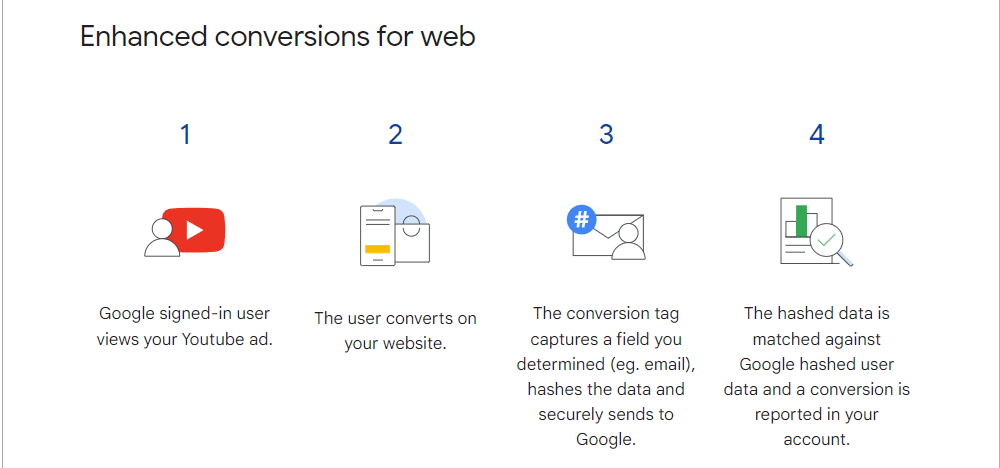
Ad networks are moving away from offline conversions, which means it’s even more important than ever that your CRMs are able to connect with your ad networks.

enhanced conversionsScreenshot from author, August 2024

Using Enhanced Conversions With CRMs

There’s a lot that can go wrong with CRM set-up and management, and those mistakes can skew lead scoring and reporting. Make sure that you trust how leads are received and tagged before beginning any serious spend.

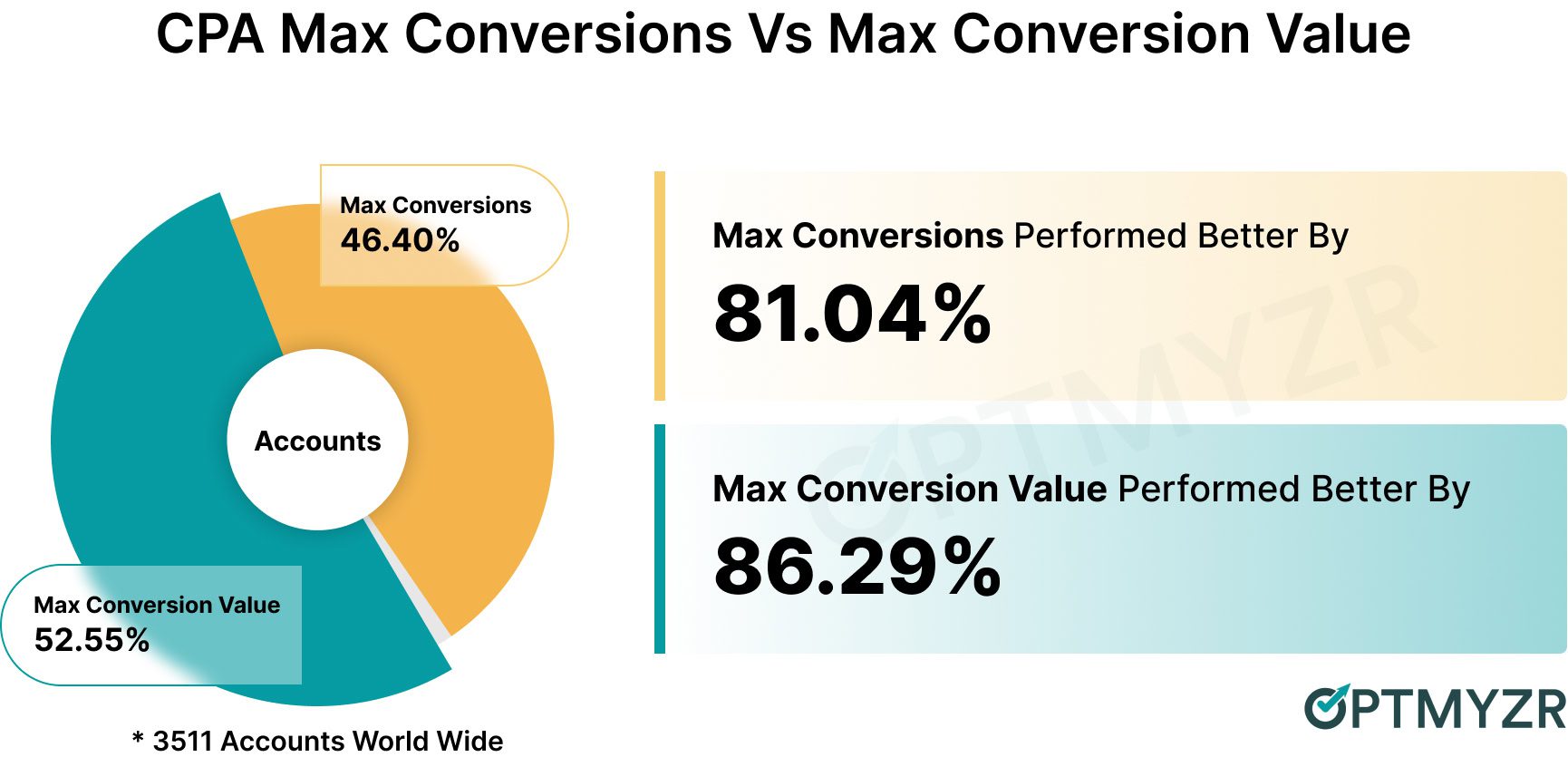
It’s worth noting that Google (and other ad platforms) can take in the customer value (and lifetime value) of a client. So you’ll want to consider passing that info through as revenue and profit-based bidding tends to lead to better results than just conversions.

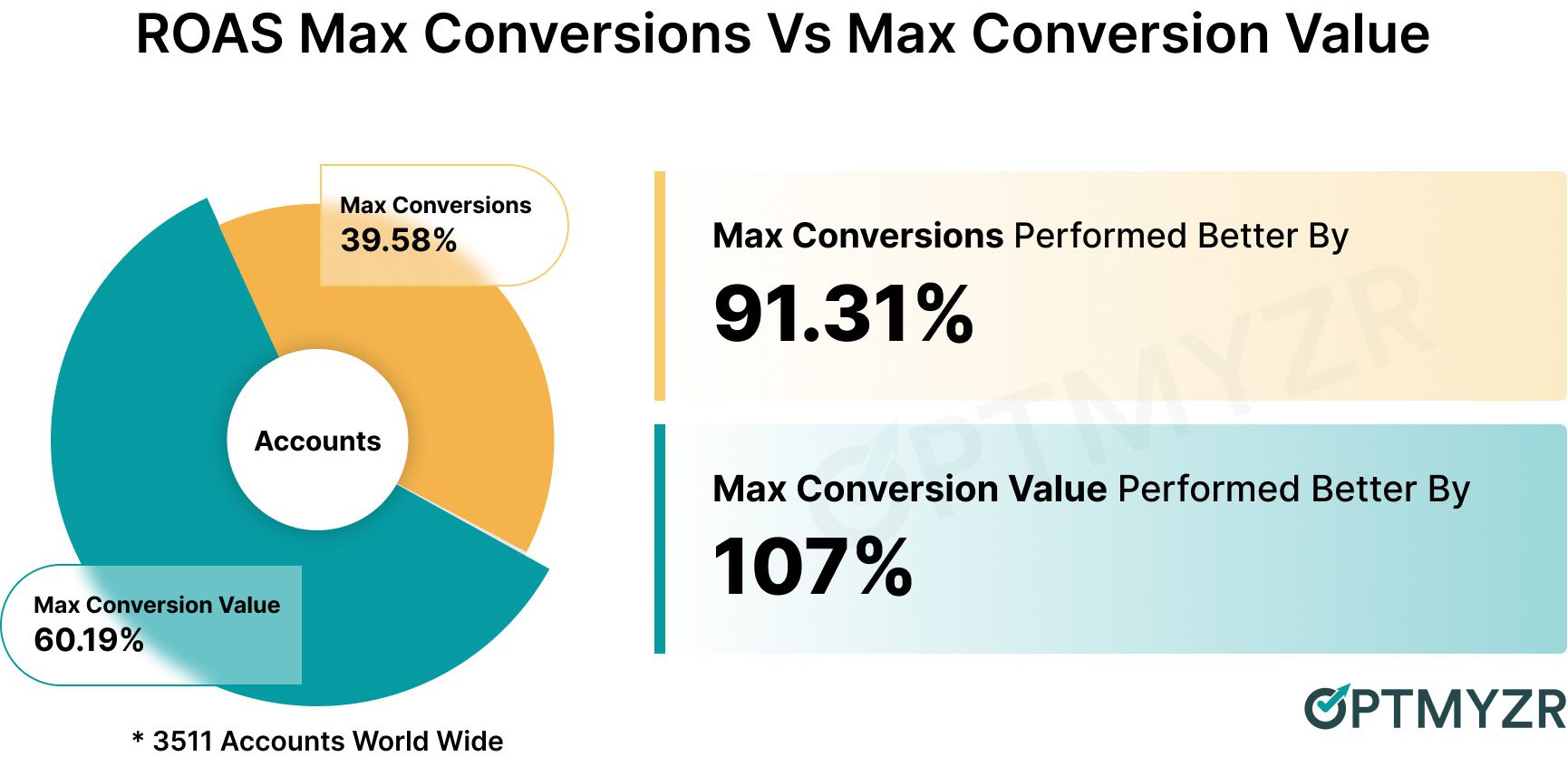
CPA for bidding strategies Image from Optmyzr, August 2024
ROAS for different bidding strategyImage from Optmyzr, August 2024

However, the CRM is just one piece of the puzzle. You also need to make sure your internal teams are prepared to handle the new leads and tag them correctly.

Depending on how your team is incented, they may put in dummy data or inaccurate data to stop their co-workers from “taking” their deals

How Much Flexibility Do I Have With Technical Implementation?

One of the most insidious parts of enterprise setup is clearing IT permissions.

Google Tag Manager (GTM) is the easiest/safest way to go through tracking pixels because once you get that installed, you can add any new pixels without needing to touch the site.

However, if you’re not allowed to touch the main site at all, you may need to look at landing page solutions or lead gen/call ads.

Here are the main considerations to be prepared to answer when helping your IT team get on board with implementing entities for you.

  • Privacy compliance requires that users be asked for consent to track. Even if there’s no conversion tracking, there are still cookies to remember preferences. This is needed for everyone, and if they’re going to help you get that set up, it will cause no performance issues to include conversion tracking pixels.
  • Plan to test conversion actions and build in rules around spam leads (excluding “1234567890” as a phone number, “test” in any field, etc.). Additionally, you may need to ask for help configuring revenue tracking in analytics/CRMs. Make sure you ask for exactly what you need and include documentation on why.

In an ideal world, you’d have your IT team set you up with consent mode. However, if you can’t, pushing for GTM is an acceptable compromise.

If your IT teams will budge at all, you may need to opt for auto or smart bidding. This means opting for max clicks or target impression share with a bid cap or manual bidding with bid adjustments.

Which Channels Will Get Creative Approval?

Different channels are going to have different tools for approval.  Google is really useful at allowing for both control and leaning into AI.

And when you lean into AI, you’re able to use brand safety standards. Additionally, there are placement controls so that you can ensure brand alignment. These include:

  • Brand standards for AI.
  • Placement reports for exclusions.
  • Ad previews.

Microsoft also allows full control and allows you to use Copilot to generate images and videos. LinkedIn, by and large, is in full control.

Meta is the one with the most risk for control because it tends to require more automation for performance gains. That said, all brands can avail themselves of more rigid controls.

Finally, there are several visual platforms that allow you to use either influencer, user-generated, or other content for ad placements. When you’re working with humans for videos, it’s on you to ensure that they meet your own brand standards.

So it’s less a question about brand standards in terms of fonts, colors, and design, and more a question of, will you be able to secure the talent for the video you want to produce?

Did I Opt Out Of All Things Auto (& Should I Fight To Keep Some)?

Most ad platforms will, by default, opt you into expansion of placements, expansion of traffic, as well as new creatives. You, as the practitioner, will need to decide which ones to keep, if any.

In most cases, on the enterprise side, none of them will fall under compliance, so you will want to opt out of all of them.

Here Is A List Of The Most Common Pitfalls In Terms Of Automated Settings

  • Automated created assets: Text, image, and video creative that gets created and added to your ads based on ad rank and placement type. Opt out of this in the account settings, as well as in the asset section of your campaign menu.
  • Automatically applied recommendations: These can be useful and should be reviewed. but not applied. Make sure you turn them off in account settings and review them in recommendations.
  • URL expansion in performance max: While this is a reasonable stand-in for Dynamic Search Ads (DSA), it’s important to remember that you won’t have the same level of control. This means your SEO-exclusive pages (blog, sitemap, etc) might get pulled in. Just be sure to leave that unchecked.
  • Setting your bidding to a bidding strategy you don’t intend: Because ad platforms want you to use conversion-based bidding, manual and automatic bidding are hidden in the drop-down menu.

Are My Budget Pacing Rules In Line With Finance’s Expectations?

It’s critical to remember that stated budgets aren’t guarantees of actual spend. Ad platforms will do their best to average out across 30.4 days of your stated daily budget.

All budgets should be able to fit enough interactions in their advertising schedule to get at least one lead/sale on paper. In practice, this translates to my bids not exceeding 10% of the daily budget rule because 10% is a really good conversion rate for non-branded.

However, starting a new campaign and account to lead to even more fluctuation. As a campaign is ramping up, you may have low- or high-spending days. This is normal but might cause finance to worry.

As a general rule, using portfolio bidding strategies is a great way to ensure bid caps and floors for all campaign types. However, if you’re using SA360, you’ll also have access to these for Performance Max campaigns (not available in “regular” Google Ads).

Whether you use portfolio bidding strategies to ensure auction price stability or not, remember that any major change to bidding strategies (including budget, goal, and type) will initiate a learning period. If a campaign is on the newer side, it might not have the conversions to quickly clear this learning period.

As a general rule, it’s a good idea to ask for about 20% more budget than you anticipate needing in the first 90 days of a campaign, which can be utilized for testing or to shore up any fluctuation in new campaigns.

Have I Set Myself Up For All Markets I Intend To Service (International/Domestic)?

Managing multiple markets is always tricky, and if you’re targeting more than just one country, it gets even more complex. Different people search and think in different ways, and if you take the same campaign that worked in one market, it may struggle in another.

Add to this the different costs of living and internet connectivity in different markets, and there’s a lot to think about before getting to translations.

As a general rule, you should not include more than one country per ad account so you can run the schedule based on that country. Additionally, if a market is a growing market, you don’t want that bad data averaging into your thriving markets.

On translating your campaigns: make sure you can service any language you’re translating into. Even though there are great deals to be had on non-English ad buys, the inability to service those customers will turn it into waste.

Make sure you know the different privacy compliance regulations for each market. Any campaigns targeting outside the US will likely need consent mode enabled.

Will I Be Able To Report On The Metrics My Stakeholders Are Expecting?

On a similar note, many are used to thinking of PPC as fast-paced and perfect reporting. This is no longer the case. It’s really important that you set out a framework from the beginning for which metrics your stakeholders will hold you accountable.

If they care about return on ad spend, conversion tracking must be set up correctly. For brands that refuse to allow third-party integrations on their sites, this may cause tracking and reporting issues.

As a general rule, getting buy-in for conversion tracking isn’t as hard as getting CRM/sales data to sync up.

However, if you can clear that hurdle, you’ll be able to report on lead quality as well as average customer value. Without that information, reports will be limited to objective CPA, conversion rate, and ad-specific metrics.

I like getting stakeholders invested in impression share and understanding how much impression share is lost due to rank or budget so they have a clear understanding of what their choices mean for the account.

Finally, try to work with the organic team to link up Search Console so you can share organic reports between teams.

Final Takeaways

Whether you’re setting up campaigns for enterprises or SMBs, there are some core focal areas for every PPC practitioner.

Hopefully, you found this a helpful start on your own enterprise PPC checklist.

More resources: 


Featured Image: PeopleImages.com – Yuri A/Shutterstock

Conversion Tracking & Reporting For Enterprise Accounts: Avoid Common Pitfalls via @sejournal, @navahf

One of the biggest areas of contention in enterprise PPC advertising is conversion tracking efficacy.

This is in part due to how difficult it is to get approvals, make changes to your sites, and ensure that there’s buy-in to how you will be tracking conversions.

We’re going to dive into how to secure permission to get your conversion tracking set up, as well as how to report on those metrics.

While you will need to adopt this for your business and your needs, it should hopefully provide a very useful framework.

Getting Buy-In From IT

The biggest issue most IT teams will have is lags in performance (site speed).

Google Tag Manager is one of the easiest ways to get tags onto your site.

This is because the install goes in once, and it’s one set of assets that will impact the site. You can then make whatever changes you need.

<span class=

However, you need to make sure the events you’re going to track are trackable and that there won’t be any changes once tracking is set up.

For example, if you have an event for a form that registers a conversion when users submit, changing the language to contact us could easily cause a lapse in conversions.

You’ll need to make sure that there is a strong communication line between your IT team, your design team, and of course, your own ideas and strategies.

What Events Will You Track?

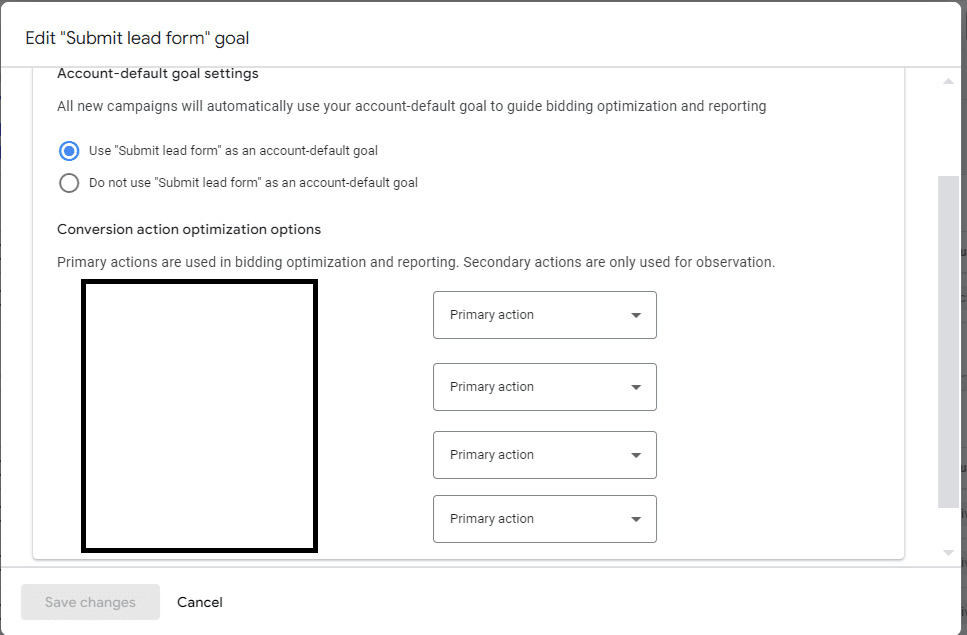
A big part of success is which events you designate as primary (influences reporting and bidding) and which ones are secondary.

primary and secondary conversionsScreenshot from Google Tag Manager, July 2024

These can be beginning an application or starting a purchase. While you may decide to keep most events as primary, you do need to make sure that the appropriate values are set.

Additionally, it is very important that you connect your CRM so that you can score your leads and, ultimately, convey the conversion values of true customers.

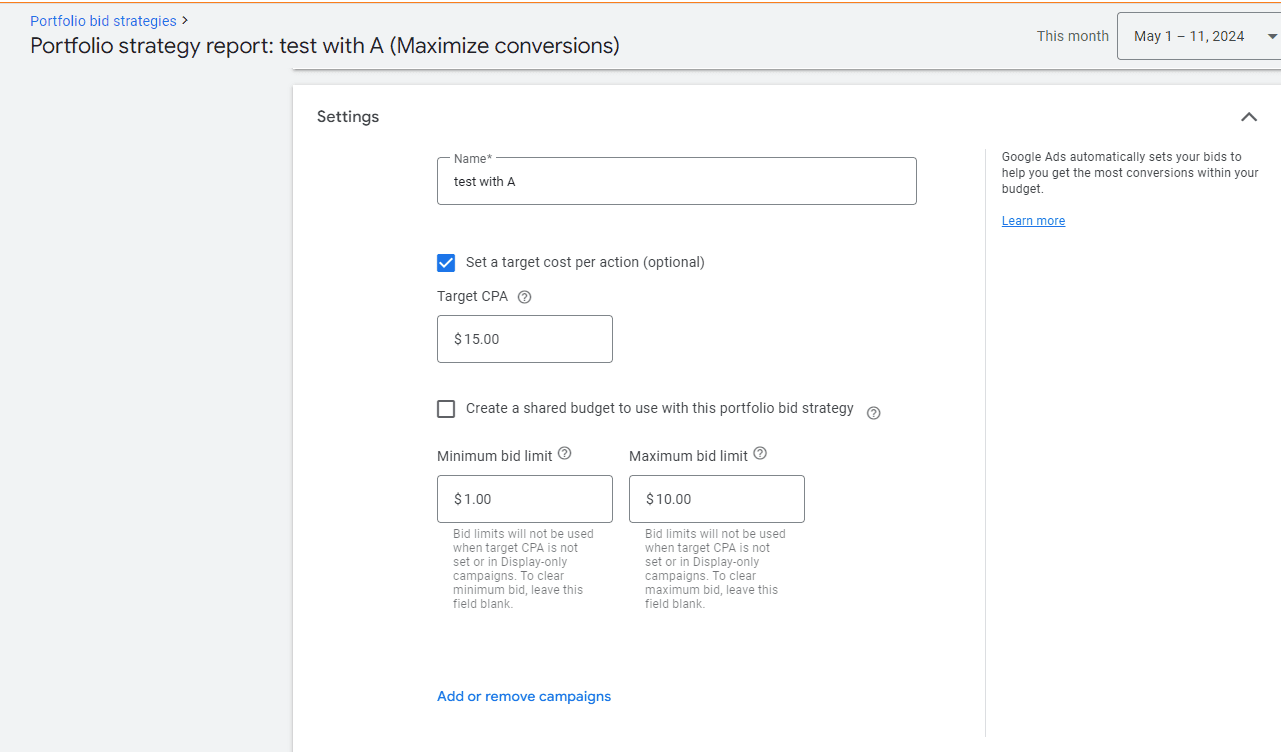
portfolio bid with bid capScreenshot from Google Tag Manager, July 2024

Ad platforms do best when you’re able to share revenue and profit information versus only relying on a placeholder number. While there is a valid fear around price gauging when an ad platform knows your profit numbers, you can mitigate that with bid floors/caps in portfolio bidding.

If you can’t track conversions for whatever reason, hope is not lost! Auto-bidding and manual can be reasonable solutions.

no conversion biddingScreenshot from Google Tag Manager, July 2024

Reporting Your Success

It’s critical that stakeholders understand (and buy into) the information you’ll be sharing with them. If all they care about is signed customers, you’re not going to show them every single type of conversion action.

You should still track what you need, i.e., segmenting conversion actions and seeing which types happened when.

As a general rule, these metrics are safe to include in reports:

  • Conversions: what you’re tracking and the value of these conversions.
  • Return on ad spend (ROAS).
  • Budget efficiency: percent of the budget going to converting entities.
  • Cost.

Every other metric is nice to have, but on a case-by-case basis.

As you share reports and agree on conversion actions, make sure you have their buy-in for privacy and consent work. This ensures you’ll be able to track effectively, and you’ll also be able to use any contact information secured in future marketing efforts.

Call tracking is going to be a critical step for many. You can use:

  • On-site: dynamic numbers based on anticipated impression and click volume.
  • Off-site: a static number assigned to an action.

When you share reporting information, you will want to ensure calls are scored based on whether they became leads and on their duration.

By default, conversions are considered at 60 seconds. However, in most cases, that will not be adequate. Make sure you’re building in at least two minutes (ideally five minutes) before considering a call a conversion.

The final consideration is how much you will rely on GA4 events vs ad platform conversion. If your team requires the same “sources of truth,” you may want to opt for GA4.

However, you can also collaborate with your SEO teams by building in organic reporting.

organic reportsScreenshot from Google Analytics 4, July 2024

By doing this, you can report on how much budget is needed in paid vs organic due to overlap and potential cannibalization. To access these reports, connect your search console to Google Ads.

User Experience

The final consideration is the user experience when they convert with you. Essentially, how easy is it for them to accidentally convert multiple times or not convert at all (despite believing that they have)? This can skew your numbers and budget allocation.

It’s important to review the conversion path for your customers on multiple devices and multiple operating systems.

For example, when you design on an iOS system, sometimes fonts and colors get skewed when moving to Windows. This can cause a bad user experience and impact the conversion tracking itself.

Another potential hurdle is form-fill confirmation.

If users don’t see a thank you page confirming their appointment and offering the opportunity to add it to their calendar, they may not realize the appointment went through.

Make sure it’s clear that the user accomplished the action you’re trying to get them to take.

Creative Solutions If You Can’t Track Conversions

If you are unable to get your IT team to set up conversion tracking properly, all is not lost. You can still create something approaching tracking, you just will need to do a little bit more manual work.

Use UTMs with tracking parameters to help your CRM system convey that a lead came from the ad platform. Then, you can share that information with the ad platform.

It’s a little bit riskier to rely wholly on analytics because it’s typically best to use a non-ad platform-oriented tracking solution as your source of truth of what value happened.

While you can use analytics, you may get more value out of using your CRM.

Final Takeaways

To sum up, conversion tracking is a critical part of any campaign, especially enterprise.

While your implementation may not be perfect, you can still get a lot of value out of using Google Tag Manager to get the most pixels on and using call tracking rules of engagement to set yourself up for success.

Be sure that you use Auto or manual bidding unless you’re able to connect off-line conversions.

More resources: 


Featured Image: Akarawut/Shutterstock

When Search Isn’t Search Anymore, But It Is Still Search via @sejournal, @jonkagan

If you talk to any paid search marketing old-timer (someone with 10+ years of experience) and ask them what has changed within the search industry, they will likely give you a straightforward reply:

Literally everything.

Without dating myself, I can say that when I started in this space, Yahoo was the bigger ad platform than Google, AskJeeves was a standalone platform (and still had Jeeves), AOL was still a standalone ad platform, and there were fewer match types.

More importantly, we relied on keywords and manually written search ads (25-35-35 – if you know this reference, congratulations, you’re old).

Targeting was limited to geography, the search network, and not much else.

Search Is Not Just Search Anymore

Today, the odds are that half your “search” campaigns don’t even have keywords, ads are bigger (and can be AI-generated), the targeting ability is incredible, and the options of what you can do seem infinite.

But at the same time, you have less transparency, and the levers you pull are more directional than definitive (because let’s face it, odds are you aren’t doing much manual CPC bidding anymore).

In addition, the concept of paid search has changed. Where once it was a keyword and text ad-focused association, it has shifted to more of a platform term that even exceeds ads showing on search engines.

Think of it like this:

  • Search marketing in 2005: Yahoo and Google text ads triggered by keywords you bid on. As well as accidentally showing in GDN (back then called the Google Content Network).
  • Search marketing in 2024: Bing (because I refuse to call it Microsoft) and Google text ads triggered by keywords you bid on, as well as:
  • Product feeds showing your catalog in search engines and social media are triggered by behavior or queries you don’t bid on.
  • An “all-in-one” ad unit that optimizes all sorts of ad placements to a single goal (Performance Max).
  • Email ad units that are tied to ad placements on a mobile app feed and video views.
  • Video ads showing for whatever it feels, with some guidance based on behavior.
  • Bidding ads in a social media platform the way you used to bid on search ads 20 years ago, and so on.

The industry and the concept of search marketing over the past 20 years are night and day. In reality, it isn’t so much search marketing but biddable media.

However, it is still powered by a single thing: people searching for things.

Now cue: “But Jon, you just said search marketing isn’t search anymore, so how do people searching for things power the space?”

To which I reply:

“Shut up and listen. If you still run basic search and/or shopping ads, then that is people searching for things. The rest is audience-based targeting, meaning someone took multiple actions on the internet to get themselves categorized into audiences. The vast majority of the time, that behavior is search. The part that goes out the window most often is the recency of them doing that.”

Search Vs. Biddable Media

As the industry evolves, the thought of search marketing becomes a subset of a concept that emerged 10 or so years ago, known as biddable media.

Biddable media is fairly straightforward conceptually: If you are advertising online, on a platform that requires you to enter an auction for your ad to show, then you are doing biddable media.

Search is the function of biddable media for:

  • Triggering of ads in the search engine results page (SERP).
  • Managing non-keyword ads that show in SERP (Performance Max, Shopping, etc).
  • Creating keyword-based audience targets on non-keyword-based ad units (Microsoft Audience Network (MSAN), Google Display Network (GDN), YouTube, Performance Max, Demand Generation, etc.).

Traditional search management is also the lifeblood of strategy and approach to biddable media:

  • Manual bidding.
  • Target cost per acquisition (TCPA)/target return on ad spend (TROAS)/Max Clicks.
  • Bid modification for targets, seasonality, device, etc.

Net-net: Search has started to become an antiquated term. In reality, search is biddable media, which is not just search but a search style of management that is across many more ad units and platforms.

I know; this is as clear as how Jenn Shah of Real Housewives of Salt Lake City made all her money before she got arrested.

What Is The Scope Of “Search” Now?

First, let me comfort all “search” marketers with this: “Your job didn’t go away with this paradigm shift (if it had, it would’ve been 5-10 years ago, and you likely wouldn’t be reading this article).”

But now, those “search” marketers just became much more valuable.

With a little additional learning, they’ve become the Jack/Jane of all trades in the digital marketing space (except for fixed rate managed service buys, which are typically CTV/Streaming or non-programmatic display efforts or affiliate; they don’t fall in this concept).

Their working knowledge of paid search management has become a working knowledge of biddable media.

In a less roundabout way of saying it, your paid search skills are applicable to all forms of paid media that require a strategy and an auction.

So, the scope of your job is more than just Google and Bing search; it also includes managing other media channels, similar to how you would manage paid search.

Biddable Media Formats Using Search Management StrategiesBiddable Media Formats Using Search Management Strategies, screenshots by author, July 2024

How Do We Adapt Our Skill Sets?

Adapting your skill set depends on if it even needs to be adapted.

You may already be adapted to manage other platforms and don’t even realize it. If you’ve been doing any of the following, you’re already most of the way there:

  • Running a Performance Max campaign.
  • Intentionally running a Google GDN, YouTube, or Bing Audience Network campaign (a true standalone campaign with proper ad units).
  • Building and utilizing audience targets and remarketing lists.
  • Deciding a specific bid strategy, setting it up, and adjusting it based on performance (TROAS, Max Conversions, TCPA, CPM, Max Clicks w/ CPC, etc.).
  • A/B testing (landing page, creative, bid strategy).

If you’re doing most or all of the above (or have in the past), stop reading this article; you’re fine; go watch my beloved NY Jets disappoint their fan base by burning through another quarterback.

If you aren’t doing more than half of these, but you are managing paid search, the learning curve isn’t difficult.

Anyone who follows me on X (Twitter) knows I rarely give Google kudos for much of anything. Still, its certification process is incredibly helpful (not so much the certifications themselves, but the tutorials).

Those give you the basics of understanding GDN, Performance Max, Shopping YouTube, Demand Generation (fka Discover), and other elements. You already know paid search, which is the most difficult element to learn.

Then, it is merely applying those skills to other platforms.

Don’t believe me? Here is a handy little equivalency chart:

  • Non-Skippable YouTube targeted to TV that shows on YouTube TV and Google TV = (similar) to CTV placements bought programmatically.
  • GDN/Audience ads = Display placements bought programmatically.
  • Performance Max = (similar) multi-ad unit social placements (i.e., Meta/Linkedin).
  • Google/Bing Shopping = (similar) social shopping placement and retail media placements. (i.e., Roundel/Walmart/Amazon/Pinterest) via a product feed.

Here are also some examples of hands-on management being similar among platforms:

  • Google and Bing search strategies and most assets are the same as each other.
  • YouTube CPM/Non-Skippable bid strategies are the same as CTV efforts on TradeDesk.
  • Google/Bing Max Click bid strategies at the campaign level are the same as optimizing Meta campaigns to Link Clicks or Landing Page Views.
  • Geotargeting in Google (which in my mind is some of the most impressive), can largely be replicated in Meta, GroundTruth, TradeDesk, SimpliFi, and more.
  • Remarketing lists are roughly designed the same way across all platforms (Google Analytics does have a leg up, I will admit), but all it requires is a platform site pixel to be deployed.
  • CRM/Customer Lists can be uploaded to nearly every platform (some restrictions apply in verticals around healthcare, financial services, and a few others).
  • Video creative (the raw file), are interchangeable between Linkedin, YouTube, Meta, Criteo, Bing, and many more.

The similarities go on:

1 Creative Across 3 Platforms (Google, TTD, Meta)1 Creative Across 3 Platforms (Google, TTD, Meta) screenshots by author, July 2024

Not to mention, between A.I. strategies (which is a fancy way of saying “bid rules”) and platform transparency (hey, Performance Max, you can sit this statement out), the management approach between the platforms on the similar ad units is nearly identical.

Not to mention, providing the non-text units are sized correctly, you can frequently utilize creative files across platforms and save yourself (and/or your creative team) some precious time.

Search Beyond Just Search Provides New Insight

My favorite part about multi-channel biddable media is its give-and-take between platforms.

Strong-performing paid search text ads are carried into social ads (RSA ads easily fit into Meta Headline + Primary Text + Description).

Engagement with display based on placement helps me decide where to target my CTV/Video creative. (High CTR on sports websites means I will focus my videos on sports content/games.)

Search Query reports give me a better sense of what people are actually searching for, which I can correlate to in-market audiences for targeting. Observational search audiences and demographics help me shape my audience segments.

The same audience build can be used across platforms, for example this customer list uploadScreenshot from author, July 2024

The same audience build can be used across platforms, for example, this customer list upload.

Your overarching bid management skillset helps you further develop each channel.

Am I Even A Search Marketer Anymore?

Short answer: Yes, you still manage search-based ad units (otherwise, you wouldn’t be reading this article).

Long answer: Sort of. But in reality, you’re a multi-purpose digital marketer who, in addition to managing search-based ad placements that they have control over, also has the working skillset to manage programmatic display, programmatic video/CTV, social, digital out-of-home (DOOH), programmatic audio, retail media (excluding affiliate), as well paid search (but don’t get cocky and say SEO, because that is definitely not a transferable skillset in this situation).

The Takeaway

Whether you realize it or not, you’ve become a digital marketing Swiss Army Knife, able to manage multiple media channels (and countless ad types), all because you know paid search.

This means you need to stop thinking that “search” marketing is about keywords triggering text ads and start thinking of it as a “search” skillset that can be deployed anywhere.

It takes a little practice and some getting used to, but it has become one of the most valuable skill sets in paid media.

More resources:


Featured Image: ra2 studio/Shutterstock

A Guide To Keyword Prioritization & The Newest Query Matching Controls In Google Ads via @sejournal, @adsliaison

There are often times when more than one keyword (and/or search theme) in your account will be eligible to match for a search term. Yet only one will be selected to compete in each auction.

So, how does Google choose which of your keywords to put forward?

There’s a prioritization framework for that!

We’ve also recently launched several updates to query matching controls, including the new brand inclusions and brand exclusions, to help you steer traffic where you want it.

While the keyword and search theme prioritization framework for query matching isn’t entirely new, it’s evolved in meaningful ways with recent AI advancements.

Now is a good time to dive into the mechanics of keyword prioritization and query matching controls. This will give you a better foundation for organizing your campaigns and ad groups, building keyword lists (positive and negative), selecting keyword match types, and using search themes to drive performance.

We’ll cover various scenarios and what to keep in mind for each prioritization rule – as well as what you need to know about the latest in query matching controls.

Why Keyword Prioritization Matters

Keyword prioritization rules help ensure keyword-to-query relevance to deliver better user experiences and advertiser outcomes.

But another big benefit of keyword prioritization rules is that they help address the reasons why advertisers resorted to using “keyword sculpting” techniques that entailed complex account and bid structures in order to route traffic where they wanted.

Google Ads <span class=

How Keyword Prioritization Works In Google Ads

I think of the four priority levels, or rules, shown above in two batches:

  • Priority rules 1 & 2 apply to scenarios when you have a keyword or search theme that’s identical to the search term or spell-corrected search term.
  • Priority rules 3 & 4 apply to scenarios when you don’t have an identical keyword or search theme and have multiple matches that could enter the auction.

Top Priority: Identical Exact Match Keywords

If you have an eligible exact match keyword that is identical to the search term or spell-corrected search term, that keyword will be prioritized to enter the auction over all other keywords in the account.

This prioritization rule means:

  • The exact match keyword [skydiving license] will match to the identical query “skydiving license”.
  • The identical exact match keyword [skydiving license] will also be prioritized over the same keyword duplicated in phrase or broad match – whether in the same or a different ad group.
  • It will be prioritized over Performance Max for Search text ads.
  • And it will be prioritized over any other relevant phrase or broad match keyword that could otherwise match to the query, such as “skydiving certification” or “skydiving licensing.”
  • Also important to note, if you have the broad match campaign setting enabled, those keywords will be treated as if both a broad match and an exact match version of the keyword were enabled.
If this: Then that:
Identical or spell-corrected exact match keyword to the query. The identical exact match keyword will be prioritized.
Identical or spell-corrected exact match keyword to the query is duplicated in phrase and/or broad match in the account. The identical exact match keyword will be prioritized over the duplicated phrase and/or broad match keywords.
Identical or spell-corrected exact match keyword to the query is duplicated in a Performance Max search theme. The identical exact match keyword will be prioritized over Performance Max, even if there is a duplicate search theme.
The broad match campaign setting is enabled, and an identical keyword to the query. The identical broad match keyword will be treated as an exact match version and will be prioritized.
The broad match campaign setting is enabled and an identical exact match keyword to the query in another campaign. The keyword with the highest Ad Rank will be prioritized.

Keep in mind:

  • Misspelled/spell-corrected search terms are considered “identical,” but plurals or synonyms are not.
    • So [skydoiving license] would be considered identical to [skydiving license], but [skydiving licenses] or [freefall license] would not.
  • The keyword has to be eligible to serve in order to match – this is true across all prioritization rules.
    • For example, if the campaign is limited by budget the keyword won’t always be able to trigger an ad.
    • Or if the targeting doesn’t align, the creatives or landing pages in the ad group are all disapproved, or the keyword has low search volume status, you may see traffic go to other keywords or Performance Max.

2nd Priority: Phrase, Broad Match, Or Search Themes That Are Identical To The Query

Next up, if you don’t have the identical exact match keyword, the system will look to see if there’s a phrase or broad match keyword, or Performance Max search theme that’s identical to the query or spell-corrected query.

This prioritization rule means:

  • A Search keyword that’s identical to the query will be prioritized over Performance Max, regardless of match type – exact (as covered by the first priority), phrase or broad.
    • This is worth reiterating because I often see it misunderstood: If you have an identical Search keyword to the query of any match type, Performance Max will not be considered for selection. With one exception . . .
  • If you have duplicate search themes and phrase or broad match keywords that are identical to the query, priority will be based on Ad Rank.
    • For example, if you have both the search theme and phrase match keyword “skydiving license” and that’s the query, the ad with the highest Ad Rank will be selected for the auction.
    • That’s because Performance Max search themes have the same prioritization as phrase and broad match keywords.
  • If you have the identical search theme to the query in Performance Max but not an identical keyword in Search, the search theme will be prioritized.
If this: Then that:
Identical or spell-corrected Search keyword and not an identical Performance Max search theme. The identical Search keyword will be prioritized over Performance Max, regardless of match type.
Identical or spell-corrected Search keyword + an identical Performance Max search theme. Prioritization will be based on Ad Rank.
Identical or spell-corrected phrase match + broad match Search keywords.
Identical search theme in Performance Max and not an identical Search keyword. The identical Performance Max search theme will be prioritized.

Keep in mind:

  • Misspelled/spell-corrected search terms are considered “identical,” but plurals or synonyms are not. So [skydoiving license] would be considered identical to [skydiving license], but [skydiving licenses] or [freefall license] would not.
  • There is no performance benefit from repeating the same keyword in multiple match types in a campaign.
    • Because the system prioritizes eligible keywords that are identical to the search term, you will have the identical keyword covered with any single match type.
  • Further, there’s a misconception that exact match keywords are “cheaper” than their phrase or broad match types.
    • If the factors are equal (ad, landing page, bid strategy), the cost for the same broad or phrase match keyword to pick up the identical exact match traffic will be equivalent. More on keyword matching options here.
    • If you are using phrase and/or broad match keywords and have duplicate keywords across match types within your ad groups, you can dedupe and remove the redundant keywords in the most restricted match types.
  • We recommend using search themes to fill gaps, rather than duplicate your keywords, in order to help steer the AI in Performance Max. More on search themes here.

Alright, now for the scenarios when you don’t have the identical match to the query in your account, we’re moving on to the next two rules of prioritization . . .

3rd Priority: Relevance (AI-Based Keyword Prioritization)

This is the new(ish) kid on the prioritization block – and the biggest recent advancement in keyword selection for Search campaigns.

AI-based keyword prioritization introduces relevance signals to identify the best keywords from the most relevant ad groups when multiple ad groups are eligible to match to a query.

This prioritization rule means:

  • Relevance is determined by looking at:
    • The meaning of the search term.
    • The meaning of all the keywords in the ad group.
    • The landing pages within the ad group.
  • Keywords with a lower Ad Rank but higher relevance can be selected over keywords with lower relevance.
  • AI-based prioritization currently works on keyword-based Search campaigns only (e.g. it does not work on Dynamic Search Ads).
  • It is used when your keywords aren’t identical to the search term.
If this Then that
Phrase and/or broad match keywords in multiple ad groups are eligible to match to a query. AI prioritization first looks at each ad group as a whole to better understand the creative and intent and selects the most relevant ad group(s) and keyword(s) for the auction.

If more than one keyword/ad group is found to be highly relevant, the one with the highest Ad Rank will be selected.

Multiple phrase and/or broad match keywords in the same ad group are eligible to match to a query.

Keep in mind:

  • A big benefit of AI-based keyword prioritization is that it reduces the need to create granular campaign structures to route traffic manually while still giving you control over which keyword matches to a query using thoughtful ad group theming.
  • To that end, AI-based prioritization only works as well, as it can infer relevance. This is why ad group theming is so important, particularly when using broad match.
  • Grouping your keywords into similar themes with relevant assets and landing pages makes it easier for Google to understand the intent of your keywords and landing pages and select the best match for the intent of the user’s search.

For example: Looking closer at the example outlined in the Help Center, a search for “skydiving certifications near me” could match to the ad groups “Skydiving License” and “Advanced Skydiving Courses.”

Both ad groups have related intent to the query, but the “Skydiving License” ad group has keywords and a landing page specific to licensing. Whereas the “Advanced Skydiving Courses” ad group has keywords and a landing page focused on advanced courses.

Because ‘license’ (included in both the keywords and landing page) + ‘certifications’ (included in the search term) are seen as significantly more related than ‘courses’ + ‘certifications’ to a search for “skydiving certifications,” the “Skydiving License” ad group is selected.

(Having worked on many education and certification campaigns over the years, I particularly appreciate this example!)

4th And Final: Ad Rank

Ad Rank is the final prioritization rule used to determine which keyword (or search theme) in your account will be selected to enter the auction. We’ve already covered some of the scenarios in which Ad Rank is used when the other rule criteria aren’t met.

Ad Rank considers a number of factors, including ad quality components, in real-time with every auction to determine which, if, and where your ads are shown relative to other advertisers. More on Ad Rank here.

This prioritization rule means:

  • If you have the identical keyword to the query repeated in both phrase and broad match, priority will be based on Ad Rank. The ad with the highest Ad Rank will be prioritized.
  • If you have the identical search theme in Performance Max and phrase or broad match keyword in Search, priority will be based on Ad Rank.
  • If there are multiple highly relevant phrase and/or broad match keywords eligible after being considered by AI-based keyword prioritization, Ad Rank is then used to make the final selection to enter the auction.
If this Then that
Duplicated phrase and broad match keywords that are identical to the query or spell-corrected query. Prioritization will be based on Ad Rank.
Identical or spell-corrected keyword + an identical Performance Max search theme to the query or spell-corrected query.
Duplicated phrase and broad match keywords that are identical to the query or spell-corrected query.
AI prioritization finds multiple highly relevant phrase and/or broad match keywords.
The broad match campaign setting is enabled and an identical exact match keyword to the query in another campaign.

Keep in mind:

  • Ad Rank also considers other factors, such as your bid, the expected impact of assets and ad formats (e.g., sitelinks, location assets, etc.), and the context of the person’s search.
  • When you run Performance Max and Search campaigns and don’t have an identical keyword to the search query, the campaign or ad with the highest Ad Rank will be selected.
  • And a quick note on Quality Score: Quality Score is based on historical impressions for identical searches of your keyword, which means the match type you use doesn’t impact Quality Score – nor does changing match types.
    • For example, if all else is equal (bid, ad, etc.), the broad match keyword running shoes and exact match keyword [running shoes] will have the same Quality Score.
    • If your broad match keyword running shoes matches to the search “shoes for running”, that doesn’t factor into Quality Score.

New Controls For Query Matching

In June, we announced several updates for query matching and brand controls. I’ll explain a bit more about each update and answer some of the questions I’ve received about them.

Brand Inclusions For Broad Match Campaigns

This feature (initially called brand restrictions) ensures your ads match only to queries related to your brand name in broad match campaigns.

To use brand inclusions, you’ll need to turn the broad match keywords setting on in your campaign. This will automatically set or change your keywords in the campaign to broad match.

After you create a brand list at the account level, you can apply it to the campaign.

It’s first important to note that there are ongoing, continuous improvements in broad match, and AI advancements are helping to accelerate progress.

For example, in the recent six months, broad match performance improved by 10% for advertisers using Smart Bidding due to AI-powered improvements to quality, relevance, and language understanding1.

And, in addition to using Smart Bidding, there are key controls for steering broad match. We have already touched on the importance of ad group theming, for example.

Brand inclusions is a new control that enables advertisers to use broad match effectively in their branded campaigns.

This means:

  • You can focus traffic only on queries that include your brand while also using the additional signals available to broad match, including landing pages, keywords in your ad group, previous searches, and more.
  • You may also now see recommendations to switch your brand-focused campaigns to broad match and apply brand inclusions.
If this Then that
A search query contains a brand that is applied to your branded campaign with brand inclusions. The query will match to the most relevant broad match brand keyword(s) in your brand campaign.
A search query does not contain a brand that is applied to your branded campaign with brand inclusions. The query will not match to any of the broad match keywords in your branded campaign.
A search query contains a competitor brand that is not applied to your branded campaign with brand inclusions.

Keep in mind:

  • Brands are not the same as keywords. Unlike keywords, brands are treated like individual entities.
  • We use logos, websites, and trademarks to determine the right brand and related products.
  • There’s no need to include misspellings, variants, or versions in other languages in your brand lists.
  • If there is a strong correlation between the query and brand entity, your brand products will be associated with the brand.

Brand Exclusions For Search

Already available for Performance Max, brand exclusions will be rolling out for Search in the coming months.

Brand exclusions offer a streamlined solution to prevent traffic from queries associated with certain brand names and misspellings.

As with brand inclusions, you create brand lists at the account level. Then apply them for exclusion to your Search and/or Performance Max campaigns.

This means:

  • You can exclude matches to searches for competitor brands, for example.
  • Brand exclusions for Search apply to all match types and Dynamic Search Ads.
  • You can also use brand exclusions to prevent matches to other brands mentioned alongside the brand you’ve specified.
    • For example, if you want traffic for “google” but want to avoid comparisons like “google vs samsung phone.”
  • Or you can prevent traffic on sub-brand queries. For example, you may want traffic for “google” but not “google maps.”
  • You will be able to apply brand lists for exclusion to multiple Search and/or Performance Max campaigns.
If this Then that
A search query contains a brand that is applied to your campaign(s) with brand exclusions. The query will not match to any of the keywords in those campaign(s).
A search query does not contain a brand name. The query may match to eligible, relevant keywords in your campaigns.
A search query contains a competitor brand that is not applied to your campaign(s) with brand exclusions. The query may match to eligible, relevant keywords in your campaign(s).

Keep in mind:

  • Brands are not the same as keywords. Unlike keywords, brands are treated like individual entities.
  • We use logos, websites, and trademarks to determine the right brand and related products.
  • There’s no need to include misspellings, variants, or versions in other languages in your brand lists.
  • If there is a strong correlation between the query and brand entity, the brand’s products will be associated with the brand.
  • The simplest variant will typically capture all variants when multiple variants of a brand have at least one common word, such as “Google” and “Google LLC.”
    • For example, “Google” will capture all variants of search queries that include “Google.” You don’t need to add the other variants to your list.
  • However, when multiple variants of a brand don’t have common words, such as “Google”, “YouTube”, and “Alphabet”, you’ll need to create a list that includes all of the variants.
    • Otherwise, the more general brand will often, but not always, capture all traffic related to all brands. (More here.)
  • Brands vs. keywords: You can still add brands as negative keywords, but since negative keywords are limited in that they don’t exclude brand variants, we recommend only using negative keywords for blocking traffic that’s undesired, regardless of performance.

Negative Keywords Block Misspellings

Negative keywords are a valuable control to prevent traffic from unwanted search terms.

And this is a very welcomed update. Negative keywords now prevent matching to misspelled queries. Below are examples of scenarios I’ve been asked about.

This means:

  • Now, instead of having to monitor your search terms or think of possible ways people might misspell your keywords, you just have to enter the correct spelling.
  • Misspellings as negatives won’t block correctly spelled queries, but correct spellings as negatives will block their misspelled queries. See examples below.
  • It will block misspellings but not synonyms, singular or plural versions, and other close variations.
  • You’ll still need to add those if you want to exclude them. (e.g., YT would be a variant of YouTube, and the misspelling would be yiotube.) See examples below.
  • You can likely do some negative keyword list culling to remove misspellings and streamline things in your account.
If this Then that
You add the correctly spelled “loan” as a negative keyword. It will block searches with “lian,” “laon,” etc. because they will be recognized as misspellings of “loan.”
You have the correctly spelled keyword “car loan” and add the misspelling “lian” as a negative. It will not block correctly spelled “loan” queries.

It will block queries such as “car lian.”

You have the keyword “bedding” and add the correctly spelled negative keyword “beds.” You’d still be able to match for “bedding” searches because “beds” is a variant, not a misspelling of “bedding.”
You have the keyword “YouTube” and the search query is “YT”. You’d still be able to match for “YT” searches because beds

Keep in mind:

  • This update applies to campaign-level and account-level keywords. More on negative keywords here.
  • Misspellings will apply to all negative keywords, regardless of match type.
  • Wondering if a word will be considered a misspelling of your keyword? A good way to check is to search on Google to see if it returns “These are results for” the spell-corrected query.

Will Pausing Low Volume Keywords And/or Ad Groups Impact Query Matching And Performance?

Lastly, another recent change raised some questions that I want to touch on.

Earlier this year, we notified advertisers that we would be automatically pausing Search ad groups and keywords that haven’t received an impression within the previous 13 months.

Clutter happens and idle ad groups and keywords that hadn’t been contributing to performance for some time can add up.

We don’t expect pausing ad groups or keywords that haven’t had an impression for more than a year to have a noticeable impact on your Search campaign traffic or to change the traffic mix between your Search and Performance Max campaigns.

You can continue to review and unpause any keywords or ad groups you think are still needed…however, this brings us back to account structure and ad group theming for relevance.

If you think these paused ad groups or keywords should have been matching to queries and generating impressions, consider before simply re-enabling them:

  • Check the keyword status for potential issues.
  • Look at whether these ad groups/keywords will be additive or if other keywords or ad groups are already covering this traffic.
  • Consider expanding the match type of these keywords to capture more queries.
  • Then, take a broader look at your ad groups’ creative theming, keeping the relevance signals that AI-based prioritization looks at in mind, including the other keywords and landing pages in the ad group.

Key Takeaway

Now that you have a deeper understanding of how these keyword prioritization rules and query matching controls work, take a fresh look at your account.

You may find opportunities to reorganize and consolidate your campaigns and focus on making your ad groups more tightly themed.

These efforts will help you streamline your account (e.g., simplify management) while also ensuring you are matching relevant queries with your most relevant ads to drive results.


Notes

1Google Internal Data, Oct 2023 – Mar 2024. Performance refers to conversions/conversion value at constant ROI.

More resources:


Featured Image: BestForBest/Shutterstock