Google Ads Simplifies Reservation Video Campaigns On YouTube via @sejournal, @kristileilani

Google now offers an easier way to set up reservation video campaigns on YouTube in Google Ads.

To simplify reserved media buying, the self-service option in Google Ads includes several YouTube ad products, including YouTube Select Lineups, YouTube TV Lineups, and Cost-Per-Impression Masthead (subject to local availability).

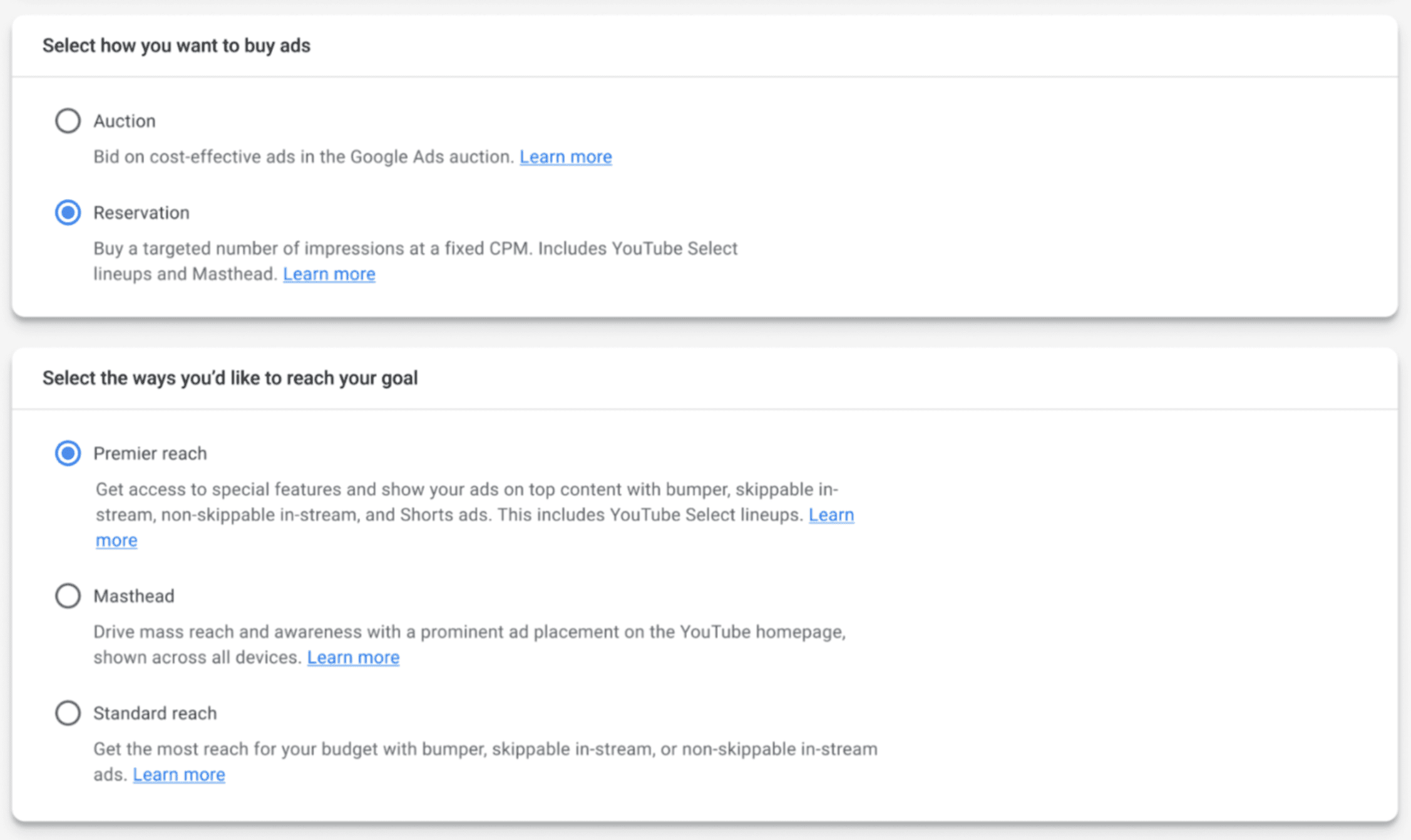
Google Ads Simplifies Reservation Video Campaigns On YouTubeScreenshot from Google, December 2023

What Are Reservation Video Campaigns?

Reservation campaigns allow advertisers and agencies to purchase specific ad placements on a cost-per-thousand impressions basis, which is ideal for campaigns aimed at promoting brand awareness or introducing new products.

The process has been simplified, allowing for direct purchases through Google Ads Reservation or Display and Video 360 Instant Reserve.

Benefits Of Reservation Media Placements On YouTube

Benefits of include greater control over impressions, high visibility through prominent placements like the YouTube Masthead, access to premier content via YouTube Select, and wider audience reach.

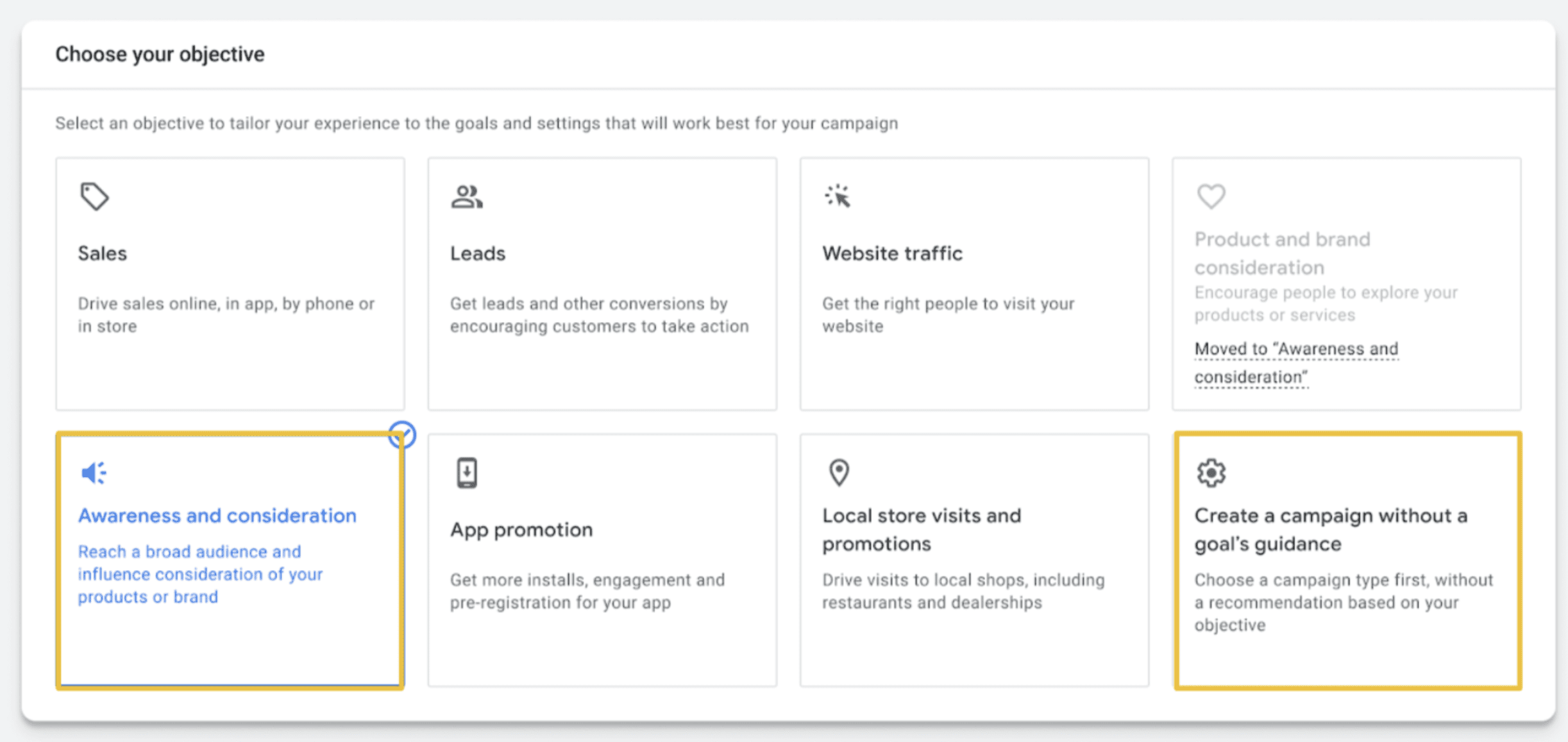
Google Ads Simplifies Reservation Video Campaigns On YouTubeScreenshot from Google, December 2023

Targeting options have been expanded to include YouTube Select, topic-based targeting, interest-based targeting, affinity audiences, and demographic targeting, offering advertisers refined tools to reach their desired audience.

Additionally, reservation campaign planning requires careful consideration of campaign details and creative approvals to ensure smooth execution.

Opportunities For Advertisers

This update is part of Google’s ongoing efforts to streamline the ad-buying process and offer more flexible and efficient solutions to advertisers and agencies.

For marketing and advertising professionals, access to high-impact YouTube ads in Google Ads will simplify campaign creation.

It’s crucial to familiarize yourself with the new system, ensuring campaigns align with Google’s policies and making the most of the fixed CPM and premier inventory options for maximum brand exposure.

Featured image: PixieMe/Shutterstock

Unlock Global Reach With Microsoft Video Advertising And Netflix via @sejournal, @kristileilani

Microsoft Advertising aims to lead the transformation of video marketing through partnerships with Netflix and top streaming platforms.

In 2023, the emergence of Connected TV (CTV) and over-the-top (OTT) platforms is redefining the advertising landscape.

During a recent webcast, Microsoft highlighted the significance of its unique tech stack, which provides advertisers with the flexibility to craft campaigns that align with their business needs.

Partnering With The Top Streaming Platform For Video Ads

Microsoft emphasized its commitment to driving innovation through partnerships with leading streaming platforms, particularly with an exclusive agreement with Netflix to power its ad-supported subscription tier.

This partnership expands Microsoft’s advertising reach, providing clients access to a highly engaged global audience. It comes at a time when the majority of US consumers will stream on one or more platforms like Netflix and Roku.

The webcast also shared insights into overcoming the complexities of video ad buying in a fragmented market.

Microsoft’s solution integrates unique data signals, collaboration with streaming services, and tailored video buying workflows to navigate these challenges efficiently.

Advertisers can benefit from a unified platform that offers consolidated deal buying and cross-channel measurement solutions, ensuring campaign success.

Scalable Advertising Solutions

Microsoft Advertising’s role in this rapidly evolving market is pivotal, offering over 860 CTV publishers, 100B weekly video impressions, and 1,200 always-on video deals.

The enterprise-level DSP, Microsoft Invest (powered by Xandr), further allows for intricate media buying strategies across various channels and formats, emphasizing the company’s versatile approach.

Advertisers have the opportunity to increase reach, enhance return on investment (ROI), and automate campaigns at scale with Microsoft’s robust suite of advertising solutions.

This comprehensive marketplace delivers scale, premium placements, and customizability that promise to revolutionize video and CTV advertising.


Featured images: Koshiro K/Shutterstock

Microsoft Advertising Offers Full-Funnel Solutions To Reach Fans via @sejournal, @kristileilani

In the competitive world of advertising, connecting with enthusiastic audiences during sporting events presents a unique and lucrative opportunity for brands.

With 31% of the US population engaging in digital live sports content monthly and similar trends in the UK, advertisers are looking to score big with fans year-round, not just during major events like the Super Bowl.

Given the challenges of aligning advertising dollars, sports sponsorship collaboration, and creating a cohesive media strategy, Microsoft Advertising proposes a synergistic solution.

Full Funnel Media Solutions

With 77% of American viewers simultaneously online while watching TV, the platform facilitates targeting across various channels from Connected TV and Paid Search, all in a single ecosystem.

Advertisers from various sectors should leverage this window, including the MVPs (key sports-related brands), the Veterans (brands with sports sponsorships across multiple industries), and the New kids on the block (brands new to sports marketing).

A particular success story highlights a consumer-packaged goods brand that observed significant increases in website and retailer page visits after aligning with a major sports event.

Audience Segmenting For Specific Fan Types

Understanding the audience is key. Segments like Enthusiasts, Tailgaters, Game Hosts, and even the Forced Fan represent the diverse demographic of sports audiences.

Targeting them through Microsoft Advertising enables advertisers a way to engage effectively, whether through Genre targeting on MSN Sports, in-market audiences for sports gear, or context-driven display ads.

Integration and smart use of existing content made for other mediums are encouraged, ensuring easy onboarding onto the Microsoft Advertising Platform. Moreover, transparent reporting and support from Microsoft’s team help streamline campaign optimization.

Team Players For Advertising Solutions

Marketers are encouraged to team up with Microsoft to maximize sports marketing results into the New Year.


Featured Image: IB Photography/Shutterstock

Key Levers To Steer AI in Performance Max And Boost Results via @sejournal, @adsliaison

I often see comments to the effect of, “Google just wants you to launch your campaigns and let its systems do everything.”

Let me just say as clearly as I can: no, that’s not what Google wants.

As always, the marketer’s role is evolving, but that role is as important as ever. This also applies to managing successful Performance Max campaigns.

The set up of Performance Max is where you can really position your campaign for success. But that doesn’t mean it’s entirely “set it and forget it.”

You know your or your client’s business better than Google. The inputs you provide, the tests you run, the creative you build, the analysis you perform to continue refining and iterating – those skills are critical to success and standing out from your competitors.

And understanding how the systems work and how to inform them is a big part of what will set you apart as the use of AI in marketing continues to evolve.

Consider Each Of These Levers In Your Performance Max Campaigns

Let’s dive into the features currently available in Performance Max to help you guide the AI and maximize your results.

Bidding Goals And Targets

Performance Max automatically adjusts formats and inventory based on the goals you provide and focuses on auctions that have a high probability of driving results toward your stated campaign goal(s).

That’s why it’s so important to define your goals based on the key performance indicators (KPIs) you want to drive with Performance Max, whether you’re looking to maximize conversions and have a cost per action (CPA) target or want to maximize conversion value and have a return on ad spend (ROAS) target.

If you have goals such as sales revenue, lifetime value, or profit margins, optimizing toward conversion value allows you to tie your bidding strategy more closely to those real business outcomes.

I’m not going to dive into marginal ROI in this article, but if you’re not familiar with the concept and are using Performance Max, I recommend bookmarking this page for later.

Conversion Value Rules

With Conversion Value Rules, you can indicate a higher value audience – as well as location and device – at the campaign level. Performance Max will optimize the bid and assemble the asset combination best predicted to convert for each audience member in real time.

New Customer Acquisition

You can either opt to bid higher for new customers/new customer value, or bid only for new customers/new customer value.

Note that there are some requirements, including needing to have an audience list of at least 1,000 active members in at least one network for the system to be able to identify existing customers.  Which brings us to…

First-party Data

It’s no secret that having a first-party data strategy is an increasingly key part of adapting to the evolving privacy landscape (some helpful resources here).

First-party data is also an important signal for informing Google AI to find more of those valuable customers and enhance your audience strategy.

There are several ways to use your first-party data in Performance Max, such as audience signals, which are covered here.

Brand Suitability

There are a number of brand suitability controls available for Performance Max, including support for all of your account-level content suitability settings.

You can check out the full list here, but I’ll highlight account-level negative keywords, which launched this year.

Performance Max respects account-level negative keywords which prevent your ads from showing for search terms that aren’t suitable for your brand in Search & Shopping inventory.

(Separately, you can also use “excluded content keywords” to prevent ads from serving on search terms on Display or Video inventory.)

Brand Exclusions

There was a lot of advertiser desire for more control over the brand terms Performance Max can show on. That’s where the new brand exclusions come in.

To prevent Performance Max from serving on specific brand terms (your own, competitor, or partner brands) in Search & Shopping, you can now apply a brand list to your campaign.

Campaign-level brand exclusions will apply to most misspellings and brand searches in a foreign language.

Page Feeds

Performance Max now supports page feeds to help you send Search traffic to a specific set of landing page URLs on your site.

You can add page feeds in Business Data to specify the URLs on your website that you want to use in your campaign.

You can also add custom labels to your page feeds to help target your ads and adjust bids per label. Note that you’ll need to enable automatically created text assets to use page feeds in Performance Max.

Final URL Controls For Automatically Created Assets

Automatically created assets in Performance Max generate headlines and descriptions from your landing page, domain, and existing ads and assets when they’re more relevant to a user’s search query and are predicted to improve performance.

When you enable Final URL expansion in automatically created assets, Google Ads will automatically send traffic to the most relevant URL it identifies as likely to improve performance. If you want to direct traffic to specific URLs only, you can uncheck this box.

You can also opt into Final URL and click the link to “exclude some URLs” in order to narrow the options available for URL expansion.

You can either enter specific URLs or use rules to exclude categories of content on your site. This is a helpful lever to steer your budget away from certain types of content, pages that are outdated, etc. More examples here.

Asset Groups

If you want to customize your messaging/assets by audience, products, or category, you can use multiple asset groups. Performance Max will test different combinations and learn which ones perform best for your target audiences.

You can use asset groups to theme products in your Merchant Center feed with listing groups.

There’s a helpful grid on this page that shows the minimum, maximum, and recommended number of assets to include in our asset groups – along with a bunch of other helpful info about asset groups – in this Help Center article.

And a quick reminder that ad strength is a guidepost, not a metric. Ad strength is an indicator of whether your asset group has enough assets to maximize performance across inventory.

The more diverse assets you provide, the more opportunities there will be to show the right ad to potential customers. A wide variety of creative assets – including different sizes and orientations – is key to resonating with different customer needs and mindsets.

New generative AI features, now in beta in the US, will also make it easier to scale your assets.

To understand how your assets are performing, you can use asset reports and asset group reporting (new this year).

When using asset reports, compare like assets to each other – headlines to headlines and descriptions to descriptions – because they are rated in relation to each other. The Combinations tab will show the top six combinations for text, image, and video assets, ranked by performance.

With asset group reporting, you can better understand the contribution of your asset groups for optimization by evaluating your average CPA or ROAS at the asset group level.

You can also select and save additional metrics in your views from the Columns button.

Location, Language, Ad Scheduling

It’s worth noting these standard settings are also available for Performance Max.

Signals

There are currently two signals you can add to your Performance Max campaigns to help jumpstart the learning to find more conversions or conversion value.

Note that signals in Performance Max are not hard targeting constraints. Instead, they’re a tool to indicate what’s relevant to your business to guide the AI.

Search Themes

Launched this fall, Search themes are a new, optional signal you can use to inform the AI about your business to expand relevant reach across all channels, including Search.

You can add up to 25 search themes per Performance Max asset group.

Search themes respect brand exclusions and account-level negative keywords, and are additive to queries that Performance Max would already match to using your URLs, assets, and more.

You can add and remove search themes at any time.

Use search terms insights on the Insights page to know what search term themes your Performance Max ads are showing on.

Audience Signals

Also optional, Performance Max will use audience signals as a starting point to find customers faster. You can add your own data, including site visitors, customers, etc., or interest and demographics as audience signals.

Again, this is not a hard signal, and Performance Max may also find that certain asset combinations convert audiences outside of the ones indicated in your audience signals.

When available, audience insights on the Insights page will show you which audiences are “signals” you proactively added and which are “optimized” and found by AI. Use audience insights to see top segments to inform your creative assets and landing pages.

Fundamentals That Often Require Partnership

While they aren’t technically “controls” you can enable, your website, landing pages, product feed, conversion tracking set up and more, can have a huge influence on the success of your Performance Max campaigns.

Sure, it’s a cliche to say good advertising can’t fix a bad website, but AI introduces even more reasons to work closely with your developer, UX, CRO – and even finance – teams and colleagues (and an opportunity to expand your own skill set).

Website And Landing Pages

Your website and landing pages are now key sources for generated assets – automatically created assets and the newly launched generative asset creation for Performance Max – so you want to be sure they accurately reflect your brand, offerings, and differentiators.

Merchant Center Feeds

For retailers, your product feed assets are reflected directly in your ads, so having high-quality images, informative and unique product titles and descriptions, and of course, accurate pricing, shipping, and tax data are all critical to success with Performance Max.

If your image assets aren’t where you want them to be, check out Product Studio which just launched in Merchant Center and uses generative AI to create high-impact product imagery.

Lead Gen Quality Improvements

There are ongoing investments in measures to help reduce invalid leads.

In addition, there are some steps we recommend advertisers take to help prevent leads from users who don’t provide accurate information.

These steps include server-side validation, double opt-in, Recaptcha, and using enhanced conversions for leads with qualified and converted conversion categories.

Performance Max Continues To Evolve

As you can see, many levers, insights, and reporting features have been added to Performance Max since it launched two years ago – thanks in large part to advertiser feedback.

You can expect to see Performance Max continue to evolve to make it easier for advertisers to get more out of their campaigns.

More resources: 


Featured Image: BestForBest/Shutterstock

Google Analytics 4 Features To Prepare For Third-Party Cookie Depreciation via @sejournal, @kristileilani

Google will roll out new features and integrations for Google Analytics 4 (GA4) for first-party data, enhanced conversions, and durable ad performance metrics.

Beginning in Q1 2024, Chrome will gradually phase out third-party cookies for a percentage of users, allowing for testing and transition.

Third-party cookies, which have been central to cross-site tracking, are being restricted or phased out by major browsers, including Chrome, as part of its Privacy Sandbox project.

The following features should help advertisers “unlock durable performance” while preserving user privacy.

Support For Protected Audience API In GA4

A key feature of recent updates to Google Analytics 4 is the integration of Protected Audience API, a Privacy Sandbox technology that is set to become widely available in early 2024.

This API allows advertisers to continue reaching their audiences after the third-party cookie phase-out.

What Is The Protected Audience API?

The Protected Audience API offers a novel approach to remarketing, which involves reminding users about sites and products they have shown interest in without relying on third-party cookies.

google analytics 4 privacy sandbox protected audience API lifecycleScreenshot from Google, December 2023
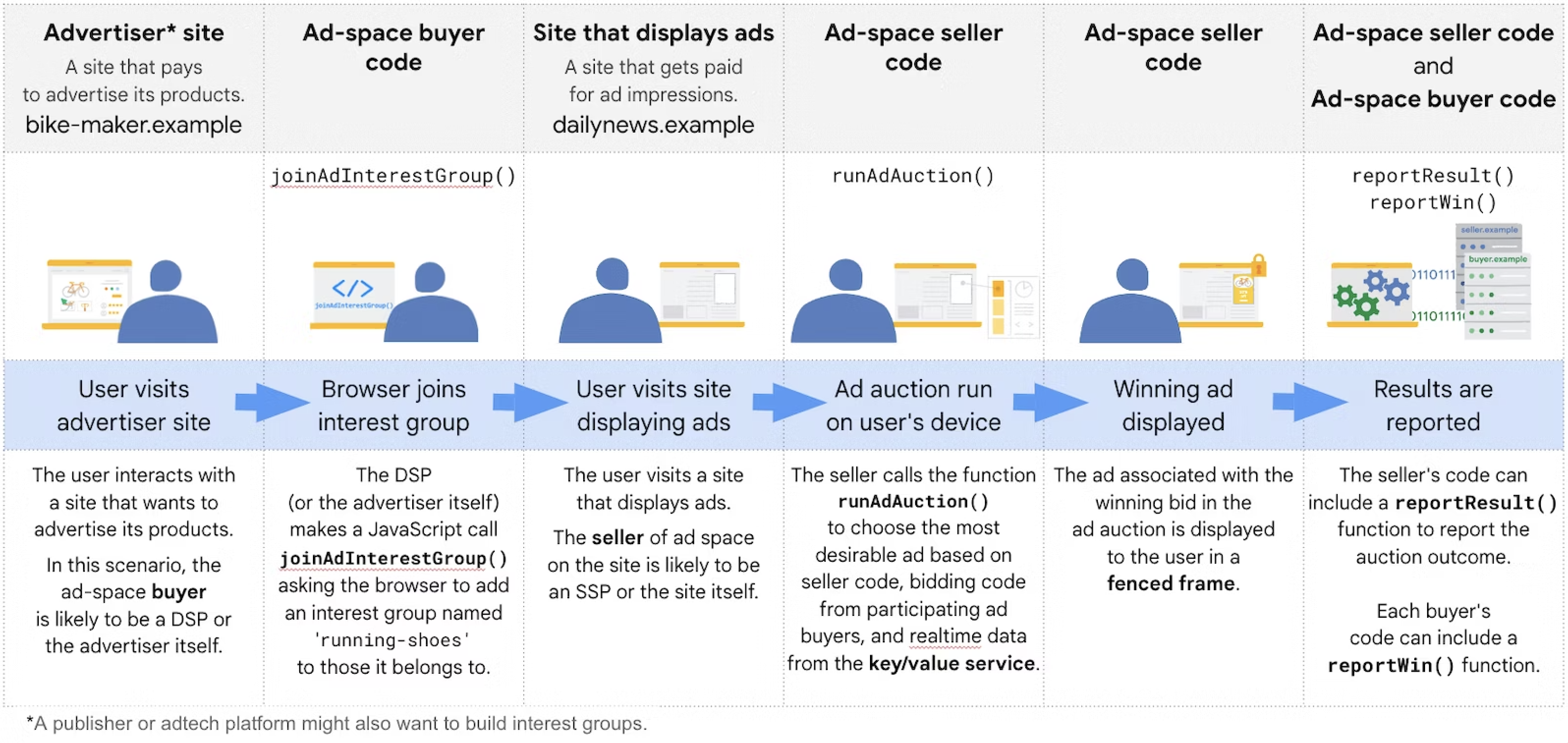
This method involves advertisers informing the browser directly about their interest in showing ads to users in the future.

The browser then uses an algorithm to determine which ads to display based on the user’s web activity and advertiser inputs.

It enables on-device auctions by the browser, allowing it to choose relevant ads from sites previously visited by the user without tracking their browsing behavior across different sites.

Key Features And Development

Key features of the Protected Audience API include interest groups stored by the browser, on-device bidding and ad selection, and ad rendering in a temporarily relaxed version of Fenced Frames.

The API also supports a key/value service for real-time information retrieval, which can be used by both buyers and sellers for various purposes, such as budget calculation or policy compliance.

The Protected Audience API, initially known as the FLEDGE API, has evolved from an experimental stage to a more mature phase, reflecting its readiness for wider implementation.

This transition is part of Google’s broader efforts to develop privacy-preserving APIs and technologies in collaboration with industry stakeholders and regulatory bodies like the UK’s Competition and Markets Authority.

The Protected Audience API offers a new way to connect with users while respecting their privacy, necessitating a reevaluation of current advertising strategies and a focus on adapting to these emerging technologies.

Support For Enhanced Conversions

Rolling out in the next few weeks, enhanced conversions is a feature enhancing conversion measurement accuracy.

enhanced conversion for webScreenshot from Google, December 2023
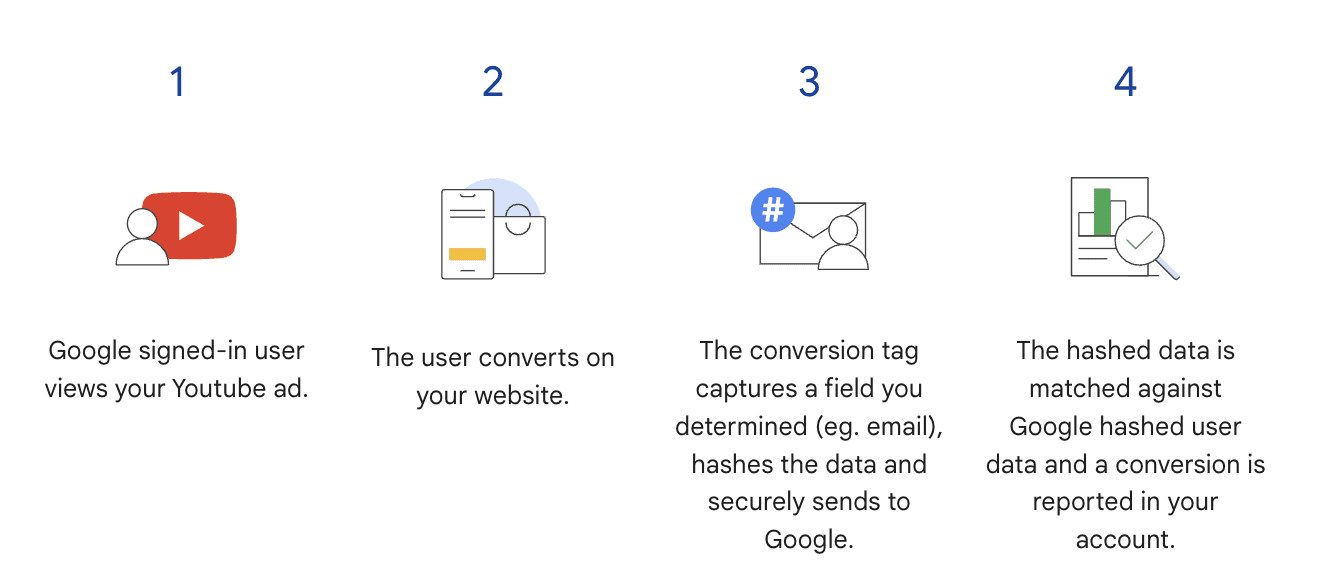
Enhanced conversions for the web cater to advertisers tracking online sales and events. It captures and hashes customer data like email addresses during a conversion on the web, then matches this with Google accounts linked to ad interactions.

This method recovers unmeasured conversions, optimizes bidding, and maintains data privacy.

For leads, enhanced conversions track sales from website leads occurring offline. It uses hashed data from website forms, like email addresses, to measure offline conversions.

Setup options for enhanced conversions include Google Tag Manager, a Google tag, or the Google Ads API, with third-party partner support available.

Advertisers can import offline conversion data for Google Ads from Salesforce, Zapier, and HubSpot with Google Click Identifier (GCLID).

Proper Consent Setup

To effectively use Google’s enhanced privacy features, it’s essential to have proper user consent mechanisms in place, particularly for traffic from the European Economic Area (EEA).

Google’s EU user consent policy mandates consent collection for personal data usage in measurement, ad personalization, and remarketing features. This policy extends to website tags, app SDKs, and data uploads like offline conversion imports.

Google has updated the consent mode API to include parameters for user data consent and personalized advertising.

Advertisers using Google-certified consent management platforms (CMPs) will see automatic updates to the latest consent mode, while those with self-managed banners should upgrade to consent mode v2.

Implementing consent mode allows you to adjust Google tag behavior based on user consent, ensuring compliance and enabling conversion modeling for comprehensive reporting and optimization.

Consent Mode integration with CMPs simplifies managing consent banners and the consent management process, adjusting data collection based on user choices and supporting behavioral modeling for a complete view of consumer performance.

Durable Ad Performance With AI Essentials

To effectively utilize AI, marketers need robust measurement and audience tools for confident decision-making.

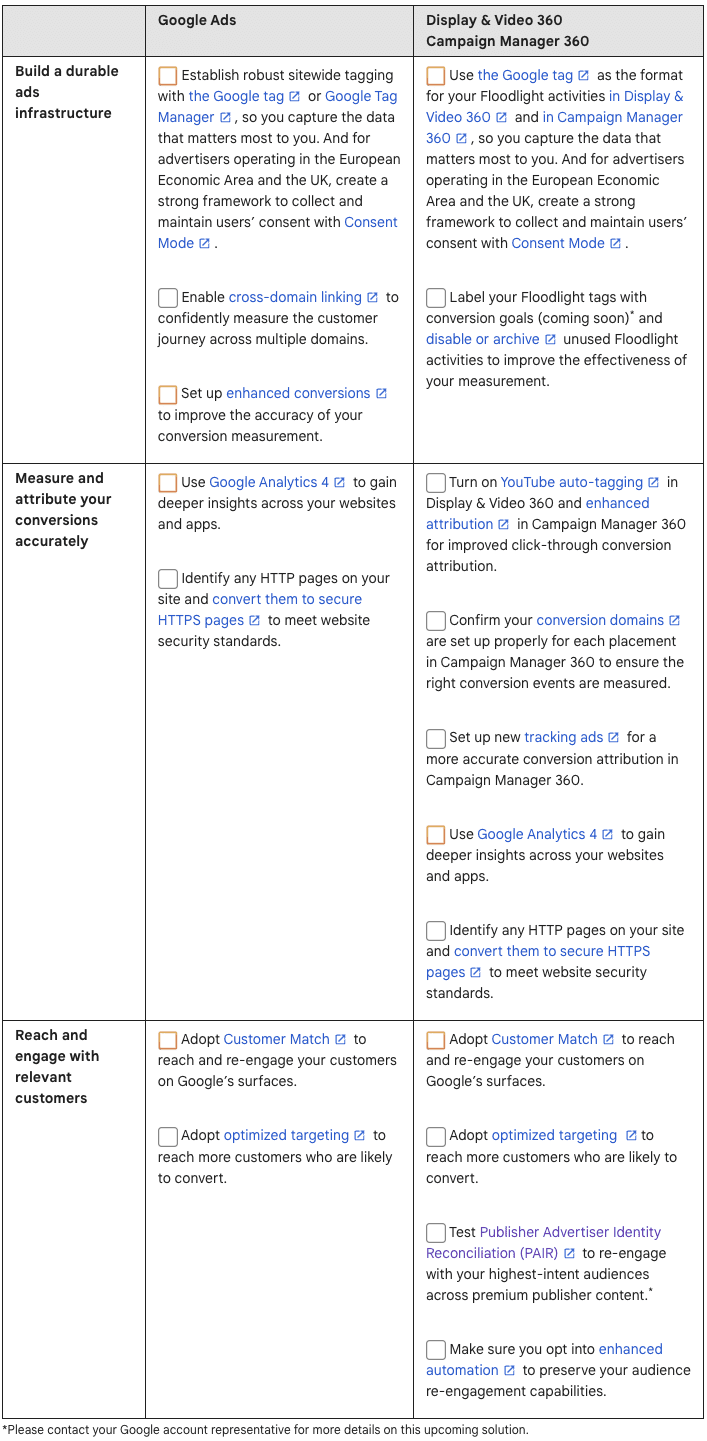
Google provided a general checklist of AI essentials for Google advertisers. In it, advertisers are encouraged to adopt AI-powered search and Performance Max campaigns, engage in Smart Bidding, and explore video campaigns on platforms like YouTube.

Google also offers a more in-depth checklist for Google Ads, Display & Video 360, and Campaign Manager 360.

google ads durable performance measurement aiScreenshot from Google, December 2023
More Ways To Prepare For The Third-Party Cookie Phase Out

As third-party cookies are phased out, it’s essential to audit and modify web code, especially focusing on instances of SameSite=None using tools like Chrome DevTools.

Adapting to this change involves understanding and managing both third-party and first-party cookies, ensuring they are set correctly for cross-site contexts and compliance.

Chrome provides solutions like Partitioned cookies with CHIPS and Related Website Sets.

At the same time, the Privacy Sandbox introduces APIs for privacy-centric alternatives, with additional support for enterprise-managed Chrome and ongoing development of tools and trials to assist in the transition.

As Google continues to update resources and documentation to reflect these changes, stakeholders are encouraged to engage and provide feedback, ensuring that the evolution of these technologies aligns with industry needs and user privacy standards.


Featured image: Primakov/Shutterstock