Google’s Push For Data Strength Is Really A Push For Better Bidding via @sejournal, @brookeosmundson

Google keeps coming back to the same message this year: your AI is only as good as the data feeding it.

That message has shown up across the Ads Decoded podcast, Data Manager updates, tagging guidance, partner integrations, and now even developer-focused content like the Ads DevCast podcast. It seems to reflect a broader shift in how Google expects campaigns to be built and optimized.

The issue is not that advertisers lack data. Most accounts have plenty of it. The problem is how that data has been structured, selected, and fed into bidding systems over time.

As Google leans further into AI-driven optimization, that gap becomes more visible for advertisers who don’t have a sound conversion setup. Campaign performance is increasingly tied to how clearly the system understands what success looks like.

Why Google Is Pushing Advertisers To Rethink Conversion Strategy

For years, many advertisers treated conversion tracking as something to expand, not refine over and over again.

If a platform made it easy to track an action, it got added. If a CRM could send something back, it got imported. If a new conversion type became available, it often made its way into the account without much resistance.

On paper, that sounds like a more complete dataset. The more data, the better – right?

In reality, it’s created a lot of noise for machines to learn what truly matters.

Campaigns are often optimized toward a mix of actions that did not share the same level of intent, value, or timing.

Some signals are high quality but might have low volume due to a delay in sales cycle activity. Others may be immediate but loosely tied to actual business outcomes. Many accounts end up blending all of them together under a single bidding strategy for the sake of measuring everything.

That worked well enough when automation was less dependent on precise inputs.

It becomes a bigger problem when bidding systems are expected to make decisions based on patterns in that data.

Where Most Conversion Setups Break Down

In one of the recent Ads Decoded podcast episodes, Google’s recent guidance around lead generation makes it clear what they are trying to correct. The focus is on mapping the full customer journey and identifying the conversion point that provides a usable signal for bidding.

That means looking at three things at the same time:

  1. How predictive the action is of real business value
  2. How frequently it occurs
  3. How quickly it happens after the initial interaction

Many advertisers still default to the deepest possible conversion, assuming that optimizing toward the final sale will produce the best outcome across every campaign.

The issue isn’t that particular goal itself, but more how usable that signal is for the system in a higher-funnel campaign. And this is where many conversion strategies start to fall apart.

If that action happens infrequently or takes weeks to materialize, it limits how much the bidding system can learn from it. The result is often slower optimization, higher volatility, and less efficient scaling.

On the other end, optimizing toward early-stage actions without considering quality can inflate volume without improving actual outcomes.

Selecting the right signal requires matching the conversion to the role the campaign plays and ensuring that signal is both meaningful and usable for bidding.

That shift requires more intentional decision-making than many accounts have historically applied to conversion setup. It also introduces a level of discipline that many advertisers have not needed when automation was less dependent on signal quality.

Why Is Google Putting So Much Weight On Data Strength?

Google is not being subtle about the Data Strength push. It’s showing up in product updates, integrations, tagging changes, and even in the way Google is speaking to both advertisers and developers.

Part of the reason is practical. Advertisers have lost visibility into many of the signals they used to rely on. Privacy changes, browser restrictions, and platform limitations have made measurement less complete than it used to be.

At the same time, Google’s bidding systems are being asked to do more with less. That puts more pressure on the signals that are still available.

This is where Data Strength comes in. Google is trying to make those signals more reliable, easier to connect, and more useful for optimization. Data Manager, tag gateway, and partner integrations all support that goal.

The expansion of integrations with platforms like HubSpot, Zapier, and Cloudflare also supports this effort. Instead of relying on custom implementations, advertisers can connect the systems where their data already exists with less effort.

This improves consistency in how data flows into bidding systems.

It also reinforces Google’s broader goal of making its automation more effective in a lower-signal environment.

Does This Point To A Broader Role For Google?

I also think there is a bigger shift underneath this push.

Google is moving closer to the systems where business outcomes actually happen, not just where ads are served. Connecting CRM data, offline conversions, and audience signals allows Google’s platforms to better understand what a “good” customer looks like beyond the initial click or form fill.

That can absolutely help advertisers improve performance.

At the same time, it positions Google as more than just an ads platform. It becomes more integrated into how businesses measure performance, define value, and connect marketing efforts back to real outcomes

Where Does Server-Side Tagging Fit In With This?

There has been a lot of confusion around server-side tagging and how it relates to what Google is promoting today.

They are related, but they aren’t the same thing.

Google tag gateway focuses on how the Google tag is delivered and how requests are routed through first-party infrastructure. It is a way to make existing tagging setups more resilient and aligned with privacy expectations.

Server-side tagging is a broader architectural approach. It shifts data processing from the browser to a server environment that the advertiser controls. This can improve site performance, provide more control over data handling, and support more advanced use cases across multiple platforms.

In practical terms, tag gateway is often a more accessible first step for advertisers looking to improve data reliability without a full infrastructure overhaul.

Server-side tagging is a larger investment and tends to be more relevant for organizations with more complex data requirements or stricter governance needs.

The two approaches can work together, and Google documentation often recommends combining them for a more durable setup.

A Thoughtful Approach To Data Strength

The increased focus on Data Strength is directionally positive, but it does not remove the need for careful decision-making.

Simplifying setup does not automatically lead to better outcomes. If conversion actions are poorly defined or not aligned with campaign intent, connecting them more efficiently will not improve performance.

If you’re a marketer who isn’t directly involved with setting up conversions, it may be worthwhile to meet with your Analytics teams. Create a list of must-have conversion events or actions you need to track for campaigns (online and/or offline), and cross-check that list with what’s currently set up.

There is also a governance component to consider. As tagging becomes more automated and data collection expands, teams need to understand what is being captured, how it is being used, and how it aligns with internal policies.

Google has noted that expanded automatic event collection may result in additional data being sent to its systems, which should be reviewed as part of implementation.

Another consideration is how platform-specific improvements fit into a broader measurement strategy.

Google’s push around Data Strength is primarily focused on improving performance within its own arena. That is valuable, but it should be complemented by broader measurement approaches when making budget and channel decisions.

This is where initiatives like Meridian come into play. Google has positioned Meridian as an open-source marketing mix modeling solution to help advertisers evaluate performance across channels and connect those insights to budget planning.

How Google Is Reinforcing Data Strength Across The Industry

One of the more interesting aspects of this push is how consistently it’s showing up across different mediums.

Product updates are only one piece of it.

Google is also investing in education and communication around Data Strength, using formats that reach both marketers and developers. Ads Decoded continues to focus on practical campaign strategies, including how to map the customer journey and select the right conversion signals.

At the same time, newer initiatives like Ads DevCast are aimed at a more technical audience, with episodes focused on topics like the Data Manager API and data integration workflows. The goal seems to be to meet teams where they are, whether they are responsible for campaign strategy or the underlying implementation.

The Data Manager API itself reinforces this direction. Google is shifting workflows like Customer Match into a system designed specifically for data connectivity, privacy controls, and more consistent ingestion of first-party data.

That combination of product changes, partnerships, and education signals a coordinated effort to strengthen how data is collected, connected, and used across the entire advertising atmosphere.

What Advertisers Are Saying About The Data Strength Conversation

The discussion around Data Strength and lead quality have sparked a lot of needed conversations between Google and advertisers.

In reaction to the Ads Decoded episode “Beyond the Form Fill“, many advertisers are happy that B2B businesses are getting the attention they’ve been asking for. Melissa Mackey praised the episode, stating that “All lead gen advertisers should go listen.” A few marketers noted the need to improve or purge the amount of bot leads they see in their B2B campaigns, including Robert Peck.

Google also did a series of posts and interviews with experts on the importance of data strength. All seemed to have similar sentiment and this is where I started seeing more and more advertisers connect the dots.

Adrija Bose commented on a discussion with Kamal Janardhan, Senior PM Director at Google, and Jeff Sauer, CEO of MeasureU:

What strikes me most is the framing of AI as the engine, not the strategy. Too many leaders conflate the two, expecting AI to compensate for weak signals. This post nails why high-quality data is non-negotiable for meaningful outcomes.

Jonathan Reed also showed his support on the renewed focus of data strength, stating that while it’s a full-time job for his team, they’ve seen “seeing dramatic increases in conversions, and dramatic decreases in cost!”

What Does This Mean For Your Campaigns?

This shift will show up pretty quickly once you look at how your campaigns are actually set up.

A lot of accounts still treat conversion tracking as something to build once and leave alone. But if the signals feeding your campaigns don’t match the intent behind the queries you’re targeting, it becomes harder for bidding to do its job well.

That usually shows up in ways you’ve probably already seen, where performance feels inconsistent and scaling becomes more difficult. Even small changes can create overly volatile swings.

None of that is coming from one setting or one campaign. It is usually a reflection of how the system is learning from the data it is given.

That is why this push toward Data Strength matters so much.

It forces a closer look at which signals are actually being used for optimization, how reliable they are, and whether they reflect real business outcomes.

In some cases, that means connecting better data from your CRM. In others, it is fixing how your tags are set up or how conversions are being defined in the first place.

As Google continues to lean into this direction, the gap will likely grow between accounts that are intentional about their data and those that aren’t.

More Resources:


Featured Image: Garun.Prdt/Shutterstock
From T-Shaped To M-Shaped: The PPC Career Evolution Nobody Is Talking About

Ask any PPC professional what career shape they are working toward, and most will say T-shaped. One deep specialism, broad supporting knowledge across adjacent areas. It became the dominant career framework in marketing over the last decade, and for good reason. In a world where platforms were simpler and clients valued versatility, the T-shaped practitioner was exactly what the market wanted.

That model is no longer enough.

Not because T-shaped practitioners are bad at their jobs or the model does not work anymore. Most are excellent. But the conditions that made T-shaped the right target have changed fundamentally, and the practitioners commanding the highest compensation in 2026 are not T-shaped. They are something more evolved: M-shaped. Two or three deep pillars of expertise, sitting on a broad foundation of knowledge across five to seven adjacent domains. It looks like a generalist from a distance and like a specialist up close, depending on which conversation you are in.

I want to make the case that M-shaped is not just an incremental upgrade on T-shaped. It is a fundamentally different career posture, built for a fundamentally different market.

Why T-Shaped Made Sense, And Why It Is No Longer Enough

The T-shaped model solved a real problem. Early in a career, being good at one thing gets you hired. Being good at only one thing gets you stuck. T-shaped gave practitioners a path: Go deep first, then build outward. It worked particularly well in agency environments where account managers needed enough breadth to have intelligent conversations across channels without needing to own them all.

The problem is that AI has quietly made T-shaped the new floor, not the ceiling. The State of PPC 2026 report, with over 1,306 responses, suggests that the skills now expected of a competent PPC manager include data analysis, first-party data activation, creative testing strategy, attribution modeling, prompt engineering, and scripting. That is not a job description for a specialist. It is the broad knowledge layer of a T-shaped practitioner, repackaged as the baseline requirement.

When the broad layer of your T becomes everyone’s minimum viable requirement, the T itself stops being a differentiator. What differentiates you now is what sits on top of it.

There is also a structural issue that the T-shaped model was never designed to address. A single deep specialism creates a single point of failure. If your specialism is automated, commoditised, or simply stops being valued by clients, you are exposed. Practitioners who built their identity around a single skill have already felt this. The M-shaped model spreads that risk across multiple pillars without sacrificing depth.

What M-Shaped Actually Means In PPC

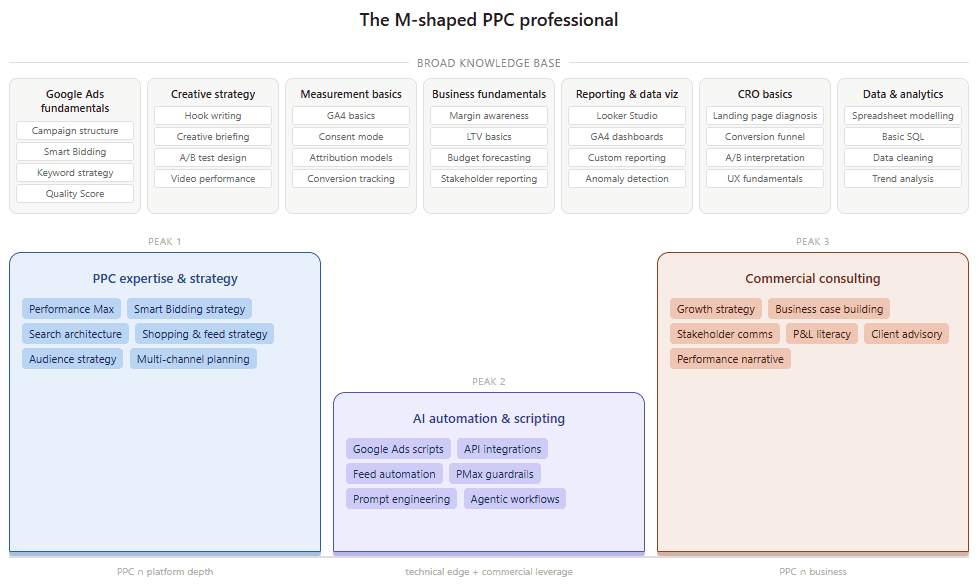
M-shaped is not a new term, but it has barely been applied to paid media specifically. In talent and HR circles, it describes a senior professional with multiple areas of genuine depth connected by a wide base of contextual knowledge. Think of the shape literally: two or three peaks, not one, all sitting on the same broad foundation.

In a PPC context, the broad foundation could cover seven domains. Not mastery of each, but enough fluency to be credible, to ask the right questions, and to connect dots across them:

Broad knowledge layer (the base of the M) What fluency looks like in practice
Google Ads and paid search fundamentals Understanding platform mechanics, bid strategy, and campaign architecture at a working level.
Creative strategy Briefing creative from a performance hypothesis, not an aesthetic preference.
Data and analytics fundamentals Enough to interpret a dataset, build a basic model in Google Sheets or Looker Studio, and know when the numbers you are looking at are telling you something real versus something misleading.
Audience and first-party data Knowing what signals matter and how first-party data integrate.
Business fundamentals Reading a P&L, understanding margin, talking to a CFO.
Reporting and data visualisation Turning raw data into a decision, not just a dashboard.
CRO basics Enough to understand where paid traffic lands and why conversion rate affects the economics of every campaign you run.

On top of that base, the M-shaped PPC professional has two or three peaks. These are not sub-specializations within PPC. They are complementary disciplines that sit alongside it. The difference matters. Going deeper on Smart Bidding or Performance Max is valuable, but it is still PPC. Building genuine expertise in data engineering, CRO, SEO, business consulting, or marketing attribution is something different. It takes you into rooms and conversations that pure PPC expertise does not open. That is what the second and third peaks are for.

My own peaks are measurement and attribution strategy, AI-driven automation and scripting, and high-value commercial consulting. Importantly, these are not just deeper layers within PPC. They are distinct disciplines in their own right, each requiring a different knowledge base and opening access to different conversations. Attribution sits at the intersection of PPC and broader data strategy. Automation and scripting sit at the intersection of PPC and engineering. Consulting sits at the intersection of all of it and commercial strategy. That is the point. The peaks of an M-shaped profile should take you somewhere your PPC foundation alone cannot reach.

The specific peaks will differ for every practitioner. What matters is that they are genuinely deep, that they are visible, and that they are connected to each other and to the broad base in a way that makes sense commercially.

A sample M-shaped skillset could look like this:

Image from author, March 2026

Why M-Shaped Is Where The Premium Compensation Actually Lives

The salary data backs this up in a way that is hard to ignore. Duane Brown’s PPC Salary Survey 2026 shows that U.S. freelancers with 10 to 15 years of experience earn a median of $202,895, compared to $123,545 for agency practitioners at the same experience level. That is a gap of nearly $80,000 for the same years on the clock.

That premium is not explained by experience alone. It is explained by the ability to operate across disciplines. The practitioners earning at that level are not running campaigns for retainer fees. They are being engaged as experts who can bridge PPC with adjacent high-value problems: a consultant who understands both automation and business strategy, a specialist who can speak to attribution in a language the CFO recognises, a practitioner who can connect first-party data infrastructure to paid media outcomes. The peaks make that possible. The base alone does not.

The in-house data tells a similar story. The same survey shows a median of $170,000 for in-house practitioners with six to nine years of experience, against $90,000 for their agency counterparts at the same stage. That $80,000 gap reflects something structural: in-house senior roles, particularly growth-oriented ones, tend to be built around practitioners who own multiple critical functions rather than managing a portfolio of client accounts. They are hired for their peaks, not their base.

Agencies have to spread expertise across too many clients to let anyone go truly deep. In-house is where M-shaped profiles find the room to build.

This is worth sitting with if you work in an agency. Agency environments are excellent for building a range. You see more campaigns, more industries, more budget levels in two years at a good agency than you would in five years in-house. But agencies have a structural ceiling on depth: there are too many clients, too many accounts, too much context-switching for any one practitioner to genuinely own a problem from end to end. The practitioners who break through that ceiling are the ones who build their peaks outside the day job, through side projects, consulting work, speaking, writing, and building tools, and use the agency as the base, not the destination.

The Counterargument Worth Addressing

The obvious pushback to all of this is that M-shaped sounds good in theory but is unrealistic in practice. Most practitioners do not have the time or the organizational support to develop multiple genuine areas of deep expertise while also managing a full workload. And they are right that it cannot happen overnight.

But I think this objection confuses building M-shaped with being M-shaped. You do not arrive at M-shaped by trying to become an expert in three things simultaneously. You arrive there by going deep in one area first, then, once that pillar is solid enough to be commercially useful, identifying a second area where your first pillar gives you a natural edge. Measurement and attribution, for example, becomes a much more tractable second pillar once you already understand automation. If you know how Performance Max actually allocates budget, what signals Smart Bidding consumes, and where platform reporting diverges from reality, you are not approaching attribution as an abstract measurement problem. You are solving a specific one: how do you build a framework that accounts for what you already know the platform is doing wrong? That prior knowledge makes you faster, more credible, and harder to replace than someone who learned attribution in isolation.

The progression is not linear, and it is not fast. But the practitioners commanding $150,000 to $200,000 in this industry did not get there by deepening a single specialism forever. They got there by building a second peak, and then finding a way to connect the two.

What This Means For Where You Invest Next

If the argument holds that T-shaped is the new floor and M-shaped is where the premium lives, then the practical question is how to identify which second or third peak to build.

My honest advice is to start from your first peak and ask what adjacent problems your clients or employers consistently struggle with that you are currently not equipped to solve. If your peak is campaign automation, the adjacent problem is probably measurement: clients who have great automation in place but no reliable way to attribute outcomes to it. If your peak is creative performance, the adjacent problem is probably first-party data and audience strategy: clients who are producing great creative but targeting it at the wrong signals.

The peaks that compound best are the ones that are genuinely complementary, where depth in one makes you better at the other and more valuable to the businesses you work with. That is what separates M-shaped from simply having two T-shapes that happen to coexist in the same person.

The State of PPC 2026 report is unambiguous on the wider context: the performance gap between sophisticated advertisers and the average is wider than it has ever been. Platforms are not becoming more transparent, privacy constraints are not loosening, and competition is not decreasing. In that environment, the practitioners who will win are not the ones who are good at everything. They are the ones who are indispensable at two or three things that matter deeply to the businesses they serve.

T-shaped got a lot of us to where we are. M-shaped is what gets us to where the market is heading, and to a point where your career becomes genuinely difficult to commoditise or replace.

One last thing worth saying clearly: Do not be discouraged by this. M-shaped is not a certification you earn or a checklist you complete in a training sprint. It is the professional identity you build over a career.

The practitioners I know who have reached it did not set out to become M-shaped. They went deep on one thing, got good enough that it opened a door to something adjacent, walked through it, and repeated the process. That takes years, sometimes a decade or more. The fact that it takes that long is precisely why it is worth building. Anything that can be acquired in two or three years can be acquired by everyone. What you are working toward is something that cannot.

More Resources:


Featured Image: Roman Samborskyi/Shutterstock

ChatGPT Ads: New Acquisition Channel Or Just Another Brand Tax? via @sejournal, @brookeosmundson

A lot of PPC managers are going to get asked about ChatGPT Ads over the next few months.

That was probably inevitable the moment OpenAI moved beyond testing ads and started building a real monetization story around them. The initial pilot was easy enough for most advertisers to ignore. It was invite-only, expensive, and limited enough that it felt more like a premium media test than something the average paid media team needed to factor into a media plan.

It’s going to be harder for PPC pros to ignore with the newest announcement from OpenAI.

OpenAI is reportedly preparing to launch self-serve advertiser capabilities in April while also expanding its ads pilot into additional countries. That does not automatically make ChatGPT Ads a serious channel for every advertiser. It does, however, make this the first point where more paid media teams may actually have to form a view on it.

And that view should probably be more skeptical than enthusiastic.

Because while the headlines around ChatGPT Ads are easy to frame as momentum, that is not the same thing as proving this is already a channel worth real budget.

For a lot of advertisers, the more useful question is not whether OpenAI can sell ads. It clearly can. The better question is whether this becomes a meaningful new acquisition channel or just another place brands feel pressure to pay for visibility before the economics are fully there.

That is the part worth taking seriously.

What OpenAI’s First Ads Pilot Told Us

The first version of ChatGPT Ads was never built for broad advertiser adoption.

OpenAI said in January that it would begin testing ads in the U.S. for logged-in adult users on Free and Go plans, while keeping Plus, Pro, Business, Enterprise, and Education ad-free. It also made a point of saying ads would not influence answers, would remain clearly separated from responses, and would not involve selling user conversations to advertisers.

That setup was important, because OpenAI was clearly trying to introduce monetization without damaging trust in the product. In practical terms, though, it also meant the pilot looked much closer to a controlled brand environment than a normal PPC channel.

The early economics reinforced that. Reuters reported in March that Criteo had been pitching advertiser commitments in the $50,000 to $100,000 range as OpenAI expanded the U.S. pilot, while other early reporting around the first wave of access pointed to premium CPMs and high barriers to entry.

That is not how platforms behave when they are trying to onboard the average mid-market advertiser. That is how they behave when they are trying to keep the test small, high-value, and manageable.

Some advertisers reported CTR of ads in ChatGPT as low as 0.91%, compared to an average benchmark of 6.4% on Google search. This metric is something marketers will want to watch closely when trying to identify how ChatGPT fits into their marketing strategy and aligning it with realistic expectations.

The context of those details matter, because some of the current reaction to ChatGPT Ads skips too quickly past what the pilot actually was. It was not broad proof of market fit.

At the same time, it would be too dismissive to treat the pilot as nothing more than a PR-friendly experiment.

OpenAI has a massive user base, a product people are already using in research and discovery behaviors, and enough advertiser demand to justify moving beyond the first phase. That does not prove long-term channel value, but it does suggest there is more here than novelty.

What About the Reported $100 Million Annualized Revenue From The Pilot?

The most repeated number in the current conversation is Reuters’ report that OpenAI’s U.S. ads pilot exceeded $100 million in annualized revenue within six weeks. That is a strong headline, and on its face, it suggests there is real advertiser demand. Reuters also reported that the pilot has expanded to more than 600 advertisers, with nearly 80% of small and medium-sized businesses signaling interest.

For a limited pilot, that seems to be a meaningful revenue pace. Even allowing for premium pricing and controlled access, it tells you this is not a fringe experiment with a handful of novelty buyers. Advertisers are interested, and OpenAI has clearly found enough demand to justify building this out further.

It also suggests there may be real commercial value in conversational inventory if the platform can maintain trust while expanding scale.

But, let’s take a deeper look into what the claim of annualized revenue means.

What Does Annualized Revenue Mean?

“Annualized revenue” is not the same thing as saying OpenAI booked $100 million in actual revenue in six weeks. It means the current pace of revenue, if sustained over a year, would exceed that number.

That is still notable, especially for a limited pilot. But it is also one of the easiest ways to make an early-stage business line sound bigger and more mature than it may actually be.

There are a few reasons to be careful about what it does and does not prove.

For one, premium pilot economics can make early revenue look healthier than a scaled platform may actually be. If access is limited, inventory is scarce, and pricing is high, you can build a very attractive short-term revenue story without proving that the platform is broadly investable for normal advertisers.

Second, Reuters reported that while about 85% of users are currently eligible to see ads, fewer than 20% are shown ads daily. That gives OpenAI room to increase monetization, but it also means the current revenue run rate is still being generated in a fairly controlled environment.

Third, the $100 million figure tells us very little about advertiser outcomes. It tells us advertisers are willing to buy in.

It does not tell us yet whether those advertisers are seeing meaningful incremental conversions, efficient customer acquisition, or strong downstream value relative to other channels.

So, while the revenue number is worth paying attention to, it shouldn’t be treated as proof that ChatGPT Ads are already a mature or “must-test” channel for most advertisers.

How Will The Self-Serve Ads Platform Change The Conversation?

In its newest development, OpenAI is reportedly preparing to open self-serve advertiser access in April.

That changes the conversation because self-serve is what turns a tightly controlled pilot into something more PPC managers may be expected to evaluate, budget for, or at least have an opinion on. Reuters also reported that OpenAI plans to expand the pilot beyond the U.S. into Canada, Australia, and New Zealand, which further signals that this is moving out of “contained experiment” territory.

A premium pilot mostly tells you whether a company can sell scarce inventory to selected advertisers. A self-serve platform is the first stage where advertisers can start evaluating whether the product behaves like a usable media channel at all.

That’s where the real learning begins again.

There’s a legitimate case for why some advertisers will want to pay close attention. If ChatGPT continues to become a place where people compare products, explore options, and work through buying decisions, then ad placements in that environment could eventually matter in a way that does not map cleanly to either search or paid social.

That possibility is real, it just has not been fully proven yet.

Why ChatGPT Ads Could Become A Meaningful Channel

If ChatGPT Ads are going to matter, the case for why is not hard to understand.

People are already using AI tools for research, planning, troubleshooting, product comparisons, and early-stage decision-making. That behavior is commercially important because it sits in a part of the journey that many advertisers care about but do not always capture especially well.

  • Search often captures explicit demand.
  • Paid social often creates or interrupts demand.
  • ChatGPT (or other AI platforms down the road) may end up sitting somewhere in-between.

A user in ChatGPT is often not just typing a keyword. They are explaining a situation, asking for options, and narrowing a decision. That creates a different kind of commercial context.

In theory, that should be valuable to advertisers, especially in categories where buyers need more information, more confidence, or more help evaluating tradeoffs before they convert.

If OpenAI can build an ad product that fits that behavior without damaging trust, there is a reasonable case that this becomes a genuinely useful environment rather than just another place to buy impressions.

Could The Hype Of ChatGPT Ads Be Overrated?

AI platforms have gotten a lot of hype over the past few years, and they all seem to be a race towards the top.

Now that ads are being placed into ChatGPT, the market anticipation may get ahead of what the platform has actually proven.

That tends to happen whenever a platform has three things at once:

  • Cultural momentum
  • Advertiser curiosity
  • Enough scale to make marketers nervous about being absent

That combination can create pressure to show up before the underlying economics are fully understood.

And that is where the “brand tax” concern comes in.

A brand tax shows up when advertisers feel compelled to buy visibility because the platform is becoming too important to ignore, even if the measurement is still fuzzy and the performance case is still incomplete.

That does not mean the spend is automatically wasteful. But, the motivation behind the spend can shift from strategic fit to defensive presence if not clearly thought through.

This is why I think the right posture for most advertisers is curiosity, not urgency.

What Types Of Advertisers Could Benefit First?

If ChatGPT Ads are going to work well, they are most likely to work first for businesses that already benefit from longer, more thoughtful buying journeys.

That includes categories where users are naturally looking for help evaluating options, understanding tradeoffs, or narrowing a set of choices.

Think along the lines of:

  • B2B software
  • Education
  • Travel
  • Home improvement
  • Higher-consideration e-commerce categories (like furniture)
  • Services where buyers need more confidence before converting

These are the kinds of businesses where the user journey is not always driven by a clean keyword and an immediate click. Often, the person is still trying to figure out what they need, what the differences are, or what is worth paying for.

That is where a conversational interface could eventually become commercially valuable.

If your ideal buyer tends to ask detailed, open-ended questions before making a decision, ChatGPT is a much more natural fit than it would be for a business relying on urgency, impulse, or low-friction conversion volume.

Why Many Mid-Market Advertisers Should Probably Wait

This is the part that will probably matter most to a lot of teams.

Most mid-market advertisers do not need to rush into ChatGPT Ads the moment self-serve opens.

That is not because the platform is irrelevant, but because most mid-market advertisers still have far more obvious growth opportunities in channels they already understand better.

If your search account structure is still messy, your paid social creative testing is inconsistent, your landing pages are underperforming, or your measurement setup is still weak, ChatGPT Ads are probably not the next smartest dollar.

That is especially true for advertisers that depend on:

  • Short purchase windows
  • Lower-ticket conversion volume
  • Aggressive CPA efficiency
  • Highly predictable scale

Those businesses may eventually find a role for ChatGPT Ads. But in the near term, it is hard to make the case that they should prioritize it over more proven opportunities.

That is where a lot of marketers get into trouble with new platforms. They confuse early visibility with early fit.

And those are not the same thing.

What Should PPC Teams Do Right Now?

For most PPC managers, the smartest move is not to force a test. It is to build a more useful framework for evaluating whether ChatGPT Ads deserve one later.

That starts with a few practical questions.

First, is your category one where conversational research behavior is likely to influence purchase decisions in a meaningful way?

Second, if you were to test this, what would success actually look like? Not in vague terms, but in measurable ones.

Would you be looking for qualified traffic? Stronger engagement? Assisted conversion value? Branded search lift? Lead quality? Or net-new customer acquisition?

If you cannot answer that before testing, then the test is probably not ready.

Third, do you have the measurement maturity to evaluate a channel that may sit somewhere between search, content discovery, and assisted decision support?

Because that is likely where ChatGPT Ads will live if they work at all.

A lot of teams will either under-credit this type of channel or over-excuse it. Neither is especially useful.

What Should PPC Managers Take From This?

ChatGPT Ads are worth paying attention to, even if your brand isn’t ready to test them yet.

Whether they become a durable acquisition channel, a useful upper- to mid-funnel complement, or simply another place where advertisers feel pressure to buy visibility before the performance case is fully established is unclear.

Right now, there is evidence for more than one possible outcome.

There is enough here to justify serious interest. OpenAI has the user scale, advertiser demand, and product usage patterns to make this more than a passing media story.

There is also enough uncertainty here to justify restraint. The platform still has a lot to prove around advertiser outcomes, economics, and where it truly fits in the paid media mix.

That is why the smartest response is probably not to rush in or write it off.

Watch the rollout carefully and pay attention to where category-specific fit starts to emerge. Then, be honest about whether your business has a reason to test beyond the fact that the platform is new.

That is a much better standard than hype, and a much better one than reflexive skepticism too.

More Resources:


Featured Image: Saeedreza/Shutterstock

How To Identify And Solve Click Fraud In Paid Media – Ask A PPC via @sejournal, @navahf

This week’s Ask a PPC addresses one of advertisers’ most frustrating fears:

“I suspect my account has click fraud. What checks can I do to confirm this, and what can I do about it?”

Click fraud is easily one of the most frustrating pitfalls in managing a paid media account. Whether it shows up as bots on low‑quality apps, suspicious display placements, or highly sophisticated schemes that mimic real search behavior, click fraud is real.

That said, not every odd click pattern, low cost-per-click, or disappointing conversion rate is the result of fraud. In many cases, what looks like click fraud is actually the outcome of campaign settings, targeting choices, or creative mismatches.

In this article, we will cover:

  • How to distinguish click fraud from human‑driven performance issues.
  • What ad platforms proactively do to protect advertisers.
  • What you can do when click fraud is genuinely present.

A quick note on perspective: I am a Microsoft Ads employee. This article is platform‑agnostic, and the guidance shared here applies broadly across paid media platforms.

1. Distinguishing Click Fraud From Human Error

Before assuming malicious intent, it is critical to audit whether your own campaign setup could be creating performance patterns that resemble click fraud.

There are several common scenarios where human behavior can look suspicious at first glance.

Start With Where Your Budget Is Going

The first question to ask is simple: Is the majority of my spend going to placements I intentionally targeted?

If the answer is no, that is your first red flag.

  • Review placement and domain reports carefully.
  • Identify whether spend is flowing to sites, apps, or partner placements you do not recognize.
  • If you see unfamiliar placements, open those URLs on a device or browser where you are comfortable evaluating risk.

If a placement feels spammy, low‑quality, or clearly misaligned with your brand, exclude it immediately. If the placement appears legitimate but you cannot realistically see how a user would engage with the ad, that may indicate fraudulent behavior.

In either case, exclusion is the right move, followed by a conversation with platform support. Ad platforms have a vested interest in removing low‑quality or fraudulent inventory.

Review Location Targeting Settings Closely

Location targeting is one of the most common sources of perceived click fraud.

When advertisers enable “People who show interest in your target locations,” they are effectively allowing global eligibility. This can lead to traffic from regions with higher bot activity or from users who appear suspicious simply because they are unlikely to convert.

If you choose to use “showing interest in,” consider adding an additional layer of geographic exclusions to ensure your ads only serve where you truly intend.

Evaluate Creative For Accidental Click Risk

Ad creative can also create misleading signals.

  • Display ads with prominent buttons can invite accidental clicks.
  • Creative that does not clearly communicate value may generate curiosity clicks without intent.
  • Small screens increase the risk of fat‑finger clicks.

In these cases, the issue is not fraud. It is design. Adjusting creative can often resolve the problem.

2. What Ad Platforms Proactively Do To Prevent Click Fraud

While I cannot speak for every ad platform, there are shared principles across the industry.

Platforms Are Incentivized To Protect Inventory Quality

If inventory performs poorly, advertisers stop investing. That creates a strong incentive for platforms to maintain secure, valuable placements.

One example from Microsoft Ads is a policy requiring Search Partner publishers to implement Microsoft Clarity. This allows deeper insight into user behavior and helps identify invalid or fraudulent activity before advertisers are exposed to it.

Other platforms have similar verification and monitoring systems in place, even if the tools differ.

Advertisers Are Not Charged For Invalid Clicks

Another core principle is that advertisers should not pay for fraudulent activity.

Most platforms continuously review clicks. When invalid or fraudulent clicks are detected, those costs are credited back to the advertiser. These credits may not appear immediately, as click validation takes time, but they are visible in platform reporting.

If you believe a significant spike in fraudulent clicks was missed, you should contact support. Platforms expect and encourage those conversations.

3. What You Can Do When Click Fraud Is Real

Once you have ruled out configuration and creative issues, and click fraud still appears present, there are concrete actions you can take.

Consider Click Fraud Mitigation Tools

If fraudulent clicks represent 40% or more of your traffic, I would recommend investing in a third‑party solution.

These tools typically focus on:

  • IP‑based blocking for simpler threats.
  • Behavioral pattern detection for advanced schemes.

Be aware that consent requirements can complicate implementation in certain regions, particularly where third‑party cookie consent is required. In markets with fewer restrictions, these tools are easier to deploy.

Use AI And Automation Where Possible

Some advertisers choose to build their own systems using AI to identify patterns and automatically exclude malicious IPs. This can be effective when done carefully and within privacy and consent guidelines.

Set Expectations Around Risky Placements And Markets

Certain placements and regions carry higher click fraud risk. If you choose to invest in them, transparency matters.

A practical approach is to communicate a 10% variance buffer to clients or stakeholders. This acknowledges that temporary spikes may occur before credits are issued.

You should not ultimately pay for click fraud, but there may be short periods where spend looks inflated before reconciliation. Monitoring credit card billing closely is important to avoid overcharging during those windows.

Remember That Fraud Is Not Limited To Clicks

Some of the most damaging fraud never happens at the click level.

Account takeovers, My Client Center (MCC) compromises, and phishing attempts are real threats. Protect yourself by:

  • Only opening emails from trusted senders.
  • Verifying suspicious messages with peers or platform support.
  • Avoiding login links unless you are certain of their legitimacy.

A well‑run account can unravel quickly if access is compromised.

Final Thoughts

Click fraud is frustrating, but it is manageable. The key is separating perception from reality, understanding how platforms protect advertisers, and knowing when to take action.

If you found this helpful, I would love to hear from you. And as always, stay tuned for next month’s Ask the PPC.

More Resources:


Featured Image: Paulo Bobita/Search Engine Journal

Building An In-House PPC Team: Why A Hybrid Model May Protect Your Ad Spend via @sejournal, @LisaRocksSEM

AI and automation in ad platforms are well established. Google Ads and Microsoft Advertising are heavily invested in automated features, and the technical barrier to entry has never been lower. However, that accessibility comes with a tradeoff.

Two common challenges surface when bringing a PPC team in-house:

  1. Campaigns are easier to launch than they are to explain and analyze.
  2. Machine-driven decisions risk going unquestioned without an outside perspective.

Those challenges point to something CMOs probably already know: Automation doesn’t eliminate the need for human judgment. It raises the requirements for it. Even with strong AI tools in place, experienced PPC practitioners are still writing strategy, creating ad copy, and manually updating targeting.

This article covers two structural paths for managing that reality.

  1. All in-house means your internal team manages PPC end-to-end, with no agency or external consultant involved.
  2. Hybrid means your internal team handles day-to-day execution and internal oversight while an external specialist or consultant provides strategy, auditing, and a second set of eyes.

Both models can work. The goal is to match machine automation with human accountability and independent performance checks. Without that structure, an in-house team can end up in a bubble where the ad platform’s suggestions dictate all of the optimization decisions.

Is Your Organization Ready? What To Assess Before You Hire

Before you post a job description, determine whether your company is ready to manage the technical work that comes with modern PPC search ads. Hiring an internal team is a long-term commitment.

The Shift In Daily Tasks

The role of the search marketer is shifting from manual campaign creation to evaluating and guiding automated systems. The human role is increasingly about checking what the AI creates and stepping in to do the work the ad platform can’t do well on its own.

That last part matters so much more than most job descriptions reflect. In my experience, AI-generated ad copy is often not platform-ready, and strategy still requires a human who understands the brand, the profit model, and the customer. If your candidates are only talking about managing manual bids and features, they may not be ready for the current landscape. You need people who can navigate automated systems and know when to override them.

Input And Data Quality

Because AI success depends on signal strength, an in-house PPC team’s value is directly tied to their ability to connect and maintain clean data. Ad platforms rely on:

  • Conversion tracking.
  • CRM integration.
  • Audience modeling.
  • Bidding inputs.

Tools such as Google Ads Data Manager (connecting external products inside Google Ads) and offline conversion uploads mean managing data should be a core responsibility of in-house PPC specialists.

Poorly configured conversion tracking or incomplete data signals can lead automated bidding to optimize toward low-value actions, if the data isn’t managed effectively in-house. You can’t expect a machine to give you good results if you’re feeding it bad information.

If You Are Hiring, Look For These Skills

If you’ve decided to build fully in-house, hiring criteria should shift toward business data management and the ability to work alongside AI without taking every single suggestion.

1. Understanding Business Margins

Most PPC managers haven’t had to think in depth about COGS (Cost of Goods Sold) or return rates, but that’s changing.

The bar is rising for in-house hires. A team that can connect ad spend to net profit, not just revenue, is far better positioned to make smart decisions as automation takes over the mechanical work.

2. Owning The Post-Click Experience

The PPC team must care about what happens after the user lands on the site. Creative quality and landing page performance are directly tied to conversions and what the algorithm learns over time.

AI-driven traffic efficiency can be thrown off by a poor landing page experience. Your internal hires should have a working knowledge of landing page testing and website user experience.

3. Ad Copy And Strategic Judgment

AI can generate ad copy, but it can create variations that are missing marketing strategy or brand-ready messaging. Your team needs to evaluate, rewrite, and at times reject what the ad platform produces.

The same applies to strategy. Automated systems optimize toward the goals you set, but setting the right goals and interpreting performance still require a skilled human. Hire for that judgment, not just ad platform knowledge.

4. Technical Data Strategy

Your team needs to know how to build and maintain first-party data connections, such as CRM data and customer match uploads.

Your team’s job is to ensure the right signals are flowing to the right campaigns at the right time. Technical data competency should be a core requirement for the job.

Why A Hybrid Model May Work Better

Even when hiring and data processes are going well, blind spots can happen inside fully internal teams. Three issues can show up:

  • Brand blindness from working primarily inside a single account.
  • Lack of independent auditing on spend and profit.
  • Difficulty pushing back on ad platform pressure.

An external perspective adds accountability that internal teams can have trouble providing for themselves. In an environment where so many features are automated, that accountability matters more because teams don’t tend to deep dive into the automations.

1. The Problem With Brand Blindness

Internal teams are focused on one brand. That focus builds deep expertise, but it can limit perspective. For example, when performance changes, it’s difficult to determine whether the change reflects a platform-wide trend, an industry shift, or a campaign-specific issue.

Working across many industries gives specialist consultants a reference point that internal teams may not have. They can tell you if a performance drop is happening to everyone in the industry or just to you.

2. The Need For Independent Auditing

An external partner acts as an independent auditor for your search spend. They can help confirm that internal goals line up with actual business profit rather than ad platform metrics.

It’s easy for internal teams to grow comfortable and focus on vanity metrics like ROAS (Return on Ad Spend). An objective third party can help show you exactly how much actual profit your search spend is generating.

3. Managing Ad Platform Pressure

Internal teams are the primary target for PPC ad platform representatives. These reps frequently push recommendations such that are auto-applied and display network serving that eat up budgets and prioritize the platform’s revenue over your business.

Independent experts are less likely to follow these suggestions without questioning them. They provide the pushback needed to ensure spend is justified by performance, not the platform’s optimization score.

Structuring The Partnership For Success

Consider a division of labor that draws on internal brand knowledge and external expertise. This hybrid approach offers the most protection for your ad spend.

What The In-House Team Should Own

  • Data Ownership: Managing the privacy and quality of your customer signals.
  • Creative Guidance: Ensuring brand voice stays consistent across AI-generated ads.
  • Ad Copy and Strategy: Writing, evaluating, and refining what the ad platform produces.
  • Sales Coordination: Connecting PPC spend with internal inventory levels and sales cycles.

What The External Specialist Should Own

  • Strategic Roadmap: Providing a long-term view of where the search industry is heading.
  • Advanced Analysis: Proving the true value of your spend through profit-based measurement.
  • Objective Auditing: Serving as an independent check against ad platform recommendations.

Successful PPC teams in an AI-first search environment won’t be worried about who automated the fastest. They’ll be more thoughtful and strategic about defining what the machine does and what a human approves.

Matching Structure To Accountability

The decision to go fully in-house or hybrid isn’t permanent. What matters is that your structure matches the level of accountability your ad spend requires.

If your team has clean data, strong hiring, and the ability to question what the ad platform suggests, a fully in-house model can work. But if no one is challenging the machine’s recommendations, you have a gap that’s hard to fix from the inside.

A hybrid model doesn’t mean your internal team isn’t capable. It means you’re building in a check that protects your budget from blind spots.

Whatever you choose, the people managing your PPC need to understand your business at the profit level, not just the platform level. Automation handles the mechanics. Your team handles the judgment.

More Resources:


Featured Image: ImageFlow/Shutterstock

Google Adds Scenario Planner, Performance Max Updates, And Veo – PPC Pulse via @sejournal, @brookeosmundson

Welcome to this week’s PPC Pulse.

This week’s updates focus on Performance Max visibility improvements, new budget planning tools in Google Analytics, and generative video now built directly into Google Ads.

Here’s what was announced this week and why they matter for your campaigns.

Google Adds More Visibility and Control To Performance Max

Google rolled out several updates to Performance Max aimed at two ongoing gaps: control and reporting.

Advertisers can now exclude first-party customer lists. This gives teams running acquisition-focused campaigns a cleaner way to avoid spending on existing users.

On the reporting side, Google added:

  • Budget report
  • Expanded audience insights, including demographic breakdowns
  • Placement reporting segmented by network

Why This Matters For Advertisers

Audience exclusions help reduce overlap between prospecting and retention, assuming your customer lists are accurate. The reporting updates are more practical. Advertisers get better visibility into spend pacing, who campaigns are reaching, and where ads are showing.

For teams already using Performance Max, this improves day-to-day oversight. It does not turn it into a fully controllable campaign type.

What PPC Professionals Are Saying

Anthony Simonetti is “very excited for more insight” for PMax campaigns, while the company Optifeed shared its support for the update by saying “Love seeing PMax get more transparent!”

Google Analytics Introduces Scenario Planner and Projections

Google Analytics launched two new tools as part of its cross-channel budgeting feature:

  • Scenario Planner for building forward-looking budget models
  • Projections for tracking whether live campaigns are pacing toward goals

Both tools use historical data to estimate conversions, revenue, and spend across channels, including non-Google platforms if cost data is imported.

Right now access is limited due to it being a beta feature. Advertisers need at least one year of data across multiple channels, as well as a few other eligibility requirements.

Why This Matters For Advertisers

Planning and performance have traditionally lived in separate places. These tools bring them closer together, especially to those marketers who manage more than just Google Ads.

Advertisers can now model budgets and monitor pacing in the same platform used for reporting. That can help teams managing multiple channels make faster adjustments during a campaign.

The tradeoff is reliability. Outputs depend entirely on data quality and historical consistency. For many accounts, that will limit how actionable these projections actually are.

Veo Brings AI Video Creation Into Google Ads

Google introduced Veo, its generative video model, inside Asset Studio in Google Ads.

Advertisers can start by uploading just three static images and generate short-form videos, then package them into ads for formats like Demand Gen.

Each uploaded image can generate a video by Veo that’s up to 10 seconds long.

Google is positioning this around speed and creative variation, and can be used in conjunction with the rollout of Nano Banana Pro. The goal is to make it easier to produce multiple video assets without traditional production.

Why This Matters For Advertisers

Creative production has been a bottleneck for many teams, especially for video.

Veo lowers that barrier immensely for brands. Advertisers can generate variations faster and test more creative without additional resources.

The bigger shift is volume. Google continues to push toward having multiple creative variations in-market at all times. This gives advertisers another way to keep up with that expectation, even if the output still needs review and refinement.

What PPC Professionals Are Saying

This got a lot of traction from advertisers, including 70 comments and over 340 reposts from its LinkedIn announcement.

André Felizol shared:

The key here will be the brands that could create something different. With AI facilitating the creation of videos based on images, everything will be similar. So, the companies that will invest more in creativity with different and creative approaches to show their products will win in the long run.

Brooke Hess is “looking forward to testing” for her agency’s clients while Thomas Eccel has already dug in and created a live demo test of Veo 3.

Personally, I’m excited to test it out after being introduced to the first version of Veo at the 2025 Google Marketing Live event last year:

Theme of the Week: More Ways To Plan, Steer, And Build

This week’s updates all support a more hands-on role for advertisers.

Google added more steering and reporting inside Performance Max, more planning functionality inside Analytics, and more creative production tools inside Google Ads.

Advertisers are getting more ways to shape performance instead of just reacting to it after the fact.

More Resources:


Featured Image: Djile/Shutterstock; Paulo Bobita/Search Engine Journal

Google Adds New Performance Max Controls And Reporting Features via @sejournal, @brookeosmundson

Google has announced a new set of updates to its Performance Max campaign type, focused on two areas advertisers have consistently asked for: more control over who campaigns prioritize, and better visibility into where budget is going.

The updates include first-party audience exclusions, budget reporting, expanded audience reporting, and placement reporting segmented by network.

Read on for more updates and what this means for your campaigns.

New First-Party Audience Exclusions

The first update Google announced was framed around more precise steering for your target audience.

Advertisers can now exclude specific first-party customer lists from Performance Max campaigns.

If your goal is acquiring net-new customers, excluding existing customer lists can help reduce wasted spend on people who may have converted anyway. It also creates a cleaner setup for evaluating whether Performance Max is actually contributing incremental value.

That said, this still depends heavily on how clean and current your first-party data is. If your customer match lists are outdated, incomplete, or poorly segmented, this feature won’t solve the problem by itself.

It also does not turn Performance Max into a precision audience campaign. Advertisers should still think of this as directional steering, not rigid targeting.

New Reporting Features Focused On Budget And Audience Visibility

The second part of Google’s update is around different reporting levers.

The first update is around the budget report. Advertisers can now find the budget report directly within a Performance Max campaign to help forecast the end-of-month spend. It can also provide scenarios on how changing the daily budget impacts potential performance.

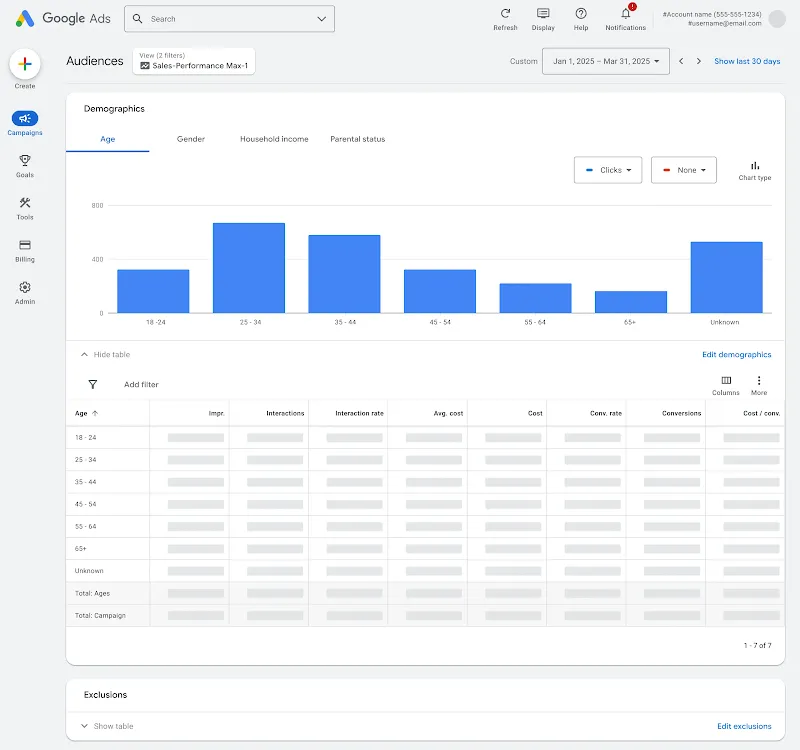
Google is also expanding audience reporting with more detailed demographic and segment-level performance views, including breakdowns such as age range and gender.

Image credit: Google, March 2026

That should give advertisers more context around who the system is actually reaching, rather than just what overall campaign performance looks like.

The last reporting update announced is around network reports. Advertisers can now segment placement reports by network to show:

  • Where ads have served
  • More visibility to ensure brand safety across all Google-owned channels

The placement report lives under the “When and where ads showed” tab.

Why This Matters For Advertisers

Google has continued on its promise to provide more transparency to advertisers in these automated campaign types. They’re continuing to make Performance Max more useful for marketers trying to manage it more intentionally.

The first-party audience exclusion update gives advertisers a more practical way to support acquisition-focused strategies. Brands trying to reduce overlap between prospecting and retention efforts may find this especially helpful.

The reporting updates will likely have broader day-to-day value.

Budget reporting should make it easier to monitor pacing and explain monthly spend behavior, especially for teams working within strict budget expectations or reporting back to stakeholders.

Expanded audience reporting gives advertisers more context around who campaigns are actually reaching. That matters when conversion volume alone doesn’t tell the full story.

Network segmentation in placement reporting also adds a layer of visibility many advertisers have wanted for a long time, particularly those keeping a close eye on brand safety and placement quality.

Taken together, these updates give advertisers more visibility into how Performance Max is spending and who it’s reaching.

Looking Ahead

This rollout is more useful than groundbreaking, but that does not make it insignificant.

Google continues to fill in some of the operational gaps that have made Performance Max harder to manage than many advertisers would like.

For teams already using it, these updates should make campaign oversight a little easier.

For teams that have been frustrated by limited visibility, this is another step toward making Performance Max more workable in real account management.

7 Google Ads Shortcuts Every PPC Manager Should Be Using via @sejournal, @brookeosmundson

Managing PPC accounts is already time-consuming, especially when attention gets pulled toward tasks that don’t meaningfully impact performance.

Over time, accounts accumulate extra keywords, inconsistent negatives, and small inefficiencies that make everyday management harder than it needs to be.

Fortunately, Google Ads includes several built-in tools that help streamline these tasks.

These seven shortcuts can help you manage accounts more efficiently while also surfacing insights faster, so you can spend more time improving performance instead of maintaining clutter.

1. Remove Duplicate Keywords

As accounts mature or change management over time, it can be easy to lose track of what keywords are being bid on.

This is especially true when one account manager structures campaigns and ad groups a certain way, and then another manager takes over and starts implementing their own structure.

It would be time-consuming to comb through all the account keywords to find duplicates.

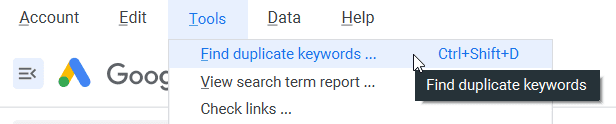
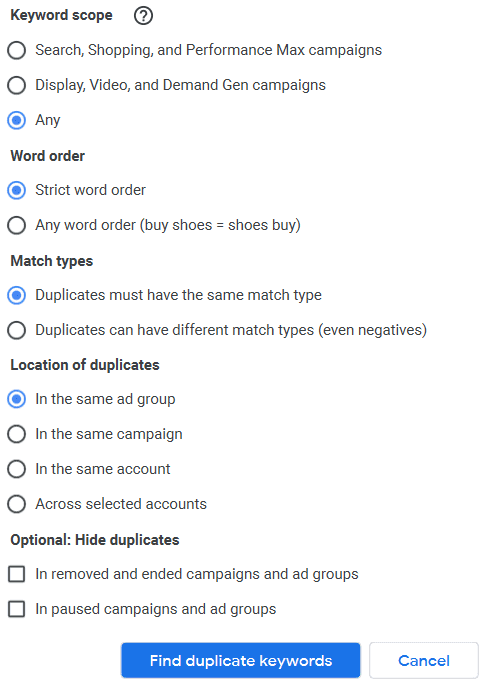
Luckily, the Google Ads Editor has a very handy feature that will do this for you!

You can access it from the top menu under Tools.

Duplicate keywords tool in Google Ads Editor.
Screenshot by author, March 2026

The duplicate keywords tool gives you many options so you can be intentional in how it defines duplicate keywords.

For example, you can choose a strict word order or any word order.

You may want to choose a strict word order if you’re mostly concerned with Exact Match keywords.

But any word order can be a great way to clear out broad match searches or phrases that are just the same words in a different order.

You’re able to scope the keyword duplicates tool from:

  • Search, Shopping, and Performance Max campaigns.
  • Display, Video, and Demand Gen campaigns.
Duplicate keyword tool in Google Ads Editor.
Screenshot by author, March 2026

Another helpful option to be mindful of is the one for Location of duplicates.

An example of why you might want it only looking at certain groups would be if you have campaigns that are duplicates but set to show to different devices or different geographies.

They’re intentionally duplicated in those instances, so you’d only want to check for duplicates within each individual campaign.

2. Use Negative Keyword Lists

Since we’re on the topic of keywords, let’s switch to a feature that will help you organize negative keywords in an account.

Negative keyword lists are a great way to exclude specific categories of keywords across multiple campaigns or the entire account.

As with trying to find duplicate keywords, it can be time-consuming to go through all the negative keywords that have been added to a campaign or ad group over time.

Negative keyword lists allow you to group certain keywords together into a list and can then be attached to different campaigns.

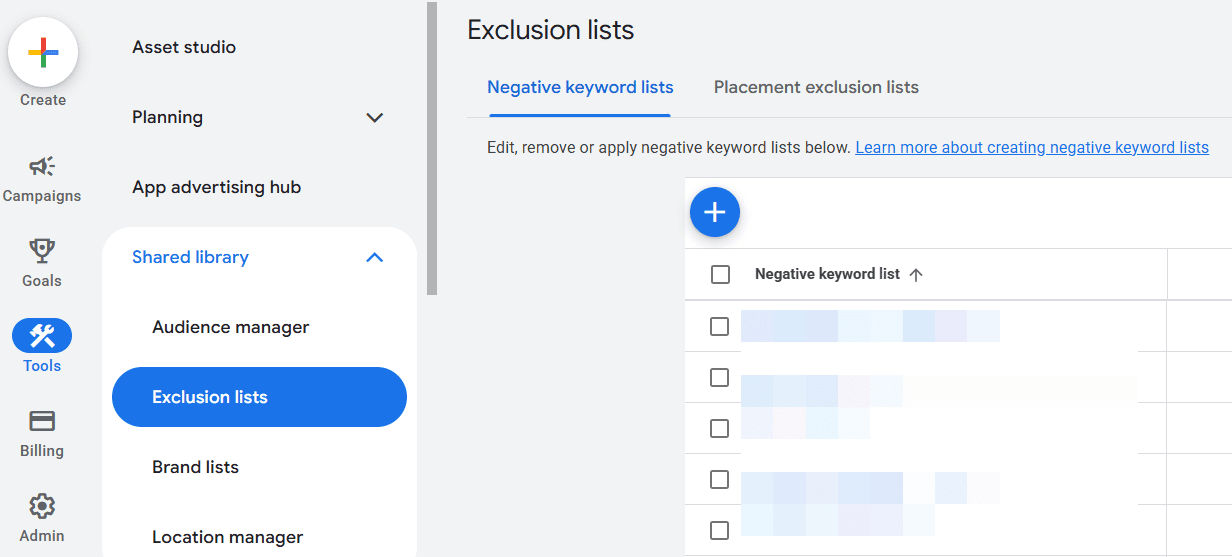
You can find this in the Google Ads online interface by going to Tools >> Shared Library >> Exclusion lists. From there, you’ll find a tab for “Negative keyword lists” or “Placement exclusion lists.”

Where to find negative keyword lists in Google Ads interface.
Screenshot by author, March 2026

For example, you may already have a huge list of irrelevant keywords that you wouldn’t want to show up for any campaign.

Create an “Irrelevant Keywords” (or whatever you choose to name it) list, and apply that keyword list to all campaigns in the account.

Another example of how to use negative keyword lists is to separate branded terms from non-branded terms.

Simply create a negative keyword list of all brand terms, searches, or phrases, and attach that list to all non-brand campaigns.

This ensures that there’s no crossover between brand and non-brand performance.

3. Use Labels To Manage Ad Creatives

The Label function in Google Ads is a powerhouse for account organization and time-saving.

In my opinion, it’s one of the most under-appreciated features in Google Ads.

While labels can be added to a campaign, ad group, and keyword level, using them for time-sensitive copy or routine testing to turn things off/on is where it shines!

It is also a huge help if you want to compare higher-level messaging or before/after efforts with copy tests.

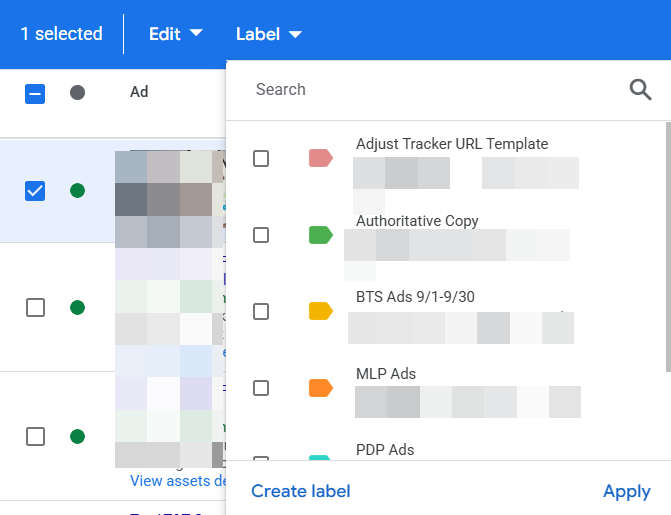
You can add a label to any ad by checking the box next to the ad versions you want to label and then choosing Label in the blue toolbar that appears:

Google Ads label function.
Screenshot by author, March 2026

You can then check the labels you want to apply to those ads or create a new label.

In this example, they want to easily test a new message related to a specific promotion happening on their website. There isn’t an easy way to see a comparison without filtering for each ad type.

Labeling each ad quickly makes it easier.

Another handy way to use labels and ads is for scheduling.

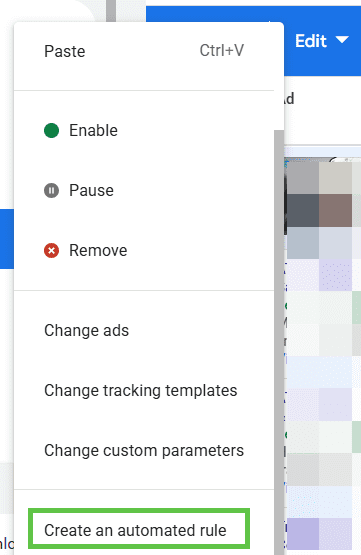
After you label the ads as outlined above, select the ones that you want to turn on for a certain date and time. Check the box next to the ads, and then go to the blue toolbar and click on Edit.

Screenshot by author, March 2026

From here, you can create rules for all the ads you selected with all kinds of timing and condition parameters.

You’d repeat this step each time you want something to turn off and then also to turn on.

4. Quickly Test Campaign Elements With Experiments

Speaking of streamlining ad creation and testing, another handy way to do this is by using the Experiments feature.

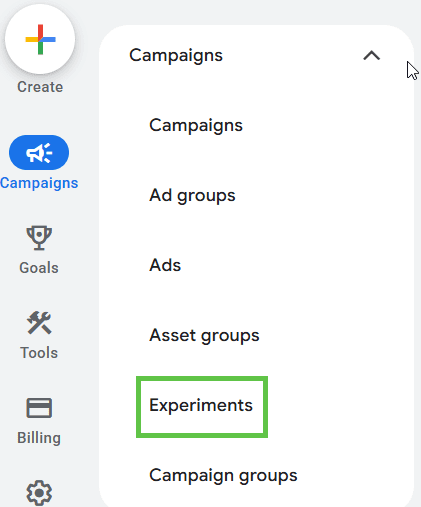
This is located under the Campaigns section on the left-hand menu.

Screenshot by author, March 2026

Click on the “All experiments” section, and then click the blue “plus” (+) button to start creating your own custom experiment.

Screenshot by author, March 2026

From there, you’ll be able to choose from multiple options:

  • Performance Max experiment.
  • Demand Gen experiment.
  • Video experiment.
  • App uplift experiment.
  • Custom experiment.
  • Optimize text ads.

One of the things I love about this option is you have the ability to set up the percentage split of your audience.

It can help you force a 50/50 split, whereas in regular ad testing, Google auto-optimizes.

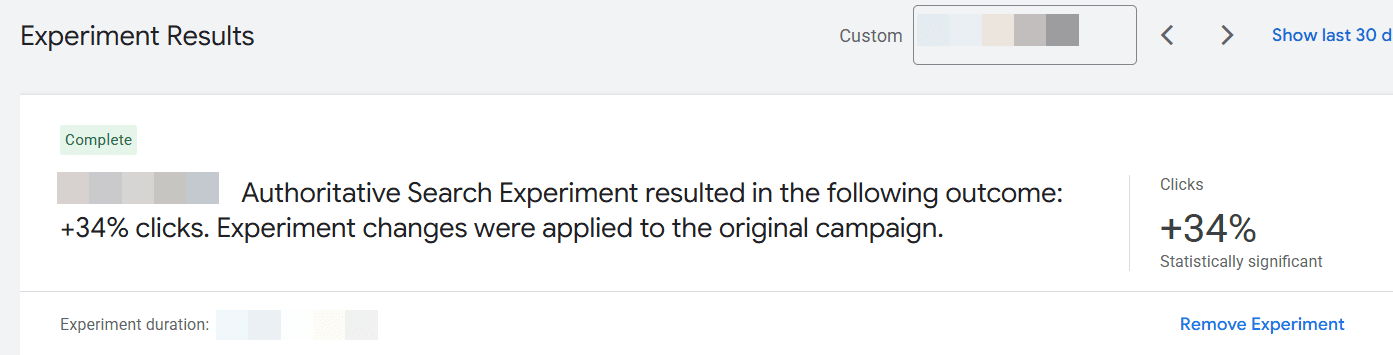
Another thing I love about experiments is that it’s easy to indicate if there’s a clear winner.

Screenshot by author, March 2026

In the example above, one of the experiments run showed a statistically significant change in clicks. This made it an easy decision to apply the experiment to the original campaign for better performance.

5. Use Notations For Important Account Changes

Keeping a log of an account history can be tough in Google Ads. There are so many moving parts, outside things that influence results, and then multiple people managing an account over its lifespan.

This can create issues when trying to analyze performance.

For example, you’re looking at year-over-year data and notice the numbers were so much better the previous year. Why?

It could be due to certain holidays that fall on different dates each year.

Or, maybe the brand got a huge PR bump that caused a lot of attention and searching.

Using notes can help you log that external history and save tons of time trying to dig and piece together this kind of analysis.

How do you add notes?

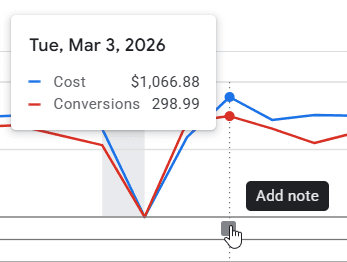
First, simply click on the performance graph.

When you hover on the graph line, the date and performance metrics appear, along with a blue Add Note option. You can type your note in that.

Screenshot by author, March 2026

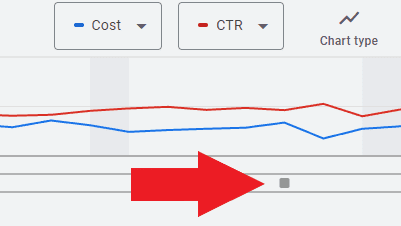
Once you have notes in the account, they will appear as a little square along the dateline of the graph.

Cost and CTR graph
Screenshot by author, March 2026

Clicking on it will show you the notes left and the date they were made.

6. Use Filters To Quickly Identify Optimization Opportunities

When managing a busy account, it’s easy to spend too much time scrolling through campaigns, ad groups, and keywords trying to find what needs attention.

Instead of manually digging through every view, Google Ads allows you to create filters that instantly surface areas worth reviewing.

Filters can be applied to almost any table in Google Ads, including campaigns, ad groups, keywords, and search terms. Once created, they allow you to quickly isolate specific performance conditions.

For example, you might create filters to identify:

  • Keywords with high spend but zero conversions.
  • Ads with a low click-through rate.
  • Search terms generating high impressions but few clicks.
  • Campaigns pacing ahead or behind budget.

Creating a filter is simple. In most table views, click the Filter icon at the top of the table and define the conditions you want to see.

Once saved, filters can be reused anytime you review that view.

Over time, this becomes one of the fastest ways to spot inefficiencies or optimization opportunities without manually reviewing every row of data.

Instead of searching for problems, filters bring the most important ones directly to you.

7. Review Insights & Recommendations

Last but not least, the Insights and Recommendations tabs in Google Ads.

I’ve found these tabs to be a huge time-saver to help me identify key changes in performance week-over-week or month-over-month.

We’re all busy. It’s easy to miss high-level insights when we’re so “in the weeds” with our accounts every single day.

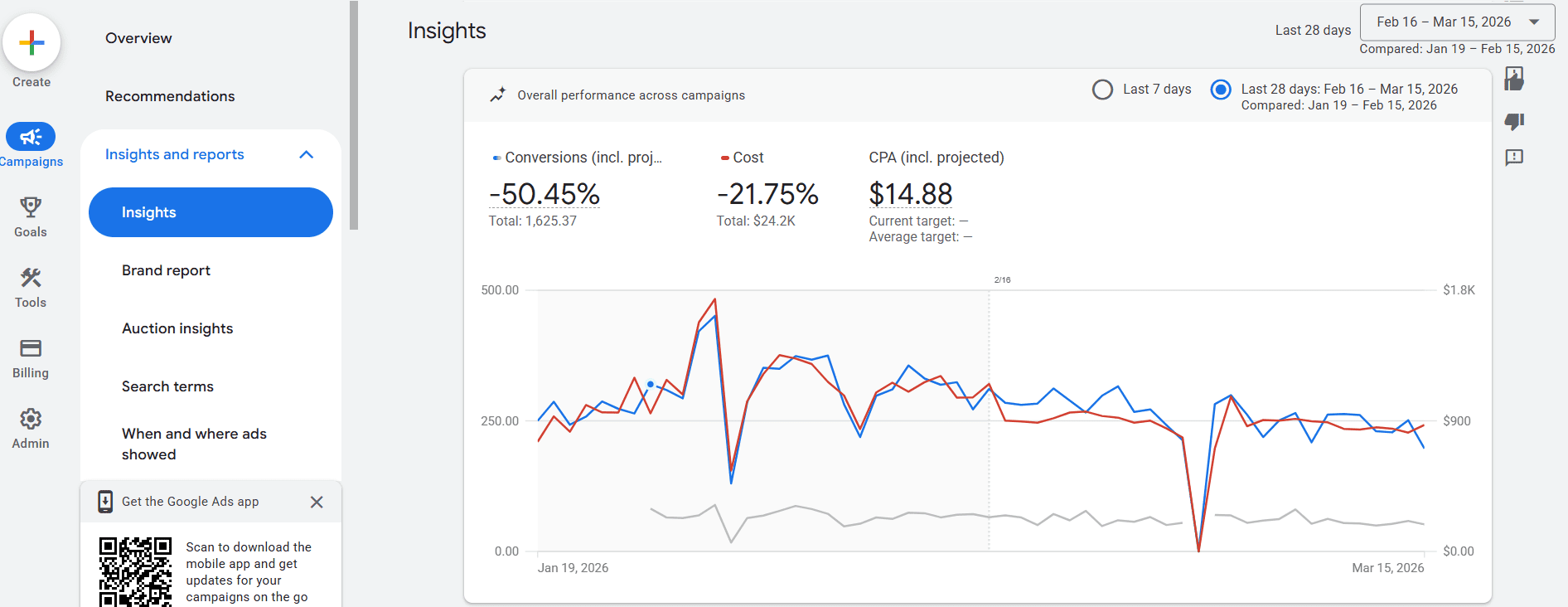
The Insights and Reports tab within the “Campaigns” left-hand menu provides insights into an account as a whole or down to the campaign level.

Screenshot by author, March 2026

It also drills down to other elements of a campaign, like search term insights or audience insights.

Knowing where to focus my time and effort from these insights saves a lot of time, so I can focus on analyzing the problem and coming up with solutions.

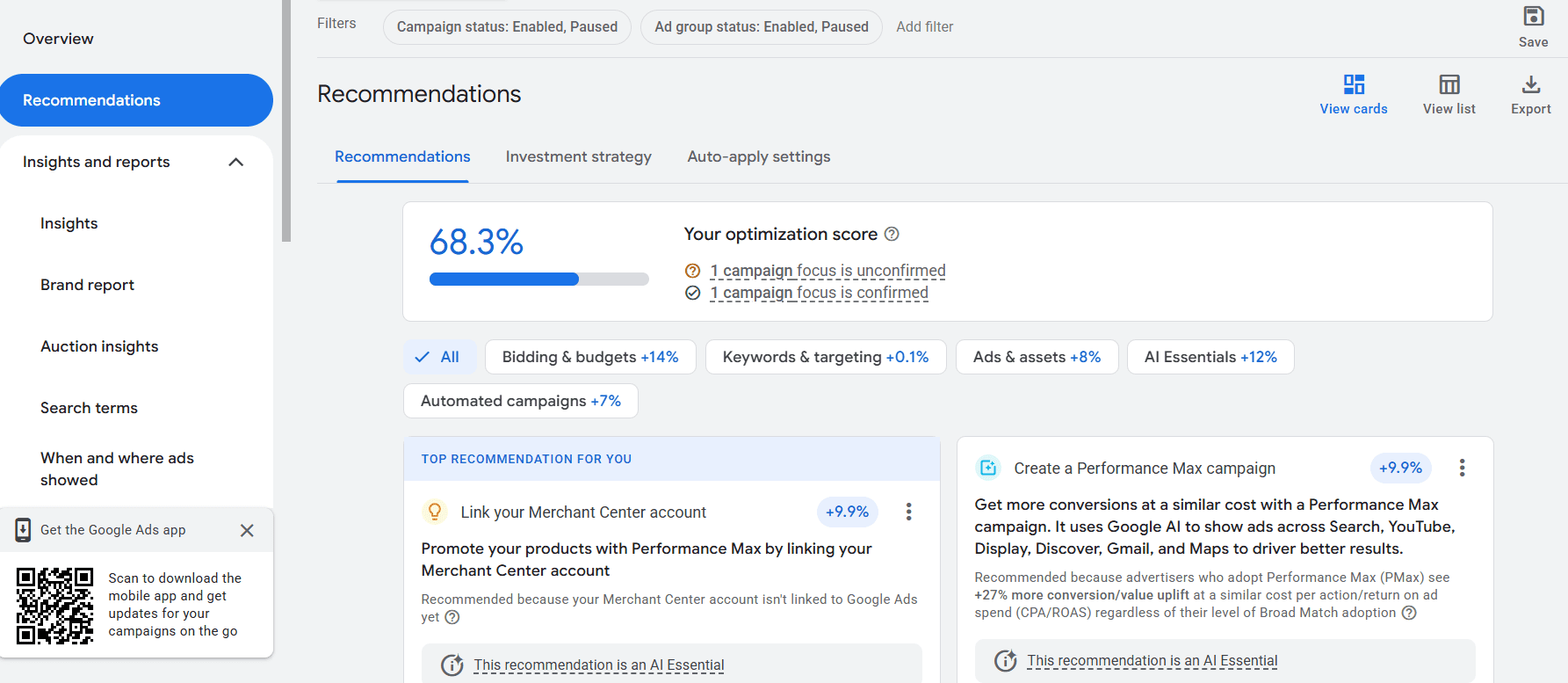
The Recommendations tab is also found on the left-hand menu and provides a wide assortment of recommendations for your account.

This is also where an account’s “Optimization Score” lives, and applying or dismissing recommendations directly impacts that score.

I don’t recommend applying every recommendation that Google suggests just to increase the Optimization Score.

For example, one of the recommendations that would have provided a 9.9% boost in Optimization Score would be to link a Merchant Center account. But this account is not in the ecommerce vertical, so the recommendation makes no sense and wouldn’t be valid.

This tab is useful for account managers to look at the context of an account and easily apply recommendations that make sense.

Screenshot by author, March 2026

These are usually broken down into categories:

  • Bidding and budgets.
  • Keywords and targeting.
  • Ads & assets.
  • AI Essentials.
  • Automated campaigns.

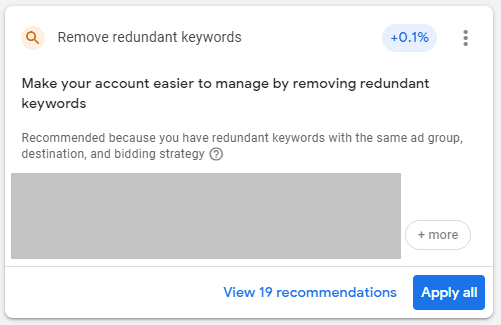
For example, this recommendation suggests removing redundant keywords to more easily manage the account. Especially with match types loosening, applying this recommendation makes sense, and Google automatically does it for me.

Remove redundant keywords recommendation.
Screenshot by author, March 2026

That means I can spend more time strategizing and analyzing an account instead of doing the normal “busy work” of having to manually go in and review each keyword to decide what to pause.

Making Google Ads Management Easier

Google Ads has become more complex over the years, and that complexity can make everyday account management slower than it needs to be.

Many of the features above exist specifically to simplify that work. Tools like labels, experiments, shared negative lists, and audience observation help keep accounts organized and easier to analyze.

When those systems are in place, less time goes toward maintenance and more time goes toward improving performance.

More Resources:


Featured Image: dae sung Hwang/Shutterstock

Google Ads Creative Tools Expand, Microsoft Simplifies Bidding – PPC Pulse via @sejournal, @brookeosmundson

Welcome to this week’s PPC Pulse. Updates focus on expanding creative tools in Google Ads and updates to bidding strategies in Microsoft Ads.

The newest version of Nano Banana Pro is now available to advertisers in Google Ads. In a separate creative update, marketers spotted an expansion to Google’s Creative Toolkit in the platform. Lastly, Microsoft Ads made changes to some of their automated bid strategies to streamline setup.

Here’s what happened this week and why it matters for advertisers.

Nano Banana Pro Version Now Available in Google Ads

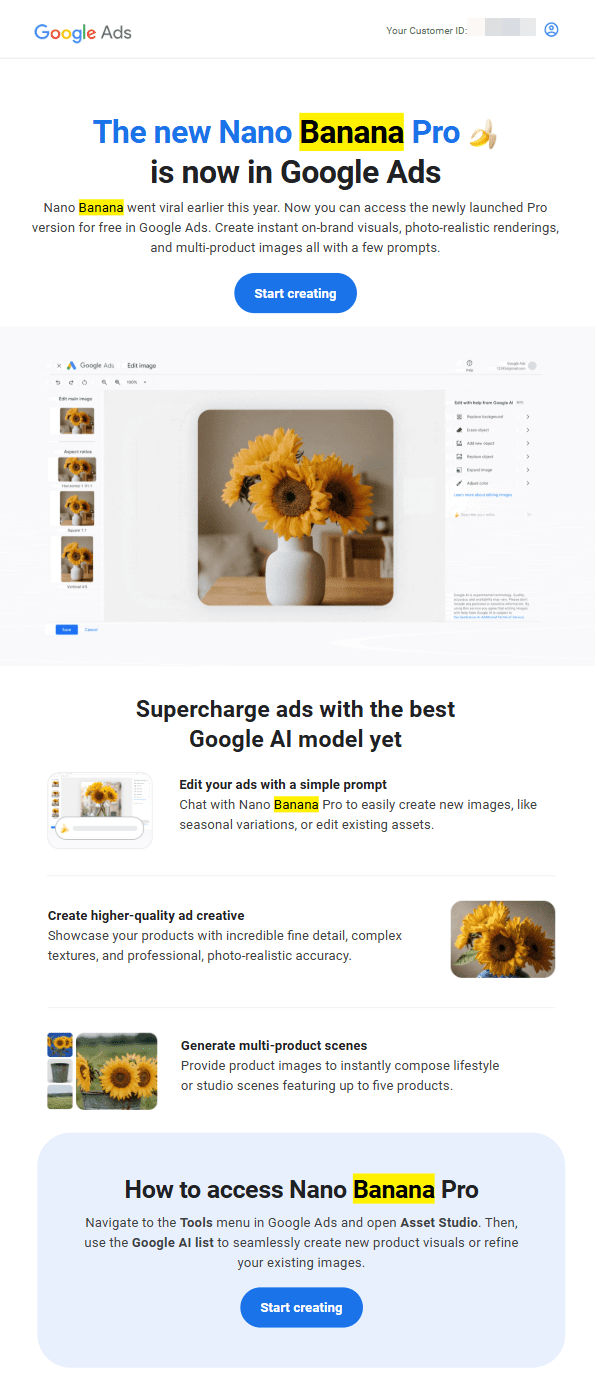
While Nano Banana Pro was originally introduced back in November 2025, advertisers were alerted via email this week that its newest version is now available for free in Google Ads.

Screenshot from author, March 2026

Now that it’s in Google Ads, advertisers can do all of these things in one platform:

  • Generate new visuals using prompts
  • Edit existing assets conversationally
  • Create multi-product scenes
  • Produce more detailed, photo-realistic imagery

Here’s a peek at what it looks like once you navigate to Asset Studio in Google Ads.

Screenshot taken by author, March 2026

Why This Matters For Advertisers

Embedding Nano Banana Pro directly into Google Ads removes a lot of potential friction between create generation and campaign execution.

This means that for advertisers who have more creative control, creative becomes part of the optimization loop, not a completely separate workflow. Instead of planning creative updates in batches like a traditional process, advertisers can generate and test assets in response to performance changes.

Additionally, cost is not a barrier to entry. Making this available for free inside Google Ads lowers the threshold for advertisers who may not have been able to invest in external creative tools or AI platforms.

Lastly, creative volume can quickly scale. This is something that I’ve experienced personally working with my Google rep this quarter. They seem to be pushing creative volume across the board.

When the tool becomes easier to generate assets, most accounts will naturally start testing more variations.

However, brands still need to check the outputs of these AI-generated assets to make sure they adhere to any brand guidelines, product accuracy, and compliance requirements.

Google Expands Creative Toolkit Inside Google Ads

In another possible related creative update, Bia Camargo took to LinkedIn to share an update she got in Google Ads about creative assets.

In her post, the Google notification says: “More rich media available for your Google Ads. In addition to Google-owned images, Google-owned rich media (including photos, videos, icons, 3D assets, text and more) will be available for use in Google Ads.”

It looks like the goal is to allow advertisers to build and assemble more creative directly inside the platform rather than relying entirely on external tools. Whether this is completely tied to the launch of Nano Banana Pro in Google Ads is unclear.

Why This Matters For Advertisers

This update continues Google’s push to bring more of the campaign workflow into Google Ads.

For advertisers, this can reduce the time between identifying a creative gap and launching new variations.

It can also help smaller teams or advertisers without dedicated design resources produce a broader set of assets.

What PPC Professionals Are Saying

Most comments were in favor of this move. Brian Lasonde called this a “genuine win” while Virgil Brewster commented “How cool is that? Bring on the toolbox.”

Bryan Shue had an interesting take around the influence of creative production in the platform:

This feels like a bigger shift than just creative convenience. Once production moves inside the ad platform, the system gains more influence over the signals entering the campaign from the start. Faster testing is the obvious upside, but it also means the line between creative development and platform optimization keeps getting thinner.

Microsoft Ads Simplifies Automated Bidding Setup

This week, Microsoft Advertising introduced an update to how automated bidding is structured for new campaigns.

Target CPA (tCPA) and Target ROAS (tROAS) are now available as optional target settings within conversion-focused bid strategies:

  • Choose Maximize Conversions and optionally set a tCPA
  • Choose Conversion Value and optionally set a tROAS

Microsoft confirmed that existing campaigns using tCPA or tROAS remain unchanged, and portfolio bid strategies are unaffected.

Microsoft has positioned this as a simplification of bidding setup rather than a change to how the strategies perform.

It was originally announced last year, but this week’s rollout makes it global to all advertisers.

Why This Matters For Advertisers

This change does not alter how campaigns optimize, but it does change how decisions are made during setup.

The choice of bid strategy is now more implied. Instead of selecting between multiple strategies, advertisers are guided into a smaller set of options with targets layered in.

That shifts the focus toward how targets are set and adjusted over time.

For advertisers managing performance closely, this reinforces the importance of:

  • Setting realistic CPA or ROAS targets based on actual performance
  • Allowing enough time for campaigns to stabilize before adjusting targets
  • Avoiding overly aggressive constraints early in the campaign lifecycle

Theme Of The Week: Less Friction In Setup, More Responsibility In Execution

This week’s updates focus on two different parts of campaign setup, but both change how much effort is required to move from idea to launch.

Google expanded what advertisers can do inside the platform by adding more built-in creative assets and making Nano Banana Pro accessible directly in Google Ads.

Microsoft simplified how bidding is applied in new campaigns by restructuring how targets are set.

Both are meant to reduce friction, but from an execution standpoint, it requires more upfront thought and attention from advertisers.

More Resources:


Featured Image: Gorodenkoff/Shutterstock; Paulo Bobita/Search Engine Journal

PPC Automation Layering: How Smart Advertisers Combine Automation With Strategy via @sejournal, @brookeosmundson

Automation has been part of PPC management for longer than many marketers realize.

Bid adjustments, keyword expansion, and audience targeting have been guided by machine learning inside platforms like Google Ads for years. What has changed is the depth of automation now influencing campaign performance.

Smart Bidding, automated assets, dynamic targeting, and recommendation engines now handle many tasks that used to require daily manual management.

That shift has changed the job of a PPC manager.

This is where PPC automation layering becomes useful. Instead of relying on a single automated feature, marketers combine multiple tools and signals to shape how campaigns perform.

Read on to learn more about automation layering and helpful use cases to make your job easier.

What Is Automation Layering?

PPC automation layering is the strategic use of multiple automation tools and rules to manage and optimize PPC campaigns.

The main goal of PPC automation layering is to improve the efficiency and effectiveness of your PPC efforts.

This is where automation layering comes in.

Instead of relying on one automated feature, advertisers use several layers of automation working together. Each layer contributes different inputs, signals, or guardrails.

Some examples of automation layering include:

  • Smart Bidding strategies: Ad platforms take care of keyword bidding based on goals input within campaign settings. Examples of Smart Bidding include target CPA, target ROAS, maximize conversions, and more.
  • Automated PPC rules: Ad platforms can run specific account rules on a schedule based on the goal of the rule. An example would be to have Google Ads pause time-sensitive sale ads on a specific day and time.
  • PPC scripts: These are blocks of code that give ad platforms certain parameters to look out for and then have the platform take a specific action if those parameters are met.
  • Google Ads Recommendations tab: Google reviews campaign performance and puts together recommendations for PPC marketers to either take action on or dismiss if irrelevant.
  • Third-party automation tools: Tools such as Google Ads Editor, Optmyzr, Adalysis, and more can help take PPC management to the next level with their automated software and additional insights.
  • AI-Powered analysis tools: Platforms like ChatGPT, Copilot, Claude, and Gemini all have different capabilities, from campaign analysis to keyword research, that can streamline your workflow and efficiency.

See the pattern here?

Automation and machine learning produce outputs of PPC management based on the inputs of PPC marketers to produce better campaign results.

How Has Automation Changed PPC Management?

Automation has gradually reshaped how paid media accounts are managed.

Ten to fifteen years ago, many PPC managers (including myself) spent most of their time adjusting bids, expanding keyword lists and negatives, and refining campaign structures. Success often came from tightly controlling every lever in the account.

Today, many of those levers are controlled by algorithms and automation.

Platforms automatically adjust bids in real time, assemble ad combinations dynamically, and expand targeting beyond the parameters advertisers originally set. These systems are designed to find conversions more efficiently than manual management.

In many cases, they do.

But automation introduces a new challenge. Algorithms are only as effective as the signals they receive.

For example, a few automation features built into the Google Ads platform include:

  • Keyword and campaign bid management.
  • Audience expansion.
  • Automated ad asset creation.
  • Keyword expansion.
  • And much more.

Automation has essentially taken over many of the day-to-day management tasks that PPC advertisers were used to doing.

While everyone can agree that easier paid media management sounds great, the learning curve for marketers has been far from perfect.

This leads us to the next big question: Will automation replace PPC marketers?

Does Automation Replace PPC Experts?

Job layoffs and restructuring due to automation are certainly a sensitive topic.

In reality, automation has already replaced many repetitive tasks that once filled a marketer’s day. Bid adjustments, keyword expansion, and ad rotation are increasingly handled by machine learning systems.

But it’s time to settle this debate once and for all.

Automation will not replace the need for PPC marketers.

What we have, and will continue to see, is a shift in the role of PPC experts.

Since automation and machine learning take the role of day-to-day management, PPC experts will spend more time doing things such as:

  • Analyzing data and data quality.
  • Strategic decision making.
  • Reviewing and optimizing outputs from automation.
  • Identifying growth opportunities.

Automation and machines are great at pulling levers, making overall campaign management more efficient.

But automation tools alone cannot replace human touch in creating a story based on data and insights.

This is the beauty of PPC automation layering.

Lean into what automation tools have to offer, which leaves you more time to become a more strategic PPC marketer.

PPC Automation Layering Use Cases

There are many ways that PPC marketers and automation technologies can work together for optimal campaign results.

Below are just a few examples of how to use automation layering to your advantage.

1. Make The Most Of Smart Bidding Capabilities

As mentioned earlier in this guide, Smart Bidding is one of the most useful PPC automation tools.

Google Ads has developed its own automated bidding strategies to take the guesswork out of manual bid management. These have been around since 2016, so this isn’t necessarily a “new” automation tool compared to others.

However, Smart Bidding is not foolproof and certainly not a “set and forget” strategy.

Smart Bidding outputs can only be as effective as the inputs given to the machine learning system.

So, how should you use automation layering for Smart Bidding?

First, pick a Smart Bidding strategy that best fits an individual campaign goal. You can choose from:

Whenever starting a Smart Bidding strategy, it’s important to put some safeguards in place to reduce the volatility in campaign performance.

This could mean setting up an automated rule to alert you whenever significant volatility is reported, such as:

  • Spike in cost per click (CPC) or cost.
  • Dip in impressions, clicks, or cost.

Either of these scenarios could be due to learning curves in the algorithm, or it could be an indicator that your bids are too low or too high.

For example, say a campaign has a set target CPA goal of $25, but then all of a sudden, impressions and clicks fall off a cliff.

This could mean that the target CPA is set too low, and the algorithm has throttled ad serving to preserve only for individual users the algorithm thinks are most likely to purchase.

Without having an alert system in place, campaign volatility could go unnoticed for hours, days, or even weeks if you’re not checking performance in a timely manner.

2. Interact With Recommendations & Insights To Improve Automated Outputs

The goal of the ad algorithms is to get smarter every day and improve campaign performance.

But again, automated outputs are only as good as the input signals it’s been given at the beginning.

Many experienced PPC marketers tend to write off the Google Ads Recommendations or Insights tab due to perceptions of receiving irrelevant suggestions.

However, these systems were meant to learn from the input of marketers to better learn how to optimize.

Just because a recommendation is given on the platform does not mean you have to implement it.

The beauty of this tool is you have the ability to dismiss the opportunity and then tell Google why you’re dismissing it.

There’s even an option for “this is not relevant.”

Be willing to interact with the Recommendations and Insights tab on a weekly or bi-weekly basis to help better train the algorithms for optimizing performance based on what you signal as important.

Regularly reviewing recommendations, rather than ignoring them completely, creates another layer of automation feedback inside the account.

3. Automate Competitor Analysis With Tools

It’s one thing to ensure your ads and campaigns are running smoothly at all times.

Next-level strategy is using automation to keep track of your competitors and what they’re doing.

Multiple third-party tools have competitor analysis features to alert you on items such as:

  • Keyword coverage.
  • Content marketing.
  • Social media presence.
  • Market share.
  • And more.

Keep in mind that these tools are a paid subscription, but many are useful in many other automation areas outside of competitor analysis.

Some of these tools include Moz, Google Trends, and Klue.

The goal is not simply to keep up with your competitors and copy what they’re doing.

Setting up automated competitor analysis helps you stay informed and can reinforce your market positioning or react in a way to help set you apart from competitor content.

4. Using LLM Platforms To Accelerate PPC Analysis

A newer layer of automation is emerging through large language model platforms such as ChatGPT, Claude, Gemini, and Copilot.

It’s important to note that these platforms do not control campaign delivery. Instead, they help marketers process and interpret information faster.

LLM platforms can assist with tasks such as reviewing exported performance data, identifying patterns across campaigns, or summarizing performance changes between reporting periods.

For example, marketers can upload campaign reports and ask targeted questions about cost trends, conversion performance, or impression share shifts. The model can quickly highlight patterns that might otherwise require significant manual analysis.

LLMs can also support areas like keyword expansion, creative brainstorming, and reporting summaries. When paired with platform automation features such as Smart Bidding or responsive ad formats, this approach helps advertisers produce stronger inputs for the algorithm to evaluate.

These tools should not replace human analysis, but they can accelerate many of the workflows surrounding campaign management.

In Summary

Automation now shapes nearly every part of paid media management.

Because of this, the role of the PPC practitioner continues to evolve.

Instead of managing every setting manually, marketers increasingly guide how automation systems operate. That guidance comes through better signals, stronger inputs, and thoughtful campaign structures.

Automation layering helps bring those elements together.

By combining platform automation, scripts, rules, external tools, and AI-driven analysis, advertisers can create a system where automation improves efficiency without losing control over their accounts.

The platforms may be running the mechanics of campaign delivery, but the direction still comes from the marketer.

More Resources:


Featured Image: Anton Vierietin/Shutterstock

FAQ

What are some key benefits of PPC automation layering?

PPC automation layering enhances the efficiency and effectiveness of PPC campaign management. It combines multiple automation tools and strategies like Smart Bidding, automated PPC rules, PPC scripts, and third-party platforms. By leveraging these technologies, marketers can focus on higher-level strategic tasks while the system manages routine tasks, such as keyword bidding, campaign bid management, and data analysis.

Will automation replace the need for PPC experts?

Automation will not replace PPC experts, but it will shift their role over time. While automation can handle many day-to-day management tasks like bid adjustments and ad scheduling, PPC experts should shift their focus to strategic decision-making, data analysis, and optimizing the outputs from automation tools. Human oversight remains crucial for effective campaign management.

What are some practical use cases for PPC automation layering?

Practical use cases for PPC automation layering include:

  • Smart Bidding strategies: Choosing the best bidding strategy (e.g., Target CPA, Target ROAS) and setting up rules to monitor performance volatility.
  • Recommendations & Insights: Regularly interacting with the Google Ads Recommendations and Insights tab to refine automated outputs.
  • Competitor Analysis: Using third-party tools like Semrush, Moz, or Google Trends to automate competitor analysis, staying informed on market positioning without manually tracking competitors.

These strategies help optimize campaign results while allowing more time for strategic analysis and decision-making.