First things first: writing content with the inverted pyramid style

Journalists have been using the inverted pyramid writing style for ages. Using it, you put your most important information upfront. Don’t hedge. Don’t bury your key point halfway down the third paragraph. And don’t hold back; tell the complete story in the first paragraph. Even online, this writing style holds up pretty well for some types of articles. It even comes in handy now that web content is increasingly used to answer every type of question a searcher might have. Find out how!

Table of contents

Key takeaways

  • The inverted pyramid writing style places crucial information at the beginning to engage readers quickly and effectively.
  • Writers should structure articles with core sentences that introduce key concepts to aid comprehension and improve scanning.
  • This style enhances SEO by making content clearer and easier to understand for both human readers and search engines.
  • While effective for many types of articles, the inverted pyramid may not suit creative writing forms like poetry or complex fiction.
  • To implement the inverted pyramid, identify key points, structure your content, and revise for clarity and focus.

What is the inverted pyramid?

Most readers don’t have the time or desire to carefully read an article, so journalists put the critical pieces of a story in the first paragraph to inform and draw in a reader. This paragraph is the meat and potatoes of a story, so to speak. This way, every reader can read the first paragraph, or the lead, and get a complete notion of what the story is about. It gives away the traditional W’s instantly: who, what, when, where, why, and, of course, how.

The introductory paragraph is followed by paragraphs that contain important details. After that, follows general information and whatever background the writers deem supportive of the narrative. This has several advantages:

  • It supports all readers, even those who skim
  • It improves comprehension; everything you need to understand the article is in that first paragraph
  • You need less time to get to the point
  • It gives writers a full paragraph to draw readers in
  • Done well, it encourages readers to scroll and read the rest of the article
  • It gives writers full control over the structure
  • It makes it easier to edit articles

An example

Here’s an example of such an intro. We wrote an article about writing meta descriptions in Yoast SEO that answers exactly that question in an easy-to-understand way. We show what it is and why it’s important immediately, while also triggering people to read the rest of the article. Here’s the intro:

“A strong meta description boosts CTR and signals relevance to search engines. This post shows how to craft descriptions that work, with practical tips and ready-to-use templates. You’ll learn the traits of good meta descriptions, common mistakes, and how Yoast SEO can help you get it right. Using these templates and guidelines can boost CTR, align reader expectations, and improve optimization for both users and Google.”

The inverted pyramid is just one of many techniques for presenting and structuring content. Like us, you can use it to write powerful news articles, press releases, product pages, blog posts, or explanatory articles.

This style of writing, however, is not suited for every piece of content. Maybe you write poetry, or long essays with a complete story arc, or just a piece of complex fiction. Critics are quick to add that the inverted pyramid style cripples their creativity. But, even then, you can learn from the techniques of the inverted pyramid that help you to draw a reader in and figure out a good way to structure a story. And, as we all know, a solid structure is key to getting people and search engines to understand your content. We wrote about that in our article on setting up a clear text structure.

The inverted pyramid

The power of paragraphs

Well-written paragraphs are incredibly powerful. These paragraphs can stand on their own. I always try to write in a modular way. That’s because I’m regularly moving paragraphs around if I think they fit better somewhere else in the article. It makes editing and changing the structure of a story so much easier.

Good writers give every paragraph a stand-out first sentence; these are known as core sentences. These sentences raise one question or concept per paragraph. So, someone who scans the article by reading the first sentence of every paragraph will get the gist of it and can choose to read the rest of the paragraph or not. Of course, the rest of the paragraph is spent answering or supporting that question or concept.

The pyramid, SEO, and AI

Front-loading the main point helps SEO perform in an AI era. Lead with the core result to give readers a fast, clear understanding and to signal relevance to search algorithms. Focusing on that idea makes snippets more likely and improves relevance while making the rest of the piece easier to scan, summarize, and reuse across channels. In practice, the inverted pyramid anchors the article in intent, guiding humans and machines toward the same destination: the core answer.

Answering questions

Something else is going on: a lot of content out there is written specifically to answer questions based on user intent. Today, Google answers a lot of questions and answers right away in the search results. That’s why it makes a lot of sense to structure your questions and answers in such a way that is easy to digest for both readers and search engines. This also supports the inverted pyramid theory. So, if you want to answer a specific question, do that right beneath that question. Don’t obfuscate it. Keep it upfront. You can answer supporting questions or give a more elaborate answer further down the text. If you have data supporting your answer, please present it.

Summaries vs. the pyramid

Front-loading the main point highlights the core idea clearly to both readers and search engines. The inverted pyramid delivers that headline idea first, then adds context and support. A summary condenses the piece into its essential takeaways, handy for meta descriptions, snippets, or quick recaps. Yoast AI Summarize can generate tight summaries from your content, giving you ready-to-use openings and meta descriptions that align with the pyramid and improve SEO performance.

How to write with the inverted pyramid in mind

The inverted pyramid forces you to think about your story: what is it, and which parts are key to understanding everything? Even if you don’t follow the structure to the letter, focusing on the essential parts of your story and deleting the fluff is always a good thing. In his seminal work The Elements of Style, William Strunk famously wrote:

“Vigorous writing is concise. A sentence should contain no unnecessary words, a paragraph no unnecessary sentences, for the same reason that a drawing should have no unnecessary lines and a machine no unnecessary parts. This requires not that the writer make all his sentences short, or that he avoid all detail and treat his subjects only in outline, but that he make every word tell.”

In short, writing works like this:

  • Map it out: What are the most important points you want to make?
  • Filter: Which points are supportive, but not key?
  • Connect: How does everything fit together?
  • Structure: Use sub-headers to build an easy-to-understand structure for your article
  • Write: Start every paragraph with your core sentence and support/prove/disprove/etc in the coming sentences
  • Revise: Are the paragraphs in the correct order? Maybe you should move some around to enhance readability or understanding?
  • Edit: I.e., killing your darlings. Do you edit your own work, or can someone do it for you?
  • Publish: Add the article to WordPress and hit that Publish button

Need more writing tips? Here are 10 tips for writing an awesome and SEO-friendly blog post.

Try the inverted pyramid

Like we said, not every type of content will benefit from the inverted pyramid. But the inverted pyramid has surely made its mark over the past century or more. Even now, as we mostly write content for the web, this type of thinking about a story or article makes us focus on the most important parts, and how we tell about those parts. It forces you to separate facts from fiction and fluff from real nuggets of content gold. So, try it out, and your next article might turn out to be the best yet.

Read more: SEO copywriting: the ultimate guide »

Why you should use synonyms and related keywords

Using the right keywords is essential in SEO. Because using the words your audience searches with will help your posts and pages rank. That’s why we always tell you to try to find the perfect keywords for optimizing your articles. So, after finding the perfect keyword, why shouldn’t you use it repeatedly? Why would you use synonyms and related keywords? It might seem contradictory, but correctly using synonyms and related keywords can improve your rankings.

Table of contents

It’s important to know the difference between synonyms and related keyphrases. Synonyms are words or phrases that mean the same thing or are very similar. Using them in SEO can help diversify your content and capture different variations of a keyword that people might use in searches. For example, “car” and “automobile” mean the same thing, so they are synonyms.

On the other hand, related keyphrases are terms that aren’t necessarily synonyms but are still connected to the main keyword in context. They help capture broader search intent by covering topics and ideas related to your primary keyword. For instance, if your main keyword is “puppy training,” related keyphrases might include “puppy behavior classes” or “puppy command basics.”

Incorporating synonyms and related keyphrases into your content can make it more relevant. This approach increases your chances of ranking for various search queries.

Variation is key

The main reason to use synonyms and related keywords in your text is to make it much easier to read. If you write a text about ‘candy’ and use the word ‘candy’ in every other sentence, your text will not flow naturally and become unreadable. Your readers will most likely stop reading and leave your page or post. You’ll lose your audience. That’s why you should aim for variation in your writing. For example, ‘sweets’ and ‘delicacy’ could be synonyms for ‘candy’. Related keywords could be ‘chocolate’ and ‘sugar,’ which aren’t synonyms for ‘candy’ but are related to it and can, therefore, still be relevant for your text. We’ll get into that later on in this post.

So, for your text to be attractive and engaging, it should be varied. This can be done in different ways. For instance, you can try to alternate long sentences with shorter ones. Longer sentences are often more difficult to process, and using shorter sentences makes your text easier to read. You can also try to alternate the sequence of words to avoid too much repetition in your sentences.

But the most important thing is to vary with the exact words you use. Especially if you’re trying to rank for a long-tail keyphrase consisting of several words, such as ‘candy store New York’. Using that exact keyphrase in many of your sentences will make your text awful to read. Using synonyms and related keywords, on the other hand, allows you to make a text much more attractive while still being able to focus on your chosen keyphrase.

What about keyword density?

Of course, it’s important to regularly use your focus keyword and be aware of your keyword density. But you shouldn’t overdo it. In the old days, SEOs tended to stuff their texts with their keyword as much as possible. That way, Google would understand the text and rank it accordingly. But Google has come a long way since then. It can read and understand texts perfectly well and is getting smarter daily.

We’ll give you an example. If you type in ‘best candy store New York’ on Google, the results will show pages about ‘candy stores’ and ‘candy shops’. Google understands that ‘store’ and ‘shop’ are synonyms and treats them as such. 

Snippets from the search result page for the search ‘best candy store New York’

This doesn’t take away from the fact that you should still use your focus keyword a few times throughout your post. After all, the focus keyword is still the word or phrase your audience was searching for. These are the words your audience uses and will expect to find in your text. That exact match remains important. But, to avoid using your keyword too many times – also called keyword stuffing – you can use synonyms and related keywords. That way, you can rank on these keywords while keeping your text attractive and readable.

Yoast SEO can help you find related keyphrases based on your focus keyword, saving you time and hassle. All you need to do is click the button to ‘Get related keyphrases’; you’ll find it right underneath your focus keyword in the Yoast sidebar. You’ll see a list of related keywords and search trend data when you click that button.

the related keyphrases feature in yoast seo showing results related to backpack essentials
This is how the related keyphrases feature looks in Yoast SEO

As a Yoast SEO Premium or Yoast SEO for Shopify users, you can add up to five related keyphrases to your SEO analysis. This lets you optimize your text for these additional terms similarly to your focus keyphrase. As always, you’ll see our familiar feedback bullets to guide you. If you’re a Yoast SEO Free user, you can explore related keyphrases using the tool, but you won’t be able to add these to your SEO analysis.

Yoast SEO can help you balance the use of your keyword, synonyms, and related keywords by recognizing word forms in different languages. If you want to know more, you can read about the related keywords feature in Yoast SEO for WordPress and the related keywords featured in Yoast SEO for Shopify.

The usage of synonyms versus the use of focus keywords is no exact science. The most important criterion is the way readers will experience your text. So, read and re-read it. Is it engaging and easy to read? Or are you getting annoyed by the constant use of a certain term? Be critical of your writing and ask others for feedback on your text. 

As mentioned earlier, you can add your related keywords to the analysis in Yoast SEO Premium and Yoast SEO for Shopify. By adding these, the plugin can check whether you’re using them in your text. Your focus keyword remains the most important keyword, though, and that’s why the plugin is less strict in its analysis of your related keyphrases.

related keyphrases in yoast seo expand the terms you are ranking for
You can add keyphrases that are related to your focus keyphrase in Yoast SEO Premium and Yoast SEO for Shopify

You’ll also be able to add synonyms of your focus and related keywords when you use our Premium SEO analysis or Yoast SEO for Shopify. These analyses include checks to ensure you’ve used these synonyms in your text and your meta description, introduction, subheadings, or image alt text. Moreover, our keyphrase distribution check will reward you for alternately using your keyphrase and its synonyms throughout your text.

synonyms in yoast seo help expand the vocabulary in the article
You can add multiple synonyms for your focus keyphrase in Yoast SEO Premium and Yoast SEO for Shopify

As we said earlier, Google has come a long way since the early days of SEO. It can understand texts, consider related concepts and synonyms, and recognize related entities. All this allows it to serve its users the best results. And part of being the best result is ensuring your texts are easy to read. Google wants to serve readable texts.

So make sure you deliver! Think of synonyms for your keyword or keyphrase and use them to your advantage. Take a moment to come up with a few alternatives for your keyword. But also think of topics that are strongly related to your keyword. You’ll notice that writing a naturally flowing text becomes much easier when you don’t have to use your focus keyword in every other sentence. Using synonyms and related keyphrases helps Google understand the context of your text, which increases your chances of ranking!

Conclusion

Focus keywords remain essential. These are the words your audience is searching for. People searching for ‘candy’ will probably not click on a result with ‘delicacy’ in the text. If you search for ‘candy’, you’ll expect to see the exact word in the search results. So, matching the keywords of your audience remains important.

Using synonyms and related concepts helps you write a text on topic and full of the proper entities. Repeating the same keyword over and over again hurts the readability of your text, especially if you’re optimizing for a long-tail keyword. Furthermore, using synonyms and related keywords may create ranking opportunities you’d otherwise have missed. If you need help with that, Yoast SEO Premium and Yoast SEO for Shopify offer extra features to ensure your content is readable and rankable.

Read more: Does readability rank? On ease of reading and SEO »

Coming up next!

Word count and SEO: how long should a post or page be?

We often get the question of how long an online text should be. As this often depends on different factors, it’s difficult to give just one answer. But looking from an SEO and user-oriented perspective, there is a rule of thumb you can follow. We advise writing more than 300 words for posts or pages, while product descriptions should be over 200 words. Why? Because a higher word count helps Google understand what your text is about. It also gives you the room to give enough information on the topic being discussed, which is helpful for your site visitors. However, we don’t advise adding more content for the sake of it. Quality and readability always come first!

Table of contents

Did you get a red or orange traffic light because your word count isn’t high enough? Read about the text length check here, or jump to the paragraph on how to write high-quality lengthy posts or informative taxonomy archive pages.

Why does word count matter?

Defining word count is easy: it’s how many words are used in a specific text, on a page or in another place. It’s an easy way to measure text length. But why does it matter you ask? Well, making sure that your text is long enough helps Google better understand what your text is about. We’ve experienced this ourselves; we have written quite some articles that are over 2500 words, such as our SEO essentials. They are cornerstone content, and they help our organic traffic grow. Here’s how longer articles contribute to SEO:

When your text is longer, Google has more indicators to determine what it is about. The longer your text, the more often your focus keyphrase will probably appear. This is no excuse for keyphrase stuffing, though! If you optimize your copy naturally, your focus keyphrase will pop up here and there throughout your text. You can also fit in more synonyms and related keyphrases. What’s more, in a longer post, you can add more headings, links, and images, where you will mention the keyphrase or related phrases. So more content gives you more room to provide users with high-quality and nuanced information.

A longer text can also help you rank for multiple long-tail variants of the keyphrase you’ve optimized your text for. That’s because you have more opportunities to address various topics in a lengthy text. Your article, or your other posts that take a deep dive into the subtopic, will have a chance to turn up in search results for the long-tail variants of your keyphrase. If you do some well-thought-out internal linking you can even boost the traffic to the extensive post you’ve written. This helps you drive more organic traffic to your site.

Avoid having thin content

Also, if a page doesn’t have a lot of text (a low word count), Google is more likely to think of it as thin content. All search engines want to provide the best answers to online searches people do. Thin content is less likely to offer a complete answer and satisfy the needs of the public. Consequently, it will probably not rank very high.

The same goes for product pages and descriptions in your online store. While these don’t have to be as long as blog posts, it is a good idea to make sure the text is long enough. Don’t underestimate the importance of having the proper information on your products. This can make the difference between making a purchase or not, as more text helps them make an informed decision and helps them trust your website.

What does Yoast SEO check?

The text length check in Yoast SEO

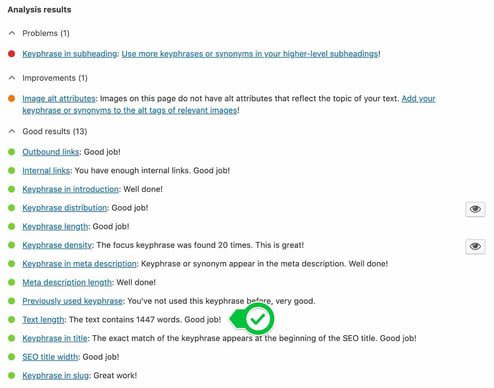
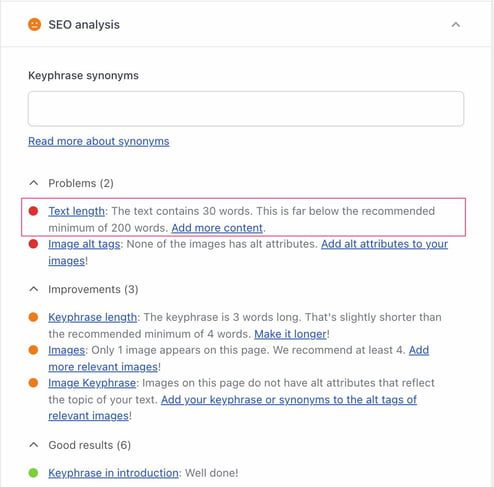
Yoast SEO helps you by checking the length of your texts. This check is part of the SEO analysis, and you will find it in the SEO tab of the Yoast SEO meta box or in the Yoast SEO sidebar. It calculates how many words you’ve added to a page and whether that’s enough to help you rank. This check is also available in our Yoast SEO for Shopify app.

Feedback of the Yoast SEO analysis on text length
Feedback of Yoast SEO for Shopify analysis on text length

Every page on your site needs to contain a certain number of words to be helpful for your site visitors and Google. How long your text should minimally be, depends on the type of page. Taxonomy pages require less content than blog posts, whereas cornerstone content is often your most important content and therefore needs to contain a significant number of words.

In the table below, you can see how we assess the different pages. If you have less than the minimum number of words on a page, you’ll get a red traffic light in the Yoast SEO analysis. Where you get a green traffic light when you’ve hit the minimum word count we advise.

Taxonomy page >250 words
Regular post or page >300 words
Cornerstone product page >400 words
Cornerstone content page >900 words
Product page or description >200 words
Minimum number of words per type of page to get a green traffic light in Yoast SEO

Not enough content

Yoast SEO will also give you a red or orange traffic light if your post or page consists of less than 50 characters in the readability analysis. To properly evaluate the readability of your content, the Yoast SEO plugin needs a minimum number of characters. If your post or page contains less than 50 characters, the plugin’s readability checks won’t give you the best results. And, in most cases, you can’t provide the best answer to your audience in such a short span of words.

Word count in the Yoast SEO insights tab

You can also find the exact word count of your content in the Yoast SEO Insights tab in the sidebar. The Insights tab also contains other useful features, like the Flesch reading ease, estimated reading time, and prominent words.

How to write a high-quality lengthy post

So, longer articles might have some advantages over short posts. But while you’re writing posts with a high word count, it is important to keep the quality of the text at a high level. Good quality texts are readable, well structured, and always contain original content

Writing high-quality content for your site or online store is hard. Especially when your goal is to write articles with a high word count to grow your organic traffic. When you’re writing, and especially elaborating on what you already have, make sure you keep the following aspects in mind:

Write readable texts

The most important thing when writing long (or any kind of) posts is to write for your audience. That may sound obvious, but it is surprisingly easy to get distracted and start adding irrelevant information. Start by thinking about questions a reader could have about the topic you’re covering. Then, provide clear answers to those questions. Of course, the answers should be well-written and readable.

What can you do to make your text readable? Your text needs to follow a logical line of thought. To accomplish that, we advise you to start every paragraph with a topic sentence, i.e., a sentence that explains the main idea of that paragraph. Use the rest of the paragraph to elaborate on that sentence. Be sure to keep your sentences and paragraphs short and snappy. If you find any unnecessary words or sentences – delete them. Minimize your use of passive voice. But do connect your paragraphs to make the text easy to read, a good way to do this is by using transition words.

Use headings

One way of structuring your text is by using headings. Headings within a text serve two purposes. First: they show a top-down hierarchy. You immediately see that a subject has, for instance, three subheadings that elaborate on it further. Another function is for scanning. You can let your readers know what a paragraph is about by using headings. It also makes your text pleasant to read, as a heading tells you what the next piece of text is about.

Write original content

This is the hardest one. It is not easy being original with so much content out there. But, it might help if you reflect on what makes you unique. Think about how what you offer is different and better than what your competitors offer. Then do some keyword research to see what your audience searches for online. Preparing with research can give you plenty of ideas on what to write about and how to make yourself stand out from the crowd. In case you get stuck, we have a whole blog post on how to find inspiration.

Want to learn more on how to write high-quality posts that users and search engines will love? Our SEO Copywriting course and other SEO courses can help you with that. You can get access to these courses with Yoast SEO Premium or Yoast SEO for Shopify, which also gives you access to extra features in the Yoast SEO plugin.

Go Premium and get free access to our SEO courses!

Learn how to write great content for SEO and unlock lots of features with Yoast SEO Premium:

How to create high-quality archive pages 

Let’s start by explaining what archive pages are. WordPress uses so-called taxonomies to group content. The word ‘taxonomy’ is a fancy term for a group of things (website pages, in this case) that have something in common. WordPress has two default taxonomies: categories and tags. The difference between a category and a tag mostly has to do with structure. Categories are hierarchical: you can have subcategories and even sub-subcategories. Tags, however, don’t have that hierarchy.

WordPress automatically generates a page for each category or tag you create. So, do be mindful of them, and don’t create new tags for each post you write! We call these pages archive pages because that’s what they do: they archive posts (or products) that have something in common. Besides categories and tags, there are also other types of archive pages. You can even create a custom taxonomy or use a plugin that creates one.

Why are archive pages important for your SEO?

Taxonomy archive pages are very valuable when it comes to structuring your site. A clear site structure helps both Google and your visitors to understand and navigate your site and help you rank higher. To get the best out of your taxonomy archive pages, you will need to work on them. The pages that WordPress automatically generates tend to only consist of a list of posts without any further introduction. So, if visitors land on one of your archive pages, they don’t get much information. This increases the chance that they won’t find what they’re looking and leave the page.

How to optimize taxonomy archive pages

To make your taxonomy archives awesome, you often don’t even have to do that much. Start by adding a clear heading and an introduction, where you highlight the content on that archive page. In addition, you can add some links to that introductory content pointing to the best posts or pages on that archive page. This will go a long way in making sure that the users understand what the page is about.

For descriptions on archive pages, we recommend a minimum of 250 words. That’s less than what we recommend for blog posts, but that’s because the description of an archive page has a different purpose than a blog post. Rather than exploring a topic, these descriptions serve as an introduction to the rest of the content on that page. These texts don’t have to be lengthy. You want to rank with these pages though, and that means category and tag pages need content.

How to write high-quality product descriptions

A lot of online stores use the default text that the manufacturer provides when it comes to the products they sell. This is not something we would recommend (at all). Not only will this show Google that there are already five other websites out there that are providing the same content as you are (which hurts your rankings), but it also shows users that you don’t take the time to properly optimize your product pages. This hurts your credibility. Of course, if you have an online store with lots of products we understand that this isn’t done in a few minutes. In that case, we recommend starting with your most important products or best-sellers.

Make sure your product descriptions contain the information people will want about these products. Make this information easy to read and to the point. As you probably saw in the table, these pages often ask for less content than blog posts or other pages. But do make sure that all the information that someone would want about that product, is on the product page. As I mentioned before, a great product description can be the difference between making a sale or not.

Conclusion on word count and SEO

This post taught you that the word count of your posts and pages can influence your rankings. However, and this is very important, you should not compromise the quality of your text for the sake of writing longer pieces. So, always use your common sense and write readable, and well-structured texts that are helpful for your site visitors. Eventually, this is what Google wants as well and therefore will get you higher up the rankings!

Read more: SEO copywriting and writing for sales »

Coming up next!

Paragraph length check: Why and how to write shorter paragraphs

The paragraph length check in Yoast SEO (for WordPress or Shopify) tells you to write shorter paragraphs when they are too long. But why is this important? What does a good paragraph even look like? And lastly, what should you do to keep your paragraphs concise? Let’s explore!

Table of contents

Why your paragraphs shouldn’t be too long

Properly sized paragraphs play an important role in making your text readable. Big walls of text are not very nice to read, and they tend to scare off readers. Just imagine this entire article being one big paragraph! You’d probably have left the page before even reading the introduction.

Paragraphs also break down your text into bite-size and easy-to-understand chunks. This puts your readers at ease, because every time you end a paragraph, you give readers the opportunity to relax and think about what they’ve just read. It really helps people make sense of the entire text.

Easy to scan

Paragraphs also help readers to scan your text more easily. When people end up on a page, they rarely start reading the article from beginning to end. First, they want to see what they can expect. That’s why people generally scan headings and the first sentences of every paragraph before they start reading. So, if you break up your text into paragraphs that reflect the topics you’re addressing, people will quickly get a good grasp of what your article is about.

What does a good paragraph look like?

A good paragraph provides information on one well-defined aspect of the topic you’re discussing in your article. Consider the two paragraphs under the previous heading in this article, for example. They address why paragraphs make your text easy to scan. In addition, it’s good practice to start your paragraphs with a core sentence that summarizes the content of the paragraph. This will help readers decide whether a paragraph is interesting to read.

How long should your paragraph be?

This depends on the context, but a paragraph should generally be more than two sentences and fewer than 200 words. Anything more than 200 words becomes difficult to understand for most readers, which means you’re better off breaking it up into different subparagraphs.

And don’t underestimate how difficult it is to read long paragraphs! Sure, more experienced or skilled readers tend to be more forgiving. But that doesn’t mean your text wouldn’t benefit from shorter paragraphs. After all, presenting complex information in an accessible form is an art, not a shortcoming.

What does Yoast SEO’s paragraph length check do?

The paragraph length assessment checks the length of your paragraphs. We advise you to keep the length of your paragraphs below 150 words. If you do that, you’ll score a green light. You’ll get an orange light if your paragraphs contain more than 150 but less than 200 words. And if you exceed 200 words, your traffic light will be red.

In the case of an orange or red light, what should you do? Do you need to use fewer words to convey the same message? Do you need to cross out entire sentences? In most cases, the answer is no. Randomly deleting sentences will harm your text instead of improve it. It makes more sense to take a look at the structure of your text. Let’s explain!

The check shows a red light and corresponding feedback. If you click the eye button, the paragraph that needs improving will be highlighted.

How to keep your paragraphs short and crisp

If you have trouble limiting the length of your paragraphs, take a look at the entire text. Try to write down the main topics and individual aspects that you’re discussing. Let’s break down the heading and paragraph structure of this post as an example:

  1. Why your paragraphs shouldn’t be too long
    • Long paragraphs are bad for readability
    • Easy to scan
      • Long paragraphs make it difficult to scan a text
  2. What does a good paragraph look like?
    • A paragraph addresses one specific aspect of the topic
    • Paragraphs start with a core sentence
  3. How long should your paragraph be?
    • A good paragraph has more than two sentences and fewer than 200 words
  4. What does the paragraph length check do?
    • Describes the check and its feedback criteria
  5. How to keep your paragraphs short and crips
    • Look at the entire text
    • Example
    • Example analysis
  6. Conclusion

As you can see, the text is now neatly divided into different parts. It’s probably a good idea to do this before writing your article. If you notice one specific aspect is taking up more space than you expected, just consider whether you can break it down into two separate aspects. This is almost always possible. If it isn’t, you can get away with a long paragraph here and there.

Want to learn more about paragraph length? Our SEO copywriting course explains everything related to writing great posts. You can get access to this course and all of our other SEO courses with Yoast SEO Premium.

Conclusion

The Yoast SEO paragraph length check warns you when you write paragraphs that are too long. Because lengthy paragraphs make it harder for readers to read and scan your text. Good paragraphs discuss a single, well-defined aspect of the topic at hand. They start with a core sentence and generally shouldn’t exceed 200 words. If you tend to struggle with limiting the length of your paragraphs, consider breaking your article down into a schematic view. Then, consider whether you can break up larger paragraphs into shorter ones. Good luck!

Read more: The complete guide to SEO copywriting »

Become a Yoast SEO pro series

Coming up next!

How to use the readability analysis in Yoast SEO

If you’re a user of Yoast SEO for WordPress or Shopify, then you’re probably familiar with the traffic lights in our plugin. Three parts of Yoast SEO use this system: the content analysis, the readability analysis, and the inclusive language analysis. The first checks whether your post or product pages are SEO-proof, while the latter checks if they’re readable for a general audience. The third checks if your content has language that might exclude people. Of course, these are interconnected, as readable content is crucial if you want your site to do well in the search results. Here, we’ll show you how to use the readability analysis.

What does the readability analysis in Yoast SEO do?

The readability analysis in Yoast SEO uses an algorithm to determine how readable your text is. We’ve crafted this algorithm to make it as accurate as possible without being too strict. It features several checks that will give you advice when you write your page. In other words, following this advice makes your text easier to read and understand.

It has been said that Yoast SEO suggests dumbing down your writing. Of course, that’s not the case. We merely want to help people write content that’s easy to understand. Just consider the following quote by content design hero Sarah Richards about making your content as readable for humans as possible:

“You’re not dumbing down, you’re opening up.”

By simplifying content, you’re automatically growing your audience as more people grasp the message of your content. Also, you’re not writing your content just for people anymore. Because virtual assistants like Alexa and Siri must also be able to work with it. Even Google increasingly uses well-written content for rich results like featured snippets, not to mention all the AI tools that love good content.

That being said, while the advice in the readability section is not the be-all and end-all advice, it does give you important clues to the perceived difficulty of your text. Writing with readability in mind is crucial, as readability ranks!

Current readability checks in Yoast SEO

The current readability checks are available in Yoast SEO:

  • Transition words: Do you use transition words like ‘most importantly’, ‘because’, ‘therefore’, or ‘besides that’ to tie your text together? Using these words improves the flow of your article as they provide hints to the reader about what is coming next.
  • Sentence beginnings: Do any of your consecutive sentences start with the same word? This might feel repetitive to your reader, and that can be annoying. Always keep your sentences varied, so your article is readable and free of obstacles. Unless you want to prove something or use it as a writing style, of course.
  • Word complexity: It would be a shame if you write something and your readers can’t fully grasp it, right? The more uncommon and complicated words you use, the harder it might be for your visitors to understand your writing.  Thanks to the feedback from this assessment, you can easily identify complex words and change them accordingly. We’ll highlight them for you so you don’t have to spend time looking.
  • Paragraph length: Some people tend to use extremely long paragraphs. Doing so makes your text look daunting as it becomes just one big blob of text. Break it up, use shorter paragraphs and don’t forget to give your core sentences some thought.
  • Subheading distribution: Similarly to long paragraphs, texts without subheadings are difficult to scan, which makes them rather daunting. So, we check if you use enough subheadings to guide your readers through the text and help them find what they’re looking for.
  • Sentence length: Sentence length is one of the core aspects that can make a text hard to read. If most of your sentences are too long – over 20 words – people lose track of your point. Readers often have to jump back a few words to find out what you mean. This is very tiring and inefficient. Try to keep the number of words in a sentence in check. Shorten your sentences. Aim for easy understanding, not a complex literary masterpiece.
  • Passive voice: Using a lot of passive voice in your text makes it appear distant, and your message will be less clear. Your sentences become wordy and difficult because the sentence structure is harder to understand. Whenever you use the passive voice, always consider whether a better, active alternative is available.
  • Transition words: Do you use transition words like ‘most importantly’, ‘because’, ‘therefore’, or ‘besides that’ to tie your text together? Using these words improves the flow of your article as they provide hints to the reader about what is coming next.
  • Sentence beginnings (doesn’t apply for Product pages): Do any of your consecutive sentences start with the same word? This might feel repetitive to your reader, and that can be annoying. Always keep your sentences varied, so your article is readable and free of obstacles. Unless you want to prove something or use it as a writing style, of course.
  • Paragraph length: Some people tend to use extremely long paragraphs. Doing so makes your text look daunting as it becomes just one big blob of text. Break it up, use shorter paragraphs and don’t forget to give your core sentences some thought.
  • Subheading distribution: Similarly to long paragraphs, texts without subheadings are difficult to scan, which makes them rather daunting. So, we check if you use enough subheadings to guide your readers through the text and help them find what they’re looking for.
  • Sentence length: Sentence length is one of the core aspects that can make a text hard to read. If most of your sentences are too long – over 20 words – people lose track of your point. Readers often have to jump back a few words to find out what you mean. This is very tiring and inefficient. Try to keep the number of words in a sentence in check. Shorten your sentences. Aim for easy understanding, not a complex literary masterpiece.
  • Passive voice: Using a lot of passive voice in your text makes it appear distant, and your message will be less clear. Your sentences become wordy and difficult because the sentence structure is harder to understand. Whenever you use the passive voice, always consider whether a better, active alternative is available.
  • Lists (Product pages only): Using lists in your product pages enable your customers to scan the content on the page, and help highlight the benefits and features of your product. Try to include at least one list (ordered or unordered) in your product description.

Supported languages

The readability analysis is available in many languages. Check out the languages Yoast SEO supports for an overview. We’re continually working on adding new languages.

How to use the readability analysis in Yoast SEO

The readability analysis

You can find the readability analysis in your Yoast sidebar in WordPress and Shopify. In WordPress, you can also find the readability checks in the Yoast SEO meta box underneath the post or page you edit.

It’s very easy to use the analysis to improve your content. You can start writing the article you want to write. The readability score is calculated in real-time, so you can look at it while you write. However, if you want to stay focused, you can also choose not to look at the score while writing your first draft. That way, you can write without being distracted and make the final tweaks afterward.

The readability score helps you by giving you a green, orange, or red traffic light per check. If you get orange or red traffic lights, click on the eye icon to determine where improvements can be made. Easy peasy!

Everyone has their own writing and editing process, and this way isn’t necessarily how you should use it. You have to find out what works for you gradually. Practice makes perfect!

It’s good to note that the word complexity assessment is a Premium feature. If you’re using the free version of Yoast SEO, you’ll see this feature being greyed out. Upgrade to Yoast SEO Premium now to unlock this feature!

The readability analysis in the Yoast SEO for WordPress metabox

Should all traffic lights be green?

We often get this question: no, not every traffic light has to be green. What you should aim for, though, is a green, happy traffic light overall — the one in the tab that reads “Readability”. An orange traffic light for one of the checks, like in the screenshot above, is fine. Your article will still be able to rank even if it doesn’t pass all of the tests. This is merely an indication, not a necessity.

We want everyone to be able to read and understand content, but we also know that there are industries where the language used is different from what most people would use. That’s perfectly fine. Find out what works for you. Need help? Please read our ultimate guide to SEO copywriting.

Try it out!

The readability analysis and content analysis of Yoast SEO help you write excellent, SEO-proof articles and product pages that are easy for anyone to grasp. In doing so, you ensure that every piece of content you write is ready to start ranking in search engines while staying enjoyable for readers. Don’t have Yoast SEO yet? Do you want to use our Premium plugins’ excellent additional features? Find out about all the benefits of Yoast SEO for WordPress and Yoast SEO for Shopify!

Read more: How to use Yoast SEO’s content analysis tool »

Become a Yoast SEO pro series

Coming up next!