What is a redirect? Types, how to set them up, and impact on SEO 

Ever clicked a link and landed on a “Page Not Found” error? Redirects prevent that. They send visitors and search engines to the right page automatically. Redirects are crucial for both SEO and user experience. For SEO, they preserve link equity and keep your rankings intact. Additionally, it enhances the user experience, as no one likes dead ends. 

Table of contents

Key takeaways

  • A redirect automatically sends users and search engines from one URL to another, preventing errors like ‘Page Not Found.’
  • Redirects are crucial for SEO and user experience, preserving link equity and maintaining rankings.
  • Different types of redirects exist: 301 for permanent moves and 302 for temporary ones.
  • Avoid client-side redirects, such as meta refresh or JavaScript, as they can harm SEO.
  • Use Yoast SEO Premium to easily set up and manage redirects on your site.

What is a redirect? 

A redirect is a method that automatically sends users and search engines from one URL to another. For example, if you delete a page, a redirect can send visitors to a new or related page instead of a 404 error. 

How redirects work

  1. A user or search engine requests a URL (e.g., yoursite.com/page-old).
  2. The server responds with a redirect instruction.
  3. The browser or search engine follows the redirect to the new URL (e.g., yoursite.com/page-new).

Redirects can point to any URL, even on a different domain. 

Why redirects matter 

Redirects keep your website running smoothly. Without them, visitors hit dead ends, links break, and search engines get lost. They’re not just technical fixes, because they protect your traffic, preserve rankings, and make sure users land where they’re supposed to. Whether you’re moving a page, fixing a typo in a URL, or removing old content, redirects make sure that nothing gets left behind. 

When to use a redirect 

Use redirects in these scenarios: 

  1. Deleted pages: Redirect to a similar page to preserve traffic. 
  2. Domain changes: Redirect the old domain to the new one. 
  3. HTTP→HTTPS: Redirect insecure URLs to secure ones. 
  4. URL restructuring: Redirect old URLs to new ones (e.g., /blog/post → /articles/post). 
  5. Temporary changes: Use a 302 for A/B tests or maintenance pages. 

Types of redirects 

There are various types of redirects, each serving a distinct purpose. Some are permanent, some are temporary, and some you should avoid altogether. Here’s what you need to know to pick the right one. 

Not all redirects work the same way. A 301 redirect tells search engines a page has moved permanently, while a 302 redirect signals a temporary change. Client-side redirects, like meta refresh or JavaScript, exist because they’re sometimes the only option on restrictive hosting platforms or static sites, but they often create more problems than they solve. Below, we break down each type, explain when to use it, and discuss its implications for your SEO. 

Redirect types at a glance 

Redirect type  Use case  When to use  Browser impact  SEO impact  SEO risk 
301  Permanent move  Deleted pages, domain changes, HTTP→HTTPS  Cached forever  Passes (almost) all link equity  None if used correctly 
302  Temporary move  A/B testing, maintenance pages  Not cached  May not pass link equity  Can dilute SEO if used long-term 
307  Temporary move (strict)  API calls, temporary content shifts  Not cached  Search engines may ignore  High if misused 
308  Permanent move (strict)  Rare; use 301 instead  Cached forever  Passes link equity  None 
Meta Refresh  Client-side redirect  Avoid where possible  Slow, not cached  Unreliable  High (hurts UX/SEO) 
JavaScript  Client-side redirect  Avoid where possible  Slow, not cached  Unreliable  High (hurts UX/SEO) 

301 redirects: Permanent moves 

A 301 redirect tells browsers and search engines that a page has moved permanently. Use it when: 

  • You delete a page and want to send visitors to a similar one.
  • You change your domain name.
  • You switch from HTTP to HTTPS.

SEO impact: 301 redirects pass virtually all link equity to the new URL. But be sure to never redirect to irrelevant pages, as this can confuse users and hurt SEO. For example, redirecting a deleted blog post about “best running shoes” to your homepage, instead of a similar post about running gear. This wastes link equity and frustrates visitors. 

Example HTTP header

HTTP/1.1 301 Moved Permanently 
Location: https://example.com/new-page

302 redirects: Temporary moves 

A 302 redirect tells browsers and search engines that a move is temporary. Use it for: 

  • A/B testing different versions of a page.
  • Temporary promotions or sales pages.
  • Maintenance pages.

SEO impact: 302 redirects typically don’t pass ranking power like 301s. Google treats them as temporary, so they may not preserve SEO value. For permanent moves, always use a 301 to ensure link equity transfers smoothly. 

Examples of when to use a 301 and 302 redirect:  

Example 1: Temporary out-of-stock product (302): An online store redirects example.com/red-sneakers to example.com/blue-sneakers while red sneakers are restocked. A 302 redirect keeps the original URL alive for future use. 

Example 2: A permanent domain change (301): A company moves from old-site.com to new-site.com. A 301 redirect makes sure visitors and search engines land on the new domain while preserving SEO rankings. 

307 and 308 redirects: Strict rules 

These redirects follow HTTP rules more strictly than 301 or 302: 

  1. Same method: If a browser sends a POST request, the redirect must also use POST. 
  2. Caching
    • 307: Never cached (temporary). 
    • 308: Always cached (permanent). 

When to use them

  • 307: For temporary redirects where you must keep the same HTTP method (e.g., forms or API calls). 
  • 308: Almost never, use a 301 instead. 

For most sites: Stick with 301 (permanent) or 302 (temporary). These are for specific technical cases only. 

What to know about client-side redirects:

Client-side redirects, such as meta refresh or JavaScript, execute within the browser instead of on the server. They’re rarely the right choice, but here’s why you might encounter them: 

  • Meta refresh: A HTML tag that redirects after a delay (e.g., “You’ll be redirected in 5 seconds…”).
  • JavaScript redirects: Code that changes the URL after the page loads.

Why should you avoid them? 

  • Slow: The browser must load the page first, then redirect.
  • Unreliable: Search engines may ignore them, hurting SEO.
  • Bad UX: Users see a flash of the original page before redirecting.
  • Security risks: JavaScript redirects can be exploited for phishing. 

When they’re used (despite the risks): 

  • Shared hosting with no server access. 
  • Legacy systems or static HTML sites.
  • Ad tracking or A/B testing tools.

Stick with server-side redirects (301/302) whenever possible. If you must use a client-side redirect, test it thoroughly and monitor for SEO issues. 

How redirects impact SEO 

Redirects do more than just send users to a new URL. They shape how search engines crawl, index, and rank your site. A well-planned redirect preserves traffic and rankings. A sloppy one can break both. Here’s what you need to know about their impact. 

Ranking power 

301 redirects pass most of the link equity from the old URL to the new one. This helps maintain your rankings. 302 redirects may not pass ranking power, especially if used long-term. 

Crawl budget 

Too many redirects can slow down how quickly search engines crawl your site. Avoid redirect chains (A→B→C) to save crawl budget

User experience 

Redirects prevent 404 errors and keep users engaged. A smooth redirect experience can reduce bounce rates. 

Common redirect mistakes 

Redirects seem simple, but small errors can cause big problems. Here are the most common mistakes and how to avoid them. 

Redirect chains 

A redirect chain happens when one URL redirects to another, which redirects to another, and so on. For example:  

  • old-page → new-page → updated-page → final-page

Why it’s bad

  • Slows down the user experience. 
  • Wastes crawl budget, as search engines may stop following the chain before reaching the final URL. 
  • Dilutes ranking power with each hop. 

How to fix it

  • Map old URLs directly to their final destination. 
  • Use tools like Screaming Frog to find and fix chains. 

Redirect loops 

A redirect loop sends users and search engines in circles. For example:  

  • page-A → page-B → page-A → page-B...

Why it’s bad

  • Users see an error page (e.g., “Too many redirects”). 
  • Search engines can’t access the content, so it won’t rank. 

How to fix it

  • Check your redirect rules for cblonflicts. 
  • Test redirects with a tool like Redirect Path (Chrome extension) or curl -v in the terminal. 

Using 302s for permanent moves 

A 302 redirect is meant for temporary changes, but many sites use it for permanent moves. For example: 

  • Redirecting old-product to new-product with a 302 and leaving it for years. 

Why it’s bad

  • Search engines may not pass link equity to the new URL. 
  • The old URL might stay in search results longer than intended. 

How to fix it

  • Use a 301 for permanent moves. 
  • If you accidentally used a 302, switch it to a 301 as soon as possible. 

Redirecting to irrelevant pages 

Redirecting a page to unrelated content confuses users and search engines. For example: 

  • Redirecting a blog post about “best running shoes” to the homepage or a page about “kitchen appliances”. 

Why it’s bad

  • Users land on content they didn’t expect, increasing bounce rates. 
  • Search engines may ignore the redirect or penalize it for being manipulative. 
  • Wastes ranking power that could have been passed to a relevant page. 

How to fix it

  • Always redirect to the most relevant page available. 
  • If no relevant page exists, let the old URL return a 404 or 410 error instead. 

Ignoring internal links after redirects 

After setting up a redirect, many sites forget to update internal links. For example: 

  • Redirecting old-page to new-page but keeping links to old-page in the site’s navigation or blog posts. 

Why it’s bad

  • Internal links to the old URL force users and search engines through the redirect, slowing down the experience. 
  • Wastes crawl budget and dilutes ranking power. 

How to fix it

  • Update all internal links to point directly to the new URL. 
  • Use a tool like Screaming Frog to find and fix outdated links. 

Not testing redirects 

Assuming redirects work without testing can lead to surprises. For example: 

  • Setting up a redirect but not checking if it sends users to the right place. 
  • Missing errors like 404s or redirect loops. 

Why it’s bad

  • Broken redirects frustrate users and hurt SEO. 
  • Search engines may drop pages from the index if they can’t access them. 

How to fix it

  • Test every redirect manually or with a tool. 
  • Check Google Search Console for crawl errors after implementing redirects. 

Redirecting everything to the homepage 

When a page is deleted, some sites redirect all traffic to the homepage. For example: 

  • Redirecting old-blog-post to example.com instead of a relevant blog post. 

Why it’s bad

  • Confuses users who expected specific content. 
  • Search engines may see this as a “soft 404” and ignore the redirect. 
  • Wastes ranking power that could have been passed to a relevant page. 

How to fix it

  • Redirect to the most relevant page available. 
  • If no relevant page exists, return a 404 or 410 error. 

Forgetting to update sitemaps 

After setting up redirects, many sites forget to update their XML sitemaps. For example: 

  • Keeping the old URL in the sitemap while redirecting it to a new URL. 

Why it’s bad

  • Sends mixed signals to search engines. 
  • Wastes crawl budget on outdated URLs. 

How to fix it

  • Remove old URLs from the sitemap. 
  • Add the new URLs to help search engines discover them faster. 

Using redirects for thin or duplicate content 

Some sites use redirects to hide thin or duplicate content. For example, redirecting multiple low-quality pages to a single high-quality page to “clean up” the site. 

Why it’s bad

  • Search engines may see this as manipulative. 
  • Doesn’t address the root problem, which is low-quality content. 

How to fix it

  • Improve or consolidate content instead of redirecting. 
  • Use canonical tags if duplicate content is unavoidable. 

Not monitoring redirects over time 

Redirects aren’t a set-it-and-forget-it task. For example: 

  • Setting up a redirect and never checking if it’s still needed or working. 

Why it’s bad

  • Redirects can break over time (e.g., due to site updates or server changes). 
  • Unnecessary redirects waste crawl budget. 

How to fix it

  • Audit redirects regularly (e.g., every 6 months). 
  • Remove redirects that are no longer needed. 

How to set up a redirect 

Setting up redirects isn’t complicated, but the steps vary depending on your platform. Below, you’ll find straightforward instructions for the most common setups, whether you’re using WordPress, Apache, Nginx, or Cloudflare.  

Pick the method that matches your setup and follow along. If you’re unsure which to use, start with the platform you’re most comfortable with. 

WordPress (using Yoast SEO Premium) 

Yoast SEO Premium makes it easy to set up redirects, especially when you delete or move content. Here’s how to do it: 

Option 1: Manual redirects 

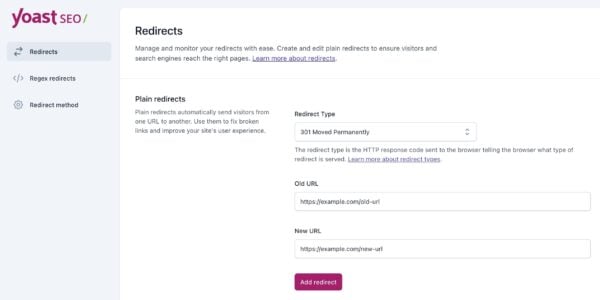
  1. Go to Yoast SEO → Redirects in your WordPress dashboard. 
  2. Enter the old URL (the one you want to redirect from). 
  3. Enter the new URL (the one you want to redirect to). 
  4. Select the redirect type: 
  • 301 (Permanent): For deleted or permanently moved pages. 
  • 302 (Found): For short-term changes. 
  1. Click Add Redirect
Manually redirecting a URL in Yoast’s redirect manager

Option 2: Automatic redirects when deleting content 

Yoast SEO can create redirects automatically when you delete a post or page. Here’s how: 

  1. Go to Posts or Pages in your WordPress dashboard. 
  2. Find the post or page you want to delete and click Trash
  3. Yoast SEO will show a pop-up asking what you’d like to do with the deleted content. You’ll see two options: 
    • Redirect to another URL: Enter a new URL to send visitors to. 
    • Return a 410 Content Deleted header: Inform search engines that the page is permanently deleted and should be removed from their index. 
  4. Select your preferred option and confirm. 

This feature saves time and ensures visitors land on the right page. No manual setup required. 

Need help with redirects? Try Yoast SEO Premium

No code, no hassle. Just smarter redirects and many other invaluable tools.

Apache (.htaccess file) 

Apache uses the .htaccess file to manage redirects. If your site runs on Apache, this is the simplest way to set them up. Add the rules below to your .htaccess file, ensuring it is located in the root directory of your site. 

Add these lines to your .htaccess file: 

# 301 Redirect 
Redirect 301 /old-page.html /new-page.html
# 302 Redirect 
Redirect 302 /temporary-page.html /new-page.html

Nginx (server config) 

Nginx handles redirects in the server configuration file. If your site runs on Nginx, add these rules to your server block and then reload the service to apply the changes. 

Add this to your server configuration: 

# 301 Redirect 
server { 
    listen 80; 
    server_name example.com; 
    return 301 https://example.com$request_uri; 
}
# 302 Redirect 
server { 
    listen 80; 
    server_name example.com; 
    location = /old-page { 
        return 302 /new-page; 
    } 
}

Cloudflare (page rules) 

Cloudflare allows you to set up redirects without modifying server files. Create a page rule to forward traffic from one URL to another, without requiring any coding. Simply enter the old and new URLs, select the redirect type, and click Save. 

  1. Go to Rules → Page Rules
  2. Enter the old URL (e.g., example.com/old-page). 
  3. Select Forwarding URL and choose 301 or 302
  4. Enter the new URL (e.g., https://example.com/new-page). 

Troubleshooting redirects 

Redirects don’t always work as expected. A typo, a cached page, or a conflicting rule can break them, or worse, create loops that frustrate users and search engines. Below are the most common issues and how to fix them.  

If something’s not working, start with the basics: check for errors, test thoroughly, and clear your cache. The solutions are usually simpler than they seem. 

Why isn’t my redirect working? 

  • Check for typos: Ensure the URLs are correct. 
  • Clear your cache: Browsers cache 301 redirects aggressively. 
  • Test with curl: Run curl -v http://yoursite.com/old-url to see the HTTP headers. 

Can redirects hurt SEO? 

Yes, if you: 

  • Create redirect chains (A→B→C
  • Use 302s for permanent moves 
  • Redirect to irrelevant pages 

How do I find broken redirects? 

  • Use Google Search Console → Coverage report. 
  • Use Screaming Frog to crawl your site for 404s and redirects. 

What’s the difference between a 301 and 308 redirect? 

  • 301: Most common for permanent moves. Broad browser support. 
  • 308: Strict permanent redirect. Rarely used. Same SEO impact as 301. 

What is a proxy redirect? 

A proxy redirect keeps the URL the same in the browser but fetches content from a different location. Used for load balancing or A/B testing. Avoid for SEO, as search engines may not follow them. 

Conclusion about redirects

Redirects are a simple but powerful tool. A redirect automatically sends users and search engines from one URL to another. As a result, they keep your site running smoothly and preserve SEO value and ranking power. Remember: 

  • Use 301 redirects for permanent moves. 
  • Use 302 redirects for temporary changes. 
  • Avoid client-side redirects, such as meta refresh or JavaScript. 

Need help? Try Yoast SEO Premium’s redirect manager.  

What are permalinks? How to optimize them for SEO

If you’re planning to build a website or publish a blog post, you’ve probably heard the word permalink pop up. But what is a permalink, really? In simple words, it’s the permanent link to a page on your website, like the official street address of your house. No matter how many times you update your content, this link remains the same and tells people (and Google) exactly where that page is located. In this blog, we’ll break down what a permalink is, why it matters, how to pick the right permalink structure, and how Yoast SEO helps you manage everything easily.

Quick note: If your website is already established, changing existing permalinks can cause broken links and SEO issues. Don’t worry, we’ll show you how to do it safely later in this guide.

Table of contents

Key takeaways

  • A permalink is a permanent link to a specific page on your website, ensuring a stable URL even when content updates occur
  • Choosing the right permalink structure improves SEO by creating clean, readable, and memorable URLs
  • Changing existing permalinks can result in broken links; always set up redirects when updating them to maintain SEO value
  • Best practices include keeping permalinks short, using hyphens, and avoiding dates unless necessary for clarity
  • Tools like Yoast SEO help manage permalinks effectively and prevent 404 errors during changes

Before we go any deeper, let’s start with the basics: what is a permalink? A permalink (short for “permanent link”) is the stable URL that points to a specific page or post on your website. Think of it as the forever address of a piece of content. Even if you update the page, the permalink remains the same, ensuring that people and search engines can always find it.

💡 Fun fact:

Permalinks gained popularity around the early 2000s, when bloggers sought clean, permanent URLs instead of long, messy links filled with numbers and symbols. The idea quickly spread across blogging platforms, and that’s how permalinks became a standard part of the web.

A permalink is usually made up of two main parts:

  • Your domain name (like yourdomain.com)
  • The slug, which is the last part of the URL, tells people what the page is about

So a clean permalink might look like:

https://yourdomain.com/sponsored-tweets-guide

And it will always lead to that exact guide.

Compare that to a messy, auto-generated URL like:

https://yourdomain.com/post-id?=5726fjwenfkd

The first one is easier to read, easier to remember, more suitable for sharing, and more beneficial for SEO. That’s precisely why understanding what the permalink in WordPress is so important, especially when your site grows, and you want your content to be easy to find.

Permalinks can also include categories or subfolders depending on your structure. For example:

https://yourdomain.com/blog/best-yoga-poses

No matter how your website changes on the backend, a permalink should always point to the same page. However, if you ever update your URL structure or change the slug, you’ll need to set up redirects; otherwise, the original permalink won’t work. We will discuss it further later in this blog post.

Clear, simple permalinks make your content easier to read, index, and trust. That’s why choosing a proper permalink structure early on matters so much.

Now that you know what a permalink is, let’s quickly break down what it’s actually made of. A permalink may seem simple on the outside, but each part of it has a specific purpose. Think of it like a small puzzle; every piece helps your browser understand exactly where to take you.

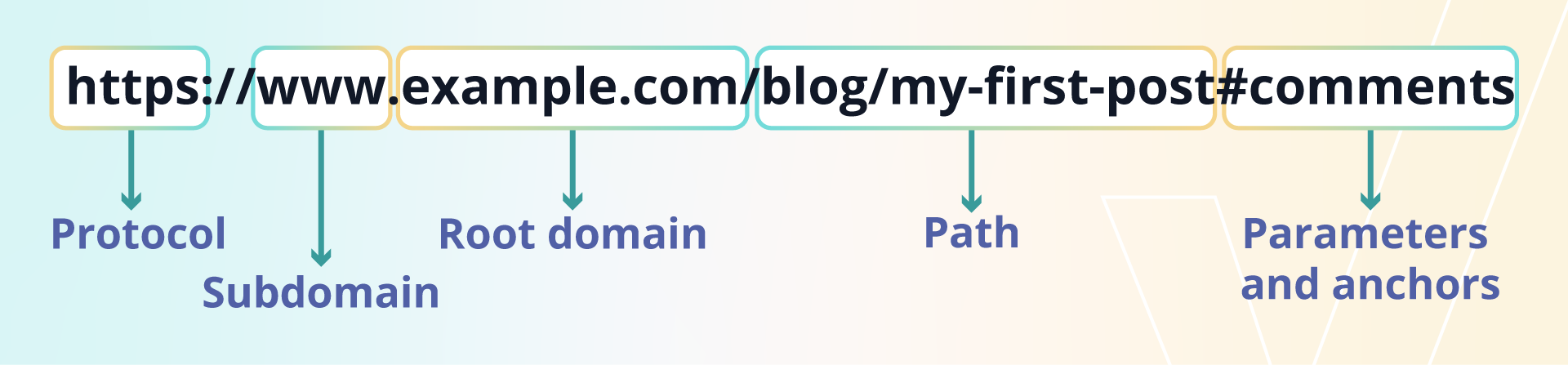
Let’s use a sample URL to make things easy:

Here’s a brief overview of each element in a permalink:

Protocol (or scheme) This is the beginning of every URL, the http:// or https:// part. It tells your browser how to connect to a website.

http:// is the old, not-so-secure version
https:// is the secure, modern version that protects your data

Today, https:// is a must, especially if you care about trust, SEO, and safety.

Subdomain This is the little prefix that comes before your main domain. In our example, it’s www. You can also use subdomains like shop.example.com or blog.example.com when you want to separate different sections of your website.
Root domain (or hostname) This is your main website address, the part you buy, like example.com.

It has two pieces:

→ The name you choose (example)
→ The extension that follows (.com, .org, .net, etc.)

Together, they form the foundation of your website’s identity.

Path (or slug) Everything that comes after the domain is usually the part WordPress users think of as the permalink.

In our example: /blog/my-first-post

→ The path (/blog/) shows the section or folder
→ The slug (my-first-post) is the unique part that describes the page

In WordPress, you can easily edit the slug for every post or page to make your permalink clean and SEO-friendly.

Parameters and anchors (optional extras) These parts don’t appear in every permalink, but when they do, they provide additional information.

Parameters come after a question mark, like ?page=2 or tracking codes like ?utm_source=email

Anchors are denoted by a hash (#), such as #comments, and direct the visitor to a specific section on the same page

You may wonder how a URL differs from a permalink. They look similar, they point to web pages, and they both live in your browser’s address bar, so what sets them apart? The easiest way to understand it is this: every permalink is a URL, but not every URL is a permalink.

Must read: Best practices for SEO-friendly URLs

Static URLs vs. dynamic URLs

To understand the difference better, URLs can be split into two types:

Static URLs:

These remain the same and always direct you to the same page. Example: yourdomain.com/blog/how-to-bake-sourdough. This is a static URL, and yes, it’s also a permalink.

Dynamic URLs:

These changes depend on user actions and typically include additional parameters, such as ?page=2 or ?color=blue. Example: yourdomain.com/products/shirt?color=blue&size=large. Dynamic URLs are not considered permalinks because search engines treat each version with different parameters as separate pages.

Not every URL qualifies as a permalink. Here’s why:

Dynamic URLs containing parameters

These URLs load content, but the added parameters make them temporary and subject to change. For example, yourdomain.com/blog?page=2 and yourdomain.com/best-yoga-poses?source=email.

Static URLs that don’t point to a specific page

These are still URLs, but they direct you to the homepage, root domain, or a general section, rather than a specific piece of content. So they aren’t considered permalinks. For example, yourdomain.com, www.yourdomain.com, and shop.yourdomain.com.

Now that you know what a permalink is and how it’s built, let’s talk about why it actually matters. Many people think permalinks are just tiny technical settings inside a content management system CMS, but they play a much bigger role in how your website looks, feels, and performs on the SERPs.

Do check out: Features of the Google Search Engine Results Page (SERP)

Search engines, such as Google, pay close attention to your URLs. A clean permalink clearly indicates what your page is about, making it easier for your content to rank high on Google.

For example: yourdomain.com/blog/what-is-a-permalink vs. yourdomain.com/?p=123. The first one clearly explains the topic. The second one tells Google nothing.

A strong permalink structure helps with:

  • Keywords: If your slug includes your main keyword, Google gets instant context
  • Crawlability: Clear folders, such as /services/web-design/, help search engines understand your site’s hierarchy
  • Link equity: People are far more likely to link to clean URLs than long, confusing ones. More links = stronger SEO

Permalinks aren’t just for search engines; they also affect how real people feel when they visit your website.

Clean, readable URLs make your site look professional and trustworthy. When someone sees a link like /contact-us/ or /shop/, they instantly know where they’re going. However, when they encounter something like /c/post?id=72, it appears suspicious and difficult to understand.

Good permalinks help with:

  • Clarity: Users can guess the topic from just the URL
  • Confidence: A neat URL feels more trustworthy than a random string of numbers
  • Memorability: Simple slugs are easy to remember or type again later

In short, clean permalinks create a smoother, friendlier experience for every visitor.

Your permalink structure is basically the map of your website. It shows how your content fits together, and it helps both users and search engines move around your site easily.

For example, a URL like: yourdomain.com/services/web-design/.

Immediately tells someone:

  • They’re in the Services section
  • They’re looking at the Web Design page

This clear parent–child relationship makes your site feel more organized. And when your site structure is clean, Google can crawl and understand your content much faster.

Choosing the right permalink structure early on keeps your website simple, safe, and easy to manage as it grows.

When you publish a new page or post in WordPress, the platform automatically creates a permalink for you. The problem? The default permalink isn’t great for SEO or user experience. The good news is that WordPress makes it super easy to change your permalink settings and choose a structure that works better for your website.

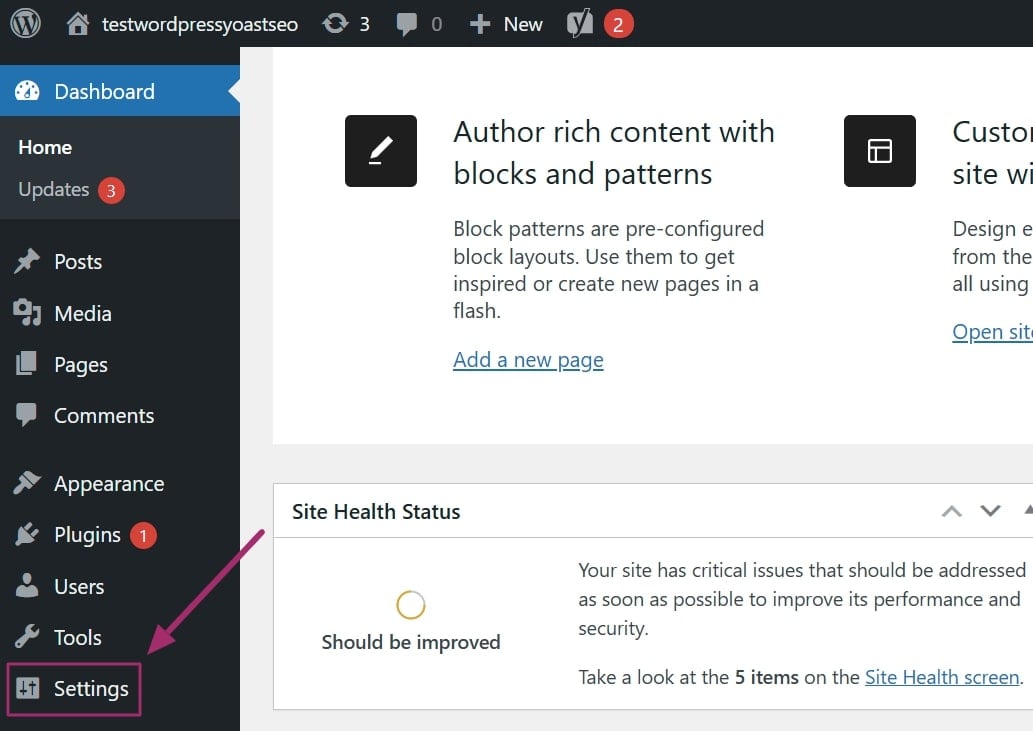
Changing your WordPress permalink structure is a simple three step process, here’s how you can do it:

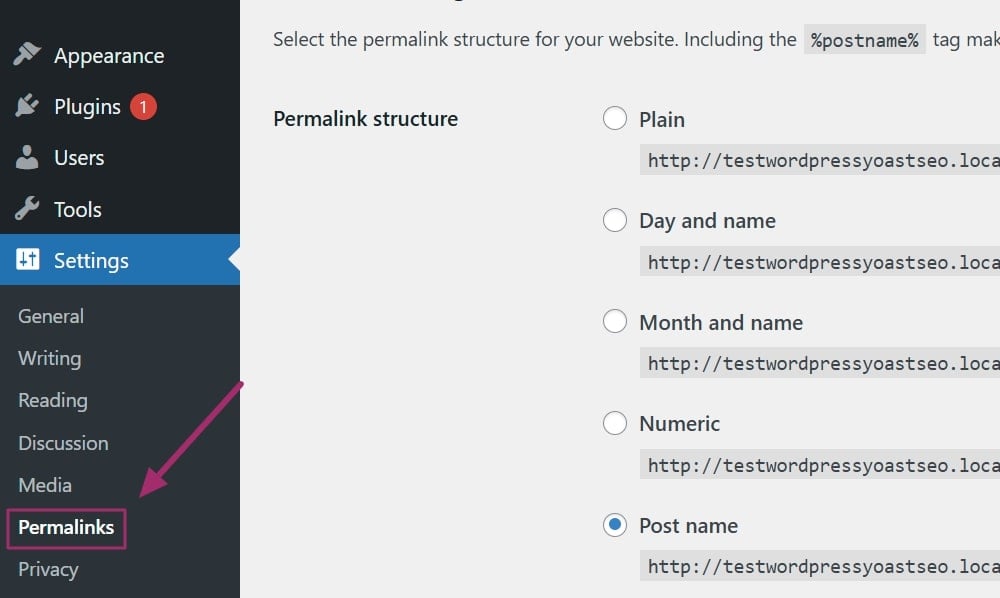
Step 1: Log in to your WordPress dashboard and look for the Settings option on the left-hand menu

Step 2: Click on the ‘Permalinks.’ option to open the page permalink settings.

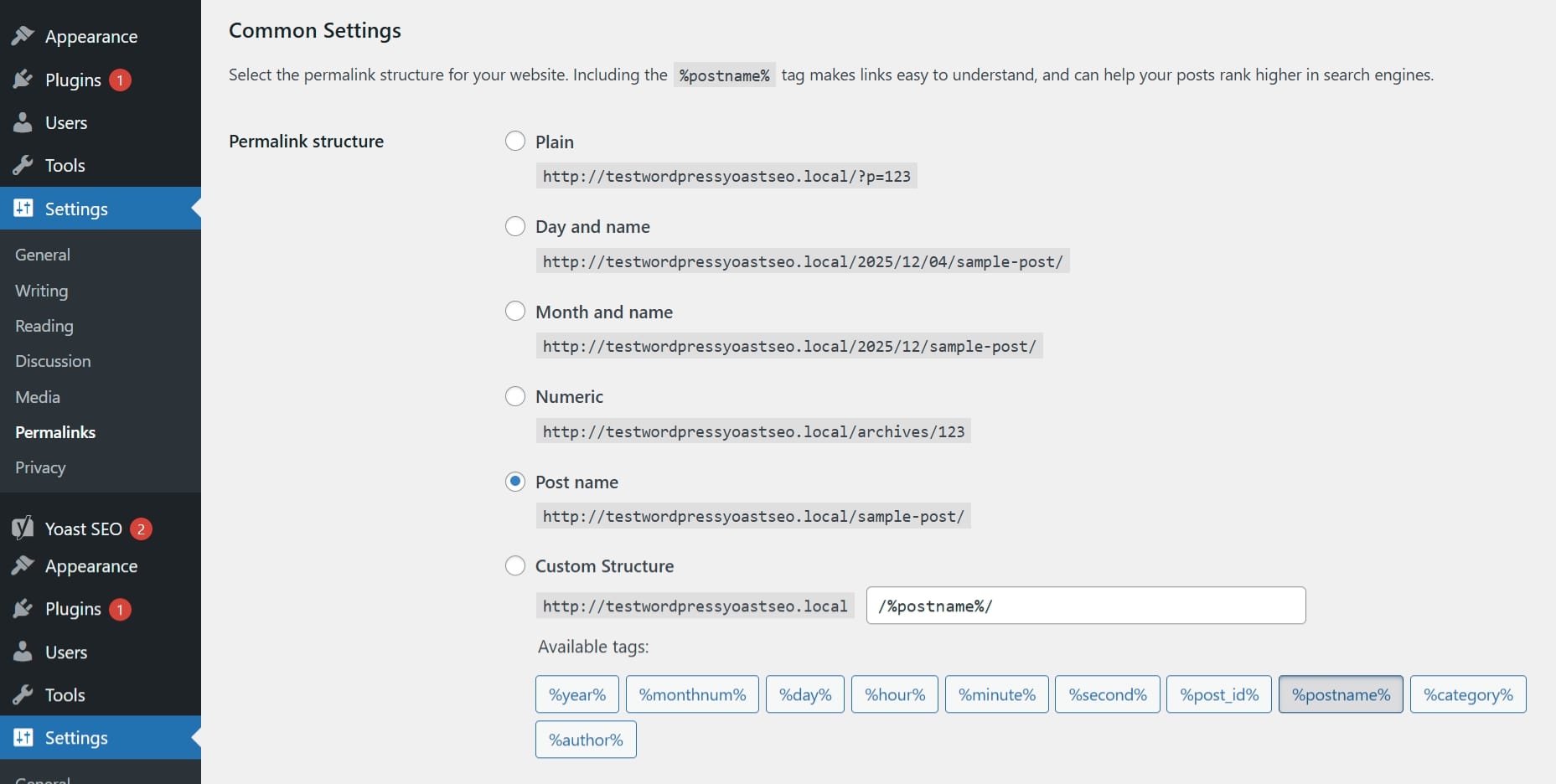
Lastly, select your desired permalink format as per your needs.

WordPress permalink options

Recommendations for each WordPress configuration

Each structure has its own purpose, so the best one for you depends on your SEO goals and the kind of content you publish. Here’s a quick and friendly breakdown:

Permalink settings Setting recommendations
Day and name
[https://example.com/2025/10/27/sample-post/]
Good for news-heavy sites.

Ideal for publishers who post multiple updates daily. However, for most websites, adding the full date makes your content appear outdated too quickly.

Month and name
[https://example.com/2025/10/sample-post/]
The verdict is the same as above. Slightly shorter, but it still adds a timestamp that most businesses might not need.
Numeric
[https://example.com/archives/123]
Skip this one.

Just another version of an unclear, non-descriptive link. It provides readers and search engines with no indication of what the page is about.

Post name
[https://example.com/sample-post/]
The best option for 99% of websites.

Clean. Short. Easy to read. Keyword-friendly. Perfect for SEO. If you’ve ever searched for ‘what is a permalink in WordPress’ or ‘what is a WordPress permalink’, this is the recommended format.

Custom structure This allows you to create your own format using tags like /%category%/, /%postname%/, or /%author%/.

Although we refer to them as permalinks or permanent links, there may be instances when you need to update them. Maybe a page title has changed, maybe you’re fixing your site structure, or maybe you’re cleaning up old URLs. Whatever the reason, changing a permalink isn’t something you should do casually; one wrong move can lead to 404 errors.

So before we talk about how to change a permalink in WordPress, it’s important to understand when you should change it, why it matters, and what the possible impact might be.

Even though permalinks are meant to stay the same, there are situations where changing them makes sense. Here are the most common use cases where updating a permalink is not only acceptable, but sometimes necessary.

If your site started with WordPress’s default “plain” URLs (like /?p=123), you’ll quickly realize they don’t describe the content, which makes ranking harder. Switching to a clean, keyword-rich structure helps search engines better understand your page.

Example:

yourdomain.com/?p=245

yourdomain.com/how-to-start-a-blog

If your permalink doesn’t reflect your topic, fixing it may be a smart move.

When you’re improving user experience

Sometimes, older permalink formats are confusing or too long. Updating them to something short and clear makes URLs easier for people to read, remember, and share.

Users are much happier to click something like yourdomain.com/blue-dress instead of yourdomain.com/products/?id=blue&ref=123.

Clean permalinks help establish trust, which in turn leads to more clicks.

Also read: SEO Basics: What are user signals?

When your content feels “dated” because of the URL

If your permalink includes the year or full date (like news-style URLs), users may assume the content is outdated, even if the blog post remains relevant. Switching to a timeless structure can improve click-through rates; for example, use yourdomain.com/best-seo-tips/ instead of yourdomain.com/best-seo-tips-2025/.

When you’re rebranding or restructuring your site

If you are rebuilding your website, changing domain names, or reorganizing categories, ensure that your permalinks align with your new structure. This keeps your content consistent and prevents confusion.

When you’re moving to HTTPS

Switching from HTTP to HTTPS is a major security upgrade, and it affects your permalinks. It requires redirects to make sure your old links still work.

Also read: HTTP status codes and what they mean for SEO

When you inherit or audit an old website

If the previous owner used messy or unclear permalinks, updating them can help you improve SEO, rebuild trust, and create a more organised structure.

Changing permalinks without a plan can cause serious problems, especially for SEO. Since permalinks function like permanent addresses, updating them incorrectly can break links throughout your entire website.

Here’s what can go wrong:

  • You may trigger 404 errors: This happens when the old URL no longer exists, and you haven’t added a redirect. Too many 404s hurt both user experience and SEO
  • You can lose rankings: If you change a permalink without a 301 redirect, Google treats the new URL as a brand-new page, causing drops in traffic and lost link value
  • Internal links can break: Any links inside your own site that point to the old URL will stop working unless they’re updated or redirected
  • External links stop sending traffic: Backlinks from other websites, emails, or social posts will lead to broken pages if redirects aren’t in place

Also read: Clean up your bad backlinks

If you ever need to update a permalink, you shouldn’t jump straight in. There’s a simple three-step process that keeps your website safe, your rankings stable, and your visitors away from 404 errors. Think of it as your mini checklist for making permalink changes the right way.

Step 1: Back up your website (just to be safe)

Before touching your URL structure, always create a full backup. If anything goes wrong, you can restore your site in seconds, rather than trying to fix broken links one by one.

Step 2: Set up a 301 redirect for the old URL

This is the most important step. A 301 redirect informs Google and your visitors that your page has been permanently moved. It redirects everyone to the new permalink and retains nearly all of your SEO value.

Without a 301 redirect With a 301 redirect
Your old link becomes a 404 Your traffic stays safe
Your new link loses rankings Your SEO strength moves with the new URL
Any backlinks pointing to the old URL lose their power Google updates the new permalink over time

You can set up redirects manually, but this usually requires knowledge of databases or cPanel. Thankfully, WordPress plugins make it easy, and this is where Yoast SEO Premium becomes incredibly helpful.

The plugin’s redirect manager feature automatically creates a 301 redirect every time you change a URL or move/delete a page. So even if you forget to set up a redirect, Yoast handles it for you and protects your SEO behind the scenes.

Here’s how the Yoast SEO Premium plugin takes the stress out of the process:

  • Automatically creates redirects when you change or delete a URL
  • Prevents 404 errors by forwarding visitors to the correct page
  • Let you choose the right redirect type (301, 302, 307, 410, etc.)
  • Organises all redirects in one clean dashboard
  • Supports advanced options like REGEX redirects and import/export

With Yoast SEO Premium, you don’t have to remember any of these steps. You change the permalink, and the plugin handles the redirect instantly, keeping your SEO, structure, and user experience intact.

A smarter analysis in Yoast SEO Premium

Yoast SEO Premium has a smart content analysis that helps you take your content to the next level!

Once your redirects are ready, you can safely update your permalink in the WordPress editor or change the global permalink settings. At this point, you won’t break any links because your redirects are already in place.

A well-structured permalink saves you from future headaches. Here are the best practices to follow every time you create a new permalink on your WordPress site.

A slug should not look like a full sentence. It should act like an address that clearly tells users and search engines what the page is about. Shorter permalinks are easier to read, share, and understand. For example, /improve-seo-2025/

Use your target keyword naturally

Your main keyword should appear in the slug, but only once. This helps search engines identify the topic without making your URL look spammy. For example, /what-is-a-permalink/.

Use hyphens to separate words

Hyphens are the correct standard for URLs. Search engines read them as natural separators between words.

Avoid:

  • Underscores (my_post)
  • Spaces (my%20post)
  • Words combined without separation (mypost)

Always write them like this: yourdomain.com/chocolate-cake

Use dates with care

As mentioned earlier, dates can be particularly helpful for news sites or when covering strictly time-sensitive topics. However, for most blogs and business websites, dates in permalinks can make your content appear outdated, even when it remains relevant. Therefore, when possible, choose evergreen URLs, such as /best-yoga-poses/.

Use lowercase letters in all URLs

Since URLs can be case-sensitive, uppercase and lowercase versions of the same slug may be treated as distinct pages. This can cause duplicate content issues. Always stick to lowercase, such as: yourdomain.com/types-of-tea.

Encode special characters and emojis

If your slug includes accented characters (ä, å, ö) or emojis (which you should avoid using), they must be encoded using UTF-8. Without encoding, browsers may break the URL or cause crawl errors.

Encoding ensures the permalink displays correctly and remains accessible to search engines.

Whether you are using /blog/%postname%/ or placing all service pages under /services/%postname%/, choose one approach and follow it for the entire site; consistency improves navigation, user experience, and SEO.

Your permalink structure may appear simple on the surface, but it silently supports the way users and search engines interact with your site. A clear and consistent URL helps readers understand your content, builds trust, reduces confusion, and prevents the need for constant changes later. It also provides search engines with a clear path to follow, which enhances your overall SEO performance.

By keeping permalinks short, descriptive, and keyword-focused, avoiding unnecessary stop words, choosing hyphens, maintaining consistency in formats, and using lowercase letters, you create a structure designed to last. These small choices make your URLs easy to share, maintain, and understand by Google.

With the right permalink strategy and the help of tools like Yoast SEO for managing redirects and site structure, you can build a solid foundation that supports your content for years to come.

Your URLs are not just technical details. They are part of your site’s identity. Treat them with care, and they will continue to guide search engines and users to the right place every time.

What is link building in SEO?

Link building is the practice of earning links from other websites to your own. These links act as signals of trust and authority for search engines, helping your pages rank higher in search results. Quality matters more than quantity. A few relevant, high-authority links are far more valuable than many low-quality ones. Modern link building focuses on creating genuinely useful content, building genuine relationships, and earning links naturally, rather than manipulating rankings.

Table of contents

Key takeaways

  • Link building helps establish content credibility through acquiring backlinks from other websites.
  • It focuses on quality over quantity, emphasizing trust and relevance in search engine rankings.
  • Effective link building involves engaging with digital PR and fostering genuine relationships with sources.
  • Producing valuable content and fostering connections leads to high-quality links and improved online visibility.
  • Today, AI-driven search evaluates authority based on context, relevance, and structured data, not just backlinks.

Link building means earning hyperlinks from other sites to show search engines your content is trustworthy and valuable. Now, it’s more like digital PR, focusing on relationships, credibility, and reputation, not just quantity. AI-powered search also considers citations, structured data, and context alongside backlinks. By prioritizing quality, precision, and authority, you build lasting online visibility. Ethical link building remains one of the most effective ways to enhance your brand’s search presence and reputation.

Link building is a core SEO tactic. It helps search engines find, understand, and rank your pages. Even great content may stay hidden if search engines can’t reach it through at least one link.

To get indexed by Google, you need links from other sites. The more relevant and trusted those links are, the stronger your reputation becomes. This guide covers the basics of link building, its connection to digital PR, and how AI-driven search evaluates trust and authority.

If you are new to SEO, check out our Beginner’s guide to SEO for a complete overview.

A link, or hyperlink, connects one page on the internet to another. It helps users and search engines move between pages.

For readers, links make it easy to explore related topics. For search engines, links act like roads, guiding crawlers to discover and index new content. Without inbound links, a website can be challenging for search engines to discover or assess.

You can learn more about how search engines navigate websites in our article on site structure and SEO.

A link in HTML

In HTML, a link looks like this:

Yoast SEO plugin for WordPress

The first part contains the URL, and the second part is the clickable text, called the anchor text. Both parts matter for SEO and user experience, as they inform both people and search engines about what to expect when they click.

Internal and external links

There are two main types of links that affect SEO. Internal links connect pages within your own website, while external links come from other websites and point to your pages. External links are often called backlinks.

Both types of links matter, but external links carry more authority because they act as endorsements from independent sources. Internal linking, however, plays a crucial role in helping search engines understand how your content fits together and which pages are most important.

To learn more about structuring your site effectively, refer to our guide on internal linking for SEO.

Anchor text

The anchor text describes the linked page. Clear, descriptive anchor text helps users understand where a link will direct them and provides search engines with more context about the topic.

For example, “SEO copywriting guide” is much more useful and meaningful than “click here.” The right anchor text improves usability, accessibility, and search relevance. You can optimize your own internal linking by using logical, topic-based anchors.

For more examples, read our anchor text best practices guide.

Link building is the process of earning backlinks from other websites. These links serve as a vote of confidence, signaling to search engines that your content is valuable and trustworthy.

Search engines like Google still use backlinks as a key ranking signal; however, the focus has shifted away from quantity to quality and context. A single link from an authoritative, relevant site can be worth far more than dozens from unrelated or low-quality sources.

Effective link building is about establishing genuine connections, rather than accumulating as many links as possible. When people share your content because they find it useful, you gain visibility, credibility, and referral traffic. These benefits reinforce one another, helping your brand stand out in both traditional search and AI-driven environments, where authority and reputation are most crucial.

Link quality over quantity

Not all links are created equal. A high-quality backlink from a well-respected, topic-relevant website has far more impact than multiple links from small or unrelated sites.

Consider a restaurant owner who earns a link from The Guardian’s food section. That single editorial mention is far more valuable than a dozen random directory links. Google recognizes that editorial links earned for merit are strong signals of expertise, while low-effort links from unrelated pages carry little or no value.

High-quality backlinks typically originate from websites with established reputations, clear editorial guidelines, and active audiences. They fit naturally within the content and make sense to readers. Low-quality links, on the other hand, can make your site appear manipulative or untrustworthy. Building authority takes time, but the reward is a reputation that search engines and users can rely on.

Read more about this long-term approach in our post on holistic SEO.

Shady techniques

Because earning high-quality links can take time, some site owners resort to shortcuts, such as buying backlinks, using link farms, or participating in private blog networks. These tactics may yield quick results, but they violate Google’s spam policies and can result in severe penalties.

When a site’s link profile looks unnatural or manipulative, Google may reduce its visibility or remove it from results altogether. Recovering from such penalties can take months. It is far safer to focus on ethical, transparent methods. In short, you’re better off avoiding these risky link building tricks, as quality always lasts longer than trickery.

The most effective way to earn strong backlinks is to create content that others genuinely want to reference and link to. Start by understanding your audience and their challenges. Once you know what they are looking for, create content that provides clear answers, unique insights, or helpful tools.

For example, publishing original data or research can attract links from journalists and educators. Creating detailed how-to guides or case studies can help establish connections with blogs and businesses that want to cite your expertise. You can also build relationships with people in your industry by commenting on their content, sharing their work, and offering collaboration ideas.

Newsworthy content is another proven approach. Announce a product launch, partnership, or study that has real value for your audience. When you provide something genuinely useful, you will find that links and citations follow naturally.

Structured data also plays an important role. By using Schema markup, you help search engines understand your brand, authors, and topics, making it easier for them to connect mentions of your business across the web.

For a more detailed approach, visit our step-by-step guide to link building.

Search is evolving quickly. Systems like Google Gemini, ChatGPT, and Perplexity no longer rely solely on backlinks to determine authority. They analyze the meaning and connections behind content, paying attention to context, reputation, and consistency.

Links still matter, but they are part of a wider ecosystem of trust signals. Mentions, structured data, and author profiles all contribute to how search and AI systems understand your expertise. This means that link building is now about being both findable and credible.

To stay ahead, make sure your brand and authors are clearly represented across your site. Use structured data to connect your organization, people, and content. Keep your messaging consistent across all channels where your brand appears. When machines and humans can both understand who you are and what you offer, your chances of visibility increase.

You can read more about how structured data supports this process in our guide to Schema and structured data.

There are many ways to put link building into action. A company might publish a research study that earns coverage from major industry blogs and online magazines. A small business might collaborate with local influencers or community organizations that naturally reference its website, thereby increasing its online presence. Another might produce in-depth educational content that other professionals use as a trusted resource.

Each of these examples shares the same principle: links are earned because the content has genuine value. That is the foundation of successful link building. When people trust what you create and see it as worth sharing, search engines take notice, too.

In conclusion

Link building remains one of the most effective ways to establish visibility and authority. Today, success depends on more than collecting backlinks. It depends on trust, consistency, and reputation.

Consider link building as an integral part of your digital PR strategy. Focus on creating content that deserves attention, build relationships with credible sources, and communicate your expertise clearly and effectively. The combination of valuable content, ethical outreach, and structured data will help you stand out across both Google Search and AI-driven platforms.

When you build content for people first, the right links will follow.

What is anchor text, and how can you improve your link texts?

Anchor text, which is also known as link text, is the visible, clickable text of a hyperlink. It usually appears in a different color and is often underlined. Good anchor text tells readers what to expect when they click and gives search engines valuable context about the linked page. Getting your anchor text right helps users navigate your content more easily, improves your internal link structure, and provides search engines with clues about your page relationships, which can positively influence your SEO. 

Table of contents

Key takeaways

  • Anchor text enhances user navigation and provides context for search engines, improving SEO outcomes.
  • Good anchor text clearly describes the linked content and avoids misleading or over-optimized phrases.
  • Different types of anchor text exist, each with specific use cases; mix them for variety and clarity.
  • Yoast SEO offers tools to analyze competing links and improve anchor text for better search engine ranking.
  • To enhance anchor text, ensure it matches the linked content, flows naturally, and clearly signals clickable links.

What does an anchor text look like? 

Anchor text is the part of a link that describes the linked page. It guides both readers and search engines toward relevant information. For example, if we link to our post about keyword research tools, the phrase “keyword research tools” is the anchor text. 

In HTML, it looks like this: 

keyword research tools

The first part is the URL, while the second, the visible text, is the anchor text. Ideally, the words you choose should naturally describe the content on the linked page. 

Links are vital for SEO. They show how your pages connect and help search engines understand your site structure. The anchor text in those links provides extra context. 

When Google crawls your site, it uses link text as a clue to what each linked page is about. If multiple links all use the same focus keyphrase, Google might not know which page should rank highest for that topic, leading to competition between your own pages. 

That’s why thoughtful, descriptive anchor text matters. It helps search engines interpret your site and helps readers decide whether a link is worth clicking. Over-optimized or misleading link text can confuse both. 

Tip: Avoid using your main focus keyphrase in multiple anchor texts within one post, as it can create competing links. Your linking should always feel natural and avoid over-optimization. 

An example of internal links with good anchor texts

Different kinds of anchor text 

Anchor text applies to both internal and external links. External sites can link to your content in various ways, and each type sends a different signal to search engines: 

  • Branded links: Use your brand name as anchor text (e.g., Yoast
  • Naked URLs: Just your site address (e.g., https://yoast.com
  • Site name: Written as Yoast.com 
  • Article or page title: Matches the title exactly (e.g., What is anchor text?
  • Exact-match keywords: The exact keyphrase of your target page 
  • Partial-match keywords: A variation that fits naturally in a sentence 
  • Related keywords: Phrases closely connected to your topic 
  • Generic links: Words like click here or read more — best avoided! 

Ideally, mix your link text types, prioritizing readability and context over repetition. 

Yoast SEO for WordPress and Yoast SEO for Shopify include a competing links check. This tool analyzes your anchor texts to help you avoid competing links. 

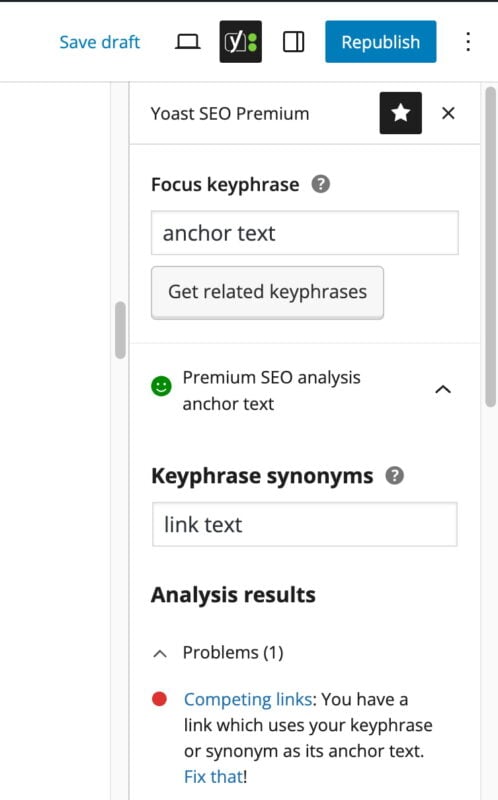
If Yoast SEO detects that one of your links contains your focus keyphrase or a synonym of it, then Premium users get a warning. The reason? You don’t want multiple pages trying to rank for the same phrase. 

For example, say your focus keyphrase is potato chips. If you link to another page using that exact phrase, Yoast SEO will flag it as a competing link. You’ll see a notification in your SEO analysis, so you can adjust it before publishing. If you have Yoast SEO Premium or Yoast SEO for Shopify, the check will also look for the synonyms of your keyphrase.

The competing links check in Yoast SEO helps you improve your linking

How to improve your anchor link texts 

If Yoast SEO alerts you about competing links, or if you simply want to improve the quality of your link text, here are some best practices to follow. 

1. Create a natural flow 

Your writing should feel effortless. If a link feels awkward or forced into a sentence, it probably doesn’t belong there. Always prioritize readability, as a smooth flow improves both engagement and SEO. For more advice on writing content that feels natural while still ranking well, read our SEO copywriting guide

2. Match the link text to the linked content

Readers should immediately understand what to expect when they click on a link. For example, a link that says meta description should lead to a post explaining what a meta description is and how to optimize it. Clear, logical linking builds trust and helps users navigate your content with ease. 

3. Don’t trick your readers 

Never mislead readers with inaccurate or confusing link text. If your link text says, “potato chips,” it shouldn’t lead to a page about cars. Consistent and honest linking keeps readers engaged and signals quality to search engines. 

4. Make it clear that the link is clickable 

Use visual cues such as color contrast or underlining, so it’s easy to tell when text is a link. This not only improves usability but also helps people using assistive technology to navigate your content. To see more on writing accessible, well-structured posts, visit our blogging guide. 

5. Bonus tip: put your entire keyphrase in quotes 

When using long tail keyphrases, you might see a warning about links that include parts of your focus keyphrase. To avoid this, put your full keyphrase in quotes, for example, “learning how to knit.” This tells Yoast SEO to look for the entire phrase rather than matching individual words. 

If you’d like to learn more about writing effective link text and improving your content for SEO, take our SEO copywriting course, which is included with Yoast SEO Premium. 

Go Premium and get free access to our SEO courses!

Learn how to write great content for SEO and unlock lots of features with Yoast SEO Premium:

Internal links are one of the most effective SEO tools you can use. The Yoast SEO internal linking suggestions tool helps you find and add relevant links throughout your content. 

But internal links work best when you write good anchor text for them. Each link should serve a clear purpose and guide readers naturally to related topics. Avoid adding unnecessary or irrelevant links just for the sake of having more connections. 

Thoughtful internal linking improves the user experience and helps search engines understand your site’s structure, which is essential for strong SEO performance. 

This is anchor text 

Anchor text remains a small but powerful element of SEO. It helps users decide whether to click, gives search engines valuable context, and supports a logical site structure. 

Keep your anchor text relevant, natural, and transparent and avoid manipulative or over-optimized linking practices. Search engines are now smarter than ever at spotting unnatural links, especially in the era of AI and semantic understanding. 

So stay genuine, link with intent, and use Yoast SEO to guide you along the way. 

Read more: SEO basics: What is a permalink? »

How to drive traffic to my website

Excited to launch your website, but how to drive traffic to your website? A beautifully designed site without visitors is like a shop with no customers — that’s why traffic matters. Wondering how to get visitors to your site? You’re in the right place. In this post, we’ll walk you through simple yet practical tips on how to drive traffic to a website and attract your first visitors, and even better, keep them coming back.

By the end of this guide, you’ll have a clear roadmap for improving your website’s visibility.

Why is driving traffic to your website important?

Well, you want people to discover your website and not just keep it to yourself within the design drafts; therefore, driving traffic is important.

Website traffic is the number of website visitors over a set time. It’s not just a vanity metric—it represents potential customers, greater visibility, and stronger brand awareness. If you’re just getting started, boosting your search visibility can feel overwhelming. However, by following these simple and practical tips, you’ll start to see your traffic grow exponentially.

Top 5 practical tips to boost website traffic

Here are the top 5 tips that will help you drive traffic to your website:

Understand your target audience

Before you dive into posting content on your website’s landing pages, it’s crucial to take a step back and ask yourself: Who am I trying to reach? Defining your target audience is the very first step if you’re serious about learning how to drive traffic to your website.

Creating content that resonates and drives engagement becomes much easier when you know your audience — their interests, challenges, and goals. Without audience clarity, even your best-written content might be a mismatch, targeting everyone but reaching no one.

Google Analytics is one of the best ways to perform audience research. It provides powerful insights into key metrics like:

  • What time of day does your audience visit your website
  • Which age groups are engaging with your content
  • Where your visitors are located

And much more!

Feeling lost when looking at analytics data? Don’t worry — you can check out this guide on Google Segments to help bring clarity to your dashboard.

Focus on SEO basics

Getting the SEO basics right is the easiest way to boost organic traffic to your website. It also makes it easier for search engines to understand the content on your website and index pages to make them accessible to searchers.

Here are some beginner-friendly SEO techniques for website traffic:

Add keywords naturally

Keywords play an essential role in boosting the searchability of your website. Think of keywords as phrases used by search engines like Google to match your content with what people are searching for. Do keyword research so your content matches what people are searching for. Once you’ve identified the relevant search phrases, sprinkle them contextually in important spots like headings, content, and alt texts.

Here’s a video for you:

Write clear and structured headings

It’s not just about writing content to incorporate keywords; presentation matters too if you want the readers to stay on your website. Therefore, it’s important to write content that is pleasant to the eyes and readable.

Organize your content with H1, H2, and H3 tags. Clear headings make your blog posts and landing pages easy to scan, improve readability, and help improve visibility on Google.

Add meta descriptions

Meta descriptions appear under your page title in search results. Although they don’t directly boost rankings, they encourage clicks, helping increase website visitors. Make them short, relevant, and inviting.

Use descriptive alt text for images

Alt text helps search engines “read” your images and makes your website more accessible. In fact, according to EU stats, a large portion of users with disabilities depend on well-structured web content to browse effectively.

Invest in seo tools to make it easier

Managing all these tasks can feel overwhelming at first. That’s why using beginner-friendly SEO tools can make a big difference. For example, the Yoast SEO plugin offers real-time suggestions for keyword usage, readability improvements, meta descriptions, and technical SEO essentials like XML sitemaps—all inside your WordPress dashboard. Some features, such as advanced keyword optimization and certain integrations, are available in Yoast SEO Premium.

Plus, with Yoast’s built-in integration with Semrush, you can access high-performing keywords with just a few clicks, and that too without even leaving your editor.

Also, with Yoast’s newly launched Site Kit by Google insights integration, you can take your SEO management to the next level. Instead of switching between different tools to check your site’s analytics and search data, you’ll see key insights—like organic traffic, impressions, clicks, and bounce rates—directly in your Yoast Dashboard.

A smarter analysis in Yoast SEO Premium

Yoast SEO Premium has a smart content analysis that helps you take your content to the next level!

Optimize for AI and LLMs

AI-driven search is transforming how people discover information. Search results are no longer just a list of blue links—they’re increasingly delivered as direct, conversational answers through platforms like ChatGPT, Perplexity, and Claude. If your brand isn’t showing up in the answers your customers see, you’re missing a significant visibility opportunity.

Studies show consumers rely on AI-generated responses for nearly 40% of their searches.

To improve your chances of being featured in AI-generated answers, start with the basics: use relevant keywords, write clear and concise copy for your webpages, maintain a well-structured hierarchy with proper headings, and craft descriptive meta titles and descriptions.

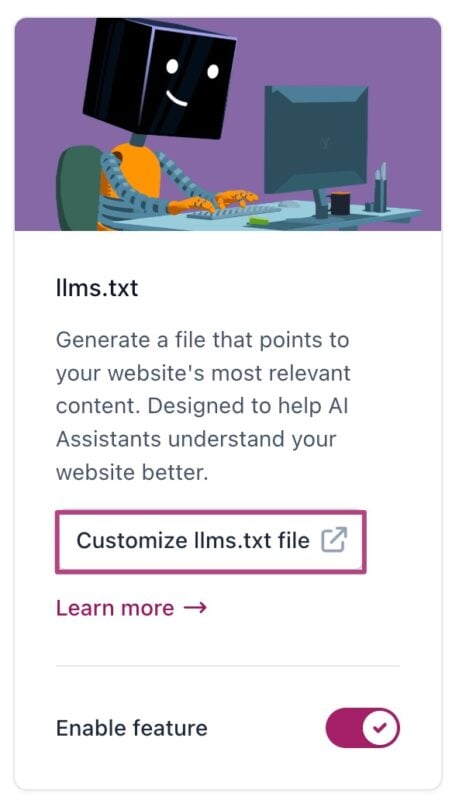
Here’s the good news—Yoast has the tools to help you optimize your content for AI and LLM comprehension. The newly launched llms.txt feature guides AI models like ChatGPT to better understand your business.

With just one click, Yoast SEO generates an llms.txt file that enables AI bots to scan specific parts of your website in real-time, ensuring they accurately present your brand when answering user queries.

Create quality content that provides value

Content is king — but only if it’s high quality. Once you have identified your target audience and completed your keyword research, it’s time to start publishing content on your website. Remember, you’re not just publishing keywords — we share that you’re creating content that solves problems and answers real questions. Valuable content builds trust, boosts engagement, and naturally increases website visitors.

Need help checking your content’s quality? Try Yoast’s Real-time Content Analysis editor to assess readability and SEO performance as you type, on the go!

Leverage social media to share and increase the reach

63.9% of the world’s population uses social media, which is a huge number waiting to be tapped. Social media platforms are powerful and free tools that help you drive traffic to your website. Posting regularly on your social media helps boost brand exposure and serves as a traffic channel for your website.

But here’s the key — don’t just drop links and disappear. Add a personal touch: explain why your post is valuable, start a conversation, or ask a question. You can even repurpose your blog posts into bite-sized social media content to reach more people and channel your followers back to your website.

With its social previews feature, the Yoast SEO plugin takes your social sharing game up a notch. Instead of guessing how your post will look when shared, you can see an exact visual preview for Facebook and Twitter right inside your editor.

This means you can fine-tune your title, description, and image before hitting publish, ensuring your post looks click-worthy and on-brand wherever it’s shared.

Keep your site fast & mobile-friendly

Website speed and mobile-friendliness are crucial factors in attracting traffic and retaining it. If your website is slow or hard to use on mobile, visitors will leave before reading a word..

Do you know there are over 6.8 billion people who own a smartphone?

Page speed impacts user experience and SEO, and search engines like Google prioritize fast-loading websites. If your website is slow, it may experience higher bounce rates, because users want instant access to information.

To improve your website’s performance, check your site speed with tools like Google PageSpeed Insights. Then, consider practices like optimizing your images, using lazy loading, and reducing JavaScript to improve site speed.

Mobile optimization takeaways:

Bonus tips for boosting traffic

The five core strategies above will set you on the right path—but why stop there? If you’re ready to go the extra mile in learning how to drive traffic to your website, try these bonus tactics:

Build an email list

Offering a valuable freebie (ebook, checklist, or discount) in exchange for emails remains one of the best strategies to drive traffic to a website. Once subscribers opt in, send them helpful newsletters that solve real problems rather than just promotions. Over time, this nurtures trust and encourages repeat visits.

Off-page SEO—earning links from other reputable sites—signals authority to Google and helps you grow your search visibility. Guest posting on industry blogs, forming partnerships for co-authored articles, and outreach for natural backlinks are proven ways to drive quality traffic to your website.

Also Read: SEO Basics: What is link building?

Join online communities and forums

Active participation in Facebook groups, LinkedIn communities, Reddit threads, and Quora spaces related to your niche gives you direct access to potential visitors. First, add genuine value—answer questions, share insights—then naturally reference your blog posts when relevant. This free method to grow website traffic fosters credibility while driving organic clicks.

Local SEO

If you own a business with a physical address, local SEO is your savior.

Local SEO refers to the practice of optimizing your website to attract people searching the “nearby…” keyphrases. It is a technique that helps you get searchable both online and offline.

Here are some basic local SEO practices that you can follow:

Claim and optimize your Google Business Profile:

  • Include location-specific keywords, such as “family dentist Chicago,” in your page titles, headings, and meta descriptions.
  • Earn citations in local directories such as Yelp, Yellow Pages, etc.
  • Encourage customer reviews.

If you want to rank your website locally and on Google Maps, do check out Yoast Local SEO plugin for WordPress.

Ready to drive traffic to your website?

Driving traffic to your website is not about quick wins—it’s a marathon. With consistent efforts and offering value to your audience, you will see long-term benefits, and your website will top the SERPs.

Keep refining your on-page SEO and publishing content that truly resonates with your audience. By applying the tips mentioned in this guide, your website’s visibility will gradually boost.

For continued learning and more in-depth insights on SEO, Yoast Academy is your go-to resource for mastering the art of improving your online presence. From SEO training for beginners to performing robust keyword research, Yoast Academy offers all-around SEO training.

The beginner’s guide to SEO reporting

When you work on your site’s SEO, reflecting on those efforts should be part of your ongoing strategy. Whether it’s for a client, your manager, or your team, creating an SEO report is the best way to do so. This helps you justify your efforts, keep track of performance and figure out what needs to be tackled next. And it’s not as hard as you would think. In this blog post, we’ll explain what SEO reporting is and take you through the process step by step.

Table of contents

Search engine optimization (SEO) helps drive more traffic to your site and improve your brand image. It should be part of anyone’s marketing strategy whose goal is to grow their (online) audience. Originally focused on performance in organic search, SEO now entails much more than that. It helps you build a strong brand name, become an authority in your field, and be visible on the platforms where your audience can be found. All this is to increase customer loyalty and grow your business.

What is SEO reporting exactly?

SEO reporting is best described as evaluating your online marketing efforts and presenting the outcomes in a report. This can be a report you create for yourself, your team, management, or a client. Often, a company has a specific template they use to do SEO reporting regularly (for example, every month). This can be in the form of a slide deck, online document, Excel sheet, or online dashboard. But it can also be any other reporting tool you feel comfortable with or your company uses for presentations.

In an SEO report, you will find metrics related to a website’s performance and other marketing activities related to SEO. This helps you track how your SEO strategy is performing and where tweaks are needed. That’s why an important part of any SEO report is the interpretation of metrics and conclusions that come out of that.

What to include in your SEO report

Whether you’re creating an SEO report for internal use, or for your client(s), it’s good to have a template. This allows you to compare recent findings with earlier ones, regardless of the frequency with which you’ll be reporting. Of course, you can make changes to this template along the way. But having a template saves you time and helps you recognize bigger issues and opportunities over time.

Naturally, it depends on your business goals what should be in your SEO report. The most important thing is that your SEO report reflects your (or your client’s) goals. This is to understand how your marketing efforts are contributing to reaching these goals and what actions need to be taken. But there are a few basics that most of us will want to include.

A general data overview

Start with an overview of the most important data for your business or website. This gives you an idea of how you’re doing right away. Especially when you’re reporting regularly, this overview will tell you or your client how the website (and online business) is performing. You can also choose to include data from the previous period (or the previous year) for comparison.

Website data to include:

  • The number of site visitors
  • Number of purchases (or other actions you want people to take)
  • A visualization of your traffic over the selected period 
  • Keyword rankings for a few important pages
  • A traffic overview by source or medium 
  • The type of visitors (new or returning)
Example of a general overview in an SEO report

Data on (content) performance

The general overview gives a quick insight into the current state of play, but to figure out how you got there, you must go into more detail. That’s why your report should include a closer look at content performance. Make sure to include data on your most important pages, such as product pages, popular blog posts, or other landing pages that attract a lot of people. 

Collect data such as page views, visitors, engagement, event count, revenue, and traffic sources. You don’t have to include everything, as this will be overwhelming and will probably cause people to lose interest. Look at the data of your most important pages, pick out the numbers that stand out (growth or decline) and add those to your report. It can be tempting to focus solely on the positive numbers but also include the negative ones to paint a realistic picture. This speaks to your credibility, makes it easier to spot issues before they get out of hand and helps the company in the long run.

Other elements to include here are an overview of new backlinks to the website, stats related to site health and the Core Web Vitals, and an overview of keyword rankings. But do remember that keyword rankings can change on a daily basis, and obsessing over individual drops in rankings isn’t going to help your overall SEO. Use these averages to get an idea of whether your overall rankings are dropping and what you can do to get your organic traffic back up again.

Activities previous period

When you have had a look at the data, it’s time to summarize what has gone out that month (or period of your choice). Use this section to highlight how many posts have gone out on social media, how the audience has interacted with those, what blog posts have been written or updated, and how your running ads are performing. But you can also include other online or offline marketing activities to show what has been done. 

Where possible, you can tie this in with any peaks in traffic or engagement. Or it can help you explain why some areas have gotten less attention than others. Either way, use this to make sense of the data and to highlight the hard work that has been put in by the team.

A summary with recommendations

Always end your SEO report with specific action points that come out of that month’s evaluation. It helps to start with a summary of the ‘highs and lows’ that were brought up in the report so far. For example, if you have noticed a noticeable drop in rankings, and therefore organic traffic, to one of your most important pages, it will make sense to focus on getting to the bottom of that in the coming weeks. And making improvements based on your findings. Or if a new type of social media post did very well, another action point could be to create a series of those and see if you can keep this success going. 

But this last part is also a moment of reflection on a bigger level. Are you still on track with the business goals, or any specific SEO goals you’ve set for yourself? And don’t forget to go through the action points you thought up in the previous SEO report. Were you able to get those done? Are a few of them still in progress? Or are there any blockers that you need help with? Make sure to end with an action plan for the upcoming month and a team (or client) that’s on board with everything discussed.

Creating an SEO report: step by step

Now that you know what to include, let’s talk about how to get started with your SEO reporting. Before you start pulling together the data, it’s important to set clear KPIs and create a setup that works for your company.

1. Set up your KPIs

The first step is to define KPIs, which stands for key performance indicators. These should be measurable goals, based on the marketing goals and/or business objectives within the company. To give a simple example, if one of the marketing goals is to grow traffic to your website, a corresponding KPI can be to increase your organic traffic by 10% that year. Other popular KPIs are conversion rate, overall rankings, click-through rates, bounce rate, page load time, and branded/non-branded traffic.

Make these KPIs realistic, especially when you’re setting expectations with a client, and reflect on the progress in your SEO reports to stay on track. I would suggest not focusing too much on maintaining certain rankings or data on specific pages. Rankings are heavily subjected to external factors and can change daily, and zooming in on one page too much can make you lose perspective. Of course, a drop in traffic for an important page is something to keep an eye on and can be a reason to make some adjustments. But keep the overall KPIs in mind and be aware of the bigger picture, while tweaking what’s needed without obsessing.

2. Set up the structure for your report

Choose a tool for your SEO reporting. This can be a presentation tool that your team often uses, an information-gathering tool such as Excel or an Analytics dashboard, or one that your client is familiar with. Just make sure that you can set it up yourself and make tweaks when needed. 

Add the sections that we’ve discussed above: a general overview, data on performance, marketing activities, and a summary with recommendations. I would suggest looking at your KPIs to figure out exactly what you want to show in the general overview and data on performance section. So, if your main KPI is growing your conversion rate, make sure that you add the data on this KPI to the general overview.

Test drive your new report by filling in this month’s data (or whatever period of time you choose). See the next step on how to tackle this. But this will help you figure out if the setup works for you in its current form. Always tweak when needed, whether that’s right now or a few months along the line. This report should work for you, you shouldn’t be jumping through hoops to get it to make sense. 

3. Gather and fill in the data

It’s time to start retrieving the data you need. There are a few tools you can use. For the general overview and data on performance, you can mainly rely on Google Analytics and Google Search Console. To get an easy overview of your marketing activities for that month, your own marketing calendar and the platforms that you posted on will give you the insights that are needed.

Data on website performance

For the general overview and data on performance, we are going to use Google Analytics and Search Console. Here you’ll find data such as visitor numbers, engagement, number of purchases (you will have to set this as an event), visualizations of your traffic, keyword rankings, traffic overview by source/medium, and type of visitors. Stats related to site health and your Core Web Vitals can also be found in Google Search Console. Lastly, if you want to get an overview of your backlinks, Semrush can provide you with that. 

A screenshot of the ‘performance on search results’ section in Google Search Console

While you’re putting those numbers into your report, remember to be mindful of how you present them. Don’t just throw everything in there and overwhelm (yourself and) others with raw data. Highlight important data and make visualizations of certain data to break up the wall of text. You can also just copy and paste a few graphs and add those in. Using a graph to show overall traffic or pie chart to show traffic by source/medium can already make a big difference.

Write down what speaks to you while filling in the data. What has been a success this month and what are areas that need more attention? And if you see something that you can’t explain right away (f.e. a drop in traffic, or a post that has an enormous amount of views), try to figure out what happened there so you can answer questions that people will inevitably ask about them.  

Data on marketing activities

If you keep a marketing calendar, this is a great way to reflect on what you’ve published in the last month. Use this to summarize how many blog posts, social media posts, videos, newsletters and other marketing-related activities you’ve worked on. This includes other activities such as attending events, workshops, appearances you’ve made, or perhaps even print media.

When it comes to blog posts you’ve published, you could highlight one that stands out and use data from Analytics and Search Console to explain how it’s performing so far. Or you could just add the numbers up and give an idea of the overall effect of this content. Keep in mind that content needs some time to get noticed by people, so don’t fret if it hasn’t done that much yet. 

Also, use this section to evaluate your social media posts and videos that you’ve uploaded to channels such as YouTube. I would recommend going to the platforms where you’ve posted content and using their analytics tools to see how well they’ve performed. This shows you what content works best and helps you draw conclusions from data from the source itself. 

For other marketing activities that have happened that month, it really depends on the activity how to mention it in your report. If it’s an offline event or workshop, try to get some feedback from (potential) customers on their experience. When it comes to print media, you could try and get some idea of the effect by how many people have contacted you after seeing it. Just make sure to think about these things beforehand, to get an idea of the effect of these activities.

4. Evaluate and take action

When you’ve added the relevant data and summarized your marketing efforts, it’s time to properly evaluate. Go through your report and write down any patterns, issues, successes and opportunities. Add these to your overall summary and compare these findings to the ones you found last month (or the months before that) to recognize bigger issues and successes. This will allow you to properly evaluate your findings and turn them into actionable recommendations and action points.

When you’ve completed your SEO report and know what actions come out of it, it’s a good idea to present it internally. Or to your client. This helps them understand what you (and the team) have been working on and will probably spark a discussion that helps you figure out what to pick up first. Finally, after sharing this report with the relevant people and agreeing on next steps, make sure to plan these so they don’t get lost. Make a realistic plan for yourself or the team and pick up the action points to set everything in motion. And plan in the next SEO report to keep this cycle going!

Conclusion

Any good SEO report, whether this is for yourself or a client, starts with clear KPIs. Make sure to get those done before you start evaluating your SEO efforts. This will allow you to set up a proper template for the report and figure out what data you need to look at. Use the right tools to get the data you need, but don’t get lost in trying to report on everything. Show the relevant data and present this to the relevant parties to get everyone on board. Use all of this to figure out what your next steps are and follow up on the action points to make sure you keep focusing on the right things. Happy SEO reporting!

Read more: How to track website traffic: how many people are visiting your site? »

15 years of Yoast: 15 SEO tips for 2025 and beyond

We’re celebrating 15 years of Yoast, and we can’t celebrate without offering some SEO insights. So, here are 15 SEO essentials to focus on in this year and beyond. Whether you are a beginner or an SEO expert, these tips will help you focus on what’s important right now.

In collaboration with our Principal SEO, Alex Moss

Table of contents

Artificial intelligence is making every part of SEO faster and more efficient, from keyword research to real-time performance tracking. Tools like Semrush and Ahrefs help you plan content quickly and uncover opportunities you might have missed. These platforms use data in new ways to help you improve your strategy based on live trends and competitor changes. Use tools like ChatGPT or Gemini for research, inspiration, coding, and data analysis.

Thanks to AI tools, you can automate time-consuming tasks like technical audits, site crawls, and content analysis. The time you win by doing that helps your team focus on the bigger picture, from setting the strategy, building authority, and creating content that connects with audiences and brings something new to the world.

Yoast SEO’s AI features offer guidance to help your content succeed.

Did you know?

Yoast is 15 years old!

We’re celebrating 15 years of Yoast this year and have all kinds of nice stuff planned. Of course, we’re also offering a deal on our SEO products. Use coupon code yoast15_gift4you at the checkout for a 15% discount!

Shop our products

2. Optimize for zero-click searches

In 2025, Google shows more quick answers than ever. You’ll see AI overviews, featured snippets, knowledge panels, People Also Ask boxes, and more. To be featured in those places, your content has to be high-quality and unique, above all, unique – regurgitating what’s already out there won’t cut it. But, it also has to be easy to read and scan. Don’t forget to use lists, highlighted snippets, and concise definitions at the top of your articles.

Keyword research helps you to find the questions your audience is asking. Write clear answers to those questions, making them as concise as possible. Use tools like AlsoAsked to find opportunities to rank even when a user doesn’t click through to your site.

3. Invest in video content

Video dominates search results and offers a good way to diversify traffic sources. The growth of a platform like TikTok shows that many people prefer consuming video content. Create videos that answer questions, demonstrate your products, or explain complex topics. Optimize the videos to make them easy to find, and don’t forget to add a transcript and timestamps to help with indexing and user experience. 

Depending on your video strategy, hosting them on YouTube and embedding them on your site can boost engagement and dwell time. YouTube is the second-largest search engine in the world, and building a solid presence there can reach a massive audience.

4. Improve e-commerce SEO

SEO for your products is not just about rankings, but also about conversion. Your product titles and descriptions should naturally include your most important keywords while also sounding persuasive. Don’t forget your category pages! Proper optimization helps customers find what they need. At the same time, you are building a strong internal linking structure. 

Structured data is essential for e-commerce stores because it can trigger rich results, highlighting reviews, pricing, and stock status. When done well, these show up nicely in Google, boosting your visibility. Rich snippets make your SERP listings more trustworthy and clickable. Do everything you can to get more traffic and, eventually, more sales. Our Yoast SEO for Shopify app can help your business succeed.

5. Prioritize local SEO

If your business is locally oriented, local SEO should be at the top of your strategy.  Keep your Google Business profile updated with opening hours, services, and nice photos. Post regularly about special offers, events, or published blog posts to show you are active and encourage engagement. 

Build citations in trusted local directories and get high-quality local backlinks. You should publish high-quality, localized content or case studies from regional customers. This signals that you are active in a geographic area, which could help local search visibility — Yoast Local SEO helps you do this.

6. Improve user experience (UX)

UX and SEO are deeply connected; we all know that. If people can’t use your site, they won’t stick around. Focus on a clean layout with plenty of whitespace and add clear call-to-actions for the user to click on. Make your site load quickly and test it regularly on mobile devices. 

Heatmaps, scroll maps, and user recordings made with tools like Hotjar can show where people get stuck on your site. Friction could occur with long loading times, confusing menus, missing CTAs, or other similar issues. Solving these can help reduce bounce rates, increase engagement and conversion.

7. Participate in SEO communities

Joining SEO communities isn’t just about asking for help when facing issues; it’s about much more. Platforms like LinkedIn, X, Reddit, Facebook groups, or SEO forums sometimes offer insights and advice you can’t get anywhere else. Sharing wins, failures, and experiments helps you stay connected to the SEO community and lets you build a name for yourself.

These platforms often surface research, news about Google core updates and warnings about issues some time before becoming common knowledge. News might be shared just early enough for you to take advantage of it before your competitor does. Building relationships can help you get business opportunities, collaborations, or friendships. 

8. Optimize for AI discovery

AI tools and chatbots are trained on information from the web, so it’s important to understand how your content is surfaced by large language models (LLMs). These systems, like ChatGPT and Google Gemini, reshape how users uncover information. The results are often served without a way to click to your site. If your brand is not visible in these generated answers, you could be missing out in a growing share of visibility. 

Research your topics and content to see how the system responds to your queries and if your content appears in the answers. Audit your content to see if you structured it so LLMs can understand it. Use clear language, be factual, build your topical authority, and use easy-to-understand layouts. Most of all, be sure that the crawlers of the AI services can reach your site without issues. 

9. Focus on content pruning

Sometimes, ranking higher isn’t about adding more content to your site; it’s often about cleaning up what you have. Content pruning means removing, merging, or updating poorly performing content. Ancient blog posts that no longer get any traffic, outdated product pages, and thin articles with no value may impact your site’s overall performance. 

Start with a content audit using Semrush, Screaming Frog, or Ahrefs. Find pages with limited traffic, few backlinks, and poor engagement. You can update these posts if you have enough insights to add. If they’re no longer relevant, merge them into a single, more authoritative page. If nothing works, delete and redirect. Keep your site lean and focused to improve the overall quality and authority, which also helps you fix keyword cannibalization.  

10. Implement structured data markup

Part of SEO is making your site easy for crawlers and search engines to understand. Structured data markup is one of the best ways to tell Google what your pages are about. With the correct schema items, you can highlight things like product prices, event dates, business locations, recipes, and more. 

Plugins like Yoast SEO make this process much easier. Start with your most important pages and products, select the proper schema, and fill in the details needed. Once you have the basics done, you can expand it to more complex structured data if needed.

11. Keep focusing on mobile

If you’ve been living under a rock, you might have missed that today’s world is all about mobile. We’ve been spending more and more hours glued to our mobile phones. So, having a perfect mobile site is no longer an option. Make sure that it adapts to all screen sizes, that the buttons work, and that no nasty pop-ups overlay the screen. 

Test your site often in various browsers on Apple and Android devices. See if it offers a great user experience. If not, fix it. Fixing even small accessibility issues or loading performance can greatly impact user satisfaction.

12. Create helpful, people-first content

Google is no longer just rewarding keyword-optimized pages, but genuinely helpful, people-first content. Your articles should satisfy user intent by providing clear, trustworthy and actionable information. Instead of writing the same things everyone has already done, create unique content that informs, solves problems, and adds value for your readers. 

When thinking about your content, ask yourself the questions that Google recommends: “After reading your content, will someone leave feeling they’ve learned enough about a topic to help achieve their goal?” and “Does your content clearly demonstrate first-hand expertise and depth of knowledge?” If your content doesn’t do any of these things, you might need to rethink it. Focus on things you know well, avoid clickbait and write for your readers, not search engines. 

13. Optimize for Core Web Vitals

Core Web Vitals gives you a sense of your site’s health, especially with speed, responsiveness, and visual stability. They measure three main things: Largest Contentful Paint (LCP), which looks at loading performance. The second is Interaction to Next Paint (INP), which shows how quickly your site responds to user actions. The third one is Cumulative Layout Shift (CLS), which checks for unexpected layout shifts when your page loads. Google uses these metrics to determine whether your site gives a good user experience. 

You can monitor your Core Web Vitals in Google PageSpeed Insights, Search Console, or Lighthouse. Improvements you can often make include optimizing images, using faster hosting, reducing reliance on JavaScript, and setting proper dimensions for media. Test your site often to see if your improvements improve the user experience. 

14. Diversify content formats

Not everyone wants to read a 2000-word blog post. Some people enjoy graphics, videos, or podcasts. You can quickly repurpose your content in various formats, instead of starting over every time. 

Doing so makes your site more interesting for readers and search engines alike. Adding helpful videos to articles or offering downloadable checklists or research reports makes your content more appealing.

15. Always stay updated

In SEO, change is a constant. There are algorithm updates, new AI features emerge, and best practices change. It’s a lot, so staying up to date with the news is essential. Follow reliable sources like Search Engine Land, Search Engine Roundtable, the Yoast SEO newsletter, or our monthly SEO update to get the needed insights.

Plan some time every week to read up on SEO news. Join the conversation whenever you feel like it. Use the new insights to improve your strategies. Sticking to last year’s strategy will not cut it if your competitors are faster to adapt!

15 SEO tips for 15 years of Yoast

Here’s to 15 years of Yoast and 15 more years of helping the world rank better. Whether you’re launching your first site or revamping your SEO strategy for the AI age, it doesn’t matter — we’ll help you succeed.

Which SEO tip do you swear by in 2025? Please share it with us on our social media platforms (X, LinkedIn, Reddit, Instagram), or in the comments below.

What is SEO (Search Engine Optimization)?

Do you have a website or are you thinking about creating one? And do you want to attract more people to your business? If the answer is yes, then there’s no doubt about it: SEO should be part of your marketing efforts. It’s a great way to build your brand and get people on your site. But what does it actually entail? In this post, we’ll give you an understanding of what SEO is and how you can get started!

What is SEO?

The acronym SEO stands for Search Engine Optimization. Let’s first get a definition from one of our principal SEO experts at Yoast, Alex Moss:


SEO is both the art and science of improving a website, and pages within, to be as visible as possible for when people search for a relevant topic within any search platform. SEO covers many areas from technical aspects including optimizing a site’s performance and structure, to enhancing brand authority by providing great content and matching it with that person’s search intent.

Alex Moss – Principal SEO at Yoast


So how does Google work? With search engines like Google, the process consists of crawling, indexing, and ranking. The crawler is an online bot that scours the web to collect all the pages out there and save them in a gigantic database called the index. This index is constantly updated with new pages or updated versions of existing ones. When someone searches online, the search engine calls on the index and uses complex algorithms to determine which pages are relevant to show. This determines the ranking of results shown to the online searcher.

For example, when I search for the term ‘sustainable phone case’, these results are shown by Google. Based on my search term and the intent behind it, Google deems these results the best ones found in its index.

search results for search query sustainable phone case
Screenshot of Google’s results for ‘sustainable phone case’

Organic vs paid search

SEO is focused on attracting more organic traffic to your website, traffic that comes to your site via unpaid search results. But as you can see in the image above, the search results also show ads and sponsored results. Often at the top of the page. To make a clear distinction, there are a few acronyms in use that are valuable to know:

  • SEM: Search engine marketing entails all marketing efforts to show up in the search results, both through ads and organic results.
  • SEO: SEO is the practice of improving a website to show up when people search for a relevant topic within any search platform. 
  • SEA: Search engine advertising is the practice of paying for ads that show up in the search results of relevant keywords.
  • PPC: Pay-per-click. The advertising model used in SEA, where the advertiser pays a fee each time one of their ads is clicked.

These paid results can allow you to show up as the top result for a search term, but it will cost you money every time a user clicks through to your website. When comparing SEO vs PPC, they both have their benefits and drawbacks. But more often than not, they complement each other well.

Why SEO is important for site owners

Huge volume of searches

The reason that so many (big) companies heavily invest in SEO is the high impact that it can have when done right. To give you an idea, Google, the most-used search engine got around 8.3 billion searches per day in 2024. A number that has only gone up (and significantly) since 1998. So if you have a website, you want to make sure to show up in Google and other search platforms.

SEO is intent-driven

Online search is very intent-driven. Unlike other marketing channels, such as social media, where people happen to scroll upon your brand and content. This means you’re interrupting a user’s experience to capture their attention, which makes it more difficult to get them interested. Showing up in their search results aligns with an existing demand—your customers are actively seeking information, products, or solutions. This makes SEO a powerful inbound marketing strategy, where users come to you rather than the other way around. Because searchers already have intent, they are more likely to convert, making SEO an essential tool for attracting high-quality leads.

Competitive advantage

Creating a website and leaving it at that isn’t going to cut it. With new websites popping up left and right, it’s becoming increasingly difficult to get noticed and maintain customer loyalty. SEO can provide you with higher online visibility, a stronger brand, more authority in your field, more contact moments with your audience and higher quality traffic to your website (and/or offline location). All of this, leading to higher brand loyalty and more revenue.

Types of SEO

Although the basic principles remain the same, there are a few different types of SEO worth mentioning. They may not all apply to your situation, but it is beneficial to dive into the ones that do:

  • Ecommerce SEO: SEO specifically focused on gaining more visibility and organic traffic for online stores. With the goal of acquiring more sales.
  • Local SEO: Local SEO is the practice of optimizing your website for a specific local area. This is to ensure you are easily found (both online and offline) by a local audience. 
  • Video SEO: The process of optimizing videos and video pages to make them appear in the search results for relevant keyphrases. Whether that is Google’s search results or search results on other platforms like YouTube and social media.
  • News SEO: Mainly relevant for news publishers, news SEO focuses on getting content to show up as the top result in Google News and other news-specific areas of the search results.

The 3 pillars of SEO

SEO is all about optimizing your website to increase your online visibility. But what do we mean by that? What exactly should you be optimizing? Well, there’s a lot you can do and it can be divided up into three main areas.

Illustration of the 3 pillars of SEO
The 3 pillars of SEO: Technical SEO, on-page SEO, and off-page SEO.

Technical SEO

First of all, it’s important to focus on the technical part of SEO. Technical SEO is all about improving a website’s technical aspects to improve user experience and make search engines understand your pages. Aspects that fall under technical SEO are:

  • Loading time of your pages
  • Making the right parts of your site crawlable for search engines
  • The amount of dead links on your site
  • Security 
  • Use of structured data

Search engines value these aspects because they want to present their users with websites that provide a proper user experience. A page that takes forever to load, doesn’t exist anymore, or isn’t secure, provides a terrible user experience and will not make users happy. Also, aspects such as crawlability and structured data help search engines understand what your pages are about. This helps search engines understand your relevance and allows them to rank your pages higher.

On-page SEO

Although technical SEO is also part of on-page SEO, this can be seen as ‘under-the-hood’ optimization to improve your pages. The other efforts that can be categorized as on-page SEO are targeted at optimizing the content on a page. Think of:

  • The quality of your content
  • Use of the proper keywords
  • Showing E-E-A-T in your content
  • Site structure
  • Internal linking
  • Well-thought-out URLs, titles, and alt tags 

On-page SEO mainly revolves around content SEO and using the elements around that content to improve your findability for relevant terms. 

Off-page SEO

In contrast to on-page SEO, off-page SEO entails everything you do for SEO outside of page optimization. Such as external link building, social media and local SEO (off-site). This is focused on growing your reach and building your brand to attract more traffic. An important part is link building, getting other relevant websites to link to your content. This can really help boost your visibility and improve your reputation as an authority – see links as like votes of confidence from other websites 

But there’s a lot more you can do. For example, speaking at events, doing interviews, and blogging for other websites. These activities give you the opportunity to showcase your expertise and reach new people. When you own a local shop, these might not be as relevant. In that case, it’s important that you focus on the experience that people have with your shop. Make sure that customers leave happy and that this experience is positive, offline and online. This also extends to social media. Although your activity there does not directly impact rankings, it pays off to be in contact with your audience there as well. And provide a similar (positive) experience through these platforms as well. 

One final aspect that you shouldn’t forget about is your business listings. Make sure these are accurate on your Google Business Profile and other websites that are relevant to your business.

SEO Ranking factors

To determine what results to show, and in what order, search engines use ranking factors. Ranking factors, or ranking signals, are characteristics of a page that search engines look at to determine how relevant that page is for a specific search query. Although the exact list of ranking factors and their importance is a bit of a mystery and changes from time to time, we do have a pretty good idea of the most important ones:

  • The quality, relevance and usability of your content
  • External and internal links
  • The technical aspects of your site (f.e. security)
  • User experience on your site (site speed, easy navigation, mobile parity)
  • The overall online presence of your brand

In addition to these top-ranking factors, there are plenty of others (both known and unknown). But to get a head start with SEO, it makes sense to focus on these aspects first.

SEO now vs early days: a brief history

SEO in the 90’s

Although websites have been around for a little while longer, people started optimizing their sites for search engines in the mid-1990s. As you can imagine, SEO was a lot simpler back then. The algorithms that search engines used were way less advanced and relied on ranking factors like keyword density to determine the relevance of a page. The ‘trick’ back then was making sure the keyword was being used enough times throughout your page and in your meta tags. 

Search engines evolving

Naturally, the companies behind search engines quickly realized the issue with this approach. Displaying the results that use the keyword most isn’t always the best experience for their users. So they had to find a way to better handle how potential results were being ranked. Search engines like Google started working on ways to get smarter and rely less on ‘tricks’ and static ranking factors. This resulted in a number of algorithm updates, each resulting in a smarter Google that was more capable of understanding the relevance of a page. 

With a team working non-stop on improving Google’s search engine, the focus moved from factors like keyword density to user experience and high-quality content. These algorithm updates are still very much a part of the SEO field, with Google releasing a new one (or multiple) every year. You can expect this to be a continuous process where search engines adapt to current search behaviour and adjust their algorithms to keep showing users the best results for their search query. 

SEO in 2025

So, where does that leave us in 2025? As mentioned, search engines continue working on their algorithms to improve their users’ experience. The focus points of SEO in 2025 are still high-quality content and technical factors like site speed, security and mobile parity. But there are more aspects that Google and other search engines deem important.

Search engines are working hard to get a better understanding of a user’s search intent, to show that user the results that fit their need best. Related to that, they continue to improve how information is presented in the search results, which can differ quite a bit per search intent. 

AI overview for search term site structure
A possible zero-click search, where the definition of site structure is shown in an AI overview.

One result of that is zero-click searches, where search engines show the complete answer to a search query in the search results. This can lead to fewer clicks to your website, but it still pays off to be the website that provides that answer. In fact, this is a good example of the direction in which SEO is going. Shift your focus from ‘just clicks’ and maintaining a specific spot in the search results to building a strong brand and being visible on different platforms.   


In 2025, SEO will focus less on raw keywords and more so around search intent across diverse platforms like social media and LLMs. As well as this, it’ll be important to produce more video content as discovery platforms integrate these more into their SERPs.

Alex Moss – Principal SEO at Yoast


The other aspect we can’t ignore is AI. More people are using AI tools for their online searches and search engines are also investing in providing AI-driven search experiences. An example of that is Google AI overviews, where Google uses AI to pull together and combine information on a search query from different resources. This is then shown in one overview, with the hope that this directly answers the specific question asked. 

Setting SEO Goals

SEO experts used to closely monitor ranking positions, clicks, website traffic and stats like bounce rates. Naturally, all of this data is still relevant, but there has been a shift in what goals to focus on. Search behavior has changed, and search engines are showing your content in many different ways. So it’s not just a number game anymore. You need to focus on the overall perception of your brand and being present in the right places. 

Set SEO goals related to engagement, brand awareness, user experience on your website, user satisfaction, and how all of this can be related to sales or other actions you want your audience to perform. This can be trickier than just looking at your daily rankings but will give you a better idea of the success of your SEO strategy and how you’re perceived.  

How to learn SEO and get started

Although it consists of a lot of different aspects, it is possible to tackle (a lot of) SEO yourself. Let’s look at how you can do that and what resources can help you get started. 

Start with the basics

Before you get to content creation, it’s important to get your technical SEO in order. If you know your way around redirects, optimizing page speed, crawlability, security and structured data, make those your first priority. If not, let your site builder help you out or hire someone with a background in technical SEO. When that’s done, you can start looking at site structure and the content on your pages.

By doing keyword research, you will be able to create content that aligns with your business and gets people to your website. It will also give you loads of input on topics to write about. This will enable you to set up an SEO strategy and plan to continue working on this throughout the year. Because SEO is never done. That’s why it’s important to create a realistic plan and keep yourself (or your team) to it. This might feel like a lot of effort, but remember that SEO not only brings more traffic to your site, it also helps build your brand and increase user loyalty in the long run. 

How we can help you

At Yoast, we want to make SEO accessible for everyone. And we want to help you do it yourself. That’s why we offer a free and Premium version of our WordPress plugin, allowing you to get started with SEO without too much trouble. Our free plugin comes with features like the SEO and readability analyses, which give you feedback on your content right away. It also handles parts of the technical SEO for you. Our Premium plugin gives you access to some more features like AI-powered features, a redirect tool, and the possibility to add multiple keywords per page. Making SEO even easier to work on. 

We also offer a variety of SEO courses in our Yoast SEO academy, where you can find 5 free courses to get started. For example, the SEO for beginners course, the WordPress for beginners course and a course on structured data. If you’re a Yoast SEO Premium user, you get access to all 16 courses on there. Which will really help you dive into the different aspects of SEO and how to tackle them. 

Finally, we have an SEO blog with numerous blog posts on SEO basics, more advanced SEO, new developments and related topics. All of this to make sure that you have all the tools you need to successfully work on SEO yourself!

Read more: The ultimate guide to WordPress SEO »

What is search intent and why is it important for SEO?

SEO is a way to get more traffic to your website. By ranking high on Google, you attract more people to your site, which leads to more sales and returning visitors. You must optimize your content for the right words to get people to your site. However, you should consider search intent to increase your chances of ranking, convincing people to buy your stuff, subscribing to your newsletter, or even returning to your website. In this post, we’ll tell you what search intent is and how you can optimize your content for search intent.

Table of contents

What is search intent?

Search intent (or user intent, audience intent) is the term used to describe the purpose of an online search. It’s the reason why someone conducts a specific search. After all, everyone who does an online search hopes to find something. But is someone looking for an answer to a question they have? Are they looking to visit a specific website? Or are they searching online because they want to buy something? Many of these types of searches are part of the user journey online, but often they represent different stages.

Over the years, Google has worked hard to improve its algorithm to determine people’s search intent. Google wants to rank pages that best fit the search term someone is using and the search intent behind the search query. That’s why you need to make sure that your post or page fits your audience’s search intent.

Four main types of search intent

There are a few distinct types of search intent. We’ll go into the four most commonly used ones, but we’ll start with an infographic describing the four types in short:

There are four main types of search intent

1. Navigational intent

The first type of search intent is called navigational intent. People with this intent want to visit a specific website. For example, people searching for [Facebook] online are usually on their way to the website. So, you want to make sure that your website can be found when someone searches for your company’s name online.

an example of a navigational search, in this case for yoast
Google’s search results for the term [Yoast]

Remember that ranking high for a navigational term is mainly beneficial if your site is what people are looking for. Years ago, we had a Google Analytics plugin that ranked well for the term [Google Analytics]. But that didn’t drive any traffic to our site. People searching for [Google Analytics] specifically were looking for the Google Analytics website and were often not interested in our plugin.

2. Informational intent

On to informational intent. People looking for information do lots of searches on the internet. This could be information about the weather, educating children, SEO, you name it. People with informational intent have a specific question or want to know more about a topic.

an example of an informational search for the term tomato sauce in google
Google’s search results for the term [omato sauce]

You should know that Google understands intent beyond simply showing results that give information about a specific term. It knows, for instance, that people looking for [tomato sauce] are most likely looking for recipes, not for the sauce’s culinary history. It understands that most people typing in [Mercury] are looking for the planet, not the element. Google even understands it’s handy to include videos and images for search terms, like [how to build a bird feeder].

3. Commercial investigation

Some people intend to buy in the (near) future and use the web to research. What washing machine would be best? Which WordPress SEO plugin is the most helpful? These people also have transactional intent but need more time and convincing. These types of search intents are usually called commercial investigating intents.

google results with more commercial information about washing machines
Google’s search results for the term [best washing machines 2024]

4. Transactional intent

The fourth type of search intent is transactional intent. Many people buy stuff online and browse the web to find the best purchase. People are searching with transactional intent when they intend to buy something at that moment. That means that they already know exactly what they want to buy and want to get to that product page immediately.

google search result for an ikea lamp showing places to buy
Google’s search results for the term [IKEA PS 2014]

Keyword intent

People’s words in their search queries give us insight into user intent. This also works the other way around. By formulating keywords with intent-specific words, you can increase your chances of being seen by people with matching search intent.

What do we mean by intent-specific words? Well, keywords with transactional intent will often contain words like:

  • buy
  • deal
  • discount
  • product names

To give another example, informational searches can (but don’t necessarily have to) contain words like:

  • information
  • how to
  • best way to
  • why

How to optimize your content for search intent

Why are we telling you this? Because you want to ensure that a landing page fits your audience’s search intent. If people are looking for information, you don’t want to show them a product page. At least, not immediately. You’ll scare them away. But if someone wants to buy your product and lands on one of your lengthier blog posts, you might lose them. In this case, you want to lead them to your shop and the right product page.

Optimizing your product pages for commercially driven keywords is a good idea. For instance, if you sell dog vitamins, you could optimize a product (category) page for the search term [buy dog vitamins]. Perhaps you also have an article about administering vitamins. You could optimize that article for the search term [how to give vitamins to my dog] and aim it at people with informational intent.

Research your audience’s search intent

Sometimes, it can be quite hard to determine the search intent of a query. And perhaps different users that use the same search term will have a (slightly) different user intent. Luckily, there is a direct source to look at to know which intent fits your keywords best: the search results pages. Find out how you can use the results pages to create intent-based content.

If you want to know more about your audience’s search intent, another way is to ask them. Create a short survey containing questions about what people are searching for, and make that survey pop up when people visit your website. That’ll give you valuable insights into your audience and their intent. Please don’t be too intrusive with these kinds of pop-ups, as this can hurt the user experience on your website.

Search intent in Yoast SEO with Semrush

Aiming your content with the right intent is important, but it becomes even more important for ecommerce content. Here’s how to apply this with a focus on ecommerce.

Start by identifying the intent behind your main keyword. In ecommerce, this often revolves around transactional or commercial investigation intents. If users are ready to buy (“transactional”), your content should guide them toward purchasing. If they’re still researching (“commercial investigation”), provide comparisons, reviews, or detailed product information.

Look for related keyphrases that match these intents. Use tools like the Semrush integration in Yoast SEO to find variations that potential customers might use. For a keyword like “buy running shoes online,” related phrases could include “discount running shoes,” “running shoes with free shipping,” or “best price running shoes.”

In the Yoast SEO Related Keyphrases interface, the different intents will be color-coded using Semrush’s system:

  • C (yellow): Commercial intent
  • N (purple): Navigational intent
  • I (blue): Informational intent
  • T (green): Transactional intent

Examine search results for the keyphrases you’ve found to see what ecommerce sites are doing. Pay attention to product pages, reviews, and comparison guides that rank well. This helps you understand what customers expect and how you can differentiate your offerings.

Incorporate these keyphrases naturally into your product descriptions, category pages, and blog posts. Make sure the content answers potential buyer questions and highlights unique selling points. Include clear calls to action to drive purchases, especially for transactional intent.

If you focus well on search intent, you can create content that improves SEO and enhances the shopping experience. Ultimately, you want higher conversions and better customer satisfaction.

the interface for yoast seo's related keyphrases tool with search intent insights by semrush
Yoast SEO shows search intent insights powered by Semrush

Conclusion on search intent for SEO

It’s crucial to ensure that your content fits the terms people are searching for and your audience’s search intent. Ensure your post or page is informational when people seek information. Be the first result when someone searches for your company name. Provide content that helps people make an informed decision while still investigating their options. But lead people to your sales pages if they want to buy one of your products.

Read more: Keyword research: the ultimate guide »

Coming up next!

seo enhancements
What is Search Experience Optimization (SXO)?

Today, you have to think beyond simply ranking high on search engines. Users want more than just a simple website visit. Your visitors and customers are looking for an engaging experience. Search Experience Optimization (SXO) can help provide this. This merges SEO with user-centric design to help you attract visitors and keep them engaged. The goal, of course, is to convert them into loyal customers. We’ll explain the topic, how it differs from SEO, and why you could use it in your strategy.

SEO, SXO, OSO?

You might think, “Another acronym? SEOs sure love their acronyms!”. Of course, you are correct — we even wrote about another interesting acronym just last week: OSO (Organic Search Optimization). SXO, however, is one you’ll want to remember. It focuses on merging search engine visibility and user experience.

What is Search Experience Optimization?

Search Experience Optimization (SXO) enhances SEO with user experience design. One of SEO’s main goals is to improve your site’s visibility in the SERPs. SXO, however, goes a step further to ensure visitors have a positive experience that meets their needs and helps them reach their goals.

While modern-day SEO inches ever closer to SXO, it initially emerged as a natural evolution from SEO. It understands that ranking high in Google is just the first step. The challenge lies in keeping visitors and turning them into customers. Combining SEO techniques with UX best practices, SXO creates websites that are easy to find and enjoyable to use.

SXO is about optimizing for both humans and search engines. It takes the entire user journey into account. It sets a path from when someone types a query into a search engine to where they complete an action on your site. This holistic SEO approach gets your website traffic. Once there, you’ll provide a fantastic experience that engages and converts.

The main components of SXO

Search Experience Optimization merges traditional SEO with UX. Combining these components helps create a site that is both search engine-friendly and user-friendly.

SEO basics

SEO is the foundation of SXO. You’ll still do the same stuff, like conducting keyword research to identify the terms your target audience is searching for. Once you have these keywords, you should use them in your content like you are used to. On-page SEO helps search engines understand your site properly. As a result, it can correctly index your content, which helps improve your search rankings.

User experience

User experience is at the heart of SXO. The goal is to keep visitors engaged. For this, you must prioritize ease of navigation, build an intuitive design, focus on accessibility, and make your content readable with great typography. You’ll build a well-structured website with clear menus, hierarchy, and navigation to help users find what they need quickly. An appealing design with high-quality visuals can make your site more engaging. And, of course, there’s also a bigger focus on conversion optimization.

Engagement metrics

To offer a great experience, you need to monitor user behavior. Engagement metrics provide valuable insights into how users interact with your site. For instance, a high bounce rate might indicate that people can’t find what they need. On the other hand, a longer average time on page might suggest that they engage with your content. Analyzing these metrics finds many things to improve and gives you data-driven decisions to enhance the UX.

Content quality

As we know, content quality is essential in both SEO and UX. Your content should be helpful and relevant to your audience’s needs. Use clear and concise language. Aim for excellent readability. High-quality content helps with search engine rankings, keeps users engaged, and encourages them to explore your site.

How SXO differs from SEO

Search Experience Optimization is SEO with an extra focus on user experience. SEO aims to increase visibility in the SERPs and attract organic traffic by optimizing content and technical aspects. SXO, on the other hand, aims to attract visitors and retain and convert them. While SEO brings users to your site, SXO helps them have a great experience once they arrive.

Technical vs. holistic approach

While content forms a big part of SEO, it is often more technical, focusing on structured data, meta tags, backlinks, and site speed. These elements help improve your rankings. SXO has a more holistic approach and combines this with user-centric design principles. It aims to improve the overall user journey, from the initial search query to the final conversion. It focuses on ease of navigation, usability, and content relevance.

Metric differences

Measuring success in SEO and SXO has quite some overlap, while SEO metrics are a bit more search engine-centric. They include rankings, organic traffic, and click-through rates (CTR). These metrics tell you how well your site is performing in search results. SXO metrics are also more user-centric. They include engagement metrics and conversion rates. These metrics provide insights into how users interact with your site and how effectively it meets their needs.

An example of SEO vs. SXO

Let’s look at a short example that hopefully makes the differences even more insightful:

SEO approach

An e-commerce website that sells running shoes focuses on optimizing for high-quality keywords. They begin by conducting extensive keyword research to identify popular search terms like “buy running shoes,” “best running shoes,” and “affordable running shoes.” Once they have identified these keywords, they optimize their product pages by incorporating these in the content. Additionally, they ensure that images are optimized with relevant alt text.

To enhance their technical SEO, they improve site speed and mobile-friendliness, both of which are crucial for better search engine rankings. They also create an XML sitemap and submit it to search engines to improve site indexing. The content creation strategy involves publishing blog posts and articles targeting specific keywords, such as “Top Running Shoes for Marathon Training” and “How to Choose the Right Running Shoes.” To further boost their SEO efforts, they build backlinks by contacting fitness blogs, influencers, and online publications, increasing their authority.

SXO approach

In addition to the above SEO tactics, the e-commerce website also focuses on the user experience to better meet user intent. They start by analyzing search queries to understand the underlying intent, such as whether users are looking for buying guides, reviews, or specific product features. With these insights, they create comprehensive buying guides that explain how to choose running shoes based on different factors like foot type, running style, and terrain. They also offer interactive tools like quizzes to help users determine the best shoe for their needs.

The website has a clean, intuitive layout that ensures easy navigation. This way, users find what they’re looking for quickly. Clear, prominent calls-to-action (CTAs) like “Shop Now,” “Learn More,” and “Take the Quiz” guide users through the purchase process. To increase engagement and build trust, they incorporate user reviews and ratings on product pages, videos, and 360-degree views of the products to give users a better understanding of the shoes.

Personalization plays a key role in their SXO strategy. They use data from previous interactions to personalize recommendations, showing users products that match their preferences and past behavior. For conversion optimization, they streamline the checkout process to reduce friction, offering multiple payment options and guest checkout. Additionally, they implement retargeting strategies, such as email reminders for abandoned carts, to encourage users to complete their purchases.

Uniting SXO and SEO

The online store integrates SEO and SXO approaches. This attracts a high volume of visitors through search engines and provides a superior user experience. Combined, this leads to higher engagement, increased user satisfaction, and better conversion rates.

For instance, a user searching for “best running shoes for flat feet” might land on a detailed guide that explains what features to look for, showcases top-rated products, and offers an interactive quiz. This comprehensive approach answers their query and guides them toward purchasing, enhancing both the SEO and the user experience.

What is Search Experience Optimization?

Search Experience Optimization combines SEO and user experience. With SXO, you don’t just aim to attract visitors through improved search engine rankings; you want them to have a great experience. This experience should be so good that it encourages them to stay, explore, and convert.

If you want to integrate SXO into your strategy, you need a holistic approach. This focus on experience and rankings builds a great online presence, ultimately driving long-term success.

Coming up next!