There are changes on the horizon that all SEOs should be aware of that are also closely related to AI. Search Generative Experience (SGE), which is now renamed to AI Overviews, and Gemini are already changing how people get their information.
And, if we are to believe Google DeepMind’s creator Demis Hassabis, within the next decade, Google will achieve their goal – building artificial general intelligence, AGI.
I do believe Demis. And I am excited.
Let’s talk first about the immediate changes to the search landscape that every website owner should be aware of.
This is a general overview as many of these features and what’s important to know about them are changing rapidly. Much of this section will likely be dated by the time you read this book!
SGE started as an experiment that could be opted into at labs.google.com. This is now in Search in some countries, with a new name, AI Overviews. They can have several different components, or a combination of them, including:
An AI generated answer that appears to be stitched together from multiple websites like a large featured snippet.
Carousels Of Websites
I have been calling these “helpful content carousels” because they generally contain the type of content we have been talking about throughout this book. I have since heard them referred to as “link cards.”
(I like helpful content carousels better!)
Image from author, July 2024
These carousels are appearing in regular searches and also in Google Assistant responses. You may see similar carousels peppered throughout search labeled as “Perspectives,” “Forum Discussions,” and other labels.
Image from author, July 2024
Image from author, July 2024
We will see more evolution of these features over time. Google is learning with each search whether people are finding AI Overviews helpful. They will continually learn how to improve.
Here’s more reading:
Google Gemini (Formerly Bard)
Google’s naming of products is confusing! You may have noticed that throughout this book I refer sometimes to Bard, and sometimes to Gemini. This is because in early 2024, Bard was renamed to Gemini.
Gemini is also the name of the language model behind the system. Gemini essentially is everything that is AI at Google.
Gemini the chatbot is not a search engine. But people will likely use it as one. It is a way to get information, and the more it improves, the more helpful it becomes.
Gemini will become Google Assistant, and be available at a quick touch or voice command on most phones that can pop up over top of other apps.
It is continually improving via a process called reinforcement learning. If you used Bard a few times and gave up because you found it unhelpful, I’d encourage you to try out Gemini.
Ideally it’s worth signing up for the most advanced version of Gemini publicly available, Gemini Advanced. As I write this, Google is offering a two month trial.
In the short time since Bard upgraded to Gemini I have been thoroughly impressed with its improvement. It feels like it improves daily.
In February of 2024 Google quietly announced an upgrade to Gemini called Gemini 1.5 that gives it an entirely new architecture based on something called a Mixture of Experts model.
This type of model is not new, but DeepMind says that the type of MoE model they use for Gemini is a brand new version of MoE. The changes made to Gemini made it significantly more efficient, accurate and better able to understand the data it trains on.
Gemini 1.5 greatly improves Google’s AI capabilities across the board. And creates a framework for them to continue to improve at a fast rate.
Here are some helpful links to learn more about Gemini:
I thoroughly believe Gemini is the way of the future. It might not seem like it if you have used it a few times and run into a few hallucinations and made up answers.
After reading all of the above, hopefully you will see what I see and that is that Gemini is poised to be the future of how we interact with information online.
A lot will likely change in the world as this happens.
How? It’s hard to predict. I think that many people will be affected like I have been. The more I use LLM’s, the more I learn. The more I learn, the more knowledge I have. Then I can take those ideas and brainstorm them with Gemini or ChatGPT.
This has led to me being able to understand a lot about how Search works and to develop my skills in almost everything I do in my work at a faster pace. The more I do this, the more I learn how to learn and also to get the most out of the LLM tools that are available to me.
People who are good at their trades will get better with the help of AI. Those who know how to use AI will start to develop significant advantages over those who do not.
Imagine if you were living in 2024 and did not use a phone. You could certainly live, but you would be at a disadvantage compared to those who do use technology.
I believe we may face a dangerous divide in our civilization as this happens. I am beyond excited for those who are at the cutting edge of learning how we can improve the world with AI. But what will happen to those who decide to avoid its use at all costs?
Fortunately, Google’s CEO has said that this transition in how we search will happen over the next decade. We hopefully have some time to adjust.
Business Integration
In Google’s earnings calls they have mentioned that one of Gemini’s strengths is business integration. We haven’t seen it yet. But eventually, we should see it get easier and easier for businesses to not only integrate Google’s AI capabilities, but also make money from it.
Pay attention to how AI is changing Google Ads as well. I have not written about Ads in this book, but can see all sorts of future opportunities here.
Let me share what I think could happen. Imagine a searcher is looking for information on a recent traffic drop. They converse with Gemini, who tells them the world’s general advice about what to consider and then recommends perhaps some websites to read.
I could see Google offering paid positions that say, “Talk to Marie Haynes’ AI Assistant.” It’s an Ad that then connects the searcher with a chatbot on my site.
This chatbot would be grounded with my recent writings. I would be incentivized to continue to create great, helpful content because this is what will make my chatbot useful.
It’s possible I could charge money for this chatbot. Or, perhaps I might choose to make it free and where appropriate, the chatbot would recommend my resources and services.
In that case, I could see Google inserting my Chatbot right into the search results.
When businesses start to make real money from Google’s AI, we will see some more acceleration!
To read the full book, SEJ readers have an exclusive 20% discount for Marie’s book, workbook and course bundle. The discount will be applied automatically by following these links:
Google’s John Mueller answered a question about the impact of increasing a website’s size by ten times its original size. Mueller’s answer should give pause to anyone considering making their site dramatically larger, as it will cause Google to see it as a brand new website and trigger a re-evaluation.
Impact Of Making A Site Bigger
One of the reasons for a site migration is joining two websites into one website, which can cause a site to become even larger. Another reason for an increase in size is the addition of a massive amount of new products.
This is the question that was asked in the SEO Office Hours podcast:
“What’s the impact of a huge expansion of our product portfolio on SEO Performance, for example going from 10,000 to products to 100,000?”
It must be pointed out that the question is about a site growing ten times larger.
This is is Mueller’s answer:
“I don’t think you have to look for exotic explanations. If you grow a website significantly, in this case, by a factor of 10, then your website will overall be very different. By definition, the old website would only be 10% of the new website. This means it’s only logical to expect search engines to re-evaluate how they show your website. It’s basically a new website after all.
It’s good to be strategic about changes like this, I wouldn’t look at it as being primarily an SEO problem.”
Re-Evaluate How Google Shows A Website
Mueller said it’s not primarily an SEO problem but it’s possible most SEOs would disagree because anything that affects how a search engine shows a site is an SEO problem. Maybe Mueller meant that it should be seen as a strategic problem?
Regardless, John Mueller’s answer means that growing a site exponentially in a short amount of time could cause Google to re-evaluate a site because it’s essentially an an entirely new website, which might be an undesirable scenario.
Although Mueller didn’t specify how long a re-evaluation can take, he has indicated in the past that it can take months. Maybe things have changed but this is what he said four years ago about how long a sitewide evaluation takes:
“It takes a lot of time for us to understand how a website fits in with regards to the rest of the Internet.
…And that’s something that can easily take, I don’t know, a couple of months, a half a year, sometimes even longer than a half a year, for us to recognize significant changes in the site’s overall quality.”
The implication of a sitewide evaluation triggered by an exponential growth in content is that the optimized way to approach content growth is to do it in phases. It’s something to consider.
Listen to the Google SEO Office Hours podcast at the 4:24 minute mark:
Google’s John Mueller was asked in an SEO Office Hours podcast if blocking the crawl of a webpage will have the effect of cancelling the “linking power” of either internal or external links. His answer suggested an unexpected way of looking at the problem and offers an insight into how Google Search internally approaches this and other situations.
About The Power Of Links
There’s many ways to think of links but in terms of internal links, the one that Google consistently talks about is the use of internal links to tell Google which pages are the most important.
Google hasn’t come out with any patents or research papers lately about how they use external links for ranking web pages so pretty much everything SEOs know about external links is based on old information that may be out of date by now.
What John Mueller said doesn’t add anything to our understanding of how Google uses inbound links or internal links but it does offer a different way to think about them that in my opinion is more useful than it appears to be at first glance.
Impact On Links From Blocking Indexing
The person asking the question wanted to know if blocking Google from crawling a web page affected how internal and inbound links are used by Google.
This is the question:
“Does blocking crawl or indexing on a URL cancel the linking power from external and internal links?”
Mueller suggests finding an answer to the question by thinking about how a user would react to it, which is a curious answer but also contains an interesting insight.
He answered:
“I’d look at it like a user would. If a page is not available to them, then they wouldn’t be able to do anything with it, and so any links on that page would be somewhat irrelevant.”
The above aligns with what we know about the relationship between crawling, indexing and links. If Google can’t crawl a link then Google won’t see the link and therefore the link will have no effect.
Keyword Versus User-Based Perspective On Links
Mueller’s suggestion to look at it how a user would look at it is interesting because it’s not how most people would consider a link related question. But it makes sense because if you block a person from seeing a web page then they wouldn’t be able to see the links, right?
What about for external links? A long, long time ago I saw a paid link for a printer ink website that was on a marine biology web page about octopus ink. Link builders at the time thought that if a web page had words in it that matched the target page (octopus “ink” to printer “ink”) then Google would use that link to rank the page because the link was on a “relevant” web page.
As dumb as that sounds today, a lot of people believed in that “keyword based” approach to understanding links as opposed to a user-based approach that John Mueller is suggesting. Looked at from a user-based perspective, understanding links becomes a lot easier and most likely aligns better with how Google ranks links than the old fashioned keyword-based approach.
Optimize Links By Making Them Crawlable
Mueller continued his answer by emphasizing the importance of making pages discoverable with links.
He explained:
“If you want a page to be easily discovered, make sure it’s linked to from pages that are indexable and relevant within your website. It’s also fine to block indexing of pages that you don’t want discovered, that’s ultimately your decision, but if there’s an important part of your website only linked from the blocked page, then it will make search much harder.”
About Crawl Blocking
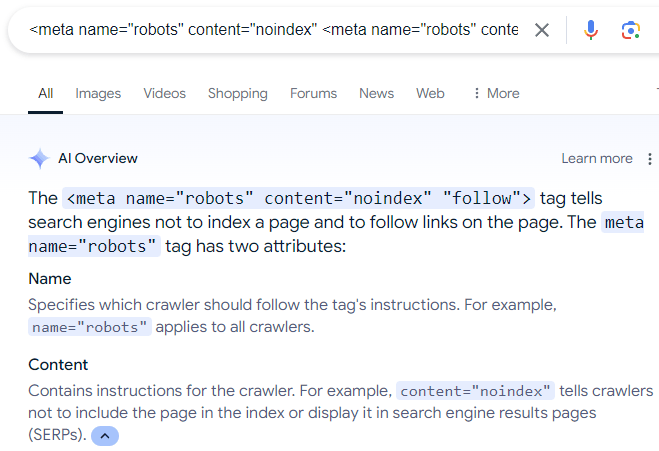
A final word about blocking search engines from crawling web pages. A surprisingly common mistake that I see some site owners do is that they use the robots meta directive to tell Google to not index a web page but to crawl the links on the web page.
The (erroneous) directive looks like this:
There is a lot of misinformation online that recommends the above meta description, which is even reflected in Google’s AI Overviews:
Screenshot Of AI Overviews
Of course, the above robots directive does not work because, as Mueller explains, if a person (or search engine) can’t see a web page then the person (or search engine) can’t follow the links that are on the web page.
Also, while there is a “nofollow” directive rule that can be used to make a search engine crawler ignore links on a web page, there is no “follow” directive that forces a search engine crawler to crawl all the links on a web page. Following links is a default that a search engine can decide for themselves.
Having trouble getting your website mentioned on big news sites to boost your search engine rankings? You’re not the only one.
Many businesses find it hard to get these links. But what if you could do this regularly, every month?
The trick is to use studies based on current trends that journalists find interesting.
Sign up for our webinar with PureLinq on July 31, 2024, where we’ll discuss “Hacks To Earn 1000+ High Authority Links From US Media With Digital PR.”
Why Attend This Webinar?
Getting authoritative websites to link to yours is key to showing up high in search results. But it’s getting harder to catch the attention of busy reporters and editors.
That’s why creating interesting reports based on data is so useful.
If you make content that fits what people are discussing right now, reporters will want to share your stories.
This can lead to many respected websites mentioning and linking to you, which can help your website rank better in searches.
What You’ll Learn
Join Kevin Rowe as he presents real examples of PR campaigns that have received extensive media attention.
You’ll learn about:
Spotting Hot Topics: How to find popular themes in the media that you can use for multiple successful PR campaigns.
The Go-To Formula: We’ll show you a simple research method that’s been super effective in getting media coverage and how you can use it.
Getting Journalists Interested: Tips on finding and reaching out to reporters who will likely share your information.
Quick & Effective Research: How to create studies that journalists will want to cover in just 1-4 weeks, sometimes only needing 5-10 hours of work.
Success Stories: We’ll examine three examples of this approach, which has generated over 1,000 links from major US news outlets.
One of the most valuable parts of this webinar is learning how achievable these results are.
Rowe will share his secrets for identifying useful media trends and creating a media-ready research study with minimal time investment.
These are practical, actionable strategies you can implement immediately after the webinar.
Who Should Attend?
This presentation is perfect for:
SEO professionals looking to enhance their link-building strategies.
Public relations folks trying to get more news outlets and websites to cover their stories.
Writers who want to make content that people will share and link to.
Anyone who wants their brand to be more visible and respected online.
Live Q&A: Get Your Questions Answered
After the presentation, we’ll have a live question-and-answer session.
You’ll have the opportunity to ask Kevin Rowe your questions and receive advice that fits your situation. Rowe is an expert at attracting brand attention online and making websites rank higher in searches.
Join Us Live
This is your chance to improve your online marketing and search engine rankings. Join us on July 31 to find out how to get trusted websites to link to you regularly.
No problem if you can’t make it! Sign up anyway, and we’ll email you a video of the event to watch when it suits you.
Register today to learn how to use data to boost your online presence and improve your search rankings!
In an SEO Office Hours podcast, Google’s John Mueller answered the question of how to get more product rich results to show in the search results. John listed four things that are important in order to get rich results for product listings.
Product Rich Results
Product search queries can trigger rich results that presents products in a visually rich manner that Google refers to as Search Experiences.
Google product search experiences can include:
Product snippets that include ratings, reviews, price, and whether availability information.
Visual representations of products
Knowledge panel with vendors and products
Product images in Google Images search results
Result enhancements (reviews, shipping information, etc.)
John Mueller Answers Question About Product Rich Results
The person asking the question wanted to know how to get more “product snippets in Search Console” which confused Mueller because product snippets are displayed in the search results, not search console. So Mueller answered the question in the context of search results.
This is the question:
“How to increase the number of product snippets in Search Console?”
John Mueller explained that there were four things to get right in order to qualify for product rich results.
Mueller answered:
“It’s not really clear to me what exactly you mean… If you’re asking about product rich results, these are tied to the pages that are indexed for your site. And that’s not something which you can change by force.
It requires that the page be indexed, that the page has valid structured data on it, and that our systems have determined that it’s worth showing this structured data.”
So, according to John Mueller, these are the four things to get right to qualify for product rich results:
Page must be indexed
The page has valid structured data
Google’s systems determine that it’s worth showing
Submit a product feed
1. Page Indexing
Getting a page indexed (and ranked) can be difficult for some search queries. People who come to me with this kind of problem tend to have content quality issues that can be traced back to using outdated SEO strategies like copying what’s already ranking in the SERPs but making it “better” which often results in content that’s not meaningfully different than what Google is already ranking.
Content quality on the page level and on the site level are important. Focusing on content that has that little extra, like better images, helpful graphs, or content that’s more concise, all of that is so much better than focusing on keywords and entities.
2. Valid Structured Data
This is another area that explains why some sites lose their rich results or fail to get them altogether. Google changes their structured data recommendations and usually the structured data plugins will update to conform to the new guidelines. But I’ve seen examples where that doesn’t happen. So when there’s a problem with rich results, go to Google’s Rich Results Test tool first.
It’s also important to be aware that getting the structured data correct is not a guarantee that Google will show rich results for that page, it’s just makes the page qualified to show in the rich results.
3. How Does Google Determine Something’s Worth Showing?
This is the part that Google doesn’t talk about. But if you’re read about reviews systems, quality guidelines, Google’s SEO starter guide and maybe even the Search Quality Raters Guidelines then that should be more than enough information to inform any question about content quality.
Google doesn’t say why they may decline to show an image thumbnail as a rich result or why they’ll not show a product in the rich results. My opinion is that debugging the issue is more productive if the problem is reconceptualized as a content quality issue. Images are content, if it’s on the page, even if it’s not text, it’s content. Evaluate all of the content in terms of how the images or products or whatever might look like in the search results. Does it look good as a thumbnail? Is the content distinctive or helpful or useful, etc.?
4. Merchant Feed
John Mueller lastly said that the merchant feed is another way to get products from a website to show as a rich result in Google.
Mueller answered:
“There’s also the possibility to submit a feed to your merchant center account, to show products there. This is somewhat separate, and has different requirements which I’ll link to. Often a CMS or platform will take care of these things for you, which makes it a bit easier.”
While John Mueller listed four ways to get product rich results, Google Search Experiences, it’s not always as easy as 1, 2, 3, and 4. There are always nuances to be aware of.
Listen to the Google SEO Office Hours podcast at the 7:00 minute mark:
In its earlier days, Google relied heavily on plain text data and backlinks to establish rankings through periodic monthly refreshes (then known as the Google Dance).
Since those days, Google Search has become a sophisticated product with a plethora of algorithms designed to promote content and results that meet a user’s needs.
To a certain extent, a lot of SEO is a numbers game. We focus on:
We might also include third-party metrics, such as search visibility or the best attempt at mimicking PageRank. But for the most part, we default to a core set of quantitative metrics.
That’s because these metrics are what we are typically judged by as SEO professionals – and they can be measured across competitor websites (through third-party tools).
Clients want to rank higher and see their organic traffic increasing, and by association, leads and sales will also improve.
When we choose target keywords, there is the tendency and appeal to go after those with the highest search volumes, but much more important than the keyword’s search volume is the intent behind it.
There is also a tendency to discount any search phrase or keyword that has a low or no search volume based on the fallacy of it offering no “SEO value,” but this is very niche-dependent. It requires an overlay of business intelligence to understand if these terms have no actual value.
This is a key part of the equation often overlooked when producing content. It’s great that you want to rank for a specific term, but the content has to be relevant and satisfy the user intent.
The Science Behind User Intent
In 2006, a study conducted by the University of Hong Kong found that at a primary level, search intent can be segmented into two search goals.
A user is specifically looking to find information relating to the keyword(s) they have used.
A user is looking for more general information about a topic.
A further generalization can be made, and intentions can be split into how specific the searcher is and how exhaustive the searcher is.
Specific users have a narrow search intent and don’t deviate from this, whereas an exhaustive user may have a wider scope around a specific topic(s).
Lagun and Agichtein (2014) explored the complexity and extent of the “task” users aim to achieve when they go online. They used eye-tracking and cursor movements to better understand user satisfaction and engagement with search results pages.
The study found significant variations in user attention patterns based on task complexity (the level of cognitive load required to complete the task) and the search domain (e.g., results relating to health and finance may be more heavily scrutinized than sneaker shopping).
Search engines are also making strides in understanding both search intents. Google’s Hummingbird and Yandex’s Korolyov and Vega are just two examples.
Google & Search Intent
Many studies have been conducted to understand the intent behind a query, and this is reflected by the types of results that Google displays.
In the presentation, Haahr explains basic theories on how a user searching for a specific store (e.g., Walmart) is most likely to look for their nearest Walmart store, not the brand’s head office in Arkansas.
The Search Quality Rating Guidelines echo this in Section 3, detailing the “Needs Met Rating Guidelines” and how to use them for content.
The scale ranges from Fully Meets (FullyM) to Fails to Meet (FailsM) and has flags for whether the content is porn, foreign language, not loading, or is upsetting/offensive.
The raters are critical not only of the websites they display in web results but also of the special content result blocks (SCRB), a.k.a. Rich Snippets, and other search features that appear in addition to the “10 blue links.”
One of the more interesting sections of these guidelines is 13.2.2, titled “Examples of Queries that Cannot Have Fully Meets Results.”
Within this section, Google details that “Ambiguous queries without a clear user intent or dominant interpretation” cannot achieve a Fully Meets rating.
Its example is the query [ADA], which could be the American Diabetes Association, the American Dental Association, or a programming language devised in 1980. As there is no dominant interpretation of the internet or the query, no definitive answer can be given.
A 2011 paper looked at the potential for using community-based question-answering (CQA) platforms to improve user satisfaction in web search results.
The study collected data from an unnamed search engine and an unnamed CQA website, and used machine learning models to predict user satisfaction. Data points used to try and predict satisfaction included:
Textual features (e.g., length of the answer, readability).
User/author features (e.g., reputation score of the answerer).
Community features (e.g., number of votes).
The study found that factors such as the clarity and completeness of answers were crucial predictors of user satisfaction.
Due to the diversity of language, many queries have more than one meaning. For example, [apple] can either be a consumer electrical goods brand or a fruit.
Google handles this issue by classifying the query by its interpretation. The interpretation of the query can then be used to define intent.
Query interpretations are classified into the following three areas:
Dominant Interpretations
The dominant interpretation is what most users mean when they search for a specific query.
Google search raters are told explicitly that the dominant interpretation should be clear, even more so after further online research.
Common Interpretations
Any given query can have multiple common interpretations. Google’s example in its guidelines is [mercury] – which can mean either the planet or the element.
In this instance, Google can’t provide a result that “Fully Meets” a user’s search intent, but instead, it produces results varying in both interpretation and intent (to cover all bases).
Minor Interpretations
A lot of queries will also have less common interpretations, and these can often be locale-dependent.
It can also be possible for minor interpretations to become dominant interpretations should real-world events force enough public interest in the changed interpretation.
Do – Know – Go
Do, Know, Go is a concept that search queries can be segmented into three categories: Do, Know, and Go.
These classifications then, to an extent, determine the type of results that Google delivers to its users.
Do (Transactional Queries)
When users perform a “do” query, they want to achieve a specific action, such as purchasing a specific product or booking a service. This is important to ecommerce websites, for example, where a user may be looking for a specific brand or item.
Device action queries are also a form of a “do” query and are becoming more and more important, given how we interact with our smartphones and other technologies.
In 2007, Apple launched the first iPhone, which changed our relationship with handheld devices. The smartphone meant more than just a phone. It opened our access to the internet on our terms.
Obviously, before the iPhone, we had 1G, 2G, and WAP – but it was really 3G that emerged around 2003 and the birth of widgets and apps that changed our behaviors, increasing internet accessibility and availability to large numbers of users.
Device Action Queries & Mobile Search
In May 2015, mobile search surpassed desktop search globally in the greater majority of verticals. Fast forward to 2024, 59.89% of traffic comes from mobile and tablet devices.
Increased internet accessibility also means that we can perform searches more frequently based on real-time events.
As a result, Google currently estimates that 15% of the queries it handles daily are new and have never been seen before.
This is in part due to the new accessibility that the world has and the increasing smartphone and internet penetration rates seen globally.
Mobile devices are gaining increasing ground not only in how we search but also in how we interact with the online sphere. In fact, 95.6% of global internet users aged 16-64 access the internet through a mobile device.
One key understanding of mobile search is that users may not also satisfy their query via this device.
In my experience, working across a number of verticals, a lot of mobile search queries tend to be more focused on research and informational, moving to a desktop or tablet at a later date to complete a purchase.
According to Google’s Search Quality Rating Guidelines:
“Because mobile phones can be difficult to use, SCRBs can help mobile phone users accomplish their tasks very quickly, especially for certain Know Simple, Visit in Person, and Do queries.”
Mobile is also a big part of Google Search Quality Guidelines, with the entirety of Section 2 dedicated to it.
Know (Informational Queries)
A “know” query is an informational query, where the user wants to learn about a particular subject.
Know queries are closely linked to micro-moments.
In September 2015, Google released a guide to micro-moments, which are happening due to increased smartphone penetration and internet accessibility.
Micro-moments occur when a user needs to satisfy a specific query there and then, and these often carry a time factor, such as checking train times or stock prices.
Because users can now access the internet wherever, whenever, there is the expectation that brands and real-time information are also accessible, wherever, whenever.
Micro-moments are also evolving. Know queries can vary from simple questions like [how old is tom cruise] to broader and more complex queries that don’t always have a simple answer.
Know queries are almost always informational in intent. They are neither commercial nor transactional in nature. While there may be an aspect of product research, the user is not yet at the transactional stage.
A pure informational query can range from [how long does it take to drive to London] to [gabriel macht imdb].
To a certain extent, these aren’t seen in the same importance as direct transactional or commercial queries – especially by ecommerce websites. Still, they provide user value, which is what Google looks for.
For example, if a user wants to go on holiday, they may start with searching for [winter sun holidays europe] and then narrow down to specific destinations.
Users will research the destination further, and if your website provides them with the information they’re looking for, there is a chance they will also inquire with you.
Featured Snippets & Clickless Searches
Rich snippets and special content results blocks (i.e., featured snippets) have been a main part of SEO for a while now, and we know that appearing in an SCRB area can drive huge volumes of traffic to your website.
On the other hand, appearing in position zero can mean that a user won’t click through to your website, meaning you won’t get the traffic and the chance to have them explore the website or count towards ad impressions.
That being said, appearing in these positions is powerful in terms of click-through rate and can be a great opportunity to introduce new users to your brand/website.
Go (Navigational Queries)
“Go” queries are typically brand or known entity queries, where a user wants to go to a specific website or location.
If a user is specifically searching for Kroger, serving them Food Lion as a result wouldn’t meet their needs as closely.
Likewise, if your client wants to rank for a competitor brand term, you need to make them question why Google would show their site when the user is clearly looking for the competitor.
This is also a consideration to make when going through rebrand migrations, as well as what connotations and intent the new term has.
Defining Intent Is One Thing, User Journeys Another
For a long time, the customer journey has been a staple activity in planning and developing both marketing campaigns and websites.
While mapping out personas and planning how users navigate the website is important, it’s also necessary to understand how users search and what stage of their journey they are at.
The word journey often sparks connotations of a straight path, and a lot of basic user journeys usually follow the path of landing page > form or homepage > product page > form. This same thinking is how we tend to map website architecture.
We assume that users know exactly what they want to do, but mobile and voice search have introduced new dynamics to our daily lives, shaping our day-to-day decisions and behaviors almost overnight.
These micro-moments directly question our understanding of the user journey. Users no longer search in a single manner, and because of how Google has developed in recent years, there is no single search results page.
We can determine the stage the user is at through the search results that Google displays and by analyzing proprietary data from Google Search Console, Bing Webmaster Tools, and Yandex Metrica.
The Intent Can Change, Results & Relevancy Can, Too
Another important thing to remember is that search intent and the results that Google displays can also change – quickly.
An example of this was the Dyn DDoS attack that happened in October 2016.
Before the attack, searching for terms like [ddos] or [dns] produced results from companies like Incapsula, Sucuri, and Cloudflare.
These results were all technical and not appropriate for the newfound audience discovering and investigating these terms.
What was once a query with a commercial or transactional intent quickly became informational. Within 12 hours of the attack, the search results changed and became news results and blog articles explaining how a DDoS attack works.
This is why it’s important to not only optimize for keywords that drive converting traffic, but also those that can provide user value and topical relevance to the domain.
While intent can change during a news cycle, the Dyn DDoS attack and its impact on search results also teach us that – with sufficient user demand and traction – the change in intent can become permanent.
How Could AI Change Intent & User Search Behavior
After reviewing client Search Console profiles and looking at keyword trends, we saw a pattern emerging over the past year.
With a home electronics client, the number of queries starting with how/what/does has increased, expanding on existing query sets.
For example, where historically the query would be [manufacture model feature], there is an increase in [does manufacturer model have feature].
For years, a regular search query has followed a fairly uniform pattern. From this pattern, Google has learned how to identify and determine intent classifiers.
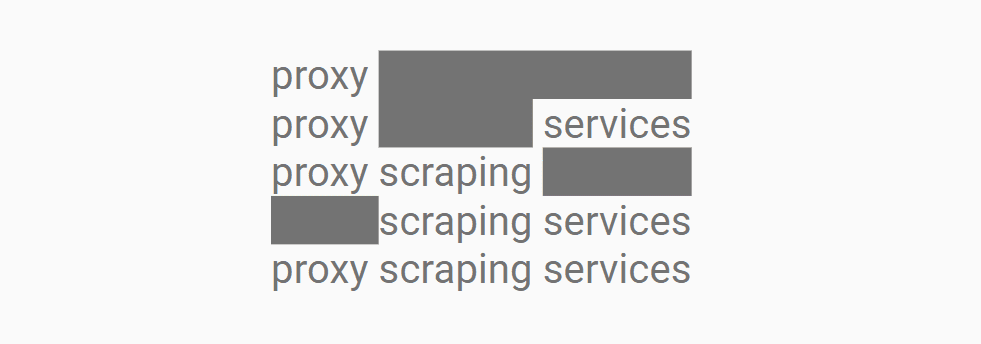
To do this, Google must annotate the query, and an annotator has a number of elements from a language identifier, stop-word remover, confidence values, and entity identifier.
This is because, as the above image demonstrates, the query [proxy scraping services] also contains a number of other queries and permutations. While these haven’t been explicitly searched for, the results for [proxy services], [scraping services], and [proxy scraping services] could have significant levels of overlap and burden the resources required to return three separate results as one.
This matters because AI and changing technologies have the potential to change how users perform searches. It is in part because we need to provide additional context to LLMs to satisfy our needs.
As we need to be explicit in what we’re trying to achieve, our language naturally becomes more conversational and expansive, as covered in Vincent Terrasi’s ChatGPT prompt guide.
If this trend becomes mainstream, how Google and search engines process the change in query type could also change current SERP structures.
Machine Learning & Intent Classification
The other side to this coin is how websites producing different (and more) content can influence and change search behavior.
How platforms market new tools and features will also influence these changes. Google’s big, celebrity-backed campaigns for Circle to Search are a good example of this.
As machine learning becomes more effective over time – and this, coupled with other Google’s algorithms, can change search results pages.
This may also lead Google to experiment with SCRBs and other SERP features in different verticals, such as financial product comparisons, real estate, or further strides into automotive.
Google updated their documentation for the Google Labs Google Notes experiment to remind users that Notes will go away at the end of July 2024 and showed how to download notes content, with a final deadline beyond which it will be impossible to retrieve it.
Google Notes
Notes is an experimental feature in Google Labs that lets users annotate search results with their ideas and experiences. The idea behind it is to make search more helpful and improve the quality of the search results through the opinions and insights of real people. It’s almost like Wikipedia where members of the public curate topics.
Google eventually decided that the Notes feature had undergone enough testing and they decided that their are shutting down Google Notes, a decision announced in April 2024.
Update To Documentation
The official documentation was updated to make it clear that Notes is shutting down at the end of July and that users who wish to download their data can do us with their Google Takeout, a Google Accounts feature that allows users to export their content from their Google Account. Google Takeout allows Google Account holders to export data from Google Calendar, Google Drive, Google Photos, a total of up to 56 kinds of content can be exported.
Google’s Search Central document changelog explains:
“A note about Notes
What: Added a note about the status of Notes to the Notes documentation.
Why: Notes is winding down at the end of July 2024.”
This is the new announcement:
“Notes is winding down at the end of July 2024. If you created a note, your notes content is available to download using Google Takeout through the end of August 2024.”
Check out the updated Google Notes documentation here:
Managed WordPress web host WP Engine announced that they are acquiring NitroPack, a leading SaaS website performance optimization solution. The acquisition of of NitroPack by WP Engine demonstrates their continued focus on improving site performance for clients.
NitroPack
NitroPack is a relatively pricey but well regarded site performance solution that has for years been known as a leader. WP Engine and NitroPack formed a partnership in 2023 that would power WP Engine’s PageSpeed Boost product that is offered internally to customers. The NitroPack team will now become integrated within WP Engine this month, July.
There are no immediate plans to change the pricing options for NitroPack so it’s safe to say that it will continue to be a standalone product. WP Engine commented to Search Engine Journal that there will be no immediate changes in services pricing or billing for current NitroPack customers.
“We have no immediate plans to change the pricing options for NitroPack products.
Today NitroPack works with page builders and other hosting providers and that will continue to be available. In the coming months, we will continue to leverage NitroPack to enhance additional functionality to Page Speed Boost for WP Engine’s customers.”
What the acquisition means for WP Engine customers is that WP Engine will continue to leverage NitroPack’s technology to add even more functionalities to their PageSpeed Boost product.
The WP Engine spokesperson said that these new integrations will be coming to WP Engine PageSpeed Boost in a matter of months.
They shared:
“In the coming months, we will continue to leverage NitroPack’s strength to enhance additional functionality to Page Speed Boost.”
Google’s Gary Illyes answered a question about a ranking preference given to sites that use country level domain names and explained how that compares to non-country domain names. The question occurred in the SEO Office Hours podcast.
ccTLD Aka Country Code Domain Names
Domain names that are specific to countries are called ccTLDs (Country Code Top Level Domains). These are domain names that target specific countries. Examples of these ccTLDs are .de (Germany), .in (India) and .kr (Korea). These kinds of domain names don’t target specific languages, they only target Internet users in a specific country.
Some ccTLDs are treated by Google for ranking purposes as if they are regular Generic Top Level Domains (gTLDs), which are domains that are not specific to a country. A popular example is .io, which technically is a ccTLD (pertaining to the British Indian Ocean Territory) but because of how it’s used, Google treats it like a regular gTLD (generic top level domain).
Ranking Boosts For ccTLDs
The question that Gary Illyes answered was about the ranking boost given to ccTLDs.
This is the question:
“When a Korean person searches Google in Korean, does a com.kr domain or a .com domain do better?”
Gary Illyes answered:
“Good question. Generally speaking the local domain names, in your case .kr, tend to do better because Google Search promotes content local to the user.”
A lot of people want to rank better in a specific country and one of the best practices for doing that is to register a domain name that is specific to the country. Google will give it a ranking boost over other sites that are not explicitly targeting a specific country.
Gary continued his answer by explaining the ranking boost of a ccTLD over a generic top level domain (gTLD), like .com, .net and so on.
This is Gary’s explanation:
“That’s not to say that a .com domain can’t do well, it can, but generally .kr has a little more benefit, albeit not too much. “
Targeting Country Versus Targeting Language
Lastly, Gary mentioned that targeting a user’s language has more impact than the domain name.
He continued his answer:
“If the language of a site matches the user’s query language, that probably has more impact than the domain name itself.”
A benefit of targeting a language is that a site is able regardless of the country that a user is searching from whereas the country code top level domain name targets a country.
Something that Gary didn’t mention is that using a ccTLD can inspire user trust from searchers whose country matches the country that the domain name is targeting and because of that searchers on Google may be more inclined to click on a search result that uses the geotargeted ccTLD.
If a user is in Korea they may feel that a .kr domain is meant specifically for them. If a searcher is in Australia they may feel more inclined to click on a .au domain name.
Listen to the podcast answer from the 3:35 minute mark:
From SEO to FID to INP – these are some of the more common ones you will run into when it comes to page speed.
There’s a new metric in the mix: INP, which stands for Interaction to Next Paint. It refers to how the page responds to specific user interactions and is measured by Google Chrome’s lab data and field data.
What, Exactly, Is Interaction To Next Paint?
Interaction to Next Paint, or INP, is a new Core Web Vitals metric designed to represent the overall interaction delay of a page throughout the user journey.
For example, when you click the Add to Cart button on a product page, it measures how long it takes for the button’s visual state to update, such as changing the color of the button on click.
If you have heavy scripts running that take a long time to complete, they may cause the page to freeze temporarily, negatively impacting the INP metric.
Here is the example video illustrating how it looks in real life:
Notice how the first button responds visually instantly, whereas it takes a couple of seconds for the second button to update its visual state.
How Is INP Different From FID?
The main difference between INP and First Input Delay, or FID, is that FID considers only the first interaction on the page. It measures the input delay metric only and doesn’t consider how long it takes for the browser to respond to the interaction.
In contrast, INP considers all page interactions and measures the time browsers need to process them. INP, however, takes into account the following types of interactions:
Any mouse click of an interactive element.
Any tap of an interactive element on any device that includes a touchscreen.
The press of a key on a physical or onscreen keyboard.
What Is A Good INP Value?
According to Google, a good INP value is around 200 milliseconds or less. It has the following thresholds:
Threshold Value
Description
200
Good responsiveness.
Above 200 milliseconds and up to 500 milliseconds
Moderate and needs improvement.
Above 500 milliseconds
Poor responsiveness.
Google also notes that INP is still experimental and that the guidance it recommends regarding this metric is likely to change.
How Is INP Measured?
Google measures INP from Chrome browsers anonymously from a sample of the single longest interactions that happen when a user visits the page.
Each interaction has a few phases: presentation time, processing time, and input delay. The callback of associated events contains the total time involved for all three phases to execute.
If a page has fewer than 50 total interactions, INP considers the interaction with the absolute worst delay; if it has over 50 interactions, it ignores the longest interactions per 50 interactions.
When the user leaves the page, these measurements are then sent to the Chrome User Experience Report called CrUX, which aggregates the performance data to provide insights into real-world user experiences, known as field data.
Long tasks that can block the main thread, delaying user interactions.
Synchronous event listeners on click events, as we saw in the example video above.
Changes to the DOM cause multiple reflows and repaints, which usually happens when the DOM size is too large ( > 1,500 HTML elements).
How To Troubleshoot INP Issues?
First, read our guide on how to measure CWV metrics and try the troubleshooting techniques offered there. But if that still doesn’t help you find what interactions cause high INP, this is where the “Performance” report of the Chrome (or, better, Canary) browser can help.
Go to the webpage you want to analyze.
Open DevTools of your Canary browser, which doesn’t have browser extensions (usually by pressing F12 or Ctrl+Shift+I).
Switch to the Performance tab.
Disable cache from the Network tab.
Choose mobile emulator.
Click the Record button and interact with the page elements as you normally would.
Stop the recording once you’ve captured the interaction you’re interested in.
Throttle the CPU by 4x using the “slowdown” dropdown to simulate average mobile devices and choose a 4G network, which is used in 90% of mobile devices when users are outdoors. If you don’t change this setting, you will run your simulation using your PC’s powerful CPU, which is not equivalent to mobile devices.
It is a highly important nuance since Google uses field data gathered from real users’ devices. You may not face INP issues with a powerful device – that is a tricky point that makes it hard to debug INP. By choosing these settings, you bring your emulator state as close as possible to the real device’s state.
Here is a video guide that shows the whole process. I highly recommend you try this as you read the article to gain experience.
What we have spotted in the video is that long tasks cause interaction to take longer and a list of JavaScript files that are responsible for those tasks.
If you expand the Interactions section, you can see a detailed breakdown of the long task associated with that interaction, and clicking on those script URLs will open JavaScript code lines that are responsible for the delay, which you can use to optimize your code.
Performance report: main thread
Performance report: long task example.
In the Source tab, it shows delays caused by specific lines of JavaScript code.
A total of 321 ms long interaction consists of:
Input delay: 207 ms.
Processing duration: 102 ms.
Presentation delay: 12 ms.
Below in the main thread timeline, you’ll see a long red bar representing the total duration of the long task.
Underneath the long red taskbar, you can see a yellow bar labeled “Evaluate Script,” indicating that the long task was primarily caused by JavaScript execution.
In the first screenshot time distance between (point 1) and (point 2) is a delay caused by a red long task because of script evaluation.
What Is Script Evaluation?
Script evaluation is a necessary step for JavaScript execution. During this crucial stage, the browser executes the code line by line, which includes assigning values to variables, defining functions, and registering event listeners.
Users might interact with a partially rendered page while JavaScript files are still being loaded, parsed, compiled, and evaluated.
When a user interacts with an element (clicks, taps, etc.) and the browser is in the stage of evaluating a script that contains an event listener attached to the interaction, it may delay the interaction until the script evaluation is complete.
This ensures that the event listener is properly registered and can respond to the interaction.
In the screenshot (point 2), the 207 ms delay likely occurred because the browser was still evaluating the script that contained the event listener for the click.
This is where Total Blocking Time (TBT) comes in, which measures the total amount of time that long tasks (longer than 50 ms) block the main thread until the page becomes interactive.
If that time is long and users interact with the website as soon as the page renders, the browser may not be able to respond promptly to the user interaction.
It is not a part of CWV metrics but often correlates with high INPs. So, in order to optimize for the INP metric, you should aim to lower your TBT.
What Are Common JavaScripts That Cause High TBT?
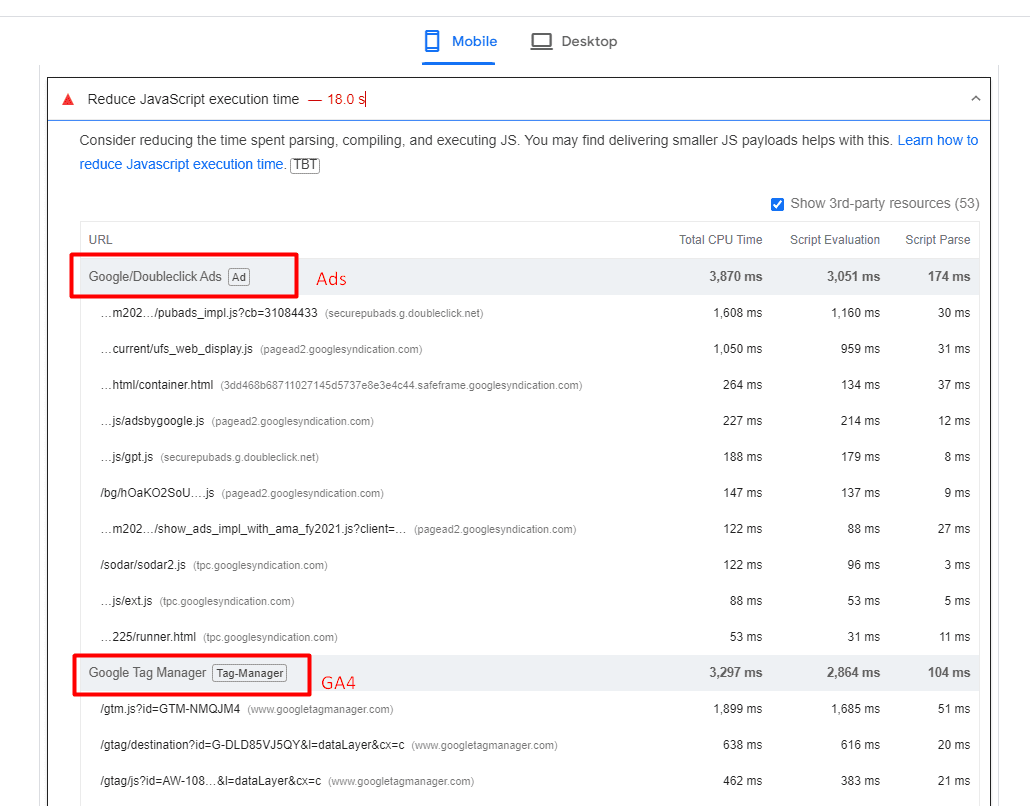
Analytics scripts – such as Google Analytics 4, tracking pixels, google re-captcha, or AdSense ads – usually cause high script evaluation time, thus contributing to TBT.
An example of a website where ads and analytics scripts cause high JavaScript execution time.
One strategy you may want to implement to reduce TBT is to delay the loading of non-essential scripts until after the initial page content has finished loading.
Another important point is that when delaying scripts, it’s essential to prioritize them based on their impact on user experience. Critical scripts (e.g., those essential for key interactions) should be loaded earlier than less critical ones.
Improving Your INP Is Not A Silver Bullet
It’s important to note that improving your INP is not a silver bullet that guarantees instant SEO success.
Instead, it is one item among many that may need to be completed as part of a batch of quality changes that can help make a difference in your overall SEO performance.

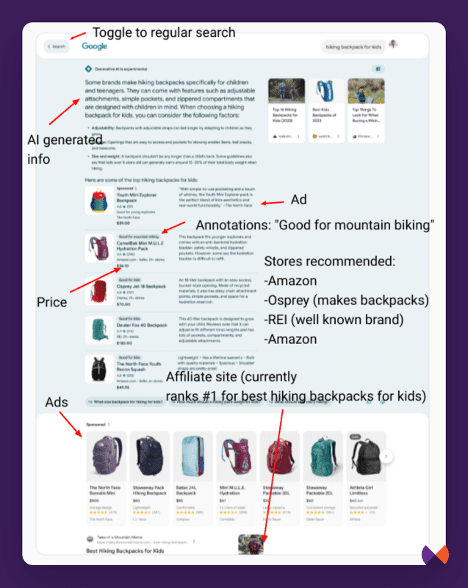 Image from author, July 2024
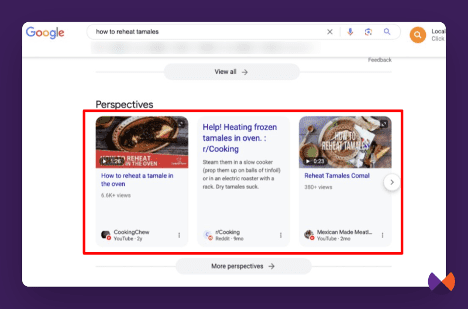 Image from author, July 2024
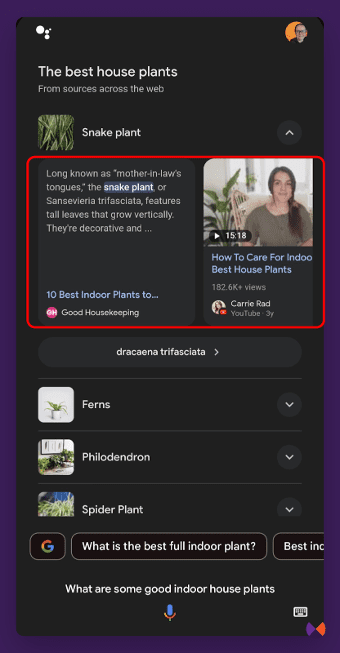 Image from author, July 2024