Google Ends Continuous Scroll SERPS: What It Really Means via @sejournal, @martinibuster

Google announced that they are ending continuous scrolling in the search results (SERPs) as a way to speed up the serving of search results. Many in the search marketing community question that reason and raise questions about it. What’s really going on here?

Continuous Scroll In Search Results

Infinite scroll is a way of showing content that was popularized by social media in which users can aimlessly navigate in a state of constant discovery. It’s purposeless navigation.

In 2021 Google adopted Continuous Scrolling in the mobile search results, which showed up to four pages worth of web results before requiring users to click a link to see more. This change was  welcomed by site owners and the search marketing community because it created the possibility of exposing more sites to searchers.

No More Continuous Scroll

The Verge recently published a report that Google has decided to remove continuous search in order to be able to serve faster search results. The change happens first to desktop search results to be followed later by a change to the mobile search results.

The Verge reported:

“In its place on desktop will be Google’s classic pagination bar, allowing users to jump to a specific page of search results or simply click “Next” to see the next page. On mobile, a “More results” button will be shown at the bottom of a search to load the next page.”

What’s The Real Impact?

While Google claims that the change is to help Google serve faster search results, many in the search marketing community are skeptical about the impact and with good reason. The U.S. Department of Justice released emails showing Google’s top management colluding about ways to show more advertising in the search results.

Brett Tabke, founder of Pubcon search marketing conference (and the person who invented the acronym SERPs), offered his opinion about the change to continuous scroll:

“It effectively boxes more clicks on to page one. That will result in a higher percentage of clicks going to Ads and Google properties. I think it is more evidence that Google is on a path to a new version of portal and away from search. Organic search itself will move to page 2, and I believe eventually to a new domain.

They will move away from organic results on page one. So what is left?

1) Google Ads

2) Google property links

3) Google Overviews vomit and

4) a link to page two.

They are on a path to fulfilling all general “searches” with their own responses in some form or another. When they don’t have a perfect response, maybe they will do “people also ask” and those lead back to a SERP where they can fulfill the search with their own properties and responses.”

Brett is not alone in his skepticism.

In what can be seen as a general sign of disbelief of Google’s motivations, many people have posted their skeptical opinions on X (formerly Twitter).

One person tweeted:

“I wouldn’t be shocked if it was hurting bottom-of-the-page / top of page 2+ ad clicks”

Another tweet reflected the common perception that Google shows less and less links to independent websites:

“Why not just show one page with Google AI, Reddit and the usual culprits? Who clicks on page 2 anyway?”

Lastly, a tweet from an anonymous account nicknamed “Google Honesty” offered a harsh view of Google’s motivations.

They tweeted:

“Continuous scroll allows everyone to be on page one.

We prefer to crush your spirit.

It’s far more humiliating to be on page 6.

Pagination in search allows this ✅”

Good For Goose. Not For Gander?

While there are many voices who see dark reasons for Google’s decision to end continuous scrolling in the SERPs, there are some who see it differently.

Kevin Indig tweeted about an uncomfortable truth about continuous scrolling which is that they are not universally a good feature.

Kevin tweeted:

“Paginated SERPs are back!

I’ve found continuous scroll to be a subpar solution for websites as well.”

Continuous scrolling is a useful feature for social media but when it comes to other kinds of websites, it’s the answer to a question that nobody is asking. Infinite scrolling is generally a poor user experience outside of the context of social media.

What’s kind of hard to ignore is that (arguably) most site owners and search marketers agree that it’s a poor user experience, inappropriate for many contexts or in some cases problematic for SEO.

So in a way, one should step back and at least consider the possibility that infinite scroll is great within the context of social media where aimless browsing and interaction makes sense but maybe infinite scrolling makes less sense within the context of purposeful browsing like in an ecommerce site, an informational site, or even in a search result. Purposeful browsing demands purposeful navigation, not aimless navigation.

Seen in that light, perhaps it might have been more believable had Google insisted that continuous scrolling was a poor user experience that didn’t fit the context of search results. Google’s  chosen explanation is not going over very well.

Featured Image by Shutterstock/Ljupco Smokovski

Google Debunks SEO Myth: Branded Keywords Won’t Hurt Rankings via @sejournal, @MattGSouthern

In a recent exchange, Google’s Search Liaison addressed concerns about using branded keywords in articles.

The discussion, which unfolded over several tweets, centered on the impact of mentioning specific brand names in product reviews and other content.

Jake Boly, a content creator, initially asked why his articles featuring unique content consistently ranked on pages 3-4 of search results, speculating that it might be due to the presence of branded terms.

This sparked a debate about SEO best practices and Google’s ranking algorithms.

Conflicting Advice from SEO Experts

Taleb Kabbara, an SEO professional, suggested mentioning branded keywords could harm rankings, advising against using terms like “new balance” in review titles.

He claimed to have audited numerous sites and observed negative ranking impacts due to such keywords.

Google’s Official Response

Google’s Search Liaison refuted these claims.

In a detailed response, they stated:

“No, you shouldn’t be afraid to mention the brand name of something you are reviewing. It’s literally what readers would expect you to do, and our systems are trying to reward things that are helpful to readers.”

The Google representative explained that writing a review without mentioning the product being reviewed would be counterintuitive.

They emphasized that Google’s systems aim to find and rank content that’s genuinely useful to readers, regardless of using branded terms.

Evidence Supporting Google’s Stance

To further support their point, the Liaison provided evidence from a specific search query for “new balance minimus tr v2 review.”

They highlighted that the top result for this query was not from a big brand but from an individual reviewer, demonstrating that Google can rank independent content when it’s relevant and helpful.

Reaffirming Best Practices

The conversation took an additional turn when Mike Hardaker shared advice he had received about no longer ranking for branded keywords. Google’s Search Liaison responded succinctly, “Yeah, don’t do that,” reaffirming their stance against avoiding branded terms in content.

Why SEJ Cares

This exchange clarifies a misconception with direct communication from Google on its approach to ranking content containing branded keywords.

It reminds publishers to write the best content for readers rather than attempt to game the system by avoiding specific terms.


Featured Image: Jack_the_sparow/Shutterstock

Data-Driven Content Strategy: Boost Google Rankings With Real Audience Insights via @sejournal, @CallRail

Now, what about the content of the actual calls? Well, you can use that, too.

Let dive into how you can use call analysis to further inform your strategy.

How To Analyze Your Call Data

The insights you collect from customer phone interactions can have a game-changing impact on your business.

But you want to make sure the effort required to dig into those calls is worth it for your team.

This is where AI and machine learning technology can be utilized effectively to streamline your process and save time.

For example, Conversation Intelligence is an AI-powered tool by CallRail that constantly records, transcribes, and analyzes each inbound and outbound call.

With transcriptions that have near-human level accuracy, Conversation Intelligence goes a step further by spotting keywords, tagging calls automatically, and qualifying leads with powerful automation rules.

Plus, with multi-conversation insights, you can easily transform countless conversations into actionable insights at scale.

Not only does this analysis unlock deeper insights to help you catch customer trends and spot long-term shifts, but it also tells you what you should focus on in your content.

2. Website Form Submissions

Another effective way to gather essential audience insights is through website form tracking.

Online forms allow you to collect valuable data directly from users, such as their contact information, preferences, and interests.

When this data is paired with deeper analytics, you can gain a clear understanding of what drives the most qualified leads for your business.

With Form Tracking, you can find out exactly which ad or keyword made someone click “submit” on your form.

Launched last year by CallRail, this tool allows you to build custom forms or integrate existing ones, pairing the data with inbound call conversions for a holistic view of your marketing efforts.

Combining Call Tracking And Form Tracking

Leads often connect with businesses through multiple channels, so focusing on just one source isn’t really enough.

By using Call Tracking and Form Tracking together, you get a comprehensive overview of your leads’ entire customer journey.

Both of these tools essentially work by installing a single line of JavaScript code on your site, which captures and relays information about each of your leads back to CallRail.

You can easily evaluate the various campaigns that you’re running, like paid ads, social media posts, email nurture campaigns, etc. – all of which could be opportunities to incorporate tracking numbers and links to your forms.

Using both a tracking number and a form tracking link gives your leads the option to choose how they prefer to contact your business.

And as they reach out, you’ll be able to measure which campaigns and which conversion type – calls or forms – is getting the best results.

3. Customer Feedback & Surveys

If you really want a deep dive into the minds of your customers, surveys are an incredibly effective way to get feedback directly from the source.

Surveys allow you to ask your users targeted questions and receive precise answers about their preferences, pain points, and expectations.

You can then leverage this comprehensive data to guide your marketing strategy and fill any content gaps you may have.

Discover the type of content your customers prefer, the topics they are most interested in, and how they like to consume information.

Once they point out areas where they feel your content is lacking or what they would like to see more of, you can then fill the gaps in your strategy to give them what they want.

Integrating Customer Feedback Into Your Content

Understanding your audience can help you tailor your content to better meet their needs and preferences.

Here are some tips for how you can effectively integrate customer feedback into your content creation process:

  • Create a Feedback Loop: Ask your audience to rate the usefulness, quality, and relevance of your content to gain a clear picture of where you can improve. Then establish a system where their feedback continuously informs your content. Regularly conduct surveys and update your strategy based on the latest insights.
  • Prioritize High-Impact Content: Identify the topics and formats that resonate most with your audience and prioritize them in your content calendar. For example, if customers indicate a preference for video tutorials over written guides, focus more on creating video content. This ensures that you’re always aligned with what your audience finds most valuable.
  • Test and Iterate: After publishing content based on customer feedback, monitor its performance to see if it meets the intended goals. Use analytics to track engagement, shares, and other metrics. Be prepared to refine your content based on ongoing feedback and performance data.
  • Communicate Changes: Let your audience know that their feedback has been heard and implemented. This not only builds trust but also encourages more customers to participate in future surveys.

Unlock Higher Search Rankings With CallRail’s Data Solutions

Google is constantly changing its algorithms to produce higher quality search results for users, which presents numerous challenges for marketers and website owners.

Between the upcoming phase-out of third-party cookies and the recent core update, the search engine is cracking down heavily on content it deems as unhelpful.

That’s why it’s time to take a user-first approach to your content strategy.

By leveraging first- and zero-party data through methods like call tracking, form submissions, and customer surveys, you can create high-quality, relevant content that meets your audience’s needs and boosts your Google rankings.

CallRail’s suite of tools makes it easier to gather and analyze this data, helping you refine your marketing strategy and drive sustainable growth.

Ready to see the impact for yourself?

Try CallRail free for 14 days and start transforming your data into actionable strategies for higher ranking content.

User-Directed AI Content: On Perplexity, Users Can Direct AI To Create Content via @sejournal, @Kevin_Indig

Boost your skills with Growth Memo’s weekly expert insights. Subscribe for free!

Perplexity’s strategy behind its new Pages feature created a deep rift with publishers, but the reaction seems blown out of proportion. It’s much more interesting as a case study for user-directed AI content (UDC instead of UGC).

Perplexity Pages allows users to “create beautifully designed, comprehensive articles on any topic.” You can turn a thread, a prompt sequence, into a page about a topic.

As a regular Growth Memo reader, you quickly grasp that this is a growth strategy where, ideally, users create AI content that ranks in organic search and brings visitors to perplexity.ai that converts into paying subscribers.

The growth strategy fits into what CEO Srinivas explains as “an aggregator of information.” It holds power by providing a superior user experience, which allows it to channel demand and commoditize supply.

Drop In The Bucket

When we look at actual data, we can see that the media reaction is overblown. Not in the critique but in impact. It’s fair to ask Perplexity to adjust attribution, follow web standards like robots.txt, and use official IPs like search engines do as well.

According to developer Ryan Knight, Perplexity crawls the web with a headless browser that masks its IP string.

CEO Srinivas said Perplexity obeys robots.txt, and the masked IP came from a third-party service. But he also mentioned that “the emergence of AI requires a new kind of working relationship between content creators, or publishers, and sites like his.”

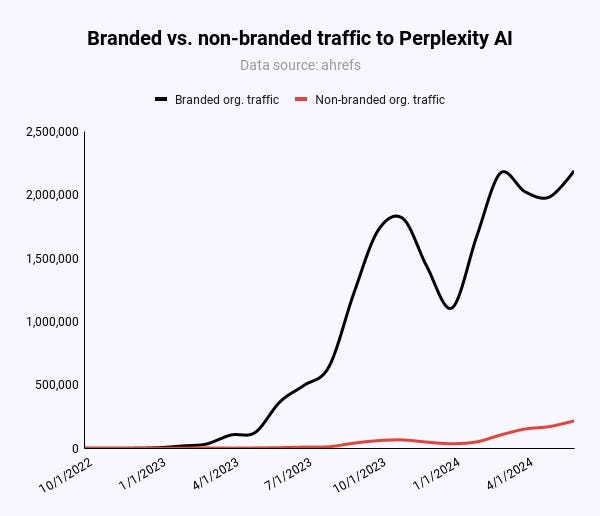
But in terms of benefit for Perplexity, Pages is a drop in the bucket.

Image Credit: Kevin Indig

91% of organic traffic to perplexity.ai comes from branded terms like “perplexity.”

Only 47,000 out of 217,000 (21.6%) monthly visitors to Pages come from organic, non-branded keywords globally.

In the US, it’s 55% (20,000/36,000). However, compared to x monthly visits from branded terms, Pages doesn’t make a dent in Perplexity’s organic traffic.

Image Credit: Kevin Indig

In reality, most traffic to Perplexity comes through its brand and word of mouth. The recent media coverage might have helped Perplexity more than it harmed. The site has hit new all-time traffic highs every day since January 2024, according to Similarweb.

Perplexity’s whole domain has only 950 pages, of which Pages make up almost 600. Compared to other sites – like Wikipedia’s 6.8 million articles on the English version alone – that’s just not a lot. Stronger scale effects will emerge as Pages get more traction. Right now, Pages is a nascent beta feature.

Taking a closer look at its performance, the most searched-for keyword Pages rank in the top 3 for is “was candy montgomery guilty” (600 MSV). The most difficult keyword it ranks in position one for is “when was the first bitcoin purchase” (KD: 76, MSV: 30). In other words, Pages still has a long way to go.

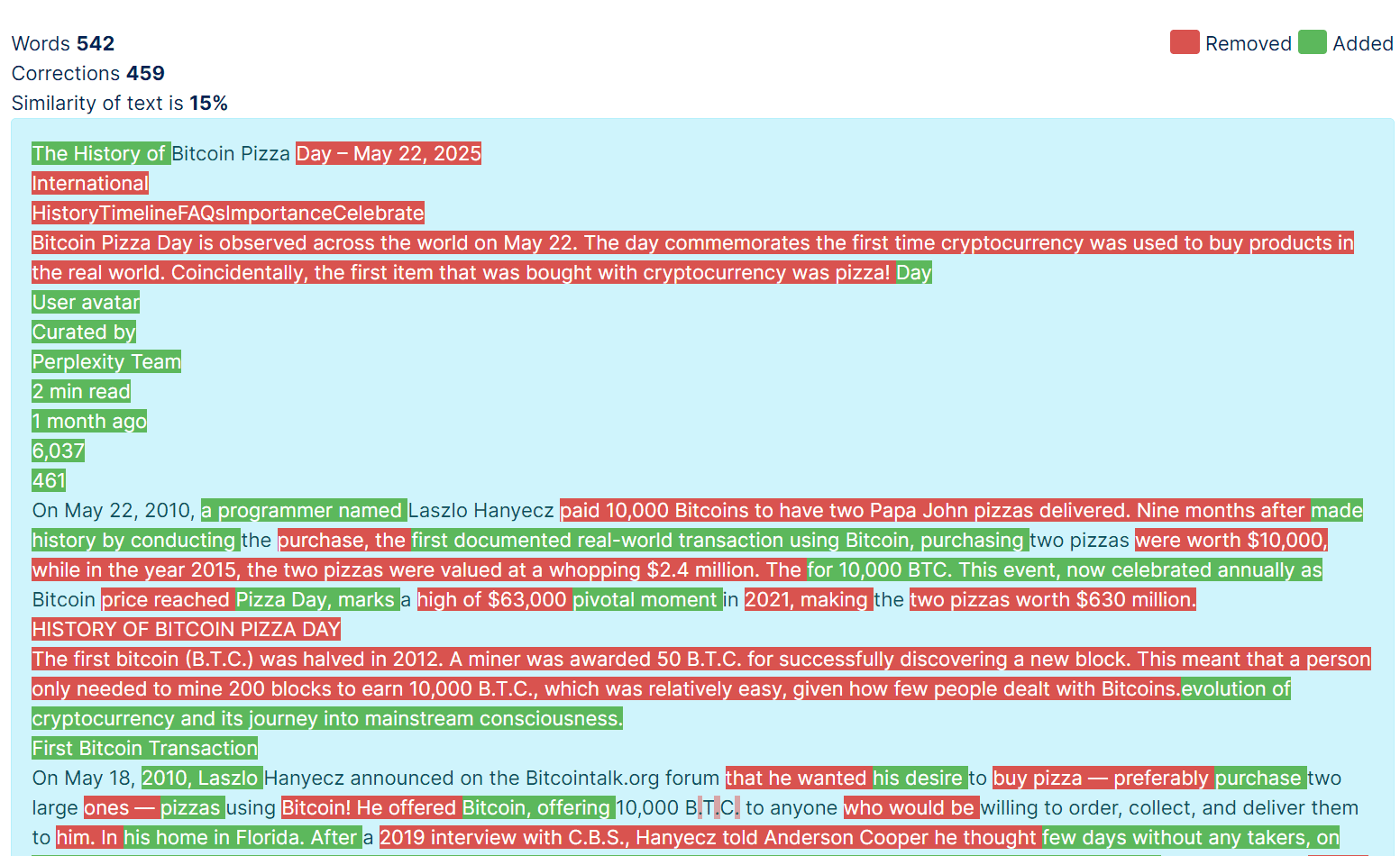
An n=1 (!) text similarity comparison with GoTranscript between Perplexity’s page for “bitcoin pizza day” and its four linked sources shows little evidence of plagiarism:

  1. nationaltoday.com/bitcoin-pizza-day/ (15% similarity).
  2. www.uledger.io/post/bitcoin-pizza-day-history (27% similarity).
  3. coinedition.com/bitcoin-pizza-day-a-700-million-reminder-of-cryptocurrencys-rise/ (15%).
  4. www.investopedia.com/news/bitcoin-pizza-day-celebrating-20-million-pizza-order/ (9%).
Text comparison between Perplexity’s and NationalToday’s article about Bitcoin Pizza Day (Image Credit: Kevin Indig)

The “missing” attribution issue seems to have been fixed, as the example below shows.

Perplexity highlights sources for answers at the top (Image Credit: Kevin Indig)

The results showed the chatbot at times closely paraphrasing WIRED stories, and at times summarizing stories inaccurately and with minimal attribution.

I wasn’t able to confirm or deny cases of hallucination, but I expect better models to get to a point at which they can summarize existing content flawlessly. The reality is, we’re not there yet. Google’s AI Overviews have also been shown to include wrong facts or make things up.

Google seems to have been able to improve the problem quickly, which is why I expect the degree of hallucination to drop.

One underlying issue of the plagiarism critique is that a search for the exact title of an article returns that article.

Of course, Perplexity should return a summary of an article when users prompt it. What else should Perplexity show? The same argument came up in the lawsuit between OpenAI and the NY Times.

Triggered

Besides the crawling issues Perplexity needs to fix, the media’s reaction seems to be triggered by Perplexity’s positioning.

One sentence in Perplexity’s announcement of Pages gets to the heart of the underlying issue:

“With Pages, you don’t have to be an expert writer to create high quality content.”

The page also mentions:

”Crafting content that resonates can be difficult. Pages is built for clarity, breaking down complex subjects into digestible pieces and serving everyone from educators to executives.”

All examples of Pages listed in the announcement are about “how to” or “what is” topics:

  • “Beginner’s guide to drumming”
  • “How to use an AeroPress”
  • “Writing Kubernetes CronJobs”
  • “Steve Jobs: Visionary CEO”
  • Etc.

That’s exactly the challenge AI poses to writers: AI can increasingly cover clearly defined content formats like guides or tutorials. I can see how this is triggering to journalists.

User-Directed Content

Note how Perplexity doesn’t create all the content for Pages but takes direction from humans through prompts (UDC).

Instead of writing a whole article, humans put the puzzle pieces together and their author bio stamp on a Page.

I expect the same to happen with other content types like reviews and platforms like Google, Tripadvisor, Yelp, G2 & Co. to provide corresponding tools to make content creation easier. The biggest challenge will be to keep quality high and reduce useless information to a minimum.

The big question is whether a build like Pages can compete with a purely human-written site like Wikipedia, which currently has 116,000 active contributors.

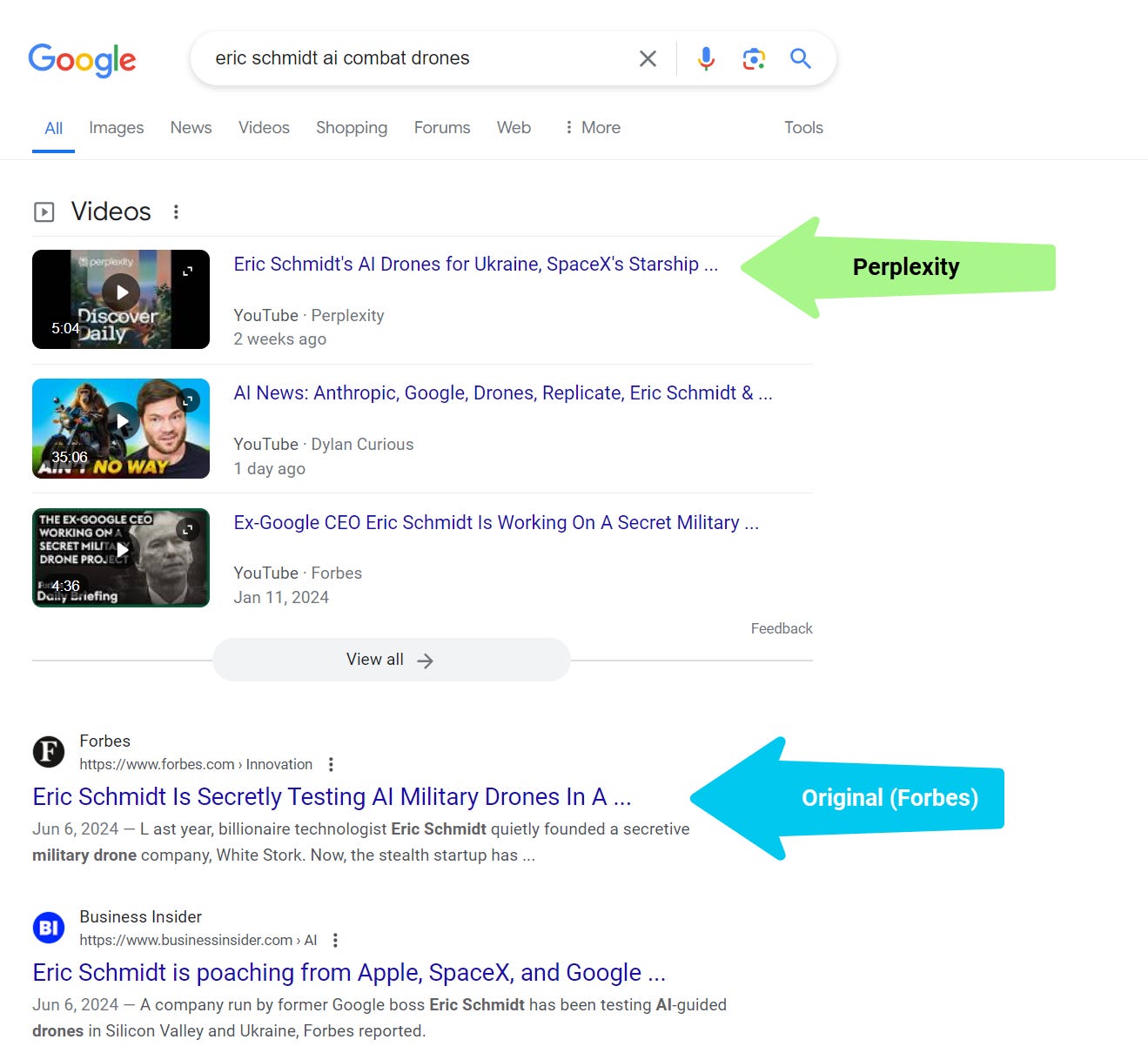
The bigger “Growth play” behind pages (IMHO) is how Perplexity creates AI (video) podcasts out of summarized articles that outrank original results.

“Perplexity then sent this knockoff story to its subscribers via a mobile push notification. It created an AI-generated podcast using the same (Forbes) reporting — without any credit to Forbes, and that became a YouTube video that outranks all Forbes content on this topic within Google search.”

Perplexity outranks publishers with video podcasts summarizing articles (Image Credit: Kevin Indig)

Google will have to figure out how to prevent LLMs from repurposing the content of publishers.

What remains after examining the facts is the realization of how difficult it is to balance giving an AI  answer while sending traffic to sources. Why should users click when most of their questions are answered?

On the other side of the coin, publishers themselves can provide summaries of their articles. Therefore, the key challenge for Perplexity – and anyone else who wants to create large-scale AI content for Search – is adding unique value on top of AI summaries.

The path to unique value from AI summaries and other AI content is personalization.

A system that can recognize your preferences of level of understanding for a topic can make AI summaries more useful to you. Perplexity is a wrapper around different LLMs, but if it collects significant information about users and personalizes output, it can add value beyond fast answers.

Device operating system makers like Alphabet and Apple have the biggest advantage when it comes to user data since they sit on top of the food chain.

A strong example is Apple Intelligence, which could likely answer questions currently provided by guides and tutorials on Google or Perplexity.

Apple Intelligence (abbreviated “AI” – nice one, Apple!) has full context through location (Apple Maps), third-party app usage, Siri prompts, email (Apple Mail), and other sources, which creates a nice base to personalize results on. The web is just one body of knowledge, with a much sexier one waiting on our Dropbox, Gmail inbox, and iPhone photos.

Today, personalized answers are a vision and a demo.

But at some point in the future, personalization will create better answers than any generic LLM summary and surely more than any human-written guide.

The value of defined and generic knowledge is on a collision course with LLM bombers. At the same time, the value of personalized knowledge, human experience, and trustworthy expert expertise is skyrocketing.


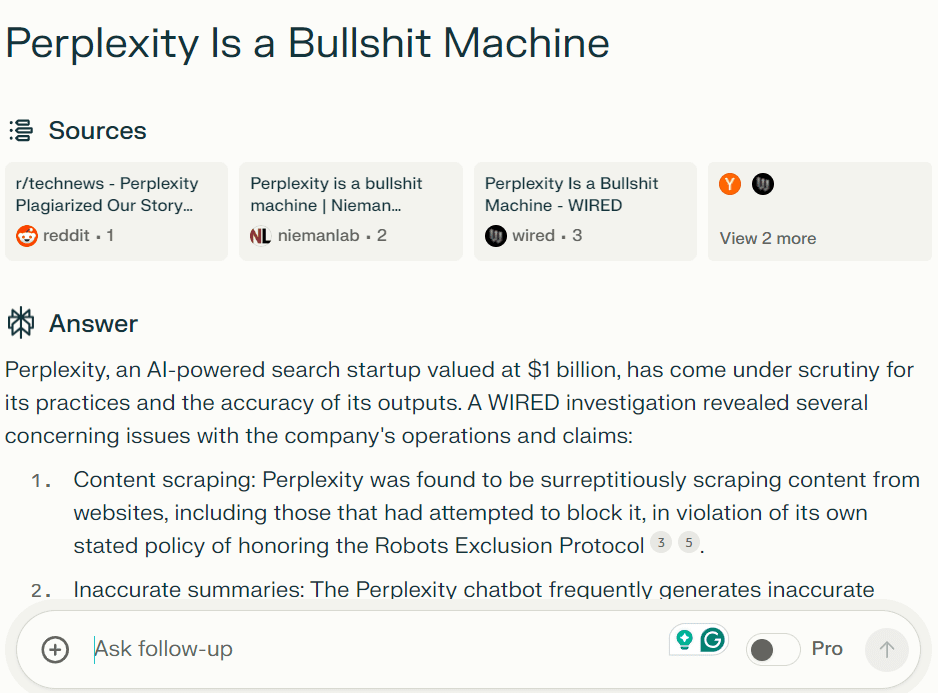
AI startup Perplexity wants to upend search business. News outlet Forbes says it’s ripping them off; Integrator vs Aggregator Growth

Perplexity AI Is Lying about Their User Agent

Perplexity CEO Aravind Srinivas responds to plagiarism and infringement accusations

What is Perplexity Pages?

Introducing Perplexity Pages

Wikipedia:About

Why Perplexity’s Cynical Theft Represents Everything That Could Go Wrong With AI


Featured Image: Paulo Bobita/Search Engine Journal

Google Updates Guidance On EEA Carousels Beta Structured Data via @sejournal, @martinibuster

Google updated the structured data guidance on a beta carousels structured data that is intended for users in the European Economic Area, which is related to Google’s preparations for the Digital Markets Act (DMA). The new guidance covers how to use this structured data on summary or category pages and for paginated categories.

Carousel (Beta) Rich Results For Aggregators & Suppliers

The Carousel (Beta) rich results is intended for sites about travel, local, and for shopping queries shown to users in the EEA. Google search users can scroll horizontally across tiles that contain information specific to the context of the search. Sites that use this new structured data become eligible to be featured in the new carousel rich results.

The original announcement from February 2024 explained that display for shopping queries will at first be limited to Czechia, France, Germany and the UK.

Updated Documentation

The new documentation consists of a new three sentence paragraph that is added to the current Structured data carousels (beta) documentation.

This is the new guidance that was added to the documentation:

“Mark up all items that are on the summary or category page. For paginated categories, add an ItemList to each subsequent page and include the entities that are listed on that page. For infinite scroll, focus on marking up the entities that are initially loaded in the viewport.”

The changelog has a notation that explains the reason for the update:

“Marking up categories with many items for structured data carousels (beta)

What: Added guidance on how to mark up categories with many items to the structured data carousels (beta).

Why: We received a question through our feedback button about how to implement this markup for categories with many items, such as paginated content or infinite scroll.”

Read the updated documentation:

Structured data carousels (beta) – Guidelines

Featured Image by Shutterstock/JHVEPhoto

OpenAI’s Rockset Acquisition And How It May Impact Digital Marketing via @sejournal, @martinibuster

OpenAI acquired a technology from Rockset that will enable the creation of new products, real-time data analysis, and recommendation systems, possibly signaling a new phase for OpenAI that could change the face of search marketing in the near future.

What Is Rockset And Why It’s Important

Rockset describes its technology as a Hybrid Search, a type of multi-faceted approach to search (integrating vector search, text search and metadata filtering) to retrieve documents that can augment the generation process in RAG systems. RAG is a technique that combines search with generative AI that is intended to create more factually accurate and contextually relevant results. It’s a technology that plays a role in BING’s AI search and Google’s AI Overviews.

Rockset’s research paper about the Rockset Hybrid Search Architecture notes:

“All vector search is becoming hybrid search as it drives the most relevant, real-time application experiences. Hybrid search involves incorporating vector search and text
search as well as metadata filtering, all in a single query. Hybrid search is used in search, recommendations and retrieval augmented generation (RAG) applications.

…Rockset is designed and optimized to ingest data in real time, index different data types and run retrieval and ranking algorithms.”

What makes Rockset’s hybrid search important is that it allows the indexing and use of multiple data types (vectors, text, geospatial data about objects & events), including real-time data use. That powerful flexibility allows the technology to interact with different kinds of data that can be used for in-house and consumer-facing applications related to contextually relevant product recommendations, customer segmentation and analysis for targeted marketing campaigns, personalization, personalized content aggregation, location-based recommendations (restaurants, services, etc.) and in applications that increase user engagement (Rockset lists numerous case studies of how their technology is used).

OpenAI’s announcement explained:

“AI has the opportunity to transform how people and organizations leverage their own data. That’s why we’ve acquired Rockset, a leading real-time analytics database that provides world-class data indexing and querying capabilities.

Rockset enables users, developers, and enterprises to better leverage their own data and access real-time information as they use AI products and build more intelligent applications.

…Rockset’s infrastructure empowers companies to transform their data into actionable intelligence. We’re excited to bring these benefits to our customers…”

OpenAI’s announcement also explains that they intend to integrate Rockset’s technology into their own retrieval infrastructure.

At this point we know the transformative quality of hybrid search and the possibilities but OpenAI is at this point only offering general ideas of how this will translate into APIs and products that companies and individuals can create and use.

The official announcement of the acquisition from Rockset, penned by one of the cofounders, offered these clues:

“We are thrilled to join the OpenAI team and bring our technology and expertise to building safe and beneficial AGI.

…Advanced retrieval infrastructure like Rockset will make AI apps more powerful and useful. With this acquisition, what we’ve developed over the years will help make AI accessible to all in a safe and beneficial way.

Rockset will become part of OpenAI and power the retrieval infrastructure backing OpenAI’s product suite. We’ll be helping OpenAI solve the hard database problems that AI apps face at massive scale.”

What Exactly Does The Acquisition Mean?

Duane Forrester, formerly of Bing Search and Yext (LinkedIn profile), shared his thoughts:

“Sam Altman has stated openly a couple times that they’re not chasing Google. I get the impression he’s not really keen on being seen as a search engine. More like they want to redefine the meaning of the phrase “search engine”. Reinvent the category and outpace Google that way. And Rockset could be a useful piece in that approach.

Add in Apple is about to make “ChatGPT” a mainstream thing with consumers when they launch the updated Siri this Fall, and we could very easily see query starts migrate away from traditional search engine boxes. Started with TikTok/social, now moving to ai-assistants.”

Another approach, which could impact SEO, is that OpenAI could create a product based on an API that can be used by companies to power in-house and consumer facing applications. With that approach, OpenAI provides the infrastructure (like they currently do with ChatGPT and foundation models) and let the world innovate all over the place with OpenAI at the center (as it currently does) as the infrastructure.

I asked Duane about that scenario and he agreed but also remained open to an even wider range of possibilities:

“Absolutely, a definite possibility. As I’ve been approaching this topic, I’ve had to go up a level. Or conceptually switch my thinking. Search is, at its heart, information retrieval. So if I go down the IR path, how could one reinvent  “search” with today’s systems and structures that redefine how information retrieval happens?

This is also – it should be noted- a description for the next-gen advanced site search.  They could literally take over site search across a wide range of mid-to-enterprise level companies. It’s easily as advanced as the currently most advanced site-search systems. Likely more advanced if they launch it. So ultimately, this could herald a change to consumer search (IR) and site-search-based systems.

Expanding from that, apps, as they allude to.  So I can see their direction here.”

Deedy Das of Menlo Ventures (Poshmark, Roku, Uber) speculated on Twitter about how this acquisition may transform OpenAI:

“This is speculation but I imagine Rockset will power all their enterprise search offerings to compete with Glean and / or a consumer search offering to compete with Perplexity / Google. Permissioning capabilities of Rockset make me think more the former than latter”

Others on Twitter offered their take on how this will affect the future of AI:

“I doubt OpenAI will jump into the enterprise search fray. It’s just far too challenging and something that Microsoft and Google are best positioned to go after.

This is a play to accelerate agentic behaviors and make deep experts within the enterprise. You might argue it’s the same thing an enterprise search but taking an agent first approach is much more inline with the OpenAI mission.”

A Consequential Development For OpenAI And Beyond

The acquisition of Rockset may prove to be the foundation of one of the most consequential changes to how businesses use and deploy AI, which in turn, like many other technological developments, could also have an effect on the business of digital marketing.

Read how Rockset customers power recommendation systems, real-time personalization, real-time analytics, and other applications:

Featured Case Studies

Read the official Rockset announcement:

OpenAI Acquires Rockset

Read the official OpenAI announcement:

OpenAI acquires Rockset
Enhancing our retrieval infrastructure to make AI more helpful

Read the original Rockset research paper:

Rockset Hybrid Search Architecture (PDF)

Featured Image by Shutterstock/Iconic Bestiary

Google Clarifies Organization Merchant Returns Structured Data via @sejournal, @martinibuster

Google quietly updated their organization structured data documentation in order to clarify two points about merchant returns in response to feedback about an ambiguity in the previous version.

Organization Structured Data and Merchant Returns

Google recently expanded their Organization structured data so that it could now accommodate a merchant return policy. The change added support for adding a sitewide merchant return policy.

The original reason for adding this support:

“Adding support for Organization-level return policies

What: Added documentation on how to specify a general return policy for an Organization as a whole.

Why: This makes it easier to define and maintain general return policies for an entire site.”

However that change left unanswered about what will happen if a site has a sitewide return policy but also has a different policy for individual products.

The clarification applies for the specific scenario of when a site uses both a sitewide return policy in their structured data and another one for specific products.

What Takes Precedence?

What happens if a merchant uses both a sitewide and product return structured data? Google’s new documentation states that Google will ignore the sitewide product return policy in favor of a more granular product-level policy in the structured data.

The clarification states:

“If you choose to provide both organization-level and product-level return policy markup, Google defaults to the product-level return policy markup.”

Change Reflected Elsewhere

Google also updated the documentation to reflect the scenario of the use of two levels of merchant return policies in another section that discusses whether structured data or merchant feed data takes precedence. There is no change to the policy, merchant center data still takes precedence.

This is the old documentation:

“If you choose to use both markup and settings in Merchant Center, Google will only use the information provided in Merchant Center for any products submitted in your Merchant Center product feeds, including automated feeds.”

This is the same section but updated with additional wording:

“If you choose to use both markup (whether at the organization-level or product-level, or both) and settings in Merchant Center, Google will only use the information provided in Merchant Center for any products submitted in your Merchant Center product feeds, including automated feeds.”

Read the newly updated Organization structured data documentation:

Organization (Organization) structured data – MerchantReturnPolicy

Featured Image by Shutterstock/sutlafk

Mastering The Art Of In-House SEO [2024 Edition] via @sejournal, @Kevin_Indig

I’ve received so many questions about advancing an in-house career lately.

All answers can be found in an extensive guide I wrote in 2020. Since I have collected more experience working with some of the best tech companies in the world, I decided to spend another ~10 hours rewriting and updating this post. In my humble opinion, this is still the best in-house SEO guide on the web.

Boost your skills with Growth Memo’s weekly expert insights. Subscribe for free!

In-house SEO is a skill you can learn and develop.

The most successful people I encountered had a strong sense for working on the right things, crisp communication skills and the ability to find solutions for important problems. They mastered skills to solve problems related to buy-in, resourcing, prioritization, and getting teams on the same page – no matter if they were managers or individual contributors.

Over my own +10-year in-house career at Atlassian, G2, and Shopify, I was able to climb the ranks from technical SEO expert to vice president. Along the way, I learned how to develop in-house skills and observed what great looks like from ultra-successful people.

The following collection of principles, frameworks, and experiences will tremendously shortcut your learning curve.

Don’t just take my word for it. This guide features generous input from:

The 5 Key Challenges Of In-House SEO

Being successful at in-house SEO all comes down to impact, and to make an impact, you need resources. The best plans, audits, and tricks don’t matter if you cannot execute them.

Jordan Silton:

The best in-house SEOs are able to influence and drive strategy. It’s no longer enough to do an SEO audit, keyword research or a competitive assessment and hand it over. This applies to agencies, too, the handover is a thing of the past. True progress and success in SEO today is a lot more about alignment and impact. More than ever, figuring out what to do is table stakes. Those that are successful get stuff done.

The biggest challenge in SEO is not knowing what to do but to get things done. The most successful companies ship, learn, and iterate fast to succeed with users and Google’s machine learning-driven algorithms.

Jackie Chu:

There are a lot of wins to being an in-house SEO, but you need to be just as mindful about growing your soft skills as your tech ones. Even if you’re somehow able to get huge wins without buy-in, if you don’t make it a priority to evangelize the team and your work it’s unlikely you will continue to find support in the company. And you’ll never get the chance to do edge SEO if your site isn’t even getting the basics right 🙂.

Getting resources like money and people to ship optimizations is a problem we can break down into five sub-problems:

1. Robust Business Cases

The number one thing (!) holding SEOs back from having an impact is making robust business cases for their recommendations.

SEOs commonly get too wrapped up in technical, nerdy details. Instead, they need to think like more product managers who talk to customers, prioritize features, and break their impact down all the way to revenue.

Twitter poll reveals the biggest perceived challenges with resourcing:

  • SEO isn’t a company priority
  • Leadership “doesn’t get it”
  • SEOs have a hard time showing value

But, the last point really hits the nail on the head: Almost any problem is SEO can be traced back to poor demonstration of ROI.

Early in my in-house career, I felt defensive when decision-makers wouldn’t fund my recommendations. “But it says to do this in the Google guidelines!” Later, I understood.

When I became a decision-maker with budget responsibility, I realized the importance of strong business cases to gain long-term trust and invest resources thoughtfully. It’s not just a tool for alignment but to double-check that you really thought things through.

The characteristics of a good SEO business case are:

  • Clarity about the problem you’re trying to solve and why it’s important.
  • Strong logic around issues and solutions.
  • Good reasons for working on this project at that time instead of something else.
  • A visible line from organic traffic to revenue.
  • A list of what’s needed to make it happen.
  • An action plan with timings.
  • Success criteria/metrics.

You can write business cases down into a written doc or spreadsheet, but they must answer the biggest questions.

Now, SEO is a complicated discipline between art and science. Its black-box nature and time to impact for some optimizations make projections difficult.

SEO A/B tests and measuring leading indicators (Googlebot server hits, impressions, ranks) can help increase confidence and gauge impact early. But it takes a lot of transparency about where recommendations come from and what to expect to create long-term trust.

A very elegant way to tackle big projects with high resource demands is to ship a small version manually.

If, for example, you need engineering and design resources to build lead generation tools, you could build and test an MVP with a turnkey third-party solution first. If the results are promising, you have a stronger base to ask for in-house resources.

Advice: Find a person who gets things done in the company and learn from them how to do it.

2. Business Model Differences

The type of site decides what resources you need and how you can make a business case.

Impact projections are easier for Aggregators and high-trafficked sites than Integrators since the former typically has a lot more pages and can get to test results faster.

An aggregator like G2, for example, has very different levers that are much more tied to the product than marketing. An Integrator like Ramp, on the other hand, needs mostly marketing resources to drive impact.

Aggregators can leverage the power of network effects that result from consolidating demand. They benefit from aggregated instead of self-created “inventory”: products, users, businesses, or ads. That lends itself to technical SEO and product-led growth loops, as I describe in How Social Networks Drive Billions of Search Visits with SEO.

Working for an integrator, you have to either pick a company to work for that has strong buy-in with SEO or be strategic in how you prioritize and sequence projects.

You cannot change the nature of growth levers, but you can create trust with results by targeting low-hanging fruit and high-confidence projects.

The more results you deliver, the more leeway you get on time-to-results. That’s why shipping optimizations with a fast and strong impact first is a smart idea.

The way you “enter” a company also makes a big difference. If you can prove your ability to drive results within your first 30 days, the rest of your tenure goes that much smoother.

Jackie Chu:

Even outside of your SEO growth work, you do a considerable amount of SEO defense work that’s spent guard-railing things like new product launches, migrations, or rebranding. You have to be a strong communicator to fairly articulate tradeoffs that are being made while striving to maintain rapport and a good relationship with your peers.

When I see in-house SEOs struggle, they’re sadly often right about the SEO problem, and the real problem is they’re struggling with resourcing, buy-in, and prioritization. This is where being a strong communicator and storyteller is especially helpful – to help de-escalate the inevitable points of conflict that occur between teams working on the same project with different incentives.

Companies selling products with large contract values often rely on human input for attribution and take months to close deals, which can blur the impact of SEO.

Along the way, leads can have many touchpoints across paid and organic channels with a company. Since paid teams have better data (e.g., keyword referrers) and faster feedback loops, they often overpower revenue attribution.

Comparing the last with the first touch can reveal eye-opening differences in revenue attribution and show how important it is to choose the right model.

Overindexing on advertising can cost a company a lot of money if the same results would come in with much lower spend. But you have to show that story in conversion and spend data to convince stakeholders.

Another solution can be to frame SEO as a brand marketing channel that drives exposure instead of direct revenue or focus on revenue contribution/margin instead of relative revenue. A different way to look at SEO can help decision-makers justify the investment.

Advice: Lean into technical SEO when working at an aggregator and content marketing for an Integrator.

3. Slow And Fuzzy Impact

Some optimizations have a slow and broad impact over time, making it harder to attribute a dollar value.

For example, we all know building a strong brand is important for SEO, but there are so many things involved that it’s next to impossible to make a business case for it.

The most important questions to navigate varying time-to-impact are:

  • How easily can you test the optimization on a small scale?
  • Across how many pages can you scale the optimization without manual effort?
  • Has a competitor done something similar?
  • How hard is the optimization to implement?

The longer something takes and the harder it is to implement, the lower you should generally prioritize it unless it has a very high traffic impact and you have lots of leverage to ship it.

Advice: Strong storytelling skills can get buy-in despite blurry numbers. Decision-makers respond strongly to stakes – the consequences of not doing something.

Being able to paint a picture of the risk can open doors, but they quickly close when things don’t work out. So, you better have a way to show that your suggestion helped.

Jackie Chu:

Having strong soft skills around leadership, storytelling and executive presence are critical to an in-house SEO’s success. The reality is a lot of times, enterprise sites are really not even doing the basics correctly, and that’s because getting something seemingly ‘small’ like title tags, or hreflang changed at scale can be a significant investment when you consider things like having multiple services, translation needs, surface area owners, legal considerations and more.

4. Weak Social Capital

Credibility, likeability, and respect matter when working with humans. People are more likely to trust your recommendations when you have a proven track record or respect from important people at the company.

Weak social capital in the form of favors and how well people perceive you, in general, has an impact on your ability to ship as well.

Matt Howell-Barby:

Here’s the thing… it doesn’t matter if you have the correct solution to a problem. What matters most is that you know how to sell the idea internally, get the resources you need to support the solution, and how (and when) to use leverage you have in the process. The last part of this is particularly important.

Advice: Find out who holds power in the company, learn what they need, and help them get it. Sometimes, it’s non-craft-specific things like finding a great candidate for a key role or contacts at another company. Other times, it’s an opportunity or risk a person or team wasn’t aware of previously.

Jordan Silton:

The best in-house SEOs are well-liked and pulled into initiatives because people like to work with them. It’s not enough to be the smartest person in the room, or the “expert”, or a technical superstar.

In-house SEO is about being part of a team. You can make yourself a checkpoint or gate to ensure everything is above board, but that slows things down and doesn’t accelerate progress. Success is how much you can accomplish, not how many mistakes you can catch.

Build strong relationships with the leaders of those teams. Meet for coffee or lunch, understand who they are, and talk about their goals.

Some call it “playing the game,” but I think it’s simply about building genuine relationships and working toward a common goal.

Matt Barby:

One of the ways that I see many people inside companies going wrong (and then often feeling frustrated) is that they choose the wrong hill to die on. Sometimes you have to let your idea die in order to build some leverage that you can use elsewhere. Any time you use your influence and accumulated leverage to get something you need, you need to either focus on building more for the future or be ok with passing on some other things you need.

If you’ve ever looked at someone in a senior management position and wondered, ‘how did this person get to where they are? I know so much more than they do!’… Well, the likelihood is that they’re much better at selling than you are. No matter what role you’re operating in within a company, you need to be a salesperson; the difference between this and a client-facing role where you’re actually selling an idea to an external client is that you’re selling to your peers. Learn this and you’ll get far.

SEO teams often lack resources when they live under marketing, while engineering teams live under product.

For most companies, SEO under marketing makes sense because they drive SEO with self-generated content and tools (Integrators).

But, SEO has to be in the product org at Aggregators for maximal impact since the business impact of SEO is proportional to the number of indexable pages on a domain.

Product-led growth companies, which are always Aggregators, should push for growth teams with SEOs under product. Sales-driven companies should use content marketing or a hybrid approach.

Igal Stolpner:

The key to success as an inhouse SEO is becoming part of the process. In most companies, Product or R&D are running the roadmap. As an in-house SEO, you want to make sure that you are right in the middle of that process and that no significant changes or launches are going over your head.

Advice: Go on an education tour across the company, especially for teams you depend on.

When I was part of Atlassian, I realized I’d never have enough resources to do all the things I wanted.

So, I ran workshops with engineers, designers, and content creators to show them how little changes in their work can make an impact.

I shared SEO checklists, presented at all-hands, and kept beating the SEO drum. I wrote a lot of internal documentation in Confluence (our “wiki”), so people have reference material and can learn at their own pace.

Most importantly, I tracked results and showed them to the people who drove them. This kind of feedback loop motivates and builds an appetite for more.

In-House And Agency SEO Are Different Games

The biggest difference between agency and in-house work is the scope.

In agencies, you go broad. Inhouse, you go deep.

Agency work exposes you to many sites and problems. It’s a great point to start an SEO career because you get such a good grasp of various issues, industries, and companies.

The challenges are winning clients, managing accounts, and getting clients to implement your recommendations. What clients want and what they need are not always the same, which you need to juggle.

In-house, you focus on a single site (maybe a few) and deeply immerse yourself in the product and market. You develop vertical expertise and own a bigger part of the process. The challenges are overcoming red tape, getting resources, and prioritizing the right work.

The part that will follow you on both sides is pitching and selling. You either pitch a client or your boss. So, you might as well get good at it. Keep this in mind because it will come back over and over in this guide.

Matt Howell-Barby:

Working in-house is very different to working agency-side. Similarly, working at a 40 person startup is a world away from a 4,000 employee enterprise org. That said, there are some common truths that apply.

Transitioning

When transitioning from agency to in-house, two traps to avoid are waiting for approval and execution speed.

Consultants need to be very transparent with their work and bill by the hour, but in-house work takes faster execution and decision-making.

Inhouse, you need to ship projects end-to-end, while agency consultants switch focus once recommendations are packaged and delivered. Many consultants experience a “culture shock” when switching to an in-house role.

In-House SEO As A Manager Vs. IC

Your experience and focus point vary based on whether you have management responsibility or not.

Oftentimes, your career will lead you from individual contributor (IC) to manager. With that jump, your in-house experience changes tremendously.

Jordan Silton:

Not every in-house SEO role is the same. Some are truly individual contributor technical analyst roles that are similar to agency life. Others are closer to product managers and are embedded with engineers on agile/scrum teams.

Still others are more senior and strategic and need to be able to influence across the organization well beyond product and marketing teams. And finally there are lots of content roles that sometimes are connecting and other times are quite separate from technical in-house teams. In house SEO is not one thing.

One of the most important skills for contributors is working on the right projects and doing good work.

It’s easy to have too much on your plate if you don’t push back. But pushing back elegantly is a skill in itself.

Share your priorities with your manager and let them redefine them instead of saying yes to everything. Hold them accountable for giving you impactful projects you can build your career on.

Not every task has to be exciting, but a big part of tour work should clearly ladder up to strategically important initiatives.

Managers, on the other hand, need leadership and management skills.

Leadership is the art of persuading people to do something. You don’t need to have direct reports to demonstrate this skill, by the way. Management is the process of setting the right goals, hiring the right people, and executing well.

At Shopify, we used a framework to collect the main tasks of managers:

  • Aim -> strategy.
  • Assemble -> hiring.
  • Achieve -> execution.

Keep in mind that not everyone is cut out or wants to be a manager. I have promoted several contributors to managers who regretted their choice shortly after. The best companies open contributor tracks up to the highest levels and define clear career paths.

The idea of internal advocacy work is to educate and motivate people so well about SEO they want to contribute. Advocacy is a hard but effective way to scale SEO throughout a company without a large team.

Positively reinforce contributions from outside the SEO team with recognition on messengers, email, or internal wikis to incentivize more “good” behavior.

At Atlassian, we had the saying, “Do good work and talk about it.”

A big part of advocacy is regular and irregular progress updates.

  • Weekly reports with progress updates for close stakeholders and monthly reports for broader organization members create alignment and spark questions.
  • Ad-hoc memos with insights that benefit the whole company invite others to problem-solve with you.
  • Annual or semi-annual reports with state-of-SEO overview can set the tone for future strategies and address decision-makers at a time they think about budget and resource allocation. Include broad trends, call out teams and individuals who support SEO and highlight threats. Release annual reports in time for (next year) planning.

Bottom Line: Ship Career-Making Projects

In-house SEO is a skill you can improve by deflecting distractions, being thoughtful about your (meta) work outside the craft work, and working on company-making projects.

Some projects that made my (inhouse) career:

  • Turning the organic traffic trend on Dailymotion around.
  • Countless migrations, kickstarting a community, growing blog traffic, and growing the third-party app marketplace at Atlassian.
  • Landing several big bets that grew organic traffic and hiring an A-class team at G2.
  • Restructuring the SEO org, bringing on a-class talent, and unifying domains at Shopify.

Luck certainly plays a role, but it’s even more important to keep an eye out for big, promising projects and fully lean into them. None of those projects would have mattered on paper. They only mattered because they shipped.

Of course, I worked on many projects that didn’t work out and failed many times.


Featured Image: Paulo Bobita/Search Engine Journal

Alt Text: What It Is & How To Write It via @sejournal, @olgazarr

In this guide, you will learn about alternative text (known as alt text): what it is, why it is important for on-page SEO, how to use it correctly, and more.

It’s often overlooked, but every image on your website should have alt text. More information is better, and translating visual information into text is important for search engine bots attempting to understand your website and users with screen readers.

Alt text is one more source of information that relates ideas and content together on your website.

This practical and to-the-point guide contains tips and advice you can immediately use to improve your website’s image SEO and accessibility.

What Is Alt Text?

Alternative text (or alt text) – also known as the alt attribute or the alt tag (which is not technically correct because it is not a tag) – is simply a piece of text that describes the image in the HTML code.

What Are The Uses Of Alt Text?

The original function of alt text was simply to describe an image that could not be loaded.

Many years ago, when the internet was much slower, alt text would help you know the content of an image that was too heavy to be loaded in your browser.

Today, images rarely fail to load – but if they do, then it is the alt text you will see in place of an image.

Screenshot from Search Engine Journal Screenshot from Search Engine Journal, May 2024

Alt text also helps search engine bots understand the image’s content and context.

More importantly, alt text is critical for accessibility and for people using screen readers:

  • Alt text helps people with disabilities (for example, using screen readers) learn about the image’s content.

Of course, like every element of SEO, it is often misused or, in some cases, even abused.

Let’s now take a closer look at why alt text is important.

Why Alt Text Is Important

The web and websites are a very visual experience. It is hard to find a website without images or graphic elements.

That’s why alt text is very important.

Alt text helps translate the image’s content into words, thus making the image accessible to a wider audience, including people with disabilities and search engine bots that are not clever enough yet to fully understand every image, its context, and its meaning.

Why Alt Text Is Important For SEO

Alt text is an important element of on-page SEO optimization.

Proper alt text optimization makes your website stand a better chance of ranking in Google image searches.

Yes, alt text is a ranking factor for Google image search.

Depending on your website’s niche and specificity, Google image search traffic may play a huge role in your website’s overall success.

For example, in the case of ecommerce websites, users very often start their search for products with a Google image search instead of typing the product name into the standard Google search.

Screenshot from search for [Garmin forerunner]Screenshot from search for [Garmin forerunner], May 2024

Google and other search engines may display fewer product images (or not display them at all) if you fail to take care of their alt text optimization.

Without proper image optimization, you may lose a lot of potential traffic and customers.

Why Alt Text Is Important For Accessibility

Visibility in Google image search is very important, but there is an even more important consideration: Accessibility.

Fortunately, in recent years, more focus has been placed on accessibility (i.e., making the web accessible to everyone, including people with disabilities and/or using screen readers).

Suppose the alt text of your images actually describes their content instead of, for example, stuffing keywords. In that case, you are helping people who cannot see this image better understand it and the content of the entire web page.

Let’s say one of your web pages is an SEO audit guide that contains screenshots from various crawling tools.

Would it not be better to describe the content of each screenshot instead of placing the same alt text of “SEO audit” into every image?

Let’s take a look at a few examples.

Alt Text Examples

Finding many good and bad examples of alt text is not difficult. Let me show you a few, sticking to the above example with an SEO audit guide.

Good Alt Text Examples

So, our example SEO guide contains screenshots from tools such as Google Search Console and Screaming Frog.

Some good examples of alt text may include:

e
e
t
g

Tip: It is also a good idea to take care of the name of your file. Using descriptive file names is not a ranking factor, but I recommend this as a good SEO practice.

Bad And/Or Spammy Alt Text Examples

I’ve also seen many examples of bad alt text use, including keyword stuffing or spamming.

Here is how you can turn the above good examples into bad examples:


e
o
o

As you can see, the above examples do not provide any information on what these images actually show.

You can also find examples and even more image SEO tips on Google Search Central.

Common Alt Text Mistakes

Stuffing keywords in the alt text is not the only mistake you can make.

Here are a few examples of common alt text mistakes:

  • Failure to use the alt text or using empty alt text.
  • Using the same alt text for different images.
  • Using very general alt text that does not actually describe the image. For example, using the alt text of “dog” on the photo of a dog instead of describing the dog in more detail, its color, what it is doing, what breed it is, etc.
  • Automatically using the name of the file as the alt text – which may lead to very unfriendly alt text, such as “googlesearchconsole,” “google-search-console,” or “photo2323,” depending on the name of the file.

Alt Text Writing Tips

And finally, here are the tips on how to write correct alt text so that it actually fulfills its purpose:

  • Do not stuff keywords into the alt text. Doing so will not help your web page rank for these keywords.
  • Describe the image in detail, but still keep it relatively short. Avoid adding multiple sentences to the alt text.
  • Use your target keywords, but in a natural way, as part of the image’s description. If your target keyword does not fit into the image’s description, don’t use it.
  • Don’t use text on images. All text should be added in the form of HTML code.
  • Don’t write, “this is an image of.” Google and users know that this is an image. Just describe its content.
  • Make sure you can visualize the image’s content by just reading its alt text. That is the best exercise to make sure your alt text is OK.

How To Troubleshoot Image Alt Text

Now you know all the best practices and common mistakes of alt text. But how do you check what’s in the alt text of the images of a website?

You can analyze the alt text in the following ways:

Inspecting an element (right-click and select Inspect when hovering over an image) is a good way to check if a given image has alt text.

However, if you want to check that in bulk, I recommend one of the below two methods.

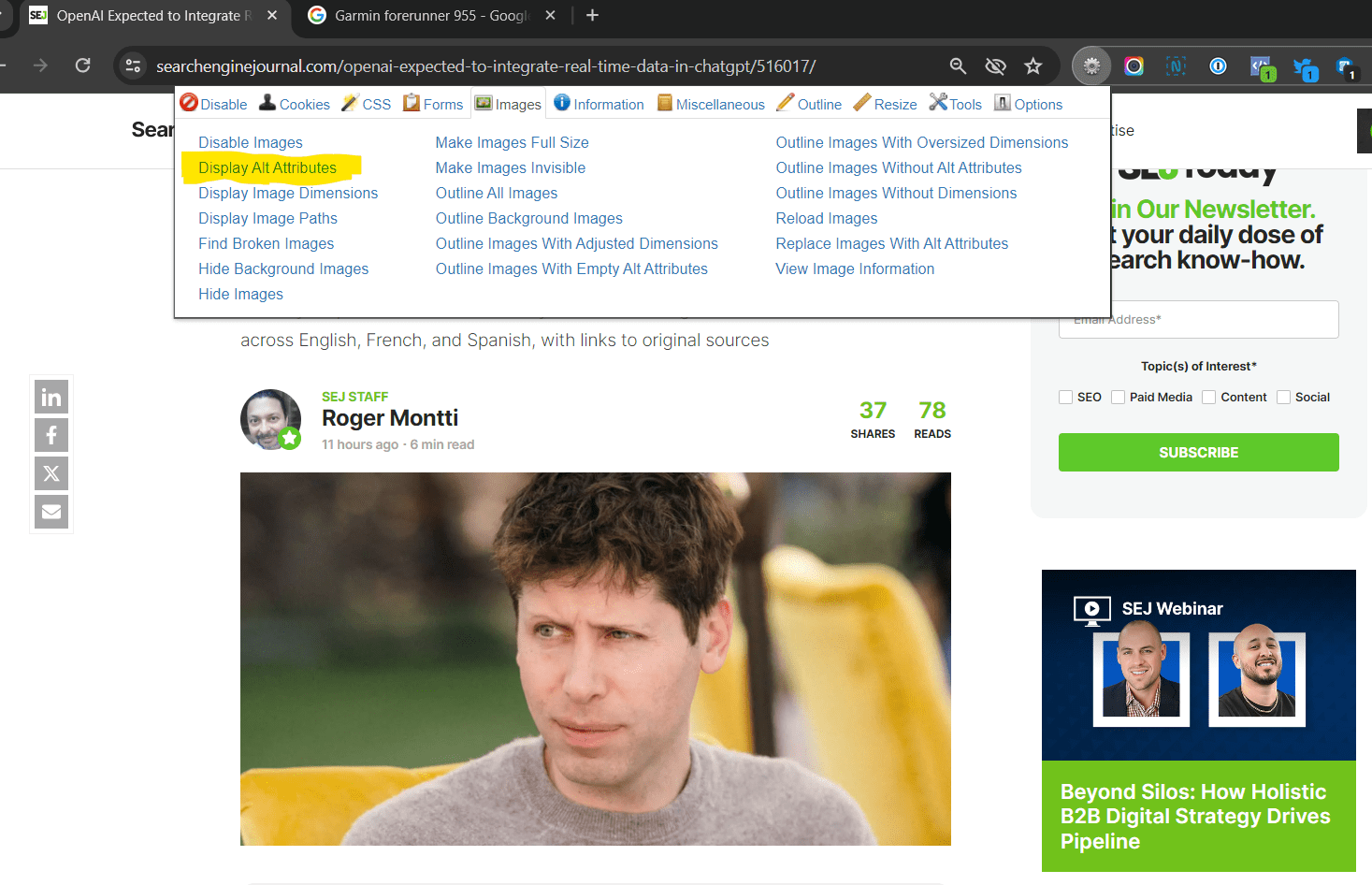
Install Web Developer Chrome extension.

Screenshot of Web Developer Extension in Chrome by authorScreenshot from Web Developer Extension, Chrome by author, May 2024

Next, open the page whose images you want to audit.

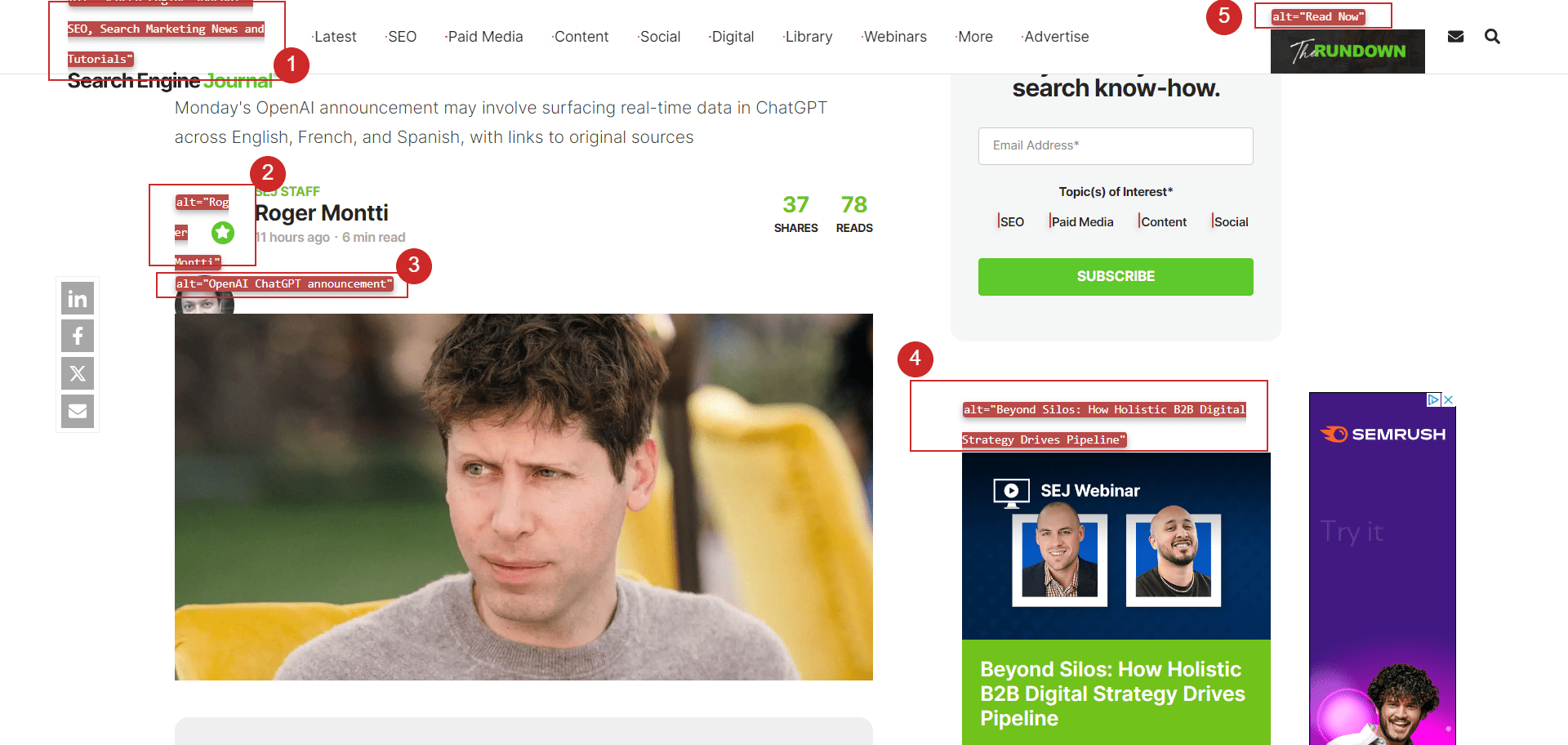
Click on Web Developer and navigate to Images > Display Alt Attributes. This way, you can see the content of the alt text of all images on a given web page.

The alt text of images is shown on the page.Screenshot from Web Developer Extension, Chrome by author, May 2024

How To Find And Fix Missing Alt Text

To check the alt text of the images of the entire website, use a crawler like Screaming Frog or Sitebulb.

Crawl the site, navigate to the image report, and review the alt text of all website images, as shown in the video guide below.

You can also export only images that have missing alt text and start fixing those issues.

Alt Text May Not Seem Like A Priority, But It’s Important

Every source of information about your content has value. Whether it’s for vision-impaired users or bots, alt text helps contextualize the images on your website.

While it’s only a ranking factor for image search, everything you do to help search engines understand your website can potentially help deliver more accurate results. Demonstrating a commitment to accessibility is also a critical component of modern digital marketing.

FAQ

What is the purpose of alt text in HTML?

Alternative text, or alt text, serves two main purposes in HTML. Its primary function is to provide a textual description of an image if it cannot be displayed. This text can help users understand the image content when technical issues prevent it from loading or if they use a screen reader due to visual impairments. Additionally, alt text aids search engine bots in understanding the image’s subject matter, which is critical for SEO, as indexing images correctly can enhance a website’s visibility in search results.

Can alt text improve website accessibility?

Yes, alt text is vital for website accessibility. It translates visual information into descriptive text that can be read by screen readers used by users with visual impairments. By accurately describing images, alt text ensures that all users, regardless of disability, can understand the content of a web page, making the web more inclusive and accessible to everyone.

More resources: 


Featured Image: BestForBest/Shutterstock

Google Spam Update Sparks Relentless Discontent via @sejournal, @martinibuster

Google spam updates have in previously been welcomed by the search marketing community. Today’s announcement reflected the sour mood of the search marketing and publishing community that is still reeling from six months of disruptive updates and the rollout of AI Overviews which is widely regarded as a traffic-stealing feature.

It’s not an overstatement to say that the response to Google’s spam update is relentlessly negative.

Not The Update Publishers Are Waiting For

Google’s March 2024 Core Update, which took about 45 days to complete, devastated the rankings for many site owners. Although Google no longer has a Helpful Content system (aka HCU), many site owners and SEOs who were affected by the HCU from last year are still waiting for a new update that would hopefully “fix” what many feel was a broken update.

One person tweeted:

“@JohnMu @searchliaison can this update remove the sitewide classifier still applied to sites since last September HCU? Or do we need to wait for a larger core update?”

Another person appeared to be laughing through their tears when they tweeted a screenshot showing their web traffic was down to six organic visitors:

“Google is coming after my last 6 organic visitors🤣Bring it on! Let’s see if we get to 0.”

Another person shared that they are demoralized from having lost 95% of their traffic from past updates:

“Honestly, it doesn’t matter what update you have under your sleeve. I’m uninstalling Google Site Kit from my site. Seeing constant, declining charts and figures every time I log into WordPress is demoralizing. They remind me that I’ve lost 95% of my traffic for no reason at all.”

A tweet that’s representative of the widespread sentiment that Google’s updates are broken:

“Your harmful monopoly is ruining the internet. Every one of your updates kills more independent websites while boosting spam.”

Another person tweeted:

“Google has turned many helpful websites into lost places”

It could be that Google’s last update missed the mark. But some of those who are affected by the updates from last year could (rightly or wrongly) be suffering from a shift in how Google defines site quality or relevance. Many are hoping that Google reverses course.

Backlash Against Pinterest In SERPs

Some of the feedback was about dissatisfaction with how Google ranked websites. One person tweeted that they hoped the spam update fixed Google’s preference for ranking Pinterest:

“Does this update means that Google will start to show my website when users make a “brand search” instead of my pins on pinterest?”

Backlash About Reddit in SERPs

Another person offered feedback about the (common) perception that Google is ranking Reddit for too many queries.

They tweeted:

“Reddit is the only spam in the SERP right now”

That sentiment about Reddit in the SERPs was shared by many others:

“Interesting to see Google roll out a spam update! I wonder how it will affect Reddit’s ranking in search results. Personally, I haven’t found a lot of truly helpful content there, Reddit is just spamming in search result.”

What About The Site Reputation Update?

Site reputation abuse is a form of spam where a digital marketer publishes content on a third party website for the purpose leveraging the site reputation for quick rankings. It’s a shortcut for avoiding having to create and promote an entirely new website.

Google SearchLiaison responded to a question of whether this spam update included the algorithmic version of the site reputation abuse update that Google announced was forthcoming. SearchLiaison responded that no, this update didn’t contain algorithmic elements for targeting site reputation abuse.

He tweeted:

“For the third time now, I’ll say again, I have every confidence that when we’re acting on site reputation abuse algorithmically, we’ll say that. It’s not right now. I also won’t be responding to this particular question every week so maybe let it go a month between asking (I don’t mean that as harsh as it sounds just that it’s not useful or productive for me to do the “are we there yet” over and over again)”

SearchLiaison followed up with:

“I mean I’d figure most wondering about this would know it’s a standard spam update given there’s no blog post, no “FYI things to know” and it’s just a regular posting to our dashboard

That said, I know people are asking Barry even though I’ve said what I just said above at least twice before. So I figured if I’m going to say it at least a third time, I’ll try again to explain why it’s not really something to ask about each week.”

No Description Of Spam Update

Changes to Google’s rankings are rarely announced except when it’s anticipated that the effects to rankings may be noticeable, which by that measure makes this update notable and significant, particularly because the update will take an entire week to roll out.

Google sometimes publishes a blog post about their spam updates but there is no accompanying article that details what this spam update is targeting, which may be a factor contributing to the anxiety expressed in some of the responses to Google’s announcement.

Google Has A Sentiment Problem

A combination of AI Overviews, Helpful Content Update from late 2023 to the recent updates dating from March are all combining to create negative sentiment in the digital marketing community. The so-called leak added to fuel to that fire. Even though the data revealed nothing that wasn’t already known, some are using it justify their long held suspicions and accusing Google of lying.  And it’s not just the search marketing community, independent web publishers and big brand news organizations have soured on Google, too.

So much negative sentiment has accumulated over the past year that the spam update, which would normally be cheered, is now met with skepticism and complaints.

Read Google’s spam announcement:

Featured Image by Shutterstock/Cast Of Thousands