How To Increase Website Traffic After The Google Update: 5 Blogger-Tested Tips via @sejournal, @getStay22

This post was sponsored by Stay22. The opinions expressed in this article are the sponsor’s own.

The latest Google update hit our partners – travel bloggers – hard. Despite the challenges presented by this update, we are amazed by their resilience.

Although we cannot influence Google, we can definitely take charge of the things within our reach.

Here are five travel blogger-tested ways to increase website traffic after the latest Google update.

Get the most out of each visitor. Check out our guide, Ten Tips for Maximizing Revenue for Travel Bloggers.

1. Use Pinterest As An Additional Search Engine

Many people think of Pinterest as a social media platform, but it functions much more as a search engine.

Pinterest’s tools make it a fantastic way to get visitors to your website.

How To Get Started With Pinterest

  1. Create a new business account or link/convert a personal account to gain access to business tools like Pinterest Business Hub and Pinterest Analytics, which allow you to monitor searches and keywords.
  2. Write a catchy bio for your profile. If you have niche keywords you use on your website, include them here.
  3. Claim your website, allowing you to track whenever someone shares your website content on Pinterest. Additionally, it will automatically include your Pinterest profile and a follow button so you can attract more visitors.

How To Use Pinterest Like A Pro

Pinterest is built around pictures, so having great visuals is critical. You want to make yours stand out on the page.

  1. When you travel, snap many pictures and pick the best ones later.
  2. Use design tools like Canva to add text, create interesting layouts, and add branding elements.
  3. Create boards to organize your content into categories, such as by destination or blog post type.
  4. Just like any other search engine, keyword research is necessary on Pinterest. Use business tools like Pinterest Trends, which lets you see keyword search volume and which pins are most popular for them.
  5. Use your selected keywords everywhere possible, including pin titles, pin descriptions, and board descriptions.
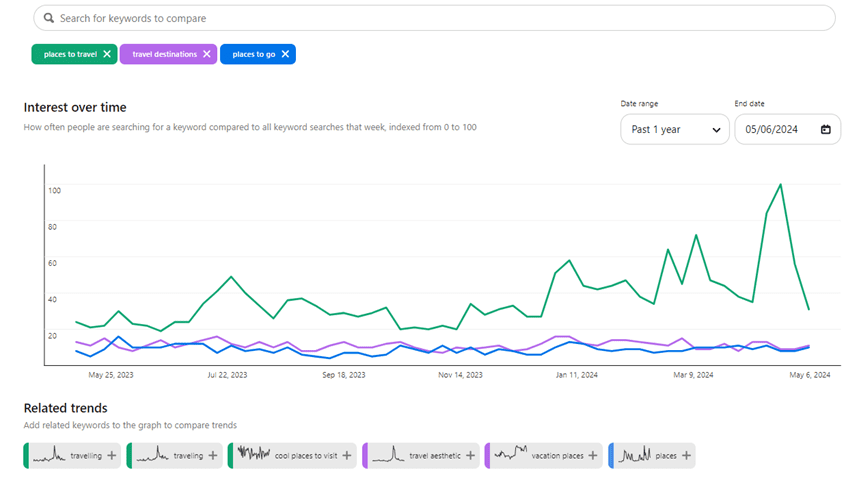
Screenshot from Pinterest Trends, June 2024

Before you start pinning, optimize your blog posts to maximize revenue to ensure every visitor counts. See how to do that in our guide Ten Tips for Maximizing Revenue for Travel Bloggers.

2. Keep Visitors Engaged With Email Marketing

Email marketing is important because you own it. Instagram could ban your account, Google can derank you, but your email list is always yours.

Use this strategy to build less volatile, consistent traffic instead of new traffic.

How To Get Started With Email Marketing

  1. Select an email marketing provider. Travel bloggers love MailerLite and MailChimp because they are low-cost and simple.
  2. Start collecting email addresses. Create a mailing list signup form with your website host and insert it at the end of posts to collect your readers’ information.

How To Use Email Marketing Like A Pro

  1. Create a lead magnet that entices readers to share their information in exchange for it. Popular lead magnets in the travel blogging community are travel guides, ebooks, and itineraries.
  2. The goal of email is to get your reader onto your site. Keep your emails short and include impressive pictures and a clear link to your website. Leave them wanting more so that they click through.
  3. Before sending an email directing traffic to one of your pages, ensure the page is set up to maximize revenue. See how in our guide, Ten Tips for Maximizing Revenue for Travel Bloggers.

“While SEO is often touted as the king of traffic, good email marketing is the absolute queen. We regularly see spikes in our web analytics when we email our audience, but those spikes aren’t just temporary. They help our users build habits. We simply wouldn’t have nearly the business we have today without activating our email list.”

Beth Stanos, Wanderful CEO & Founder

    3. Add Your Content To Flipboard To Grab More Website Visits

    Flipboard is an article curation website that lets users flip through articles from different publications, like magazines.

    How To Get Started With Flipboard

    1. Download the Flipboard app on mobile and create an account and profile.
    2. Create Flipboard magazines. These are topic categories that group your content (much like Pinterest boards).
    3. Add your blog posts to them from the magazine page on Flipboard or the Flipit Chrome bookmark.
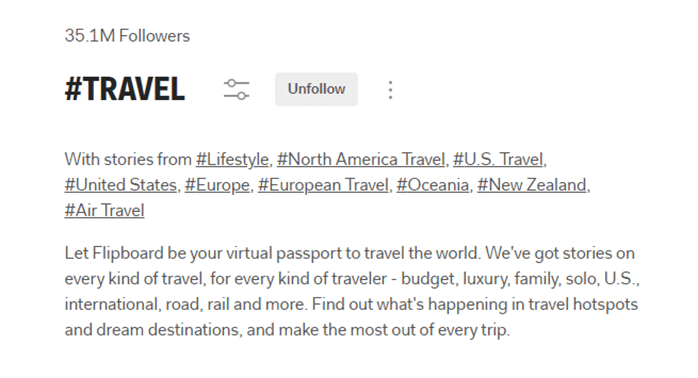
    Screenshot taken from Flipboard, June 2024

    How To Use Flipboard Like A Pro

    1. Add your fresh blog posts to Flipboard right after publishing.
    2. Add relevant content to your magazines that isn’t your own. Engaging with other bloggers’ content and maintaining new content in your magazines helps your reach.
    3. Include your target keywords in your magazine descriptions, post captions, and profile.

    “Flipboard has become a major traffic source for all 3 of my websites. They have fantastic tools for creators, like storyboards, scheduling, and RSS feeds for magazines, making creating and sharing compelling content easy.”

    Amanda O’Brien, theboutiqueadventurer.com Founder

    4. Get Discovered With Short-Form Videos On Social Media

    Did you know 77% of travelers use social media when planning their trips? Get their eyes on your content with short-form videos on platforms like TikTok, Instagram, and YouTube shorts.

    These platforms have algorithms to serve your content to people who don’t follow you, making them ideal for readers to discover you.

    How To Get Started Making Videos

    1. Create your accounts on YouTube, Instagram, and TikTok.
    2. Download Capcut, a free mobile app for video editing. It’s better than the in-app editing functionality, with pre-installed templates and effects.
    3. Create a Linktree account or an alternative. All three platforms make it difficult for users to leave and visit your site, so a place where users can go for all your links is necessary.

    “PLACES ON EARTH WITH THE BLUEST WATER” by @thetravelshack, June 2024

    How To Make Short Video Content Like A Pro

    1. While traveling, keep video creation in the back of your mind. When you see eye-catching scenery or an interesting environment, be ready to capture it in video. Your video’s “wow” factor differentiates between a mediocre and a fantastic video.
    2. On Instagram, write detailed captions. On YouTube and TikTok, keep captions as brief as possible.
    3. Voice-over, on-screen text, and music are crucial to your engagement rate. You can add these with Capcut or in-app.
    4. Pick your video thumbnails carefully. Make sure they stand out in a grid of other videos.
    5. Finally, keep your short video short. The ideal length for a Reel is seven to eleven seconds, a TikTok 21 to 34 seconds, and a YouTube Short 25 to 35 seconds.

    “TikTok helped us to get our second blog on Mediavine. We shared detailed videos about “how to do something” and always included a call to action, directing viewers to our blog for more information. In recent years, we’ve had videos go viral while encouraging followers to visit the link in our bio. This has resulted in thousands of clicks to our websites.”

    Natasha Alden, theworldpursuit.com Co-Founder

    5. Expose Yourself To New Audiences With Guest Posting

    Having your writing published on another website gives you access to a whole new audience, making it an excellent strategy for attracting new readers.

    How To Start Guest Posting

    1. Find places that accept guest posts. Many publications have open submissions that you can submit to.
    2. If you see a site that has guest posts but no open submissions, find their contact information and send an inquiry email.
    3. Create a pitch by explaining your travel expertise and provide writing samples.

    How To Guest Post Like A Pro

    1. When creating your pitch, understand the site’s needs. What content gaps do they have? Focus your pitch there.
    2. Organic guest posting opportunities arise if you take the time to network. Meeting and developing friendships with travel bloggers is a great way to share audiences. You can network on social media, as well as in-person events like TBEX, TravelCon, and Traverse.
    3. Create a clear link back to your blog and include a catchy description so readers will be enticed to read more of your content.
    4. Strategize by monitoring the traffic of potential sites with tools like SEMRush and pick the best option.
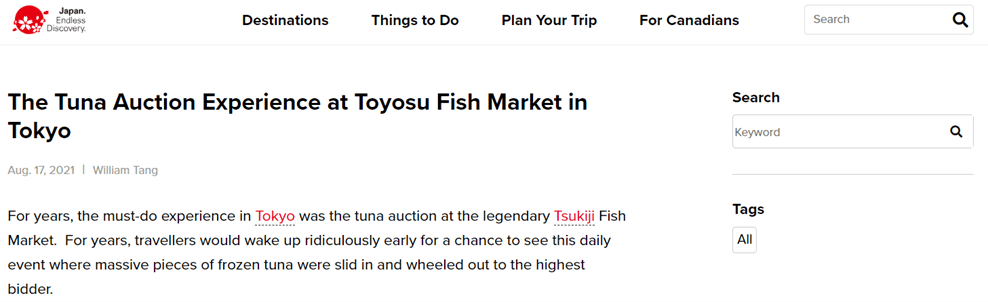
    Screenshot from japan.travel, June 2024

    “Creating content for another publication to share as a standalone article allows you to share new expertise about a certain area. Whether through the article itself or subsequent social shares, a new audience gets exposure to you as a writer.”

    William Tang, goingawesomeplaces.com Founder

    See how William Tang made travel blogging his full-time job with the help of Stay22’s revenue-boosting tools. Read the case study.

    Compensate For Traffic Dips By Maximizing Your Revenue.

    Maximize your conversions with strategic CTA placement and Stay22’s cutting-edge AI-powered affiliate tools! Skyrocket your affiliate sales with these proven tips:

    DOWNLOAD OUR GUIDE: Ten Tips for Maximizing Revenue for Travel Bloggers.


    Image Credits

    Featured Image: Image by Shutterstock. Used with permission.

    Yes, Clicks and Engagement Impact SEO

    For years Google denied using clicks on organic listings as a ranking signal. We now know otherwise. Recently revealed documents show Google indeed uses click-related signals in its algorithm.

    Here’s an overview of those documents with my takeaways on the search engine optimization impact.

    Organic Clicks

    At Google’s federal antitrust trial last year, Google Search V.P. Pandu Nayak testified the search engine uses a ranking system called “Navboost” (also called “Glue”) that analyzes user interactions on search results (such as clicks, hovers, scrolls, and swipes) and keeps the data for 13 months.

    Navboost delivers results based on users’ interactions with related search result pages. The system also determines whether search results should include other features, such as videos, featured snippets, “People also ask,” and local packs.

    The same trial produced an internal Google PDF from 2016 naming “user interactions” (i.e., clicks) as one of the top three ranking factors.

    Many in the search engine community have long suspected that Google uses clicks in its ranking algorithm. We’ve also shared that it’s highly limiting, existing only for higher-ranking pages (that generate many clicks). Thus other ranking signals, such as inbound links and on-page relevance and quality, remain fundamental for all but the very top listings.

    Chrome Browser Clicks

    Last month, documents leaked from Google Search’s internal engineering department. The contents revealed the importance of organic clicks on rankings. Moreover, the documents described Google’s monitoring of users’ Chrome browser interactions with websites. Google has denied that for years.

    So, no matter the traffic source, Google knows how visitors using Chrome interact with a website.

    ‘Long clicks’

    SEO pros have theorized for years that click data informs content quality. “Dwell time” and “pogo-sticking” are oft-discussed bounce-rate metrics.

    Thanks to the engineering leak, we know Google does have such a metric, calling it “long clicks.” The longer a ranking page holds users, the better.

    SEO Takeaways

    • Keep a close eye on your highest-traffic pages. Google has the most data about them. Make sure they are engaging and trigger meaningful interactions. Use heatmaps and other usability tools to understand visitors’ actions and optimize accordingly.
    • Focus on meaningful clicks, not just from search results. Try to improve click-throughs from email newsletters and even ads. Google accumulates this data from Chrome. Aim link-building campaigns on those that drive clicks.
    • Optimize page titles as they impact click-throughs on search result pages. Review top SERP listings and snippets regularly to improve clicks. Use structured data where possible to earn rich snippets.
    Top SEO & Content Marketing Trends To Future-Proof Your Strategy via @sejournal, @hethr_campbell

    What are the key SEO and content marketing trends you should prioritize in 2024 and beyond?

    Join us and find out! 

    With search taking on a more human-first and user-centric approach, powered by AI intelligence and collaboration, now’s the time to adapt your strategy.  

    That’s why on June 18, we’re hosting a live webinar with Conductor about which SEO trends to focus on this year (and which to ignore) in order to drive sustainable growth and success. 

    Here are some key takeaways from the presentation:

    • Predictions on SGE’s Potential Impact on SEO: Understand how Google’s Search Generative Experience (SGE) could transform the SEO landscape and what it means for your strategy.
    • How to Adapt to Industry-Wide Disruptions: Learn best practices for navigating significant changes in search, while maintaining a competitive edge.
    • Deep Dive into E-E-A-T: Discover everything you need to know about Experience, Expertise, Authority, and Trustworthiness (E-E-A-T) and how to integrate these principles into your content.
    • Agile Approach to Algorithm Updates: Find out why flexibility and agility are crucial in responding to rapid and significant changes in Google’s algorithms.  
    • Staying Indexed in 2024: Learn why staying indexed is becoming a new challenge and how to ensure your content remains visible.
    • Trends to Ignore: Save time and resources by identifying which SEO trends aren’t worth your focus.

    In this webinar, Zack Kadish, Sr. SEO Strategy Director at Conductor, and Alex Carchietta, Sr. Customer Success Manager at Conductor, will provide the expert insights you need to thrive in this ever-evolving industry.

    Don’t miss this opportunity to stay ahead of the curve and ensure your SEO and content marketing strategies are primed for the future.

    Plus, if you join us live, Zack and Alex will answer any questions you have at the end of the presentation. 

    Can’t make it to the live event? Sign up anyway, and we’ll send you a recording of the webinar to watch at your convenience.

    Google To Limit AI Overviews For “Nonsensical” Queries via @sejournal, @MattGSouthern

    Google has addressed concerns regarding the accuracy and quality of its AI overview feature in search results.

    The company acknowledges the criticism and odd results generated by the AI overviews but claims that the feature leads to higher user satisfaction and more complex queries being answered.

    As Liz Reid, Head of Google Search, continues to repeat the same talking points, here’s what’s being done about AI overviews.

    Background On AI Overviews

    Google launched AI overviews to provide users with comprehensive responses to complex questions that would have previously required multiple searches.

    The feature is powered by a customized language model integrated with Google’s core web ranking systems.

    Unlike chatbots and other large language model (LLM) products, Google claims that AI overviews are built only to show information backed up by top web results and include relevant links for further exploration.

    Google alleges that, in testing, the accuracy rate for AI overviews is on par with featured snippets, another popular AI-powered search feature.

    Addressing Odd Results & Criticism

    The widespread use of AI overviews by millions of users has surfaced some odd and inaccurate results.

    • Google attributes these issues to several factors, including:
    • Misinterpreting queries
    • Misinterpreting nuances in web content language
    • Limited high-quality information available for specific topics

    In its statement, Google addresses the viral example of “How many rocks should I eat?” which generated an AI overview based on satirical content republished on a geological software provider’s website.

    The company explains that this is an instance of a “data void” or “information gap,” where limited high-quality content is available on a topic.

    Improvements & Updates

    In response to the criticism, Google says it’s made over a dozen technical improvements to AI overviews.

    These updates include:

    • Better detection mechanisms for nonsensical queries
    • Limiting the inclusion of satire and humor content
    • Updating systems to limit the use of potentially misleading user-generated content
    • Adding triggering restrictions for queries where AI overviews were less helpful
    • Enhancing quality protections for sensitive topics like news and health

    Google’s company message is that less than one in every 7 million unique queries with AI overviews contained a content policy violation.

    Why SEJ Cares

    The lessons from Google’s AI overview launch will shape the future of search and have implications for the SEO industry.

    The concerns about accuracy highlight the need for search engines to be transparent about how these AI features work, their limitations, and how issues are being addressed.

    SEO professionals, content creators, and website owners should push for clearer communication. By actively engaging in these discussions, you can guide the responsible use of AI tools.

    Google’s challenges present an opportunity for competitors to prioritize transparency, user trust, and ethical AI deployment to differentiate themselves. It will be interesting to see if anyone steps up to the challenge.


    Featured Image: DIA TV/Shutterstock

    Google Validates Leak, Igniting Questions Around Search Transparency via @sejournal, @MattGSouthern

    Google has officially acknowledged that some internal documents recently leaked online are authentic.

    The files containing details about data Google collects and potentially uses in its search ranking algorithms ignited speculation and analysis within the SEO community.

    Now, there’s a question of whether the leak will cause Google to tighten its already restricted communication channels.

    Background Information

    The existence of the leaked documents was first reported earlier this week by Rand Fishkin and Mike King.

    They claim the materials offer a look under the hood of Google’s closely guarded search engine, suggesting the company tracks data like user clicks and Chrome browsing activity – signals that Google representatives have previously downplayed as ranking factors.

    However, Google has cautioned against jumping to conclusions based on the leaked files alone.

    Many in the SEO community have made potentially inaccurate assumptions about how the leaked data points fit into Google’s systems. Google cautions against this.

    A Google spokesperson said in a statement to The Verge:

    “We would caution against making inaccurate assumptions about Search based on out-of-context, outdated, or incomplete information.”

    Potential Impact On Google’s Public Communication

    The leak has put Google in an awkward position, forcing the typically tight-lipped company to respond publicly.

    With so much speculation and argumentation now swirling around the leaked files, Google may hesitate to reveal new details about its search engine and ranking processes.

    Historically, the company has walked a fine line between guiding SEO professionals and publishers while protecting its algorithms from manipulation and abuse.

    Looking Ahead

    While the documents provide clues about Google’s search algorithms, much remains unknown about how Google collects and weights the various data points.

    The consensus view emerging is to treat the leaked information as a jumping-off point for further research and testing, not as gospel truth about what drives search rankings.

    Open and collaborative discussion has always been a strength of the SEO world. Still, it’s important to pair that knowledge-sharing with rigorous testing, healthy skepticism, and respect for the limitations of any one data source – even from inside Google itself.

    FAQ

    How might the leak change Google’s communication strategy?

    Following the leak, Google might become more secretive in its communications to avoid further exposure of sensitive information.

    Historically, Google has balanced guiding SEO experts while protecting its algorithms from manipulation. This balance may shift, leading to restricted public disclosures about its search engine and ranking processes.

    Why is it important not to draw hasty conclusions from the leaked documents?

    It’s crucial not to make hasty conclusions from the leaked documents because they might contain incomplete, outdated, or out-of-context information.

    Google has cautioned against making inaccurate assumptions about its search algorithms based solely on these files. SEO professionals are advised to use the information as a starting point for further research and validation through practical testing.

    What should SEO experts focus on after the Google data leak?

    Post-leak, SEO experts should focus on fostering open and collaborative discussions while being skeptical of any one data source, even if it’s from Google.

    They should continue testing and research to confirm insights from the leaked documents. Aim to develop strategies based on verified and comprehensive data rather than solely relying on potentially misleading internal leaks.


    Featured Image: Veroniksha/Shutterstock

    Core Web Vitals: WordPress, Wix, Squarespace, Joomla, Duda, & Drupal via @sejournal, @martinibuster

    The Core Web Vitals technology report shows that five out of six of the most popular content management systems performed worse in April 2024 when compared to the beginning of the year. The real-world performance data collected by HTTPArchive offers some clues about why performance scores are trending downward.

    Core Web Vitals Technology Report

    The rankings for Core Web Vitals (CWV) are a mix of real-world and lab data. The real-world data comes from the Chrome User Experience Report (CrUX) and the lab data is from an HTTP Archive public dataset (lab data based on the websites included in the CrUX report).

    The data is used to create the Core Web Vitals technology report which can be sliced and diced to measure the mobile and desktop performances for a wide variety of content management systems in any combination, as well as provide data on JavaScript, CSS HTML and image weight data.

    The data reported in the Search Engine Journal articles are based on measurements of mobile data. The scores are in the form of percentages which represent the percentages of website visits that resulted in a good Core Web Vitals (CWV) score.

    This is the background on the HTTP Archive scoring for CWV:

    “Core Web Vitals
    There may be different approaches to measure how well a website or group of websites performs with CWV. The approach used by this dashboard is designed to most closely match the CWV assessment in PageSpeed Insights”

    This is the background information about the HTTP Archive lab data:

    “HTTP Archive measures individual web pages, not entire websites. And due to capacity limitations, HTTP Archive is limited to testing one page per website. The most natural page to test for a given website is its home page, or the root page of the origin.”

    Source of quotes, HTTP Archive.

    Top Core Web Vitals Performance

    The highest performing content management system (CMS) of the six CMS under comparison is Duda, a closed-source website builder platform that is used by agencies and developers for creating and managing large portfolios of client sites. 71% of website visits resulted in a good core web vitals score. Duda’s score is 13 percentage points ahead of the second place winner, Squarespace, another closed source website building platform.

    Sites built with Duda consistently have higher CWV performance rates than any other CMS, by a wide margin. Squarespace, Drupal and Wix are bunched together with similar performance scores, with the Joomla and WordPress scoring in fifth and sixth place.

    WordPress Is Faster But Other Factors Slowing It Down

    Although WordPress is ranked in sixth place, it’s performance did not drop as much as the other leading content management systems, quite possibly reflecting the many performance improvements in
    present in each new version of WordPress. WordPress 6.5, released in early April 2024, featured over 100 performance improvements to the backend and the front end.

    The performance score for WordPress was slightly lower in April 2024 than in the beginning of the year, but less than one percentage point. However, that percentage drop is lower than the top ranked CMS, Duda, which experienced a drop of 5.41 percentage points.

    Chrome Lighthouse is an automated tool for measuring website performance. The Lighthouse scores for WordPress in January of this year was 35%, which means that 35% of measured WordPress sites had a good Lighthouse CWV score. The CWV score took a dip in February and March but it zipped back to 35% in April, perhaps reflecting the many performance improvements in WordPress version 6.5.

    The scores for the average Page Weight is likely where the performance lagged. Page Weight is the average number of bytes sent over the network, which could be compressed. The average Page Weight of WordPress sites started out at 568.48 in January and increased to 579.92, an increase of 11.44.

    The average download size of images when compared from January to April 2024 increased by 49.5 Kilobytes but that’s something that has more to do with how publishers use WordPress and not how WordPress is being used. These could be contributing to the essentially flat performance change this year. But again, virtually no change in performance is better than what’s going on with other content management systems which experienced larger drops in their performance rates.

    Top CWV Performance By CMS

    The list of CWV performance represents the percentage of sites using a given CMS that has a good CWV score. Here is the list of the top performers with their respective percentage rates:

    1. Duda 71%
    2. Squarespace 58%
    3. Drupal 54%
    4. Wix 52%
    5. Joomla 43%
    6. WordPress 38%

    Performance Drops By CMS

    Comparing the performance drop by CMS shows a weird trend in that four out of six content management systems had relatively high drops in performance. The following is a comparison of performance drops by percentage points, indicated with a minus sign.

    List By Performance Change

    • Wix -7.11
    • Duda -5.41
    • Joomla -2.84
    • Drupal -2.58
    • WordPress -0.71

    As can be seen above, WordPress had the lowest drop in performance. Wix and Duda had the steepest drops in performance while Squarespace was the only CMS with an increase in performance, with a positive score of +3.92.

    Core Web Vitals Scores – Takeaways

    Duda is clearly the Core Web Vitals performance champ, outscoring every content management system in this comparison. Squarespace, Wix and Drupal are close behind in a tight pack.  Out of the six platforms in this comparison only Squarespace managed to improve their scores this year.

    All of the other platforms in this comparison scored less well in April compared to the beginning of the year, possibly due to increases in page weight, particularly in images but there might be something else that accounts for this anomaly that isn’t accounted for  in the HTTP Archive reports.

    The WordPress performance team continues to score notable improvements to the WordPress core and the slight performance drop of less than one percent may be because of how publishers are using the platform.

    It’s safe to say that all the platforms in this comparison are winners because all of them show steady improvements in general.

    Explore the HTTP Archive Core Web Vitals report here.

    Featured Image by Shutterstock/Roman Samborskyi

    Why Do I Need A Privacy Statement? via @sejournal, @DrSScheuing

    This edited extract is from How to Use Customer Data by Sachiko Scheuing ©2024 and reproduced with permission from Kogan Page Ltd.

    Do you use personal data?

    I bet you do because otherwise, you would not be reading this book. If your company uses personal data for marketing, accounting, HR, or whatever other purposes, you need a privacy policy.

    The traditional approach to data protection and informational self-determination suggests that meaningful control of your own data is only possible if you were informed about how the data will be used.

    One of the first rules GDPR lays down in its text, after clarifying the scope of the law and the different definitions, is Article 5 (legislation.gov.uk, 2016):

    1. Personal data shall be:

    (a) processed lawfully, fairly and in a transparent manner in relation to the data subject (‘lawfulness, fairness and transparency’)

    This very requirement triggers the need for a privacy statement.

    Companies, in particular, when they are data controllers, must be accountable for their data use and have a privacy statement. This requirement is also spelled out in Article 24(2) of the GDPR (legislation.gov.uk, 2016).

    This article covers the topic of automated individual decision-making, including profiling – not profiling for marketing that automates the selection of ads to be shown and so on, but profiling that can have a serious impact on people.

    Article 24(2) says such profiling can only be compliant if an appropriate data protection policy, which includes a privacy statement, is implemented (legislation.gov.uk, 2016).

    In any event, a privacy statement is an important document. GDPR dedicates two articles to list out the precise information you need to post on your privacy policy; Article 13 sets out the requirements in case you collect data directly from consumers, and Article 14 those for situations where data is collected indirectly (legislation.gov.uk, 2016).

    Who Will Read Your Privacy Statement?

    In the case of food labelling, it was me as a customer checking for a particular ingredient that read this. Have you ever wondered who reads your privacy statement?

    Customers and prospects are one obvious group of stakeholders who are concerned about what is happening with their data once it’s in your hands. Privacy activists and consumer protection organizations may also be going through your privacy statement.

    Authors and academic researchers in the field of data protection find it a great source of information, learning how companies are using personal data. Regulators, judges, and lawyers who are working on a case that involves your company also take great interest in your privacy notice.

    Your corporate image is shaped by how your privacy statement reads. Customers, both in business-to-business as well as business-to-consumer markets, pay great attention to your privacy practice.

    Business partners and suppliers to your company often formalize the review of your company’s data protection compliance, asking questions about your privacy statement in their due diligence questionnaires.

    Whoever the readers are, it is another “touch-point” for a variety of stakeholders, including revenue-generating parties like customers and partners.

    You want them to have a good impression of your privacy practices, and the first chance you have to showcase this may be your privacy statement. Borrowing the words of the ICO, a good privacy statement “helps build trust, avoids confusion, and lets everyone know what to expect.” (ICO, 2023)

    How Long Should My Privacy Statement Be?

    GDPR expects you to draw up a privacy statement long enough so that you can properly explain which data is collected, used, and stored. This makes your privacy statement transparent.

    At the same time, your privacy statement must be concise, according to Article 12(1) of GDPR (legislation.gov.uk, 2016). These two requirements seem to contradict each other at first glance. The EU regulators, therefore, give some explanations in their guidelines on transparency (Art 29 WP, 2018).

    While a privacy statement aims to give necessary information so that consumers can make decisions about their personal data, regulators are also aware of the phenomena known as “information fatigue” or “information overload.” The hypothesis is that human beings have a limited capacity to digest information.

    When too much information is presented, people become overwhelmed and either ignore the information or make illogical decisions to cope with the psychological stress they experience (Simmel, 1950; Milgram, 1969).

    There are two strategies to avoid this that can, at the same time, still provide all the details required.

    Have A Clear Structure

    Before starting to write a privacy notice, list out all the information you need to provide in it. Then, think about how you want to present it to your customers and other data subjects in a logical manner.

    In doing so, you might want to read the privacy statements of big consumer brands and governmental organizations and find out how their privacy statements are structured.

    There is a good chance that their privacy notices are prepared by experienced in-house lawyers or by law firms that specialize in data protection. The idea is to get the feeling of what great privacy statements look like.

    You might also want to read up on the privacy statements of your competitors, as well as those of your partners in your business field.

    Ask your privacy person which competitors have good reputations with regard to their data protection practices, or perhaps you already know who they are. Just take a look at how their privacy notices are structured. You can also simply adopt the structure of ICO’s privacy policy template.

    Whatever you do, the key is to improve the readability of your privacy statement by giving it a logical structure.

    Prepare Privacy Notices In Layers

    Another approach, endorsed by the regulators, is the so-called layered approach (Art 29 WP, 2018).

    Assuming that the privacy notice is going to be online, you can make your privacy policy interactive by using links, so that users can click on them when they want more information, or skip them and stay on the first-level summary information if they so wish, just as you would use an online encyclopedia.

    This way, the key messages are simplified, and readers of your privacy statement will have a good overview of the first layer of the statement.

    Regulators recommend the following information should be visible on the first layers of the privacy notice (Art 29 WP, 2018, p 19, para 36):

    1. Details of the purposes of processing
    2. The identity of the data controller
    3. Description of the data subjects’ rights
    4. Information on the processing which has the most impact on the data subject
    5. Information on the processing which could surprise them.

    When Do I Have To Present The Privacy Statement?

    Consumers must be informed what data is collected for, for instance marketing purposes, as early as possible.

    When you are collecting data directly from your customers, you must present your privacy notice the moment you are collecting the data (see Article 13(1) GDPR; legislation.gov.uk, 2016).

    In a scenario where you license the data from other organizations, such as from public sources or marketing data providers, Article 14(3)a and b require the privacy information to be provided in the following manner (legislation.gov.uk, 2016):

    • within a reasonable period after obtaining the personal data, but at the latest within one month, having regard to the specific circumstances in which the personal data are processed;
    • if the personal data are to be used for communication with the data subject, at the latest at the time of the first communication to that data subject; or
    • if a disclosure to another recipient is envisaged, at the latest when the personal data are first disclosed.

    In short, for licensed data that is not contact detail data, the privacy notice must be communicated within a month.

    If you are using contact data like names, telephone numbers, email addresses, and physical addresses, you need to communicate the privacy statement the first time you send a commercial message to them.

    In practice, companies embed a link to the privacy statement in email messages or print that link on direct mail pieces to fulfill this requirement.

    References:

    • Art 29 WP (2018) Article 29 Data Protection Working Party, WP260 rev.01 Guidelines on transparency under Regulation 2016/679, adopted on 29 November 2017, last revised and adopted on 11 April 2018, https://ec.europa.eu/newsroom/article29/items/622227 (archived at https://perma.cc/4HWYURKL)
    • ICO (2023) UK Information Commissioner’s Office: Transparency direct marketing detailed guidelines, https://ico.org.uk/for-organisations/advice-for-smallorganisations/frequently-asked-questions/transparency-cookies-and-privacynotices/ (archived at https://perma.cc/K3ZR-T7E5)
    • legislation.gov.uk (2016)‘Regulation (EU) 2016/679 of the European Parliament and of the Council, 27 April 2016, www.legislation.gov.uk/eur/2016/679/contents (archived at https://perma.cc/NVG6-PXBQ)
    • Milgram, S (1969) The experience of living in cities, Science 167, 1461–1468
    • Simmel, G (1950) The metropolis and mental life, in K H Wolff (ed.), The Sociology of Georg Simmel, Free Press, New York, USA.

    To read the full book, SEJ readers have an exclusive 25% discount code and free shipping to the US and UK. Use promo code SEJ25 at koganpage.com here.

    More resources: 


    Featured Image: Rawpixel.com/Search Engine Journal

    How To Find Competitors’ Keywords: Tips & Tools

    This post was sponsored by SE Ranking. The opinions expressed in this article are the sponsor’s own.

    Wondering why your competitors rank higher than you?

    The secret to your competitors’ SEO success might be as simple as targeting the appropriate keywords.

    Since these keywords are successful for your competitors, there’s a good chance they could be valuable for you as well.

    In this article, we’ll explore the most effective yet simple ways to find competitors’ keywords so that you can guide your own SEO strategy and potentially outperform your competitors in SERPs.

    Benefits Of Competitor Keyword Analysis

    Competitor keywords are the search terms your competitors target within their content to rank high in SERPs, either organically or through paid ads.

    Collecting search terms that your competitors rely on can help you:

    1. Identify & Close Keyword Gaps.

    The list of high-ranking keywords driving traffic to your competitors may include valuable search terms you’re currently missing out on.

    To close these keyword gaps, you can either optimize your existing content with these keywords or use them as inspiration for creating new content with high traffic potential.

    2. Adapt To Market Trends & Customer Needs.

    You may notice a shift in the keywords your competitors optimize content for. This could be a sign that market trends or customer expectations are changing.

    Keep track of these keywords to jump on emerging trends and align your content strategy accordingly.

    3. Enhance Visibility & Rankings.

    Analyzing your competitors’ high-ranking keywords and pages can help you identify their winning patterns (e.g., content format, user intent focus, update frequency, etc).

    Study what works for your rivals (and why) to learn how to adapt these tactics to your website and achieve higher SERP positions.

    How To Identify Your Competitors’ Keywords

    There are many ways to find keywords used by competitors within their content. Let’s weigh the pros and cons of the most popular options.

    Use SE Ranking

    SE Ranking is a complete toolkit that delivers unique data insights. These insights help SEO pros build and maintain successful SEO campaigns.

    Here’s the list of pros that the platform offers for agency and in-house SEO professionals:

    1. Huge databases. SE Ranking has one of the web’s largest keyword databases. It features over 5 billion keywords across 188 regions. Also, the number of keywords in their database is constantly growing, with a 30% increase in 2024 compared to the previous year.
    2. Reliable data. SE Ranking collects keyword data, analyzes it, and computes core SEO metrics directly from its proprietary algorithm. The platform also relies on AI-powered traffic estimations that have up to a 100% match with GSC data.

    Thanks to SE Ranking’s recent major data quality update, the platform boasts even fresher and more accurate information on backlinks and referring domains (both new and lost).

    As a result, by considering the website’s backlink profile, authority, and SERP competitiveness, SE Ranking now makes highly accurate calculations of keyword difficulty. This makes it easy to see how likely your own website or page is to rank at the top of the SERPs for a particular query.

    1. Broad feature set. Beyond conducting competitive (& keyword) research, you can also use this tool to track keyword rankings, perform website audits, handle all aspects of on-page optimization, manage local SEO campaigns, optimize your content for search, and much more.
    2. Great value for money. The tool offers premium features with generous data limits at a fair price. This eliminates the need to choose between functionality and affordability.

    Let’s now review how to use SE Ranking to discover the keywords your competitors are targeting for both organic search and paid advertising.

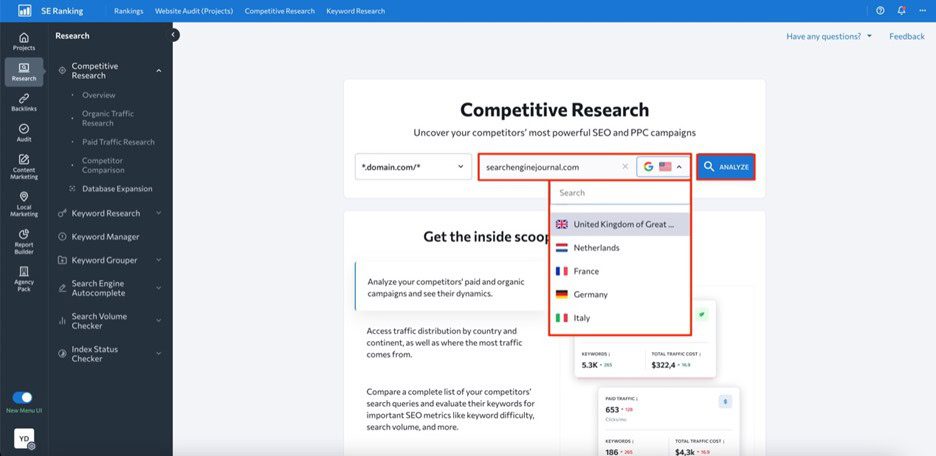
    First, open the Competitive Research Tool and input your competitor’s domain name into the search bar. Select a region and click Analyze to initiate analysis of this website.

    Image created by SE Ranking, May 2024

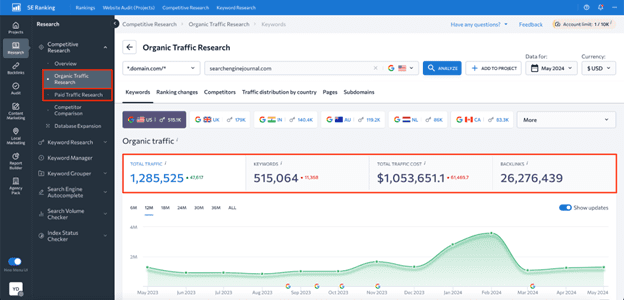
    Depending on your goal, go either to the Organic Traffic Research or Paid Traffic Research tab on the left-hand navigation menu.

    Here, you’ll be able to see data on estimated organic clicks, total number of keywords, traffic cost, and backlinks.

    Image created by SE Ranking, May 2024

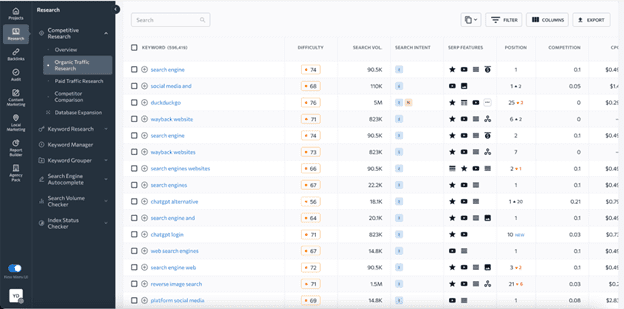
    Upon scrolling this page down, you’ll see a table with all the keywords the website ranks for, along with data on search volume, keyword difficulty, user intent, SERP features triggered by keywords, ranking position, URLs ranking for the analyzed keyword, and more.

    Image created by SE Ranking, May 2024

    What’s more, the tool allows you to find keywords your competitors rank for but you don’t.

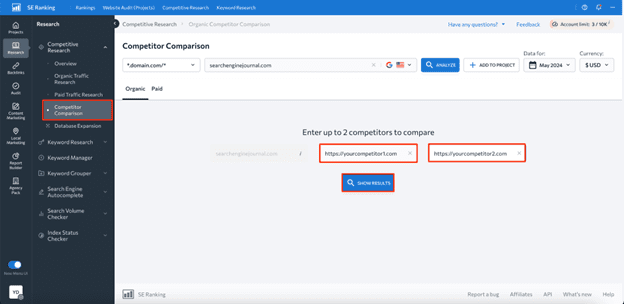
    To do this, head to the Competitor Comparison tab and add up to two websites for comparison.

    Image created by SE Ranking, May 2024

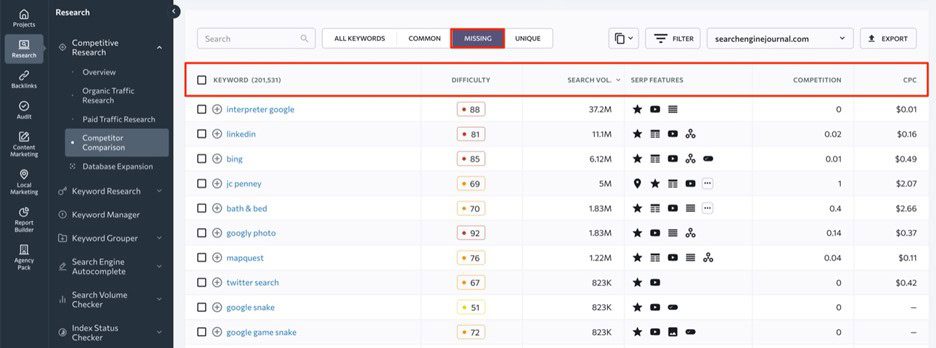
    Within the Missing tab, you’ll be able to see existing keyword gaps.

    Image created by SE Ranking, May 2024

    While the platform offers many benefits, there are also some downsides to be aware of, such as:

    1. Higher-priced plans are required for some features. For instance, historical data on keywords is only available to Pro and Business plan users.
    2. Data is limited to Google only. SE Ranking’s Competitor Research Tool only provides data for Google.

    Use Google Keyword Planner

    Google Keyword Planner is a free Google service, which you can use to find competitors’ paid keywords.

    Here’s the list of benefits this tool offers in terms of competitive keyword analysis:

    1. Free access. Keyword Planner is completely free to use, which makes it a great option for SEO newbies and businesses with limited budgets.
    2. Core keyword data. The tool shows core SEO metrics like search volume, competition, and suggested bid prices for each identified keyword.
    3. Keyword categorization. Keyword Planner allows you to organize keywords into different groups, which may be helpful for creating targeted ad campaigns.
    4. Historical data. The tool has four years of historical data available.

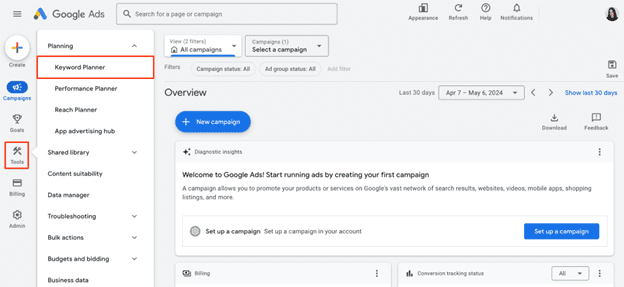
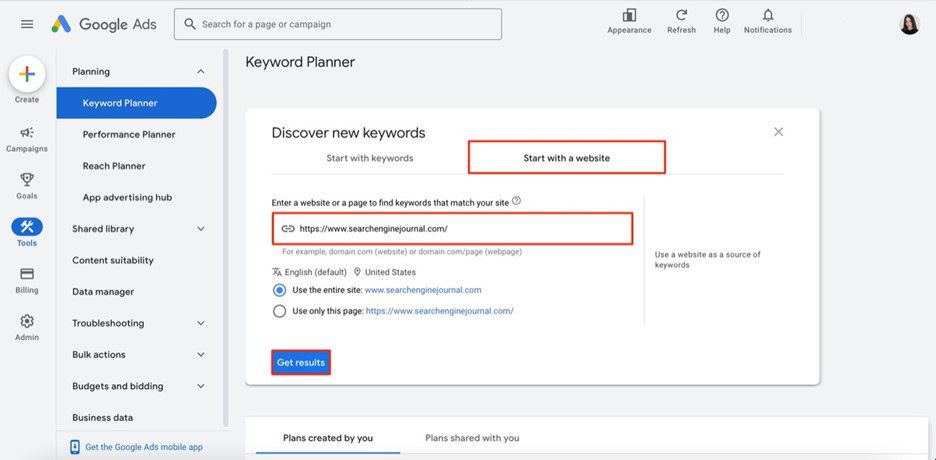
    Once you log into your  Google Ads account, navigate to the Tools section and select Keyword Planner.

    Screenshot from Google Ads, May 2024

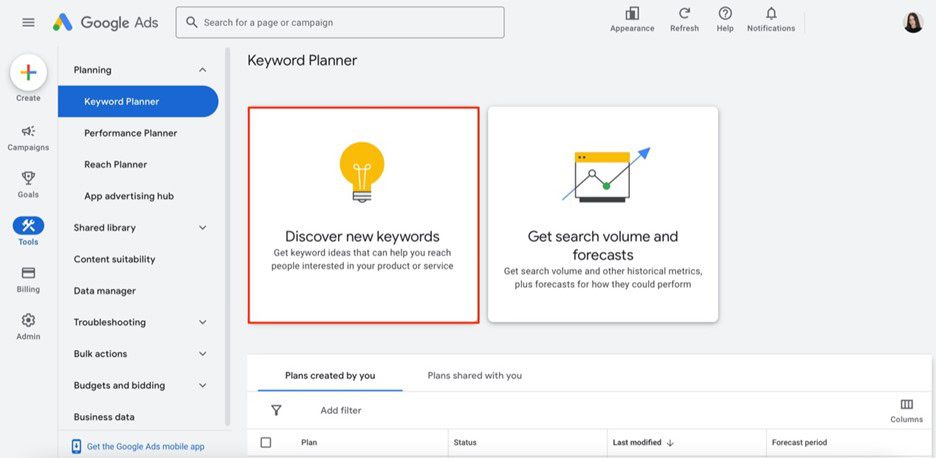
    Now, click on the Discover new keywords option.

    Screenshot from Google Ads, May 2024

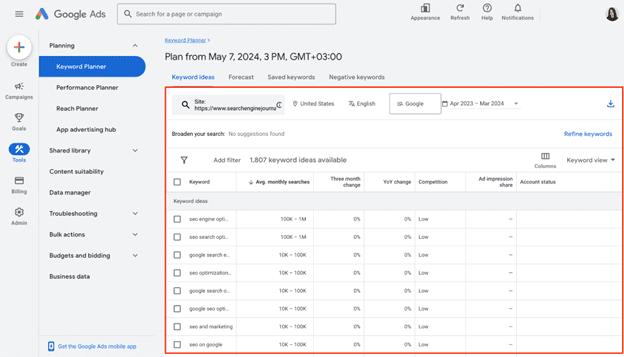
    Choose Start with a website option, enter your competitor’s website domain, region, and language, then choose to analyze the whole site (recommended for deeper insights) or a specific URL.

    Screenshot from Google Ads, May 2024

    And there you have it — a table with all keywords that your analyzed website uses in its Google Ads campaigns.

    Screenshot from Google Ads, May 2024

    Although Keyword Planner can be helpful, it’s not the most effective and data-rich tool for finding competitors’ keywords. Its main drawbacks are the following:

    1. No organic data. The tool offers data on paid keywords, which is mainly suitable for advertising campaigns.
    2. Broad search volume data. Since it’s displayed in ranges rather than exact numbers, it might be difficult to precisely assess the demand for identified keywords.
    3. No keyword gap feature. Using this tool, you cannot compare your and your competitors’ keywords side-by-side and, therefore, find missing keyword options.

    So, if you want to access more reliable and in-depth data on competitors’ keywords, you’ll most likely need to consider other dedicated SEO tools.

    Use SpyFu

    SpyFu is a comprehensive SEO and PPC analysis tool created with the idea of “spying” on competitors.

    Its main pros in terms of competitor keyword analysis are the following:

    1. Database with 10+ years of historical data. Although available only in a Professional plan, SpyFu offers long-term insights to monitor industry trends and adapt accordingly.
    2. Keyword gap analysis. Using this tool, you can easily compare your keywords to those of your competitors using metrics like search volume, keyword difficulty, organic clicks, etc.
    3. Affordability. It’s suitable for businesses on a tight budget.

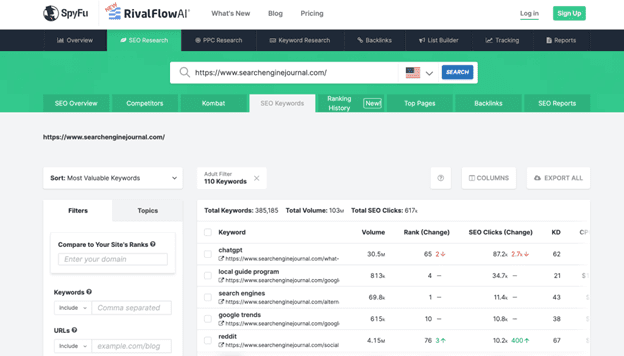
    To explore competitor data, simply visit their website and enter your competitor’s domain in the search bar.

    You’ll be presented with valuable insights into their SEO performance, from estimated traffic to the list of their top-performing pages and keywords. Navigate to the Top Keywords section and click the View All Organic Keywords button to see the search terms they rank for.

    Screenshot of SpyFu, May 2024

    Yet, this free version provides an overview of just the top 5 keywords for a domain along with metrics like search volume, rank change, SEO clicks, and so on. To perform a more comprehensive analysis, you’ll need to upgrade to a paid plan.

    When it comes to the tool’s cons, it would be worth mentioning:

    1. Keyword data may be outdated. On average, SpyFu updates data on keyword rankings once a month.
    2. Limited number of target regions. Keyword data is available for just 14 countries.

    Wrapping Up

    There’s no doubt that finding competitors’ keywords is a great way to optimize your own content strategy and outperform your rivals in SERPs.

    By following the step-by-step instructions described in this article, we’re sure you’ll be able to find high-value keywords you haven’t considered before.

    Ready to start optimizing your website? Sign up for SE Ranking and get the data you need to deliver great user experiences.


    Image Credits

    Featured Image: Image by SE Ranking. Used with permission.
    Doubts Emerge Over Alleged Google Data Leak via @sejournal, @martinibuster

    Many SEOs are coming to the conclusion that the alleged Google data leak was not a leak, did not contain ranking algorithm secrets, was five years out of date and it did not show anything new. While that’s not how everyone feels about it, SEOs in general don’t tend to agree about anything.

    As SEJ reported yesterday, there were signs that this was not a ranking algorithm data dump and that there were many unanswered questions.

    Our take about the alleged leak was:

    “At this point in time there is no hard evidence that this “leaked” data is actually from Google Search… and not related in any way to how websites are ranked in Google Search.”

    At this point we have more information and many SEOs are saying that the information is not an algorithm data dump.

    Some SEOs Urged Caution

    While many in the search community were quick to accept the claims of a data leak at face value, others who care about actual facts cautioned to slow down and think first and to be open minded to all possibilities.

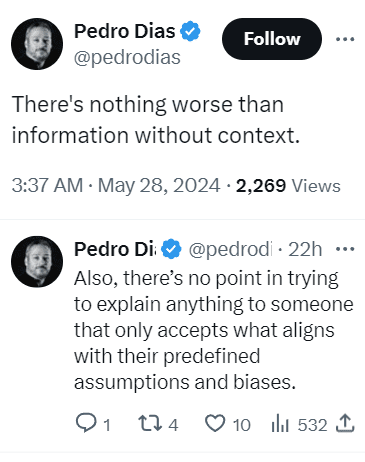
    Tweet By Ex-Googler Pedro Dias

    Tweet with the following words: There's nothing worse than information without context. Also, there’s no point in trying to explain anything to someone that only accepts what aligns with their predefined assumptions and biases.

    Ryan Jones was the first to offer a modest note of caution, advising people in a tweet to view the information objectively and without preconceived ideas.

    Ex-Googler Pedro Dias tweeted:

    “Have no issues with the shared data. And advising caution on the interpretation of some items.”

    Pedro followed up with another tweet to explain why he couldn’t comment on specifics:

    “I can only speak for me. I think you understand why I can’t just correct specific items. What I’m saying is that context is needed and room should be given for interpretation.”

    Someone tweeted that Pedro’s response didn’t add anything to the discussion.

    Pedro responded:

    “I didn’t say that. All I’ve been saying is please be careful jumping to conclusions. If you think that’s not helpful, than I’m sorry.”

    The ex-Googler later tweeted about the importance of having discussions:

    “Let’s remind everyone:
    – It’s healthy to bring logical arguments to a discussion.

    – It’s not healthy to expect everyone to buy opinions without discussing. Especially when it comes from data sources lacking context.”

    Search marketing expert Dean Cruddance tweeted:

    “There isn’t anything that gives away the secret sauce.”

    To which ex-Googler Pedro Dias responded:

    “100%
    But the impact of this, fuels a lot of tinfoil hattery and simplistic takes on search, which is suboptimal.

    In the end, I believe it’s more detrimental than beneficial. Not for the information it contains, but by how it’s gonna be spun and interpreted.”

    This SEO Is Not Buying It

    As the day passed more and more SEOs began openly doubting the leak. Twenty-year search marketing expert Trevor Stolber (LinkedIn profile) posted his observations about the alleged leak, indicating that he wasn’t “buying it.”

    Some of what he posted on LinkedIn:

    • “It’s from a deprecated code base (still very interesting – but old and not used)
    • It’s not actually from their ranking algorithm, it is an API used internally
    • We already knew most of the things that are in there
    • Good production code documentation would specify ranges and values – I see none of that here
    • Google doesn’t use DA (Domain Authority) – DA is an analog to PR (Page Rank) which was Google’s stand-out differentiator – I am not sure why so much attention is being paid to these nuances.”

    Kristine Schachinger, another SEO who I personally know to be an expert, commented in that discussion that the information in the so-called leak dated from 2019.

    “I have been reading the raw dump and they are all dated 2019 and there is literally nothing you can gather from 90% of the pages — I so agree. “

    Others in that discussion openly questioned if it was actually a leak and most everyone agreed that there was nothing new in it and advised it was better to focus on Google’s new AI Overviews, particularly because AI doesn’t follow ranking factors.

    This Was Not A Leak?

    Out of all the people in SEO, the person who can most be described as the father of modern SEO is Brett Tabke. He is the founder of PubCon search marketing conference and also the founder of WebmasterWorld, which in the early days of SEO was the largest and most important SEO forum in the world. Brett is also the person who coined the acronym SERPs (for search engine results pages).

    Brett devoted five hours to studying the data leak and then posted his observations on Facebook.

    Among his observations (paraphrased):

    • This is not a leak
    • There is zero in it that’s directly algorithm related but rather they are API calls.
    • He found nothing that points to how any of the data could be used as part of a ranking algorithm.

    Ash Nallawalla, an enterprise SEO with over 20 years experienced commented:

    “Like I said a few times, it is merely an API document with a list of calls and not an algo code dump. At the most, we can learn some more internal Google terminology.”

    Google Data Leak: Where Are The Facts?

    It’s sinking in within the SEO community that this wasn’t the Google algorithm data leak that some expected it to be. In fact, it wasn’t even a leak by a Googler. And far from being algorithm secrets many are agreeing that there is nothing new in there and that it’s just a distraction.

    Google Ads Now Being Mixed In With Organic Results via @sejournal, @brodieseo

    Google has an incentive to encourage users to click its sponsored ads – but this should not be to the detriment of user experience.

    This aspect of Search seems to have gone awry in recent years, with Google engaging in activities that negatively impacted users.

    Historically, search engine users are accustomed to ads either being placed at the top or the bottom of a SERP, with the page itself either being purely organic results or having the organic results placed in between the ads. Search features are often mixed in, too.

    This has now changed.

    A change was recently added to Google’s documentation, stating that:

    “Top ads may show below the top organic results on certain queries.”

    Detailing how placement for top ads is dynamic and may change.

    In this article, we explore this change and its impact on users and organic search results.

    Timeline Of Changes

    Leading up to the change, Google had been testing mixing sponsored ads within organic listings in various capacities over a 10-month period.

    Here is a timeline of the changes leading up to the official launch.

    June 17th, 2023: Initial Testing

    This was the first time the test appeared in Google’s search results, only showing on mobile devices at the time. Within this initial testing period, it was showing for very few users with more discrete inclusion only on mobile, easily being mistaken for an organic listing for users.

    October 23rd, 2023: Heavier Testing

    Within this testing period, it was the first time that the broader SEO community started to notice the ad labels appearing within organic listings, being visible across both mobile and desktop.

    This testing period was more prolonged in the lead-up to launch.

    March 28th, 2024: Launch

    On this date, Google’s Ads Liaison announced that the change would be a permanent one, with a new definition being added to the “top ads” documentation. From this date, users were then to expect an official change where ads would be mixed in with organic results beyond limited testing.

    Different Types Of Placements

    Now that Google has been mixing sponsored ads within organic results for almost two months, we’re able to gain a better understanding of the extent of the change and how the sponsored ads are appearing.

    Based on my research, there are two common situations where Google is presenting ads within organic listings.

    Mixed With Organic Results

    The standard approach involves a simple ad placement within the top organic results.

    Based on my experience, it is common for there to be one or two ads that are placed together in this situation. It is rare for there to be a maximum of four ads in a row.

    An example of this can be found below:

    Screenshot from search for seo expert melbourneScreenshot from search for [seo expert melbourne], Google, May 2024

    In this example, the sponsored ad technically appears in position #2 on the page. Normally, the ad would have appeared above my page, but in this instance, it is below.

    For the Semrush page, the visibility on the SERP would be unchanged if they were above, but for my page it is at an advantage in terms of ranking visibility.

    Directly Below Featured Snippets

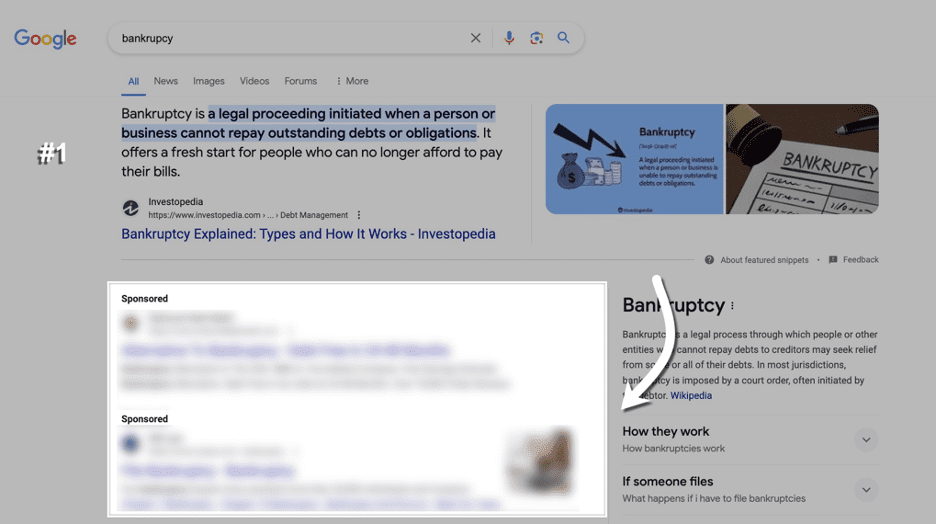
    What seems to be the most common way ads are mixed in with organic listings is by placing them directly below a featured snippet.

    In cases like this, it is common for there to be a full lot of four ads that appear below the featured snippet. In this example, there are two ads that are appearing.

    2 sponsored ads appearing in the SERPsScreenshot from search for [backruptcy], Google, May 2024

    In the past, and still having the ability to show right now, ads would always be placed directly above the featured snippet.

    This could have been perceived as a poor user experience, considering featured snippets tend to show when an answer to a query can be explained with a short description from the page.

    What Are Google’s Intentions?

    Each of the situations explained in the previous section could be interpreted differently.

    The first situation (mixed within organic results) is pretty clear about Google’s intentions: to encourage more clicks on ads and desensitize users to ads appearing at the top, with users mistaking ads for organic listings.

    In contrast, the second situation with featured snippets could be perceived differently. While ads continue to appear in the viewport on desktop, the answer to the user’s query is prominently displayed at the top of search results without ads getting in the way.

    I can’t see this being a bad thing for users or SEO, as Google is making the organic listing more visible across these instances.

    In general, I’m aware of Google’s need to prioritize ad revenue with changes to ad placement. While there are certainly arguments to be made from both angles with this change, my perception is that the outcome is fairly neutral from both sides.

    Ads mixed in with organic results are still exceptionally rare, but featured snippet placements are a more common use case, and there are some clear upsides to this.

    How To Analyze With Semrush

    analyze ads top featureScreenshot from Semrush, May 2024

    While Semrush does have an Advertising Research tool that shows you the position of your ads across various queries, I found that the data wasn’t being collected in a way that allows you to compare ad position relative to organic listings.

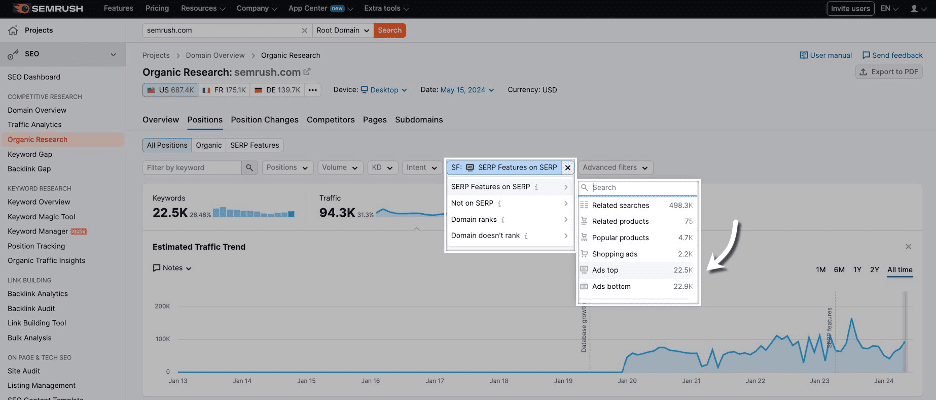
    As an alternative, I found the best approach for analysis to be through using “Ads top” as a SERP feature filter through Organic Research to locate instances where ads were being mixed with organic listings.

    Here’s where this filter is located:

    This filtering doesn’t allow you to filter by URLs for a specific domain, with it instead showing instances where “top ads” are a SERP feature across the Semrush index.

    Using this method, I’m able to review historical top ad inclusions since the launch in March and conclude that ads being mixed in with organic results is still exceptionally rare.

    Final Thoughts

    Overall, based on how Google currently operates, I’m not particularly concerned about this ad placement change from Google.

    While the change is an official one based on the update to Google’s documentation, it still operates more like a test, where ads are continuing to appear in normal positions in the vast majority of instances.

    Based on my research, I believe the change should be perceived as neutral for Google users and SEO. If you see ads being mixed with organic listings in the wild, keep your wits about you.

    I’ll be keeping an eye on this change to make sure Google’s ad placements don’t get too carried away.

    Google’s ad testing has more recently reverted back to using the “ad” labeling instead of “sponsored” on mobile, which was the previous treatment up until recent years.

    We can certainly expect these types of tests to continue into the future, with there never being a boring day within our industry.

    More resources: 


    Featured Image: BestForBest/Shutterstock