Ask an Expert: Should Merchants Block AI Bots?

“Ask an Expert” is an occasional series where we pose questions to seasoned ecommerce pros. For this installment, we’ve turned to Scot Wingo, a serial ecommerce entrepreneur most recently of ReFiBuy, a generative engine optimization platform, and before that, ChannelAdvisor, the marketplace management firm.

He addresses tactics for managing genAI bots.

Practical Ecommerce: Should ecommerce merchants monitor and even block AI agents that crawl their sites?

Scot Wingo: It’s a nuanced and strategic decision essential to every merchant.

Scot Wingo

Scot Wingo

The four agentic commerce experiences — ChatGPT (Instant Checkout, Agentic Commerce Protocol), Google Gemini (Universal Commerce Protocol), Microsoft Copilot (Copilot Checkout, ACP), and Perplexity (PayPal, Instant Buy) — have nearly 1 billion combined monthly active users. With Google transitioning from traditional search to AI Mode, that number will dramatically increase.

For merchants, the opportunity is as big or bigger than Amazon or any other marketplace.

Merchants should embrace AI agents and ensure access to the entire product catalog.

But genAI models need more than access. Agentic commerce thrives not just on extensive attributes but also on the products’ applications and use cases. Merchants should expand attributes beyond what’s shown on product detail pages and provide essential context via a deep and wide question-and-answer section that includes common shopper queries. It enables the models to match consumer prompts with relevant recommendations, driving sales to those merchants.

The time for action is now. Gemini’s shift to AI Mode means zero-click searches will increase, likely producing 20-30% fewer clicks (and revenue) in 2026.

Synthetic Personas For Better Prompt Tracking via @sejournal, @Kevin_Indig

Boost your skills with Growth Memo’s weekly expert insights. Subscribe for free!

We all know prompt tracking is directional. The most effective way to reduce noise is to track prompts based on personas.

This week, I’m covering:

  • Why AI personalization makes traditional “track the SERP” models incomplete, and how synthetic personas fill the gap.
  • The Stanford validation data showing 85% accuracy at one-third the cost, and how Bain cut research time by 50-70%.
  • The five-field persona card structure and how to generate 15-30 trackable prompts per segment across intent levels.
The best way to make your prompt tracking much more accurate is to base it on personas. Synthetic Personas speed you up at a fraction of the price. (Image Credit: Kevin Indig)

A big difference between classic and AI search is that the latter delivers highly personalized results.

  • Every user gets different answers based on their context, history, and inferred intent.
  • The average AI prompt is ~5x longer than classic search keywords (23 words vs. 4.2 words), conveying much richer intent signals that AI models use for personalization.
  • Personalization creates a tracking problem: You can’t monitor “the” AI response anymore because each prompt is essentially unique, shaped by individual user context.

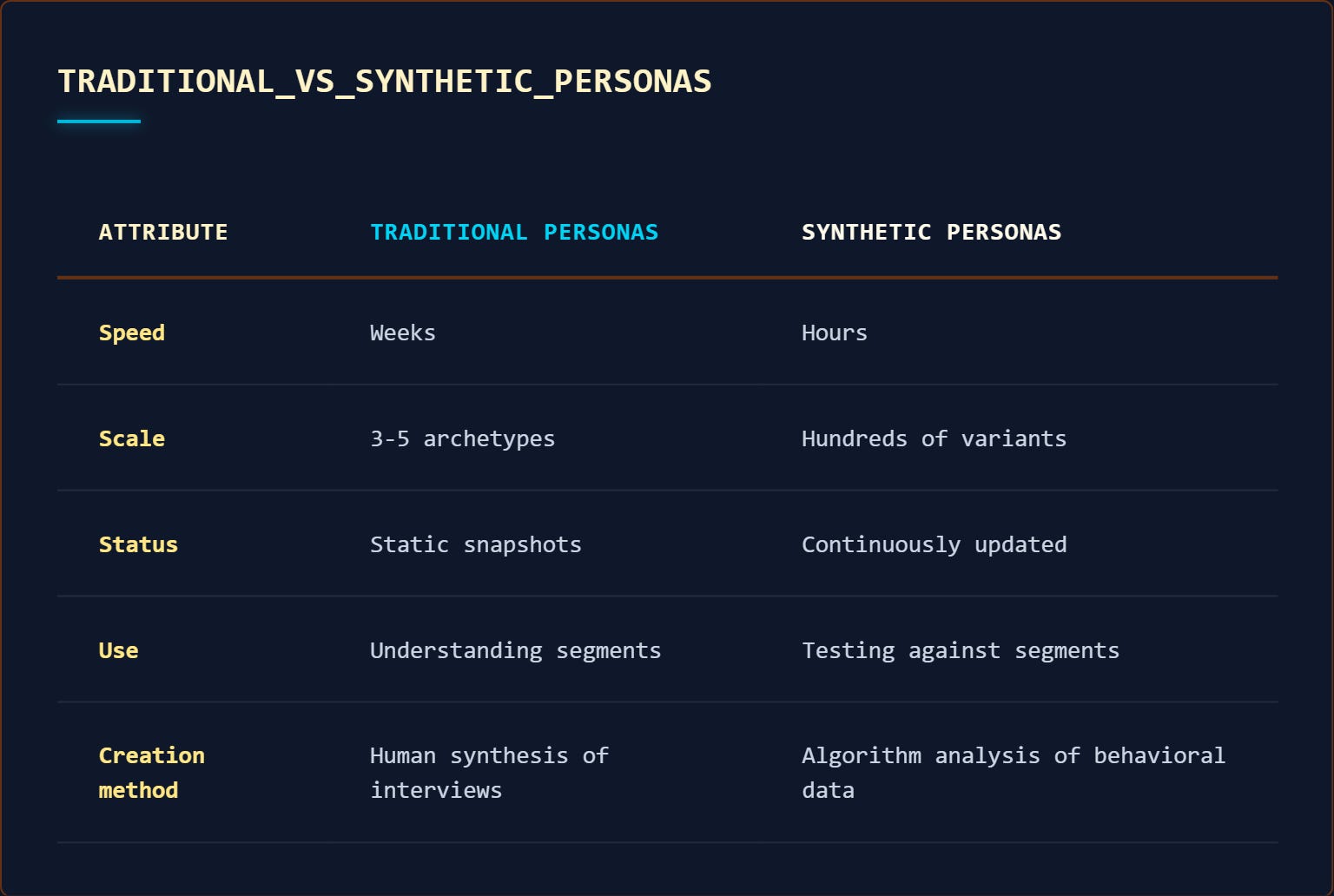
Traditional persona research solves this – you map different user segments and track responses for each – but it creates new problems. It takes weeks to conduct interviews and synthesize findings.

By the time you finish, the AI models have changed. Personas become stale documentation that never gets used for actual prompt tracking.

Synthetic personas fill the gap by building user profiles from behavioral and profiling data: analytics, CRM records, support tickets, review sites. You can spin up hundreds of micro-segment variants and interact with them in natural language to test how they’d phrase questions.

Most importantly: They are the key to more accurate prompt tracking because they simulate actual information needs and constraints.

The shift: Traditional personas are descriptive (who the user is), synthetic personas are predictive (how the user behaves). One documents a segment, the other simulates it.

Image Credit: Kevin Indig

Example: Enterprise IT buyer persona with job-to-be-done “evaluate security compliance” and constraint “need audit trail for procurement” will prompt differently than an individual user with the job “find cheapest option” and constraint “need decision in 24 hours.”

  • First prompt: “enterprise project management tools SOC 2 compliance audit logs.”
  • Second prompt: “best free project management app.”
  • Same product category, completely different prompts. You need both personas to track both prompt patterns.

Build Personas With 85% Accuracy For One-Third Of The Price

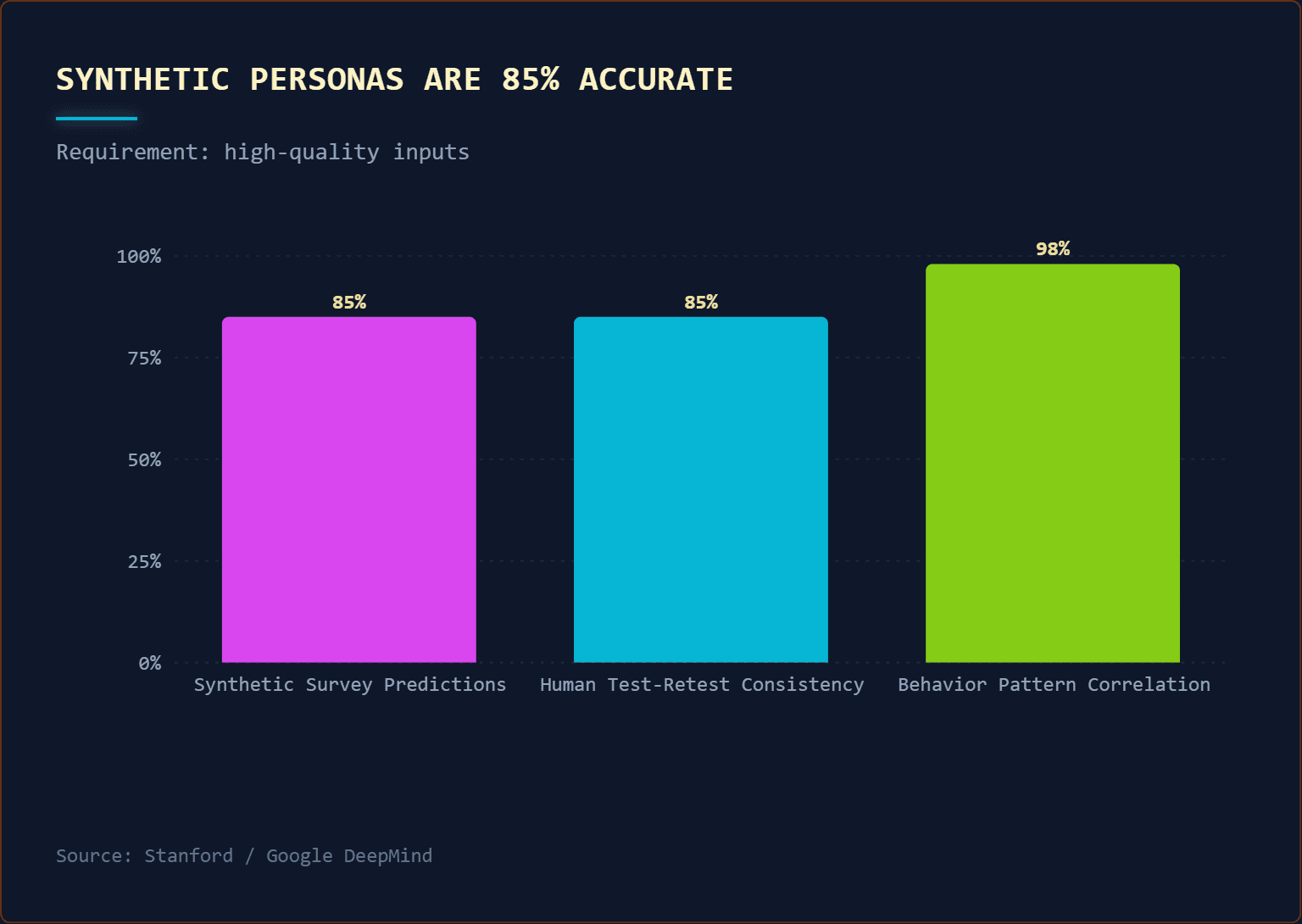
Stanford and Google DeepMind trained synthetic personas on two-hour interview transcripts, then tested whether the AI personas could predict how those same real people would answer survey questions later.

  • The method: Researchers conducted follow-up surveys with the original interview participants, asking them new questions. The synthetic personas answered the same questions.
  • Result: 85% accuracy. The synthetic personas replicated what the actual study participants said.
  • For context, that’s comparable to human test-retest consistency. If you ask the same person the same question two weeks apart, they’re about 85% consistent with themselves.

The Stanford study also measured how well synthetic personas predicted social behavior patterns in controlled experiments – things like who would cooperate in trust games, who would follow social norms, and who would share resources fairly.

The correlation between synthetic persona predictions and actual participant behavior was 98%. This means the AI personas didn’t just memorize interview answers; they captured underlying behavioral tendencies that predicted how people would act in new situations.

Bain & Company ran a separate pilot that showed comparable insight quality at one-third the cost and one-half the time of traditional research methods. Their findings: 50-70% time reduction (days instead of weeks) and 60-70% cost savings (no recruiting fees, incentives, transcription services).

The catch: These results depend entirely on input data quality. The Stanford study used rich, two-hour interview transcripts. If you train on shallow data (just pageviews or basic demographics), you get shallow personas. Garbage in, garbage out.

How To Build Synthetic Personas For Better Prompt Tracking

Building a synthetic persona has three parts:

  1. Feed it with data from multiple sources about your real users: call transcripts, interviews, message logs, organic search data.
  2. Fill out the Persona Card – the five fields that capture how someone thinks and searches.
  3. Add metadata to track the persona’s quality and when it needs updating.

The mistake most teams make: trying to build personas from prompts. This is circular logic – you need personas to understand what prompts to track, but you’re using prompts to build personas. Instead, start with user information needs, then let the persona translate those needs into likely prompts.

Data Sources To Feed Synthetic Personas

The goal is to understand what users are trying to accomplish and the language they naturally use:

  1. Support tickets and community forums: Exact language customers use when describing problems. Unfiltered, high-intent signal.
  2. CRM and sales call transcripts: Questions they ask, objections they raise, use cases that close deals. Shows the decision-making process.
  3. Customer interviews and surveys: Direct voice-of-customer on information needs and research behavior.
  4. Review sites (G2, Trustpilot, etc.): What they wish they’d known before buying. Gap between expectation and reality.
  5. Search Console query data: Questions they ask Google. Use regex to filter for question-type queries:
    (?i)^(who|what|why|how|when|where|which|can|does|is|are|should|guide|tutorial|course|learn|examples?|definition|meaning|checklist|framework|template|tips?|ideas?|best|top|lists?|comparison|vs|difference|benefits|advantages|alternatives)b.*

    (I like to use the last 28 days, segment by target country)

Persona card structure (five fields only – more creates maintenance debt):

These five fields capture everything needed to simulate how someone would prompt an AI system. They’re minimal by design. You can always add more later, but starting simple keeps personas maintainable.

  1. Job-to-be-done: What’s the real-world task they’re trying to accomplish? Not “learn about X” but “decide whether to buy X” or “fix problem Y.”
  2. Constraints: What are their time pressures, risk tolerance levels, compliance requirements, budget limits, and tooling restrictions? These shape how they search and what proof they need.
  3. Success metric: How do they judge “good enough?” Executives want directional confidence. Engineers want reproducible specifics.
  4. Decision criteria: What proof, structure, and level of detail do they require before they trust information and act on it?
  5. Vocabulary: What are the terms and phrases they naturally use? Not “churn mitigation” but “keeping customers.” Not “UX optimization” but “making the site easier to use.”

Specification Requirements

This is the metadata that makes synthetic personas trustworthy; it prevents the “black box” problem.

When someone questions a persona’s outputs, you can trace back to the evidence.

These requirements form the backbone of continuous persona development. They keep track of changes, sources, and confidence in the weighting.

  • Provenance: Which data sources, date ranges, and sample sizes were used (e.g., “Q3 2024 Support Tickets + G2 Reviews”).
  • Confidence score per field: A High/Medium/Low rating for each of the five Persona Card fields, backed by evidence counts. (e.g., “Decision Criteria: HIGH confidence, based on 47 sales calls vs. Vocabulary: LOW confidence, based on 3 internal emails”).
  • Coverage notes: Explicitly state what the data misses (e.g., “Overrepresents enterprise buyers, completely misses users who churned before contacting support”).
  • Validation benchmarks: Three to five reality checks against known business truths to spot hallucinations. (e.g., “If the persona claims ‘price’ is the top constraint, does that match our actual deal cycle data?”).
  • Regeneration triggers: Pre-defined signals that it’s time to re-run the script and refresh the persona (e.g., a new competitor enters the market, or vocabulary in support tickets shifts significantly).

Where Synthetic Personas Work Best

Before you build synthetic personas, understand where they add value and where they fall short.

High-Value Use Cases

  • Prompt design for AI tracking: Simulate how different user segments would phrase questions to AI search engines (the core use case covered in this article).
  • Early-stage concept testing: Test 20 messaging variations, narrow to the top five before spending money on real research.
  • Micro-segment exploration: Understand behavior across dozens of different user job functions (enterprise admin vs. individual contributor vs. executive buyer) or use cases without interviewing each one.
  • Hard-to-reach segments: Test ideas with executive buyers or technical evaluators without needing their time.
  • Continuous iteration: Update personas as new support tickets, reviews, and sales calls come in.

Crucial Limitations Of Synthetic Personas You Need To Understand

  • Sycophancy bias: AI personas are overly positive. Real users say, “I started the course but didn’t finish.” Synthetic personas say, “I completed the course.” They want to please.
  • Missing friction: They’re more rational and consistent than real people. If your training data includes support tickets describing frustrations or reviews mentioning pain points, the persona can reference these patterns when asked – it just won’t spontaneously experience new friction you haven’t seen before.
  • Shallow prioritization: Ask what matters, and they’ll list 10 factors as equally important. Real users have a clear hierarchy (price matters 10x more than UI color).
  • Inherited bias: Training data biases flow through. If your CRM underrepresents small business buyers, your personas will too.
  • False confidence risk: The biggest danger. Synthetic personas always have coherent answers. This makes teams overconfident and skip real validation.

Operating rule: Use synthetic personas for exploration and filtering, not for final decisions. They narrow your option set. Real users make the final call.

Solving The Cold Start Problem For Prompt Tracking

Synthetic personas are a filter tool, not a decision tool. They narrow your option set from 20 ideas to five finalists. Then, you validate those five with real users before shipping.

For AI prompt tracking specifically, synthetic personas solve the cold-start problem. You can’t wait to accumulate six months of real prompt volume before you start optimizing. Synthetic personas let you simulate prompt behavior across user segments immediately, then refine as real data comes in.

Where they’ll cause you to fail is if you use them as an excuse to skip real validation. Teams love synthetic personas because they’re fast and always give answers. That’s also what makes them dangerous. Don’t skip the validation step with real customers.


Featured Image: Paulo Bobita/Search Engine Journal

Google Can Now Monitor Search For Your Government IDs via @sejournal, @MattGSouthern
  • Google’s “Results about you” tool now lets you find and request removal of search results containing government-issued IDs.
  • This includes IDs like passports, driver’s licenses, and Social Security numbers.
  • The expansion is rolling out in the U.S. over the coming days, with additional regions planned.

Google’s Results about you tool now monitors Search results for government-issued IDs like passports, driver’s licenses, and Social Security numbers.

New Data Shows Googlebot’s 2 MB Crawl Limit Is Enough via @sejournal, @martinibuster

New data based on real-world actual web pages demonstrates that Googlebot’s crawl limit of two megabytes is more than adequate. New SEO tools provide an easy way to check how much the HTML of a web page weighs.

Data Shows 2 Megabytes Is Plenty

Raw HTML is basically just a text file. For a text file to get to two megabytes it would require over two million characters.

The HTTPArchive explains what’s in the HTML weight measurement:

“HTML bytes refers to the pure textual weight of all the markup on the page. Typically it will include the document definition and commonly used on page tags such as

or . However it also contains inline elements such as the contents of script tags or styling added to other tags. This can rapidly lead to bloating of the HTML doc.”

That is the same thing that Googlebot is downloading as HTML, just the on-page markup, not the links to JavaScript or CSS.

According to the HTTPArchive’s latest report, the real-world median average size of raw HTML is 33 kilobytes. The heaviest page weight at the 90th percentile is 155 kilobytes, meaning that the HTML for 90% of sites are less than or approximately equal to 155 kilobytes in size. Only at the 100th percentile does the size of HTML explode to way beyond two megabytes, which means that pages weighing two megabytes or more are extreme outliers.

The HTTPArchive report explains:

“HTML size remained uniform between device types for the 10th and 25th percentiles. Starting at the 50th percentile, desktop HTML was slightly larger.

Not until the 100th percentile is a meaningful difference when desktop reached 401.6 MB and mobile came in at 389.2 MB.”

The data separates the home page measurements from the inner page measurements and surprisingly shows that there is little difference between the weights of either. The data is explained:

“There is little disparity between inner pages and the home page for HTML size, only really becoming apparent at the 75th and above percentile.

At the 100th percentile, the disparity is significant. Inner page HTML reached an astounding 624.4 MB—375% larger than home page HTML at 166.5 MB.”

Mobile And Desktop HTML Sizes Are Similar

Interestingly, the page sizes between mobile and desktop versions were remarkably similar, regardless of whether HTTPArchive was measuring the home page or one of the inner pages.

HTTPArchive explains:

“The size difference between mobile and desktop is extremely minor, this implies that most websites are serving the same page to both mobile and desktop users.

This approach dramatically reduces the amount of maintenance for developers but does mean that overall page weight is likely to be higher as effectively two versions of the site are deployed into one page.”

Though the overall page weight might be higher since the mobile and desktop HTML exists simultaneously in the code, as noted earlier, the actual weight is still far below the two-megabyte threshold all the way up until the 100th percentile.

Given that it takes about two million characters to push the website HTML to two megabytes and that the HTTPArchive data based on actual websites shows that the vast majority of sites are well under Googlebot’s 2 MB limit, it’s safe to say it’s okay to scratch off HTML size from the list of SEO things to worry about.

Tame The Bots

Dave Smart of Tame The Bots recently posted that they updated their tool so that it now will stop crawling at the two megabyte limit for those whose sites are extreme outliers, showing at what point Googlebot would stop crawling a page.

Smart posted:

“At the risk of overselling how much of a real world issue this is (it really isn’t for 99.99% of sites I’d imagine), I added functionality to tamethebots.com/tools/fetch-… to cap text based files to 2 MB to simulate this.”

Screenshot Of Tame The Bots Interface

The tool will show what the page will look like to Google if the crawl is limited to two megabytes of HTML. But it doesn’t show whether the tested page exceeds two megabytes, nor does it show how much the web page weighs. For that, there are other tools.

Tools That Check Web Page Size

There are a few tool sites that show the HTML size but here are two that just show the web page size. I tested the same page on each tool and they both showed roughly the same page weight, give or take a few kilobytes.

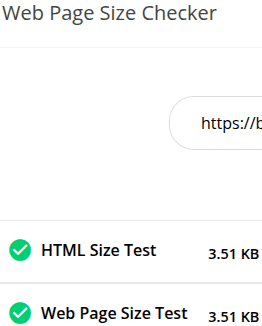
Toolsaday Web Page Size Checker

The interestingly named Toolsaday web page size checker enables users to test one URL at a time. This specific tool just does the one thing, making it easy to get a quick reading of how much a web page weights in kilobytes (or higher if the page is in the 100th percentile).

Screenshot Of Toolsaday Test Results

Small SEO Tools Website Page Size Checker

The Small SEO Tools Website Page Size Checker differs from the Toolsaday tool in that Small SEO Tools enables users to test ten URLs at a time.

Not Something To Worry About

The bottom line about the two megabyte Googlebot crawl limit is that it’s not something the average SEO needs to worry about. It literally affects a very small percentage of outliers. But if it makes you feel better, give one of the above SEO tools a try to reassure yourself or your clients.

Featured Image by Shutterstock/Fathur Kiwon

Traffic Impact of Google Discover Update

Google Discover has become a reliable traffic source for some publications. Last week, Google launched a core update to Discover in the U.S., with the global rollout coming.

Google’s Search Central blog has included “Get on Discover” guidelines since 2019, explaining its content quality requirements and traffic recovery strategies. Google revised the guidelines last week, alongside the core update.

Some requirements have not changed:

  • Titles and headlines must clearly “capture the essence of the content.”
  • Include “compelling, high-quality images,” especially those 1,200 pixels wide.
  • Address “current interests [that] tells a story well, or provides unique insights.”

Yet two requirements — clickbait avoidance and page experience — are new.

New Guidelines

Avoid clickbait

The previous guideline versions warned against “misleading or exaggerated details in preview content.” The revision moved this recommendation to the top, presumably to emphasize its importance as reflected in the core update.

The guidelines state that “clickbait” can prevent would-be readers from understanding the content and manipulate them into clicking a link.

The guidelines separately warn publishers from using “sensationalism tactics… by catering to morbid curiosity, titillation, or outrage.”

Page experience

“Provide a great page experience” is new, although it’s in keeping with Google’s traditional search algorithm, which rewards sites with stong user engagement.

Google collects page experience metrics from its Chrome browser and retains them only for high-traffic pages. Search Console shows no Core Web Vitals data for sites with little traffic.

Sites with 50% or more losses in Discover traffic should audit the user experience:

  • In Search Console, look for URLs marked “poor” in the Core Web Vitals report.
  • Evaluate how those pages load, especially on mobile devices. The headings and body text should load first, allowing users to start reading immediately.
  • Look for elements, such as ads or pop-ups, that block the content.

Traffic Impact

The revised guidelines do not address “topic authority,” yet Google’s announcement of Discover’s core update does:

Since many sites demonstrate deep knowledge across a wide range of subjects, our systems are designed to identify expertise on a topic-by-topic basis.

The focus on topical expertise suggests the update will elevate niche, authoritative sites.

Finally, the announcement states that Discover will show more local and personalized content.

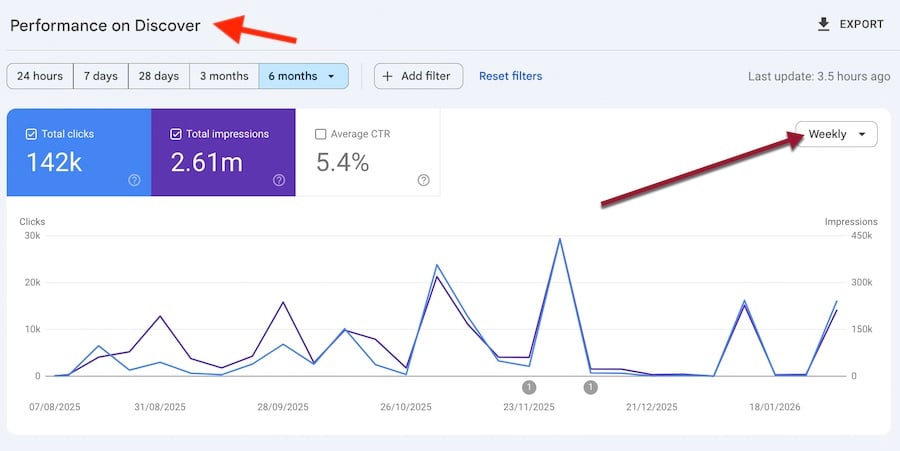
Nonetheless, most ecommerce blogs have modest Discover traffic and will therefore experience little (if any) impact from the core update. Still, keep an eye on the Discover section in Search Console; switch to “weekly” stats for a current overview.

Screenshot of the Discover section in Search Console

In Search Console’s Discover section, switch to “weekly” stats for a current overview.

7 Insights From Washington Post’s Strategy To Win Back Traffic via @sejournal, @martinibuster

The Washington Post’s recent announcement of staffing cuts is a story with heroes, villains, and victims, but buried beneath the headlines is the reality of a big brand publisher confronting the same changes with Google Search that SEOs, publishers, and ecommerce stores are struggling with. The following are insights into their strategy to claw back traffic and income that could be useful for everyone seeking to stabilize traffic and grow.

Disclaimer

The Washington Post is proposing the following strategies in response to steep drops in search traffic, the rise of multi-modal content consumption, and many other factors that are fragmenting online audiences. The strategies have yet to be proven.

The value lies in analyzing what they are doing and understanding if there are any useful ideas for others.

Problem That Is Being Solved

The reasons given for the announced changes are similar to what SEOs, online stores, and publishers are going through right now because of the decline of search and the hyper-diversification of sources of information.

The memo explains:

“Platforms like Search that shaped the previous era of digital news, and which once helped The Post thrive, are in serious decline. Our organic search has fallen by nearly half in the last three years.

And we are still in the early days of AI-generated content, which is drastically reshaping user experiences and expectations.”

Those problems are the exact same ones affecting virtually all online businesses. This makes The Washington Post’s solution of interest to everyone beyond just news sites.

Problems Specific To The Washington Post

Recent reporting on The Washington Post tended to narrowly frame it in the context of politics, concerns about the concentration of wealth, and how it impacts coverage of sports, international news, and the performing arts, in addition to the hundreds of staff and reporters who lost their jobs.

The job cuts in particular are a highly specific solution applied by The Washington Post and are highly controversial. An opinion can be made that cutting some of the lower performing topics removes the very things that differentiate the website. As you will see next, Executive Editor Matt Murray justifies the cuts as listening to readers’ signals.

Challenges Affecting Everyone

If you zoom out, there is a larger pattern of how many organizations are struggling to understand where the audience has gone and how best to bring them back.

Shared Industry Challenges

  • Changes in content consumption habits
  • Decline of search
  • Rise of the creator economy
  • Growth of podcasts and video shows
  • Social media competing for audience attention
  • Rise of AI search and chat

A recent podcast interview (link to Spotify) with the executive editor of The Washington Post, Matt Murray, revealed a years-long struggle to restructure the organization’s workflow into one that:

  • Was responsive to audience signals
  • Could react in real time instead of the rigid print-based news schedule
  • Explored emerging content formats so as to evolve alongside readers
  • Produced content that is perceived as indispensable

The issues affecting the Washington Post are similar to issues affecting everyone else from recipe bloggers to big brand review sites. A key point Murray made was the changes were driven by audience signals.

Matt Murray said the following about reader signals:

“Readers in today’s world tell you what they want and what they don’t want. They have more power. …And we weren’t picking up enough of the reader signals.”

Then a little later on he again emphasized the importance of understanding reader signals:

“…we are living in a different kind of a world that is a data reader centric world. Readers send us signals on what they want. We have to meet them more where they are. That is going to drive a lot of our success.”

Whether listening to audience signals justifies cutting staff or ends up removing the things that differentiate The Washington Post remains to be seen.

For example, I used to subscribe to the print edition of The New Yorker for the articles, not for the restaurant or theater reviews yet they were still of interest to me as I liked to keep track of trends in live theater and dining. The New Yorker cartoons rarely had anything to do with the article topics and yet they were a value add. Would something like that show up in audience signals?

Build A Base Then Adapt

The memo paints what they’re doing as a foundation for building a strategy that is still evolving, not as a proven strategy. In my opinion that reflects the uncertainty introduced by the rapid decline of classic search and the knowledge that there are no proven strategies.

That uncertainty makes it more interesting to examine what a big brand organization like The Washington Post is doing to create a base strategy to start from and adapt it based on outcomes. That, in itself, is a strategy for coping with a lack of proven tactics.

Three concrete goals they are focusing on are:

  1. Attracting readers
  2. Create content that leads to subscriptions
  3. Increase engagement.

They write:

“From this foundation, we aim to build on what is working, and grow with discipline and intent, to experiment, to measure and deepen what resonates with customers.”

In the podcast interview, Murray also described the stability of a foundation as a way to nurture growth, explaining that it creates the conditions for talent to do its best work. He explains that building the foundation gives the staff the space to focus on things that work.

He explained:

“One of the reasons I wanted to get to stability, as I want room for that talent to thrive and flourish.

I also want us to develop it in a more modern multi-modal way with those that we’ve been able to do.”

A Path To Becoming Indispensable

The Washington Post memo offered insights about their strategy, with the goal stated that the brand must become indispensable to readers, naming three criteria that articles must validate against.

According to the memo:

“We can’t be everything to everyone. But we must be indispensable where we compete. That means continually asking why a story matters, who it serves and how it gives people a clearer understanding of the world and an advantage in navigating it.”

Three Criteria For Content

  1. Content must matter to site visitors.
  2. Content must have an identifiable audience.
  3. Content must provide understanding and also be applicable (useful).

Content Must Matter
Regardless of whether the content is about a product, a service, or informational, the Washington Post’s strategy states that content must strongly fulfill a specific need. For SEOs, creators, ecommerce stores, and informational content publishers, “mattering” is one of the pillars that support making a business indispensable to a site visitor and provides an advantage.

Identifiable Audience
Information doesn’t exist in a vacuum, but traditional SEO has strongly focused on keyword volume and keyword relevance, essentially treating information as existing in a space devoid of human relevance. Keyword relevance is not the same as human relevance. Keyword relevance is relevance to a keyword phrase, not relevance to a human.

This point matters because AI Chat and Search destroys the concept of keywords, because people are no longer typing in keyword phrases but are instead engaging in goal-oriented discussions.

When SEOs talk about keyword relevance, they are talking about relevance to an algorithm. Put another way, they are essentially defining the audience as an algorithm.

So, point two is really about stepping back and asking, “Why does a person need this information?”

Provide Understanding And Be Applicable
Point three states that it’s not enough for content to provide an understanding of what happened (facts). It requires that the information must make the world around the reader navigable (application of the facts).

This is perhaps the most interesting pillar of the strategy because it acknowledges that information vomit is not enough. It must be information that is utilitarian. Utilitarian in this context means that content must have some practical use.

In my opinion, an example of this principle in the context of an ecommerce site is product data. The other day I was on a fishing lure site, and the site assumed that the consumer understood how each lure is supposed to be used. It just had the name of the lure and a photo. In every case, the name of the lure was abstract and gave no indication of how the lure was to be used, under what circumstances, and what tactic it was for.

Another example is a clothing site where clothing is described as small, medium, large, and extra large, which are subjective measurements because every retailer defines small and large differently. One brand I shop at consistently labels objectively small-sized jackets as medium. Fortunately, that same retailer also provides chest, shoulder, and length measurements, which enable a user to understand exactly whether that clothing fits.

I think that’s part of what the Washington Post memo means when it says that the information should provide understanding but also be applicable. It’s that last part that makes the understanding part useful.

Three Pillars To Thriving In A Post-Search Information Economy

All three criteria are pillars that support the mandate to be indispensable and provide an advantage. Satisfying those goals help content differentiate it from information vomit, AI slop. Their strategy supports becoming a navigational entity, a destination that users specifically seek out and it helps the publisher, ecommerce store, and SEOs build an audience in order to claw back what classic search no longer provides.

Featured Image by Shutterstock/Roman Samborskyi

Google Discover for Ecommerce

As AI Overviews and shopping agents divert clicks away from traditional search results, Google Discover may provide a new and growing source of organic traffic for ecommerce merchants.

Discover is Google’s personalized, query-less content feed similar to those on X and Facebook. The Discover feed appears in Google’s mobile applications and on the main screens of Android devices. It shows articles, videos, and content that presumably interests users.

How Google selects a given article or video to appear in the Discover feed is something of a mystery, with some marketers stating that Google Discover Optimization — GDO, if you need another three-letter acronym — is significantly different from traditional organic search.

Google Discover web page

Discover is a personalized, query-less content feed similar to those on X and Facebook. Image: Google. 

Core Update

Google’s February 2026 Discover Core Update marks the first time the search engine giant changed its algorithm for Discover alone.

Google says the update improved quality. It aimed to reduce the presence of clickbait and low-value content while surfacing more in-depth, original, and timely material from sites with demonstrated expertise.

Some published reports speculated that the update devalued AI-generated content, yet Google’s concern is probably not artificial intelligence per se. Rather, it is scaled, thin, or risky AI-generated content that degrades trust.

Discover’s content is not in response to a query. Google chooses what to show folks. That choice raises the bar for accuracy, usefulness, and credibility in ways that differ from classic search results.

In a sense, the Discover update is less about ranking tweaks and more about editorial standards. Google may be limiting sensational, misleading, or mass-produced content to protect the tool’s long-term viability.

Therein lies the content marketing opportunity.

Discover’s Future

Discover launched in 2018. Until recently, it has been, for most marketers, a secondary way to boost traffic.

News publishers in particular could see significant traffic spikes when an item made its way into the feed. But optimizing for Discover did not compare to the steady, regular flow of traffic that organic search could deliver.

As AI Overviews have siphoned off that traffic, some marketers have emphasized Discover.

Google’s apparent focus has prompted widespread speculation about Discover’s future.

Discover as a home feed. Discover could become a personalized home feed for the Google ecosystem. Imagine something akin to an individualized MSN or Yahoo home page.

This home feed might include articles, videos, social content, and even data from other Google products, such as Gmail or Docs. The goal might be to keep users engaged across Google properties.

What’s more, both MSN and Yahoo have shown that such pages can drive significant ad revenue.

Personal and local experience. In its February update, Google noted that Discover would favor local or regional content. Users in the United States will see content from domestic publishers.

That could benefit retailers with physical stores, as very local content might beat out similar articles from nationwide competitors.

Multi-format, creator-centric. The Discover feed has recently featured relatively more video and creator content, especially from YouTube and social platforms.

While publishers often frame this as competition, ecommerce marketers could benefit. Product explainers, buying guides, and similar content already perform well in video and visual formats. Discover’s expansion beyond text may favor brands and retailers that invest in rich, creator-led content.

Yet merchants without creators can mimic the style and potentially win on Discover.

An interest graph, not just a feed. Some have suggested that Google treats Discover as part of a broader interest graph that informs search, recommendations, and AI-assisted experiences.

Thus content that performs well in Discover may shape Google’s understanding of user intent over time beyond the feed itself.

Discover could be upstream from traditional and AI-driven search. GDO may precede and inform SEO, GEO (generative engine optimization), and AEO (answer engine optimization).

Optimize

Google Discover deserves attention if it’s becoming a meaningful traffic channel.

Start with Google’s recommendations, which include descriptive headlines, large images, and “people-first” content. From there, marketers can experiment.

A practical approach is a testing framework. Publish consistently and track Discover performance separately in Search Console. Over time, look for editorial traits, formats, or topics that predictably earn Discover visibility and thus inform a long-term strategy.

90 Days. 1 Plan. Improved Local Search Visibility [Webinar] via @sejournal, @hethr_campbell

A 90 Day Plan to Prepare Every Location for AI Search

AI is changing how consumers discover and choose local brands. For multi-location businesses, visibility is no longer decided only by search rankings. 

AI agents now evaluate location data, reviews, content, engagement, and brand trust before a customer ever clicks. This shift means each individual location is judged on its own signals, not just the strength of the parent brand.

Without a clear plan, enterprise teams risk silent exclusion across entire location networks, leading to lost visibility and declining demand. The challenge is not understanding that GEO matters, but knowing how to operationalize it at scale.

In this session, Ana Martinez, Chief Technology Officer of Uberall, shares a practical 90-day framework for making every location AI-ready. She will explain how AI agents surface and exclude local brands, which location-level signals matter most, and how teams can execute GEO across hundreds or thousands of locations.

What You’ll Learn

  • A phased GEO roadmap to prepare, optimize, and scale AI readiness
  • The key location level signals AI agents trust and what to fix first
  • How to operationalize GEO across large location networks

Why Attend?

This webinar gives enterprise teams a clear, actionable plan to compete in AI-driven local discovery. You will leave with a framework that protects visibility, supports demand, and prepares every location for how discovery works today.

Register now to learn how to make every location AI-ready in the next 90 days.

🛑 Can’t attend live? Register anyway, and we’ll send you the on-demand recording after the webinar.

Google Revises Discover Guidelines Alongside Core Update via @sejournal, @MattGSouthern

Google revised its “Get on Discover” documentation following the lauch of the February Discover core update.

On its documentation updates page, Google said it added more information on how sites can increase the likelihood of content appearing in Discover. Here’s what was added.

What Changed

Comparing the archived version with the current page shows Google rewrote its list of recommendations for Discover visibility.

The previous version combined title and clickbait guidance into a single bullet, saying to “Use page titles that capture the essence of the content, but in a non-clickbait fashion.”

Google split that into two items. The first now says “Use page titles and headlines that capture the essence of the content.” The second says “Avoid clickbait and similar tactics to artificially inflate engagement.”

That word “clickbait” is new. The previous version said “Avoid tactics to artificially inflate engagement” without naming the tactic.

The sensationalism guidance changed too. The old version said “Avoid tactics that manipulate appeal by catering to morbid curiosity, titillation, or outrage.” The revision names the tactic, saying “Avoid sensationalism tactics that manipulate appeal.”

The new addition is a recommendation to “Provide an overall great page experience,” with a link to Google’s page experience documentation. That recommendation isn’t in the archived version.

Image requirements, traffic fluctuation guidance, and performance monitoring sections remain unchanged.

Why This Matters

These documentation changes map to what Google said the core update targets. The blog post announcing the update said the update would show more locally relevant content, reduce sensational content and clickbait, and surface more original content from sites with expertise.

Discover documentation has changed before alongside algorithm updates. Previously, Google added Discover to its Helpful Content System documentation and later expanded its explanation of why Discover traffic fluctuates. Both of those updates aligned with broader changes to how Discover evaluated content.

Page experience has been part of Google’s Search guidance since 2020 but wasn’t in the Discover-specific recommendations before this revision.

Looking Ahead

The February Discover core update is rolling out to English-language users in the United States over the next two weeks. Google said it plans to expand to all countries and languages in the months ahead.

Publishers monitoring Discover traffic in Search Console should check the Get on Discover page for the current recommendations. Google’s standard core update guidance applies as well.


Featured Image: ZikG/Shutterstock

Discover Core Update, AI Mode Ads & Crawl Policy – SEO Pulse via @sejournal, @MattGSouthern

Welcome to the week’s Pulse for SEO: updates affect how Google ranks content in Discover, how it plans to monetize AI search, and what content you serve to bots.

Here’s what matters for you and your work.

Google Releases Discover-Only Core Update

Google launched the February 2026 Discover core update, a broad ranking change targeting the Discover feed rather than Search. The rollout may take up to two weeks.

Key Facts: The update is initially limited to English-language users in the United States. Google plans to expand it to more countries and languages, but hasn’t provided a timeline. Google described it as designed to “improve the quality of Discover overall.” Existing core update and Discover guidance apply.

Why This Matters For SEOs

Google has historically rolled Discover ranking changes into broader core updates that affected Search as well. Announcing a Discover-specific core update means rankings in the feed can now move without any corresponding change in Search results.

That distinction creates a monitoring problem. When you track performance in Search Console, you should check Discover traffic independently over the next two weeks. Traffic drops that look like a core update penalty may be Discover-only. Treating them as Search problems leads to the wrong diagnosis.

Discover traffic concentration has grown for publishers. NewzDash CEO John Shehata reported that Discover accounts for roughly 68% of Google-sourced traffic to news sites. A core update targeting that surface independently raises the stakes for any publisher relying on the feed.

Read our full coverage: Google Releases Discover-Focused Core Update

Alphabet Q4 Earnings Reveal AI Mode Monetization Plans

Alphabet reported Q4 2025 earnings, showing Search revenue grew 17% to $63 billion. The call included the first detailed look at how Google plans to monetize AI Mode.

Key Facts: CEO Sundar Pichai said AI Mode queries are three times longer than traditional searches. Chief Business Officer Philipp Schindler described the resulting ad inventory as reaching queries that were “previously challenging to monetize.” Google is testing ads below AI Mode responses.

Why This Matters For SEOs

The monetization details matter more than the revenue headline. Google is treating AI Mode as additive inventory, not a replacement for traditional search ads. Longer queries create new ad surfaces that didn’t exist when users typed three-word searches. For paid search practitioners, that means new campaign territory in conversational queries.

The metrics Google celebrated on this call describe users staying on Google longer. Google framed longer AI Mode sessions as a growth driver, and the monetization infrastructure follows that logic. The tradeoff to watch is referral traffic.

AI Mode creates a seamless path from AI Overviews, as detailed in our coverage last week. The earnings data suggest Google sees that containment as part of the growth story.

Read our full coverage: Alphabet Q4 2025: AI Mode Monetization Tests And Search Revenue Growth

Mueller Pushes Back On Serving Markdown To LLM Bots

Google Search Advocate John Mueller pushed back on the idea of serving Markdown files to LLM crawlers instead of standard HTML, calling the concept “a stupid idea” on Bluesky and raising technical concerns on Reddit.

Key Facts: A developer described plans to serve raw Markdown to AI bots to reduce token usage. Mueller questioned whether LLM bots can recognize Markdown on a website as anything other than a text file, or follow its links. He asked what would happen to internal linking, headers, and navigation. On Bluesky, he was more direct, calling the conversion “a stupid idea.”

Why This Matters For SEOs

The practice exists because developers assume LLMs process Markdown more efficiently than HTML. Mueller’s response treats this as a technical problem, not an optimization. Stripping pages to Markdown can remove the structure that bots need to understand relationships between pages.

Mueller’s technical guidance is consistent, including his advice on multi-domain crawling and his crawl slump guidance. This fits a pattern where Mueller draws clear lines around bot-specific content formats. He previously compared llms.txt to the keywords meta tag, and SE Ranking’s analysis of 300,000 domains found no connection between having an llms.txt file and LLM citation rates.

Read our full coverage: Google’s Mueller Calls Markdown-For-Bots Idea ‘A Stupid Idea’

Google Files Bugs Against WooCommerce Plugins For Crawl Issues

Google’s Search Relations team said on the Search Off the Record podcast that they filed bugs against WordPress plugins. The plugins generate unnecessary crawlable URLs through action parameters like add-to-cart links.

Key Facts: Certain plugins create URLs that Googlebot discovers and attempts to crawl. The result is wasted crawl budget on pages with no search value. Google filed a bug with WooCommerce and flagged other plugin issues that remain unfixed. The team’s response targeted plugin developers rather than expecting individual sites to fix the problem.

Why This Matters For SEOs

Google intervening at the plugin level is unusual. Normally, crawl efficiency falls on individual sites. Filing bugs upstream suggests the problem is widespread enough that one-off fixes won’t solve it.

Ecommerce sites running WooCommerce should audit their plugins for URL patterns that generate crawlable action parameters. Check your crawl stats in Search Console for URLs containing cart or checkout parameters that shouldn’t be indexed.

Read our full coverage: Google’s Crawl Team Filed Bugs Against WordPress Plugins

LinkedIn Shares What Worked For AI Search Visibility

LinkedIn published findings from internal testing on what drives visibility in AI-generated search results. The company reported that non-brand awareness-driven traffic declined by up to 60% across the industry for a subset of B2B topics.

Key Facts: LinkedIn’s testing found that structured content performed better in AI citations, particularly pages with named authors, visible credentials, and clear publication dates. The company is developing new analytics to identify a traffic source for LLM-driven visits and to monitor LLM bot behavior in CMS logs.

Why This Matters For SEOs

What caught my attention is how much this overlaps with what AI platforms themselves are saying. Search Engine Journal’s Roger Montti recently interviewed Jesse Dwyer, head of communications at Perplexity. The AI platform’s own guidance on what drives citations lines up closely with what LinkedIn found. When both the cited source and the citing platform arrive at the same conclusions independently, that gives you something beyond speculation.

Read our full coverage: LinkedIn Shares What Works For AI Search Visibility

Theme Of The Week: Google Is Splitting The Dashboard

Every story this week points to the same realization. “Google” is no longer one thing to monitor.

Google is now announcing Discover core updates separately from Search core updates. AI Mode carries ad formats and checkout features that don’t exist in traditional results. Mueller drew a policy line around how bots consume content. Google filed crawl bugs upstream at the plugin level, and LinkedIn is building a separate measurement for AI-driven traffic.

A year ago, you could check one traffic graph in Search Console and get a reasonable picture. The picture now fragments across Discover, Search, AI Mode, and LLM-driven traffic. Ranking signals and update cycles differ, and the gaps between them haven’t been closed.

Top Stories Of The Week:

This week’s coverage spanned five developments across Discover updates, search monetization, crawl policy, and AI visibility.

More Resources:


Featured Image: Accogliente Design/Shutterstock