Google CTR Study: AI Overviews Rise As Click Rates Decline via @sejournal, @MattGSouthern

A new study on Google search behavior examines changes in clickthrough rates across industries. The data correlates with increased AI Overviews (AIOs) in Google’s search results.

Research from Advanced Web Ranking (AWR) reveals that AIOs appeared in 42.51% of search results in Q4, up 8.83 percentage points from the previous quarter.

With this increase, clickthrough rates for informational queries dropped significantly.

Websites in the top four positions for searches using terms like what, when, where, and how saw a combined decrease of 7.31 percentage points in desktop clickthrough rates.

Study author Dan Popa states:

“This surge in AI Overviews may be impacting clickthrough rates for organic listings, as informational content is increasingly getting overrun by these AI-generated summaries.”

Here’s more about the study and what the findings mean for your website.

Industry CTR Gap

The study reveals SEO success is becoming increasingly industry-dependent.

For example, law and politics sites recorded a 38.45% CTR in position one, while science sites get 19.06% for the same ranking. That gap nearly tripled in a single quarter.

CTR shifts were observed in the following sectors:

  • Law & Politics: Recorded Q4’s highest position-specific increase with a 7.39 percentage point CTR gain for top desktop positions, alongside 68.66% higher search demand.
  • Science: Recorded Q4’s largest CTR decline with top desktop positions dropping 6.03 percentage points, while experiencing a 37.63% decrease in search demand.
  • Careers: Despite search demand more than tripling (+334.36%), top three desktop positions lost a combined 4.34 percentage points in CTR.
  • Shopping: The holiday season brought a 142.88% surge in search demand, yet top-ranked sites saw CTR declines of 1.39 and 1.96 percentage points on desktop and mobile, respectively.
  • Education: Mixed bag with top positions gaining nearly 6% in CTR while positions 2-3 declined, all during a traffic increase.

Only the business and style and fashion sectors saw increased search demand and improved CTRs, making them rare bright spots in a challenging market.

Desktop vs. Mobile

The report also looks at behavior patterns between devices.

While desktop CTR for informational queries declined, mobile showed opposing trends, with top-ranked sites gaining 1.81 percentage points.

Similar device-specific shifts appeared across multiple industries. For example, arts and entertainment websites saw a 1.01 percentage point drop in desktop CTR but a 2.28 percentage point mobile gain for position one.

Query length also influenced click behavior differently across devices.

Long-tail queries (four or more keywords) experienced CTR declines on desktop for positions 2-3. In contrast, single-word queries gained nearly two percentage points in CTR on mobile for top positions.

Why This Study Matters

These findings demonstrate that ranking #1 doesn’t guarantee the same traffic it once did. Your industry, query type, and SERP features (especially AI Overviews) all impact click potential.

AWR suggests tracking pixel depth (how far users must scroll to see your listing) alongside rankings for more accurate traffic forecasting.

It’s important to account for these widening performance gaps, particularly for informational content competing with Google’s AIOs.

Study Methodology

Advanced Web Ranking’s research compared CTR averages from Q4 2024 to Q3 2024. It included data from markets like the US and UK, linking CTR shifts with industry search demand.

Using AWR’s free AIO tool, the study found an 8.83 percentage point rise in AI Overview presence. Queries were categorized by intent, length, and 21 industry verticals to identify user behavior patterns.

For more, read the full study.


Featured Image: jack_the_sparrow/Shutterstock

CMO Guide To Schema: How Your Organization Can Implement A Structured Data Strategy via @sejournal, @marthavanberkel

Putting together an actionable strategy to keep your organization relevant in the ever-changing search marketing landscape is harder than ever.

To help support your organization through this journey, this guide provides insights into why schema markup is essential and how you can implement a structured data markup strategy to support your organization’s goals this year.

What Is Schema (A.k.a. Structured Data)?

Schema, also used interchangeably with the term structured data, refers to machine-readable data that you can add to your website to describe your content.

Schema is actually the industry standard vocabulary that is used to markup structured data. This helps search engines understand the content on your website in the context of your brand, making your content more visible to your target audience.

Optimizing your website is like translating your content into the language of search engines and machines.

Enable Higher Visibility In Search

By implementing structured data markup, you unlock the potential for your content to appear as rich results in Google search listings.

These rich results – which showcase additional information such as product pricing, star ratings, job posting details, and video thumbnails – take up more real estate in search results, drawing more attention and leading to higher click-through rates (CTR) and more traffic to your website.

Example of content with a rich result vs content without rich results on the SERPImage created by author, February 2025

Schema markup helps ensure your website can achieve rich results, supporting increased visibility and conversion from search engine results pages (SERPs), resulting in more traffic and leads.

Tip #1: Maximize Rich Results On Your Site

When implementing a structured data strategy, focus on maximizing the number of rich results you can achieve. These results can significantly improve your website’s visibility and conversion rate on the search engine result page

Top-performing rich results include Products, Reviews, Questions and Answers, and Job Postings.

Have your team review your current content to identify existing opportunities for rich results.

Google’s Guide provides examples to get your team started. Also, look for opportunities to update content to unlock new rich result opportunities.

For example, if you have a product page with pricing information, consider expanding it with additional recommended properties like availability, shipping details, ratings, and reviews. This could help you achieve a more detailed Merchant Listing in search results.

We recommend marking up more than just the minimum required fields.

Include Google’s recommended properties to increase your chances of achieving rich results, as well as other properties that showcase the uniqueness of your content or products. This helps inform search engines about your content and match them to specific queries.

While rich results have been around for some time, they remain a powerful tool in the age of zero-click searches to drive traffic to your site. Accelerating the optimization of your content with schema markup to achieve these rich results should be a priority.

Manage Your Brand With A Semantic Data Layer

With the introduction of AI Overviews in Google, as well as the rise of generative AI platforms such as ChatGPT, Perplexity, and Gemini, your target audience is increasingly interacting with your website data before they even visit a webpage on your site.

The data these AI models interact with is derived from the content on your site. While you have control over the content on your website, you have little control over how AI platforms interpret and understand the data.

When AI “hallucinates,” it can result in incorrect information showing up in search experiences, and these inaccuracies could harm your brand’s reputation.

While it’s not clear if these AI platforms are currently being trained on schema markup, adding semantic schema markup, which results in a semantic data layer, provides a resource to machines for how you want your content understood. This semantic data layer gives you a control point in how your brand is presented to these machines.

Large language models (LLMs) and AI tools are advancing and changing every day.

As the experiences powered by these models evolve, your web content will remain constant. You want to be sure your data is ready to be crawled and consumed – and structured data markup allows you to do that.

Tip #2: Shift Your Team From Keywords To Entities Using Structured Data Markup

To create a semantic data layer, your team needs to shift from thinking about keywords to thinking about entities. There is value in describing “things” on your website in context.

In this world of advanced search engines, think of keywords as being one-dimensional and entities being multi-dimensional.

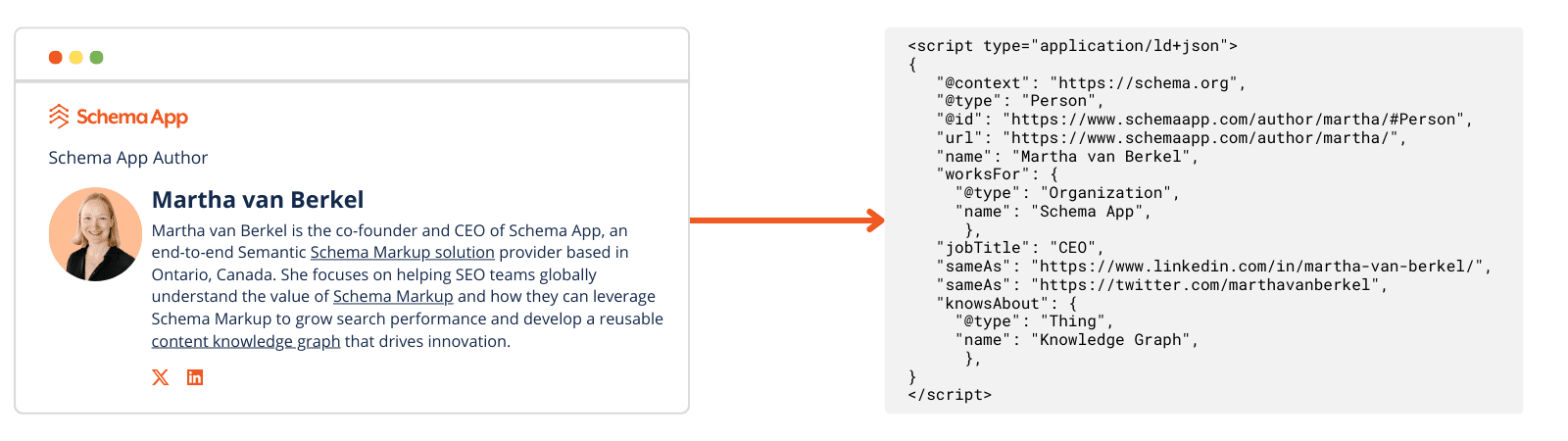
For example, I, Martha van Berkel, am a person, and I can be defined as an entity on my author page.

The words on the page talk about things that people might want to know about me, and the schema markup structures this data to be understood by machines.

The schema markup on my author page explains who I am, my relationship to my organization, and information about my area of expertise.

Example of Martha van Berkel's author page translated into Schema MarkupImage created by author, February 2025

Doing so will translate your unstructured content into machine-readable data, enhancing your semantic data layer.

So, in addition to trying to achieve rich results, you should leverage the Schema.org vocabulary to its fullest to explain what your website content is about and create a semantic data layer.

Add schema markup to your entire site to identify and describe your entities – the key topics or “things” within your content.

Tip #3: Connect The Things On Your Website With Schema Markup

Identifying and describing the entities on your site is only the first step. Many entities on your site can also be defined by their relationship to other things on your site and across the web.

Therefore, it is important that your team uses structured data markup to define the entities and topics on your site and explain their relationships.

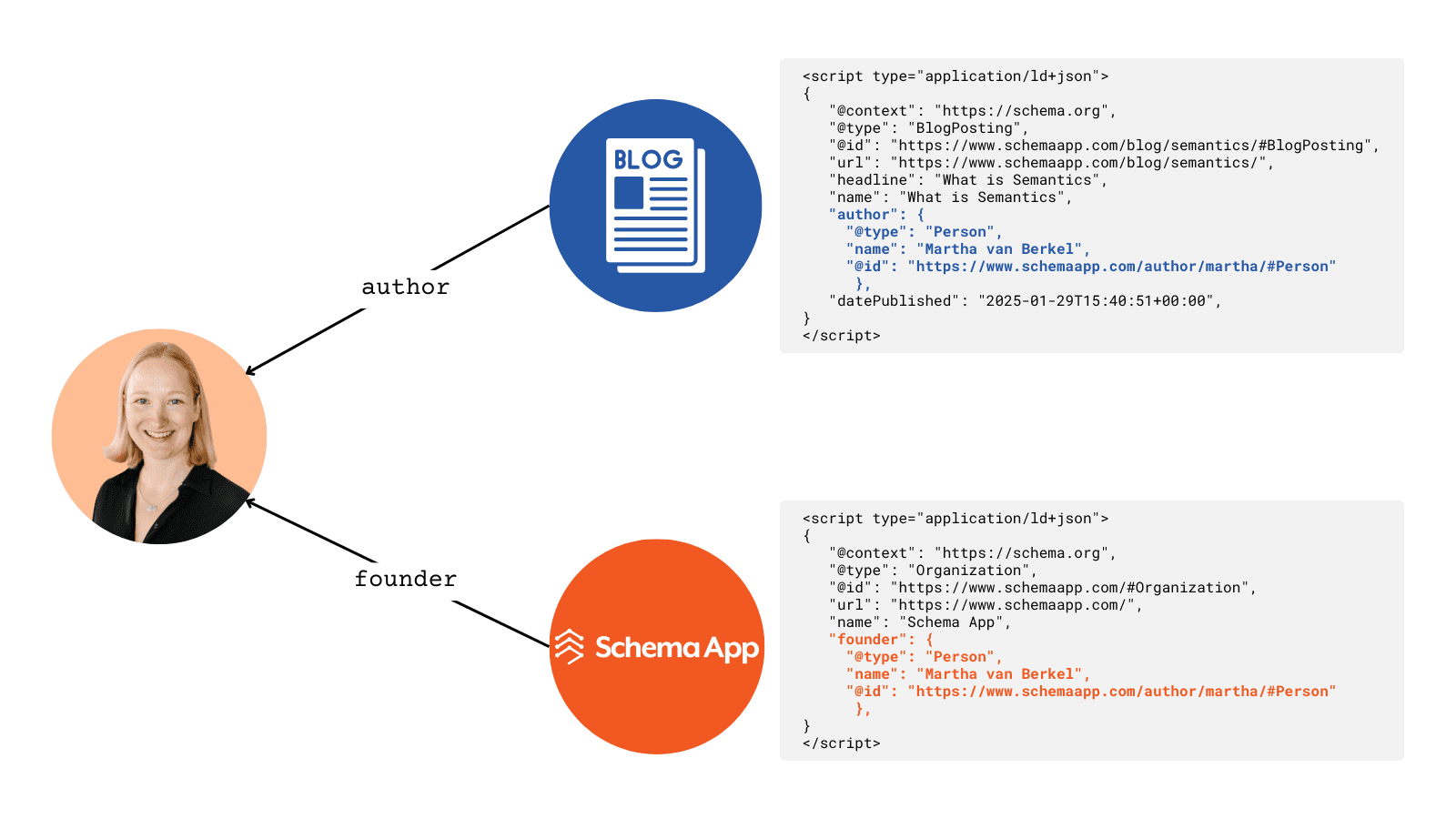
For example, I, Martha van Berkel, am the founder of the organization Schema App. I am also the author of a few blog articles on the Schema App website.

Schema App and these blog articles are all unique entities. We can use schema markup to articulate my relationship with these entities.

Example of Martha's connection to other entities using Schema MarkupImage created by author, February 2025

Moreover, markup enables you to link entities across the web, providing greater context to search engines and AI.

This process, known as entity linking, helps to not only further define your entities, but also clarify their meaning.

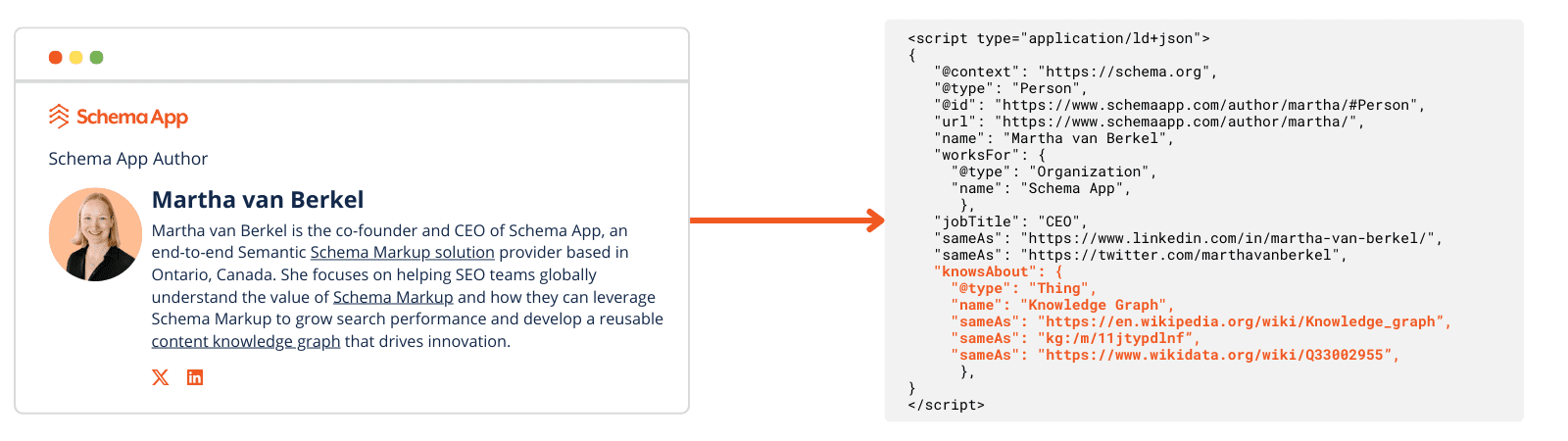
Continuing our example: I, Martha van Berkel, know about knowledge graphs. One could easily mistake the knowledge graph we’re talking about as Google’s knowledge graph.

To clarify what “knowledge graph” we’re referring to, we could link the term “knowledge graphs” to the corresponding entity in authoritative knowledge bases like Wikidata, where the term structured data is already defined and understood by the machines consuming the content.

Example of doing entity linking using Schema markupImage created by author, February 2025

In addition to building the semantic data layer, at Schema App, we’ve seen an increase in related queries after adding entity linking.

For example, “near me” queries increased after we implemented place-based entity linking for location pages.

By connecting entities both within your site and across the web with structured data markup, you are effectively building a content knowledge graph.

This semantic data layer ensures that search engines, AI, and other data consumers understand the entities on your site and their relationships – far beyond just keywords.

Preparing For AI Within Your Organization

Many organizations have been tasked with developing AI strategies to prepare for the future. The good news is that the content knowledge graph you’ve built for search is equally valuable in enabling your internal AI innovations.

In February 2024, Gartner assessed 30 emerging technologies that companies need to invest in to stay relevant in this new AI world.

They named “knowledge graphs” as a critical enabler for generative AI. Knowledge graphs can support generative AI adoption by grounding the LLM in factual information, reducing hallucinations.

Furthermore, another research by Data.World showed that using knowledge graphs for responses in enterprises improves GPT-4’s accuracy from 16% to 54%.

The digital landscape is changing rapidly, and there are now many ways consumers and businesses can “search.” At the heart of these new experiences is your brand’s website content or your website data.

By investing in optimizing your website with schema markup and building a dynamic content knowledge graph, you are preparing your organization’s web data for internal AI initiatives.

When you do semantic schema markup, your web data is reusable and adaptable to future technologies.

Tip #4: Challenge SEO Professionals To Shift From Optimizing Pages To Optimizing Your Web Data

Just like content teams need to shift from thinking about keywords, SEO teams need to think about optimizing their web data vs. their webpages.

Challenge your SEO specialists to think about your entities and their relationships across your website using schema markup. This shift will require teams to think about how structured their web data is and how they can make it easily accessible to crawl and understand.

SEO professionals need to think like data architects to ensure your brand’s website data is future-proofed for what’s coming next in search and AI within and outside your organization.

Managing Your Web Data To Prepare For The Future

Implementing a structured data markup strategy is not just about optimizing for visibility in search. It is also about defining and connecting entities to build your brand’s semantic data layer.

The search landscape is ever-evolving, and AI technologies will come and go.

Therefore, SEO teams should take this opportunity to leverage schema markup for its semantic value and develop a content knowledge graph that prepares your brand for whatever comes next.

More Resources:


Featured Image: PeopleImages.com – Yuri A/Shutterstock

Why Search Rankings Are Driving Less Traffic

There’s a disturbing trend in organic search: Many web pages are losing traffic without a substantial change in rankings.

It’s not an abrupt loss and usually occurs for low-volume queries. Yet the aggregated traffic reduction across many pages adds up, becoming noticeable.

What can be done? A drop in traffic usually stems from lower rankings. But what if rankings are unchanged? This trend is widespread, affecting large and small sites.

Here are the causes.

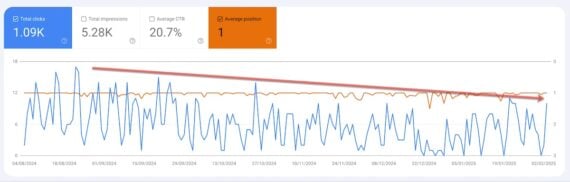
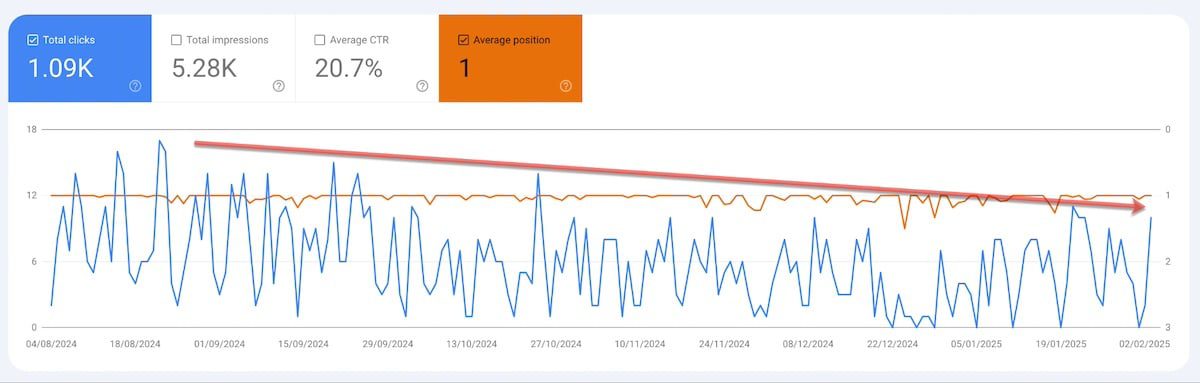
Screenshot of Google Analytics graph showing traffic to the web page.

Clicks to this web page decreased from April 2024 to February 2025, but its top ranking stayed the same. Click image to enlarge.

Zero Click Searches

Google’s search result pages no longer consist solely of 10 blue links with predictable click rates. Search results are much more diverse and dynamic. Many of the new features generate few, if any, clicks.

Certainly Google has infused more advertisements in search results, which compete with organic listings. Other factors include:

  • Featured snippets that answer queries directly, removing the need to click.
  • Sections for “People also ask” and “People also search for” prompt users to stay on-site, researching more.
  • Videos play directly in search results.
  • Images can take at least two clicks to reach the underlying web page.
  • Other sections (social media, maps, forums) distract from the organic results.

A 2024 study by SparkToro found that, on average, 1,000 U.S.-based searches resulted in just 360 external clicks.

AI Overviews

Google’s launch of AI Overviews dramatically contributes to zero-click searches. A recent study by Seer Interactive revealed organic and paid click rates with and without AI overviews. The trend is obvious: AI Overviews decrease clicks to ranking pages.

Here are some of Seer’s findings.

Zero Click Discovery

Generative AI platforms — ChatGPT, Claude, Gemini, Perplexity, others — are upending shopping patterns. Consumers increasingly rely on those tools for brand and product recommendations, yet very few answers include external links.

The result is zero-click discoveries, forcing consumers to search, say, Google or Bing to locate the recommended sites. Hence branded search volume is growing for most businesses, especially the prominent names. Non-branded rankings may not change but clicks route through branded searches instead.

What to Do?

  • Prioritize queries with transactional intent. AI Overviews appear mostly for informational searches. Continue providing helpful information but don’t waste resources monitoring those positions. Write for shoppers, not search engines.
  • Monitor and optimize branded search.

There’s no single fix to zero-click searches and discovery. Adjust optimization tactics and start adapting to a lower-traffic future.

Google On Low-Effort Content That Looks Good via @sejournal, @martinibuster

Google’s John Mueller used an AI-generated image to illustrate his point about low-effort content that looks good but lacks true expertise. His comments pushed back against the idea that low-effort content is acceptable just because it has the appearance of competence.

One signal that tipped him off to low-quality articles was the use of dodgy AI-generated featured images. He didn’t suggest that AI-generated images are a direct signal of low quality. Instead, he described his own “you know it when you see it” perception.

Comparison With Actual Expertise

Mueller’s comment cited the content practices of actual experts.

He wrote:

“How common is it in non-SEO circles that “technical” / “expert” articles use AI-generated images? I totally love seeing them [*].

[*] Because I know I can ignore the article that they ignored while writing. And, why not should block them on social too.”

Low Effort Content

Mueller next called out low-effort work that results content that “looks good.”

He followed up with:

“I struggle with the “but our low-effort work actually looks good” comments. Realistically, cheap & fast will reign when it comes to mass content production, so none of this is going away anytime soon, probably never. “Low-effort, but good” is still low-effort.”

This Is Not About AI Images

Mueller’s post is not about AI images; it’s about low-effort content that “looks good” but really isn’t. Here’s an anecdote to illustrate what I mean. I saw an SEO on Facebook bragging about how great their AI-generated content was. So I asked if they trusted it for generating Local SEO content. They answered, “No, no, no, no,” and remarked on how poor and untrustworthy the content on that topic was.

They didn’t justify why they trusted the other AI-generated content. I just assumed they either didn’t make the connection or had the content checked by an actual subject matter expert and didn’t mention it. I left it there. No judgment.

Should The Standard For Good Be Raised?

ChatGPT has a disclaimer warning against trusting it. So, if AI can’t be trusted for a topic one is knowledgeable in and it advises caution itself, should the standard for judging the quality of AI-generated content be higher than simply looking good?

Screenshot: AI Doesn’t Vouch for Its Trustworthiness – Should You?

Screenshot of ChatGPT interface with the following warning beneath the chat box: ChatGPT can make mistakes. Check important info.

ChatGPT Recommends Checking The Output

The point though is that maybe it’s difficult for a non-expert to discern the difference between expert content and content designed to resemble expertise. AI generated content is expert at the appearance of expertise, by design.  Given that even ChatGPT itself recommends checking what it generates, maybe it might be useful  to get an actual expert to review that content-kraken before releasing it into the world.

Read Mueller’s comments here:

I struggle with the “but our low-effort work actually looks good” comments.

Featured Image by Shutterstock/ShotPrime Studio

Google AIO Is Sending More Traffic To YouTube via @sejournal, @martinibuster

New data confirms that AIO is becoming an increasingly significant source of traffic to YouTube channels. A closer look reveals that complex search queries, which traditional organic search may not adequately answer, create opportunities for optimized YouTube videos but only for certain topics.

BrightEdge Data On YouTube And AIO

BrightEdge’s data shows that YouTube’s presence in Google’s AI Overviews (AIO) is increasing faster month over month. There was a 21% increase since January 1st and a 36.66% month-over-month growth from January to February.
The data revealed the kind of video content that’s benefiting from AIO.

Topics and Keywords with an AIO that cite YouTube:

  • Instructional Content (31.2%): With “how-to” queries leading at 22.4%
  • Visual Demonstrations (28.5%): Physical techniques, style guides
  • Verification/Examples (19.7%): Product comparisons, visual proof
  • Current Events (8.2%): Breaking news, live coverage

Which Industries Benefit The Most From Videos In AIO?

The BrightEdge data shows that healthcare topics benefited the most, closely followed by eCommerce related topics. Education only accounted for less than 4% of citations.

Here are the full rankings by industry:

  • Healthcare: 41.97%
  • eCommerce: 30.87%
  • B2B Tech: 18.68%
  • Finance: 9.52%
  • Travel: 8.65%
  • Insurance: 8.62%
  • Education: 3.87%

Google Is Actively Targeting Video Content

Many people feel more comfortable consuming video content, especially for topics where they’re learning something related to a hobby but also Your Money Or Your Life (YMYL) topics which related to health and finances.

The data shows that there’s a change happening in Google’s AIO to integrate videos as answers. Google’s AI is clearly becoming more multimodal.

These are the kinds of videos cited by the analysis as benefiting from the shift in emphasis to video in AIO:

  • “Visual demonstrations
  • Step-by-step tutorials
  • Product comparisons
  • Real-world examples”

A startling data point is that almost 70% of the YouTube citations are related to instructions or demonstrations.

  • Instructional 35.6%
  • Visual Demo 32.5%

Takeaways

BrightEdge suggests that prioritizing product demonstrations, step by step tutorials and focusing comparison content may be a useful strategy if Google’s emphasis on YouTube citations in AIO continues.

Read the BrightEdge analysis:

From the YouTube CEO: Our big bets for 2025

Featured Image by Shutterstock/Gearstd

Google AI Overviews Trending Toward Authoritative Sites via @sejournal, @martinibuster

New data provided to Search Engine Journal shows that the sites Google is ranking in AI Overviews varies by time and industry, offering an explanation of volatility in AIO rankings. The new research shows what industries are most impacted and may provide a clue as to way.

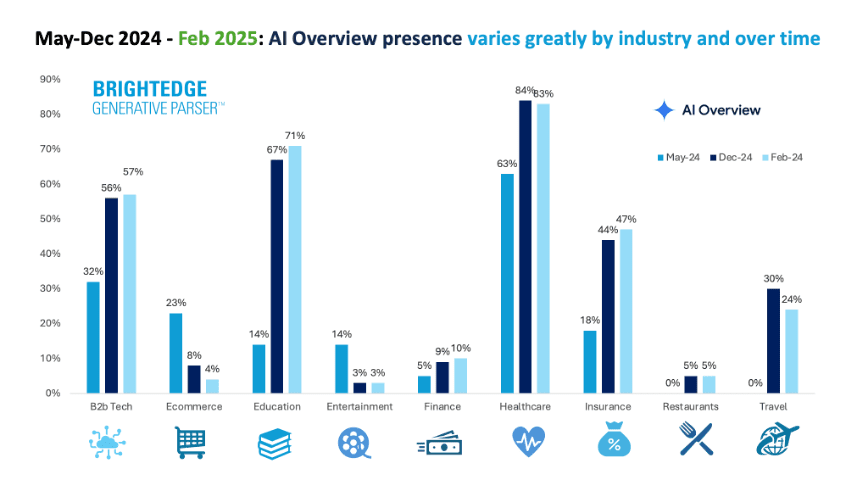
AIO Presence Varies Over Time and By Industry.

The research was provided by BrightEdge using their proprietary BrightEdge Generative Parser technology that tracks AI Overviews, detects patterns and offers insights useful for SEO and marketing.

Healthcare, Education, and B2B Technology topics continue to show greater presence in Google’s AI Overviews. Healthcare and Education are the two industries where BrightEdge saw the strongest growth as well as stability of which sites are shown.

Healthcare has the highest AIO presence at 84% as of late February 2025. AIOs shown for Education topics show a consistent growth pattern, now at 71% in February 2025.

The travel, restaurant and insurance sectors are also trending upward, with the travel queries being a notable trend. Travel had zero AIO presence in May 2024 but that’s completely different now. Travel is now up to 20-30% presence in the AIO search results.

The presence of restaurant related topics in AIO are up from 0 to 5%, suggesting a rising trend. Meanwhile insurance queries have grown from 18% of queries in May 2024 to a whopping 47% of queries by February 2025.

B2B technology queries that trigger AIO are at 57%. These kinds of queries are important because they are typically represent research related by people involved in decision making. Purchase decisions are different than with consumer queries. So the fact that 57% of queries are triggering AIOs may be a reflection of the complexity of the decision making process and the queries involved with that process.

Let’s face it, technology is complex and the people using it aren’t expert in concepts like “data modeling” and that’s the kind of queries BrightEdge is seeing, which could be reflective of the end user wrapping their minds around what the technology does and how it benefits users.

Having worked with B2B technology it’s not unusual for SaaS providers to use mind numbing jargon to sell their products but the decision makers or even the users of that technology aren’t necessarily going to understand that kind of language. That’s why Google shows AI Overviews for a keyword phrase like associative analytics engine instead of showing someone’s product.

Finance related queries, which had been on a moderate growth trend have doubled from 5% of queries in May 2024 to 10% of queries in February 2025.

Here’s the takeaway provided by BrightEdge:

  • B2B Tech is at 57%, in Feb-25. Finance has been growing moderately and doubled from 5% in May-24 to 10% in Fed-25
  • Ecommerce 4% (down from 23% in May-24). Entertainment has dropped to 3%.
  • Ecommerce and Entertainment presence drops from suggests more testing and alignment with traditional Google search where users can engage in platform experiences. For Ecommerce, the use of features like product grids may be the reason. Traditional search provides more in-platform experiences.

What Does This Mean?

This volatility could reflect variable quality of complex user queries. Given that these are complex queries that are triggering AIO then it may be reasonable to assume that they are longtail in nature. Longtail doesn’t mean that they’re long and complex queries, they can also be short queries like “what is docker compose?”

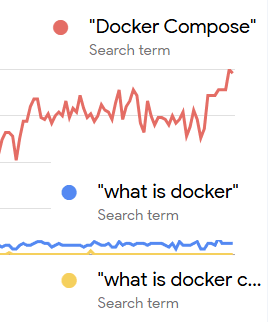
Screenshots of Google trends shows that more people query Docker Compose than they do What is Docker Compose or What is Docker. Why do more people do that?

Screenshot Of Google Trends

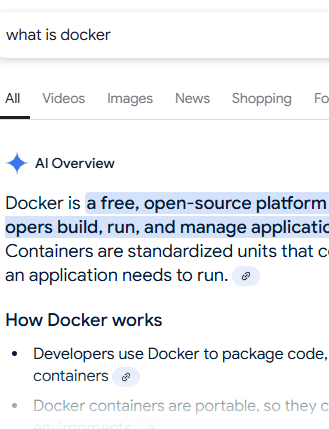
It’s clearly because people are querying Docker Compose as a navigational query. And you can prove that Docker Compose is a navigational query because Google’s search results don’t show an AIO for the query “Docker Compose” but it does show AIO for the other two.

Screenshot Shows SERPs For Docker Compose

Screenshot Shows “What Is” Query Triggers AIO

Changes In AIO Patterns: Gains For Authoritativeness

An interesting trend is that queries for some topics correlated to answers from big brand sites. This is interesting because it somewhat mirrors what happened with Google’s Medic update where SEOs noticed that non-scientific websites no longer ranked for medical queries. Some misunderstood this as Google betraying a bias for big brand sites but that’s not what happened.

What happened in that update was not limited to health related topics. It was a widespread effect that was more like a rebalancing of queries to user expectations- which means this was all about relevance. A query about diabetes should surface scientific data not herbal remedies.

What’s happening today with AIO, particularly with AIO, is a similar thing. Google is tightening up the kind of content AIO is showing to users for medical and technology queries.

Is it favoring brands or authoritativeness? The view that Google has favored brands is shallow and lacks substance. Google has consistently shown a preference for ranking what users expect to see and there are patents that support that observation. SEOs who expect to see rankings based on their made for search engines links, optimized for search engines content, and naïve “EEAT optimized” content completely miss the point of what’s really going on in today’s search engines that rank content based on topicality, user preferences and user expectations. Trustworthy signals of authoritativeness very likely derive from users themselves.

Here’s what BrightEdge shared:

  • “For example, in the healthcare category, where accuracy and trustworthiness are paramount, Google is increasingly showing search results from just a handful of websites.
  • Content from authoritative medical research centers account for 72% of AI Overview answers, which is an increase from 54% of all queries at the start of January.
  • 15-22% of B2B technology search queries are derived from the top five technology companies, such as Amazon, IBM, and Microsoft.”

Takeaways:

  • AIO Presence Varies by Industry and Time
  • There is growth in AIO visibility for Healthcare, Travel, Insurance, and B2B Technology
  • Declining presence of AIO in Ecommerce and Entertainment
  • AIO patterns indicate a preference for authoritative sources. AIO results are increasingly sourced from authoritative sites, particularly in Healthcare and B2B Tech.
    In B2B Tech, 15-22% of AIO responses come from the top five companies. This shift may mirror previous Google updates like the Medic Update that appeared to rebalance search results based on authoritativeness and user expectations.

More information about AI Overviews at BrightEdge

9 Trends You Should Watch To Keep Your Website Afloat in 2025

This post was sponsored by Bluehost. The opinions expressed in this article are the sponsor’s own.

Is my website ready for 2025’s tech and SEO changes?

How can I keep my site fast, secure, and user-friendly?

What makes a hosting provider future-proof?

In 2025, the extent to which you adapt to emerging technologies, changing user expectations, and evolving search engine algorithms will determine if you’ll thrive or struggle to stay relevant.

Staying ahead of emerging trends is essential for maintaining a fast, secure, and user-friendly website.

Optimizing performance, strengthening security measures, and enhancing user experience will be key factors in staying competitive.

The first step to ensuring your website remains resilient and future-ready is choosing a reliable hosting provider with scalable infrastructure and built-in optimization tools.

1. AI-Powered User Experience

Artificial intelligence has transformed how websites interact with visitors, making online experiences more personalized, engaging, and efficient.

Use AI For Higher Conversion Rates

AI-driven personalization allows websites to deliver tailored content and product recommendations based on user behavior, preferences, and past interactions to create an intuitive experience.

The result? Visitors remain engaged, increasing conversions.

Chatbots and AI-powered customer support are also becoming essential for websites looking to provide instant, 24/7 assistance.

These tools answer common questions, guide users through a website, and even process transactions, reducing the need for human intervention while improving response times.

And they’re gaining in popularity.

71% of businesses in a recent survey either already have a chatbot integrated into their sites and customer service processes or plan to get one in the near future.

And they’re reaping the benefits of this technology; 24% of businesses with a chatbot already installed report excellent ROI.

Use AI For Speeding Up Website Implementation

AI is also revolutionizing content creation and website design.

Based on user data, automated tools can generate blog posts, optimize layouts, and suggest design improvements.

This streamlines website management, making it easier for you to maintain a professional and visually appealing online presence.

For example, many hosting providers now include AI-powered website builders, offering tools that assist with design and customization. These features, such as responsive templates and automated suggestions, can make building and optimizing a website more efficient.

2. Voice Search & Conversational Interfaces

Voice search is becoming a major factor in how users interact with the web, with more people relying on smart speakers, mobile assistants, and voice-activated search to find information.

To put this into perspective, ChatGPT from OpenAI reportedly holds 60% of the generative AI market, performing more than one billion searches daily. If just 1% of those are via its voice search, that equates to 10 million voice searches every day on ChatGPT alone.

Reports estimate 20.5% of people globally use voice search daily. And these numbers are increasing.

You need to adapt by optimizing for conversational SEO and natural language queries, which tend to be longer and more specific, making long-tail keywords and question-based content more important than ever.

To stay ahead, websites should structure content in a way that mimics natural conversation:

  • FAQ-style pages.
  • Featured snippet optimization.
  • Ensuring fast-loading, mobile-friendly experiences.

If this is an upgrade that makes sense for your industry, be sure that your host supports SEO-friendly themes and plugins that help websites rank for voice queries.

3. Core Web Vitals & SEO Best Practices

Google continues to refine its ranking algorithms, with Core Web Vitals playing a critical role in determining search visibility.

Implement Core Web Vital Data & Monitor Website Speed

These performance metrics, Largest Contentful Paint (LCP), First Input Delay (FID), and Cumulative Layout Shift (CLS), measure how quickly a page loads, how responsive it is, and how stable its layout appears to users.

Websites that meet these benchmarks not only rank higher in search results but also provide a better overall user experience.

One study found that pages ranking in the top spots in the SERPs were 10% more likely to pass CWV scores than URLs in position 9.

Ensure Your Website Is Faster Than Your Competitors To Rank Higher

As part of the prioritization of performance, mobile-first approach remains essential; Google prioritizes sites that are fast and responsive on smartphones and tablets.

Ensuring faster load times through optimized images, efficient coding, and proper caching techniques can make a significant impact on search rankings.

Leverage Structured Data To Tell Google What Your Website Is About

Structured data, on the other hand, helps search engines better understand a website’s content, improving the chances of appearing in rich snippets and voice search results.

4. Mobile-First & Adaptive Design

With mobile devices accounting for the majority of web traffic, mobile optimization remains a top priority in 2025.

Google’s mobile-first indexing means that search engines primarily evaluate the mobile version of a site when determining rankings.

A website that isn’t optimized for mobile results in overall poor performance, lower search rankings, and a frustrating user experience.

To keep up, many websites are adopting:

  • Adaptive design – Ensures that websites adjust dynamically to different screen sizes, providing an optimal layout on any device.
  • Progressive Web Apps (PWAs) – Combine the best features of websites and mobile apps, offering faster load times, offline capabilities, and app-like functionality without requiring a download.

Best practices for a seamless mobile experience include responsive design, fast-loading pages, and touch-friendly navigation.

Optimizing images, minimizing pop-ups, and using mobile-friendly fonts and buttons can also greatly enhance usability.

5. Enhanced Website Security & Data Privacy

Cyber threats are becoming more sophisticated.

You must take proactive measures to protect your websites from attacks, data breaches, and unauthorized access.

Implementing strong security protocols not only safeguards sensitive information but also builds trust with visitors.

Key security measures include:

  • SSL certificates – Encrypt data transmitted between users and a website, ensuring secure connections—something that search engines and users now expect as a standard feature.
  • Multi-Factor Authentication (MFA) – Adds an extra layer of security by requiring multiple verification steps before granting access, reducing the risk of compromised credentials.
  • Zero-trust security models – Ensures that all access requests, even from within a network, are continuously verified, minimizing potential security gaps.

Beyond technical defenses, compliance with evolving privacy laws such as GDPR and CCPA is essential.

You must be transparent about how they collect, store, and process user data, providing clear consent options and maintaining privacy policies that align with current regulations.

6. Sustainability & Green Web Hosting

Every website, server, and data center requires energy to function, contributing to global carbon emissions.

Optimizing websites through lighter code, efficient caching, and reduced server load also plays a role in minimizing environmental impact.

Choosing a hosting provider that values sustainability is an important step toward a greener web.

For example, Bluehost has taken steps to improve energy efficiency, ensuring that website owners can maintain high-performance sites while supporting environmentally friendly initiatives.

7. AI-Generated & Interactive Content

AI tools can assist in creating blog posts, product descriptions, and videos with minimal manual input, helping businesses maintain a steady content flow efficiently.

Beyond static content, interactive features like quizzes, calculators, and AR are becoming key for user engagement.

These elements encourage participation, increasing time on site and improving conversions.

To integrate interactive features smoothly, a hosting provider that supports interactive plugins and flexible tools can help keep websites engaging and competitive.

8. The Role of Blockchain in Web Security

Blockchain is emerging as a tool for web hosting and cybersecurity, enhancing data security, decentralization, and content authenticity.

Unlike traditional hosting, decentralized networks distribute website data across multiple nodes, reducing risks like downtime, censorship, and cyberattacks. Blockchain-powered domains also add security by making ownership harder to manipulate.

Beyond hosting, blockchain improves data verification by storing information in a tamper-proof ledger, benefiting ecommerce, digital identity verification, and intellectual property protection.

9. The Importance of Reliable Web Hosting

No matter how advanced a website is, it’s only as strong as the hosting infrastructure behind it. In 2025, website performance and uptime will remain critical factors for success, impacting everything from user experience to search engine rankings and business revenue.

Scalable hosting solutions play a crucial role in handling traffic spikes, ensuring that websites remain accessible during high-demand periods.

Whether it’s an ecommerce store experiencing a surge in holiday traffic or a viral blog post drawing in thousands of visitors, having a hosting plan that adapts to these changes is essential.

Reliable hosting providers help mitigate these challenges by offering scalable infrastructure, 100% SLA uptime guarantees, and built-in performance optimizations to keep websites running smoothly.

Features like VPS and dedicated hosting provide additional resources for growing businesses, ensuring that increased traffic doesn’t compromise speed or stability. Investing in a hosting solution that prioritizes reliability and scalability helps safeguard a website’s long-term success.

Future-Proof Your Website Today

The digital landscape is changing fast, and staying ahead is essential to staying competitive.

From AI-driven personalization to enhanced security and sustainable hosting, adapting to new trends ensures your site remains fast, secure, and engaging. Investing in performance and user experience isn’t optional, it’s the key to long-term success.

Whether launching a new site or optimizing an existing one, the right hosting provider makes all the difference.

Bluehost offers reliable, high-performance hosting with built-in security, scalability, and guaranteed uptime, so your website is ready for the future.

Get started today and build a website designed to thrive.


Image Credits

Featured Image: Image by Bluehost. Used with permission.

Customer-Centric SEO: How To Enhance Customer Experiences via @sejournal, @jasonhennessey

We’ve all heard the phrase, “The customer’s always right.” It’s a common mantra in customer service and hospitality – and, I’d argue, should carry over into the world of SEO as well!

After all, we SEO pros are in the business of not only pleasing Google but also appealing to the needs and interests of prospective consumers.

Customers do the searching, navigate your website, and ultimately decide whether your brand is worth buying from.

While many SEO tactics focus on rankings and clicks, customer-centric SEO asserts that the user experience on-site should be the top priority.

So, if you’re looking to enhance customer experiences and build brand loyalty, consider these customer-first SEO strategies.

What Is Customer-Centric SEO?

Customer-centric SEO prioritizes the user’s online experience, from navigating your website to the content that appeals to their needs and interests.

Instead of implementing SEO improvements for the sake of performance metrics or rankings, customer-centric SEO combines optimization best practices with a deeper, purposeful understanding of user behavior and customer goals.

The importance of user experience (UX) in SEO has grown, in no small part, due to the rollout of a page experience report in Google Search Console analytics (April 2021, now depreciated) and Google’s Page Experience Update in May 2021.

SEO Improvements To Enhance Customer Experience, Behavior

Designing a great website UX and providing valuable content are two important aspects of customer-centric SEO, but many other factors can affect user behavior, trust, and brand loyalty.

Here are a few ways to enhance the user experience, increase conversions, and build a loyal customer base.

1. Make Information Easy To Find With User-Friendly Navigation

One of the best ways to facilitate a friendly user experience is through simple, organized site navigation.

A website’s structure should not be convoluted; rather, it should make it easy for users to find information, navigate to related pages, learn about your products or services, and proceed with their inquiry or purchase.

An example of poor site navigation might include a cluttered menu with too many drop-down options, broken links resulting in 404 pages, a lack of clear categories or topical hierarchy, or the absence of a search bar to assist users in finding specific information.

On the other hand, user-friendly site navigation will have an intuitive menu with clear page categories (e.g., Services, Products, About Us, etc.), breadcrumbs that indicate where users are within the site, and a search function that helps people find results quickly.

It will also maintain a shallow page depth, keeping the number of clicks required for users to access important pages at a minimum.

Optimized site navigation will not only help enable faster search engine crawling and indexation, but also reduce friction in website visitors’ path to purchase.

2. Reduce Visual Bloat And Page Speed Issues

It’s no secret that page speed is an important factor in user experience and search engine rankings.

Today’s consumers expect a fast and easy-to-use website, and search engines tend to prioritize sites that have a fast loading speed.

PageSpeed Insights is the go-to test to assess a website’s loading speed and experience across desktop and mobile devices.

If a website yields a low score (any less than 60/100), this indicates a slow loading time, which can deter prospective customers.

Some factors that may contribute to slow loading speed include unoptimized page code (CSS, unnecessary JavaScript, etc.), visual bloat through large images and video files, hosting your website on a slow hosting server, and the presence of other render-blocking scripts/stylesheets that delay loading of your main page content.

That said, there are many more elements that may be hindering your site’s speed and rendering, so be sure to assess your specific site and review the items outlined in the PageSpeed Insights report.

Data from a page speed report reveals that nearly 70% of online shoppers factor in loading time before making a purchase.

Customer-centric SEO prioritizes loading speed as a matter of user experience, knowing that a slow website can be a huge deterrent to new site visitors.

3. Audit Content For Timeliness And Relevance

In the SEO space, there’s a strong draw toward evergreen content due to its promise of long-running organic traffic.

While evergreen content has its place, it sometimes does a disservice to new website visitors if it is not regularly updated and maintained.

For example, a previously published “Social Media Marketing Best Practices” page might have included relevant statistics from 2023, but new visitors are likely looking for more timely information, up-to-date examples, and current sources.

Thus, auditing and updating existing content should be an ongoing practice in customer-centric SEO. This allows one to identify outdated information, link to more recent sources, add information as relevant, and provide more value to prospective customers.

Here are a few things to look for when refreshing old content:

  • Is the information still accurate and relevant to today’s audience?
  • Are there outdated statistics, articles, or references that need updating?
  • Do all internal and external links still work? Are they pointing to the best sources?
  • Has search intent changed? Does the content still align with user expectations?
  • Are there new insights, case studies, or examples that could enhance the content?
  • Are there opportunities to improve formatting and readability (e.g., adding images, videos, or bullet points)?
  • Does the content reflect the latest industry guidelines and/or technology updates?
  • Are there opportunities to expand or consolidate content for better clarity?
  • Is the metadata still optimized to drive clicks in the search results?

I highly recommend running through these questions like a checklist, at least every quarter.

Not only will this allow you to catch missed SEO opportunities (in terms of content length, metadata updates, etc.), but it also will ensure that your content is still relevant and valuable to incoming visitors.

4. Implement A Mobile-First Website Design

In 2024, mobile devices generated the majority (64.54%) of all global website traffic.

With so many users searching for information via mobile devices (smartphones, tablets, etc.), having a mobile-friendly website is absolutely essential.

In addition to ensuring a fast load speed, your website should be responsive (load correctly, be easy to navigate, etc.) on all types of devices.

Best practices for mobile-friendliness include disabling intrusive pop-ups and display ads, formatting the mobile version of your site to adapt to various screen sizes, and using large and easily “clickable” buttons so users can navigate your site.

One significant component that often changes between a site’s desktop and mobile versions is the navigation.

The menu bar on the mobile version of your site may be larger; include a more compressed hamburger menu, and perhaps larger text. This makes it easier for users to click on the menu items even when using a smaller screen.

Mobile-friendliness is not a “nice to have.” In this fast-paced world, users expect a positive experience no matter where they search. This makes mobile optimization an essential aspect of customer-centric SEO.

5. Put Trust Factors At The Forefront

In keeping with the theme of making information easy to find, your site’s case studies, reviews, and testimonials should also be at the forefront.

Avoid nesting this important info – what I call “trust factors” – deep in your website (as many do, at the bottom of a webpage).

Instead, embed testimonials strategically in your content. Accompany these testimonials with product or service examples, customer names, and even videos to add to the visual appeal.

Build out robust case studies that explain how your products/services work and the benefits they’ve provided to your customers.

By making this information highly visible, you’ll build trust with prospective customers more quickly, eliminating the need for them to search through your site to find proof of your credibility.

6. Make Content Skimmable And Well-Organized

When it comes to webpage and blog post content, customer-centric SEO makes the body content easier to scan and digest.

This means adding strategic headings that establish a hierarchy between sections and adding bulleted or numbered lists to better organize the text.

Few people want to read a wall of text that reads more like an essay than an informative guide.

Formatting gives readers “breathing room” as they skim the information, contemplate the value provided, and search for references within your content.

Ideally, your content should be formatted in such a way that readers can:

  • Immediately know what the content is about (i.e., a clear title).
  • Easily scan the most important sections, clearly labeled with specific headers.
  • Readily find sources cited and internal links to related content.

7. CRO Your CTAs

Calls-to-action (CTAs) are often a driving force in getting users to take action on your site – whether that’s calling your business, signing up for your newsletter, or making a purchase.

With customer-centric SEO, you make sure these CTAs are prominent, concise, and easy to navigate.

First, there’s the design aspect of your CTAs. Are they visually appealing? Is the color contrast such that users can easily find them? Do they stand out from other parts of your content?

Then, there’s the text itself. Is the CTA clear in what action you want users to take? Does the text imply where the user will be directed next? Does it use action verbs to compel clicks?

Some examples of poor CTAs can include:

  • “See here.”
  • “More.”
  • “Read.”

However, some more compelling CTAs may include:

  • “Browse products.”
  • “Book a free demo.”
  • “Schedule a consultation.”
  • “Read related articles.”

Both the visual design and the text are important in appealing to users and driving the desired action.

8. Break Up Text With Media Elements And Eye-Catching Graphics

Add intrigue to your content by breaking up walls of text with custom graphics, videos, downloadables, GIFs, and other types of media.

Many studies have pointed to the value of images in content, indicating that engagement rates improve when high-quality visuals are used.

Media adds to the visual appeal of your content, but it can also bring SEO benefits as well.

For instance, pre-recorded videos embedded on your website and uploaded to YouTube can drive additional traffic via search engines, YouTube Search, and similar methods.

There’s an accessibility component as well.

Media optimized with descriptive alt text is more readily accessible by e-readers, devices used by visually impaired individuals to understand content on the web. This is an SEO best practice and a user experience best practice.

A Confident Future In Customer-Centric SEO

Chances are, many of the SEO best practices you’ve been implementing to date were designed with user experience in mind.

Search engines have a long history of considering the user experience, from algorithm changes to emerging technologies in analytics tools.

But there are up-and-coming practices as well – ones that SEO pros would be remiss to neglect in future forward strategies.

Customer-centric SEO is a philosophy that puts the customer first.

Outside of optimization, for optimization’s sake, it involves purposeful changes to make a user’s experience more enjoyable.

This can bring tangible benefits for the brand – in terms of traffic and sales – and meaningful benefits to the user, in terms of ease of use, accessibility, and trust.

More Resources:


Featured Image: PeopleImages.com – Yuri A/Shutterstock

Google On Search Console Noindex Detected Errors via @sejournal, @martinibuster

Google’s John Mueller answered a question on Reddit about a seemingly false ‘noindex detected in X-Robots-Tag HTTP header’ error reported in Google Search Console for pages that do not have that specific X-Robots-Tag or any other related directive or block. Mueller suggested some possible reasons, and multiple Redditors provided reasonable explanations and solutions.

Noindex Detected

The person who started the Reddit discussion described a scenario that may be familiar to many. Google Search Console reports that it couldn’t index a page because it was blocked not from indexing the page (which is different from blocked from crawling). Checking the page reveals no presence of a noindex meta element and there is no robots.txt blocking the crawl.

Here is what the described as their situation:

  • “GSC shows “noindex detected in X-Robots-Tag http header” for a large part of my URLs. However:
  • Can’t find any noindex in HTML source
  • No noindex in robots.txt
  • No noindex visible in response headers when testing
  • Live Test in GSC shows page as indexable
  • Site is behind Cloudflare (We have checked page rules/WAF etc)”

They also reported that they tried spoofing Googlebot and tested various IP addresses and request headers and still found no clue for the source of the X-Robots-Tag

Cloudflare Suspected

One of the Redditors commented in that discussion to suggest troubleshooting if the problem was originated from Cloudflare.

They offered a comprehensive step by step instructions on how to diagnose if Cloudflare or anything else was preventing Google from indexing the page:

“First, compare Live Test vs. Crawled Page in GSC to check if Google is seeing an outdated response. Next, inspect Cloudflare’s Transform Rules, Response Headers, and Workers for modifications. Use curl with the Googlebot user-agent and cache bypass (Cache-Control: no-cache) to check server responses. If using WordPress, disable SEO plugins to rule out dynamic headers. Also, log Googlebot requests on the server and check if X-Robots-Tag appears. If all fails, bypass Cloudflare by pointing DNS directly to your server and retest.”

The OP (orginal poster, the one who started the discussion) responded that they had tested all those solutions but were unable to test a cache of the site via GSC, only the live site (from the actual server, not Cloudflare).

How To Test With An Actual Googlebot

Interestingly, the OP stated that they were unable to test their site using Googlebot, but there is actually a way to do that.

Google’s Rich Results Tester uses the Googlebot user agent, which also originates from a Google IP address. This tool is useful for verifying what Google sees. If an exploit is causing the site to display a cloaked page, the Rich Results Tester will reveal exactly what Google is indexing.

A Google’s rich results support page confirms:

“This tool accesses the page as Googlebot (that is, not using your credentials, but as Google).”

401 Error Response?

The following probably wasn’t the solution but it’s an interesting bit of technical SEO knowledge.

Another user shared the experience of a server responding with a 401 error response. A 401 response means “unauthorized” and it happens when a request for a resource is missing authentication credentials or the provided credentials are not the right ones. Their solution to make the indexing blocked messages in Google Search Console was to add a notation in the robots.txt to block crawling of login page URLs.

Google’s John Mueller On GSC Error

John Mueller dropped into the discussion to offer his help diagnosing the issue. He said that he has seen this issue arise in relation to CDNs (Content Delivery Networks). An interesting thing he said was that he’s also seen this happen with very old URLs. He didn’t elaborate on that last one but it seems to imply some kind of indexing bug related to old indexed URLs.

Here’s what he said:

“Happy to take a look if you want to ping me some samples. I’ve seen it with CDNs, I’ve seen it with really-old crawls (when the issue was there long ago and a site just has a lot of ancient URLs indexed), maybe there’s something new here…”

Key Takeaways: Google Search Console Index Noindex Detected

  • Google Search Console (GSC) may report “noindex detected in X-Robots-Tag http header” even when that header is not present.
  • CDNs, such as Cloudflare, may interfere with indexing. Steps were shared to check if Cloudflare’s Transform Rules, Response Headers, or cache are affecting how Googlebot sees the page.
  • Outdated indexing data on Google’s side may also be a factor.
  • Google’s Rich Results Tester can verify what Googlebot sees because it uses Googlebot’s user agent and IP, revealing discrepancies that might not be visible from spoofing a user agent.
  • 401 Unauthorized responses can prevent indexing. A user shared that their issue involved login pages that needed to be blocked via robots.txt.
  • John Mueller suggested CDNs and historically crawled URLs as possible causes.
Data Suggests Google Indexing Rates Are Improving via @sejournal, @martinibuster

New research of over 16 million webpages shows that Google indexing rates have improved but that many pages in the dataset were not indexed and over 20% of the pages were eventually deindexed. The findings may be representative of trends and challenges that are specific to sites that are concerned about SEO and indexing.

Research By IndexCheckr Tool

IndexCheckr is a Google indexing tracking tool that enables subscribers to be alerted to when content is indexed, monitor currently indexed pages and to monitor the indexing status of external pages that are hosting backlinks to subscriber web pages.

The research may not statistically correlate to Internet-wide Google indexing trends but it may have a close-enough correlation to sites whose owners are concerned with indexing and backlink monitoring, enough to subscribe to a tool to monitor those trends.

About Indexing

In web indexing, search engines crawl the internet, filter content (such as removing duplicates or low-quality pages), and store the remaining pages in a structured database called a Search Index. This search index is stored on a distributed file system. Google originally used the Google File System (GFS) but later upgraded to Colossus, which is optimized for handling massive amounts of search data across thousands of servers.

Indexing Success Rates

The research shows that most pages in their dataset were not indexed but that indexing rates have improved from 2022 to 2025. Most pages that Google indexed are indexed within six months.

  • Most pages in the dataset were not indexed (61.94%).
  • Indexing rates have improved from 2022 to 2025.
  • Google indexes most pages that do get indexed within six months (93.2%).

Deindexing Trends

The indexing trends are very interesting, especially about how fast Google is at deindexing pages. Of all the indexed pages in the entire dataset, 13.7% of them are deindexed within three months after indexing. The overall rate of deindexing is 21.29%. A sunnier way of interpreting that data is that 78.71% remained firmly indexed by Google.

Deindexing is generally related to Google quality factors but it could also reflect website publishers and SEOs who purposely request web page deindexing through noindex directives like the Meta Robots element.

Here is the time-based cumulative percentages of deindexing:

  • 1.97% of the indexed pages are deindexed within 7 days.
  • 7.97% are deindexed within 30 days.
  • 13.70% deindexed within 90 days
  • 21.29% deindexed after 90 days.

The research paper that I was provided offers this observation:

“This timeline highlights the importance of early monitoring and optimization to address potential issues that could lead to deindexing. Beyond three months, the risk of deindexing diminishes but persists, making periodic audits essential for long-term content visibility.”

Impact Of Indexing Services

The next part of the research highlights the effectiveness of tools designed to increase the web page indexing. They found that URLs submitted to indexing tools had a low 29.37% success rate. That means that 70.63% of submitted web pages remained unindexed, possibly highlighting limitations in manual submission strategies.

High Percentage Of Pages Not Indexed

Less than 1% of the tracked websites were entirely unindexed. The majority of unindexed URLs were from websites that were indexed by Google. 37.08% of all the tracked pages were fully indexed.

These numbers may not reflect the state of the Internet because the data is pulled from a set of sites that are subscribers to an indexing tool. That slants the data being measured and makes it different from what the state of the entire Internet may be.

Google Indexing Has Improved Since 2022

Although there are some grim statistics in the data a bright spot is that there’s been a steady increase in indexing rates from 2022 to 2025, suggesting that Google’s ability to process and include pages may have improved.

According to IndexCheckr:

“The data from 2022 to 2025 shows a steady increase in Google’s indexing rate, suggesting that the search engine may be catching up after previously reported indexing struggles.”

Summary Of Findings

Complete deindexing at a website-level are rare for this dataset. Google’s indexing speed varies and more than half of the web pages in this dataset struggles to get indexed, possibly related to site quality.

What kinds of site quality issues would impact indexing? In my opinion, some of what is causing this could include commercial product pages with content that’s bulked up for the purposes of feeding the bot. I’ve reviewed a few ecommerce sites doing that who either struggled to get indexed or to rank. Google’s organic search results (SERPs) for ecommerce are increasingly precise. Those kinds of SERPs don’t make sense when reviewed through the lens of SEO and that’s because strategies based on feeding the bot entities, keywords and topical maps tend to result in search engine first websites and that’s not going to affect the ranking factors that really count that are related to how users may react to content.

Read the indexing study at IndexCheckr.com:

Google Indexing Study: Insights from 16 Million Pages

Featured Image by Shutterstock/Shutterstock AI Generator