Google Confirms 3 Ways To Make Googlebot Crawl More via @sejournal, @martinibuster

Google’s Gary Illyes and Lizzi Sassman discussed three factors that trigger increased Googlebot crawling. While they downplayed the need for constant crawling, they acknowledged there a ways to encourage Googlebot to revisit a website.

1. Impact of High-Quality Content on Crawling Frequency

One of the things they talked about was the quality of a website. A lot of people suffer from the discovered not indexed issue and that’s sometimes caused by certain SEO practices that people have learned and believe are a good practice. I’ve been doing SEO for 25 years and one thing that’s always stayed the same is that industry defined best practices are generally years behind what Google is doing. Yet, it’s hard to see what’s wrong if a person is convinced that they’re doing everything right.

Gary Illyes shared a reason for an elevated crawl frequency at the 4:42 minute mark, explaining that one of triggers for a high level of crawling is signals of high quality that Google’s algorithms detect.

Gary said it at the 4:42 minute mark:

“…generally if the content of a site is of high quality and it’s helpful and people like it in general, then Googlebot–well, Google–tends to crawl more from that site…”

There’s a lot of nuance to the above statement that’s missing, like what are the signals of high quality and helpfulness that will trigger Google to decide to crawl more frequently?

Well, Google never says. But we can speculate and the following are some of my educated guesses.

We know that there are patents about branded search that count branded searches made by users as implied links. Some people think that “implied links” are brand mentions, but “brand mentions” are absolutely not what the patent talks about.

Then there’s the Navboost patent that’s been around since 2004. Some people equate the Navboost patent with clicks but if you read the actual patent from 2004 you’ll see that it never mentions click through rates (CTR). It talks about user interaction signals. Clicks was a topic of intense research in the early 2000s but if you read the research papers and the patents it’s easy to understand what I mean when it’s not so simple as “monkey clicks the website in the SERPs, Google ranks it higher, monkey gets banana.”

In general, I think that signals that indicate people perceive a site as helpful, I think that can help a website rank better. And sometimes that can be giving people what they expect to see, giving people what they expect to see.

Site owners will tell me that Google is ranking garbage and when I take a look I can see what they mean, the sites are kind of garbagey. But on the other hand the content is giving people what they want because they don’t really know how to tell the difference between what they expect to see and actual good quality content (I call that the Froot Loops algorithm).

What’s the Froot Loops algorithm? It’s an effect from Google’s reliance on user satisfaction signals to judge whether their search results are making users happy. Here’s what I previously published about Google’s Froot Loops algorithm:

“Ever walk down a supermarket cereal aisle and note how many sugar-laden kinds of cereal line the shelves? That’s user satisfaction in action. People expect to see sugar bomb cereals in their cereal aisle and supermarkets satisfy that user intent.

I often look at the Froot Loops on the cereal aisle and think, “Who eats that stuff?” Apparently, a lot of people do, that’s why the box is on the supermarket shelf – because people expect to see it there.

Google is doing the same thing as the supermarket. Google is showing the results that are most likely to satisfy users, just like that cereal aisle.”

An example of a garbagey site that satisfies users is a popular recipe site (that I won’t name) that publishes easy to cook recipes that are inauthentic and uses shortcuts like cream of mushroom soup out of the can as an ingredient. I’m fairly experienced in the kitchen and those recipes make me cringe. But people I know love that site because they really don’t know better, they just want an easy recipe.

What the helpfulness conversation is really about is understanding the online audience and giving them what they want, which is different from giving them what they should want. Understanding what people want and giving it to them is, in my opinion, what searchers will find helpful and ring Google’s helpfulness signal bells.

2. Increased Publishing Activity

Another thing that Illyes and Sassman said could trigger Googlebot to crawl more is an increased frequency of publishing, like if a site suddenly increased the amount of pages it is publishing. But Illyes said that in the context of a hacked site that all of a sudden started publishing more web pages. A hacked site that’s publishing a lot of pages would cause Googlebot to crawl more.

If we zoom out to examine that statement from the perspective of the forest then it’s pretty evident that he’s implying that an increase in publication activity may trigger an increase in crawl activity. It’s not that the site was hacked that is causing Googlebot to crawl more, it’s the increase in publishing that’s causing it.

Here is where Gary cites a burst of publishing activity as a Googlebot trigger:

“…but it can also mean that, I don’t know, the site was hacked. And then there’s a bunch of new URLs that Googlebot gets excited about, and then it goes out and then it’s crawling like crazy.”​

A lot of new pages makes Googlebot get excited and crawl a site “like crazy” is the takeaway there. No further elaboration is needed, let’s move on.

3. Consistency Of Content Quality

Gary Illyes goes on to mention that Google may reconsider the overall site quality and that may cause a drop in crawl frequency.

Here’s what Gary said:

“…if we are not crawling much or we are gradually slowing down with crawling, that might be a sign of low-quality content or that we rethought the quality of the site.”

What does Gary mean when he says that Google “rethought the quality of the site?” My take on it is that sometimes the overall site quality of a site can go down if there’s parts of the site that aren’t to the same standard as the original site quality. In my opinion, based on things I’ve seen over the years, at some point the low quality content may begin to outweigh the good content and drag the rest of the site down with it.

When people come to me saying that they have a “content cannibalism” issue, when I take a look at it, what they’re really suffering from is a low quality content issue in another part of the site.

Lizzi Sassman goes on to ask at around the 6 minute mark if there’s an impact if the website content was static, neither improving or getting worse, but simply not changing. Gary resisted giving an answer, simply saying that Googlebot returns to check on the site to see if it has changed and says that “probably” Googlebot might slow down the crawling if there is no changes but qualified that statement by saying that he didn’t know.

Something that went unsaid but is related to the Consistency of Content Quality is that sometimes the topic changes and if the content is static then it may automatically lose relevance and begin to lose rankings. So it’s a good idea to do a regular Content Audit to see if the topic has changed and if so to update the content so that it continues to be relevant to users, readers and consumers when they have conversations about a topic.

Three Ways To Improve Relations With Googlebot

As Gary and Lizzi made clear, it’s not really about poking Googlebot to get it to come around just for the sake of getting it to crawl. The point is to think about your content and its relationship to the users.

1. Is the content high quality?
Does the content address a topic or does it address a keyword? Sites that use a keyword-based content strategy are the ones that I see suffering in the 2024 core algorithm updates. Strategies that are based on topics tend to produce better content and sailed through the algorithm updates.

2. Increased Publishing Activity
An increase in publishing activity can cause Googlebot to come around more often. Regardless of whether it’s because a site is hacked or a site is putting more vigor into their content publishing strategy, a regular content publishing schedule is a good thing and has always been a good thing. There is no “set it and forget it” when it comes to content publishing.

3. Consistency Of Content Quality
Content quality, topicality, and relevance to users over time is an important consideration and will assure that Googlebot will continue to come around to say hello. A drop in any of those factors (quality, topicality, and relevance) could affect Googlebot crawling which itself is a symptom of the more importat factor, which is how Google’s algorithm itself regards the content.

Listen to the Google Search Off The Record Podcast beginning at about the 4 minute mark:

Featured Image by Shutterstock/Cast Of Thousands

The 6 Best AI Content Checkers To Use In 2024 via @sejournal, @annabellenyst

Today, many people see generative AI like ChatGPT, Gemini, and others as indispensable tools that streamline their day-to-day workflows and enhance their productivity.

However, with the proliferation of AI assistants comes an uptick in AI-generated content. AI content detectors can help you prioritize content quality and originality.

These tools can help you discern whether a piece of content was written by a human or AI – a task that’s becoming increasingly difficult – and this can help detect plagiarism, and ensure content is original, unique, and high-quality.

In this article, we’ll look at some of the top AI content checkers available in 2024. Let’s dive in.

The 6 Best AI Content Checkers

1. GPTZero

Screenshot from GPTZero.me, July 2024

Launched in 2022, GPTZero was “the first public open AI detector,” according to its website – and it’s a leading choice among the tools out there today.

GPTZero’s advanced detection model comprises seven different components, including an internet text search to identify whether the content already exists in internet archives, a burstiness analysis to see whether the style and tone reflect that of human writing, end-to-end deep learning, and more.

Its Deep Scan feature gives you a detailed report highlighting sentences likely created by AI and tells you why that is, and GPTZero also offers a user-friendly Detection Dashboard as a source of truth for all your reports.

The tool is straightforward, and the company works with partners and researchers from institutions like Princeton, Penn State, and OpenAI to provide top-tier research and benchmarking.

Cost:

  • The Basic plan is available for free. It includes up to 10,000 words per month.
  • The Essential plan starts at $10 per month, with up to 150,000 words, plagiarism detection, and advanced writing feedback.
  • The Premium plan starts at $16 per month and includes up to 300,000 words, everything in the Essential tier, as well as Deep Scan, AI detection in multiple languages, and downloadable reports.

2. Originality.ai

Screenshot from Originality.ai, July 2024

Originality.ai is designed to detect AI-generated content across various language models, including ChatGPT, GPT-4o, Gemini Pro, Claude 3, Llama 3, and others. It bills itself as the “most accurate AI detector,” and targets publishers, agencies, and writers – but not students.

The latter is relevant because, the company says, by leaving academia, research, and other historical text out of its scope, it’s able to better train its model to hone in on published content across the internet, print, etc.

Originality.ai works across multiple languages and offers a free Chrome extension and API integration. It also has a team that works around the clock, testing out new strategies to create AI content that tools can’t detect. Once it finds one, it trains the tool to sniff it out.

The tool is straightforward; users can just paste content directly into Originality.ai, or upload from a file or even a URL. It will then give you a report that flags AI-detected portions as well as the overall originality of the text. You get three free scans initially, with a 300-word limit.

Cost:

  • Pro membership starts at $12.45 per month and includes 2,000 credits, AI scans, shareable reports, plagiarism and readability scans, and more.
  • Enterprise membership starts at $179 per month and includes 15,000 credits per month, features in the Pro plan, as well as priority support, API, and a 365-day history of your scans.
  • Originality.ai also offers a “pay as you go” tier, which consists of a $30 one-time payment to access 3,000 credits and some of the more limited features listed above.

3. Copyleaks

Screenshot from Copyleaks.com, July 2024

While you’ve probably heard of Copyleaks as a plagiarism detection tool, what you might not know is that it also offers a comprehensive AI-checking solution.

The tool covers 30 languages and detects across AI models including ChatGPT, Gemini, and Claude – and it automatically updates when new language models are released.

According to Copyleaks, its AI detector “has over 99% overall accuracy and a 0.2% false positive rate, the lowest of any platform.”

It works by using its long history of data and learning to spot the pattern of human-generated writing – and thus, flag anything that doesn’t fit common patterns as potentially AI-generated.

Other notable features of Copyleaks’ AI content detector are the ability to detect AI-generated source code, spot content that might have been paraphrased by AI, as well as browser extension and API offerings.

Cost:

  • Users with a Copyleaks account can access a limited number of free scans daily.
  • Paid plans start at $7.99 per month for the AI Detector tool, including up to 1,200 credits, scanning in over 30 languages, two users, and API access.
  • You can also get access to an AI + Plagiarism Detection tier starting at $13.99 per month.

4. Winston AI

Screenshot from GoWinston.ai, July 2024

Another popular AI content detection tool, Winston AI calls itself “the most trusted AI detector,” and claims to be the only such tool with a 99.98% accuracy rate.

Winston AI is designed for users across the education, SEO, and writing industries, and it’s able to identify content generated by LLMs such as ChatGPT, GPT-4, Google Gemini, Claude, and more.

Using Winston AI is easy; paste or upload your documents into the tool, and it will scan the text (including text from scanned pictures or handwriting) and provide a printable report with your results.

Like other tools in this list, Winston AI offers multilingual support, high-grade security, and can also spot content that’s been paraphrased using tools like Quillbot.

One unique feature of Winston AI is its “AI Prediction Map,” a color-coded visualization that highlights which parts of your content sound inauthentic and may be flagged by AI detectors.

Cost

  • Free 7-day trial includes 2,000 credits, AI content checking, AI image and deepfake detection, and more.
  • Paid plans start at $12 per month for 80,000 credits, with additional advanced features based on your membership tier.

5. TraceGPT

Screenshot from plagiarismcheck.org, July 2024

Looking for an extremely accurate AI content detector? Try TraceGPT by PlagiarismCheck.org.

It’s a user-friendly tool that allows you to upload files across a range of formats, including doc, docx, txt, odt, rtf, and pdf. Then, it leverages creativity/predictability ratios and other methods to scan your content for “AI-related breadcrumbs.”

Once it’s done, TraceGPT will provide results that show you what it has flagged as potential AI-generated text, tagging it as “likely” or “highly likely.”

As with many of the options here, TraceGPT offers support in several languages, as well as API and browser extension access. The tool claims to be beneficial for people in academia, SEO, and recruitment.

Cost

  • You can sign up to use TraceGPT and will be given limited free access.
  • Paid plans differ based on the type of membership; for businesses, they start at $69 for 1,000 pages, and for individuals, it starts at $5.99 for 20 pages. Paid plans also give you access to 24/7 support and a grammar checker.

6. Hive Moderation

Screenshot from hivemoderation.com, July 2024

Hive Moderation, a company that specializes in content moderation, offers an AI content detector with a unique differentiator. Unlike most of the other examples listed here, it is capable of checking for AI content across several media formats, including text, audio, and image.

Users can simply input their desired media, and Hive’s models will discern whether they believe them to be AI-generated. You’ll get immediate results with a holistic score and more detailed information, such as whether Hive thinks your image was created by Midjourney, DALL-E, or ChatGPT, for example.

Hive Moderation offers a Chrome extension for its AI detector, as well as several levels of customization so that customers can tweak their usage to fit their needs and industry.

Pricing:

  • You can download the Hive AI Chrome Extension for free, and its browser tool offers at least some free scans.
  • You’ll need to contact the Hive Moderation team for more extensive use of its tools.

What Is An AI Content Checker?

An AI content checker is a tool for detecting whether a piece of content or writing was generated by artificial intelligence.

Using machine learning algorithms and natural language processing, these tools can identify specific patterns and characteristics common in AI-generated content.

An important disclaimer: At this point in time, no AI content detector is perfect. While some are better than others, they all have limitations.

They can make mistakes, from falsely identifying human-written content as AI-generated or failing to spot AI-generated content.

However, they are useful tools for pressure-testing content to spot glaring errors and ensure that it is authentic and not a reproduction or plagiarism.

Why Use An AI Content Detector?

As AI systems become more widespread and sophisticated, it’ll only become harder to tell when AI has produced content – so tools like these could become more important.

Other reasons AI content checkers are beneficial include:

  • They can help you protect your reputation. Say you’re publishing content on a website or blog. You want to make sure your audience can trust that what they’re reading is authentic and original. AI content checkers can help you ensure just that.
  • They can ensure you avoid any plagiarism. Yes, generative AI is only getting better, but it’s still known to reproduce other people’s work without citation in the answers it generates. So, by using an AI content detector, you can steer clear of plagiarism and the many risks associated with it.
  • They can confirm that the content you’re working with is original. Producing unique content isn’t just an SEO best practice – it’s essential to maintaining integrity, whether you’re a business, a content creator, or an academic professional. AI content detectors can help here by weeding out anything that doesn’t meet that standard.

AI content detectors have various use cases, including at the draft stage, during editing, or during the final review of content. They can also be used for ongoing content audits.

AI detectors may produce false positives, so you should scrutinize their results if you’re using them to make a decision. However, false positives can also help identify human-written content that requires a little more work to stand out.

We recommend you use a variety of different tools, cross-check your results, and build trust with your writers. Always remember that these are not a replacement for human editing, fact-checking, or review.

They are merely there as a helping hand and an additional level of scrutiny.

In Summary

While we still have a long way to go before AI detection tools are perfect, they’re useful tools that can help you ensure your content is authentic and of the highest quality.

By making use of AI content checkers, you can maintain trust with your audience and ensure you stay one step ahead of the competition.

Hopefully, this list of the best solutions available today can help you get started. Choose the tool that best fits your resources and requirements, and start integrating AI detection into your content workflow today.

More resources: 


Featured Image: Sammby/Shutterstock

Google Warns: URL Parameters Create Crawl Issues via @sejournal, @MattGSouthern

Gary Illyes, Analyst at Google, has highlighted a major issue for crawlers: URL parameters.

During a recent episode of Google’s Search Off The Record podcast, Illyes explained how parameters can create endless URLs for a single page, causing crawl inefficiencies.

Illyes covered the technical aspects, SEO impact, and potential solutions. He also discussed Google’s past approaches and hinted at future fixes.

This info is especially relevant for large or e-commerce sites.

The Infinite URL Problem

Illyes explained that URL parameters can create what amounts to an infinite number of URLs for a single page.

He explains:

“Technically, you can add that in one almost infinite–well, de facto infinite–number of parameters to any URL, and the server will just ignore those that don’t alter the response.”

This creates a problem for search engine crawlers.

While these variations might lead to the same content, crawlers can’t know this without visiting each URL. This can lead to inefficient use of crawl resources and indexing issues.

E-commerce Sites Most Affected

The problem is prevalent among e-commerce websites, which often use URL parameters to track, filter, and sort products.

For instance, a single product page might have multiple URL variations for different color options, sizes, or referral sources.

Illyes pointed out:

“Because you can just add URL parameters to it… it also means that when you are crawling, and crawling in the proper sense like ‘following links,’ then everything– everything becomes much more complicated.”

Historical Context

Google has grappled with this issue for years. In the past, Google offered a URL Parameters tool in Search Console to help webmasters indicate which parameters were important and which could be ignored.

However, this tool was deprecated in 2022, leaving some SEOs concerned about how to manage this issue.

Potential Solutions

While Illyes didn’t offer a definitive solution, he hinted at potential approaches:

  1. Google is exploring ways to handle URL parameters, potentially by developing algorithms to identify redundant URLs.
  2. Illyes suggested that clearer communication from website owners about their URL structure could help. “We could just tell them that, ‘Okay, use this method to block that URL space,’” he noted.
  3. Illyes mentioned that robots.txt files could potentially be used more to guide crawlers. “With robots.txt, it’s surprisingly flexible what you can do with it,” he said.

Implications For SEO

This discussion has several implications for SEO:

  1. Crawl Budget: For large sites, managing URL parameters can help conserve crawl budget, ensuring that important pages are crawled and indexed.in
  2. Site Architecture: Developers may need to reconsider how they structure URLs, particularly for large e-commerce sites with numerous product variations.
  3. Faceted Navigation: E-commerce sites using faceted navigation should be mindful of how this impacts URL structure and crawlability.
  4. Canonical Tags: Using canonical tags can help Google understand which URL version should be considered primary.

In Summary

URL parameter handling remains tricky for search engines.

Google is working on it, but you should still monitor URL structures and use tools to guide crawlers.

Hear the full discussion in the podcast episode below:

Creating Value And Content Across Multiple City And Area Service Pages via @sejournal, @TaylorDanRW

For enterprise multi-location businesses, the alignment of your SEO strategy and business strategy is crucial for success.

Whether the business is operating a franchise model, a retail chain, or multiple hubs operating as a service area business, your approach to local SEO needs to be tailored to meet your specific goals. It also needs to be scalable and efficient enough to be maintained while returning long-term ROI.

Another key requirement is that your content approach produces enough value for users, and Google, so that it falls above the indexing quality threshold.

This means going beyond the standard best practices for local SEO and creating a local SEO campaign that drives brand visibility and conversions sustainably.

Aligning The SEO & Business Strategies

Multi-location businesses have different objectives.

While the basics of multi-location management are the same, your approach needs to work with the overall strategy and align with the overall business objectives.

For example, the strategy franchise business with multiple operators running service businesses in multiple towns, cities, and states will differ from a big-box store with hundreds of locations in multiple states.

Success metrics also vary. Typically, the KPIs for enterprise local SEO campaigns fall into one of the following categories:

  • To drive visibility and footfall to the individual locations.
  • To funnel local intent searches to the online store for direct delivery, or future interaction with local stores.
  • A combination of the two above.

Depending on what the business determines as “success” will greatly impact your approach to creating a choice architecture for users, and how you report on success.

Approaches To Bulk Local Page Creation

Over the years, our approach to describing and producing multiple area service pages has changed.

A decade ago, we’d describe low-quality versions with small amends and largely the same content as doorway pages, something Google moved to devalue over time.

In more recent years, with the increased popularity of programmatic SEO, or pSEO, this method has become a popular go-to for creating these pages at scale.

Programmatic Content Creation For Local Service Pages

For businesses that operate hundreds or thousands of locations, programmatic or partial-programmatic content creation can be an attractive option.

Programmatic SEO, or pSEO, allows you to scalably generate large volumes of content. This approach has helped a number of businesses scale, but it can also lead to problems if the pages being created don’t create enough of a unique value proposition for Google to invest resources.

If we look at two common website architectures for local service pages, we typically have either a central service page and then local service pages, or a central page that acts as a gateway to the locale service pages – such as a store locator.

Local service page hierarchyImage from author, July 2024

Depending on your business type, you will likely choose one structure over the other by default, but both can come with their challenges.

With a central service page structure you can run into issues with creating unique value propositions and ensuring each page has enough differentiation and falls above Google’s quality thresholds for indexing.

The store locator page approach can cause issues with PageRank distribution and how you internally link to the different locations. Most user-friendly store location applications don’t load HTML links, so while visually linking to all the stores, Google can’t crawl the links.

A common issue with both of these approaches, however, is how you work to capture “wider” searches around the locations.

Local Content Value Propositions

Local pages are at their most helpful when they tailor best to the location.

Historically, I’ve seen companies do this by “bloating” pages with additional information about the area, such as a paragraph or two on local infrastructure, schools, and sports teams – none of which is relevant if you’re trying to get people to visit your hardware store or enquire about your home-visit security fitting services.

It’s also not enough to just change the location name in the URL, H1, Title Tag, and throughout the body copy.

When this happens, Google effectively sees near-duplicate pages with very little differentiation in the value proposition that is relevant to the user query.

A symptom of this is when pages are shown as not indexed in Search Console, and Google is either choosing to override the user-declared canonical, or they’re stuck in either the Discovered or Crawled, not currently indexed phases.

There will always be a level of duplication across local service and location pages. Google is fine with this. Just because something is duplicated on multiple pages doesn’t mean it’s low quality.

Creating Value Proposition Differentiations

This is where I tend to favor the partially programmatic approach.

Programmatic can fulfill 70%(+) of the page’s content; it can cover your service offerings, pricing, and company information for those specific locations.

The remaining percentage of the page is manual but allows you to create the value proposition differentiation against other pages.

Let’s say you’re a multi-state courier service, and you have many routes to market, and your main distribution hubs in Texas are in Austin, San Antonio, and Dallas, and you want to target potential customers in Euless.

The services you offer for Euless are the same as what you offer customers in Pflugerville, Kyle, and Leander – so those parts of each location page will be the same on all of them.

But Euless is served by the Dallas hub and the others by the Austin hub – this is your first content differentiation point to highlight.

You can then use data from within the business, and keyword research, to flesh out these pages with travel time data.

Customers looking for courier services in Euless might be looking for Euless to Austin, or Euless to Houston services – so building this into the local page and having a time estimation to popular locations from the destination shows local specialism and helps customers better understand the service and plan.

Your business data will also help you identify the customer types. For example, many jobs booked in Euless might be for university students moving out to live on campus, so this is again more localized targeting to the customer base that can be included on the page.

Internal Linking

When it comes to internal linking, the use of pseudo-HTML sitemaps can help with this and not only act as clean internal links through the pages, but also be beneficial to users and allow you to create other landing pages to target county or area level searches.

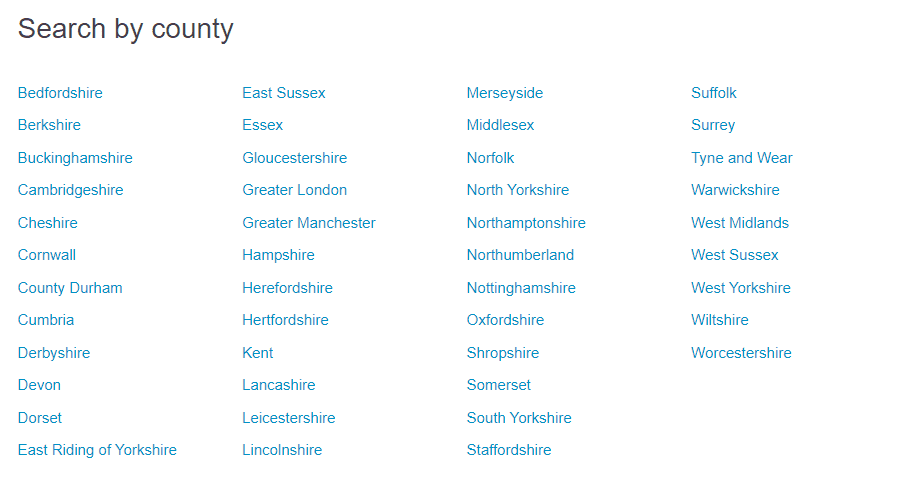
Ten years ago on a property finder page, the team I worked with built out a page structure pattern of County > Town/City whilst pulling through relevant locations into the landing pages along the way.

Search by countyScreenshot from author, July 2024

Visually, this just acted as a more “manual” method for users to filter from the non-location specific pages towards their local areas.

Google Business Profile Linking

Another key component that is often missed is the direct linking of Google Business Profiles (GBPs) to their related location page on the website.

I come across a number of multinationals and nationals who link back to their company homepage, sometimes with a parameter to highlight which GBP the user has clicked through from – but this is both poor web architecture and poor user choice architecture.

If a user is looking for a service/store in XYZ, they don’t want a homepage or generic information page if they click on the website link.

In terms of user-choice architecture, from here a user could navigate to a different store or page and miss key information relevant to them, that otherwise could have driven a sale or enquiry.

Google’s Local Algorithms

In addition to Google’s core algorithm and more general Search ranking signals, Google has released updates specifically targeting local queries. The two main ones are:

  • Pigeon 2014: This update aimed to provide more relevant and accurate local search results by tying local search results more closely to general Search ranking signals. User proximity (as a signal) also received a boost.
  • Possum 2016: This update aimed to enhance the ranking of businesses located just outside city limits, making search results more location-specific to the user’s proximity to the business. Address-based filtering was also introduced to avoid duplicate listings for businesses sharing the same address (such as virtual offices).

These updates make it harder for businesses to spoof being present in a local market, and potentially not offering a value proposition that matches or meets the needs of the searcher.

Anecdotally, Google seems to prioritize ranking businesses that provide the most comprehensive information.

This includes opening dates, onsite dining options (if applicable), special opening hours, business categories, service listings, and defining the service area and service types.

Google Business Profile Importance

Following the guidelines is a must, but even then, you can fall foul of Google’s auto-detection checks.

Working with an international software company, that has multiple offices across Asia, a number are rented floors in shared offices.

We assume that occasionally, Google detects the shared addresses and mistakes them as being a virtual office/fake address, which is something the Possum algorithm update looked to reduce.

When you’re working with an enterprise organization with a large number of physical locations, the approach to Google Business Profile management can become more complex through internal stakeholder management and understanding how GBPs fit into, and contribute, to the overall objectives and ecosystem.

Reporting GBP Data

Depending on your objectives, how you report success will vary between campaigns.

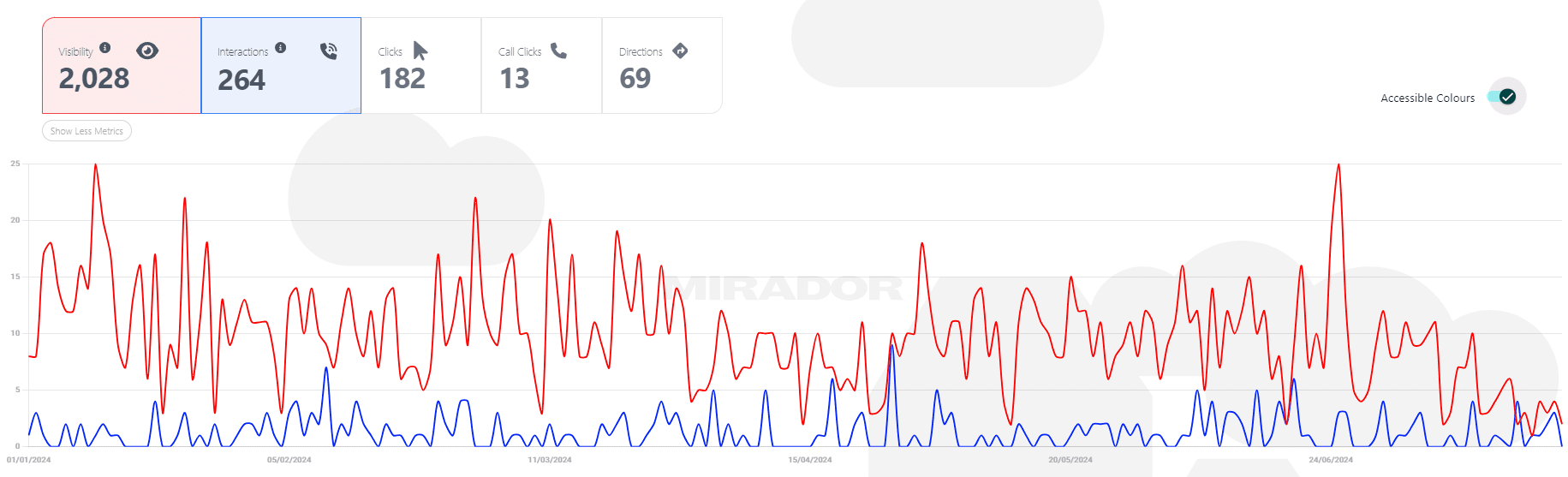
From the Google API, you can access listing-level data for your Impressions, and a breakdown of different user interactions (infer impressions and clicks from GSC mirror metrics).

Atypical Google Business Profile reporting dashboard. (Screenshot from author, July 2024)

In my opinion, any business operating across multiple towns, cities, counties, or states needs to have some form of GBP monitoring and reporting visibility outside of tracking parameterized URLs in Google Search Console and other analytics platforms (assuming you’re using parameters on your GBP website links).

More resources: 


Featured Image: ivector/Shutterstock

Using AI Tools For Global Websites Operation And Management via @sejournal, @motokohunt

Running and maintaining global websites is not an easy task.

The good news is there are new AI tool solutions available that ease some of the work that goes into website management as well as assisting with SEO efforts.

AI technology is advancing rapidly and has been adopted into different work streams and all areas of marketing.

However, AI is not perfect and still needs refinements and human interaction. But that should not stop us from exploring and testing it out.

Here are ways you can benefit from AI to make your work with global websites more efficient and productive in areas including content, SEO, research, and management.

Global Website Content

Creating relevant content and publishing it on multiple websites in different languages requires plenty of resources. This is one of the big challenges and unavoidable tasks with global websites.

Content Translation and Localization

In the past, I always advised against using machine translation to translate original content to other languages. I hadn’t found any translation tools that produced satisfactory quality output, especially for Asian languages.

I’ve been testing different AI-powered translation tools lately and found their quality to be much improved. However, it is still not the same quality as the work of skilled human translators.

My suggestion is to use the AI tools as “go-between” solutions. Because this is one area where a lack of resources (both manpower and budget) holds the entire project back, I think it’s worth a try.

Text Translation And Localization

Let the AI tools handle the initial translation work. It still needs to be edited by humans, especially if the content covers specific industry knowledge, but at least it is in the correct language.

Before you deploy it site-wide, create the prompt based on several tests.

Prioritize the content (by type, category, dates, etc.) for human editing.

Duplicate Content

Use AI to check for duplicate content in the CMS. You can then decide whether to keep or kill reported content.

Having duplicate content is not necessarily a negative issue. Many global websites have content in the same language but each targeting a different country.

In this case, AI tools can help quickly localize the content for each target country by changing the spelling, currency, measurements, addresses, etc.

Image ALT Text Creation And Translation

The image ALT tag has been overlooked for many years. Many websites don’t use it.

Even if the main site uses it, the regional sites don’t have translated text in ALT tags. There are multiple solutions available now with AI tools baked into the image file management systems.

Some use Google’s Vision API to identify the key elements of an image and create appropriate text for the image to be auto-localized.

User Generated Content (UGC) Translation:

Because of the nature of the UGC, it is a huge challenge to translate the content as it is created.

The machine translation with an AI-powered review process is perhaps the best option out there.

Content Creation

Having content that is designed for the target audience in a specific country/region is one of the keys to a successful business.

You sometimes see a small company beat a large corporation in the online realm because a small business has an advantage in its deeper understanding of its local audience.

With the AI-assisted research project, you could quickly identify content gaps and content that satisfies the local audience’s needs.

Content Topic And Opportunity Research

AI tools can help shorten your local audience research process. It can identify the locally unique search demand and different types of information people look for in different countries or regions.

The research may also be used to identify the content gap between your site and competitor sites and give you an idea for locally unique FAQ content. You may also learn that unpopular items on the main site could perform much better in another country.

Other Ways To Improve Content

Localized Images

Images on websites support the understanding of products, corporate messages, and more. You may want to replace some images with more acceptable ones in some countries.

For example, create images with Asian models for websites targeting Asian countries.

Video Transcription And Translation

Transcribing the videos and translating them are other items I often see on the to-do list, but they are always pushed down on the priority list.

International SEO

In addition to content-related work, AI tools can support other international SEO action items.

From the technical SEO standpoint, AI tools can help in many areas, including the below:

  • Hreflang tag URL mapping review.
  • Tags and codes auto-generation review – language tag, title tag, meta description, canonical tag, etc.
  • Schema markup review.
  • Finding broken or unnecessary codes.

Depending on the size of the websites, these tasks could take many resource hours, especially for multinational and multilingual sites. With the help of AI tools, you can focus on improving the sites rather than finding them.

You can also let the AI tool analyze site crawl reports to find patterns in broken links and broken redirects and even suggest where to set redirects based on relevance and other technical SEO issues across the sites.

Data Analysis And Global Website Management

If you manage global websites or international SEO work, you know how important it is to have the same data points, KPIs, report templates, and best practice guidelines across countries.

Strengthen the governance of your global website management with AI tools.

Example Tasks

  • Add visualization of data in the performance reports.
  • Competitors analysis in each country and language.
  • Research local regulations.
  • Create visualization of task process and guidelines.
  • Audience analysis to create local personas.

Conclusion

We should embrace technologies such as AI tools to make our work more efficient and cost-effective. However, remember that AI tools are supporting tools and should not completely replace the work of humans.

As mentioned previously, AI tools are not perfect, and you should not let them auto-run. It is important to test the quality of their output prior to deployment.

Because of its dynamic learning capability, you want to test and improve prompts, requirements, etc., especially at the beginning.

Human reviews should be part of the process, and the settings should be updated or modified as needed.

More resources: 


Featured Image: Fah Studio 27/Shutterstock

Query Refinements: How Google Helps Users Find Products Faster via @sejournal, @Kevin_Indig

Shopping SERPs have been looking more like a feed than ranked results for a while now. In December, I wrote about the integration of Google’s shopping tab into the main results for shopping queries in e-commerce shifts. The result is a marketplace that looks more like Amazon than web search results.

SERP features and query refinements play a big role in this transition. They direct users from unrefined searches to finding products as quickly as possible, having an outsized impact on clicks and revenue.

In this deep dive, I analyzed +28,000 shopping SERPs to understand how query refinements work and how e-commerce sites can use them.

It’s a bit early for shopping season, but I’m writing a lot of e-commerce because most shops need some time to make changes on their site (especially the big ones). So, if you want a fruitful 2024, now is the time to get the work on the roadmap.

This piece builds on two analyses I’ve published previously:

1. Growth Memo

A warm welcome to 80 new Growth Memo readers who joined us since last week! Join the ranks of Amazon, Microsoft, Google and 13,400 other Growth Memo readers…

2. Growth Memo

SEO funnel shows the full path from the creation of pages on a website to getting organic traffic…

Boost your skills with Growth Memo’s weekly expert insights. Subscribe for free!

What Are Query Refinements

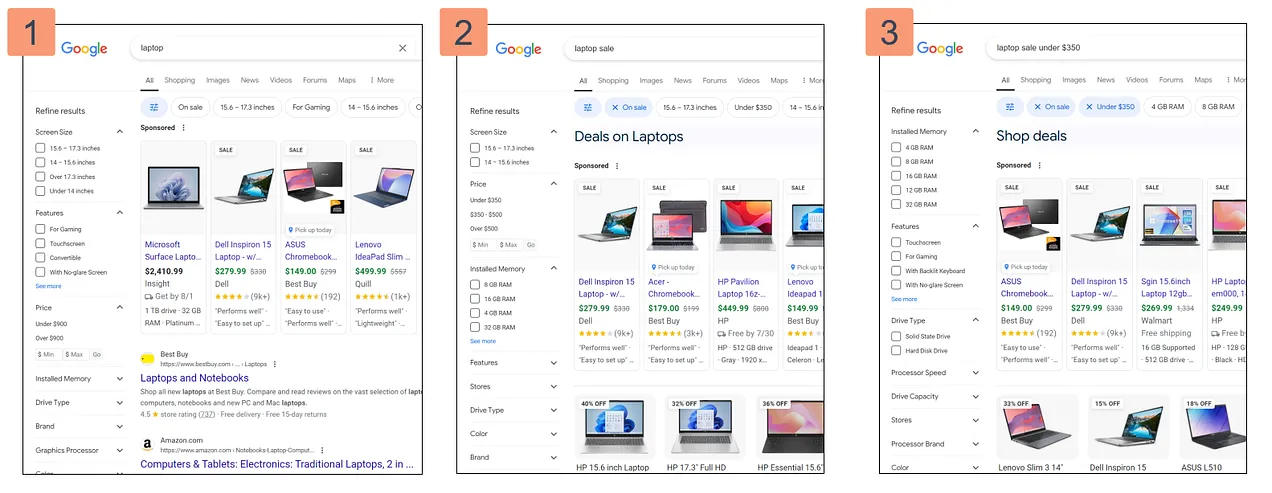
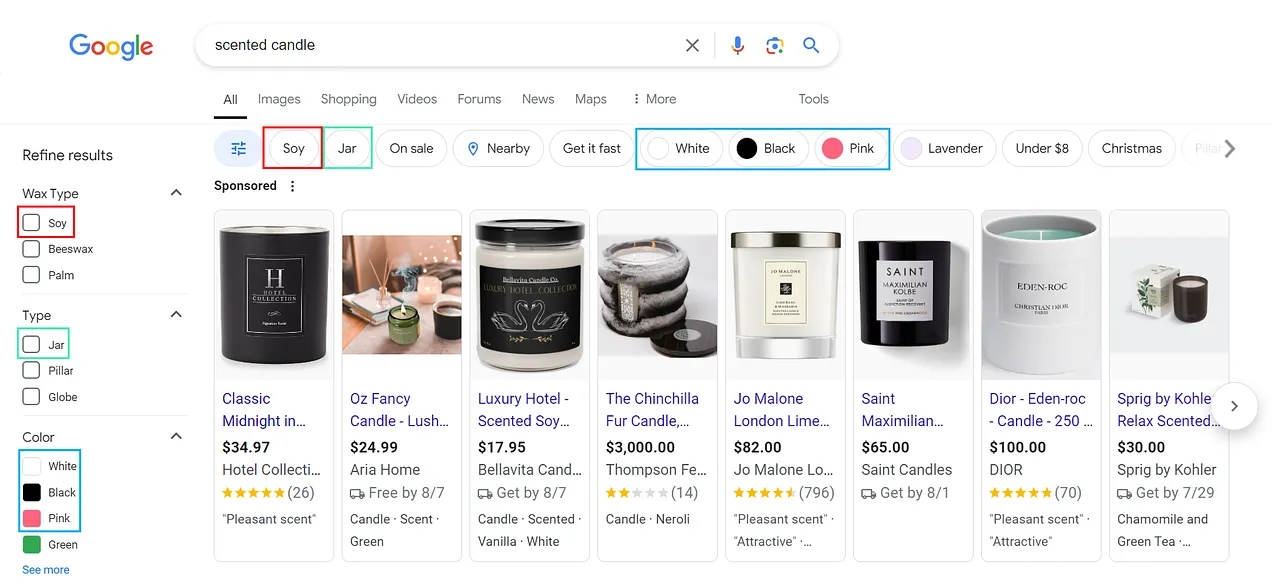
Query Refinements are “pills” at the top of the search results that help users refine their search. In essence, query refinements are product filters.

First announced at Google Search On 2022, Google explained that refinements (and filters on desktop) follow real-time search trends (bolding mine):

Whole page shopping filters on Search are now dynamic and adapt based on real-time Search trends. So if you’re shopping for jeans, you might see filters for “wide leg” and “bootcut” because those are the popular denim styles right now — but those may change over time, depending on what’s trending.1

Examples of Query Refinements. (Image Credit: Kevin Indig)

The purpose of query refinements is to bring users from the “messy middle” to conversion as quickly as possible as they literally refine the query. When you click on a pill, Google sends users to another SERP, just like when users click the product filters on the left.

To understand how query refinements work and how e-commerce sites can use them to their advantage, I dug up some data.

How Query Refinements Work

I analyzed 28,286 shopping keywords (US, desktop) with seoClarity and found that query refinements:

  • follow distinct patterns sites can use for keyword targeting.
  • lead to search queries without search volume.
  • trigger new AI Overviews on mobile.

Common Refinements

I analyzed which refinements come up most often in “position” one, two and three. Think about position one in this context as the first refinement from the left, which is the most visible.

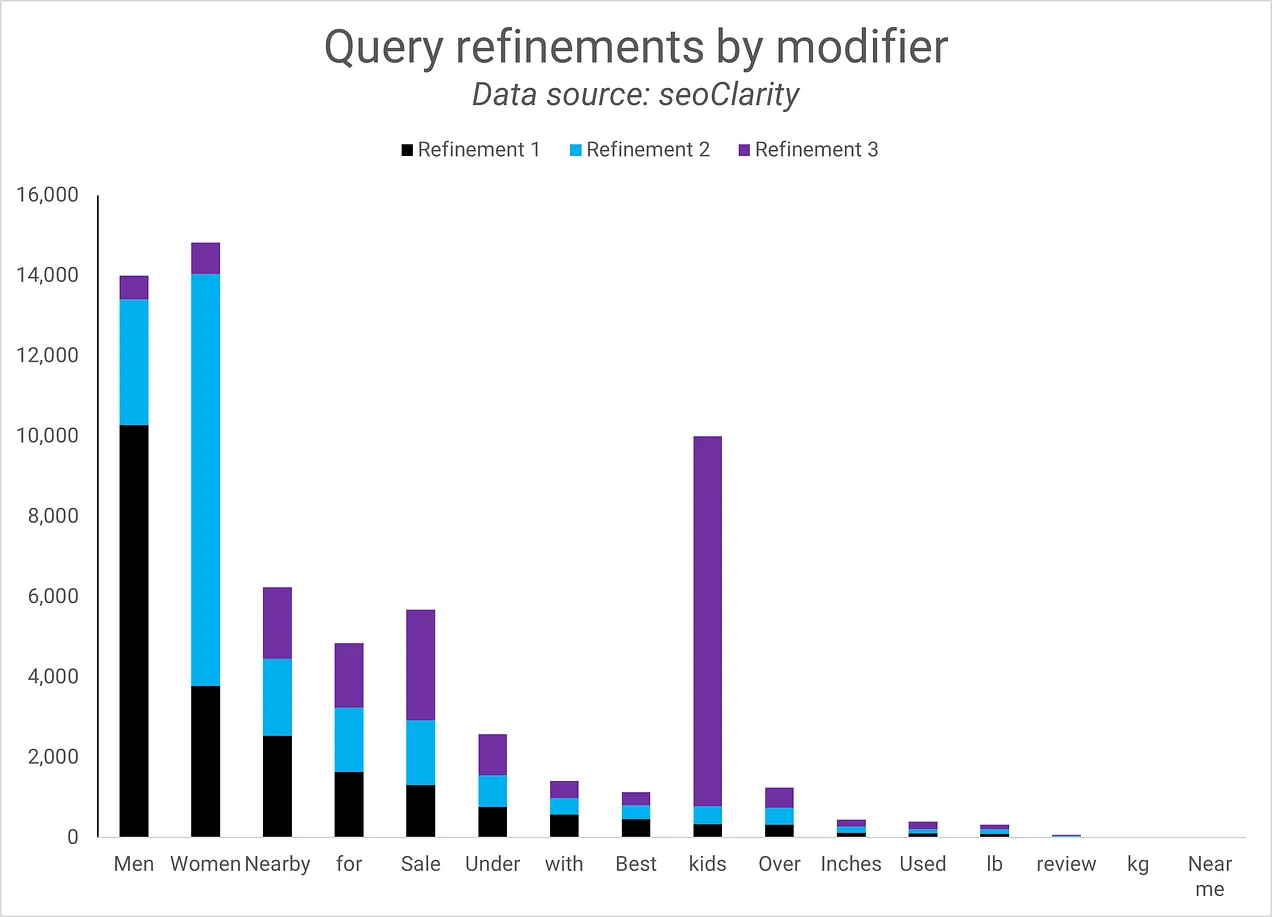
Most refinements specify gender. The term “women” comes up most often in the top 3, but “men” comes up most often in the first refinement. 45% of query refinements mention one gender at least once, 61.4% if you include kids. It makes sense: before diving into product attributes like color or size, you want to make sure a product is “for you.”

The most common query refinements. (Image Credit: Kevin Indig)

The second most common group of refinements is location. Ten percent of the top three refinements include “nearby,” which is much more visible on mobile. Google shows maps by default on mobile devices, as mobile device users are more likely to be on the go.

The third group is attributes around queries that include “for” or “with”, where users try to specify use cases (9.8%), and the fourth is price (9% of refinements include the term “sale”).

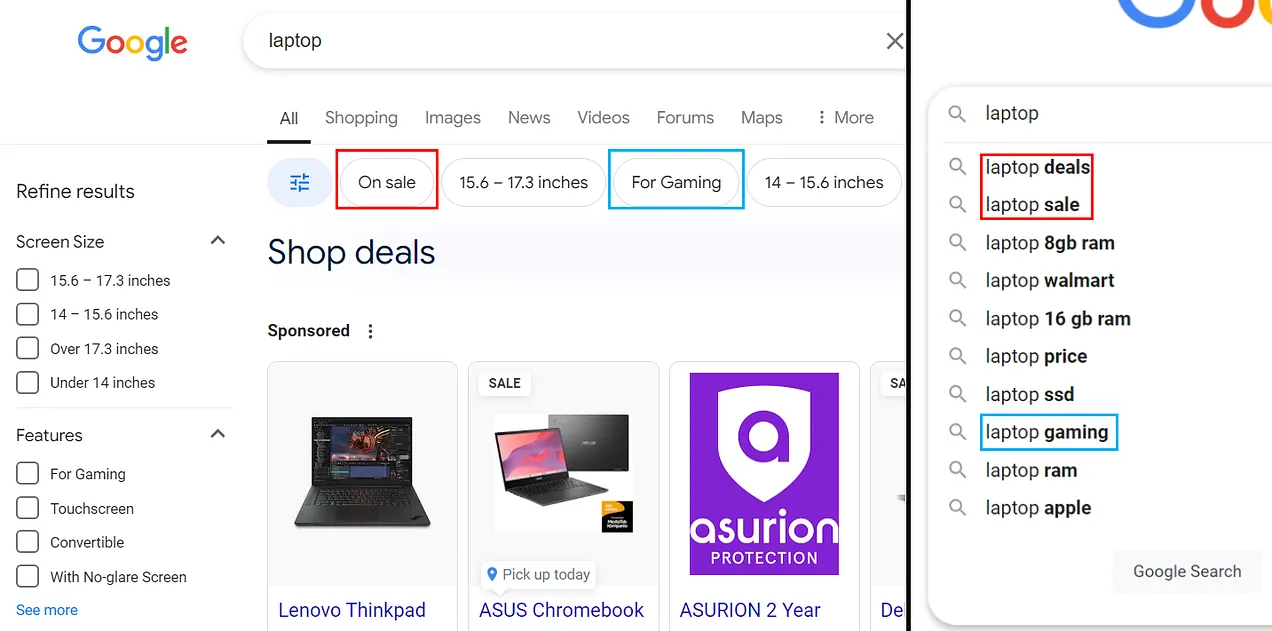
Query refinements have a high overlap with product filters on desktops and often feature the first few filters as refinements. Product filters don’t exist on mobile, likely because users might expect the filter sidebar on desktop, but it doesn’t make sense on mobile.

Product filters (desktop) and query refinements tend to have high overlap. (Image Credit: Kevin Indig)

The sorting and visibility of refinements are different on mobile and desktop. Due to the difference in bigger screen size, mobile search results show ~4 refinements on load, while desktop can show over 10.

Since query refinements are based on realtime searches, they also overlap heavily with autosuggest.

(Image Credit: Kevin Indig)

Interesting Findings

Three insights from the data surprised me:

First, Google keeps refinements strictly focused on product attributes but not user intents. I expected searchers to be interested in opinions and reviews on Reddit, but neither “Reddit” nor “reviews” came up as a refinement a single time.

Two, query refinements exactly match the query, meaning you won’t find synonyms or closely related terms in them. As a result, brands don’t appear in refinements, either.

Three, most query refinements don’t have search volume or a CPC. Only 10,696 / 27,262 keywords in the first refinement have search volume (median = 70), and only 6,514 / 27,262 keywords have a CPC. Since query refinements are based on search behavior, we can conclude that search volume and other keyword planner data are very limited metrics.

AI Overview Refinements

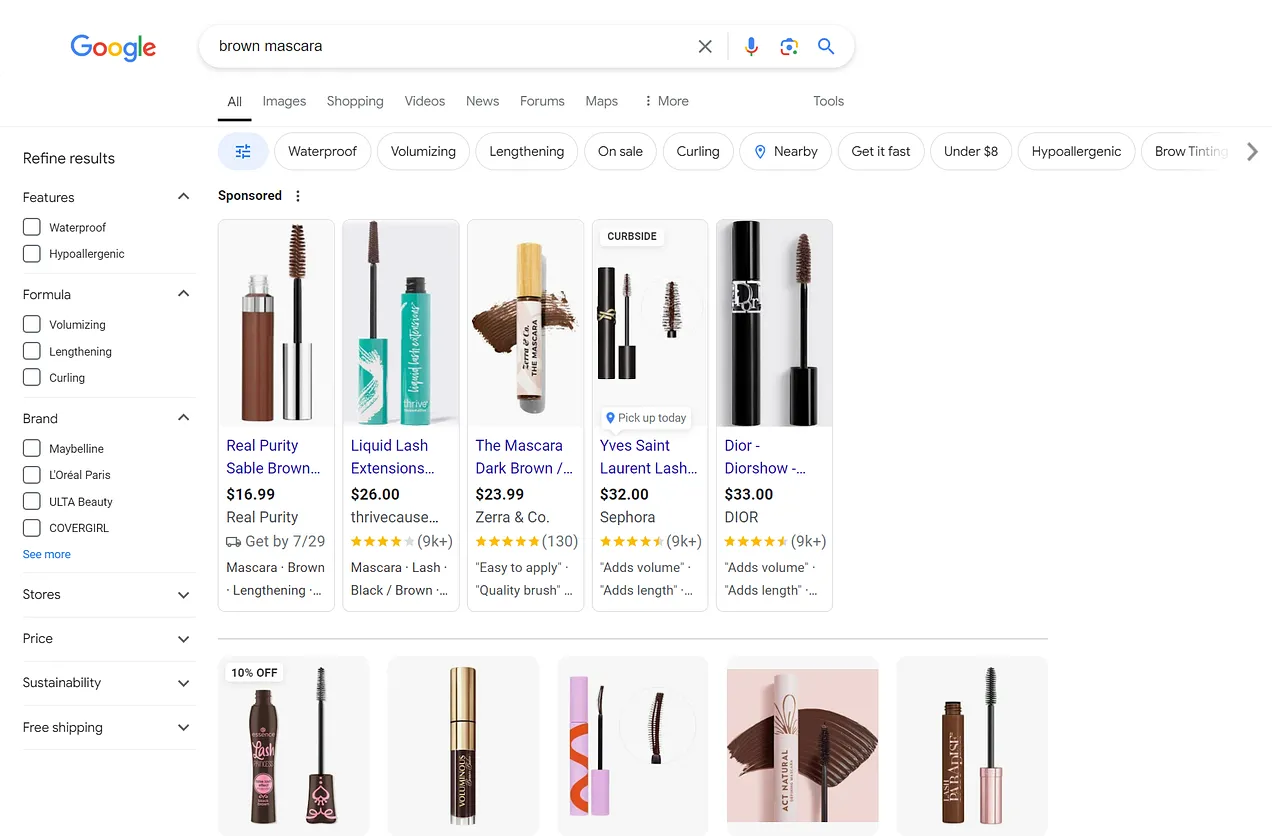
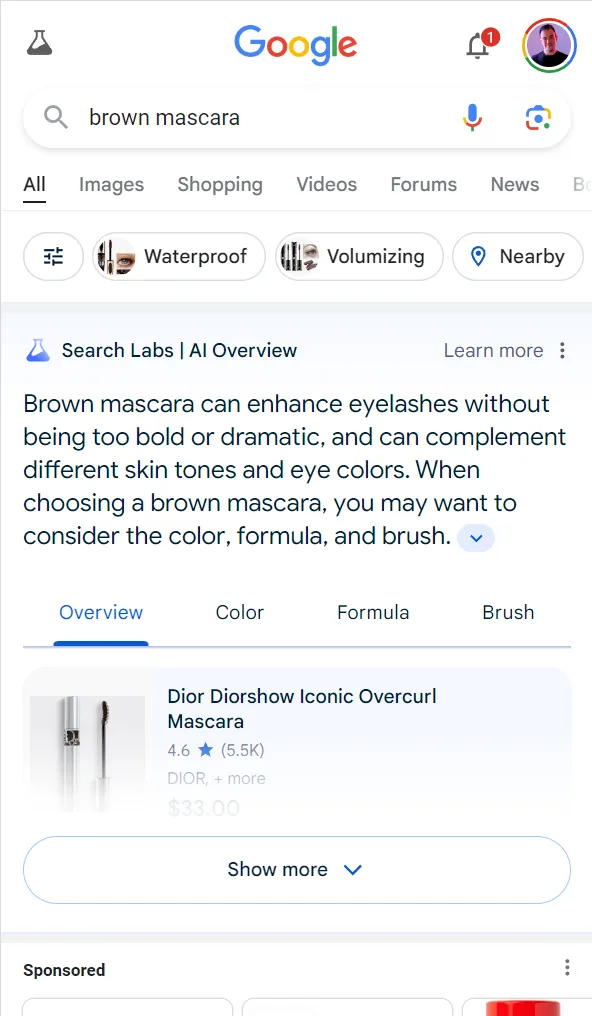
Of course, I came across AI Overviews (AIOs) in my research. For the queries I analyzed, mobile results returned AIOs but desktop doesn’t. An example is brown mascara.

Brown mascara on desktop, no showing an AIO. (Image Credit: Kevin Indig)
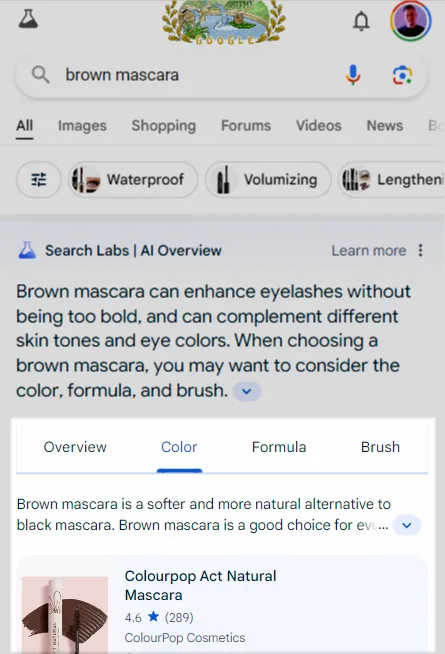
Brown mascara on mobile, triggering an AIO. (Image Credit: Kevin Indig)

You likely spotted the AIO tabs on the screenshot above, which appear independently of refinements and explain common product attributes.

(Image Credit: Kevin Indig)

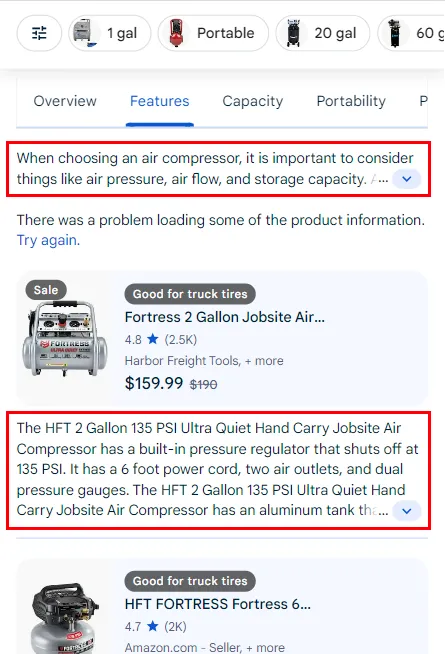
Notice how the AIO provides additional guidance and information in tabs (see screenshot below).

(Image Credit: Kevin Indig)

At this point, it’s unclear whether citations in AIO tabs are good because they drive traffic to review articles or bad because they give the answer away.

(Image Credit: Kevin Indig)

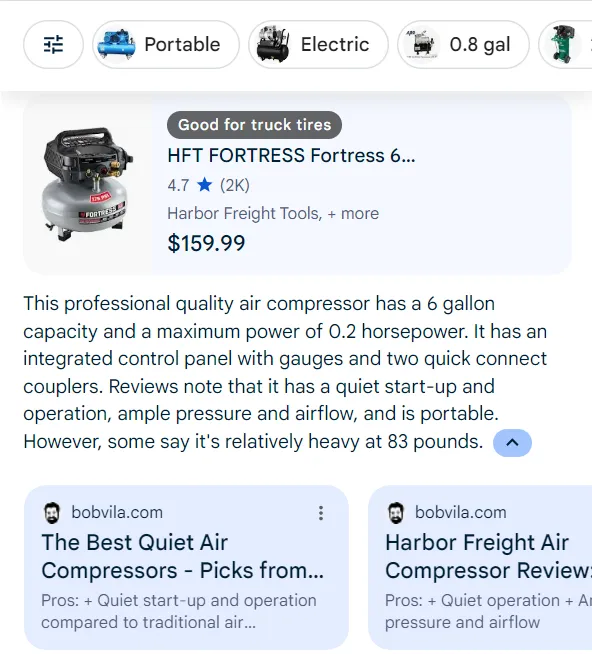
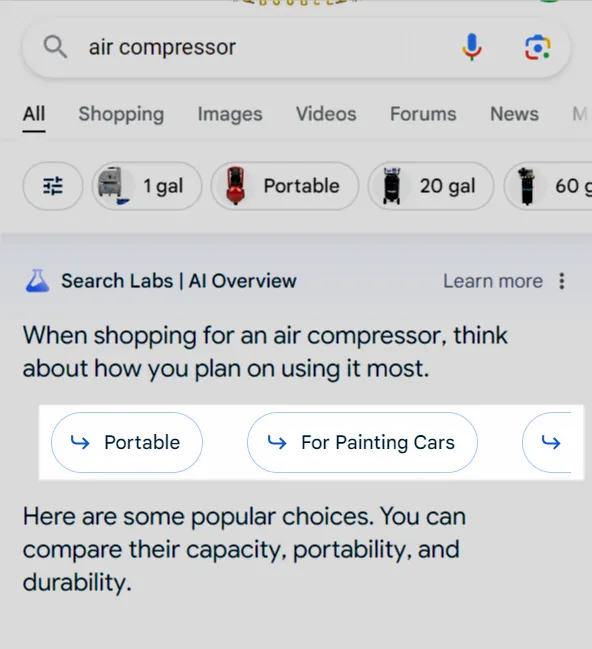
For other queries, like “air compressor”, I was able to spot refinements in the AI Overview instead of above it. Clicking an AIO refinement leads to another search with the refinement in the query. For example, on the SERP for “air compressor, one refinement is “for painting cars”. Clicking it leads to another SERP for the query “air compressor for painting cars” (with another AIO and tabs but no refinement). Notice that I was logged into the SGE beta, which means those features might not yet be live for every user.

(Image Credit: Kevin Indig)

5 Lessons

5 key lessons surfaced from my analysis of over 28,000 shopping queries:

  • You should create specific product and category pages for men/women/kids when it matters for products (e.g. fashion).
  • Mine query refinements and autosuggest to find relevant query variations for your keyword research (for example, seoClarity can do this).
  • Monitor ranks by query refinement to drive your decisions around facetted indexing (like Nike or Target). Refinements showing different URLs are an indicator of building specific facets.
  • You need to identify searcher interest beyond search volume. The fact that more than half of queries don’t have search volume, but query refinements are optimized for search behavior shows that you might miss a lot of opportunities by limiting yourself to queries that have search volume. Instead, leverage onsite search data, surveys and qualitative research to enhance keyword targeting.
  • Monitor and compare clicks from desktop and mobile results to understand the impact of product filters (desktop) and AIOs (mobile).
Maximizing Your SEO Investment: Tips For Outsourcing Effectively via @sejournal, @AdamHeitzman

Outsourcing SEO to a team of experienced professionals is one of the most reliable ways to increase your digital footprint and drive meaningful traffic to your site.

But ensuring your SEO partner integrates seamlessly with your business and consistently meets your expectations is easier said than done.

To get the best returns on your SEO investment, you need to set clear goals, strategically choose the right partner, and, crucially, foster a collaborative working relationship that adapts to shifting business needs and market conditions.

In this post, we’ll explore various strategies for developing and maintaining a fruitful partnership with your outsourced SEO team.

Let’s dive straight in.

What Does It Mean To Outsource Your SEO?

Outsourcing SEO is the process of hiring a third-party SEO expert or agency to oversee some or all of your SEO activities. This includes keyword research, link building, local SEO, content strategy and marketing, and technical SEO.

Outsourcing your SEO can be trickier than the other aspects of your marketing (or business).

Why?

SEO is a multifaceted discipline that requires experience and a tactical approach to deliver real results. You’re more likely to find freelancers who are experts in specific areas of SEO, not all areas of SEO.

Also, you’re torn between two options:

  • Hiring an expert to oversee the individual components you don’t want to do yourself.
  • Hiring a managed SEO agency that handles everything from scratch to finish.

For instance, if you’re adept at creating content but struggle with technical SEO, hiring a technical SEO expert will be more cost-effective than hiring an SEO agency. But this also means you must oversee all other aspects of SEO yourself.

Why Should You Consider Outsourcing Your SEO?

Marketers before and after outsourcingImage created by author, July 2024

Outsourcing your SEO can help you achieve your SEO goals and scale more rapidly.

Also, if you feel your competitors are outshining you on the search engine results pages (SERPs) despite all your efforts, outsourcing to experts can help you gain a competitive advantage and improve your overall performance.

How To Outsource Your SEO: 5 Tips To Make It Effective

1. Lay The Groundwork For SEO Before Outsourcing

Before engaging with an SEO provider, it’s essential to recognize that your SEO efforts should be geared toward supporting your broader business objectives.

For example, if your business priority is to expand into new geographic markets, your SEO strategy might focus on localizing content and optimizing for regional search terms.

Alternatively, if you want to increase online product sales, your strategy might focus on optimizing product pages, improving user experience, and targeting high-intent commercial keywords.

Establishing these objectives early on will not only guide your SEO strategy but will also allow you to select an SEO partner whose strengths and experience align with your business needs.

Once you’ve aligned your business goals with your SEO ambitions, you should evaluate the current state of your site. Setting these benchmarks will provide a good baseline for measuring progress and give your outsourced team a clear picture of where your website currently stands.

Remember, there’s no need to conduct a thorough website audit yourself. Instead, you can use readily available tools like Google Analytics and Google Search Console to quickly gather top-level data about organic traffic, keyword rankings, and conversion rates.

2. Choose The Right SEO Partnership Model

Once you’ve defined your SEO goals and understand how your site is currently performing, it’s time to search for a suitable SEO provider.

There are three types of providers to choose from. Each option offers different advantages depending on your specific needs.

  • An independent contractor or freelancer: Ideal for small projects or companies with limited budgets. Working with an independent professional offers flexibility and a more personalized approach, but may lack the broader capabilities and manpower of multi-person agencies.
  • A full-service digital marketing agency: These agencies provide SEO along with other services like social media management, PPC, and email marketing. This model is suitable for businesses looking for a complete digital marketing strategy that ensures all elements are integrated and aligned.
  • A specialist SEO agency: These agencies are laser-focused on SEO and are usually on the cutting edge of trends and algorithm changes, offering a depth of knowledge and tactical proficiency that generalist agencies might not offer.

Whichever model suits your business best, there are a few common qualities to look for in any worthwhile SEO partner. When considering potential suitors, look for those that can satisfy the following criteria:

  • Expertise: Look for an SEO company with a long track record of executing successful SEO campaigns. Review their case studies, client testimonials, and official credentials to gauge their level of technical expertise and project management abilities.
  • Industry experience: Ideally, your SEO partner will have experience running campaigns for businesses within your industry. This familiarity will make it easier for them to develop strategies that are more likely to succeed in your specific context.
  • Transparency and communication: Clear and consistent communication is vital for the success of any SEO project. Look for a provider that values transparency and offers regular (and honest!) updates on campaign progress.
  • Flexibility: The organic search landscape is constantly changing. Any provider worth your time should be tuned in to what your competitors are doing and stay up to speed on the latest developments in the world of SEO. They should be ready to adapt to shifting circumstances and innovate as needed to keep your SEO efforts effective.
  • Cultural fit: The relationship with your SEO provider should be collaborative and synergistic. Make sure their values and company culture align with yours, as this will enhance the working relationship and contribute to a smoother project flow.
  • A focus on results: Ultimately, you want a provider who is focused on achieving your specific business outcomes. Ensure they understand your goals and are committed to driving the results you need, whether it’s increasing traffic, improving keyword rankings, or boosting conversions.

As a marketer/business owner, you don’t have the resources or time to invest in the wrong agency. So, how can you find the best fit for your business?

  • Go beyond the search results. Ask for recommendations from industry peers, online communities, and forums (e.g., LinkedIn, Twitter, and Reddit are great platforms to start with).
Tweet from Colin GardinerScreenshot from Twitter, July 2024
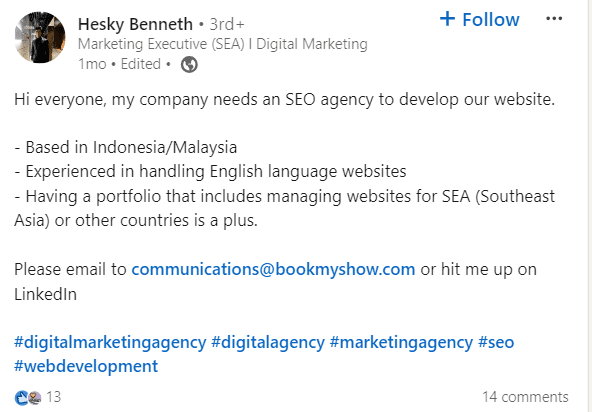
Tweet from Hesky BennethScreenshot from Twitter, July 2024
  • Check out your competitor pages on LinkedIn to see if they’re managing their SEO in-house or attributing success to a particular agency. Sometimes, these agencies refrain from taking on two similar clients simultaneously, but their profiles can give you a good head start in your search process.
  • Attend SEO-related virtual events to connect with experts in the industry. And even if they can’t handle your SEO, they could give you quality referrals.
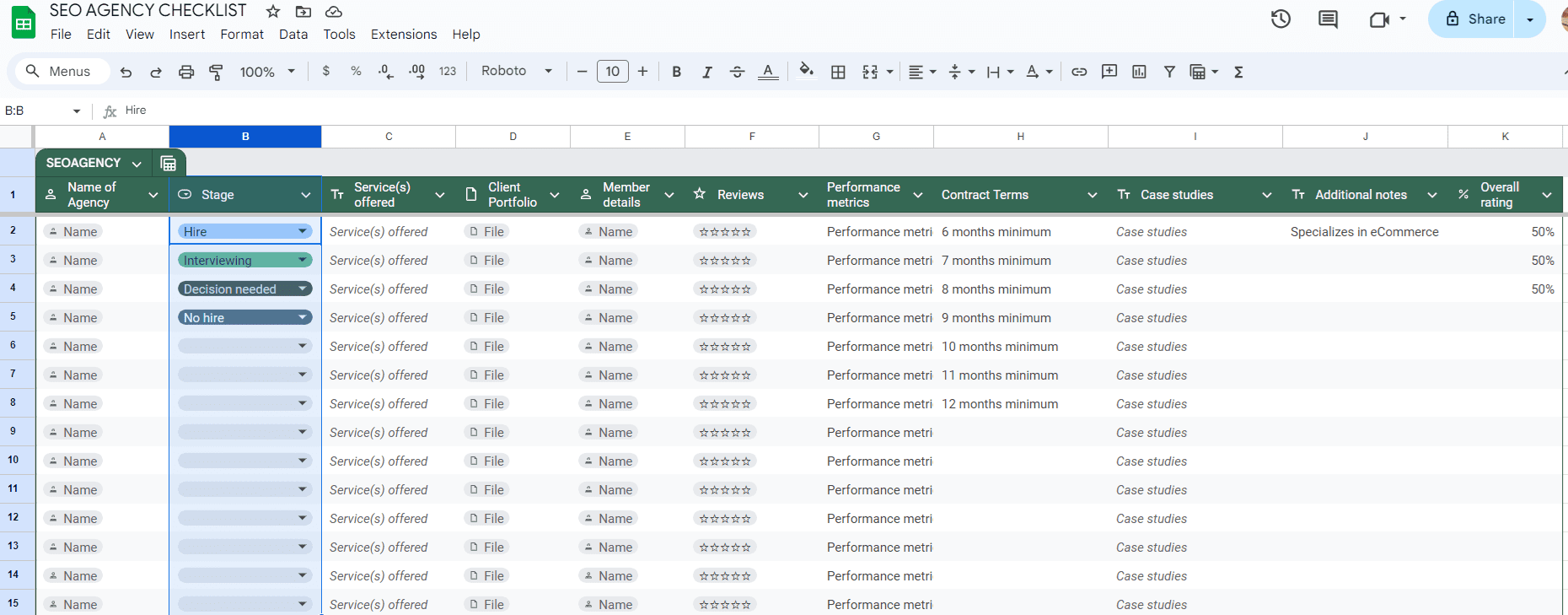
  • Make a list (on a spreadsheet) of the agencies/contractors/freelancers you got from your search. Segment them according to their years of experience, service offered, portfolio, etc. Here’s some inspiration:
seo agency checklist outsourceScreenshot from author, July 2024

3. Vet The Shortlisted Agencies/Freelancers:

Now that you have a list, it’s time to go deeper into each to find the perfect fit for you.

Before I get into the details, keep in mind that any agency that guarantees results like a #1 rankings boost in your conversion rate after the first month is most likely a scam. Overall, anything that sounds too good to be true probably is.

  • Check out the agency/freelancer service offerings. Some agencies/freelancers focus exclusively on specific areas of SEO, e.g., technical SEO, while others offer full-scale SEO. Unless you need specialized services, opt for those offering comprehensive services.
  • How long have they been in the SEO industry? How many projects have they worked on within the period? If they can’t provide straightforward answers with proofs, tick them off your list.
  • Next, examine their case studies (or portfolio). Have they worked with businesses similar to yours? Prioritize those with prior experience in your industry. This will shorten the learning curve and allow them to adopt strategies tailored to your needs.
  • Sometimes, written words aren’t enough because anyone can claim to be an expert. Contact the agency/consultant for a one-on-one interview to discuss how they intend to achieve your SEO goals.

Ask questions like: ‘How would you solve my SEO goal?’ ‘Can you provide examples of successful SEO campaigns you’ve worked on?’ ‘How do you approach keyword research and selection for my business?’

  • Go over their testimonials, too. What are people saying about them? Honest feedback from previous clients can give you a clear picture of what to expect when working with them. It’s also okay if they have one or two negative reviews – no one is perfect. What really matters is how they respond to them. So, be sure to check this out during your research.
  • Add an extra layer of credibility to your search by checking out for industry-relevant awards.

4. Enhance Collaboration With Your SEO Partner

Once you’ve signed on with your new SEO provider, it’s essential to establish clear lines of communication from the get-go.

This means agreeing on a structured communication framework that defines how often you’ll interact and through what modes (e.g., email, phone, video calls).

Creating a regular schedule for updates and meetings will ensure that both parties stay informed and are able to make proactive adjustments to the SEO strategy.

Consider implementing a collaborative project management tool where both your internal employees and your SEO partner can view, track, and update progress on tasks.

Tools like Trello, Slack, or Asana can facilitate real-time updates and smooth communication. Note that some SEO providers will set up a customized reporting dashboard as part of their service offering.

It’s helpful to think of your SEO partner as an extension of your team rather than a separate entity. Try to encourage an open exchange of ideas, involve them in relevant internal discussions, and make sure they have ready access to necessary tools and data within your organization.

Remember, the goal is to create the most collaborative environment possible with minimal points of friction. Doing so will ensure that your SEO team can continually tweak their strategy to better meet your business needs and avoid unnecessary hold-ups in the progress of your campaign.

5. Leverage Your SEO Partner’s Expertise

Another way to maximize returns on your outsourced SEO investment is to take full advantage of the specialized knowledge your SEO partner brings to the table.

Your service agreement should include comprehensive, scheduled reporting focusing on critical SEO metrics such as keyword performance, traffic trends, and backlink acquisition.

However, the purpose of these reports isn’t just to provide data. They should serve as a foundation for strategic discussions that, if necessary, lead to tactical campaign adjustments. If you have questions about specific metrics or trends, or if you don’t understand the rationale behind a given strategy, these review sessions are the ideal time to ask for clarity.

Remember, a good SEO partner will have no qualms explaining their methodologies. After all, challenging assumptions are a healthy feature of any collaborative project.

Moreover, the more you and your team learn about the dynamics of SEO from your service provider, the better equipped you’ll be to integrate SEO thinking into broader marketing and business strategies.

This knowledge transfer not only optimizes your current investment but also prepares your team for future digital marketing challenges.

How Much Does Outsourcing SEO Cost?

There’s no fixed cost for outsourcing SEO, as the value depends on the level of expertise of the agency or freelancer, the scope of the project, etc.

On average, SEO consultants in the US charge $144.68/hour. Agencies charge a higher rate—$147.93/hour—primarily because of their massive talent pool, expertise, and access to advanced SEO tools.

Read more about SEO pricing here.

When Should You Outsource SEO?

You should outsource your SEO when you notice or get any of these results:

  • You (or your marketing team) have a lot on your plate and need an extra hand.
  • Your growth is stagnant, and you need fresh ideas to revitalize your current strategy.
  • You want to scale but lack the expertise and resources to do so.
  • Your SEO efforts are undefined, and you’re not seeing any positive results.
  • You want to target new markets.
  • You’re an SEO professional or agency experiencing a surge in client demand that exceeds your current capacity.
  • Your team is great but not experts in SEO.

Final Thoughts

Outsourcing SEO allows you to benefit from expert, data-driven search strategies while keeping your focus on core business activities.

But making the most of your outsourced SEO investment sometimes feels like a whole new challenge in and of itself.

Fortunately, by following the tips outlined in this post, you can streamline the process, ensuring the partnership remains productive and stress-free.

More resources: 


Featured Image: Ink Drop/Shutterstock

In-article screenshots taken by author

Improve Your Site With The Latest Organic Traffic Benchmarks & Search Trends via @sejournal, @hethr_campbell

How do you know if your website is doing as well as your competitors in search results?

Join us on August 14 for a webinar that will reveal the latest organic search traffic benchmarks, trends, and insights for 2024. 

This session, brought to you by Conductor, is designed to help you fine-tune your SEO and content strategies for maximum impact.

Why Attend This Webinar?

Knowing how well your website does in regular search results compared to others in your field is really important. It helps you:

  • Make sense of how many people have found your site through search so far this year.
  • Gain better visibility for your website in search results and hone what kind of content you create.
  • Set better goals for your website’s performance.

Shannon Vize, Senior Content Marketing Manager, and Ryan Maloney, who leads the Customer Success Team, will give you practical advice on improving your website’s search performance.

Key Takeaways

In this information-packed session, you’ll learn:

  • 2024 organic search traffic benchmarks across major industries and their subsectors.
  • Industry-specific comparisons of branded vs. non-branded organic search traffic.
  • The most common rich result types and top content sources.
  • Practical SEO tactics you can apply to your own strategy.
  • How to set more accurate KPIs to evaluate and improve organic search performance.

Who Should Attend?

This webinar is perfect for:

  • SEO pros who want to measure their performance against others.
  • Digital marketers looking to sharpen their organic search tactics.
  • Content creators aiming to boost their search visibility.

Take advantage of this chance to fine-tune your organic search and content strategies for success.

Live Q&A: Get Your Questions Answered

Bring your burning questions! After the presentation, Shannon and Ryan will be available for a live Q&A session to address your specific concerns.

Can’t Make It?

No worries! Register anyway, and we’ll send you a recording of the webinar after the event.

Join us on August 14th at 2 PM ET to gain valuable insights to help you outperform your competition in organic search. Register today and take the first step toward elevating your SEO strategy!

Google Found in Violation of Antitrust Law, Judge Rules via @sejournal, @MattGSouthern

A federal judge has ruled that Google violated U.S. antitrust law by illegally maintaining monopolies in the markets for general search services and general search text advertising.

Judge Amit P. Mehta of the U.S. District Court for the District of Columbia, ruling in a case brought against Google by the Justice Department, said that Google had abused its monopoly power over the search business in part by paying companies to present its search engine as the default choice on their devices and web browsers.

Judge Mehta wrote in his opinion filed Monday:

“After having carefully considered and weighed the witness testimony and evidence, the court reaches the following conclusion: Google is a monopolist, and it has acted as one to maintain its monopoly. It has violated Section 2 of the Sherman Act.”

The court found that Google abused its dominant position in several ways:

  • Paying hefty sums to ensure default status on devices and browsers
  • Leveraging user data to reinforce its search engine’s dominance
  • Illegally protecting its monopoly over search-related advertising

Key Findings Of Anticompetitive Behavior

The judge found that Google’s agreements with Apple, Mozilla, and Android partners foreclosed about 50% of the search market and 45% of the search advertising market from rivals.

These exclusive distribution agreements deprived competitors like Microsoft’s Bing of the scale needed to compete with Google in search and search advertising.

Judge Mehta concluded that Google’s conduct had anticompetitive effects:

  • Foreclosing a substantial share of the market
  • Depriving rivals of scale needed to compete
  • Reducing incentives for rivals to invest and innovate in search

The case began in 2020 and culminated in a 10-week trial last fall.

Financial Revelations

The trial disclosed financial details of Google’s default search agreements.

In 2022, Google paid Apple $20 billion for default search placement on iOS devices, an increase from $18 billion in 2021.

Additionally, Google shares 36% of Safari’s search ad revenue with Apple.

These figures highlight the value of default search positioning in the industry.

Google’s Defense & Market Share

Throughout the trial, Google maintained that its market dominance resulted from superior product quality rather than anticompetitive practices.

The company disputed the DOJ’s estimate that it held a 90% share of the search market, arguing for a broader definition of its competitive landscape.

However, Judge Mehta rejected this defense:

“Google has thwarted true competition by foreclosing its rivals from the most effective channels of search distribution.”

Ruling On Search Advertising

On search advertising, the judge found Google could charge supra-competitive prices for text ads without rivals’ constraints.

However, the judge ruled in Google’s favor on some claims, finding Google doesn’t have monopoly power in the broader search advertising market.

Potential Ramifications

While Judge Mehta has yet to determine specific remedies, the ruling opens the door to potentially far-reaching consequences for Google’s business model. Possible outcomes could include:

  • Forced changes to Google’s search operations
  • Divestiture of specific business segments
  • Restrictions on default search agreements

The decision is likely to face appeals, and the final resolution may evolve, as seen in the Microsoft antitrust case of the 1990s.

Broader Context

This ruling sets a precedent that could influence other ongoing antitrust cases against tech giants like Amazon, Apple, and Meta.

It signals a shift in how century-old antitrust laws are applied to modern digital markets.

What’s Next

Google is expected to appeal the decision, potentially leading to a protracted legal battle that could shape the future of online search and digital advertising.

The Department of Justice and a group of attorneys general from 38 states and territories, who filed similar antitrust suits against Google in 2020, will eagerly anticipate the next steps in this legal battle.


Featured Image: Sergei Elagin/Shutterstock