Google Revises Core Update Guidance: What’s Changed? via @sejournal, @MattGSouthern

Google has updated its guidance on core algorithm updates, providing more detailed recommendations for impacted websites.

The revised document, published alongside the August core update rollout, includes several additions and removals.

New Sections Added

The most significant change includes two new sections: “Check if there’s a traffic drop in Search Console” and “Assessing a large drop in position.”

The “Check if there’s a traffic drop in Search Console” section provides step-by-step instructions for using Search Console to determine if a core update has affected a website.

The process involves:

  1. Confirming the completion of the core update by checking the Search Status Dashboard
  2. Waiting at least a week after the update finishes before analyzing Search Console data
  3. Comparing search performance from before and after the update to identify ranking changes
  4. Analyzing different search types (web, image, video, news) separately

The “Assessing a large drop in position” section offers guidance for websites that have experienced a significant ranking decline following a core update.

It recommends thoroughly evaluating the site’s content against Google’s quality guidelines, focusing on the pages most impacted by the update.

Other Additions

The updated document also includes a “Things to keep in mind when making changes” section, encouraging website owners to prioritize substantive, user-centric improvements rather than quick fixes.

It suggests that content deletion should be a last resort, indicating that removing content suggests it was created for search engines rather than users.

Another new section, “How long does it take to see an effect in Search results,” sets expectations for the time required to see ranking changes after making content improvements.

Google states that it may take several months for the full impact to be reflected, possibly requiring waiting until a future core update.

The document adds a closing paragraph noting that rankings can change even without website updates as new content emerges on the web.

Removed Content

Several sections from the previous version of the document have been removed or replaced in the update.

The paragraph stating that pages impacted by a core update “haven’t violated our spam policies” and comparing core updates to refreshing a movie list has been removed.

The “Assessing your own content” section has been replaced by the new “Assessing a large drop in position.”.

The “How long does it take to recover from a core update?” section no longer contains specific details about the timing and cadence of core updates and the factors influencing recovery time.

Shift In Tone & Focus

There’s a noticeable shift in tone and focus with this update.

While the previous guide explained the nature and purpose of core updates, the revised edition has more actionable guidance.

For example, the new sections related to Search Console provide clearer direction for identifying and addressing ranking drops.

In Summary

Here’s a list of added and removed items in Google’s updated Core Algorithm Update Guidance.

Added:

  • “Check if there’s a traffic drop in Search Console” section:
    • Step-by-step instructions for using Search Console to identify ranking changes.
  • “Assessing a large drop in position” section:
    • Guidance for websites experiencing significant ranking declines after a core update.
  • “Things to keep in mind when making changes” section:
    • Encourages substantive improvements over quick fixes.
    • Suggests content deletion as a last resort.
  • “How long does it take to see an effect in Search results” section:
    • Sets expectations for the time to see ranking changes after content improvements.
    • States that full impact may take several months and require a future core update.
  • Closing paragraph:
    • Notes that rankings can change even without website updates as new content emerges.

Removed:

  • A paragraph stating pages impacted by a core update “haven’t violated our spam policies.”
  • Comparing core updates to refreshing a list of best movies.
  • The “Assessing your own content” section from the previous version was replaced by the new “Assessing a large drop in position” section.
  • Specific details about the timing of core updates and factors influencing recovery time.

An archived version of Google’s previous core update guidance can be accessed via the Wayback Machine.


Featured Image: salarko/Shutterstock

Google’s “Information Gain” Patent For Ranking Web Pages via @sejournal, @martinibuster

Google was recently granted a patent on ranking web pages, which may offer insights into how AI Overviews ranks content. The patent describes a method for ranking pages based on what a user might be interested in next.

Contextual Estimation Of Link Information Gain

The name of the patent is Contextual Estimation Of Link Information Gain, it was filed in 2018 and granted in June 2024. It’s about calculating a ranking score called Information Gain that is used to rank a second set of web pages that are likely to be of interest to a user as a slightly different follow-up topic related to a previous question.

The patent starts with general descriptions then adds layers of specifics over the course of paragraphs.  An analogy can be that it’s like a pizza. It starts out as a mozzarella pizza, then they add mushrooms, so now it’s a mushroom pizza. Then they add onions, so now it’s a mushroom and onion pizza. There are layers of specifics that build up to the entire context.

So if you read just one section of it, it’s easy to say, “It’s clearly a mushroom pizza” and be completely mistaken about what it really is.

There are layers of context but what it’s building up to is:

  • Ranking a web page that is relevant for what a user might be interested in next.
  • The context of the invention is an automated assistant or chatbot
  • A search engine plays a role in a way that seems similar to Google’s AI Overviews

Information Gain And SEO: What’s Really Going On?

A couple of months ago I read a comment on social media asserting that “Information Gain” was a significant factor in a recent Google core algorithm update.  That mention surprised me because I’d never heard of information gain before. I asked some SEO friends about it and they’d never heard of it either.

What the person on social media had asserted was something like Google was using an “Information Gain” score to boost the ranking of web pages that had more information than other web pages. So the idea was that it was important to create pages that have more information than other pages, something along those lines.

So I read the patent and discovered that “Information Gain” is not about ranking pages with more information than other pages. It’s really about something that is more profound for SEO because it might help to understand one dimension of how AI Overviews might rank web pages.

TL/DR Of The Information Gain Patent

What the information gain patent is really about is even more interesting because it may give an indication of how AI Overviews (AIO) ranks web pages that a user might be interested next.  It’s sort of like introducing personalization by anticipating what a user will be interested in next.

The patent describes a scenario where a user makes a search query and the automated assistant or chatbot provides an answer that’s relevant to the question. The information gain scoring system works in the background to rank a second set of web pages that are relevant to a what the user might be interested in next. It’s a new dimension in how web pages are ranked.

The Patent’s Emphasis on Automated Assistants

There are multiple versions of the Information Gain patent dating from 2018 to 2024. The first version is similar to the last version with the most significant difference being the addition of chatbots as a context for where the information gain invention is used.

The patent uses the phrase “automated assistant” 69 times and uses the phrase “search engine” only 25 times.  Like with AI Overviews, search engines do play a role in this patent but it’s generally in the context of automated assistants.

As will become evident, there is nothing to suggest that a web page containing more information than the competition is likelier to be ranked higher in the organic search results. That’s not what this patent talks about.

General Description Of Context

All versions of the patent describe the presentation of search results within the context of an automated assistant and natural language question answering. The patent starts with a general description and progressively becomes more specific. This is a feature of patents in that they apply for protection for the widest contexts in which the invention can be used and become progressively specific.

The entire first section (the Abstract) doesn’t even mention web pages or links. It’s just about the information gain score within a very general context:

“An information gain score for a given document is indicative of additional information that is included in the document beyond information contained in documents that were previously viewed by the user.”

That is a nutshell description of the patent, with the key insight being that the information gain scoring happens on pages after the user has seen the first search results.

More Specific Context: Automated Assistants

The second paragraph in the section titled “Background” is slightly more specific and adds an additional layer of context for the invention because it mentions  links. Specifically, it’s about a user that makes a search query and receives links to search results – no information gain score calculated yet.

The Background section says:

“For example, a user may submit a search request and be provided with a set of documents and/or links to documents that are responsive to the submitted search request.”

The next part builds on top of a user having made a search query:

“Also, for example, a user may be provided with a document based on identified interests of the user, previously viewed documents of the user, and/or other criteria that may be utilized to identify and provide a document of interest. Information from the documents may be provided via, for example, an automated assistant and/or as results to a search engine. Further, information from the documents may be provided to the user in response to a search request and/or may be automatically served to the user based on continued searching after the user has ended a search session.”

That last sentence is poorly worded.

Here’s the original sentence:

“Further, information from the documents may be provided to the user in response to a search request and/or may be automatically served to the user based on continued searching after the user has ended a search session.”

Here’s how it makes more sense:

“Further, information from the documents may be provided to the user… based on continued searching after the user has ended a search session.”

The information provided to the user is “in response to a search request and/or may be automatically served to the user”

It’s a little clearer if you put parentheses around it:

Further, information from the documents may be provided to the user (in response to a search request and/or may be automatically served to the user) based on continued searching after the user has ended a search session.

Takeaways:

  • The patent describes identifying documents that are relevant to the “interests of the user” based on “previously viewed documents” “and/or other criteria.”
  • It sets a general context of an automated assistant “and/or” a search engine
  • Information from the documents that are based on “previously viewed documents” “and/or other criteria” may be shown after the user continues searching.

More Specific Context: Chatbot

The patent next adds an additional layer of context and specificity by mentioning how chatbots can “extract” an answer from a web page (“document”) and show that as an answer. This is about showing a summary that contains the answer, kind of like featured snippets, but within the context of a chatbot.

The patent explains:

“In some cases, a subset of information may be extracted from the document for presentation to the user. For example, when a user engages in a spoken human-to-computer dialog with an automated assistant software process (also referred to as “chatbots,” “interactive personal assistants,” “intelligent personal assistants,” “personal voice assistants,” “conversational agents,” “virtual assistants,” etc.), the automated assistant may perform various types of processing to extract salient information from a document, so that the automated assistant can present the information in an abbreviated form.

As another example, some search engines will provide summary information from one or more responsive and/or relevant documents, in addition to or instead of links to responsive and/or relevant documents, in response to a user’s search query.”

The last sentence sounds like it’s describing something that’s like a featured snippet or like AI Overviews where it provides a summary. The sentence is very general and ambiguous because it uses “and/or” and “in addition to or instead of” and isn’t as specific as the preceding sentences. It’s an example of a patent being general for legal reasons.

Ranking The Next Set Of Search Results

The next section is called the Summary and it goes into more details about how the Information Gain score represents how likely the user will be interested in the next set of documents. It’s not about ranking search results, it’s about ranking the next set of search results (based on a related topic).

It states:

“An information gain score for a given document is indicative of additional information that is included in the given document beyond information contained in other documents that were already presented to the user.”

Ranking Based On Topic Of Web Pages

It then talks about presenting the web page in a browser, audibly reading the relevant part of the document or audibly/visually presenting a summary of the document (“audibly/visually presenting salient information extracted from the document to the user, etc.”)

But the part that’s really interesting is when it next explains using a topic of the web page as a representation of the the content, which is used to calculate the information gain score.

It describes many different ways of extracting the representation of what the page is about. But what’s important is that it’s describes calculating the Information Gain score based on a representation of what the content is about, like the topic.

“In some implementations, information gain scores may be determined for one or more documents by applying data indicative of the documents, such as their entire contents, salient extracted information, a semantic representation (e.g., an embedding, a feature vector, a bag-of-words representation, a histogram generated from words/phrases in the document, etc.) across a machine learning model to generate an information gain score.”

The patent goes on to describe ranking a first set of documents and using the Information Gain scores to rank additional sets of documents that anticipate follow up questions or a progression within a dialog of what the user is interested in.

The automated assistant can in some implementations query a search engine and then apply the Information Gain rankings to the multiple sets of search results (that are relevant to related search queries).

There are multiple variations of doing the same thing but in general terms this is what it describes:

“Based on the information gain scores, information contained in one or more of the new documents may be selectively provided to the user in a manner that reflects the likely information gain that can be attained by the user if the user were to be presented information from the selected documents.”

What All Versions Of The Patent Have In Common

All versions of the patent share general similarities over which more specifics are layered in over time (like adding onions to a mushroom pizza). The following are the baseline of what all the versions have in common.

Application Of Information Gain Score

All versions of the patent describe applying the information gain score to a second set of documents that have additional information beyond the first set of documents. Obviously, there is no criteria or information to guess what the user is going search for when they start a search session. So information gain scores are not applied to the first search results.

Examples of passages that are the same for all versions:

  • A second set of documents is identified that is also related to the topic of the first set of documents but that have not yet been viewed by the user.
  • For each new document in the second set of documents, an information gain score is determined that is indicative of, for the new document, whether the new document includes information that was not contained in the documents of the first set of documents…

Automated Assistants

All four versions of the patent refer to automated assistants that show search results in response to natural language queries.

The 2018 and 2023 versions of the patent both mention search engines 25 times. The 2o18 version mentions “automated assistant” 74 times and the latest version mentions it 69 times.

They all make references to “conversational agents,” “interactive personal assistants,” “intelligent personal assistants,” “personal voice assistants,” and “virtual assistants.”

It’s clear that the emphasis of the patent is on automated assistants, not the organic search results.

Dialog Turns

Note: In everyday language we use the word dialogue. In computing they the spell it dialog.

All versions of the patents refer to a way of interacting with the system in the form of a dialog, specifically a dialog turn. A dialog turn is the back and forth that happens when a user asks a question using natural language, receives an answer and then asks a follow up question or another question altogether. This can be natural language in text, text to speech (TTS), or audible.

The main aspect the patents have in common is the back and forth in what is called a “dialog turn.” All versions of the patent have this as a context.

Here’s an example of how the dialog turn works:

“Automated assistant client 106 and remote automated assistant 115 can process natural language input of a user and provide responses in the form of a dialog that includes one or more dialog turns. A dialog turn may include, for instance, user-provided natural language input and a response to natural language input by the automated assistant.

Thus, a dialog between the user and the automated assistant can be generated that allows the user to interact with the automated assistant …in a conversational manner.”

Problems That Information Gain Scores Solve

The main feature of the patent is to improve the user experience by understanding the additional value that a new document provides compared to documents that a user has already seen. This additional value is what is meant by the phrase Information Gain.

There are multiple ways that information gain is useful and one of the ways that all versions of the patent describes is in the context of an audio response and how a long-winded audio response is not good, including in a TTS (text to speech) context).

The patent explains the problem of a long-winded response:

“…and so the user may wait for substantially all of the response to be output before proceeding. In comparison with reading, the user is able to receive the audio information passively, however, the time taken to output is longer and there is a reduced ability to scan or scroll/skip through the information.”

The patent then explains how information gain can speed up answers by eliminating redundant (repetitive) answers or if the answer isn’t enough and forces the user into another dialog turn.

This part of the patent refers to the information density of a section in a web page, a section that answers the question with the least amount of words. Information density is about how “accurate,” “concise,” and “relevant”‘ the answer is for relevance and avoiding repetitiveness. Information density is important for audio/spoken answers.

This is what the patent says:

“As such, it is important in the context of an audio output that the output information is relevant, accurate and concise, in order to avoid an unnecessarily long output, a redundant output, or an extra dialog turn.

The information density of the output information becomes particularly important in improving the efficiency of a dialog session. Techniques described herein address these issues by reducing and/or eliminating presentation of information a user has already been provided, including in the audio human-to-computer dialog context.”

The idea of “information density” is important in a general sense because it communicates better for users but it’s probably extra important in the context of being shown in chatbot search results, whether it’s spoken or not. Google AI Overviews shows snippets from a web page but maybe more importantly, communicating in a concise manner is the best way to be on topic and make it easy for a search engine to understand content.

Search Results Interface

All versions of the Information Gain patent are clear that the invention is not in the context of organic search results. It’s explicitly within the context of ranking web pages within a natural language interface of an automated assistant and an AI chatbot.

However, there is a part of the patent that describes a way of showing users with the second set of results within a “search results interface.” The scenario is that the user sees an answer and then is interested in a related topic. The second set of ranked web pages are shown in a “search results interface.”

The patent explains:

“In some implementations, one or more of the new documents of the second set may be presented in a manner that is selected based on the information gain stores. For example, one or more of the new documents can be rendered as part of a search results interface that is presented to the user in response to a query that includes the topic of the documents, such as references to one or more documents. In some implementations, these search results may be ranked at least in part based on their respective information gain scores.”

…The user can then select one of the references and information contained in the particular document can be presented to the user. Subsequently, the user may return to the search results and the references to the document may again be provided to the user but updated based on new information gain scores for the documents that are referenced.

In some implementations, the references may be reranked and/or one or more documents may be excluded (or significantly demoted) from the search results based on the new information gain scores that were determined based on the document that was already viewed by the user.”

What is a search results interface? I think it’s just an interface that shows search results.

Let’s pause here to underline that it should be clear at this point that the patent is not about ranking web pages that are comprehensive about a topic. The overall context of the invention is showing documents within an automated assistant.

A search results interface is just an interface, it’s never described as being organic search results, it’s just an interface.

There’s more that is the same across all versions of the patent but the above are the important general outlines and context of it.

Claims Of The Patent

The claims section is where the scope of the actual invention is described and for which they are seeking legal protection over. It is mainly focused on the invention and less so on the context. Thus, there is no mention of a search engines, automated assistants, audible responses, or TTS (text to speech) within the Claims section. What remains is the context of search results interface which presumably covers all of the contexts.

Context: First Set Of Documents

It starts out by outlining the context of the invention. This context is receiving a query, identifying the topic, and ranking a first group of relevant web pages (documents) and selecting at least one of them as being relevant and either showing the document or communicating the information from the document (like a summary).

“1. A method implemented using one or more processors, comprising: receiving a query from a user, wherein the query includes a topic; identifying a first set of documents that are responsive to the query, wherein the documents of the set of documents are ranked, and wherein a ranking of a given document of the first set of documents is indicative of relevancy of information included in the given document to the topic; selecting, based on the rankings and from the documents of the first set of documents, a most relevant document providing at least a portion of the information from the most relevant document to the user;”

Context: Second Set Of Documents

Then what immediately follows is the part about ranking a second set of documents that contain additional information. This second set of documents is ranked using the information gain scores to show more information after showing a relevant document from the first group.

This is how it explains it:

“…in response to providing the most relevant document to the user, receiving a request from the user for additional information related to the topic; identifying a second set of documents, wherein the second set of documents includes at one or more of the documents of the first set of documents and does not include the most relevant document; determining, for each document of the second set, an information gain score, wherein the information gain score for a respective document of the second set is based on a quantity of new information included in the respective document of the second set that differs from information included in the most relevant document; ranking the second set of documents based on the information gain scores; and causing at least a portion of the information from one or more of the documents of the second set of documents to be presented to the user, wherein the information is presented based on the information gain scores.”

Granular Details

The rest of the claims section contains granular details about the concept of Information Gain, which is a ranking of documents based on what the user already has seen and represents a related topic that the user may be interested in. The purpose of these details is to lock them in for legal protection as part of the invention.

Here’s an example:

The method of claim 1, wherein identifying the first set comprises:
causing to be rendered, as part of a search results interface that is presented to the user in response to a previous query that includes the topic, references to one or more documents of the first set;
receiving user input that that indicates selection of one of the references to a particular document of the first set from the search results interface, wherein at least part of the particular document is provided to the user in response to the selection;

To make an analogy, it’s describing how to make the pizza dough, clean and cut the mushrooms, etc. It’s not important for our purposes to understand it as much as the general view of what the patent is about.

Information Gain Patent

An opinion was shared on social media that this patent has something to do with ranking web pages in the organic search results, I saw it, read the patent and discovered that’s not how the patent works. It’s a good patent and it’s important to correctly understand it. I analyzed multiple versions of the patent to see what they  had in common and what was different.

A careful reading of the patent shows that it is clearly focused on anticipating what the user may want to see based on what they have already seen. To accomplish this the patent describes the use of an Information Gain score for ranking web pages that are on topics that are related to the first search query but not specifically relevant to that first query.

The context of the invention is generally automated assistants, including chatbots. A search engine could be used as part of finding relevant documents but the context is not solely an organic search engine.

This patent could be applicable to the context of AI Overviews. I would not limit the context to AI Overviews as there are additional contexts such as spoken language in which Information Gain scoring could apply. Could it apply in additional contexts like Featured Snippets? The patent itself is not explicit about that.

Read the latest version of Information Gain patent:

Contextual estimation of link information gain

Featured Image by Shutterstock/Khosro

Google vs Microsoft Bing: A Detailed Comparison Of Two Search Engines via @sejournal, @wburton27

Between Google and Bing, which search engine should you focus on? Should you focus on both or prioritize one over the other?

Google is still the world’s most popular search engine and dominant APP store player, but things are changing quickly in an AI-driven world.

With the rise of artificial intelligence and both Bing and Google incorporating AI – i.e., Microsoft Copilot powered by OpenAI’s GPT-4, Bing Chat, and Google Gemini – into their algorithms and in the search engine results pages (SERPs), things are changing fast.

Let’s explore.

Google Vs. Microsoft Bing Market Share

One of the first distinctions between Microsoft Bing and Google is market share. According to Statcounter, in the US:

  • Google fell to 86.58%, down from 86.94% in March and 88.88% YoY.
  • Microsoft Bing grew to 8.24%, up from 8.04% in March and up from 6.43% YoY.
  • Yahoo grew to 2.59%, up from 2.48% in March and up from 2.33% YoY.

That’s pretty huge to see Bing growing and Google reducing.

Globally

Google had a 91.05% search market share in June 2024, according to Statcounter’s revised data, which is down from 91.38% in March and 92.82% YoY. Google’s highest search market share during the past 12 months, globally, was 93.11% last May.

While that may make it tempting to focus on Google alone, Microsoft Bing provides good conversions and has a user base that shouldn’t be ignored. Bing’s usage has grown because of the AI-powered feature Bing Chat, which has attracted new users.

Bing is also used by digital assistants such as Alexa and Cortana.

Bing has around 100 million daily active users which is a number that you can’t ignore. It’s particularly important to optimize for Bing if you’re targeting an American audience. In fact, 28.3% of online queries in the U.S. are powered by Microsoft properties when you factor in Yahoo and voice searches.

Some have wondered over the years whether Bing is an acronym for “Because It’s Not Google.” I’m not sure how true that is, but the name does come from a campaign in the early 1990s for its predecessor, Live Search.

Another fun tidbit is that Ahrefs recently did a study on the Top 100 Bing searches globally, and the #1 query searched was [Google].

Comparing Google Vs. Microsoft Bing’s Functionality

From a search functionality perspective, the two search engines are similar, but Google offers more core features:

Feature Google  Microsoft Bing
Text Search Yes Yes
Video Search Yes Yes
Image Search Yes Yes
Maps Yes Yes
News Yes Yes
Shopping Yes Yes
Books Yes No
Flights Yes No
Finance Yes No
Scholarly Literature Yes No

Comparing AI Functionality

Feature Google Bing
AI Accuracy Prone to errors More accurate since it is based on OpenAI GPT-4
Integration Google Workspace Microsoft 365 apps (Word, PowerPoint, Excel, etc.)
Image Generation Handle complex image prompts better than Gemini Allows users to use existing images as prompts for modifications, a feature not in Copilot
Knowledge Base Accesses the up-to-date info and has access to the web Copilot may lag due to potentially outdated databases
Summarizes Provides concise summaries for content within Google’s ecosystem i.e., YouTube videos or emails Good at summarizing meetings and writing emails. Etc.
Context Window Has significantly larger context window of 2 million tokens (or up to 10 million for researchers), allowing it to process much more information at once Microsoft Copilot (using GPT-4) has a context window of up to 100,000 tokens.
AI in Results Yes (AI Overviews) Yes
Focus Research Business and customer service applications
Pricing Similar Similar

How Google & Microsoft Bing Differ In Size Of Index And Crawling

Google says:

“The Google Search index contains hundreds of billions of webpages and is well over 100,000,000 gigabytes in size.”

Even so, not even Google can crawl the entire web. That is just not going to happen.

This is why using structured data is so important, especially now with AI overviews. It provides a data feed about your content so Google can understand it better, which can help you qualify for rich results and get more clicks and impressions.

Microsoft Bing hasn’t released similar figures. However, this search engine index size estimate website puts the Microsoft Bing index at somewhere between 8 to 14 billion web pages.

The two engines have shared a little about their approaches to web indexing.

Microsoft Bing says:

“Bingbot uses an algorithm to determine which sites to crawl, how often, and how many pages to fetch from each site. The goal is to minimize bingbot crawl footprint on your web sites while ensuring that the freshest content is available.”

Around the same time the above statement was made, John Mueller from Google said:

“I think the hard part here is that we don’t crawl URLs with the same frequency all the time. So, some URLs we will crawl daily. Some URLs maybe weekly.

Other URLs every couple of months, maybe even every once half year or so. So, this is something that we try to find the right balance for so that we don’t overload your server.”

Google has a mobile-first index, while Microsoft Bing takes a different stance and does not have plans to apply a mobile-first indexing policy.

Instead, Microsoft Bing maintains a single index that is optimized for both desktop and mobile, so it is important to make sure your site experience is optimized, loads quickly, and gives users what they need.

Google has evolved into more than just a search engine with products like Gmail, Maps, Chrome OS, Android OS, YouTube, and more.

Microsoft Bing also offers email via Outlook, as well as other services like Office Online or OneDrive.

Unlike Google, however, it does not have its own operating system. Instead, it uses Windows Phone 8 or iOS on Apple devices.

Now, let’s take a look at where Bing is on par with Google – or superior.

Differences In User Interface & Tools

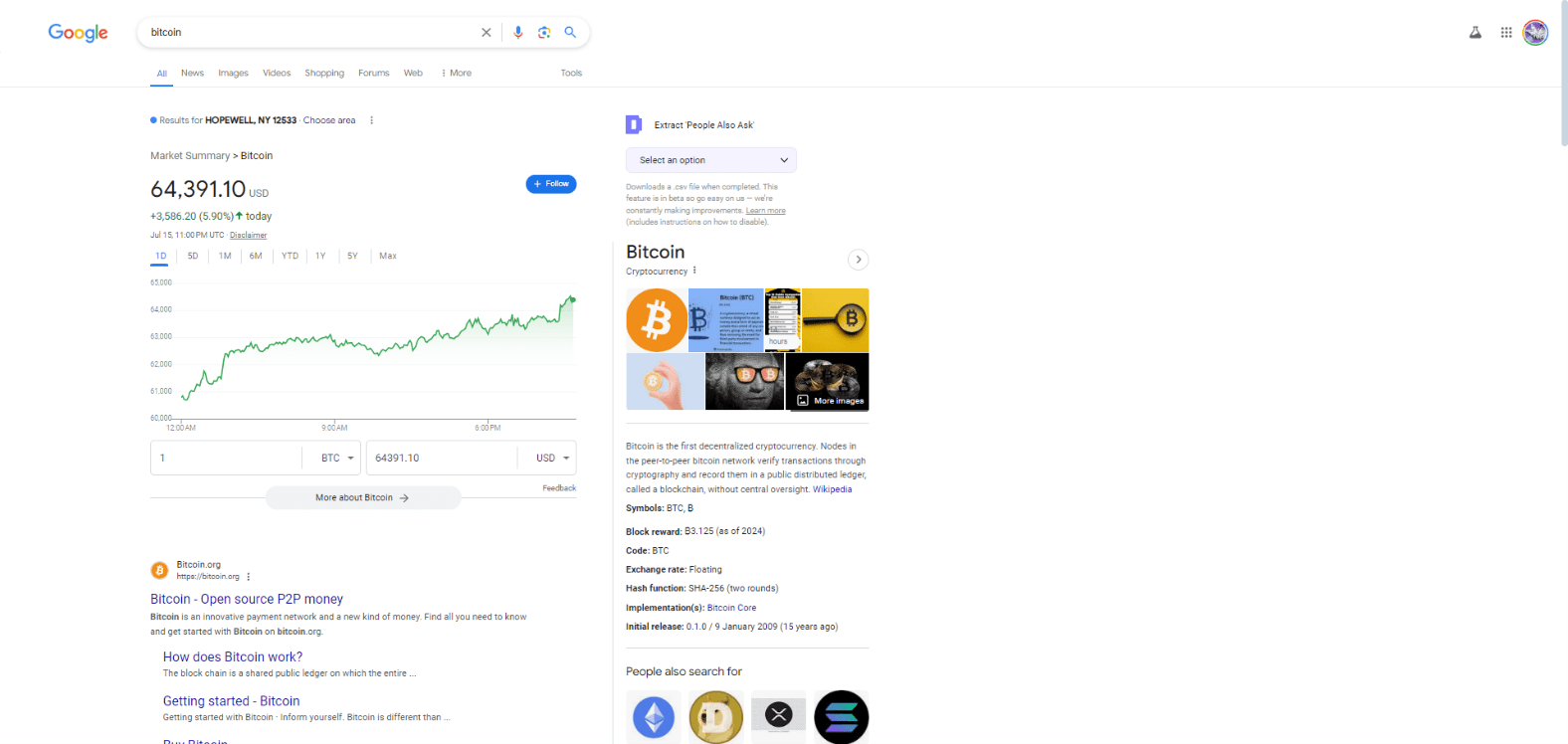
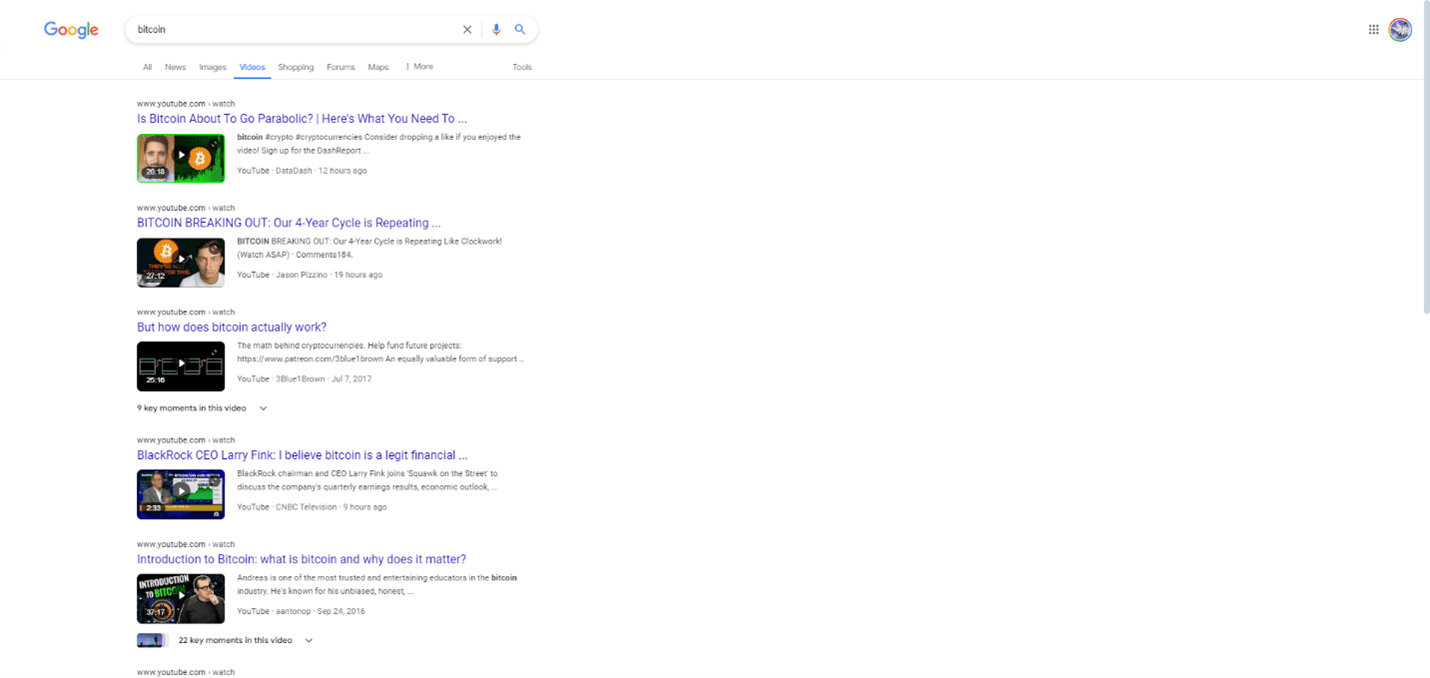
Google has a clean, simple interface that many people find easy to use, but for some queries, AI overviews are shown.

Google search for bitcoinScreenshot from search for [bitcoin], Google, July 2024

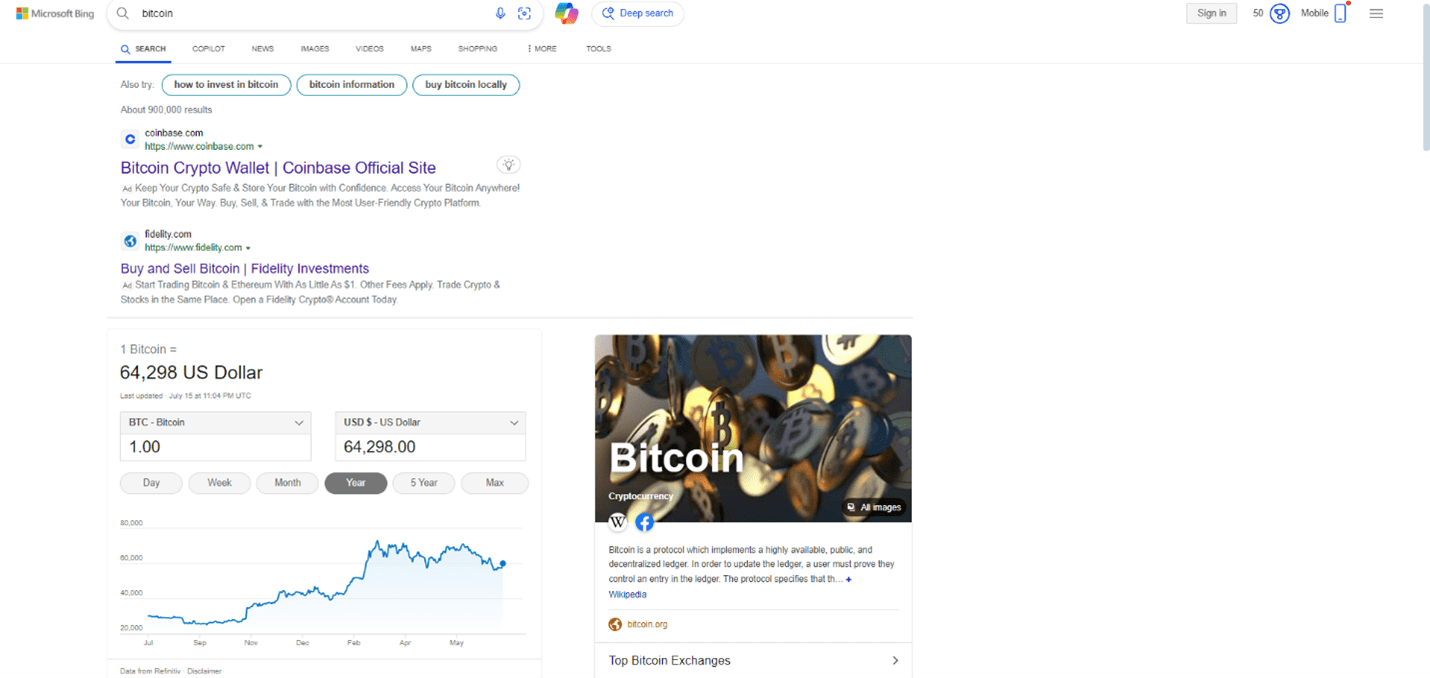
So does Microsoft Bing, though Bing is a little bit more visual.

Microsoft Bing search for bitcoinScreenshot from search for [bitcoin], Microsoft Bing, July 2024

Both search engines display useful information about related searches, images, companies, and news and do a great job of informing users of everything they need to know about a given topic.

SEO professionals love our tools and data.

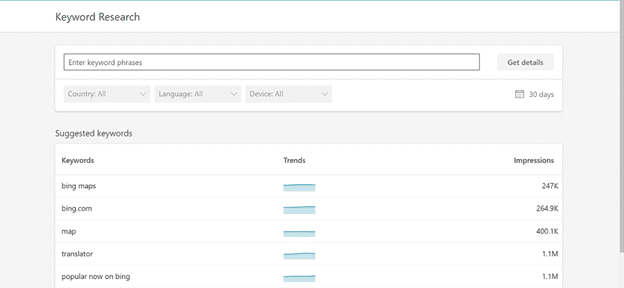
Thankfully, both Google and Microsoft Bing have decent keyword research tools that offer insights into performance:

Keywords research toolsScreenshot from author, July 2024

One area where I think Google falls behind is the data it provides in Google Search Console. If you want to learn how to use it, check out How to Use Google Search Console for SEO: A Complete Guide.

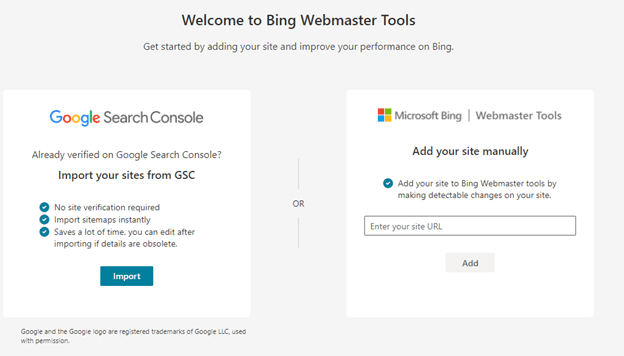
One of the cool feature sets in Microsoft Bing is the ability to import data from Google Search Console:

Another Microsoft Bing feature that I think beats Google is the fact that it provides SEO Reports.

Bing Webmaster ToolsScreenshot from Bing Webmaster Tools, July 2024

According to Bing, these reports contain common page-level recommendations based on SEO best practices to improve your rankings.

The reports are automatically generated biweekly and provide tips as to what to work on or investigate.

See A Complete Guide to Bing Webmaster Tools to learn more.

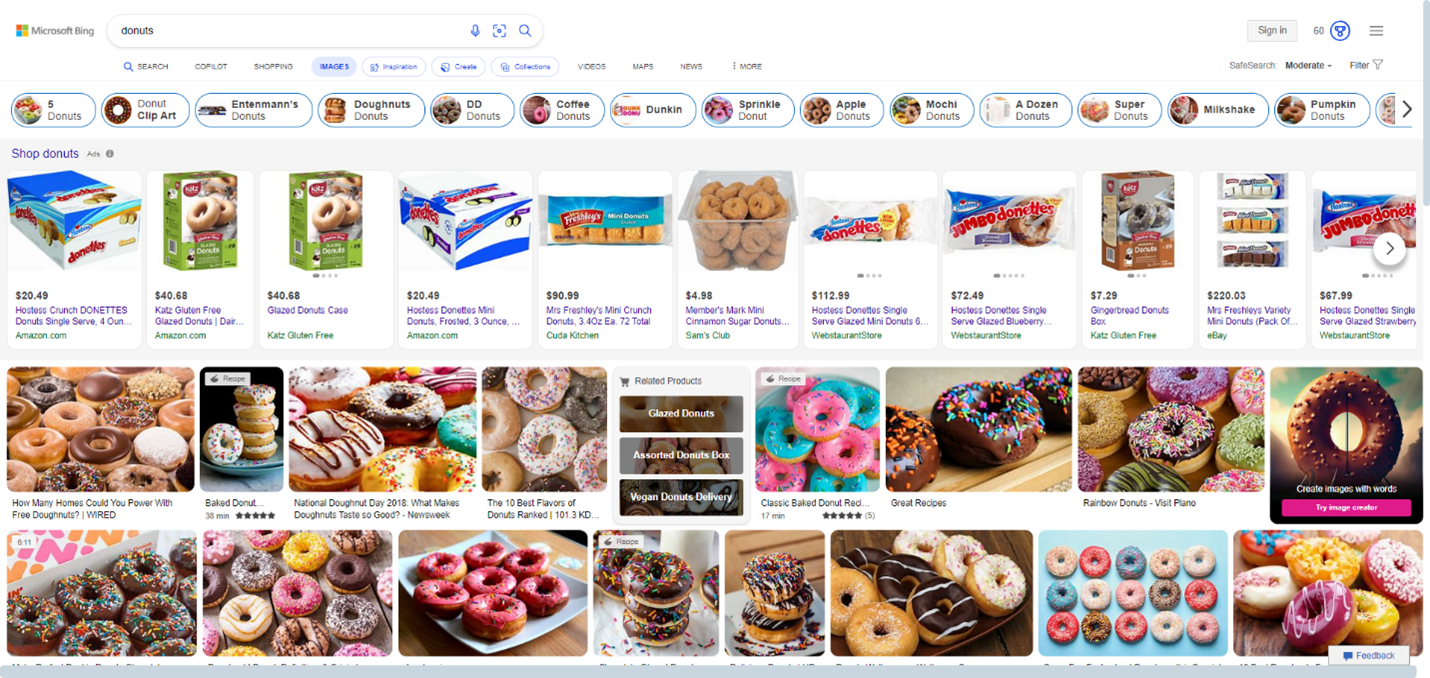
Microsoft Bing May Excel In Image Search Over Google

When it comes to image search, Microsoft Bing may have a leg up on Google by providing higher-quality images.

Microsoft Bing search for donutsScreenshot from search for [donuts], Microsoft Bing, July 2024

I like the filtering features in its image search, too, because you can turn titles off and search by image size, color, or type.

Test out Bing Visual Image Search, which allows you to do more with images. Check out its library of specialized skills to help you shop, identify landmarks and animals, or just have fun.

Then, see How Bing’s Image & Video Algorithm Works to learn more.

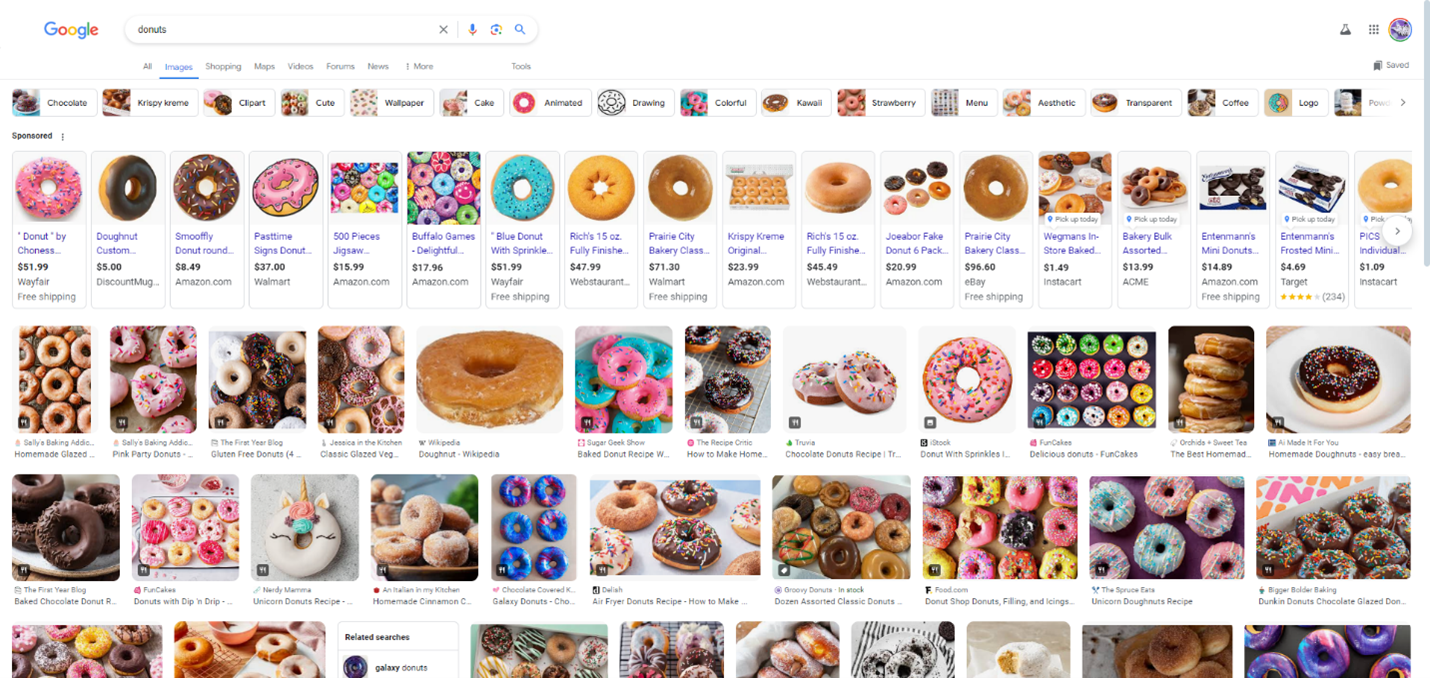
Google search for donutsScreenshot from search for [donuts], Google, July 2024

Google has more images available for viewing than Microsoft Bing. Make the most of it with the tips in A Guide to Google’s Advanced Image Search.

However, Microsoft Bing provides more detailed information about the image users are searching for.

How Microsoft Bing & Google Handle Video Search

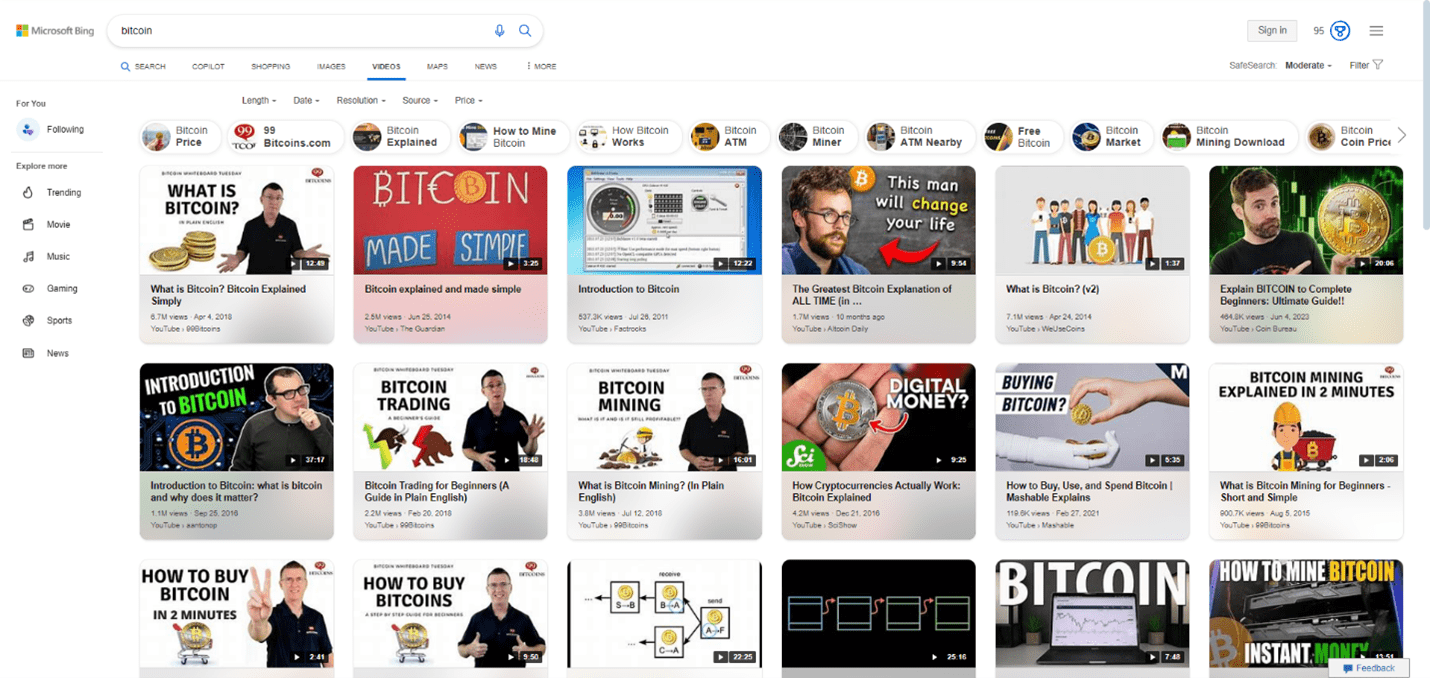
Microsoft Bing provides a much more visual video search results page, including a grid view of large thumbnails.

Google’s video results are more standard, featuring a vertical list of small thumbnails.

As you can see from the screenshot of a Bitcoin search below, they include different filters like length, price, etc., which is a great user experience.

I did not get this experience with Google video search.

This is one area where Microsoft Bing outperforms Google.

Microsoft Bing video searchScreenshot from search for [bitcoin], Microsoft Bing, July 2024
Google video search for bitcoinScreenshot from search for [bitcoin], Google, July 2024

Map Listings On Both Search Engines Matter For Local SEO

Both engines have similar functionality for maps, including map listings and local listings in the search engine results pages (SERPs).

Make sure you claim all your listings in both Microsoft Bing and Google and optimize your profile with business information, photos, proper categories, social information, etc.

Accurate name, address, and phone number (NAP) information are key. Google focuses on a user’s immediate vicinity by default, providing highly localized search results, while Bing offers a broader view of the wider area in local searches, which can be beneficial for some businesses.

See A Complete Guide to Google Maps Marketing.

Optimizing For Google Search Vs. Microsoft Bing

Google is primarily concerned with E-E-A-T: Experience, Expertise, Authority, and Trust. Providing users with high-quality, useful, and helpful content that is factual, original, and offers users value, as well as a site that provides good user experience, will help you rank.

Backlinks are also still important.

Microsoft Bing has always been focused on on-page optimization. It emphasizes exact-match keywords in domain names and URLs, gives weight to social signals and official business listings, and favors older and established domains.

Unlike Google, Microsoft Bing states in its webmaster guidelines that it incorporates social signals into its algorithm. That means you should also focus on Twitter and Facebook – including building good quality content on your site and social platforms – if you want to rank highly in Microsoft Bing.

Content is extremely important for both search engines. Always focus on high-quality content that satisfies the user’s intent and informational needs. By creating useful and relevant content, users will naturally love it and link to it.

Both speed, mobile-friendliness, and proper tech infrastructure matter for both engines.

Make sure you check out these resources for optimizing for various search engines:

Google Is Pushing Organic Results Further And Further Down The Page

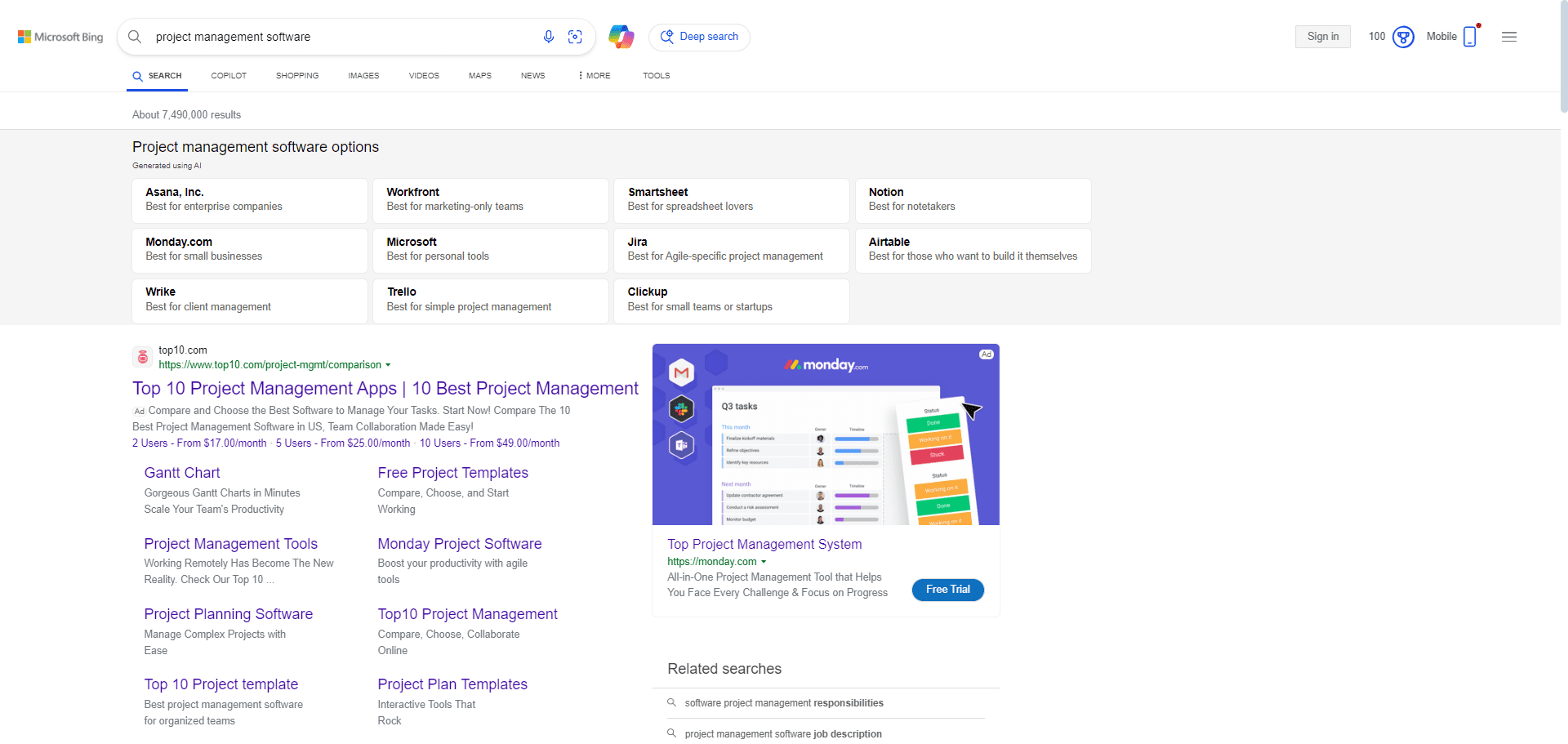
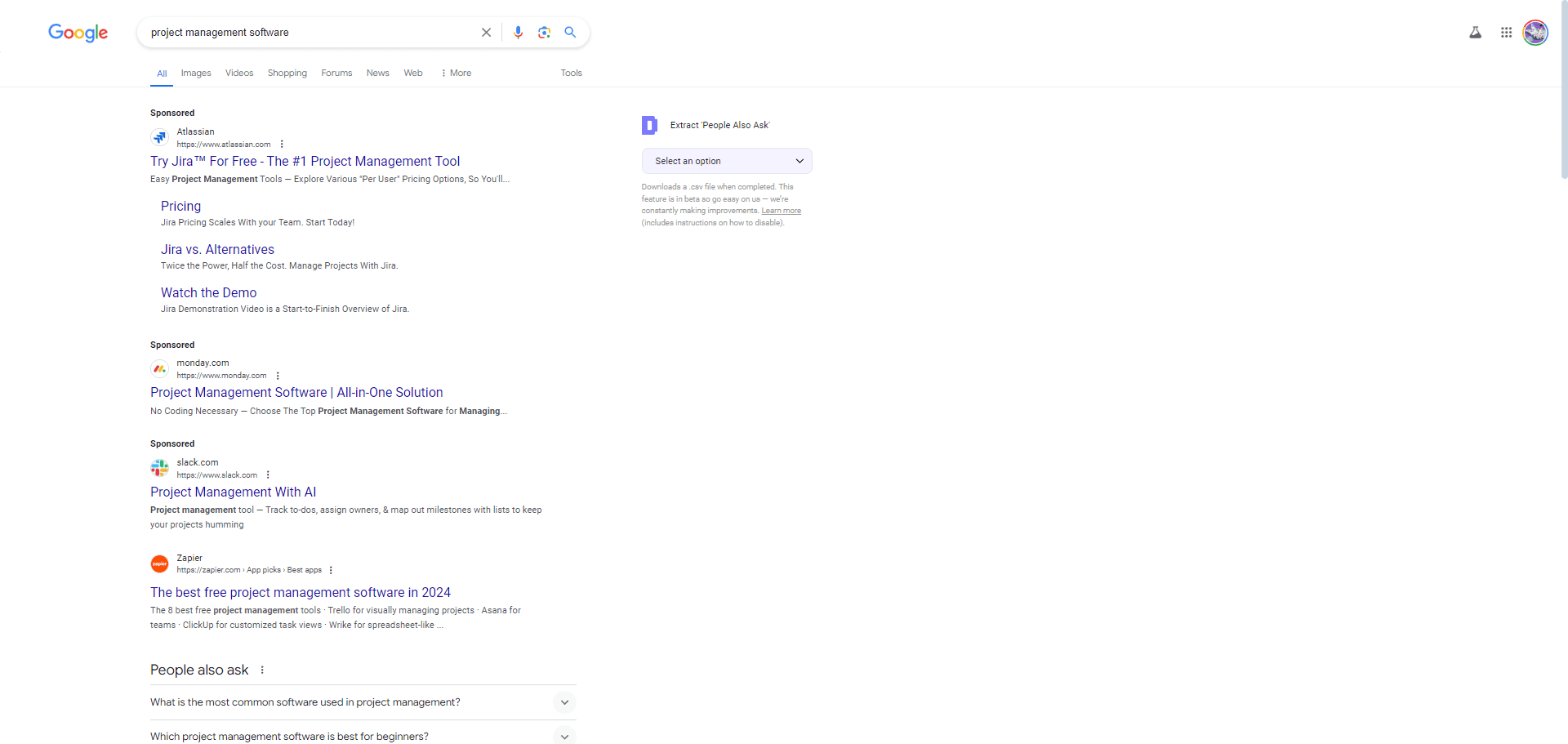
As time goes on, Google continues to push organic results down the page, resulting in more revenue from paid search ads and fewer clicks from organic search. That is why a blended strategy is important to win in today’s SERPs.

Here is a comparison between a search in Google and a search in Bing. As you can see, Bing does not have as many ads as Google, and organic listings are more prominent on the page than Google.

Bing search for project management softwareScreenshot from search for [project management software], Microsoft Bing, July 2024
Google search for project management softwareScreenshot from search for [project management software], Google, July 2024

Google Search Vs. Microsoft Bing: The Verdict

Both Microsoft Bing and Google satisfy the informational needs of millions of people every day.

While Google remains the dominant player in the battle between Bing and Google, they both offer opportunities for your brand to reach new users and put you in front of millions of qualified customers who are looking for information, products, and services.

Bing offers unique advantages and opportunities, particularly in visual search, social signals, and certain niche markets.

Bing holds a smaller market share but has a growing user base.

Since optimizing for both Bing and Google is similar, with some key differences, I recommend optimizing for both. This can enhance overall visibility and reach, especially in a world where Google is pushing organic listings further and further down the page.

More resources: 


Featured Image: Overearth/Shutterstock

Monopoly: A Ruling Against Google Could Benefit The Open Web via @sejournal, @Kevin_Indig
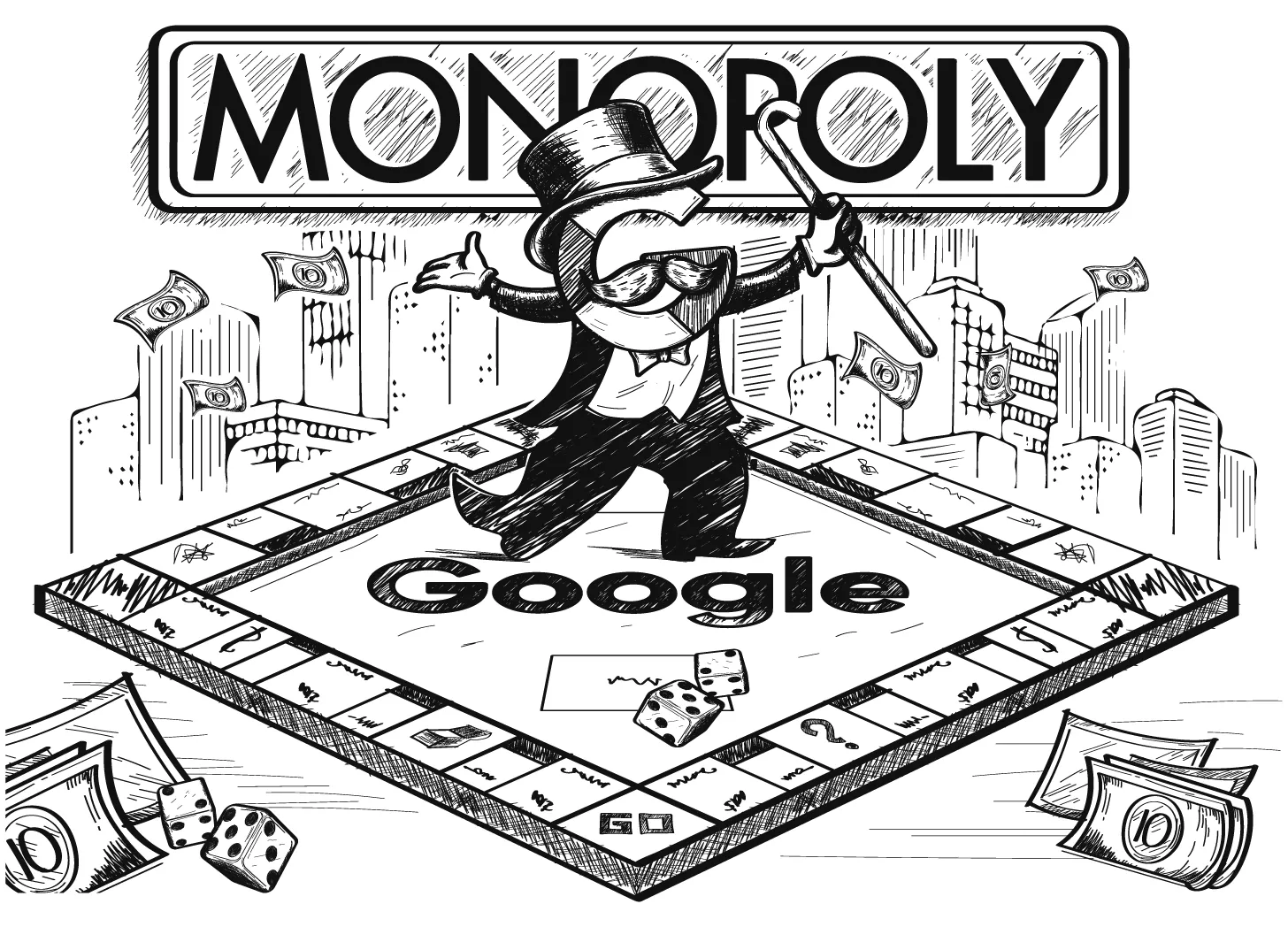
Monopoly Image Credit: Lyna ™

Boost your skills with Growth Memo’s weekly expert insights. Subscribe for free!

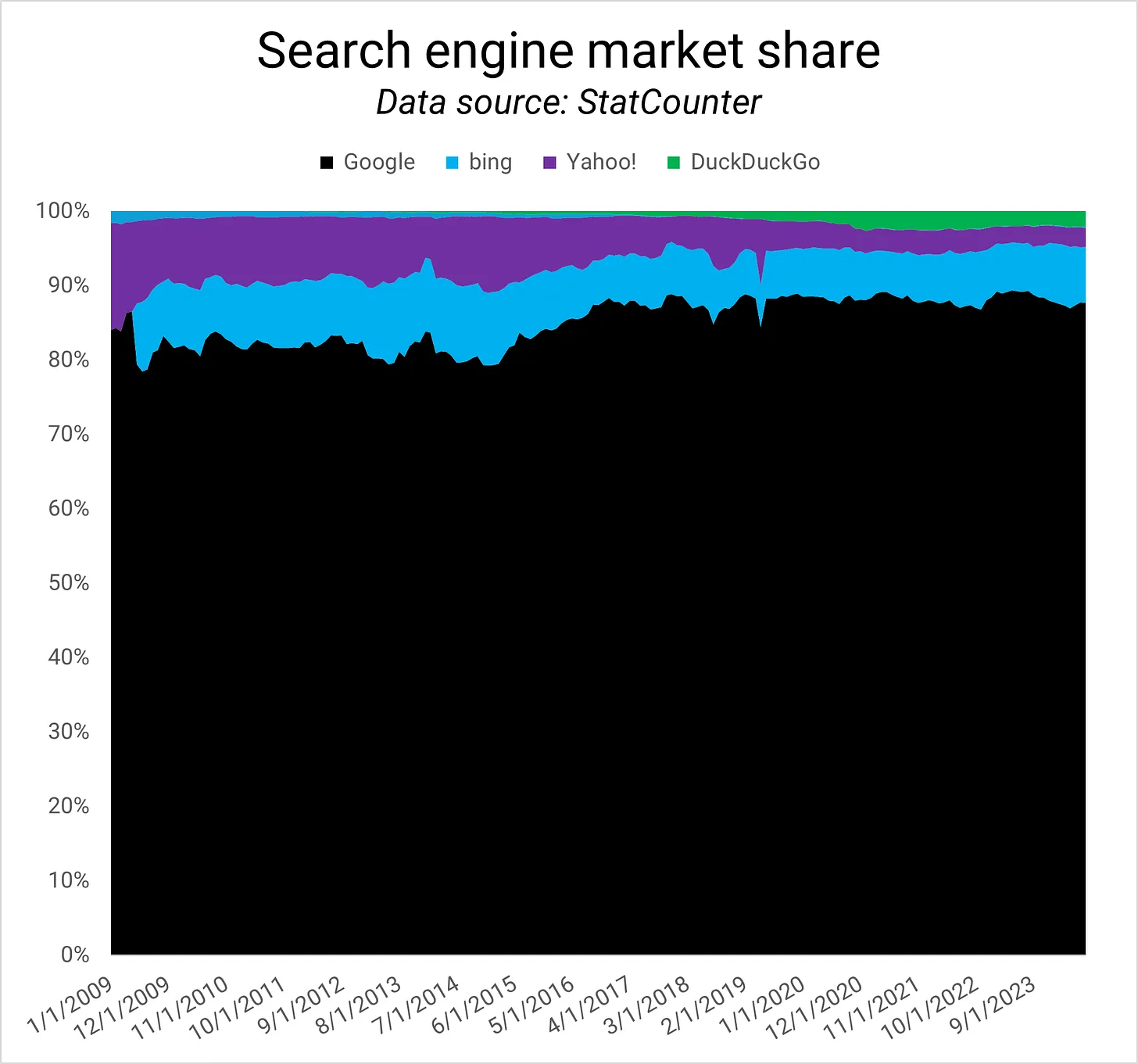
4 years after the DOJ lawsuit against Google started, Judge Amit Mehta declared Google guilty of monopolizing online search and advertising markets. The most successful startup in history is officially an illegal monopoly.

Search engine market shareGoogle’s search engine market share (Image Credit: Kevin Indig).

The ruling itself is big, but the fat question in the room is what consequences follow and whether there is an impact on SEO.

I can’t look into the future, but I can run through scenarios. There is a good chance it will affect SEO and the open web.

Before we dive in, remember:

  1. I’m not a lawyer or legal expert.
  2. I solely rely on documents and insights from the court case for my opinion.
  3. When I refer to “the document”, I mean Judge Mehta’s opinion memorandum.1

Scenarios

Scenario planning is the art and science of envisioning multiple futures.

Step one is framing the key question: What might the remedies (consequences) of the lawsuit against Google be, and what potential consequences could result for SEO?

Step two is identifying the driving forces affecting the key question:

  • Legal:
    • Judge Mehta concludes that Google is an illegal search monopoly, not an advertising monopoly. This is important.
    • The defining precedent lawsuit against Microsoft in the 90s didn’t lead to a break-up of the company but the opening of APIs, sharing of key information and a change in business practices.
  • Economic:
    • Google faces competition in advertising from Amazon, TikTok and Meta.
    • Google has superior market share in search, browsers, mobile OS and other markets.
    • Exclusivity and revenue share agreements between Google, Apple, Samsung, Mozilla and other partners delivered massive traffic to Google and profits to partners.
  • Technological:
    • Apple agreed not to innovate in search, spotlight and device search in return for revenue share.
    • Large Language Models are in the process of changing how search works and the dynamics between searchers, search engines and content providers.
  • Social: Younger generations use TikTok to search and social networks to get news and other information.
  • Political:
    • The sentiment of “big tech” has turned largely negative.
    • After almost two decades of no anti-competitive action against tech companies, the Google lawsuit could start a wave of tech regulation.

Step three is defining scenarios based on the key question and driving forces. I see 3 possible scenarios:

Scenario 1: Google must end its exclusivity deals immediately. Apple needs to let users choose a default search engine when setting up their devices. Google could get hefty fines for every year they keep the contract with Apple going.

Scenario 2: Google gets broken up. Alphabet must spin off assets that prevent it from gaining and holding more power in search and keep other players from entering the market.

  • YouTube is the 2nd largest search engine (Google is the largest text search engine, according to the judge). Running both at the same time creates too much power for one company to own.
  • Chrome and Android – maybe Gmail – need to be divested because they habituate users to choose Google and provide critical data about user behavior. A good example for the “damage” or habituation is Neeva, which failed because it couldn’t convince users to change their habit of using Google, according to founder Sridhar Ramaswamy.
  • Alphabet can keep Maps because there is competition from Apple.

Scenario 3: Google must share data like click behavior with the open market so everyone can train search engines on it.

Scenarios two and three are messy and could potentially harm consumers (privacy). Scenario 1 is the most likely to happen. To me, the argument “If Google is the best search engine, why does it need to pay to be the default on devices?” checks out.

Polygamy

Let’s look at the consequences for Google, Apple, and the web under the lens of scenario 1: Apple needs to end its monogamous relationship with Google and let users choose which search engine they want as default when setting up their phones.

1/ Consequence For Google

Apple’s impact on Google Search is massive. The court documents reveal that 28% of Google searches (US) come from Safari and makeup 56% of search volume. Consider that Apple sees 10 billion searches per week across all of its devices, with 8 billion happening on Safari and 2 billion from Siri and Spotlight.

Google receives only 7.6% of all queries on Apple devices through user-downloaded Chrome” and “10% of its searches on Apple devices through the Google Search App (GSA).” Google would take a big hit without the exclusive agreement with Apple.

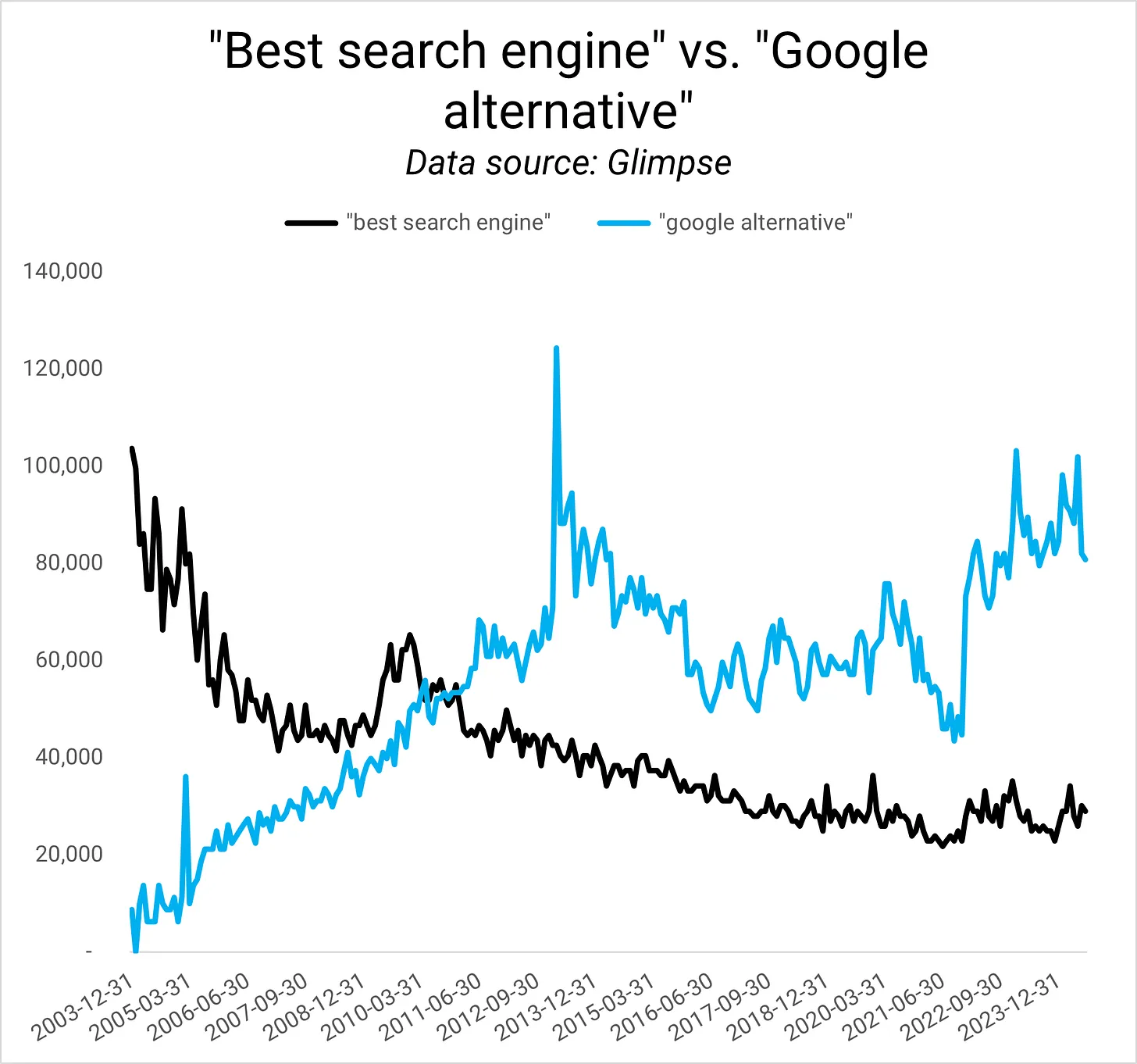
best search engine vs Google alternativeGoogle searches for “best search engine” vs. “google alternative” (Image Credit: Kevin Indig)

If Apple lets users choose a search engine, 30% of searches from iOS and 70% from MacOS could go to non-Google search engines: “In 2020, Google estimated that if it lost the Safari default placement, it would claw back more search volume on desktop than on mobile.” Apparently, users are less inclined to change their default search engine on mobile devices.

Google would take a big hit but survive because its brand is so strong that even worse search results wouldn’t scare users away. From the document:

In 2020, Google conducted a quality degradation study, which showed that it would not lose search revenue if were to significantly reduce the quality of its search product. Just as the power to raise price “when it is desired to do so” is proof of monopoly power, so too is the ability to degrade product quality without concern of losing consumers […]. The fact that Google makes product changes without concern that its users might go elsewhere is something only a firm with monopoly power could do.

Most of you had some feelings about this test when I brought it up on Twitter.

2/ Consequence For Apple

Apple wouldn’t be able to make another exclusive deal. I doubt that the court would forbid only Google to make distribution agreements.

Even if Apple could partner with someone else, they don’t want to: Eddy Cue, Apple’s senior vice president of Services, said publicly in court, “There’s no price that Microsoft could ever offer“ to replace Google. “They offered to give us Bing for free. They could give us the whole company.” Woof.

But Apple’s bottom line would certainly take a hit. In the short term, Apple would miss about $20 billion from Google, which makes up 11.5% of its $173 billion profits (trailing the last 12 months in Q1 ‘24). In the long term, the losses would amount to $12 billion over 5 years:

Internal Apple assessment from 2018, which concluded that, even assuming that Apple would retain 80% of queries should it launch a GSE, it would lose over $12 billion in revenue during the first five years following a potential separation from Google.

Mind you, not only Apple’s bottom line would take a hit, but also Google’s other distribution partners. Mozilla, for example, gets over 80% of its revenue from Google.2 Without the revenue share, it’s likely the company wouldn’t survive. Bing should buy Mozilla to keep the company alive and slightly balance Google’s power with Chrome.

3/ Consequence For The web

The web could be the big winner from a separation of Google’s distribution agreements. More traffic to other search engines could result in a broader distribution of web traffic. Here is my thought process:

  1. Search is a zero-sum game that follows Zipf’s law in click distribution: the first result gets a lot more clicks than the second, which gets more than the third and so on.
  2. In theory, you can get near-infinite reach on social networks because they customize the feed for audiences. On Google, the feed is not customized, meaning there are only so many results for a keyword.
  3. If more users would use other search engines on Apple devices, those non-Google search engines get more traffic, which they could pass on to the web.
  4. Assuming not every search engine would rank the same site at the top (otherwise, what’s the point?), the available amount of traffic for websites would expand because there are now more search results across several search engines that websites could get traffic from.

The big question is, “How many users would choose search engines that are not google if given a choice?” Google estimated in 2020 that it would lose $28.2 – $32.7 billion in net revenue (~$30 billion to keep the math simple) and over double that in gross revenue from losing 30% of iOS searches and 70% of MacOS.

Net revenue is the amount of money from selling goods or services minus discounts, returns, or deductions. Since we don’t have that number, we have to use total revenues as a ceiling because we know that net revenue has to be lower than revenue.

In 2020, Google’s total revenue was $182.5 billion, meaning~$30 billion would be 16.5% of total revenue. The actual number is likely higher.

Other search engines would likely catch some of Google’s lost revenue. A study by DuckDuckGo from 2019 3 found that mobile market share of non-Google search engines would increase by 300%-800% if users could choose a default.

The next logical question is “Who would get the search traffic Google loses?” Bing and DuckDuckGo are the obvious ones, but what about Perplexity and OpenAI? As I wrote in Search GPT:

OpenAI might bet on regulators breaking up Google’s exclusive search engine deal with Apple and hope to become part of a search engine choice set on Apple devices.

At the time of writing, I thought the likelihood of OpenAI intentionally launching Search GPT to catch some of the Apple traffic is small. I don’t think that anymore.

If Open AI got just 10% of the $30b in revenue Google would lose, it could make up over half of the $5b in annual expenses it runs on now. And all that without having to build much more functionality. Good timing.

According to Judge Mehta, Chat GPT is not considered a search engine: “AI cannot replace the fundamental building blocks of search, including web crawling, indexing, and ranking.”

I don’t agree, for what it’s worth. Most LLMs ground answers in search results. From What Google I/O 2023 reveals about the future of SEO:

Most search engines use a tech called Retrieval Augmented Generation, which cross-references AI answers from LLMs (large language models) with classic search results to decrease hallucination.

2nd-Order Effects

I want to take my scenarios one step further to uncover 2nd-order effects:

First, Would only Apple be forced to let users choose a default search engine when setting up their device or could Android as well? Mobile operating systems could be seen as a market bottleneck to search traffic.

A blanket ruling for all mobile OSs could mean that Google has to let users choose and potentially lose some of the advantages of owning Android.

Second, if Google were forced to cut all distribution agreements, it would have ~$25b to spend. What would they do with the money? Would it simply compensate for the ~$30 billion it would lose by taking a massive hit in Apple search traffic?

Third, if Apple wasn’t contractually obligated to not innovate in Search across Spotlight, Safari, and Siri, would it build its own search engine?

It might be better off building what comes after search and/or charge to use LLMs. The court documents reveal that Apple estimated a cost of at least $6 billion per year to build a general search engine.

State Of SEO Report: Top Insights For 2025 Success via @sejournal, @Juxtacognition

What opportunities are other SEO professionals taking advantage of? Did other SEO professionals struggle with the same things you did this year?

Our fourth annual State of SEO Report is packed with valuable insights, including the most pressing challenges, emerging trends, and actionable strategies SEO practitioners like you have faced over the last year and what they see on the horizon.

Find out how top search teams are tackling challenges. Download the full report today.

Top Challenges In SEO: From Content To Algorithm Changes

In 2023, 13.8% of SEO pros said content creation was the top challenge for SEO professionals. However, in 2024, 22.2% (up from 8.6% in 2023) of all SEO practitioners surveyed revealed that algorithm changes have become the primary concern.

In fact, 30.2% of those we asked pointed to core and general algorithm updates as the main source of traffic instability over the last 12 months. This finding is in stark contrast to 2023,  where 55.9% of SEO pros felt algorithm updates helped their efforts at least a little.

Why?

Simply put, creating the most helpful and expert content no longer guarantees a top spot in the SERPs.

To complicate matters, Google’s algorithms are constantly evolving, making it crucial to adapt and stay updated.

Budget Constraints: A Major Barrier To Success

Our survey revealed that budget limitations (cited by 19.4%) are the number one barrier to SEO success and the primary reason clients leave (by 41.0% of SEO professionals surveyed.)

With everyone feeling the financial squeeze, how can you gain an edge?

  • Forget gaming the SERPs. Focus on creating content that genuinely serves your ideal customer.
  • Collaborate with your marketing team to distribute this content on platforms where your audience is most active. Remember, Google’s rules may change, but the need for high-quality, valuable content that genuinely serves a need remains constant.
  • Prove your return on investment (ROI). Track customer journeys and identify where you are gaining conversions. If you’re not seeing success, make a plan and create a proposal to improve your strategies.

Learn how to overcome budget barriers with even more insights in the full report.

Key Insights From The State Of SEO Survey

SEO Industry Changes:

  • AI is predicted to drive the most significant changes in the SEO industry according to 29.0% of those we surveyed.
  • 16.6% believe Google updates will continue to be a major factor.

Performance Disruptions:

  • 36.3% of State of SEO respondents believe generative AI in search platforms and AI-generated content are major disruptors going forward into the future.

Essential SEO Metrics: Adapting To Fluctuations

As you explore the data in the report, you’ll find that 20.0% of State of SEO 2025 respondents indicated that keyword rankings and organic pageviews (11.7%) are the top tracked SEO metrics.

However, when these metrics fluctuate due to uncontrollable factors, it’s essential to build business value into your tracking.

Focus on the quality of your traffic and prioritize efforts that bring in high-quality users.

Skills In Demand: Navigating A Changing SEO Landscape

The most challenging skills to find in SEO professionals are technical SEO (18.9%) and data analysis (14.8%).

Meanwhile, 18.2% of respondents indicated that the most desired skills in candidates are soft skills and 15.7% said the ability to build and execute SEO strategies.

Want to grow as an SEO professional?

Develop rare and desirable skills.

SEO is increasingly integrated with other marketing disciplines, so cultivating exemplary collaborative skills and learning the languages of other fields will make you highly valuable.

Other Important Findings

  • 69.8% of SEO professionals found SERP competition increased over the last 12 months.
  • Only 13.2% of respondents felt zero click searches will cause significant shifts in the SEO industry.
  • 50.0% of SEO professionals reported client turnover remained steady throughout 2024.

The State of SEO 2025 Report is your go-to resource for understanding and mastering the current SEO landscape.

Download your copy today to gain a deeper understanding of the challenges, opportunities, and insights that will shape SEO in the coming year.

Stay informed, stay ahead, and make 2025 your best year in SEO yet!

Google’s AI Overviews Ditch Reddit, Embrace YouTube [Study] via @sejournal, @MattGSouthern

A new study by SEO software company SE Ranking has analyzed the sources and links used in Google’s AI-generated search overviews.

The research, which examined over 100,000 keywords across 20 niches, offers insights into how these AI-powered snippets are constructed and what types of sources they prioritize.

Key Findings

Length & Sources

The study found that 7.47% of searches triggered AI overviews, a slight decrease from previous research.

The average length of these overviews has decreased by approximately 40%, now averaging 2,633 characters.

According to the data, the most frequently linked websites in AI overviews were:

  1. YouTube.com (1,346 links)
  2. LinkedIn.com (1,091 links)
  3. Healthline.com (1,091 links)

Government & Education

The research indicates that government and educational institutions are prominently featured in AI-generated answers.

Approximately 19.71% of AI overviews included links to .gov websites, while 26.61% referenced .edu domains.

Media Representation

Major media outlets appeared frequently in the AI overviews.

Forbes led with 804 links from 723 AI-generated answers, followed by Business Insider with 148 links from 139 overviews.

HTTPS Dominance

The study reported that 99.75% of links in AI overviews use the HTTPS protocol, with only 0.25% using HTTP.

Niche-Specific Trends

The research revealed variations in AI overviews across niches:

  • The Relationships niche dominated, with 40.64% of keywords in this category triggering AI overviews.
  • Food and Beverage maintained its second-place position, with 23.58% of keywords triggering overviews.
  • Notably, the Fashion and Beauty, Pets, and Ecommerce and Retail niches saw significant declines in AI overview appearances compared to previous studies.

Link Patterns

The study found that AI overviews often incorporate links from top-ranking organic search results:

  • 93.67% of AI overviews linked to at least one domain from the top 10 organic search results.
  • 56.50% of all detected links in AI overviews matched search results from the top 1-100, with most (73.01%) linking to the top 1-10 search results.

International Content

The research noted trends regarding international content:

  • 9.85% of keywords triggering AI overviews included links to .in (Indian) domains.
  • This was prevalent in certain niches, with Sports and Exercise leading at 36.83% of keywords in that category linking to .in sites.

Reddit & Quora Absent

Despite these platforms ‘ popularity as information sources, the study found no instances of Reddit or Quora being linked in the analyzed AI overviews. This marks a change from previous studies where these sites were more frequently referenced.

Methodology

The research was conducted using Google Chrome on an Ubuntu PC, with sessions based in New York and all personalization features disabled.

The data was collected on July 11, 2024, providing a snapshot of AI overview behavior.

SE Ranking has indicated that they plan to continue this research, acknowledging the need for ongoing analysis to understand evolving trends.

What Does This Mean?

These findings have several implications for SEO professionals and publishers:

  1. Google’s AI favors trusted sources. Keep building your site’s credibility.
  2. AI overviews are getting shorter. Focus on clear, concise content.
  3. HTTPS is a must. Secure your site if you haven’t already.
  4. Diversify your sources. Mix in .edu and .gov backlinks where relevant.
  5. AI behavior varies across industries. Adapt your strategy accordingly.
  6. Think globally. You might be competing with international sites more than before.

Remember, this is just a snapshot. Google’s AI overviews are changing fast. Monitor these trends and be ready to pivot your SEO strategy as needed.

The full report on SE Ranking’s website provides a detailed breakdown of the findings, including niche-specific data.


Featured Image: DIA TV / Shutterstock.com

Maximize Your Organic Traffic for Enterprise Ecommerce Sites via @sejournal, @hethr_campbell

In the enterprise ecommerce space, staying ahead of the competition on Google can be challenging. With so much at stake, it’s key to ensure that your site is performing at its best and capturing as much market share as possible. But how can you make sure your ecommerce platform is fully optimized to reach its potential in organic search?

On August 21st, we invite you to join us for an in-depth webinar where we’ll explore the strategies that can help you make the most of your existing site. Whether you’re looking to resolve technical challenges or implement scalable solutions that are proven to drive results, this session will provide the practical insights you need.

Why Attend This Webinar?

Wayland Myers, with his 18 years of experience working with major brands like Expedia and Staples, will lead the discussion. Save your spot to learn the common issues that often prevent large ecommerce sites from reaching their full potential in organic search and he’ll explain that, if left unaddressed, can significantly limit your site’s ability to attract and convert visitors.

Wayland will dive into actionable solutions that can help overcome these challenges. You’ll learn about proven strategies that can be applied at scale, ensuring that your site is not only optimized for performance but also prepared to handle the complexities of enterprise-level ecommerce. 

What Will You Learn?

From technical fixes to advanced tactics like AI-enhanced programmatic content creation and internal linking, this session will cover the approaches that have been proven to work in real-world scenarios.

This webinar will also highlight the importance of careful implementation. Making changes to an enterprise ecommerce site requires a thoughtful approach to avoid potential pitfalls. Wayland will share his insights on what to watch out for during the process, ensuring that your efforts lead to positive outcomes without unintended consequences.

Key Takeaways:

  • Identifying and resolving issues that hinder your site’s organic growth.
  • Implementing solutions that enhance search performance at scale.
  • Learning from successful strategies used by industry leaders.

Live Q&A: Get Your Questions Answered

After the presentation, there will be a LIVE Q&A session where you can bring your specific questions. Whether you’re dealing with technical challenges or looking to fine-tune your current strategy, this is your chance to get expert advice tailored to your needs.

If you’re focused on improving your ecommerce site’s performance and capturing a larger share of the market on Google, this webinar is an opportunity you won’t want to miss.

Can’t make it to the live session? No worries. By registering, you’ll receive a recording of the webinar to watch at your convenience.

Take this chance to learn from an industry expert and ensure your ecommerce site is fully optimized for success.

13 Steps To Boost Your Site’s Crawlability And Indexability via @sejournal, @MattGSouthern

One of the most important elements of search engine optimization, often overlooked, is how easily search engines can discover and understand your website.

This process, known as crawling and indexing, is fundamental to your site’s visibility in search results. Without being crawled your pages cannot be indexed, and if they are not indexed they won’t rank or display in SERPs.

In this article, we’ll explore 13 practical steps to improve your website’s crawlability and indexability. By implementing these strategies, you can help search engines like Google better navigate and catalog your site, potentially boosting your search rankings and online visibility.

Whether you’re new to SEO or looking to refine your existing strategy, these tips will help ensure that your website is as search-engine-friendly as possible.

Let’s dive in and discover how to make your site more accessible to search engine bots.

1. Improve Page Loading Speed

Page loading speed is crucial to user experience and search engine crawlability. To improve your page speed, consider the following:

  • Upgrade your hosting plan or server to ensure optimal performance.
  • Minify CSS, JavaScript, and HTML files to reduce their size and improve loading times.
  • Optimize images by compressing them and using appropriate formats (e.g., JPEG for photographs, PNG for transparent graphics).
  • Leverage browser caching to store frequently accessed resources locally on users’ devices.
  • Reduce the number of redirects and eliminate any unnecessary ones.
  • Remove any unnecessary third-party scripts or plugins.

2. Measure & Optimize Core Web Vitals

In addition to general page speed optimizations, focus on improving your Core Web Vitals scores. Core Web Vitals are specific factors that Google considers essential in a webpage’s user experience.

These include:

To identify issues related to Core Web Vitals, use tools like Google Search Console’s Core Web Vitals report, Google PageSpeed Insights, or Lighthouse. These tools provide detailed insights into your page’s performance and offer suggestions for improvement.

Some ways to optimize for Core Web Vitals include:

  • Minimize main thread work by reducing JavaScript execution time.
  • Avoid significant layout shifts by using set size attribute dimensions for media elements and preloading fonts.
  • Improve server response times by optimizing your server, routing users to nearby CDN locations, or caching content.

By focusing on both general page speed optimizations and Core Web Vitals improvements, you can create a faster, more user-friendly experience that search engine crawlers can easily navigate and index.

3. Optimize Crawl Budget

Crawl budget refers to the number of pages Google will crawl on your site within a given timeframe. This budget is determined by factors such as your site’s size, health, and popularity.

If your site has many pages, it’s necessary to ensure that Google crawls and indexes the most important ones. Here are some ways to optimize for crawl budget:

  • Using a clear hierarchy, ensure your site’s structure is clean and easy to navigate.
  • Identify and eliminate any duplicate content, as this can waste crawl budget on redundant pages.
  • Use the robots.txt file to block Google from crawling unimportant pages, such as staging environments or admin pages.
  • Implement canonicalization to consolidate signals from multiple versions of a page (e.g., with and without query parameters) into a single canonical URL.
  • Monitor your site’s crawl stats in Google Search Console to identify any unusual spikes or drops in crawl activity, which may indicate issues with your site’s health or structure.
  • Regularly update and resubmit your XML sitemap to ensure Google has an up-to-date list of your site’s pages.

4. Strengthen Internal Link Structure

A good site structure and internal linking are foundational elements of a successful SEO strategy. A disorganized website is difficult for search engines to crawl, which makes internal linking one of the most important things a website can do.

But don’t just take our word for it. Here’s what Google’s search advocate, John Mueller, had to say about it:

“Internal linking is super critical for SEO. I think it’s one of the biggest things that you can do on a website to kind of guide Google and guide visitors to the pages that you think are important.”

If your internal linking is poor, you also risk orphaned pages or pages that don’t link to any other part of your website. Because nothing is directed to these pages, search engines can only find them through your sitemap.

To eliminate this problem and others caused by poor structure, create a logical internal structure for your site.

Your homepage should link to subpages supported by pages further down the pyramid. These subpages should then have contextual links that feel natural.

Another thing to keep an eye on is broken links, including those with typos in the URL. This, of course, leads to a broken link, which will lead to the dreaded 404 error. In other words, page not found.

The problem is that broken links are not helping but harming your crawlability.

Double-check your URLs, particularly if you’ve recently undergone a site migration, bulk delete, or structure change. And make sure you’re not linking to old or deleted URLs.

Other best practices for internal linking include using anchor text instead of linked images, and adding a “reasonable number” of links on a page (there are different ratios of what is reasonable for different niches, but adding too many links can be seen as a negative signal).

Oh yeah, and ensure you’re using follow links for internal links.

5. Submit Your Sitemap To Google

Given enough time, and assuming you haven’t told it not to, Google will crawl your site. And that’s great, but it’s not helping your search ranking while you wait.

If you recently made changes to your content and want Google to know about them immediately, you should submit a sitemap to Google Search Console.

A sitemap is another file that lives in your root directory. It serves as a roadmap for search engines with direct links to every page on your site.

This benefits indexability because it allows Google to learn about multiple pages simultaneously. A crawler may have to follow five internal links to discover a deep page, but by submitting an XML sitemap, it can find all of your pages with a single visit to your sitemap file.

Submitting your sitemap to Google is particularly useful if you have a deep website, frequently add new pages or content, or your site does not have good internal linking.

6. Update Robots.txt Files

You’ll want to have a robots.txt file for your website. It’s a plain text file in your website’s root directory that tells search engines how you would like them to crawl your site. Its primary use is to manage bot traffic and keep your site from being overloaded with requests.

Where this comes in handy in terms of crawlability is limiting which pages Google crawls and indexes. For example, you probably don’t want pages like directories, shopping carts, and tags in Google’s directory.

Of course, this helpful text file can also negatively impact your crawlability. It’s well worth looking at your robots.txt file (or having an expert do it if you’re not confident in your abilities) to see if you’re inadvertently blocking crawler access to your pages.

Some common mistakes in robots.text files include:

  • Robots.txt is not in the root directory.
  • Poor use of wildcards.
  • Noindex in robots.txt.
  • Blocked scripts, stylesheets, and images.
  • No sitemap URL.

For an in-depth examination of each of these issues – and tips for resolving them, read this article.

7. Check Your Canonicalization

What a canonical tag does is indicate to Google which page is the main page to give authority to when you have two or more pages that are similar, or even duplicate. Although, this is only a directive and not always applied.

Canonicals can be a helpful way to tell Google to index the pages you want while skipping duplicates and outdated versions.

But this opens the door for rogue canonical tags. These refer to older versions of a page that no longer exist, leading to search engines indexing the wrong pages and leaving your preferred pages invisible.

To eliminate this problem, use a URL inspection tool to scan for rogue tags and remove them.

If your website is geared towards international traffic, i.e., if you direct users in different countries to different canonical pages, you need to have canonical tags for each language. This ensures your pages are indexed in each language your site uses.

8. Perform A Site Audit

Now that you’ve performed all these other steps, there’s still one final thing you need to do to ensure your site is optimized for crawling and indexing: a site audit.

That starts with checking the percentage of pages Google has indexed for your site.

Check Your Indexability Rate

Your indexability rate is the number of pages in Google’s index divided by the number of pages on your website.

You can find out how many pages are in the Google index from the Google Search Console Index by going to the “Pages” tab and checking the number of pages on the website from the CMS admin panel.

There’s a good chance your site will have some pages you don’t want indexed, so this number likely won’t be 100%. However, if the indexability rate is below 90%, you have issues that need investigation.

You can get your no-indexed URLs from Search Console and run an audit for them. This could help you understand what is causing the issue.

Another helpful site auditing tool included in Google Search Console is the URL Inspection Tool. This allows you to see what Google spiders see, which you can then compare to actual webpages to understand what Google is unable to render.

Audit (And request Indexing) Newly Published Pages

Any time you publish new pages to your website or update your most important pages, you should ensure they’re being indexed. Go into Google Search Console and use the inspection tool to make sure they’re all showing up. If not, request indexing on the page and see if this takes effect – usually within a few hours to a day.

If you’re still having issues, an audit can also give you insight into which other parts of your SEO strategy are falling short, so it’s a double win. Scale your audit process with tools like:

9. Check For Duplicate Content

Duplicate content is another reason bots can get hung up while crawling your site. Basically, your coding structure has confused it, and it doesn’t know which version to index. This could be caused by things like session IDs, redundant content elements, and pagination issues.

Sometimes, this will trigger an alert in Google Search Console, telling you Google is encountering more URLs than it thinks it should. If you haven’t received one, check your crawl results for duplicate or missing tags or URLs with extra characters that could be creating extra work for bots.

Correct these issues by fixing tags, removing pages, or adjusting Google’s access.

10. Eliminate Redirect Chains And Internal Redirects

As websites evolve, redirects are a natural byproduct, directing visitors from one page to a newer or more relevant one. But while they’re common on most sites, if you’re mishandling them, you could inadvertently sabotage your indexing.

You can make several mistakes when creating redirects, but one of the most common is redirect chains. These occur when there’s more than one redirect between the link clicked on and the destination. Google doesn’t consider this a positive signal.

In more extreme cases, you may initiate a redirect loop, in which a page redirects to another page, directs to another page, and so on, until it eventually links back to the first page. In other words, you’ve created a never-ending loop that goes nowhere.

Check your site’s redirects using Screaming Frog, Redirect-Checker.org, or a similar tool.

11. Fix Broken Links

Similarly, broken links can wreak havoc on your site’s crawlability. You should regularly check your site to ensure you don’t have broken links, as this will hurt your SEO results and frustrate human users.

There are a number of ways you can find broken links on your site, including manually evaluating every link on your site (header, footer, navigation, in-text, etc.), or you can use Google Search Console, Analytics, or Screaming Frog to find 404 errors.

Once you’ve found broken links, you have three options for fixing them: redirecting them (see the section above for caveats), updating them, or removing them.

12. IndexNow

IndexNow is a protocol that allows websites to proactively inform search engines about content changes, ensuring faster indexing of new, updated, or removed content. By strategically using IndexNow, you can boost your site’s crawlability and indexability.

However, using IndexNow judiciously and only for meaningful content updates that substantially enhance your website’s value is crucial. Examples of significant changes include:

  • For ecommerce sites: Product availability changes, new product launches, and pricing updates.
  • For news websites: Publishing new articles, issuing corrections, and removing outdated content.
  • For dynamic websites, this includes updating financial data at critical intervals, changing sports scores and statistics, and modifying auction statuses.
  • Avoid overusing IndexNow by submitting duplicate URLs too frequently within a short timeframe, as this can negatively impact trust and rankings.
  • Ensure that your content is fully live on your website before notifying IndexNow.

If possible, integrate IndexNow with your content management system (CMS) for seamless updates. If you’re manually handling IndexNow notifications, follow best practices and notify search engines of both new/updated content and removed content.

By incorporating IndexNow into your content update strategy, you can ensure that search engines have the most current version of your site’s content, improving crawlability, indexability, and, ultimately, your search visibility.

13. Implement Structured Data To Enhance Content Understanding

Structured data is a standardized format for providing information about a page and classifying its content.

By adding structured data to your website, you can help search engines better understand and contextualize your content, improving your chances of appearing in rich results and enhancing your visibility in search.

There are several types of structured data, including:

  • Schema.org: A collaborative effort by Google, Bing, Yandex, and Yahoo! to create a unified vocabulary for structured data markup.
  • JSON-LD: A JavaScript-based format for encoding structured data that can be embedded in a web page’s or .
  • Microdata: An HTML specification used to nest structured data within HTML content.

To implement structured data on your site, follow these steps:

  • Identify the type of content on your page (e.g., article, product, event) and select the appropriate schema.
  • Mark up your content using the schema’s vocabulary, ensuring that you include all required properties and follow the recommended format.
  • Test your structured data using tools like Google’s Rich Results Test or Schema.org’s Validator to ensure it’s correctly implemented and free of errors.
  • Monitor your structured data performance using Google Search Console’s Rich Results report. This report shows which rich results your site is eligible for and any issues with your implementation.

Some common types of content that can benefit from structured data include:

  • Articles and blog posts.
  • Products and reviews.
  • Events and ticketing information.
  • Recipes and cooking instructions.
  • Person and organization profiles.

By implementing structured data, you can provide search engines with more context about your content, making it easier for them to understand and index your pages accurately.

This can improve search results visibility, mainly through rich results like featured snippets, carousels, and knowledge panels.

Wrapping Up

By following these 13 steps, you can make it easier for search engines to discover, understand, and index your content.

Remember, this process isn’t a one-time task. Regularly check your site’s performance, fix any issues that arise, and stay up-to-date with search engine guidelines.

With consistent effort, you’ll create a more search-engine-friendly website with a better chance of ranking well in search results.

Don’t be discouraged if you find areas that need improvement. Every step to enhance your site’s crawlability and indexability is a step towards better search performance.

Start with the basics, like improving page speed and optimizing your site structure, and gradually work your way through more advanced techniques.

By making your website more accessible to search engines, you’re not just improving your chances of ranking higher – you’re also creating a better experience for your human visitors.

So roll up your sleeves, implement these tips, and watch as your website becomes more visible and valuable in the digital landscape.

More Resources:


Featured Image: BestForBest/Shutterstock