10 tips to improve the quality of your page

Is your page not attracting the number of people you thought it would? Or are you wondering what you can improve to get your page higher up in the search results? And to get people to stay on (and come back to) your site? There are a few things you can do to give your page a better chance at performing well. In this blog post, we’ll discuss how you can determine which pages could use some extra love and what you can do to turn them into high-quality pages!

It is important to realize that content quality can have a big impact on your business and online findability. Especially since Google announced its helpful content update, your rankings might suffer if you have too much low-quality content. It’s not just about using the right keyword; search engines nowadays look at the whole picture. So it’s important to identify those low-quality pages and work your magic.

How to determine page quality

It’s important to determine which pages need improving and in what order. It can be tempting to just get started with the first page that comes to mind, but take some time to work out how your pages perform. This helps you prioritize and decide on what page needs your attention first.

Have a look at the metrics

You probably know your audience to some degree, but it’s unlikely that you know exactly what they want. Or how they search online and navigate through your site. Even if you have a hunch or hear from them regularly, make sure to look at the data to validate what people do on your site and where you can improve. A great tool to do this is Google Analytics. It can tell you how many people visit your site and where they’re coming from. Additionally, which pages are being visited the most, and how long people tend to stay on each page. All of this helps you determine the quality of your individual pages. So it’s well worth the effort to start learning about Google Analytics.

Use the Yoast SEO content analysis

Yoast SEO cleverly analyses your content to help you identify problems. Your content might have readability issues, making it hard for users to understand what you’re saying. Or you might have overused your keywords, making your text seem unnatural and spammy. Using Yoast SEO, you can easily see which pages and posts need improvement by looking at the traffic lights in the overview.

Yoast SEO shows red and orange traffic lights in the overview to highlight content issues

Identify low-quality pages with Screaming Frog

A tool you can use to easily identify low-quality content is Screaming Frog SEO Spider. When you run a query for your website in the SEO spider, you will get a list of all the URLs on your site. Now scroll through that list and visit every URL that makes no sense to you. The fact is, low-quality pages often occur in groups, rather than as a single page.

Think along the lines of old .html pages, where you end your URLs with a trailing slash now. Think about your attachment pages or anything with too many numbers in it. These should all make you feel suspicious. Visit the page and see if it displays low-quality content that shouldn’t be on Google. Test if these pages are indexed and check if there are more pages like them. Take a critical look at the pages you’ve found.

10 tips to directly improve page quality

Once you’ve assessed the quality of your individual pages, it’s a good idea to create a list prioritizing the pages you want to work on first. After that, the real fun begins. Let’s take a look at the first 10 tips to improve your page quality.

1. Decide on what you want to do with the page

First things first, figure out what you want to do with your page. For pages that are no longer up to date, ask yourself the following question: Can you update the page by making changes to it? Great, then you can go to the second tip on this list. But for pages that no longer have any business being on your site anymore, it might be best to remove them. Decide whether you want to update or delete the page.

Chances are that you’ll also resurface a few outdated pages that don’t need to be shown in Google, even if you want to keep them on your site. On these pages you can use the noindex tag. If a low-quality page still holds relevant links to other parts of your website and has some traffic due to, for instance, links from other websites, you can use noindex, follow in your robots meta tag. This way, Google can find the page, follow the relevant links, but it will keep the page itself out of the search results.
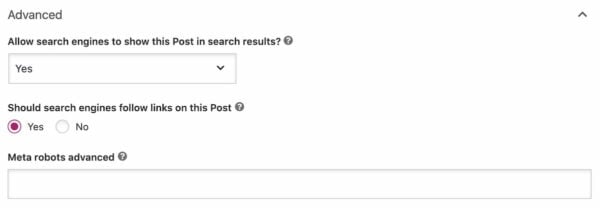
Advanced tab in Yoast SEO to set page to noindex or nofollow
You can find these indexing options in the Advanced tab in the Yoast SEO meta box

2. Think about search intent

When you want to improve the quality of a page, it’s good practice to take search intent into consideration. Search intent (or user intent) is the term used to describe the purpose of an online search. To be more exact, it’s the reason why someone conducts a specific search. Over the years, Google has worked hard to improve its algorithm to be able to determine people’s search intent. That’s why you need to think about matching your content to someone’s search intent when they land on your page.

The reason we’re discussing this here is that you want to make sure your pages show up for the right search intent. When someone is looking for information, you don’t want to send them to your product page right away. They’re probably not ready for that yet. And when someone does have a transactional intent, you don’t want them to land on one of your blog posts discussing the latest news. In that case, you want to ensure they go to the right product (or category) page right away.

Read more: Using the search results to create great intent-based content »

3. Create unique content

An important factor that determines the quality of your page is content. There are a few basics that you need to tackle right away. For one, always base your content on the right keyphrases by conducting keyword research. Also, if your low-quality page doesn’t have a lot of text and doesn’t hold a lot of information, this could be considered thin content. Your users and search engines aren’t fans of this type of content, as it has little or no value to them. So make sure to write extensively on the topic you want to be found on.

Try to be critical of your writing and become the source for people instead of copying another source. Although it’s always good to keep an eye on your competition and the content they’re producing, make sure to have your own voice. If you write unique, insightful, useful content, people will be much more inclined to actually read it or link to it. Google will see that content as an addition to its index.

4. Show E-E-A-T

Everyone can own a website nowadays. Which is great, as this opens up the web for everyone. But this online growth has also resulted in trust issues when it comes to sites you’re not familiar with yet. That’s why it’s crucial to show readers, and search engines, that you can be trusted and that you’re an authority in your field. This doesn’t just help your pages show up in the search results; it also helps users reach the level of trust they need to do business with you online.

Google is working hard to recognize and reward high-quality content, and this is where E-E-A-T also comes into play. This acronym stands for Experience, Expertise, Authoritativeness, and Trustworthiness. This core concept is outlined in their Search Quality Raters guidelines and is used to evaluate online content. Meaning that your content will be judged as higher quality if you show experience, expertise, authoritativeness and trustworthiness. All of these will enhance the quality of your pages while helping you build a strong brand online.

5. Work on your site reputation

Another factor that is closely related to trustworthiness is the reputation of your website. This is something search engines also take into account when determining the quality of the pages on your site. But how do they determine your reputation? By analyzing what others are saying about you online. For example, user ratings about your site and how positive these are. But also other experts or established sites mentioning your business on their site. Or any other information about your business or authors mentioned on other sites.
6. Link to and from your page

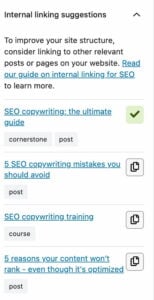
For people and search engines to be able to find your page, you need to ensure that you link to it. From other pages on your website that are related to the one you’re currently working on. So make sure to work on your internal linking and connect the content on your website to each other.

That being said, it’s important not to overdo it and link to every page you own in one post. Always keep the user in mind. So make sure to link to pages or posts that are actually relevant and that you can link to naturally. Our plugin has a great internal linking tool that suggests related content for every post or page.

Tips to improve site performance

We still have 4 tips to go, and they’re all related to the performance of your site. Some of them may take some more time, but these aspects are essential if you want to improve the quality of your pages. Not just for the search engines, but especially for your users.

7. Improve your site’s speed

The speed of your website determines whether you get a good ranking in Google, and its importance keeps growing. Why? Because faster sites are easier for search engines to process. And because search engines know that users don’t like slow websites. Users tend to buy less from slower sites and don’t read and engage as much as they would on a site with great site speed. So work on improving your site speed, you’ll be thankful for it later. Google also made page experience a ranking factor, making speed and user experience on your site even more important.

8. Consider user experience

User experience, also called UX, is all about how users experience a site or product. Search engines want to provide their users with the best results for their search queries. The best result doesn’t only mean the best answer, but also the best experience. So even if you’ve written an excellent answer in a post, but your site is slow or a mess, Google won’t consider your post the best answer.

Consider the goal of your site and its specific pages. What do you want visitors to do on your page? Buy stuff? Read your articles? Your design and content should support this goal. Having a clear goal in mind will also help you prioritize the improvements for your site. This ties in with the search intent of a certain page, but you should also consider whether the design and structure of your pages support the goal of your site. And how does your site work on mobile devices?

9. Don’t forget about accessibility

The last question mentions your mobile site, and with good reason. Mobile is such a big part of most people’s lives nowadays that you don’t have the luxury of not having a well-performing mobile site. Make sure your site works on different devices and in different browsers to cater to every one of your site visitors. We have an ultimate guide on Mobile SEO that helps you determine the state of your mobile website and what you can still improve on.

10. Keep your site healthy and safe

The safety and health of your site is important for the visibility of your site, but it’s also important for you and your business. So make sure to check how safe your site is right now and make the necessary improvements to keep your site happy and healthy. If you’re using WordPress, we have blog posts that help you with your site’s health and your security in a few easy steps.

Time to improve that page quality!

All of these tips will help you improve the quality of your pages. And give Google a website that truly helps their visitors, and in the end, simply answers their question. As soon as you have cleaned up all that low-quality content and all high-quality pages surface in Google, you know you’ve made yet another sustainable step towards better rankings. Have fun!

Keep reading: What is quality content and how do you create it? »

From slow to super fast: how to boost site speed the right way

Did you know that even a one-second delay in page loading speed can cause up to 11% fewer page views? That’s right, you might have the best content strategy and a solid plan to drive traffic, but visitors won’t stay long if your site lags. Page speed is one of the biggest factors in keeping users engaged and converting.

In this guide, we’ll uncover the most common causes of slow websites and explore proven ways to boost website performance. Whether your site feels sluggish or you simply want to make it faster, these insights will help you identify what’s holding it back and how to fix it.

Table of contents

What do we mean by ‘website performance’ and why is it important for you?

Website performance is all about how efficiently your site loads and responds when someone visits it. It’s not just about how fast a page appears; it’s about how smoothly users can interact with your content across devices, browsers, and locations. In simple terms, it’s the overall quality of your site’s experience that should feel fast, responsive, and effortless to use.

When your page loading speed is optimized, you’re not only improving the user experience but also setting the foundation for long-term website performance.

Here’s why it matters for every website owner:

Fast-loading sites have higher conversion rates and lower bounce rates

Attention spans are notoriously short. As the internet gets faster, they’re getting shorter still. Numerous studies have found a clear link between the time it takes a page to load and the percentage of visitors who become impatient while waiting.

By offering a fast site, you encourage your visitors to stay longer. Not to mention, you’re helping them complete their checkout journey more quickly. That helps improve your conversion rate and build trust and brand loyalty. Think of all the times you’ve been cursing the screen because you had to wait for a page to load or were running in circles because the user experience was atrocious. It happens so often, don’t be that site.

A fast page improves user experience

Google understands that the time it takes for a page to load is vital to the overall user experience. Waiting for content to appear, the inability to interact with a page, and even noticing delays create friction.

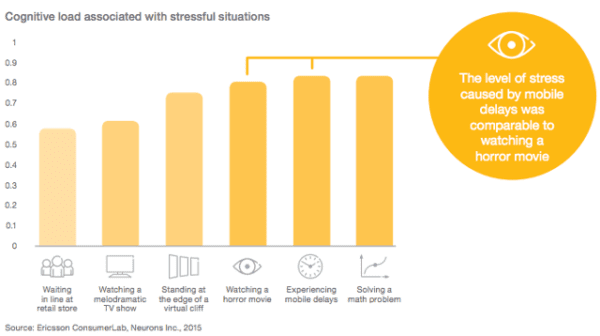
That friction costs time, money, and your visitor’s experience. Research shows that the level of stress from waiting for slow mobile results can be more stressful than watching a horror movie. Surely not, you say? That’s what the fine folks at Ericsson Research found a few years back.

Ericsson Mobility Report MWC Edition, February 2016

Improving your site speed across the board means making people happy. They’ll enjoy using your site, make more purchases, and return more frequently. This means that Google will view your site as a great search result because you are delivering high-quality content. Eventually, you might get a nice ranking boost.

Frustration hurts your users and hurts your rankings

It’s not just Google – research from every corner of the web on all aspects of consumer behavior shows that speed has a significant impact on outcomes.

  • Nearly 70% of consumers say that page speed impacts their willingness to buy (unbounce)
  • 20% of users abandon their cart if the transaction process is too slow (radware.com)
  • The BBC found that they lost an additional 10% of users for every additional second their site took to load

These costs and site abandonment happen because users dislike being frustrated. Poor experiences lead them to leave, visit other websites, and switch to competitors. Google easily tracks these behaviors (through bounces back to search engine results pages, short visits, and other signals) and is a strong indicator that the page shouldn’t be ranking where it is.

Google needs fast sites

Speed isn’t only good for users – it’s good for Google, too. Slow websites are often inefficient. They may load too many large files, haven’t optimized their media, or fail to utilize modern technologies to serve their page. That means that Google has to consume more bandwidth, allocate more resources, and spend more money.

Across the whole web, every millisecond they can save, and every byte they don’t have to process, adds up quickly. And quite often, simple changes to configuration, processes, or code can make websites much faster with no drawbacks. That may be why Google is so vocal about its education on performance.

A faster web is better for users and significantly reduces Google’s operating costs. Either way, that means that they’re going to continue rewarding fast(er) sites.

Improving page speed helps to improve crawling for search engines

Modern sites are incredibly wieldy, and untangling that mess can make a big difference. The larger your site is, the greater the impact page speed optimizations will have. That not only impacts user experience and conversion rates but also affects crawl budget and crawl rate.

When a Googlebot comes around and crawls your webpage, it crawls the HTML file. Any resources referenced in the file, like images, CSS, and JavaScript, will be fetched separately. The more files you have and the heavier they are, the longer it will take for the Googlebot to go through them.

On the flip side, the more time Google spends on crawling a page and its files, the less time and resources Google has to dedicate to other pages. That means Google may miss out on other important pages and content on your site.

Optimizing your website and content for speed will provide a good user experience for your visitors and help Googlebots better crawl your site. They can come around more often and accomplish more.

Page speed is a ranking factor

Google has repeatedly said that a fast site helps you rank better. It’s no surprise, then, that Google has been measuring the speed of your site and using that information in its ranking algorithms since 2010.

In 2018, Google launched the so-called ‘Speed Update,’ making page speed a ranking factor for mobile searches. Google emphasized that it would only affect the slowest sites and that fast sites would not receive a boost; however, they are evaluating website performance across the board.

In 2021, Google announced the page experience algorithm update, demonstrating that page speed and user experience are intertwined. Core Web Vitals clearly state that speed is an essential ranking factor. The update also gave site owners metrics and standards to work with.

Of course, Google still wants to serve searchers the most relevant information, even if the page experience is somewhat lacking. Creating high-quality content remains the most effective way to achieve a high ranking. However, Google also states that page experience signals become more important when many pages with relevant content compete for visibility in the search results.

Google mobile-first index

Another significant factor in page speed for ranking is Google’s mobile-first approach to indexing content. That means Google uses the mobile version of your pages for indexing and ranking. This approach makes sense as we increasingly rely on mobile devices to access the internet. In recent research, Semrush found out that 66% of all website visits come from mobile devices.

To compete for a spot in the search results, your mobile page needs to meet Core Web Vitals standards and other page experience signals. And this is not easy at all. Pages on mobile take longer to load compared to their desktop counterparts, while attention span stays the same. People might be more patient on mobile devices, but not significantly so.

Take a look at some statistics:

  • The average website loading time is 2.5 seconds on desktop and 8.6 seconds on mobile, based on an analysis of the top 100 web pages worldwide (tooltester)
  • The average mobile web page takes 15.3 seconds to load (thinkwithgoogle)
  • On average, webpages on mobile take 70.9% longer to load than on desktop (tooltester)
  • A loading speed of 10 seconds increases the probability of a mobile site visitor bouncing by 123% compared to a one-second loading speed (thinkwithgoogle)

All the more reasons to optimize your website and content if your goal is to win a spot in the SERP.

Understanding the web page loading process

When you click a link or type a URL and press Enter, your browser initiates a series of steps to load the web page. It might seem like magic, but behind the scenes, there’s a lot happening in just a few seconds. Understanding this process can help you see what affects your page loading speed and what you can do to boost website performance.

The “one second timeline” from Google’s site speed documentation

The process of loading a page can be divided into three key stages:

Network stage

This is where the connection begins. When someone visits your site, their browser looks up your domain name and connects to your server. This process, known as DNS lookup and TCP connection, enables data to travel between your website and the visitor’s device.

You don’t have much direct control over this stage, but technologies like content delivery networks (CDNs) and smart routing can make a big difference, especially if you serve visitors from around the world. For local websites, optimizing your hosting setup can still help improve overall page loading speed.

Server response stage

Once the connection is established, the visitor’s browser sends a request to your server asking for the web page and its content. This is when your server processes that request and sends back the necessary files.

The quality of your hosting, server configuration, and even your website’s theme or plugins all influence how quickly your server responds. A slow response is one of the most common issues with slow websites, so investing in a solid hosting environment is crucial if you want to boost your website’s performance.

One popular choice is Bluehost, which offers reliable infrastructure, SSD storage, and built-in CDN support, making it a go-to hosting solution for many website owners.

Browser rendering stage

Now it’s time for the browser to put everything together. It retrieves data from your server and begins displaying it by loading images, processing CSS and JavaScript, and rendering all visible elements.

Browsers typically load content in order, starting with what’s visible at the top (above the fold) and then proceeding down the page. That’s why optimizing the content at the top helps users interact with your site sooner. Even if the entire page isn’t fully loaded yet, a quick initial render can make it feel fast and keep users engaged.

Key causes that are causing your website to slow down

While you can’t control the quality of your visitors’ internet connection, most slow website issues come from within your own setup. Let’s examine the key areas that may be hindering your site’s performance and explore how to address them to enhance your website’s performance.

Your hosting service

Your hosting plays a big role in your website’s performance because it’s where your site lives. The speed and stability of your host determine how quickly your site responds to visitors. Factors such as server configuration, uptime, and infrastructure all impact this performance.

Choosing a reliable host eliminates one major factor that affects speed optimization. Bluehost, for example, offers robust servers, reliable uptime, and built-in performance tools, making it a go-to hosting choice for anyone serious about speed and stability.

Your website theme

Themes define how your website looks and feels, but they also impact its loading speed. Some themes are designed with clean, lightweight code that’s optimized for performance, while others are heavy with animations and complex design elements. To boost website performance, opt for a theme that prioritizes simplicity, efficiency, and clean coding.

Large file size

From your HTML and CSS files to heavy JavaScript, large file sizes can slow down your website. Modern websites often rely heavily on JavaScript for dynamic effects, but overusing it can cause your pages to load slowly, especially on mobile devices. Reducing file sizes, compressing assets, and minimizing unnecessary scripts can significantly improve the perceived speed of your pages.

Badly written code

Poorly optimized code can cause a range of issues, from JavaScript errors to broken layouts. Messy or redundant code makes it harder for browsers to load your site efficiently. Cleaning up your code and ensuring it’s well-structured helps improve both performance and maintainability.

Images and videos

Unoptimized images and large video files are among the biggest causes of slow websites. Heavy media files increase your page weight, which directly impacts loading times. If your header image or hero banner is too large, it can delay the appearance of the main content. Optimizing your media files through compression, resizing, and Image SEO can dramatically improve your website’s speed.

Too many plugins and widgets

Plugins are what make WordPress so flexible, but adding too many can slow down your site. Each plugin adds extra code that your browser needs to process. Unused or outdated plugins can also conflict with your theme or other extensions, further reducing performance. Audit your plugins regularly and only keep the ones that truly add value.

Absence of a CDN

A content delivery network (CDN) helps your website load faster for users worldwide. It stores copies of your site’s static content, such as images and CSS files, across multiple servers located in different regions. This means that users access your site from the nearest available server, reducing loading time. If your audience is global, using a CDN is one of the easiest ways to boost website performance.

Redirects

Redirects are useful for managing URLs and maintaining SEO, but too many can slow down your site. Each redirect adds an extra step before reaching the final page. While a few redirects won’t hurt, long redirect chains can significantly affect performance. Whenever possible, try to link directly to the final URL to maintain consistent page loading speed.

For WordPress users, the redirect manager feature in Yoast SEO Premium makes handling URL changes effortless and performance-friendly. You can pick from redirect types such as 301, 302, 307, 410, and 451 right from the dashboard. Since server-side redirects tend to load faster than PHP-based ones, Yoast lets you choose the type your stack supports, allowing you to avoid slow website causes and boost website performance.

A smarter analysis in Yoast SEO Premium

Yoast SEO Premium has a smart content analysis that helps you take your content to the next level!

How to measure page speed and diagnose performance issues

Before you can improve your website performance, you need to know how well (or poorly) your pages are performing. Measuring your page speed helps you identify what’s slowing down your website and provides a direction for optimization.

What is page speed, really?

Page speed refers to how quickly your website’s content loads and becomes usable. But it’s not as simple as saying, ‘My website loads in 4 seconds.’ Think of it as how fast a visitor can start interacting with your site.

A page might appear to load quickly, but still feel slow if buttons, videos, or images take time to respond. That’s why website performance isn’t defined by one single metric — it’s about the overall user experience.

Did you know?

There is a difference between page speed and site speed. Page speed measures how fast a single page loads, while site speed reflects your website’s overall performance. Since every page behaves differently, measuring site speed is a more challenging task. Simply put, if most pages on your website perform well in terms of Core Web Vitals, it is considered fast.

Core metrics that define website performance

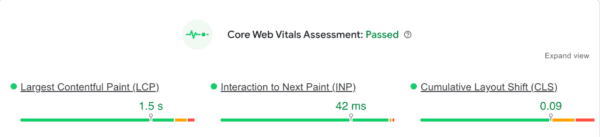
Core Web Vitals are Google’s standard for evaluating how real users experience your website. These metrics focus on the three most important aspects of page experience: loading performance, interactivity, and visual stability. Improving them helps both your search visibility and your user satisfaction.

  • Largest Contentful Paint (LCP): Measures how long it takes for the main content on your page to load. Aim for LCP within 2.5 seconds for a smooth loading experience
  • Interaction to Next Paint (INP): Replaces the older First Input Delay metric and measures how quickly your site responds to user interactions like taps, clicks, or key presses. An INP score under 200 milliseconds ensures your site feels responsive and intuitive
  • Cumulative Layout Shift (CLS): Tracks how stable your content remains while loading. Elements shifting on screen can frustrate users, so keep CLS below 0.1 for a stable visual experience

How to interpret and improve your scores

Perfection is not the target. Progress and user comfort are what count. If you notice issues in your Core Web Vitals report, here are some practical steps:

  • If your LCP is slow: Compress images, serve modern formats like WebP, use lazy loading, or upgrade hosting to reduce load times
  • If your INP score is high: Reduce heavy JavaScript execution, minimize unused scripts, and avoid main thread blocking
  • If your CLS score is poor: Set defined width and height for images, videos, and ad containers so the layout does not jump around while loading
  • If your TTFB is high: Time to First Byte is not a Core Web Vital, but it still impacts loading speed. Improve server performance, use caching, and consider a CDN

Remember that even small improvements create a noticeable difference. Faster load times, stable layouts, and quicker interactions directly contribute to a smoother experience that users appreciate and search engines reward.

Tools to measure and analyze your website’s performance

Here are some powerful tools that help you measure, analyze, and improve your page loading speed:

Google PageSpeed Insights

Google PageSpeed Insights is a free tool from Google that provides both lab data (simulated results) and field data (real-world user experiences). It evaluates your page’s Core Web Vitals, highlights problem areas, and even offers suggestions under ‘Opportunities’ to improve load times.

Google Search Console (Page Experience Report)

The ‘Page Experience’ section gives you an overview of how your URLs perform for both mobile and desktop users. It groups URLs that fail Core Web Vitals, helping you identify whether you need to improve LCP, FID, or CLS scores.

Lighthouse (in Chrome DevTools)

Lighthouse is a built-in auditing tool in Chrome that measures page speed, accessibility, SEO, and best practices. It’s great for developers who want deeper insights into what’s affecting site performance.

WebPageTest

WebPage Test lets you test how your website performs across various networks, locations, and devices. Its ‘waterfall’ view shows exactly when each asset on your site loads, perfect for spotting slow resources or scripts that delay rendering.

Chrome Developer Tools (Network tab)

If you’re hands-on, Chrome DevTools is your real-time lab. Open your site, press F12, and monitor how each resource loads. It’s perfect for debugging and understanding what’s happening behind the scenes.

A quick checklist for diagnosing performance issues

Use this checklist whenever you’re analyzing your website performance:

  • Run your URL through PageSpeed Insights for Core Web Vitals data
  • Check your Page Experience report in Google Search Console
  • Use Lighthouse for a detailed technical audit
  • Review your WebPageTest waterfall to spot bottlenecks
  • Monitor your server performance (ask your host or use plugins like Query Monitor)
  • Re-test after every major update or plugin installation

Speed up, but with purpose

As Mahatma Gandhi once said, ‘There is more to life than increasing its speed.’ The same goes for your website. While optimizing speed is vital for better engagement, search rankings, and conversions, it is equally important to focus on creating an experience that feels effortless and meaningful to your visitors. A truly high-performing website strikes a balance between speed, usability, accessibility, and user intent.

When your pages load quickly, your content reads clearly, and your navigation feels intuitive, you create more than just a fast site; you create a space where visitors want to stay, explore, and connect.