Today we’ve launched a redesigned onboarding experience for Yoast SEO for Shopify, built to guide, support, and empower every user from the moment they install. Customer-centric marketers and designers know, first impressions matter, and thoughtful onboarding is the first step to long-term success.
A new onboarding, designed with care
We’ve simplified the setup process, removed unnecessary steps, and introduced a guided, narrative-style welcome experience that makes it easier to get started and harder to get stuck.
Whether you’re new to SEO or scaling a large store, our goal is the same: help you feel confident from the first click.
“We wanted users to land in the onboarding flow and immediately understand two things: how the app can help them improve their Shopify store’s SEO, and what steps to take first to see results.” Tom Ottjes, UX Designer at Yoast
Behind the scenes: Service design in action
This onboarding redesign isn’t just a UI refresh, it’s the result of a service design approach that included:
Journey mapping based on real user behavior
Cross-functional collaboration across UX, development, support and marketing using service blueprints
Strategic improvements to both front-end and back-end processes
Want to learn how a single blueprint helped align our teams and reshape the onboarding experience?
We’re already working on the next phase of improvements designed to improve our customers’ experience, including smarter in-app guidance and contextual feature onboarding.
Thanks to everyone who shared feedback along the way. Keep it coming, we’re listening, learning, and building better together.
Beth is Product Marketing Manager at Yoast. Before joining the company, she honed her digital marketing and project management skills in various in-house and agency environments.
During the initial rollout, we discovered a technical issue where unintended classes were being added to content for some users. While these added classes are harmless and do not impact the functionality or appearance of your content, they should not have been added, that’s on us.
We take this seriously, and to maintain the quality you expect, we’ve been actively working on a solution. We’re pleased to share that a fix has now been released, and the issue has been resolved. For users already affected, we are automatically cleaning up the unintended classes as part of the fix, no action is needed on your part.
As part of our commitment to delivering reliable and thoughtful features, we have also temporarily disabled the AI Optimize feature for the Classic Editor. This will give us time to reconsider our approach and develop an improved solution. We’ll keep you updated and reintroduce the feature as soon as we’re confident in its performance.
Please update your Yoast SEO plugins to the latest version where available. Should you have any concerns, feel free to contact our support team.
Thank you for your understanding and continued support.
Beth is Product Marketing Manager at Yoast. Before joining the company, she honed her digital marketing and project management skills in various in-house and agency environments.
Increased usage of AI is changing how people discover businesses and services online. While your website may be optimized for traditional search engines, large language models (LLMs) process your website’s information differently. Our new feature, llms.txt offers to bridge the gap. Yoast SEO generates a file that highlights the most important, up-to-date content on your website as an invitation for LLMs to get the right picture. It’s automatic, requires no technical setup, and is ready in one click.
Helping AI understand your website
Unlike search engines that regularly crawl and index websites, LLMs like ChatGPT and Google Gemini work differently. They don’t store website content for future use. Instead, they gather information in real time when responding to user queries.
This means LLMs often only access a small portion of a website while looking for answers. This is especially true for large websites such as news platforms or ecommerce stores. This can lead to incomplete or even inaccurate AI-generated responses. Not ideal if you’re aiming to improve your visibility in LLM-generated answers as part of your marketing strategy.
The llms.txt file gives LLMs a suggested, pre-prepared slice of your website, highlighting your most important and up-to-date content.
Think of it like a helpful guide at the entrance of a large department store. Imagine you’re walking in looking for socks. Someone greets you and hands you a store map that highlights where the socks are, along with other key departments like shoes, checkout, and customer service. You don’t have to use the map, you can wander around on your own, but it makes it much easier to quickly find what you’re looking for.
In the same way, this file helps LLMs quickly identify the most relevant and useful parts of your website. While the models can still explore other areas, giving them clear guidance increases the chances that they’ll surface the right information in their responses.
How is it different from robots.txt?
robots.txt
Tells bots what not to access
Focuses on permission
Used for search engine indexing and crawling
Supported by traditional search engines
llms.txt
Suggests what AI should read
Focuses on guidance and clarity
Helps AI answer user questions more accurately
Designed for large language models like ChatGPT
How does Yoast SEO llms.txt work?
When you turn the feature on, it automatically generates an llms.txt file for your website, using a mix of relevant website data. It draws from:
Your most recently updated content
Technical SEO elements like your sitemap for context
Descriptions you’ve added about your website
This offers large language models a website summary to understand what your website is about and what content is most important.
Managing your llms.txt file
The plugin automatically creates and maintains the llms.txt file for you, refreshing every week. You can preview the file to ensure it accurately reflects your brand and prioritizes the right content before implementation.
Want full control or prefer to manage it yourself? Learn how to manually add an llms.txt file to your website by visiting our developer documentation.
At Yoast, our mission is SEO for everyone
Setting up an llms.txt file manually may only be accessible to a technical few. By automating the process, we make it easier for all website owners to benefit from this new technology, without needing to dive into code.
At Yoast, we believe that everyone should have a say in how their content is seen and used. Especially as AI plays a bigger role in how people discover information online. That’s why we’ve introduced this feature as opt-in, so you can decide if and when it makes sense for your website. We’ve seen early signs that this is something more website owners are starting to think about.
Just as robots.txt tries to help search engines understand what to index, llms.txt suggests which parts of your website large language models should pay attention to.If you’d like to see what an llms.txt file looks like in practice, you can view the live version on yoast.com.

Beth is Product Marketing Manager at Yoast. Before joining the company, she honed her digital marketing and project management skills in various in-house and agency environments.
Ever feel frustrated having to jump between different apps just to check your site’s SEO performance? We’ve simplified things for you. Yoast now seamlessly integrates insights from Site Kit by Google (Google Analytics and Search Console) right into your Yoast Dashboard, giving you one clear view to manage your website’s SEO effectively.
Here’s why you’ll love this:
Connect once, get instant clarity: Easily link your Yoast Dashboard and Site Kit by Google just once, avoiding multiple logins and complex workflows.
Instantly see where to focus your efforts: Efficiently recognize your best opportunities to boost visibility and rankings, allowing you to prioritize SEO tasks effectively.
Stay effortlessly informed: The Yoast Dashboard integration with Site Kit by Google connects your analytics and search data seamlessly in one place, so you can quickly see important metrics like organic traffic, impressions, clicks, and bounce rates without switching tabs.
How to connect your Site Kit by Google to the Yoast SEO Dashboard
Update your Yoast plugin to the latest version.
Go to your Yoast Dashboard in WordPress.
Follow the steps in the Site Kit installation widget.
Start reviewing insights directly in your Yoast Dashboard.
Connect Site Kit by Google to your Yoast Dashboard today and simplify your SEO workflow!
Disclaimer!
Please note that we’re rolling out this new feature in phases. This means that you might not see the Site Kit integration in your Yoast Dashboard yet. Eventually, this integration will be available to everyone, so stay tuned!
When I first started working in marketing, Yoast SEO was the first plugin I used. Today, I work with the tool that I depended on the most. I’m Carl Henry, my background is in SaaS growth marketing with a focus on content. I like basketball, padel, painting, and gaming.
We’re excited to announce that Yoast AI Optimize is now also available when using the Classic Editor in WordPress!
You’ve finished your copy, great! But those pesky Yoast SEO Analysis lights aren’t all green and you have to make manual changes. That’s where Yoast AI Optimize comes in. With Yoast SEO Premium, you can now get AI-powered suggestions right inside your Classic Editor to help fine-tune your content.
What is Yoast AI Optimize?
Yoast AI Optimize brings smart, targeted SEO support into your writing flow. It gives AI-powered suggestions for specific assessments in the Yoast SEO analysis, such as length, structure, and keyphrase distribution. You’ll see exactly where improvements can be made and get quick, editable suggestions to help you fix them. You can quickly apply or dismiss them; the final decision always remains yours.
Benefits:
Get real-time AI suggestions that help improve SEO and readability
Edit suggestions to match your style and tone of voice
Apply or dismiss suggestions easily without breaking your writing flow
Use it in both the Classic and Block editors with Yoast SEO Premium
Supports optimization for:
Keyphrase in introduction
Keyphrase distribution
Keyphrase density
Sentence length
Paragraph length
Whether you’re using the Classic Editor or sticking with the Block Editor, Yoast AI Optimize helps you improve your SEO score faster, without losing the personal touch.
If you’re curious to know how we built this feature, check out our developer blog post with all the behind the scenes.
Ready to optimize smarter? Update to Yoast SEO Premium to try AI Optimize in the Classic Editor today!
Beth is Product Marketing Manager at Yoast. Before joining the company, she honed her digital marketing and project management skills in various in-house and agency environments.
Bring your Shopify products to life in Google searches. Highlight product variants that shoppers care about—color, size, pattern, material and audience demography—and watch your clicks and sales soar.
Why you and your customers will love it
Attract more shoppers
Make it easier for Google to show exactly what customers are searching for.
Stand apart
Richer product details and search snippets help you outshine competitors.
Confidence and clarity
Easily check your structured data in the Schema tab—no more confusion.
No extra cost
Available immediately for all Yoast SEO for Shopify users.
Here’s how to try it:
To access the Yoast SEO for Shopify product variant schema, you just need to:
Open your Yoast SEO app and select a product.
Click on the Schema tab in your editor.
Confirm your variants and enhance your listings.
About Yoast for Shopify
Yoast SEO for Shopify makes SEO for your online store easy for everyone. It gives you the tools and guidance to do SEO yourself. Let us worry about your technical SEO so that you can focus on other aspects of your business. With multiple integrations with Semrush, Judge.me, Ali Reviews, Loox, Opinew, Weglot and Langify to help you get more out of the online store.
When I first started working in marketing, Yoast SEO was the first plugin I used. Today, I work with the tool that I depended on the most. I’m Carl Henry, my background is in SaaS growth marketing with a focus on content. I like basketball, padel, painting, and gaming.
Getting our SEO plugin up and running should be quick and stress-free. That is why we are introducing a simpler installation flow that takes just a few clicks. If you have ever felt confused about installing plugins, this new option is here to help you.
Click the install button and follow the on-screen prompts
Complete the setup, and you are all set
Because everything is more user-friendly, you will save time and avoid the usual guesswork. This improved flow is perfect for new users and anyone who does not feel comfortable around zip files or manual uploads.
Installation should be the easiest part of your SEO journey. Try it today by heading to the Yoast SEO Free page and trying the plugin. You will be optimizing your site in no time.
Get Yoast SEO today and join the 13+million websites using Yoast.
When I first started working in marketing, Yoast SEO was the first plugin I used. Today, I work with the tool that I depended on the most. I’m Carl Henry, my background is in SaaS growth marketing with a focus on content. I like basketball, padel, painting, and gaming.
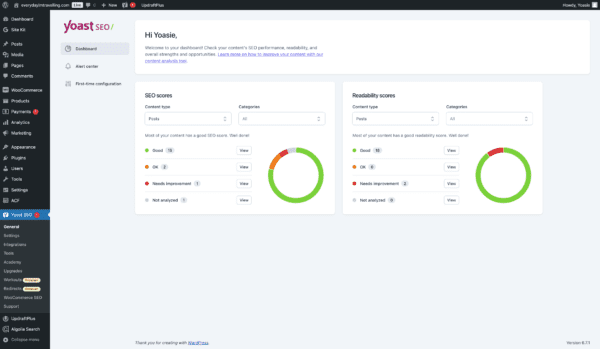
With the new Yoast SEO Dashboard, you can see how your site is doing at a glance. Instead of hunting through pages, you’ll find all your key metrics in one place. It’s easy to spot which posts need attention, see where you can improve, and figure out what to tackle first so you can spend more time refining your content and less time searching for data.
We know it can be challenging to improve your content when you have to dig through every post and page. That’s why we created a dashboard that instantly shows your site SEO Perfomance. It streamlines the process so you can focus on what matters: making your content shine.
What you get from the Yoast SEO Dashboard:
Top-level overview of your SEO: see critical insights at a glance without hunting through individual pages
Filterable views of SEO and readability scores: quickly spot where you can make the most significant improvements
Designed for clarity and direction, our dashboard makes it easy to check in, prioritize your next steps, and enhance your content strategy immediately. It’s straightforward, efficient, and all about helping you work smarter.
How to access the Yoast SEO Dashboard:
To access the Yoast SEO Dashboard, you just need to:
Ensure your Yoast SEO is up-to-date: In your WordPress admin area, go to “Plugins” and update Yoast SEO to the latest version
Navigate to the Dashboard: Click on “Yoast SEO” in your WordPress sidebar to land on the dashboard, or click on “Dashboard”
Explore your insights: Review the overview, filter your scores, and start working through your task list
Ready to see how much simpler managing your SEO can be? Get Yoast SEO today and let your new dashboard guide you toward better performance.
Carl Henry Addoumieh
When I first started working in marketing, Yoast SEO was the first plugin I used. Today, I work with the tool that I depended on the most. I’m Carl Henry, my background is in SaaS growth marketing with a focus on content. I like basketball, padel, painting, and gaming.
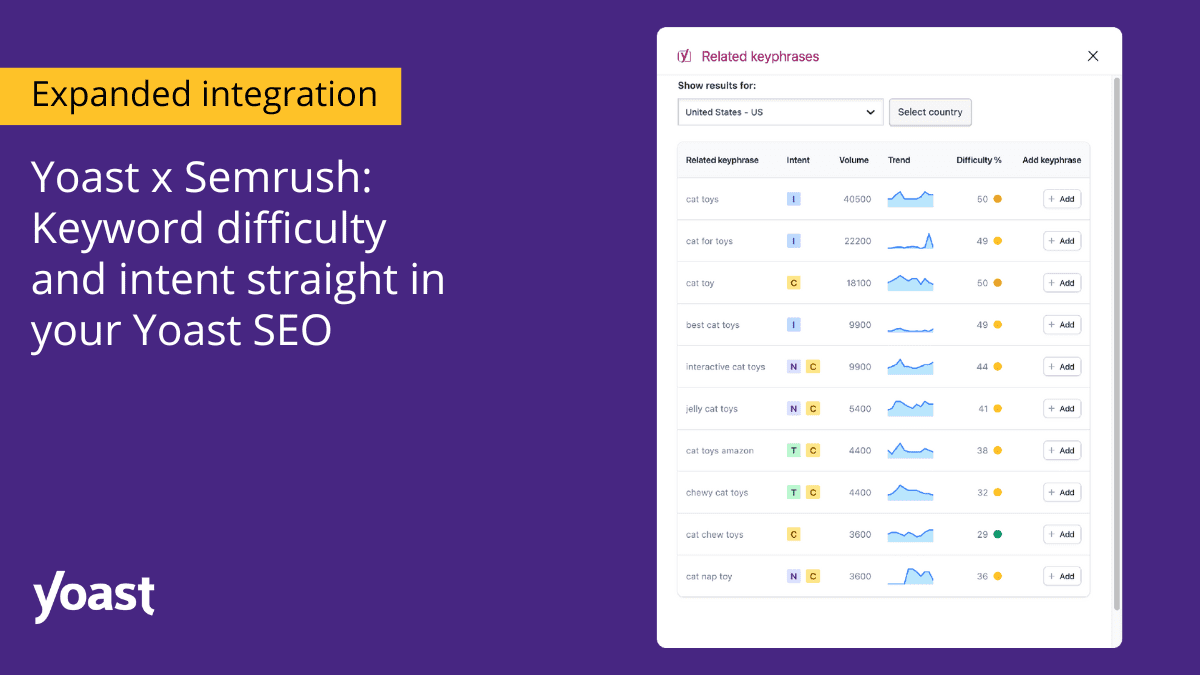
Take your content strategy to the next level with expanded Semrush insights in the Yoast SEO plugin! Simplify your SEO process and focus on what matters the most: crafting and optimizing content that resonates and ranks. The Yoast Semrush integration means all Yoast SEO users can access keyword intent, and keyword difficulty and track and analyze up to four keywords. All powered by Semrush—seamlessly integrated into Yoast’s focus keyphrase section.
Keyword difficulty and intent:
Make your keyword choices smarter with data-driven insights:
Keyword difficulty shows how challenging it is to rank for a specific keyword, helping you focus on keywords that are within reach and maximize your chances of ranking.
Keyword intent, or search intent, reveals whether users searching for a keyword are looking for information, products, or services. This gives you the context to create content that genuinely connects with their needs.
These insights empower you to shape content that ranks and resonates—right from Yoast SEO’s analysis section.
Terms can sometimes be overwhelming, so the Yoast team prepared a comprehensive glossary with all the SEO terms you need to build and implement an SEO strategy successfully.
Get started
Click “Get related keyphrases” below the focus keyphrase box to get started. If you haven’t activated your Yoast Semrush integrations, you will be redirected to the Semrush login page. Afterward, you will instantly see keyword insights in the related keyphrases section. This makes adapting your content strategy seamless, allowing you to make quick, data-driven adjustments as you write.
Get started in simple steps:
Click “Get related keyphrases” below the focus keyphrase box.
If you haven’t activated your Yoast Semrush integrations, you will be redirected to the Semrush login page.
You will instantly see keyword insights in the related keyphrases section.
This makes adapting your content strategy seamless, allowing you to make quick, data-driven adjustments as you write. To learn more about activating your integrations within Yoast SEO, visit our help center.
About Yoast Semrush integration
Expanded Semrush insights are available at no additional cost to all users with a Semrush account. Just update your plugin and enjoy the data you need to rank higher, right next to your keywords—effortless, real-time SEO insights, all within Yoast!
Integrate your Semrush account into your Yoast SEO and boost your ranking with valuable data within the plugin. Directly bringing comprehensive keyword research tools to your fingertips without switching platforms. Learn more about the Yoast Semrush integration.
Today we’re welcoming Yoast AI Optimize to our family of AI features. The AI features are designed to make SEO tasks easier than ever by harnessing the power of AI. The tool is perfect for marketing professionals, freelance writers, and content strategists. This brand new feature ensures your carefully-crafted content is search engine friendly.
What does Yoast AI Optimize do?
You have finished drafting your copy, and you are relatively happy with the results. Great! Until you realize that there’s a lot of manual tweaking needed to implement the suggestions in the Yoast SEO analysis. We get it, reworking copy is not the most interesting part of blogging. In fact, internal research informed us that optimizing content for SEO is the most tedious and challenging part of the content creation process. At the same time, our customers know how important this final stage can be to gaining visibility in the SERPS. So we found a solution. This is where Yoast AI Optimize steps in to help your content over the ‘SEO’ finish line.
How you can access the new feature
Easily recognizable by the color fade and signature sparkle icon, Yoast AI Optimize is automatically available to all our Yoast SEO Premium customers. To access, customers must have updated to the most recent version, 23.2 and granted consent to use AI.
Where you can use Yoast AI Optimize
Currently you can optimize three of the assessments in the Yoast SEO Analysis; Keyphrase in introduction, Keyphrase distribution and Keyphrase density. Just click on the sparkly icon next to the assessment to receive the AI-powered suggestions.
Pricing and usage
You can look out from behind your fingers, there are no additional or hidden costs! That said, we know you will all understand that to continue offering sustainable innovation using AI, we must consider fair ways to maintain our current pricing. For this reason, we have introduced the spark counter which keeps track of how many interactions you have with our AI features.
At the moment there is no limit on the number of sparks you can generate. Currently, the counter is set to 100, but you may surpass this limit without issue for now. Of course, the general Yoast AI rate limits apply. The counter resets on the first day of every calendar month. Our internal research on usage tells us that this number will not pose a challenge for the vast majority of our customers, allowing for flexible and uninhibited use across all our AI features.
What are sparks and how do they work?
A spark is defined as a single click on a button of one of Yoast SEO’s AI features. In practice, this means that when you click ‘Use AI’ to generate five example meta descriptions, this would be considered one spark. Should you regenerate another five, this would be another single spark.
You can find the spark counter at the top of the dismiss or apply modals which pop up whenever you interact with the feature within the Yoast SEO analysis sidebar.
The new signature colors help you know when you interact with AI
Kai van Grunsven, UX Designer at Yoast, comments on how the UX team created awareness around when our customers interact with artificial intelligence in line with our core ethical values. The spark counter applies to all Yoast’s AI features. Naturally, this is also fully responsive on mobile.
“As a UX designer, my goal was to give our AI features distinct branding that stands out and integrates seamlessly into our UI. I used a ‘sparkles’ icon and a gradient transitioning from Yoast’s purple to indigo to enhance AI buttons and the spark counter. This familiar icon and modern color scheme help users recognize and engage with our AI features effortlessly, ensuring a visually engaging and intuitive experience for our customers.”
Limitations
Yoast AI Optimize, like all other AI features, is currently in beta. This means you may experience limitations when using the tool. For transparency, these are listed below.
Yoast AI Optimize is only available for texts up to around 1000 words. For longer texts, the button will be inactive.
Yoast AI Optimize is only available for the Block editor. It can optimize content in the following blocks: Paragraph, Heading, List, and Table block. Content from other blocks cannot be optimized.
Yoast AI Optimize currently is available for the following SEO checks: Keyphrase in Introduction, Keyphrase Density, Keyphrase Distribution. For keyphrase density, we only support the case in which the keyphrase is underused. If the keyphrase is overused, we do not provide the Yoast AI Optimize feature.
You can only accept or reject all suggestions. It is not currently possible to accept parts of a suggestion.
For longer texts, it might take up to a minute for AI Optimize to produce a result.
Provide feedback on the new beta feature
Yoast AI Optimize is currently in beta, with this in mind, we value your feedback to make it even better. Your insights and suggestions will help us refine and enhance the AI-powered title and meta description generation feature. To help shape this tool’s future and contribute to your SEO strategy’s success, please provide feedback here.
Try out Yoast AI Optimize today
Upgrade to Yoast SEO Premium to unlock the full potential of our AI features! Gain access to all our advanced tools, including the award-nominated Yoast AI Generate and the powerful Yoast AI Optimize. Streamline your processes and receive SEO-ready suggestions at a click when you upgrade to the latest version, 23.2.
Beth is the Product Marketeer at Yoast. Before joining the company, she honed her digital marketing and project management skills in various in-house and agency environments.