A vulnerability advisory was issued for a WordPress plugin that saves contact form submissions. The flaw enables unauthenticated attackers to delete files, launch a denial of service attack, or perform remote code execution. The vulnerability was given a severity rating of 9.8 on a scale of 1 to 10, indicating the seriousness of the issue.
Database for Contact Form 7, WPForms, Elementor Forms Plugin
The Database for Contact Form 7, WPForms, Elementor Forms, also apparently known as the Contact Form Entries Plugin, saves contact form entries into the WordPress database. It enables users to view contact form submissions, search them, mark them as read or unread, export them, and perform other functions. The plugin has over 70,000 installations.
The plugin is vulnerable to PHP Object Injection by an unauthenticated attacker, which means that an attacker does not need to log in to the website to launch the attack.
A PHP object is a data structure in PHP. PHP objects can be turned into a sequence of characters (serialized) in order to store them and then deserialized (turned back into an object). The flaw that gives rise to this vulnerability is that the plugin allows an unauthenticated attacker to inject an untrusted PHP object.
If the WordPress site also has the Contact Form 7 plugin installed, then it can trigger a POP chain during deserialization.
“This makes it possible for unauthenticated attackers to inject a PHP Object. The additional presence of a POP chain in the Contact Form 7 plugin, which is likely to be used alongside, allows attackers to delete arbitrary files, leading to a denial of service or remote code execution when the wp-config.php file is deleted.”
All versions of the plugin up to and including 1.4.3 are vulnerable. Users are advised to update their plugin to the latest version, which as of this date is version 1.4.5.
How to make your content visible in the age of AI search
So, what exactly is LLM Optimization? Well, the answer to that question depends on who you ask. For example, if you ask a machine learning engineer, they’ll tell you it’s all about tweaking prompts and token limits to get better performance from a large language model. In fact, Iguazio actually defines LLM optimization as improving the way models respond, which means smarter, faster, and with more contextual recognition.
If, on the other hand, you are a content strategist or SEO enthusiast, LLM optimization will mean something completely different to you and that is making sure that your content shows up in AI-generated search results. And, that needs to be true no matter whether you’re talking to ChatGPT, searching with Perplexity, or scanning Google’s new AI Mode for answers. Some call this ChatGPT SEO or Generative Engine Optimization.
So, if you fall into the latter of those two groups, ie: the people who want their content and product pages to be seen and clicked, then this article is for you. And, if you’d like to read on, we’ll show you why LLM optimization in an AI-search landscape isn’t some sort of luxury option; it’s an absolute necessity.
What are LLMs and why should you care?
AI engineers train Large Language models on huge amounts of text and data to generate answers, summaries, code, and human-like language. They’ve read everything (not just the Classics) and that includes blogs, news articles and your website.
The reason that’s important is that LLMs don’t crawl your website in real time like Search Engines do. What they do is read it, learn from it and when someone asks them a question, they try to recall what they saw and rephrase it into an answer. If your site shows up as the answer, “Great” but if not, you’ve got a visibility problem.
The new way of searching
Search is not just about Google anymore. Also, it’s not as if just one other thing has come to dominate which means we’re left with a rather messy mix of Perplexity answers, Chat GPT chats, Gemini summaries and voice assistants reading out answers while we try to do two tasks at once.
In short, people aren’t just searching, they’re conversing and if your content can’t hold its own in this environment then you’re missing out on visibility, traffic, and the ability to build trust. We’ll walk you through exactly how to fix that.
SEO vs. GEO vs. AEO vs. LLMO: Are we just rebranding SEO?
If you’ve been wondering whether you now need four different strategies for SEO (Search Engine Optimization), GEO (Generative Engine Optimization), AEO (Answer Engine Optimization), and LLMO (Large Language Model Optimization), relax, it’s not as big a deal as you might think. You see, despite all the buzzwords, the core of optimization hasn’t changed much.
All four terms point to the same central goal: making your content more findable, quotable, and credible in machine-generated output regardless of whether that comes from Google’s AI Overviews, ChatGPT, or an answer box on Bing.
So, should you overhaul your entire content strategy to ‘do LLMO’?
Not really. At least, not yet.
Most of what boosts your presence in LLMs is already what SEO professionals have been doing for years. Structured content, semantic clarity, topical authority, entity association, clean internal linking, it’s all classic SEO.
Where they slightly diverge:
SEO (Search Engine Optimization)
Relies on backlinks and site architecture to establish authority
GEO (Generative Engine Optimization
Puts extra emphasis on unlinked brand mentions and semantic association
AEO (Answer Engine Optimization)
Focuses on being the single best, most concise, and sourceable response to a specific query
LLMO (Large Language Model Optimization)
Leans into optimizing content not just for people or search crawlers but for LLMs reading in chunks, skipping JavaScript, and relying on embeddings and grounding datasets
But the thing is: you don’t need four different playbooks. All you need is one solid SEO foundation. In fact, this point is backed up by Google’s Gary Illyes who confirmed that AI Search does not require specialized optimization, saying that “AI SEO” is not necessary and that standard SEO is all that is needed for both AI Overviews and AI Mode.
Focus more on entity mentions, not just links
Treat your core site pages (home, pricing, about) and PDFs as important LLM fuel.
Remember that AI crawlers don’t render JavaScript, so client-side content might be invisible
Think about how LLMs process structure (chunking, context, citations), not just how humans skim it
So, if you’ve already been investing in foundational SEO, you’re already doing most of what GEO, AEO, and LLMO ae all about. That’s why not every new acronym needs you to have a whole rethink on your efforts. Sometimes, it’s just like SEO.
Key LLM SEO optimization techniques
Now that we know LLMs aren’t crawling our site but are understanding it, we need to think a little differently about how we create and construct content and for more on this, you may find this article extremely insightful. This is not about cramming in keywords or trying to play the algorithm, it’s about clarity, structure and credibility because these are the things LLMs care about when deciding what to quote, summarize or ignore. Below are some techniques that will help your content stay visible now that people are using generative search.
The bar has been raised on the quality of content
LLMs love clarity. The more natural and specific your language is, the easier it is for them to understand and reuse your content. That means not using jargon, avoiding ambiguity and instead, focusing on writing like you’re explaining something to a colleague.
To give an exact example:
Don’t Say:
“Our innovative tool revolutionizes the digital landscape for modern businesses.”
Instead Say:
“The Yoast SEO plugin for WordPress helps businesses to improve their website’s visibility and appear inn search results
Use Structure, Chunked Formatting
Chunked formatting means breaking your content into small pieces (chunks) of informatin that are easy to understand and remember. LLMs tend to prioritize the most easily digestible content construction – which means your headings, bullet points, and clearly defined sections must do a lot of heavy lifting. Not only does organizing your content like this help people to skim read, but it also helps machines understand what each section is about.
Structuring your content like this will help:
Write clear, descriptive H2s and 3s
Use bullet points that can provide standalone value
Include summaries and tables to give quick overviews
Be Factual, Transparent, and Authoritative
Just like Google, LLMs need to trust that your content is reliable before they start taking you seriously. This means you need to show your working out, quote sources, reveal authors, and follow the principles of E-E-A-T. Experience, Expertise, Authority, and Trust.
Include an author bio and credentials if possible (include a link to actual author bios and social profiles)
Name your sources when you use claims or statistics
Share real experiences if possible “As a small business owner…”
The more real, relatable and trustworthy your content looks, the more AI will like it.
Optimize for Summarization
LLMs won’t quote your entire blog post; they’ll only use snippets. Your job is to make those snippets irresistible. Start with strong lead sentences so that each paragraph begins with a clear point followed by context. Also, it’s a good idea to front-load your content. Don’t save your best bits for the end.
As a reminder:
Start each section with what you want the key takeaway to be
Keep paragraphs short and self-contained
Create standalone summary paragraphs as these often get quoted in AI generated answers
Use Schema
Behind every great summary is a structured content model. That’s where Schema markup comes in and to help the AI understand your content, you need to speak in a certain way.
Once you’ve got the basics completed, like clear writing, structure and trust signals, there’s still more you can do to give your content the best shot at visibility. These bonus strategies focus on how to make your site even more AI-friendly by anticipating how LLMs interpret and reuse information.
Use Explicit Context and Clear language
Humans have an incredible ability to be able to ‘fill in the blanks’ and still ‘get the message’ even if the information they got was vague or unclear. One of the biggest differences between humans and LLMs? Humans can infer meaning from vague references. LLMs on the other hand… well, let’s just say that it doesn’t come naturally to them.
In any case, the point is that if your article mentions “this tool” or “our product” without any context, an LLM might miss the connection entirely. The result? You’re left out of the answer, even if you’re the best source.
So, to give your content the clarity it deserves:
Use the full product or brand name, like “Yoast SEO plugin for WordPress,” not just “Yoast”
Define technical or niche terms before using them
Avoid vague language (“this page,” “the above section,” “click here”)
You don’t need to be repetitive, but you do need to be explicit rather than implicit.
Leverage FAQs and Conversational Formats
LLMs love FAQs because they’re direct, predictable, and easy to quote. They closely match real user intent and provide high-value snippets that tools like Perplexity and Gemini can pull from without much guesswork.
That said, there’s an important limitation to keep in mind if you’re using the Yoast SEO FAQ block in Gutenberg:
You cannot use H2 or H3 heading tags inside the FAQ block. The block creates its own question-answer formatting using custom HTML, which is great for structured data (FAQ Page schema), but it doesn’t support native heading tags which limits your ability to optimize AI readability and skimmability.
So, if your goal is to appear in AI-generated summaries or answer boxes, where headings like “What is LLM SEO?” make it easy for AI to quote your content, you might be better off using manual formatting.
Here’s how to get the best of both worlds:
STEP 1: Use H2 or H3 tags for each question (e.g., “What is llms.txt?”) and write a clear, short answer beneath it. This improves LLM visibility but doesn’t generate structured FAQ schema.
Step 2: Use the Yoast FAQ block for schema support but know that it won’t give you a proper heading structure.
Ultimately, the more your FAQs resemble natural, searchable questions — and are structured in a way that both humans and AI can easily parse — the more likely they are to be featured in answers.
Enhance Trust with Freshness Signals
Just like search engines, some LLMs give preference to newer content, but remember that we need to talk to them in a certain way to get the best out of them.
Older content can be overlooked. Worse, it can be quoted incorrectly if something has changed since you last hit publish.
Make sure your pages include:
A clear “last updated” timestamp (can we get a picture of what one would look like for clarification?)
Regular reviews for accuracy
Changelogs or update notes if applicable (especially for software or plugin content)
It doesn’t have to be complicated, even a simple “Last updated: June 2025” can help both readers and AI systems trust that your content is current.
Today, we’re entering a phase where who wrote your content is just as important as what it says. That means you need to highlight author visibility and put effort into signaling real-world experience.
Use Person schema to formally associate the content with a specific individual
Weave in relevant experience (“As an SEO consultant who works with SaaS brands…”)
Remember, LLMs are more likely to trust, quote, and amplify expert-authored content.
Use Internal Linking Strategically
Think of internal linking as your site’s nervous system. It helps both humans and LLMs understand what’s important, how topics relate, and where to go next.
But internal linking isn’t just about SEO hygiene anymore — it’s also a way to establish topic authority and help LLMs build a map of your expertise.
Do:
Cluster related articles together (e.g., link from “LLM Optimization” to “Schema Markup for SEO”)
Use descriptive anchor text like “read our full guide to Schema markup,” not just “click here”
Ensure every piece of content supports a broader narrative
The role of llms.txt. Giving AI search all the right signals
Now let’s talk about one of the most recent developments in LLM visibility; a little file called llms.txt.
Think of it as a sibling to robots.txt, but instead of guiding search engines, it tells AI tools how they’re allowed to interact with your content. Note: llms.txt is still an evolving standard, and support across AI tools may vary, but it’s a smart step toward asserting control
With llms.txt, you can:
Define how your content may be reused or summarized
Set clear expectations around attribution, licensing
It’s not just about protection, it’s about being proactive as AI usage accelerates.
LLM Optimization and SEO are part of the same family, but they serve different functions and require slightly different thinking.
Let’s compare:
Traditional SEO
LLM Optimization
Crawled and ranked by bots
Read, remembered, and reused by AIs
Emphasizes keywords
Emphasizes context and clarity
Optimizes for SERPs
Optimizes for AI-generated summaries and answers
The takeaway? You can’t ignore either. One brings traffic; the other boosts brand visibility within AI responses.
And considering that 42% of users now start their research with an LLM (not Google), you’ll want to be found in both places.
Common Mistakes to Avoid
Even well-meaning content creators fall into holes. So, take a look at the tips below to avoid any mishaps that could damage your LLM visibility:
Writing like a robot or allowing a robot to write for you (ironically, not appreciated by robots)
Leaving your content undated and unchanged for years
Publishing posts without any author information or editorial standards
Ignoring internal links or leaving orphaned pages
Using vague headings or anchor text like “read more” or “this article”
If your content looks generic, outdated, or anonymous, it won’t earn any trust. And, without trust, it won’t get quoted.
Tools and Resources to Get Started
Search used to be about visibility within SERPs. But now, it’s also about being seen in summaries, answers, snippets, and chats. LLMs aren’t just shaping the future of search; they’re shaping how your brand is perceived to both humans and robots alike.
To stand out:
Write with clarity and context
Structure for humans and machines
Cite your expertise and show your authors
Use tools like Yoast and llms.txt to signal your intent
Future-proof your visibility with Yoast SEO. From llms.txt integration to schema support, Yoast gives you all the tools you need to speak AI’s language and dominate both generative answers and search engines. Get started with Yoast SEO Premium nowand make it easy for AI to say something accurate, useful, and… ideally, about you.
Brendan Reid
Brendan is a seasoned writer with a particular interest in SMEs. What he really enjoys is being able to provide real, actionable steps that can be taken today to start making business better for everyone.
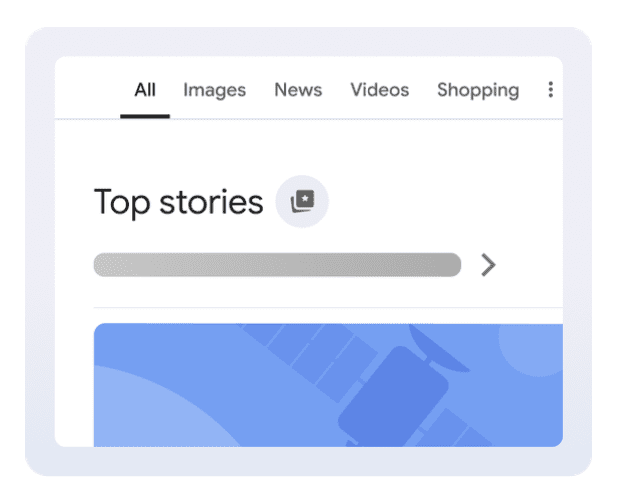
Google is rolling out a new setting that lets you pick which news outlets you want to see more often in Top Stories.
The feature, called Preferred Sources, is launching today in English in the United States and India, with broader availability in those markets over the next few days.
What’s Changing
Preferred Sources lets you choose one or more outlets that should appear more frequently when they have fresh, relevant coverage for your query.
Google will also show a dedicated From your sources section on the results page. You will still see reporting from other publications, so Top Stories remains a mix of outlets.
Google Product Manager Duncan Osborn says the goal is to help you “stay up to date on the latest content from the sites you follow and subscribe to.”
How To Turn It On
Image Credit: Google
Search for a topic that is in the news.
Tap the icon to the right of the Top stories header.
Search for and select the outlets you want to prioritize.
Refresh the results to see the updated mix.
You can update your selections at any time. If you previously opted in to the experiment through Labs, your saved sources will carry over.
In early testing through Labs, more than half of participants selected four or more sources. That suggests people value seeing a range of outlets while still leaning toward publications they trust.
Why It Matters
For publishers, Preferred Sources creates a direct way to encourage loyal readers to see more of your coverage in Search.
Loyal audiences are more likely to add your site as a preferred source, which can increase the likelihood of showing up for them when you have fresh, relevant reporting.
You can point your audience to the new setting and explain how to add your site to their list. Google has also published help resources for publishers that want to promote the feature to followers and subscribers.
This adds another personalization layer on top of the usual ranking factors. Google says you will still see a diversity of sources, and that outlets only appear more often when they have new, relevant content.
Looking Ahead
Preferred Sources fits into Google’s push to let you customize Search while keeping a variety of perspectives in Top Stories.
If you have a loyal readership, this feature is another reason to invest in retention and newsletters, and to make it easy for readers to follow your coverage on and off Search.
Excited to launch your website, but how to drive traffic to your website? A beautifully designed site without visitors is like a shop with no customers — that’s why traffic matters. Wondering how to get visitors to your site? You’re in the right place. In this post, we’ll walk you through simple yet practical tips on how to drive traffic to a website and attract your first visitors, and even better, keep them coming back.
By the end of this guide, you’ll have a clear roadmap for improving your website’s visibility.
Why is driving traffic to your website important?
Well, you want people to discover your website and not just keep it to yourself within the design drafts; therefore, driving traffic is important.
Website traffic is the number of website visitors over a set time. It’s not just a vanity metric—it represents potential customers, greater visibility, and stronger brand awareness. If you’re just getting started, boosting your search visibility can feel overwhelming. However, by following these simple and practical tips, you’ll start to see your traffic grow exponentially.
Top 5 practical tips to boost website traffic
Here are the top 5 tips that will help you drive traffic to your website:
Understand your target audience
Before you dive into posting content on your website’s landing pages, it’s crucial to take a step back and ask yourself: Who am I trying to reach? Defining your target audience is the very first step if you’re serious about learning how to drive traffic to your website.
Creating content that resonates and drives engagement becomes much easier when you know your audience — their interests, challenges, and goals. Without audience clarity, even your best-written content might be a mismatch, targeting everyone but reaching no one.
What time of day does your audience visit your website
Which age groups are engaging with your content
Where your visitors are located
And much more!
Feeling lost when looking at analytics data? Don’t worry — you can check out this guide on Google Segments to help bring clarity to your dashboard.
Focus on SEO basics
Getting the SEO basics right is the easiest way to boost organic traffic to your website. It also makes it easier for search engines to understand the content on your website and index pages to make them accessible to searchers.
Here are some beginner-friendly SEO techniques for website traffic:
Add keywords naturally
Keywords play an essential role in boosting the searchability of your website. Think of keywords as phrases used by search engines like Google to match your content with what people are searching for. Do keyword research so your content matches what people are searching for. Once you’ve identified the relevant search phrases, sprinkle them contextually in important spots like headings, content, and alt texts.
Here’s a video for you:
Write clear and structured headings
It’s not just about writing content to incorporate keywords; presentation matters too if you want the readers to stay on your website. Therefore, it’s important to write content that is pleasant to the eyes and readable.
Organize your content with H1, H2, and H3 tags. Clear headings make your blog posts and landing pages easy to scan, improve readability, and help improve visibility on Google.
Add meta descriptions
Meta descriptions appear under your page title in search results. Although they don’t directly boost rankings, they encourage clicks, helping increase website visitors. Make them short, relevant, and inviting.
Use descriptive alt text for images
Alt text helps search engines “read” your images and makes your website more accessible. In fact, according to EU stats, a large portion of users with disabilities depend on well-structured web content to browse effectively.
Invest in seo tools to make it easier
Managing all these tasks can feel overwhelming at first. That’s why using beginner-friendly SEO tools can make a big difference. For example, the Yoast SEO plugin offers real-time suggestions for keyword usage, readability improvements, meta descriptions, and technical SEO essentials like XML sitemaps—all inside your WordPress dashboard. Some features, such as advanced keyword optimization and certain integrations, are available in Yoast SEO Premium.
Plus, with Yoast’s built-in integration with Semrush, you can access high-performing keywords with just a few clicks, and that too without even leaving your editor.
Also, with Yoast’s newly launched Site Kit by Google insights integration, you can take your SEO management to the next level. Instead of switching between different tools to check your site’s analytics and search data, you’ll see key insights—like organic traffic, impressions, clicks, and bounce rates—directly in your Yoast Dashboard.
A smarter analysis in Yoast SEO Premium
Yoast SEO Premium has a smart content analysis that helps you take your content to the next level!
Optimize for AI and LLMs
AI-driven search is transforming how people discover information. Search results are no longer just a list of blue links—they’re increasingly delivered as direct, conversational answers through platforms like ChatGPT, Perplexity, and Claude. If your brand isn’t showing up in the answers your customers see, you’re missing a significant visibility opportunity.
Studies show consumers rely on AI-generated responses for nearly 40% of their searches.
To improve your chances of being featured in AI-generated answers, start with the basics: use relevant keywords, write clear and concise copy for your webpages, maintain a well-structured hierarchy with proper headings, and craft descriptive meta titles and descriptions.
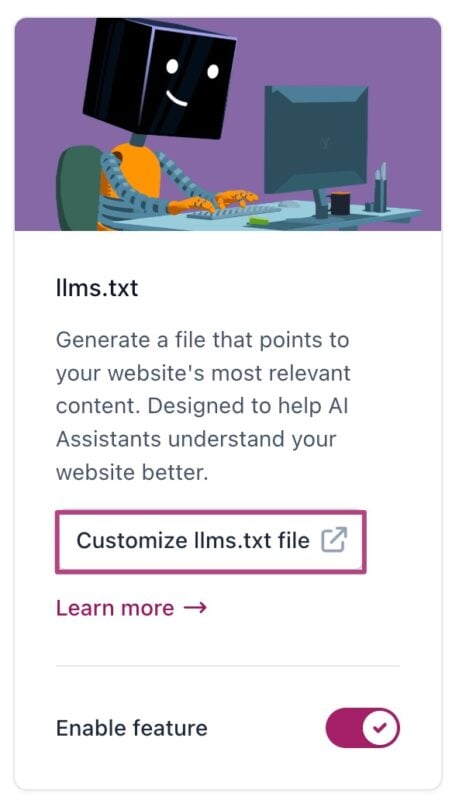
With just one click, Yoast SEO generates an llms.txt file that enables AI bots to scan specific parts of your website in real-time, ensuring they accurately present your brand when answering user queries.
Create quality content that provides value
Content is king — but only if it’s high quality. Once you have identified your target audience and completed your keyword research, it’s time to start publishing content on your website. Remember, you’re not just publishing keywords — we share that you’re creating content that solves problems and answers real questions. Valuable content builds trust, boosts engagement, and naturally increases website visitors.
Need help checking your content’s quality? Try Yoast’s Real-time Content Analysis editor to assess readability and SEO performance as you type, on the go!
Leverage social media to share and increase the reach
63.9% of the world’s population uses social media, which is a huge number waiting to be tapped. Social media platforms are powerful and free tools that help you drive traffic to your website. Posting regularly on your social media helps boost brand exposure and serves as a traffic channel for your website.
But here’s the key — don’t just drop links and disappear. Add a personal touch: explain why your post is valuable, start a conversation, or ask a question. You can even repurpose your blog posts into bite-sized social media content to reach more people and channel your followers back to your website.
With its social previews feature, the Yoast SEO plugin takes your social sharing game up a notch. Instead of guessing how your post will look when shared, you can see an exact visual preview for Facebook and Twitter right inside your editor.
This means you can fine-tune your title, description, and image before hitting publish, ensuring your post looks click-worthy and on-brand wherever it’s shared.
Keep your site fast & mobile-friendly
Website speed and mobile-friendliness are crucial factors in attracting traffic and retaining it. If your website is slow or hard to use on mobile, visitors will leave before reading a word..
Page speed impacts user experience and SEO, and search engines like Google prioritize fast-loading websites. If your website is slow, it may experience higher bounce rates, because users want instant access to information.
The five core strategies above will set you on the right path—but why stop there? If you’re ready to go the extra mile in learning how to drive traffic to your website, try these bonus tactics:
Build an email list
Offering a valuable freebie (ebook, checklist, or discount) in exchange for emails remains one of the best strategies to drive traffic to a website. Once subscribers opt in, send them helpful newsletters that solve real problems rather than just promotions. Over time, this nurtures trust and encourages repeat visits.
Off-page SEO for link building
Off-page SEO—earning links from other reputable sites—signals authority to Google and helps you grow your search visibility. Guest posting on industry blogs, forming partnerships for co-authored articles, and outreach for natural backlinks are proven ways to drive quality traffic to your website.
Active participation in Facebook groups, LinkedIn communities, Reddit threads, and Quora spaces related to your niche gives you direct access to potential visitors. First, add genuine value—answer questions, share insights—then naturally reference your blog posts when relevant. This free method to grow website traffic fosters credibility while driving organic clicks.
Local SEO
If you own a business with a physical address, local SEO is your savior.
Local SEO refers to the practice of optimizing your website to attract people searching the “nearby…” keyphrases. It is a technique that helps you get searchable both online and offline.
Here are some basic local SEO practices that you can follow:
Claim and optimize your Google Business Profile:
Include location-specific keywords, such as “family dentist Chicago,” in your page titles, headings, and meta descriptions.
Earn citations in local directories such as Yelp, Yellow Pages, etc.
Encourage customer reviews.
If you want to rank your website locally and on Google Maps, do check out Yoast Local SEO plugin for WordPress.
Ready to drive traffic to your website?
Driving traffic to your website is not about quick wins—it’s a marathon. With consistent efforts and offering value to your audience, you will see long-term benefits, and your website will top the SERPs.
Keep refining your on-page SEO and publishing content that truly resonates with your audience. By applying the tips mentioned in this guide, your website’s visibility will gradually boost.
I’m a Computer Science grad who accidentally stumbled into writing—and stayed because I fell in love with it. Over the past six years, I’ve been deep in the world of SEO and tech content, turning jargon into stories that actually make sense. When I’m not writing, you’ll probably find me lifting weights to balance my love for food (because yes, gym and biryani can coexist) or catching up with friends over a good cup of chai.
Since March 2025 in the U.S. (and May elsewhere), many sites have noticed an uncomfortable pattern: organic conversions slipping.
It’s easy to blame falling traffic from Google’s intensified AI Overviews.
But purchase intent doesn’t just vanish. Does it?
If your conversions are holding steady, congratulations. If they’re not, the reasons may be more layered than you think.
In today’s Memo, I’m breaking down the five biggest forces I see behind SEO conversion declines across industries:
Loss of top-of-the-funnel (TOFU) traffic (and why it matters more than you thought).
Platform shifts pulling demand into other ecosystems.
Channel shifts from organic to paid search.
Attribution leakage that hides organic’s true impact.
Macro factors pressuring conversion rates.
I’ll also walk you through the signals to check, how to measure each, and – inside the premium section – the exact process I use to identify which drivers are hitting a site the hardest.
Image Credit: Kevin Indig
Boost your skills with Growth Memo’s weekly expert insights. Subscribe for free!
How have your SEO conversions changed since Google intensified AI Overviews?
If they’ve grown – all the power to you!
If not, I’m seeing five underlying reasons that could be contributing to their decline across industry types:
Loss of TOFU traffic.
Platform shift.
Channel shift.
Attribution loss.
Economic change.
Sites that are noticing an SEO conversion drop have seen it since 2025 (March in the U.S., May in other countries).
It’s logical to assume that the reason is a decline in organic traffic – makes sense – but purchase intent doesn’t just vanish.
Have your conversions gone to other sites, or could there be another explanation behind their decline?
Let’s dig in.
For decades, SEOs have created top-of-the-funnel content (like “what is X” or “why you need X”). This kind of content often has an unclear impact on the bottom line.
Now that organic clicks are dropping, conversions are dropping (to a lower degree) as well.
Was top-of-the-funnel content more impactful than we thought all along?
AIOs are really mostly TOFU queries. In that case, TOFU content always had more impact on the bottom line than we were able to prove and we can expect the traffic decline to level off.
Or AIOs impact way more than MOFU and BOFU queries as well (which is what I think), and we’re in for a long decline of traffic.
If true, I expect revenue that’s attributed to organic search to decline at a lower rate – or not at all for certain companies – since purchase intent doesn’t just go away. Therefore, revenue results would relate more to our ability to influence purchase intent.
That’s where my concept of “Demand Activation” elasticity comes in.
In economics, price elasticity measures how much demand changes when prices change.
In marketing, Demand Activation elasticity describes how much eventual purchase behavior changes when you influence someone early in their journey.
Think about Demand Activation as how many potential customers you influence to buy from you.
If the “elasticity” is high, being visible at the very top of the funnel creates a disproportionate downstream impact on revenue, even if you can’t directly attribute it in analytics.
If this turns out to be correct, it’s an argument for earning AI visibility.
If Demand Activation has the impact I think it has, being visible in ChatGPT, AI Mode & Co. has stronger downstream effects than we can directly attribute. I’ve certainly seen more high-pipeline deals and purchases come from ChatGPT for some of my clients.
To illustrate the concept, let’s consider an economic example.
I’ve been searching for an excuse to write about the economic impact if Germany were to open stores on Sundays for a long time: Would people buy more if they could, or would purchases simply spread out across more days?
Studies by the EHI, IFO, and IW Köln show that people in Germany would actually buy more if stores were open on Sundays, especially non-food items. [1, 2, 3]
Stores in Germany do open a few Sundays a year.
And during those rare occasions, people shop more, especially for impulse buys.
Some research suggests that it’s mainly driven by events and tourism in higher spend areas, but looking at EU neighbors with an open-Sunday policy, like the Netherlands, we see consistently higher incremental retail spend.
To bring it back to Search, exposure early on in the user journey (as in “more open Sundays”) might have a stronger downstream impact (like more top-of-funnel visits) than we thought. Therefore, it could be critical to be broadly visible in LLMs.
Signals To Check:
1. TOFU traffic decline vs. MOFU/BOFU.
How to measure: In Search Console, filter queries using a TOFU regex (remove branded terms). Compare YOY clicks for TOFU vs. MOFU/BOFU.
2. Branded search volume change.
How to measure: Use Google Trends or a classic keyword tool (Ahrefs, Semrush) to track branded search volume over time. Correlate drops with TOFU traffic declines and conversions from organic.
3. Assisted conversions drop.
How to measure: In GA4 or another MTA model, compare YOY assisted conversions from organic search. A sharp drop suggests TOFU content was influencing downstream revenue.
Another explanation is that conversions are happening more on other platforms instead of Google Search.
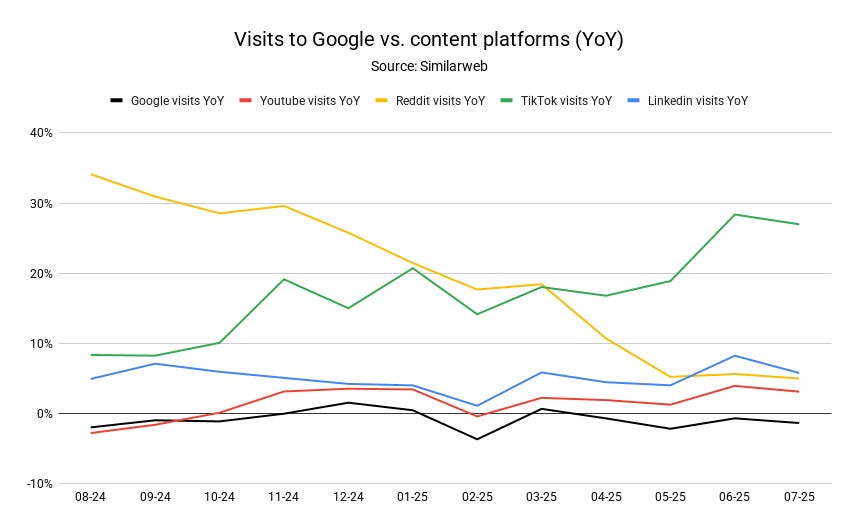
While Google’s ad market share has grown over the last five years, search behavior has diversified across multiple ecosystems:
TikTok, YouTube, Reddit, LinkedIn, Instagram, niche forums – all of which have their own “search” layers.
YouTube has long been the second-largest search engine in the world.
Reddit is now the second-largest site in the U.S. (only Wikipedia is bigger), and Google is surfacing Reddit content more prominently, except in ecommerce.
The biggest shift, however, may be to LLMs.
ChatGPT alone sees 2.5 billion prompts per day.[4] While many prompts are additive to Google Search and exploratory in intent, it’s unlikely there’s no overlap with purchase-driven queries.
Why this is happening now:
Google’s increased integration of Reddit results (high-trust user content) changes click patterns.
New LLM model releases (ChatGPT o3, Gemini 2.5) improve quality and speed, keeping users inside AI environments longer.
AI-first platforms are beginning to feel less “experimental” and more like a default research tool.
Image Credit: Kevin Indig
Signals To Check:
1. Referral traffic from non-Google search platforms.
How to measure: In GA4, track YOY referral traffic from YouTube, Reddit, TikTok, LinkedIn. See if gains coincide with Google organic losses.
2. Share of search activity across platforms.
How to measure: Use Similarweb, Statcounter, or GWI to compare platform-specific search volumes and market share over time.
3. Self-reported attribution.
How to measure: Ask users to fill out a short survey about where they first and last saw your brand after signing up or buying.
It is also possible that the clicks that would have gone to organic search are now going to paid search. The logic is simple:
When AI Overviews or zero-click results satisfy most of the informational need, the only prominent offers left are often ads.
If users still want to explore a product or service after reading an AIO, they might be more likely to click the sponsored result than scroll further to organic links.
The timing matches AIO rollout phases. If we see Google reporting strong Search revenue growth while organic traffic declines, it is a sign the demand has not disappeared – it is just being monetized differently.
Image Credit: Kevin Indig
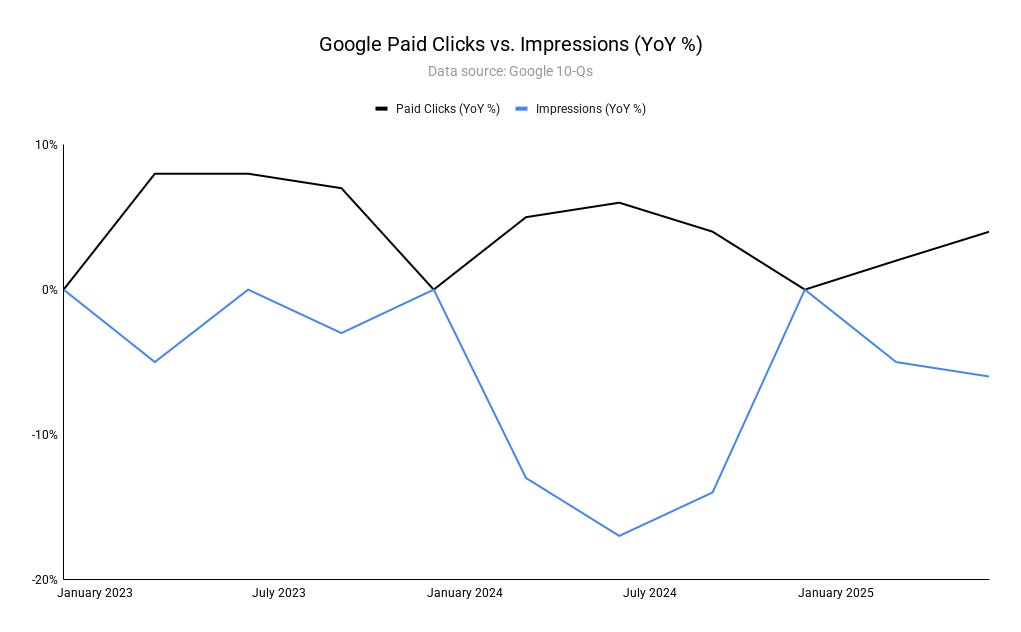
Alphabet’s Q1 2025 10‑Q [5] reveals that paid clicks from Google Search either grew or hit 0% growth in the last 10 quarters, but never declined.
Impressions (from Google Network), on the other hand, saw the opposite trend.
Whenever paid impressions drop, paid clicks go up because lower ad inventory means advertisers need to pay more for traffic.
Q2 2025 earnings [6] highlighted that Search ad revenue grew 12% year‑over‑year. Industry benchmark data reveals that the average Google CPC in 2025 lands at $5.26 – up approximately 13% year-over-year.[7]
So, less ad inventory leads to higher CPCs and more paid clicks.
Since we don’t know how many AI Overviews Google shows ads for, we can’t say with certainty that more clicks are going to ads as a direct result, but the data does show that more clicks are going to ads.
Signals To Check:
1. Organic vs. paid search traffic share.
How to measure: In GA4, compare YOY sessions from organic search vs. paid search. Look for paid’s share increasing as organic drops.
2. Paid search impression and click growth.
How to measure: Pull impressions and clicks from your Google Ads account (or industry benchmarks) over the last 12 months and compare to pre-AIO periods.
3. CPC and CPA trends.
How to measure: In Google Ads or industry benchmarks, track YOY CPC and CPA changes in your vertical. Rising CPC with organic decline suggests a mix shift.
One (popular) possibility is that the influence of organic search has not changed much, but the way we measure it has.
Essentially, classic attribution methods are broken.
AI Overviews answer the user’s question before the click, so when they are ready to buy, they bypass the search click entirely and go straight to the homepage or an app.
In analytics, that conversion shows up as direct traffic, not organic search.
Attribution leakage has always been a challenge for SEO, but AI-driven summaries and brand mentions make it worse.
Because it’s a demand capture channel, consider that SEO takes much more time between first and last touch to convert users than the default 90-day lookback window.
Often, the last touch is prone to paid channels because advertising tips people over the edge.
Also, it’s not uncommon for users to switch devices during a purchase cycle, making attribution way harder. Lastly, most attribution tools are geared towards advertising.
If you only track last-click conversions, you may underestimate the true contribution of search visibility.
Signals To Check:
1. Direct conversions are up while organic conversions are down.
How to measure: In GA4, compare YOY direct channel conversions vs. organic. Look for inverse movement.
2. Branded search stable or rising.
How to measure: Use Google Trends or a keyword tool to track branded search queries. Stability with organic session decline suggests clicks are being skipped.
3. Multi-touch attribution still shows search influence.
How to measure: In GA4 (data-driven model) or a dedicated attribution tool, check if search remains a common first or assist touchpoint even when last-click conversions fall.
Are SEO conversion rates down because people simply have less money?
There is credible evidence that macro conditions in the U.S. are weighing on conversion rates:
1. Price sensitivity and promotion dependence
Adobe reports that shoppers were unusually price elastic during the holiday season of 2024.
A 1% drop in price produced a roughly 1.03% rise in demand, indicating elevated sensitivity to discounts. That effect implies conversions were heavily promotion-led.[8]
Adobe’s Digital Price Index shows online prices have fallen for 33 straight months through May 2025, suggesting merchants are discounting to stimulate demand.
Sustained discounting typically lifts conversions only when price cuts are material, and it compresses margins.[9]
2. Consumer caution and mix shift
Salesforce’s Shopping Index commentary notes U.S. shoppers “buying less,” prioritizing essentials, and trading down in 2025.
It also cites 0% U.S. ecommerce sales growth in Q1 2025, consistent with softer sensitivity to purchase.[10]
Consumer confidence has improved slightly but remains soft relative to 2024, which tends to dampen conversion rates.[11]
3. Household finance constraints
The New York Fed reports total household debt at a record $18.39 trillion in Q2 2025, with delinquency rates up from earlier periods and credit card balances at $1.21 trillion.
Higher borrowing costs and rising delinquencies constrain checkout conversion, especially for lower-income cohorts.[12]
4. Observed conversion pressure in digital benchmarks
Contentsquare’s 2025 Digital Experience Benchmark finds online conversion rates fell 6.1% year over year, attributing much to experience friction.
In context with the macro signals above, this supports a broader environment where it is harder to turn visits into orders without heavier incentives.[13]
But…
Overall, U.S. ecommerce dollars are still growing in many periods, including +5.6% year-over-year in Q1 2025 and strong holiday spend, so demand has not collapsed.
Growth is being “bought” through price cuts and promotions, which can mask weaker underlying conversion propensity.[14, 15]
Also, you could argue that these economic conditions have been in place for a few years.
Why would they impact SEO conversions so much now?
Signals To Check:
1. Organic conversion rate trend vs. other channels.
Track monthly SEO conversion rates alongside paid search, direct, and email.
If all channels decline in parallel, macroeconomic pressure is a likely driver.
If organic drops disproportionately, AI Overviews are adding to the decline.
2. Correlation with economic indicators.
Compare organic CR trends to macro metrics like CPI, inflation rate, Consumer Confidence Index, and online price trends (Adobe DPI).
Look for statistically significant correlations, like CR rising when CPI falls or confidence increases.
If patterns are similar across Paid Search and Direct, macroeconomic factors are likely influencing purchase readiness.
3. Promotion elasticity
Measure CR lift during promotions vs. baseline for organic, paid, and direct traffic.
A bigger lift than in prior years – especially if mirrored across channels – indicates conversions are increasingly discount-driven, a sign of macro pressure.
If you’re experiencing a decline in SEO conversions in 2025, it’s likely not due to one specific reason.
In fact, it’s likely that all five options are playing into SEO conversion drops across the web.
To what degree each option has an impact matters from site to site and industry to industry.
That’s why it’s so important to run the analysis I recommend in each section above for your own data.
AI Mode will intensify the downward trend of SEO conversions.
I don’t think SEO will decline to zero because a small fraction of people will still click, even in AI Mode.
And Google won’t show AI Mode everywhere, because adoption is generational (see the UX study of AIOs for more info).
I think AI Mode will launch at a broader scale (like showing up for more queries overall) when Google figures out monetization.
Plus, ChatGPT is not yet monetizing, so advertisers go to Google and Meta – for now. And that’s my hypothesis as to why Google Search is continuing to grow.
At least for the time being.
It’ll be interesting to see what happens next in the coming months.
Featured Image: Paulo Bobita/Search Engine Journal
This week’s Ask an SEO question comes from Zahara:
“What metrics should small businesses actually care about when measuring content strategy success? Everyone talks about different KPIs, but I need to know which ones truly matter for growth.”
The metrics to measure for growth with a content strategy change by company and industry, and the type of business you run.
Publishers, for example, make their money by selling ad impressions and repeat content to consumers.
Ecommerce stores rely heavily on direct conversions and subscribers, while service-based and SaaS companies need leads and to scale remarketing groups.
There’s no shortage of ways to twist data, but there are certain key performance indicators (KPIs) and conversion items I measure based on what the goal of the client is, their current and future marketing capabilities as they grow or shrink, and things that I like to use as a measure of success when talking to the C-suite vs. day-to-day workers.
Here are some of the metrics or KPIs I measure from content marketing campaigns, and when I apply them to different clients.
Email And SMS Opt-ins
These are the unsung heroes of the marketing world. They’re people with enough of an interest in your company that they want to get marketing messages from you.
They sign up from blog content, whitepapers, and all other channels. Yet, most companies segment them without considering where the opt-in originated from.
The metrics here are:
Number of opt-ins.
Dollars in sales.
Average Order Value (AOV).
Lifetime Value (LTV) of the customer by content type and by article (if you get granular).
By tracking how many email and SMS opt-ins you get from content, and then the conversions and LTV metrics, you can tie revenue directly to the type of content on your site and how valuable each customer is based on the type of content you produce.
A comparison guide between two compatible electronic accessories for a camera may bring a photographer in; they liked the content, so they subscribed.
Six months later, they need to replace their computer. There’s a new version of editing software, so they get your message saying there is a sale, and this conversion happened because of your comparison content.
The email team would not have had the opt-in if you hadn’t created your guide.
The same can be said for companies that sell cookware.
The recipes you produce for their cooking blog or the recipe books you use as a lead gen get the SMS and email opt-in, so that when you’re having a sale or deal, the SMS and email teams have active lists to drive revenue.
Without your content, the customers would not be on your list, and the email or SMS team would not be able to do their jobs.
YOY Traffic Increases With Conversions
The next metric we track from content marketing is the total traffic increase year-over-year.
Showing an increase in non-branded and branded traffic displays:
More impressions are being made that build brand awareness if the topics are relevant to your business.
An increase in website visits, which can result in opt-ins for email and SMS, PPC, and social media to build remarketing lists.
Direct conversions if you’re tracking clicks on internal links, banner ads, and other calls to action.
Increases in branded search.
One metric we use with some of our clients is when non-branded search rises and people come back to visit the site again for more content and to shop.
One of our current clients requires seven website visits before a conversion happens, and as we show up for high-volume “newbie” phrases, we notice an increase in branded search.
We then tracked the pathways for the users who came back for more research questions, and when they eventually converted.
The finance team was then able to calculate the value for the cold topics. On top of that, we learned where people are who have never heard of the company before, but were in a mid-funnel stage.
By creating copy at this touch point, we have been able to reduce the seven visits to four or five in some cases.
The biggest benefit here was the branded search building. As branded searches increased, the site started to appear for high-volume and topically relevant product and shopping queries.
Examples (not from this client) could be a funny t-shirt company that now shows up for “t-shirts” and “graphic t-shirts” vs. only specific ones like “vintage 90’s cartoon t-shirts,” which has a lower search volume and is less competitive.
Direct Conversions
One of the easiest content KPIs to measure is direct conversions.
These could be completed sales, completed form fills with or without identifiable and financial information (credit cards or social security numbers), and sign-ups for petitions, non-profits, and parties or events.
The reason this is the easiest content KPI is because you can track the conversion from a piece of content, and the system records it on the thank you or confirmation page.
Page Views Per Visit
Publishers need page views to make money, and analytics packages make it easy to monitor how many page views each topic and content type gets on average.
By using internal links, an educational series, and content that makes sense to read as a follow-up, you can measure how the content you’re creating increases the amount of pageviews per visit, so you can increase your company’s overall revenue.
This also helps you find opportunities to promote similar articles, adding better internal links, and creating more guides when you notice people leave to do another search, and then come back to finish the article when there weren’t enough examples on your current site.
Repeat Visitors
These are people who come back for more content, whether it is a direct type-in, a new non-branded phrase from a different keyword in search results because they enjoyed your previous content, or from a different marketing team sharing content that is interesting to the audience.
By seeing which visitors come back from what efforts, you can better segment who gets what type of content and the types of content that move the needle.
Publishers can segment lists based on interests and email or send SMS messages as new content is created.
Retailers can email deals and specials based on what customers engage with.
Lead generation companies can fine-tune their sales funnels by showing relevant content within the customer’s need, want, and use cohorts.
Branding teams can keep good associations with the company to current customers as a way to keep them subscribing, paying, and sharing the good their companies are doing.
Final Thoughts
There is no shortage of KPIs you can track from content marketing. It’s a matter of matching them to the people you report to.
HR may want more job applicants, while the sales team wants leads. Marketing and advertising want direct conversions and subscriber list growth, while the C-suite wants to know market share and reach.
As a content marketer, you can fine-tune your tracking and reporting to meet each stakeholder’s needs and become the star of the company by keeping everyone informed on how your efforts are growing their parts of the company, and that is how we decide which KPIs to monitor and report on, based on the client.
More Resources:
Featured Image: Paulo Bobita/Search Engine Journal
We just introduced two new updates to Yoast SEO Premium that focus on clarity and speed. Yoast SEO Redirect Manager just got a cleaner, more user-friendly workspace. After heavy testing, Yoast AI Optimize is now available for the Classic Editor. It helps you optimize your copy for readability and SEO without disrupting your workflow or website performance.
Redirects, made simpler
The Redirect Manager helps you prevent errors like 404s and 410s by automatically prompting you to create redirects when you move or delete content. The core functionality remains the same. The new design makes redirect management easier and clearer.
Here’s a quick reminder of what the Redirect Manager helps you do:
Quickly set up and manage redirects without digging through menus
See exactly where each redirect starts and ends
Import and export multiple redirects in bulk using CSV files
Apply advanced regex rules to support more complex setups, such as full migrations
Whether you’re making small updates or handling a major restructuring, everything is easier to manage. No extra tools or technical steps required. It’s all built into your Yoast SEO Premium.
Yoast AI Optimize in the Classic Editor
Yoast AI Optimize brings smart, targeted SEO support into your writing flow. After heavy testing, we extended it to the Classic Editor. Improvements are easy to review and apply, and the final decision stays within the editor, under your complete control.
Optimize faster, keep your control:
Get real-time AI suggestions that help improve SEO and readability
Edit suggestions to match your style and tone of voice
Apply or dismiss suggestions easily without breaking your writing flow
Use it in both the Classic and Block editors with Yoast SEO Premium
Supports optimization for:
Keyphrase in introduction
Keyphrase distribution
Keyphrase density
Sentence length
Paragraph length
Yoast AI Optimize helps improve SEO scores faster while keeping a natural writing style, in both the Classic and Block editors.
A smarter analysis in Yoast SEO Premium
Yoast SEO Premium has a smart content analysis that helps you take your content to the next level!
When I first started working in marketing, Yoast SEO was the first plugin I used. Today, I work with the tool that I depended on the most. I’m Carl Henry, my background is in SaaS marketing with a focus on content. I like basketball, padel, painting, and gaming.
Google’s Gary Illyes confirmed that AI content is fine as long as the quality is high. He said that “human created” isn’t precisely the right way to describe their AI content policy, and that a more accurate description would be “human curated.”
The questions were asked by Kenichi Suzuki in the context of an exclusive interview with Illyes.
AI Overviews and AI Mode Models
Kenichi asked about the AI models used for AI Overviews and AI Mode, and he answered that they are custom Gemini models.
Illyes answered:
“So as you noted, the the model that we use for AIO (for AI Overviews) and for AI mode is a custom Gemini model and that might mean that it was trained differently. I don’t know the exact details, how it was trained, but it’s definitely a custom model.”
Kenichi then asked if AI Overviews (AIO) and AI Mode use separate indexes for grounding.
Grounding is where an LLM will connect answers to a database or a search index so that answers are more reliable, truthful, and based on verifiable facts, helping to cut down on hallucinations. In the context of AIO and AI Mode, grounding generally happens with web-based data from Google’s index.
Suzuki asked:
“So, does that mean that AI Overviews and AI Mode use separate indexes for grounding?”
Google’s Illyes answered:
“As far as I know, Gemini, AI Overview and AI Mode all use Google search for grounding. So basically they issue multiple queries to Google Search and then Google Search returns results for that those particular queries.”
Kenichi was trying to get an answer regarding the Google Extended crawler, and Illyes’s response was to explain when the Google Extended crawler comes into play.
“So does that mean that the training data are used by AIO and AI Mode collected by regular Google and not Google Extended?”
And Illyes answered:
“You have to remember that when grounding happens, there’s no AI involved. So basically it’s the generation that is affected by the Google extended. But also if you disallow Google Extended then Gemini is not going to ground for your site.”
AI Content In LLMs And Search Index
The next question that Illyes answered was about whether AI content published online is polluting LLMs. Illyes said that this is not a problem with the search index, but it may be an issue for LLMs.
Kenichi’s question:
“As more content is created by AI, and LLMs learn from that content. What are your thoughts on this trend and what are its potential drawbacks?”
Illyes answered:
“I’m not worried about the search index, but model training definitely needs to figure out how to exclude content that was generated by AI. Otherwise you end up in a training loop which is really not great for for training. I’m not sure how much of a problem this is right now, or maybe because how we select the documents that we train on.”
Content Quality And AI-Generated Content
Suzuki then followed up with a question about content quality and AI.
He asked:
“So you don’t care how the content is created… so as long as the quality is high?”
Illyes confirmed that a leading consideration for LLM training data is content quality, regardless of how it was generated. He specifically cited the factual accuracy of the content as an important factor. Another factor he mentioned is that content similarity is problematic, saying that “extremely” similar content shouldn’t be in the search index.
He also said that Google essentially doesn’t care how the content is created, but with some caveats:
“Sure, but if you can maintain the quality of the content and the accuracy of the content and ensure that it’s of high quality, then technically it doesn’t really matter.
The problem starts to arise when the content is either extremely similar to something that was already created, which hopefully we are not going to have in our index to train on anyway.
And then the second problem is when you are training on inaccurate data and that is probably the riskier one because then you start introducing biases and they start introducing counterfactual data in your models.
As long as the content quality is high, which typically nowadays requires that the human reviews the generated content, it is fine for model training.”
Human Reviewed AI-Generated Content
Illyes continued his answer, this time focusing on AI-generated content that is reviewed by a human. He emphasizes human review not as something that publishers need to signal in their content, but as something that publishers should do before publishing the content.
Again, “human reviewed” does not mean adding wording on a web page that the content is human reviewed; that is not a trustworthy signal, and it is not what he suggested.
Here’s what Illyes said:
“I don’t think that we are going to change our guidance any time soon about whether you need to review it or not.
So basically when we say that it’s human, I think the word human created is wrong. Basically, it should be human curated. So basically someone had some editorial oversight over their content and validated that it’s actually correct and accurate.”
Takeaways
Google’s policy, as loosely summarized by Gary Illyes, is that AI-generated content is fine for search and model training if it is factually accurate, original, and reviewed by humans. This means that publishers should apply editorial oversight to validate the factual accuracy of content and to ensure that it is not “extremely” similar to existing content.
The propensity for AI systems to make mistakes and for humans to miss those mistakes has been on full display in the US legal system as of late. The follies began when lawyers—including some at prestigious firms—submitted documents citing cases that didn’t exist. Similar mistakes soon spread to other roles in the courts. In December, a Stanford professor submitted sworn testimony containing hallucinations and errors in a case about deepfakes, despite being an expert on AI and misinformation himself.
The buck stopped with judges, who—whether they or opposing counsel caught the mistakes—issued reprimands and fines, and likely left attorneys embarrassed enough to think twice before trusting AI again.
But now judges are experimenting with generative AI too. Some are confident that with the right precautions, the technology can expedite legal research, summarize cases, draft routine orders, and overall help speed up the court system, which is badly backlogged in many parts of the US. This summer, though, we’ve already seen AI-generated mistakes go undetected and cited by judges. A federal judge in New Jersey had to reissue an order riddled with errors that may have come from AI, and a judge in Mississippi refused to explain why his order too contained mistakes that seemed like AI hallucinations.
The results of these early-adopter experiments make two things clear. One, the category of routine tasks—for which AI can assist without requiring human judgment—is slippery to define. Two, while lawyers face sharp scrutiny when their use of AI leads to mistakes, judges may not face the same accountability, and walking back their mistakes before they do damage is much harder.
Drawing boundaries
Xavier Rodriguez, a federal judge for the Western District of Texas, has good reason to be skeptical of AI. He started learning about artificial intelligence back in 2018, four years before the release of ChatGPT (thanks in part to the influence of his twin brother, who works in tech). But he’s also seen AI-generated mistakes in his own court.
In a recent dispute about who was to receive an insurance payout, both the plaintiff and the defendant represented themselves, without lawyers (this is not uncommon—nearly a quarter of civil cases in federal court involve at least one unrepresented party). The two sides wrote their own filings and made their own arguments.
“Both sides used AI tools,” Rodriguez says, and both submitted filings that referenced made-up cases. He had authority to reprimand them, but given that they were not lawyers, he opted not to.
“I think there’s been an overreaction by a lot of judges on these sanctions. The running joke I tell when I’m on the speaking circuit is that lawyers have been hallucinating well before AI,” he says. Missing a mistake from an AI model is not wholly different, to Rodriguez, from failing to catch the error of a first-year lawyer. “I’m not as deeply offended as everybody else,” he says.
In his court, Rodriguez has been using generative AI tools (he wouldn’t publicly name which ones, to avoid the appearance of an endorsement) to summarize cases. He’ll ask AI to identify key players involved and then have it generate a timeline of key events. Ahead of specific hearings, Rodriguez will also ask it to generate questions for attorneys based on the materials they submit.
These tasks, to him, don’t lean on human judgment. They also offer lots of opportunities for him to intervene and uncover any mistakes before they’re brought to the court. “It’s not any final decision being made, and so it’s relatively risk free,” he says. Using AI to predict whether someone should be eligible for bail, on the other hand, goes too far in the direction of judgment and discretion, in his view.
Erin Solovey, a professor and researcher on human-AI interaction at Worcester Polytechnic Institute in Massachusetts, recently studied how judges in the UK think about this distinction between rote, machine-friendly work that feels safe to delegate to AI and tasks that lean more heavily on human expertise.
“The line between what is appropriate for a human judge to do versus what is appropriate for AI tools to do changes from judge to judge and from one scenario to the next,” she says.
Even so, according to Solovey, some of these tasks simply don’t match what AI is good at. Asking AI to summarize a large document, for example, might produce drastically different results depending on whether the model has been trained to summarize for a general audience or a legal one. AI also struggles with logic-based tasks like ordering the events of a case. “A very plausible-sounding timeline may be factually incorrect,” Solovey says.
Rodriguez and a number of other judges crafted guidelines that were published in February by the Sedona Conference, an influential think tank that issues principles for particularly murky areas of the law. They outline a host of potentially “safe” uses of AI for judges, including conducting legal research, creating preliminary transcripts, and searching briefings, while warning that judges should verify outputs from AI and that “no known GenAI tools have fully resolved the hallucination problem.”
Dodging AI blunders
Judge Allison Goddard, a federal magistrate judge in California and a coauthor of the guidelines, first felt the impact that AI would have on the judiciary when she taught a class on the art of advocacy at her daughter’s high school. She was impressed by a student’s essay and mentioned it to her daughter. “She said, ‘Oh, Mom, that’s ChatGPT.’”
“What I realized very quickly was this is going to really transform the legal profession,” she says. In her court, Goddard has been experimenting with ChatGPT, Claude (which she keeps “open all day”), and a host of other AI models. If a case involves a particularly technical issue, she might ask AI to help her understand which questions to ask attorneys. She’ll summarize 60-page orders from the district judge and then ask the AI model follow-up questions about it, or ask it to organize information from documents that are a mess.
“It’s kind of a thought partner, and it brings a perspective that you may not have considered,” she says.
Goddard also encourages her clerks to use AI, specifically Anthropic’s Claude, because by default it does not train on user conversations. But it has its limits. For anything that requires law-specific knowledge, she’ll use tools from Westlaw or Lexis, which have AI tools built specifically for lawyers, but she finds general-purpose AI models to be faster for lots of other tasks. And her concerns about bias have prevented her from using it for tasks in criminal cases, like determining if there was probable cause for an arrest.
In this, Goddard appears to be caught in the same predicament the AI boom has created for many of us. Three years in, companies have built tools that sound so fluent and humanlike they obscure the intractable problems lurking underneath—answers that read well but are wrong, models that are trained to be decent at everything but perfect for nothing, and the risk that your conversations with them will be leaked to the internet. Each time we use them, we bet that the time saved will outweigh the risks, and trust ourselves to catch the mistakes before they matter. For judges, the stakes are sky-high: If they lose that bet, they face very public consequences, and the impact of such mistakes on the people they serve can be lasting.
“I’m not going to be the judge that cites hallucinated cases and orders,” Goddard says. “It’s really embarrassing, very professionally embarrassing.”
Still, some judges don’t want to get left behind in the AI age. With some in the AI sector suggesting that the supposed objectivity and rationality of AI models could make them better judges than fallible humans, it might lead some on the bench to think that falling behind poses a bigger risk than getting too far out ahead.
A ‘crisis waiting to happen’
The risks of early adoption have raised alarm bells with Judge Scott Schlegel, who serves on the Fifth Circuit Court of Appeal in Louisiana. Schlegel has long blogged about the helpful role technology can play in modernizing the court system, but he has warned that AI-generated mistakes in judges’ rulings signal a “crisis waiting to happen,” one that would dwarf the problem of lawyers’ submitting filings with made-up cases.
Attorneys who make mistakes can get sanctioned, have their motions dismissed, or lose cases when the opposing party finds out and flags the errors. “When the judge makes a mistake, that’s the law,” he says. “I can’t go a month or two later and go ‘Oops, so sorry,’ and reverse myself. It doesn’t work that way.”
Consider child custody cases or bail proceedings, Schlegel says: “There are pretty significant consequences when a judge relies upon artificial intelligence to make the decision,” especially if the citations that decision relies on are made-up or incorrect.
This is not theoretical. In June, a Georgia appellate court judge issued an order that relied partially on made-up cases submitted by one of the parties, a mistake that went uncaught. In July, a federal judge in New Jersey withdrew an opinion after lawyers complained it too contained hallucinations.
Unlike lawyers, who can be ordered by the court to explain why there are mistakes in their filings, judges do not have to show much transparency, and there is little reason to think they’ll do so voluntarily. On August 4, a federal judge in Mississippi had to issue a new decision in a civil rights case after the original was found to contain incorrect names and serious errors. The judge did not fully explain what led to the errors even after the state asked him to do so. “No further explanation is warranted,” the judge wrote.
These mistakes could erode the public’s faith in the legitimacy of courts, Schlegel says. Certain narrow and monitored applications of AI—summarizing testimonies, getting quick writing feedback—can save time, and they can produce good results if judges treat the work like that of a first-year associate, checking it thoroughly for accuracy. But most of the job of being a judge is dealing with what he calls the white-page problem: You’re presiding over a complex case with a blank page in front of you, forced to make difficult decisions. Thinking through those decisions, he says, is indeed the work of being a judge. Getting help with a first draft from an AI undermines that purpose.
“If you’re making a decision on who gets the kids this weekend and somebody finds out you use Grok and you should have used Gemini or ChatGPT—you know, that’s not the justice system.”
My colleague Grace Huckins has a great story on OpenAI’s release of GPT-5, its long-awaited new flagship model. One of the takeaways, however, is that while GPT-5 may make for a better experience than the previous versions, it isn’t something revolutionary. “GPT-5 is, above all else,” Grace concludes, “a refined product.”
This is pretty much in line with my colleague Will Heaven’s recent argument that the latest model releases have been a bit like smartphone releases: Increasingly, what we are seeing are incremental improvements meant to enhance the user experience. (Casey Newton made a similar point in Friday’s Platformer.) At GPT-5’s release on Thursday, OpenAI CEO Sam Altman himself compared it to when Apple released the first iPhone with a Retina display. Okay. Sure.
But where is the transition from the BlackBerry keyboard to the touch-screen iPhone? Where is the assisted GPS and the API for location services that enables real-time directions and gives rise to companies like Uber and Grindr and lets me order a taxi for my burrito? Where are the real breakthroughs?
In fact, following the release of GPT-5, OpenAI found itself with something of a user revolt on its hands. Customers who missed GPT-4o’s personality successfully lobbied the company to bring it back as an option for its Plus users. If anything, that indicates the GPT-5 release was more about user experience than noticeable performance enhancements.
And yet, hours before OpenAI’s GPT-5 announcement, Altman teased it by tweeting an image of an emerging Death Star floating in space. On Thursday, he touted its PhD-level intelligence. He then went on the Mornings with Maria show to claim it would “save a lot of lives.” (Forgive my extreme skepticism of that particular brand of claim, but we’ve certainly seen it before.)
The people running these companies literally talk about the danger that the things they are building might take over the world and kill every human on the planet. GPT-5, meanwhile, still can’t tell you how many b’s there are in the word “blueberry.”
This is not to say that the products released by OpenAI or Anthropic or what have you are not impressive. They are. And they clearly have a good deal of utility. But the hype cycle around model releases is out of hand.
I say that as one of those people who use ChatGPT or Google Gemini most days, often multiple times a day. This week, for example, my wife was surfing and encountered a whale repeatedly slapping its tail on the water. Despite having seen very many whales, often in very close proximity, she had never seen anything like this. She sent me a video, and I was curious about it too. So I asked ChatGPT, “Why do whales slap their tails repeatedly on the water?” It came right back, confidently explaining that what I was describing was called “lobtailing,” along with a list of possible reasons why whales do that. Pretty cool.
But then again, a regular garden-variety Google search would also have led me to discover lobtailing. And while ChatGPT’s response summarized the behavior for me, it was also too definitive about why whales do it. The reality is that while people have a lot of theories, we still can’t really explain this weird animal behavior.
The reason I’m aware that lobtailing is something of a mystery is that I dug into actual, you know, search results. Which is where I encountered this beautiful, elegiac essay by Emily Boring. She describes her time at sea, watching a humpback slapping its tail against the water, and discusses the scientific uncertainty around this behavior. Is it a feeding technique? Is it a form of communication? Posturing? The action, as she notes, is extremely energy intensive. It takes a lot of effort from the whale. Why do they do it?
I was struck by one passage in particular, in which she cites another biologist’s work to draw a conclusion of her own:
Surprisingly, the complex energy trade-off of a tail-slap might be the exact reason why it’s used. Biologist Hal Whitehead suggests, “Breaches and lob-tails make good signals precisely because they are energetically expensive and thus indicative of the importance of the message and the physical status of the signaler.” A tail-slap means that a whale is physically fit, traveling at nearly maximum speed, capable of sustaining powerful activity, and carrying a message so crucial it is willing to use a huge portion of its daily energy to share it. “Pay attention!” the whale seems to say. “I am important! Notice me!”
Which is not to say there aren’t really cool things happening in AI. And certainly there have been a number of moments when I have been floored by AI releases. ChatGPT 3.5 was one. Dall-E, NotebookLM, Veo 3, Synthesia. They can amaze. In fact there was an AI product release just this week that was a little bit mind-blowing. Genie 3, from Google DeepMind, can turn a basic text prompt into an immersive and navigable 3D world. Check it out—it’s pretty wild. And yet Genie 3 also makes a case that the most interesting things happening right now in AI aren’t happening in chatbots.
I’d even argue that at this point, most of the people who are regularly amazed by the feats of new LLM chatbot releases are the same people who stand to profit from the promotion of LLM chatbots.
Maybe I’m being cynical, but I don’t think so. I think it’s more cynical to promise me the Death Star and instead deliver a chatbot whose chief appeal seems to be that it automatically picks the model for you. To promise me superintelligence and deliver shrimp Jesus. It’s all just a lot of lobtailing. “Pay attention! I am important! Notice me!”
This article is from The Debrief, MIT Technology Review’s subscriber-only weekly email newsletter from editor in chief Mat Honan. Subscribers can sign up here to receive it in your inbox.