Chatbots and AI shopping tools that generate gift ideas and recommend products could disrupt affiliate marketing and distort attribution in the 2025 holiday shopping season and beyond.
Ecommerce shops that rely on affiliate traffic for low-cost shopper acquisition during the peak holiday season should closely monitor traffic and sales volume and consider a backup plan if affiliate traffic falls short of expectations.
The reason for this potential disruption is that AI is typically easier for shoppers. Type “gift ideas under $50 for a 10-year-old gamer” into ChatGPT, Grok, or Gemini, and you will get a relatively straightforward answer, not a list of sites for further research.
While such a list may provide more in-depth information or product details, generative AI is easier to use.
This is especially true on Google Search when the results include the AI Overviews summary. Zero clicks needed.
Ecommerce marketing managers may want to watch affiliate production during the 2025 holiday season to gauge AI’s impact.
Lost Traffic
Shoppers who ask AI for products or services effectively bypass affiliate review and recommendation sites. Skipping affiliate content could lead to lost or unattributed traffic.
Each could impact a store’s revenue, although lost traffic could hurt most.
Lost traffic. Affiliate content, such as gift guides or product roundups, may attract a smaller fraction of the consumer holiday audience in 2025.
The big affiliate review sites — Wirecutter, The Inventory, or BestProducts.com — have historically thrived by capturing search traffic for “best X” or “gift ideas for” queries, especially around Black Friday and Christmas.
AI search tools, such as ChatGPT and Google’s AI Overviews, offer similar content without clicking to a separate website. Fewer clicks lead to fewer readers, which could equal fewer ecommerce sales via the affiliate channel.
While observers have raised this concern, the outcome is speculation. If AI does disrupt affiliate traffic, the 2025 peak shopping season might be the first indication.
Attribution. The second problem relative to AI and the affiliate channel is attribution.
AI’s shopping recommendations are almost certainly trained on and derived, at least partially, from affiliate channel content.
Emarketer’s Sara Lebow put it this way in a May 2025 article, “sites like the New York Times’ Wirecutter offer curated recommendations ChatGPT can scrape, personalize, and regurgitate.”
If true, this might mean that some of the sales an ecommerce shop earns via search or AI this Christmas are, at least in part, the result of affiliate efforts.
In the near term, that is a bonus to merchants: sales without commissions. Over time, however, it is a disincentive. If affiliates earn less, they likely will produce less or find other ways to profit without ecommerce referrals. The result could be less traffic and fewer sales.
Opportunities
I see three ways ecommerce operators can respond to affiliate marketing changes:
Collaborate with affiliates,
Create content,
Find alternatives.
Collaboration. Affiliates are acutely aware of AI’s disruptive potential and are seeking alternatives. Ecommerce merchants can collaborate with these partners to test and invest in some of these options.
For example, affiliates have long used advertising arbitrage to find readers, deliver traffic, and ultimately earn commissions. For good reason, merchants often place restrictions on how and what an affiliate can advertise. But stores and affiliates could work together, perhaps using hybrid commission models or multi-touch attribution to make it easier and less risky for affiliates to buy ads.
Separately, many affiliate sites have robust email lists. These lists were once complementary traffic drivers, but they represent an owned audience. Merchants can buy ads or advertorials in these email broadcasts with a hybrid commission — part fixed, part percentage.
Create content. Ecommerce merchants concerned about the demise of affiliate traffic could also produce more of their own content. Affiliates have proven the value of content to attract shoppers.
Find alternatives. Merchants can seek alternatives to affiliate marketing for similarly low customer acquisition costs.
One such alternative could well be ChatGPT, which could add affiliate revenue through its shopping recommendations. Emarketer suggested this might take the form of paying review sites a flat fee or sharing affiliate revenue with review sites when the AI result draws from their content.
First Test
AI will not kill affiliate marketing, but it will change the traffic mix and attribution math.
The 2025 holiday season may be the first clear test of whether ecommerce brands can adapt fast enough, rebalancing their partner portfolios, optimizing for AI discovery, and building direct connections to customers, so they are not wholly dependent on any single referral channel.
Google’s Gary Illyes recently answered the question of whether AI-generated images used together with “legit” content can impact rankings. Gary discussed whether it had an impact on SEO and called attention to a technical issue involving server resources that is a possible outcome.
Does Google Penalize for AI-Generated Content?
How does Google react to AI image content when it’s encountered in the context of a web page? Google’s Gary Illyes answered that question within the context of a Q&A and offered some follow-up observations about how it could lead to extra traffic from Google Image Search. The question was asked at about the ten-minute mark of the interview conducted by Kenichi Suzuki and published on YouTube.
This is the question that was asked:
“Say if there’s a content that the content itself is legit, the sentences are legit but and also there are a lot of images which are relevant to the content itself, but all of them, let’s say all of them are generated by AI. Will that content or the overall site, is it going to be penalized or not?”
This is an important and reasonable question because Google ran an update about a year ago that appeared to de-rank low quality AI-generated content.
Google’s Gary Ilyes’ answer was clear that AI-generated content will not result in penalization and that it has no direct impact on SEO.
He answered:
“No, no. So AI generated image doesn’t impact the SEO. Not direct.
So obviously when you put images on your site, you will have to sacrifice some resources to those images… But otherwise you are not going to, I don’t think that you’re going to see any negative impact from that.
If anything, you might get some traffic out of image search or video search or whatever, but otherwise it should just be fine.”
AI-Generated Content
Gary Illyes did not discuss authenticity; however it’s a good thing to consider in the context of using AI-generated content. Authenticity is an important quality for users, especially in contexts where there is an expectation that an illustration is a faithful depiction of an actual outcome or product. For example, users expect product illustrations to accurately reflect the products they are purchasing and screenshots of food to reasonably represent the completed dishes after following the recipe instructions.
Google often says that content should be created for users and that many questions about SEO are adequately answered by the context of how users will react to it. Illyes did not reflect on any of that, but it is something that publishers should consider if they care about how content resonates with users.
Gary’s answer makes it clear that AI-generated content will not have a negative impact on SEO.
For decades, the digital world has been defined by hyperlinks, a simple, powerful way to connect documents across a vast, unstructured library. Yet, the foundational vision for the web was always more ambitious.
It was a vision of a Semantic Web, a web where the relationships between concepts are as important as the links between pages, allowing machines to understand the context and meaning of information, not just index its text.
With its latest Search Labs experiment, Web Guide (that got me so excited), Google is taking an important step in this direction.
Google’s Web Guide is designed to make it easier to find the information, not just webpages. It is optimized as an alternative to AI Mode and AI Overview for tackling complex, multi-part questions or to explore a topic from multiple angles.
Built using a customized version of the Gemini AI model, Web Guide organizes search results into helpful, easy-to-browse groups.
This is a pivotal moment. It signals that the core infrastructure of search is now evolving to natively support the principle of semantic understanding.
Web Guide represents a shift away from a web of pages and average rankings and toward a web of understanding and hyper-personalization.
This article will deconstruct the technology behind Web Guide, analyzing its dual impact on publishers and refining a possibly new playbook for the era of SEO or Generative Engine Optimization (GEO) if you like.
I personally don’t see Web Guide as just another feature; I see it as a glimpse into the future of how knowledge shall be discovered and consumed.
How Google’s Web Guide Works: The Technology Behind The Hyper-Personalized SERP
At its surface, Google Web Guide is a visual redesign of the search results page. It replaces the traditional, linear list of “10 blue links” with a structured mosaic of thematic content.
For an exploratory search like [how to solo travel in Japan], a user might see distinct, expandable clusters for “comprehensive guides,” “personal experiences,” and “safety recommendations.”
This allows users to immediately drill down into the facet of their query that is most relevant to them.
But, the real revolution is happening behind the scenes. This curation is powered by a custom version of Google’s Gemini model, but the key to its effectiveness is a technique known as “query fan-out.”
When a user enters a query, the AI doesn’t just search for that exact phrase. Instead, it deconstructs the user’s likely intent into a series of implicit, more specific sub-queries, “fanning out” to search for them in parallel.
For the “solo travel in Japan” query, the fan-out might generate internal searches for “Japan travel safety for solo women,” “best blogs for Japan travel,” and “using the Japan Rail Pass.”
By casting this wider net, the AI gathers a richer, more diverse set of results. It then analyzes and organizes these results into the thematic clusters presented to the user. This is the engine of hyper-personalization.
The SERP is no longer a one-size-fits-all list; it’s a dynamically generated, personalized guide built to match the multiple, often unstated, intents of a specific user’s query. (Here is the early analysis I did by analyzing the network traffic – HAR file – behind a request.)
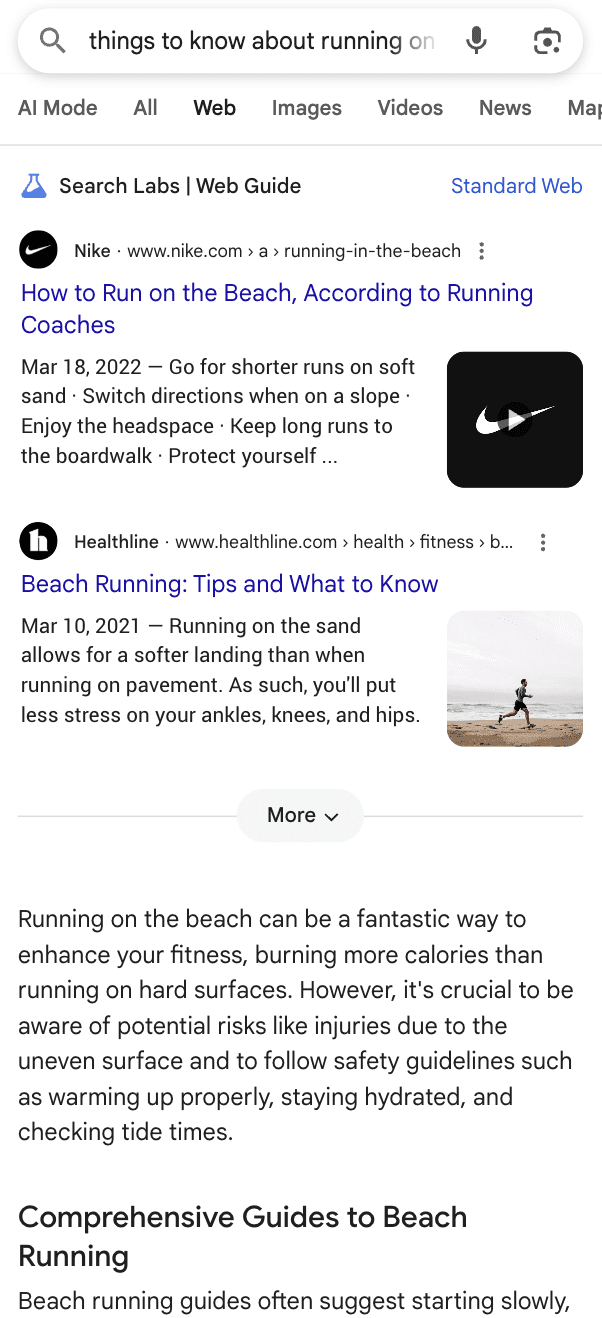
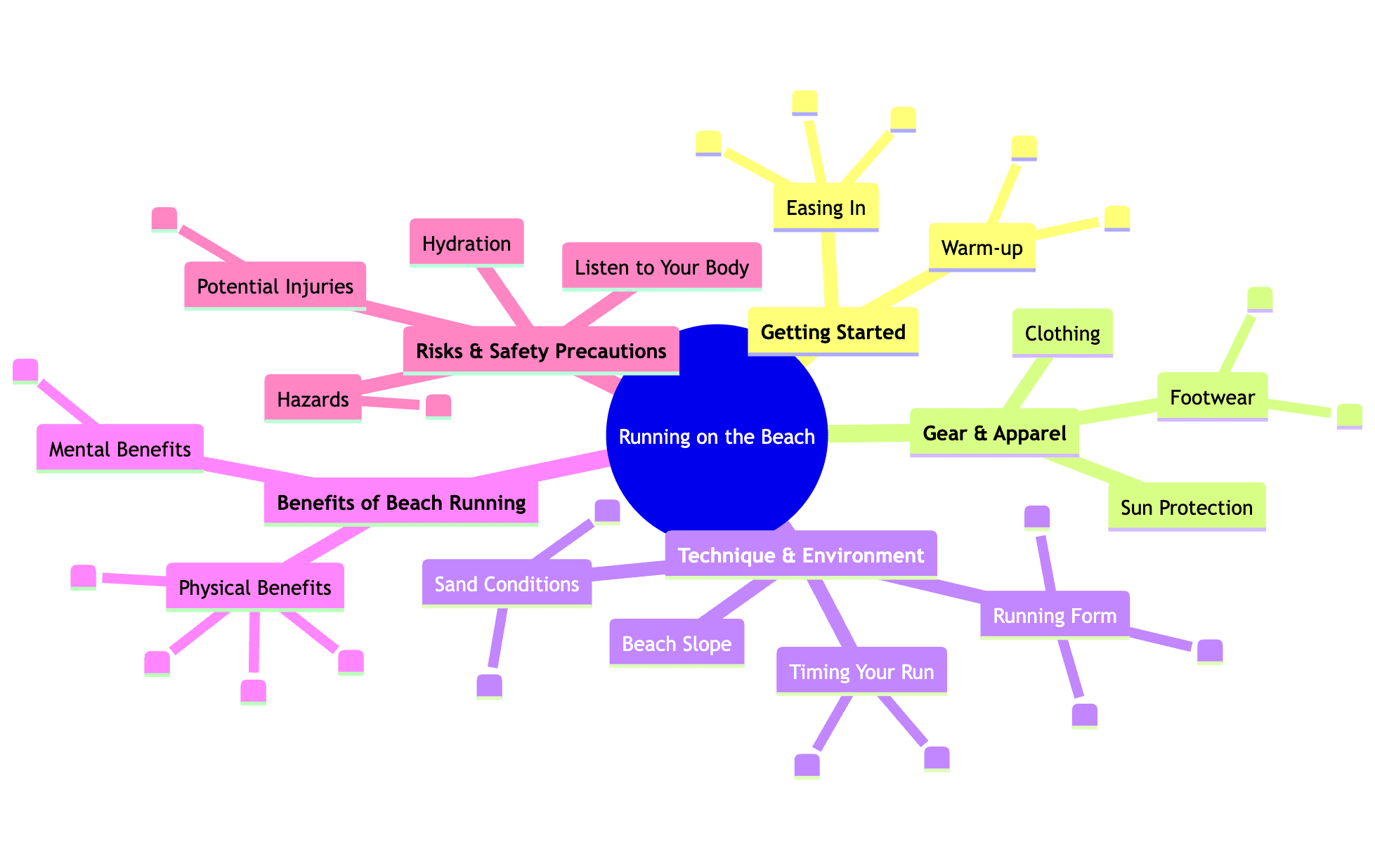
To visualize how this works in semantic terms, let’s consider the query “things to know about running on the beach,” which the AI breaks down into the following facets:
Screenshot from search for [things to know about running on the beach], Google, August 2025
Image from author, August 2025
The WebGuide UI is composed of several elements designed to provide a comprehensive and personalized experience:
Main Topic: The central theme or query that the user has entered.
Branches: The main categories of information generated in response to the user’s query. These branches are derived from various online sources to provide a well-rounded overview.
Sites: The specific websites from which the information is sourced. Each piece of information within the branches is attributed to its original source, including the entity name and a direct URL.
Let’s review Web Guide in the context of Google’s other AI initiatives.
Feature
Primary Function
Core Technology
Impact on Web Links
AI Overviews
Generate a direct, synthesized answer at the top of the SERP.
Generative AI, Retrieval-Augmented Generation.
High negative impact. Designed to reduce clicks by providing the answer directly. It is replacing featured snippets, as recently demonstrated by Sistrix for the UK market.
AI Mode
Provide a conversational, interactive, generative AI experience.
Custom version of Gemini, query fan-out, chat history.
High negative impact. Replaces traditional results with a generated response and mentions.
Web Guide
Organize and categorize traditional web link results.
Custom version of Gemini, query fan-out.
Moderate/Uncertain impact. Aims to guide clicks to more relevant sources.
Web Guide’s unique role is that of an AI-powered curator or librarian.
It adds a layer of AI organization while preserving the fundamental link-clicking experience, making it a strategically distinct and potentially less contentious implementation of AI in search.
The Publisher’s Conundrum: Threat Or Opportunity?
The central concern surrounding any AI-driven search feature is the potential for a severe loss of organic traffic, the economic lifeblood of most content creators. This anxiety is not speculative.
Cloudflare’s CEO has publicly criticized these moves as another step in “breaking publishers’ business models,” a sentiment that reflects deep apprehension across the digital content landscape.
This fear is contextualized by the well-documented impact of Web Guide’s sibling feature, AI Overviews.
A critical study by the Pew Research Center revealed that the presence of an AI summary at the top of a SERP dramatically reduces the likelihood that a user will click on an organic link, a nearly 50% relative drop in click-through rate in its analysis.
Google has mounted a vigorous defense, claiming it has “not observed significant drops in aggregate web traffic” and that the clicks that do come from pages with AI Overviews are of “higher quality.”
Amid this, Web Guide presents a more nuanced picture. There is a credible argument that, by preserving the link-clicking paradigm, it could be a more publisher-friendly application of AI.
Its “query fan-out” technique could benefit high-quality, specialized content that has struggled to rank for broad keywords.
In this optimistic view, Web Guide acts as a helpful librarian, guiding users to the right shelf in the library rather than just reading them a summary at the front desk.
However, even this more “link-friendly” approach cedes immense editorial control to an opaque algorithm, making the ultimate impact on net traffic uncertain to say the least.
The New Playbook: Building For The “Query Fan-Out”
The traditional goal of securing the No. 1 ranking for a specific keyword is rapidly becoming an outdated and insufficient goal.
In this new landscape, visibility is defined by contextual relevance and presence within AI-generated clusters. This requires a new strategic discipline: Generative Engine Optimization (GEO).
GEO expands the focus from optimizing for crawlers to optimizing for discoverability within AI-driven ecosystems.
The key to success in this new paradigm lies in understanding and aligning with the “query fan-out” mechanism.
Pillar 1: Build For The “Query Fan-Out” With Topical Authority
The most effective strategy is to pre-emptively build content that maps directly to the AI’s likely “fan-out” queries.
This means deconstructing your areas of expertise into core topics and constituent subtopics, and then building comprehensive content clusters that cover every facet of a subject.
This involves creating a central “pillar” page for a broad topic, which then links out to a “constellation” of highly detailed, dedicated articles that cover every conceivable sub-topic.
For “things to know about running on the beach,” (the example above) a publisher should create a central guide that links to individual, in-depth articles such as “The Benefits and Risks of Running on Wet vs. Dry Sand,” “What Shoes (If Any) Are Best for Beach Running?,” “Hydration and Sun Protection Tips for Beach Runners,” and “How to Improve Your Technique for Softer Surfaces.”
By creating and intelligently interlinking this content constellation, a publisher signals to the AI that their domain possesses comprehensive authority on the entire topic.
This dramatically increases the probability that when the AI “fans out” its queries, it will find multiple high-quality results from that single domain, making it a prime candidate to be featured across several of Web Guide’s curated clusters.
This strategy must be built upon Google’s established E-E-A-T (Experience, Expertise, Authoritativeness, and Trustworthiness) principles, which are amplified in an AI-driven environment.
Pillar 2: Master Technical & Semantic SEO For An AI Audience
While Google states there are no new technical requirements for AI features, the shift to AI curation elevates the importance of existing best practices.
Structured Data (Schema Markup): This is now more critical than ever. Structured data acts as a direct line of communication to AI models, explicitly defining the entities, properties, and relationships within your content. It makes content “AI-readable,” helping the system understand context with greater precision. This could mean the difference between being correctly identified as a “how-to guide” versus a “personal experience blog,” and thus being placed in the appropriate cluster.
Foundational Site Health: The AI model needs to see a page the same way a user does. A well-organized site architecture, with clean URL structures that group similar topics into directories, provides strong signals to the AI about your site’s topical structure. Crawlability, a good page experience, and mobile usability are essential prerequisites for competing effectively.
Write with semiotics in mind: As Gianluca Fiorelli would say, focus on the signals behind the message. AI systems now rely on hybrid chunking; they break content into meaning-rich segments that combine text, structure, visuals, and metadata. The clearer your semiotic signals (headings, entities, structured data, images, and relationships), the easier it is for AI to interpret the purpose and context of your content. In this AI-gated search environment, meaning and context have become your new keywords.
The Unseen Risks: Bias In The Black Box
A significant criticism of AI-driven systems like Web Guide lies in their inherent opacity. These “black boxes” pose a formidable challenge to accountability and fairness.
The criteria by which the Gemini model decides which categories to generate and which pages to include are not public, raising profound questions about the equity of the curation process.
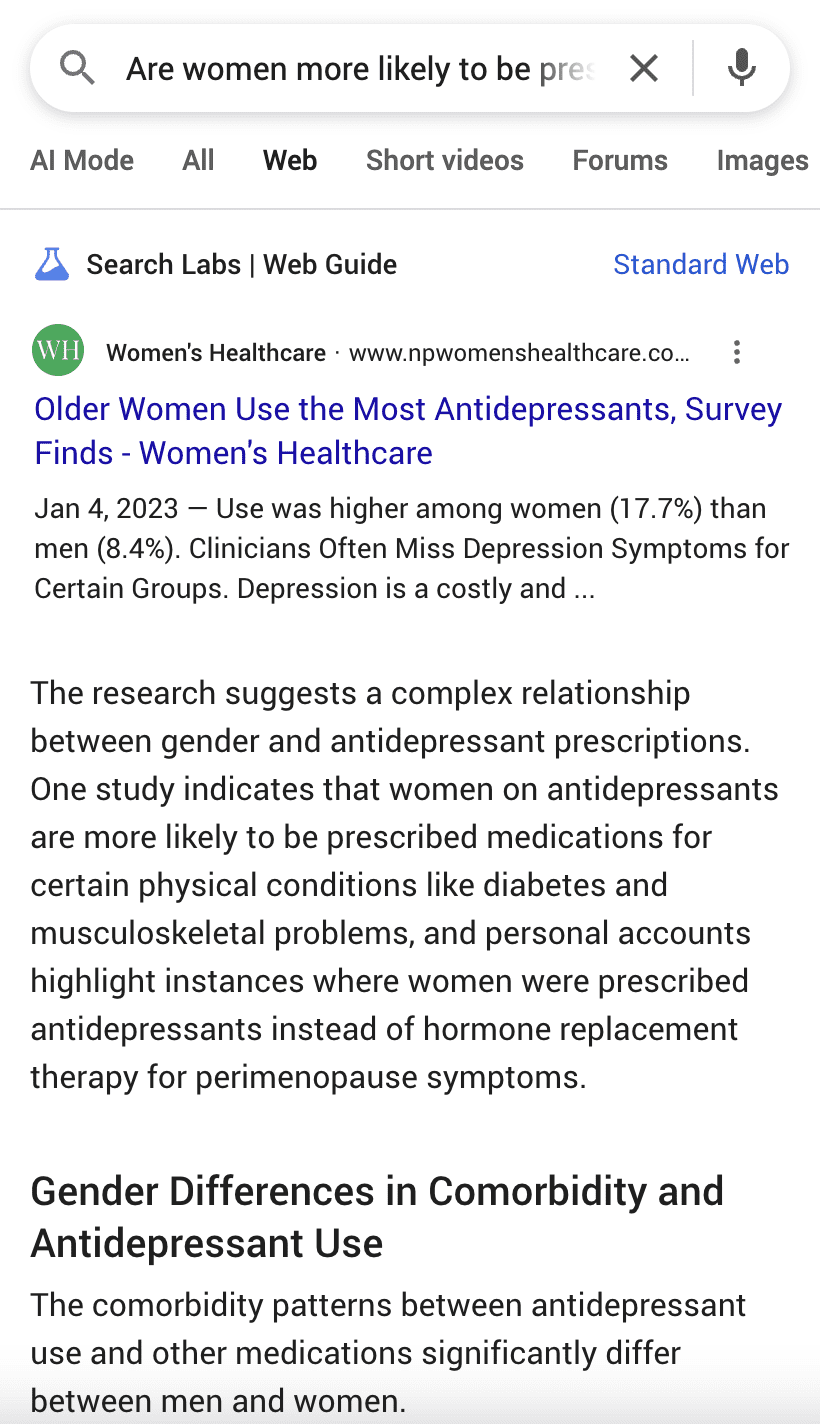
There is a significant risk that the AI will not only reflect but also amplify existing societal and brand biases. A compelling example is to review complex issues to test the fairness of the Web Guide.
Screenshot from search for [Are women more likely to be prescribed antidepressants for physical symptoms?], Google, August 2025
Medical diagnostic queries are complex and can easily reveal biases.
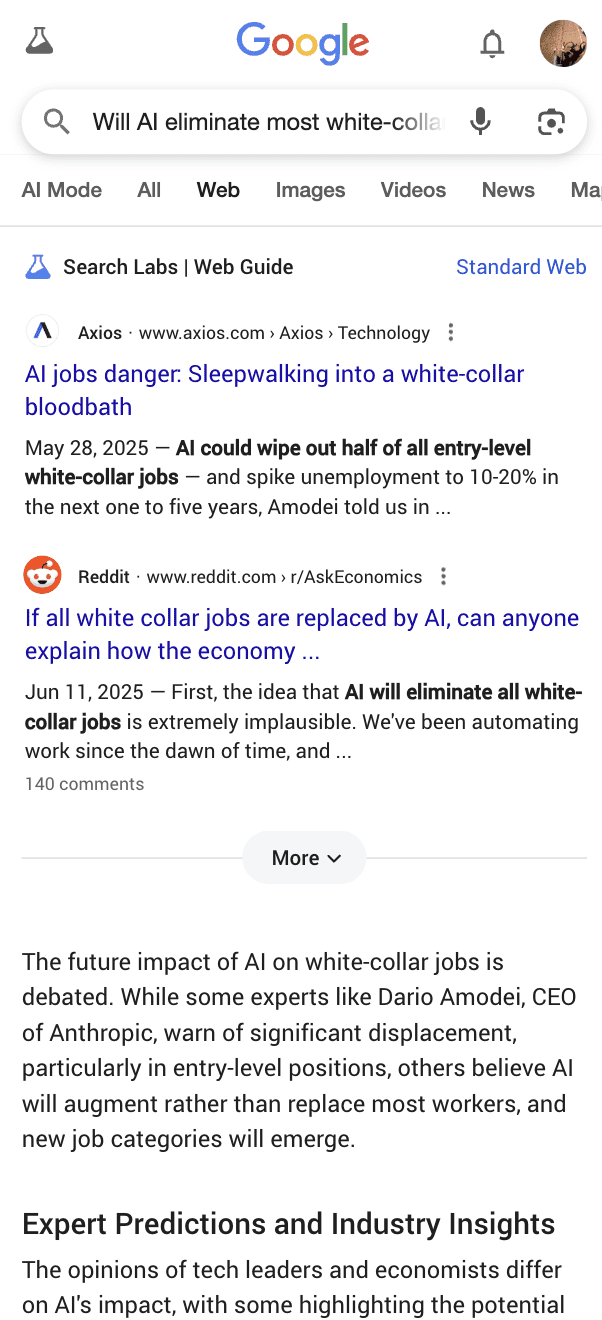
Screenshot from search for [Will AI eliminate most white-collar jobs?], Google, July 2025
Once again, UGC is used and might not always bring the right nuance between doom narratives and overly optimistic positions.
Since the feature is built upon these same core systems of traditional Search, it is highly probable that it will perpetuate existing biases.
Conclusion: The Age Of The Semantic AI-Curated Web
Google’s Web Guide is not a temporary UI update; it is a manifestation of a deeper, irreversible transformation in information discovery.
It represents Google’s attempt to navigate the passage between the old world of the open, link-based web and the new world of generative, answer-based AI.
The “query fan-out” mechanism is the key to understanding its impact and the new strategic direction. For all stakeholders, adaptation is not optional.
The strategies that guaranteed success in the past are no longer sufficient. The core imperatives are clear: Embrace topical authority as a direct response to the AI’s mechanics, master the principles of Semantic SEO, and prioritize the diversification of traffic sources. The era of the 10 blue links is over.
The era of the AI-curated “chunks” has begun, and success will belong to those who build a deep, semantic repository of expertise that AI can reliably understand, trust, and surface.
I’ve had this post in drafts for a while, mostly as a container for me to drop bits into for when I get time to expand it into a proper newsletter.
Then, my good friend Jono Alderson published his excellent piece on semantic HTML, and for a few weeks, I lost the will to complete mine.
But, I thought I should finish my version anyway, as my focus is slightly different and perhaps a bit more practical than Jono’s.
You should still definitely read Jono’s blog; it says all I want to say and more.
Semantic HTML
Let’s start with a quick overview of what semantic HTML is.
As the language upon which the web is built, HTML is a markup that surrounds text to provide it with structure.
The
tag around a block of content indicates that it is a paragraph of text.
The
tag around a sentence shows that it is the page’s main heading.
The
tag indicates the start of an ordered (usually numbered) list.
The tag indicates you’ll be loading an image onto the webpage. And so forth.
Semantic HTML was used to code every webpage.
Content was surrounded by specific tags that indicated what each bit of content was meant for, and then CSS was applied to make it look good. It wasn’t perfect by any means, but it worked.
It also meant that you could look at the raw HTML source of a webpage and see what the page was trying to deliver, and how. The HTML signposted the structure and meaning of each bit of content on the page. You could see the purpose of the page just by looking at its code.
Then WYSIWYG editors and later JavaScript frameworks arrived on the scene, and HTML took a backseat. Instead of
and
, we got endless nestings of
and tags.
The end result is webpage HTML that lacks structure and has no meaning, until it is completely rendered in the browser and visually painted onto a screen. Only then will the user (and a machine system trying to emulate a user) understand what the page’s purpose is.
It’s why Google goes through the effort of rendering pages as part of its indexing process (even though it really doesn’t want to).
We know Google doesn’t usually have the time to render a news article before it needs to rank it in Top Stories and elsewhere. The raw HTML is therefore immensely important for news publishers.
Good HTML allows Google to effortlessly extract your article content and rank your story where it deserves in Google’s ecosystem.
Semantic HTML is a key factor here. This is the reason why SEOs like me insist that an article’s headline is wrapped in the
heading tag, and that this is the only instance of
on an article page.
The H1 headline indicates a webpage’s primary headline. It signposts where the article begins, so that Google can find the article content easily.
Which HTML Tags Are Semantic?
Beyond the
heading tag, there are many other semantic HTML elements you can implement that allow Google to more easily extract and index your article content.
In no particular order, the elements you should be using are:
Paragraphs: Don’t use
and tags to format the article into paragraphs. There’s been a tag for that for as long as HTML has existed, and it’s the
tag. Use it.
Subheadings: Use
/
/
subheading tags to give your page structure. Use subheadings in an article to preface specific sections of content in your article. Use subheadings for the headers above concrete structural elements, such as recommended articles.
Images: Always use the tag if you want to show an image that you’d like Google to see as well. Google explicitly recommends this.
Relational Links: The tag allows you to create a relationship between the current URL and another URL. This can be a canonical page, a stylesheet, an alternative language version of the current page, etc.
Lists: Bullet lists should use the
tag, and numbered lists should use
tag. You can make them look however you want with CSS, but do use the list tags as the foundation.
Emphasis: When you want to highlight a specific word or phrase, there are semantic HTML tags you should use for that: for italics, and for bold.
All the above tags, with the exception of , are intended for the content of the webpage, providing structure and meaning to the text.
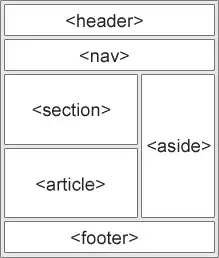
There are additional semantic HTML tags that are intended to provide structure and meaning to the code of the page.
These tags allow Google to identify different elements on the page, such as the navigation vs. a sidebar, and process them accordingly.
Semantic HTML image from W3Schools.com (Image Credit: Barry Adams)
The and tags exist to separate the page’s metadata (in the ) from the actual content (in the ). Every HTML page starts with those two.
can be used to wrap around the head section of the page, where the logo, navigation, and other stylistic elements sit.
should be used for your site’s main navigation. Mega menus, hamburger menus, top navigation links, whatever form your navigation takes, you should wrap it in the
You can use tags to divide your page into multiple sections. One section could be the article; another could be the comments below the article.
is the tag that shows where the page’s actual main article text begins (including the headline). This is a very valuable tag for news publishers.
With you can indicate blocks of content like a sidebar of trending stories, recommended articles, or the latest news.
is used for, you guessed it, the footer of the webpage.
These structural semantic tags help search engines understand the purpose and value of each section of HTML.
It enables Google to rapidly index your content and process the different elements of your pages appropriately.
There are many more semantic HTML tags at your disposal, for various different purposes. Chances are, there’s an HTML element for every imaginable use case.
Rather than cram your code full of
tags to make something happen, first see if there’s a proper HTML element that does the trick.
How Does It Help AI?
We know that LLMs like ChatGPT and Perplexity crawl the open web for training data, as well as for specific user queries that require content from the web.
What some of you may not know is that LLMs do not render JavaScript when they process webpages.
Google is the exception to the rule, as it has devoted a great deal of resources to rendering webpages as part of indexing.
Because Google’s Gemini is the only LLM built on Google’s index, Gemini is the only LLM that uses content from fully rendered webpages.
So, if you want to have any chance of showing up as a cited source in ChatGPT or Perplexity, you’d do well to ensure your complete page content is available in your raw, unrendered HTML.
Using semantic HTML to structure your code and provide meaning also helps these LLMs easily identify your core content.
It’s much simpler for ChatGPT to parse a few dozen semantic HTML tags rather than several hundred (or even thousand) nested
tags to find a webpage’s main content.
If and when the “agentic web” comes to life (I’m skeptical), semantic HTML is likely a crucial aspect of success.
With meaningless
and tags, it’s much easier for an AI agent to misunderstand what actions it should perform.
When you use semantic HTML for things like buttons, links, and forms, the chances of an AI agent failing its task are much lower.
The meaning inherent in proper HTML tags will tell the AI agent where to go and what to do.
What About Structured Data?
You may think that structured data has made semantic HTML obsolete.
After all, with structured data, you can provide machine systems with the necessary information about a page’s content and purpose in a simple machine-readable format.
This is true to an extent. However, structured data was never intended to replace semantic HTML. It serves an entirely different purpose.
Structured data has limitations that semantic HTML doesn’t have.
Structured data won’t tell a machine which button adds a product to a cart, what subheading precedes a critical paragraph of text, and which links the reader should click on for more information.
By all means, use structured data to enrich your pages and help machines understand your content. But you should also use semantic HTML for the same reasons.
Used together, semantic HTML and structured data are an unbeatable combination.
Build Websites, Not Web Apps
I could go off on a 2,500-word rant about why we should be building websites instead of web apps and how the appification of the web is anathema to the principles on which the World Wide Web was founded, but I’ll spare you that particular polemic.
Suffice it to say that web apps for content-delivery websites (like news sites) are almost always inferior to plain old-fashioned websites.
And websites are built, or should be, on HTML. Make use of all that HTML has to offer, and you’re avoiding 90% of the technical SEO pitfalls that web apps tend to faceplant themselves into.
That’s it for another edition. Thanks for reading and subscribing, and I’ll see you at the next one!
Brave Search announced the release of AI Grounding with the Brave Search API, a way to connect an AI system to grounding in search to reduce hallucinations and improve answers. The API is available in Free, Base AI, and Pro AI plans.
The Brave Search API is for developers and organizations that want to add AI grounding from authoritative web information to their AI applications. The Brave API supports agentic search, foundation model training, and creating search-enabled applications.
State Of The Art Performance (SOTA)
Brave’s announcement says that their AI Grounding API enables state of the art performance in both single-search and multi-search configurations, outperforming competitors in accuracy, claiming they can answer more than half of all questions with a single search.
According to Brave:
“Brave can answer more than half of the questions in the benchmark using a single search, with a median response time of 24.2 seconds. On average (arithmetic mean), answering these questions involves issuing 7 search queries, analyzing 210 unique pages (containing 6,257 statements or paragraphs), and takes 74 seconds to complete. The fact that most questions can be resolved with just a single query underscores the high quality of results returned by Brave Search.”
Pricing
There are three pricing tiers:
Free AI 1 query/second and a limit of 5,000 queries/month
Base AI $5.00 per 1,000 requests A limit of up to 20 queries/second 20M queries/month Rights to use in AI apps
Pro AI $9.00 per 1,000 requests A limit of up to 50 queries/second Unlimited queries/month Rights to use in AI apps
Brave’s AI Grounding API offers a reliable way to supply AI systems and apps with trustworthy information from across the web. Its independence and privacy practices make it a viable choice for developers building search-enabled AI applications.
America’s new stablecoin law could lead to billions of dollars in annual savings for enterprise retailers that issue their own digital money.
When President Trump signed the bipartisan Guiding and Establishing National Innovation for U.S. Stablecoins (GENIUS) Act into law in July 2025, America became the first nation to provide a regulatory framework for the issuance and oversight of secure, fiat-backed digital currencies.
“This bill will cement U.S. dollar dominance, protect customers, increase demand for U.S. treasuries, and ensure that innovation in the digital asset space is in the hands of the United States of America, not our adversaries,” said Tennessee Senator Bill Hagerty (R), who was the bill’s lead sponsor, in an official statement.
The GENIUS Act requires the participating banks or businesses releasing stablecoins to back each dollar’s worth of cryptocurrency with one dollar in cash or U.S. Treasury bonds — essentially, secure and liquid assets.
The U.S. GENIUS Act pegs the value of stablecoins to the U.S. dollar.
Retail Stablecoin
One possible use for the stablecoins that the GENIUS Act governs would be retailer-issued currency.
Walmart and Amazon may already be considering it to slash payment processing fees.
As every merchant knows, payment cards typically cost 1% to 3% in transaction fees. Those fees add up quickly for enterprise retailers.
Store-issued stablecoins could help these retail behemoths bypass traditional payment networks and cut transaction fees to nearly zero.
Thus, Walmart and Amazon, among other retailers, could drop billions to the bottom line each year. Collectively, American merchants pay something like $160 billion a year for payment card transactions.
Stablecoin Benefits
Beyond the immediate savings on transaction fees, issuing a stablecoin offers compelling benefits to an enterprise retailer, such as better cash flow from instant settlements, lower fraud risk, and improved customer loyalty from a branded digital money.
Yet some observers remember TerraUSD, the “stable” coin that took a nosedive in May 2022, dipping below its one-dollar peg on the 9th before eventually plunging to just 10 cents.
TerraUSD was an “algorithmic” stablecoin that used its relationship to another cryptocurrency, Luna, to hold its value.
The idea was this. TerraUSD was supposed always to be worth exactly one U.S. dollar, but Luna’s price could change.
The algorithm aimed to maintain TerraUSD at $1 by allowing people to trade it for $1 worth of Luna whenever the price fluctuated. If TerraUSD dropped to 99 cents, you could swap it for $1 worth of Luna and make a small profit, which was supposed to push the price back up.
The problem was that this only worked if people trusted the system and Luna had value. A run on TerraUSD pushed Luna prices down so fast that some investors panicked and started dumping Luna, too.
The algorithm stopped working.
Secure Coins
GENIUS Act stablecoins, however, will be as reliable and, as their name implies, as stable as most financial instruments.
This stability comes from the backing assets described above — $1 held in an account for every $1 worth of stablecoin in circulation, much different from TerraUSD and similar algorithmic or crypto-backed “stablecoins.”
Not for SMBs
Stablecoins have the potential to transform ecommerce and retail, but small and mid-size businesses will likely see relatively few benefits, at least in the near term.
For example, stablecoins unlock opportunities in cross-border sales, but ecommerce platform providers and marketplaces might not pass on per-transaction savings to sellers.
As an example, Shopify announced its support for USD Coin (USDC) in June 2025, but, at the time of writing, the ecommerce platform charged stablecoin transaction fees similar to standard payment card processing, despite USDC transactions being dramatically cheaper.
Large ecommerce marketplaces could take a similar tack, charging merchants the same fees to process stablecoins as for payment cards.
Concerns
I see two further concerns. First, any retailer issuing its own stablecoin will face banking-industry levels of reporting, regulation, and oversight.
Second, some economists worry that the proliferation of “private” money could create market chaos, especially if consumers used stablecoins for everyday purchases as described here.
Nonetheless, government-regulated stablecoins are real, and they will impact in-store and online merchants.
Google announced that they’re testing a new AI-powered Google Finance tool. The new tool enables users to ask natural language questions about finance and stocks, get real-time information about financial and cryptocurrency topics, and access new charting tools that visualize the data.
Three Ways To Access Data
Google’s AI finance page offers three ways to explore financial data:
Research
Charting Tools
Real-Time Data And News
Screenshot Of Google Finance
The screenshot above shows a watchlist panel on the left, a chart in the middle, a “latest updates” section beneath that, and a “research” section on the right hand panel.
Research
The new finance page enables users to ask natural language questions about finance, including the stock market, and the AI will return comprehensive answers, plus links to the websites where the relevant answers can be found.
Closeup Screenshot Of Research Section
Charting Tools
Google’s finance page also features charting tools that enable users to visualize financial data.
According to Google:
“New, powerful charting tools will help you visualize financial data beyond simple asset performance. You can view technical indicators, like moving average envelopes, or adjust the display to see candlestick charts and more.”
Real-Time Data
The new finance page also provides real-time data and tools, enabling users to explore finance news, including cryptocurrency information. This part features a live news feed.
The AI-powered page will roll out over the next few weeks on Google.com/finance/.
In the spring of 2021, climate scientists were stumped.
The global economy was just emerging from the covid-19 lockdowns, but for some reason the levels of methane—a greenhouse gas emitted mainly through agriculture and fossil-fuel production—had soared in the atmosphere the previous year, rising at the fastest rate on record.
Researchers around the world set to work unraveling the mystery, reviewing readings from satellites, aircraft, and greenhouse-gas monitoring stations. They eventually spotted a clear pattern: Methane emissions had increased sharply across the tropics, where wetlands were growing wetter and warmer.
That created the ideal conditions for microbes that thrive in anaerobic muck, which gobbled up more of the carbon-rich organic matter and spat out more methane as a by-product. (Reduced pollution from nitrogen oxides, which help to break down methane in the atmosphere, also likely played a substantial role.)
The findings offer one of the clearest cases so far where climate change itself is driving additional greenhouse-gas emissions from natural systems, triggering a feedback effect that threatens to produce more warming, more emissions, and on and on.
There are numerous additional ways this is happening or soon could, including wildfires and thawing permafrost. These are major emissions sources that aren’t included in the commitments nations have made under the Paris climate agreement—and climate risks that largely aren’t accounted for in the UN Intergovernmental Panel on Climate Change’s most recent warming scenarios.
Spark Climate Solutions (not to be confused with this newsletter) hopes to change that.
The San Francisco nonprofit is launching what’s known as a model intercomparison project, in which different research teams run the same set of experiments on different models across a variety of emissions scenarios to determine how climate change could play out. This one would specifically explore how a range of climate feedback effects could propel additional warming, additional emissions, and additional types of feedback.
“These increased emissions from natural sources add to human emissions and amplify climate change,” says Phil Duffy, chief scientist at Spark Climate Solutions, who previously served as climate science advisor to President Joe Biden. “And if you don’t look at all of them together, you can’t quantify the strength of that feedback effect.”
Other participants in the effort will include scientists at the Environmental Defense Fund, Stanford University, the Woodwell Climate Research Center, and other institutions in Europe and Australia, according to Spark Climate Solutions.
The nonprofit hopes to publish the findings in time for them to be incorporated into the UN climate panel’s seventh major assessment report, which is just getting underway, to help ensure that these dangers are more fully represented. That, in turn, would give nations a more accurate sense of the world’s carbon budgets, or the quantity of greenhouse gases they can produce before the planet reaches temperatures 1.5 °C or 2 °C over preindustrial levels.
But one thing is already clear: Since the current scenarios don’t fully account for these feedback effects, the world will almost certainly warm faster than is now forecast, which underscores the importance of carrying out this exercise.
Scientists at EDF, Woodwell and other institutions found that fires in the world’s northernmost forests, thawing permafrost and warming tropical wetlands could together push the planet beyond 2 °C years faster, eliminating up to a quarter of the time left before the world passes the core goal of the Paris agreement, in a paper under review.
Earlier this year, Spark Climate Solutions set up a broader program to advance research and awareness of what’s known as warming-induced emissions, which will launch additional collaborations similar to the modeling intercomparison project.
The goal of the program and the research project is “to really mainstream the inclusion of this topic in climate science and climate policy, and to drive research around climate solutions,” says Ben Poulter, who leads the program at Spark Climate Solutions and was previously a scientist at the NASA Goddard Space Flight Center.
Spark notes that warming temperatures could also release more carbon dioxide from the oceans, in a process known as outgassing; additional carbon dioxide and nitrous oxide, a potent greenhouse gas that also depletes the protective ozone layer, from farmland; more carbon dioxide and methane from wildfires; and still more of allthree ofthese gases as permafrost thaws.
The ground remains frozen year round across a vast expanse of the Northern Hemisphere, creating a frosty underground storehouse from Alaska to Siberia that’s packed with twice as much carbon as the atmosphere.
But as it thaws, it starts to decompose and release greenhouse gases, says Susan Natali, an Arctic climate scientist focused on permafrost at Woodwell. A study published in Nature in January noted that 30% of the world’s Arctic–Boreal Zone has already flipped from a carbon sink to a carbon source, when wildfires, thawing permafrost and other factors are taken into account.
Despite these increasing risks, only a minority of the models that fed into the UN climate panel’s last major report incorporated the feedback effects of thawing permafrost. And the emissions risks still weren’t fully accounted for because these ecosystems are difficult to monitor and model, Natali says.
Among the complexities: Wildfires, which are themselves hard to predict, can accelerate thawing. It’s also hard to foresee which regions will grow drier or wetter, which determines whether they release mostly methane or carbon dioxide—and those gases have very different warming effects over different time periods. There are counterbalancing effects that must be taken into account as well—for instance, as carbon-absorbing plants replace ice and snow in certain areas.
Natali says improving our understanding of these complex feedback effects is essential to understanding the dangers we face.
“It’s going to mean additional costs to human health, human life,” she says. “We want people to be safe—and it’s very hard to do that if you don’t know what’s coming and you’re not prepared for it.”
This article is from The Spark, MIT Technology Review’s weekly climate newsletter. To receive it in your inbox every Wednesday,sign up here.
Customer acquisition costs can ruin a business. Some merchants limit acquisition spend to the gross margin of the first sale. Others look to customers’ lifetime value.
Yet Taylor Holiday, CEO of the agency Common Thread Collective, profits from acquisition marketing. He calls it “negative CAC.”
Taylor first appeared on the podcast in 2020. In our recent conversation, he explained his acquisition strategy, experiences with employee ownership, and more.
The audio from our entire discussion is embedded below. The transcript is condensed and edited for clarity.
Eric Bandholz: Give us the rundown.
Taylor Holiday: I’m the CEO of Common Thread Collective, an ecommerce marketing agency that helps brands grow predictably and profitably. We’ve been at it for over a decade. Recently, we partnered with Acacia, a private equity firm, to expand our platform and pursue the next phase of growth.
We operate with an employee stock ownership plan, an ESOP. Our company took a bank loan to buy 20% of equity from existing shareholders and placed it in a trust for employees. Shares are allocated annually based on each employee’s salary as a percentage of total payroll. For example, if payroll is $1 million and you earn $100,000, you’d get 10% of each share allocation.
Employees receive shares tax-free, with no purchase cost. If they leave, the company must buy back their shares, making them relatively liquid. ESOPs can buy out partners or provide owner liquidity, but they require education, vesting schedules, and carry liabilities on the balance sheet. Well-known companies like King’s Hawaiian are fully employee-owned.
Bandholz: Would you do it again?
Holiday: Probably not. Employees didn’t fully understand the ESOP, and it didn’t change behavior as I’d hoped. Plus, it complicates an eventual sale of a business, and the operational challenges are significant.
There’s a book on “community capitalism” that explores alternatives to pure capitalism and socialism. Capitalism can overly concentrate wealth, while socialism has its flaws. Many people sense the shortcomings of both systems but haven’t found a perfect alternative. For me, the ESOP wasn’t that solution. It was a noble attempt, but I don’t believe it resolves the core issues — and maybe nothing fully can, given human nature.
Bandholz: Before this interview, you referenced negative customer acquisition costs. Can you talk about that?
Holiday: Negative CAC means our marketing generates profit instead of being a cost. Initially, our podcast, videos, and email newsletter were purely for lead generation — effective but costly to scale. We realized these were valuable media assets for which companies, especially software vendors in our space, would pay to access our audience.
By selling sponsorships to our podcast, email list, YouTube channel, and social content, we offset production costs and, in some cases, made them profitable. This shift turned marketing into a profit center, improving margins and fueling growth.
There’s currently high advertiser demand, but a limited supply of quality, ecommerce-focused media. A small group of creators dominates sponsorships because they have niche authority. However, most operate independently with fragmented sales processes and no funding for new content creation.
I see an opportunity to unite strong content creators, build a shared sales engine, and package sponsorship offerings, similar to how The Ringer network scaled before being acquired by Spotify. Whether it’s launching new shows or helping others monetize existing ones, it’s about building the pipeline, finding sponsors, and providing the resources many creators lack.
Many brands turn costly activities into content that drives sales. For example, Vktry (pronounced “victory”), a performance insole company, outfits entire sports teams, such as UCLA volleyball. Vktry films the training sessions and uses that authentic, authority-rich footage as ad content. What would typically be a sales or training expense becomes a marketing asset, fueling ads and reducing acquisition costs.
Another example is Alex Hormozi, co-founder of Acquisition.com, a business education firm, who hosts high-ticket weekend seminars. Attendees pay to learn, and he films the sessions for ongoing distribution. He’s essentially getting paid to produce content that generates more revenue, creating a self-sustaining cycle.
In contrast, most ecommerce brands spend heavily on production, then on distribution, and hope the ads meet their CAC goals. Finding ways to subsidize or monetize production upfront can turn marketing into a profit driver rather than a cost center.
Bandholz: Where can people follow you, learn from you, and use your services?
With over 2 billion monthly active users, standing out on the platform requires strategy and content planning.
A content plan is an essential blueprint to help you keep your posts aligned with your strategy and your overall marketing goals.
Posting without a plan can just be a wasted effort without clear direction.
To support your brand’s conversion and success, this guide has a free Instagram content plan template and helpful tips that you can customise for your brand.
So, let’s try to capture some of those users.
1. Create Your Content Calendar
A well-structured plan is your roadmap to guide your path, help you meet your goals, and schedule campaigns effectively.
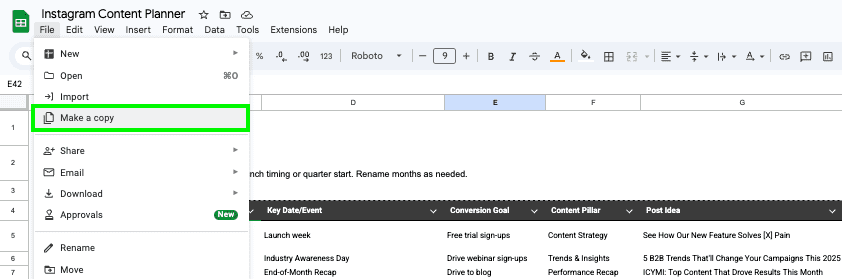
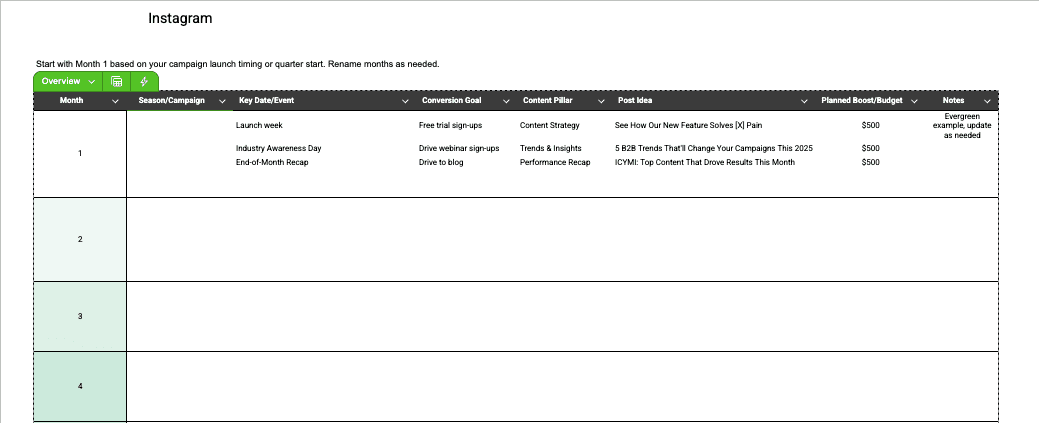
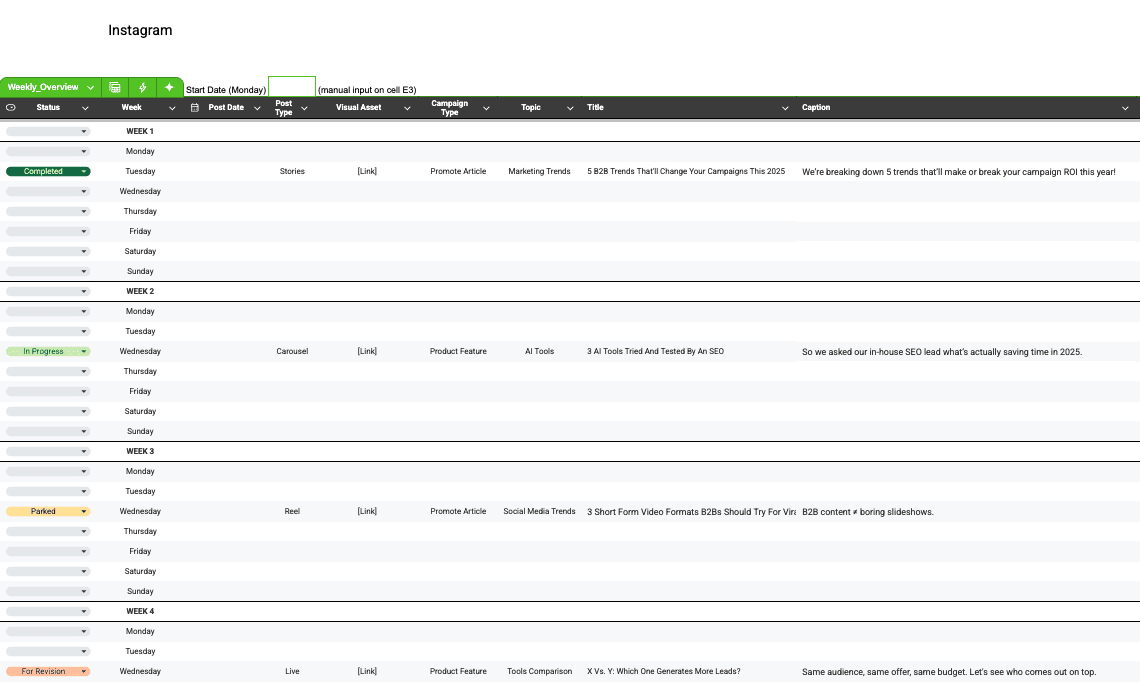
For this purpose, our template comes with an Overview tab and monthly planning tabs with flexible weekly layouts to give you a bird’s-eye view of your content.
It will help you know when you’ve met your goal and can readjust and analyze ways to improve your content strategy for your next one.
Plus, an Instagram content plan can keep ideas, budgets, themes, and marketing initiatives categorized. It also helps you identify any content gaps and build consistency – a key to Instagram success.
Begin with the Overview tab by outlining campaign cycles, including key conversion goals, strategic themes, and content pillars with associated budgets.
Move to the main weekly sheet to refine execution. Decide topics and post type, craft appropriate captions, align with campaign types, and define CTAs that support your marketing funnel objectives.
Finally, after you have the above laid out and initial captions, you can move to the next step: Create or assign the necessary key visuals or assets.
Breaking content planning into smaller, actionable steps makes it easier to create a content calendar.
Bonus Tip: Sync With Existing Marketing Initiatives
With a helpful overview or dashboard (included in our Instagram Content Plan), you can map out your seasonal themes, align your topics with days you’re posting, and have your captions and hashtags ready to easily copy and paste when you’re ready to schedule your content.
Screenshot by author, July 2025
If you already have some marketing initiatives, it’s the perfect time to incorporate them into your marketing campaign. For example, maybe you have a new product release.
You can then build a content series around it. Tease the product release with a few posts, run a giveaway, feature an influencer using the product in a video, and highlight key benefits throughout.
Events and holidays offer opportunities to boost engagement and attract new customers. They are another fun and positive way to get customers talking about your brand. Holiday giveaways or deals are another way to grow brand awareness and gain followers.
If you have an event coming up, you can create a campaign hyping the event and discussing the speakers involved, products that will be there, or awesome grab bags you’re giving away at the event.
We recommend pairing our Marketing Calendar for 2025 when creating your Instagram content plan to tie in your creative campaigns with holidays and seasonal themes for the week, month, or even quarter.
2. Define Your Goals
Once you have your content template and before you plan your posts, what you want to do is create your Instagram goals.
What do you want to accomplish? Is it to grow your audience, drive more engagement, or increase product sign-ups?
Once you know this, you can set the key performance indicators (KPIs) to mark different points of analysis you want to observe along with your Instagram campaign.
For example, you want to grow your audience by 20% by the end of the campaign cycle, or you wish to increase your engagement rate to at least 0.43%.
After you select your conversion goals, it’s beneficial to break down your goal into milestones you would like to reach.
This way, you can map out the type of content needed for each and track your progress using the KPIs you’ve set above.
Screenshot from author, July 2025
Ask yourself: What milestones can you mark to achieve that goal along the way? What types of content, topics, or content series can you create to increase engagement?
Write down all the goals you think your brand can reasonably achieve (Pro tip: the trick is to make it SMART).
3. Keep Your Theme And Tone Consistent
If you want to keep your posts engaging, ensure visual and tonal consistency by developing a brand guide. You’ll also want to maintain a cohesive theme across all posts, including style, typography, and color palette.
For inspiration, you can look at your website, content, and logos to help create the proper tone and theme for your posts.
Think about the look of your content for both pictures and videos, and consider a consistent angle or filter to set the right tone and look for your content.
It’s also vital to create standard operating procedures (SOPs) about your messaging, whether for captions, comments, or responses to direct messages, because chances are, multiple people are managing the account.
How you respond to consumers on Instagram matters, especially if you have multiple people responding to comments and messages, to ensure it’s within the brand’s tone.
4. Showcase Your Creativity: Instagram Post Types (With Examples)
Instagram is more than just an aesthetic photo-sharing app. It’s a significant platform that can showcase your product in different formats to entertain, engage, and educate audiences.
There are various ways to create content for Instagram that can highlight your brand and increase engagement.
Let’s talk through them for best practices for each use case:
Photos
Pictures are a great way to showcase products’ USPs, share thought leadership quotes, relatable memes, or announce new feature updates.
It’s also great for posing questions that you can answer in your image caption, or promoting deals or giveaways through the use of compelling captions.
Example: HubSpot’s AI-generated meme of its customer service rep as a toy figure catches attention and serves as a conversation starter.
Carousels
What can your company do when you have multiple photos from your high-end photoshoot but don’t want to post them into a grid or oversaturate your feed? Try beautifully crafted carousels to ensure return on investment (ROI).
Carousels have been a mainstay on Instagram since 2015. It is a collection of 10 photos you can post all at once, now expandable up to 20.
To entice your audience, make it interesting to swipe right with chronological storytelling, collage/magazine cutout elements, text overlays, or a narrative.
Example: Clickup’s photo of its new AI calendar features text overlay, seamlessly transitioning between both static and dynamic photos and tutorial short videos.
Reels
Next, videos are an excellent way to show sneak peeks of something coming up or create product teasers. You can also use videos for behind-the-scenes content to build product hype.
Consider using Instagram Reels, or short videos, to showcase products, share stories, and grow your audience.
By the way, Instagram discontinued IGTV, or Instagram TV, back in 2021, but you can post longer videos in-feed. Brands use these to go more in-depth into describing a particular topic.
Stories
Meanwhile, Stories are photos or videos that last 24 hours (unless you add them to your highlights on your profile), where you can share posts from your profile or post new content.
It’s a popular way to gain more followers and engage with consumers.
Example: Even if Stories expire after 24 hours, they still remain valuable. Sprout Social curated its Stories into its “Trending” highlights, showcasing key events and social media insights, such as the Oscars, Coachella, and Art Basel.
User Generated Content (UGC)
User-generated content, or content created by influencers, customers, or other users, is a great way to extend your reach to different audiences and further promote your products.
People are more intrigued to learn about a new product if it’s promoted by someone they already follow. Likewise, it can help build trust with consumers new to your brand if they see a post by a customer who already loves it.
Example: Slack featured its No. 1 “Slacker,” Rox (a senior social media manager at Gozney), as a fun UGC post, where she apparently sent the most Slack messages in a year.
But what content goes viral? It can be beneficial to look at what your competitors are posting on Instagram and put your brand’s unique twist on it.
5. Craft Compelling Captions And CTAs
While it’s great to have high-quality pictures and engaging videos, the captions and call to action still matter.
If you hooked the consumer with your picture or video, you still want to reel them in with your caption and CTA.
Screenshot by author, July 2025
It’s essential to craft the right CTA to ensure consumers follow your page, engage with your post, or purchase your product.
Consider A/B testing to identify the right approach for your campaigns. A compelling call-to-action is clear, concise, and written in an active voice.
6. Choose The Correct Hashtags
Researching and choosing the right hashtags is crucial to ensure your posts reach the intended audience and some new ones that might be interested in your niche and brand.
Hashtags allow your content to reach users beyond your profile’s following as you create content for specific hashtags. Note which posts perform particularly well.
That way, you can create future posts for specific hashtags that will increase your content’s visibility to a broader audience, helping you achieve more brand awareness.
7. Know The Best Time To Post
Planning posts ahead of time can help alleviate some stress from social media strategy.
You can use Meta Business Suites to schedule posts for Facebook and Instagram and set posts for a week or a couple of weeks.
If you’re unsure when to post, here are suggested days and times where analysis points to where you’ll get the most engagement and views.
It would be beneficial to do some research specific to your industry to see the best time and day for you to make your posts.
One important thing to keep in mind when you’re planning your content is the upcoming holidays.
Are you going to post celebrating the holiday, use the holiday to do a promotion or give away, or choose not to post on that day altogether?
No matter what you pick, keeping holidays in mind is crucial.
8. Measure Results And Adjust
Instagram Insights, both on the app and through Meta Business Suites, can show how many views a post gets and statistics on the engagement with the posts to help you see which types of content are working best. You can see your content’s likes, shares, comments, and saves.
Brands can also use Insights to get metrics on the paid activity. Insights are a great way to see trends so that you can adjust your content strategy.
You’ll also be able to see metrics about your followers to see how many you’re receiving, the age of your followers, and information on when they are most active online. This way, you can adjust your post times to ensure you are better at reaching your audience.
If your Instagram isn’t getting results, it may be due to a lack of planning.
Don’t miss the opportunity to tie your conversion goals, marketing campaigns, trends, holidays, and creative campaigns together and give it the well-planned, in-advance budget it deserves.
It can only help, not hurt, to create a proactive content plan for your social media team to stay aligned, maintain consistency, and deliver measurable results.
Achieving your goals by developing an Instagram-specific content calendar guided by current marketing objectives and data-driven themes will help your brand engage on the platform.
Download our Instagram content plan and start being more effective with your Instagram strategy.
More Resources:
Featured Image: Paulo Bobita/Search Engine Journal