How to create a 301 redirect in WordPress

Do you need to create a 301 redirect in your WordPress site? You’ve come to the right place! We’ll show you how to set up 301 redirects using three methods. Do you know if you need to use a redirect or whether a 301 redirect is right? No worries, we’ll explain that, too.

Redirects in a nutshell

The name ‘redirect’ says it all: It sends visitors traveling from a specific page to an alternative one instead. Or, if there’s no alternative, an HTTP header (similar to redirects) can make that clear to users and search engines. It’s like registering a change of address when you move house. What if an old friend visits your old home to visit you? A redirect is like a front door note telling your visitors where you live now. Any time you change a URL or delete a page, you should think about redirects.

Different redirects serve different purposes. Since this post is all about 301 redirects, let’s look at some situations where you might need to use one.

When should you use a 301 redirect?

A 301 redirect should be used when:

  • You’ve permanently deleted a page on your site, but you have another similar page you want to send users to instead
  • You’ve changed the URL of a page that was already published
  • You’re moving your site to a new domain
  • You’re changing your URL structure, e.g. changing from HTTP to HTTPS, or removing ‘www’ from the start of your URL

These are some of the more common reasons for using a 301 redirect, but other situations require redirecting, too. And besides that, there are other redirects and HTTP headers you can use in other situations. For instance, if you permanently delete a page and there is no suitable replacement or substitute you can send users to, then a 410 redirect is what you need to use. We have another post where you can read more about which redirects to use in which situations.

Option 1: Create a 301 redirect on the server

To set up a 301 redirect using .htaccess for the given example URLs, you need to add a specific line to your site’s .htaccess file, which is located in the root directory of your WordPress installation. Here’s how you can do it:

  1. Access your server. Access your site’s files using an FTP client or your web host’s file manager. You can also access and edit your .htaccess file from inside the Yoast SEO tools section.
  2. Locate the .htaccess file: The .htaccess file is usually in the root directory of your WordPress installation.
  3. Edit the .htaccess file: Open the .htaccess file with a text editor.
  4. Add the redirect rule: Insert the following line at the end of the file to create the redirect. This rule indicates that requests to /page-1 should be permanently redirected to /page-2.
Redirect 301 /page-1 /page-2
  1. Save changes: If you use an FTP client, save your changes to the .htaccess file and upload them back to your server.

Using this rule, any request to https://example.com/page-1 will be permanently redirected to https://example.com/page-2. The 301 status code indicates to search engines and browsers that the redirect is permanent. Note that this approach assumes the URLs follow the format /page-1 and /page-2 without additional subdirectories. You can adjust the path if your URLs are different.

These configurations can become unmaintainable over time, especially if you’re an avid blogger trying to improve your posts’ SEO. You must also log in to your server over FTP, edit the files, and re-upload them whenever you add a new redirect. That’s why, generally speaking, this method is not considered the way to go.

Option 2: Create a 301 redirect with Cloudflare

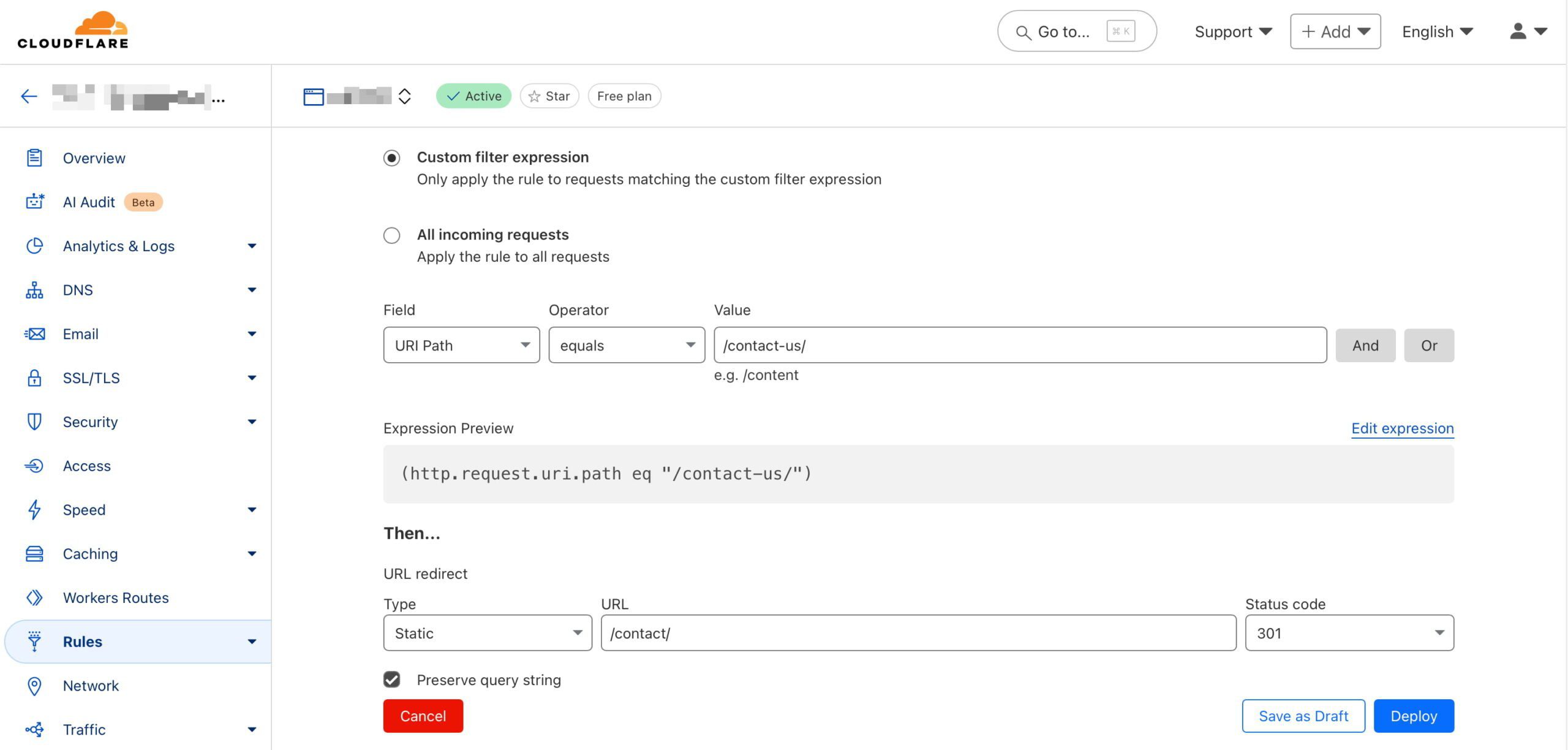
Most of us already use Cloudflare in one form or another, so you know that it offers a wide array of tools to help our websites perform. For instance, it comes with a Rules feature where you can set various options related to your website cache. You can also find various redirect options here; this will help you guide up redirects for everything from HTTP to HTTPS to single redirects for individual pages.

It’s easy to set up redirects through Cloudflare. Here’s how that works:

  1. Log into your Cloudflare account: Go to the Cloudflare dashboard and select your account and domain. Then, select Rules and Overview.
  2. Create a redirect rule: Select Create rule and then choose Redirect Rule. In the Rule name field, you might name it something like Redirect Page 1 to Page 2.
  3. Define the matching criteria: Set a wildcard pattern and set the Request URL to https://example.com/page-1. This means any traffic to example.com/page-1 will be matched for redirection
  4. Set the redirect parameters:
    • Target URL: Enter https://example.com/page-2 as the redirect destination.
    • Status code: Select 301 to indicate a permanent redirect.
    • Preserve query string: Decide based on your preference; enable this option if the original URL’s query string should be retained. When you choose to preserve the query string in a redirect, you keep any additional parameters that may be included in the original URL when redirecting to the new URL. Preserving the query string is often useful for tracking purposes, like retaining analytics or advertising parameters, ensuring that useful data isn’t lost during redirection.
  5. Deploy the rule:
    Click Deploy to save and activate the redirect.

Now, whenever someone visits https://example.com/page-1, they will be redirected to https://example.com/page-2 with a 301 status code, indicating a permanent move.

You can efficiently manage traffic without touching your server configuration by setting up redirects via Cloudflare. It provides flexibility for using simple patterns or more complex URL structures.

Cloudflare offers essential tools to manage the performance of your website

Option 3: Create a 301 redirect the easy way with Yoast SEO

Our Yoast SEO Premium plugin offers you a helping hand when it comes to creating these redirects. Our built-in redirect manager assists you whenever you change the URL of a post, page, or any taxonomies that may result in a possible 404 if you don’t properly redirect visitors. In addition, we also offer you an interface to edit or remove these redirects at a later point in time. The plugin also tells you when you’re about to create a redirect that will result in a redirect loop. This looping is something you want to avoid at all costs.

Here’s how you can set up a 301 redirect using Yoast SEO Premium in WordPress:

  1. Access the Yoast SEO settings: Log into your WordPress admin area and navigate to the Yoast SEO section.
  2. Open the Redirect Manager: Go to the Redirects feature in Yoast SEO Premium.
  3. Add a new redirect: Follow the steps below to create a new rule.
    • In the Old URL field, enter /page-1 as the source path.
    • In the New URL field, enter the destination /page-2 as the complete new URL.
    • Choose a 301 (Moved Permanently) from the list of redirect types.
  4. Save the Redirect: Click Add redirect, and Yoast SEO will handle the redirection.

Yoast SEO Premium also offers an option to automatically redirect deleted content. When you delete a page or post, Yoast SEO prompts you to set up a redirect to avoid broken links. This ensures visitors and search engines won’t encounter 404 errors and are smoothly directed to a relevant page.

These features are part of Yoast SEO Premium, designed to make managing redirects straightforward without manually altering code or server settings. They keep your site user-friendly and help maintain SEO performance by preventing dead links.
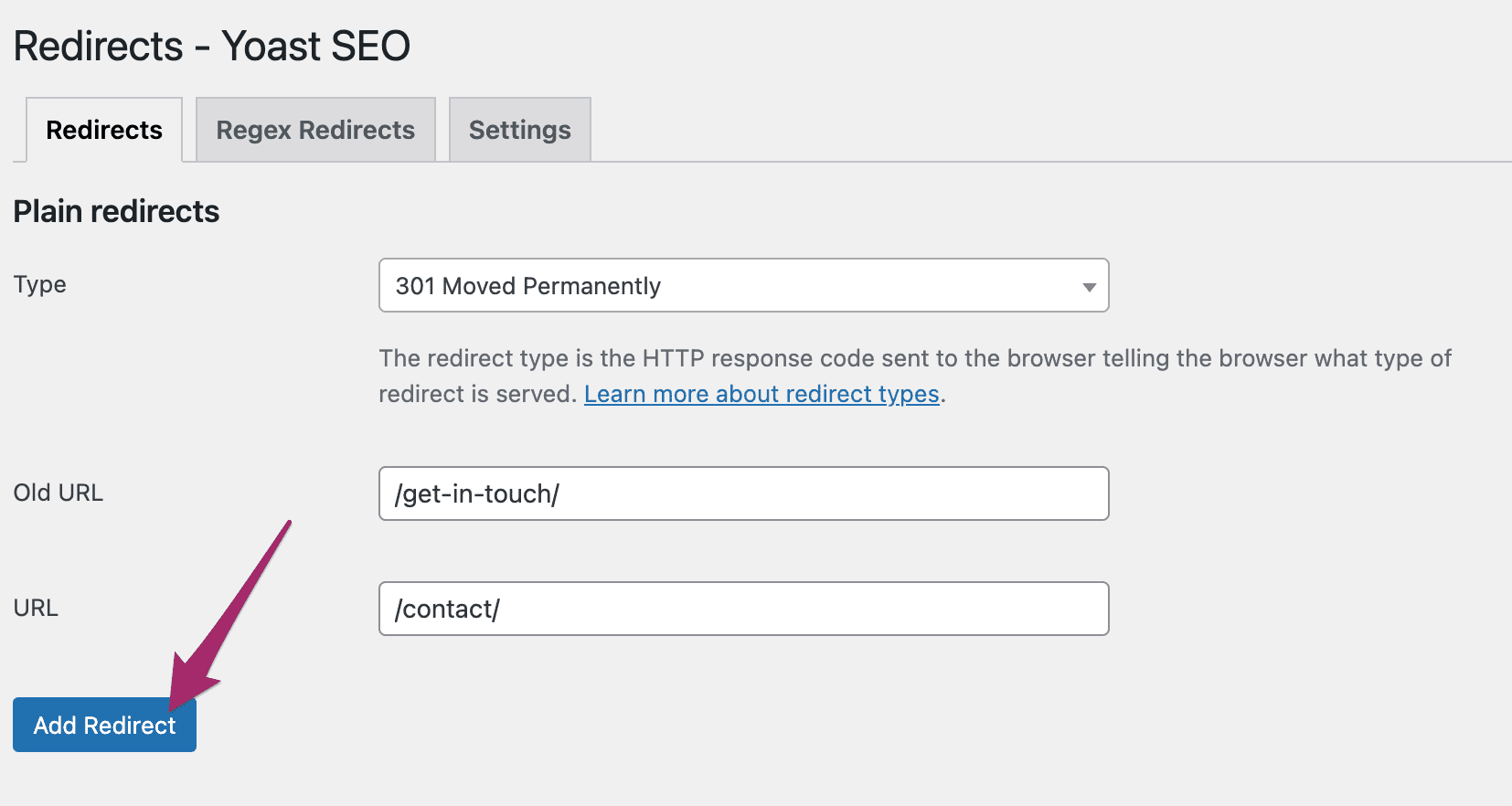
Adding a redirect with Yoast SEO Premium is very easy

Conclusion

Understanding how to set up 301 redirects is essential for maintaining your website’s integrity and user experience. Whether you choose Cloudflare, Yoast SEO Premium, or the .htaccess method, each approach offers a simple solution to guide visitors to the right place, preventing 404 errors and keeping your SEO rankings intact. Smoothly transitioning traffic from old links to new ones enhances usability and search visibility. Choose the best method that suits your needs and keeps your website running smoothly.

Read more: How to properly delete pages from your site »

How To Plan PPC Campaigns For SaaS Marketing & Think Strategically via @sejournal, @timothyjjensen

Planning a SaaS PPC strategy can be daunting. It often involves lengthy buying cycles, complex products to explain, and high competition.

According to Gartner, B2B SaaS buyers spend 27% of their time in the buying process doing independent research online.

Being visible across channels is crucial to keep your brand top-of-mind during this process.

In this article, we’ll dive into thinking through PPC for SaaS marketing, from audience planning to measurement.

Your Target Audience Is Wider Than You May Think

Who’s your target for a software product that will be used in an enterprise-level company?

While a director or C-level individual may sign off on a purchase, the people using the product on the ground are more likely to influence the decision-making process.

For instance, if you’re selling marketing automation software, a marketing operations manager may be fed up with their current solution and ask senior management to consider a new tool. However, a CMO may still need to approve the contract.

Particularly when using platforms such as LinkedIn, which allow incredible granularity with job title targeting, you’re likely shooting yourself in the foot if you only target select executive suite titles.

Job functions and groups can be a better route to reach a broader pool of individuals with a say in the purchase process.

Use data from your organization wherever possible to inform targeting. For instance, look at existing titles for individuals engaging with lead forms and sales processes.

Additionally, you can use LinkedIn Audience Insights on the website audience segments you’ve created to view demographic criteria that can help identify what job roles and types of companies are actually most engaging with your content.

Identify Your “Hook”

How are you getting the attention of prospects for their initial touchpoint with your brand?

Keeping in mind the breadth of the potential target audience, you’ll likely want to consider testing multiple “hooks” that may appeal to those in different roles.

For instance, a call to action (CTA) emphasizing bulk seat discounts may appeal to a chief financial officer (CFO) or someone primarily accountable for cost savings. A CTA emphasizing efficiency may resonate with an operations manager.

Testing multiple hooks against different audience segments can also be a helpful way to determine what will drive the most prospective interest at the most efficient cost.

This can be done using testing capabilities within ad platforms, such as Google’s Ad Variations or Campaign Experiments, or Meta Experiments, to ensure that separate individuals are exposed to the appropriate variant.

Next, while planning what messaging to use to entice new prospects, take into account what competitors are running and how your offer compares.

Analyze Your Competition

SaaS can be a highly competitive niche in paid search and other channels, with other players bidding aggressively and attempting to outdo each other’s offers.

Take some time to document the advertising efforts of competitors in your space, including ad messaging, creative, and landing pages.

Realize that those who actually compete with you most often in search auctions may not necessarily be the same as those who top the list of competitors for company leadership.

Use Auction Insights in Google and Microsoft to note which advertisers most often overlap for particular campaigns.

You can then use ad libraries such as Google’s Ad Transparency Center, Meta’s Ad Library, and LinkedIn’s Ad Library to view ads that these competitors have run.

Your analysis should help to answer questions such as:

  • What audience do they appear to be speaking to?
  • How attractive are competitor offers compared to yours?
  • What CTAs are they using?
  • Are there ad formats they are running that you’re not currently using (for instance, LinkedIn Lead Gen Forms)?
  • How many creative variants do they appear to be testing? Are there types of images that you’re not incorporating (for instance, vector graphics vs. stock photos)?

Additionally, go to competitor sites and initiate their lead processes by filling out forms or starting to sign up for an account. See what follow-up measures they implement.

Are you seeing retargeting ads encouraging you to complete account signup or offering additional resources? Are you receiving email follow-ups?

Share your findings with your team, not only to inform paid media tactics but also in thinking about landing pages and marketing automation flows.

Additionally, bidding on competitor names can be an effective paid search tactic to target people who are in the market for your product, especially when first entering the foray of search.

You can latch onto familiarity with a larger competitor that may have more search volume than your own brand.

While you shouldn’t directly mention your competitor by name in an ad (for trademark and ethical reasons), feel free to highlight your brand’s differentiators.

Research your competitors to keep tabs on areas where they may be weak and you are strong.

For instance, if a competitor has recently increased their pricing, current users and those in research mode may be more open to other options.

You can capitalize on mentioning your more efficient pricing, if that is your brand’s selling point.

You may also discover that a competitor receives frequent complaints about their customer service. If your brand is known for positive customer service, highlight that aspect of your business in ads to stand in contrast against your competitor.

Set Measurement Goals

SaaS marketing often involves long sales cycles with multiple steps of interaction before a user or business becomes a paying customer.

Establishing realistic expectations for cost per acquisition (CPA) and conversion rate goals at each stage is crucial.

Additionally, only measuring at the beginning or the end of the cycle is not beneficial in the long run.

If you’re purely focused on tracking and bidding toward CPA and conversion rate for a final paying customer, you’re likely not getting enough data back to the ad platforms to inform campaigns focused on those earlier in the awareness stages.

Conversely, if you’re strictly optimizing to an initial touchpoint such as a whitepaper download, you’re likely not providing the platforms enough information about lead quality to drive conversions from those most likely to become paying customers.

Consider your lead cycle and how your sales team nurtures prospects when establishing these goals.

For instance, you may categorize individuals as marketing qualified leads (MQLs) after they’ve downloaded a resource and attended a demo and mark them as sales qualified leads (SQLs) if they’ve completed those actions and started a free trial.

Each stage further down the “funnel” is likely worth a higher value, which should inform one’s willingness to pay a higher CPA to obtain it.

Connect Ad Platforms To Your CRM

Connecting your ad platforms to CRMs and/or marketing automation platforms, such as HubSpot or Salesforce, can help with complete conversion tracking and audience creation.

First, you can pass back conversions when users complete specific actions, such as completing a demo or signing up for a trial, and associate them with the same user.

Enhanced Conversions for Leads can ensure you track these actions more accurately based on individual contact information.

You can also use your CRM or marketing automation platform to sync audiences to ad platforms.

For instance, you may have a list of people that have opted in from an initial touchpoint with a webinar or whitepaper download.

Use the lists that you build for audiences to target ads based on the buying stage where they are.

Additionally, you can use lists of high-value prospects or customers to seed lookalike audiences for targeting and reaching people with similar demographic characteristics and interests.

Meta allows for lookalike targeting across campaign types (with the exception of some sensitive industries), while Google lets you build lookalike audiences for Demand Gen campaigns.

LinkedIn offers Predictive Audiences built from first-party data as a method to reach similar individuals.

You can also use customer lists to exclude existing customers from campaigns or to exclude those who already have a particular product from upsell campaigns.

Use Account List Targeting

In addition to targeting specific individuals, you can also use account-based marketing (ABM) to reach select companies you’d like to target.

The advantage here is that you don’t need explicit opt-ins to upload a list. A sales team may have a list compiled of “dream” target accounts, or you may have access to a list of major companies within a particular industry.

Out of the major self-service ad platforms, LinkedIn is the primary route for uploading account lists.

In addition, you can also work with reps to sync account lists in native advertising platforms such as Taboola or Outbrain, and for larger buys, you can look into dedicated ABM platforms.

You can also overlay additional targeting onto the account lists to ensure you’re reaching the right decision-makers in the organization.

For example, you can overlay an IT job function with job seniority of director and upwards to put your ads in front of people likely to make IT buying decisions.

Making PPC Work For Your Saas Marketing

Planning and executing a PPC strategy for a SaaS product can be a complex but rewarding process when you start to see qualified leads come through and turn into paying customers.

Start with understanding your audience and competition, and work through setting clear measurement goals and targeting strategies.

As you move forward with your campaigns, you can continue to test and refine based on the data you can gather, especially as you have time to analyze lifetime value associated with customers obtained via various channels.

More Resources:


Featured Image: Andrii Yalanskyi/Shutterstock

Google Says Disavow Tool Not Part Of Normal Site Maintenance via @sejournal, @martinibuster

Google’s John Mueller, at the Search Central NYC event, answered a question about what to do about toxic backlinks and responded with an overview of what goes on inside Google with links in order to explain why the disavow tool is something only sites that are guilty of something and know it should be using.

What To Do If Disavow Tool Is No Longer Available?

Google has a tool that allows publishers and SEOs to disavow links, which is basically telling Google to not count certain links. The purpose of the disavow tool arose after Google penalized countless thousands of sites for buying links. This was during the Penguin update in 2012. Getting rid of paid links was a difficult thing and some link sellers were asking for payment for removing the links. SEOs raised the idea of a disavow tool to help them get rid of the links their clients and themselves purchased and after a time Google agreed to provide that tool for that one purpose: to remove paid links.

Someone submitted a question for John Mueller to answer, asking what should SEOs do if the disavow tool is no longer available, asking:

“How can we remove toxic backlinks?”

The phrase “toxic backlinks” is something that the SEO backlink removal services and tools invented as part of scaring people into buying their backlink data and tools. That’s not a phrase that Googlers used, it’s totally 100% invented by SEO tool companies.

Google’s John Mueller answered:

“So internally we don’t have a notion of toxic backlinks. We don’t have a notion of toxic backlinks internally.

So it’s not that you need to use this tool for that. It’s also not something where if you’re looking at the links to your website and you see random foreign links coming to your website, that’s not bad nor are they causing a problem.

For the most part, we work really hard to try to just ignore them. I would mostly use the disavow tool for situations where you’ve been actually buying links and you’ve got a manual link spam action and you need to clean that up. Then the Disavow tool kind of helps you to resolve that, but obviously you also need to stop buying links, otherwise that manual action is not going to go away.”

Disavowing Links Is Not Normal Site Maintenance

Mueller continued his answer by pointing out that using a disavow tool on a regular basis is not a normal thing to do as part of site maintenance.

He said:

“But that’s essentially like from my point of view, the disavow tool is not something that you need to do on a regular basis. It’s not a part of normal site maintenance. I would really only use that if you have a manual spam action.”

I know there are some people who are “victims” of bad inbound links and blame those links for their poor rankings. So they disavow the bad links and their rankings never improve. One would think that the failure of the disavow tool to fix their ranking problems would cause them to see if something else is the problem but some people are so convinced that their sites are perfect that considering their site is poorly optimized is not an option for them.

But all of the cases I’ve looked at where people say they’re victims of negative SEO, 100% of them have problems with their SEO or content issues. Google’s algorithms aren’t affected by random links, that’s just not how link ranking algorithms work.

Featured Image by Shutterstock/Krakenimages.com

How the Pentagon is adapting to China’s technological rise

It’s been just over two months since Kathleen Hicks stepped down as US deputy secretary of defense. As the highest-ranking woman in Pentagon history, Hicks shaped US military posture through an era defined by renewed competition between powerful countries and a scramble to modernize defense technology.  

She’s currently taking a break before jumping into her (still unannounced) next act. “It’s been refreshing,” she says—but disconnecting isn’t easy. She continues to monitor defense developments closely and expresses concern over potential setbacks: “New administrations have new priorities, and that’s completely expected, but I do worry about just stalling out on progress that we’ve built over a number of administrations.”

Over the past three decades, Hicks has watched the Pentagon transform—politically, strategically, and technologically. She entered government in the 1990s at the tail end of the Cold War, when optimism and a belief in global cooperation still dominated US foreign policy. But that optimism dimmed. After 9/11, the focus shifted to counterterrorism and nonstate actors. Then came Russia’s resurgence and China’s growing assertiveness. Hicks took two previous breaks from government work—the first to complete a PhD at MIT and joining the think thank Center for Strategic and International Studies (CSIS), which she later rejoined to lead its International Security Program after her second tour. “By the time I returned in 2021,” she says, “there was one actor—the PRC (People’s Republic of China)—that had the capability and the will to really contest the international system as it’s set up.”

In this conversation with MIT Technology Review, Hicks reflects on how the Pentagon is adapting—or failing to adapt—to a new era of geopolitical competition. She discusses China’s technological rise, the future of AI in warfare, and her signature initiative, Replicator, a Pentagon initiative to rapidly field thousands of low-cost autonomous systems such as drones.

You’ve described China as a “talented fast follower. Do you still believe that, especially given recent developments in AI and other technologies?

Yes, I do. China is the biggest pacing challenge we face, which means it sets the pace for most capability areas for what we need to be able to defeat to deter them. For example, surface maritime capability, missile capability, stealth fighter capability. They set their minds to achieving a certain capability, they tend to get there, and they tend to get there even faster.

That said, they have a substantial amount of corruption, and they haven’t been engaged in a real conflict or combat operation in the way that Western militaries have trained for or been involved in, and that is a huge X factor in how effective they would be.

China has made major technological strides, and the old narrative of its being a follower is breaking down—not just in commercial tech, but more broadly. Do you think the US still holds a strategic advantage?

I would never want to underestimate their ability—or any nation’s ability—to innovate organically when they put their minds to it. But I still think it’s a helpful comparison to look at the US model. Because we’re a system of free minds, free people, and free markets, we have the potential to generate much more innovation culturally and organically than a statist model does. That’s our advantage—if we can realize it.

China is ahead in manufacturing, especially when it comes to drones and other unmanned systems. How big a problem is that for US defense, and can the US catch up?

I do think it’s a massive problem. When we were conceiving Replicator, one of the big concerns was that DJI had just jumped way out ahead on the manufacturing side, and the US had been left behind. A lot of manufacturers here believe they can catch up if given the right contracts—and I agree with that.

But the harder challenge isn’t just making the drones—it’s integrating them into our broader systems. That’s where the U.S. often struggles. It’s not a complicated manufacturing problem. It’s a systems integration problem: how you take something and make it usable, scalable, and connected across a joint force. Replicator was designed to push through that—to drive not just production, but integration and deployment at speed.

We also spent time identifying broader supply-chain vulnerabilities. Microelectronics was a big one. Critical minerals. Batteries. People sometimes think batteries are just about electrification, but they’re fundamental across our systems—even on ships in the Navy.

When it comes to drones specifically, I actually think it’s a solvable problem. The issue isn’t complexity. It’s just about getting enough mass of contracts to scale up manufacturing. If we do that, I believe the US can absolutely compete.

The Replicator drone program was one of your key initiatives. It promised a very fast timeline—especially compared with the typical defense acquisition cycle. Was that achievable? How is that progressing?

When I left in January, we had still lined up for proving out this summer, and I still believe we should see some completion this year. I hope Congress will stay very engaged in trying to ensure that the capability, in fact, comes to fruition. Even just this week with Secretary [Pete] Hegseth out in the Indo-Pacific, he made some passing reference to the [US Indo-Pacific Command] commander, Admiral [Samuel] Paparo, having the flexibility to create the capability needed, and that gives me a lot of confidence of consistency.

Can you talk about how Replicator fits into broader efforts to speed up defense innovation? What’s actually changing inside the system?

Traditionally, defense acquisition is slow and serial—one step after another, which works for massive, long-term systems like submarines. But for things like drones, that just doesn’t cut it. With Replicator, we aimed to shift to a parallel model: integrating hardware, software, policy, and testing all at once. That’s how you get speed—by breaking down silos and running things simultaneously.

It’s not about “Move fast and break things.” You still have to test and evaluate responsibly. But this approach shows we can move faster without sacrificing accountability—and that’s a big cultural shift.

 How important is AI to the future of national defense?

It’s central. The future of warfare will be about speed and precision—decision advantage. AI helps enable that. It’s about integrating capabilities to create faster, more accurate decision-making: for achieving military objectives, for reducing civilian casualties, and for being able to deter effectively. But we’ve also emphasized responsible AI. If it’s not safe, it’s not going to be effective. That’s been a key focus across administrations.

What about generative AI specifically? Does it have real strategic significance yet, or is it still in the experimental phase?

It does have significance, especially for decision-making and efficiency. We had an effort called Project Lima where we looked at use cases for generative AI—where it might be most useful, and what the rules for responsible use should look like. Some of the biggest use may come first in the back office—human resources, auditing, logistics. But the ability to use generative AI to create a network of capability around unmanned systems or information exchange, either in Replicator or JADC2? That’s where it becomes a real advantage. But those back-office areas are where I would anticipate to see big gains first.

[Editor’s note: JADC2 is Joint All-Domain Command and Control, a DOD initiative to connect sensors from all branches of the armed forces into a unified network powered by artificial intelligence.]

In recent years, we’ve seen more tech industry figures stepping into national defense conversations—sometimes pushing strong political views or advocating for deregulation. How do you see Silicon Valley’s growing influence on US defense strategy?

There’s a long history of innovation in this country coming from outside the government—people who look at big national problems and want to help solve them. That kind of engagement is good, especially when their technical expertise lines up with real national security needs.

But that’s not just one stakeholder group. A healthy democracy includes others, too—workers, environmental voices, allies. We need to reconcile all of that through a functioning democratic process. That’s the only way this works.

How do you view the involvement of prominent tech entrepreneurs, such as Elon Musk, in shaping national defense policies?

I believe it’s not healthy for any democracy when a single individual wields more power than their technical expertise or official role justifies. We need strong institutions, not just strong personalities.

The US has long attracted top STEM talent from around the world, including many researchers from China. But in recent years, immigration hurdles and heightened scrutiny have made it harder for foreign-born scientists to stay. Do you see this as a threat to US innovation?

I think you have to be confident that you have a secure research community to do secure work. But much of the work that underpins national defense that’s STEM-related research doesn’t need to be tightly secured in that way, and it really is dependent on a diverse ecosystem of talent. Cutting off talent pipelines is like eating our seed corn. Programs like H-1B visas are really important.

And it’s not just about international talent—we need to make sure people from underrepresented communities here in the US see national security as a space where they can contribute. If they don’t feel valued or trusted, they’re less likely to come in and stay.

What do you see as the biggest challenge the Department of Defense faces today?

I do think the  trust—or the lack of it—is a big challenge. Whether it’s trust in government broadly or specific concerns like military spending, audits, or politicization of the uniformed military, that issue manifests in everything DOD is trying to get done. It affects our ability to work with Congress, with allies, with industry, and with the American people. If people don’t believe you’re working in their interest, it’s hard to get anything done.

The Download: how the US is meeting China’s technological rise, and Trump’s tariff war intensifies

This is today’s edition of The Download, our weekday newsletter that provides a daily dose of what’s going on in the world of technology.

How the Pentagon is adapting to China’s technological rise

It’s been just over two months since Kathleen Hicks stepped down as US deputy secretary of defense. As the highest-ranking woman in Pentagon history, Hicks shaped US military posture through an era defined by renewed competition between powerful countries and a scramble to modernize defense technology.  

Over the past three decades, Hicks has watched the Pentagon transform—politically, strategically, and technologically. In this conversation with MIT Technology Review, Hicks reflects on how the Pentagon is adapting—or failing to adapt—to a new era of geopolitical competition. She discusses China’s technological rise, the future of AI in warfare, and her signature initiative, Replicator, a Pentagon initiative to rapidly field thousands of low-cost autonomous systems such as drones. Read the full story.

—Caiwen Chen

The must-reads

I’ve combed the internet to find you today’s most fun/important/scary/fascinating stories about technology.

1 Donald Trump’s trade war could trigger a global recession
Investors are sounding the alarm as markets struggle to react to his tariffs. (Economist $)
+ Unsurprisingly, the President has doubled down on his tariffs. (BBC)
+ It’s all part of his plan to “reset global trade.” (Politico)
+ Trump’s tariffs will deliver a big blow to climate tech. (MIT Technology Review)

2 The White House was just hours from announcing a TikTok deal
Until the Chinese government insisted on tariff negotiations first. (WP $)
+ The two countries now seem likely to descend into tit-for-tat restrictions. (WSJ $)
+ The President has extended the sale deadline by another 75 days. (NBC News)

3 DeepSeek is working on self-improving AI models
It’s working with Tsinghua University to reduce its models’ training needs. (Bloomberg $)
+ China is narrowing the AI dominance gap between it and the US. (Wired $)
+ How DeepSeek ripped up the AI playbook—and why everyone’s going to follow its lead. (MIT Technology Review)

4 X is flourishing under the Trump administration
Elon Musk appears to be positioning the platform as a new media outlet. (NYT $)
+ X is cracking down on parody accounts. (BBC)

5 A shingles vaccine could help lower the risk of developing dementia
We might have to overhaul the way we treat neurodegenerative diseases. (Vox)
+ It may help to treat them like viruses. (NYT $)
+ Dementia content gets billions of views on TikTok. Whose story does it tell? (MIT Technology Review)

6 San Francisco’s mayor is trying to convince tech leaders to come back
He may be willing to offer tax breaks as an incentive. (TechCrunch)
+ Some of his supporters aren’t in favor of his new upzoning plan. (SF Standard)

7 TikTok’s algorithm promotes live streams of begging children
While taking fees and commission of up to 70%. (The Guardian)

8 China’s EV makers are locked in intense competition
And consumers are spoilt for choice. (FT $)
+ Argentina has lifted tariffs on EVs. (Rest of World)
+ China’s EV giants are betting big on humanoid robots. (MIT Technology Review)

9 This version of video game Quake was created using AI
Microsoft has opened a demo up to Copilot users. (The Verge)
+ How generative AI could reinvent what it means to play. (MIT Technology Review)

10 Tracking celebrity heights is an internet obsession
Is anyone actually 5”11? (The Guardian)

Quote of the day

“We’d like to put this chapter behind us.”

—Sean Murphy, executive vice president of policy at trade group the Information Technology Industry Council, tells the Washington Post how the tech industry is desperate to see the tariffs that affect it reversed as quickly as possible.

The big story

The messy quest to replace drugs with electricity

In the early 2010s, electricity seemed poised for a hostile takeover of your doctor’s office. Research into how the nervous system—the highway that carries electrical messages between the brain and the body— controls the immune response was gaining traction.

And that had opened the door to the possibility of hacking into the body’s circuitry and thereby controlling a host of chronic diseases, including rheumatoid arthritis, asthma, and diabetes, as if the immune system were as reprogrammable as a computer.

To do that you’d need a new class of implant: an “electroceutical.” These devices would replace drugs. No more messy side effects. And no more guessing whether a drug would work differently for you and someone else. In the 10 years or so since, around a billion dollars has accreted around the effort. But electroceuticals have still not taken off as hoped.

Now, however, a growing number of researchers are starting to look beyond the nervous system, and experimenting with clever ways to electrically manipulate cells elsewhere in the body, such as the skin.

Their work suggests that this approach could match the early promise of electroceuticals, yielding fast-healing bioelectric bandages, novel approaches to treating autoimmune disorders, new ways of repairing nerve damage, and even better treatments for cancer. Read the full story.

—Sally Adee

We can still have nice things

A place for comfort, fun and distraction to brighten up your day. (Got any ideas? Drop me a line or skeet ’em at me.)

+ The internet is hating on the Beatles biopics before they’re even out—but why?
+ Do you know the last time all of humanity was on Earth?
+ The new Naked Gun film looks suitably unhinged.
+ Here’s some simple bits of advice to help make each day that little bit happier.

Google Ads Recommendations Worth Doing

Google Ads utilizes artificial intelligence and machine learning to recommend tactics across seven categories:

  • Ads & Assets
  • AI Essentials
  • Automated Campaigns
  • Bids & Budgets
  • Keywords & Targeting
  • Measurement
  • Repairs

I view Google’s recommendations cautiously. Implemented correctly, some can improve performance. Others may not align with an advertiser’s goals or even hurt the results.

Moreover, beware of Google Ads optimization score. It’s an estimate of how an account will perform. Implementing Google’s recommendations will increase the score but not, in my experience, the actual performance. It’s a vanity metric, in other words.

In this post, I’ll suggest recommendations worth examining.

Ads & Assets

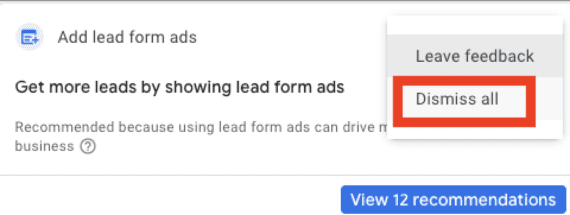
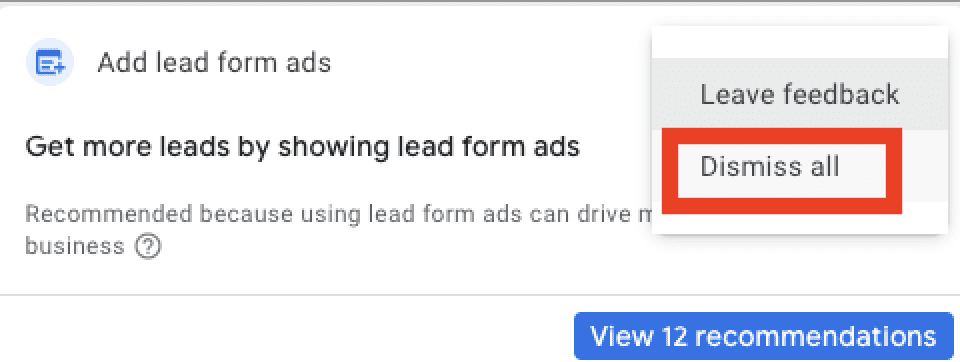
Ads & Assets addresses ad copy and assets (formerly extensions). Many of the recommendations suggest implementing missing items such as call assets and lead form ads. But lead form ads do not make sense for advertisers seeking visitors and on-site form completions. Dismiss the recommendation if that’s your scenario.

Yet recommending missing assets is helpful for ads with legitimate shortcomings, such as Search ads with fewer than 15 headlines and four descriptions or demand generation ads with missing text or images.

Advertisers seeking visitors and on-site form fills likely should dismiss lead form ads. Click image to enlarge.

AI Essentials

These recommendations are the core tactics Google wants all advertisers to implement. Many of the recommendations overlap in other categories. For example, “adding images” also appears in Ads & Assets.

The critical recommendations in AI Essentials are:

  • Adding broad match keywords
  • Updating bid strategies
  • Using consent mode

I’ve addressed the importance of broad match keywords because it uses most audience signals and thus helps scale conversions. Likewise, smart bidding is mandatory for me as it’s more effective than manual. And consent mode is critical to respect users’ privacy and recover lost conversions from searchers with tracking disabled.

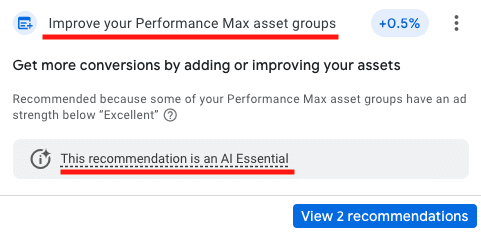
Google considers Performance Max a priority and includes it in AI Essentials, even if the campaign type isn’t a fit for all advertisers.

Screenshot of the recmmendation to include Performance Max asset groups.

Google includes Performance Max recommendations in AI Essentials. Click image to enlarge.

Automated Campaigns

Google’s primary recommendation for automated campaigns is to create a Performance Max campaign, stating, “According to Google Data… advertisers who use Performance Max achieve, on average, over 18% more conversions at a similar cost per action.”

Other Automated Campaign recommendations include updating both Dynamic Search Ads and Display campaigns to Performance Max.

Bids & Budgets

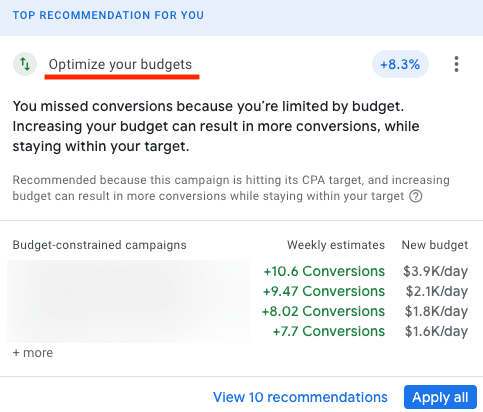
Bids & Budgets recommendations are helpful when analyzed correctly. The first addresses budget-constrained campaigns wherein Google recommends weekly changes to improve conversions.

I find those recommendations useful even for higher spends. Be sure to match the recommendations with specific campaigns, as it’s not always obvious, and ensure each aligns with your goals. For example, increasing budgets for top-of-funnel Display campaigns may not apply.

Google could also recommend in Bids & Budgets a different bid strategy, such as moving from a tCPA to a tROAS.

Google’s recommendations for optimizing budgets are useful even for higher spends. Click image to enlarge.

Keywords & Targeting

In this category, Google recommends adding broad match keywords and suggests new keyword ideas and removing non-serving terms (for example, those with low search volume). The idea is to provide new keyword opportunities while cleaning up non-performers.

Keywords & Targeting also includes recommendations for (i) audience targeting, (ii) Customer Match automating, and (iii) optimized targeting in Display campaigns. The latter gives Google more leeway for showing Display ads, which I tend to dismiss owing to poor performance.

Measurement

I implement Google’s Measurement recommendations because they impact user privacy and help recover lost conversions. I also implement enhanced conversions. Users who disable tracking prevent visibility if they convert.

By updating conversion tracking, advertisers can collect first-party data, hash it, and then send it back to Google to close the conversion gap. Hence enhanced conversions allow more accurate performance reports.

Repairs

The Repairs category alerts advertisers of disapproved and missing items. Example alerts include rejected sitelinks or missing ad group keywords. Advertisers can run scripts for these notifications. Most Repairs recommendations are straightforward and worth implementing.

Check out Google’s post “Types of recommendations” for a complete list for each category.

Shopify CEO’s Memo Marks A Pivotal Moment For AI In The Workplace via @sejournal, @martinibuster

A memo by Shopify’s CEO Tobi Lütke sets a company-wide expectation for the use of AI not just throughout the company but also encourages employees to think about how their end users can use AI. Everyone needs to read this because it marks a pivotal moment in how everyone should be using AI to hundredfold increase what they can accomplish and to visualize how AI can be employed for end users as well.

The internal memo details a company-wide reflexive AI usage strategy, which means using AI as a matter of course. It sets the stage for reshaping how merchants use Shopify and points toward a future where entrepreneurship on Shopify is AI-native by design. The memo signals how AI is swiftly becoming central to how all businesses will operate, especially yours.

Reflexive Use Of AI

The heart of the memo is the CEOs encouragement of discovering how AI can be applied to every aspect of how work gets done internally, citing his own usage of AI and how he feels he’s only scratching the surface of how it can be integrated into his own workflow. He asks all employees to “tinker” with AI and encourage company-wide adoption so that the usage of AI becomes reflexive.

His use of the word reflexive is important because it means doing something without consciously thinking about it. The express meaning then is that he really wants AI everywhere and the reason for that is because AI has the ability to boost productivity not just ten times but a hundredfold.

Tobias advocates for the transformational qualities of AI as a productivity multiplier, citing the reflexive use of it for unlocking exponential gains in what can be accomplished at Shopify.

He wrote:

“We are all lucky to work with some amazing colleagues, the kind who contribute 10X of what was previously thought possible. It’s my favorite thing about this company. And what’s even more amazing is that, for the first time, we see the tools become 10X themselves.

I’ve seen many of these people approach implausible tasks, ones we wouldn’t even have chosen to tackle before, with reflexive and brilliant usage of AI to get 100X the work done.”

Workplace Expectations and Requirements

What’s important about the Lütke memo is that it sets expectations about the use of AI in the workplace in a way that should serve as an inspiration for how all workplaces may consider following as well.

Using AI effectively is now a fundamental expectation of all Shopify employees and it will be factored into the peer and performance review questionnaires. Employees will be mandated to demonstrate why AI cannot be used to accomplish goals before asking for more resources. The expectations for AI usage is not just about software engineers, it applies to all employees, including all the way to the top at the executive management level.

AI At Every Workflow Step

The memo sets the expectation that AI must be involved during the GSD (Get Sh*t Done) prototype phase and at a “fraction of the time it used to take.” Teams are also encouraged to envision their projects as if AI were also a part of the team.

He writes:

“What would this area look like if autonomous AI agents were already part of the team? This question can lead to really fun discussions and projects.”

And elsewhere:

“In my On Leadership memo years ago, I described Shopify as a red queen race based on the Alice in Wonderland story—you have to keep running just to stay still. In a company growing 20-40% year over year, you must improve by at least that every year just to re-qualify. This goes for me as well as everyone else.

This sounds daunting, but given the nature of the tools, this doesn’t even sound terribly ambitious to me anymore. It’s also exactly the kind of environment that our top performers tell us they want. Learning together, surrounded by people who also are on their own journey of personal growth and working on worthwhile, meaningful, and hard problems is precisely the environment Shopify was created to provide. This represents both an opportunity and a requirement, deeply connected to our core values of Be a Constant Learner and Thrive on Change. These aren’t just aspirational phrases—they’re fundamental expectations that come with being a part of this world-class team. This is what we founders wanted, and this is what we built.”

Learning, Collaboration, and Community

The other exciting part of Lütke’s memo for AI usage in the workplace is that he encourages employees to share their discoveries and breakthroughs with each other so that all employees can benefit from new and creative ways of getting things done with AI, to share all of their wins with each other.

“We’ll learn and adapt together as a team. We’ll be sharing Ws (and Ls!) with each other as we experiment with new AI capabilities, and we’ll dedicate time to AI integration in our monthly business reviews and product development cycles. Slack and Vault have lots of places where people share prompts that they developed, like #revenue-ai-use-cases and #ai-centaurs.”

Takeaways

Lütke’s memo shows how AI is radically changing the workplace at Shopify and how it can spread across every workforce, including your own.

Shopify is envisioning the next stage of ecommerce entrepreneurship, AI-everything, where AI is an ubiquitous presence for merchants. This is an example of the kind of leadership all entrepreneurs and small businesses should have, to start thinking of how they can integrate AI for themselves and their customers instead of lowering the window blinds to spy across the street to see what competitors are doing.

Read the entire memo:

Featured Image by Shutterstock/TarikVision

Google Chrome Adds New Tools For Better Mobile Testing via @sejournal, @MattGSouthern

Chrome has added new DevTools features that help developers test website performance based on real-world data.

Available in Chrome 134, these tools include CPU throttling calibration and other improvements that help bridge the gap between development environments and actual experiences.

How This Helps

Developers build websites on powerful desktop computers. However, many users visit these sites on much slower mobile devices.

This creates a problem: performance issues may not show up during testing.

Chrome DevTools has offered CPU throttling for years, letting developers simulate slower devices. But choosing the right throttling level has been mostly guesswork.

This update is designed to eliminate the guesswork.

CPU Throttling Calibration

The main new feature in Chrome 134 is CPU throttling calibration. It creates testing presets specifically for your development machine.

After a quick test, DevTools creates two options:

  • Low-tier mobile” – Mimics very basic devices
  • Mid-tier mobile” – Matches average mobile device speed
Screenshot from: developer.chrome.com/blog/devtools-grounded-real-world, April 2025.

Brendan Kenny states in the Chrome Developers Blog:

“We generally recommend the ‘mid-tier’ preset for most testing. If many of your users have even slower devices, the ‘low-tier’ option can help catch issues affecting those users.”

Setting up calibration is easy:

  • Open the Performance panel’s Environment settings
  • Select “Calibrate…” from the CPU throttling dropdown
  • Let DevTools run a quick test
  • Start using your new calibrated presets
Screenshot from: developer.chrome.com/blog/devtools-grounded-real-world, April 2025.

What Throttling Can & Can’t Do

The new calibration makes testing more accurate, but it has limits.

Throttling works by pausing the browser tab to make tasks take longer. This method is useful for simulating JavaScript and layout calculations.

Tests show that calibrated throttling closely matches how these processes run on real mobile devices.

However, CPU throttling doesn’t accurately simulate:

  • Graphics-heavy operations
  • Slower storage speeds
  • Limited memory
  • Device heating issues

Chrome’s testing showed that visually complex pages could take twice as long on real mobile devices compared to simulated tests.

This means you should still test on real devices, especially for visually rich websites.

Real-World Data Integration

Besides CPU calibration, Chrome 134 adds several features that use real-world performance data:

  • Throttling suggestions based on your actual site visitors
  • Alerts when your test results don’t match real-user experiences
  • Performance insights that flag mismatches between tests and reality
  • Smarter organization of performance tips based on your users’ actual needs
  • Better tracking of what settings were used for each test

These features help ensure your testing matches what users experience rather than artificial lab conditions.

Why It Matters For SEO & Marketing

These new tools solve a disconnect between websites that work well in development but struggle on real devices.

Chrome 134 helps ensure your performance improvements benefit users by providing more realistic testing conditions.

As mobile continues to dominate web traffic, these tools provide a better foundation for improving user experience, conversion rates, and search rankings.

Google Maps Gets An Upgrade To Combat Fake Reviews via @sejournal, @MattGSouthern

Google has updated its AI systems for Maps and Business Profiles, which now use Gemini to identify risky profile edits and fake reviews.

Gemini Finds Suspicious Profile Edits

Google is employing Gemini to spot fake changes to Business Profiles.

It can distinguish between a regular update, like a slight name change, and a sudden, suspicious shift, such as changing a business category from a “cafe” to a “plumber.”

In its announcement, Google said:

“We trained a new model with the help of Gemini that identifies potentially suspicious profile edits. A business that changes its name from ‘Zoe’s Coffee House’ to ‘Zoe’s Cafe’ isn’t suspicious—but a business that suddenly changes its category from ‘cafe’ to ‘plumber’ is.”

Google says this new system has blocked thousands of risky edits this year.

New Tools to Stop Fake Five-Star Reviews

Google will use Gemini to spot fake five-star reviews by tracking reviews over time. This allows the system to find new signs of abuse, even after the review is posted.

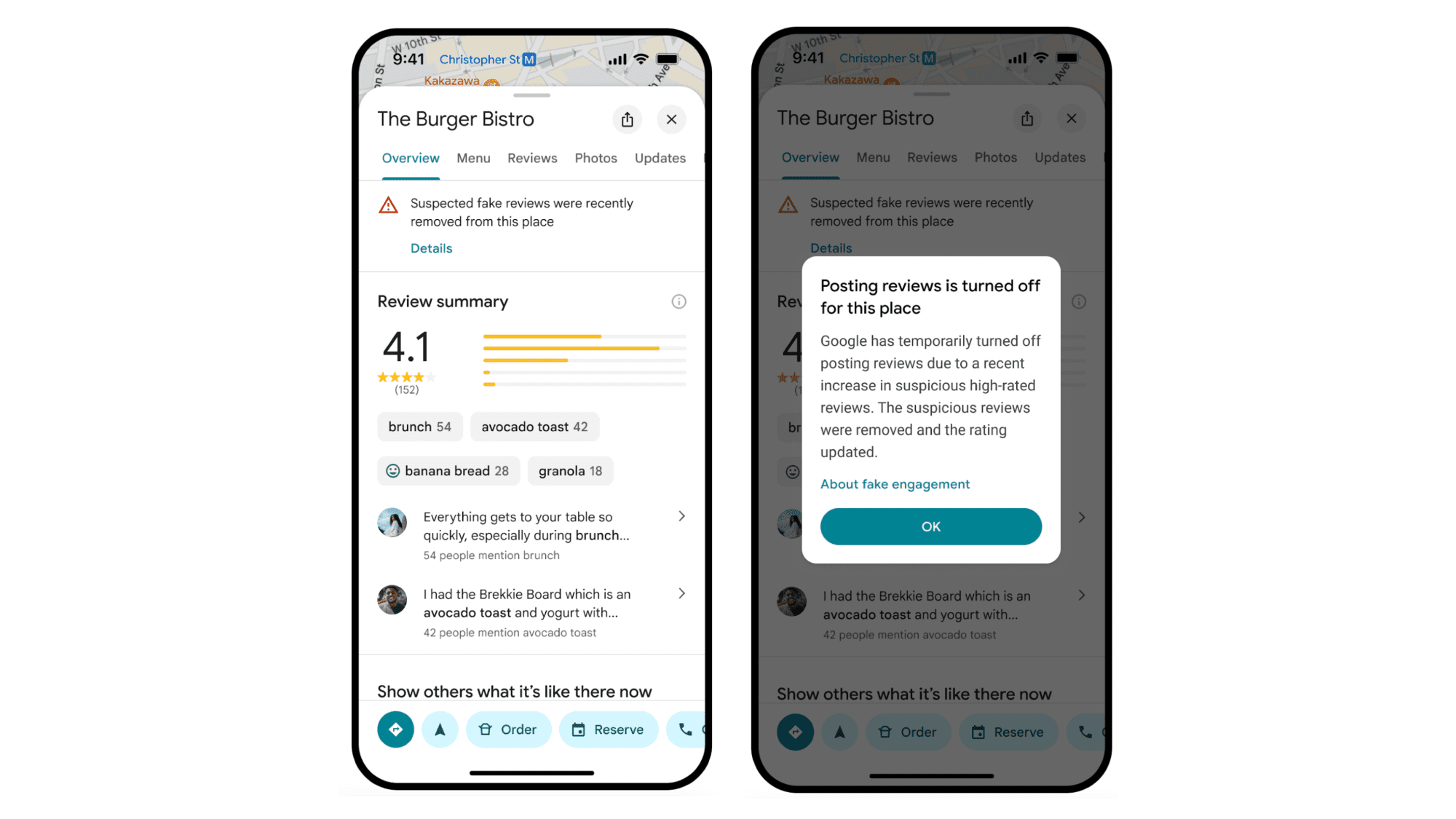
The company has launched alerts in the US, UK, and India. These alerts warn users when suspicious five-star reviews have been removed. Google plans to roll out the alerts worldwide next month.

See an example of the alerts below.

2024 in Numbers: Content Moderation

Google shared strong numbers from its work in 2024:

  • Over 240 million policy-violating reviews were blocked or removed before many people saw them.
  • More than 70 million risky edits to Maps listings were stopped.
  • Over 12 million fake Business Profiles were removed or blocked.
  • Posting was restricted on over 900,000 accounts that broke the rules repeatedly.

What This Means for SEO and Local Marketers

For SEO specialists and local marketing professionals, these updates underline the need for honest review strategies and careful Business Profile management.

As Google’s AI improves, tricks like fake reviews and unauthorized profile changes are easier to catch. Companies using shady tactics will face steeper penalties, while those focusing on genuine customer engagement will gain more trust from Google.

Best Practices for Local SEO

Given these advancements, local SEO professionals should:

  1.  Ensure client review practices follow Google’s rules.
  2. Ensure all Business Profiles are correctly claimed and managed.
  3. Monitor profile changes and review patterns.
  4. Focus on getting honest customer feedback.
  5. Use Google’s tools to report any suspicious activities by competitors.

Looking Ahead

Google plans to keep improving its systems. The company stated it will “keep working on the front lines and behind the scenes to keep content on Google Maps helpful and reliable.”

More details are available in its Content Trust and Safety Report.