Rivals are rising to challenge the dominance of SpaceX

SpaceX is a space launch juggernaut. In just two decades, the company has managed to edge out former aerospace heavyweights Boeing, Lockheed, and Northrop Grumman to gain near-monopoly status over rocket launches in the US; it accounted for 87% of the country’s orbital launches in 2024, according to an analysis by SpaceNews. Since the mid-2010s, the company has dominated NASA’s launch contracts and become a major Pentagon contractor. It is now also the go-to launch provider for commercial customers, having lofted numerous satellites and five private crewed spaceflights, with more to come. 

Other space companies have been scrambling to compete for years, but developing a reliable rocket takes slow, steady work and big budgets. Now at least some of them are catching up. 

A host of companies have readied rockets that are comparable to SpaceX’s main launch vehicles. The list includes Rocket Lab, which aims to take on SpaceX’s workhorse Falcon 9 with its Neutron rocket and could have its first launch in late 2025, and Blue Origin, owned by Jeff Bezos, which recently completed the first mission of a rocket it hopes will compete against SpaceX’s Starship. 

Some of these competitors are just starting to get rockets off the ground. And the companies could also face unusual headwinds, given that SpaceX’s Elon Musk has an especially close relationship with the Trump administration and has allies at federal regulatory agencies, including those that provide oversight of the industry.

But if all goes well, the SpaceX challengers can help improve access to space and prevent bottlenecks if one company experiences a setback. “More players in the market is good for competition,” says Chris Combs, an aerospace engineer at the University of Texas at San Antonio. “I think for the foreseeable future it will still be hard to compete with SpaceX on price.” But, he says, the competitors could push SpaceX itself to become better and provide those seeking access to space with a wider array of options..

A big lift

There are a few reasons why SpaceX was able to cement its position in the space industry. When it began in the 2000s, it had three consecutive rocket failures and seemed poised to fold. But it barreled through with Musk’s financial support, and later with a series of NASA and defense contracts. It has been a primary beneficiary of NASA’s commercial space program, developed in the 2010s with the intention of propping up the industry. 

“They got government contracts from the very beginning,” says Victoria Samson, a space policy expert at the Secure World Foundation in Broomfield, Colorado. “I wouldn’t say it’s a handout, but SpaceX would not exist without a huge influx of repeated government contracts. To this day, they’re still dependent on government customers, though they have commercial customers too.”

SpaceX has also effectively achieved a high degree of vertical integration, Samson points out: It owns almost all parts of its supply chain, designing, building, and testing all its major hardware components in-house, with a minimal use of suppliers. That gives it not just control over its hardware but considerably lower costs, and the price tag is the top consideration for launch contracts. 

The company was also open to taking risks other industry stalwarts were not. “I think for a very long time the industry looked at spaceflight as something that had to be very precise and perfect, and not a lot of room for tinkering,” says Combs. “SpaceX really was willing to take some risks and accept failure in ways that others haven’t been. That’s easier to do when you’re backed by a billionaire.” 

What’s finally enabled international and US-based competitors to emerge has been a growing customer base looking for launch services, along with some investors’ deep pockets. 

Some of these companies are taking aim at SpaceX’s Falcon 9, which can lift as much as about 20,000 kilograms into orbit and is used for sending multiple satellites or the crewed Dragon into space. “There is a practical monopoly in the medium-lift launch market right now, with really only one operational vehicle,” says Murielle Baker, a spokesperson for Rocket Lab, a US-New Zealand company.

Rocket Lab plans to take on the Falcon 9 with its Neutron rocket, which is expected to have its inaugural flight later this year from NASA’s Wallops Flight Facility in Virginia. The effort is building on the success of the company’s smaller Electron rocket, and Neutron’s first stage is intended to be reusable after it parachutes down to the ocean. 

Another challenger is Texas-based Firefly, whose Alpha rocket can be launched from multiple spaceports so that it can reach different orbits. Firefly has already secured NASA and Space Force contracts, with more launches coming this year (and on March 2 it also became the second private company to successfully land a spacecraft on the moon). Next year, Relativity Space aims to loft its first Terran R rocket, which is partially built from 3D-printed components. And the Bill Gates–backed Stoke Space aims to launch its reusable Nova rocket in late 2025 or, more likely, next year.

Competitors are also rising for SpaceX’s Falcon Heavy, holding out the prospect of more options for sending massive payloads to higher orbits and deep space. Furthest along is the Vulcan Centaur rocket, a creation of United Launch Alliance, a joint venture between Boeing and Lockheed Martin. It’s expected to have its third and fourth launches in the coming months, delivering Space Force satellites to orbit. Powered by engines from Blue Origin, the Vulcan Centaur is slightly wider and shorter than the Falcon rockets. It currently isn’t reusable, but it’s less expensive than its predecessors, ULA’s Atlas V and Delta IV, which are being phased out. 

Mark Peller, the company’s senior vice president on Vulcan development and advanced programs, says the new rocket comes with multiple advantages. “One is overall value, in terms of dollars per pound to orbit and what we can provide to our customers,” he says, “and the second is versatility: Vulcan was designed to go to a range of orbits.” He says more than 80 missions are already lined up. 

Vulcan’s fifth flight, slated for no earlier than May, will launch the long-awaited Sierra Space Dream Chaser, a spaceplane that can carry cargo (and possibly crew) to the International Space Station. ULA also has upcoming Vulcan launches planned for Amazon’s Kuiper satellite constellation, a potential Starlink rival.

Meanwhile, though it took a few years, Blue Origin now has a truly orbital heavy-lift spacecraft: In January, it celebrated the inaugural launch of its towering New Glenn, a rocket that’s only a bit shorter than NASA’s Space Launch System and SpaceX’s Starship. Future flights could launch national security payloads. 

Competition is emerging abroad as well. After repeated delays, Europe’s heavy-lift Ariane 6, from Airbus subsidiary Arianespace, had its inaugural flight last year, ending the European Space Agency’s temporary dependence on SpaceX. A range of other companies are trying to expand European launch capacity, with assistance from ESA.

China is moving quickly on its own launch organizations too. “They had no less than seven ‘commercial’ space launch companies that were all racing to develop an effective system that could deliver a payload into orbit,” Kari Bingen, director of the Aerospace Security Project at the Center for Strategic and International Studies, says of China’s efforts. “They are moving fast and they have capital behind them, and they will absolutely be a competitor on the global market once they’re successful and probably undercut what US and European launch companies are doing.” The up-and-coming Chinese launchers include Space Pioneer’s reusable Tianlong-3 rocket and Cosmoleap’s Yueqian rocket. The latter is to feature a “chopstick clamp” recovery of the first stage, where it’s grabbed by the launch tower’s mechanical arms, similar to the concept SpaceX is testing for its Starship.

Glitches and government

Before SpaceX’s rivals can really compete, they need to work out the kinks, demonstrate the reliability of their new spacecraft, and show that they can deliver low-cost launch services to customers. 

The process is not without its challenges. Boeing’s Starliner delivered astronauts to the ISS on its first crewed flight in June 2024, but after thruster malfunctions, they were left stranded at the orbital outpost for nine months. While New Glenn reached orbit as planned, its first stage didn’t land successfully and its upper stage was left in orbit. 

SpaceX itself has had some recent struggles. The Federal Aviation Administration grounded the Falcon 9 more than once following malfunctions in the second half of 2024. The company still shattered records last year, though, with more than 130 Falcon 9 launches. It has continued with that record pace this year, despite additional Falcon 9 delays and more glitches with its booster and upper stage. SpaceX also conducted its eighth Starship test flight in March, just two months after the previous one, but both failed minutes after liftoff, raining debris down from the sky.

Any company must deal with financial challenges as well as engineering ones. Boeing is reportedly considering selling parts of its space business, following Starliner’s malfunctions and problems with its 737 Max aircraft. And Virgin Orbit, the launch company that spun off from Virgin Galactic, shuttered in 2023.

Another issue facing would-be commercial competitors to SpaceX in the US is the complex and uncertain political environment. Musk does not manage day-to-day operations of the company. But he has close involvement with DOGE, a Trump administration initiative that has been exerting influence on the workforces and budgets of NASA, the Defense Department, and regulators relevant to the space industry. 

Jared Isaacman, a billionaire who bankrolled the groundbreaking 2021 commercial mission Inspiration4, returned to orbit, again via a SpaceX craft, on Polaris Dawn last September. Now he may become Trump’s NASA chief, a position that could give him the power to nudge NASA toward awarding new lucrative contracts to SpaceX. In February it was reported that SpaceX’s Starlink might land a multibillion-dollar FAA contract previously awarded to Verizon. 

It is also possible that SpaceX could strengthen its position with respect to the regulatory scrutiny it has faced for environmental and safety issues at its production and launch sites on the coasts of Texas and Florida, as well as scrutiny of its rocket crashes and the resulting space debris. Oversight from the FAA, the Federal Communications Commission, and the Environmental Protection Agency may be weak. Conflicts of interest have already emerged at the FAA, and the Trump administration has also attempted to incapacitate the National Labor Relations Board. SpaceX had previously tried to block the board from acting after nine workers accused the company of unfair labor practices.

SpaceX did not respond to MIT Technology Review’s requests for comment for this story.

“I think there’s going to be a lot of emphasis to relieve a lot of the regulations, in terms of environmental impact studies, and things like that,” Samson says. “I thought there’d be a separation between [Musk’s] interests, but now, it’s hard to say where he stops and the US government begins.”

Regardless of the politics, the commercial competition will surely heat up throughout 2025. But SpaceX has a considerable head start, Bingen argues: “It’s going to take a lot for these companies to effectively compete and potentially dislodge SpaceX, given the dominant position that [it has] had.”

Ramin Skibba is an astrophysicist turned science writer and freelance journalist, based in the Bay Are

We should talk more about air-conditioning

Things are starting to warm up here in the New York City area, and it’s got me thinking once again about something that people aren’t talking about enough: energy demand for air conditioners. 

I get it: Data centers are the shiny new thing to worry about. And I’m not saying we shouldn’t be thinking about the strain that gigawatt-scale computing installations put on the grid. But a little bit of perspective is important here.

According to a report from the International Energy Agency last year, data centers will make up less than 10% of the increase in energy demand between now and 2030, far less than the energy demand from space cooling (mostly air-conditioning).

I just finished up a new story that’s out today about a novel way to make heat exchangers, a crucial component in air conditioners and a whole host of other technologies that cool our buildings, food, and electronics. Let’s dig into why I’m writing about the guts of cooling technologies, and why this sector really needs innovation. 

One twisted thing about cooling and climate change: It’s all a vicious cycle. As temperatures rise, the need for cooling technologies increases. In turn, more fossil-fuel power plants are firing up to meet that demand, turning up the temperature of the planet in the process.

“Cooling degree days” are one measure of the need for additional cooling. Basically, you take a preset baseline temperature and figure out how much the temperature exceeds it. Say the baseline (above which you’d likely need to flip on a cooling device) is 21 °C (70 °F). If the average temperature for a day is 26 °C, that’s five cooling degree days on a single day. Repeat that every day for a month, and you wind up with 150 cooling degree days.

I explain this arguably weird metric because it’s a good measure of total energy demand for cooling—it lumps together both how many hot days there are and just how hot it is.  

And the number of cooling degree days is steadily ticking up globally. Global cooling degree days were 6% higher in 2024 than in 2023, and 20% higher than the long-term average for the first two decades of the century. Regions that have high cooling demand, like China, India, and the US, were particularly affected, according to the IEA report. You can see a month-by-month breakdown of this data from the IEA here.

That increase in cooling degree days is leading to more demand for air conditioners, and for energy to power them. Air-conditioning accounted for 7% of the world’s electricity demand in 2022, and it’s only going to get more important from here.

There were fewer than 2 billion AC units in the world in 2016. By 2050, that could be nearly 6 billion, according to a 2018 report from the IEA. This is a measure of progress and, in a way, something we should be happy about; the number of air conditioners tends to rise with household income. But it does present a challenge to the grid.  

Another piece of this whole thing: It’s not just about how much total electricity we need to run air conditioners but about when that demand tends to come. As we’ve covered in this newsletter before, your air-conditioning habits aren’t unique. Cooling devices tend to flip on around the same time—when it’s hot. In some parts of the US, for example, air conditioners can represent more than 70% of residential energy demand at times when the grid is most stressed.

The good news is that we’re seeing innovations in cooling technology. Some companies are building cooling systems that include an energy storage component, so they can charge up when energy is plentiful and demand is low. Then they can start cooling when it’s most needed, without sucking as much energy from the grid during peak hours.

We’ve also covered alternatives to air conditioners called desiccant cooling systems, which use special moisture-sucking materials to help cool spaces and deal with humidity more efficiently than standard options.

And in my latest story, I dug into new developments in heat exchanger technology. Heat exchangers are a crucial component of air conditioners, but you can really find them everywhere—in heat pumps, refrigerators, and, yes, the cooling systems in large buildings and large electronics installations, including data centers.

We’ve been building heat exchangers basically the same way for nearly a century. These components basically move heat around, and there are a few known ways to do so with devices that are relatively straightforward to manufacture. Now, though, one team of researchers has 3D-printed a heat exchanger that outperforms some standard designs and rivals others. This is still a long way from solving our looming air-conditioning crisis, but the details are fascinating—I hope you’ll give it a read

We need more innovation in cooling technology to help meet global demand efficiently so we don’t stay stuck in this cycle. And we’ll need policy and public support to make sure that these technologies make a difference and that everyone has access to them too. 

This article is from The Spark, MIT Technology Review’s weekly climate newsletter. To receive it in your inbox every Wednesday, sign up here.

The Download: dethroning SpaceX, and air-conditioning’s energy demands

This is today’s edition of The Download, our weekday newsletter that provides a daily dose of what’s going on in the world of technology.

Rivals are rising to challenge the dominance of SpaceX

SpaceX is a space launch juggernaut. In just two decades, the company has managed to edge out former aerospace heavyweights Boeing, Lockheed, and Northrop Grumman to gain near-monopoly status over rocket launches in the US. It is now also the go-to launch provider for commercial customers, having lofted numerous satellites and five private crewed spaceflights, with more to come.

Other space companies have been scrambling to compete for years, but developing a reliable rocket takes slow, steady work and big budgets. Now at least some of them are catching up. Read the full story.

—Ramin Skibba

We should talk more about air-conditioning

—Casey Crownhart

Things are starting to warm up here in the New York City area, and it’s got me thinking once again about something that people aren’t talking about enough: energy demand for air conditioners. 

I get it: Data centers are the shiny new thing to worry about. And I’m not saying we shouldn’t be thinking about the strain that gigawatt-scale computing installations put on the grid. But a little bit of perspective is important here.

I just finished up a new story about a novel way to make heat exchangers, a crucial component in air conditioners and a whole host of other technologies that cool our buildings, food, and electronics. Let’s dig into why I’m writing about the guts of cooling technologies, and why this sector really needs innovation. Read the full story.

This article is from The Spark, MIT Technology Review’s weekly climate newsletter. To receive it in your inbox every Wednesday, sign up here.

The must-reads

I’ve combed the internet to find you today’s most fun/important/scary/fascinating stories about technology.

1 Donald Trump has announced sweeping new tariffs
Experts fear the measures will spark a global trade war. (FT $)
+ The new tariffs are significantly higher than America’s targeted trade partners. (Vox)
+ US tech companies are reliant on global supply chains. What happens next? (Wired $)
+ Tech stocks dropped sharply following the announcement. (CNBC)

2 Elon Musk tried to control the Wisconsin Supreme Court race—and lost
The billionaire was mocked on his own platform, X, after the state rejected the Republican candidate he spent millions bankrolling. (The Guardian)
+ It was the most expensive judicial election in American history. (Economist $)
+ It appears as though Musk’s political influence is waning. (The Atlantic $)

3 Amazon made a bid to keep TikTok operational in the US
As has mobile tech company AppLovin. (WSJ $)
+ The founder of OnlyFans partnered with a crypto foundation in another bid. (Reuters)

4 Parents are worried about their teenagers’ smartphone use
But drawing firm conclusions about phones and social media’s effects on their mental health is far from easy. (Nature)

5 How China gets around America’s chip restrictions
Smuggling and subsidiaries are just some of the ways it skirts the bans. (Rest of World)
+ This super-thin semiconductor is just one molecule thick. (Ars Technica)
+ What’s next in chips. (MIT Technology Review)

6 Neuralink is looking for new patients across the world
The company has implanted devices in three people’s brains to date. (Bloomberg $)
+ Brain-computer interfaces face a critical test. (MIT Technology Review)

7 Italian police are investigating a major fire at a Tesla dealership
The blaze destroyed 17 cars in Rome. (The Guardian)

8 Publishers are experimenting with AI translations for books
Not everyone agrees that the technology is ready. (The Markup)

9 Vibe coding needs a reality check
A new AI app created using the loose process generated a recipe for deadly cyanide ice cream. (404 Media)

10 You may be unwittingly following JD Vance’s wife on Instagram
If you were following Kamala Harris’s husband on the platform, you’re now following Usha Vance. (TechCrunch)

Quote of the day

“Elon Musk’s money might buy some ads, but it repels voters.”

—Wisconsin Democratic Party Chairman Ben Wikler reflects on how his party’s candidate Susan Crawford won the state’s Supreme Court election, despite Musk spending $25 million supporting her Trump-endorsed rival, The Hill reports.

The big story

The lucky break behind the first CRISPR treatment

December 2023

The world’s first commercial gene-editing treatment is set to start changing the lives of people with sickle-cell disease. It’s called Casgevy, and it was approved in November 2022 in the UK.

The treatment, which will be sold in the US by Vertex Pharmaceuticals, employs CRISPR, which can be easily programmed by scientists to cut DNA at precise locations they choose.

But where do you aim CRISPR, and how did the researchers know what DNA to change? That’s the lesser-known story of the sickle-cell breakthrough. Read more about it.

—Antonio Regalado

We can still have nice things

A place for comfort, fun and distraction to brighten up your day. (Got any ideas? Drop me a line or skeet ’em at me.)

+ If you’re stuck for what to read next, this list of the 21st century’s best books is a great source of inspiration.
+ Controversial ranking time—do you agree that Abbey Road is the Beatles’ best album?
+ Inside the tricky technicalities of time travel.
+ Uhoh: magnolia paint is making a comeback.

New Ecommerce Tools: April 3, 2025

Our weekly digest highlights the latest innovations for online retailers. This installment covers developments from Perplexity, Shopify, Amazon, Commercetools, UPS, Veho, Pipe17, Chord Commerce, Contentful, Ordoro, and BlueSwitch.

Got an ecommerce product release? Email releases@practicalecommerce.com.

New Tools for Merchants

Perplexity partners with Firmly’s agentic shopping. Perplexity, an AI answer engine, announced it will integrate Firmly.ai’s agentic ecommerce technology to scale access to Perplexity’s native shopping experience. By integrating Firmly.ai’s Agentic Commerce platform, Perplexity says it will empower more users to complete their entire shopping journey, from product discovery to secure transaction, without leaving the platform. Merchants can tap into this new sales channel instantly while retaining their merchant-of-record status, ensuring control over transactions, customer relationships, and data, according to Perplexity.

Web page announcing Firmly's integration with Perplexity

Firmly.ai

Shopify’s AI-powered assistant Sidekick now supports 20 languages. Shopify’s Sidekick, an AI-powered commerce assistant, is expanding from English to 20 supported languages. Sidekick blends Shopify’s platform knowledge with each merchant’s store. Merchants can analyze data, enhance product descriptions, automate routine tasks, and more, according to Shopify. Sidekick automatically detects and responds in the merchant’s language.

Amazon launches AI-powered Interests feature for product discovery. Amazon has introduced AI-powered Interests to help shoppers discover products by checking new items on the marketplace in real time. With Interests, users create personalized shopping prompts, price limits, and preferences, from mainstream to niche, using everyday language. Interests is available to a limited number of U.S. customers, with a full rollout coming soon, per Amazon.

Commercetools launches Payment Hub. Commercetools, an enterprise commerce platform for brands, has launched Payment Hub, giving enterprises control over their payment strategy. Payment Hub allows businesses to negotiate directly with leading payment service providers. Commercetools has also expanded its partnership with Stripe, the first payment-provider integration with Payment Hub.

Web page of Commercetools' Payment Hub

Commercetools’ Payment Hub

UPS unveils Global Checkout to guarantee cost of fees at checkout. UPS has launched Global Checkout to assist consumers worldwide with buying shipping. UPS Global Checkout guarantees upfront the amount online shoppers pay in duties, fees, and taxes, eliminating the possibility of unexpected delivery costs. Available in 43 origin countries, Global Checkout is one of several new tools UPS offers for cross-border ecommerce.

Veho and Shippo offer 2-5 day delivery to ecommerce brands. Veho, a logistics and technology company that operates U.S. parcel delivery platforms, and Shippo have launched a 2-5 day premium delivery for ecommerce. The integration enables merchants to access Veho’s delivery network through Shippo’s platform, with features including simplified label creation, address validation, proactive tracking, and hassle-free returns. Shippo handles all carrier integrations.

Pipe17 order management partners with Shopify. Pipe17, an order management platform for brands and retailers, has partnered with Shopify. Powered by AI, Pipe17 orchestrates order and inventory updates and real-time visibility. Pipe17 provides Shopify merchants with a managed network of marketplaces, third-party logistics providers, and other commerce applications. The integration will help Shopify’s direct-to-consumer, B2B, and enterprise merchants by simplifying the complexities of omnichannel selling and fulfillment, according to Pipe17.

Home page of Pipe17

Pipe17

Chord Commerce raises $5.5 million for AI-driven marketing. Chord Commerce has raised $5.5 million to expand its AI-powered data and marketing platform. Combining AI-powered insights, attribution, and activation, Chord helps commerce brands make faster, more informed decisions and execute real-time marketing strategies, according to the company. Led by M13, with participation from Act One Ventures and GR0 Capital, the investment will help Chord grow its customer base and develop its AI orchestration platform.

Digital experience platform Contentful partners with Shopify. Contentful and Shopify have partnered to connect and synchronize content and commerce systems. Contentful is launching an app in the Shopify Liquid Storefront that empowers marketers to enhance content, streamline localization, and leverage AI-driven personalization.

Shipping platform Ordoro partners with multichannel operations portal SureDone. Ordoro, a shipping and inventory management platform, is partnering with SureDone, a multichannel ecommerce operations portal. According to the companies, SureDone’s capabilities in multichannel listing and automation combined with Ordoro’s shipping and fulfillment features will help online sellers manage operations.

BlueSwitch launches a B2B Shopify agency. BlueSwitch, an ecommerce software developer, has launched B2, a Shopify agency to help enterprise B2B businesses scale. Per BlueSwitch, B2 provides ecommerce solutions to enhance the front-end user experience and back-end technical performance.

Home page of B2 by BlueSwitch

B2 by BlueSwitch

Studies Reveal Consumers Easily Detect AI-Generated Content via @sejournal, @MattGSouthern

Two new studies reveal that most consumers can easily spot AI-generated content, both images and text, which may be more than marketers expected.

The results suggest that brands should be careful when using AI in their marketing materials.

Consumers Identify AI-Generated Images

A study by digital marketing consultant Joe Youngblood found that U.S. consumers correctly spotted AI images 71.63% of the time when shown real photos side-by-side with AI versions.

The study surveyed over 4,000 Americans of different ages.

Youngblood states:

“When asking them to determine which photo was real and which one was AI, over 70% of consumers on average could correctly select the AI generated image,”

Detection rates varied by type of image:

  • Celebrity images (Scarlett Johansson as Black Widow): 88.78% identified correctly
  • Natural landscapes (Italian countryside): 88.46% identified correctly
  • Animal photos (baby peacock): 87.97% identified correctly
  • Space images (Jupiter): 83.58% identified correctly

However, some images were more challenging to detect. Only 18.05% correctly spotted an AI version of the Eiffel Tower, and 50.89% identified an AI-created painting of George Washington.

Similar Skepticism Toward AI-Written Content

A separate report by Hookline& surveyed 1,000 Americans about AI-written content.

Key findings include:

  • 82.1% of respondents can spot AI-written content at least some of the time.
  • Among those aged 22–34, the rate rises to 88.4%.
  • Only 11.6% of young people said they never notice AI content.

Christopher Walsh Sinka, CEO of Hookline&, stated:

“Writers and brands aren’t sneaking AI-generated content past readers.”

Reputational Risks for Brands and Writers

Both studies point to the risks of using AI in content.

From the image study, Youngblood warned,

“If consumers determine that AI images are poor quality or a bad fit they may hold that against your brand/product/services.”

The content study showed:

  • 50.1% of respondents would think less of writers who use AI.
  • 40.4% would view brands more negatively if they used AI-generated content.
  • Only 10.1% would view the brands more favorably.

Older consumers (ages 45–65) were the most critical. Nearly 30% said they did not like AI-written content.

Acceptable Use Cases for AI

Despite the caution, both studies indicate that some uses of AI are acceptable to consumers.

The content report found that many respondents approved of using AI for:

  • Brainstorming ideas (53.7%)
  • Conducting research (55.8%)
  • Editing content (50.8%)
  • Data analysis (50.1%)

In the image study, Youngblood noted that consumers might accept AI for fun and informal uses such as memes, video game sprites, cartoons, and diagrams.

However, for important decisions, they prefer real images.

What This Means

These studies offer guidance for those considering incorporating AI-generated content in marketing material:

  1. Be Transparent: Since many consumers can spot AI-generated content, honesty about its use may help maintain trust.
  2. Focus on Quality: Both studies suggest that genuine, professionally produced content is seen as more reliable.
  3. Use AI Wisely: Save AI for tasks like research and editing, but let people handle creative decisions.
  4. Know Your Audience: Younger consumers may be more accepting of AI than older groups. Tailor your strategy accordingly.

Future marketing campaigns should consider how well consumers can detect AI content and adjust their strategies to maintain trust and credibility.

Free Content Plan Template To Adapt To Your Needs This 2025 via @sejournal, @donutcaramel13

Consistency is crucial when posting content to ensure your customers remain engaged with your business and its products.

To maintain consistency, it’s essential to develop a structured posting schedule aligned with your company’s marketing objectives for optimal results.

Our content plan is designed to support this process.

But, what exactly does a content plan need? And what differentiates an effective one from an ineffective one?

This article provides an overview of productive content planning, outlining essential components, and offers a customizable free template for your content team.

What Is A Content Plan?

A content plan is a strategic roadmap that defines the what, when, and where of your content, as well as its purpose in achieving specific objectives.

It spans various content types, from snappy Instagram Reels to 2,000-word blog posts, across platforms that support your marketing funnel.

Ideally, the content should align with one of the funnel stages: Awareness, Consideration, or Conversion.

Why Do I Need A Content Plan?

A content plan helps ensure alignment and consistency within your team while smoothing out the posting schedule to keep your audience engaged.

It also supports SEO and marketing efforts by maintaining focus on key priorities. These include targeting the best keywords, creating high-quality content that satisfies search intent, and enforcing consistent publishing schedules.

By creating and implementing a content plan, you make it easier for your team to collaborate and execute effectively.

A well-structured plan ensures efficient resource allocation, minimizing delays and costs while maintaining organization and preventing redundancies.

Content Strategy Vs. Content Plan: What’s The Difference?

Although they sound interchangeable, they are not.

Content strategy refers to your overall vision and goals for content – a content marketing masterplan, if you will.

A content plan is a tactical tool that helps to implement your strategy.

You’ll need both to succeed in content marketing.

Your content strategy outlines the overarching goals and purpose of your content within the broader marketing plan.

The content plan, on the other hand, focuses on the specifics, like detailing what content will be created, when it will be published, and where it will be distributed to support the strategy and achieve your objectives.

Leverage your content plan to achieve specific goals outlined in your content strategy, such as driving organic traffic, boosting on-page engagement, and increasing conversions.

Your content strategy needs to be crafted first, with the content plan serving as a tool and blueprint to execute.

What Information Is Included In This Content Plan?

The structure of a content plan is largely determined by your specific goals and the needs of your team and organization.

For content managers, it’s essential to track who is responsible for what tasks and identify opportunities for high-quality content within the given timeframe, whether monthly or annually.

For the team, an effective content plan should provide all relevant information in a clear and easily accessible format, enabling them to efficiently create or oversee the production of content.

In our experience, every content plan includes core elements, though they may be labeled differently. These are the columns in our content plan:

  • Status: Simply put, the current stage of your content. Whether it has not yet started, is in progress, is under revision, has been completed, etc., you can keep track and provide updates to stakeholders or team members during meetings.
  • Title + Creator/Owner: A clear title crafted with the primary topic/keyword and reflecting the content is essential on every plan so you can reference it easily. The creator/owner is the point person for producing that specific title.
  • Primary Topic/Keyword: This is the focus of your content based on keyword research. These help ensure your content is relevant, searched for, and aligned with SEO goals.
  • Marketing Funnel Goals/Customer Journey Stage: Understanding the stages of awareness, consideration, and conversion (others have a fourth stage: loyalty/retention, depending on your company’s goals) allows you to tailor content to your target audience’s needs and craft the most effective messaging to engage them.
  • Prioritization: With 1 being the highest and 5 being the lowest, you can prioritize which content requires more attention and budget allocation from your team.
  • Content Formats And Types: Is it a blog post, white paper, infographic, or video? This is where you specify what your content will look like and what it’ll contain. The choice should be influenced by your target audience’s position in the funnel.
  • Distribution Platforms: Take your pick from social media platforms, company sites, etc.
  • Promotion Strategies: Whether a combination of social media push and email marketing, paid ads, or entirely organic, having a plan maximizes the visibility of your piece of content.
  • Publishing Schedule: A target schedule for when it’s created until when it goes live. For the latter, it may or may not be the deadline for the writer to submit the content.
  • Notes: Context for anything that doesn’t necessarily fit the above, like suggestions from stakeholders, insights from analytics, or other instructions important to creating that content.

For additional details on tone, structure, layout, word count, categories, and URLs, we recommend utilizing a content brief to maintain clarity and avoid clutter in your content plan.

Different Types Of Content To Include

We mentioned this above, but we cannot emphasize enough how every piece of content should tie in with the marketing funnel and align with your customer’s needs.

Now as a quick refresher, let’s look at each stage and discuss the types of content that work best for each stage of the customer journey.

Awareness

This type of content is going after the top of the marketing funnel (TOFU). The goal is to introduce your brand to customers and quickly capture interest.

Ideally, TOFU content should be easily consumable and easy to share. For some companies, that could be visually desirable home decor ideas or top trends on TikTok.

Common types of awareness content are:

  • Social media content.
  • High-volume keywords for SEO.
  • Short-form videos and live streams.
  • Non-branded blog posts and articles.

Learn More: How To Use SEO To Target Your Audience Throughout The Funnel

Consideration

At this point in the funnel (a.k.a. the middle of the funnel or MOFU), the customer is evaluating your brand and factoring in other solutions to their problem.

You’re already on the customer’s mind, but they need more convincing to choose you over your competition.

They need more information, and this is your chance to present your product as the solution to their pain point. Given this, your content should be more in-depth and provide evidence of solutions.

Content that works well for the consideration stage includes, but isn’t limited to:

  • Blogs establishing your authority.
  • How-to guides.
  • Comparison content.
  • Webinars.

Learn More: How To Write Content For Each Stage Of Your Sales Funnel

Conversion

This is the last stage at the bottom of the funnel (BOFU), where your customer knows your brand and has already compared all the options. They’re now ready to take action.

Aside from purchasing the products or service, this could look like a free download, subscribing to newsletters, or calling someone on your sales team.

The goal is now to encourage customers to take action and remove any blockers for a smooth process. Content types that can help in this stage include:

  • Sales, promos, and coupons.
  • Case studies and white papers.
  • Customer feedback and user-generated content.
  • Consultation offers, product demos, free trials, comparison content.

Learn More: What Is The Content Marketing Funnel

Creating Your Own Content Plan: Template + Tips

Download the content plan template here and edit it for your brand’s content team.

You can also customize it to best fit your team’s requirements. Here are some suggestions:

Tips On Tailoring Your Content Plan

1. Refine Your Content Goals And Make Them SMART

Each piece of content must serve a clear purpose from the moment it’s listed there – it should align with user intent, title formulation, format, target audience, and other elements of your strategy.

As you look at each column, continuously assess and make sure that each piece is aligned with its intended objective.

When trying to achieve more defined goals under the marketing funnel, keep SMART goals in mind (specific, measureable, actionable, relevant, and time-bound).

2. Know Where The Target Audience Is

Understanding your audience’s position in the marketing funnel and selecting an appropriate format is crucial, but it’s equally important to choose the right social media platform to engage them effectively.

Identify your target audience, explore all available platforms (both social and non-social), and decide the optimized placement for each piece of content.

Note that certain content types perform better on specific platforms: Short-form videos thrive on TikTok, Instagram Reels, and Facebook, while webinars are more sought after on LinkedIn.

3. Factor In Your Budget

When creating and publishing content, you can use the plan to carefully manage your budget.

For instance, if you’re managing a travel blog and preparing resource-intensive Christmas content for a major event, you would want to reduce your budget in other months to ensure you can invest in your event.

The plan can help you visualize where you can scale down and better allocate your budget where it’s best spent.

The great benefit of a content plan is that it gives you information about ongoing and upcoming projects at a glance.

4. Establish Your Publishing Schedule

Add or subtract as many rows as you need to when you tweak this content plan.

Your frequency of posting will depend on many factors relevant to you, so once a week might work for one brand, and five times a day is right for another news publisher.

As for social media, you could post multiple TikTok videos every day or publish static assets on Instagram as few as three times a week on social media, depending on the platform and several other factors.

Gaining credibility and growing your audience requires regularly releasing fresh content at the best times to post.

Have a rough estimate of how long it takes to craft various content types, as well as the resources needed for planning, production, and publication.

Then, try to gain insights from your customers as to how frequent they’d love to see your brand, perhaps via survey and feedback sessions.

Finally, decide the frequency based on your primary content goal.

For example, if you’re trying to grow your audience, you should probably post more frequently. But if you’re trying to gain authority, taking the time to produce higher quality content would be even better.

5. Tailor To Incorporate Into Your Workflow

You need to know who’s responsible for each piece of content.

For a smoother workflow, you need to determine what content a team member is responsible for at each step. Then, establish a process for submission, approval, publishing, and social media crossposting.

Try to structure your free content plan around your team to integrate it without much friction.

You could rearrange the columns, add a color-coded system for each member of the production team, and include COUNTIF formulas, add/subtract types, etc., if you have target numbers for each type of content.

You may also merge the top cells and leave instructions for people to tag, input URLs, etc.

Make it as granular or as broad as you need to for seamless integration.

Content Planning Reminders

So, you’ve downloaded the template, edited it to your team’s requirements, and are ready to fill out the months.

But, before you start outlining every piece of content you’ll produce this year, here are some other reminders and recommendations:

Keep SEO In Mind

It’s crucial to ensure your customers can find you, and organic search is a critical part of this.

Every piece of digital content you create should be built around your SEO strategy and be optimized to maximize visibility and reach.

Consider your keywords and strive to make helpful content that matches search intent.

Also, always be looking at your competitors through competitive analysis and content gap analysis to see if you are missing any opportunities.

Consider Crossposting And Repurposing

Get the most out of your investment in content and repurpose where you can.

For example, if you have a lengthy how-to video tutorial, you can cut that into shorts, or summarise the highlights into a post.

You can also create templates for multiple trendjacking opportunities, like the Super Bowl and Valentine’s Day.

Keep A Tab On Ideas

Content ideas tend to strike while you’re planning other ideas in your spreadsheet, so make a note that you can return to.

Consider adding another tab to your content plan spreadsheet called “Ideas” or “Idea File,” where you can list ideas for future content.

Keywords can give you extra material for generating ideas. Marketing holidays and major U.S. events are great sources for inspiration, too.

Conclusion: Make Your Content Plan Work For You

Creating a good content plan doesn’t automatically mean your brand will go viral and achieve immense success.

But, organization and workflows are essential in managing content production and implementing content strategies. It is all about planning.

Using the template provided, you might adapt it over time to suit your needs.

So, download the content plan template and start planning for the year to create your best content yet.

Happy planning!

More Resources:


Featured Image: David Gyung/Shutterstock

Ask A PPC: What Marketers Need To Know About Micro Conversions In Google Ads via @sejournal, @navahf

Micro conversions are among the most misunderstood – and underutilized – tools in a PPC marketer’s toolkit.

While they don’t represent final goals like sales or leads, they can provide critical signals that improve campaign performance, inform audience strategy, and enable smarter automation.

Here’s what marketers need to know to harness micro conversions effectively.

What Are Micro Conversions In Google Ads?

Micro conversions are the smaller, trackable user actions that occur on the path to a primary (macro) conversion. These can include:

  • Button clicks (e.g., “Learn More” or “Book a Demo”).
  • Time on site thresholds.
  • Scroll depth (e.g., 50% or more of a page).
  • Video views or completions.
  • Downloads of gated or ungated assets (PDFs, white papers, brochures).
  • Add-to-cart or view-a-product actions (especially in ecommerce).
  • Account creations or newsletter signups (in lead gen or SaaS).

In technical terms, micro conversions are events configured in Google Ads or Google Analytics 4 (GA4) events to be imported into Google Ads. These actions need to be set as primary actions so they impact the algorithm and reporting.

Advertisers can also create campaign-level conversions or conversion groups within Google Ads to group and value these actions based on their strategic importance.

It’s important to note that conversion data is stored at the conversion action level, so using both account-level and campaign-level conversion actions isn’t advisable. This is because you might end up double counting.

Who Should Use Micro Conversions?

While all advertisers can benefit from micro conversions, there are specific cases where they’re particularly critical:

Long Sales Cycles

For B2B, high-ticket, or enterprise brands, the conversion path often spans weeks or months. Relying on sparse “true” conversions (like closed deals) limits algorithmic learning.

Micro conversions feed Smart Bidding strategies with faster, more frequent signals, improving optimization while nurturing intent.

Low Conversion Volume Accounts

Advertisers with fewer than 50 conversions per month often find themselves stuck with suboptimal bid strategies.

Layering in high-quality micro conversions, like “contact page views” or “start checkout” events, can help reach the volume threshold needed to unlock Maximize Conversions, Target CPA, or Target ROAS bidding.

Top-Of-Funnel Or Awareness Campaigns

Display, Video, and Demand Gen campaigns often drive engagement but not immediate conversions.

Micro conversions give advertisers a way to demonstrate value and engagement upstream, helping justify investment in brand-building initiatives.

Brands With Multi-Touch Journeys

If a business relies on several touchpoints, such as a blog reader later becoming a webinar attendee and eventually a customer, micro conversions allow marketers to track and optimize for each meaningful step, rather than only the final destination.

How To Report On Performance Using Micro Conversions (Without Losing Credibility)

The biggest risk with micro conversions is miscommunication, especially when stakeholders assume that all “conversions” reported in Google Ads are sales, leads, or revenue-driving actions.

To keep reporting accurately and strategically, advertisers should lean heavily on Google Ads’ conversion settings and be proactive in setting expectations.

1. Use Primary Conversions Wisely

In Google Ads, each conversion action includes a toggle for primary vs. secondary:

  • If Primary is toggled, the action contributes to the “Conversions” column and influences Smart Bidding strategies.
  • If Secondary is toggled, the action is still tracked but only appears in the “All Conversions” column.

Best Practice: Only include high-intent micro conversions (e.g., “Start Checkout,” “Request Demo Click”) in the “Conversions” column if they reflect a strong signal of purchase or lead intent and your account doesn’t yet have sufficient macro conversion volume for Smart Bidding.

For awareness-stage micro conversions (e.g., video views, scroll depth), keep them out of the bidding unless you are struggling to hit conversion thresholds.

2. Be Honest About Conversion Rate Discrepancies

There’s a difference between the conversion rate in Google Ads and the actual business conversion rate (e.g., sales closed, qualified leads, or revenue).

When micro conversions are included in the primary column, Google Ads will report an artificially high conversion rate.

Example:

  • Google Ads reports a 7% conversion rate (including ebook downloads and demo button clicks).
  • Customer relationship management (CRM) data shows that only 1.5% of those sessions became qualified leads or customers.

To maintain credibility and stakeholder trust:

  • Label micro conversions clearly in both platform naming and external reports.
  • Segment performance by conversion type (e.g., “Soft Conversion Rate” vs. “True Conversion Rate”).
  • Use blended metrics like “Cost per Qualified Lead” or “Lead-to-Sale Rate” alongside platform metrics to provide the full picture.

3. Set Up Custom Columns For Clean Reporting

Google Ads allows advertisers to build custom columns that isolate specific conversion actions. This is key to preventing performance inflation and aligning reports with what actually matters.

You can create:

  • A column for Primary Conversions Only (macro).
  • A column for Micro Conversions.
  • A column for All Conversions.

This structure helps teams tell the story: “Here’s how many people meaningfully engaged, here’s how many took the final action, and here’s what we spent to get both.”

4. Strategically Value Micro Conversions

If you’re using Target ROAS or Maximize Conversion Value bidding, assigning values to micro conversions must be done carefully.

These should reflect relative business importance, not just arbitrary numbers.

For example:

  • Demo Request = $50.
  • Ebook Download = $10.
  • Video View = $1.

This hierarchy ensures Google’s bidding logic prioritizes actions that are more likely to lead to revenue, without starving the algorithm of lower-funnel signals.

Final Takeaways

Micro conversions are powerful, but they’re also easy to misuse, especially in reporting. They must never be presented as equivalent to actual sales or leads unless there’s proof of correlation.

Advertisers should:

  • Structure Google Ads conversion settings to clearly separate micro and macro actions.
  • Educate stakeholders on what each “conversion” type means in context.
  • Bridge the platform vs. reality gap by layering CRM or offline data into their performance analysis.

In environments where the final conversion volume is too low to fuel automation or draw meaningful insights, micro conversions provide the volume and behavioral data needed to optimize, but they’re only as valuable as the strategy behind them.

The key is transparency. Micro conversions can absolutely drive long-term success, but only when advertisers set the right expectations, use Google Ads’ tools to their full extent, and align campaign optimization with real business outcomes.

More Resources:


Featured Image: Paulo Bobita/Shutterstock

Automattic Terminates 16% Of Workforce via @sejournal, @martinibuster

Automattic announced that Matt Mullenweg is terminating 16% of Automattic employees, citing the need to increase productivity and the capacity to invest. The company is currently in a period of growth and profitability, six months after more than 8% of employees resigned.

The announcement explains:

“We have reached an important crossroads. While our revenue continues to grow, Automattic operates in a highly competitive market, and technology is evolving at unprecedented levels. To support our customers and products, we must improve our productivity, profitability, and capacity to invest.”

The decision to terminate the employees is not based on survival or avoiding decline but rather it’s about becoming more profitable than they already are by squeezing more juice out of less oranges. One can imagine how much this must sting for the Automattic employees who were terminated, given that they enjoyed working at the company enough decline the severance package Mullenweg offered six months ago.

Automattic Software Engineers Let Go

Several former Automattic software engineers were posting on LinkedIn hoping to find new jobs.

A Special Projects Engineer named Mike Straw posted:

“Hi everyone! I was part of a sizable group of folks that were suddenly laid off at Automattic today. So, I’m seeking a new role and would appreciate your support. If you hear of any opportunities or just want to catch up, please send me a message or comment below. I’d love to reconnect. hashtag#OpenToWork”

Just three weeks ago he had posted this:

Read Automattic’s announcement:

Restructuring Announcement

Featured Image by Shutterstock/Serg64

How To Apply E-E-A-T To Your Site & Boost On-Page SEO via @sejournal, @xandervalencia

To crack down on misinformation in content and enforce quality guidelines, Google came up with the concept of experience, expertise, authoritativeness, and trustworthiness, or E-E-A-T (previously E-A-T).

This emerged out of their Search Quality Rater Guidelines, which emphasize the importance of providing users with reliable, valuable, and accurate information and a great website experience.

If you give users what they want, and they trust you enough to keep coming back, Google is more likely to reward you in terms of rankings and traffic.

These concepts hold the most weight when it comes to Your Money or Your Life (YMYL) content – brands that provide information related to people’s health, finances, and well-being. This content must be reliable and fact-checked.

Quality Content, Care, And User Experience

When it comes to E-E-A-T, your top priority should be creating content that your target audience wants or needs – content that offers true value.

Your content should also be accessible, easy to navigate, and adhere to high standards of accuracy and reliability.

Creating these pages for your website should help it perform better in Google’s search results.

And, yes, this is much easier said than done. First, you must have a clear understanding of what Google means by “high-quality content.”

What Is High-Quality Content?

Whatever content you create must have a purpose. Your content must benefit your clients, customers, users, or readers.

Common Traits Of High-Quality Pages

According to the Search Quality Rater Guidelines, high-quality pages are those that have:

  • High levels of experience, expertise, authoritativeness, and trustworthiness (E-E-A-T).
  • A satisfying amount of high-quality main content, including a descriptive or helpful title.
  • Satisfying website information and information about who is responsible for the website (for shopping pages or those that enable financial transactions, this includes satisfying customer service information).
  • Placement on a website that has a strong reputation for being one of the best resources for information on the topic.
  • A positive reputation for the creator of the main content, if different from that of the website.

The highest quality pages (including YMYL pages) will have an extremely high level of E-E-A-T, according to Google’s guidelines.

What Is Low-Quality Content?

Low-quality content is, as you’d expect, the exact opposite of high-quality content.

As Google puts it:

“Websites or pages without some sort of beneficial purpose, including pages that are created with no attempt to help users, or pages that potentially spread hate, cause harm, or misinform or deceive users, should receive the Lowest rating.”

If high-quality content helps your site rank higher, it logically follows that low-quality pages could hurt your Google rankings.

If your content is inaccurate, has no purpose, or includes elements that hurt the user experience, it’s unlikely that Google will feature your website prominently in the search engine results pages (SERPs).

Common Traits Of A Low-Quality Page

Here are the characteristics of a low-quality page, according to Google’s guidelines:

  • The page has an inadequate level of experience, expertise, authoritativeness, and trustworthiness (E-E-A-T).
  • The quality of the main content is low.
  • There is an unsatisfying amount of main content for the purpose of the page.
  • The title is exaggerated or shocking.
  • Ads or secondary content distracts from the main content.
  • There is an unsatisfying amount of website information or information about the creator of the content for the purpose of the page (no good reason for anonymity).
  • The website or the content creator has a mildly negative reputation based on extensive reputation research.

In short, low E-E-A-T means bad content. Bad content means bad SEO, and bad SEO means you’re missing out on valuable traffic and conversions due to low rankings.

E-E-A-T In The Age Of Generative AI

Generative AI (Gen AI) has transformed content creation in a major way.

AI tools make it easier than ever to generate content at high volumes, and some use AI to mass-produce low-quality content that risks misinformation and generic insights.

To prioritize E-E-A-T, brands should create content backed by credible resources, research, and real-world expertise.

Gen AI can be useful in some respects, but you should never outsource your thoughts and insight to an AI tool.

Brands that publish original thought and prioritize human insight and expertise are in a better position to rank in search than those who rely on generative AI alone.

How To Improve Your Website’s E-E-A-T

So, how can you make sure your website content is high quality and also boost your on-page SEO efforts?

Here are some best practices to follow when creating new content.

1. Identify Your Authors With A Byline And Bio

Think about the last time you landed on a blog where some content was published by “Admin” or some random guy with no last name. Did you trust that site? Was the content amazing? No and no.

Google’s guidelines advise creating articles with “journalistic professionalism.”

Part of that professionalism means every piece of content you publish should have the writer’s name – their byline – attached to it.

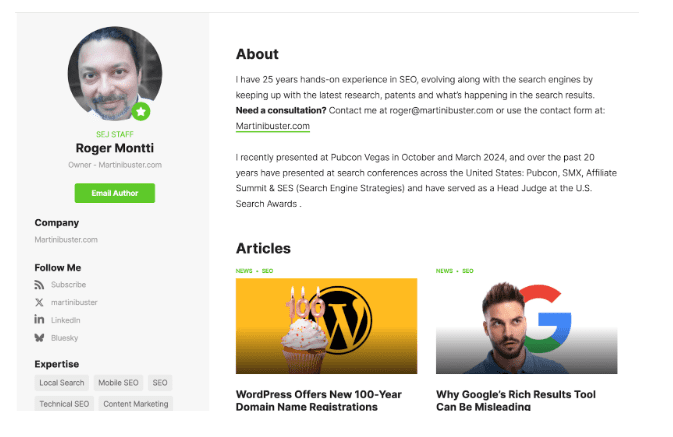
Here’s how Search Engine Journal highlights the bylines of its articles:

Screenshot of Roger Montti’s author byline, Search Engine Journal, February 2025

Identify All Your Content Contributors

Ideally, you should highlight the biographical details of every person who creates content for you – whether that’s blog posts, articles, or question-and-answer pages.

Is the author of your content a recognized expert in your field? Then you definitely want to highlight that.

You can do so on a separate bio page that also contains the author’s past content, or you can even put it at the bottom of the article.

Search Engine Journal does both. At the bottom of any of its articles, you’ll see an author’s box.

Clicking on [Read full bio] leads to the full bio page with information that establishes who the author is and what they do:

Screenshot of Roger Montti’s profile, Search Engine Journal, February 2025

In this example, Search Engine Journal highlights that the author, Roger Montti, brings “25 years hands-on experience in SEO,” “recently presented at Pubcon” (a reputable marketing conference), and “served as a Head Judge at the U.S. Search Awards.”

This bio clearly establishes Montti as a subject matter expert and authority when it comes to talking about (and writing about) SEO, which provides E-E-A-T to Search Engine Journal’s articles.

What To Include On A Bio Page

Here are some essential elements of a good bio page:

  • Full name.
  • Headshot.
  • Title/position.
  • A detailed bio.
  • Contact information (e.g., email form, social media).

Doing all of this makes it easy for users (and Google) to know who created the content and assess their individual E-E-A-T.

2. Make Your Contact Info Easy To Find

When visitors arrive on your landing pages, is it easy to find your contact information?

Can they quickly determine how to get customer support?

Remember, E-E-A-T evaluates your website as a whole. The easiest solution is to make sure you link to your About Us and Contact Us pages in either your main or footer navigation.

If you don’t have those pages on your website, make them now!

3. Remove Or Improve Your Low-Quality Content

If you have content that is no longer useful – or is just so terrible that it’s not worth the time investment to update or improve it – then pruning that content is one quick way to improve your E-E-A-T.

You’ll need to decide whether to improve or remove your old or outdated content.

Removing content should always be your last resort, but if it needs to be done, do it without hesitation.

Ideally, you want to identify any content that looks like it has low E-E-A-T and figure out ways you can reverse that.

Here are some ways you could increase E-E-A-T on old content:

  • Have a more authoritative person write the content.
  • Add quotes from experts, data, sources, or citations.
  • Make some simple edits to improve the readability, grammar, spelling, and structure.
  • Add more information to make it more comprehensive.
  • Write a new and better title.
  • Add some visual appeal, such as photos, charts, and screenshots (and make sure to optimize those images).
  • Add a video for people who prefer that format vs. text only (this has the added benefit of potentially keeping visitors on your site longer).

The process of elevating content definitely takes longer, but doing so will greatly improve your website’s E-E-A-T and performance. This process is especially crucial for any YMYL page.

4. Create A Positive Brand Reputation

A positive brand reputation is key to growing both your business and your E-E-A-T.

One way you can do this is through thought leadership by sharing insights that your target audience truly finds valuable.

High-quality thought leadership content is good for winning, keeping, and growing a business. It will also help you build authority in your niche and help Google trust you.

Thought leadership is incredibly powerful when done right, but to get it right, it needs expertise, experience and authority – all the things that represent E-E-A-T.

What’s Good For The User

Is E-E-A-T a ranking factor?

That is the wrong question to ask, in my opinion. Let’s forget about ranking factors for a moment and think about your audience instead.

If you’re doing everything outlined in Google’s E-E-A-T guidelines, then you’re creating informative, useful, high-quality content that your audience wants and helping them accomplish a task (e.g., acquiring knowledge, buying a product).

In other words, you’re providing a satisfying user experience.

Anything good for users is good for helping you be visible in Google – and driving the traffic and conversions you really want.

More Resources:


Featured Image: insta_photos/Shutterstock

seo enhancements
Ecommerce SEO checklist: 30 tips for a better online store

There is so much you can do to optimize your online store, whether for users or Google. To help you cover all your bases, we’ve written this ecommerce SEO checklist. It doesn’t cover absolutely everything, but if you at least start by optimizing all the aspects in this post, you will definitely be doing a great job!

Table of contents

Site-wide ecommerce checklist

The first part of our ecommerce checklist is all about changes you can make site-wide to make sure your online shop is up to scratch. Some of these tips will help with your ecommerce SEO, but — more importantly — they will give users a better experience when they visit your site.

1. Use consistent branding

The first thing you should be aware of is that you should always use consistent branding. Ensure your brand or logo is visible on your homepage and page title. This will build trust and help promote and build your business, helping trigger recognition offline and in search engine result pages.

2. Add social buttons and newsletter sign-up

Newsletters and social media are the easiest ways to get return visits from your customers. Be sure to draw attention to your social profiles and newsletter signups throughout your website. Add your social profiles to your footer at least (use icons, links, and social widgets), but if you have space left in your header, that would also be a great spot for them. Promote your newsletter in your sidebar and use scroll-triggered boxes to draw attention to it. A nice giveaway always helps motivate people to subscribe.

3. Take care of site navigation essentials

Make sure users can navigate to your most important pages from your site menu. It should always be easy to reach shopping pages and the shopping cart, as well as customer service information and FAQs covering essential information like shipping costs and payment options. If users can’t find these pages, they’ll find it difficult to shop on your site.

4. Use SSL and security seals

Here’s one vital thing about creating trust: If your site has an SSL certificate, it will have that nice green padlock in your visitors’ browser address bar, and you’ll let them know they are shopping in a safe environment. These things will help customers confidently insert their home address, credit card details, or other personal information you ask them to provide. You could also add security seals. Find more tips like this in our trust article.

5. Make sure your site is mobile-friendly

Don’t forget mobile users! Making purchases via mobile is a popular option for many shoppers. So be ready for them and don’t miss out on those transactions. Read our ultimate guide to mobile SEO to get started.

6. Get things up to speed

When we say speed, we mean the performance of your site. People have short attention spans, and we’ve all got used to faster internet everywhere. However, many places worldwide have to make do with less-than-perfect mobile connections and a small data allowance. Don’t take your situation as gospel. Also, Google tends to rank websites faster, which is another reason to make sure your website is as fast as possible.

7. Add an ‘About us’ page if you don’t have one

People like to know about the company they’re buying from. Who is behind it? What’s their story? What motivates them? If we share the same values and beliefs, people are likelier to return to that shop and buy more products. Adding an about us page, and perhaps a team photo will help build a connection between your company and your customers. If you want some inspiration, Patagonia and Dopper are nice examples.

Buy Yoast SEO Premium now!

Unlock powerful features and much more for your WordPress site with the Yoast SEO Premium plugin!

Homepage

While you don’t necessarily need to optimize the homepage of your ecommerce site for SEO, you shouldn’t just ignore it completely, either. There are a couple of things you can do to make sure any visitors landing there will continue to shop and make a purchase:

8. Show featured products

You also need to reserve a prominent spot on your homepage for featured products or something similar, usually your core products or the items you currently have on sale. This will provide an immediate trigger for visitors and a good way to let them know whether or not they have come to the right online shop.

9. Include a compelling call to action

Your homepage needs a compelling call to action. This may change if you want to promote particular products or run seasonal promotions like a Black Friday sale. But whatever your CTA is, you need to make sure it’s always easily visible and meets your visitors’ needs and expectations.

Product search and categories

Having a great site is one thing, but if visitors can’t find the products they want to buy, it won’t be much of use to anyone. That’s why the following section of our ecommerce checklist is all about making your products easy for customers to find when searching on your site.

10. Add a search option

Every online store with more than 20 products should have a search option. Make sure you put the search option in a visible spot, as this will probably be the navigation of choice for your visitors. Besides optimizing your search option, be sure to give the search result pages some TLC. More on that later.

11. Use product categories

How you set up your categories and make these accessible to visitors matters – a lot. Categories help visitors get to different groups of products as quickly as possible, especially those who aren’t sure which specific products to buy. Amazon has a large list of categories (or departments), but makes the kind of products a category contains as clear as possible. That has much to do with naming these categories and logically using subcategories. Put yourself in the place of your visitors and go over your shop’s categories. Do they make sense? Are these the terms a visitor would use? If the answer is yes, you’re on the right track.

12. Add introductory content on category pages

Besides being clear about the name of your category, be sure to add a nice introduction to your category pages as well. This introduction is like the glue that holds the collection of products on that page together. This is really helpful in determining the subject of the page, especially for search engines. This also helps the category pages function in a similar way to cornerstone content.

13. Add thumbnail images for your products

In most cases, product images say more than a thousand words. This is especially true for those pages that simply don’t have space for a thousand words about a single product, such as your category or internal search result pages. Adding a stunning thumbnail image of that dress or painting will encourage more clicks to that page. Good thumbnail images make it easier for visitors to choose from a wide variety of products in category or search result pages.

14. Include calls to action in overviews

Besides having killer product thumbnails, your overview pages also need a call to action for each product, which means the visitor can add that product to their cart right from the category or search result page. Although it isn’t always possible for every product, you should do this wherever you can. There are online shops that allow you to choose the color and size of jeans, for example, without having to go to the product page. Choose the option you like, click add to cart, and proceed to checkout, all from the overview page.

Product pages

You’ve probably already put much effort into crafting your product pages. But are you sure nothing is missing, and nothing can be improved? This section of our ecommerce SEO checklist will help you ensure your product pages look the best they can.

15. Add great product images

Be sure to add great product images to your product pages. They should be zoomable and give multiple views of the product. Remember that even the filename and alt text of the product image matter for SEO. There’s a lot more on this in our detailed article on product images.

16. Write a fantastic product description

Optimizing your category pages is often much easier than optimizing all your product pages. If you’re selling bolts, screws and nails, adding an awesome and unique product description to each page is a lot of work. If you need your product page to rank as well, be sure to invest some time and effort in optimizing your product descriptions for the product name and/or SKU. Our Yoast SEO plugin will be useful if you have a WordPress site or a Shopify store.

17. Be clear about pricing

We can’t emphasize this enough: be clear about your prices. Adding surprise costs like shipping or taxes later in the checkout process will backfire, and shoppers may abandon their purchase. Be clear about these additional costs (if any) right from the start. You could even leverage this by offering free shipping on orders of more than a certain value, say $20 or $50. Surprise costs are a major turn-off, and they are illegal in the EU.

18. Show product reviews

Creating trust is a good thing for all online shops. Genuine product reviews help a great deal with this. One thing we would recommend for websites that include user reviews from third parties is to copy a couple of those reviews to your own website. Including third-party reviews in, for example, a widget, would be a great solution. Add these near your call to action for the best results.

19. Promote related products

When you’ve got their interest, leverage it. If someone buys an iPhone from your site, chances are they’ll need a cover and might even want a pair of those expensive wireless ear pods. But they might feel a bit less expensive when a customer has just paid full price for a new iPhone! Adding a related products section or an ‘other customers also bought’ section to your product page will trigger upsells, allow for bundles, and much more. We highly recommend adding these.

20. Add a call to action on your product page

Your visitor needs to click the Add to Cart button on your product page to start the purchase. Don’t hide that button! The number of shops that accidentally disguise the Add to Cart button is lower than it used to be, but we’d still like you to look at that button and make sure it stands out. This is especially true when you have a secondary call to action like ‘Add to wish list’. Making sure that the Add to Cart button stands out the most and is the largest and first major button on your product page is essential.

21. Show stock availability

These days, the availability of a product drives sales. With online shops everywhere, people want to buy things at a shop that will deliver the products they want tomorrow or even the same day. If you tell users a product is in stock, people are likelier to buy it. But this isn’t just about competition; it’s about managing expectations. If your website shows something isn’t in stock, people can still decide to buy at your shop and know they’ll have to wait a bit. If people buy at your shop and won’t get the product for three weeks because it’s out of stock, they’d likely have bought it elsewhere. Not making availability clear also badly affects your brand, by the way.

It can be easy to overlook the details of your shopping cart and checkout process. However, these parts of your site are vital to the customer journey. In this section of our ecommerce checklist, we encourage you to take some time to ensure everything is working seamlessly.

22. Make the shopping cart easy to find

Regardless of how noble your intentions are, in most cases, your main goal is to make as much money as possible, and that money is made through your shopping cart. For this reason, your shopping cart should always be available and visible – don’t make people look for it. We recommend adding the number of products in the cart to the cart icon. It will help people remember if they have already added products to the cart.

A recognizable shopping cart icon that shows how many products are in the cart.

23. Show the payment options early on

Like in number 16 of this ecommerce SEO checklist, this one is about preventing surprises. It’s frustrating to get to the end of the checkout process only to find that your preferred payment option isn’t available. And again, if your ecommerce shop is in the EU, it is now a legal requirement to display your accepted payment methods to customers before they get to the checkout.

24. No account needed

Always allow customers to buy without forcing them to create an account. We think that making customers create an account is bad practice. It’s only valid if creating an account gives customers perks like easy license renewal, managing recurring payments, etc. These are tasks customers probably would want to do in a secure environment, so they wouldn’t mind setting up an account, but when they’re shopping for clothes, having an account only makes sense for convenience reasons (not having to fill in address details next time and so on), and therefore it should be optional.

25. Set longer cookie expiration times

Perhaps ‘cookie expiration times’ are too narrow for what we’re trying to say. Our article on shopping cart abandonment will tell you a lot about how people use your shopping cart. Read that entire article, and you’ll discover why using longer cookie expiration times for your cart is better.

26. Use discount codes wisely

Discount codes and vouchers can be a great way to increase sales. But before you put a field to add a discount code on your checkout pages, consider whether you want to do this carefully. Once users see the option to add a code, they will want a discount code. And often, that means they’ll stop mid-transaction and search for one! So, if you want to offer discount codes, it’s a good idea to make it easy for users to find a discount (even if it’s to remove the delivery costs from their order). If you’re not planning to offer discount codes soon, leaving the discount code field off your checkout pages is probably better. Otherwise, it might increase your cart abandonment rates.

Search and social appearance

All right, by now, your online shop should be ready to go. One thing left to do for our ecommerce SEO checklist: make sure your site looks its best wherever it appears. That could be in the Google search results or social media, so be ready to make a good impression!

27. Optimize your SEO titles and Meta descriptions

With ecommerce sites, more so than all other websites, SEO titles and meta descriptions serve a very important purpose. Where Google is probably able to come up with a proper and keyword-related invitation to your website for information pages, the chances are your product page doesn’t have enough product information, or it contains details about your customer service or warranty that Google might use instead. Add a product-focused meta description to your product pages to encourage Google not to show the wrong text in search results! Use Yoast SEO Premium’s AI tools to speed up the creation process.

28. Add structured data to your pages

We recommend adding structured data to your product pages for technical SEO reasons. Schema markup will help search engines and Google Shopping understand your page’s contents better, and it might even help your page stand out in the search results!

Add at least schema.org/Product and schema.org/Offer, and see if you can extend this to even more detailed schemas. Adding structured data markup is more technical than optimizing your product description, so if you don’t know exactly what you’re doing, please ask your web developer for help. You can also use our WooCommerce SEO plugin or Shopify SEO app, making it much easier!

Read more: Schema.org is hard, Yoast SEO makes it easy for you »

29. Make sure you look great on social media

Besides structured data, be sure to add OpenGraph and X Cards. Again, Yoast SEO can help you add images to your page to be displayed on social media. With Yoast SEO Premium, you can even preview those! These ensure that when people share your content or products, they will be displayed as attractively as possible. This and more are explained in our article about product page SEO.

Keep reading: Positioning your shop in the online market »

One last thing…

30. Make ecommerce easier with Yoast SEO

Yoast SEO plugins and apps can help you to optimize loads of aspects of your site:

  • Making sure your texts are readable? Check.
  • Keyword research and optimization? Check.
  • Managing your SEO titles, meta descriptions and social outputs? Check.
  • Using AI to speed up the hard work? Check.
  • Adding structured data to your pages with minimal effort? Check.
  • Extra features for WooCommerce with our dedicated WooCommerce plugin? Check.
  • And for your Shopify store? Check.

Try Yoast SEO for WordPress (available in free and Premium versions) on your site today. If you’re using WooCommerce, add on our WooCommerce plugin for the ultimate ecommerce optimization. Alternatively, if you’re working with Shopify, try our Yoast SEO for Shopify app instead.

Lastly, boost your ecommerce SEO expertise with our ecommerce training at Yoast SEO Academy! You can follow a trial lesson for free or unlock the full course when you buy Yoast SEO Premium, Yoast WooCommerce SEO, or Yoast SEO for Shopify. Still want more? Check out our ultimate guide to ecommerce usability.