Beyond Rankings: Important Metrics To Measure For SEO Success via @sejournal, @AdamHeitzman

SEO metrics such as rankings are great, but what matters most is SEO’s impact on business growth.

This means you can only understand SEO’s value if you track the right metrics and how it can increase revenue.

Your metrics should focus on:

  • Audience quality: Are you attracting visitors who are likely to become customers?
  • Engagement and behavior: Are users finding the information they need, spending time on your site, and taking desired actions?
  • Conversions: Is your organic traffic translating into desired outcomes?
  • Brand impact: Is SEO influencing your brand’s reputation and visibility?

In this article, we’ve categorized important metrics to focus on at a high level.

User Engagement Metrics

Here are some user engagement metrics to track:

Bounce Rate

Bounce rate is the percentage of users who return to the SERP, or exit the webpage (and your site) without interacting with another page on your website. A high bounce rate can indicate that visitors are not finding what they want on your site, which causes them to exit quickly.

Why Is Bounce Rate Important In SEO?

Bounce rate helps you fix issues such as:

  • User Experience: A high bounce rate may indicate issues with your website’s content, design, or alignment with user intent. When you notice a high bounce rate, address these issues to improve user experience.
  • SEO Rankings: Search engines aim to provide users with the most relevant results. However, a high bounce rate may signal to Google that your site is not meeting user expectations and will lose visibility. This will also affect conversions as users didn’t even engage with your page.

How To Analyze Bounce Rate

Check your Google Analytics 4 for the percentage of single-page visits and divide that by the total number of visits. The result is a percentage of your bounce rate.

For example, if your website received 500 visitors and 100 interacted with more than one page, then 400 visitors bounced. Therefore, your bounce rate would be 80% (400 single-page visits / 500 total visits times 100).

Read more: 20 Proven Ways To Reduce Your Bounce Rate.

Dwell Time (Engaged Session Duration)

Engaged session duration measures the amount of time a user actively spends on your website during an engaged session. This metric indicates how long users interact with your content before leaving the site or becoming inactive.

For example, if a user searches for “best running shoes,” clicks on your link, spends three minutes reading your content, and continues to interact with other parts of your site, the engaged session duration is three minutes.

Why Is Engaged Session Duration Important In SEO?

  • It indicates content engagement and relevance: Longer engaged session durations show that users find your content valuable and are willing to spend time interacting with it.
  • It impacts rankings: High-engaged session durations signal to search engines that your page provides content that satisfies user intent, which can improve your rankings.
  • It helps gauge content effectiveness: If users spend more time on your site, it suggests your content is meeting their expectations and providing the information they need.

To Analyze Dwell Time

  • Open GA4 and click on Reports in the left-hand menu.
  • Choose the Traffic acquisition: Session default channel group.
  • Click on the pencil icon at the top right corner and select Metrics.
  • In the bottom search box that says Add metric, type “average engagement time” and hit Apply.
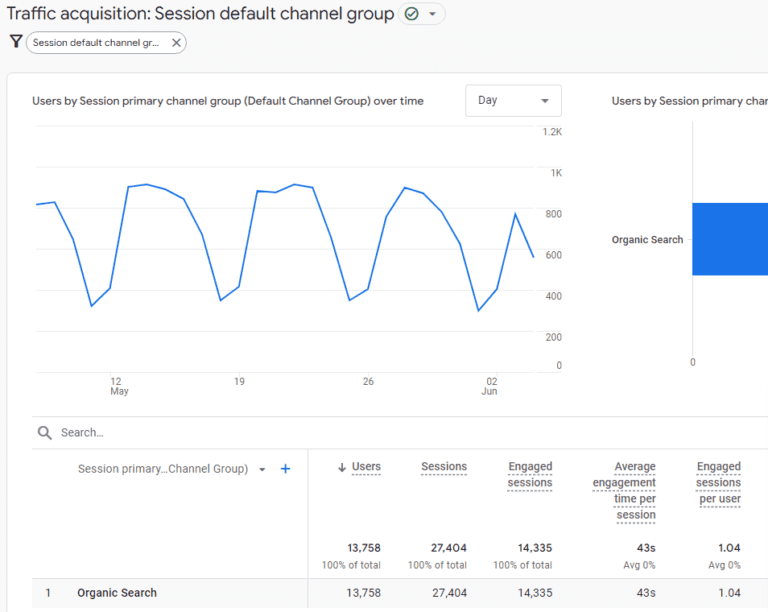
Traffic acquisition: Session default channel groupScreenshot from GA4, June 2024

Engaged Sessions Per User

Engaged sessions per user is a metric that measures how frequently users interact meaningfully with your website.

In Google Analytics, an engaged session is defined by user activity that includes spending a certain amount of time on the site, viewing multiple pages, or completing specific actions like form submissions or purchases.

For example, if a user lands on your homepage, spends more than a minute exploring your content, clicks on a product page, and completes a form, this counts as an engaged session.

Why Is Engaged Sessions Per User Important To SEO?

  • It reflects user engagement and satisfaction: High engaged sessions per user indicate that visitors find your content valuable and are willing to interact with it in a meaningful way.
  • It impacts SEO positively: Search engines use engagement metrics as signals of content quality and relevance. High engagement suggests that your site meets user needs, which can boost your rankings.

How To Calculate Engaged Sessions Per User

Google Analytics provides this metric directly, but to calculate it manually, divide the total number of engaged sessions by the number of unique users.

For example, if your website had 50,000 engaged sessions and 20,000 unique users in a month, engaged sessions per user equals 50,000 divided by 20,000 (2.5).

This means, on average, each user had 2.5 engaged sessions during that month.

Read more: Essential GA4 Reports You Need To Measure Your SEO Campaigns.

Conversion Metrics

Here are helpful conversion metrics to track:

Organic Conversion Rate

The organic conversion rate is the percentage of visitors who find your website through organic search results and complete a desired action. This could be

  • Making a purchase (usually on ecommerce sites).
  • Submitting a lead form (for businesses focused on lead gen).
  • Newsletter subscription (to build an email list)

Or any other goal that moves them further along the customer journey.

This metric shows how SEO drives valuable clicks that contribute to your business objectives.

How To Calculate the Organic Conversion Rate

  • Determine what constitutes a conversion for your business (e.g., form completion, sales, subscription).
  • Track the number of users who complete the desired action and the total number of organic visitors over a specific period.
  • Divide the number of conversions by the total number of organic visitors, then multiply by 100 to get a percentage.

For context, the organic conversion rate equals the number of conversions divided by the number of organic visitors multiplied by 100.

This means if 500 out of 10,000 organic visitors complete the desired action, the conversion rate would be 5%.

Read more: What Is Conversion Rate & How Do You Calculate It?

Goal Completions

A goal completion is recorded whenever a user completes a specific action you’ve defined as valuable. The actions could be the same metrics bulleted out in the previous point.

Goal completions matter because they tell if your SEO is driving the right traffic and if visitors are taking the actions you want them to take.

How To Track Goal Completions

  • Choose an analytics platform such as GA4, Adobe Analytics, Matomo, etc.
  • Define your goals and be specific (e.g., “purchase confirmation page viewed”).
  • Set up goal tracking.

For this article, we’ll use GA4, and tracking looks like this:

  • Go to the Admin section.
  • In the Property column, click on Events.
  • Click the “Create Event” button to set up a new event.
  • Name your event (e.g., “form_submission” or “purchase_completed”).
  • Define the conditions for your event. For example, if tracking a form submission, set parameters like event name equals “form_submit” or similar.
  • Click Create to save your new event.
  • Mark that event as a Key Event (conversion).
  • Then, monitor and analyze the reports to track goal completions.
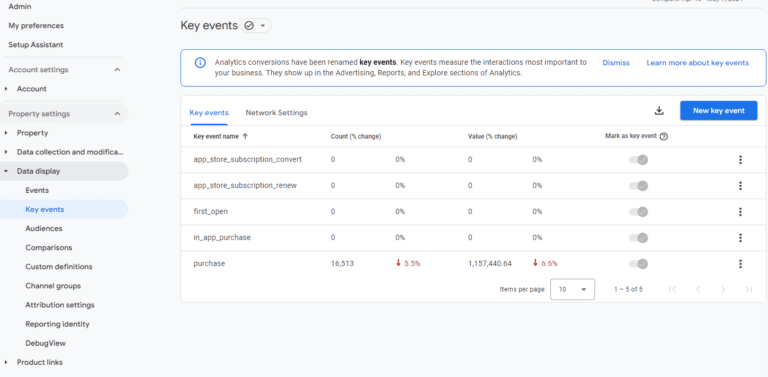
Key events: GA4Screenshot from GA4, June 2024

Ecommerce Transactions

In ecommerce, a conversion is completing a desired action that generates revenue.

The most apparent conversion is a purchase, but other valuable actions include adding items to a cart, creating an account, or subscribing to emails.

What Does Tracking Ecommerce Transactions Look Like?

  • A user searches for [best running shoes] on Google.
  • They click on your blog post, “Top 10 Running Shoes for 2024,” which ranks high in organic search results.
  • They read your review and click on the buy button link to a product page on your website.
  • They add the shoes to their cart and complete the purchase.

If you enable enhanced ecommerce in GA4, it’ll track the entire customer journey (from product view to purchase).

UTM parameters will identify the blog post as the conversion source, your attribution model will assign credit to the post, and your CRM can link the purchase to the user’s profile for further analysis.

Follow this process to track ecommerce sales on Google Analytics 4.

Traffic Metrics

Here are some traffic metrics to prioritize:

Organic Traffic Volume

Organic traffic volume is the number of visitors arriving at your website through unpaid search results – organic clicks from search engine result pages (SERPs).

High organic traffic indicates that search engines consider your website relevant and authoritative for your target keywords.

This way, as long as you write quality content, your website will convert users without relying on paid advertising.

How To Measure Organic Traffic

Log into GA4 and go to Acquisition Reports. Navigate to Reports > Acquisition > Traffic Acquisition.

This report provides a detailed breakdown of your traffic sources, including organic search.

Organic Traffic Value

Organic traffic value goes beyond numbers to assess the actual worth of visitors your SEO efforts attract. It quantifies the potential revenue or business impact of your organic traffic.

Organic traffic value is ROI-focused; it answers the question, “What is the monetary value of the organic traffic we’re getting?”

The answer then informs decisions on how to allocate marketing resources.

How To Calculate Organic Traffic Value

You can either use the cost-per-click (CPC), conversion-based value, or the customer lifetime value (LTV) metrics:

  • The CPC method estimates the value of organic traffic by calculating how much you would have spent on paid advertising (PPC) to get the same number of clicks. It uses the average CPC for your target keywords.

If your website receives 1,000 organic clicks per month for a keyword with an average CPC of $2, the estimated organic traffic value would be $2,000.

  • The conversion-based value metric calculates the revenue generated from organic traffic by tracking conversions and assigning a value to each conversion. For example, if your website receives 1,000 organic visitors and 50 convert into customers with an average order value of $100, the organic traffic value would be $5,000.
  • Another method is the customer lifetime value (LTV). This method takes a long-term view by considering the total value a customer brings over their entire relationship with your business. It factors in repeat purchases, customer retention, and average order value.

For example, if your average customer from organic search makes three purchases per year with an average order value of $100 and remains a customer for two years, their LTV would be $600.

Technical SEO Metrics

Technical SEO metrics provide insights into your website’s infrastructure to ensure search engines can access, crawl, and index your content. Here are some metrics to focus on:

Crawl Errors

Crawl errors occur when search engine bots (like Googlebot) encounter issues while crawling pages on your website.

These errors can prevent search engines from understanding your content, potentially leading to lower rankings and visibility in SERPs.

Types of Crawl Errors

  • 404 (Not Found): The requested page doesn’t exist. This could be due to a broken link, a deleted page, or a typo in the URL.
  • 5xx (Server Errors): The server encountered an error while processing the request. This could be due to a temporary outage, a misconfiguration, or a server overload.
  • Robots.txt Errors: The robots.txt file blocks search engine bots from accessing certain pages or sections of your website.

How To Identify Crawl Errors

Head to Google Search Console (GSC). Go to Index > Coverage to see a list of crawl errors and warnings. Click on each error for more details, including the affected URLs and the error type. Then, prioritize the most critical errors, such as 404 errors on essential pages.

You can also check your server logs for crawl errors that might not appear in GSC.

To fix 404 errors, try these processes:

  • Restore the page if it was accidentally deleted.
  • Create a 301 redirect to the new URL if the page has been moved permanently.
  • Create a helpful custom 404 page that guides users back to relevant content.
  • Afterward, validate your fixes using the URL Inspection tool in GSC to test if the fixed page can be crawled and indexed correctly.

Indexation Status

Indexation status refers to whether or not a specific webpage has been added to a search engine’s index.

When a page is indexed, it appears in search results when users search for relevant queries. In contrast, if a page is not indexed, it’s invisible to search engines and won’t be found by users.

How To Ensure Proper Indexing of Pages

  • Create high-quality, unique content and use relevant keywords to signal to search engines what your page is about.
  • Submit a sitemap to help search engines discover and crawl your pages.
  • Optimize internal linking to help search engine bots navigate your site and discover all your pages.
  • Check Robots.txt to ensure your txt file is not blocking search engines from crawling and indexing critical pages.
  • Monitor indexation status by checking the Index > Coverage report in GSC to see which pages have been indexed and if there are any indexing errors.
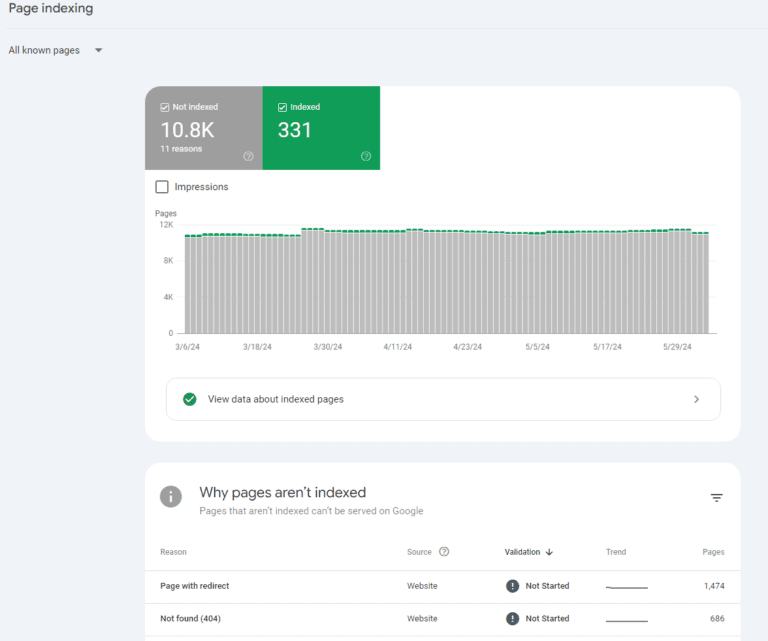
Page trackingScreenshot from GA4, June 2024

Site Speed

Site speed is the time a website’s content takes to load and become fully interactive for users. Think of it as the digital stopwatch that measures the responsiveness and efficiency of your website.

Why Is Site Speed Important for SEO?

  • User experience (UX): Studies have shown that users expect websites to load within a few seconds. Fast website speed keeps users engaged, encourages them to explore more pages, consume more content, and ultimately convert into customers or leads. It also enhances the mobile experience.
  • Search engine rankings: Search engines prioritize faster websites because they provide a better user experience, which can help your faster website outrank slower competitors.

Read More:

Content Performance Metrics

This explores how effective your content is via:

Content Engagement

Content engagement measures users’ level of interaction and involvement with your web pages.

It goes beyond passive consumption and delves into how visitors actively engage with your content to indicate genuine interest and value.

How To Measure Content Engagement

  • In GA4, track metrics like average engagement time, sessions, and engagement rate to gauge how long users actively interact with your content. You can also implement event tracking to measure specific interactions (video views, downloads, form submissions, or clicks on internal links).
  • Use heatmaps and session recording tools like Hotjar or Crazy Egg to visualize how users interact with your pages. This will reveal where they click, scroll, and spend the most time.

Content Shares And Backlinks

Content shares, or social signals, are the number of times your content is shared across social media platforms.

Social shares indicate that your content is valuable and worthy of being shared and can amplify reach, build brand awareness, and attract backlinks.

Backlinks, on the other hand, are links from external websites that point to your web pages. Quality backlinks from other authoritative sites act as “votes of confidence” and signal to search engines that your content is trustworthy and authoritative.

High-quality backlinks can boost rankings, drive referral traffic from other websites, and increase your domain authority.

To track social shares, use the built-in analytics tools provided by social media platforms to track the number of shares, likes, comments, and overall engagement for your content. You can also use third-party tools like Hootsuite or Buffer.

To track backlinks, use tools like Ahrefs, Semrush, or Moz to see your total backlinks, referring domains, and link quality.

Read more:

Local SEO Metrics

Local SEO ensures your business appears when users search for products or services in your geographic area. Let’s start with getting insights from Google Business.

Google Business Profile Insights

Google Business Profile (GBP) is a free tool for businesses to manage their online presence across Google, including Search and Maps.

GBP Insights provides valuable data on how customers find and interact with your business listing.

How To Track GBP Performance

Log in to your GBP account and click the Insights tab. Look for the section titled How customers search for your business.

You’ll see a breakdown of:

  • Direct searches (branded searches),
  • Discovery searches (non-branded searches— when customers search for a general category, product, or service that you offer) and
  • Maps searches: When customers find your business through Google Maps.
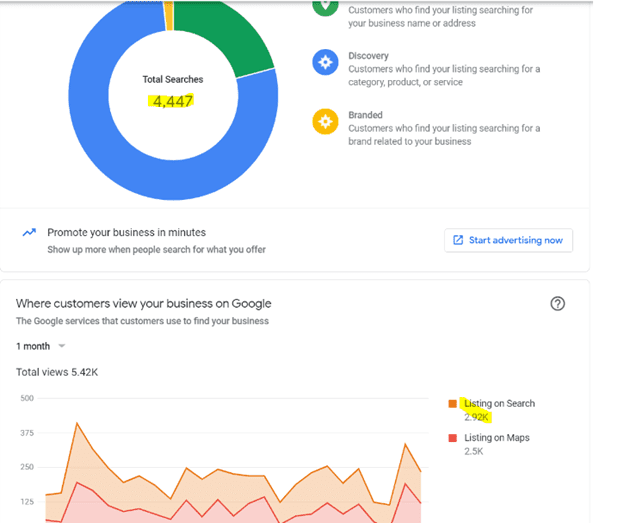
Total pageviewsImage from Google Support, June 2024

In the same Insights tab, look for the section called Where customers view your business on Google. It will show whether customers find your listing more often in Search results or Maps.
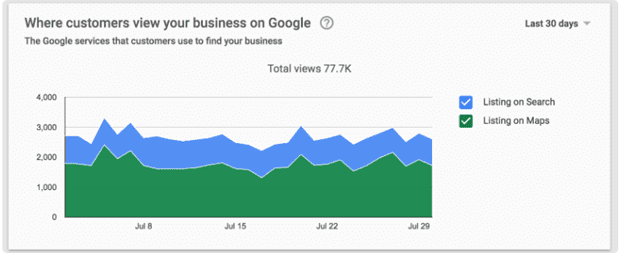
where customers view business on GoogleImage from Google Support, June 2024

Also, check for customer actions in the Insights tab. Here, you can track website visits, calls directly from your listing, and direct requests to your location. This data reveals how customers engage with your business after finding your listing.

Other data to track include photo views and search queries.

Local Search Rankings

Local search rankings refer to your business’s position in the SERPs for queries with local intent.

These searches include location-specific keywords like “coffee shops near me” or “best dentist in Albany.”

Local search results often include a map pack (a group of three to four businesses displayed on a map) and organic listings.

How to Track Local SEO Success

  • Tracking local keyword rankings through tools like Semrush, Ahrefs, or Moz Local. Monitor your rankings for critical local keywords, as well as your map pack rankings and organic rankings.
  • Monitor GMB Insights to know how customers find your business, their actions, and which search queries they use.
  • Analyze local traffic and conversions on GA4 to segment your traffic by location and track conversions (phone calls, direction requests, website visits, purchases) that originated from local searches.
  • Track online reviews and ratings.

Read more on how to rank for Local Pack SEO.

Customer Reviews And Ratings

Customer reviews and ratings provide valuable customer feedback about their experiences with your business, products, or services.

These reviews are often publicly accessible on Google, Yelp, Facebook, and industry-specific review sites.

Why Are Reviews Important For Local SEO?

  • It’s a ranking factor, as businesses with positive reviews are more likely to appear higher in local search results, including the map pack and organic listings. For instance, Google ranks your business higher if you have many reviews, a high frequency of new reviews, multiple review sources, and an overall star rating.
  • Star ratings (or positive reviews) displayed alongside your business listing in search results can increase CTR.
  • Positive reviews enhance customer trust and conversion, as customers now rely on online reviews when making purchasing decisions.

Competitor Analysis

Competitive Benchmarking

Competitive benchmarking in SEO involves identifying, analyzing, and comparing your website’s performance to that of your top competitors in the search engine results pages (SERPs).

This helps you uncover your strengths and weaknesses, discover opportunities, and make data-driven decisions.

Some competitor performance metrics to analyze include:

  • Their keywords, search volume, and keyword gaps.
  • Their high-performing content format.
  • Backlink analysis.
  • Technical SEO audit (site speed, mobile friendliness, crawlability, and indexability.

Read more: SEO Competitive Analysis: The Definitive Guide.

Conclusion

Rankings are great, but conversions pay the bills.

Conversions are important they determine the efficacy of all your marketing efforts.

Tracking these metrics (and how they contribute to sales) will help you intensify marketing efforts on the strategies that work and allocate budgets effectively.

More resources:


Featured Image: Deemerwha studio/Shutterstock

In article screenshots taken by author
New Ecommerce Tools: July 2, 2024

Every week we publish a list of new products from companies offering services to ecommerce and omnichannel merchants. This installment includes updates on shoppable media, AI assistants, personalization, returns forecasting, installment payments, shipping platforms, discount ecommerce, and marketplaces.

Got an ecommerce product release? Email releases@practicalecommerce.com.

New Tools for Merchants: July 2, 2024

Shopify embeds AI across its platform. Shopify has introduced AI-related products during its semi-annual showcase, Shopify Editions. New features among the 150-plus updates include (i) an AI tool to suggest personalized replies to customer emails, (ii) Magic, an AI-powered media editor, now instantly suggests personalized and intelligent recommendations for all product categories, assigning the right attributes to new products, and (iii) AI image editing is expanding to everywhere images are used, including in the Shopify mobile app.

Web page of Shopify's Summer ’24 Edition

Shopify’s Summer ’24 Edition

Amazon to launch a discount marketplace. Amazon plans to launch a new section dedicated to low-priced fashion and lifestyle items, allowing China-based sellers to ship directly to U.S. consumers. According to a presentation by Amazon to select sellers viewed by CNBC, Amazon’s storefront will feature unbranded items, many priced under $20. Amazon will ship the products directly from China to the U.S. and deliver them to shoppers within nine to 11 days.

Bloomreach unveils Loomi AI features for ecommerce teams. Bloomreach, an ecommerce personalization platform, has announced new premium features for its proprietary Loomi AI to customize, optimize, and automate personalization across the customer journey. Premium features for marketers include AutoSegments to automatically identify high-value customer segments, an analytics assistant with a conversational interface, and a variant generator to reduce campaign creation and testing time. New search features include Loomi Search+ with semantic and vector search tech, visual search, and search in 33 languages.

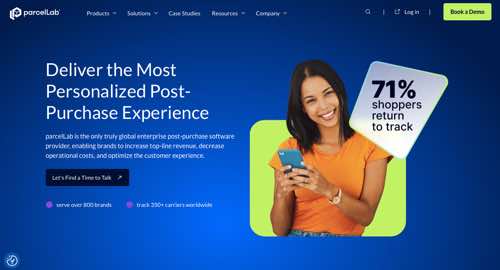
ParcelLab launches Returns Forecast AI to improve visibility for retailers. ParcelLab, a provider of post-purchase experience software, has launched its Returns Forecast AI. According to ParcelLab, the new tool leverages AI to estimate inbound parcels for retailer warehouses, allowing retailers to (i) forecast returns volumes and identify trend changes more accurately, (ii) better plan warehouse resources, and (iii) reduce processing times and operational costs. Returns Forecast AI is designed for retailers to strengthen their ability to anticipate and mitigate the financial impact of returns.

Home page of ParcelLab

ParcelLab

Target partners with Shopify to add third-party sellers to its marketplace. Target has partnered with Shopify to discover new brands and hot items for Target’s marketplace. Shopify will help the retailer discover hot items and make them available for Target’s online shoppers. Target plans to put some popular items found through Shopify on store shelves. Unlike Amazon, Walmart, and eBay, Target only allows brands to join by invitation. It has more than 1,200 sellers. Target says its seller and product count have doubled over the past year.

Pear Commerce secures $10 million to transform shoppable media. Pear Commerce, a retail ecommerce marketing platform for omnichannel brands, has closed a $10 million funding round led by Stage 2 Capital. The funding follows Pear’s recent product launch, Pear Connect, a shoppable ad unit that integrates where-to-buy technology directly into the ad. Pear Connect enhances existing social and display ad creative by serving the in-stock product and retailer combinations most likely to be selected using Pear’s daily inventory scanning technology and ad platform algorithms.

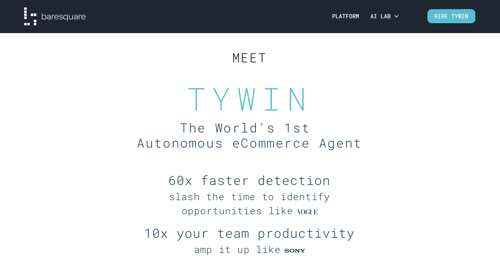
Data analytic platform Baresquare launches AI manager for ecommerce revenue optimization. Baresquare, an AI-powered analytics platform, has launched an autonomous ecommerce AI agent called Tywin. According to Baresquare, Tywin monitors marketing campaigns and customer experience errors, creates revenue forecasts and targets, performs competitive pricing and inventory analysis, and checks online for search engine optimization and external factors such as weather and news events. Users can upload existing revenue plans or allow Tywin to generate forecasts based on historical data.

Home page of Baresquare

Baresquare

Adverio launches Amazon PPC Management Services for ecommerce advertising. Adverio, a digital marketing agency, has launched its Amazon PPC Management Services, designed to elevate the advertising performance and sales of ecommerce businesses on Amazon. The offering aims to streamline and enhance the pay-per-click strategies for sellers, leveraging advanced analytics and an understanding of Amazon’s advertising ecosystem. Adverio’s Amazon PPC Management Services cover all aspects of pay-per-click advertising, from initial setup and strategy development to ongoing optimization and performance analysis.

Qoo10 launches Wish+ to expand international sales channels. Two ecommerce platforms, Asia-based Qoo10 and U.S.-based Wish.com, have integrated. The integration provides a unified ecommerce experience on the upgraded Wish+ site and an expanded product inventory to encompass suppliers local to users along with Asia-based brands and manufacturers. The move combines Qoo10’s ecommerce ecosystem of merchants in Korea, Japan, and India with Wish.com’s North America and Europe market presence and inventory of regional and China-based manufacturers.

Visa expands payment options for Amazon customers in Canada. Visa has announced a collaboration with Amazon to provide Canadian consumers with more choices at checkout. When shopping online on Amazon.ca or the Amazon app, eligible RBC and Scotiabank credit cardholders will now have the option to select “Installments enabled by Visa” as their payment method for qualifying purchases. This payment option enables eligible consumers to convert their purchases into smaller, fixed payments over a defined period.

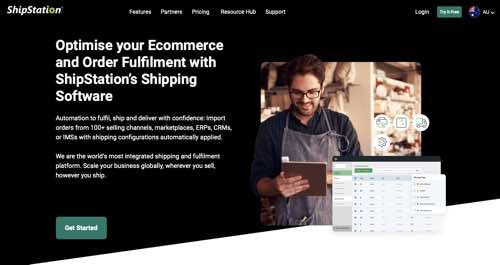
ShipStation streamlines ecommerce shipping in Australia. ShipStation, a cloud-based shipping platform from Auctane, has launched new features to help online businesses in Australia streamline their shipping processes and enhance customer experiences. New features include inventory sync, deliver-by date, harmonization code import, checkout rate control, custom labels, GlobalPost Carrier integration, add-on marketplace, and more. ShipStation also released its High Volume Plan for retailers in Australia and New Zealand, tailored to meet the demands of enterprise parcel delivery.

Web page of ShipStation in Australia

ShipStation in Australia

Google’s AI Overviews Coincide With Drop In Mobile Searches via @sejournal, @MattGSouthern

A new study by search industry expert Rand Fishkin has revealed that Google’s rollout of AI overviews in May led to a noticeable decrease in search volume, particularly on mobile devices.

The study, which analyzed millions of Google searches in the United States and European Union, sheds light on the unexpected consequences of AI integration.

AI Overviews Rollout & Reversal

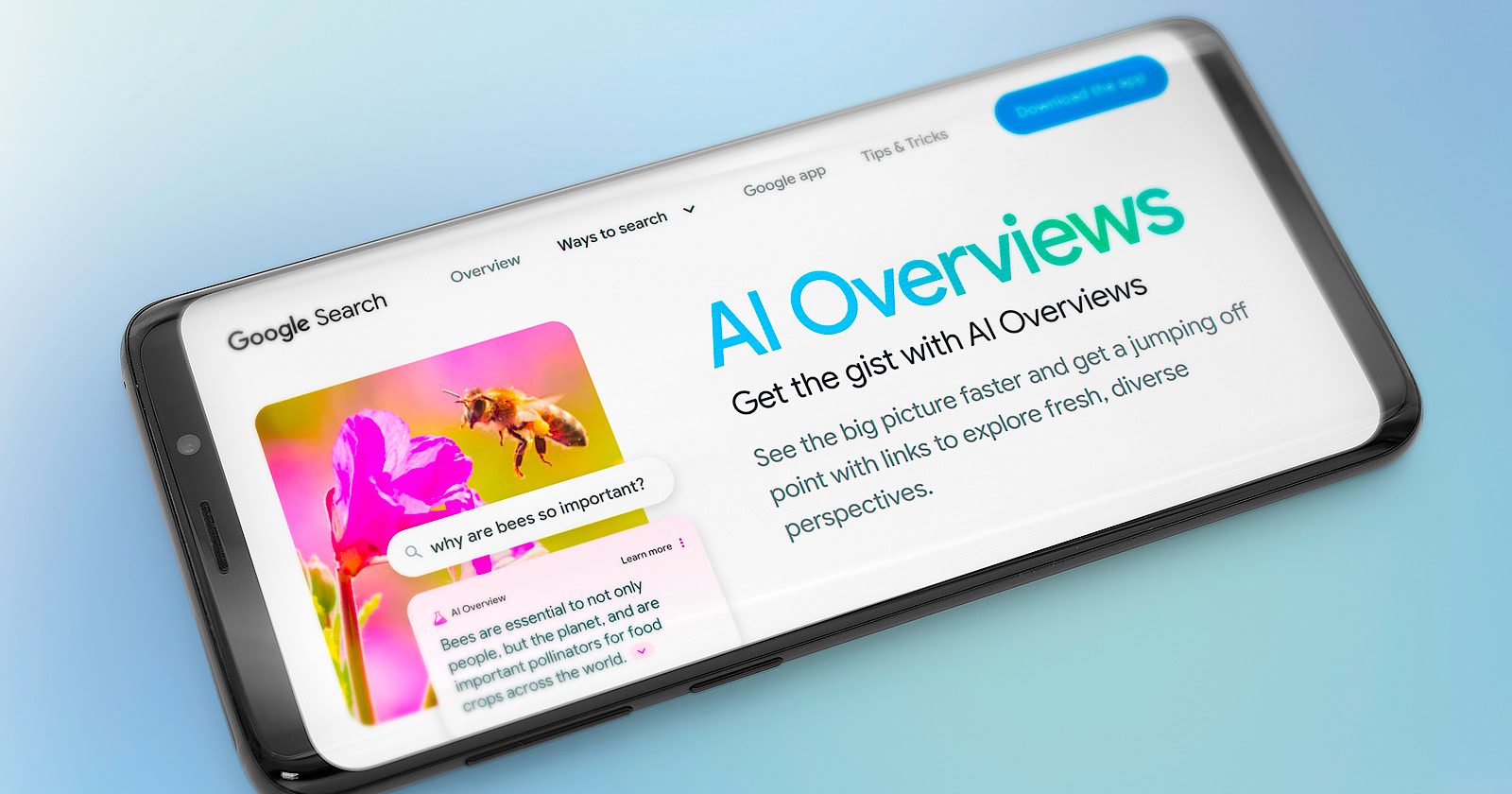
In May 2024, Google rolled out AI overviews in the United States, which generate summaries for many search queries.

However, the feature was met with mixed reactions and was quickly dialed back by the end of the month.

In a blog post published on May 30, Google admitted to inaccurate or unhelpful AI overviews, particularly for unusual queries.

Google says it implemented over a dozen technical improvements to its systems in response.

A subsequent study by SE Ranking found the frequency of these summaries decreased, with only 8% of searches now triggering an AI Overview. However, when shown, these overviews are now longer and more detailed, averaging 25% more content.

SE Ranking also noted that after expansion, AI overviews typically link to fewer sources, usually around four.

Decline In Mobile Searches

Fishkin’s analysis reveals that the introduction of AI Overviews coincided with a marked decline in mobile searches in May.

While desktop searches saw a slight increase, the drop in mobile searches was significant, considering that mobile accounts for nearly two-thirds of all Google queries.

This finding suggests that users may have been less inclined to search on their mobile devices when confronted with AI-generated summaries.

Fishkin commented:

“The most visible changes in May were shared by both the EU and US, notably… Mobile searches fell a considerable amount (if anything spooked Google into rolling back this feature, I’d put my money on this being it).”

He adds:

“If I were running Google, that dip in mobile searches (remember, mobile accounts for almost 2/3rds of all Google queries) would scare the stock-price-worshiping-crap outta me.”

Impact On Overall Search Behavior

Despite the dip in mobile searches, the study found that search behavior remained relatively stable during the AI overviews rollout.

The number of clicks per search on mobile devices increased slightly, while desktop clicks per search remained flat.

This indicates that while some users may have been deterred from initiating searches, those who did engage with the AI Overviews still clicked on results at a similar or slightly higher rate than the previous months.

Implications For Google & the Search Industry

The study highlights the challenges Google faces in integrating AI-generated content into its search results.

Additionally, the research found other concerning trends in Google search behavior:

  • Low Click-through Rates: Only 360 out of every 1,000 Google searches in the US result in clicks to non-Google websites. The EU fares slightly better with 374 clicks per 1,000 searches.
  • Zero-click Searches Dominate: Nearly 60% of searches in both regions end without any clicks, classified as “zero-click searches.”
  • Google’s Self-referral Traffic: About 30% of clicks from US searches go to Google-owned properties, with a somewhat lower percentage in the EU.

Why SEJ Cares

This study underscores the need for adaptable SEO strategies.

As an industry, we may need to shift focus towards optimizing for zero-click searches and diversifying traffic sources beyond Google.

The findings also raise questions about the future of AI in search.

While major tech companies continue to invest in AI technologies, this study suggests that implementation may not always yield the expected results.


Featured Image: Marco Lazzarini/Shutterstock

GraphRAG Is A Better RAG And Now It’s Free via @sejournal, @martinibuster

Microsoft is making publicly available a new technology called GraphRAG, which enables chatbots and answer engines to connect the dots across an entire dataset, outperforming standard Retrieval-Augmented Generation (RAG) by large margins.

What’s The Difference Between RAG And GraphRAG?

RAG (Retrieval-Augmented Generation) is a technology that enables an LLM to reach into a database like a search index and use that as a basis for answering a question. It can be used to bridge a large language model and a conventional search engine index.

The benefit of RAG is that it can use authoritative and trustworthy data in order to answer questions. RAG also enables generative AI chatbots to use up to date information to answer questions about topics that the LLM wasn’t trained on. This is an approach that’s used by AI search engines like Perplexity.

The upside of RAG is related to its use of embeddings. Embeddings is a way of representing the semantic relationships between words, sentences, and documents. This representation enables the retrieval part of RAG to match a search query to text in a database (like a search index).

But the downside of using embeddings is that it limits the RAG to matching text at a granular level (as opposed to a global reach across the data).

Microsoft explains:

“Since naive RAG only considers the top-k most similar chunks of input text, it fails. Even worse, it will match the question against chunks of text that are superficially similar to that question, resulting in misleading answers.”

The innovation of GraphRAG is that it enables an LLM to answer questions based on the overall dataset.

What GraphRAG does is it creates a knowledge graph out of the indexed documents, also known as unstructured data. The obvious example of unstructured data are web pages. So when GraphRAG creates a knowledge graph, it’s creating a “structured” representation of the relationships between various “entities” (like people, places, concepts, and things) which is then more easily understood by machines.

GraphRAG creates what Microsoft calls “communities” of general themes (high level) and more granular topics (low level). An LLM then creates a summarization of each of these communities, a “hierarchical summary of the data” that is then used to answer questions. This is the breakthrough because it enables a chatbot to answer questions based more on knowledge (the summarizations) than depending on embeddings.

This is how Microsoft explains it:

“Using an LLM to summarize each of these communities creates a hierarchical summary of the data, providing an overview of a dataset without needing to know which questions to ask in advance. Each community serves as the basis of a community summary that describes its entities and their relationships.

…Community summaries help answer such global questions because the graph index of entity and relationship descriptions has already considered all input texts in its construction. Therefore, we can use a map-reduce approach for question answering that retains all relevant content from the global data context…”

Examples Of RAG Versus GraphRAG

The original GraphRAG research paper illustrated the superiority of the GraphRAG approach in being able to answer questions for which there is no exact match data in the indexed documents. The example uses a limited dataset of Russian and Ukrainian news from the month of June 2023 (translated to English).

Simple Text Matching Question

The first question that was used an example was “What is Novorossiya?” and both RAG and GraphRAG answered the question, with GraphRAG offering a more detailed response.

The short answer by the way is that “Novorossiya” translates to New Russia and is a reference to Ukrainian lands that were conquered by Russia in the 18th century.

The second example question required that the machine make connections between concepts within the indexed documents, what Microsoft calls a “query-focused summarization (QFS) task” which is different than a simple text-based retrieval task. It requires what Microsoft calls, “connecting the dots.”

The question asked of the RAG and GraphRAG systems:

“What has Novorossiya done?”

This is the RAG answer:

“The text does not provide specific information on what Novorossiya has done.”

GraphRAG answered the question of “What has Novorossiya done?” with a two paragraph answer that details the results of the Novorossiya political movement.

Here’s a short excerpt from the two paragraph answer:

“Novorossiya, a political movement in Ukraine, has been involved in a series of destructive activities, particularly targeting various entities in Ukraine [Entities (6494, 912)]. The movement has been linked to plans to destroy properties of several Ukrainian entities, including Rosen, the Odessa Canning Factory, the Odessa Regional Radio Television Transmission Center, and the National Television Company of Ukraine [Relationships (15207, 15208, 15209, 15210)]…

…The Office of the General Prosecutor in Ukraine has reported on the creation of Novorossiya, indicating the government’s awareness and potential concern over the activities of this movement…”

The above is just some of the answer which was extracted from the limited one-month dataset, which illustrates how GraphRAG is able to connect the dots across all of the documents.

GraphRAG Now Publicly Available

Microsoft announced that GraphRAG is publicly available for use by anybody.

“Today, we’re pleased to announce that GraphRAG is now available on GitHub, offering more structured information retrieval and comprehensive response generation than naive RAG approaches. The GraphRAG code repository is complemented by a solution accelerator, providing an easy-to-use API experience hosted on Azure that can be deployed code-free in a few clicks.”

Microsoft released GraphRAG in order to make the solutions based on it more publicly accessible and to encourage feedback for improvements.

Read the announcement:

GraphRAG: New tool for complex data discovery now on GitHub

Featured Image by Shutterstock/Deemerwha studio

seo enhancements
Should your business start using Threads?

Social media can be a great tool for your business and your SEO, because it can help drive traffic to your website. That’s why it’s good to keep an eye on new social media platforms, like Threads. So, is it worth it to invest your time in Threads? Or should you focus your efforts on other social media platforms?

Before we dive into Threads specifically, it’s good to refresh our memories. So, why is it good for your business to be on social media? Multiple reasons. First, because it helps your off-page SEO, which means it generates traffic to your site.

Second, a lot of people use social media as a search engine nowadays, so being active on multiple platforms can boost your brand’s visibility big time. And finally, it can only enhance your trustworthiness, because your audience will see that there are actual people behind the brand. 

What is Threads?

Created by Instagram, Threads is a text-based conversation app. Think of it as Twitter’s sibling. It’s a platform where people are encouraged to be authentic and write whatever they’re thinking. 

When Threads was first launched, it became the fastest platform to ever reach 100 million users. Which happened in just five days! However, after a month, Threads quickly lost 80% of its users. So is it not worth the trouble anymore? Not exactly. It still boasts a few million users, and for a new social media platform, that’s not a bad start.

Should you create a Threads account?

Depends! As always, you should look at where your audience is. However, sometimes it can pay off to venture into uncharted territories. And maybe the leap to a new platform isn’t even that big. If your posts always perform well on X (formerly Twitter), then they might actually do well on Threads too—seeing as it’s a similar platform.

Okay, let’s talk about why it might actually be a good idea to create that Threads account.

1. Rapid user growth

As we already mentioned, Threads has quickly gained a large and active user base. This means it has the potential to become even bigger, especially if X (formerly Twitter) keeps making not-so-popular choices

2. Integration with IG

Since Threads is already connected to Instagram, it allows a seamless integration between the two. This means you can easily share content between the two platforms. Plus, it allows you to use your existing follower base from Instagram. You won’t have to start from zero! 

3. Authentic platform with real-time conversation

A huge trend at the moment is authenticity. It’s part of the reason why TikTok has grown so popular, because people are looking for authentic content. They want to see the people behind a brand or business. Since Threads is designed for real-time interactions, this makes it the perfect place for you to build a connection with your audience.

4. Stay relevant

Last but not least, you might want to consider creating a Threads account to stay relevant. If your audience is on Threads, you should be too. This will allow you to stay visible and in the loop, because you know just what your audience is talking about—which you can then use to your advantage!

The future of Threads

It’s tricky to predict what will happen to Threads. How long will it be around? Will it grow more popular or less? Seeing as more people are leaving X (formerly Twitter) and moving to Threads, there’s a  big chance that Threads will stick around. 

Especially since it’s expected that Threads will introduce more features, such as advanced analytics, ecommerce integration, and an in-app camera function. According to PR Daily, Threads is also testing a draft post option, and exploring automatic archiving of posts, which are all positive signs that Threads is here to say.

Don’t be afraid to experiment on social media

Social media is all about experimentation. Whether it’s trying out funny content or short-form videos, or trying out new social media platforms. Because if you don’t experiment, how will you know what your audience will engage with? 

Plus, as we said before, it’s also great for your off-page SEO. If your social media content gets shared by others, you’ll be getting more brand mentions and recognition. You might even get more backlinks! So if you have the time, why not give Threads a go?

Coming up next!

Robots.txt Turns 30: Google Highlights Hidden Strengths via @sejournal, @MattGSouthern

In a recent LinkedIn post, Gary Illyes, Analyst at Google, highlights lesser-known aspects of the robots.txt file as it marks its 30th year.

The robots.txt file, a web crawling and indexing component, has been a mainstay of SEO practices since its inception.

Here’s one of the reasons why it remains useful.

Robust Error Handling

Illyes emphasized the file’s resilience to errors.

“robots.txt is virtually error free,” Illyes stated.

In his post, he explained that robots.txt parsers are designed to ignore most mistakes without compromising functionality.

This means the file will continue operating even if you accidentally include unrelated content or misspell directives.

He elaborated that parsers typically recognize and process key directives such as user-agent, allow, and disallow while overlooking unrecognized content.

Unexpected Feature: Line Commands

Illyes pointed out the presence of line comments in robots.txt files, a feature he found puzzling given the file’s error-tolerant nature.

He invited the SEO community to speculate on the reasons behind this inclusion.

Responses To Illyes’ Post

The SEO community’s response to Illyes’ post provides additional context on the practical implications of robots.txt’s error tolerance and the use of line comments.

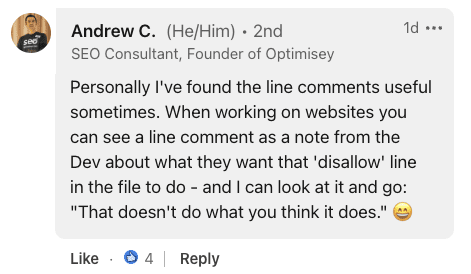
Andrew C., Founder of Optimisey, highlighted the utility of line comments for internal communication, stating:

“When working on websites you can see a line comment as a note from the Dev about what they want that ‘disallow’ line in the file to do.”

Screenshot from LinkedIn, July 2024.

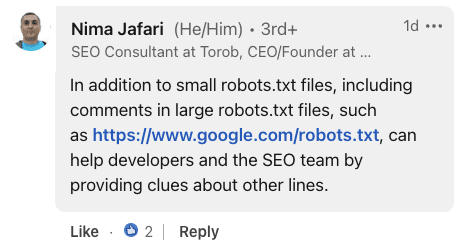
Nima Jafari, an SEO Consultant, emphasized the value of comments in large-scale implementations.

He noted that for extensive robots.txt files, comments can “help developers and the SEO team by providing clues about other lines.”

Screenshot from LinkedIn, July 2024.

Providing historical context, Lyndon NA, a digital marketer, compared robots.txt to HTML specifications and browsers.

He suggested that the file’s error tolerance was likely an intentional design choice, stating:

“Robots.txt parsers were made lax so that content might still be accessed (imagine if G had to ditch a site, because someone borked 1 bit of robots.txt?).”

Screenshot from LinkedIn, July 2024.

Why SEJ Cares

Understanding the nuances of the robots.txt file can help you optimize sites better.

While the file’s error-tolerant nature is generally beneficial, it could potentially lead to overlooked issues if not managed carefully.

What To Do With This Information

  1. Review your robots.txt file: Ensure it contains only necessary directives and is free from potential errors or misconfigurations.
  2. Be cautious with spelling: While parsers may ignore misspellings, this could result in unintended crawling behaviors.
  3. Leverage line comments: Comments can be used to document your robots.txt file for future reference.

Featured Image: sutadism/Shutterstock

9 Tips For Successful Lead Generation (Insights From Expert Brands) via @sejournal, @hethr_campbell

Building a quality pipeline right now is a challenge, and Google isn’t making it any easier.

Changes in how traffic and leads are coming to your site have probably shifted, yet lead generation is still a top priority.

It’s critical to start by understanding that the customer journey has never been more important. Also, be aware that the final stages are where the most failures happen, such as not having your CRM and sales team ready before a campaign launch.

In a recent webinar, Brent Csutoras and I talked about the shifts that need to happen at an organizational level, not just within your marketing department.

Keep reading for a takeaway of the nine insights we took from the webinar, and watch a full on-demand version here.

9 Tips For Successful Lead Generation

1. The Customer Journey Has Never Been More Important

Understanding customer journeys is crucial for successful lead generation.

Brent and I highlighted the shift in how users navigate online, emphasizing the need for content that addresses pain points throughout the funnel. Quality content that solves problems and adds value at every stage is the key to engaging and converting users effectively.

2. Generating Quality Leads Takes Quality Content, Which Takes Research, Testing, And Budget

Creating content that converts begins with thorough audience and market research.

Regular testing, optimization, and diverse formats like blogs, videos, and emails ensure you can reach potential customers via a media channel that appeals to them. It’s not going to be free, so make sure you allocate a content budget when talking to leadership.

3. The Channels Are Working Fine. It’s Your Content And Execution That Are Not Working

Tried-and-true channels still work. It’s just that too many marketers focus on only the bottom of the funnel because it’s easy to track and attribute.

While some leads will convert from a single content piece, you must prepare for those who require more nurturing before they convert. Considering most of the content you create should be top- and mid-funnel, spend time matching the channel with intent.

These are just a couple of examples of channels that work. Watch the on-demand for more ideas.

  • Email marketing remains a powerful tool for lead generation, especially when focusing on segmentation and personalization.
  • Leveraging internal experts and influencers can build trust and credibility with your audience.

Here’s a snapshot of the channels we used to drive leads for this webinar:

4. “Sweat The Assets!” Meaning Use One To Make Many

Maximizing the value of each piece of content is essential for scaling your efforts. Repurpose and tailor content for different platforms and audiences to ensure it serves multiple purposes.

It’s also important to budget for both content creation and promotion, recognizing that quality content requires investment.

5. You Should Expect To Pay Quality Money For Quality Leads

Investing in quality resources for lead generation may mean higher costs, but it can lead to higher quality leads and lower overall Customer Acquisition Costs (CAC). Consider all costs, including advertising and human resources. Optimization and continuous assessment are crucial for optimizing budget spend.

Plus, low-quality leads take your valuable sales resources who could have been working on legit leads. A good lead-scoring strategy can help reduce resource drain.

6. The Key Is An Always-On, Full-Funnel Strategy

A common mistake is relying on a single piece of bottom-funnel content for all stages of the buyer’s journey. Brands must engage their audience consistently from awareness to consideration, conversion, and retention to build loyalty and keep the cycle running.

7. Know What Efforts Are Working For Your Goals

Continuous evaluation is key to understanding the effectiveness of your lead generation strategies. However, with these shifts in customer demand and creating more top-of-the-funnel content, engagement is one of the most important metrics you can track to tell you if your content is resonating.

Catch the on-demand webinar to hear more about metrics we think are important to track.

8. Outside Vendors Impact Your Lead Gen Success

Leveraging external resources can enhance your lead generation efforts, especially if you’re a lean team. Treat vendors as team extensions, sharing goals and KPIs. Listen to their audience insights. Most importantly, ask if they offer real-time lead delivery to keep leads fresh and your brand top of mind.

9. The Most Important Piece: No Follow-Up = No Leads

Don’t overlook what happens when a lead enters your system. Ensure your customer relationship management (CRM)/customer data platform (CDP)/marketing tech is ready. Set up lead scoring, automation, and dashboards. Prepare your sales teams to smoothly handle new leads, reducing launch day stress for everyone.

It’s All About Building A Customer-Centric Experience

The bottom line is that the way customers want to interact with brands has changed. These strategies outlined above aren’t new. We learned about them in Marketing 101, but they’ve been pushed aside for product-focused marketing over the years.

Customers are really looking for brands who get them, and provide a solution to their pain. Then, they’ll repay you with loyalty.

So, ask yourself – “How is the quality of my leads?” Then, assess how much-focused effort you are putting into their journey.

Discover How You Can Supercharge Your Lead Generation Efforts

As a publisher, we serve as an agency to our advertisers (those looking to reach marketers and SEO professionals). That means we’re marketing to marketers – some of the smartest out there –and that’s you!

And what we’re doing to drive quality leads is working.

Whether you’re an expert or just getting started, Brent Csutoras and I put this webinar together for you. It’s full of functional takeaways that even the savviest marketers tend to forget, or worse, that leadership doesn’t see the value in.

This on-demand webinar has insights that we’ve been taking note of for years, and so should you. You can use this for strategy and to sway others in your organization to change the way you think about – and drive – leads.

Trust us, you don’t want to miss this!

Watch now.


Featured Image: Olivier Le Moal/Shutterstock

How Expert Brands Are Winning At Lead Generation Right Now via @sejournal, @hethr_campbell

Building a quality pipeline is a challenge, and Google isn’t making it any easier.

Changes in the way traffic, and leads, are coming to your site has probably shifted, yet lead generation is still a top priority.

Watch this on demand webinar to learn about channels and tactics that are working, and some of the common missteps we see brands making over and over.

Grab a pen and take notes on the importance of customer journeys, how to build a customer-centric culture across all teams, and what to expect when working with third parties.

Get an insider’s view into lead generation campaign successes and failures for ourselves, and our sponsors.

And, get an exclusive peek behind the curtain and see how we approach product promotions using a holistic, consumer-centered strategy that pays off time after time.

Key takeaways:

  • The best ways to attract and nurture your leads through every step of their journey.
  • How to support your team, or an agency, to execute these strategies effectively.
  • What to do after the lead hits your workflow. Pitfalls to avoid, what’s working, what’s not, and how to set up effective nurture campaigns.

With our very own Heather Campbell and Brent Csutoras, we’ll explore how to shift your strategy to attract and retain quality leads.

If you’re looking to create a holistic and consistent approach that will grow your lead generation efforts to new heights, check out the full webinar.

AIO Pullback: Google Shows 2/3 Fewer AIOs And More Citations via @sejournal, @Kevin_Indig

It has become quiet around AI Overviews. One month after my initial traffic impact analysis, I updated my data for AIOs. The results are important for anyone who aims for organic traffic from Google as we’re seeing a shift in AIO structures.

Shortly after Google just launched AI Overviews on May 14, I looked at 1,675 queries and found:

  • -8.9% fewer organic clicks when a domain is cited in AIOs than regular results.
  • A strong relationship between a domain’s organic ranks and AIO citations.
  • Variations of referral traffic depending on user intent.

Since then:

  • Featured snippets and AIOs confuse users with slightly different answers.
  • Google has significantly pulled back AIOs across all industries.
  • AIOs cite more sources.

Boost your skills with Growth Memo’s weekly expert insights. Subscribe for free!

AIOs Dropped By Two-Thirds

A few days after Google launched AIOs in the US, users found misleading and borderline harmful answers.

In a post titled “About last week,” VP of Search Liz Reid addressed the issue, but also called out that many queries were phrased in a way that would likely return questionable answers.

The debate about LLM answers and questionable queries is not new. Yes, you might get a funny answer when you ask an LLM a funny question. Leading queries were used in the NY Times vs. OpenAI lawsuit and backlash against Perplexity and are no different than leading questions that suggest the answer.

After the PR backlash, Google dropped AIOs across almost every industry by an average of two-thirds.

  • May 30: 0.6% on desktop, 0.9% on mobile.
  • June 28: 0.2% on desktop, 0.3% on mobile.

Industries with the largest drops (data from Semrush Sensor):

  • Health: -3.7% desktop, 1.3% mobile.
  • Science: -1% desktop, -2.6% mobile.
  • People & Society: -2% desktop, -3.9% mobile.
Bar chart showing percentage changes in web traffic across various categoriesImage Credit: Kevin Indig

It seems that YMYL industries, such as health, science, animals, and law, were most affected. Some industries gained a small amount of AIOs, but not more than a negligible 0.2%.

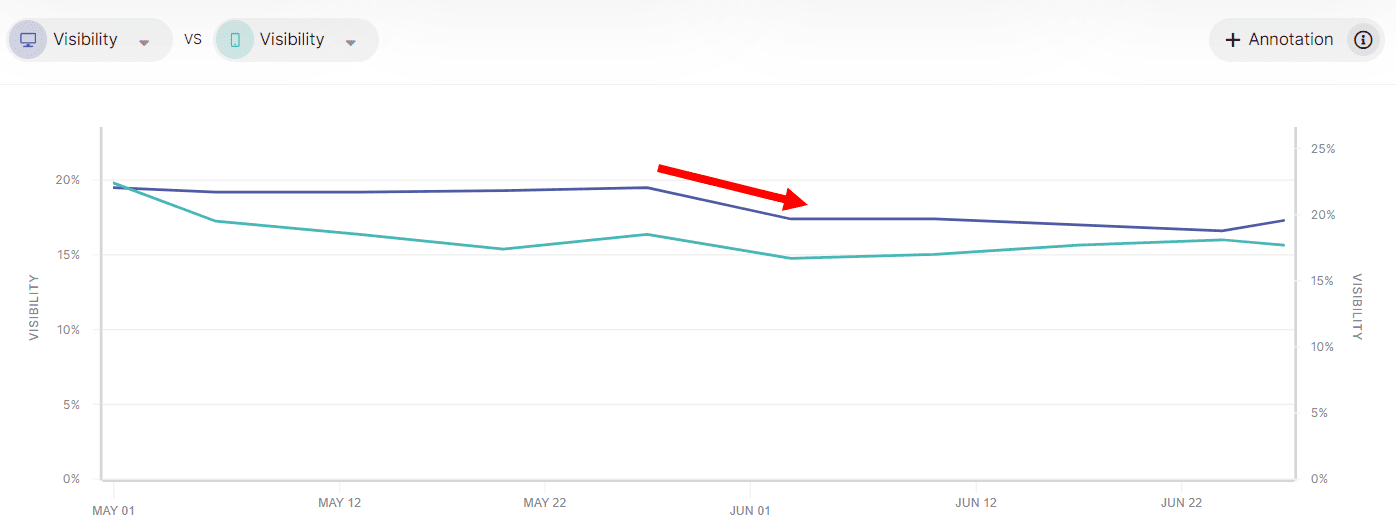
  • Example: SEOmonitor clearly shows the pullback in visibility metrics for the jobs site monster.com.
A line graph with two lines indicating visibility percentages over time, showing a red arrow highlighting a peak around mid-June. The time period from May 1 to June 22 reflects the impact of Google AIOs on these trends.Image Credit: Kevin Indig

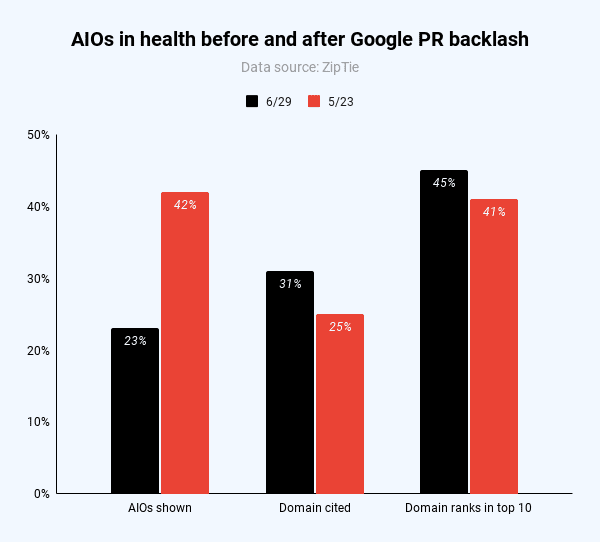
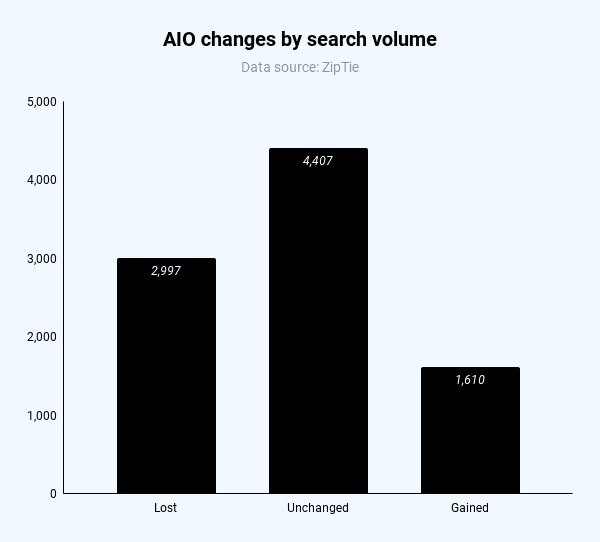
For the 1,675 queries I analyzed, the number of AIOs dropped from 42% to 23% of queries (almost half). Interestingly, the domain was cited more often (31% vs. 25%, more shortly) and ranked more often in the top 10 spots (45% vs. 41%).

Bar chart showing changes in AIOs in health before and after Google PR backlash. Metrics compared: AIOs shown, Citations, and Domain ranks in top 10, with percentages for 6/29 and 5/23. This illustrates the AIO Pullback during this period.Image Credit: Kevin Indig

Queries that stopped showing AIOs had, on average, less search volume. However, I couldn’t detect a clear pattern across word count, user intent, or SERP features for queries that gained vs. lost AIOs. The effect applies broadly, meaning Google reduced AIOs for all types of queries.

A bar chart titled Image Credit: Kevin Indig

AIOs Lean Heavily On No. 1 Web Result For Text Snippets

The before and after comparison allows us to learn more about the structure and behavior of AIOs.

For example, [hair growth products] and [best hair growth products] deliver almost identical AIOs (see screenshots below). The text is the same, but the product list and cited sources are slightly different. Google treats product searches as equal to “best” searches (makes sense).

SERPs for hair growth products (Image Credit: Kevin Indig)
SERPs for best hair growth products (AIO text is identical to screenshot above) Image Credit: Kevin Indig

The biggest difference is that the query for [hair growth products] shows no citation carousel on the side when you click the “show more” button (another example below).

On mobile, the carousel lives at the bottom of the AIO, which is not great for click-throughs. These subtle design differences likely make a big difference when it comes to clicks from AIOs since more prominently featured citations increase the likelihood of clicks.

Citations only expand when users click “show more” (Image Credit: Kevin Indig)

For transactional queries like [hair growth products], Google ranks products in the AIO in no apparent order.

I cross-referenced reviews, average ratings, price, organic product carousel and references in top-ranking articles – none indicate a relationship with the ranking in the AIO. It seems Google leans on its Shopping Graph to sort product lists.

To structure the AIO text, Google seems to pick more elements from the organic No. 1 result than others. For example, time.com ranks No. 1 for [best hair growth products]. Even though the citation in the AIO highlights a section about ingredients (purple in the screenshot below), the whole text closely mirrors the structure of the TIME article before it lists products.

The AIO mirrors the text on the No. 1 web result (time.com) (Image Credit: Kevin Indig)

AIOs use fragments of top web results because LLMs commonly use Retrieval Augmented Generation (RAG) to generate answers.

I wrote in How SEO might thrive under Bard and Prometheus:

Sridhar says that Neeva uses a technique called Retrieval Augmented Generation (RAG), a hybrid of classic information retrieval and machine learning. With RAG, you can train LLMs (Large Language Models) through documents and “remove” inaccurate results by setting constraints. In plain terms, you can show AI what you want with the ranking score for web pages. That seems to be the same or similar technique Bing uses to make sure Prometheus results are as accurate and relevant as possible.

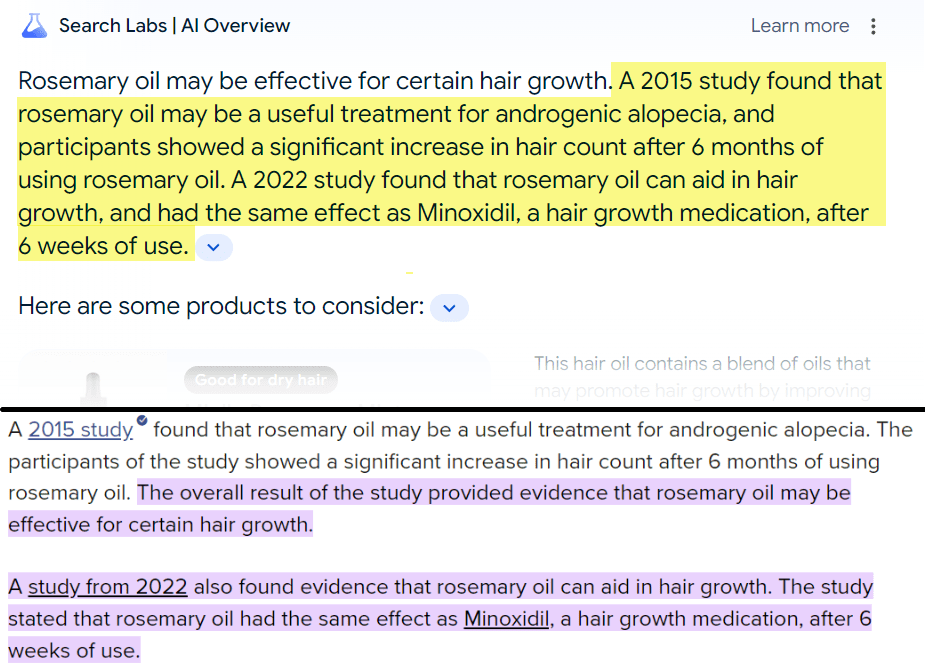
The best example of Google mirroring the AIO after the No. 1 web result (in some cases) is the answer for [rosemary oil for hair growth]. The AIO pulls its text from MedicalNewsToday (No. 1) and restructures the answer.

Highlighted text comparing studies from 2015 and 2022 on the effectiveness of rosemary oil for hair growth, noting its potential treatment for androgenic alopecia similar to Minoxidil after 6 weeks of use, cited fewer AIOs overall.Text in the AI Overview vs. a snippet from MedicalNewsToday (Image Credit: Kevin Indig)

AIOs And Featured Snippets Still Co-Exist

For more informational queries with a featured snippet, like [dht], [panic attack vs. anxiety attack], or [does creatine cause hair loss], Google closely mirrors the answer in the featured snippets and elaborates further.

High overlap between AIOs and featured snippets (Image Credit: Kevin Indig)

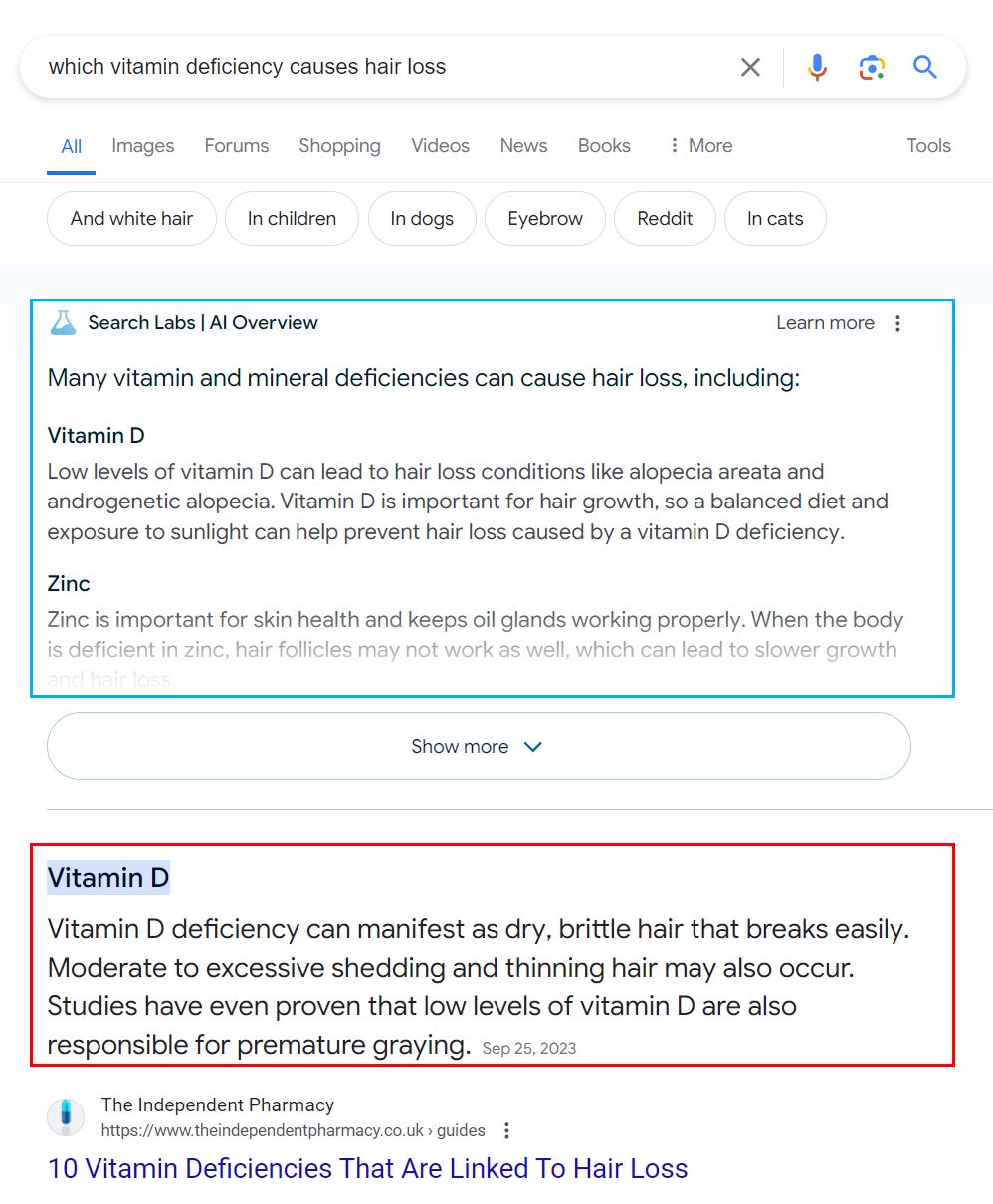
In some cases, the elaboration might confuse users. When searching for [which vitamin deficiency causes hair loss], users see a long list in the AIO and a single answer in the featured snippet. While not contradicting each other, the AIO answer makes the featured snippet seem less trustworthy.

A Google search result page detailing information on vitamins and hair loss, with citations emphasizing that Vitamin D deficiency can lead to dry, brittle hair prone to breaking easily and increased shedding and thinning.Image Credit: Kevin Indig

In my opinion, Google would be best off not showing a featured snippet when an AIO is present. However, that would be bad news for sites ranking in featured snippets.

AIOs Contain More Citations

One way Google seems to have increased the accuracy of AIOs after the PR backlash is by adding more citations. The average number of citations increased from 15 to 32 in the sample of 1,675 keywords I analyzed. I haven’t yet been able to confirm that more citations are used to compile the answer, but more outgoing links to webpages are a good signal for the open web because they increase the chance of getting click-throughs from AIOs.

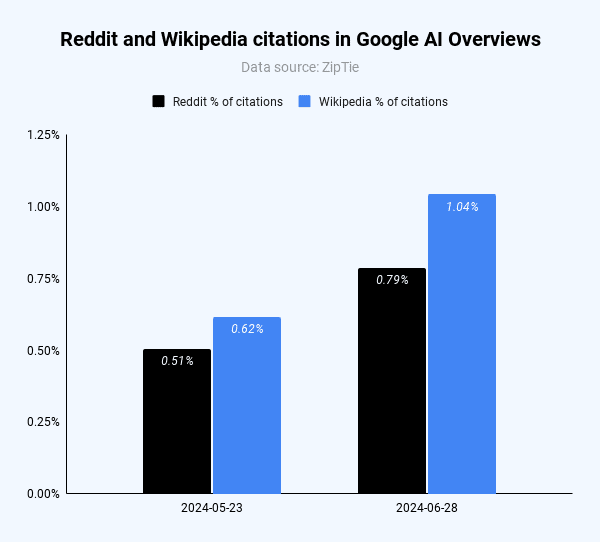
Both Reddit and Wikipedia were cited more often after the PR Backlash. I counted citations from those two domains because marketers pay a lot of attention to influencing the public discourse on Reddit, while Wikipedia has a reputation for having more gatekeepers.

Bar chart comparing citations from Reddit and Wikipedia in Google AI Overviews on two dates. Image Credit: Kevin Indig

Keep in mind that, with 0.8% and 1%, the number of citations is relatively low. It seems AIO heavily diversifies the number of citations. Only 23 keywords in the 1,675 keyword sample returned more than 10% of citations from Reddit after the PR backlash (28 for Wikipedia).

Accountability

We can conclude that:

  1. Google shows 50-66% fewer AIOs, which reduces the risk of losing organic traffic – for now.
  2. There seem to be more opportunities to be cited in AIOs, but strong performance in classic web search still largely determines citations and referral clicks from AIOs.
  3. Featured snippets get fewer clicks when AIOs are present since they elaborate much more on the answer.

Google becomes more accountable as it touches the border to publishing with AI Overviews. Verticals like health, science, and law continuously morph as new evidence comes out. It will be curious to understand whether AIOs are able to factor new evidence and opinions in and at what speed.

It’s not clear how, exactly, AI Overviews evaluate the strength of evidence, or whether it takes into account contradictory research findings, like those on whether coffee is good for you. “Science isn’t a bunch of static facts,” Dr. Yasmin said. She and other experts also questioned whether the tool would draw on older scientific findings that have since been disproved or don’t capture the latest understanding of an issue.

If AIOs adapt to new information, websites need to monitor AIOs and adapt content at an equal speed. The adaptation challenge alone will provide room for competitive advantages.


AI Overviews: About last week

Google Is Using A.I. to Answer Your Health Questions. Should You Trust It?


Featured Image: Paulo Bobita/Search Engine Journal