Are you feeling frustrated and anxious about your website’s performance?
Given the state of SEO this past year, we’d be surprised if you didn’t.
As the search landscape continues to evolve, we’re seeing a surge in volatility, with high-quality content often outranked by spam pages.
And with Google’s algorithms becoming more and more complex, traditional best practices no longer seem to cut it.
So, what does this mean for you and your strategy?
How can you navigate these complexities and boost your search rankings?
Our new ebook, Google Ranking Systems & Signals 2024, is the ultimate resource for understanding the recent ranking trends and unlocking sustainable SEO success.
You’ll get expert insights and analysis from seasoned SEO professionals, digital marketing strategists, industry thought leaders, and more.
Our featured experts include:
Adam Riemer, President, Adam Riemer Marketing.
Aleh Barysevich, Founder, SEO PowerSuite.
Andrea Volpini, Co-Founder and CEO, WordLift.
Dan Taylor, Partner & Head of Technical SEO, SALT.agency.
Erika Varangouli, Head of Branded Content at Riverside.fm.
Helen Pollitt, Head of SEO, Car & Classic.
Kevin Indig, Writer of the Growth Memo.
Kevin Rowe, Founder & Head of Digital PR Strategy, PureLinq.
Ludwig Makhyan, Global Head of Technical SEO, EssilorLuxottica.
Mordy Oberstein, Head of SEO Brand at Wix.
Scott Stouffer, CTO and Co-Founder, Market Brew.
Download the ebook to learn about the latest developments in Google Search, and how to meet the challenges of today’s competitive search environment.
We also address where different types of content belong and offer advice on whether you should diversify your acquisition channels or pivot to gated content models.
Explore the following topics inside:
Why Is Search Full Of Spam?
What Are The Top Ranking Factors That SEO Pros Can Rely On Right Now?
The Top 3 Ranking Factors
Freshness & Content Maintenance
“Ranking” In Search Generative Experience
Staying Indexed Is The New SEO Challenge
Where Does Your Best Content Belong?
Proactively Embracing SEO Disruption By Focusing On User Needs
Making Sense Of Ranking In 2024
Whether you’re a seasoned professional or just starting out, this ebook is full of practical tips and actionable strategies to help you improve your website’s visibility and drive organic traffic.
The rise of generative AI, coupled with the rapid adoption and democratization of AI across industries this decade, has emphasized the singular importance of data. Managing data effectively has become critical to this era of business—making data practitioners, including data engineers, analytics engineers, and ML engineers, key figures in the data and AI revolution.
Organizations that fail to use their own data will fall behind competitors that do and miss out on opportunities to uncover new value for themselves and their customers. As the quantity and complexity of data grows, so do its challenges, forcing organizations to adopt new data tools and infrastructure which, in turn, change the roles and mandate of the technology workforce.
Data practitioners are among those whose roles are experiencing the most significant change, as organizations expand their responsibilities. Rather than working in a siloed data team, data engineers are now developing platforms and tools whose design improves data visibility and transparency for employees across the organization, including analytics engineers, data scientists, data analysts, machine learning engineers, and business stakeholders.
This report explores, through a series of interviews with expert data practitioners, key shifts in data engineering, the evolving skill set required of data practitioners, options for data infrastructure and tooling to support AI, and data challenges and opportunities emerging in parallel with generative AI. The report’s key findings include the following:
The foundational importance of data is creating new demands on data practitioners. As the rise of AI demonstrates the business importance of data more clearly than ever, data practitioners are encountering new data challenges, increasing data complexity, evolving team structures, and emerging tools and technologies—as well as establishing newfound organizational importance.
Data practitioners are getting closer to the business, and the business closer to the data. The pressure to create value from data has led executives to invest more substantially in data-related functions. Data practitioners are being asked to expand their knowledge of the business, engage more deeply with business units, and support the use of data in the organization, while functional teams are finding they require their own internal data expertise to leverage their data.
The data and AI strategy has become a key part of the business strategy. Business leaders need to invest in their data and AI strategy—including making important decisions about the data team’s organizational structure, data platform and architecture, and data governance—because every business’s key differentiator will increasingly be its data.
Data practitioners will shape how generative AI is deployed in the enterprise. The key considerations for generative AI deployment—producing high-quality results, preventing bias and hallucinations, establishing governance, designing data workflows, ensuring regulatory compliance—are the province of data practitioners, giving them outsize influence on how this powerful technology will be put to work.
Every week we publish a rundown of new products from companies offering services to ecommerce and omnichannel merchants. This installment includes updates on virtual-universe stores, customized checkout, multichannel management, AI website builders, cross-channel commerce, omnichannel fulfillment, product images, and global sourcing.
Got an ecommerce product release? Email releases@practicalecommerce.com.
New Tools for Merchants: June 10
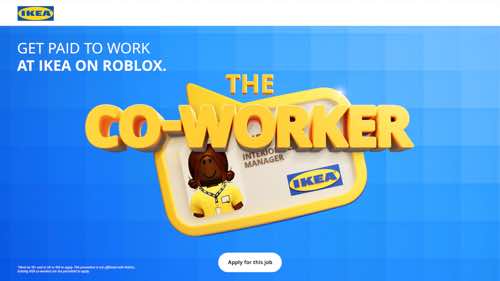
Ikea to open a virtual store on Roblox.Ikea is opening a virtual store called The Co-Worker Game on the Roblox on June 24. The virtual store will allow people to immerse themselves in the world of Ikea, with a limited number of paid roles available. This is Ikea’s first foray into mainstream gaming.
Ikea’s The Co-Worker Game
Shopify acquires Checkout Blocks for customized checkouts.Shopify has acquired Checkout Blocks, a company offering a no-code solution that lets Shopify merchants customize their checkout. Checkout Blocks enables Shopify Plus merchants to add fields to collect additional data or show new information to their shoppers, control how delivery and payment options are displayed, and design fully branded checkouts. Checkout Blocks is offering its starter plan for free for all Shopify Plus merchants.
Newegg launches SellingPilot, a multichannel marketplace management solution.Newegg Commerce, a marketplace specializing in consumer electronics, has launched SellingPilot, a marketplace management platform. SellingPilot connects with Amazon, Walmart, and others to manage product listings and orders. Using SellingPilot, merchants can (i) leverage AI tools to optimize product descriptions and keywords and streamline customer service, (ii) use email outreach and campaign creation for platforms such as TikTok, Facebook, and Instagram, and (iii) access timely competitive pricing data.
Bluehost WonderSuite unveils AI Website Creator.Bluehost, a WordPress hosting platform, has unveiled AI Website Creator, allowing WordPress users to leverage AI to create personalized websites with relevant content, images, and pages. Bluehost’s WonderSuite, with the AI Website Creator, is included with Bluehost’s WordPress hosting plans. It offers WordPress website building with intuitive AI onboarding (WonderStart), content and block creation (WonderTheme and WonderBlocks), ongoing AI assistance (WonderHelp), and ecommerce functionality to help small business owners sell more products (WonderCart).
Bluehost
Till Payments partners with BigCommerce on cross-channel commerce.Till Payments, a subsidiary of Nuvei, a Canada-based payment processor, has partnered with BigCommerce to deliver transaction processing capabilities for B2C and B2B brands. Till’s Online Checkout for BigCommerce enables merchants to accept payments, pre-authorize transactions, manage refunds, utilize 3DS2 authentication technology, accept multiple currencies, take payments with stored credit cards, and integrate an embedded checkout. BigCommerce’s multichannel merchants can use Till’s payments to unify in-store and online payment services.
eBay releases background enhancement tool for product images.eBay has launched an AI-powered background enhancement tool to help sellers produce product photos from everyday snapshots. The tool removes a background from an existing photo, leaving only the actual item for sale, and then places that item in an AI-generated backdrop selected by the seller. Background enhancement is available to iOS app users and will roll out to Android soon.
eBay’s AI-powered background enhancement tool.
“Alibaba Guaranteed” to simplify global sourcing for SMBs.Alibaba has launched Guaranteed to simplify global sourcing and provide a reliable supply chain for small and medium-sized enterprises in the U.S. Through Alibaba Guaranteed, buyers can source products at fixed prices with shipping fees included and guaranteed delivery dates. Alibaba will fulfill products sourced. Additionally, the platform handles finance and after-sales services, such as money back for order glitches and free local returns for defects.
Fulfillment platform OneRail acquires Orderbot for omnichannel fulfillment.OneRail, a last-mile delivery fulfillment service with a network of 12 million drivers across North America, has announced the acquisition of Vancouver-based Orderbot, an enterprise inventory and distributed order management platform. According to OneRail, the acquisition combines Orderbot’s inventory and order management capabilities with OneRail’s OmniPoint cloud-based last-mile operating system and delivery network, creating a comprehensive solution that streamlines fulfillment processes, reduces costs, and improves order accuracy. Mastercard partners with identity platform Trulioo to streamline onboarding.Trulioo, a global identity verification platform, has partnered with Mastercard to streamline consumers’ digital onboarding on apps and platforms. Trulioo will leverage Mastercard’s Identity solutions to power its Person Match and Risk Intelligence products, providing additional identity insights and risk scores through a customizable dashboard. Trulioo states this will diversify its suite beyond API-based products and enhance consumers’ onboarding processes. The collaboration also augments Mastercard’s Onboard Risk Check product by including Trulioo global business identity verification services.
Bloomreach partners with Valantic and Commercetools to form B2B Accelerator.Bloomreach, an ecommerce personalization platform, has announced an expansion of its partnership with digital consulting company Valantic and composable commerce platform Commercetools through the launch of B2B Accelerator. The Accelerator enables B2B brands to integrate a composable tech stack, including Bloomreach’s Discovery site search. According to Bloomreach, businesses on Accelerator will reduce time to market and time to value and mitigate risks associated with transitioning to composable commerce.
Google went public with AI Overviews in late May. I’ve been tracking queries and third-party studies since then.
AI Overviews occasionally produces incorrect answers. An account on X, Goog Enough, curates some of these errors. To its credit, Google has fixed many glitches, mainly by limiting the occurrence of Overviews and excluding user-generated content from the sources.
Here’s what we know thus far in AI Overview’s rollout.
15% of Queries
An article last week in Search Engine Land cited a study from BrightEdge, the search engine optimization firm, that found Overviews now shows for just 15% of queries. This aligns with my observations for queries I am following. Others in the industry have similar experiences.
Public AI Overviews only show for U.S.-based searchers signed in to Google accounts. Hence the visibility is likely even lower.
Labs vs. Public
Searchers who signed up for the Labs version of Search Generative Experience — the predecessor of AI Overviews — may see Labs-only results. To access public results, those searchers must opt out of Labs or create a Google profile in Chrome to test both.
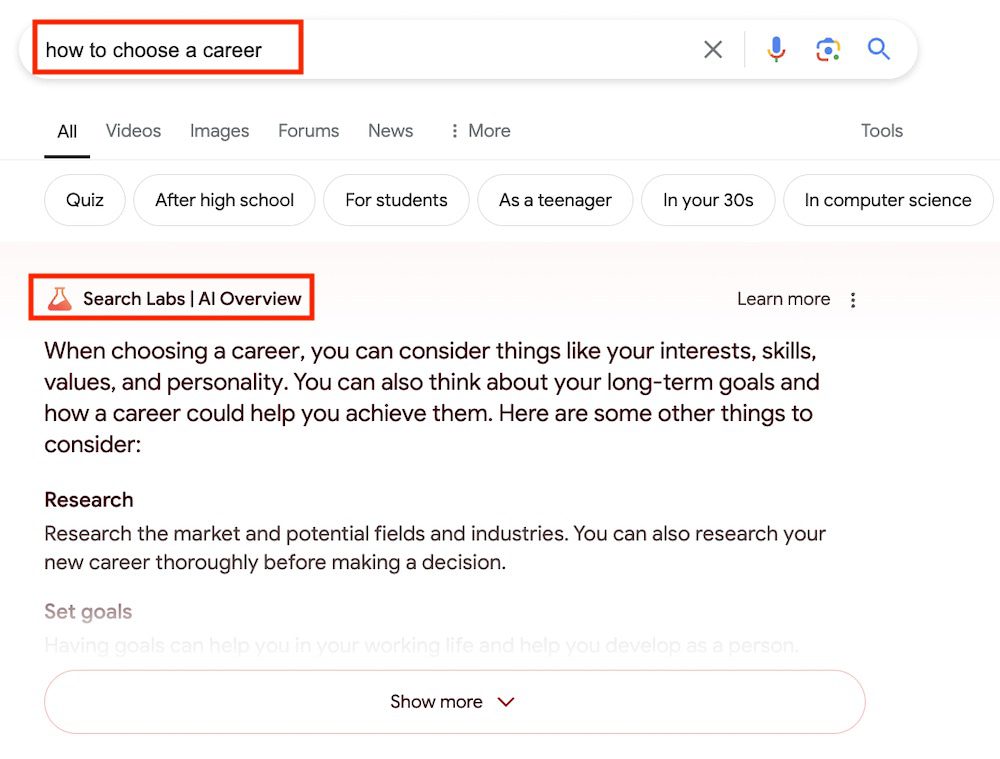
I tested the query “how to choose a career.” When logged-in to my Labs profile, I see an Overview with the notation “Search Labs” above it.
Search Labs participants see a unique notation above the Overview. Click image to enlarge.
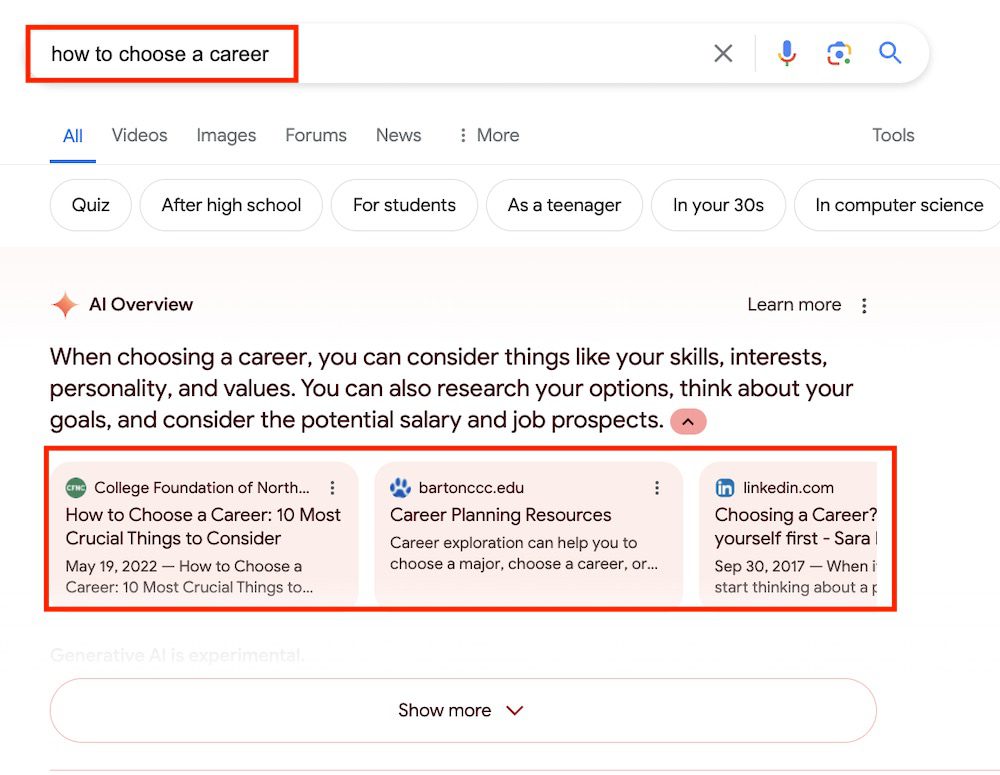
When using my non-Labs profile, I see the same AI Overviews with visible sources.
Public, non-Labs searchers see sources below the Overview. Click image to enlarge.
Optimizing for AI Overviews
In testing SGE results before the public rollout of Overviews, we knew getting a site listed in an AI answer wasn’t too difficult. From Google’s 2023 SGE patent:
AI answers in Google summarize existing search results
Google generates references (i.e., links in the answers) after creating the summaries.
The relative ease apparently remains. A simple test by search optimizer Cyrus Shepard immediately generated a link in AI Overviews. He first identified a query that produced an Overview for which his page ranked organically with a featured snippet. He then updated that page with a paragraph closely matching the text in the Overview. A link to his page appeared right away.
However, Shepard listed two caveats:
His page lost the featured snippet.
The link in the Overview disappeared quickly.
The link disappeared too soon for meaningful conclusions, such as the impact on featured snippets. However, the rapid change — in and then out of Overviews — suggests the fluidity of AI answers and caution in implementing new optimization tactics. Google is changing AI Overviews seemingly daily. While short-lived gains are possible, there’s too little data for long-term action.
At its annual developer conference, Apple announced a wave of AI-powered features for users of the latest devices.
While these developments showcase new ways to use generative AI, they raise questions about the potential impact on content creators, publishers, and search and discovery.
Here’s an overview of what Apple announced and the broader considerations.
Integration Of ChatGPT
Screenshot from: Apple.com, June 2024.
At the heart of Apple’s AI push is the integration of ChatGPT, the chatbot developed by OpenAI.
By weaving ChatGPT’s capabilities into Siri, systemwide writing tools, and image generation features, Apple is making generative AI more accessible to users.
However, this integration has implications that extend beyond user convenience.
Potential Impact On Content Visibility & Discoverability
One of the primary concerns is how Apple’s AI will affect the visibility and discoverability of publisher content within apps and on the web.
As Siri and other AI-powered features become more adept at understanding context and providing targeted suggestions, there is a risk that certain types of content or sources may be prioritized over others.
This could impact traffic and revenue for publishers outside of Apple’s preferred partner ecosystem.
Concerns About Control & Transparency
An increased reliance on AI-driven recommendations and content curation raises questions about the level of control and transparency.
If Apple’s algorithms begin to favor specific content types, formats, or sources, it could create an uneven playing field for publishers and limit the diversity of information available to users.
This is concerning, given Apple’s scale and influence in the tech industry.
Potential For A Closed Ecosystem
Another potential consequence of Apple’s AI advancements is the creation of a more closed and curated ecosystem.
By providing users with highly personalized and context-aware experiences, Apple may inadvertently discourage them from venturing outside its walled garden.
This could limit opportunities for publishers and marketers outside Apple’s inner circle, as they may need help gaining visibility and engaging with users within the Apple ecosystem.
Availability
Apple’s new AI capabilities will be free for users. ChatGPT subscribers can connect their accounts to access premium features.
A beta version in English will launch this fall for iPhones, iPads, and Macs in the U.S., and more languages and capabilities will roll out over the next year.
To access the features, you’ll need an iPhone 15 Pro or a Mac with an M1 chip (or newer).
Looking Ahead
As Apple rolls out these AI features to millions of users worldwide, publishers, content creators, and the tech community should closely monitor their impact.
While Apple’s AI advancements undoubtedly offer exciting possibilities for enhancing the user experience, they must be approached critically.
How Apple’s AI shapes user behavior and content discovery could have far-reaching consequences.
By carefully examining the potential risks, the industry can work toward a future that balances innovation with equal opportunities.
In a series of tweets, Google’s SearchLiaison responded to a question that connected click-through rates (CTR) and HCU (Helpful Content Update) with how Google ranks websites, remarking that if the associated ideas were true it would be impossible for any new website to rank.
Users Are Voting With Their Feet?
Search Liaison’s answer was to a tweet that quoted an interview answer by Google CEO Sundar Pichai, the quote being, “Users vote with their feet”.
Here is the tweet:
“If the HCU (Navboost, whatever you want to call it) is clicks/user reaction based – how could sites hit by the HCU ever hope to recover if we’re no longer being served to Google readers?
@sundarpichai “Users vote with their feet”,
Okay I’ve changed my whole site – let them vote!”
The above tweet appears to connect Pichai’s statement to Navboost, user clicks and rankings. But as you’ll see below, Sundar’s statement about users voting “with their feet” has nothing to do with clicks or ranking algorithms.
Background Information
Sundar Pichai’s answer about users voting “with their feet” has nothing to do with clicks.
The problem with the interview question (and Sundar Pichai’s answer) is that the question and answer are in the context of “AI-powered search and the future of the web.”
The interviewer at The Verge used a site called HouseFresh as an example of a site that’s losing traffic because of Google’s platform shift to the new AI Overviews.
But the HouseFresh site’s complaints predate AI Overviews. Their complaints are about Google ranking low quality “big media” product reviews over independent sites like HouseFresh.
“Big media publishers are inundating the web with subpar product recommendations you can’t trust…
Savvy SEOs at big media publishers (or third-party vendors hired by them) realized that they could create pages for ‘best of’ product recommendations without the need to invest any time or effort in actually testing and reviewing the products first.”
Sundar Pichai’s answer has nothing to do with why HouseFresh is losing traffic. His answer is about AI Overviews. HouseFresh’s issues are about low quality big brands outranking them. Two different things.
The Verge-affiliated interviewer was mistaken to cite HouseFresh in connection with Google’s platform shift to AI Overviews.
Furthermore, Pichai’s statement has nothing to do with clicks and rankings.
“There’s an air purifier blog that we covered called HouseFresh. There’s a gaming site called Retro Dodo. Both of these sites have said, “Look, our Google traffic went to zero. Our businesses are doomed.”
…Is that the right outcome here in all of this — that the people who care so much about video games or air purifiers that they started websites and made the content for the web are the ones getting hurt the most in the platform shift?”
Sundar Pichai answered:
“It’s always difficult to talk about individual cases, and at the end of the day, we are trying to satisfy user expectations. Users are voting with their feet, and people are trying to figure out what’s valuable to them. We are doing it at scale, and I can’t answer on the particular site—”
Pichai’s answer has nothing to do with ranking websites and absolutely zero context with the HCU. What Pichai’s answer means is that users are determining whether or not AI Overviews are helpful to them.
SearchLiaison’s Answer
Let’s reset the context of SearchLiaison’s answer, here is the tweet (again) that started the discussion:
“If the HCU (Navboost, whatever you want to call it) is clicks/user reaction based – how could sites hit by the HCU ever hope to recover if we’re no longer being served to Google readers?
“If you think further about this type of belief, no one would ever rank in the first place if that were supposedly all that matters — because how would a new site (including your site, which would have been new at one point) ever been seen?
The reality is we use a variety of different ranking signals including, but not solely, “aggregated and anonymized interaction data” as covered here:”
The person who started the discussion responded with:
“Can you please tell me if I’m doing right by focusing on my site and content – writing new articles to be found through search – or if I should be focusing on some off-site effort related to building a readership? It’s frustrating to see traffic go down the more effort I put in.”
When a client says something like “writing new articles to be found through search” I always follow up with questions to understand what they mean. I’m not commenting about the person who made the tweet, I’m just making an observation about past conversations I’ve had with clients. When a client says something like that, they sometimes mean that they’re researching Google keywords and competitor sites and using that keyword data verbatim within their content instead of relying on their own personal expertise and understanding of what the readers want and need.
Here’s SearchLiaison’s answer:
“As I’ve said before, I think everyone should focus on doing whatever they think is best for their readers. I know it can be confusing when people get lots of advice from different places, and then they also hear about all these things Google is supposedly doing, or not doing, and really they just want to focus on content. If you’re lost, again, focus on that. That is your touchstone.”
Site Promotion To People
SearchLiaison next addressed the excellent question about off-site promotion where he strongly asserted focusing on the readers. A lot of SEOs focus on promoting sites to Google, which is what link building is all about.
Promoting sites to people is super important. It’s one of the things that I see high ranking sites do and, although I won’t mention specifics, I believe it feeds into higher rankings in an indirect way.
SearchLiaison continued:
“As to the off-site effort question, I think from what I know from before I worked at Google Search, as well as my time being part of the search ranking team, is that one of the ways to be successful with Google Search is to think beyond it.
Great sites with content that people like receive traffic in many ways. People go to them directly. They come via email referrals. They arrive via links from other sites. They get social media mentions.
This doesn’t mean you should get a bunch of social mentions, or a bunch of email mentions because these will somehow magically rank you better in Google (they don’t, from how I know things). It just means you’re likely building a normal site in the sense that it’s not just intended for Google but instead for people. And that’s what our ranking systems are trying to reward, good content made for people.”
What About False Positives?
The phrase false positive is used in many contexts and one of them is to describe the situation of a high quality site that loses rankings because an algorithm erroneously identified it as low quality. SearchLiaison offered hope to high quality sites that may have seen a decrease in traffic, saying that it’s possible that the next update may offer a positive change.
He tweeted:
“As to the inevitable “but I’ve done all these things when will I recover!” questions, I’d go back to what we’ve said before. It might be the next core update will help, as covered here:
It might also be that, as I said here, it’s us in some of these cases, not the sites, and that part of us releasing future updates is doing a better job in some of these cases:
This is more a creator / site owner question, and the team that deals with that is @googlesearchc — that’s why I’m not really answering this type of stuff so much now. It’s not the primary focus of my work (I deal with search generally). @googlesearchc generates our guidance…
— Google SearchLiaison (@searchliaison) April 5, 2024
SearchLiaison linked to a tweet by John Mueller from a month ago where he said that the search team is looking for ways to surface more helpful content.
“I can’t make any promises, but the team working on this is explicitly evaluating how sites can / will improve in Search for the next update. It would be great to show more users the content that folks have worked hard on, and where sites have taken helpfulness to heart.”
Is Your Site High Quality?
Everyone likes to think that their site is high quality and most times it is. But there are also cases where a site publisher will do “everything right” in terms of following SEO practices but what they’re unaware of is that those “good SEO practices” that are backfiring on them.
One example, in my opinion, is the widely practiced strategy of copying what competitors are doing but “doing it better.” I’ve been hands-on involved in SEO for well over 20 years and that’s an example of building a site for Google and not for users. It’s a strategy that explicitly begins and ends with the question of “what is Google ranking and how can I create that?”
That kind of strategy can create patterns that overtly signal that a site is not created for users. It’s also a recipe for creating a site that offers nothing new from what Google is already ranking. So before assuming that everything is fine with the site, be certain that everything is indeed fine with the site.
Google has announced an update to the attribution models in Google Analytics 4 (GA4) to improve the accuracy of paid search campaigns.
Google plans to roll out adjustments over the next two weeks to address a longstanding issue where conversions originating from paid search were mistakenly attributed to organic search traffic.
According to the company’s statement, this misattribution occurs with single-page applications when the “gclid” parameter — a unique identifier for paid search clicks — fails to persist across multiple page views.
As a result, conversions that should have been credited to paid search campaigns were incorrectly assigned to organic search channels.
Improved Conversion Attribution Methodology
To address this problem, Google is modifying how it attributes conversions to ensure campaign information is captured from the initial event on each page.
Under the new methodology, the attribution will be updated to reflect the appropriate traffic source if a user exits the site and returns through a different channel.
This change is expected to increase the number of conversions attributed to paid search campaigns, potentially impacting advertising expenditures for marketers leveraging Google Ads.
Preparation & Review Recommended
In light of the impending update, Google strongly advises advertisers to review their budget caps and make necessary adjustments before the changes take effect.
As more conversions may be assigned to paid search efforts, campaign spending levels could be affected.
Proactive budget management should be used to align with evolving performance data.
Why SEJ Cares
Improved attribution accuracy gives you a clearer picture of how well your paid search advertising works.
This will allow you to make smarter decisions about where to spend your marketing budget and how to improve your paid search campaigns based on precise data.
How This Can Help You
With more accurate conversion data, you can:
Gain a clearer picture of your paid search campaigns’ actual impact and return on investment (ROI).
Optimize campaigns based on reliable performance metrics, allowing for more effective budget allocation and targeting strategies.
Identify areas for improvement or expansion within your paid search efforts, informed by precise attribution data.
Make data-driven decisions regarding budget adjustments, bid strategies, and overall campaign management.
To get the most out of these changes, review your budget caps and make necessary adjustments to anticipate the potential increase in conversions attributed to paid search campaigns.
Staying ahead will make it easier to adapt to the new attribution method and leverage the improved data.
Google has introduced a feature in Search Console that allows merchants to track their product listings in the Google Search Image tab.
This expanded functionality can help businesses better understand their visibility across Google’s shopping experiences.
New to Search Console Performance report 📢 you can now see merchant listings performance in the Google Search Image tab. Learn more about Shopping reports and tools at https://t.co/W7UdFeFG4ppic.twitter.com/3xc9tZNkZr
— Google Search Central (@googlesearchc) June 10, 2024
Where To Find ‘Merchant Listings Performance’ In Search Console
The new data is accessible through the “Performance” report under the “Google Search Image” tab.
From there, you can monitor the performance of your listings across various Google surfaces.
This includes information on impressions, clicks, and other key metrics related to your product showcases.
By integrating merchant listing performance into Search Console, businesses get a more comprehensive view of their product visibility to optimize their strategies accordingly.
Eligibility & Shopping Section In Search Console
To qualify for merchant listing reports, a website must be identified by Google as an online merchant primarily selling physical goods or services directly to consumers.
Affiliate sites or those that redirect users to other platforms for purchase completion are not considered eligible.
Once recognized as an online merchant, the Search Console will display a “Shopping” section in its navigation bar.
This dedicated area houses tools and reports tailored to shopping experiences, including:
Product Snippet Rich Report: Providing insights into product snippet structured data on the site, enabling enhanced search result displays with visual elements like ratings and prices.
Merchant Listing Rich Report: Offering analytics on merchant listing structured data enables more comprehensive search results, often appearing in carousels or knowledge panels.
Shopping Tab Listings: Information and guidance on enabling products to appear in the dedicated Shopping tab within Google Search results.
Google’s automated systems determine a site’s eligibility as an online merchant based on the presence of structured data and other factors.
In Summary
This new feature in Google’s Search Console provides valuable information about the visibility of your product listings in search results.
You can use these insights to make changes and improve your products’ visibility so that more potential customers can find them.
Many advertisers have a tight budget for pay-per-click (PPC) advertising, making it challenging to maximize results.
One of the first questions that often looms large is, “How much should we spend?” It’s a pivotal question, one that sets the stage for the entire PPC strategy.
Read on for tips to get started or further optimize budgets for your PPC program to maximize every dollar spent.
1. Set Expectations For The Account
With a smaller budget, managing expectations for the size and scope of the account will allow you to keep focus.
A very common question is: How much should our company spend on PPC?
To start, you must balance your company’s PPC budget with the cost, volume, and competition of keyword searches in your industry.
You’ll also want to implement a well-balanced PPC strategy with display and video formats to engage consumers.
First, determine your daily budget. For example, if the monthly budget is $2,000, the daily budget would be set at $66 per day for the entire account.
The daily budget will also determine how many campaigns you can run at the same time in the account because that $66 will be divided up among all campaigns.
Be aware that Google Ads and Microsoft Ads may occasionally exceed the daily budget to maximize results. The overall monthly budget, however, should not exceed the Daily x Number of Days in the Month.
Now that we know our daily budget, we can focus on prioritizing our goals.
2. Prioritize Goals
Advertisers often have multiple goals per account. A limited budget will also limit the number of campaigns – and the number of goals – you should focus on.
Some common goals include:
Brand awareness.
Leads.
Sales.
Repeat sales.
In the example below, the advertiser uses a small budget to promote a scholarship program.
They are using a combination of leads (search campaign) and awareness (display campaign) to divide up a daily budget of $82.
Screenshot from author, May 2024
The next several features can help you laser-focus campaigns to allocate your budget to where you need it most.
Remember, these settings will restrict traffic to the campaign. If you aren’t getting enough traffic, loosen up/expand the settings.
3. Location Targeting
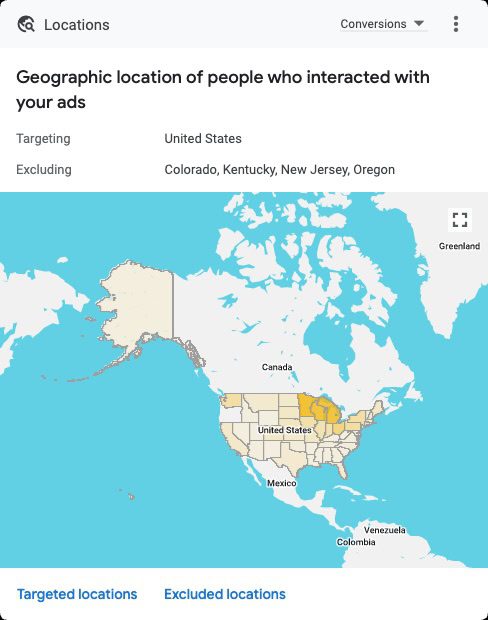
Location targeting is a core consideration in reaching the right audience and helps manage a small ad budget.
To maximize a limited budget, you should focus on only the essential target locations where your customers are located.
While that seems obvious, you should also consider how to refine that to direct the limited budget to core locations. For example:
You can refine location targeting by states, cities, ZIP codes, or even a radius around your business.
Choosing locations to target should be focused on results.
The smaller the geographic area, the less traffic you will get, so balance relevance with budget.
Consider adding negative locations where you do not do business to prevent irrelevant clicks that use up precious budget.
If the reporting reveals targeted locations where campaigns are ineffective, consider removing targeting to those areas. You can also try a location bid modifier to reduce ad serving in those areas.
Screenshot by author from Google Ads, May 2024
4. Ad Scheduling
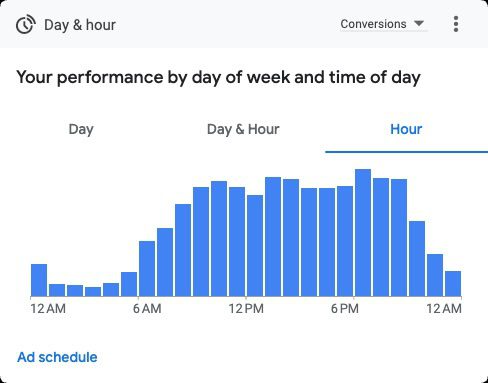
Ad scheduling also helps to control budget by only running ads on certain days and at certain hours of the day.
With a smaller budget, it can help to limit ads to serve only during hours of business operation. You can choose to expand that a bit to accommodate time zones and for searchers doing research outside of business hours.
If you sell online, you are always open, but review reporting for hourly results over time to determine if there are hours of the day with a negative return on investment (ROI).
Limit running PPC ads if the reporting reveals hours of the day when campaigns are ineffective.
The purpose is to prevent your ad from showing on keyword searches and websites that are not a good match for your business.
Generate negative keywords proactively by brainstorming keyword concepts that may trigger ads erroneously.
Review query reports to find irrelevant searches that have already led to clicks.
Create lists and apply to the campaign.
Repeat on a regular basis because ad trends are always evolving!
6. Smart Bidding
Smart Bidding is a game-changer for efficient ad campaigns. Powered by Google AI, it automatically adjusts bids to serve ads to the right audience within budget.
The AI optimizes the bid for each auction, ideally maximizing conversions while staying within your budget constraints.
Smart bidding strategies available include:
Maximize Conversions: Automatically adjust bids to generate as many conversions as possible for the budget.
Target Return on Ad Spend (ROAS): This method predicts the value of potential conversions and adjusts bids in real time to maximize return.
Target Cost Per Action (CPA): Advertisers set a target cost-per-action (CPA), and Google optimizes bids to get the most conversions within budget and the desired cost per action.
7. Try Display Only Campaigns
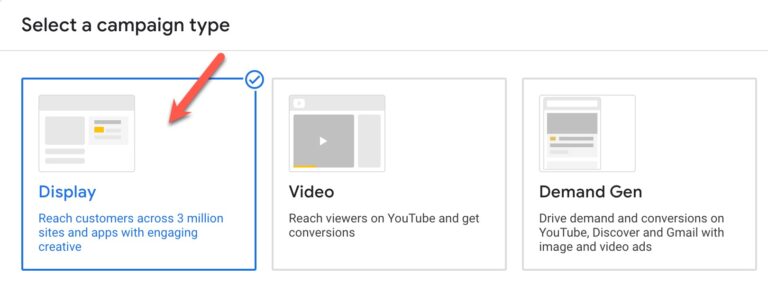
Screenshot by author from Google Ads, May 2024
For branding and awareness, a display campaign can expand your reach to a wider audience affordably.
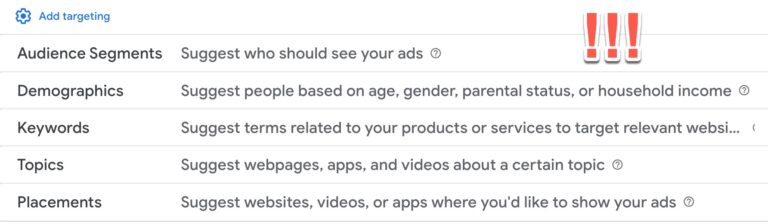
Audience targeting is an art in itself, so review the best options for your budget, including topics, placements, demographics, and more.
Remarketing to your website visitors is a smart targeting strategy to include in your display campaigns to re-engage your audience based on their behavior on your website.
Let your ad performance reporting by placements, audiences, and more guide your optimizations toward the best fit for your business.
Screenshot by Lisa Raehsler from Google Ads, May 2024
In short, automation is used to maximize conversion results by serving ads across channels and with automated ad formats.
This campaign type can be useful for limited budgets in that it uses AI to create assets, select channels, and audiences in a single campaign rather than you dividing the budget among multiple campaign types.
Since the success of the PMax campaign depends on the use of conversion data, that data will need to be available and reliable.
9. Target Less Competitive Keywords
Some keywords can have very high cost-per-click (CPC) in a competitive market. Research keywords to compete effectively on a smaller budget.
Use your analytics account to discover organic searches leading to your website, Google autocomplete, and tools like Google Keyword Planner in the Google Ads account to compare and get estimates.
In this example, a keyword such as “business accounting software” potentially has a lower CPC but also lower volume.
Ideally, you would test both keywords to see how they perform in a live campaign scenario.
Screenshot by author from Google Ads, May 2024
10. Manage Costly Keywords
High volume and competitive keywords can get expensive and put a real dent in the budget.
In addition to the tip above, if the keyword is a high volume/high cost, consider restructuring these keywords into their own campaign to monitor and possibly set more restrictive targeting and budget.
Levers that can impact costs on this include experimenting with match types and any of the tips in this article. Explore the opportunity to write more relevant ad copy to these costly keywords to improve quality.
Every Click Counts
As you navigate these strategies, you will see that managing a PPC account with a limited budget isn’t just about monetary constraints.
Rocking your small PPC budgets involves strategic campaign management, data-driven decisions, and ongoing optimizations.
In the dynamic landscape of paid search advertising, every click counts, and with the right approach, every click can translate into meaningful results.
Google’s John Mueller responded to a question about whether it’s okay to stop optimizing a desktop version of a website now that Google is switching over to exclusively indexing mobile versions of websites.
The question asked is related to an announcement they made a week ago:
“…the small set of sites we’ve still been crawling with desktop Googlebot will be crawled with mobile Googlebot after July 5, 2024. … After July 5, 2024, we’ll crawl and index these sites with only Googlebot Smartphone. If your site’s content is not accessible at all with a mobile device, it will no longer be indexable.”
Stop Optimizing Desktop Version Of A Site?
The person asking the question wanted to know if it’s okay to abandon optimizing a purely desktop version of a site and just focus on the mobile friendly version. The person is asking because they’re new to a company and the developers are far into the process of developing a mobile-only version of a site.
This is the question:
“I am currently in a discussion at my new company, because they are implementing a different mobile site via dynamic serving instead of just going responsive. Next to requirements like http vary header my reasoning is that by having two code bases we need to crawl, analyze and optimize two websites instead of one. However, this got shut down because “due to mobile first indexing we no longer need to optimize the desktop website for SEO”. I read up on all the google docs etc. but I couldn’t find any reasons as to why I would need to keep improving the desktop website for SEO, meaning crawlability, indexability, using correct HTML etc. etc. What reasons are there, can you help me?”
Mobile-Only Versus Responsive Website
Google’s John Mueller expressed the benefits of one version of a website that’s responsive. This eliminates the necessity of maintaining two websites plus it’s desktop-friendly to site visitors who are visiting a site with a desktop browser.
He answered:
“First off, not making a responsive site in this day & age seems foreign to me. I realize sometimes things just haven’t been updated in a long time and you might need to maintain it for a while, but if you’re making a new site”
Maintaining A Desktop-Friendly Site Is A Good Idea
Mueller next offered reasons why it’s a good idea to maintain a functional desktop version of a website, such as other search engines, crawlers and site visitors who actually are on desktop devices. Most SEOs understand that conversions, generating income with a website, depends on being accessible to all site visitors, that’s the big picture. Optimizing a site for Google is only a part of that picture, it’s not the entire thing itself.
Mueller explained:
“With mobile indexing, it’s true that Google focuses on the mobile version for web search indexing. However, there are other search engines & crawlers / requestors, and there are other requests that use a desktop user-agent (I mentioned some in the recent blog post, there are also the non-search user-agents on the user-agent documentation page).”
He then said that websites exist for more than just getting crawled and ranked by Google.
“All in all, I don’t think it’s the case that you can completely disregard what’s served on desktop in terms of SEO & related. If you had to pick one and the only reason you’re running the site is for Google SEO, I’d probably pick mobile now, but it’s an artificial decision, sites don’t live in isolation like that, businesses do more than just Google SEO (and TBH I hope you do: a healthy mix of traffic sources is good for peace of mind). And also, if you don’t want to have to make this decision: go responsive.”
After the person asking the question explained that the decision had already been made to focus on mobile, Mueller responded that this is a case of choosing your battles.
“If this is an ongoing project, then shifting to dynamic serving is already a pretty big step forwards. Pick your battles :). Depending on the existing site, sometimes launching with a sub-optimal better version earlier is better than waiting for the ideal version to be completed. I’d just keep the fact that it’s dynamic-serving in mind when you work on it, with any tools that you use for diagnosing, monitoring, and tracking. It’s more work, but it’s not impossible. Just make sure the desktop version isn’t ignored completely :). Maybe there’s also room to grow what the team (developers + leads) is comfortable with – perhaps some smaller part of the site that folks could work on making responsive. Good luck!”
Choose Your Battles Or Stand Your Ground?
John Mueller’s right that there are times where it’s better to choose your battles rather than dig in and compromise. But just make sure that your recommendations are on record and that those pushing back are on record. That way if things go wrong the blame will find it’s way back to the ones who are responsible.