Traditional search engine optimization is fundamental to visibility on generative AI platforms.
Large language models query Google to research topics and find answers. Thus low or unranked pages are largely invisible to ChatGPT, Perplexity, Gemini, and others.
Here are the top SEO tactics to elevate genAI mentions and citations.
Keyword research
To date, genAI platforms provide no prompt data. We have no definitive info on how consumers discover brands or products on those platforms.
Keyword research remains the primary source for how online consumers decide to buy. Third-party tools can organize keywords by intent, offering clues for targeting prospects at every step of their research.
Keyword gaps identify what’s missing on a site to attract would-be customers.
Prompts are longer than traditional search queries and, anecdotally, wildly unpredictable. Yet higher-level keyword optimization informs content and landing pages that cater to shoppers’ needs.
Optimized content
The best ecommerce content explains how a merchant’s products help consumers address needs and solve problems.
It may generate less traffic than a few years ago, but it remains essential for product discovery. Focusing on “bottom-of-the-funnel” queries (a common recommendation from “GEO experts”) leads to fewer new customers.
Yes, LLMs may summarize your content and include it in an answer without referring to your company. But the content will be part of that answer as a trusted LLM solution provider, foretelling potential future recommendations.
Optimizing for buying journeys, then, includes keywords to understand shoppers’ desires and relevant content for search and LLM bots to find solutions.
Site architecture
Horizontal site architecture (pages aren’t buried) and internal links ensure bot crawlability and long-tail ranking opportunities.
Clear architecture helps LLMs understand a business and correctly place its products in the training data.
Optimized site navigation is:
Structured for humans and LLM agents to find what they need quickly.
Usable without JavaScript and accessible with all web browsers.
Focused on a site’s most important sections and key benefits.
Link building
LLMs’ use of authority signals, such as backlinks, remains unclear. Nearly a year ago I speculated on Reddit that Gemini and AI Mode rely on PageRank at least indirectly. Whether that includes backlinks, however, is a mystery.
Yet backlinks, brand mentions, and co-citations are important for LLM visibility:
Google’s Gary Illyes and Martin Splitt used a recent episode of the Search Off the Record podcast to discuss whether webpages are getting too large and what that means for both users and crawlers.
The conversation started with a simple question: are websites getting fat? Splitt immediately pushed back on the framing, arguing that website-level size is meaningless. Individual page size is where the discussion belongs.
What The Data Shows
Splitt cited the 2025 Web Almanac from HTTP Archive, which found that the median mobile homepage weighed 845 KB in 2015. By July, that same median page had grown to 2,362 KB. That’s roughly a 3x increase over a decade.
Both agreed the growth was expected, given the complexity of modern web applications. But the numbers still surprised them.
Splitt noted the challenge of even defining “page weight” consistently, since different people interpret the term differently depending on whether they’re thinking about raw HTML, transferred bytes, or everything a browser needs to render a page.
How Google’s Crawl Limits Fit In
Illyes discussed a 15 MB default that applies across Google’s broader crawl infrastructure, where each URL gets its own limit, and referenced resources like CSS, JavaScript, and images are fetched separately.
That’s a different number from what appears in Google’s current Googlebot documentation. Google states that Googlebot for Google Search crawls the first 2 MB of a supported file type and the first 64 MB of a PDF.
Our previous coverage broke down the documentation update that clarified these figures earlier this year. Illyes and Splitt discussed the flexibility of these limits in a previous episode, noting that internal teams can override the defaults depending on what’s being crawled.
The Structured Data Question
One of the more interesting moments came when Illyes raised the topic of structured data and page bloat. He traced it back to a statement from Google co-founder Sergey Brin, who said early in Google’s history that machines should be able to figure out everything they need from text alone.
Illyes noted that structured data exists for machines, not users, and that adding the full range of Google’s supported structured data types to a page can add weight that visitors never see. He framed it as a tension rather than offering a clear answer on whether it’s a problem.
Does It Still Matter?
Splitt said yes. He acknowledged that his home internet connection is fast enough that page weight is irrelevant in his daily experience. But he said the picture changes when traveling to areas with slower connections, and noted that metered satellite internet made him rethink how much data websites transfer.
He suggested that page size growth may have outpaced improvements in median mobile connection speeds, though he said he’d need to verify that against actual data.
Illyes referenced prior studies suggesting that faster websites tend to have better retention and conversion rates, though the episode didn’t cite specific research.
Looking Ahead
Splitt said he plans to address specific techniques for reducing page size in a future episode.
Most pages are still unlikely to hit those limits, with the Web Almanac reporting a median mobile homepage size of 2,362 KB. But the broader trend of growing page weight affects both performance and accessibility for users on slower or metered connections.
Jobs with the highest potential for AI-assisted productivity gains also face the highest projected job losses, according to a new index from Digital Planet at Tufts University’s Fletcher School.
The American AI Jobs Risk Index ranks 784 U.S. occupations, 530 metro areas, 50 states, and 20 industry sectors by vulnerability to AI-driven job loss.
All figures are model projections based on AI adoption scenarios, not actual layoffs or employment changes. The median scenario estimates 9.3 million jobs at risk, ranging from 2.7 million to 19.5 million depending on AI adoption speed.
Which Jobs Face The Highest Projected Risk
Writers and authors top the list of occupations at risk at 57%. Computer programmers and web and digital interface designers follow at 55% each. Editors are at 54%, and web developers at 46%.
Market research analysts and marketing specialists face a projected 35% job loss rate. Public relations specialists are at 37%. News analysts, reporters, and journalists face 35% risk.
Earlier analyses, such as the Anthropic Economic Index and Stanford’s “Canaries in the Coal Mine,” measured how accessible jobs are to AI. This analysis goes further by estimating how likely that exposure is to translate into projected job loss.
Augmentation & Loss Risk Go Together
Authors refer to the connection between jobs that benefit from AI-driven productivity gains and those expected to lose jobs as the “augmentation-displacement link.”
When AI increases individual workers’ efficiency, companies can produce the same output with fewer employees. This mainly affects entry-level and lower-seniority roles first, because companies can cut back on hiring rather than firing.
Writing, programming, web design, technical writing, and data analysis are where this pattern is most evident. Tasks in these fields are cognitive, language-intensive, and structured enough for large language models to manage.
By Industry
Average vulnerability across all industries is about 6%. Sectors with the highest projected job loss are Information (18%), Finance and Insurance (16%), and Professional, Scientific, and Technical Services (16%).
Software Developers, Management Analysts, and Market Research Analysts face the biggest total income losses. These three roles combine high pay with large workforces, accounting for a significant share of the projected $757 billion in total at-risk annual income.
What The Analysis Doesn’t Include
Note that job creation effects aren’t included in this version. The authors intend to add that data in future updates as they gather more evidence.
Additionally, regulatory constraints, union bargaining power, and occupational licensing requirements that could help slow job losses in some sectors are not part of this analysis. The authors emphasize that their forecasts are based on different scenarios rather than being definitive.
Why This Matters
There’s a common assumption among digital professionals that using AI to boost productivity protects their jobs. However, this data challenges that idea.
SEJ previously covered this tension in 2023 when Dr. Craig Froehle of the University of Cincinnati warned that companies not investing in employee retraining would see turnover costs double. The Tufts data puts numbers on the specific occupations where that pressure is building.
Looking Ahead
Updates to the American AI Jobs Risk Index will be made as AI capabilities and labor market conditions evolve. The authors mention that future versions will try to include job creation data along with loss estimates, providing a more complete view of AI’s overall impact on employment.
The methodology is available on the Digital Planet site, which also links to a data download page.
AI search is changing how visibility works. Users are getting direct answers instead of clicking links, which means fewer chances to drive traffic. In this shift, AI citations are becoming the new gatekeepers, deciding which sources get featured in answers. Over the past year, search has moved from ranking pages to selecting sources, pushing us from traditional SEO toward AI-driven visibility.
In this article, we’ll explain what AI citations are, how they work, and how you can earn them.
Table of contents
Key takeaways
AI citations are references that search engines include in AI-generated answers, enhancing credibility and visibility
This shift in visibility moves from traditional SEO ranking to AI-driven inclusion as a key factor for brand presence
AI tools retrieve information from diverse sources, with citations coming from both top-ranking and deeper pages
To earn AI citations, create valuable, structured content and establish topical authority across your niche
Tools like Yoast AI Brand Insights help track your AI visibility and citation presence across platforms
What are AI citations?
Citations have always been a way to show where information comes from and why it can be trusted. The same idea now applies to AI-generated answers.
ChatGPT cites resources in its answer
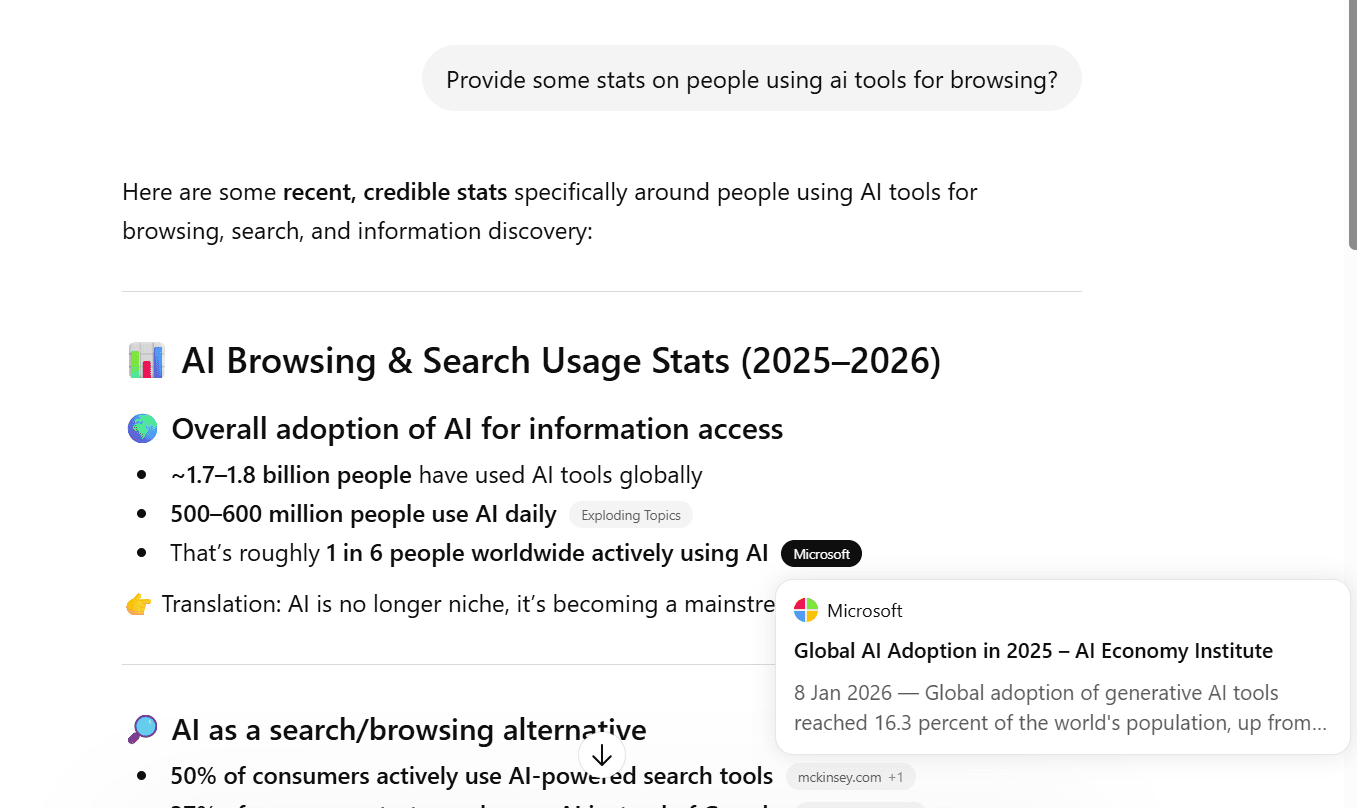
AI citations are the references that search engines and AI tools include to support the answers they generate. When a tool like ChatGPT responds to a query, it often points to specific pages or sources that back up the information. These references act as signals of credibility, helping users understand where the answer is coming from and giving them a way to explore the original content.
In simple terms, if your content is cited, it becomes part of the answer itself, and not just another link in the results.
AI citations vs the blue link era
If AI citations determine what gets included in answers, it’s worth asking how this differs from how search used to work. Because this isn’t just a feature update, it’s a shift in how visibility itself is earned.
In the traditional model, ranking higher meant getting more clicks. In AI-driven search, being selected as a source matters just as much, if not more.
Aspect
Traditional SEO
AI citations
Visibility
Blue links
Ai-generated answers
Traffic
Click-driven
Influence-driven
Authority signal
Backlinks
Credibility and accuracy
User action
Visit website
Consume instant answers
This doesn’t mean traditional SEO is going away. Rankings, indexing, and backlinks still play a critical role. However, how that value gets surfaced is changing. Instead of just competing for position on a results page, you’re now competing to be part of the answer itself.
Do check out Alex Moss’s talk at BrightonSEO, 2025, on the evolution of search intent and discoverability.
Where do AI citations come from?
Before you try to earn AI citations, it’s important to understand where they actually come from. Because you’re not just competing with other blog posts, you’re competing with an entire information ecosystem.
AI models pull their answers from a mix of sources:
Web content: Blog posts, guides, landing pages, and long-form articles
Structured sources: Platforms like Wikipedia, documentation hubs, and product data feeds
Forums and UGC: Discussions from Reddit, Quora, and Stack Overflow
First-party data: Brand websites, help centers, and official resources
How the sources are selected is quite interesting. A recent analysis of Google’s AI Overviews found that citations don’t strictly come from top-ranking pages. In fact, only about 38% of cited sources rank in the top 10 results, meaning a large share comes from deeper pages or alternative formats.
Another key insight by CXL: AI models tend to prioritize clear, early answers within the content, with a significant portion of citations pulled from the top sections of a page rather than from deeper sections.
The takeaway is simple. AI systems are not just ranking content; they are selecting the most useful pieces of information across formats and sources. That means your content is competing not only for rankings but also for clarity, structure, and trustworthiness across this entire ecosystem.
Types of AI citations
Not all AI citations look the same. Depending on the query and intent, AI models pull in different types of sources to support their answers.
Broadly, you’ll see three main types:
Informational citations
These are the most common. AI tools refer to blog posts, guides, and educational content to explain concepts or answer questions. If someone asks, “what are AI citations,” the sources cited will typically be long-form, explanatory content.
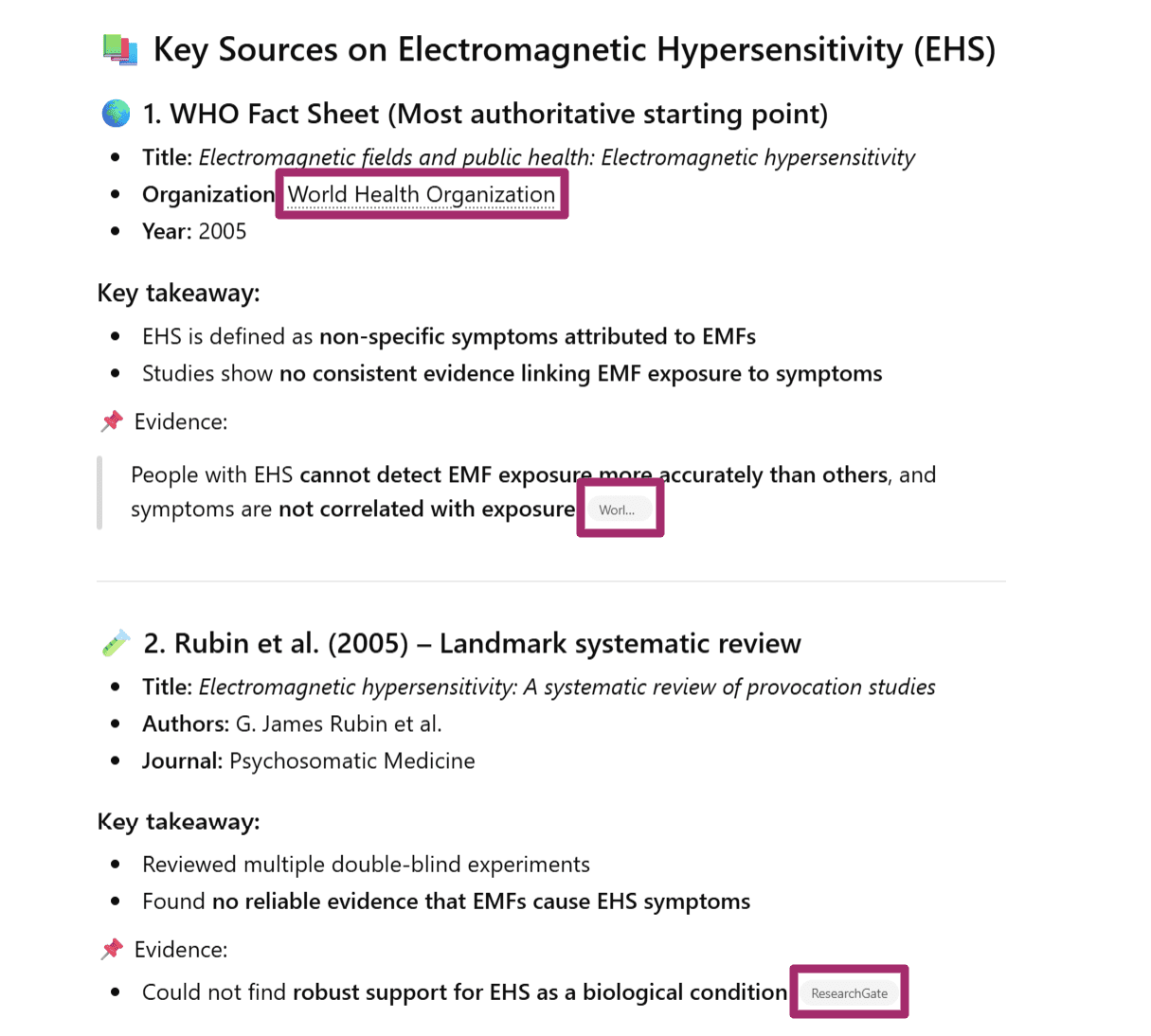
Informational citations made by ChatGPT
Product citations
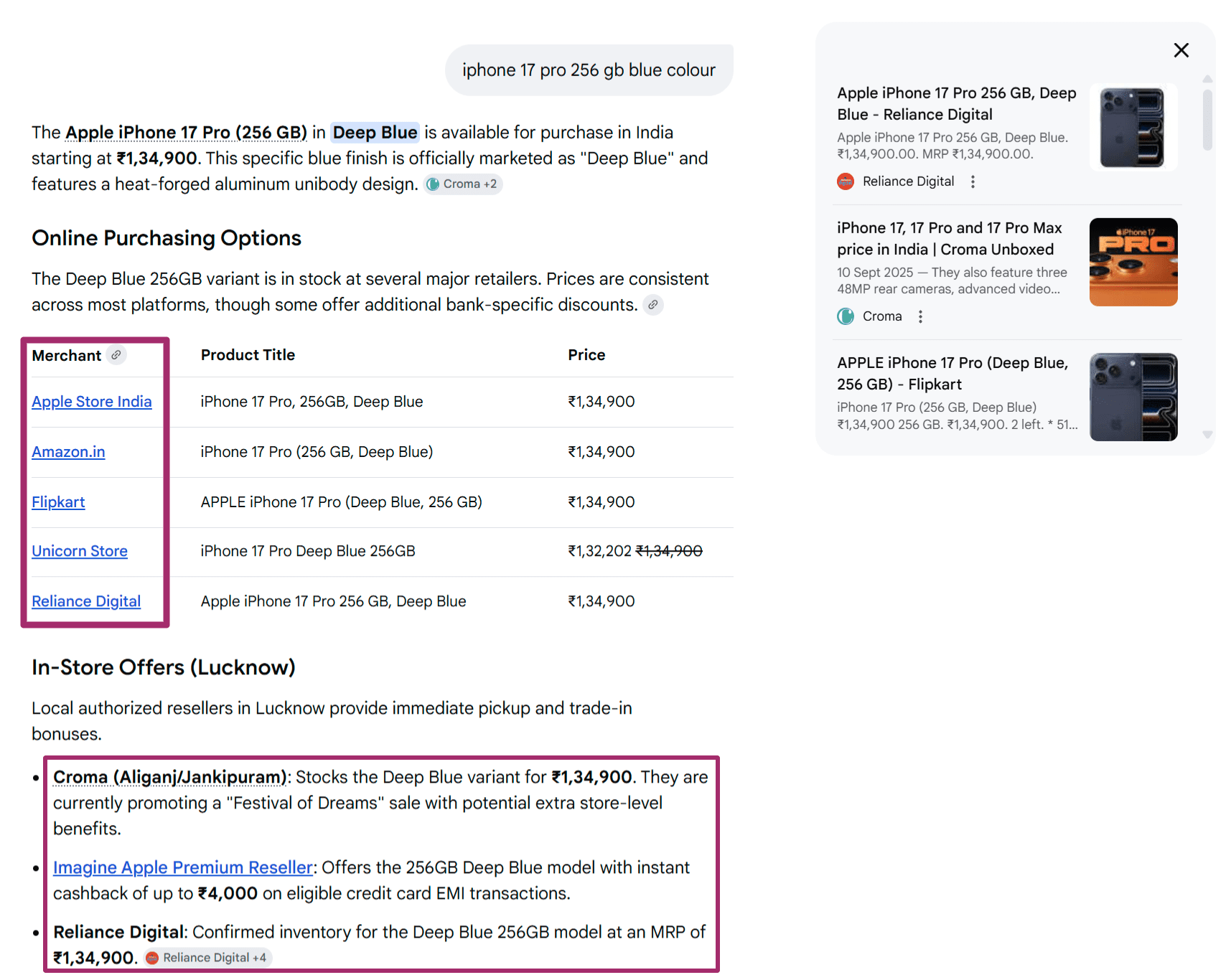
These show up in commercial or comparison queries. For example, “best SEO tools” or “top project management software.” Here, AI models cite product pages, listicles, and review-based content to support recommendations.
Product citations by Google AI mode, the model shares both online and offline options
Multimedia citations
AI doesn’t rely solely on text. Videos, images, and other visual formats can also be cited, especially when they better explain something than text alone. Think tutorials, walkthroughs, or demonstrations.
Multimedia citation for a query by ChatGPT
How AI citations impact brand credibility
AI citations don’t just drive visibility. They shape how your brand is perceived before a user even visits your website.
When your content is cited in an AI-generated answer, some of that trust transfers to your brand. You’re no longer just another result on a page; you’re part of the answer itself. And that changes how users interpret your authority.
This also means buyer decisions are starting earlier. Users may form opinions, shortlist options, or even make decisions directly from AI responses, without ever clicking through. If your brand isn’t cited, you’re not part of that consideration set.
There’s also a strong signal of relevance at play. Being included in AI answers suggests that your content is not just optimized, but genuinely useful in context. It tells both users and algorithms that your brand deserves to be surfaced.
Over time, this creates a compounding effect. The more your content is cited, the more your brand becomes associated with specific topics. That repeated exposure builds familiarity, authority, and trust.
How AI citations work: a complete breakdown
So far, we’ve talked about what AI citations are and where they come from. But how do AI systems actually decide what to cite?
Let’s break it down.
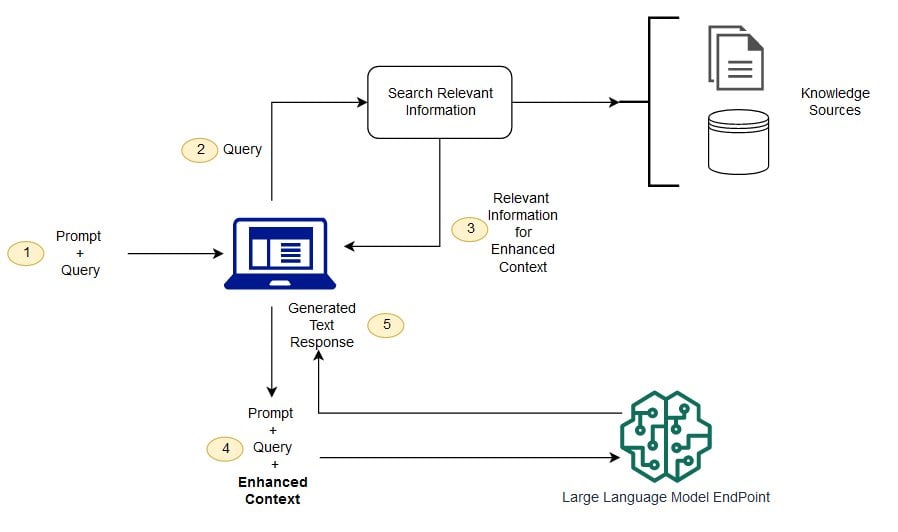
A diagram by AWS showing the conceptual flow of using RAG with LLMs
At a high level, most AI-powered search systems follow a retrieval-and-synthesis process, often powered by approaches such as Retrieval-Augmented Generation (RAG). In simple terms, they don’t just generate answers; they find, evaluate, and assemble information from multiple sources before deciding what to cite.
Here’s what that process looks like in practice:
1. Query understanding
Everything starts with intent. The AI interprets what the user is really asking, whether it’s informational, navigational, or commercial. This step shapes what kind of sources it will look for.
2. Retrieval of sources
Next, the system pulls in potential sources from multiple places:
Web indexes
Training data patterns
Live retrieval systems (depending on the model)
This is where your content first enters the consideration set.
3. Source evaluation
Not all sources are treated equally. AI models evaluate them based on:
Relevance to the query
Authority and trust signals
Clarity and structure of information
Entity-level trust (how credible the brand or author is)
When you look at these signals closely, they all point in one direction. Experience, Expertise, Authoritativeness, and Trustworthiness (E-E-A-T) play a central role in determining what gets cited. In other words, AI systems aren’t just looking for answers; they’re looking for reliable sources behind those answers.
4. Answer synthesis
Instead of showing individual links, AI combines insights from multiple sources into a single, cohesive answer. This is where your content may be used, even if it’s not directly cited.
5. Citation selection
Finally, the model decides which sources to:
Explicitly cite (with links or references)
Implicitly use (without direct attribution)
This is the step that ultimately determines your visibility.
How this differs across AI systems
While the core process is similar, different AI tools prioritize different parts of this pipeline.
AI systems
How it handles citations
ChatGPT
Leans more on third-party sources and consensus, such as directories, reviews, and aggregator sites, rather than relying heavily on brand-owned content.
Perplexity
Focuses on retrieval-first behavior, pulling from a wide range of web sources and surfacing multiple citations to support transparency (strong emphasis on external validation).
Gemini
Prioritizes brand-owned and structured content, especially pages that are clearly organized and easy to interpret.
Even though the process is complex, the signals that increase your chances of being cited are surprisingly consistent:
Well-organized structure: Clear headings, bullet points, and logical flow make it easier for AI to extract information
Evidence-based reasoning: Content that references data, sources, or supporting claims is more likely to be trusted
Timeliness and relevance: Fresh, updated content often gets prioritized, especially for evolving topics
Authoritative voice and depth: Content that demonstrates expertise and covers a topic comprehensively stands out
Topical consistency: Brands that consistently publish around a topic are more likely to be recognized as reliable sources
The key takeaway here is simple: AI citations are not random. They are the result of a structured evaluation process in which clarity, trust, and relevance determine who is included in the final answer.
So far, we’ve looked at what AI citations are and how models decide what to cite. The next question is the one that matters most: how do you actually get cited?
Because this isn’t just about creating content, it’s about sending the right signals that your content is worth citing. Here are some strategies that can help you do exactly that:
1. Create citation-friendly content
Citation-worthy content goes beyond surface-level answers. It offers original thinking, clear explanations, and real value, helping AI models support their responses with confidence. In other words, it’s not just optimized, it earns references by being genuinely useful.
The following content types consistently get cited by AI models:
Content type
What to write
Why AI loves them
Original research
Studies or data that answer new or unexplored questions
Gives AI concrete evidence to support claims
Case studies
Real-world examples showing how something works in practice
Helps AI justify recommendations with proof
Thought leadership
Opinion-led content with unique insights or perspectives
Adds depth and diversity to AI-generated answers
News content
Timely, accurate coverage of recent developments
Fills gaps where training data falls short
2. Build topical authority (clusters)
AI models don’t just evaluate individual pages; they evaluate how consistently you cover a topic.
If you publish multiple pieces on a specific subject, each addressing different aspects, you signal depth, expertise, and reliability. That’s what topical authority is all about.
And this is where E-E-A-T naturally comes into play. The more consistently you demonstrate experience and expertise in a niche, the more likely your content is to be trusted and cited.
What to do in practice:
Create clusters around a core topic (pillar page/cornerstone content + supporting content)
Cover both broad and specific questions in your niche
Go beyond basic answers, add expert insights, examples, or real-world context
Keep your messaging and terminology consistent across content
AI systems evaluate content, but they also evaluate who is behind it.
Strong entity signals help models understand your brand, your authors, and your credibility within a topic. The clearer these signals are, the easier it is for AI to trust and cite your content.
What to do in practice:
Build clear author profiles with expertise and credentials
Maintain consistent brand mentions across your site and the web
Use structured data (schema) to define authors, organizations, and content relationships
Ensure your “About” and author pages clearly establish credibility
4. Earn external validation signals across the web
AI models don’t rely on a single source of truth. They validate information by cross-referencing multiple sources across the web.
That means your credibility isn’t built only on your website. It’s shaped by how consistently your brand shows up across trusted platforms. The more aligned and authoritative those signals are, the easier it is for AI systems to trust and cite your content.
Think of this as building a web-wide validation layer that reinforces your brand through multiple independent sources.
This is also where traditional SEO practices like link building evolve. It’s no longer just about backlinks, but about earning consistent, high-quality mentions that strengthen your entity across the web.
What to do in practice:
Contribute insights to reputable publications in your niche
Earn consistent mentions across industry blogs, directories, and review platforms
Be active in communities like Reddit, Quora, or niche forums
Run digital PR campaigns that reinforce your brand narrative across sources
5. Keep content fresh and updated
AI models prefer content that reflects current information.
Outdated content is less likely to be trusted, especially for topics that evolve quickly. Regular updates signal that your content is still relevant and reliable.
What to do in practice:
Refresh key articles with updated data, examples, and insights
Add new sections instead of rewriting from scratch where possible
AI models don’t read content the way humans do. They extract answers.
Most AI-generated responses are built by identifying clear, concise answer blocks within content. And increasingly, users prefer this format. In fact, according to a poll by IWAI, 67% of users find AI tools more efficient than traditional search for getting answers. That shift makes one thing clear: if your content doesn’t directly answer questions, it’s less likely to be surfaced or cited.
This means it’s not enough to include answers. You need to structure your content so those answers are easy to find, interpret, and reuse.
What to do in practice:
Lead sections with direct, concise answers before expanding
Use headings that mirror real user queries and intent
Break down complex topics into scannable, extractable sections
Add summaries, definitions, or key takeaways at the start of sections
Anticipate follow-up questions and answer them within the same content
Tracking AI brand presence with Yoast
By now, we know what AI citations are, how they work, and how to earn them. But here’s the real question: how do you know if you’re already being cited? And if not, how do you understand where your competitors are showing up and where you’re missing out?
As AI-generated answers become a key discovery layer, most traditional analytics tools fall short. They can tell you about traffic, but not whether your brand is being mentioned, how it’s being perceived, or which sources AI systems trust when referencing you. That’s a critical blind spot, especially as AI answers increasingly shape user decisions before a click even occurs.
Yoast AI Brand Insights helps you track and understand your AI visibility, citations, and brand mentions across platforms like ChatGPT, Gemini, and Perplexity, so you can move from guesswork to informed action.
Here’s what it enables you to do:
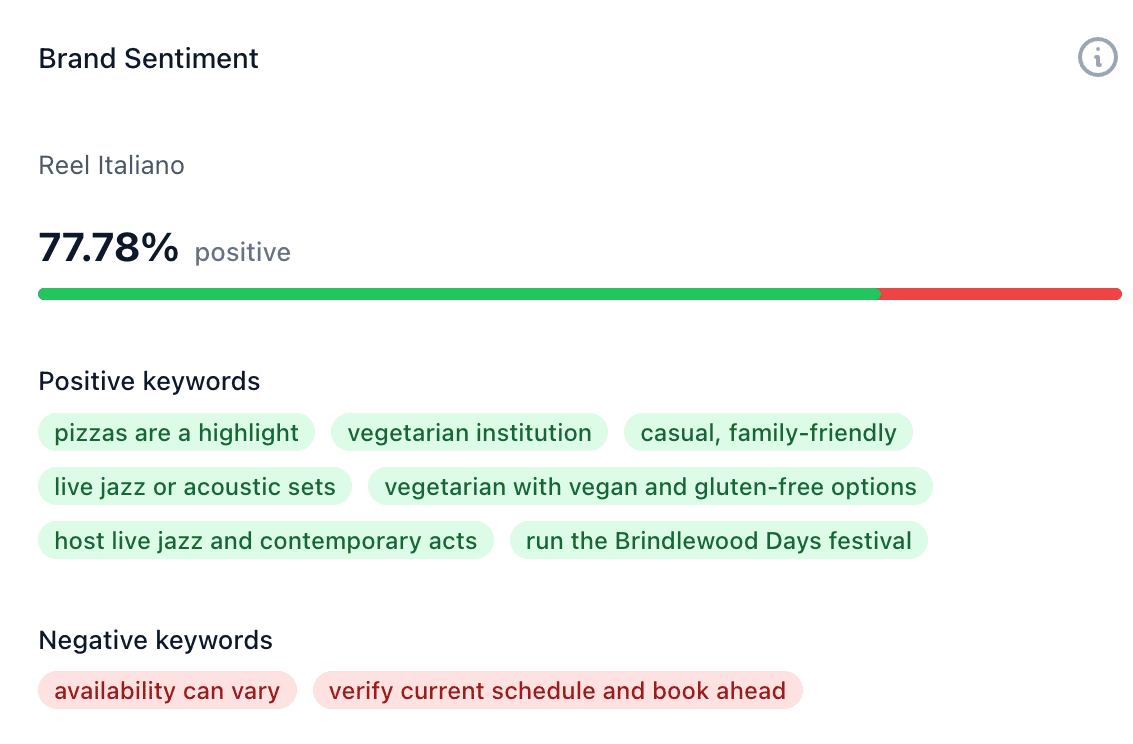
Sentiment tracking
Understand how your brand is being perceived in AI-generated answers. The tool analyzes keywords associated with your brand and shows whether the overall sentiment is positive or negative, helping you spot tone issues and shifts over time.
Citation analysis (brand mentions)
See when and where your brand is being cited. More importantly, understand which sources AI platforms reference alongside your brand, so you can identify citation gaps and opportunities to improve your presence.
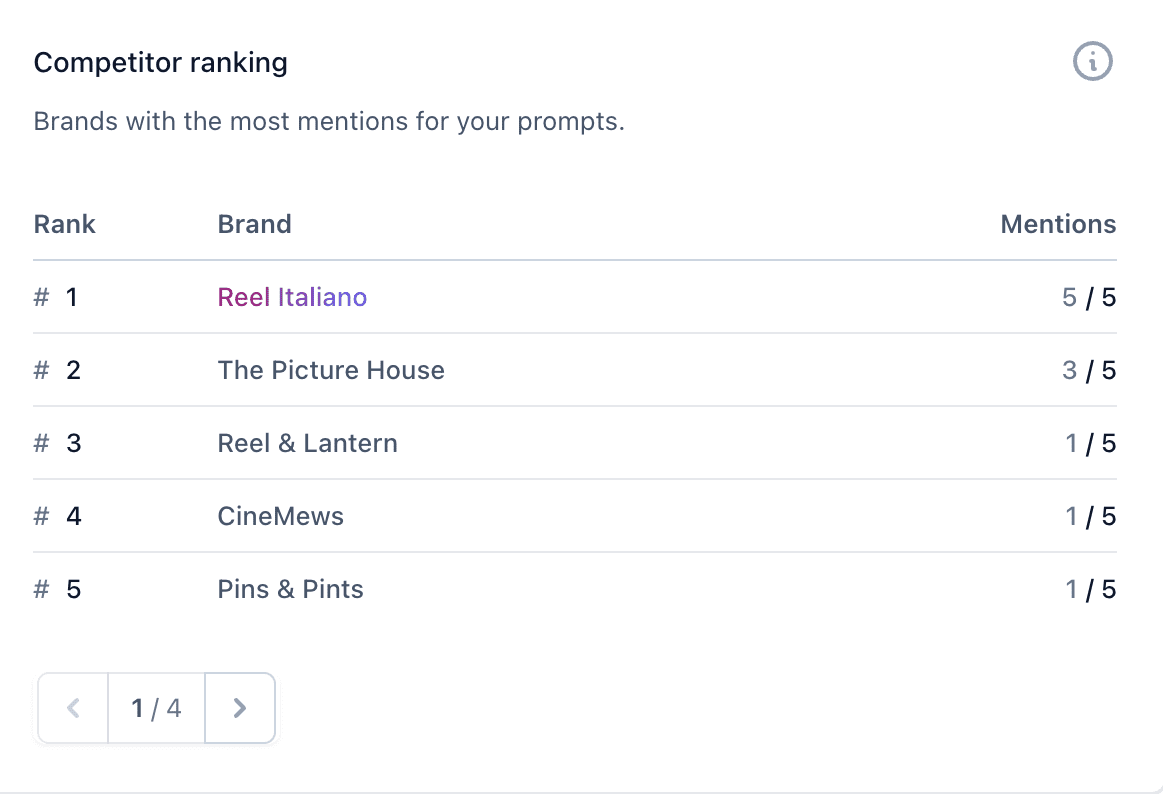
Competitor benchmarking
See how you stack up against other brands mentioned in your prompts
AI visibility is relative. This feature lets you compare your brand’s citations, mentions, and sentiment against competitors, helping you understand who is being surfaced more often and why.
Question monitoring
AI search is driven by queries. With question monitoring, you can track specific brand-related or industry questions and see whether your brand appears in the answers, giving you direct insight into where you’re visible and where you’re missing.
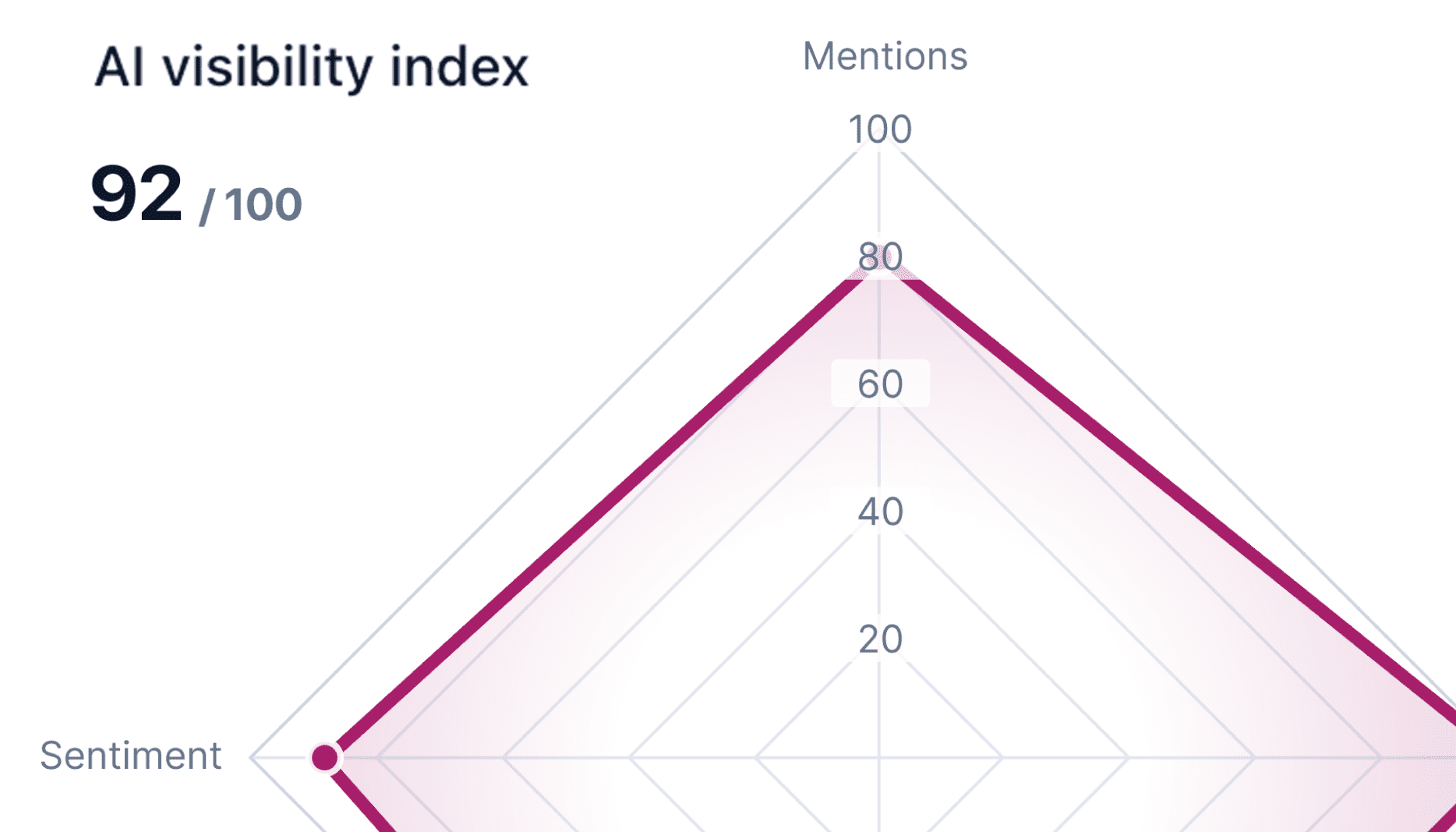
AI visibility index
See your score, which is a representation of different AI signals
Instead of looking at isolated metrics, Yoast combines signals like citations, mentions, sentiment, and rankings into a single visibility score. This gives you a clearer picture of how your brand performs across AI systems over time.
The bigger picture here is simple: Yoast AI Brand Insights helps you understand your position in this new ecosystem, so you can strengthen your presence, close gaps, and ensure your brand is part of the answers your audience is already consuming.
FAQs on AI citations
AI citations can feel complex at first, especially as search continues to evolve. Here are answers to some of the most common questions to help you navigate them better.
Are backlinks different from AI citations?
Yes, they serve different purposes. Backlinks help your pages rank in traditional search, while AI citations determine whether your content gets included in AI-generated answers. In short, backlinks drive visibility on SERPs, while citations drive visibility within answers.
No, AI systems don’t always include citations. When responses are generated purely from pre-trained knowledge rather than retrieved sources, citations may not appear.
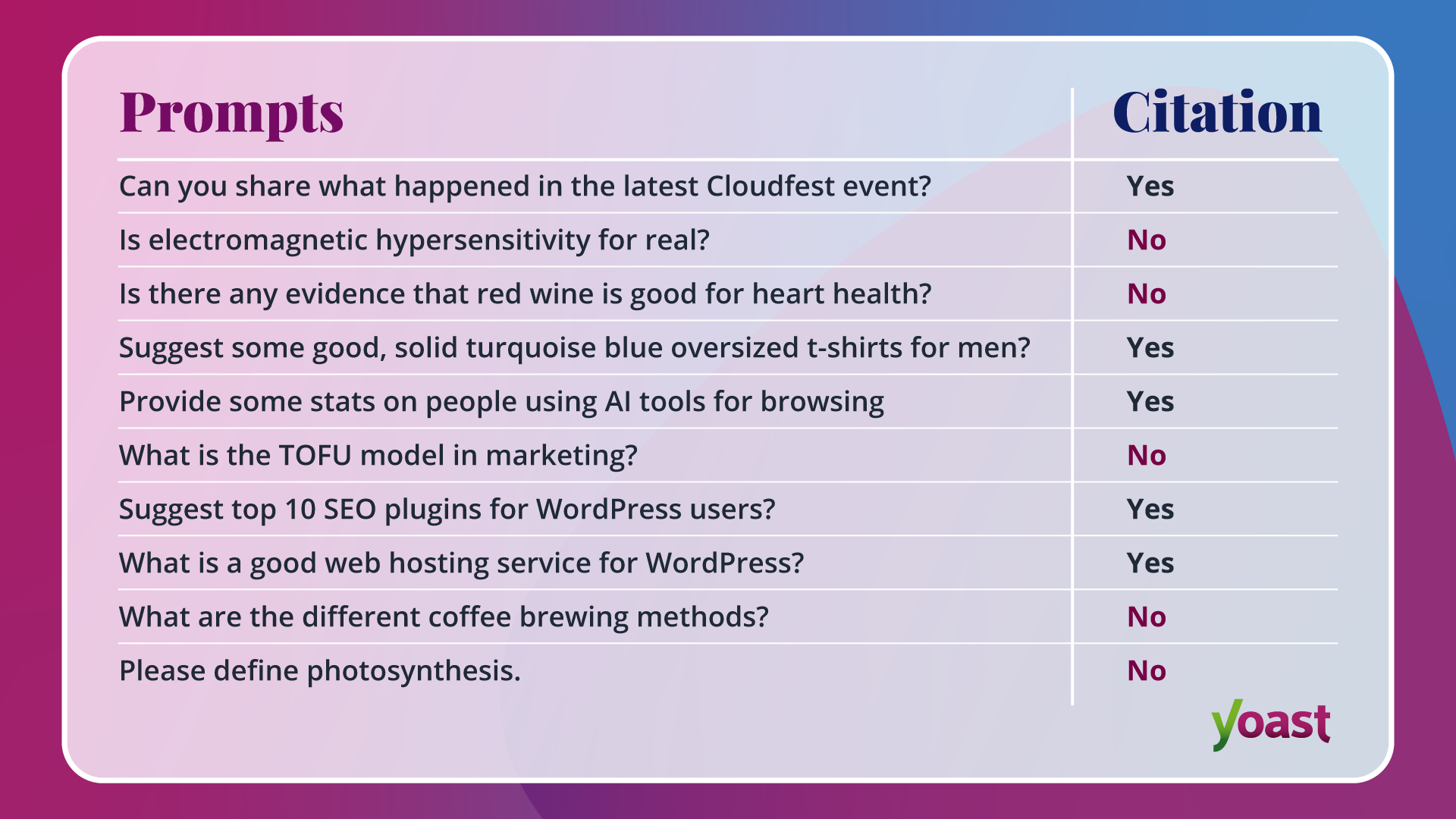
To test this, I tried the following prompts on ChatGPT:
Out of these, citations appeared in about half of the responses.
A clear pattern emerged:
Queries involving products, recommendations, statistics, or recent events were more likely to trigger citations
Queries focused on definitions or general knowledge often did not include citations
This shows that citation behavior depends heavily on the query type, intent, and context. Not every answer requires a source, but the more specific or evidence-driven the query, the more likely citations are to appear.
How do I direct AI models to the most important content on my website?
You can’t directly control what AI models choose to cite, but you can make it easier for them to understand and prioritize your content.
One effective way to do this is by using llms.txt, a feature in Yoast SEO. It creates a structured, LLM-friendly markdown file that highlights your most important pages, helping LLMs better understand your site when generating answers.
A smarter analysis in Yoast SEO Premium
Yoast SEO Premium has a smart content analysis that helps you take your content to the next level!
Think of it as a way to clearly communicate which content matters most, so when AI systems look for reliable sources, your key pages are easier to interpret and surface.
AI citations: The currency of the AI-driven web
AI citations are changing how users discover and trust information. They don’t just complement rankings; they reshape them by deciding which sources become part of the answer itself. In many cases, users no longer need to click to explore. If your content is cited, you’re visible. If not, you’re invisible.
This shift also changes what we optimize for. It’s no longer just about traffic; it’s about trust, relevance, and inclusion in the answer layer. As we explored in our recent read, Rethinking SEO in the age of AI, the central question for SEO is evolving. It’s no longer just, “Can Google find my website?” It’s now, “Does the AI have a reason to remember my brand?”
I’m a Computer Science grad who accidentally stumbled into writing—and stayed because I fell in love with it. Over the past six years, I’ve been deep in the world of SEO and tech content, turning jargon into stories that actually make sense. When I’m not writing, you’ll probably find me lifting weights to balance my love for food (because yes, gym and biryani can coexist) or catching up with friends over a good cup of chai.
Google published a blog post on a new breakthrough in vector search technology called TurboQuant. The potential implications of this technology for Search are staggering!
TurboQuant is a suite of advanced algorithms that drastically reduce AI processing size and memory requirements. Their blog post says, “This has potentially profound implications … especially in the domains of Search and AI.”
Let’s talk about how TurboQuant works, and then I’ll share thoughts on how this will open the door for more AI Overviews, more personalized AI, instantaneous indexing, greatly increased ability to present searchers with content that meets their needs, and massive progress in AI use in both agents and the physical world.
How TurboQuant Works
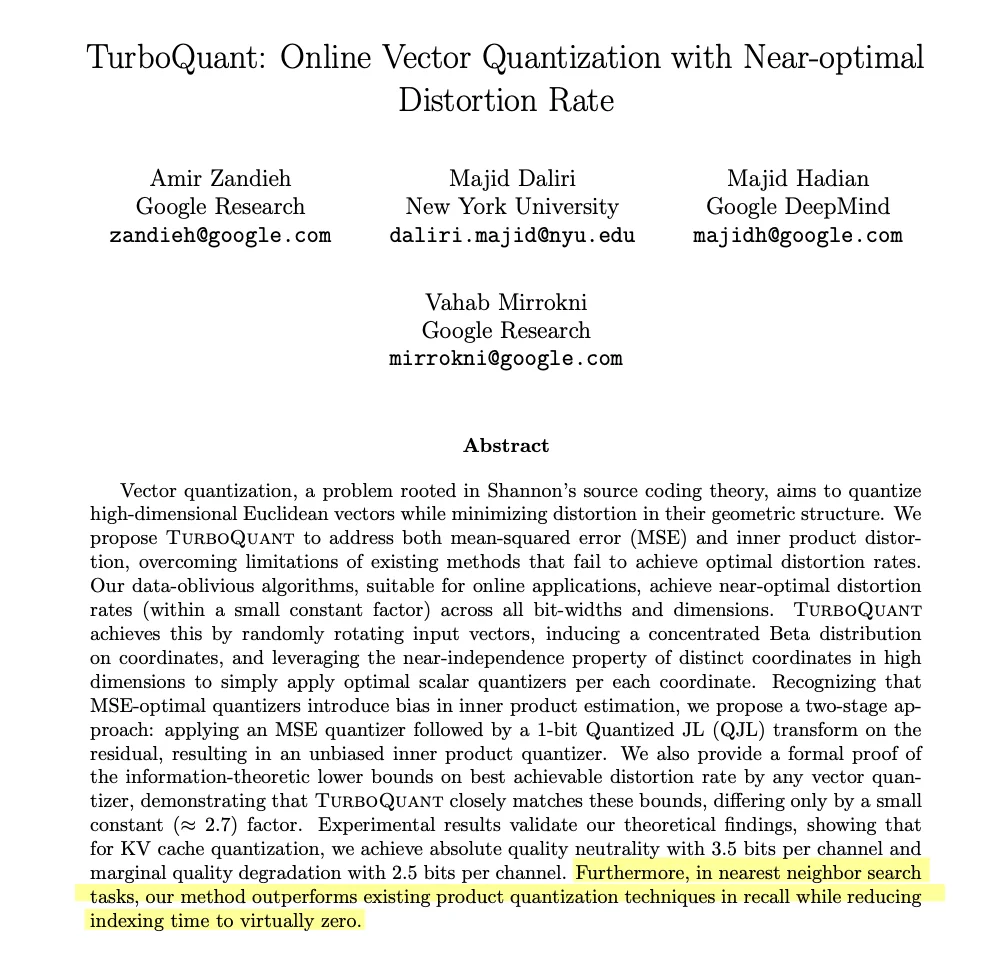
TurboQuant is a technique that dramatically speeds up the process of building vector databases. The abstract of the TurboQuant paper tells us that not only does this method outperform existing methods for vector search, but it also reduces the time needed to build an index for vector search to “virtually zero.”
Image Credit: Marie Haynes
To understand how this works, we first need to understand vector embeddings, vector search, and then vector quantization.
Vector Embeddings
If you are new to understanding vectors and vector search, I would highly recommend this video by Linus Lee. He explains how text embeddings work.
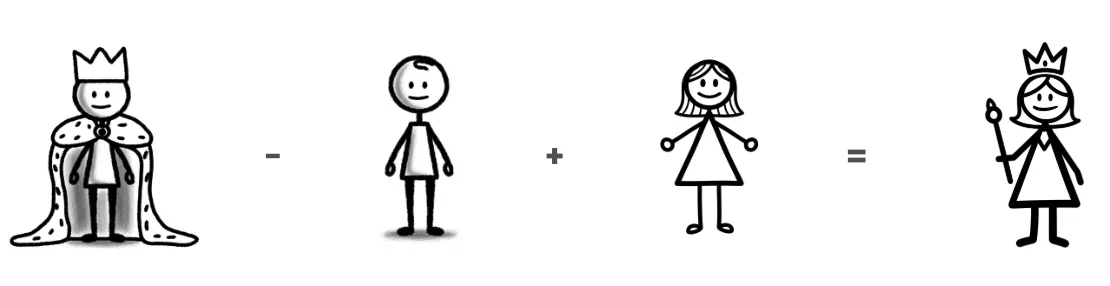
Essentially, vector embedding is a way to take text (or images or video) and turn it into a series of numbers. The numbers encode the semantic meaning and relationship of words or concepts. It really is so amazing. If you have time, I would highly encourage you to read Google’s Word2Vec paper from 2013 or, better yet, paste the URL into the Gemini app, choose “guided learning” from the tool menu, and ask Gemini to walk you through it. It blew my mind to learn about how math can be done on vector embeddings. Because words are mapped in the vector space based on their context, you can actually do math with them.
In the paper, Google says that if you take the vector for King and subtract the vector for Man, then add the vector for Woman, you end up almost exactly at the vector for Queen.
Image Credit: Marie Haynes
Wow.
Vector Search
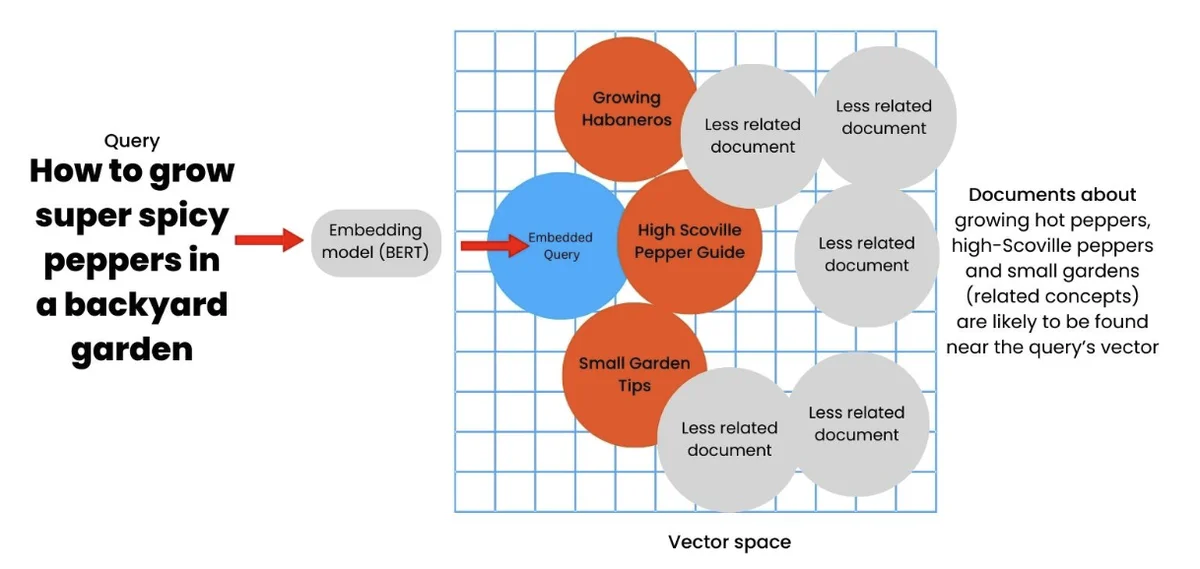
Now that we know that words and concepts can be mapped as mathematical coordinates, vector search is simply the process of finding which points are the closest to each other. Let’s say I am searching in a vector space for the query, “how to grow super spicy peppers in a backyard.” A traditional search engine hunts for text containing those exact words. With vector search, that query would be embedded in a vector space. Content in that space that is semantically similar to the query and the concepts embedded within will appear nearby in the vector space.
I’ve demonstrated this below in a two-dimensional space, but in reality, this space would have far more dimensions than our brains can comprehend.
Image Credit: Marie Haynes
Vector Quantization
Vector search is incredibly powerful, but there is a catch. Vector search in a space with multiple dimensions consumes vast amounts of memory. Memory is the bottleneck for nearest neighbor searches, which are used by the parts of Google Search that use vector search. This is where vector quantization comes in. Essentially, vector quantization is a mathematical technique used to reduce the size of these massive data points. It compresses the vectors, kind of like an ultra-efficient zip file.
The problem with vector quantization, though, is that when you compress the data, it degrades the quality of the results. Also, vector quantization adds an extra bit or two to every block of data, which adds to the load of memory required to do the calculations – defeating the point of compressing the data!
How TurboQuant Solves The Memory Problem
TurboQuant takes a large data vector and compresses it by rotating the vector in a way that simplifies its geometry. This step makes it easier to map the values into smaller, discrete sets of symbols or numbers to each part of the vector individually. It’s similar to JPEG compression and allows the system to capture the main concepts of the original vector but uses much less memory.
The problem with this type of compression, though, is that it can introduce hidden errors. The TurboQuant system uses something called QJL to mathematically error-check the tiny mistakes left behind, using just one bit of memory. The result is that the new vector is a fraction of its original size, but maintains the same accuracy, allowing AI to process information much faster.
I put the paper and Google’s announcement on TurboQuant into NotebookLM and asked it to simplify the explanation for me:
“To understand how Google’s TurboQuant fixes this memory bottleneck, imagine trying to pack thousands of awkwardly shaped items – like spiky lamps and rigid chairs – into a moving truck. Traditional compression simply crushes the items to make them fit, which damages them and, in the case of data, leads to bad search results.
TurboQuant does something entirely different. Instead of crushing the data, it mathematically spins and reshapes these massive, awkward vectors into identical, perfectly smooth cubes so they can be easily packed. To fix any minor scratches caused by this reshaping, it applies a metaphorical piece of “magic tape” – a single bit of data – that restores the item to its perfect, original condition.”
That’s still a little confusing. If you want to go deeper here, I had NotebookLM make a video to explain it further:
You don’t need to understand the exact processes used for TurboQuant, but rather, know that it makes it possible to assemble a vector embedded space and do vector search really quickly and with large amounts of data.
What Does TurboQuant Mean For Search?
What we’ve learned so far is that vector search across large amounts of data is slow and inaccurate, but TurboQuant makes it faster and accurate. The TurboQuant paper says that the technique reduces the time to index data into a vector space to “virtually zero”.
When I read this, I thought of Google engineer Pandu Nayak’s testimony on RankBrain in the recent DOJ vs Google trial.
(Fun fact: When RankBrain was introduced, Danny Sullivan, writing for Search Engine Land, said that Google told him it was connected to Word2Vec – the system for embedding words as vectors. Here is the 2013 Google blog post on learning the meaning behind words with Word2Vec.)
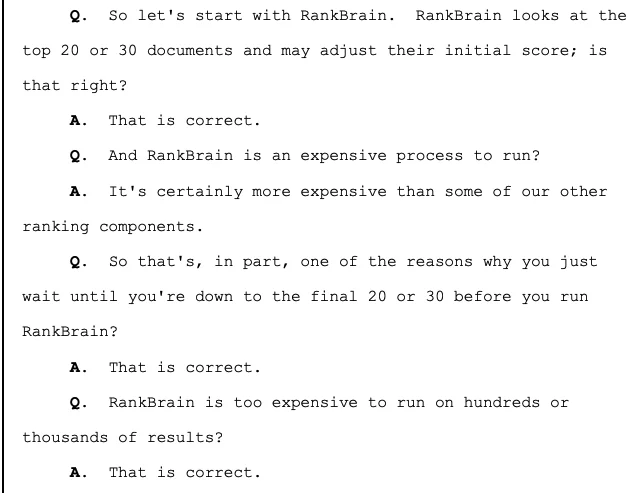
In the trial, Nayak said that traditional search systems are used to initially rank results, and then RankBrain was used to rerank the top 20 to 30 results. They only ran it across the top 20-30 results because it was an expensive process to run.
Image Credit: Marie Haynes
I think that TurboQuant changes this! If TurboQuant reduces indexing time to virtually zero, and drastically cuts the memory required to store massive vector databases, then the historical cost of running vector search across more than 20 or 30 documents completely vanishes.
TurboQuant makes it possible for Google to run massive-scale semantic search.
We may see all or some of the following happen:
Truly Helpful And Interesting Content That Meets The User’s Specific Needs And Intent May Be More Easily Surfaced
Google uses AI to understand what a searcher is really trying to accomplish and then again uses AI to predict what they are going to find helpful. TurboQuant should make that second step much faster and allow for more choices to be included in the vector space that AI draws from for its recommendations.
I know what you’re thinking. If AI Overviews answer the question, why would I create content for it? This is really the subject of a separate article, but to sum up my thoughts, I believe that some types of content are no longer beneficial to make, especially if that content’s main strength is to organize the world’s information. If you can create content that people truly want to engage with over an AI answer, then you have gold on your hands. It can be done! I mean, you’re reading this article right now, right?
We May See More AI Overviews
I know this will not be a popular thing for many. From the user’s perspective, however, AI Overviews are becoming more helpful. TurboQuant should allow Google to gather the information that could be helpful in answering a user’s question, even a complicated one, and then instantly produce an AI-generated answer.
Personalized Search Will Become Even More Powerful
TurboQuant should make it even easier for Google to become a highly personalized, real-time AI assistant as it can create searchable vector spaces loaded with your personal history. (I am reminded of DeepMind CEO Demis Hassabis’ post in which he laid out Google’s plans to build a universal AI assistant.)
The Capabilities Of Agentic Systems Will Drastically Improve
Agents are heavily limited by their context windows and how slowly they retrieve information. With TurboQuant, an AI agent will have boundless, perfectly recallable long-term memory. It will be able to instantly search every interaction, document, email, and preference you have shared with it in milliseconds. And, it will be able to communicate massive amounts of information with other agents. The implications are too many to grasp!
Vision-Powered Search (Soon On Glasses) Will Be Even More Helpful
The vast amount of visual data you see via AI glasses or Gemini Live will be able to be converted into a vector space. Also, this week, Search Live expanded globally.
Your glasses will be a powerful visual memory layer for you. Hey Gemini … where did I leave my keys?
Other tech that relies on gathering data from the real world (like Waymo and other self-driving cars, for example) will become smarter and faster.
Robots Will Become Much More Capable
Right now, if you put a robot in my living room and asked it to tidy, it would be overwhelmed by an overwhelming number of objects and trying to understand their semantic context and what to do with each of them. I expect TurboQuant to make it so that robots will be much smarter and capable. (Did you know that Google DeepMind recently partnered with Boston Dynamics?) I think robotics progress will speed up dramatically because of TurboQuant.
What Do We Do With This Information As SEOs?
We were discussing TurboQuant in my community, The Search Bar, and one of the members asked how this changes our jobs as SEOs. I think it does not change much for those of us who are focused on thoroughly understanding and meeting user intent over tricks or technical improvements.
For some businesses, there will be more incentive to create in-depth, truly helpful content. For others, though, especially those whose business model involves curating the world’s information, TurboQuant will likely make it so that you lose more traffic as AI Overviews will satisfy searchers who used to land on their site.
You may find this Gemini Gem helpful. I have put several documents, including the one that you are reading now, into the knowledge base. It will brainstorm with you and help you determine if your current business model is likely to be impacted as AI changes our world. It will also help you dream of what you can do to thrive.
My prediction is that we will see another core update soon. Well, Google launched the March 2026 core update before I could get this article out!
It would not surprise me if TurboQuant is introduced into the ranking systems.
Last year, I speculated that Google’s vector search breakthrough MUVERA was behind the changes we saw in the June 2025 core update. Some folks said, “But Marie, you can’t publish a breakthrough and then implement it into core ranking algorithms within a week.” What they missed was that Google’s announcement of MUVERA came a full year after they published the original research paper. It turns out that the same is true of TurboQuant. They published the blog post announcement in March of 2026, but the original paper was published in April of 2025. They have had loads of time to improve upon their AI-driven ranking systems.
If TurboQuant is a part of the March 2026 core update, then we will see Google have more ability to do semantic search across hundreds of possible results, providing searchers almost instantly with accurate and helpful information. If true, then there will be even less reliance on traditional SEO factors like links and SEO focused copy.
Demis Hassabis has predicted AGI (Artificial General Intelligence that can do anything cognitive that a human can) will be reached within the next 5 to 10 years. When asked this question, he almost always says that a few more breakthroughs in AI will be needed for us to get there. I believe that TurboQuant is one of those!
TurboQuant makes it much easier, cheaper, and faster for Google to do the intense computation required for AI. Amazingly, this was predicted by Larry Page many years ago.
More Resources:
Read Marie’s newsletter, AI News You Can Use. Subscribe now.
Multi-touch journeys, cross-device behavior, last-click attribution defaults, and privacy restrictions all make attribution messy. Much messier than most dashboards suggest.
The challenge is that stakeholders usually want a clean answer. But the data rarely behaves that way. When reports don’t match expectations, credibility can wear off, and it is not because the analysis is wrong, but because uncertainty isn’t communicated.
In practice, the solution is fairly simple: Be explicit about what the data shows, what it estimates, and what it simply can’t tell us. That kind of transparency doesn’t weaken your reporting. If anything, it tends to build trust over time.
Why The Data Is Never As Clean As It Looks
Uncertainty in analytics usually comes from the way the tools themselves operate. Once you understand where the limitations are, it becomes much easier to talk about them without sounding defensive.
Most of the time, uncertainty shows up in four predictable places, and none of them are really anyone’s fault.
Bad news: No tracking implementation captures everything. Every measurement method has blind spots built into it. In fact, the data you collect is real, but it is not the entire picture.
Take Google Analytics 4, for example. It relies heavily on cookies and consent signals. When users decline tracking, they effectively disappear from your dataset. From the platform’s perspective, those sessions never happened.
Another source of uncertainty comes from modeling. Attribution models, revenue forecasts, and imputed values are all attempts to estimate what likely happened based on patterns in the data. They’re informed approximations, not ground truth.
When Google Analytics 4 distributes conversion credit across touchpoints using its data-driven attribution model, and it’s using probabilities derived from historical patterns. Most of the time, those estimates are directionally useful. But they’re still estimates. And when modeled numbers get presented alongside raw counts without any context, it’s easy for people to treat both as equally certain.
Data pipelines take time. The world moves faster than most analytics systems. That means there’s almost always a gap between what happened and what shows up in your reports.
For instance, Google Analytics 4 generally needs 24-48 hours to fully process event data. If you pull a report too early, you may be looking at something incomplete. This isn’t a bug. It’s simply how large-scale data processing works. Still, it can create confusion if people assume the first version of a report is final.
And then there’s the biggest complication of all: people. Real-world user behavior is unpredictable in ways that models struggle to capture.
An organic user who reads four blog posts over six weeks before converting will often show up in GA4’s funnel explorations as having touched organic. But if the final session came through a branded search or a direct visit, from a reporting perspective, organic may get little or no credit. Yet without those earlier touchpoints, the conversion likely wouldn’t have happened at all.
Anyone who has looked closely at funnel explorations in GA4 has probably seen versions of this story. So, the contribution was actually real. However, the system can’t fully see it. No model can perfectly account for the complexity of real human behavior.
None of this means that something is broken in your setup. It means the tools are working exactly as designed with their limitations.
Where Uncertainty Hides In Your Reports
The tricky thing about uncertainty in analytics is that it rarely announces itself. Most of the time, it hides behind numbers that look extremely precise.
Dashboards are a good example for this. When a report shows something like “14,823 sessions” or a conversion rate of “3.2%,” the presentation feels definitive. But if that metric is influenced by sampling, tracking gaps, or modeled attribution, the number actually carries a margin of error that never appears on screen. The interface displays precision, and that precision quietly implies accuracy.
Attribution models introduce another layer of ambiguity. Whether a report uses last-click attribution or a data-driven model, what you’re seeing is still an interpretation of how credit should be distributed. The moment those numbers appear in a slide deck without context, though, they tend to be interpreted as fact.
I learned this in the most painful way, but forecasts create perhaps the most visible version of this problem. A projection like “we expect 12,000 leads next quarter” or “we project generating $5 million ARR by the end of this year” sounds confident and concrete. But the moment the confidence interval disappears, that projection becomes misleading.
Every forecast really represents a range of plausible outcomes. Removing that range doesn’t make the prediction stronger, it just makes the eventual miss harder to explain.
What Happens When You Misrepresent Uncertainty
Overstating certainty in analytics reporting has consequences, and most of them show up later.
The first is trust. When a forecast misses badly or a metric turns out to be significantly off, stakeholders rarely isolate the problem to that single number. They begin questioning the reporting process as a whole. And, no doubt, rebuilding that confidence takes time. Once people have been burned by overly confident analysis, they often develop a quiet skepticism toward future reports, even when those reports are methodologically sound.
The other consequence shows up in decision quality. When a channel appears to be performing with more certainty than the data actually supports, teams tend to overinvest. The opposite happens, too. A metric that looks definitively negative might cause a team to abandon something prematurely when the underlying signal was simply noisy or incomplete.
Either way, false confidence distorts strategy. Budgets shift in the wrong direction. Roadmaps change based on partial information and the cost of those decisions often goes unnoticed because the root cause traces back to how the data was presented.
There’s also an organizational impact. If predictions consistently miss and explanations feel reactive, analytics teams gradually lose their position as strategic partners. Instead of guiding decisions, they become a reporting service that simply provides numbers on request.
When that happens, leadership starts making important choices with less analytical input than it should have, and that’s a loss for the entire organization.
How To Report Uncertainty Without Losing Your Audience
Communicating uncertainty doesn’t mean overwhelming people with statistical caveats. The goal is simply to help decision-makers understand how much weight they should put on each number.
A few practical habits make it that much easier.
1. Use Ranges Instead Of Point Estimates
I believe that a range communicates the reality of the data much better than a single point estimate.
For example, saying “between 12% and 18%” may feel less tidy than saying “15%,” but it’s actually more honest about what the data can support. A single figure like “15%” implies a level of exactness that often doesn’t exist, and when reality lands at 11%, the question becomes why were you so wrong?
It also encourages better decision-making. When stakeholders see a range, they naturally start asking what actions make sense across the possible outcomes rather than anchoring on one specific number.
2. Label Modeled Vs. Measured Data Clearly
Whenever possible, label whether a metric is measured directly or generated by a model. A simple note next to the metric often does the job.
That small piece of context prevents attribution estimates, forecasts, or imputed values from being interpreted with the same confidence as raw counts.
3. Add Plain-Language Confidence To Forecasts
You don’t need to have complex statistical explanations. Something like “we’re reasonably confident the number falls between X and Y, with the most likely outcome around Z” gives decision-makers more context than they need.
The point here should not be providing mathematical elegance. For the sake of practical clarity, our goal here should be to be transparent.
4. Replace Jargon With Decision-Relevant Language
When uncertainty appears in a report, focusing on how it affects the decision at hand is the most logical thing to do.
Therefore, instead of saying something like “this result has a wide confidence interval,” I recommend trying “this number could shift quite a bit over the next few weeks, so it’s probably worth waiting before making large budget changes.” That’s the version that changes how people act.
5. Normalize Saying “I Don’t Know Yet”
This one is partly cultural. In environments where analysts feel pressure to produce definitive answers immediately, uncertainty often gets replaced with false precision.
A healthier approach is to make space for statements like, “I don’t have enough data to call this yet.”
When you can say that openly, you make space for everyone in the team to do the same at the same time. In this way, the quality of reporting usually improves.
Uncertainty Is The Work, Not The Problem
It’s tempting to treat uncertainty as something that needs to be smoothed over to keep reports looking clean. But that approach misses the main point: Uncertainty is basically a reflection of the complexity we operate in.
Our world is unpredictable. User behavior changes constantly, measurement systems have limits, and data pipelines introduce delays.
None of that means the analysis is failing. In fact, acknowledging those realities is often the most rigorous thing you can do.
The analysts who communicate uncertainty well tend to earn durable trust, which is something that’s difficult to build. Because when forecasts miss, or results surprise everyone, stakeholders remember that the uncertainty was explained upfront.
At that point, they stop expecting you to be an oracle and start treating you as a thinking partner.
You already have the instincts. Now you have the language to match them.
Google quietly updated its list of user-triggered fetchers to include a new one called Google-Agent. The new agent will be used by its Project Mariner tool that began as an AI browser agent and may now be part of a pivot to compete with OpenClaw-style personal agents.
OpenClaw
OpenClaw is a new type of personal AI agent assistant that is able to perform a wide range of tasks online. In fact, it is able to form teams with one agent as the manager (the orchestrator) handing out tasks to specialized agents in a team. These AI agents run from a laptop or desktop device as well as in hosted environments. They are model-agnostic and can connect to any cloud-based AI providers like Anthropic (Claude), Google (Gemini), and OpenAI.
Chinese AI providers like MiniMax, Moonshot AI (Kimi), Alibaba Cloud (Qwen), and DeepSeek are increasingly popular because they are significantly less expensive than mainstream American AI providers, further driving the personal AI agent boom.
The personal AI agent space is so popular and important that OpenAI hired the developer of the OpenClaw AI agent, Peter Steinberger.
Google’s Project Mariner
Project Mariner was announced in 2025 and was only available to Google AI Ultra subscribers and others who were allowed in as Google Labs testers. The initial version of Project Mariner was a browser style assistant that you could tell what to do, and it would go out onto the web and accomplish various tasks.
A video of Project Mariner in action showed it to be a fairly clunky way to navigate the web, with one tester calling it “far from perfect.”
Project Mariner Test Drive Video
Pivot To AI Agents Called LAMs
AI agents are exploding right now, largely in the developer community, especially as it intersects with the vibe-coding trend. AI is currently used for building software, WordPress plugins, creating blog posts, and monitoring and posting to social media. AI agents are essentially robot workers that can do all of that autonomously.
These kinds of user agents are becoming known as Large Action Models (LAMs). A LAM understands what a user wants accomplished, breaks the goal up into steps, clicks buttons, calls APIs, and carries out tasks autonomously or with human oversight. Unlike LLMs that basically say things, LAMs actually do things.
The imminent release of the AI-friendly WordPress 7.0 may usher in a period of rapid evolutionary change in how businesses create and manage websites, and AI agents will quite likely expand and play a big role in that.
Many of the Project Mariner staff have moved over to the Gemini Agent product, as some of the capabilities and insights from Project Mariner are moved over to other projects. Wired reported that it received confirmation, one day before Google announced the new Google-Agent crawler, that Google was moving Project Mariner staff over to its Gemini Agent product.
“A Google spokesperson confirmed the changes, but said the computer use capabilities developed under Project Mariner will be incorporated into the company’s agent strategy moving forward. Google has already folded some of these capabilities into other agent products, including the recently launched Gemini Agent, the spokesperson added.
The change comes as Google and other AI labs rush to respond to the rise of highly capable agents like OpenClaw.”
Anthropic is already ahead of Google with its announcement of Claude Cowork, a desktop interface for interacting with AI agents that makes it possible for non-coders to take advantage of AI agents.
Anthropic describes Cowork’s capabilities and purpose:
“Unlike Chat, Cowork lets Claude complete work on its own. Describe the outcome and cadence, and it takes action and keeps you informed. Come back to the result.
Claude delivers finished work instead of step-by-step updates: a formatted spreadsheet, a memo, a briefing doc. You review, refine, and decide what’s next.
Tell Claude what you want from your desktop or phone. Claude picks the fastest path: a connector for Slack, Chrome for web research, or your screen to open apps when there’s no direct integration.”
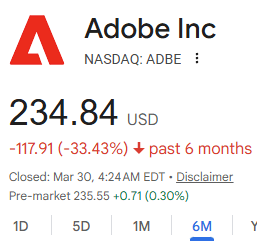
The boom in agentic AI coding has sent shockwaves through the software publishing industry based on fears that AI coding will make it easier for users to roll their own software solutions. Adobe Inc.’s stock has already lost 33% of its value over the past six months, as have many other software companies.
Screenshot Of Google Search For Adobe Inc Stock Price
For example, Mistral recently released Voxtral TTS, an inexpensive text-to-speech AI that can run on a laptop with at least 3GB of RAM, undercutting other companies offering the same service for a monthly subscription.
3gb of RAM is wild. been paying ElevenLabs $22/mo for my projects and this runs on hardware i already own. the economics of AI services are going to collapse faster than anyone’s modeling
The new Google-Agent crawler is labeled as a user-initiated crawler, meaning that the crawler is initiated by a user. The documentation for the new crawler explains:
“Google-Agent is used by agents hosted on Google infrastructure to navigate the web and perform actions upon user request (for example, Project Mariner). It uses IP ranges from user-triggered-agents.json.”
Google currently offers Gemini CLI, but it’s not a one-to-one competitor with the agent-first Claude Code, which is designed to take actions. This addition of the new Google-Agent crawler could be a small piece of a new product that is able to compete more directly with Code.
That said, Google once again finds itself racing to catch up to rapidly developing situations, and this change to the list of Google’s user-triggered fetchers is likely part of Google’s pivot to compete more robustly in the LAM space.
Google Gemini more than doubled its referral traffic to websites between November and January, according to SE Ranking data from more than 101,000 sites with Google Analytics installed.
The increase started in December, shortly after Google began rolling out Gemini 3 across its products. SE Ranking measured a 51% increase in December and a 42% increase in January, for a combined gain of about 115%.
For transparency, SE Ranking sells AI visibility tracking tools, and the data below comes from their own Google Analytics dataset.
Gemini Passes Perplexity
In January, SE Ranking’s data shows Gemini sent 29% more visitors to websites than Perplexity globally. In the U.S., the gap was wider at 41%.
Five months earlier, the positions were reversed. In August, Perplexity was sending roughly three times more referral traffic than Gemini, according to the same dataset.
ChatGPT’s Decline From Peak
ChatGPT’s referral traffic peaked in October and has fallen since then. SE Ranking measured an 8% drop in November and an 18% drop in December, with a partial recovery in January.
Even after the decline, ChatGPT still generates about 80% of all AI referral traffic to websites. ChatGPT’s lead over Gemini narrowed from roughly 22x in October to about 8x in January. That’s still a large gap.
Similarweb’s January data showed a similar pattern when measuring direct visits to chatbot sites. ChatGPT’s traffic share fell from 86% to 64% over the past year, while Gemini rose from 5% to 21 %. The two datasets measure different things, but both show the same direction.
The Gemini 3 Connection
The timing of Gemini’s traffic increase lines up with Google’s rollout of Gemini 3 models.
Google released Gemini 3 Pro on November 18, Gemini 3 Deep Think on December 4, and Gemini 3 Flash on December 17. Flash became the default model in the Gemini app and in AI Mode for Search.
Before those releases, Gemini’s referral traffic had been mostly flat for eight months. SE Ranking’s data shows it grew at roughly 4% per month from January through October. The jump to 47% monthly growth in December and January represents about a 12x acceleration from the prior pace.
AI Traffic In Context
All AI platforms combined still account for a small share of overall web traffic. SE Ranking puts the figure at about 0.24% of global internet traffic as of January, up from 0.15% in 2025.
An earlier SE Ranking report of 13,700 websites found Google generating 94% of organic traffic. ChatGPT and Perplexity were starting to show up in referral reports. The new dataset is larger at 101,574 sites across 250 markets but uses the same GA-based methodology.
Why This Matters
Two months of growth from Gemini doesn’t predict where AI referral traffic will be by year’s end. The increase from November to January is measurable and correlates with a known product launch, but it’s too early to call it a sustained pattern.
The Perplexity milestone is more concrete. Gemini may now show up as a larger referral source than Perplexity in your own analytics. That’s worth checking.
Looking Ahead
SE Ranking says it will continue monitoring AI referral traffic through 2026. Google hasn’t disclosed referral traffic figures for Gemini or AI Mode directly. The next Similarweb AI Tracker update could provide a second data point on whether Gemini’s growth continued past January.
Beehiiv, an emerging email newsletter platform, became this month the most recent ecommerce-adjacent software company to announce an MCP integration for artificial intelligence.
On its own, Beehiiv’s announcement might not seem significant. Yet the integration could point to a larger trend.
Increasingly, merchants’ software tools have direct, even native, AI connections. Examples include Shopify, WooCommerce, Yottaa, and Shippo.
What Is an MCP?
Anthropic, the company behind the popular Claude LLM, defined the Model Context Protocol in 2024. Releasing it as “a new standard for connecting AI assistants to the systems where data lives, including content repositories, business tools, and development environments. It aims to help frontier models produce better, more relevant responses.”
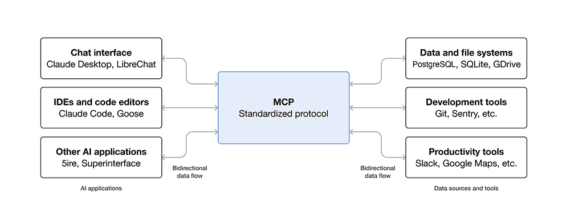
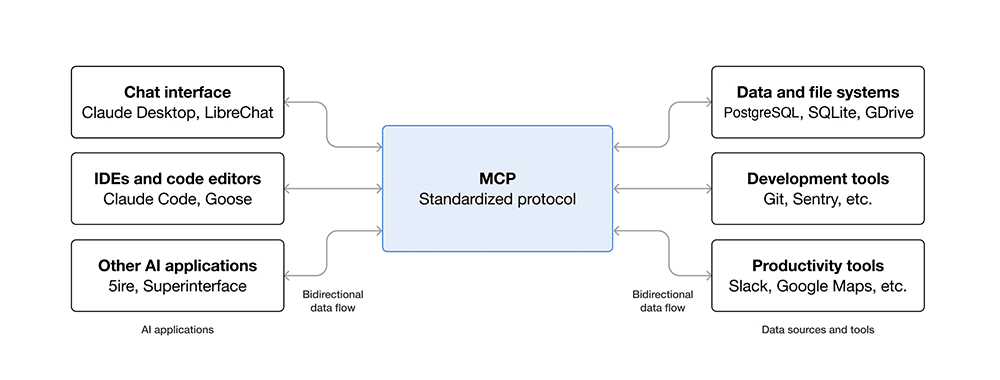
Essentially, the MCP (and competing protocols) ensure secure two-way connections between data sources and AI-powered tools or agents.
Connecting data sources and services with AI-enabled agents and tools, the MCP describes one way AI will integrate into business operations. Click image to enlarge.
Instead of building one-off integrations for every service via an API, a business can expose its entire tools and data to AI systems. An AI model can then query those systems and take action.
Business leaders can think of MCP as AI infrastructure. It sits between the AI and the systems that run the business. And when a software supports the MCP, the opportunity to integrate with AI for analysis, generation, and automation is relatively greater and easier.
Operational Shift
Many AI tools today summarize reports, draft emails, or answer questions. With MCP-style integrations, those tools can act. An AI assistant could check inventory, compare shipping rates, and evaluate campaign performance, before making adjustments, perhaps in real time.
Consider a simple case. An AI system detects rising delivery costs on a group of orders. With access to shipping tools, it compares carrier rates and selects a cheaper option. The same system updates the order and notifies the customer. This can happen even as someone in the warehouse is picking items.
That type of loop is what MCP and similar protocols are trying to enable.
Here are a few examples.
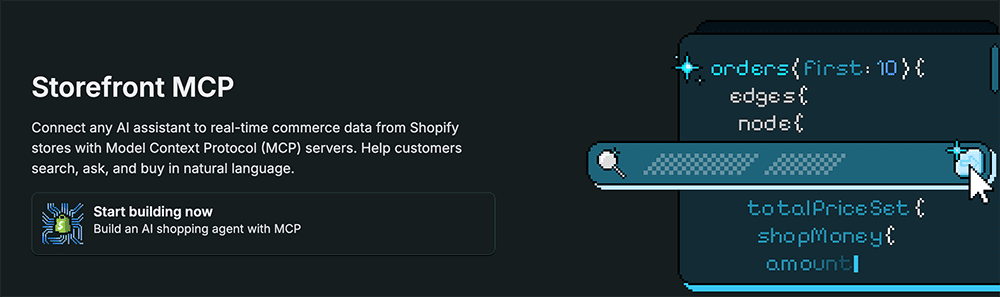
Shopify’s Hydrogen update introduced AI support for Storefront MCP.
The integration allows AI agents to browse products, manage carts, and assist with checkout. In effect, the storefront becomes a structured environment that an AI can navigate. An AI could have done this before, but the MCP provides rules that make it more successful.
Shopify is one example of an ecommerce-related MCP implementation.
Shippo’s MCP serverexposesshipping workflows to AI systems. An AI assistant can create shipments, compare carrier rates, generate labels, track packages, and validate addresses. These are tasks that typically require manual steps or custom integrations.
An AI system identifies a cluster of delayed shipments. It checks alternative carriers, updates fulfillment rules, and flags affected customers. The shopper experience is better, and the agent acted without direct supervision, albeit within the set of guidelines.
The current version focuses on analysis. AI can evaluate subject lines, subscriber growth, churn, and engagement trends. That insight can guide content and monetization decisions. It might even help close the loop, so to speak, on how email marketing contributes to ecommerce sales.
APIs Remain
MCP does not replace application programming interfaces; it complements them.
APIs are precise and stable. They are suited for core integrations such as order processing or payments. MCP is flexible. The protocol allows AI systems to move across tools without rigid workflows.
In practice, an ecommerce stack will likely combine APIs for reliability and MCP-style interfaces for adaptability.
Other Protocols
The MCP is part of a broader shift toward agentic applications and commerce. Other protocols are emerging.
OpenAI’s Agentic Commerce Protocol, for example, aims to enable product discovery and transactions within AI environments such as ChatGPT. Google is developing a similar approach for its AI interfaces.
These protocols define how shopping happens inside AI-driven surfaces. MCP focuses on how AI systems access business operations behind the scenes.
For merchants, the distinction matters. One set of standards governs how consumers find and buy products. Another governs how the business fulfills and manages those transactions. Each case illustrates the evolution of businesses and their software tools with AI.
Implementation
The most important takeaway may be that the MCP signals a shift from AI as a chat tool to an operator in a business.
Ecommerce leaders should focus less on the protocol itself and more on being ready to adapt to AI use and integration. Having clean, organized data and clear workflows is more important than being the first to adopt new tools.
Expect a stack where APIs offer reliability and MCP-like layers enable flexibility. And monitor where AI-driven shopping happens, as protocols from platforms such as OpenAI or Google may shape demand as much as backend operations.
You probably set up your Google Business Profile a while back, filled in your address, picked your categories, maybe chased down a few reviews, and then called it done. Totally understandable. That was enough, once.
But here’s what’s changed: If you haven’t meaningfully touched that profile in months, you’re losing visibility to competitors who figured out something you haven’t yet. Google transformed GBP from a directory listing into a live engagement surface, and businesses that treat it like the former are quietly bleeding map pack rankings they don’t even know they’ve lost.
This applies to every local business. Retailers, yes, but also law firms, dental practices, restaurants, gyms, plumbers, and salons. If your GBP isn’t actively signaling to Google that you’re open for business and earning it every day, you’re leaving real visibility on the table.
Let’s talk about what killed the static profile, what Google built in its place, and exactly what you need to do about it.
When “Set It And Forget It” Actually Worked
Cast your mind back to the directory era. You filled out your name, address, and phone number (NAP), chose a category, uploaded a logo, and crossed your fingers. Google treated these profiles as reference points, fixed coordinates in the physical world. The algorithm cared about NAP consistency across directories more than anything else. Match your citations across 50 listing sites? You were golden.
It worked because that’s genuinely all Google needed. The platform was confirming you existed at a given address. Nothing more.
The New Table Stakes (And Why They’re Not Enough)
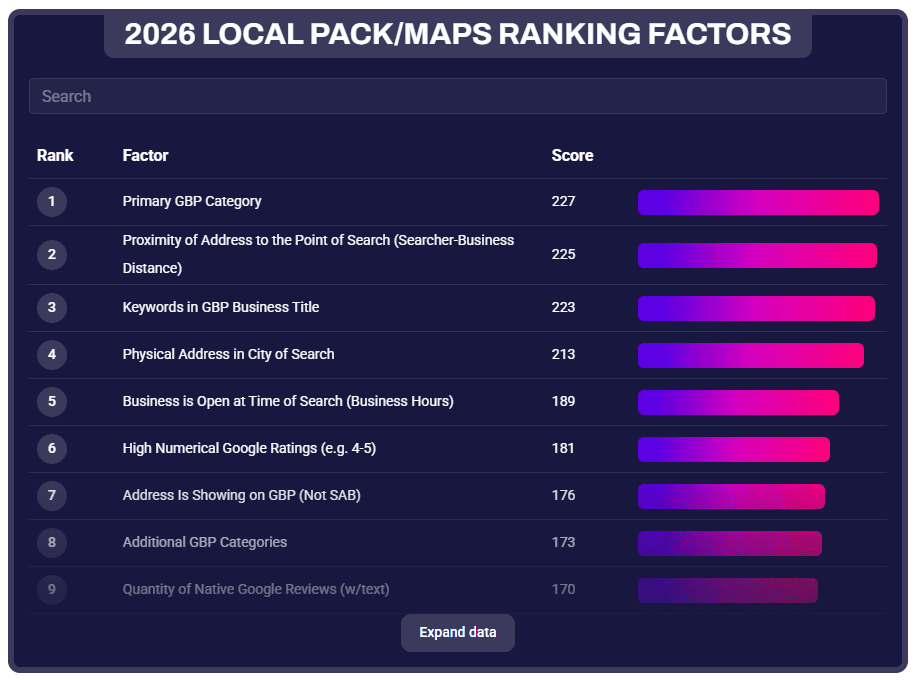
Those fundamentals haven’t disappeared; they’ve just become the entry fee. According tothe 2026 Local Search Ranking Factors report, the primary GBP category is still the No. 1 factor for local pack visibility, followed by proximity to the searcher and keywords in the business title. These matter enormously. But when every serious competitor has them dialed in, they stop being differentiators.
Screenshot from Whitespark, March 2026
The report also makes clear that behavioral and engagement signals, posts, photos, clicks, calls, direction requests, and review cadence are climbing fast in importance. Google is actively rewarding businesses that “look alive.”
There’s also a finding worth pausing on: Being open when users search is now the No. 5 local pack ranking factor. Your hours aren’t just informational; they’re a ranking signal. This was first noted by Joy Hawkins of Sterling Sky and subsequently confirmed by a BrightLocal study of 50 businesses across 10 categories, which found that rankings tended to drop when a business is listed as closed. Don’t treat your hours as a set-and-forget field. Audit them quarterly, set special hours for holidays before the holiday arrives (not after), and consider whether your current hours are costing you visibility during high-intent search windows.
A static profile with perfect NAP and a 4.8-star rating is like showing up to a job interview in a great suit but refusing to speak. You look the part, but you’re not convincing anyone you’re the right choice.
Google’s Shift: From Listings To Live Engagement
Google didn’t randomly decide to make GBP harder to manage. They followed user behavior. People aren’t browsing businesses anymore; they’re searching with immediate intent. “Who can help me with this right now?” isn’t a research question; it’s a decision waiting to happen.
So Google built GBP into an active engagement surface. For retailers, that meant integrating Merchant Center so real-time product inventory could surface directly in search results and Maps. For service businesses, it means appointment booking, Q&A, and post-activity are all live signals. For restaurants, it’s menus, wait times, and reservation links. The platform expects ongoing input, and it rewards the businesses that provide it.
The core principle is the same whether you sell hiking boots or handle divorces: Google favors profiles that continuously demonstrate relevance and activity. The mechanism differs by business type. The outcome doesn’t.
The Signals That Actually Move The Needle
Review Velocity, Not Just Review Volume
Reviews have always mattered, but the 2026 Local Search Factors Ranking Report data adds important nuance. Fresh reviews don’t just help you rank; they help people pick you over a competitor with the same star rating. Research further confirms that review signals are gaining influence across local rankings, with proximity earning you the look, but review content helping secure the top spot.
Do this: Make review requests part of your operational workflow. Send the ask within 24 hours of a completed service or transaction while the experience is fresh. Respond to every review, positive and negative, within 48 hours. Owner responses are an engagement signal, not just a reputation management courtesy.
Not that: Don’t batch review requests monthly or rely on a generic follow-up email. Don’t respond to positive reviews with a copy-paste “Thanks for your feedback!” Google and potential customers can both tell.
A law firm that earns 12 reviews over three years and one that earns 12 reviews over three months are sending very different signals to the algorithm, even with identical star ratings.
GBP Posts: The Most Underused Freshness Signal
Most businesses either never post to GBP or publish one post in January and forget it exists. That’s a significant missed opportunity. Posts, whether offers, updates, events, or business news, are a direct freshness signal that tells Google your profile is actively managed.
Do this: Post at least once a week. Tie posts to things that are actually happening: a seasonal promotion, a recently completed project, a staff milestone, or a local event you’re involved in. Use the “Offer” post type when you have something time-sensitive; the expiry date creates urgency and signals recency.
Not that: Don’t recycle the same “Welcome to our business!” post every few months. Don’t post only when you remember to; build it into a recurring task, same as you would any other content channel. And don’t ignore the post types Google gives you; Events and Offers get more real estate in the profile than standard Updates.
Photos: Recency Matters As Much As Quality
According to Birdeye’s State of Google Business Profile 2025 report, verified profiles with photos consistently receive more website visits, direction requests, and calls, and listings with recent photos and video see measurably higher engagement than those with stale or infrequently updated imagery. That “recently updated” part is key. A profile with 80 photos, all uploaded three years ago, isn’t sending the same freshness signal as one with steady uploads over recent months.
Do this: Set a recurring reminder to upload new photos at least twice a month. Show real things: recent work, your current team, your updated space, seasonal inventory. For service businesses, job-site photos and before/after shots are gold; they’re authentic, specific, and far more compelling than stock imagery.
Not that: Don’t upload a batch of 50 photos once a year and call it done. Don’t use obviously staged or stock photos as your primary images; research on competitor GBP analysis shows that photo quality and authenticity are increasingly factored into how profiles are perceived. And don’t ignore customer-uploaded photos; respond to them or flag inappropriate ones rather than leaving them unattended.
Booking And Messaging: Closing The Loop Inside Google
Google increasingly wants to keep searchers inside its own ecosystem. For local businesses, that means enabling every feature your business type supports: “Book Online” links, appointment URLs, and the Q&A section. These aren’t just convenience features; they’re engagement signals. When a user books directly through your GBP, that interaction tells Google your profile is functional and driving real-world action.
Do this: If your business supports appointments, connect a booking link (Google supports integrations with platforms like Booksy, Vagaro, OpenTable, and others). Seed your Q&A section with the three to five questions customers actually ask most, and answer them yourself before strangers do it for you.
Not that: Don’t leave your Q&A section empty or unmonitored, unanswered questions (or worse, inaccurate answers from random users) erode trust and represent a missed engagement opportunity.
For Retailers: Real-Time Inventory Is Its Own Category
If you sell physical products, everything above applies, but you have an additional lever that service businesses don’t: real-time inventory.
Google integrated Merchant Center with GBP specifically to surface what’s on your shelves in search results and Maps.
Do this: Prioritize your top 50 highest-intent, most-searched products first. Get those live and accurate before trying to sync your entire catalog. Add product schema markup to your website’s product pages so your feed and your site are telling Google the same thing.
Not that: Don’t upload a feed manually once a week and assume that’s close enough to real-time. Don’t skip the Merchant Center diagnostics step; a feed with errors will silently underperform, and you won’t know why until you check. And don’t assume inventory feeds only matter for paid ads; enabling free local listings through Merchant Center unlocks organic product visibility in search, Maps, and your GBP profile at no additional cost.
The AI Layer: Why This All Matters More Than Ever
Here’s the dimension that makes everything above more urgent: GBP signals are now feeding directly into AI-driven local results, not just the traditional map pack.
Google’s AI Mode pulls from the same signals discussed in this article: review recency and sentiment, photo freshness, post activity, accurate hours, and service completeness. The Whitespark 2026 report introduced an entirely new AI Search Visibility category for the first time, with three of the top five AI visibility factors being citation and entity-based signals. Businesses that keep their GBP current and consistent are the ones being surfaced in AI-generated answers. Businesses with stale profiles aren’t just losing map pack spots; they’re becoming invisible to AI-driven discovery entirely.
Treat every update you make to your GBP not just as a ranking tactic for the traditional local pack, but as a data signal for AI systems that are increasingly acting as the front door to local search. Accurate hours, fresh photos, recent reviews, and complete service descriptions aren’t just best practices; they’re the inputs AI needs to confidently recommend your business.
What To Measure
Once you’re actively managing your profile, track what’s actually moving:
Profile interactions: calls, direction requests, website clicks, and (where applicable) booking clicks tell you which features are actually driving action.
Review velocity: not just your total count, but how many you’re earning per month and how quickly you’re responding.
Post engagement: views and clicks on GBP posts help you understand which content types your local audience actually responds to. For retailers, add product impressions and store visit conversions to this list.
The Compounding Effect
Here’s what makes dynamic GBP management so powerful over time: the signals compound. Consistent posting builds freshness and authority. Steady review velocity builds trust signals. Updated photos drive higher engagement. Higher engagement improves rankings. Better rankings bring more profile views, more reviews, and more interactions, which further improve rankings. And now, all of those same signals are feeding AI systems that are reshaping how local businesses get discovered in the first place.
Local visibility is increasingly built on engagement, credibility, and connection, not just keyword optimization. Static profiles erode authority over time. Dynamic profiles compound it.
The businesses treating GBP like a compliance checkbox are the ones watching competitors steal map pack spots they used to own. The ones showing up consistently, posting, earning reviews, updating photos, keeping information current, and (for retailers) feeding Google live inventory, are building durable local visibility that’s genuinely hard to disrupt, whether the search happens in the traditional map pack or in an AI-generated answer.
That’s the gap. The only question is which side of it you want to be on.