WordPress Astra Theme Vulnerability Affects +1 Million Sites via @sejournal, @martinibuster

One of the World’s most popular WordPress themes quietly patched a security vulnerability over the weekend that security researchers say appears to have patch a stored XSS vulnerability.

The official Astra changelog offered this explanation of the security release:

“Enhanced Security: Our codebase has been strengthened to further protect your website.”

Their changelog, which documents changes to the code that’s included in every update, offers no information about what the vulnerability was or the severity of it.  Theme users thus can’t make an informed decision as to whether to update their theme as soon as possible or to conduct tests first before updating to insure that the updated theme is compatible with other plugins in use.

SEJ reached out to the Patchstack WordPress security company who verified that Astra may have patched a cross-site scripting vulnerability.

Brainstorm Force Astra WordPress Theme

Astra is one of the world’s most popular WordPress theme. It’s a free theme that’s relatively  lightweight, easy to use and results in professional looking websites. It even has Schema.org structured data integrated within it.

Cross-Site Scripting Vulnerability (XSS)

A cross-site scripting vulnerability is one of the most common type of vulnerabilities found on WordPress that generally arises within third party plugins and themes. It’s a vulnerability that occurs when there’s a way to input data but the plugin or theme doesn’t sufficiently filter what’s being input or output which can subsequently allow an attacker to upload a malicious payload.

This particular vulnerability is called a stored XSS. A stored XSS is so-called because it involves directly uploading the payload to the website server and stored.

The non-profit Open Worldwide Application Security Project (OWASP) website offers the following description of a stored XSS vulnerability:

“Stored attacks are those where the injected script is permanently stored on the target servers, such as in a database, in a message forum, visitor log, comment field, etc. The victim then retrieves the malicious script from the server when it requests the stored information. Stored XSS is also sometimes referred to as Persistent or Type-II XSS.”

Patchstack Review Of Plugin

SEJ contacted Patchstack who promptly reviewed the changed files and identified a possible theme security issue in three WordPress functions. WordPress functions are code that can change how WordPress features behave such as changing how long an excerpt is. Functions can add customizations and introduce new features to a theme.

Patchstack explained their findings:

“I downloaded version 4.6.9 and 4.6.8 (free version) from the WordPress.org repository and checked the differences.

It seems that several functions have had a change made to them to escape the return value from the WordPress function get_the_author.

This function prints the “display_name” property of a user, which could contain something malicious to end up with a cross-site scripting vulnerability if printed directly without using any output escaping function.

The following functions have had this change made to them:

astra_archive_page_info
astra_post_author_name
astra_post_author

If, for example, a contributor wrote a post and this contributor changes their display name to contain a malicious payload, this malicious payload will be executed when a visitor visits that page with their malicious display name.”

Untrusted data in the context of XSS vulnerabilities in WordPress can happen where a user is able to input data.

These processes are called Sanitization, Validation, and Escaping, three ways of securing a WordPress website.

Sanitization can be said to be a process that filters input data. Validation is the process of checking what’s input to determine if it’s exactly what’s expected, like text instead of code. Escaping output makes sure that anything that’s output, such as user input or database content, is safe to display in the browser.

WordPress security company Patchstack identified changes to functions that escape data which in turn gives clues as to what the vulnerability is and how it was fixed.

Patchstack Security Advisory

It’s unknown whether a third party security researcher discovered the vulnerability or if Brainstorm, the makers of the Astra theme, discovered it themselves and patched it.

The official Patchstack advisory offered this information:

“An unknown person discovered and reported this Cross Site Scripting (XSS) vulnerability in WordPress Astra Theme. This could allow a malicious actor to inject malicious scripts, such as redirects, advertisements, and other HTML payloads into your website which will be executed when guests visit your site. This vulnerability has been fixed in version 4.6.9.”

Patchstack assessed the vulnerability as a medium threat and assigned it a score of 6.5 on a scale of 1 – 10.

Wordfence Security Advisory

Wordfence also just published a security advisory.  They analyzed the Astra files and concluded:

“The Astra theme for WordPress is vulnerable to Stored Cross-Site Scripting via a user’s display name in all versions up to, and including, 4.6.8 due to insufficient input sanitization and output escaping. This makes it possible for authenticated attackers, with contributor-level access and above, to inject arbitrary web scripts in pages that will execute whenever a user accesses an injected page.”

It’s generally recommended that users of the theme update their installation but it’s also prudent to test whether the updated theme doesn’t cause errors before pushing it to a live website.

Featured Image by Shutterstock/GB_Art
YouTube Warns Channels Against Deleting Videos via @sejournal, @MattGSouthern

In a recent public service announcement on Twitter, YouTube’s Product Lead for homepage and recommendation, Todd Beaupre, cautioned content creators against the arbitrary deletion of videos from their channels.

His statement points to the potential negative impact of video removal on a channel’s growth.

YouTube Says Don’t Delete Videos

Beaupre advised in his tweet:

“YouTubers: Don’t delete videos unless you have a very, very good reason. When you delete a video, you delete your channel’s connection to the audience that watched that video. If you want to maximize your growth, keep your videos public or unlist them if you must.”

YouTube’s Creator Liaison, Rene Ritchie, further amplified the message, retweeting Beaupre’s post to ensure wider visibility.

The coordinated effort from two YouTube representatives highlights the significance of the advice for content creators.

Video Deletion May Impact Channel Growth & Discoverability

YouTube’s out-of-the-way PSA on Twitter suggests that video deletion could be a weighty factor in YouTube’s algorithm for homepage recommendations.

The platform may be less likely to recommend videos from channels with a history of removing content, as it could negatively affect user experience and engagement.

YouTube’s recommendation system is designed to connect viewers with content they will likely enjoy and engage with. If a channel frequently deletes videos, it disrupts the viewer’s experience and makes it harder for the algorithm to assess the channel’s value accurately.

Unlist Rather Than Delete

The advice to keep videos public or unlisted, rather than deleting them entirely, offers creators a middle ground for managing their content without compromising its growth potential.

By maintaining a stable video catalog, creators can foster long-term connections and provide a consistent data stream for YouTube’s algorithm to evaluate their channel’s relevance and engagement.


FAQ

How does deleting videos from a YouTube channel affect its growth?

Deleting videos from a YouTube channel can adversely affect the channel’s growth potential.

When a video is removed, the connection that was built between the channel and its audience through that video is lost.

This deletion can lead to reduced visibility and discoverability of the channel within YouTube’s recommendation algorithm, potentially hindering the channel’s ability to attract new viewers and negatively impacting user experience and engagement.

What is the recommended alternative to deleting videos on YouTube?

The recommended alternative to deleting YouTube videos is to keep them public or unlist them.

By doing so, creators can manage their content library without compromising their channel’s growth potential and algorithmic evaluation.

This strategy ensures the creator’s video catalog remains stable, which is beneficial for maintaining long-term connections with the audience and preserving the integrity of the channel’s data for YouTube’s recommendation system.


Featured Image: Muhammad Alimaki/Shutterstock

Google Search Liaison: Ads Not A Hindrance To Search Rankings via @sejournal, @MattGSouthern

As Google’s March core update continues, there’s uncertainty surrounding the impact of advertisements on search rankings.

Google’s Search Liaison, Danny Sullivan, took to Twitter to address these concerns, stating that sites with ads can still rank well in Google search results.

Google Clarifies The Impact Of Ads On Search Rankings

Website owner Tony Hill brought the issue to light, inferring from Sullivan’s earlier advice that Google disapproves of ads.

Hill points out the prevalence of ads in Google’s search results pages, especially on mobile devices, and expressed concern that Google’s algorithms may unfairly target smaller sites that rely on ad revenue.

Sullivan clarified that “there are plenty of sites that rank perfectly well in Google Search that have ads, both sites big and small.”

He emphasized that Google’s systems aim to reward sites that provide a good page experience, a long-standing goal that isn’t new.

Ads Aren’t Direct Ranking Factors

Referring to Google’s documentation on page experience, Sullivan noted that Core Web Vitals are direct ranking factors, while other aspects mentioned, such as excessive ads in relation to main content, are not.

The documentation states:

“Beyond Core Web Vitals, other page experience aspects don’t directly help your website rank higher in search results. However, they can make your website more satisfying to use, which is generally aligned with what our ranking systems seek to reward.”

Anecdotal evidence supports Sullivan’s statement, with many sites climbing in rankings following the core update despite having advertisements on their pages.

This suggests that ads alone don’t necessarily hinder a site’s ability to rank well in Google search results.

Analyzing Sullivan’s Statement

Considering Sullivan’s statements and the wider conversation surrounding ads and search rankings, several additional points are worth mentioning.

First, while ads may not be a direct ranking factor, their implementation can indirectly impact SEO.

Excessive or intrusive ads that significantly disrupt the user experience could negatively impact search rankings. Therefore, you must carefully consider ads’ placement, quantity, and quality.

Google’s increasing reliance on ads in search results pages has drawn criticism, with some arguing that it creates a double standard.

The debate sparked by Hill’s comments also raises questions about the fairness of Google’s approach to smaller websites that rely heavily on ad revenue. While Sullivan affirms that sites of all sizes can rank well with ads, some website owners may feel that the playing field isn’t level.

While ads are a legitimate means of monetization, they shouldn’t diminish a website’s core value.

In Summary

The debate surrounding ads and search rankings highlights the delicate balance between user experience and website financial sustainability.

As Sullivan points out, ads make much of the web accessible and free for users. However, page experience remains crucial in how Google’s algorithms assess and rank websites.

As website owners navigate the March core and spam updates, Sullivan’s clarification confirms that advertisements don’t inherently conflict with achieving strong search rankings.

Google Offers Advice For Those Affected By HCU via @sejournal, @martinibuster

Google’s SearchLiaison answered a question asking for advice on how to diagnose content that’s lost rankings because of the Helpful Content update. SearchLiaison offered advice on how to step back and think about what the problem could be and if there even is a problem to consider.

Question On Fixing HCU Affected Pages

Someone on X (formerly Twitter) expressed frustration with the advice SEOs have offered because it was understood (erroneously it turns out) that the Helpful Content issue is a sitewide signal which complicates identifying pages that didn’t need fixing.

Lee Funke (@FitFoodieFinds) tweeted:

“I keep getting advice from SEOs to “look at the pages with the biggest drops” and figure out why they dropped. If we were hit by HCU then the sitewide signal has made ALL pages drop, making it difficult to analyze helpful vs. unhelpful. Any advice?”

SearchLiaison Answers HCU Question

SearchLiaison first addressed the perception that the Helpful Content ranking system is a single signal.

He tweeted:

“We had this in our Search Central blog post, but it’s probably worth highlighting that the helpful content system of old is much different now:
https://developers.google.com/search/blog/2024/03/core-update-spam-policies

“Just as we use multiple systems to identify reliable information, we have enhanced our core ranking systems to show more helpful results using a variety of innovative signals and approaches. There’s no longer one signal or system used to do this, and we’ve also added a new FAQ page to help explain this change.””

Next he explained that the Helpful Content System (commonly referred to as the HCU) is not a sitewide “thing” but rather it affects websites at the page-level.

He followed up with:

“The FAQ page itself is here, and it explains it’s not just a site-wide thing now:
https://developers.google.com/search/help/helpful-content-faq

“Our core ranking systems are primarily designed to work on the page level, using a variety of signals and systems to understand the helpfulness of individual pages. We do have some site-wide signals that are also considered.””

Drops In Rankings: Not Always About Fixing Pages

The next bit of advice that he offered is that a drop in ranking doesn’t necessarily mean that there’s something wrong that needs fixing. He’s right. A common mistake I see website publishers and SEOs make is to immediately assume that there’s something wrong that needs fixing but that’s not the case when the problem is related to relevance.

A site that loses rankings because of relevance can sometimes come back but in extreme cases the old rankings can never come back, ever. An SEO with experience knows how to tell the difference.

SearchLiaison tweeted:

“So then to the all pages dropping questions. Pages could drop in ranking for a variety of reasons, including that we’re showing other content that just seems more relevant higher. Sort of what I was talking about here:
https://twitter.com/searchliaison/status/1768681292181434513”

That tweet he referred to offered the advice to wait until the update finished rolling out before making any changes. He also said that rankings can change by themselves without changing anything and that user trends can affect site traffic, it’s not always due to rankings.

Self-Assess Pages That Lost Rankings

Returning to the answer to Lee Funke (@FitFoodieFinds), SearchLiaison suggested identifying the pages that are receiving less traffic and to focus on self-assessing those pages together with the Helpful Content FAQ documentation and the HCU Self-Assessment page as guides.

He tweeted:

“If it’s more than just moving down a bit, then I’d look to some of the pages that I’d previously gotten a lot of visits to and self-assess if you think they’re helpful to your visitors (the FAQ page covers this). If you do, carry on.”

Is Google’s FAQ Contradictory?

The person who tweeted the original question had some follow-up questions and concerns. They tweeted felt that the HCU FAQ was contradictory in that it said that the Helpful Content signals were at a page level but that it also suggests there are sitewide factors that can bring the entire site down.

This is what the person who started the discussion tweeted:

“Also the FAQ about HCU sounds a bit contradictory. It says that the systems work primarily on a page level but then unhelpful/thin content can weigh down the success of other pages which feels site wide. I’m just trying to understand what these massive drops resulted from!”

The FAQ doesn’t cite thin content but it does mention unhelpful content affecting other pages in a way that goes beyond page level.

This is what it says:

“Our systems work primarily at the page level to show the most helpful content we can, even if that content is on sites also hosting unhelpful content.

This said, having relatively high amounts of unhelpful content might cause other content on the site to perform less well in Search, to a varying degree. Removing unhelpful content might contribute to your other pages performing better.”

That’s kind of vague and contradictory.

  • Does Google mean that if most of the content on a website is unhelpful that it would drown out the value of a handful of pages that are helpful?
  • Is Google implying that a website that’s infested with a preponderance of unhelpful content won’t ever get links or user enthusiasm because nobody would be able to find the actual good content?

It’s not unreasonable to say that Google’s documentation could use a little more clarity.

Non-Self Self-Assessing

I would suggest sticking with the self-assessment suggestions in Google’s Helpful Content FAQ.

A fresh set of eyes can see things with more clarity than someone who authored the page.

Featured Image by Shutterstock/Roman Samborskyi

Google Testing AI Chat On Developer Pages via @sejournal, @martinibuster

Google is rolling out a beta test of an AI Chat feature across the developers pages subdomain that is able to answer questions about anything that’s in the developers pages such as in the SEO, structured data and ranking documentation.

The beta feature is supposed to become available on all developer pages to answer questions about the page a site visitor is on or any other webpage in the developer documentation.

Developer Profile Required

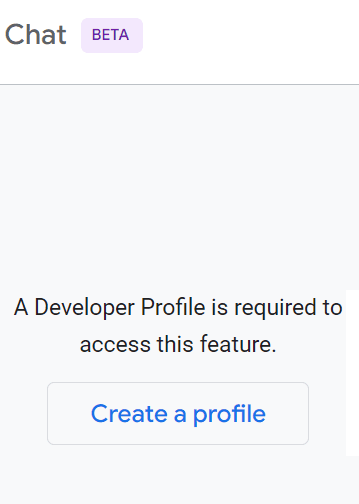
The new feature, called Side Panel Chat, is only available though desktop devices, not on mobile. It’s available in many regions but requires users to register for a Developer Profile. Signing up requires signing into a Google account to create a developer profile but it doesn’t require confirming your email address.

Google side panel chat requires a developer profile

Google’s documentation explains that the developer profile allows it to personalize the chat panel responses. The developer profile itself is gamified with achievements for unlocking and badges that can be earned.

Side Panel Questions

The AI chat answers questions about anything that’s in the developer pages documentation but it’s possible for it to go off the rails a little bit. I asked a question about link building and one of the responses was questionable.

The question asked:

What are five hot ways to build links?

The one arguably sketchy answer was:

Guest posting:
Write high-quality guest posts for other websites in your industry or niche.
Make sure to include a link back to your website in your author bio.”

It also advised creating infographics but it didn’t suggest to require backlinks.

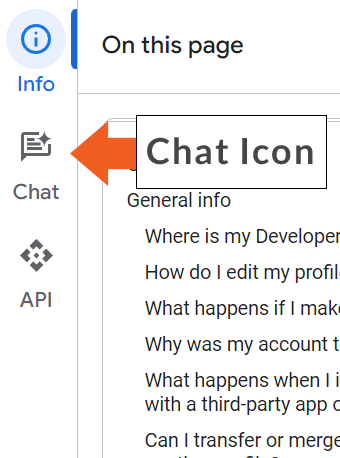
Side Panel Chat Button

Side panel chat icon for activating a chat in one of Google's developer pages

I next asked the side panel chat for the top 5 tips for ranking in the top of Google’s search results.

Google’s new AI chat offered the following suggestions plus an explanation for each:

  1. Create high-quality, relevant content
  2. Build high-quality backlinks
  3. Optimize your website for technical SEO
  4. Promote your content
  5. Monitor your results and make adjustments

Limited Answers

The chat is limited to answering questions that are related to the developer pages documentation. It cannot answer questions that are outside of that scope.

Because the AI chat is in beta, which means it’s in a testing phase, it may incorrectly say it cannot answer a question or offer questionable answers. Google asks that users provide feedback so as to improve the service.

Google’s documentation states:

“If you encounter errors with valid questions, consider rephrasing your question. If the chat incorrectly indicates that it cannot respond to your question, you can report this issue by clicking the Send feedback icon at the top of the Side Panel Chat.”

Read more about Google’s developer pages side panel chat:

Side Panel Chat

Featured Image by Shutterstock/Tada Images

Google Answers If Different Content Based On Country Affects SEO via @sejournal, @martinibuster

Google’s John Mueller answered a question on Reddit about whether showing different content based on IP address of the site visitor affected SEO. His answer offered insights into Google’s crawling and indexing.

Showing Banners For Specific Countries

The person asking the question managed a website that wanted to show a banner on the side of the page with country-specific content. Their concern was how that might affect rankings in different countries.

Here’s the question:

“I got one question on how content for different geoip effect for seo?

Some marketers in my company asking me about to place side banner for users of certain geo ip – for example for UK visitors they want to show banner about event that coming in UK), but main geo for website: US.

Does it affect SEO for website overall? How Google classifies that type of placement? Is this kinda sort of cloaking (without purpose to cheat on google systems)?”

John Mueller’s Answer

The person asking the question asked three questions and Mueller limited his response to the one about how it affects SEO.

Mueller answered:

“Google generally crawls from one location – and that’s the content which would be used for search.

If you want something to be indexed, you need to make sure it’s shown there (or shown globally). The rest is up to you :-)”

Googlebot generally crawls from United States IP addresses and if it’s geographically blocked by IP address then it’ll switch over to an IP from another country.

How Google Classifies Side Banner

One of the questions that went unanswered was about how Google classifies the “placement” by which I assume the person means the content located in the sidebar.

This is what they asked:

“How Google classifies that type of placement?”

Assuming that the person is asking how Google classifies the content in a sidebar then the answer to that question is that Google identifies the main content of a page and more or less ignores the non-main content for ranking purposes.

We know that Google identifies the different sections of a webpage and one example is provided in an interview with Google’s Martin Splitt. Splitt talked about how Google identifies the different parts of the webpage like the main content, navigation, and other boilerplate so that it could score the different parts differently (“weighted” differently is how he described it).

Google then identifies where the main content of the page is and summarizes it into what he called the Centerpiece Annotation. Martin said that the Centerpiece Annotation is an identification of what the topic is.

In the context of the Reddit question Google would probably classify the banner in the side panel as not a part of the main content and consequently not use it for ranking purposes.

Is Changing Content Based On IP Address Cloaking?

Cloaking is a spam technique that in general identifies Googlebot by IP address and shows it content created specifically for Google and then shows different content for everybody else. Cloaking therefore is showing different content specifically for Google and everyone else.

That’s not the case with the scenario described by the Redditor.

Googlebot crawls from United States IP addresses so in general Google won’t crawl and index content that’s switched out for other countries. It will see and index only the United States content. Swapping out content based on the country origin of the site visitor doesn’t qualify as cloaking in the sense of cloaking for spam purposes either.

Read the post on Reddit:

Q: banners for certain geo-ip addresses? how it affect for seo?

Featured Image by Shutterstock/Asier Romero