Step-By-Step Guide To Earning Your Google Ads Certification via @sejournal, @coreydmorris

Getting Google Ads Certified is a great way to demonstrate a baseline learning effort and level of exposure to PPC and managing Google Ads.

Whether you’re coming out of school, entering a career that involves Google Ads, or simply want to learn, it is a great place to get started.

Some employees may list it as a minimum requirement on applications. Others will include it in onboarding and training. It can be a great place to start your own self-guided journey in less corporate environments or if you’re doing your own work to learn and level up.

Additionally, many agencies and organizations are part of the Google Partners program. Google Partners often must meet certain standards, such as maintaining different levels of badges or credentials across their teams.

One requirement is to have a certain number of connected accounts (strategists) certified, with certain numbers or minimums that need to be met in specific specialty areas (more on these later).

This article is about the individual certification (for professionals), so just note that it is important to make sure things get linked up properly with your company if you were asked to become certified for your company’s Google Partner program.

What Is Google Ads Certification?

Google Ads certification is a process by which Google recognizes marketers as experts in online advertising.

After passing Ads certification exams, individuals get a personalized certificate and – if affiliated with a company – can contribute to the company’s Google Partner credentials.

There have been a tremendous number of changes in Google Ads.

Google has increased the number of certification exam topics over the past couple of years, but in some cases, the rapid pace of Google’s platform changes hasn’t been maintained in the learning and exam content.

If you’re interested in learning more or taking your own steps toward Google Ads Certification – regardless of the reason or motivation – check out the four steps to work through the process and be prepared to dedicate some time to working through them.

How To Earn Your Google Ads Certification

Step 1: Get Started In Skillshop

Navigate to the Google Ads Certification platform within Skillshop.

In the top right corner, click Log In.

Now, we’re at a critical step right away. We want to ensure that the account you get certified through is the specific one you want to be certified. If this is your first time using Google’s Skillshop, you must create a new account.

Please read to the end of the details for this step before you start filling out the forms and taking any account linking steps.

Please note that if you have an existing account, you may still be required to do some new account linking or migration based on Google’s migration from skillshop.exceedlms.com to skillshop.docebosaas.com.

If you work for an agency or a company, you will likely be required to use your work email address.

Regardless of agency, corporate, or whatever status, you likely want to link your certification to the address you manage Google Ads to keep things simple and clean.

If you haven’t managed Google Ads yet and don’t have an account, you can easily create one here to get started.

If you’re a returning user, be careful to find your Skillshop profile and ensure your Google account is still properly linked so you don’t accidentally take exams in a new account versus recertifying your current account.

Again, you may have to perform additional linking and verification steps based on the migration of systems on Google’s end. Be mindful of that.

The account management piece can be confusing and frustrating as there are separate profiles yet linked accounts between this system and Google’s accounts and Ad management systems.

If you’re interested in having your certification count toward a Google Partners badge, be sure to link things properly using the company email address you use for managing ads for your Google Partner company.

If you’re interested, I encourage you to learn more about the Google Partners program details, requirements, and logistics for getting set up.

Please note that the certifications you need to be counted for Google Partners are more narrow and specific than those you need to be a certified Google Ads Professional.

Step 2: Select Your Exam

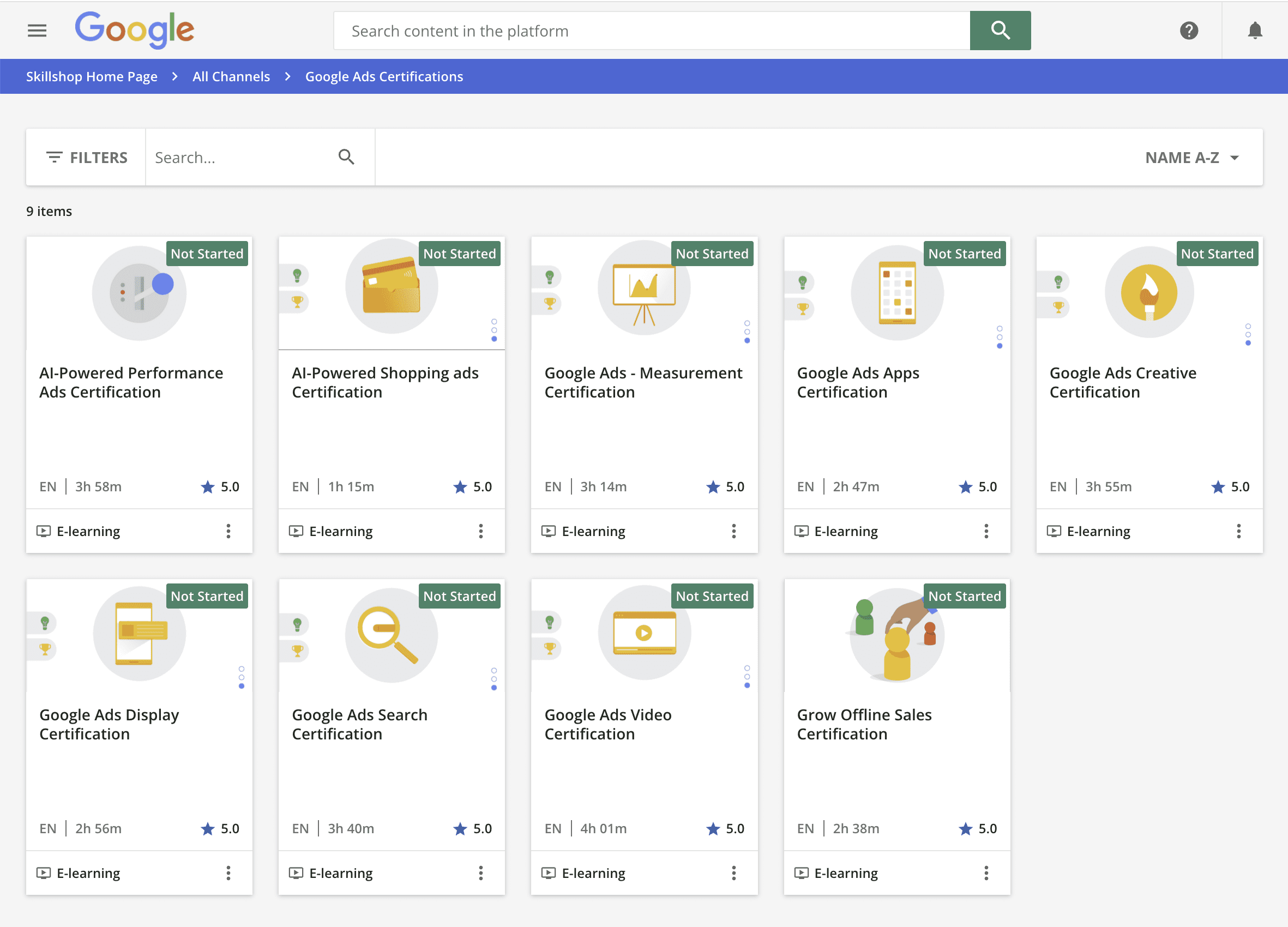
If needed, navigate back through Skillshop to the Google Ads Certifications again to arrive at the page with the list of exam topics.

You’ll find an intro page that provides background information to help you determine which certification is right for you and different categories or exam tiers as Google recommends.
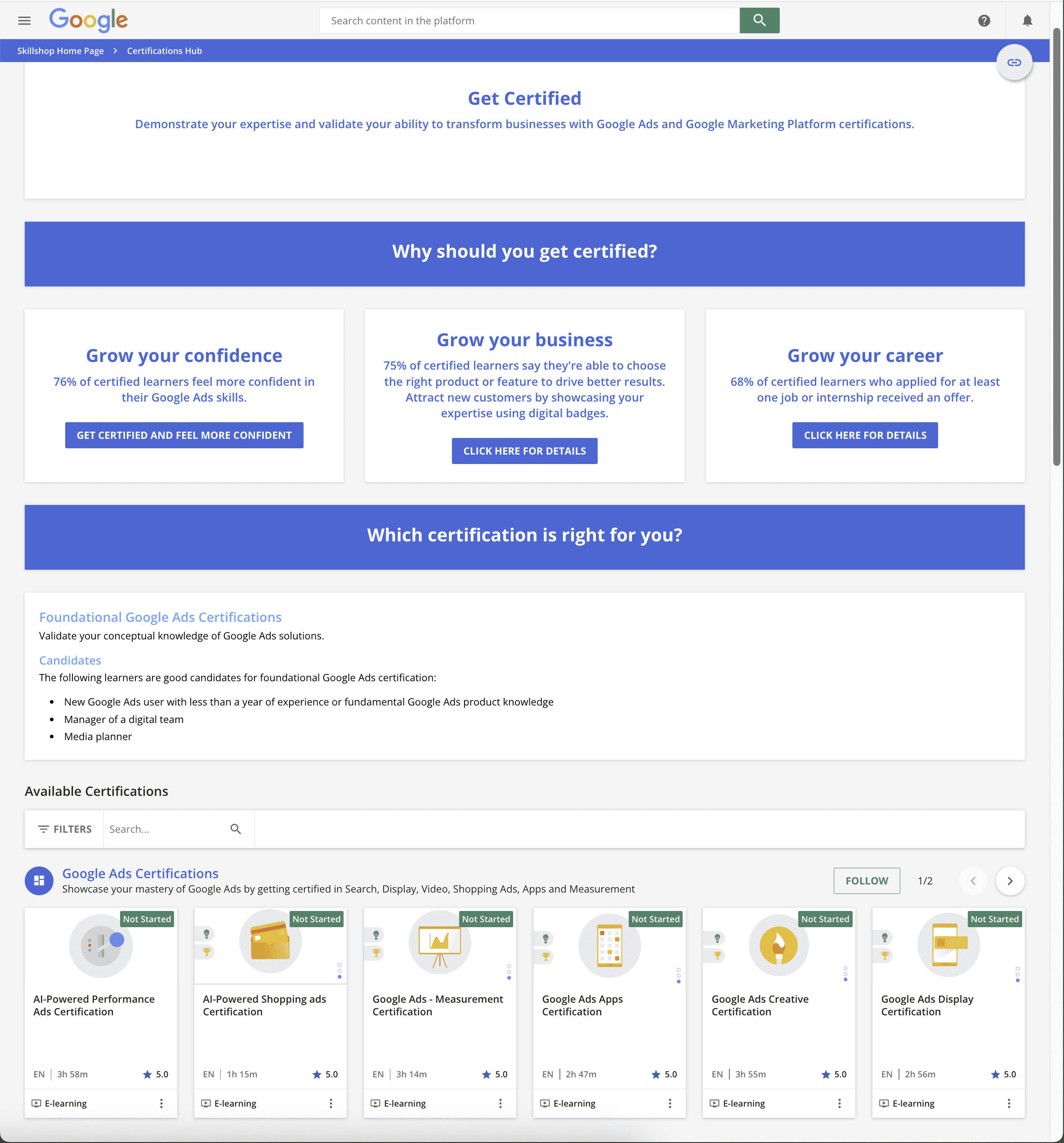
Google <span class=

If your goal is simply to get certified, then you can follow the navigation to reach the page that is focused on the certification exams itself.
Google <span class=

Here, you can find the specific certification you want to start with and click on it.

Within the specific certification, read the overview info.

When you’re ready to dive in, click the Get Started button.

Step 3: Prepare For Exams

Google provides both basic educational info and more extensive training content.

The specific Google Ads certifications include:

  • AI-Powered Performance Ads Certification.
  • AI-Powered Shopping Ads Certification.
  • Google Ads – Measurement Certification.
  • Google Ads Apps Certification.
  • Google Ads Creative Certification.
  • Google Ads Display Certification.
  • Google Ads Search Certification.
  • Google Ads Video Certification.
  • Grow Offline Sales Certification.

If you’re brand new to Ads and the certification exams, I recommend starting with the Google Ads Search Certification.

Search ads are one of the fundamental and traditional types of ads from the Google Ads platform.

But if you are more focused on something like just shopping, then start there.

Or, if you’re brand new and are most interested in the newer AI-powered ads and functionality, skip right to that one, but know that you might need a little more training and ramp-up time to understand the AI aspects on top of some traditional concepts.

Training content is available and tied to each of the specific certifications.

When you click on any of them, you’ll have options to get started, including a quick knowledge assessment and other resources.
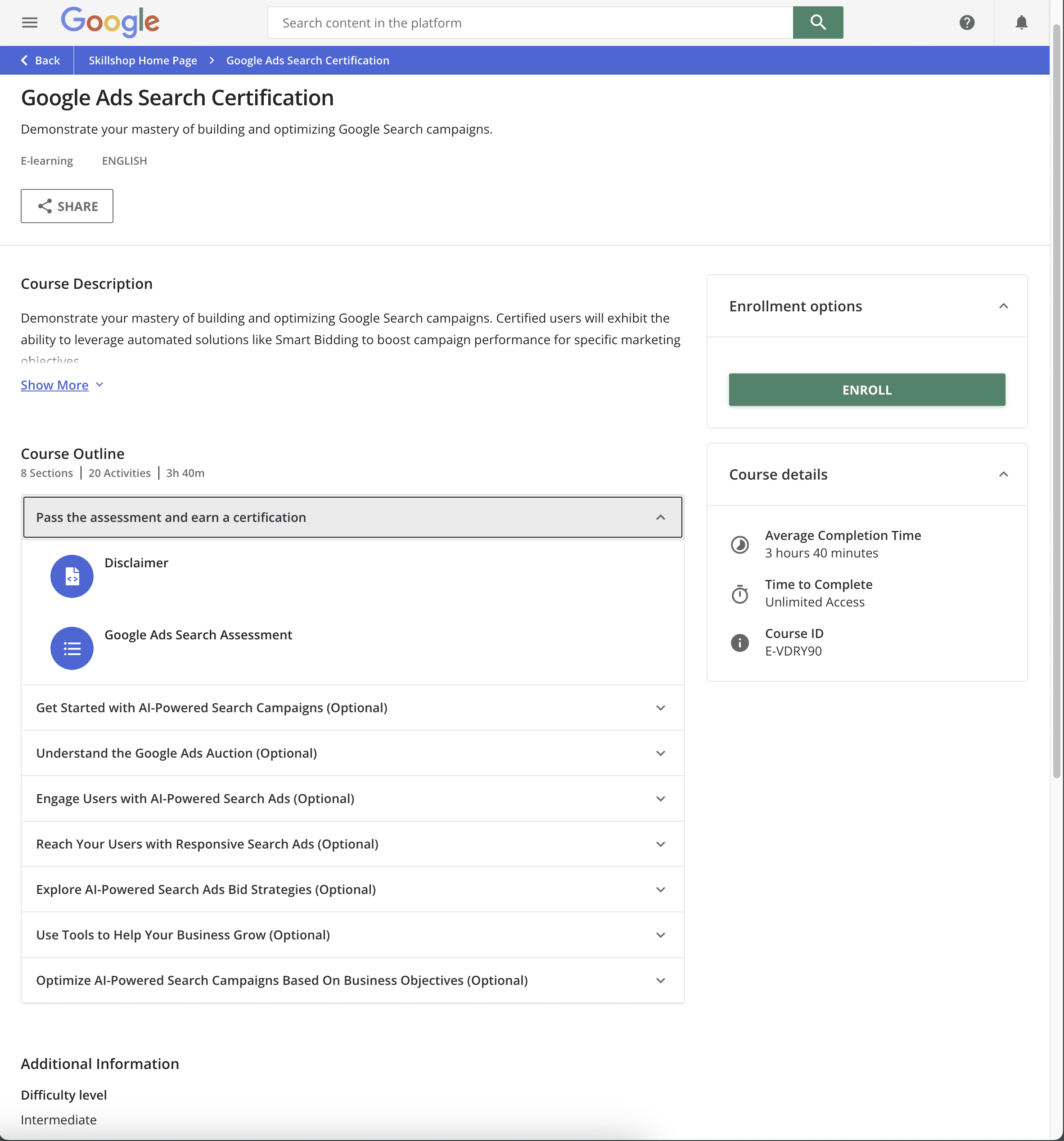
Google Ads Certification DetailsScreenshot from skillshop.docebosaas.com, June 2024

You’ll need to plan on investing at least a few hours to go through the training content specialization.

If you’ve been managing Ads campaigns or have deeper exposure, it’s still a good idea to go through the modules – even if you do it faster.

The sample questions are quite helpful; they are written in the same format as they appear on the actual exams.

This is especially important to note as with some of the recent rapid changes and features that have been rolled out into Google Ads, some of the exam content might be slightly (or more) dated than what you’re used to seeing in the platform on a daily basis.

Unless you have previously been certified and/or have moderate Ads experience, don’t skip the training content!

Step 4: Pass The Assessment

To become certified, you must pass the assessment in any of the respective certification specialties by achieving at least a minimum percentage of correct answers within the time allotted for the exam.

Note that you cannot pause the timer, so be sure that you’re able to dedicate the time required and can remove interruptions.

Your certification will then be awarded for that specific product focus area.

You can stop with one specialization or continue by going through additional specializations until you have mastered and achieved all of those relevant to your desired credentials.

If you’re an overachiever or love standardized tests, there’s nothing that says you can’t take them all.

Note that if you fail to pass an exam, you must wait one day before retaking that specific assessment again. That’s the only real penalty for not passing.

For all assessments you pass, which give you certifications, you will receive an email confirming your status at minimum. In the past, there have been badges and certificates to publicly display and download.

As things continue to change, though, I recommend keeping a digital record of your certifications. You can always go back into the dashboard to help show or prove that you passed and are certified if necessary.

The Google Ads Platform Is Ever-Changing

Whether you’re new to paid search ads through Google or have been managing ads for years and are just now exploring certification, I encourage you to spend some time with the steps I unpacked and see if you feel like it will be a worthwhile investment in your learning and personal credentialing.

As I mentioned earlier, be patient and know that there might be some disconnects between what you see in the exams versus in the platform itself as things are changing at a rapid pace with new features, interfaces, and ways that Google Ads works.

Regardless of your certification status, I want to encourage you on your journey with Google Ads and wish you happy and profitable days ahead for your business or organization!

More resources: 


Featured Image: Prostock-studio/Shutterstock

Google Ads Experiencing Outage Impacting Key Features via @sejournal, @MattGSouthern

Google Ads is currently experiencing a widespread outage that has affected several components of its platform.

The incident, which began on August 1, 2024, at 15:27 UTC, has left many advertisers unable to access vital tools and reports.

According to the Google Ads Status Dashboard, multiple features are currently unavailable:

  1. Report Editor
  2. Dashboards
  3. Saved Reports
  4. Products, Product Groups, and Listing Groups pages

The issue spans the Google Ads web interface, API, and Google Ads Editor, indicating a comprehensive system-wide problem.

Ginny Marvin, Google’s Ads Liaison, addressed the situation in a public statement:

“We’re actively looking into an issue with Google Ads. Report Editor, Dashboards, and Saved Reports in the Google Ads web interface are currently down. The Products, Product Groups, and Listing Groups pages are down across the web interface, API, and Google Ads Editor. Thank you for your patience. We will provide an update as soon as we have more information.”

Impact On Advertisers

This outage will likely disrupt Google Ads advertisers’ daily operations.

Without access to the Report Editor, Dashboards, and Saved Reports, marketers may struggle to analyze campaign performance, make data-driven decisions, or present client results.

Inability to access the Products, Product Groups, and Listing Groups pages is concerning for ecommerce advertisers who use these features to manage their product feeds and shopping campaigns.

Further, the API outage means that third-party tools and custom integrations dependent on Google Ads data may also be affected, potentially causing a ripple effect.

What Advertisers Can Do

While Google works to resolve the issue, advertisers are advised to:

  1. Monitor the Google Ads Status Dashboard for real-time updates
  2. Document any discrepancies or issues noticed in campaigns during this period
  3. Prepare alternative reporting methods using previously exported data if available
  4. Communicate with clients about potential delays in reporting or campaign adjustments

As of the latest update at 7:38 p.m. UTC on August 1, 2024, Google has not provided an estimated time for resolution.

The company affirms it’s actively investigating the problem and will provide updates as more information becomes available.


Featured Image: eamesBot/Shutterstock

Navigating A Cookieless Future: PPC Strategies For Privacy-First World

The digital advertising landscape is constantly changing, and a recent announcement from Google has shifted things yet again.

On July 22, 2024, Google made a surprising U-turn on its long-standing plan to phase out third-party cookies in Chrome.

This decision comes after years of back-and-forth between Google, regulatory bodies, and the advertising industry.

Advertisers have relied on third-party cookies – small pieces of code placed on users’ browsers by external websites – to track online behaviour, build detailed user profiles, and serve targeted ads across the web.

The initial plan to remove these cookies was driven by growing privacy concerns and regulations such as Europe’s General Data Protection Regulation (GDPR) and the California Consumer Privacy Act (CCPA) in the US.

However, Google’s recent announcement doesn’t mean the death of the cookieless future has been permanently averted. Instead, it signals a more gradual and user-choice-driven transition, allowing us to keep cookies for a little bit longer.

Google now plans to introduce a new experience in Chrome that will enable users to make informed choices about their web browsing privacy, which they can adjust at any time, thus giving control back to the user.

This change in approach emphasizes the ongoing tension between privacy concerns and the need for effective digital advertising.

While third-party cookies may stick around longer than initially expected, the trend toward more privacy-focused solutions continues. As such, it’s crucial for businesses running PPC campaigns to stay informed and adaptable.

In this article, we’ll examine the debate surrounding the elimination of cookies for enhanced privacy, explore the potential alternatives to third-party cookies, and discuss how these changes might shape the future of PPC campaigns in an evolving digital landscape.

Should We Get Rid Of Cookies For Enhanced Privacy?

The digital advertising industry has been debating this question for years.

Despite Google’s recent decision to keep third-party cookies in Chrome, the overall direction of the industry is moving towards more privacy-focused solutions.

Other major browsers, including Safari and Firefox, have already implemented restrictions on third-party cookies, underlining the industry trend toward increased privacy for users.

Of course, whether cookieless is the best path to greater privacy is still debated.

Yes, this would reduce some forms of tracking on the one hand, but on the other hand, it will spur efforts toward arguably even more invasive tracking methods.

Cookies also store a couple of user-friendly purposes like login information and user preferences.

As the industry continues to talk about these questions, one thing is obvious: the future of digital advertising will be a dance between user privacy and effective ad targeting.

However, that may be the case. Only time will tell whether it is in accepting the eventual phasing out of third-party cookies or developing new technologies that make the use of privacy user-friendly in the end.

What Options Are There To Replace Third-Party Cookies?

The urgency to find replacements halted after Google announced that Chrome would retain third-party cookies while adding more controls for users.

However, Google is still moving forward with its Privacy Sandbox initiative, which aims to develop privacy-preserving alternatives to third-party cookies.

The Privacy Sandbox is a collective name given to ongoing collaborative efforts to create new technologies designed to protect user privacy while ensuring digital ads are as effective as possible.

For some time now, Google has announced a raft of APIs around this, including the Topics API, Protected Audience API, and Attribution Reporting API.

These technologies are designed to offer a subset of the functionality of third-party cookies in a far more privacy-friendly manner.

While Google decided to retain third-party cookies for the time being, it is worth noting that the company is still investing in these alternative technologies.

This reflects the fact that the trend in the long run is toward a more privacy-centric Web, even though the transition might be happening at a slightly slower pace than initially planned.

In mid-2023, Google announced the release of 6 new APIs for Chrome version 115, designed to replace some functionalities of third-party cookies:

  • The Topics API allows the browser to show ads based on broad interest categories or “topics” that users care about without tracking them individually. For example, topics could include fitness, travel, books, and literature.
  • Protected Audience API enables interest-based advertising by allowing an “interest group owner” to ask a user’s Chrome browser to add a membership for a specific interest group.
  • Attribution Reporting API helps advertisers understand the most effective ads without revealing individual user data.
  • private-aggregation”>Private Aggregation API works with aggregated data from the Topics API and Shared Storage, similar to Attribution Reporting.
  • Shared Storage API allows advertisers to show relevant ads without accessing visitors’ personal information.
  • Fenced Frames API enables websites to display ads in a privacy-safe manner without tracking or collecting visitor information.

It’s important to note that these APIs are still evolving, and more may be developed in the future.

The UK’s Competition and Markets Authority (CMA) has raised concerns about various aspects of these APIs, including user consent interfaces, the potential for abuse, and impacts on competition in the digital advertising market.

As a digital marketer, it’s crucial to stay informed about these developments and be prepared to adapt your strategies as these new technologies roll out.

While they aim to provide privacy-friendly alternatives to third-party cookies, they will likely require new approaches to targeting, measuring, and optimizing your PPC campaigns.

First-Party Data

As third-party cookies slowly become a thing of the past, first-party data becomes very important. First-party data is information you collect directly from your audience or customers, including the following:

  • Website or app usage patterns.
  • Purchase history.
  • Newsletter subscriptions with email.
  • Reactions and feedback forms from customers, online surveys.
  • Social media engagement with your brand.

First-party data is collected based on the users’ consent and falls under the Utility Standards of privacy regulations.

It also provides direct insights about your customers and their activities towards your brand, enabling more accurate and relevant targeting.

Alternative Tracking Methods

As the industry moves away from third-party cookies, several new tracking and measurement methods are emerging:

Consent Mode V2: A feature that adjusts Google tags based on user consent choices. When a user doesn’t consent to cookies, Consent Mode automatically adapts tag behavior to respect the user’s preference while still providing some measurement capabilities. This approach gives users more control over their data and its use, balancing user privacy and advertisers’ data needs.

Enhanced Conversions: Implementing this improves conversion measurement accuracy using first-party data. It uses hashed customer data like email addresses to connect online activity with actual conversions, even when cookies are limited. By utilizing secure hashing to protect user data while improving measurement, Enhanced Conversions offers a privacy-focused solution for tracking conversions.

Server-Side Tracking: This method collects data from the user’s browser and sends it to the server. Instead of placing tracking pixels or scripts on the user’s browser, data is collected and processed on the server side. This method reduces user data exposure in the browser, improving security and website performance while allowing for effective tracking.

Customer Lists: This utilizes first-party data for audience targeting and remarketing. Advertisers can upload hashed lists of customer information, like email addresses, to platforms for targeting or measurement purposes. This approach relies on data that customers have directly provided to the business rather than third-party tracking, making it a more privacy-conscious method of audience targeting.

Offline Conversion Tracking: OCT connects online ad interactions with offline conversions. It uses unique identifiers to link clicks on online ads to offline actions such as phone calls or in-store purchases. This method provides a more holistic view of the customer journey without relying on extensive online tracking, bridging the gap between digital advertising and real-world conversions.

Small businesses, with their adaptability, can navigate these changes.

Though no single method would be a perfect replacement for the functionality of third-party cookies, together, these alternatives can supply similar functionality for advertisers and solve the privacy fault lines that brought about their deprecation.

Advertisers are likely to need this combination of methods to achieve desired advertising and measurement goals in the era beyond cookies.

Long-Term Strategies For Small Businesses

1. First-Party Data Collection Strategy

Shift your focus to collecting data directly from your customers:

  • Add sign-up forms against email capture on a website.
  • Create loyalty programs or share valuable content in return for information about your customers.
  • Use tools like Google Analytics to trace user interactivity on a website.
  • Customer feedback surveys to understand their view about a business and learn more about your customers.

This process will be successful by building trust:

  • Be open and transparent about how you collect and make use of the customer’s data.
  • Communicate and offer your customers whatever value they get in return for their information.
  • Give customers an easy way out and allow them an opt-out option. Customers must have control over their data.
  • Provide regular training to raise employee awareness about privacy regulations and best practices for handling customer data.

Invest in a robust CRM system to help organize and manage first-party data effectively.

2. Diversify Your Marketing Channels

Businesses should not keep all the eggs in one basket.

Yes, the need for PPC will always be there; however, in light of this drastic step, it is imperative now to diversify marketing efforts within/between:

Diversification allows you to reach customers through numerous touchpoints and reduces your reliance upon any platform or technology.

Remember that the rule of seven states that a prospect needs to “hear” (or see) the brand’s message at least seven times before they take action to buy that product or service.

3. Embrace Contextual Targeting

Contextual targeting is a kind of targeting that displays advertisements by webpage content and not by the profiles of users. How to work with this approach:

  • Choose relevant, meaningful keywords and topics aligned with your products or services.
  • Choose placements where your target audience will most likely be viewing.
  • Produce several ad creatives specifically for various contexts to prompt relevance.

Pros Of Contextual Targeting

  • Privacy-friendly since it does not utilize personal data.
  • When well done, targeting people actively interested in connected subjects is remarkably effective.

Cons Of Contextual Targeting

  • Accuracy in targeting audiences might be lower than the audience-based targeting methods.
  • Requires planning and analysis of content.

4. Use Tracking Solutions With A Focus On Privacy

Next comes server-side tracking and conversion APIs (refer to this article’s Alternative Tracking Methods section for more information). These methods shift data collection from the user’s browser to your server.

Pros

  • Improved data accuracy: Server-side tracking can capture events that client-side tracking might miss due to ad blockers or browser restrictions.
  • Cross-device tracking capabilities: Server-side solutions can more easily track user interactions across different devices and platforms.
  • Future-proofing: As browser restrictions on cookies and client-side tracking increase, server-side solutions will likely remain more stable and effective in the long term.
  • Ability to enrich data: Server-side tracking allows data integration from multiple sources before sending it to analytics platforms, potentially providing richer insights.

Cons

  • Increased complexity: Server-side tracking and conversion APIs are more technically complex than traditional client-side methods, potentially requiring specialized skills or resources to implement and maintain.
  • Potential latency issues: Server-side tracking may introduce slight delays in data processing, which could impact real-time analytics or personalization efforts.
  • Ongoing maintenance: Server-side solutions often require more regular updates and maintenance to ensure they remain effective and compliant with evolving privacy regulations.

These solutions may become overly technical. You can also partner with a developer or an agency to ensure their implementation.

5. Investment In Creative Optimization

With reduced accuracy in targeting, your ad creative is more crucial than ever:

  • Design creative, eye-catching visuals to blockbuster visuals.
  • Be bold, clear in your ad copy, and fast in delivering your value proposition.
  • Test different ad formats to find out what will make a connection with people.
  • Run A/B testing over ad variations, images, headlines, or CTAs.

6. Embrace Privacy-First Solutions

Track the numerous efforts underway within Google’s Privacy Sandbox and other fast-developing privacy-centric solutions.

Be prepared to test these tools and to scale up their adoption upon release to stay ahead of the curve.

For now, enable Enhanced Conversions inside Google Ads to deliver a better model of your return on ad spend (ROAS) using hashed first-party data.

7. Train And Educate Employees End

Provide continuous training to your workforce:

  • Educate your employees about data privacy and security.
  • Keep them updated with all the latest privacy regulations and their impact on businesses.
  • Conduct training on best practices in collecting, storing, and using customer data.
  • Embed a culture of privacy awareness across the organization.

8. Collaborate With Experts

Navigating a cookieless future can be tricky.

A PPC agency or consultant can help you with the latest changes and best practices, implement advanced tracking and targeting solutions, and optimize your campaigns in this new landscape.

When choosing an agency:

  • Check for experience in privacy-first campaigns.
  • Ask about their approach to first-party data and alternative targeting methods.
  • They have a record for converting to changes in the industry.

Start Now And Be Flexible As Digital Advertising Changes

Google’s decision to keep third-party cookies in Chrome while adding more user controls represents a significant shift in the digital advertising landscape.

While this move will definitely grant a bit of breathing room to the advertisers who are heavily reliant on third-party cookies, it doesn’t change the overall trend towards user privacy and control over personal data.

The strategies outlined in this article – focusing on first-party data collection, diversifying marketing channels, embracing contextual targeting, and investing in privacy-focused solutions – remain relevant for long-term success in digital advertising.

These approaches will help you navigate the current landscape and prepare you for a future where user privacy is increasingly prioritized.

Yes, third-party cookies are sticking around longer than initially expected, but the push to find more privacy-friendly advertising solutions still continues.

By implementing these strategies now, you’ll be better positioned to adapt to further changes down the road, whether they come from regulatory bodies, browser policies, or changing consumer expectations.

The time to start future-proofing is now. Start by auditing your existing strategies, building first-party data assets, and testing new targeting and measurement capabilities.

Stay informed about developments in privacy-preserving technologies like Google’s Privacy Sandbox, and be prepared to test and implement these new tools when they become available.

Taking a proactive, strategic approach that puts the user’s privacy and trust first ensures that your PPC campaigns will continue to thrive. The future of digital advertising may be uncertain.

Still, with the appropriate strategies and respect for users’ privacy, you can turn these challenges into opportunities for growth and innovation.

More resources: 


Featured Image: BestForBest/Shutterstock

How To Get Ad Creative AI-Ready In Search Ads via @sejournal, @LisaRocksSEM

PPC ads are at the core of many marketers’ digital media mix, so it is critical to stay on top of new features and ad tech advancements.

The hot topic and major changes involve AI to automate and improve the efficiency of pay-per-click campaigns.

However, it’s unsurprising that AI is not replacing the marketing strategist or PPC manager. On the contrary, the marketing team is more important than ever to provide high-quality manual creative ad assets to the ad platforms to inform the AI machine.

While this is an automated process, the advertiser is at the heart of this, providing the creative strategy, vision, and messaging. You power the AI.

Note: This article focuses on Google Ads due to their market share and volume, but many of these suggestions can be applied to any ad platform.

The AI power component comes into play through “automatically created assets,” where the “asset” is the headline or description of the ad copy. The “manual assets” refers to what the advertiser writes and enters into Google Ads.

Consider:

  • Automatically created assets generate new headlines and descriptions continuously to form ad copy that is relevant to the query and ad’s content.
  • Automated assets are used alongside and in combination with advertiser manual assets to show the search ad that is predicted to perform the strongest.
  • Reporting (asset details report) is available on automatically generated content, and advertisers can remove it if needed.

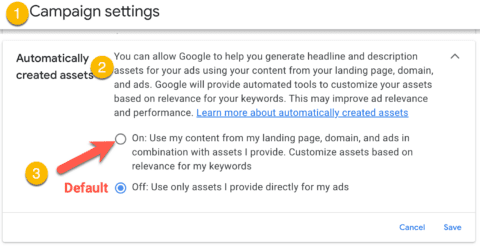
First, the advertiser must opt in at the campaign level. This is a good thing because there is prep work to be done to get the greatest benefit from AI tools.

opt-in to <span class=automatically created assets in Google Ads” width=”480″ height=”246″ class=”aligncenter” />

Next, prepare your inputs for AI-driven ads:

  • Landing page.
  • Manual assets.
  • Keywords.

1. Landing Page And Website

One key aspect of getting the most from AI is the landing page and website content. The AI algorithms need content to draw from, and the better the content, the more potential outputs will have.

After providing the URL, Google will find the relevant information on your page to generate ad creative.

Clear and ad-focused content. Clever, flowery marketing language or excessive jargon takes a back seat to concise, fact-based language.

Correct and up-to-date content. This can be a challenge for some smaller advertisers who do not have complete control over frequent content changes without incurring web dev fees. You may want to wait on AI right now if this is the case. For everyone else, be proactive and mindful about writing content for ads. Next, the “reactive” approach is to review reports to determine if web content should be altered or automated assets should be removed. The automated assets will change if the web content changes or assets are removed.

Content alignment. Ensure that the landing page content aligns with the ad copy. Keywords and messaging should be consistent with the search ads to maintain user trust and engagement.

Clear value proposition. Highlight the unique benefits or solutions your product/service offers. Use a compelling headline and subheadline that immediately captures the visitor’s attention.

Write strong CTAs. A common problem is advertisers simply not being clear in their CTAs in ad copy or on landing pages. Use action-oriented language repeated on the page and ad. Stick to one clear CTA. For a refresher, see this post.

Bonus: It is also a good idea to make a long-term plan to permanently change web content to aid AI in the future, as it is here to stay.

2. Manual Assets

The “manual assets” refer to the headlines and descriptions you write and enter into Google Ads.

Since the headlines and descriptions are served in many combinations, it’s important that the assets communicate a cohesive message. Enabling AI will allow automatically generated descriptions to be thrown into the mix.

Headlines: With up to 15 headlines with a maximum of 30 characters, try to assign a strategy to the type and number of headlines. For example, include:

  • Brand name: Although your company will appear in the “business name” field, it might not be the brand or product name you need to communicate here. Control the language and use a pin if needed.
  • Keywords from the adgroup.
  • CTA: ensure this is consistent and consider pinning this headline.
  • Feature/benefit.

Descriptions: Up to 4 total, with up to 90 characters per description.

While you want to use keywords, unique headlines, and consider Google suggestions, the ad should ultimately be clear, concise, and persuasive enough to get users to click and convert.

3. Keywords

In search campaigns with automated assets, keywords still matter and inform Google and, ultimately, your customer what the ad is about.

We want to stick with best practices in account structure and keyword selection. The keywords should always be closely connected to your ad and landing page.

If you have not been a perfectionist on this recently, now is a good time to review and evaluate your keywords, keeping AI automation in mind.

A great shortcut: While in the ad creation tool, venture into the ad suggestions area where Google will show you “popular keywords from the adgroup” you can click to add as a headline.

Finally, Performance

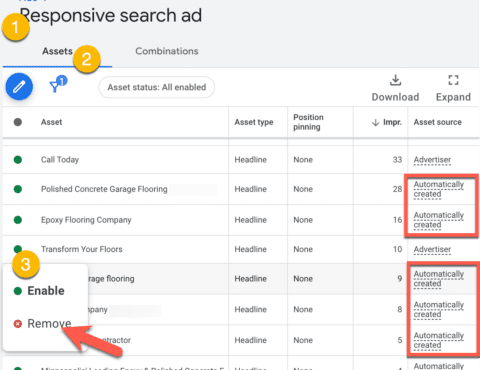
  • You can see the automatically created assets that were generated and served by reviewing the asset detail report.
  • Remove assets you don’t like: under the Responsive search ad > View asset details.

automated asset details in google ads

Conclusion

One of the misconceptions about AI in ads and automatically generated assets is that it’s a “set and forget” model that solves problems with ad management resources, time, and performance.

As we can see above, the process to enable AI takes knowledge, strategy, and ongoing management to ensure the messages served to your ideal customers can meet and exceed what is done manually.

This can only be achieved with humans setting it up for success.

Learn more on this topic: Google Ads: A Quick Guide To Every AI-Powered Ad Creative Feature (And What’s Coming Soon)

More resources:


Featured Image: VectorMine/Shutterstock

7 Mistakes Ecommerce Retailers Make When Advertising With Google Shopping via @sejournal, @brookeosmundson

Google Shopping can be a goldmine for many ecommerce retailers.

But, it also comes with the risk of losing money if not managed properly.

Even seasoned PPC advertisers can make easy mistakes that can drain the budget and lose campaign effectiveness.

However, making mistakes is a necessary part of any learning process. Each misstep can provide valuable insights to better optimize your Google Shopping campaigns.

In this article, we’ll review seven common mistakes ecommerce retailers make with Google Shopping and how you can turn those pitfalls into opportunities for growth.

1. Poor Product Feed Quality

The foundation for any successful Google Shopping campaign is undoubtedly the quality of a product feed.

Better data quality leads to better campaign outcomes.

However, many retailers overlook the importance of feed quality, which can lead to issues like:

  • Missing or incorrect product information.
  • Poorly written descriptions.
  • Lack of relevant keywords.

A poor product feed can result in low ad relevance and a poor-performing campaign.

So, where does one start to ensure a solid product feed?

The first priority of your product feed should be the title attribute. Some key items to consider when optimizing product titles include:

  • Use top-performing keywords at the beginning of the title.
  • Avoid using the brand name in the title if it doesn’t perform.
  • Use descriptive words.
  • Embrace the title character limit for maximum communication about the product.

It’s important to regularly audit your Google Shopping product feed to ensure all information is accurate, complete, and optimized for your top-performing keywords.

Google Merchant Center also includes diagnostics tools to identify any errors to fix.

Additionally, leveraging feed management tools can help automate and enhance the feed optimization process.

2. Ignoring Negative Keywords

While Google Shopping campaigns don’t have a keyword bidding component, they certainly have a negative keyword component.

For that reason, many retailers forget the importance of having a negative keyword strategy in their Shopping campaigns.

Ignoring the use of negative keywords is an easy gateway to wasted advertising spend on irrelevant searches. This can lead to reducing the overall campaign efficiency and return on investment (ROI).

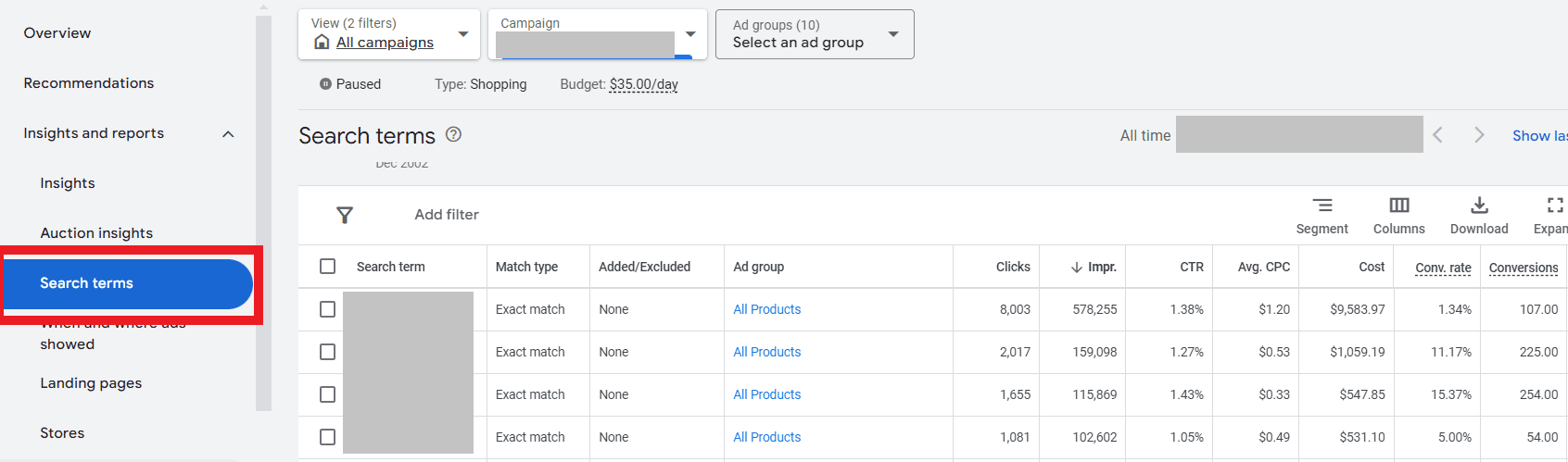
To combat this potential wasted ad spend, start by reviewing the search terms report regularly to identify and add any negative keywords.

In your Google Shopping campaign, navigate to Insights and reports > Search terms.

Google Shopping <span class=

From there, you can review what search terms triggered your products and how they performed.

If you find any irrelevant terms triggering your ads, you can add them as a negative – or better yet, create a negative keywords list to easily add to in the future.

This helps refine your targeting by showing your ads on more relevant searches, reducing wasted ad spend on non-converting traffic.

3. Inadequate Bid Management

Bid management is another critical component of a successful Google Shopping ads strategy.

However, many PPC managers will set bids once and then forget about them, instead of adjusting them based on performance data.

This hands-off approach can lead to underbidding or overbidding, and both scenarios can hurt your campaign’s ROI.

Another common mistake is using a “one size fits all” bid strategy, where you set the same bid amount or bid strategy across all products and campaigns.

To start optimizing your Google Shopping bid strategy, utilize automated bid strategies like:

  • Target return on ad spend (ROAS).
  • Target cost per action (CPA).
  • Maximize Conversion Value.

These Smart Bidding strategies help optimize your bids in real time, looking at factors like device, location, time of day, audience segments, and more.

Additionally, make sure that your daily budget aligns with your Smart Bidding strategy to ensure you’re not over- or under-bidding in any particular campaign.

For example, if you have a daily budget of $50 but are using a Target CPA bid strategy with a goal of $25, you’ll likely need to increase the daily budget significantly to give the algorithm a chance to learn more by serving more ad impressions.

4. Not Optimizing Images

With Google Shopping ads, the product image is likely the first thing to catch the user’s attention.

Most ecommerce retailers use the standard images from the official manufacturer’s website.

But wait, why would that be a bad thing?

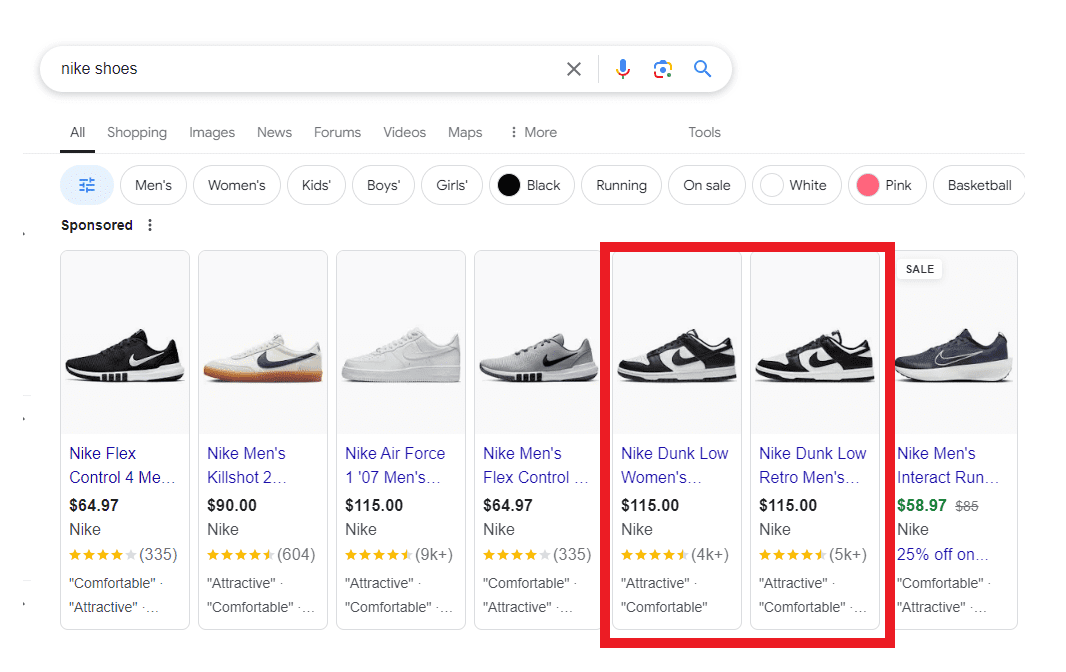
Well, to start, this means everyone will see the same image across a variety of brands, making it extremely difficult to stand out from your competitors.

For example, when was the last time you searched for “Nike shoes” and got a barrage of Shopping ads for the same shoes, just different retailers?

Example of a Google search with the query of 'Nike shoes' showing Shopping ad examples.Screenshot taken by author, July 2024.

If you’re used to using the same stock images, try taking advantage of some of the recent tools announced by Google at this year’s Google Marketing Live.

For example, advertisers can use Product Studio later this year, which instantly turns static images into eye-catching videos.

Additionally, you can use the new generative AI tools like their AI-powered image editing for product images from your Google Merchant Center feed.

Lastly, try A/B testing the standard stock photos against lifestyle images featuring the product to understand what resonates better with users.

5. Misunderstanding Campaign Types & Structure

As with any other campaign type, the structure can make or break your performance.

With Google Shopping, there are essentially three different options when creating a campaign:

  • Performance Max (with a feed).
  • Performance Max (feed-only).
  • Standard Shopping.

Both campaign types have their pros and cons when it comes to Google Shopping. The key is to understand the differences in features, functionality, and amount of control in order to choose the right campaign type for your goals.

In a regular Performance Max campaign, you have the option to add a feed as an asset, among many other assets like headlines, descriptions, images, etc.

This essentially means your Google Shopping ads can show across many types of Google inventory, not just on the Google Shopping network.

Now, feed-only Performance Max campaigns and Standard Shopping campaigns both focus on only showing ads on the Google Shopping network.

Next, let’s talk about the structure of your campaigns.

It may be tempting to lump everything into an “All Products” ad group and call it a day.

This mistake can cost you a lot of wasted ad dollars if not monitored closely.

If you’ve taken the steps to have a well-organized and clean product feed, don’t let that work go to waste!

A well-structured product feed will make your Google Shopping campaigns run much smoother by giving you control of how and when certain products are triggered.

If you’re unsure where to start, try grouping your products by their category. This allows for greater control over the ad listings.

Additionally, if you know you have low-margin products or products you want to avoid completely from showing, make sure to exclude those when setting up your campaign.

6. Overlooking Competitive Pricing

Google Shopping is a highly competitive channel, especially when it comes to pricing and its effect on ad performance.

Retailers who ignore their competitors’ pricing strategies may find their ads less appealing to customers, which leads to lower click-through rates and conversions.

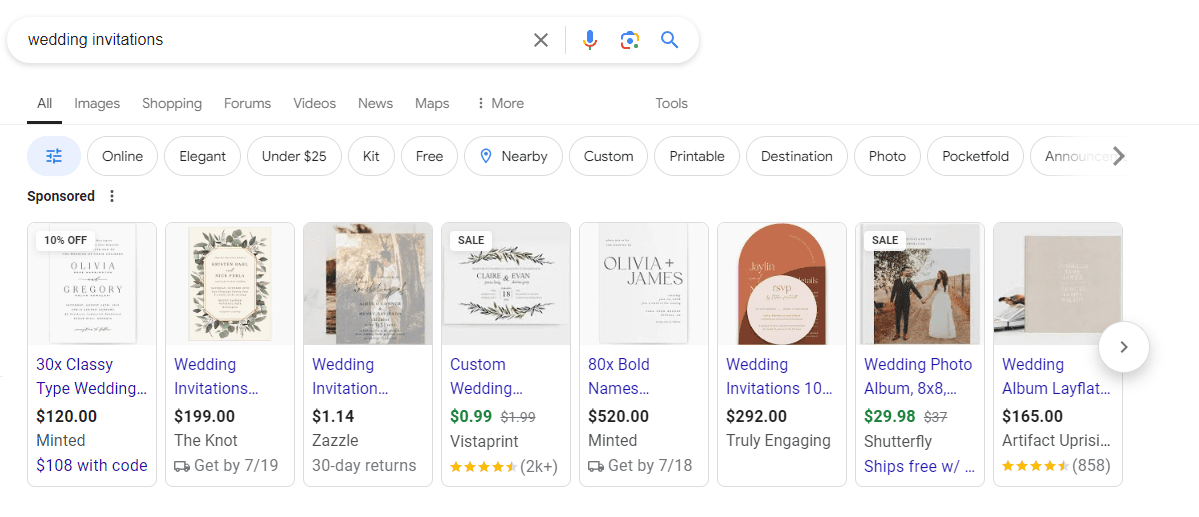
For retailers who sell items in minimum quantities, it may be about lowering your prices. It may also be about analyzing how your feed is structured by showing the “price per quantity.”

For example, when searching for ‘wedding invitations,’ the Shopping results come back with different brands with vastly different price points:

A search query for 'wedding invitations' on Google Search with Shopping ads results.Screenshot taken by author, July 2024

It’s clear that from this example, some brands show the price for a minimum of 30 (in the first example).

Other brands in the middle look to show the price per individual invitation.

When regularly analyzing your Shopping listings compared to others in the auction, it may be worth adjusting your price feed structure to stay competitive and remain attractive to active shoppers.

7. Not Using Merchant Promotions

In this economy, it’s no secret that almost everyone is looking for a deal when shopping.

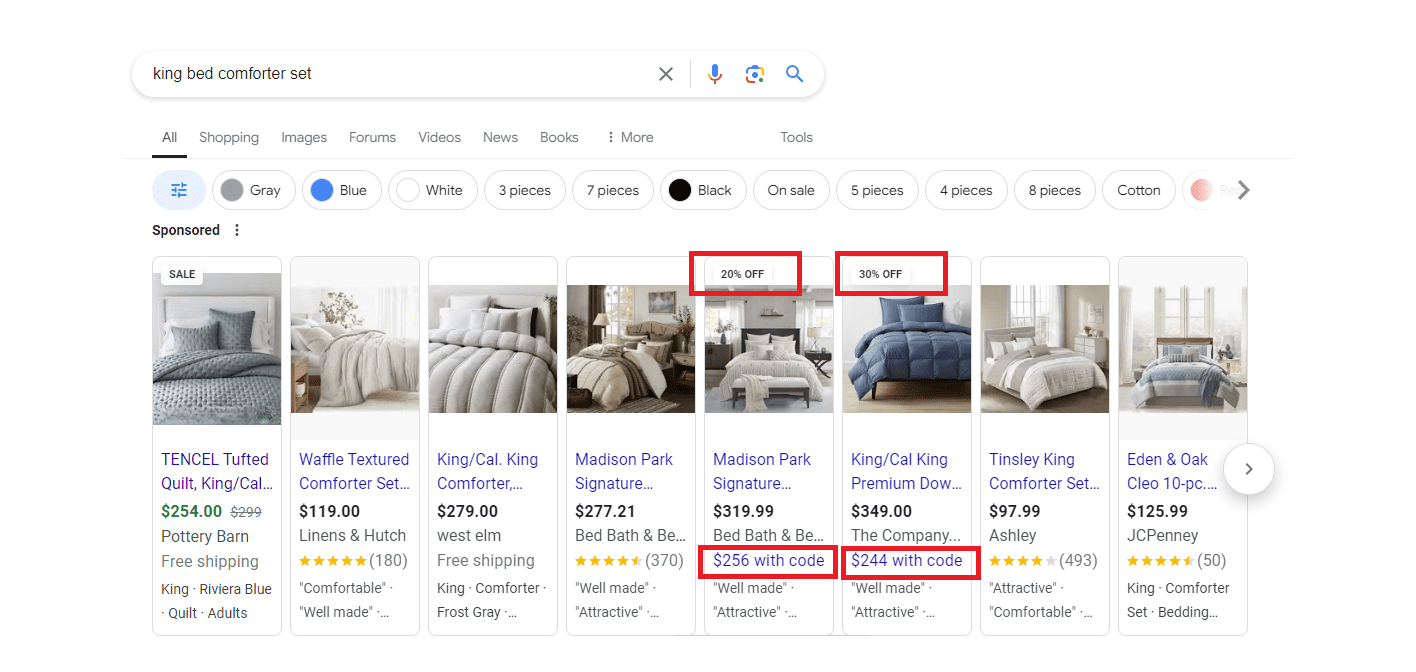
If you actively run promotions on your website, make sure to take advantage of Merchant Promotions and promotion assets in Google Ads.

Running Merchant Promotions will help make your product listing more attractive to shoppers, which could lead to higher click-thru rates and better ROI.

In this example, the Shopping ads shown when searching for ‘king bed comforter set’ showed two listings that were using Merchant Promotions.

Google search query of 'king bed comforter sets' with Google Shopping ads results.Screenshot taken by author, July 2024

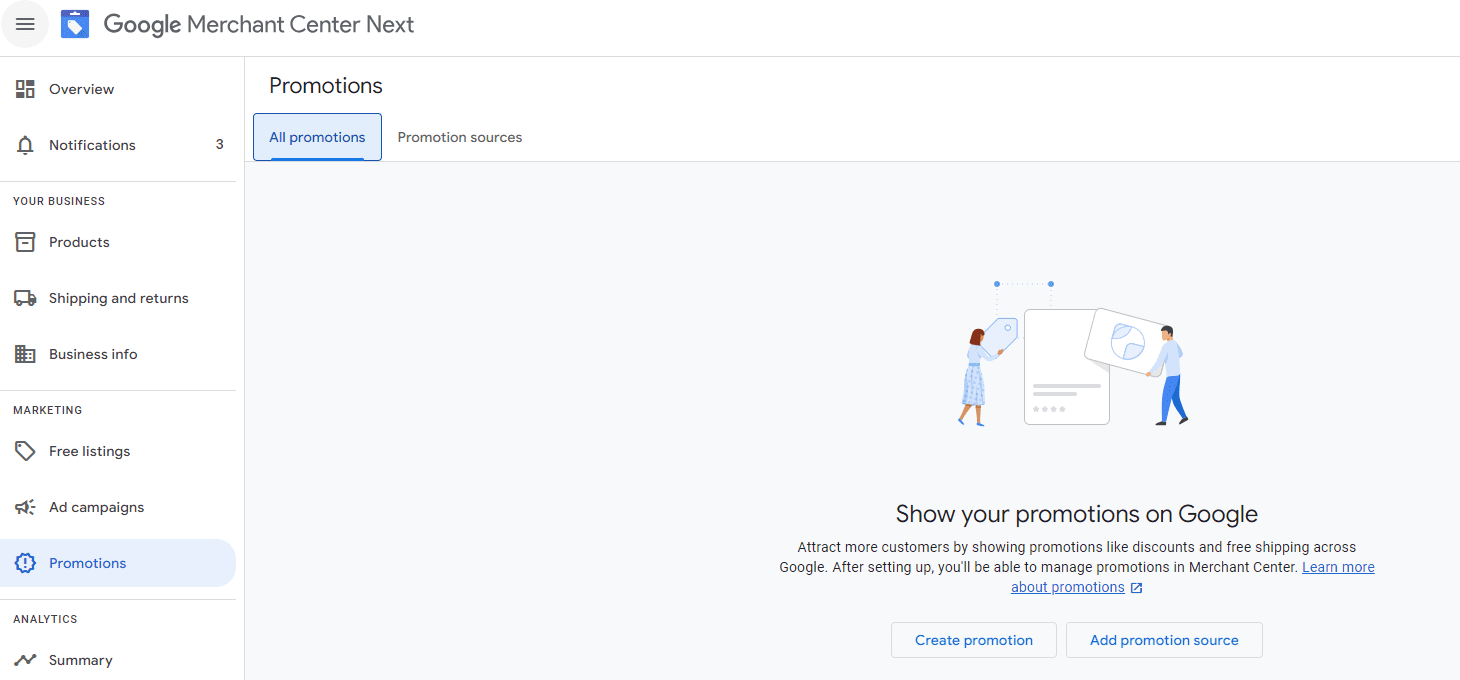
To set up a promotion, navigate to Promotions on the left-hand side of your Google Merchant Center platform. Then, click Create promotion:

How to set up merchant promotionsScreenshot taken by author, July 2024

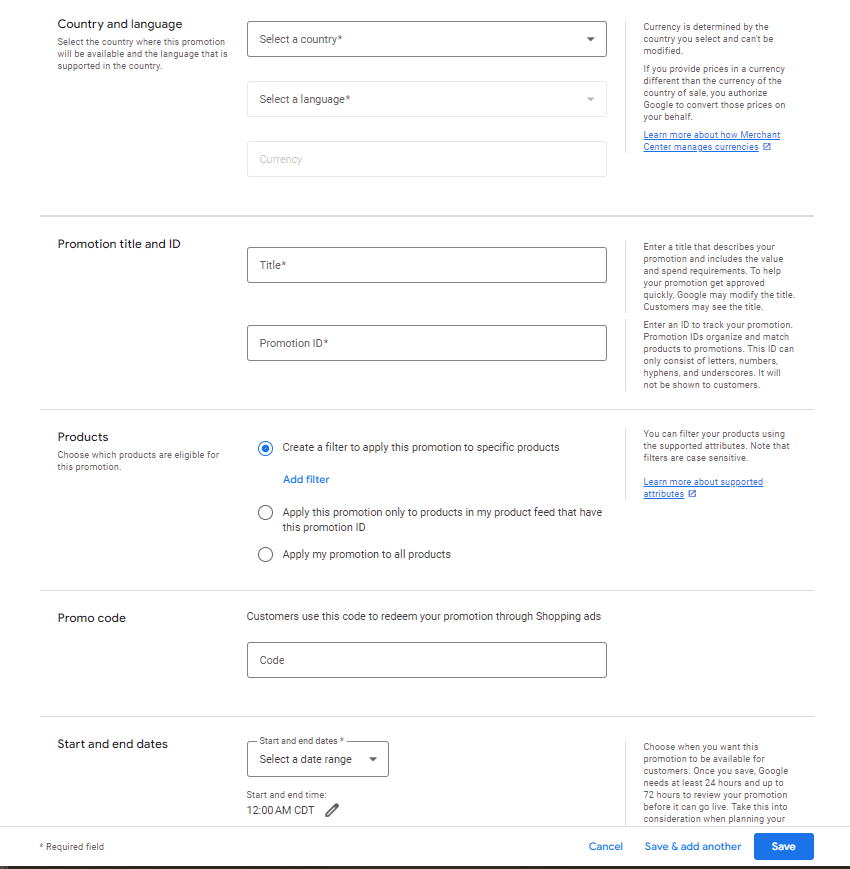
From there, you’ll enter the required information in order to save the promotion. After saving, the promotion can take up to 15 minutes to be visible to shoppers.

The required fields include:

  • Country.
  • Language.
  • Promotion Title.
  • Promotion ID.
  • Start and end dates.

The use of promo code is optional, where you can add it in if necessary for users to enter in order to redeem the sale.

Merchant Promotions setupScreenshot taken by author, July 2024

Later this year, Google also announced the rollout of a new way to tailor promotions in Shopping, like member-only exclusives or special pricing.

Additionally, Google announced on the same day that advertisers will be able to feature ‘first order’ promotions for new customers, which will be available in both Performance Max and Standard Shopping campaigns.

Continually Refine Your Google Shopping Campaigns

Avoiding these common Google Shopping mistakes can save you significant time, money, and headaches, as well as enhance campaign performance.

By focusing on things like product feed quality, bid management, negative keywords, and more, you can be on your way to driving better results and achieving a better ROI.

Remember, every mistake is an opportunity to learn and refine your strategy.

Stay proactive and continuously optimize, and you’ll turn your Google Shopping campaigns into a well-oiled machine and power revenue driver for your ecommerce business.

More resources: 


Featured Image: ulkerdesign/Shutterstock

When Search Isn’t Search Anymore, But It Is Still Search via @sejournal, @jonkagan

If you talk to any paid search marketing old-timer (someone with 10+ years of experience) and ask them what has changed within the search industry, they will likely give you a straightforward reply:

Literally everything.

Without dating myself, I can say that when I started in this space, Yahoo was the bigger ad platform than Google, AskJeeves was a standalone platform (and still had Jeeves), AOL was still a standalone ad platform, and there were fewer match types.

More importantly, we relied on keywords and manually written search ads (25-35-35 – if you know this reference, congratulations, you’re old).

Targeting was limited to geography, the search network, and not much else.

Search Is Not Just Search Anymore

Today, the odds are that half your “search” campaigns don’t even have keywords, ads are bigger (and can be AI-generated), the targeting ability is incredible, and the options of what you can do seem infinite.

But at the same time, you have less transparency, and the levers you pull are more directional than definitive (because let’s face it, odds are you aren’t doing much manual CPC bidding anymore).

In addition, the concept of paid search has changed. Where once it was a keyword and text ad-focused association, it has shifted to more of a platform term that even exceeds ads showing on search engines.

Think of it like this:

  • Search marketing in 2005: Yahoo and Google text ads triggered by keywords you bid on. As well as accidentally showing in GDN (back then called the Google Content Network).
  • Search marketing in 2024: Bing (because I refuse to call it Microsoft) and Google text ads triggered by keywords you bid on, as well as:
  • Product feeds showing your catalog in search engines and social media are triggered by behavior or queries you don’t bid on.
  • An “all-in-one” ad unit that optimizes all sorts of ad placements to a single goal (Performance Max).
  • Email ad units that are tied to ad placements on a mobile app feed and video views.
  • Video ads showing for whatever it feels, with some guidance based on behavior.
  • Bidding ads in a social media platform the way you used to bid on search ads 20 years ago, and so on.

The industry and the concept of search marketing over the past 20 years are night and day. In reality, it isn’t so much search marketing but biddable media.

However, it is still powered by a single thing: people searching for things.

Now cue: “But Jon, you just said search marketing isn’t search anymore, so how do people searching for things power the space?”

To which I reply:

“Shut up and listen. If you still run basic search and/or shopping ads, then that is people searching for things. The rest is audience-based targeting, meaning someone took multiple actions on the internet to get themselves categorized into audiences. The vast majority of the time, that behavior is search. The part that goes out the window most often is the recency of them doing that.”

Search Vs. Biddable Media

As the industry evolves, the thought of search marketing becomes a subset of a concept that emerged 10 or so years ago, known as biddable media.

Biddable media is fairly straightforward conceptually: If you are advertising online, on a platform that requires you to enter an auction for your ad to show, then you are doing biddable media.

Search is the function of biddable media for:

  • Triggering of ads in the search engine results page (SERP).
  • Managing non-keyword ads that show in SERP (Performance Max, Shopping, etc).
  • Creating keyword-based audience targets on non-keyword-based ad units (Microsoft Audience Network (MSAN), Google Display Network (GDN), YouTube, Performance Max, Demand Generation, etc.).

Traditional search management is also the lifeblood of strategy and approach to biddable media:

  • Manual bidding.
  • Target cost per acquisition (TCPA)/target return on ad spend (TROAS)/Max Clicks.
  • Bid modification for targets, seasonality, device, etc.

Net-net: Search has started to become an antiquated term. In reality, search is biddable media, which is not just search but a search style of management that is across many more ad units and platforms.

I know; this is as clear as how Jenn Shah of Real Housewives of Salt Lake City made all her money before she got arrested.

What Is The Scope Of “Search” Now?

First, let me comfort all “search” marketers with this: “Your job didn’t go away with this paradigm shift (if it had, it would’ve been 5-10 years ago, and you likely wouldn’t be reading this article).”

But now, those “search” marketers just became much more valuable.

With a little additional learning, they’ve become the Jack/Jane of all trades in the digital marketing space (except for fixed rate managed service buys, which are typically CTV/Streaming or non-programmatic display efforts or affiliate; they don’t fall in this concept).

Their working knowledge of paid search management has become a working knowledge of biddable media.

In a less roundabout way of saying it, your paid search skills are applicable to all forms of paid media that require a strategy and an auction.

So, the scope of your job is more than just Google and Bing search; it also includes managing other media channels, similar to how you would manage paid search.

Biddable Media Formats Using Search Management StrategiesBiddable Media Formats Using Search Management Strategies, screenshots by author, July 2024

How Do We Adapt Our Skill Sets?

Adapting your skill set depends on if it even needs to be adapted.

You may already be adapted to manage other platforms and don’t even realize it. If you’ve been doing any of the following, you’re already most of the way there:

  • Running a Performance Max campaign.
  • Intentionally running a Google GDN, YouTube, or Bing Audience Network campaign (a true standalone campaign with proper ad units).
  • Building and utilizing audience targets and remarketing lists.
  • Deciding a specific bid strategy, setting it up, and adjusting it based on performance (TROAS, Max Conversions, TCPA, CPM, Max Clicks w/ CPC, etc.).
  • A/B testing (landing page, creative, bid strategy).

If you’re doing most or all of the above (or have in the past), stop reading this article; you’re fine; go watch my beloved NY Jets disappoint their fan base by burning through another quarterback.

If you aren’t doing more than half of these, but you are managing paid search, the learning curve isn’t difficult.

Anyone who follows me on X (Twitter) knows I rarely give Google kudos for much of anything. Still, its certification process is incredibly helpful (not so much the certifications themselves, but the tutorials).

Those give you the basics of understanding GDN, Performance Max, Shopping YouTube, Demand Generation (fka Discover), and other elements. You already know paid search, which is the most difficult element to learn.

Then, it is merely applying those skills to other platforms.

Don’t believe me? Here is a handy little equivalency chart:

  • Non-Skippable YouTube targeted to TV that shows on YouTube TV and Google TV = (similar) to CTV placements bought programmatically.
  • GDN/Audience ads = Display placements bought programmatically.
  • Performance Max = (similar) multi-ad unit social placements (i.e., Meta/Linkedin).
  • Google/Bing Shopping = (similar) social shopping placement and retail media placements. (i.e., Roundel/Walmart/Amazon/Pinterest) via a product feed.

Here are also some examples of hands-on management being similar among platforms:

  • Google and Bing search strategies and most assets are the same as each other.
  • YouTube CPM/Non-Skippable bid strategies are the same as CTV efforts on TradeDesk.
  • Google/Bing Max Click bid strategies at the campaign level are the same as optimizing Meta campaigns to Link Clicks or Landing Page Views.
  • Geotargeting in Google (which in my mind is some of the most impressive), can largely be replicated in Meta, GroundTruth, TradeDesk, SimpliFi, and more.
  • Remarketing lists are roughly designed the same way across all platforms (Google Analytics does have a leg up, I will admit), but all it requires is a platform site pixel to be deployed.
  • CRM/Customer Lists can be uploaded to nearly every platform (some restrictions apply in verticals around healthcare, financial services, and a few others).
  • Video creative (the raw file), are interchangeable between Linkedin, YouTube, Meta, Criteo, Bing, and many more.

The similarities go on:

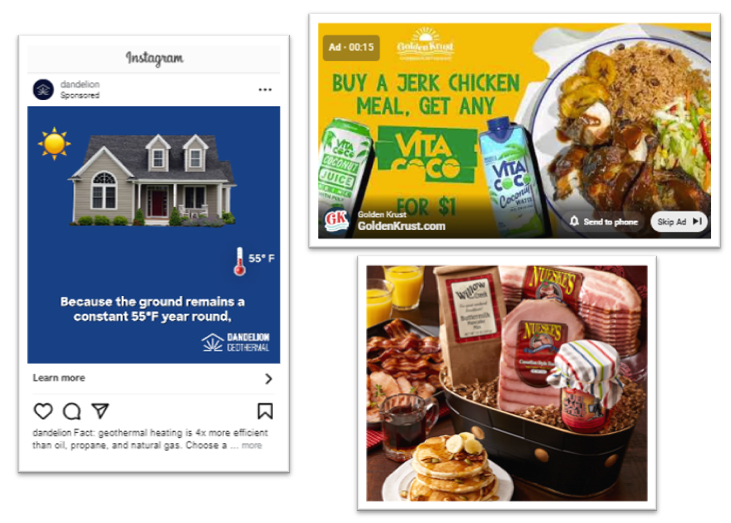
1 Creative Across 3 Platforms (Google, TTD, Meta)1 Creative Across 3 Platforms (Google, TTD, Meta) screenshots by author, July 2024

Not to mention, between A.I. strategies (which is a fancy way of saying “bid rules”) and platform transparency (hey, Performance Max, you can sit this statement out), the management approach between the platforms on the similar ad units is nearly identical.

Not to mention, providing the non-text units are sized correctly, you can frequently utilize creative files across platforms and save yourself (and/or your creative team) some precious time.

Search Beyond Just Search Provides New Insight

My favorite part about multi-channel biddable media is its give-and-take between platforms.

Strong-performing paid search text ads are carried into social ads (RSA ads easily fit into Meta Headline + Primary Text + Description).

Engagement with display based on placement helps me decide where to target my CTV/Video creative. (High CTR on sports websites means I will focus my videos on sports content/games.)

Search Query reports give me a better sense of what people are actually searching for, which I can correlate to in-market audiences for targeting. Observational search audiences and demographics help me shape my audience segments.

The same audience build can be used across platforms, for example this customer list uploadScreenshot from author, July 2024

The same audience build can be used across platforms, for example, this customer list upload.

Your overarching bid management skillset helps you further develop each channel.

Am I Even A Search Marketer Anymore?

Short answer: Yes, you still manage search-based ad units (otherwise, you wouldn’t be reading this article).

Long answer: Sort of. But in reality, you’re a multi-purpose digital marketer who, in addition to managing search-based ad placements that they have control over, also has the working skillset to manage programmatic display, programmatic video/CTV, social, digital out-of-home (DOOH), programmatic audio, retail media (excluding affiliate), as well paid search (but don’t get cocky and say SEO, because that is definitely not a transferable skillset in this situation).

The Takeaway

Whether you realize it or not, you’ve become a digital marketing Swiss Army Knife, able to manage multiple media channels (and countless ad types), all because you know paid search.

This means you need to stop thinking that “search” marketing is about keywords triggering text ads and start thinking of it as a “search” skillset that can be deployed anywhere.

It takes a little practice and some getting used to, but it has become one of the most valuable skill sets in paid media.

More resources:


Featured Image: ra2 studio/Shutterstock

Which Metrics Matter In PPC? via @sejournal, @navahf

Pay-per-click (PPC) advertising has evolved quite a bit since it first began in the early days of the internet.

Metrics like cost per click (CPC) remain an important part of the conversation, while others (like average position) have retired.

Understanding the history of each major metric, as well as how they relate to each other, is critical to determining which metrics to focus on.

This guide will attempt to be as agnostic as possible on account structure strategy (though a certain amount of subjectivity is unavoidable).

Here’s what we’ll be covering:

  • The major metrics in PPC: In this case, we define PPC as any channel where you pay per click. This means there will be some video/social metrics.
  • Relationships between metrics.
  • Which metrics matter today and likely will matter in the future?

Major Metrics In PPC

Given that Google is a dominant player, we’ll focus mostly on those metrics. However, we’ll call out additional network metrics where needed.

Additionally, we’re not separating YouTube from Google Ads. We will only cover “go do” metrics vs. informational ones (i.e., the setup metrics).

By the way, this section is a bit beginner-friendly. So, if you’re already familiar with PPC metrics, skip ahead to the next section.

Major PPC Metrics

Impressions The users could see the ad. (Note: It’s possible to have more than one impression for the same user if the ad appears multiple times on the page.)
View The user sees the ad. (This is a video-oriented metric.)
Click The user clicks the ad.
Interaction Any interaction the user completes with the ad. (It can include clicks, but is not limited to that.)
Click-through rate (CTR) The number of clicks received divided by impressions.
Interaction rate (IR) The number of interactions received divided by impressions.
Impression share Of all available impressions for a given target, how many are you receiving?
Spend The amount spent in a given period.
Average cost per click (CPC) The average amount spent in each auction per click.
Average cost per mille (CPM) The average amount spent per thousand impressions.
Top of page impression share Of all available impressions, how many of them are serving in the top-of-page ad model?
Absolute top of page impression share
Of all available impressions, how many are serving in the No. 1 position in the top-of-page model?
Any impression share lost due to rank
The percentage of impressions you lose due to bidding or structural issues.
Any impression share lost due to budget The percentage of impressions you lose due to budget issues.
Frequency The number of times the same person sees the same ad.
Reach How many people did the ad actually reach?
Overlapping share The amount of times you and a competitor serve for the same target.
Engagement A non-click interaction. (An example is watching a video for at least 10 seconds.)
Conversions A profitable action that you’ve designated as useful.
All conversions
A mix of conversion actions you’ve told Google to factor into bidding/reporting and ones you’ve told it to observe only. (Note: There is an all-conversion variant for all other conversion metrics, but in the interest of efficiency, we’ll just spell out the counted conversion metrics.)
Conversion value The monetary value assigned to a given conversion action.
Conversion rate The number of conversions divided by the interactions.
Cost per acquisition (CPA) The spend of a given entity divided by the count of conversions. (Note: An entity can be anything from a search term all the way to the account level.)
Return on ad spend (ROAS) The total conversion value divided by the total amount of spend generated by the entity.
Quality Score A three-pronged valuation system looking at expected CTR, ad relevance, and landing page quality.
Ad Strength A non-weighted critique of ad assets in responsive search, display, and Performance Max campaigns.
Optimization score A score provided by Google to review your campaign. In order to maintain Google Partner status, you need to achieve an average of 70%.

Relationship Between Metrics

There’s a lot of interconnectivity between PPC metrics, and it can be a bit daunting to know which relationships to build strategy around.

While there’s a case to be made for every metric playing a role in your account choices, these are the top relationships to focus on.

CTR And Conversion Rate

The most critical relationship to focus on is CTR vs. conversion rate.

This is because these two metrics help hold your ad account and website accountable for their respective roles in winning customers.

If your CTR is really good and your conversion rate is not, there are a few potential paths you can explore:

  • Is the landing page letting you down? This could be a design issue or a technical one (conversion tracking isn’t configured correctly).
  • The ads are engaging, but they target people who aren’t quite ready to purchase. Adding more prequalifying language into the ads can solve this.
  • Targeting is outright incorrect, and the clicks are accidental. This can be caused by search partners with display expansion or misconfigured Performance Max campaigns.

When CTR is low but the conversion rate is good, the fixes will be a little different:

  • The ad creative may not be enticing enough. You may want to be more direct in asking folks to contact you or order now.
  • Your budget may not support prime-time bidding, so you end up serving a lot during off-hours when folks are less likely to engage. You can correct this with an ad schedule to force budgets to only spend during peak hours.
  • There may be a double or triple counting issue, where you’re getting more than one conversion count per click. Use the “conversion action” segment to identify any false positives. This is critical to catch because double-counting conversions will influence smart bidding and reporting.

When both are good or bad, it can be a little tougher to know where to focus optimization or scale efforts.

The best starting point will always be your customers and the quality of your leads.

Average CPC And Search Terms/Placement Type

It can be very tempting to overoptimize for cheap clicks, but if you only focus on CPC, you may price yourself out of the auction.

While we don’t have full search term access, leveraging what we do have is critical to making informed choices around which ideas we budget for.

If your average CPCs are low for your industry, here is what you should check for:

  • Branded queries sneaking into non-branded campaigns. This can happen if you’re using broad match, as well as if you don’t use negatives to sequester branded traffic.
  • Non-search placements are using search budget. These placements aren’t inherently bad, but if you’re bidding for search, you will overbid on other placements.
  • If you’re losing more than 50% impression share due to rank, you are likely choking volume too much to be profitable.

When the average CPC is high for your industry, here is what to check for:

  • Accidental duplicates that might be causing you to bid against yourself (and potentially cause serving issues). While search terms will be the best source of truth for this, you also can check a keyword’s status. If you get the “another eligible keyword was chosen” status more than 25% of the time, you likely need to clean up close variant duplicates.
  • The bidding strategy may be forcing you to bid too high because there isn’t enough conversion data to inform smart bidding. Consider switching back to manual or using target impression share/max clicks with a bid cap. The bid cap should be no more than 10% of your daily budget.

CPA And ROAS’s Influence On Volume/Value

One reason Smart Bidding (Max Conversions and Max Conversion Value) catches a lot of heat is that people don’t fully understand how to help them learn profitable budget allocation.

It is very normal for a brand-new account using Smart Bidding to have a bad experience if they don’t have enough conversions (30+) in a 30-day period.

When you need volume, CPAs and ROAS have to be more conservative. For example, you might be willing to take a $100 CPA on a $300 product/service. The ROAS goal would be 300% (we spent $100 to achieve $300).

This mindset is really important for product/company launches, as well as if you are facing a shortage of leads.

Conversely, if you’re under scrutiny for marketing costs, you may set more aggressive goals, so each customer is worth more (even if you get fewer of them).

For example, I might only be willing to pay $30 for that $300 product/service.

This inherently means that I will get fewer leads than when I was willing to pay $100 to acquire them, but that might also provide needed operational filters (not overloading sales/customer success teams with leads).

The ROAS equation is a little tougher because you still want to factor in lifetime value. Most industries do well somewhere between a two-time and five-time ROAS goal.

It’s also worth noting that your CPC will be directly impacted by which school of thought you adopt. Absolutely use bid floors and caps to make sure you bid enough to enter the auction, as well as balance how much of your budget goes to a single click.

As a general rule, you don’t want more than 10% of a daily budget going to one click because a 10% conversion rate is really good for non-branded.

However, the floor is a bit trickier to set. If you don’t have the data for your industry CPCs, consider starting with 3% of your daily budget.

Which Metrics Matter

Ultimately, the metrics that matter are the ones enabling you to “go do” off of the analysis, as well as the ones weighted in the auction.

These metrics are weighted in the auction:

  • Conversions.
  • CTR.
  • CPC.
  • Quality score*: While this is not officially weighted in the auction anymore, the core signals informing it still are.

These metrics are your “go do’s:”

  • CPA/ROAS: Are you making enough money off of your ads? If not, adjust targets.
  • Impression share: Based on what, if any, is lost to, make structural, bidding, or budgeting changes
  • Conversion rate/CTR: Are the account and website supporting each other in winning business, and do you trust the reporting of both?

Metrics like Ad Strength and optimization score are friendly suggestions but don’t actually impact your account performance.

Final Takeaways

It can be tough to know where to focus on your ad account.

Hopefully, this review of the metrics and their relationships to each other helps you prioritize what to focus on, report on, and act on.

More resources:


Featured Image: kenchiro168/Shutterstock

Mastering AI-Powered PPC Bid Strategies: A Guide To Maximizing Performance via @sejournal, @brookeosmundson

Let’s talk about PPC bidding strategies. If you’ve ever felt like you’re throwing darts in the dark when it comes to picking the right one, you’re not alone.

When I first started in Google Ads, the only bidding strategy available was “Max CPC” bidding, meaning everything was manual.

Nowadays, there are many AI-powered bidding strategies to fit your diverse campaign needs.

These strategies aren’t exactly a “one size fits all” deal for your campaigns.

Not only are there more choices than ever to reach your goals, but the inputs you set at the campaign level are just as crucial for success.

The truth is that choosing the right bid strategy can be the difference between crushing your PPC goals or watching your budget go up in flames.

Let’s dive into the nitty-gritty of AI-powered bid strategies, or Smart Bidding strategies, and figure out how to maximize performance for each of your campaigns.

How Many PPC Bid Strategies Does Google Ads Have?

Google Ads offers multiple types of bidding strategies aimed at meeting the goals of all available campaign types.

These strategies use Google AI to optimize in every single auction, typically known as “real-time bidding.”

It takes many factors into consideration at the time of auction outside of your bidding strategy, including device, location, time of day, operating system, and many more.

Google categorizes their Smart Bidding strategies into three main goals:

  • Conversions.
  • Clicks.
  • Viewability.

It’s important to match your Google Ads bid strategies with the campaign’s specific advertising objectives.

If you’re not sure where to start with goals, consider these points when making a bid strategy decision:

  • Are you looking for users to take direct action on your website?
  • Do you want to increase website traffic overall?
  • How important is brand awareness to you?
  • Are you looking to increase video engagement and interaction?
  • Are you focused on product or brand consideration when users are actively shopping around?

Conversion-Based Bid Strategies

Currently, Google Ads offers these Smart Bidding strategies aimed at increasing conversions:

  • Target Cost per Action (CPA).
  • Target Return on Ad Spend (ROAS).
  • Maximize Conversions.
  • Maximize Conversion Value.
  • Enhanced Cost per Click (eCPC).

Click-Based Bid Strategies

If your main goal is gaining website traction, the only automated bid strategy currently available is Maximize Clicks.

Manual CPC bidding is still an option, but we’ll get to that later on in the article.

Visibility-Based Bid Strategies

Not all campaigns aim to capture the final conversion, and that’s ok!

You need to have some element of brand awareness coming in, otherwise the group of people who know about your product will continue to shrink.

If your campaign goals are focused on awareness, consider these automated PPC bidding strategies:

  • Target Impression Share.
  • CPM.
  • tCPM.
  • vCPM.

Next, we’ll examine the main AI-powered PPC bidding strategy more granularly to get a better understanding of each one, as well as when it makes sense to choose that particular bid strategy.

Read more: PPC Automation Layering: How To Get More From Google Ads

Target Cost Per Action (CPA) Bidding

Target CPA lets you set the amount you’re willing to pay for a conversion. Google Ads uses machine learning to get as many conversions as possible at or below your set CPA.

Google then takes your Target CPA to set bids based on the likelihood of conversion from that particular user.

While some conversions may cost more than your Target CPA, others may cost less than your target, but overall, the Google Ads system tries to keep your cost per conversion at the level you set.

There are multiple use cases for choosing Target CPA bidding:

  • Historical conversion data is available. This bid strategy requires historical conversion data, so if you have ample campaign or account conversion data, this could be a good strategy for you.
  • You need better budget control. It’s also good if you need to retain control over your CPA in order to manage the overall ROI of your PPC program.
  • Conversion tracking is accurately set up. As long as there are no underlying issues with your conversion tracking, this bid strategy could be reliable for your campaigns.

For example, say you run an online boutique clothing website and know that acquiring a new customer at $50 will still be profitable. For your campaign, you choose the Target CPA bid strategy and set the limit to $50.

As you’re running your campaigns, the data shows you’ve consistently been acquiring new customers at $40. Because of this, the Google Ads system knows it can optimize bids further to get you more customers while still staying within that $50 limit.

Now, there are some limitations to Target CPA bidding to be aware of:

  • Limited budgets could reduce visibility. If you’ve set a competitive Target CPA, Google may limit your ad exposure or participation in the auction and reserve your budget for more expensive or competitive auctions. Essentially, you may see impressions and clicks decline as the system “conserves” budget expenditure for the most likely-to-purchase candidates.
  • Misalignment of daily budget and Target CPA can reduce results. Say you have a daily budget of $50 for your campaign, but your Target CPA is set at $25. Your impressions may be vastly reduced because, in this scenario, you’d need to have a stellar conversion rate for the number of clicks you get in order to stay within that $25 CPA.

Target Return On Ad Spend (ROAS) Bidding

Target ROAS aims to achieve a specific return on ad spend. You set the desired ROAS, and Google Ads optimizes bids to maximize conversion value while hitting your target.

Similar to Target CPA, Google then takes your ROAS inputs to set bids based on the likelihood of a conversion from that particular user.

Some good use cases for using Target ROAS bidding for campaigns include:

  • Your goals are revenue-driven. Target ROAS is great for ecommerce businesses where goals are revenue-based.
  • You have high-value transactions. This PPC bidding strategy can be especially effective for high-revenue transactions or a high volume of conversions.
  • Proper conversion tracking is set up. Similar to Target CPA bidding, this strategy requires accurate conversion tracking. As long as tracking is accurate and validated, this can be a good choice for your campaigns.

The Target ROAS bid strategy is a great choice when you need to balance the cost of your PPC campaigns versus the revenue coming in.

Ultimately, it helps generate more revenue for every dollar spent.

For example, you have an online store that sells running shoes. Your average order value is $150, and you aim to have a 300% ROAS.

That means for every $1 you spend, you get back $3 in revenue. By setting a Target ROAS, Google optimizes campaign bids to focus on the specific conversions that will likely meet or exceed that 300% ROAS goal.

As your campaigns gain more historical sales data, you’ll notice that more of your dollars are going to those higher revenue-generating sales because of the goal setting.

With Target ROAS settings, remember that if you have an overall goal of 300% ROAS, that doesn’t mean every campaign you set should have that 300% goal.

When it comes to search campaigns, brand terms and non-brand terms are not created equal. Brand terms will likely have the highest ROAS because someone is actively searching for your brand, signaling a higher likelihood of purchase.

Non-brand terms, on the other hand, will be more competitive and costly, and likely won’t have the same ROAS as brand terms. So, be sure to set your ROAS goals at the campaign level accordingly.

Maximize Conversions Bidding

Maximize Conversions automatically sets bids to help you get the most conversions within your budget. 

This strategy aims at spending your entire campaign budget without having any ROAS or CPA limitations.

Maximize Conversions can be an ideal bid strategy if:

  • You have more budget flexibility. As mentioned above, this strategy is not constrained by CPA or ROAS targets. If you’re looking to drive as many conversions as possible and have the budget to do so, this strategy is right for you.
  • You’re looking for quick wins. If you just launched a new product and conversion expectations are high, this is an ideal strategy.
  • A broader audience is targeted. This strategy can be effective with a broader audience because there’s more of a likelihood for your ads to show as the system learns what a valuable customer looks like.

For example, your company just launched a new fitness app and needs to acquire users quickly.

By having a flexible budget, Maximize Conversions is chosen to drive as many downloads and signups as possible. Google will automatically adjust those bids to find the users most likely to convert.

This bid strategy is not for the faint of heart, especially for advertisers who have limited budgets or need to stay within certain performance constraints.

Maximize Conversion Value Bidding

Similar to Maximize Conversions, the Maximize Conversion Value strategy sets bids to help you get the most conversion value within your budget.

This strategy aims to optimize for conversion value while spending your entire campaign budget without having any ROAS or CPA limitations.

Maximize Conversions can be an ideal bid strategy if:

  • Conversion value is prioritized over volume. This bid strategy is suitable when the goal is to prioritize high-value conversions instead of the volume of conversions.
  • Campaigns are revenue-focused. Maximize Conversion Value is great when maximizing revenue is important.
  • Your products have multiple price points. This is an effective bid strategy when you have different products that vary in price. The system will learn to focus on the high-value transactions from users.

For example, you run an online wedding invitations company with higher price points. Your site also sells accessories that cost much less than the invitations.

Using the Maximize Conversion Value bidding strategy helps focus on those high-value transactions, like wedding invitations, to boost your revenue while spending your campaign budget.

As with each bidding strategy, there are some limitations to using the Maximize Conversions (and Value) strategies:

  • Performance is dependent on campaign budget. If the campaign budget is set too low, it will be difficult for Google Ads to effectively learn and optimize towards high-value conversions.
  • Less control over specific types of conversions. If you’re measuring multiple conversion types that have values associated, this strategy doesn’t allow you to target the specific conversion types. Its aim is to look at the overall conversion value.
  • This could lead to inefficiencies in performance metrics. While you may see an increase in revenue, you could also yield higher Cost per Acquisition, especially during more competitive markets.

At the end of the day, it’s up to you to decide if you have enough budget flexibility to utilize Maximize Conversions (or Value) or need to stay within certain ROAS or CPA constraints.

Read more: How To Get The Most Out Of Max Conversion Value And tROAS Bidding

Maximize Clicks Bidding

The Maximize Clicks bid strategy aims to get as many clicks as possible within your budget.

What’s nice about this strategy is that you can add “ceiling” bid limits for Google to not go over within the auction process.

Maximize Clicks is ideal for your campaigns if:

  • You’re looking to increase website traffic. If you’re less focused on conversion and looking to get as much traffic as possible, this strategy is for you.
  • You’re running Top-of-Funnel (TOF) or Middle-of-Funnel (MOF) campaigns. Similar to the above, if your campaign goal is more about awareness generation and buyer consideration, Maximize Clicks is a great place to start.
  • You’re setting up new campaigns with no history. Because many of the conversion-based bid strategies require historical data, setting campaigns to Maximize Clicks with a suitable maximum CPC limit can really help your campaigns take off quickly.

For example, you started a recipe blog website and just published a new guide on healthy swaps in your kitchen. Your primary goal is to drive as much traffic to that page as possible within your given budget.

Using the Maximize Clicks bid strategy will then aim to get you as many clicks to your site within that budget for the keywords you’re bidding on. Just remember to set a maximum CPC if you’re in a competitive industry!

Target Impression Share Bidding

This next PPC bidding strategy focuses mainly on the visibility of your campaigns, whereas the others focus on conversion or click-based outcomes.

Target Impression Share automatically sets bids to help ensure your ads achieve a specific impression share on the search results page. 

You can choose your goal to show your ads:

  • At the absolute top of the page.
  • On the top of the page.
  • Anywhere on the page of the search results.

Using the Target Impression Share strategy can help boost your campaigns if:

  • Brand awareness is top of mind. If the campaign’s main goal is maintaining a solid presence on Google or increasing visibility for your brand, this strategy is for you.
  • You’re in a highly competitive market. In markets where competition is high and visibility to your brand is crucial.
  • You’re running top-of-funnel keywords. Similar to brand awareness, you may be targeting keywords that aren’t conversion-focused and want your brand to be top of mind when users first start their purchase journey.

For example, you just launched a new fashion brand and want to ensure your ads are visible in a highly competitive space.

Your goal is to appear at the top of the Google search results page for keywords like “summer fashion trends” or “stylish summer outfits for women.” By choosing Target Impression Share, you can choose how often you’re willing to appear at the top of the page for the keywords you’re bidding on.

Keep in mind that by using this bid strategy, you may see higher-than-average CPCs. That’s because you’re paying extra for that coveted top space on the search results page.

Another example is setting your brand campaign on Target Impression Share to ensure your core brand terms are always covered.

Results have been mixed in my experience, as sometimes I’ll just see inflated CPCs on terms where I would’ve seen lower CPCs utilizing Maximize Conversions or Maximize Clicks.

What About Manual Bidding?

Manual CPC bidding is still around – for now.

Google has not indicated that it is removing this option, but we can never guarantee that it will always be there.

As the name says, Manual CPC bidding means you set the maximum CPCs you’re willing to pay. They can be set at the campaign, ad group, or keyword level.

The reason many have transformed their PPC bidding strategies to more AI-powered strategies from Google is that human real-time bidding simply can’t keep up with machine learning.

There are still use cases for brands who need to use Manual CPC and continue to use it to this day. Especially for brands that don’t have conversion data or are running small accounts, some just opt into this model for managing their Google Ads campaigns.

Read more: Do Manual Adjustments Still Make Sense With Automated Bidding?

Choose The Right Strategy For Your Specific Goals

So, there you have it – a breakdown of Google Ads’ AI-powered bid strategies and when to use them.

Remember, the key to PPC success is not just picking any strategy but choosing the right one for your specific goals and campaign needs.

Google’s machine learning outputs are usually the direct result of the inputs from the advertisers, so choose accordingly. And remember, they can be changed over time! Just make sure that your changes align with the overall business goals.

By understanding these strategies, you can make smarter decisions and get the most out of your PPC budget. Happy optimizing!

More resources: 


Featured Image: BestForBest/Shutterstock