How to craft great page titles for SEO?

Writing strong page titles is one of the simplest and most impactful SEO optimizations you can make. The title tag is often the first thing users see in search results, and it helps search engines understand the content of your page.

In this article, you’ll learn what SEO page titles are, why they matter, and how to write titles that improve visibility and attract clicks.

Key takeaways

  • Crafting a strong page title is vital for SEO; it attracts clicks and helps search engines understand your content
  • An SEO page title appears in search results and browser tabs, serving as the first impression for users
  • To optimize your page title, include relevant keywords and ensure it aligns with the content to improve your ranking
  • Yoast SEO provides tools to help check title width and keyword usage, and includes an AI-powered title generator
  • You can change the page title after publication, and doing so may significantly improve click-through rates

Table of contents

What is an SEO page title?

Let’s start with the basics. If you look at the source of a page (right-click on the page, then choose View Page Source), you find a title in the head section. It looks like this:

This is an example SEO title - Example.com

This is the HTML title tag, also called the SEO title. When you look something up in a search engine, you get a list of results that appear as snippets. The part that looks like a headline is the SEO title. The SEO title typically includes the post title but may also incorporate other elements, such as the site name. Or even emojis!

An example of a Google snippet with a favicon, site name, URL, meta description, and title in the largest font

In most cases, the SEO title is the first thing people see, even before they get on your site. In tabbed browsers, you will usually also see the SEO title in the page tab, as shown in the image below.

An SEO title in a browser tab

What’s the purpose of an SEO title?

Your SEO title aims to entice people to click on it, visit your website, read your post, or purchase your product. If your title is not good enough, people will ignore it and move on to other results. Essentially, there are two goals that you want to achieve with an SEO title:

  1. It must help you rank for a keyword
  2. It must make the user want to click through to your page

Google uses many signals when deciding your relevance for a specific keyword. While click-through rate is not a direct ranking factor, user interaction with search results can be a signal that a result matches search intent.

If your page ranks well but attracts few clicks, that may indicate your title doesn’t resonate with searchers. Improving your SEO title can increase clicks and help you perform better over time.

Additionally, as mentioned earlier, Google uses the SEO title specified for your website as a ranking input. So, it’s not just about those clicks; you also need to ensure that your title reflects the topic being discussed on your page and the keyword that you’re focusing on. The SEO title you use has a direct influence on your ranking.

Now that you know the importance of SEO titles, let’s look at how to evaluate and improve them. Tools like Yoast SEO (Free) can help by checking key elements such as title width and keyword usage. Yoast SEO Premium uses generative AI to create titles.

A smarter analysis in Yoast SEO Premium

Yoast SEO Premium has a smart content analysis that helps you take your content to the next level!

Yoast SEO Premium includes an AI-powered title generator that can help you create SEO-friendly page titles based on your content and focus keyphrase. This can be useful for inspiration or for quickly generating alternatives when you’re unsure how to phrase a title.

As with any AI-generated content, it’s best to review and refine the suggested titles to ensure they align with your page’s intent, brand voice, and audience expectations.

In addition, if you use Yoast SEO Premium, you get various other AI features, like Yoast AI Optimize, that help you do the hard work.

Simply hit the Use AI button to have Yoast SEO Premium generate great titles for you

What does the empty title check in Yoast SEO do?

The empty title check in Yoast SEO Premium is self-explanatory: it checks whether you’ve filled in any text in your post’s ‘Title’ section. If you haven’t, you’ll see a red traffic light reminding you to add a title. Once this is filled in, the post title can be automatically added to the SEO title field using the ‘Title’ variable.

You can edit your titles in the Search appearance section of Yoast SEO

Note that your post title is output as an H1 heading. A clear H1 helps users quickly understand what a page is about, improves accessibility for screen readers, and aids search engines in interpreting the page structure. You should only use one H1 heading per page to avoid confusing search engines. Don’t worry; we’ve got a check for multiple H1 headings in Yoast SEO!

What does the SEO title width check in Yoast SEO do?

You will find this check in the SEO tab of the Yoast SEO sidebar or meta box. If you haven’t written an SEO title yet, this will remind you to do so. Additionally, Yoast SEO verifies the width of your SEO title. When it is too long, you will get a warning.

We used to warn you if your SEO title was too short, but we’ve changed that since our Yoast 17.1 release. A title with an optimal width gets you a green traffic light in the analysis. Remember that we exclude the separator symbol and site title from the title width check. We don’t consider these when calculating the SEO title progress bar.

You can find the SEO title width check in the Yoast SEO sidebar or the meta box

How to write an SEO title with an optimal width

If your SEO title doesn’t have the correct width, parts of it may be cut off in Google’s search results. The result may vary, depending on the device you’re using. That’s why you can also check how your SEO title will look in the mobile and desktop search results in the Search appearance section of Yoast SEO. The tool defaults to the mobile version, but you can also switch to view it in the desktop version.

Here’s a desktop result:

The Search appearance in Yoast SEO lets you switch between the mobile and desktop results

And here’s the mobile result for the same URL:

A mobile preview for this particular page

As a general guideline, aim for a title that fully displays on mobile search results, clearly communicates the main topic, and avoids unnecessary filler words. If your title fits visually and still reads naturally, you’re on the right track.

Width vs. Length

Have you noticed that we talk about width rather than length? Why is that? Rather than using a character count, Google has a fixed width for the titles counted in pixels. While your title tags can be long, and Google doesn’t have a set limit on the number of characters you can use, there is a limit on what’s visible in the search results. If your SEO title is too wide, Google will visually truncate it. That might be different from what you want. Additionally, avoid wasting valuable space by keeping the title concise and clear. Additionally, the SEO title often informs other title-like elements, such as the og:title, which also has display constraints.

Luckily, our Search appearance section can help you out! You can fill in your SEO title; our plugin will provide you with immediate feedback. The green line underneath the SEO title turns red when your title is too long. Keep an eye on that and use the feedback to create great headlines.
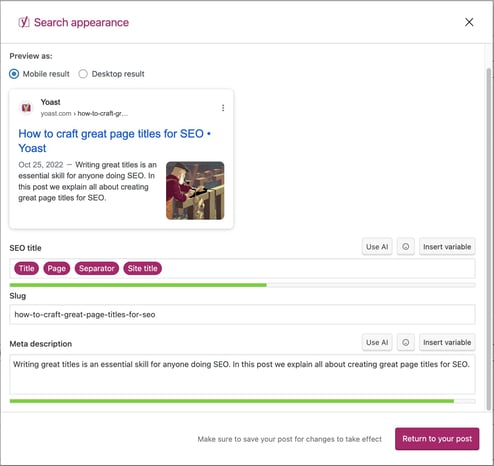
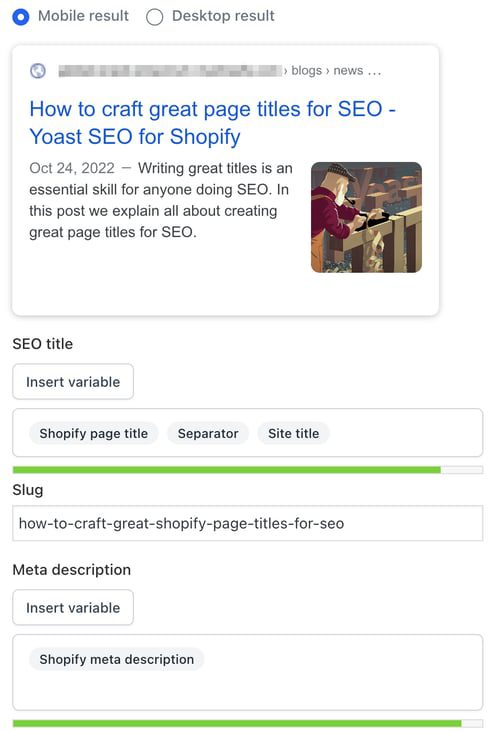
The Search appearance section in the Yoast SEO for WordPress block editor
The Google preview in Yoast SEO for Shopify

What does the keyphrase in the SEO title check in Yoast SEO do?

This check appears in the SEO tab of the Yoast SEO sidebar in WordPress and Shopify, as well as in the meta box in WordPress. It checks if you’re using your keyphrase in the SEO title of your post or page. This check is intentionally strict because the SEO title plays an important role in signaling a page’s topic to both search engines and users. Since Google uses the title to figure out your page’s topic, not having the focus keyphrase in the SEO title may harm your rankings. Additionally, potential visitors are more likely to click on a search result that matches their query. For optimal results, try to include your keyphrase at the beginning of the SEO title.

This check finds out if you’ve used your focus keyphrase in your SEO title

How to use your keyphrase in the SEO title

Sometimes, when optimizing for a highly competitive keyword, everyone will have the keyword at the beginning of the SEO title. In that case, you can try making it stand out by putting one or two words before your focus keyword, thereby slightly “indenting” your result. In Yoast SEO, if you start your SEO title with “the”, “a”, “who”, or another function word followed by your keyphrase, you’ll still get a green traffic light.

At other times, such as when you have a very long keyphrase, adding the complete keyphrase at the beginning doesn’t make sense. If your SEO title looks weird with the keyphrase at the beginning, try to add as much of the keyphrase as early in the SEO title as possible. But always keep an eye on the natural flow and readability.

How to reduce the chance of Google rewriting your SEO title

Google may rewrite titles when they are overly long, stuffed with keywords, misleading, or inconsistent with the page’s main heading.

To reduce the likelihood of rewrites:

  • Make sure your SEO title closely matches your page’s H1
  • Avoid excessive separators, repetition, or boilerplate text
  • Ensure the title accurately reflects the page content

While rewrites can still happen, clear and concise titles are more likely to be shown as written.

Want to learn how to write text that’s pleasant to read and optimized for search engines? Our SEO copywriting course can help you with that. You can access this course and our other SEO courses with Yoast SEO Premium. This also gives you access to extra features in the Yoast SEO plugin.

Are you struggling with more aspects of SEO copywriting? Don’t worry! We can teach you to master all facets, so you’ll know how to write awesome copy that ranks. Take a look at our SEO copywriting training and try the free trial lessons!

Crafting SEO-friendly page title: FAQs

Are the SEO title and the H1 heading the same?

To be clear, you should not confuse the SEO title with the post title; both serve different purposes and do not have to be the same.

The post title, also known as the H1 heading, is the main heading users see on the page. Its primary role is to help readers understand what the page is about and to add structure to your content. You should always write your H1 with users in mind.

The SEO title is the title that appears in search results and in the browser tab. This title helps search engines understand the topic of your page and influences whether users click on your result.

While the SEO title and H1 can be similar, they do not need to be identical. In WordPress, tools like Yoast SEO allow you to set a separate SEO title, giving you more control over how your page appears in search results without changing the on-page heading.

Should you add your brand to the SEO title?

For quite some time, it was a common practice among some SEOs to omit the site name from the SEO title. The idea was that the “density” of the title mattered, and the site name wouldn’t help with that. Don’t do this. If possible, your SEO title should include your brand, preferably in a recognizable way. If people search for a topic and see your brand several times, even if they don’t click on it the first time, they might click when they see you again on their next page of results.

However, with the site name and favicon updates, be sure to fill in the site settings, upload a favicon, and make general changes to the design of the snippets. This will increase your brand’s visibility in search results. Today, you’ll notice that Google hardly shows your brand name in the snippet’s title. However, Google often has a mind of its own when generating titles to change them for any given reason. The design and function of the SERPs can change at any moment, so we still recommend adding your brand to your titles.

Can you change the SEO title after a page is published?

Yes. You can change the SEO title even after a page has been published, and doing so can improve performance.

At Yoast, we once noticed that although we ranked well for “WordPress security,” the page was not getting as much traffic as expected. We updated the SEO title and meta description to make them more engaging and relevant. As a result, traffic to that page increased by over 30 percent.
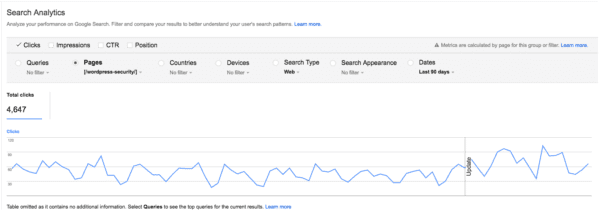
The original SEO title was:

WordPress Security • Yoast

We changed it to:

WordPress Security in a few easy steps! • Yoast

This change did not significantly affect rankings, but it did improve click-through rates. The keywords stayed largely the same, but the title became more compelling for searchers.

This shows that optimizing SEO titles after publication can be an effective way to increase traffic, especially if your page already ranks well but receives fewer clicks than expected.

Does Google always use the SEO title you set?

No. Google does not always display the exact SEO title you set in search results.

That said, the HTML title tag is still the most common source Google uses for generating title links. Google Search uses the following sources to automatically determine title links:

  • The tag
  • The main visible heading on the page, such as the
  • Other headings on the page
  • Prominent text styled to stand out
  • Anchor text from internal or external links
  • Structured data related to the website

Google typically selects one title per page and does not change it for different queries.

What does this mean for you? The SEO title you set remains important for ranking and relevance. Even if Google sometimes displays a different version, your title still helps search engines understand the content of your page.

To stay on top of changes, monitor your key pages in Google Search Console, check how titles appear in search results, and watch for shifts in click-through rates.

Can you use the same title for SEO and social media?

You can, but it is often better not to.

What might be a good SEO title isn’t necessarily a good title for social media. In social media, keyword optimization is less important than creating a title that entices people to click. You often don’t need to include the brand name in the title. This is especially true for Facebook and X if you include some branding in your post image. Our social media appearance previews in Yoast SEO Premium and Yoast SEO for Shopify can help you.

If you use Yoast SEO, you can set different titles for Google, Facebook, and X. Enter your SEO title in the snippet editor, then customize the social media titles in the social tab. If you do not set a specific X title, X will use the Facebook title by default.

This flexibility allows you to optimize your titles for both search engines and social platforms without compromise.

Update or delete? Cleaning up old content on your site

Sometimes, content on your website becomes irrelevant or outdated and you need to decide whether to update it or delete it. It can be tricky to decide what needs to be done, but don’t let this hold you back. Regularly updating outdated content should be a key part of your content maintenance activities. Let’s help you make that decision and discuss when you should update existing content or remove it altogether.

Update old content that is still valid

On our blog, we have an article on meta descriptions that needs regular updating to keep it relevant. We just have to ensure it stays up to date with all the changes Google makes to the way it handles meta descriptions. Our post helps people write meta descriptions, even though the advice changes over time. Although the article itself might be what we call cornerstone content, its content must be updated to keep up with the latest standards, constantly.

You can also create new, valuable content by updating old posts and making them current again: old wine in new bottles, as the saying goes. You can, for example, merge multiple old blog posts about the same subject into one new post or simply replace older parts of your post with updated content.

A good rule of thumb is to check the amount of traffic you’re getting on a page or post. Are you considering removing a page or unsure about what to do with an outdated one? If that page is still attracting a lot of traffic, it would be a shame to delete it. It would be better to update it to make sure it’s accurate and reflects the latest developments in that field. If the page is not getting a lot of traffic, but the topic is important to you(r company), that can also be a good reason to reevaluate the page and update its content.

Read more: How to update your content in 10 steps (and make it better) »

Delete irrelevant posts or pages

It’s likely that you have old posts or pages on your site that you no longer need. Think along the lines of a blog post about a product you stopped selling a while ago and have no intention of ever selling again. Or an announcement of an event that took place a long time ago. You may also have old pages with little or no content, known as thin content pages. This outdated content no longer adds value, now or in the foreseeable future. In that case, you need to either make it clear that this content is no longer relevant or assign the URL a new purpose.

When we talk about deleting old content, I don’t mean simply pressing “delete” and forgetting about it. If you do that, the content may still appear in Google search results for weeks after deletion. The URL might actually have some link value as well, which would be a shame to waste. So, what should you do? Here are two options:

“301 Redirect” the old post to a related one

When a URL still holds value because, say, you have a number of quality links pointing to that page, you want to leverage that value by redirecting the URL to a related one. With a 301 redirect, you’ll inform search engines and visitors that a better or newer version of this content can be found elsewhere on your site. The 301 redirect automatically sends people and Google to this page.

Say you have an old post on a specific product. You need to delete it, so the logical next step would be to redirect that post to a newer post about this product. If you don’t have that post, choose a post about the closest product possible. One that can still help out the user in a way that the old product would. Redirecting to a relevant category might be an option in some edge cases, but this should not be standard practice. Furthermore, redirecting to the homepage should be avoided — this is an SEO anti-pattern.

There are a few ways to create a 301 redirect in WordPress, but using the redirect manager in Yoast SEO Premium makes it incredibly easy.

Tell search engines the content is intentionally gone

If there isn’t a relevant page on your site to redirect to, it’s wise to tell Google to forget about your old post entirely by serving a “410 Deleted” status. This status code will tell Google and visitors that the content didn’t just disappear; you’ve deleted it with a reason.

When Google can’t find a post, the server typically returns a “404 Not Found” status to the search engine’s bot. You’ll also find a 404 crawl error in your Google Search Console for that page. Eventually, Google will work it out, and the URL will gradually vanish from the search result pages. But this takes time.

The 410 is more powerful in the sense that it informs Google that the page is permanently deleted and will never be available again. You deleted it on purpose. Google will act on that faster than with a 404. Read up about the server status codes if this is all gibberish to you.

Keep reading: How to properly delete a page from your site »

Do you have old content to deal with?

Cleaning up old content should be part of your content maintenance routine. If you don’t review your old posts regularly, you’re bound to encounter issues sooner or later. You might show incorrect information to visitors or hurt your own rankings by having too many pages about the same topic, increasing the chances of keyword cannibalization. So prune your content regularly and decide what to do: update, merge or delete.

Clean up orphaned content with Yoast SEO Premium

A great place to start is with your orphaned content, which is content that has zero internal links to it. You might be surprised, but most of us have orphaned content on our website. Which is a shame, because both your audience and Google won’t be able to find this content. Meaning that you might be missing out on a great place in the search results and lots of traffic.

To help you clean up your old content, we’ve created an SEO workout that identifies those pages and guides you through four simple steps to fix them. These steps enable you to determine whether you want to update or delete a page. And when you do decide to update it, it also suggests pages or posts from which you can link to this updated content.

The first step in the orphaned content workout in Yoast SEO Premium

You will need Yoast SEO Premium to use this workout. You might also want to try our other internal linking SEO workout to help you rank higher with your best content, also available in the Premium plugin:

Unlock our SEO workouts with Yoast SEO Premium

Get Yoast SEO Premium and enjoy access to all our best SEO tools, training and SEO workouts!

seo enhancements
SEO Basics: What is link building?

Link building is an essential part of SEO. It helps search engines find, understand, and rank your pages. You can write the perfect post, but if search engines cannot follow at least one link to it, your content may stay hidden from view.

Table of Contents

  1. What is link building?
  2. What is a link?
  3. Internal and external links
  4. Anchor text and why it matters
  5. Why we build links
  6. Link building as digital PR
  7. Link quality over quantity
  8. Avoid shady link-building tactics
  9. How to earn high-quality links
  10. Link building in the era of AI and LLM search
  11. Examples of effective link building
  12. In conclusion
  13. TL;DR

For Google to discover your pages, you need links from other websites. The more relevant and trustworthy those links are, the stronger your reputation becomes. In this guide, we explain what link building means in 2025, how it connects to digital PR, and how AI-driven search now evaluates trust and authority.

If you are new to SEO, check out our Beginner’s guide to SEO for a complete overview.

A link, or hyperlink, connects one page on the internet to another. It helps users and search engines move between pages.

For readers, links make it easy to explore related topics. For search engines, links act like roads, guiding crawlers to discover and index new content. Without inbound links, a website can be difficult for search engines to find or evaluate.

You can learn more about how search engines navigate websites in our article on site structure and SEO.

In HTML, a link looks like this:

Yoast SEO plugin for WordPress

The first part contains the URL, and the second part is the clickable text, called the anchor text. Both parts matter for SEO and user experience, because they tell both people and search engines what to expect when they click.


There are two main types of links that affect SEO. Internal links connect pages within your own website, while external links come from other websites and point to your pages. External links are often called backlinks.

Both types of links matter, but external links carry more authority because they act as endorsements from independent sources. Internal linking, however, plays a crucial role in helping search engines understand how your content fits together and which pages are most important.

To learn more about structuring your site effectively, see our guide to internal linking for SEO.


Anchor text and why it matters

The anchor text describes the linked page. Clear, descriptive anchor text helps users understand where a link will take them and gives search engines more context about the topic.

For example, “SEO copywriting guide” is much more useful and meaningful than “click here.” The right anchor text improves usability, accessibility, and search relevance. You can optimize your own internal linking by using logical, topic-based anchors.

For more examples, read our anchor text best practices guide.


Link building is the process of earning backlinks from other websites. These links act as votes of confidence, signaling to search engines that your content is valuable and trustworthy.

Search engines like Google still use backlinks as a key ranking signal, but the focus has shifted away from quantity and toward quality and context. A single link from an authoritative, relevant site can be worth far more than dozens from unrelated or low-quality sources.

Good link building is about creating genuine connections, not collecting as many links as possible. When people share your content because they find it useful, you gain visibility, credibility, and referral traffic. These benefits reinforce one another, helping your brand stand out both in traditional search and in AI-driven environments where authority and reputation matter most.


In 2025, link building has evolved into a form of digital PR. Instead of focusing purely on SEO tactics, marketers now use link building to boost brand visibility and credibility.

Digital PR revolves around storytelling, relationship-building, and public exposure. A successful strategy might involve pitching articles or insights to journalists, collaborating with bloggers, or publishing original research that earns citations across the web. When your business appears in trusted media or professional communities, you gain not just backlinks but also brand mentions and citations that reinforce your authority.

Citations are particularly important in today’s search landscape. They are references to your brand or content, even without a clickable link. Search engines and AI systems treat them as indicators of credibility, especially when they appear on reputable sites. Combined with consistent author information and structured data, they help demonstrate your E-E-A-T—Experience, Expertise, Authoritativeness, and Trustworthiness.

You can learn more about building brand authority in our article on E-E-A-T and SEO.


Not all links are created equal. A high-quality backlink from a well-respected, topic-relevant website has far more impact than multiple links from small or unrelated sites.

Consider a restaurant owner who earns a link from The Guardian’s food section. That single editorial mention is far more valuable than a dozen random directory links. Google recognizes that editorial links earned for merit are strong signals of expertise, while low-effort links from unrelated pages carry little or no value.

High-quality backlinks usually come from sites with strong reputations, clear editorial standards, and engaged audiences. They fit naturally within content and make sense to readers. Low-quality links, on the other hand, can make your site appear manipulative or untrustworthy. Building authority takes time, but the reward is a reputation that search engines and users can rely on.

Read more about this long-term approach in our post on holistic SEO.


Because earning good links can take time, some site owners resort to shortcuts like buying backlinks, using link farms, or participating in private blog networks. These tactics may offer quick results, but they violate Google’s spam policies and can trigger severe penalties.

When a site’s link profile looks unnatural or manipulative, Google may reduce its visibility or remove it from results altogether. Recovering from such penalties can take months. It is far safer to focus on ethical, transparent methods. Quality always lasts longer than trickery.


The best way to earn strong backlinks is to produce content that others genuinely want to reference. Start by understanding your audience and their challenges. Once you know what they are looking for, create content that provides clear answers, unique insights, or helpful tools.

For example, publishing original data or research can attract links from journalists and educators. Creating detailed how-to guides or case studies can draw links from blogs and businesses that want to cite your expertise. You can also build relationships with people in your industry by commenting on their content, sharing their work, and offering collaboration ideas.

Newsworthy content is another proven approach. Announce a product launch, partnership, or study that has real value for your audience. When you provide something genuinely useful, you will find that links and citations follow naturally.

Structured data also plays a growing role. By using Schema markup, you help search engines understand your brand, authors, and topics, making it easier for them to connect mentions of your business across the web.

For a more detailed approach, visit our step-by-step guide to link building.


Search is evolving quickly. Systems like Google Gemini, ChatGPT, and Perplexity no longer rely solely on backlinks to determine authority. They analyze the meaning and connections behind content, paying attention to context, reputation, and consistency.

In this new landscape, links still matter, but they are part of a wider ecosystem of trust signals. Mentions, structured data, and author profiles all contribute to how search and AI systems understand your expertise. This means that link building is now about being both findable and credible.

To stay ahead, make sure your brand and authors are clearly represented across your site. Use structured data to connect your organization, people, and content. Keep your messaging consistent wherever your brand appears. When machines and humans can both understand who you are and what you offer, your chances of visibility increase.

You can read more about how structured data supports this process in our guide to Schema and structured data.


There are many ways to put link building into action. A company might publish a research study that earns coverage from major industry blogs and online magazines. A small business might collaborate with local influencers or community organizations that naturally reference its website. Another might produce in-depth educational content that other professionals use as a trusted resource.

Each of these examples shares the same principle: links are earned because the content has genuine value. That is the foundation of successful link building. When people trust what you create and see it as worth sharing, search engines take notice too.


In conclusion

Link building remains one of the strongest ways to build visibility and authority. But in 2025, success depends on more than collecting backlinks. It depends on trust, consistency, and reputation.

Think of link building as part of your digital PR strategy. Focus on creating content that deserves attention, build relationships with credible sources, and communicate your expertise clearly. The combination of valuable content, ethical outreach, and structured data will help you stand out across both Google Search and AI-driven platforms.

When you build for people first, the right links will follow.


TL;DR (2025 Version)

Link building means earning links from other websites to show search engines that your content is credible and valuable. In 2025, it is part of digital PR, focused on relationships, trust, and reputation rather than quantity.

AI-driven search now looks at citations, structured data, and contextual relevance alongside backlinks. Focus on quality, clarity, and authority to build long-term visibility online.

Ethical link building remains one of the best ways to grow your brand’s reach and reputation in search.

The psychology of scannable content and bullet points

Table of contents

Your content has 15 seconds. That’s it. In those precious moments, your reader’s brain makes a critical decision: scan or abandon. The statistics are sobering. Users read only 20-28% of webpage content, spending an average of 15 seconds on a page before deciding whether to stay or leave. Yet many content creators still write as if their audience will consume every carefully crafted sentence from start to finish.  

The reality? Your readers aren’t reading; they are scanning, which is why scannable content becomes important. This isn’t a failure of modern attention spans or a sign that people don’t value quality content. It’s neuroscience in action. The human brain has evolved sophisticated pattern recognition systems that help us quickly identify relevant information while filtering out the noise. And do you know what the most potent triggers for this system are? The humble bullet point.  

When readers encounter well-structured bullet points in your blog piece, their brains release small hits of dopamine, the same neurotransmitter associated with completing tasks and achieving goals. This is a biological reward system that makes scannable content easier to process and pleasurable to consume.  

Understanding the cognitive psychology behind how people process information isn’t just academic curiosity.  It’s also the key to creating content that converts, engages, and serves your audience’s actual reading behaviors. Tools like Yoast’s AI Summarize feature recognize this reality, helping content creators quickly identify and restructure their essential points into the scannable formats readers crave. 

Key takeaways

  • Readers scan content in 15 seconds, favoring scannable formats like bullet points for quick comprehension.
  • Research shows that effective scannable content enhances cognitive processing and engages readers better.
  • Key factors like motivation, task type, and focus determine how deeply someone will read your content.
  • Mobile usage has reshaped reading habits, increasing demand for short, structured, and scannable content.
  • To create scannable content, writers should respect cognitive patterns and optimize content structure with clear visuals.

The scanning habits of our brain  

The myth of linear reading 

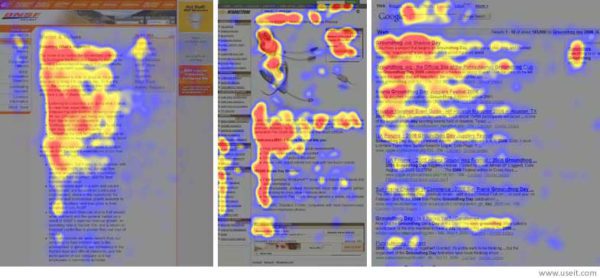
If you believe your readers start at the top of your content and methodically work their way through each paragraph, you’re operating under a dangerous misconception. Eye-tracking research from the Nielsen Norman Group reveals that people don’t read online content, they scan it in predictable patterns.  

  • F-shape scanning pattern: It is one of the most common reading patterns, where readers scan horizontally across the top, make a second horizontal scan partway down, then scan vertically down the left side.
  • Layer cake pattern: This includes scanning headings and subheadings.  
  • Spotted pattern: Jumping to specific words or phrases that catch attention.  
F-shape reading pattern of the brain

This isn’t laziness, it’s cognitive efficiency at its best. Our brains are wired to seek the path of least resistance when processing information. In a world where we’re bombarded with more content than we could ever consume, scanning helps us quickly identify what deserves our full attention. 

Cognitive load theory explains why this happens. Our working memory can only hold about 5 to 9 pieces of information at once. When content is presented in dense paragraphs, our brains work harder to extract meaning, creating mental fatigue that leads to abandonment.  

Factors that determine reading depth 

Not all scanning is created equal. Four key factors determine whether someone will scan briefly or dive deeper into your content:  

  • Level of motivation: When readers desperately need specific information, like troubleshooting a technical problem, they’ll invest more cognitive resources in careful reading. But for general browsing, they’ll skim for signals of value.   
  • Type of task: Fact-finding missions (like researching product features) create different reading behaviors than exploratory browsing. Task-oriented readers scan for specific data points, while browsers scan for interesting concepts.   
  • Level of focus: A reader juggling multiple browser tabs while checking their phone will scan differently than someone in a quiet environment dedicated to learning. Multitasking reduces the cognitive resources available for deep processing.  
  • Personal characteristics: Some people are naturally deep readers who prefer narrative content, while others are chronic scanners who gravitate toward lists and summaries. Age, education, and cultural background all influence these preferences.  

The impact of mobile evolution on content consumption 

Smartphone usage hasn’t just changed where we consume content, it’s rewired how we process information. The average smartphone user checks their device 96 times daily, creating a constant state of partial attention that makes scanning the dominant reading mode.  

Mobile screens compress information into narrow columns, overwhelming traditional paragraph structures. This physical constraint has trained our brains to prefer “thumb-friendly” content architecture: short paragraphs, frequent subheadings, and plenty of white space.

The impact transcends mobile devices. Desktop readers now expect the same scannable formats they’ve grown accustomed to on their phones. Content that doesn’t accommodate these evolved reading behaviors feels dated and inaccessible.  

The psychology behind bullet points

Understanding why bullet points work so effectively requires a quick look at how your brain processes information. When you encounter a wall of text, your mind has to work overtime to extract the key points, organize the information, and remember what matters. Bullet points do this heavy lifting for you, turning complex information into digestible chunks that your brain can process with minimal effort.

1. The mental burden relief of cognitive load reduction 

Bullet points aren’t just visually appealing, but also easy to scan. They’re cognitive performance enhancers. When information is presented in bullet format, our working memory can process it more efficiently because each point operates as a discrete unit.  

Research in cognitive psychology shows that structured information reduces the mental effort required for comprehension. This creates what researchers call “cognitive ease”, a state where information feels more trustworthy and credible simply because it’s easier to process.  

The famous 7±2 rule (also known as Miller’s Law) explains why bullet points work so well. Our working memory can comfortably hold 5-9 items at once. Well-crafted bullet lists respect this limitation by chunking information into digestible pieces that our brains can easily manipulate and remember.  

When content flows smoothly through our mental processing systems, we unconsciously associate that ease with quality and authority. This is why bullet points improve comprehension and credibility.  

2. Pattern recognition and predictability  

Human brains are pattern-recognition machines, constantly seeking familiar structures that help us predict what will happen next. Bullet points, through their predictable format, provide precisely this kind of psychological comfort.  

Visual hierarchy serves as a roadmap for our attention. When readers see a bullet list, they instantly understand the structure: each point will present a discrete piece of information, all points are roughly equivalent in importance, and the data can be consumed in any order.  

Gestalt principles explain why this works so well. Our brains use proximity (related items grouped), similarity (consistent formatting signals related content), and continuation (visual flow guides attention) to organize information efficiently. Bullet points leverage all three principles simultaneously.  

This predictability reduces cognitive anxiety. Readers don’t need to invest mental energy figuring out how information is organized, they can focus entirely on processing the content.  

3. The psychology of completion  

Perhaps the most fascinating aspect of bullet point psychology is how it triggers our brain’s reward system. Each bullet point creates a micro-task that can be “completed” simply by reading. This completion triggers a small dopamine release; the same neurotransmitter associated with crossing items off a to-do list.  

The Zeigarnik effect demonstrates why this matters. Our brains create psychological tension around incomplete tasks, making them more memorable than completed ones. Bullet points cleverly exploit this by creating multiple small completion opportunities within a single piece of content.  

This neurological reward system explains why people find lists inherently satisfying. We’re not just consuming information; we’re experiencing a series of small accomplishments that make reading feel productive and rewarding.  

4. Visual breathing room

White space isn’t space; it’s cognitive breathing room. Dense paragraphs create visual clutter that triggers stress responses in our brains, making content feel overwhelming before we even begin reading.  

Bullet points introduce strategic white space that gives our visual processing system room to operate. This breathing room prevents cognitive overload and makes content more approachable and manageable.  

Eye movement research shows that readers’ gaze patterns follow predictable paths through well-spaced content. White space guides attention naturally, creating a visual rhythm that supports comprehension rather than fighting against it.  

The science of information processing  

Working memory and executive function  

Working memory is the temporary storage system where we manipulate information while processing it. Unlike long-term memory, which has virtually unlimited capacity, working memory can only handle a few items simultaneously.  

Bullet points support working memory by presenting information in pre-chunked units. Instead of extracting key points from dense paragraphs, a task that requires executive function resources, readers can directly process the distilled information.  

Research comparing narrative versus expository text comprehension shows structured formats consistently outperform traditional paragraphs for information retention and comprehension speed. The brain’s executive functions can focus on understanding content rather than organizing it.  

This is particularly important for complex or technical information. When cognitive resources are allocated efficiently, readers can engage with more sophisticated concepts without experiencing mental fatigue.  

The discrete thought advantage  

Each bullet point functions as a self-contained information unit, allowing for what cognitive scientists call “discrete processing.” Unlike paragraphs, where ideas build upon each other sequentially, bullet points can be processed independently.  

This creates a “mental reset” opportunity between points. Readers can fully process one concept before moving to the next, preventing cognitive overload when multiple ideas compete for working memory space.  

The difference is like comparing building a tower (paragraphs) versus collecting individual blocks (bullet points). Building requires awareness of the entire structure, while collecting allows focus on each piece.  

Speed vs. comprehension 

Critics often argue that scannable content sacrifices depth for speed, but research suggests a more nuanced reality. Studies show that bullet formats can improve comprehension for certain types of information while dramatically increasing processing speed.  

The key matches the format of the content type. Bullet points excel for factual information, feature lists, and step-by-step processes. They’re less effective for narrative content, complex arguments, and emotional storytelling.  

In research studies, retention rates for structured information consistently outperform unstructured text. The sweet spot appears to be content that balances scanning speed with information density, exactly what effective bullet points achieve.  

This is where AI-powered tools like Yoast’s AI Summarize feature become invaluable. They can analyze dense content and identify the key points that would benefit from bullet formatting, helping writers optimize speed and comprehension without sacrificing essential nuances.  

Instantly highlight your core insights with AI Summarize, in Yoast SEO Premium. Generate editable summaries in seconds.

The hierarchy of scannable elements  

The content ecosystem  

Bullet points are not isolated components; they’re part of a broader ecosystem of scannable elements that work together to create user-friendly content. An effective scannable design incorporates multiple layers of visual hierarchy.  

Headings and subheadings serve as navigation anchors, allowing readers to identify relevant sections quickly. They’re the highway signs of content, helping people find their destination without reading every word.  

Numbers and statistics act as attention magnets, drawing the eye with their specificity and authority. Our brains are wired to notice numerical information, making stats powerful tools for engagement.  

Bold text and formatting provide visual cues that guide attention to key concepts. Strategic emphasis helps readers identify the most important information without overwhelming the overall design.  

White space ties everything together, preventing visual overcrowding and giving each element room to breathe. The silence between notes makes music coherent.  

Choosing from Lists and other formats  

Different content types call for different scannable formats. Understanding when to use each format prevents the monotony of bullet point overuse while optimizing for specific communication goals.  

  1. Bullet points: They excel for features, benefits, and key takeaways where order doesn’t matter. They’re perfect for highlighting multiple advantages or listing unranked options. 
  1. Numbered lists: These lists work best for processes, rankings, and sequential information. They provide clear progression and help readers track their position within the content.
  1. Tables: Ideal for comparisons and data-heavy content. They allow readers to scan vertically and horizontally, facilitating quick comparisons across multiple variables.
  1. Paragraphs: An essential storytelling instrument, context-building, and complex arguments requiring narrative development. The key is using them strategically rather than defaulting to them automatically.  

The mobile-first psychology

Mobile usage hasn’t just changed screen sizes, it’s fundamentally altered how we consume content. Thumb-scrolling creates different engagement patterns than mouse-based navigation, favoring content that works with natural thumb movements.  

The “thumb-friendly” hierarchy prioritizes easily tappable elements and accommodates one-handed usage. This means shorter sections, more frequent headings, and content designed for vertical scrolling rather than horizontal scanning.  

Responsive design psychology goes beyond technical implementation. It requires understanding how reading behaviors change across devices and optimizing content structure for each context.  

Implementing psychology-driven content

Knowing the science behind scannable content is one thing—putting it into practice is another. The good news? You don’t need a psychology degree to create content that respects how your readers’ brains work. With a few strategic adjustments to your writing process, you can transform dense, intimidating content into clear, engaging material that people actually read and act on. Here’s how to make the psychology work for you.

The content creator’s checklist  

  • Pre-writing considerations: Analyze your audience’s attention constraints and reading context. Are they researching solutions under pressure, browsing casually, or seeking deep understanding? This determines your optimal scannable structure. 
  • During writing: Identify natural breaking points during writing where concepts shift or new ideas emerge. These transition moments are perfect for bullet points, subheadings, or formatting changes supporting scanning behaviors. 
  • Post-writing optimization: Simulate scanning behavior by reading only headings, first sentences, and formatted elements. Does the content still make sense and provide value? If not, restructure to serve better scanning readers.  

Tools and techniques  

  1. Readability analyzers: They provide objective metrics for content accessibility, but understanding their psychological basis helps interpret results more meaningfully. High readability scores often correlate with scannable structure.
  1. Heat mapping tools: One of the most potent tools for revealing reader attention patterns, showing where scannable elements succeed or fail. This data helps optimize formatting for real usage rather than theoretical best practices.
  1. User testing methodologies: A one of the kind testing methods that is used for content structures and can also include card sorting exercises, first impression tests, and task-based evaluations. They reveal how well your formatting serves actual reader goals. 

Respecting your reader’s brain  

Understanding the psychology of scannable content isn’t about manipulating readers, but about respecting how their brains process information. Everyone wins when we create content that works with cognitive patterns rather than against them.  

Readers get information they can consume efficiently without sacrificing comprehension. Content creators build trust and engagement by serving their audience’s genuine needs rather than forcing outdated consumption models.  

The competitive advantage goes to those recognizing that effective content serves the reader’s brain, not the creator’s ego. Attention is the scarcest resource, so content that respects cognitive limitations while delivering genuine value will consistently outperform material that ignores psychological realities.  

Ready to implement these insights with Yoast SEO? Start by auditing your existing content through a psychological lens. Look for opportunities to break up dense paragraphs, add scannable elements, and create the visual breathing room that modern readers crave. Your audience’s brains and content performance will thank you.

Make every post easier to read, scan, and share. Use AI Summarize to create key takeaways and boost engagement.

First things first: writing content with the inverted pyramid style

Journalists have been using the inverted pyramid writing style for ages. Using it, you put your most important information upfront. Don’t hedge. Don’t bury your key point halfway down the third paragraph. And don’t hold back; tell the complete story in the first paragraph. Even online, this writing style holds up pretty well for some types of articles. It even comes in handy now that web content is increasingly used to answer every type of question a searcher might have. Find out how!

Table of contents

Key takeaways

  • The inverted pyramid writing style places crucial information at the beginning to engage readers quickly and effectively.
  • Writers should structure articles with core sentences that introduce key concepts to aid comprehension and improve scanning.
  • This style enhances SEO by making content clearer and easier to understand for both human readers and search engines.
  • While effective for many types of articles, the inverted pyramid may not suit creative writing forms like poetry or complex fiction.
  • To implement the inverted pyramid, identify key points, structure your content, and revise for clarity and focus.

What is the inverted pyramid?

Most readers don’t have the time or desire to carefully read an article, so journalists put the critical pieces of a story in the first paragraph to inform and draw in a reader. This paragraph is the meat and potatoes of a story, so to speak. This way, every reader can read the first paragraph, or the lead, and get a complete notion of what the story is about. It gives away the traditional W’s instantly: who, what, when, where, why, and, of course, how.

The introductory paragraph is followed by paragraphs that contain important details. After that, follows general information and whatever background the writers deem supportive of the narrative. This has several advantages:

  • It supports all readers, even those who skim
  • It improves comprehension; everything you need to understand the article is in that first paragraph
  • You need less time to get to the point
  • It gives writers a full paragraph to draw readers in
  • Done well, it encourages readers to scroll and read the rest of the article
  • It gives writers full control over the structure
  • It makes it easier to edit articles

An example

Here’s an example of such an intro. We wrote an article about writing meta descriptions in Yoast SEO that answers exactly that question in an easy-to-understand way. We show what it is and why it’s important immediately, while also triggering people to read the rest of the article. Here’s the intro:

“A strong meta description boosts CTR and signals relevance to search engines. This post shows how to craft descriptions that work, with practical tips and ready-to-use templates. You’ll learn the traits of good meta descriptions, common mistakes, and how Yoast SEO can help you get it right. Using these templates and guidelines can boost CTR, align reader expectations, and improve optimization for both users and Google.”

The inverted pyramid is just one of many techniques for presenting and structuring content. Like us, you can use it to write powerful news articles, press releases, product pages, blog posts, or explanatory articles.

This style of writing, however, is not suited for every piece of content. Maybe you write poetry, or long essays with a complete story arc, or just a piece of complex fiction. Critics are quick to add that the inverted pyramid style cripples their creativity. But, even then, you can learn from the techniques of the inverted pyramid that help you to draw a reader in and figure out a good way to structure a story. And, as we all know, a solid structure is key to getting people and search engines to understand your content. We wrote about that in our article on setting up a clear text structure.

The inverted pyramid

The power of paragraphs

Well-written paragraphs are incredibly powerful. These paragraphs can stand on their own. I always try to write in a modular way. That’s because I’m regularly moving paragraphs around if I think they fit better somewhere else in the article. It makes editing and changing the structure of a story so much easier.

Good writers give every paragraph a stand-out first sentence; these are known as core sentences. These sentences raise one question or concept per paragraph. So, someone who scans the article by reading the first sentence of every paragraph will get the gist of it and can choose to read the rest of the paragraph or not. Of course, the rest of the paragraph is spent answering or supporting that question or concept.

The pyramid, SEO, and AI

Front-loading the main point helps SEO perform in an AI era. Lead with the core result to give readers a fast, clear understanding and to signal relevance to search algorithms. Focusing on that idea makes snippets more likely and improves relevance while making the rest of the piece easier to scan, summarize, and reuse across channels. In practice, the inverted pyramid anchors the article in intent, guiding humans and machines toward the same destination: the core answer.

Answering questions

Something else is going on: a lot of content out there is written specifically to answer questions based on user intent. Today, Google answers a lot of questions and answers right away in the search results. That’s why it makes a lot of sense to structure your questions and answers in such a way that is easy to digest for both readers and search engines. This also supports the inverted pyramid theory. So, if you want to answer a specific question, do that right beneath that question. Don’t obfuscate it. Keep it upfront. You can answer supporting questions or give a more elaborate answer further down the text. If you have data supporting your answer, please present it.

Summaries vs. the pyramid

Front-loading the main point highlights the core idea clearly to both readers and search engines. The inverted pyramid delivers that headline idea first, then adds context and support. A summary condenses the piece into its essential takeaways, handy for meta descriptions, snippets, or quick recaps. Yoast AI Summarize can generate tight summaries from your content, giving you ready-to-use openings and meta descriptions that align with the pyramid and improve SEO performance.

How to write with the inverted pyramid in mind

The inverted pyramid forces you to think about your story: what is it, and which parts are key to understanding everything? Even if you don’t follow the structure to the letter, focusing on the essential parts of your story and deleting the fluff is always a good thing. In his seminal work The Elements of Style, William Strunk famously wrote:

“Vigorous writing is concise. A sentence should contain no unnecessary words, a paragraph no unnecessary sentences, for the same reason that a drawing should have no unnecessary lines and a machine no unnecessary parts. This requires not that the writer make all his sentences short, or that he avoid all detail and treat his subjects only in outline, but that he make every word tell.”

In short, writing works like this:

  • Map it out: What are the most important points you want to make?
  • Filter: Which points are supportive, but not key?
  • Connect: How does everything fit together?
  • Structure: Use sub-headers to build an easy-to-understand structure for your article
  • Write: Start every paragraph with your core sentence and support/prove/disprove/etc in the coming sentences
  • Revise: Are the paragraphs in the correct order? Maybe you should move some around to enhance readability or understanding?
  • Edit: I.e., killing your darlings. Do you edit your own work, or can someone do it for you?
  • Publish: Add the article to WordPress and hit that Publish button

Need more writing tips? Here are 10 tips for writing an awesome and SEO-friendly blog post.

Try the inverted pyramid

Like we said, not every type of content will benefit from the inverted pyramid. But the inverted pyramid has surely made its mark over the past century or more. Even now, as we mostly write content for the web, this type of thinking about a story or article makes us focus on the most important parts, and how we tell about those parts. It forces you to separate facts from fiction and fluff from real nuggets of content gold. So, try it out, and your next article might turn out to be the best yet.

Read more: SEO copywriting: the ultimate guide »

The Flesch reading ease score: Why & how to use it

If you have ever run your writing through a readability checker like Yoast SEO, you have probably come across the Flesch reading score. This metric was developed more than 70 years ago and is still one of the most widely used ways to measure how easy your text is to read. But what does it actually mean, and how does it affect your writing for the web?

In this guide, we will explain how the Flesch reading score works, why it became so prominent in publishing and SEO, and how you can use it effectively today. We will also show you where it fits into the Yoast SEO plugin and why we have introduced new readability checks alongside it.

Table of contents

Reminder: We made some changes to our readability analysis in Yoast SEO 19.3. We replaced the Flesch Reading Ease Score with the word complexity assessment. You can still find the Flesch reading ease score in the Insight tab, but we won’t use this assessment in our readability analysis anymore.

What is the Flesch reading score?

The Flesch reading score, also called the Flesch reading ease test, was created by Rudolf Flesch in the 1940s. His goal was simple: to give writers a quick way of checking whether their text was easy to understand. The formula combines three basic elements: sentence length, word length, and syllable count. When these figures are combined into the formula, which I’ll explain in just a moment, they generate a score between 0 and 100.

The highest scores are reserved for the easiest text. For example, a score in the 90s suggests that a typical 11-year-old child should be able to read it without any difficulty. A score of around 60 is closer to plain English that a high school student would be expected to understand. Scores under 30 are considered very difficult and are only really found in academic or legal writing.

Here’s a quick overview of the ranges and what they mean:

Score range Readability level Who can understand it
90–100 Very easy An average 11-year-old student
80–89 Easy Middle school students
70–79 Fairly easy Teenagers aged 13–15
60–69 Standard High school students
50–59 Fairly difficult College students
30–49 Difficult University graduates
0–29 Very confusing Specialists, academics, or experts

Just for fun: this article itself scores around 63 on the Flesch reading score, which puts it in the “standard” range.

How the Flesch reading score is calculated

The formula behind the score looks intimidating, but don’t worry, it is surprisingly straightforward. In fact, it’s only based on two things. The total number of words divided by the total number of sentences, which gives us the ASL or Average Sentence Length, and the total number of syllables divided by the total number of words to get the ASW or Average Syllables per Word. Once we have these figures, we enter them into this formula:

206.835 – (1.015 × ASL) – (84.6 × ASW)

This will give us a score between 0 and 100. The longer your sentences and the more complex your words, the lower your score will be.

Let’s take a quick example by looking at this short text below:

“The cat sat on the mat. The dog barked.”

This has very short words and sentences, so it would score in the 90s, which means it is very easy to read.

Now compare it with:

“The domesticated feline reclined languidly upon the woven floor covering, while the canine produced a resonant vocalization.”

This is essentially the same meaning, but longer words and clauses drop the score dramatically, likely into the 30s.

This example shows why the Flesch reading score works well as a proxy for readability. It rewards writing that is concise and simple with a high score and wags a finger at writing that is dense and complex, ultimately giving it a low score.

Why the Flesch reading score became important

The Flesch reading score spread beyond classrooms into business and publishing because it answered a universal question: Is my writing easy to understand?

By the 1970s, the U.S. Navy was using it to ensure that training manuals were clear for recruits. Later, several U.S. states made it part of their official requirements for insurance documents and consumer contracts. Healthcare organizations also began using it to ensure that patient information was accessible.

When personal computers became common, Microsoft Word added the Flesch reading ease test to its spelling and grammar tools. Suddenly, anyone writing a school essay or business report could get instant feedback on readability. That mainstreamed the score and kept it relevant well into the digital age.

In the world of web writing, readability became even more critical. Online readers scan rather than study text. Research shows they decide within seconds whether a page is worth their time or not. That makes clarity a competitive advantage. Tools that included the Flesch reading score gave web writers a way to benchmark themselves and improve user experience.

The Flesch reading score in Yoast SEO

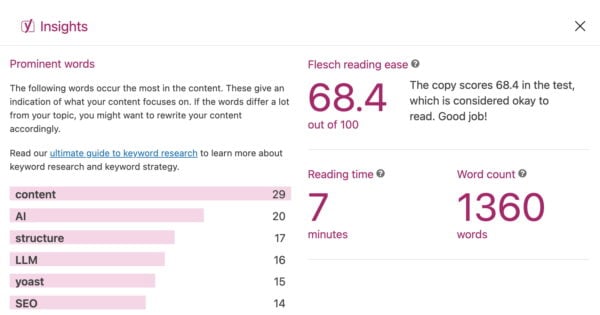
When Yoast introduced readability checks to the plugin, the Flesch reading score was one of the first tools we built in. We popularized the use of tools to score your content. It gave writers using WordPress an instant way to measure whether their content was accessible to a broad audience. You can still find the Flesch reading ease score inside the plugin today, in the insights tab.

This has helped thousands of users discover that shorter sentences and simpler words often improve how people engage with their content. While the score does not guarantee better rankings, it does contribute to a positive reading experience, which in turn can influence user behavior and SEO outcomes.

The Insights tab contains a lot of information, including your Flesch reading ease score

Why Yoast moved beyond Flesch

Although the Flesch reading score remains useful, it is not perfect. It only looks at sentence and word length, without considering context, tone, or audience. A blog post aimed at medical professionals may score poorly but still be exactly right for its readers.

That is why we developed additional checks, including word complexity, which evaluates how challenging your vocabulary might be. This allows writers to balance clarity with precision, rather than chasing a single score. In practice, this means you can still use the Flesch reading score as a quick reference, but you should combine it with other insights to get the full picture.

Should you still care about the Flesch reading score?

The Flesch reading score remains a valuable guide for writers who want to make their content more approachable. If your text scores very low, it may be worth shortening sentences or replacing long words with simpler alternatives. But you do not need to obsess over getting a perfect score.

Readability is about more than numbers. Think about your audience, their expectations, and the purpose of your content. Combine the Flesch reading score with other readability signals to create a text that is clear, engaging, and optimized for both humans and search engines.

How to use the Flesch reading ease score to improve your writing

We’ve come to the essential question. How can you use the Flesch score to improve your writing? Well, you write for an audience and know your audience the best. Before writing or editing, consider what kind of texts fit your readers. Do you sell clothes or organize photography workshops? Or do you write for a mom blog or make step-by-step DIYs? Your content should be relatively easy to read in all these cases since you are targeting a broad audience.

However, remember that you do not have to chase a high Flesch reading score at all costs. For example, you may write about complex, specialist topics for a specific, more knowledgeable audience. Or, perhaps you are an academic blogging about your research? It makes sense if the Flesch test produces a lower score in those cases.

Still, whatever your situation is, your text always benefits from concise language. So, if you want to benefit from the feedback the Flesch reading ease score gives you, focus on two things:

1. Shorten your sentences

Too many long sentences make your text difficult to read, while short sentences keep the subject clear. When the sentences in your text are short, you allow your readers to absorb the information in your text. As a result, they don’t need to use all their attention to decipher what you want to say. That is why we advise you to break down long sentences; your text will be much easier to read. 

And please, don’t think that by using short sentences, you will oversimplify your text. Let’s compare two short texts to show you what we mean. First, we have this sentence:

My favorite place to visit during weekends is my grandparents’ house near the lake, where we love to fish and swim, and we often take the boat out on the lake.

Did you find this sentence easy to read? Wasn’t it too lengthy, confusing, and difficult to process? Breaking it into two or more sentences can make it much clearer:

My favorite place to visit during weekends is my grandparents’ house. It’s near the lake, where we love to fish and swim. We also often take the boat out on the lake.

These few short sentences are much easier to read. Yet, you give the same information as in the long sentence, so there is no oversimplifying. Using short sentences keeps the subject clear and lets your readers absorb the information you’re presenting. 

2. Limit your use of difficult words

Words with four or more syllables are considered difficult to read, so try to avoid them where possible. Or try not to use them too much. For example, try words like small instead of minuscule, about instead of approximately, and use instead of utilize. We have the word complexity assessment in Yoast SEO Premium to help you with that.

If you want to reach a broad audience, you should also try to avoid using jargon. If you’re a medical expert, you’re probably familiar with terms like analgesic, intravenous, and oophorectomy. However, keep in mind that most people aren’t. When you can’t find a better alternative, make sure to explain it for users who might not know the word.

Conclusion

The Flesch reading score has been around for decades, and it is not going anywhere. It still offers a quick way to test whether your writing is easy to follow, and it continues to play a role in Yoast SEO. At the same time, the web has moved on, and so have we. By combining the score with modern checks like word complexity, you can create content that is not only readable but also effective in meeting your goals.

So next time you write a blog post, take a look at your Flesch reading score. Use it as a guide, not a rule. The result will be content that your readers and search engines will thank you for.

TLDR

  • You should care about your score, but do not chase perfection. Balance readability with your audience’s needs
  • The Flesch Reading Score measures how easy a text is to read, using sentence length and word length
  • Scores range from 0 to 100: higher is easier. For example, 90–100 is very easy, 60–69 is standard, and 0–29 is very confusing
  • It became popular in education, government, and publishing before being integrated into tools like Microsoft Word and SEO platforms
  • In Yoast SEO, the Flesch reading score still exists in the Insights tab, but we now also use word complexity to provide more accurate feedback

Go Premium and get free access to our SEO courses!

Learn how to write great content for SEO and unlock lots of features with Yoast SEO Premium:

Ecommerce copywriting tips & frameworks that convert [+a free checklist]

Table of contents

Product pages. Ads. Emails. Headlines. Every word you publish either builds momentum or loses it. Great ecommerce copy does more than describe a product. It earns trust, sparks emotion, and clears doubt. Most importantly, it helps someone say yes with confidence. 

This guide includes 20 practical, proven tips to sharpen your copy across strategy, product pages, persuasion, and retention. They’re not theory. Just tested techniques from brands that convert. 

And there’s more: Want the full 40? 
Get the 20 bonus tips straight to your inbox by signing up here. 

How to choose the right copywriting framework and emotional trigger 

Before you write, choose two things: 

  1. A framework to guide structure 
  1. An emotional trigger to shape tone and persuasion 

These decisions will shape every line of your copy. 

Copywriting frameworks 

1. AIDA: Attention, Interest, Desire, Action 

AIDA is the foundational copywriting framework that guides prospects through a systematic journey from awareness to conversion. 

Best for: Landing pages, ads, hero sections. 

Why it works: It grabs attention quickly, builds curiosity, then shifts momentum toward a clear action. 

Example: Selling a portable espresso maker 

Attention: “Brew perfect espresso anywhere.”

Interest: “No plugs, no bulky machines, just fresh coffee in your backpack.”

Desire: “Get café-level crema in 90 seconds flat.” 

Action: “Order now and take 20% off your first brew.” 

2. PAS: Problem, Agitation, Solution 

PAS is the emotional powerhouse that transforms pain points into urgent buying decisions by first identifying problems and discomfort and presenting a solution.   

Best for: Pain-point-driven products or comparison pages.

Why it works: It starts by naming the problem and digging into the frustration, then offers your product as the fix. 

Example: Selling an anti-theft travel backpack 

Problem: “Worried about pickpockets on your next trip?” 

Agitation: “One stolen wallet can ruin your entire vacation and most zippers do not stand a chance.” 

Solution: “Our backpack has cut-proof fabric, hidden zippers, and lockable compartments to keep you safe on the move.” 

3. BAB: Before, After, Bridge 

BAB leverages aspirational storytelling to showcase transformation, painting a vivid picture of life improvement before positioning your solution as the bridge to that better future.   

Best for: Lifestyle or transformation-focused products.

Why it works: It shows life before and after the product, then connects the dots with your offer. 

Example: Selling a fitness app 

Before: “You used to skip workouts, feel sluggish, and waste time guessing what to do at the gym.” 

After: “Now your workouts are short, focused, and actually fun to stick with.” 

Bridge: “All it took was our guided 20-minute training plans built for real people and real schedules.” 

Emotional triggers 

Pathos: Emotion 

Best for: Beauty, lifestyle, wellness, identity-driven products.

Why it works: It speaks to how people want to feel or who they want to become. 

Example: Selling sustainable clothing 

“You are not just buying a shirt. You are choosing to show up for the planet and look good doing it.” 

Logos: Logic 

Best for: Tech, tools, performance-based products.

Why it works: It appeals to rational decision-making, like saving time, money, or hassle. 

Example: Selling noise-canceling headphones 

“Blocks 95% of background noise so you can focus faster and work smarter, backed by lab testing and a 2-year warranty.” 

Ethos: Trust and credibility 

Best for: Financial, health, professional, or safety-related products.

Why it works: People rely on authority or reputation to reduce risk.

Example: Selling skincare 

“Developed by dermatologists and trusted by over 1 million users worldwide because your skin deserves expert care.” 

Strategies for clearer copy 

Strategic copywriting transforms scattered messaging into focused communication that guides prospects smoothly through their buying journey.   

  1. Let structure guide flow: AIDA, PAS, BAB. Pick one and follow it through. Good copy is linear, not scattered. 
  1. Tone should match buyer intent: New visitor? Use clarity and reassurance. Returning shopper? Bring speed and confidence. 
  1. Give each section one job: Trying to explain, reassure, and upsell in a single block? Nothing will land. Break it up. 
  1. Answer doubts before they form: If shipping time, fit, or returns are common questions, surface them early in the copy. 
  1. Use a mix of logic, emotion, and visuals: Show how the product works, how it feels, and how it fits their life. 

Product copywriting prioritizes outcome-driven messaging that shows customers exactly how their lives improve. It moves beyond features to paint vivid pictures of real-world usage scenarios. 

  1. Lead with the outcome: Start with what changes for the customer. Then explain how. 
  1. Put the product in a real moment: Don’t say “compact.” Say, “Fits in your jacket pocket on a rainy commute.” 
  1. Use bullets to speed up decisions: List what is included, what it is made of, and who it is for. Keep it snappy. 
  1. Write purposeful alt text: Describe what the image shows and how it ties to the benefit. 
    Example: “Man hiking with a 40L waterproof pack. Rain visible, straps tight.” 
  1. Flag missing alt text during content analysis: It helps keep accessibility and SEO aligned without extra efforts.

What most ecommerce copy gets wrong 

A well-written text is polite. Descriptive. Sometimes clever. But it rarely decides or helps in conversion.

A Strong copy does not try to please everyone. It tells the right person, “This is for you.” It dares to be specific. It has an inviting glare and confidence to emphasize what matters and ignore what does not. 

Copywriting hooks and earns attention. It says, “Here it is, look.” SEO attracts keen onlookers. 

Good copy makes them stop and persuades them to be curious about more. The best ecommerce brands leverage both. Tools like Yoast SEO bridge the gap between conversion-driven copy and search visibility. 

Persuasion tips that feel natural 

Natural persuasion in copywriting focuses on building genuine connections through transparent communication rather than manipulative tactics.   

  1. Start strong: Put your main benefit above the fold. Do not hide the reason to care. 
  1. Use microcopy to ease tension: “No hidden fees” next to pricing. “We will never charge without asking” near the credit card field. 
  1. Only create urgency if it is real: “Only 3 left” works if it is true. False scarcity breaks trust. 
  1. Make subheads sell, not just organize: “Why 10,000 customers switched” says more than “Features.” 
  1. Precision beats cleverness: “Save 3 hours a week” converts better than “Boost productivity. 

Strategy Retention tips to boost trust 

Customer retention copywriting transforms one-time buyers into loyal advocates through strategic communication that demonstrates ongoing value and genuine care.  

  1. Make thank-you pages do more: Confirm next steps. Offer a bonus. Link to a useful guide. Do not waste attention. 
  1. Follow up with something useful: A setup guide, a pro tip, or a behind-the-scenes story is more valuable than a request for a review. 
  1. Treat onboarding like conversion 2.0: “You are 60 seconds away from setup” is better than “See instructions.” 
  1. Write policies with warmth and clarity: “If it does not fit, send it back. No stress.” Sounds like a human. That is the point. 
  1. Show loyalty some love: A personal thank-you after the third purchase can mean more than a 10 percent coupon. 

Final thoughts 

Forget clever. Go for clarity. Don’t be smart. Leverage curious questions. Think about what a customer wants.

Let them feel seen and heard. Forget perfection; strive for a connection. Keep your words simple. If your words help the right person say yes and the right searcher find your page, they have already done their job. That is where strong copy meets smart SEO. 

Want 20 more copywriting techniques that drive conversions? 

In Part 2, we’ll go deeper into: 

  • Advanced copywriting funnel;
  • High-impact product formatting ideas;
  • Persuasive phrasing that feels personal to the reader;
  • Loyalty copy that turns onlookers into trusted comrades.
10 tips to streamline your blog content workflow

Content production seems quite simple, in principle. You develop an idea, write about it, do SEO checks, and click publish. Simple, right? It never turns out that way, especially when working with a team. Miscommunications, last-minute changes, and confusion about what needs to happen when. We’ve all been there! Try these ten tips to streamline your digital content workflow and eliminate much stress.

Table of contents

Before we start

Before we start, remember that the ‘perfect’ content workflow probably doesn’t exist. After all, every piece of content is unique, so a one-size-fits-all process is unlikely to produce the highest quality results. If your high-quality, unique content is taking forever to finish, you might struggle to meet deadlines or keep to a schedule. If that sounds like you or your organization, take a look at our tips and see how you can improve.

1. Start the process with clear goals

Whether you’re working alone or as part of a bigger team, it’s important to have a clear idea of all the steps involved and how long each step might take. Not every digital content process is the same. For instance, social media posts don’t need to be optimized for search engines, while blog posts targeting organic traffic do. Regardless of your end goal, the first step is always to start with clear goals.

Want to cover all your bases? Try to answer as many of these questions as you can, as clearly as you can:

  • What topic are you focusing on? How in-depth will you go?
  • Who are you writing for? Who is your audience?
  • What are you trying to achieve? More website visits, increased sales, and more social shares?
  • How will people be able to find your content? Where will you share it, and when?

If you specify your ideas and plans clearly at the beginning, it can help you and your team align your plans. It also helps you to stay on track, which can save you a lot of back-and-forth later on!

Read more: Audience research: how to analyze your audience »

2. Identify contributors and stakeholders

If you’re working in a team, our next tip is as important as the first. Why? Even if you’re clear about your goals, does everyone involved agree with your action plan? That’s why you need to identify your essential contributors and key stakeholders.

Depending on how big your organization is and how well-developed your process is already, making a list of contributors and stakeholders could be a lot of hard work, or a total no-brainer. If you sometimes find that your digital content workflow reaches a bottleneck (or descends to total chaos) because blockers arise from unexpected sources, it could be a sign that you need to do more work in this area.

Once you’ve come up with your plan, it’s a good idea to share it with any essential colleagues who need to give approval in the end before you start doing the real work. If you can get these people to agree with your initial plan, you can refer back to this later to explain creative choices and decisions you might need to make. When you let key parties know what to expect, you can avoid a lot of “What is this? What were you thinking?” kind of conversations.

3. Visualize your content workflow

It can be beneficial to visualize your content workflow, even if it seems daunting. At a minimum, you should write out the basic steps. If you add boxes and arrows to link the steps together, this can help to make the journey through the steps clearer (especially if there are moments when you need to loop back and repeat an earlier step). You can create this however feels comfortable to you — you could choose basic office software like Microsoft Word or Google Docs (Yoast SEO has a handy Google Docs add-on), you could try more advanced software like Visio or Lucidchart, or you could sketch it out on paper. It’s up to you!

For instance, your workflow could look like the first example written out in steps, or like the image below if you use a visualization tool. If, like us, you’re working in WordPress or Google Docs with the Yoast SEO plugin enabled, you can incorporate the features that you use into your workflow too.

Use Yoast SEO in Google Docs

Optimize as you draft for SEO, inclusivity, and readability. The Yoast SEO Google Docs add-on lets you export content ready for WordPress, no reformatting required.

Content workflow example 1

  1. Create a content brief with the agreement of any necessary colleagues
  2. Carry out keyword research using Google Trends and the Semrush keyword data tool in Yoast SEO Premium
  3. Create an article outline using a title and headings that relate to your keywords and the expected search intent
  4. Check if your stakeholders agree with the article outline: If yes, then continue; If no, go back to steps 1-3
  5. Write your draft in WordPress or Google Docs, taking the readability and SEO optimization suggestions from the Yoast SEO plugin into account
  6. Add a featured image in the Post Settings tab and a social image in the Social media appearance tab
  7. Make sure the SEO title, meta description and slug are all a suitable length and describe the content well
  8. Use the Public Preview option in WordPress to share a preview of the post with everyone who needs to give feedback or approval
  9. If feedback needs to be implemented, then implement it! If you’ve made any important changes, go back to get feedback and approval again!
  10. Once everyone who needs to has approved it, your post is ready to publish.

Content workflow example 2

An example of a Jira workflow for tracking blog projects

Read more: How to optimize a blog post for search engines: a checklist! »

4. Assign activities and responsibilities to team members

Even if you have a solid content workflow on paper, it’s important to ensure that each time you go through it, everyone is clear about who is doing what. Not only that, but how and when will different team members communicate with each other to hand over tasks or ask questions? Clearing these kinds of things up in advance can save a lot of hassle for everyone involved.

If these tasks aren’t a regular part of your team’s working day, they’ll also need to manage their own schedule to accommodate the tasks. If so, make sure that they have time to work on your planned content. It’s also worth checking what other priorities your contributors are juggling, as these could prevent progress if they become too demanding. Maybe you have the authority to make your planned content a top priority. If that’s your intention, make sure everyone involved knows that this should be #1 on their to-do list!

Naturally, you’ll want to set a deadline for when your content is going to be published. But if you think you can just send out an initial set of instructions, with one final deadline for all the tasks, and nothing concrete in between… Then things are quite likely to go wrong.

To achieve a much more reliable plan of action, you should include sub-deadlines and contact moments at key points in the content process. These help to keep everyone’s work aligned as the piece of content is developed, and can help you to avoid process bottlenecks by identifying issues early on. It’s also wise to schedule your own internal deadlines to have your content ready at least a week before you intend to publish it. That way, you can avoid last-minute changes (and all the mistakes that are likely to come with them). We’ll come back to this point later.

6. Agree on standards and priorities

So at this point, if you’ve followed all of our tips, you might be planning in sub-deadlines like ‘rough draft is ready’ or ‘final draft for approval’. Before you build all your hopes and dreams around these mini-deliverables, you’ll need to clarify how rough this rough draft can be! After all, you don’t want to end up disappointed because you only received a basic article outline and a few bullet point lists when you were expecting something almost finished.

If you’re using tools like Yoast SEO, you’ll also want to make it clear what results are acceptable to you: for instance, do you expect the readability analysis to always be green, but the SEO analysis doesn’t have to be when it’s not written for ranking purposes? Do you expect the internal linking suggestions to be added as a requirement, or are these just to be used as suggestions? Make sure everyone agrees about how you use your tools and what the end goal is.

7. Allow time for final checks and changes

If you have a regular content publishing schedule that you want to keep to, it’s a good idea to prepare your drafts with a decent amount of time to spare. That way, you can avoid stressing about deadlines and last-minute changes. Here are a few things that really ought to be on your pre-publication checklist, especially if they’re not already incorporated in your content development process:

  • Check the SEO of your post using the Yoast SEO analysis. Is it good enough?
  • Check the readability of your post using the readability analysis. Is it good enough?
  • Have you added a featured image?
  • Have you added an OG image and title for optimized social sharing?
  • Is the slug short and descriptive?
  • Have you added internal links to and from other relevant pages on your site?
  • If you use tags/categories, have you selected all the right options?
  • Are comments enabled/disabled according to your preferences for this post?
  • Is the correct date/time set for your post?
Yoast SEO for Google Docs add-on
Using Yoast SEO in Google Docs makes it much easier to work across teams

As you can see, there’s quite a lot to do even after a post is written, so don’t underestimate how long these checks will take.

Got a good basic content process, but still having issues? This is what to check:

8. Do you create unnecessary work?

Sometimes tasks become more complicated than they really need to be. Are there times when one small change causes a cascade of new issues to deal with? This can be a sign that you need to rethink the order of your steps and who is involved. Small changes should be easy, right?

Often, it’s obvious who should be doing what and how the process should continue. But it’s not always. For instance, if you have a graphic design team, do they need to make every change themselves? Can you make things easier by enabling your writing team to change text and background colors themselves, for instance?

Another type of problem can arise if you don’t have a clear decision-maker in place. Sure, there might be lots of people who should have a say about the content in the end. But who makes the final decisions? If it’s not clear who is responsible for which decisions, you might end up with all your best experts trying to reach an agreement about every little thing. That can be tricky, and it can waste loads of time! Make it easier by giving specific individuals ownership of specific aspects of the process.

9. Are things not going according to plan?

Sometimes things go wrong, in spite of your best efforts. But if things are often going wrong in your content production process, you should investigate the cause of your problems. It’s always a good idea to reach out to the people involved in the steps that are going wrong. What challenges are they facing? Does the existing process make things easier for them or more difficult? And very importantly, ask if they have any ideas to improve the process!

Don’t be afraid to try something new if what you’re doing isn’t working. Even if your new idea doesn’t work out any better, you can always learn from it and try something different next time! Or put it this way: trying anything is better than burying your head in the sand and continuing with a broken content development process.

Last but not least: are you making life harder by adding in ‘nice-to-have’ extras that weren’t part of the plan? It’s an easy mistake to make! After all, when you really care about the content you’re creating, your natural instinct is to keep improving and make it the best that it can be. Even though that means making a whole new infographic. Even though that infographic wasn’t a part of the original plan. Your team can make it happen, right? Or else you can just push the deadline back…

It’s great to aim high when it comes to making quality content. But if you’re ambitious, late-arriving ideas become a burden to the process, you might want to start categorizing them into “must-have” and “nice-to-have” content elements. That way, everyone knows which parts to prioritize and which parts can be left out if they’re too difficult to achieve within the original plan. And don’t forget that one of the biggest advantages of publishing digital content is that you can continue to improve it and share it again whenever you want!

Streamline your content workflow, but don’t let it rule you!

Those are our ten tips! It can be really worthwhile to streamline your content workflow, especially if you’re experiencing issues and bottlenecks in the process. Naturally, every situation is different, and each piece of content comes with its own opportunities and challenges, too. So you need to think about what works for you and what doesn’t in order to adapt your content process.

Try to keep a balance and avoid making a content process that’s too strict or inflexible. You don’t want to set up a rigid process that dictates your editorial decisions and rules your creative output. It’s a creative process, after all! So it’s always good to keep some room for flexibility, but just how much is up to you.

Remember: whatever your content workflow looks like, WordPress, Google Docs, and the Yoast SEO plugin can help you! From your main topic and focus keyphrase, through to the final touches you add just before publishing, the tools can form checkpoints to easily align your team and your goals.

Read more: Adapting your content SEO strategy »

How to create a good meta description

The meta description summarizes a page’s content and presents it to users in the search results. It’s one of the first things people will likely see when searching for something, so optimizing it is crucial for SEO. It’s your chance to persuade users to click on your result! This post will show you the characteristics of a good meta description and how Yoast SEO can help you get it right.

Table of contents

Did you get a red traffic light for the keyphrase in the meta description check in Yoast SEO? Read what this check does, and how to turn this traffic light green. Yoast SEO also checks the length of your meta description. Read about how that check works and how to write a concise meta description.

The meta description is an HTML tag you can set for a post or page of your website. In it, you can use roughly 155 characters to describe what your page is about. If you’re lucky, Google will show it beneath your page’s title in the search results. It allows you to convince search engine users that your page will offer what they are looking for.

In Google’s search results, this is where it can be displayed:

A meta description from yoast.com as seen in the search results

And this is what it looks like in the HTML code of the page:

The purpose of a meta description is simple: it needs to get someone searching with a search term on Google to click your link. In other words, meta descriptions are there to generate click-throughs from search engines.

Search engines say there is no direct SEO benefit from the meta description – they don’t use it in their ranking algorithm. But there is an indirect benefit: Google uses click-through rate (CTR) to determine whether you’re a good result. If more people click on your result, Google considers you to be a good result and will, based on your position, move you up the rankings. This is why optimizing your meta description is important, as is optimizing your titles.

Unfortunately, there is no guarantee that Google will display the description that you’ve written. But, as there is a chance it will, adding it to your post or page is always worth the effort.

What does a good meta description contain?

Here’s a list of elements you need to write a good meta description:

  1. Keep it up to 155 characters
  2. Use an active voice and make it actionable
  3. Include a call to action
  4. Use your focus keyphrase
  5. Show specifications when needed
  6. Make sure it matches the content of the page
  7. Make it unique

Let’s go over them in detail!

1. Keep it up to 155 characters 

The right length doesn’t exist; it depends on the message you want to convey. You should take enough space to convey the message, but keep it short and snappy. However, if you check the search results in Google, you’ll mostly see snippets of 120 to 156 characters, like in the example below. Google says you can make your meta descriptions as long as you want, but there is a limit to what we can see in the SERPs — and that’s around 155 characters; anything longer will get truncated.

an example of a meta description showing one on puppy training, including review ratings
This search result from a Yoast SEO user shows a succinct meta description in Google

Unfortunately, you can’t fully control what Google displays in the search results. Sometimes, it shows the meta description, and sometimes, it just grabs some sentences of your copy or generates something itself. Either way, your best bet is to keep it short. That way, if Google does decide to show the description you’ve written, it won’t be cut short. 

2. Use active voice and make it actionable 

If you see the meta description as an invitation to visit your page, you have to think about your user and their (possible) motivation to visit your page. Ensure your description isn’t dull, difficult, or too cryptic. People need to know what they can expect to find on your page.

The example in the image below is the description you should strive to write. It’s active, speaks to you, and addresses you directly. You know what you’ll get if you click on the link!

an example of a meta description with an attractive writing style
Make people want to click your search result

3. Include a call-to-action

“Hello, we have a new product, and you want it. Find out more!” This overlaps with what we said about the active voice, but we wanted to emphasize it again. The meta description is your sales text. In this case, the “product” you are trying to sell is the linked page. Invitations like Learn more, Get it now, Try for free come in handy, and we use them too.

an example of a meta description with a call to action
Get people to click on your link

4. Use your focus keyword

If the search keyword matches a part of the text in the meta description, Google will be more inclined to use it and highlight it in the search results. This will make the link to your site even more inviting. Google sometimes even highlights synonyms. In the example below, both the Academy Awards and Oscars are highlighted. Getting your results emphasized like that makes them stand out even more.

The image shows a meta description for the Wikipedia page about the Academy Awards. The words 'Academy Awards' and 'Oscars' are shown in bold text.
A listing for the Academy Awards on Google

5. Show specifications, where possible 

If you have a product in your Shopify or WooCommerce store aimed at the tech-savvy, it can be a good idea to focus on the technical specs. For example, you can include the manufacturer, SKU, price, etc. If the visitor specifically seeks that product, you won’t have to convince them. Can the watch help us stay fit? Sign us up; that’s all we need to know. Note that to optimize your result in this manner, you should work on getting rich snippets.

Google search result describe the Apple Watch SE
Make it spark

6. Make sure it matches the content of the page

This is an important one. Google will find out if you use meta descriptions to trick visitors into clicking on your results. They might even penalize you if you do it. But besides that, misleading descriptions will also increase your bounce rate. Which will also lower people’s trust in your company. It’s a bad idea for that reason alone. That is why you want the meta description to match the content on the page.

7. Make it unique 

Adding the date to the snippet preview

People often ask questions about the date shown in the Google preview of our Yoast SEO plugin. We’ve added this because search engines may display a date with your snippet. So it’s important to factor it in when you decide on the right length of your meta description. Unfortunately, there’s no way to directly control whether this date is shown or not, but you can try to manage the dates they use in the search results.

If your meta description is the same as those for other pages, the user experience in Google will be hampered. Although your page titles might vary, all pages will appear the same because all the descriptions are identical. Instead of creating duplicate meta descriptions, you’d better leave them blank. Google will pick a snippet from the page containing the keyword used in the query. That being said, writing a unique meta description for every page you want to rank is always the best practice.

Adding a meta description is easy if you’re on WordPress or Shopify and using Yoast SEO. Firstly, you can write it in the Search appearance preview section of Yoast SEO. But Yoast SEO also gives you feedback on it in the SEO analysis. The plugin checks the meta description length and whether you’ve used your focus keyphrase. So, let’s see how the plugin helps you and what you can do with it. 

Using AI to generate meta descriptions in Yoast SEO Premium

Yoast SEO Premium has our Yoast AI Generate features, which include AI-powered meta description generation. This meta description generator brings the power of generative AI to your fingertips, producing engaging and SEO-optimized meta descriptions with just one click. Using advanced algorithms and machine learning techniques, it generates creative and appealing meta descriptions, captivating your audience while meeting search engine standards.

yoast seo's ai tool can generate relevant titles and meta descriptions for you
Creating meta descriptions with a little help from generative AI in Yoast SEO Premium

This feature simplifies your meta description optimization process and fully complies with best SEO practices. It enhances user experience, amplifies your website’s visibility, and effortlessly directs high-quality, organic traffic to your site. With this outstanding AI generator, effortlessly elevate your SEO performance and generate outstanding meta descriptions that set you apart.

You can edit your meta description in Yoast SEO
You can edit your meta description in Yoast SEO for Shopify

What does the keyphrase in meta description assessment in Yoast SEO do?

This check is all about using the keyphrase in the meta description. A focus keyphrase is the search term you want a page to rank for. When people use that term, you want them to find your page. You base your keyphrase on keyword research. After your research, you should end up with a combination of words that most of your audience will likely search for. We’ve already discussed that when you use your keyphrase in the meta description, Google will likely highlight it. That makes it easier for people to see they’ve found what they are looking for. 

Yoast SEO checks if and how often you use the words from your focus keyphrase in the meta description text. In addition, if you use Yoast SEO Premium, it also considers the synonyms you enter. If you overdo it, the plugin advises you to limit the use of your focus keyphrase.

What a green bullet looks like in Yoast SEO
What a green bullet looks like in Yoast SEO for Shopify

How to get a green traffic light for the keyphrase in meta description

You’ll get a red traffic light if you don’t mention the keyphrase in the meta description. So, make sure to write one. But don’t stuff your meta description with your keyphrase because that will also get you a red traffic light. And make sure to mention all the words from your keyphrase near each other. Search engines are pretty smart nowadays, but you must clarify what your page is about. 

Yoast SEO Premium plugin considers the synonyms you’ve added when it performs its analysis. This allows you to write more naturally, resulting in a more pleasant text. Moreover, it’s easier to score a green traffic light this way. Use it to your advantage!

Unlock all features in Yoast SEO Premium

Save time on your SEO and get access to all of our SEO courses.

What does the meta description length assessment do?

This meta description length assessment measures whether your description is too short (less than 120 characters) or too long (more than 156 characters).  You’ll get a green traffic light when your meta description has the right length. If it’s too long or too short, you’ll get an orange traffic light in the SEO analysis of Yoast SEO (or red if you’ve marked your article as cornerstone content).

What the check looks like in the Yoast SEO sidebar
A green bullet in the Yoast SEO for Shopify app

How to write a concise meta description

A good meta description convinces people that your page offers the best result for their query. But, to be the best result, you must know what people seek. What is their search intent? Are they looking for an answer to a question? If they are, try to give them the most complete answer. Are they looking for a product? Write down what makes your product stand out and why they would best buy it in your store. Be concise and convincing!

You get real-time feedback on the meta description length in the Search appearance section in the Yoast SEO sidebar or meta box. Click “Search appearance” in the Yoast SEO sidebar to write a meta description. This will open the snippet editor, and you’ll see input fields for editing the SEO title, the slug, and the meta description. When you start typing in the meta description input field, the snippet preview at the top of the Search appearance editor will immediately show your new text. Underneath the input field, there is a bar. It’s orange when you start typing and will become green when you’ve added enough information. When you add too much text, it will turn orange again.

The bar will change color when your go over the limit
Checking the Google preview in Yoast SEO for Shopify

Writing or editing your meta description in the Yoast SEO meta box underneath your post editor is also possible. Go to the SEO tab in the meta box (if it’s not on this tab by default), and you can start typing in the field under Meta description immediately.

What to do if you need meta descriptions for a lot of pages?

After reading this, do you need to change all your meta descriptions? But are you not sure how to fit that into your schedule? Google has the answer:

If you don’t have time to create a description for every single page, try to prioritize your content; at the very least, create a description for the critical URLs like your home page and popular pages.

Advice from Google Search Central documentation

You can check which of your pages ranks highest with Google Search Console. Take it from there. It’s also possible to optimize your meta descriptions with variables in Yoast SEO. This allows you to speed up this process without worrying about duplicate descriptions.

If you prefer to write a unique description for each page and have much to get through, you can use the Bulk editor tool in Yoast SEO for WordPress. Head to the Tools page, click ‘Bulk editor’, then select the ‘Description’ tab. You’ll be able to see any meta descriptions already set for your pages, and you can quickly add new ones without opening each page individually. However, with this tool, you won’t get warnings if your description is too short/long, or if the focus keyword is missing.

Preventing snippets with Yoast SEO

Yoast SEO provides an easy way to control search result snippets using the nosnippet meta tag feature. This setting lets you prevent Google from displaying any snippet for particular pages, giving you control over what appears in search results. It’s especially useful when you want to prioritize privacy or ensure that content is not shown without its full context. With the nosnippet tag, you have another way to manage snippet creation and to align everything with your content strategy.

in the advanced section of yoast seo, you can prevent snippets from appearing by activating no snippet
Yoast SEO lets you easily add the nosnippets robots tag in the Advanced settings

Do you have Yoast SEO? Check the Social media appearance in the Yoast SEO sidebar or social tab in the Yoast SEO meta box below your post or page. You can add a separate description for your social media channels there. In Yoast SEO Premium, you even have social previews that show you what your post or page will look like when shared on social media.

Conclusion to meta descriptions

Meta descriptions are a crucial yet often underestimated component of SEO — even if these are not fully in your control. It serves as a brief advertisement for your content in search results, influencing click-through rates and user engagement. Crafting clear, compelling, and keyword-rich meta descriptions can significantly enhance your online visibility. In return, it could attract more targeted traffic to your website. While they may not directly impact rankings, their role in driving clicks and conversions is undeniable.

A well-crafted meta description is not just about SEO; it’s about creating a better user experience by providing searchers with a clear, concise preview of what to expect on your page. Of course, Google might think it knows better than you, but that doesn’t mean you shouldn’t put your best foot forward!

Read more: How to use the Google preview in Yoast SEO »

Keyword and content cannibalization: how to identify and fix it

If you optimize your articles for similar terms, your rankings might suffer from keyword or content cannibalization: you’ll be ‘devouring’ your chances to rank in Google! Especially when your site is growing, your content could start competing with itself. Here, we’ll explain why keyword and content cannibalism can harm SEO, how to recognize it, and what to do about it.

Table of contents

What is keyword cannibalization?

Keyword cannibalization happens when multiple pages on your website target the same or very similar keywords. This often occurs unintentionally, especially as your site grows and more content accumulates. Pages that are too similar in focus might confuse search engines, which may struggle to decide which to rank higher. As a result, your pages compete with one another, and all of them can rank lower.

For example, if you publish two posts — one optimized for “does readability rank” and another for “readability ranking factor” — Google may see them competing for the same query. Instead of one strong result, both might hover around lower positions, weakening your site’s overall performance.

What is content cannibalization?

Content cannibalization is closely related but centers on the issue of multiple articles covering the same topic, regardless of whether they’re optimized for the same keyword. It’s a broader issue that affects thematic overlap more than exact keyword matching.

Where keyword cannibalization focuses on duplicating keywords, content cannibalization involves too many pages delivering overlapping value. This undermines user experience, spreads authority thin, and can make your content performance uneven.

Is cannibalization harmful?

Both keyword and content cannibalization can hurt SEO.

  • Lower rankings: Google often limits the number of results from a domain per query. When several of your pages try to rank for the same keyword, they could all underperform. This is especially true when neither page is clearly better in content depth, backlinks, or relevance.
  • Diluted backlinks: Instead of one strong page getting all the backlinks, multiple weaker ones split the attention. If many pages discuss a similar topic, other sites may link to each inconsistently. As a result, no one page accumulates strong authority. This fragmentation makes it harder for your content to rank competitively.
  • Confused crawlers: Search engines can’t always easily figure out which page they should prioritize. As a result, this could lead to inconsistent rankings. These days, Google is better at understanding topical relationships and can often see their differences. If content overlap is too high and intent is unclear, prioritization issues can still arise, especially on sites with thin or low-quality pages.
  • Reduced Click-Through Rate (CTR): Spreading clicks across several similar listings may lower the collective performance. If multiple similar titles from your domain show in results, users may split clicks between them. Worse, one strong CTA title might appear further down the page than a weaker or outdated one. This can impact user engagement and CTR for both pages, especially if they fall further down the SERPs.

In short, cannibalization limits your content’s potential by weakening each page’s authority and clarity.

How to identify cannibalization issues

As your site grows, you’ll have more and more content. Some of these articles are going to be about a similar topic. Even when you’ve always categorized it well, your content might compete with itself. You’re suffering from keyword or content cannibalization. Finding and fixing keyword cannibalization issues should be part of your content maintenance work to prevent all this.

Identifying keyword cannibalization

Start with a site search. Use site:yourdomain.com “keyword” in Google to surface all pages relevant to a particular term. If you see two or more of your URLs targeting the same term, they may be in conflict.

Next, use tools like Google Search Console. Look under the Performance tab. Filter by query to view keywords that bring in impressions and clicks, then see which pages receive traffic from those terms. Then, use SEO tools such as Ahrefs or Semrush to track keyword rankings and expose overlapping URLs targeting the same terms.

Look especially for pages that rank beyond the top five positions for the same term. When two of your URLs rank closely together outside the top spots, it’s often a sign that neither is performing optimally.

A simple site search with your domain and keyword will show all the pages ranking for that term

Identifying content cannibalization

Content cannibalization is subtler. You might not see overlapping keywords, but you may notice thematic overlap.

Review URL structures and tags to catch duplicates

Start by scanning your site’s URLs and content categories to catch pages covering the same topic in different formats. Look for similar slugs, repeated folder structures, or articles under the same tag or category. This quick check often reveals duplicate coverage, especially on larger sites or those with multiple writers.

Use keyword/topic mapping tools

Trace what each page is targeting. Create a list of your key pages and their target keywords or main topics. This helps you spot when multiple pages aim for the same term or cover the same subject. It doesn’t matter whether you use a tool or a spreadsheet, but keyword mapping helps explain the purpose of content. It also helps avoid overlap and ensures that all pages on your site have a place in your strategy.

Use the page filter

In Google Search Console, use the Page filter to see how each URL performs. The data gives insights into impressions, clicks, and average position. Look for pages that are getting traffic from similar queries. Multiple pages appearing for the same or closely related terms could signal content cannibalization. You can also use the Query filter to search by keyword and review which pages compete for it.

How to fix cannibalization issues

You should know your content, its performance, and where overlaps exist. Fixing keyword or content cannibalization means auditing, evaluating, and restructuring your pages. It doesn’t mean you should delete content blindly. Every page on your site should have a purpose and support your site’s overall SEO strategy. Below are practical ways to resolve both types of cannibalization.

Fixing keyword cannibalization

In many cases, solving keyword cannibalization means deleting and merging content. We will run you through some of that maintenance work as we did it at Yoast to show you how to do this. In particular, we’ll show you some thinking around a cluster of keywords related to keyword research.

Step 1: Audit your content

The first step is finding all the content on the keyword research topic. Most of that was simple: we have a keyword research tag, and most of the content was nicely tagged. This was also confronting, as we had many posts about the topic.

We searched for site:yoast.com "keyword research" and Google showed all the posts and pages on the site that mentioned the topic. We had dozens of articles devoted to keyword research or large sections mentioning it. Dozens or so mentioned it in passing and linked to other articles.

We started auditing the content for this particular group of keywords to improve our rankings around the cluster of keywords related to keyword research. So we needed to analyze which pages were ranking and which weren’t. This content maintenance turned out to be badly needed. It was surely time to find and fix possible cannibalization issues!

Step 2: Analyze the content performance

Go to Google Search Console and find the Performance section. In that section, click the filter bar. Click Query and type “keyword research” into the box like this:

A Google Search Console keyword query filter helping you find which articles rank for terms
Google Search Console helps you find which articles rank for certain terms

This makes Google Search Console match all queries containing keyword and research. This gives you two very important pieces of data. A list of the keywords your site has been shown in the search results for, and the clicks and click-through rate (CTR) for those keywords. A list of the pages that were receiving all that traffic, and how much traffic each of those pages received.

Start with the total number of clicks the content received for all those queries, then look at the individual pages. Something was clear: just a few posts were getting most of the traffic. But we knew we had loads of articles covering this topic. It was time to clean up. Of course, we didn’t want to throw away any posts that were getting traffic not included in this bucket of traffic, so we had to check each post individually. 

We removed the Query filter and used another option: the Page filter. This allows you to filter by a group of URLs or a specific URL. On larger sites, you might be able to filter by groups of URLs. In this case, we looked at the data for each post individually, which is best if you truly want to find and fix keyword cannibalization on your website.

Step 3: Decide on the next steps

After reviewing each post in this content maintenance process, we decided whether to keep it or delete it. If we deleted a post (which we did for most of them), we decided which post we should redirect it to.

For each of those posts, we evaluated whether they had sections to merge into another article. Some posts had paragraphs or sections that could be merged into another post. When merging posts entails more work (and time) than adding one paragraph or a few sentences, we recommend working in a new draft by cloning one of the original posts with Yoast Duplicate Post plugin. This way, you can work on your merged post without making live changes to one of your original posts.

Step 4: Take action

We had a list of action items: content to add to specific articles, after which each piece of content could be deleted from the articles it came from. Using Yoast SEO Premium, it’s easy to 301 redirect a post or page when you delete it, so that process was fairly painless.

With that, we’d removed the excess articles about the topic and retained only the most important ones. We still had a list of articles that mentioned the topic and linked to one of the other. We reviewed them and ensured each was linked to one or more of the remaining articles in the appropriate section.

Another example of fixing cannibalization by merging

Another example: We once had three separate articles covering how to do an SEO audit, split into parts 1, 2, and 3. Each post focused on a different section of the audit process, but none of them ranked well or brought in meaningful traffic. On their own, the articles felt incomplete, and splitting the topic likely made it harder for users (and search engines) to find everything they needed in one place. We decided to take a step back.

After reviewing performance data and gathering insights on what users were actually searching for, we merged the three posts into a single, more useful SEO audit guide. We rewrote outdated sections, expanded key points, added a practical checklist, included tool recommendations, and tightened up the structure. Since updating and combining the content, that article now ranks for more keywords than the separate posts ever did, draws more consistent traffic, and performs better overall. It’s a good example of how merging overlapping content, when done thoughtfully, can give users more value and improve SEO at the same time.

This shows three old seo audit articles that were merged in a much better, more comprehensive guide
Merging three simple posts into one big, much-improved SEO audit guide helped boost performance

Yoast Duplicate Post is a great free plugin

Ever wanted to quickly make a copy of a post in WordPress to work on some changes without the risk of ruining the published post?

You need Yoast Duplicate Post!

Fixing content cannibalization

Even if keywords differ slightly, topics may still overlap, and there are things you can do to improve that.

Create a cornerstone/pillar or landing page

Create a main page — a cornerstone article — that covers the broad topic in depth, then link to more specific articles that explore subtopics. This helps define a content hierarchy, improves internal linking, and signals which page should rank for the core topic to search engines. Supporting content can still rank independently, but will pass relevance and authority back to the pillar.

Consolidate underperforming content

If you have several pages covering similar ideas, but none are ranking well, combine them into one stronger, more complete resource. Prioritize the page with the most traffic or links, and bring valuable sections from the others. This helps reduce redundancy, improve content quality, and give search engines a clear page to index for that topic.

Use 301 redirects

Redirects are an important tool for your cannibalization actions. After deleting content, remember to use 301 redirects to send visitors from the old URLs to the updated one. Of course, you can also send them to the most relevant page as an alternative. This keeps existing rankings, backlinks, and traffic from the original pages intact. Plus, it also helps to avoid broken links or indexing issues. 

Preventive measures

Another way to avoid future keyword or content cannibalization issues is to prevent them, of course. 

Audit your content regularly

Analyze the content for your most important topics regularly. Look for overlapping pages, outdated posts, or content that doesn’t fit your keyword strategy. Regular audits will help you find issues early, which can help keep your site focused and maintain search visibility.

Assign a unique target keyword to each page

Before creating new content, please ensure no existing page targets the same keyword. Giving each page a clear, unique focus prevents internal competition and helps search engines understand which page to rank for a given query.

Write with a clear content brief

Start every piece with a brief that outlines the target keyword, search intent, key points to cover, and how it supports your existing content. Such a strategy helps your articles stay focused and avoids topic overlap. In addition, it ensures that the new content you add is truly unique to your site.

Keep a keyword and topic map

Maintain a simple record of which topics and keywords are already covered on your site. This makes it easier to spot gaps, avoid duplication, and plan new content that fits your overall strategy. A keyword map also helps when updating or pruning existing pages.

Also, if you’re running an e-commerce site with many similar product pages, make sure category pages are well-optimized and that your products clearly support them through internal linking.

Common mistakes in addressing cannibalization

Cannibalization happens, and many site owners have tried to address it in one way or another. Of course, there are right and wrong ways to do this.

Deleting pages without checking their value

Don’t delete content because you think it no longer serves a goal. Before you do that, look at traffic data, backlinks, and search performance before taking drastic measures. For instance, a page may look outdated, while in reality, it still drives traffic or has solid external links. Simply deleting it could lead to unwanted ranking losses.

Relying on canonical tags without checking content

Adding a canonical tag isn’t always the right fix. If two pages are too similar, merging or redirecting them may be better. Canonicals help when content overlap is minimal and both pages still serve a purpose, not as a quick workaround for duplication without analysis.

Merging pages that target different search intent

Just because two pages cover a similar topic doesn’t mean they should be combined. If each one is aimed at a very specific audience or answers a different question, merging them could hurt relevance and rankings. Always consider the intent behind each page before deciding to consolidate.

Overlooking internal linking opportunities

Internal links help search engines understand which pages are most important. If you skip this step, you may weaken page authority and miss chances to guide crawlers — and users — to your key content. Linking related pages strategically can reduce confusion and support stronger rankings.

Final thoughts on keyword and content cannibalization

A growing website means a growing risk of content overlapping. This could be a risk to the visibility of all that content. To prevent this, perform regular content audits and carefully plan and structure your content. 

Whether you’re fixing overlapping blog posts or aligning product pages under a clear hierarchy, regularly addressing cannibalization helps search engines — and users — find the most relevant, valuable pages on your site.