Data Shows Google AI Overviews Changing Faster Than Organic Search via @sejournal, @martinibuster

New research on AI Overviews and organic search results presents a fresh view on how AIO is evolving and suggests how to consider it for purposes of SEO.

Among the findings:

  • Their research showed that the AIO they were tracking showed more volatility than the organic search results, that they were changing at a faster rate.
  • AIO volatility doesn’t correlate with organic search volatility
  • They conclude that AIO is replacing featured snippets or “enhancing search results.”
  • It was also concluded that, for the purpose of SEO, AIO should be considered as something separate from the organic search.
  • Generative text changed for every query they looked at.

That last finding was really interesting and here is what they said about that:

“As far as I can tell, the generative text changed for every single query. However, our measure was looking for meaningful changes in the generative text which might reflect that Google had shifted the intent of the original query slightly to return different generative ranking pages.”

Another interesting insight was a caveat about search volatility is that it shouldn’t be taken as a sign of a Google update because it could be the influence of current events temporarily changing the meaning of a search query, which is related to Google’s freshness algorithm. I don’t know who the Authoritas people are but hats off to them, that’s a reasonable take on search volatility.

You can read the AIO research report here, it’s very long, so set aside at least 20 minutes to read it:

AIO Independence From Organic SERPs

That research published by Authoritas got me thinking about AIO, particularly the part about the AIO independence from the search results.

My thoughts on that finding is that there may be two reasons why AIO and organic SERPs are somewhat decoupled:

  1. AIO is tuned to summarize answers to complex queries with data from multiple websites, stitching them together from disparate sources to create a precise long-form answer.
  2. Organic search results offer answers that are topically relevant but not precise, not in the same way that AIO is precise.

Those are important distinctions. They explain why organic and AIO search results change independently. They are on independent parallel paths.

Those insights are helpful for making sense of how AIO fits into overall marketing and SEO strategies. Wrap your head around the insight that AIO and Organic Search do different and complementary things and AIO will seem less scary and become easier to focus on.

A complex query is something AIO can do better than the regular organic search results. An example of a complex question is asking “how” a general concept like men’s fashion is influenced by an unrelated factor like military clothing. Organic search falls short because Google’s organic ranking algorithm generally identifies a topically relevant answer and this kind of question demands a precise answer which may not necessarily exist on a single website.

What Is A Complex Query?

If complex queries trigger AI Overviews, where is the line? It’s hard to say because the line is moving. Google’s AIO are constantly changing. A short TL/DR answer could arguably be that adding a word like what or how can make a query trigger an AIO.

Example Of A Complex Query

Here’s the query:

“How is men’s fashion influenced by military style?”

Here’s the AIO answer that’s a summary based on information combined from from multiple websites:

“Men’s fashion is significantly influenced by military style through the adoption of practical and functional design elements like sharp lines, structured silhouettes, specific garments like trench coats, bomber jackets, cargo pants, and camouflage patterns, which originated in military uniforms and were later incorporated into civilian clothing, often with a more stylish aesthetic; this trend is largely attributed to returning veterans wearing their military attire in civilian life after wars, contributing to a more casual clothing culture.”

Here are the completely different websites and topics that AIO pulled that answer from:

Screenshot Of AIO Citations

The organic search results contain search results that are relevant to the topic (topically relevant), but don’t necessarily answer the question.

Information Gain Example

An interesting feature of AI Overviews is delivered through a feature that’s explained in a Google Patent on Information Gain. The patent is explicitly in the context of AI Assistants and AI Search. It’s about anticipating the need for additional information beyond the answer to a question. So in the example of “how is men’s fashion influenced by military style” there is a feature to show more information.

Screenshot Showing Information Gain Feature
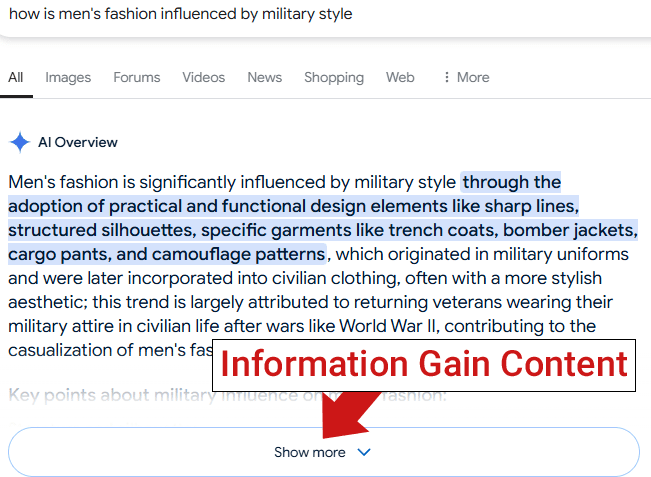
The information gain section contains follow-up topics about:

  • Clean lines and structured fit
  • Functional design
  • Iconic examples of military clothing
  • Camouflage patterns
  • Post-war impact (how wars influenced what men after they returned home)

How To SEO For AIO?

I think it’s somewhat pointless to try to rank for information gain because what’s a main keyword and what’s a follow up question? They’re going to switch back and forth. Like, someone may query Google about the influence of camouflage patterns and one of the information gain follow-up questions may be about the influence of military clothing on camouflage.

The better way to think about AIO, which was suggested by the Authoritas study, is to just think about AIO as a search feature (which is what they literally are) and optimize for that in the same way one optimized for featured snippets, which in a nutshell is to create content that is concise and precise.

Featured Image by Shutterstock/Sozina Kseniia
How to Optimize for GenAI Answers

ChatGPT is taking the world by storm. It reported in November 2024 100 million weekly users, despite being only one of the popular generative AI platforms.

No business should ignore those channels, as consumers increasingly turn to genAI for product and brand recommendations.

Yet showing up in AI answers is tricky, and the tactics vary among platforms.

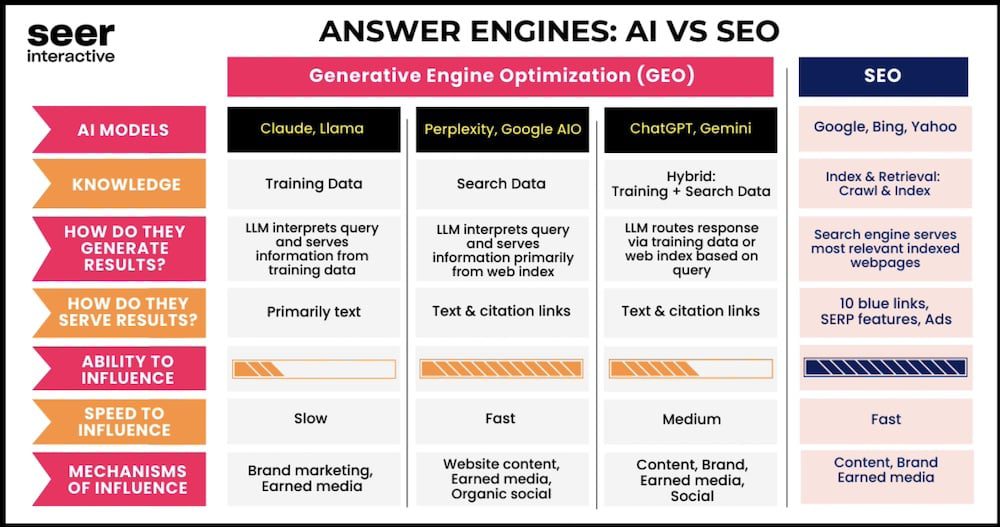
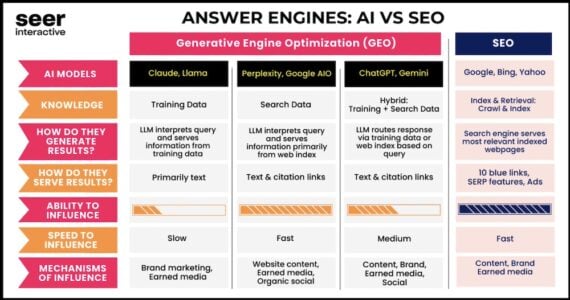
In August 2024, Seer Interactive, a marketing agency, compared the leading “answer engines.”

Answer Engines: AI vs SEO(Seer Interactive) Generative Engine Optimization (GEO) vs SEO AI Models: • Claude, Llama (Training Data) • Perplexity, Google AIO (Search Data) • ChatGPT, Gemini (Hybrid: Training + Search Data) • SEO: Google, Bing, Yahoo How They Generate Results: • Claude, Llama: LLM interprets query and serves information from training data. • Perplexity, Google AIO: LLM interprets query and serves information primarily from web index. • ChatGPT, Gemini: LLM routes response via training data or web index based on query. • SEO: Index & Retrieval: Crawl & Index. How They Serve Results: • Claude, Llama: Primarily text • Perplexity, Google AIO: Text & citation links • ChatGPT, Gemini: Text & citation links • SEO: Search engine serves most relevant indexed webpages (10 blue links, SERP features, Ads). Ability to Influence: • Claude, Llama: Low • Perplexity, Google AIO: Medium • ChatGPT, Gemini: Medium • SEO: High Speed to Influence: • Claude, Llama: Slow • Perplexity, Google AIO: Fast • ChatGPT, Gemini: Medium • SEO: Fast Mechanisms of Influence: • Claude, Llama: Brand marketing, Earned media • Perplexity, Google AIO: Website content, Earned media, Organic social • ChatGPT, Gemini: Content, Brand, Earned media, Social • SEO: Content, Brand, Earned media

“Answer Engines: AI vs. SEO” from Seer Interactive. Click image to enlarge.

Here’s my version.

Structure Organic Search ChatGPT, Gemini, Copilot Perplexity, Google AI Overviews Claude, DeepSeek, Llama
Knowledge sources Search index, knowledge graph Training data + search data + memory Search index Training data
Output Citations, ads, search features Answers + citations Answers + citations Answers (few links)
Optimization tactics Content, backlinks, branding Content, backlinks, branding Google & Bing indexes + top ranking Branding

Foundational search optimization tactics apply to genAI. Sites should be indexed and visible in Google and Bing to appear in answers on the leading platforms — ChatGPT, Gemini, Google’s AI Overviews, Microsoft Copilot, and Perplexity.

However, some AI-optimizaiton tactics are more important than others in my experience.

Fast, Light, Simple

AI crawlers that access a site will learn about the business and its purpose but may not link to it. Generative AI platforms often repurpose content without referencing the source. Antropic’s Claude, Meta’s Llama, and now DeepSeek rarely include links.

Thus allowing those AI crawlers on a site is debatable. My advice to clients is this: Google has monetized our content for years, but we’ve all benefitted from the visibility. So I usually suggest optimizing for AI platforms rather than blocking them.

The best AI-optimized sites are fast, light, and usable with JavaScript disabled. AI crawlers are immature, more or less. Most cannot render JavaScript and abort crawling slow-loading sites.

No Fluff

For years, Google’s machine learning favored featured snippets from pages with clear, concise, factual answers — even when the page itself wasn’t ranking organically near the top.

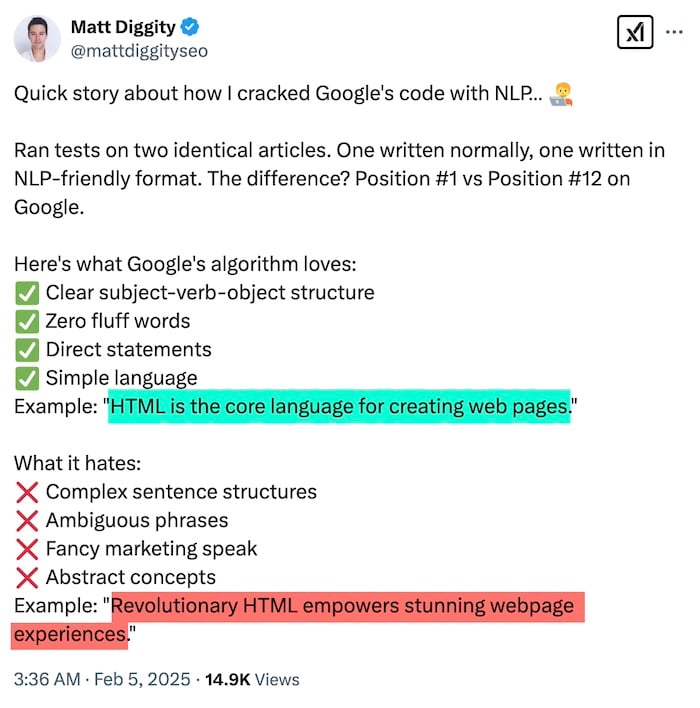
Recent case studies prove the point. One comes from search optimizer Matt Diggity, who shared examples on X of the ranking benefits in Google from brevity and clarity.

Search optimizer Matt Diggity posted on X the results from his “natural language processing” text. Click image to enlarge.

Matt’s findings apply to all writing, including generative AI platforms.

In short, AI optimization aligns with commonsense organic search tactics. Optimizing for one will likely help the other.

Hostinger Horizons Enables Anyone To Build Web Apps With AI via @sejournal, @martinibuster

Hostinger announced a new service called Hostinger Horizons that allows anyone to build interactive online apps (like an AI-based website builder) without having to code or hire programmers. The new service allows users to turn their ideas into web applications by prompting an AI to create it.

AI Democratizes Entrepreneurship

In the early days of the Internet it seemed like people with backgrounds from Stanford University and Harvard Business School had access to the resources and connections necessary to turn ideas into functioning web apps. Over time, platforms like WordPress lowered the barrier to entry for starting and running online businesses, enabling virtually anyone to compete toe to toe with bigger brands. But there was still one last barrier and that was the ability to create web apps, the functionalities that power the biggest ideas on the Internet. Hostinger Horizons lowers that barrier, enabling anyone to turn their idea into a working app and putting entrepreneurial success within reach of anyone with a good idea. The significance of this cannot be overstated.

AI Powered Web App Builder

Hostinger Horizons is an AI-powered no-code platform created specifically for individuals and small businesses that enables them to create and publish interactive web applications without having to use third-party integrations or requiring programming knowledge.

The new platform works through an AI chat interface that creates what users are asking for while also showing a preview of the web app. A user basically prompts what they want, makes feature requests, tells it what to change and preview the results in real-time.

Hostinger Horizons speeds up the time it takes to create and deploy a functioning web app. Hosting and all other necessary services are integrated into the service, which simplifies creating web apps because there’s no need for third party services and APIs. Once an app is created an online a user can still return to it, edit and improve it in minutes. It promises to be a solution for fast prototyping without the technical and investment barriers that are typically associated with translating a good idea to deployment on the web.

The Hostinger announcement noted that simple web apps only takes minutes to create:

“Early access trials show that simple web apps, such as a personal calorie tracker, a language-learning card game, or a time management tool, can be built and published in minutes.”​

How Hostinger Horizons Works

The new service combines AI-powered chat, with real-time previews and the ability to instantly publish the app to the web.

Hostinger provides all the necessary elements to get the work done:

  • Domain name registration
  • Email services
  • Multilingual support (80+ languages)
  • Supports image uploads
  • Supports user-provided sketches and screenshots
  • Voice prompting
  • Web hosting

Giedrius Zakaitis, Hostinger Chief Product and Technology Officer, offered these insights:

“Web apps have turned ideas into million-dollar startups, but building one always required coding or hiring a developer. We believe it is time to change the game. Just like Hostinger AI Website Builder introduced a new kind of site-building experience, Hostinger Horizons will democratize web apps so that anyone can bring their unique and exciting ideas online…”

Hostinger Horizons is an AI-powered no-code platform that is specifically designed to enable individuals and small businesses to build and publish fully functional web apps with no coding experience or external integrations needed. Users can just prompt what they want through an AI chat interface with real-time previews. It even allows uploading screenshots and sketches.

Hostinger Horizons promises to dramatically simplify the process of turning an idea into a working business by bundling hosting, domain registration, and email services into one solution.

Four reasons that make this a breakthrough service:

  1. Rapid Prototyping: Create, modify, and deploy interactive apps in real-time, including rapid revisions after the app is published.
  2. Integrated Services: Hosting and other essential tools are built in, eliminating reliance on third-party providers.
  3. Democratized Development: Hostinger Horizons enables anyone to turn their ideas into an online business without technical barriers.
  4. Supports 80+ languages

Creating Complex Websites With AI

What can you do with Hostinger Horizons? It seems like the right question to ask is what can’t you do with it. I asked Hostinger if the following applications of the technology was possible and they affirmed that the short answer is yes but that some of the ideas that I suggested may not be 100% straightforward to implement but that they were indeed possible to create.

Money makes the web run and I think applications that many would be interested in are ways to interactively engage users by enabling them to accomplish goals, capture leads, product comparison, improved shopping experiences and follow-up emails.

Since Hostinger Horizons handles hosting, domain registration, and email in a single platform, entrepreneurs and businesses can build these kinds of web pages by describing it to the AI chat interface, iteratively improving it and then publishing the finished project when it’s ready.

This could be useful to a restaurant, a law office, or a product review site, for example. Here are examples of the kinds of things I’d like to see it do.

Restaurant:

  • Reservation & Loyalty App
    Allows users to sign up and reserve tables and receive follow up reminders and offers.
  • Interactive Menu Explorer
    Can enable users to browse a menu according to dietary preferences and capture contact information for special offers.

Legal Office

Could be used to generate questionnaires and streamline the intake.

Product Reviews

  • Can encourage users to provide their requirements and preferences and then generate a summary of product reviews with quick links to where to purchase them.
  • Interactive Comparison Tools with links to where to purchase

Read more:

Prompt, refine, go live: We are set to disrupt the web app market with a fully integrated no-code solution — Hostinger Horizons

Ask An SEO: Is There Any SEO Benefit To Image Geolocation Data? via @sejournal, @HelenPollitt1

Our question today follows well from the one I addressed previously, which is all about metadata for images.

This time, it focuses specifically on one aspect of metadata: “Is there any SEO benefit to image geolocation data?”

Before I answer this question, it’s important that we all get on the same page about what geolocation data is.

What Is Image Geolocation Data?

Essentially, it’s code embedded in an image that gives details about where that image was taken or created.

The most common way of expressing this information is through EXIF or exchangeable image file format.

EXIF is a data format that includes information about how an image was captured. It can include aspects such as the size of the image in pixels, the settings the camera was set to when it took the image, and when the photo was taken.

EXIF data can also provide information on where the image was taken.

How You Can Find The Image Location Data

Not every photo you take or download will have metadata. If, for example, you have set your phone’s camera to not share the location of the images you take, then that data will be missing.

However, if you go to the file information of a photo, usually through a right-click on the image or tapping the menu accessible via the image, you should be able to see if a location has been recorded.

This will often be in the form of coordinates and may have a rough town or city based on those coordinates.

A warning, though: the location data can not only be deleted but also edited. Therefore, even if you find the location data for the image, its accuracy cannot be guaranteed.

In Theory, What Benefit Could Geolocation Data Have?

If we think about this logically, understanding what we’ve deduced about how search engines work, there are several areas where we could expect geolocation data to help with SEO.

Understanding The Image

In a similar way to structured data markup, we could expect the geolocation to give the search engines more contextual clues about the nature of the image.

For example, if the photo is of a mountain and the geolocation data puts the photographer at the base of Mount Everest, the search engines might deduce that the photo is of Mount Everest.

Relevancy For Landscapes/Location Imagery

By giving the search engines more context about the image, it may help them to identify its relevance to searches.

For example, understanding that this photo of a mountain was taken near Mount Everest may make it more relevant to image searches like “Mount Everest photo” and “base camp at Mount Everest.”

This would make logical sense, especially given what we know of how the search bots often use an image’s title and alt text to determine relevancy.

Local Search And Location Profiles

Location information would, in theory, be most important for local searches and location-specific business profiles like Google Business Profile and Bing Places.

Images are often uploaded to these profiles, and as such, geolocation data could enhance the local relevancy of the profiles.

A photo of the outside of a shop in Seattle with the geolocation data suggesting the photo was taken in Seattle would theoretically help to reinforce that the shop was relevant to searchers in Seattle.

What Evidence Do We Have That Geolocation Data Makes An Impact On SEO?

When we are considering how optimizations might impact ranking, crawling, indexing and other aspects of SEO, we need to ask ourselves if we have any evidence of it being impactful.

In the case of geolocation data impacting SEO, I can say that, no, unfortunately, there is none – beyond anecdotal, that is.

In fact, there have been a lot of studies into whether geolocation data impacts local rankings and the performance of Google Business Profiles. One study to take a look at is by Sterling Sky.

It appears that Google actually strips out the EXIF data from images posted through Google Business Profile, at least from public display. Whether it still uses the EXIF data it removes from the image is to be determined.

Google Claims It Does Not Use Exif Data

As far back as 2014, Google representatives, including Matt Cutts, claimed they did not currently use EXIF data but that they may well in the future.

However, reports from the SMX Advanced conference in September 2024 suggest that Martin Splitt of Google reiterated this 10 years after Cutts.

Can We Trust Google?

A lot of SEO pros will claim that Google lies. I prefer to think of it as us SEO professionals, perhaps not understanding the nuances enough to see that what a Google representative has said is technically true, but not necessarily accurate to the context we perceive it in.

However, in line with Google’s assertions, we really don’t have anything beyond occasional, unverifiable anecdotes that geolocation data like EXIF impacts Google’s crawling, indexing, or ranking in any meaningful way.

What About The Other Search Engines?

Bing does not mention geolocation data at all in its photo guidelines. I can’t find any evidence that Baidu or Yandex use it either, although this is purely through armchair research.

Given that, though, we do know that there are waves of new search platforms coming online and, indeed, other ways of searching that could arguably fall under an SEO’s purview.

Large language models (LLMs) may well use additional data points than the traditional search engines.

What we don’t know yet is if they use geolocation data as part of their ways of selecting which pages and brands to display in their answers or search results.

So, Is Geolocation Data Something We Should Take Note Of?

I would suggest that adding geolocation data to your images is not something that should find its way into your task list. We don’t really have the data to back up claims that it is impactful.

In fact, we have more studies and communications from search engine representatives that suggest it isn’t useful in SEO.

Whereas I don’t think it is worth the time and energy to implement geolocation data, I don’t think it’s harmful to include it. Don’t go to the extent of altering it or deleting it. Just leave it if you have already included geolocation data in your images.

Perhaps, in time, it will become useful. As Google has said, it reserves the right to use it. We still don’t know if emerging search platforms will use it.

Essentially, if you are really keen to understand its impact, I would suggest testing it with your own images.

Add EXIF data to a set of images and measure their rankings against a control group that doesn’t use EXIF data.

Measure the change in rankings before and after adding the EXIF data and compare it to the control group.

If there are similar changes in the rankings, then it is possible the EXIF data had no impact.

If there are significant increases (or decreases!) in the rankings of the images with EXIF data, but not the control group, that would suggest they are impactful.

More Resources:


Featured Image: maxbelchenko/Shutterstock

WordPress Offers New 100-Year Domain Name Registrations via @sejournal, @martinibuster

WordPress.com updated their 100-year domain and hosting plan, unlocking the opportunity to secure a domain name for a one hundred year period for only $2,000.  The new service is a breakout from the 100-year plan which is another offering that includes hosting and other benefits for $38,000.

100 Year Domain Name Registration

The new domain name registration is available for .com, .org, .net, or .blog domains and is managed in a trust account controlled by the person registering the domain. This service was previously available as part of a 100-year plan that came with hosting at a price of $38,000. The domain registration fee of $2,000 is more affordable and a good value for those who require the security of knowing the domain isn’t changing hands by mistake.

WordPress.com offers the following benefits:

  • No expiration surprises.
  • No lost domains due to admin mistakes.
  • No stress about renewals—ever (or 100 years, whichever comes first).
  • A full century of security for your domain.
  • One setup. 100 years of ownership.

They’ve also reimagined their 100-year plan so that it comes with numbered trust accounts controlled by the owner of the domain and hosting plus contingencies that guarantee the continued web presence should anything happen to WordPress.com or Automattic.

Read more about the new 100-year domain name registration:

Secure Your Domain For the Next Century

Featured Image by Shutterstock/gcafotografia

How To Create a Certified Fast Website To Compete In 2025

This post was sponsored by Bluehost. The opinions expressed in this article are the sponsor’s own.

Imagine clicking on a website only to wait several seconds for it to load.

Frustrating, right?

Your prospective customers think so, too.

In a world where attention spans are shrinking, even a one-second delay can lead to lost visitors, lower rankings, and missed revenue opportunities.

Research finds that B2C websites that load in one second or less have conversion rates three times higher than those that load in five seconds or more.

Conversion rates are 2.5 times higher for B2C websites that load in one second or less.

In other words, speed is no longer a luxury.

Speed is a necessity.

A fast-loading website enhances user experience, boosts SEO rankings, and drives higher conversions.

And with search engines and consumer expectations continuing to evolve, businesses must prioritize performance to stay ahead of the competition.

Implementing the right strategies ensures that websites remain fast, competitive, and ready for the demands of 2025.

A trusted partner like Bluehost provides the robust infrastructure, advanced caching mechanisms, and built-in performance enhancements needed to help websites reach peak efficiency.

1. How To Select The Right Hosting Plan

A website’s performance starts with selecting the right hosting plan. The plan should align with the site’s current and future needs to effectively accommodate growth and traffic fluctuations.

Assess Your Website’s Needs

Before settling on a hosting plan, it’s crucial to evaluate key factors like traffic expectations, content types, and scalability.

For example, websites with heavy multimedia content require more resources than text-based sites, and anticipated visitor numbers influence server capacity needs.

Additionally, selecting a plan that supports future growth ensures smooth scaling without performance bottlenecks.

Match Your Website’s Needs To What The Host Provides

Different hosting solutions cater to different website requirements, ranging from budget-friendly shared hosting to more robust, performance-driven plans. Bluehost offers multiple hosting options tailored to various business needs.

Shared Hosting can work well for smaller websites with moderate traffic, offering a cost-effective way to get started.

Bluehost’s VPS hosting offers more power and flexibility by providing dedicated resources, making it an excellent choice for growing websites that need additional performance.

For large-scale websites demanding maximum speed and control, our dedicated hosting plans deliver exclusive server access with top-tier performance for optimal speed and scalability.

2. Implement Caching Mechanisms

Caching is an essential tool for optimizing website speed by reducing the need to load the same data repeatedly. By storing frequently accessed files, caching decreases server load, enhances response times, and ensures visitors experience faster page loads.

Websites that effectively utilize caching experience better performance, lower bounce rates, and improved search rankings.

Use Built-In Caching Features

For instance, Bluehost provides multiple caching mechanisms to enhance website performance, such as PHP APC (Alternative PHP Cache). A powerful opcode caching system, PHP APC improves database query speed and optimizes PHP script execution, ensuring that frequently accessed data is retrieved faster.

On the other hand, edge caching minimizes latency by delivering content from servers closest to the user, reducing server response times and improving load speeds.

Bluehost makes it easy to use caching to enhance website speed. Caching can be enabled directly through the Bluehost control panel, ensuring seamless implementation.

Additionally, Bluehost is powered by Dell rack-mount servers, which use AMD EPYC chips, DDR5 RAM, and ultrafast NVMe storage. With caching plugins like W3 Total Cache or WP Rocket, your web pages will load faster, improving the user experience, SEO, traffic, and conversion rates.

3. Absolutely Leverage Content Delivery Networks (CDNs)

Another way to speed up websites is to examine how content is delivered to users. A Content Delivery Network (CDN) enhances website performance by distributing content across multiple servers worldwide. This reduces latency and ensures visitors load pages faster, regardless of location.

CDNs minimize the physical distance between the server and the user by caching static assets like images, stylesheets, and scripts at various data centers worldwide. This results in load times and reduced bandwidth usage.

Beyond speed improvements, CDNs also enhance website security by protecting against DDoS attacks, traffic spikes, and malicious bots. Some CDNs offer additional features, such as image optimization, automated compression, and firewall rules, that further improve performance and security.

CDNs & Bluehost

Bluehost offers built-in CDN solutions, including Cloudflare integration, to help websites achieve optimal performance and security.

Activating a CDN through Bluehost’s dashboard is straightforward, and configuring settings that best suit a website’s needs significantly improves speed and reliability.

4. Optimize Images & Media

Impact of Media Files on Load Times

Large images and unoptimized videos can significantly slow down a website. Why? High-resolution media files require more bandwidth and processing power, leading to slower page loads and a poorer user experience.

This is particularly problematic for mobile users and those with slower internet connections since heavy media files can take significantly longer to load, frustrating visitors and increasing bounce rates.

Additionally, media files that are not optimized can consume excessive server resources, potentially affecting overall website performance. If too many large files are loaded simultaneously, the hosting environment can strain, causing slowdowns for all users.

Image- and media-based slowdowns are widespread on websites that rely heavily on visual content, such as e-commerce platforms, portfolios, and media-heavy blogs.

Reducing file sizes, choosing appropriate formats, and leveraging compression techniques can greatly enhance website speed while maintaining visual quality.

How To Size Images The Right Way

First, while it may be common and easy to do, avoid using the width and height attributes in HTML to resize images since this forces the browser to scale the image, increasing load times and decreasing performance.

Instead, resize images before uploading them using graphic editing tools such as Photoshop, GIMP, or online compression services. Scaling images improperly can lead to pixelation and a stretched appearance, negatively impacting user experience.

By resizing images to their intended display size before uploading, websites can significantly reduce the amount of data a browser needs to process, resulting in faster page loads and a more visually appealing layout.

Appropriately resized images will also have a higher visual quality because they are sized for the right display dimensions.

How To Compress Images For Better Website Performance

Compressing images using tools like Squoosh, TinyPNG, or plugins like Smush helps reduce file sizes without sacrificing quality.

Implementing lazy loading ensures that off-screen images and videos only load when needed, reducing initial load times and enhancing overall site performance.

5. Minimize Plugins & External Scripts

How To Discover Your Plugins’ Usage

Overloading a website with excessive plugins and external scripts can severely impact performance. Therefore, it’s essential to regularly assess installed plugins and remove outdated, redundant, or unnecessary ones.

Limiting the number of external scripts running on a page can also help reduce loading times and improve efficiency.

How To Choose Efficient Plugins

Selecting the right plugins is crucial for maintaining website performance. First, look for lightweight, well-coded plugins that prioritize speed and efficiency.

Then, regularly auditing your plugins and removing outdated or redundant ones can prevent conflicts and minimize resource usage.

Bluehost provides hosting environments tailored for WordPress users, ensuring compatibility with essential caching, security, and SEO plugins.

By hosting your website on a reliable platform like Bluehost, you can benefit from a stable infrastructure that complements the best WordPress plugins. This will help you enhance functionality without compromising speed.

6. Tips For Compression, Minification & Technical Tweaks

Additional technical optimizations, in addition to caching and CDNs, can further improve site speed and performance. Compression and minification techniques help reduce file sizes, while other backend optimizations ensure web pages load efficiently.

Implementing these strategies can significantly improve desktop and mobile user experiences.

Benefits Of Compression

Reducing the size of HTML, CSS, and JavaScript files significantly improves page speed. Compressed files require less bandwidth and load faster, creating a smoother user experience.

Effortless Compression & Technical Optimization With Bluehost

Bluehost makes compression easy. GZIP compression can be enabled via Bluehost’s control panel or by modifying the .htaccess file.

Plugins like Autoptimize help minify code by removing unnecessary characters, ensuring that files remain lightweight and optimized for performance.

Utilizing ETags & Expires Headers

Another important aspect of page speed optimization involves using ETags and expired headers, which help streamline browser requests and improve overall efficiency.

These settings instruct a visitor’s browser on how to handle cached content, preventing unnecessary reloads and reducing the number of requests made to the server.

ETags (Entity Tags) are used by browsers to determine whether cached resources have been modified since the last visit. If the content remains unchanged, the browser loads the local copy instead of downloading it again, minimizing bandwidth usage and speeding up load times.

On the other hand, expired headers specify a timeframe for when specific resources should be refreshed.

By setting an appropriate expiration date for static files like images, CSS, and JavaScript, web developers can ensure that repeat visitors are not unnecessarily reloading content that has not changed.

For example, a website logo that remains consistent across pages can be cached efficiently so that users do not have to download it every time they navigate the site.

Properly configuring these settings enhances website performance, particularly for sites with recurring visitors. It prevents redundant data transfers and reduces the workload on the browser and server.

Many hosting providers, including Bluehost, offer tools and support to help website owners implement these optimizations effectively. This ensures a faster and more seamless user experience.

7. Regularly Monitor & Execute Maintenance

Practice Continuous Performance Assessment

Technology changes and slows down. Websites are no exception.

Therefore, websites should undergo regular performance assessments to ensure they’re continually optimized for the best user experience.

Routine speed testing helps identify areas where performance can be improved, whether by addressing slow-loading elements, optimizing server response times, or refining backend processes.

Various tools can assist in performance evaluation. Google PageSpeed Insights, for example, provides detailed reports on website speed and offers specific recommendations for improvements.

Lighthouse, a Google open-source tool, analyzes performance, accessibility, and SEO, helping site owners fine-tune their pages.

Beyond automated tools, ongoing monitoring through website analytics platforms, such as Google Analytics, can offer valuable insights into user behavior.

High bounce rates and low engagement metrics may indicate slow performance, guiding further refinements.

Businesses running ecommerce platforms or large applications should consider integrating application performance monitoring (APM) tools to track performance bottlenecks in real time.

Maintenance Tips

Regular updates to website software, regardless of the platform used, are essential for security and performance.

Content management systems (CMS) like WordPress, Joomla, and Drupal require frequent updates to core files, themes, and plugins to prevent compatibility issues and vulnerabilities. Similarly, frameworks and libraries for custom-built sites must be kept up to date to ensure efficiency and security.

Database optimization is another crucial maintenance task. Over time, databases accumulate redundant data, slowing down query execution.

Periodic optimizations, such as removing unused tables, cleaning up post revisions, and properly indexing databases, can enhance efficiency.

Server maintenance is equally important. Websites hosted on dedicated or VPS servers should have automated backups, uptime monitoring, and log analysis configured.

Cloud-based hosting solutions like Bluehost Cloud provide performance-tracking tools that can help identify and mitigate slowdowns at the infrastructure level, a 100% uptime SLA, and more to ensure websites run smoothly.

Lastly, implementing a proactive security strategy ensures ongoing performance stability. Regular malware scans, security patches, and SSL certificate renewals help prevent vulnerabilities that could slow down or compromise a website.

Security plugins and firewalls, such as Cloudflare, add an extra layer of protection while minimizing unwanted traffic that could strain server resources.

That’s what makes Bluehost the superior choice. We offer automated backups, performance monitoring tools, and dedicated 24/7 support professionals who can help keep your website running at peak efficiency.

And with a range of hosting plans tailored to different needs, Bluehost ensures that your website will remain fast, secure, and scalable as it grows.

Building a certified fast website in 2025 requires strategic hosting, caching, content delivery, and ongoing maintenance.

Leveraging Bluehost’s robust hosting plans, integrated CDN, and performance optimization tools ensures your website remains fast, competitive, and ready for the evolving digital landscape.

Bluehost’s hosting solutions provide an easy and reliable way to optimize performance.


Image Credits

Featured Image: Image by Bluehost. Used with permission.

Google’s New ‘Ask For Me’ Reviewed: Is This Bad For Local Businesses?

We have been testing Google’s newest “Ask For Me” Search Lab test.

It is quick, easy, and impressive technology to request local quotes, but it is not at all clear that it is good for small businesses.

At the end of January, Rose Yao, a product lead at Google, announced a new Search Lab test (“Ask for Me”) that uses Google Duplex to automate calls to local businesses “to find out what they charge for a service and when it’s available.”

It’s testing in two categories to start: automotive service/repair and nail salons. And we just got access.

When your search query falls within one of the two test categories (e.g., oil change), the Ask for Me module appears under the Local Pack with a large call to action that encourages users to “Get started.”

Google Ask for me CTAAsk for Me Module, CTA (Screenshot from search, Google, February 2025)

The Ask For Me Experience

It then asked what service I needed and gave me a list of 20, from factory-scheduled maintenance to vehicle leaks. I chose “oil change” and provided complete details about my car’s make, model, year, and mileage.

I indicated my desired scheduling and preferred communication method (email or SMS) – and we were off to the races.

It took me 96 seconds, but I wasn’t clear on all of the choices. In practice, it takes less than one minute once you are familiar with the process.

What Happened After Submitting A Form?

From the time I submitted the form, it took 17 minutes to receive a response.

I was given a summary of prices and availability from the three businesses that answered the phone. Additionally, I was notified that five businesses couldn’t be reached.

Screenshot from search, Google, February 2025

Google called eight of the top nine listings in the Local Finder. The one not called was Walmart.

The businesses that responded were ranked second, third, and seventh on the Finder list.

In a second test, requesting a tire purchase and installation, Google called 11 businesses.

Six of those answered and provided information. Five of the calls went unanswered. Exactly how many locations Google will call is still TBD.

If you call after hours, Google will send back an email indicating that it will call once the businesses are open.

Screenshot of author’s email, February 2025

How This Could Be A Problem For SMBs

Google Duplex was launched in 2018, using AI “for conducting natural conversations to carry out “real world” tasks over the phone.”

That year, Google implemented a similar solution for restaurant reservations, allowing users to click a reservation button and let Google handle the process. That system is beneficial for both the user and the restaurant.

However, “Ask for Me” is different. It functions more like a Request for Proposal (RFP), letting users quickly contact multiple repair shops with minimal effort.

Even worse, it effectively pits one shop against another, which, if it were to become widely adopted, could drive auto repair shop profits down.

The product also creates additional work for local businesses.

Until auto repair shops adopt automation and bots to handle these calls, staff will be burdened with calls that take just as long as regular ones – but with less direct customer interaction and a lower chance of closing a sale.

In a nutshell, here’s what’s wrong from a business point of view (POV):

  • Businesses learn nothing about the potential customer.
  • Callers learn nothing but price and availability about the business.
  • Local services become further commodified.

There are obvious spam implications: local black hats using Ask for Me calling to waste a competitor’s time.

In addition, this puts pressure on local merchants to “low ball” when Google calls and potentially do a “bait and switch” when the customer actually appears.

Only A Test

As I noted in our most recent podcast, the Ask for Me test is dramatically more limited than most Google tests.

Normally, Google releases its early work on some percentage of searchers (e.g., 1%). Then, if successful, it will show the test to 10%, and so on, until a full rollout.

In this case, the user has to opt in via Search Labs, which will significantly limit the test’s scope. Unless this is a PR ploy, it would appear that Ask for Me is not ready for even a 1% rollout.

How To Opt Out From Ask For Me Duplex Calls

Businesses can opt out of receiving these calls, but the process is somewhat complicated and requires a verified profile.

To opt out of Google Duplex calls for your business, you can:

  • Go to your Business Profile. Select the three-dot menu.
  • Select Business Profile settings.
  • Select Advanced settings.
  • Under “Google Assistant calls,” turn off “Bookings from customers” or “Automated calls.”
Screenshot from Google Business Profile, February 2025

Final Thoughts

We are just beginning to experience the reality of bots (AI agents) interacting with our businesses.

While those obsessed with efficiency may see the appeal, I’m not convinced this will actually be efficient in practice.

It looks more like a battle of attrition, with Google generating more calls and businesses wasting time quoting prices – only to lose sales to the lowest bidder.

In the process, a lot of time is wasted.

More Resources:


Featured Image: PeopleImages.com – Yuri A/Shutterstock

Why Google’s Rich Results Tool Can Be Misleading via @sejournal, @martinibuster

A recent discussion in a Facebook SEO group highlighted how Google’s structured data testing tool can produce misleading results, making Schema.org structured data difficult to debug. This is why the tool falls short and why Schema.org provides a better solution.

This article doesn’t link to the private Facebook group discussion but it does provide screenshots from debugging the site that was discussed.

WordPress Plugin For Structured Data

The person who started the discussion said they were using a WordPress plugin to output their structured data. Someone pointed their finger at the SEO plugin, saying that the Schema.org structured data output by plugins isn’t good enough but that answer turned out to be incorrect. It may have been an issue with the structured data selected by the user, not the plugin itself.

Structured data plugins are useful for outputting structured data because:

1. It automates the tedious task of generating a Schema.org JSON-LD structured data script.

2. It automatically outputs structured data that is required by Google.

3. Plugins will automatically update all structured data when Google changes its requirements.

The only downside, as may have been the case in this situation, is if the user chooses a structured data that’s not appropriate for their content. This can happen, for example, if the correct version is LocalBusiness, but it requires a paid version of the plugin and the user selects another type of structured data, like AggregateRating.

Google Rich Results Tool Error

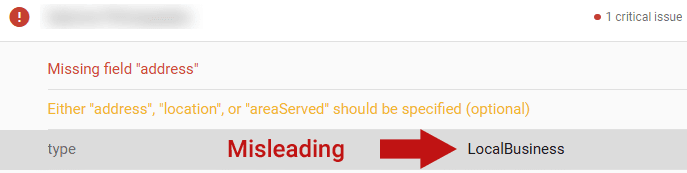
The person should have been using the LocalBusiness structured data but the code on the page was for AggregateRating. But when the person checked it on Google’s structured data testing tool it incorrectly showed that they were using the LocalBusiness structured data.

Screenshot Of Misleading Google Rich Results Test

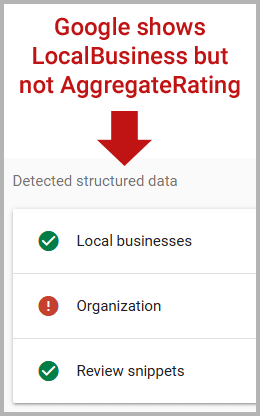
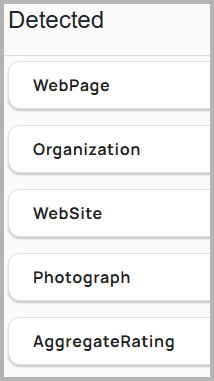
The weird part is that Google’s tool enables users to view the structured data that’s in the HTML and it accurately shows that the web page was using AggregateRating, not LocalBusiness, Schema.org structured data.

Screenshot: Google’s Tool Detects Wrong Structured Data

The tool detects LocalBusiness structured data but that is actually something that’s nested within the AggregateRating structured data, which is not detected.  What the tool is showing is related to rich results, but the label on the tool confusingly says it’s showing detected structured data.

Schema.org Structured Data Validator

The more accurate Schema.org structured data validation tool is the one provided by Schema.org, not Google.

Here’s the structured data that the official Schema.org tool detected:

Why Did Google’s Tool Fail?

What happened is that the website was using the AggregateRating structured data to review their local business. Google’s Rich Results Test tool mistakenly identified the LocalBusiness structured data and ignored that the script was really about AggregateRating.

The official Schema.org validator accurately identified the structured data.

This doesn’t mean that Google’s tool is broken though. I think what’s happening is that Google’s tool has a functionality that may be limited to testing for whether a website’s structured data qualifies the page for rich results, which is why it’s called the Rich Results Tester.  It maybe doesn’t validate the structured data so if you want to accurately debug your code then it’s probably a good idea to give the official Schema.org tool a spin.

If you’re having trouble debugging structured data and reading HTML isn’t a part of your skill set you may want to give the official Schema.org structured data tool a try, it may help you better understand what’s wrong with your structured data.

Maybe it’s time SEOs and publishers add the official Schema.org Structured Data Validator to their list of tools to use.

Featured Image by Shutterstock/Viorel Sima

SEO Considerations for New Domain Names

Securing a good domain name is easier than a decade ago. The proliferation of top-level domains means short and catchy names are obtainable, and there’s no longer an organic ranking benefit to a .com.

The necessity of a findable brand name is now crucial. Shoppers are discovering brands and products via generative AI platforms such as ChatGPT, Claude, and DeepSeek, as well as on social sites such as Reddit, TikTok, and Instagram — despite having no links to click.

The result is consumers discover a brand and then search for it on Google, Bing, and similar engines, producing more clicks and impressions for branded terms. The trend will likely grow as genAI platforms become mainstream.

Hence memorable domain names are both available and crucial.

Here are my search-engine optimization considerations for a new domain.

Avoid Generic Names

Years ago domain names influenced organic search rankings. A keyword-focused domain was critical. No more. To Google and others, domain names alone do not imply relevancy.

Yet bland, nondescript domains are easily forgotten, thus complicating visibility in branded searches.

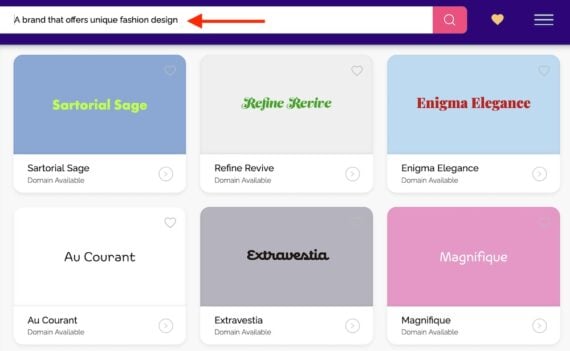
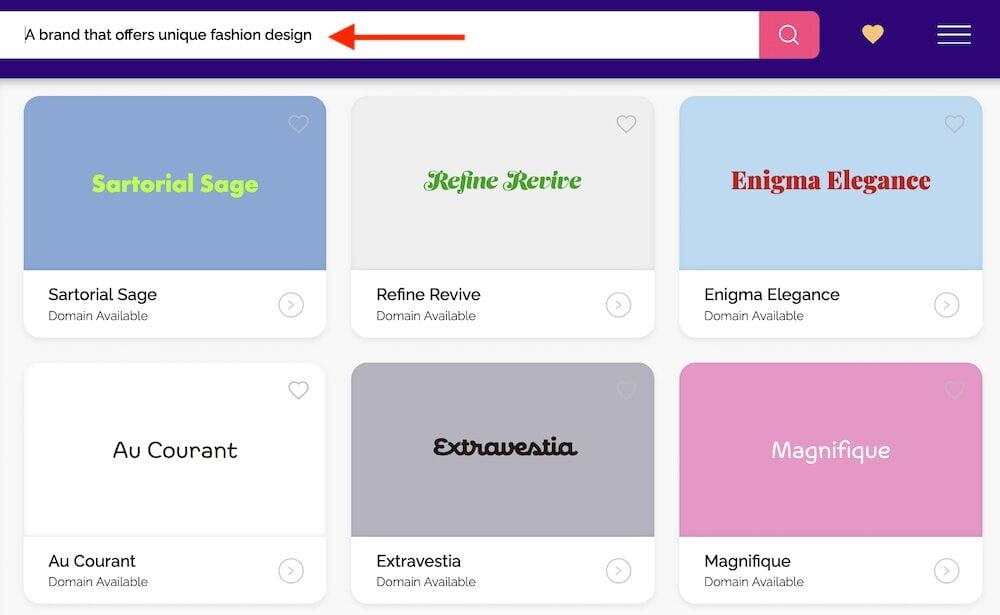
Seek a name that implies a niche and is memorable. Tools such as Namify can help.

Screenshot of a Namify page showing the brand name options

Namify offers brand name suggestions, such as this example for “A brand that offers unique fashion design.”

Assess Brand Competitors

The expansion of top-level domains means multiple companies can register the same name on, say, .com, .co, .biz., and .us. Search for the name you’re considering. If another company ranks for it, even in a different niche, carefully consider whether you could compete with it on branded queries.

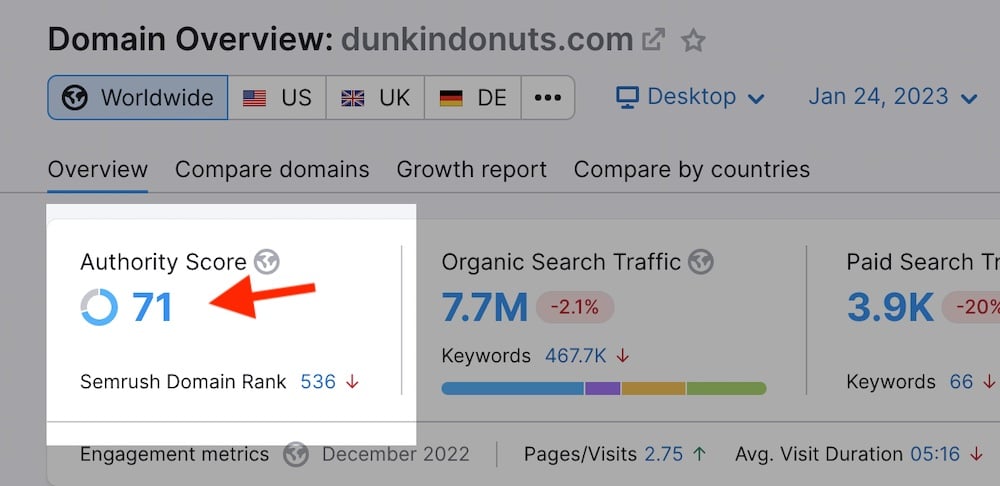
Tools such as Moz and Semrush measure and track domain authority and organic traffic history. Both help assess the organic brand-search strength of would-be competitors.

Screenshot of the Semrush interface showing the authority score

Semrush says Dunkindonuts.com has a “71” authority score.

Avoid Apparent Misspellings

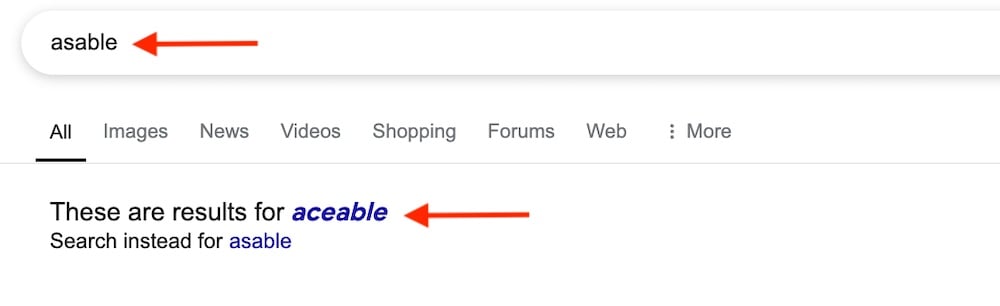
Google automatically generates results for the correct spelling of a query if it considers it misspelled. Thus seemingly clever spellings of prominent terms could backfire.

Avoid branded domain names that trigger automated corrections by search engines. Consumers will search for a new brand if they see it in an ad or an email. They likely won’t find it if the search engine thinks it’s an error.

Google thinks “asable” should be “aceable.”

WooCommerce Rebrand Offers Lessons For Gaining Competitive Edge via @sejournal, @martinibuster

An interview with WooCommerce shows that their recent rebrand is a strategic refresh, offering lessons for businesses and search marketers on how to stay relevant and competitive.

A Business Refresh

A recently announced rebrand by WooCommerce is far more than a logo update; it’s part of an evolution of their platform that demonstrates the strategic value of reassessing user expectations to stay competitive.

A spokesperson from WooCommerce agreed:

“Exactly: the brand update reflects our broader evolution toward a more integrated platform. While the visual changes are noticeable, they represent our shift toward making WooCommerce more powerful out of the box while maintaining the flexibility of open source.”

From Evolution To A Refresh

WooCommerce has been on a steady evolution from a plugin to a platform. And even though it’s referred to itself as a platform for awhile now, the evolution from plugin to platform is speeding up because of an internal WooCommerce initiative called More In Core. Announced in 2024, More In Core is a shift to a WooCommerce experience that provides a more complete ecommerce experience straight of the box, delivering the core functionalities that most ecommerce sites need without needing to install additional plugins.

One of the examples, from October 2024, is the Brand Plugin integration, which used to be a premium plugin but is now a standard feature of the platform itself. The Brand feature enables store owners to create a taxonomy based on brands.

A WooCommerce spokesperson explained:

“While ‘More in Core’ is an internal name we use (we’re excited about these improvements!), our goal isn’t simply adding more features — it’s about thoughtfully building a comprehensive commerce platform that delivers the essential tools that the majority of merchants need out of the box, reducing plugin conflict and management, increasing the depth of integration between platform features, and freeing builders and sellers to focus on other parts of their business.

We’re starting by integrating Woo-owned extensions, like Brands. This isn’t about removing opportunities for third-party developers — we remain committed to a vibrant ecosystem where developers can build and grow on our platform. We’re carefully considering which features are truly essential for most merchants and integrating them in ways that maintain the flexibility WooCommerce is known for.

Looking ahead to 2025, merchants and developers can expect continued thoughtful and deep integration of key features, continued performance improvements across product and order management in particular, and a streamlined user experience that’s leveraging more and more of WordPress’ modern admin designs.”

User Experience And UI

Focusing on the user is a great place to start a business refresh. Do site visitors use your site the same way? Are there emerging trends to consider?

I asked WooCommerce if there were any any specific UX and UI improvements implemented as part of their recent February 2025 brand refresh. They answered:

“The brand refresh aligns with ongoing work to make WooCommerce more intuitive. We’re focusing first on improving core experiences in the admin interface and store management — the essential interactions our merchants use daily.

More specifically, we’re rolling out improvements to the payments onboarding and configuration experience.

We’re creating a new commerce-optimized starter theme with a set of creative variations available out of the box. We’re iterating rapidly on the WooCommerce Analytics product we just released in beta, and collaborating directly with the community on new capabilities around order status and fulfillment management.”

Lessons For Search Marketers

I asked about how their brand refresh fits into a larger strategy in order to find out what others can learn about doing something like this for their own brands and websites. I asked them for what lessons search marketers could learn from their experience and they described a process that identified stakeholders from the ecosystem to the users, user expectations set by competitors and wrapping all of that into creating their refresh.

The WooCommerce spokesperson shared:

“Our rebrand considered the multiple groups that make up our ecosystem: builders who create stores for clients, developers who create products and extensions, merchants who run their businesses on WooCommerce, hosts who help connect us to a larger set of customers, and contributors to our open source platform. The key was researching each group to understand how they interact with WooCommerce differently: developers building businesses on our platform, merchants managing daily operations, builders creating client sites, and contributors enhancing the core platform.

And of course we also had to factor in the current landscape. What other ecommerce platforms look like, what other technology companies look like — and how can we stand out. All that, plus we needed to make sure it felt true to Woo: that it aligned with our open-source roots, what we believe in, and what the platform does. We’re incredibly proud of what our in-house design and marketing teams accomplished here; it’s a great demonstration of the team we’ve assembled and what they’re capable of.

For search marketers, there’s a valuable lesson here about understanding your different audience segments and how they interact with your product or service. Just as we needed to consider how our brand speaks to builders versus merchants versus developers, search marketers need to consider how different user groups search for and interact with their content. It’s about creating a cohesive message that resonates across audiences while addressing their specific needs and pain points.”

Priorities For A Refresh

Some people like the flexibility of only activating needed functionalities because of concerns about the performance hit that comes from feature bloat. My understanding is that there are ways to turn off unneeded functionalities, is that true? Would turning them off be as simple as a toggle (a module UI), or would they have to jump into the code to do that?

How does one go about deciding what what’s best for the user? At what point do you say, not enough people need this?

WooCommerce offered the following useful insights:

“We’re being very thoughtful about considering what features become part of core WooCommerce. We started by looking at our own premium extensions that provide essential commerce functionality — features that most merchants need to run their businesses effectively.

This isn’t about adding features just to add them, and it’s definitely not about limiting opportunities for third-party developers who are crucial to our ecosystem. We recognize that some merchants and builders need specific features that our extensions don’t offer — and that’s the power of WooCommerce. At the same time, we also recognize that having to manage multiple extensions for simple functions, like brands, can create pain points.

Instead, it’s about providing a solid foundation that both merchants and developers can build upon. Features can be easily enabled or disabled through the admin interface so merchants can keep their sites lean and fast. This modular approach means stores can use what they need while developers can continue to innovate and extend the platform in new ways, relying on robust core functionality that’s always available.

When evaluating what becomes part of core, we look at how essential the feature is for most merchants — what they need to get a store online, selling, shipping, and getting paid — plus how it fits into the broader WooCommerce ecosystem. And of course for anything we add into core, performance is top of mind for our product teams.

Our goal is to strengthen the platform’s foundation while maintaining the openness and flexibility that makes WooCommerce so powerful. In some cases we’re looking at opening up new capabilities via lower level changes, without necessarily dictating how those capabilities should be used. Order statuses are a good example here: adding separate statuses for fulfillment and payment enables all sorts of new functionality, even if we don’t immediately require all solutions to leverage both.”

Focus On Performance

Adding more features or code to a site can degrade performance, something WooCommerce considered as part of the initiative. Adding needed functions helped make the entire platform more stable which ended up helping performance.

An example that WooCommerce shared was last year’s introduction of High-Performance Order Storage (HPOS), an optimized way to store customer order information that increases store website performance over the traditional ways of handling the same data.

The spokesperson answered:

“Performance remains fundamental to our approach. When we consider adding features to core, we’re actually making a thoughtful trade-off: for functionality that most merchants need, having it built-in and optimized is often more performant than requiring an additional plugin. This can reduce complexity and potential conflicts while improving overall site performance.

Our team ensures that as we integrate features, we’re doing so in a way that maintains or improves site speed. HPOS is a prime example — we’re rebuilding fundamental structures to improve scalability. Each feature addition is carefully evaluated for its performance impact, and we’re committed to keeping WooCommerce fast and efficient. We’re also currently in the middle of a performance review across all of our main functionalities to see where we can make improvements ahead of adding anything new.

For 2025, our focus is on thoughtfully enhancing WooCommerce’s essential capabilities while maintaining the open ecosystem that lets developers build innovative solutions for merchants, and improving the quality of our user experience from end to end. The goal isn’t to add more for the sake of more — it’s about providing a solid, performant foundation that benefits merchants, builders, and developers, and raising the bar for everyone.”

Should You Consider A Business Refresh?

What WooCommerce is doing is a reminder that settling on a strategy and moving forward year after year isn’t enough; consumer needs and the ways they interact online are constantly evolving. Taking inventory of emerging trends and user expectations is a sound practice for keeping an enterprise fresh and relevant—especially important right now as the Internet undergoes one of the most significant transformations in decades. Ultimately, consumers, not competitors, should drive your strategy. Identifying better ways to interact with users, customers, and site visitors can help position you as the disruptor rather than the disrupted.

Featured Image by Shutterstock/insta_photos