How To Choose The Best WordPress Theme For SEO via @sejournal, @MaddyOsman

Your WordPress theme encapsulates your brand and helps provide a good user experience. But people often forget about the search engine optimization aspect of it.

A WordPress theme that isn’t SEO-friendly (or worse, is bloated and slow) can be a real hindrance in the fiercely competitive battle to land on top of the search engine result pages (SERPs).

And since higher rankings can drive more organic traffic, leads, and revenue — this is one element you really want to get right.

In this guide, you’ll learn what an SEO-friendly theme is, what you should consider when selecting one, and which five WordPress themes are best for SEO.

The Basics Of A Search-Friendly WordPress Theme

A WordPress theme built with search engine optimization in mind helps websites achieve better rankings on SERPs.

Optimized WordPress themes are built to elevate your SEO efforts and provide a great user experience.

There are thousands of themes for WordPress users to choose from and thousands more from third-party providers.

Most of these themes make your WordPress website look stunning, but a glance under the hood could tell a different story.

Poor coding, slow loading speeds, and a lack of plugin support can be hiding underneath a beautiful facade. All of these flaws affect search engine rankings.

When you have significant technical SEO issues, Google won’t trust your website as an industry authority, and you’ll likely struggle to reach the first page.

On the other hand, the best WordPress themes for SEO are both stunning and optimized with the latest SEO techniques in mind. They’ll have:

  • A responsive design.
  • Clean code.
  • Fast loading speeds.

And they’ll let you optimize your WordPress website effortlessly.

How To Choose The Best WordPress Theme For SEO

So, how do you choose an SEO-friendly WordPress theme?

You should:

1. Pick A Responsive Theme

Mobile devices (excluding tablets) account for nearly 60% of web page views worldwide.

A majority of smartphone users look up websites, products, and related content on their phones. After all, when you hear about a cool product, you usually don’t want to wait until you’re home to check it out.

SEO-friendly WordPress themes have responsive layouts. A responsive WordPress website will adjust to varying screen sizes across devices with ease.

That way, mobile shoppers aren’t greeted with a poorly adjusted ecommerce homepage when they click through.

Google prefers mobile-friendly websites and offers a tool where you can test how your website fares and performs on different devices.
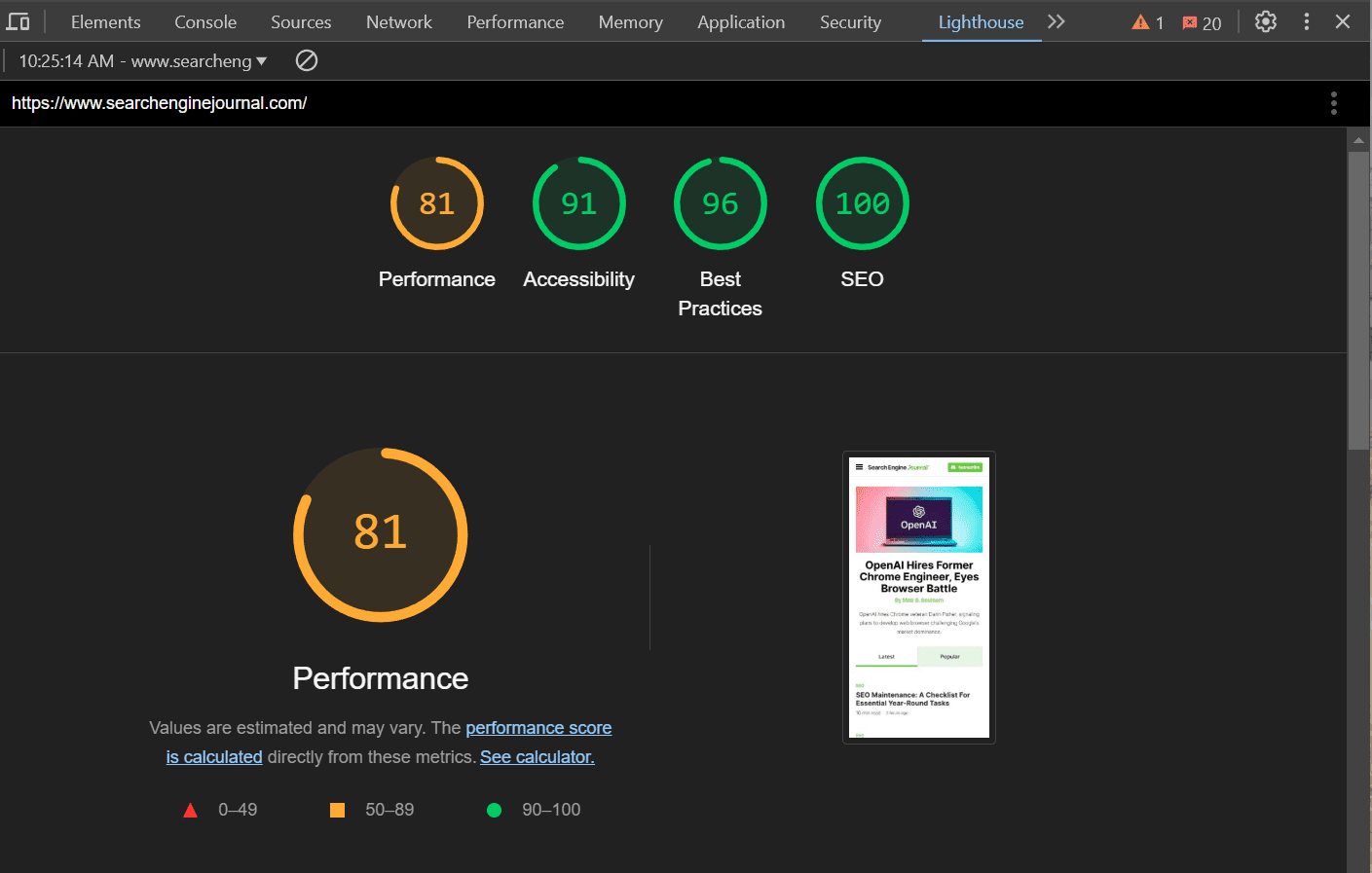
A screenshot of the Google Chrome Dev Tools window, containing a Lighthouse performance report. This report displays metrics for webpage performance, accessibility, best practices, and SEOScreenshot Google Lighthouse, November 2024

2. Pick A Theme That Supports Most Plugins

WordPress plugins help unlock your website’s true potential with additional features for both users and website owners.

WooCommerce, Jetpack, Akismet, and Google Analytics are popular plugins. You can also download the best SEO plugins to make optimization easier.

The WordPress theme you pick should support popular plugins, especially those you use regularly.

W3 Super Cache is an example of a plugin that’s always active because it maintains optimum page speed. You don’t want it to fail because you switched themes.
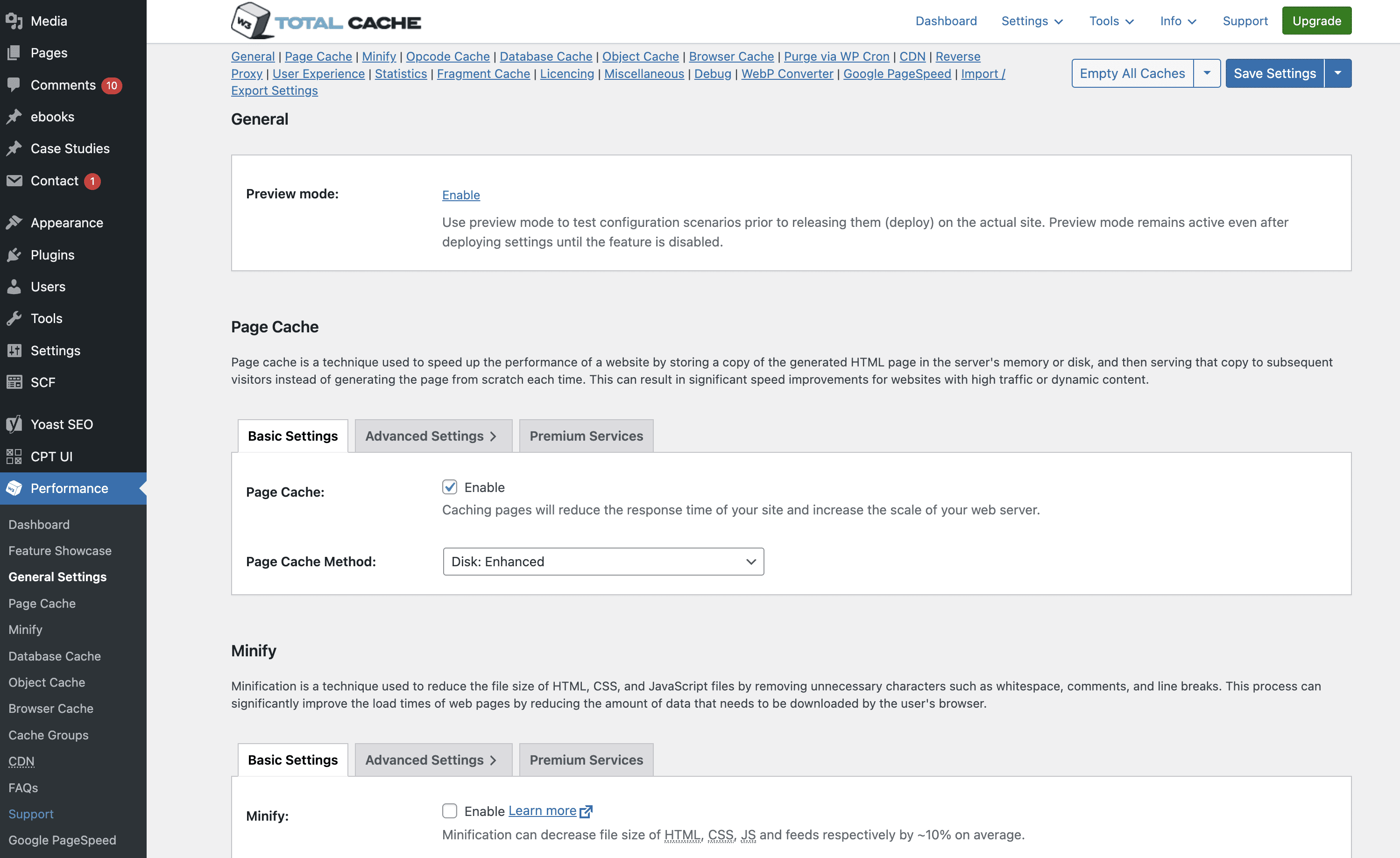
screenshot of cache pluginScreenshot of W3 Total Cache dashboard in WordPress CMS, November 2024

3. Pick A Theme With Clean Code

Your website is made up of code. If code is poorly written, it can affect your website’s security, speed, and resources.

The same applies to WordPress themes.

The best WordPress themes for SEO have clean code that makes them more secure and reliable, with less downtime.

Clean code and SEO go hand-in-hand. This is because clean code WordPress themes boost page load speed and SEO ranking.

For example, an optimized theme with clean code speeds up updates of essential SEO elements like meta, title, and header tags. This helps search engines to:

  • Find these tags quickly.
  • Crawl your website easily.

To analyze your chosen WordPress theme and ensure it has clean code that conforms to the standard WordPress coding conventions, you can make use of themecheck.info.

Upload a theme to the website using a zip file, and it will evaluate the theme for security and code quality.

Note that free WordPress themes don’t have the cleanest code and might pose security threats, especially if the developer copies and alters code from an online source.

4. Choose A Theme That Works On Multiple Browsers

Google Chrome, Mozilla Firefox, Safari, and Opera are common desktop and mobile browsers, but there are several more. You don’t need to cater to all of them, but your theme should work across the most popular browsers.

An SEO-friendly WordPress theme caters to all popular browsers, making it convenient for users to read and share your content, regardless of their browser choice.

Besides supporting different browsers, check version compatibility. Not everyone uses the latest browser version. Often, updates are delayed based on the device or operating system they’re using.

Ideally, your website should work seamlessly on the last five versions of the most popular Windows, iOS, Android, and Linux browsers.

You can use tools like PowerMapper to check browser compatibility.
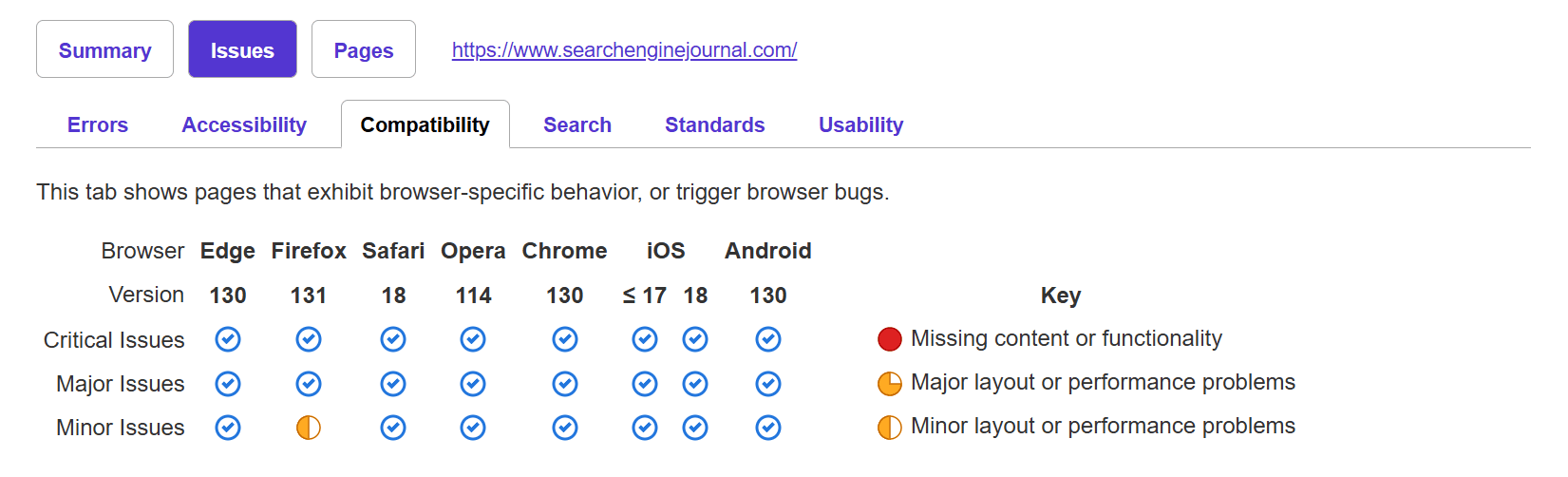
A screenshot from powermapper.com showing the browser compatability of searchenginejournal.comScreenshot of powermapper.com, November 2024

Developers can also manually run tests to determine compatibility.

5. Evaluate Page Builder Plugins Carefully

A page builder is a WordPress plugin that makes creating your website’s layout easier through drag-and-drop features. You can quickly choose from premade layout options and drag and drop the elements to place them where you want.

Page builders are an excellent option for easy website creation, and most premium WordPress themes offer them.

If you’re a digital marketing agency working with multiple clients, you can use page builders to set up multiple websites quickly.

But page builders do have a few issues.

Page builders generate a lot of code, and, as mentioned earlier, bloated websites are slow. This is bad for SEO.

More importantly, when you create a website using a page builder and then switch themes, the layout – and consequently, the content on it – will require several edits.

Your technical and on-page SEO could be affected, so be sure to account for SEO during a rebuild.

You will need to weigh the benefits of drag-and-drop page builders against the development resources required to fix any bloated code. If you’re building websites for clients you will need to expend resources to ensure that the sites perform well by fixing bloated code.

6. Choose A Theme That Loads Quickly

Users have very short attention spans. Many will leave if a website takes more than a few seconds to load. Page speed is crucial for SEO.

Improving page speed has shown tremendous results. A study from NitroPack in partnership with Google showed that compared to a 2-second page load speed, 50% more visitors drop off when a page loads in 3 seconds. And a 0.1 second improvement led to an 8.4% increase in ecommerce conversions.

It’s tempting to go for a reasonably-priced theme with a laundry list of features, like custom widgets or Google Fonts. But if you don’t actually use these functions, then they’re just slowing your website down.

You should pick a fast, lightweight, and customizable WordPress theme with only the features you need. Alternatively, you can pick SEO-optimized themes that let you disable functions you don’t use.

Use Google Search Console to find out how fast your website is and see if it’s slowed down after you’ve installed a theme.

7. Select A Theme That’s Updated Regularly

Regular theme updates are crucial for security and bug fixes. You don’t want a WordPress theme that’s updated once a year.

Developers use updates to provide the latest security patches, fix bugs, address compatibility issues with the latest browsers and plugins, and clean up old code.

Your SEO takes a hit when you use an outdated theme. If your theme isn’t compatible with the latest version of Google Chrome, it won’t load. You’ll lose out on the potential traffic generated by Chrome users and give your competitors a chance to leapfrog you.

Outdated themes might also have limited functionality on newer devices and browsers.

8. Choose A Theme With Good Ratings

The easiest way to identify the best WordPress themes for SEO is to check user reviews and ratings.

Don’t just check the reviews and testimonials on the theme’s official website – check for ratings on third-party websites and social media, too.

Users might not leave SEO-focused reviews, but they will often list things like “slow loading speed” or “not mobile-friendly.” Compare these to your SEO checklist to understand how usable and well-built the theme is.

Compare common user problems with issues that could affect your website in general, and avoid those themes.

While a small number of speed-related complaints in a sea of positive reviews is OK, you should avoid themes with mostly poor reviews.

Best WordPress Themes For SEO

  • Divi.
  • Astra.
  • Kadence.
  • Hello by Elementor.
  • GeneratePress.

If you’re looking for the best WordPress theme for SEO, these are it. Let’s take a deeper look into each of them:

Divi
Screenshot of https://www.elegantthemes.com/Screenshot of www.elegantthemes.com, November 2024

Divi is an SEO-optimized WordPress theme with a wide range of pre-built templates to suit websites across most niches, including SEO agencies and blogging.

It lets you customize almost every aspect of your WordPress website.

Created by Elegant Themes, Divi has built-in SEO optimization and is regularly updated, so you never have to worry about compatibility.

Astra
Screenshot from wpastra.comScreenshot from wpastra.com, November 2024

Astra is a powerful WordPress theme with retina-ready premade page templates to suit different businesses.

Its lightweight code and fast load speeds make it an excellent option for an SEO-friendly WordPress theme.

Astra supports popular WordPress plugins, including Yoast SEO and All in One SEO. It also supports drag-and-drop page builders such as WPBakery.

Kadence
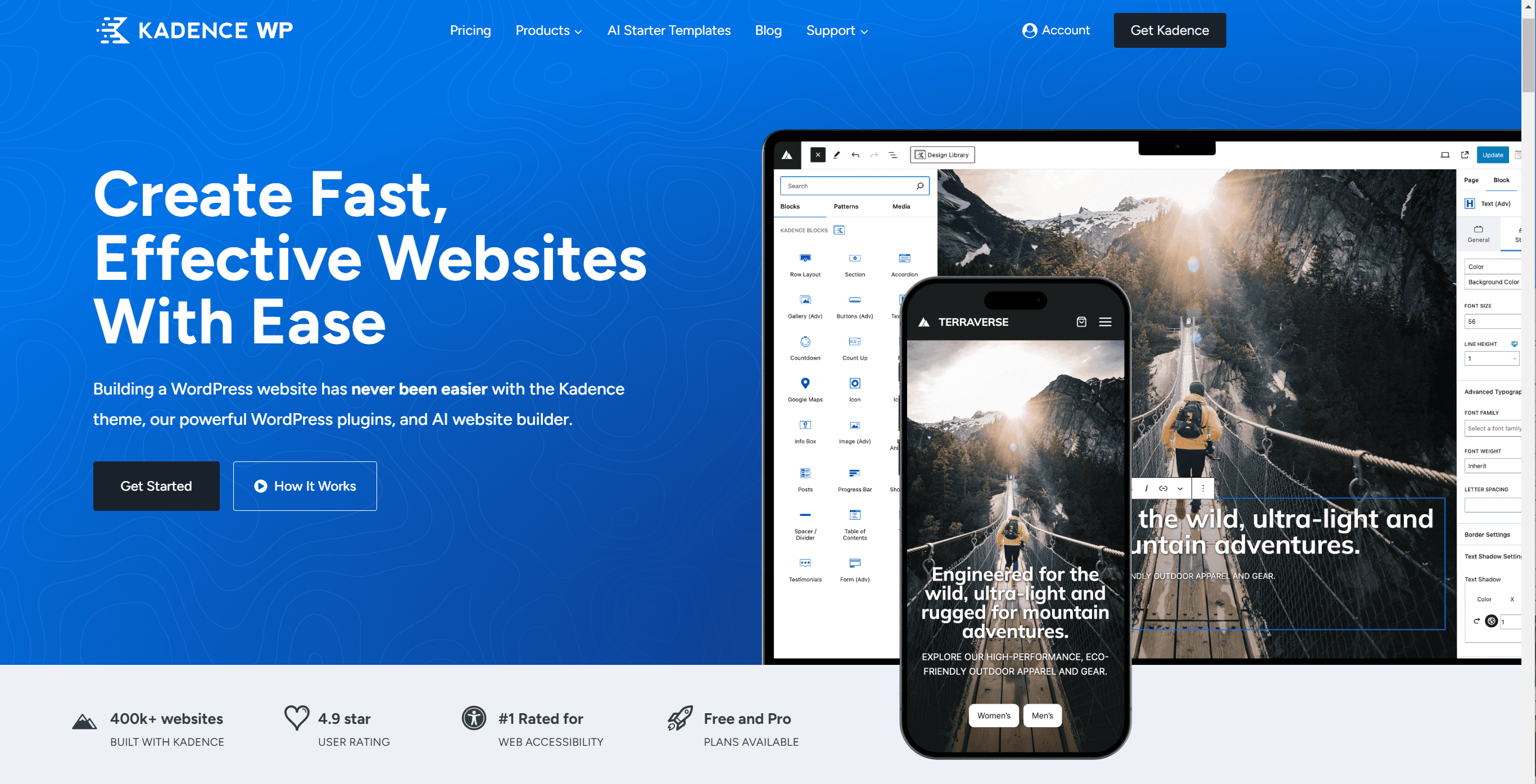
Screenshot from kadencewp.comScreenshot from kadencewp.com, November 2024

Kadence is a multi-purpose WordPress theme that lets you create lightning-fast websites in minutes. It has templates for brands, influencers, small businesses, ecommerce, and agencies.

It also integrates with major plugins, including Elementor, WooCommerce, and Beaver Builder.

Kadence is built with the best SEO practices for markup and schema and lets you customize every element of your website – including header styles, colors, and typography – easily.

Hello By Elementor

Screenshot of elementor.comScreenshot of elementor.com November 2024

Built with lean, non-intrusive code, Hello by Elementor is the perfect WordPress theme for SEO.

It’s ultra-lightweight, responsive, and claims to load websites in a quarter of a second. A faster website leads to lower bounce rates and happier users.

Despite its focus on speed and using minimal resources, Hello still offers hundreds of templates, plenty of customization options, and regular updates. It also has RTL support.

GeneratePress
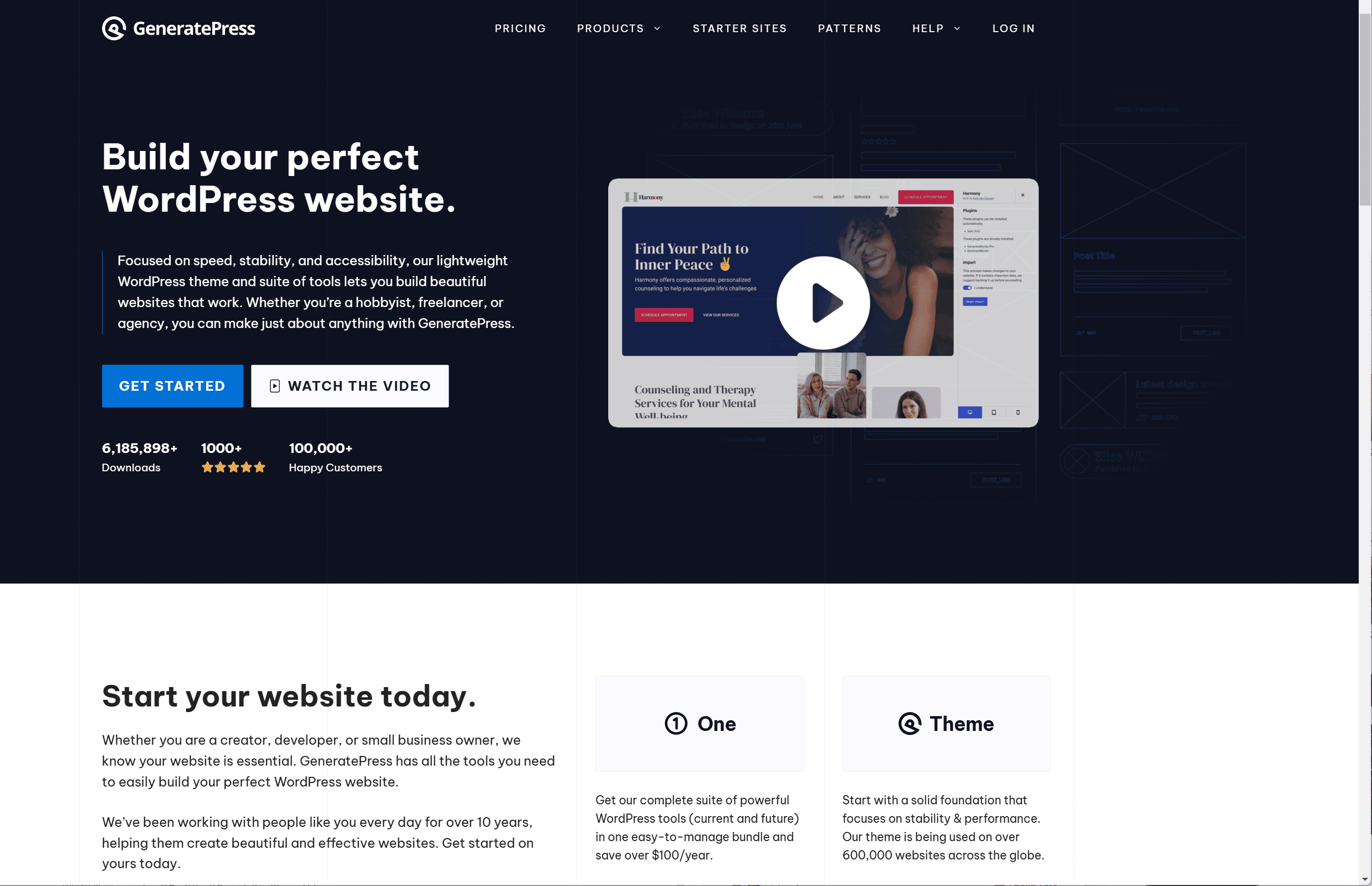
Screenshot of generatepress.comScreenshot of generatepress.com, November 2024

Whether you’re a freelancer, startup, or agency, GeneratePress is a great WordPress theme for SEO.

It’s fast, lightweight, and accessible. The free version of the theme is focused on speed and performance, which are essential SEO elements.

Upgrading to the Premium version gives you access to GeneratePress’ block-style website builder (so you never have to learn a line of code), professionally designed starter websites, and customization controls.

Final Thoughts: How To Pick The Best SEO-Optimized WordPress Theme

WordPress themes are a great way to spruce up your website, but they shouldn’t hinder your SEO efforts. Don’t let the overwhelming amount of theme options intimidate you into quickly picking one and settling.

Instead, maintain your cool and pick an SEO-optimized WordPress theme after doing your research.

If you need any more help with WordPress SEO, check out our comprehensive expert guide.

More Resources:


Featured Image: PeopleImages.com – Yuri A/Shutterstock

Voice Search SEO: 9 Practical Tips For Businesses via @sejournal, @MattGSouthern

Voice search is increasingly important and optimizing for voice search is essential for businesses to stay competitive in today’s SEO market.

In the US and UK, 28% of consumers claim to use voice assistants daily, which is well over a quarter of users.

This guide presents eight strategies for voice search optimization, including conversational keywords, featured snippets, local SEO, and voice-friendly content.

We will also highlight critical technical elements and new opportunities in voice features and accessibility.

Whether starting out or looking to improve your strategy, read on for practical tips to succeed in SEO.

1. Master Conversational, Long-Tail Keywords

A key difference between text search and voice search is the use of conversational, long-tail keywords.

For example, someone might type, “best Italian restaurant NYC,” while a voice searcher would ask, “What’s the best Italian restaurant in New York City?”

To improve visibility in voice searches, focus on long-tail keywords that reflect natural speech.

Use question phrases like “what,” “where,” and “how.” Tools like AnswerThePublic and AlsoAsked can help you find common questions in your industry.

Example

For instance, a meal delivery service might encounter questions like, “What’s the healthiest meal delivery option?”

The company can increase its chances of ranking in voice searches by creating content that answers these.

2. Aim For Position Zero

Featured snippets, or “position zero,” are short answer boxes at the top of search results. They’re crucial for voice search, as they provide direct answers for virtual assistants.

To improve your chances of getting a featured snippet, offer clear answers to common questions in your field. Use bullet points, numbered lists, or short paragraphs (40-50 words) for easy reading.

Example

Imagine a skincare brand that creates a series of “How to” blog posts addressing common concerns like “How to get rid of acne scars” or “How to build a basic skincare routine.”

By structuring their content in a voice-friendly way and providing direct, actionable answers, they can improve their odds of earning featured snippets for these queries.

3. Prioritize Local SEO

Many voice searches are local, like “coffee shops near me” or “directions to the nearest gas station.”

To take advantage of this traffic, businesses should focus on local SEO.

First, claim and improve your Google Business Profile. Ensure your business name, address, phone number, hours, and other details are accurate.

Encourage satisfied customers to leave reviews, as these can appear in voice search results.

Also, use local keywords throughout your website and create specific pages or posts with phrases like “best [product/service] in [city].”

Example

Consider a local home services company that wants to improve its visibility for voice searches.

This business could use the ‘LocalBusiness’ schema markup, target “near me” keywords, and create city-specific service pages.

This would help search engines understand where the business operates and improve its visibility in local voice searches.

4. Speed Up Your Website

Voice searchers want quick answers, and slow-loading websites can lose them. Page speed is crucial for ranking in both regular and voice searches.

Use tools like Google’s PageSpeed Insights or GTmetrix to check your load times and find improvements.

You can speed up your site by compressing images, minifying CSS and JavaScript, using browser caching, reducing redirects, and upgrading your hosting.

Example

Imagine an ecommerce website that struggles with slow load times due to large product images and inefficient code.

Implementing a series of speed optimizations could improve page load times, provide a better user experience, and increase the site’s chances of ranking for voice searches.

5. Implement Structured Data

Structured data, or schema markup, is code that helps search engines understand your website better.

This extra information can boost your chances of ranking for voice searches and appearing in special search results.

If you own a local business, focus on specific schema types like LocalBusiness, Restaurant, and Product.

These schemas let you share important details such as your business hours, address, menu items, and customer reviews.

Example

Consider a local restaurant that implements RestaurantSchema markup on its website.

By providing search engines with detailed information about their cuisine type, price range, hours, and location, they can improve their chances of appearing in voice search results for queries like “What’s the best sushi restaurant near me?”

6. Craft Voice-Friendly Content

To optimize your content for voice search, think about both what you say and how you say it. People using voice search want clear, brief, and easy-to-understand information.

Here are some tips for creating voice-friendly content:

  • Answer common questions directly.
  • Use simple words and short sentences.
  • Organize your content with H2 tags, bullet points, and numbered lists.
  • Keep paragraphs short (1-2 sentences).
  • Write a clear, conversational title that matches what people might ask in a voice search.

FAQ pages work well for voice search optimization because they naturally answer common questions in a straightforward way.

Users often search for “Near Me” phrases such as “pizza near me,” “gas stations near me,” or “ATM near me.” To improve your visibility for these searches, follow these tips:

  • Consider distance, relevance, and prominence to the search.
  • Create content and pages for each location.
  • Add Google Maps to your website to show where your business is located.
  • Use local keywords, like neighborhood names and landmarks.

Example

If you run a retail business with several locations, create specific pages for each.

You can help customers find their nearest store more easily by including store details, directions, and maps.

7. Improve Accessibility

Voice search is essential for many users with visual impairments or mobility challenges.

Improving your website’s accessibility can help these users and may also improve your voice search rankings. Here are some key accessibility practices:

  • Use alt text for images.
  • Provide clear anchor text for links.
  • Include captions and transcripts for video and audio content.
  • Use semantic HTML markup.

8. Explore Voice-Specific Features

As voice search technology improves, there are new ways to optimize your content.

Here are some features to consider:

  • Build Alexa skills or Google Actions to connect with voice assistant users.
  • Use speakable markup to show which parts of your content work well for audio playback.
  • Optimize for conversational searches on voice shopping sites like Amazon and Walmart.

Make Your Business Voice-Search Ready

Implementing these eight voice search optimization strategies can ensure your business is well-positioned to capture the growing audience of voice search users.

The key to success is to imagine yourself in your target customer’s shoes and consider how they might phrase their queries when speaking to a voice assistant.

As a final tip, it’s always a good idea to conduct your own voice searches related to your industry or niche. Analyze the top-ranking results and identify commonalities or best practices you can apply to your optimization efforts.

By staying proactive and continually refining your approach, you can remain ahead in the ever-evolving world of voice search SEO.

More Resources:


Featured Image: fizkes/Shutterstock

Google Causes Global SEO Tool Outages via @sejournal, @martinibuster

Google cracked own on web scrapers that harvest search results data, triggering global outages at many popular rank tracking tools like SEMRush that depend on providing fresh data from search results pages.

What happens if Google’s SERPs are completely blocked? A certain amount of data provided by tracking services have long been extrapolated by algorithms from a variety of data sources. It’s possible that one way around the current block is to extrapolate the data from other sources.

SERP Scraping Prohibited By Google

Google’s guidelines have long prohibited automated rank checking in the search results but apparently Google has also allowed many companies to scrape their search results and charge for accessing ranking data for the purposes of tracking keywords and rankings.

According to Google’s guidelines:

“Machine-generated traffic (also called automated traffic) refers to the practice of sending automated queries to Google. This includes scraping results for rank-checking purposes or other types of automated access to Google Search conducted without express permission. Machine-generated traffic consumes resources and interferes with our ability to best serve users. Such activities violate our spam policies and the Google Terms of Service.”

Blocking Scrapers Is Complex

It’s highly resource intensive to block scrapers, especially because they can respond to blocks by doing things like changing their IP address and user agent to get by any blocks. Another way to block scrapers is through targeting specific behaviors like how many pages are requested by a user. Excessive amounts of page requests can trigger a block. The problem to that approach is that it can become resource intensive keeping track of all the blocked IP addresses which can quickly number in the millions.

Reports On Social Media

A post in the private SEO Signals Lab Facebook Group announced that Google was striking hard against web scrapers, with one member commenting that the Scrape Owl tool wasn’t working for them while others cited that SEMRush’s data has not updated.

Another post, this time on LinkedIn, noted multiple tools that weren’t refreshing their content but it also noted that the blocking hasn’t affected all data providers, noting that Sistrix and MonitorRank were still working. Someone from a company called HaloScan reported that they made adjustments to resume scraping data from Google and have recovered and someone else reported that another tool called MyRankingMetrics is still reporting data.

So whatever Google is doing it’s not currently affecting all scrapers. It may be that Google is targeting certain scraping behavior, learning from the respones and improving their blocking ability. The coming weeks may reveal that Google is improving its ability to block scrapers or it’s only targeting the biggest ones.

Another post on LinkedIn speculated that blocking may result in higher resources and fees charged to end users of SaaS SEO tools. They posted:

“This move from Google is making data extraction more challenging and costly. As a result, users may face higher subscription fees. “

Ryan Jones tweeted:

“Google seems to have made an update last night that blocks most scrapers and many APIs.

Google, just give us a paid API for search results. we’ll pay you instead.”

No Announcement By Google

So far there has not been any announcement by Google but it may be that the chatter online may force someone at Google to consider making a statement.

Featured Image by Shutterstock/Krakenimages.com

Evidence That Google Detects AI-Generated Content via @sejournal, @martinibuster

A sharp-eyed Australian SEO spotted indirect confirmation about Google’s use of AI detection as part of search rankings that was hiding in plain sight for years. Although Google is fairly transparent about content policies, the new data from a Googler’s LinkedIn profile adds a little more detail.

Gagan Ghotra tweeted:

“Important FYI Googler Chris Nelson from Search Quality team his LinkedIn says He manages global team that build ranking solutions as part of Google Search ‘detection and treatment of AI generated content’.”

Googler And AI Content Policy

The Googler, Chris Nelson, works at Google in the Search Ranking department and is listed as co-author of Google’s guidance on AI-generated content, which makes knowing a little bit about him

The relevant work experience at Google is listed as:

“I manage a large, global team that builds ranking solutions as part of Google Search and direct the following areas:

-Prevent manipulation of ranking signals (e.g., anti-abuse, spam, harm)
-Provide qualitative and quantitative understanding of quality issues (e.g., user interactions, insights)
-Address novel content issues (e.g., detection and treatment of AI-generated content)
-Reward satisfying, helpful content”

There are no search ranking related research papers or patents listed under his name but that’s probably because his educational background is in business administration and economics.

What may be of special interest to publishers and digital marketers are the following two sections:

1. He lists addressing “detection and treatment of AI-generated content”

2. He provides “qualitative and quantitative understanding of quality issues (e.g., user interactions, insights)”

While the user interaction and insights part might seem unrelated to the detection and treatment of AI-generated content, the user interactions and insights part is in the service of understanding search quality issues, which is related.

His role is defined as evaluation and analysis of quality issues in Google’s Search Ranking department. “Quantitative understanding” refers to analyzing data and “qualitative understanding” is a more subjective part of his job that may be about insights, understanding the “why” and “how” of observed data.

Co-Author Of Google’s AI-Generated Content Policy

Chris Nelson is listed as a co-author of Google’s guidance on AI-generated content. The guidance doesn’t prohibit the use of AI for published content, suggesting that it shouldn’t be used to create content that violates Google’s spam guidelines. That may sound contradictory because AI is virtually synonymous with scaled automated content which has historically been considered spam by Google.

The answers are in the nuance of Google’s policy, which encourages content publishers to prioritize user-first content instead of a search-engine first approach. In my opinion, putting a strong focus on writing about the most popular search queries in a topic, instead of writing about the topic, can lead to search engine-first content as that’s a common approach of sites I’ve audited that contained relatively high quality content but lost rankings in the 2024 Google updates.

Google (and presumably Chris Nelson’s advice) for those considering AI-generated content is:

“…however content is produced, those seeking success in Google Search should be looking to produce original, high-quality, people-first content demonstrating qualities E-E-A-T.”

Why Doesn’t Google Ban AI-Generated Content Outright?

Google’s documentation that Chris Nelson co-authored states that automation has always been a part of publishing, such as dynamically inserting sports scores, weather forecasts, scaled meta descriptions and date-dependent content and products related to entertainment.

The documentation states:

“…For example, about 10 years ago, there were understandable concerns about a rise in mass-produced yet human-generated content. No one would have thought it reasonable for us to declare a ban on all human-generated content in response. Instead, it made more sense to improve our systems to reward quality content, as we did.

…Automation has long been used to generate helpful content, such as sports scores, weather forecasts, and transcripts. …Automation has long been used in publishing to create useful content. AI can assist with and generate useful content in exciting new ways.”

Why Does Googler Detect AI-Generated Content?

The documentation that Nelson co-authored doesn’t explicitly states that Google doesn’t differentiate between how low quality content is generated, which seemingly contradicts his LinkedIn profile that states “detection and treatment of AI-generated content” is a part of his job.

The AI-generated content guidance states:

“Poor quality content isn’t a new challenge for Google Search to deal with. We’ve been tackling poor quality content created both by humans and automation for years. We have existing systems to determine the helpfulness of content. …Our systems continue to be regularly improved.”

How do we reconcile that part of his job is detecting AI-generated content and Google’s policy states that it doesn’t matter how low quality content is generated?

Context is everything, that’s the answer. Here’s the context of his work profile:

Address novel content issues (e.g., detection and treatment of AI-generated content)”

The phrase “novel content issues” means content quality issues that haven’t previously been encountered by Google. This refers to new types of AI-generated content, presumably spam, and how to detect it and “treat” it. Given that the context is “detection and treatment” it could very well be that the context is “low quality content” but it wasn’t expressly stated because he probably didn’t think his LinkedIn profile would be parsed by SEOs for a better understanding of how Google detects and treats AI-generated content (meta!).

Guidance Authored By Chris Nelson Of Google

A list of articles published by Chris Nelson show that he may have played a role in many of the most important updates from the past five years, from the Helpful Content update, site reputation abuse to detecting search-engine first AI-generated content.

List of Articles Authored By Chris Nelson (LinkedIn Profile)

Updating our site reputation abuse policy

What web creators should know about our March 2024 core update and new spam policies

Google Search’s guidance about AI-generated content

What creators should know about Google’s August 2022 helpful content update

Featured Image by Shutterstock/3rdtimeluckystudio

Programmatic SEO: An Introduction To Pages At Scale via @sejournal, @TaylorDanRW

Programmatic SEO is an approach to SEO and content creation that leverages automation and technology to efficiently create, optimize, and manage a large volume of webpages.

It’s particularly useful for websites that require thousands, or even millions, of pages to rank for diverse search queries.

Ecommerce giants like Amazon or travel websites like Expedia rely on programmatic SEO to dynamically generate pages for every product, location, or service they offer.

The power of programmatic SEO lies in its ability to handle such scale while maintaining a focus on relevant keywords, content structure, and user intent.

Defining Your Objectives

Before starting with programmatic SEO, define your goals.

Do you want to boost organic traffic, rank for more keywords, or improve user experience?

Clear goals guide your strategy and measure success.

  1. Set KPIs: Use metrics like traffic growth, conversions, and rankings to track progress.
  2. Find Opportunities: Research your industry and competitors to uncover untapped keywords or markets.
  3. Prioritize User Intent: Create content that answers questions and solves user problems.

Programmatic Keyword Research

In traditional keyword research, the goal is often to identify high-search volume keywords that can drive significant traffic to a website.

However, these keywords usually come with high competition, making it challenging for newer or smaller sites to rank well in search engine results.

Programmatic SEO takes a different approach by targeting low-search volume and low-competition, long-tail keywords.

This strategy focuses on creating a large number of pages optimized for specific queries, allowing you to rank higher more easily and attract a highly targeted audience.

Keywords in programmatic SEO consist of two main components:

Head Terms

Head terms are broad keywords that describe a general topic or category. Head terms often have the following characteristics:

  • High average monthly search volumes.
  • Tend to be “short tail.”
  • Have multiple common interpretations.
  • Tend to be more stable SERPs with a lot of competition targeting the query.

Examples include keywords such as “onboarding software,” “winter sun vacations,” or “crm software.”

Modifiers

Modifiers are words or phrases that add specificity to head terms, and will vary greatly between sectors.

Modifiers are easily identifiable as they follow patterns, which again vary between different sectors.

Common modifier patterns include:

  • “for SaaS.”
  • “for staffing agencies.”
  • “for accountants.”
  • “best practices.”
  • “2025.”

In contrast to head terms, aside from occasional spikes in traffic, average monthly search volumes tend to be lower, but when combined with head terms, they create more targeted queries with more focused intent. It helps capture visibility with niche audiences and consumers who may be showing intent.

Combined with head terms, we tend to call these “long-tail” keywords.

Reliable Datasets

To scale programmatic SEO effectively, you need a reliable dataset that can generate unique, valuable, and relevant pages.

Depending on the types of pages you’re creating, you need to understand and anticipate the change frequency of the data, and how your infrastructure will handle the changes.

Many platforms provide APIs that you can use to fetch structured data.

These include:

  • Yelp API: For local business details.
  • OpenWeather API: For weather-related data.
  • Google Maps API: For location-based information.

Your own proprietary data can also be a valuable source for programmatic pages. These can be:

  • Product catalogs from an ecommerce store.
  • CRM data with user or location-specific insights.
  • Inventory databases, such as hotel room availability or real estate listings.

Programmatic Keyword Clustering

Organizing your keywords into logical clusters is a powerful way to streamline your content creation process.

You can develop scalable, template-based pages that enhance relevance for users and search engines by leveraging these clusters.

This approach allows for efficiency and customization while aligning with search intent.

Clustering also allows for more seamless automation and reduces the potential to create large swathes of pages with near-duplicate intents and purposes.

1. Categorize By Intent

Start by grouping keywords according to their search intent. This ensures your content addresses specific user needs, such as:

  • Informational: Answering questions or providing knowledge. Example: What are the best coffee shops in Boston?
  • Transactional: Enabling actions like purchases or bookings. Example: Order coffee beans online in Boston.
  • Navigational: Helping users locate specific places or brands. Example: Starbucks locations in Boston.

2. Define Pages Based On Patterns

Once you’ve categorized keywords, identify common patterns to create flexible templates. This strategy helps structure content consistently across multiple pages.

  • Location-Specific Templates:
    • Format: [Category] in [Location].
    • Example: Hotels in Paris.
  • Feature-Specific Templates:
    • Format: [Product] with [Feature].
    • Example: Smartphones with best cameras.
  • Use Case-Specific Templates:
    • Format: [Service] for [Audience/Use Case].
    • Example: CRMs for hospitality industry.

3. Expand With Modifiers

Enhance clusters by incorporating commonly searched modifiers to make the content more comprehensive:

  • Price-Related Modifiers: Add terms like cheap, affordable, or luxury.
  • Time-Related Modifiers: Include phrases such as “near me now” or “open late.”
  • Specific Features: Highlight characteristics like “with a pool,” “pet-friendly,” or “free delivery.”

4. Combine Variations

Use combinations of templates, categories, and modifiers to address long-tail keywords and niche queries. Examples include:

  • Pet-friendly hotels in Chicago with free breakfast.
  • Best Italian restaurants in New York open late.

Programmatic SEO relies on automated systems to generate content at scale, reducing the manual workload involved in traditional SEO efforts.

Automation allows businesses to rapidly create pages that address various user needs, ensuring coverage of broad and highly specific search terms.

Programmatic SEO Challenges

Programmatic SEO can offer tremendous scalability and efficiency, but it’s not always the right approach for every website.

A manual SEO strategy may be a better fit for small sites or those requiring significant customization.

However, when using programmatic SEO, it’s important to address potential challenges to ensure success.

Over-Prioritizing Keywords

Automation should never compromise the quality of the user experience. Pages must provide meaningful, accurate, and engaging content that answers user queries effectively.

Overemphasizing keywords can result in content that feels unnatural or overly optimized. This can harm user experience and reduce click-through rates.

Avoid stuffing keywords and instead prioritize readability and relevance. Ensure your content provides value by answering user queries comprehensively.

Crawlability And Indexing Issues

Large websites with programmatically generated pages can face challenges with crawlability and indexing. If pages lack structure or unique value, Google may struggle to index them properly.

To alleviate these issues, aside from improving the overall page quality to show unique value and beneficial purpose, you can optimize:

  • Internal Linking: Implement a robust internal linking strategy to help search engines discover and prioritize pages.
  • Backlinks: Acquire backlinks to improve visibility and encourage indexing.
  • Sitemaps: Use an XML sitemap and adhere to Google’s limit of 50,000 URLs per sitemap. Organize your sitemap logically by grouping pages into categories or themes.

These steps will enhance crawlability, and potentially move the pages above Google’s indexing threshold. If the issues persist, the focus should be on content pruning and improving quality.

Thin Content

Thin content lacks value for users and doesn’t satisfy Google’s quality standards. Pages with minimal or irrelevant information are unlikely to rank well.

Thin content can be addressed in several ways:

  1. Remove Low-Value Content: Eliminate outdated or irrelevant pages that offer little benefit to users or your SEO strategy.
  2. Improve Content Quality: Add meaningful text, descriptive captions, and relevant multimedia like images or videos.
  3. Consolidate Pages: Merge thin content pages into a single, comprehensive piece to increase relevance and depth.

Final Thoughts

When implemented effectively, programmatic SEO can drive significant organic traffic, expand market reach, and establish a competitive edge.

However, achieving success requires a thoughtful balance of strategic planning, technical optimization, and a commitment to delivering value to users.

More Resources:


Featured Image: Gorodenkoff/Shutterstock

How To Leverage Your Content Knowledge Graph To Support Your Marketing Strategy via @sejournal, @marthavanberkel

Knowledge graphs have existed for a long time and have proven valuable across social media sites, cultural heritage institutions, and other enterprises.

A knowledge graph is a collection of relationships between entities defined using a standardized vocabulary.

It structures data in a meaningful way, enabling greater efficiencies and accuracies in retrieving information.

LinkedIn, for example, uses a knowledge graph to structure and interconnect data about its members, jobs, titles, and other entities. It uses its knowledge graph to enhance its recommendation systems, search features, and other products.

Google’s knowledge graph is another well-known knowledge graph that powers knowledge panels and our modern-day search experience.

In recent years, content knowledge graphs, in particular, have become increasingly popular within the marketing industry due to the rise of semantic SEO and AI-driven search experiences.

What Is A Content Knowledge Graph?

A content knowledge graph is a specialized type of knowledge graph.

It is a structured, reusable data layer of the entities on your website, their attributes, and their relationship with other entities on your website and beyond.

In a content knowledge graph, the entities on your website and their relationships can be defined using a standardized vocabulary like Schema.org and expressed as Resource Description Framework (RDF) triples.

RDF triples are represented as “subject-predicate-object” statements, and they illustrate how an entity (subject) is related to another entity or a simple value (object) through a specific property (predicate).

For example, I, Martha van Berkel, work for Schema App. This is stated in plain text on our website, and we can use Schema.org to express this in JSON-LD, which allows machines to understand RDF statements about entities.

Image showing how content gets translated into Schema.org using JSON-LD, which forms a connected graph of RDF triplesImage showing how content gets translated into Schema.org using JSON-LD, which forms a connected graph of RDF triples (Image from author, November 2024)

Your website content is filled with entities that are related to each other.

When you use Schema Markup to describe the entities on your site and their relationships to other entities, you essentially express them as RDF triples that form your content knowledge graph.

Sure, we might be simplifying the process a little, as there are a few more steps to creating a content knowledge graph.

But before you start building a content knowledge graph, you should understand why you’re building one and how your team can benefit from it.

Content Knowledge Graphs Drive Semantic Understanding For Search Engines

Over the past few years, search engines have shifted from lexical to semantic search. This means less matching of keywords and more matching of relevant entities.

This semantic understanding is even more beneficial in the age of AI-driven search engines like Gemini, SearchGPT, and others.

Your content knowledge graph showcases all the relationships between the entities on your website and across the web, which provides search engines with greater context and understanding of topics and entities mentioned on your website.

You can also connect the entities within your content knowledge graph with known entities found in external authoritative knowledge bases like Wikipedia, Wikidata, and Google’s Knowledge Graph.

This is known as entity linking, and it can add even more context to the entities mentioned on your site, further disambiguating them.

Example of Entity Linking – Disambiguating the place Quebec by linking it to the corresponding entity found on wikipedia, wikidata and google's knowledge graphExample of linking an entity to external authoritative knowledge bases using Schema Markup (Image from author, November 2024)

Your content knowledge graph ultimately enables search engines to explicitly understand the relevance of your content to a user’s search query, leading to more precise and useful search results for users and qualified traffic for your organization.

Content Knowledge Graphs Can Reduce AI Hallucinations

Beyond SEO, content knowledge graphs are also crucial for improving AI performance. As businesses adopt more AI technologies like AI chatbots, combatting AI hallucination is now a key factor to success.

While large language models (LLMs) can use patterns and probabilities to generate answers, they lack the ability to fact-check, resulting in erroneous or speculative answers.

Content knowledge graphs, on the other hand, are built from reliable data sources like your website, ensuring the credibility and accuracy of the information.

This means that the content knowledge graph you’ve built to drive SEO can also be reused to ground LLMs in structured, verified, domain-specific knowledge, reducing the risk of hallucinations.

A recent research done by data.world has shown that using a knowledge graph of the enterprise SQL database increases accuracy to 54% (from 16%).

Content knowledge graphs are rooted in factual information about entities related to your organization, making them a great data source for content insights.

Content Knowledge Graphs Can Drive Content Strategies

High-quality content is one of the cornerstones of great SEO. However, content marketers are often challenged with figuring out where the gaps are in their existing content about the entities and topics they want to drive traffic for.

Content knowledge graphs have the ability to provide content teams with a holistic view of their entities to get useful insights to inform their content strategy. Let’s dive deeper.

Get A Holistic View Of Entities Across Your Content

Traditionally, content marketing teams would manually audit or use a spreadsheet or relational database (tables, rows, and columns) to manage their content. The issue with a relational database is its lack of semantic meaning.

For example, a table could capture the title, URL, author, meta description, word count, and topic of an article. However, it cannot capture entities mentioned in a plain-text article.

If you want to know which pages on your website currently mention an old product you no longer provide, identifying these pages is hard and very manual.

Content knowledge graphs, on the other hand, provide a multi-dimensional categorization system for your content.

When built using the Schema.org vocabulary, the detailed types and properties enable you to capture the connections between different content pieces based on entities and taxonomy.

For example, a blog post on your website would likely show up on your content knowledge graph as a BlogPosting with properties like author, publisher, mentions, datePublished, dateModified, audience, citations, and more.

These properties connect your blog article (an entity) to other entities you’ve defined on your site. The author of a specific article is a Person who you might have defined on an Author page.

Your article might mention a product or service that you’ve defined on other pages on your site.

Example of a content knowledge graph that shows how a blog post is connected to other entities through the Schema.org propertiesExample of a content knowledge graph that shows how a blog post is connected to other entities through the Schema.org properties (Image from author, November 2024)

For marketing teams that have to manage large volumes of content, structuring your content into a content knowledge graph can give you a more holistic view of your content and entities.

You can easily perform a content audit to find out what exists on your website without manually auditing the site or updating a spreadsheet.

This, in return, enables you to perform content analysis with ease and get deeper insights into your content.

Get Deeper Insight Into Your Content

With a holistic view provided by your content knowledge graph, you can easily audit your content and entities to identify gaps and opportunities to improve your content strategy.

Example 1: You want to strengthen your E-E-A-T for specific authors on your site. Your content knowledge graph will showcase:

  • All the content this author has created, edited, or contributed to.
  • How the author is related to your organization and other acclaimed entities.
  • The author’s role, job title, awards, credentials, and certifications.

This unified view can provide your team with a broad overview of this author and identify content opportunities to improve the author’s topical authority on your site.

Example 2: Your organization wants to remove all mentions of COVID-19 protocols from your website.

You can query your content knowledge graph to identify past content that mentions the topic “COVID-19” and assess the relevance and necessity of each mention before removing it from your content.

This targeted approach can enable your team to refine their content without investing too much time in manual reviews.

Since content knowledge graphs built using Schema.org are expressed as RDF triples, you can use the query language SPARQL to find out which pages a specific entity is mentioned in or how much content you have on a specific entity or topic.

This will help your team answer strategic questions such as:

  • Which entities are unrepresented in your website content?
  • Where can additional content be created to improve entity coverage?
  • What existing content should be improved?

Beyond its SEO and AI benefits, content knowledge graphs have the potential to help content marketing teams perform content analysis with greater efficiency and accuracy.

It’s Time To Start Investing In Content Knowledge Graphs

Today, content knowledge graphs represent a shift from thinking of creating content as a content manager’s job to the opportunity for SEO professionals to create an interconnected content data source that answers questions and identifies opportunities for the content team.

It is a crucial technology for organizations looking to differentiate themselves in an increasingly complex digital landscape.

Investing in content knowledge graphs now positions your organization at the forefront of SEO and content optimization, giving you the tools to navigate tomorrow’s challenges.

And it all starts with implementing semantic schema markup on your site.

More resources:


Featured Image: optimarc/Shutterstock

.AI Domain Migrated To A More Secure Platform via @sejournal, @martinibuster

The Dot AI domain has migrated to a new domain name registry, giving all registrants of .AI domains stronger security and more stability, with greater protection against outages.

Dot AI Domain

.AI is a country-code top-level domain (ccTLD), which is distinct from a gTLD. A CCTLD is a two letter domain that is reserved for a specific country, like .US is reserved for the United States of America. .AI is reserved for the British Overseas Territory in the Caribbean, Anguilla.

.AI Is Now Handled By Identity Digital

The .AI domain was previously handled by a local small business named DataHaven.net but has now fully migrated to the Identity Digital platform, giving the .AI domain availability from over 90% of all registrars worldwide and a 100% availability guarantee. The migration also provides fast distribution of the .AI domain in milliseconds and greater resistance to denial of service attacks.

According to the announcement:

“Beginning today, .AI is exclusively being served on the Identity Digital platform, and we couldn’t be more thrilled for what this means for Anguilla.

The quick migration brings important enhancements to the .AI TLD like 24/7 global support, and a growing list of features that will benefit registrars, businesses and entrepreneurs today and in the years to come.”

Read the full announcement:

.ai Completes a Historic Migration to the Identity Digital Platform

Featured Image by Shutterstock/garagestock

Why I Recommend My Clients To Expand From SEO To YouTube via @sejournal, @Kevin_Indig

YouTube can be an effective source of B2C or B2C customers, but most companies look at it through the wrong lens: a performance channel.

The desire for companies to immediately squeeze customers out of YouTube content is holding them back.

After helping dozens of companies expand from SEO to YouTube, I’ve discovered that YouTube is the ideal expansion channel after SEO has matured. But to do it successfully, companies face three critical challenges: attribution, metrics, and conversion.

Overcoming those three challenges means you could unlock a new customer acquisition channel. Failing means a competitor could get an advantage by moving to YouTube first, and you might miss out on a way to repurpose your SEO content.

Together, YouTube and SEO make a perfect pairing, but only after you hit liftoff velocity in SEO. First, you want to cover your SEO bases: Rank for critical brand and non-branded keywords and drive steady growth in organic traffic and customers.

Expanding to YouTube too early means:

  1. You’re spreading yourself too thin.
  2. Viewers might search but not find you on Google.
  3. You might not have enough data about which topics drive business impact.

Once you have traction or maturity in SEO, there are five strong reasons to invest in YouTube:

  1. YouTube is the second largest search engine and No. 1 podcast platform, and it gets watched by 75 billion people every month.1
  2. YouTube is a critical source of citations in Google AI Overviews and answers in LLM chatbots.
  3. YouTube shows up prominently in the search results as part of Google’s video carousel SERP feature.
  4. YouTube can also send important traffic diversification signals to Google. For example, affiliate site GarageGymReviews is winning against its much bigger competitor, Barbend, by employing a multi-channel strategy.
  5. B2B buyers are watching YouTube, not just B2C customers (keep in mind 50% of B2B researchers are millennials):

Seventy percent of B2B buyers and researchers are watching videos throughout their path to purchase. That’s a 52% jump in only two years. And it’s not just light viewing.

According to U.S. YouTube data, over 895K hours of some of the top B2B videos from brands were watched in 2014. Nearly half of these researchers are viewing 30 minutes or more of B2B-related videos during their research process, and almost one in five watch over an hour of content. What’s got their attention?

Videos about product features top the list, followed by how-tos and professional reviews.2

Bottom line: Chances are high that your audience is on YouTube, and being visible positively impacts your sales funnel. The part that’s often forgotten is how YouTube content can also grow your presence in LLMs and solidify your position on Google.

So, how do you solve the attribution, metrics, and conversion problem?

The solution is to approach YouTube with a brand-building instead of a performance mindset:

  • Understand the inherent attribution problem
  • Focus on the right growth metrics
  • Test different conversion tactics (examples included)

The Attribution Problem

Image Credit: Kevin Indig

Most companies want to measure the direct impact of YouTube, similarly as they do for SEO or advertising, to determine the impact of an action. It makes sense because you want to prioritize your resources effectively.

However, YouTube wants to keep users on the platform, which means referral traffic from YouTube is extremely low.

I looked into two websites, one in B2C and one in B2B, and found that YouTube referral traffic makes up only 0.2% of total traffic for both of them, even though they get vastly different amounts of total traffic.

The fact that two very different sites get the same relative amount of YouTube referral traffic says something.

The typical user journey is that customers watch a bunch of videos and then often come to the site directly after a while. Our telemetry cannot pick that up. In short, YouTube attribution isn’t linear. It’s messy.

Image Credit: Kevin Indig

The solution is a mix of post-purchase surveys and UTM parameters. Post-purchase surveys (PPS) ask customers after their purchase how they found the company. You can find tons of software on the web that can do this for you.

UTM parameters allow you to trace clicks back to specific videos, but they demand a structured approach: keep a record of all the UTM parameters you use to tag CTAs for each video.

Don’t forget, though, that CTA clicks on YouTube videos are much lower compared to other channels, as YouTube wants to keep users on the platform.

The Right Growth Metrics

Image Credit: Kevin Indig

Because YouTube is not a performance channel, it’s very hard to get internal buy-in without the right metrics.

As a leader, you want to make sure performance is measured the right way so you can judge whether your team is on track to make an impact or not.

But what are the right metrics if you cannot measure linear attribution?

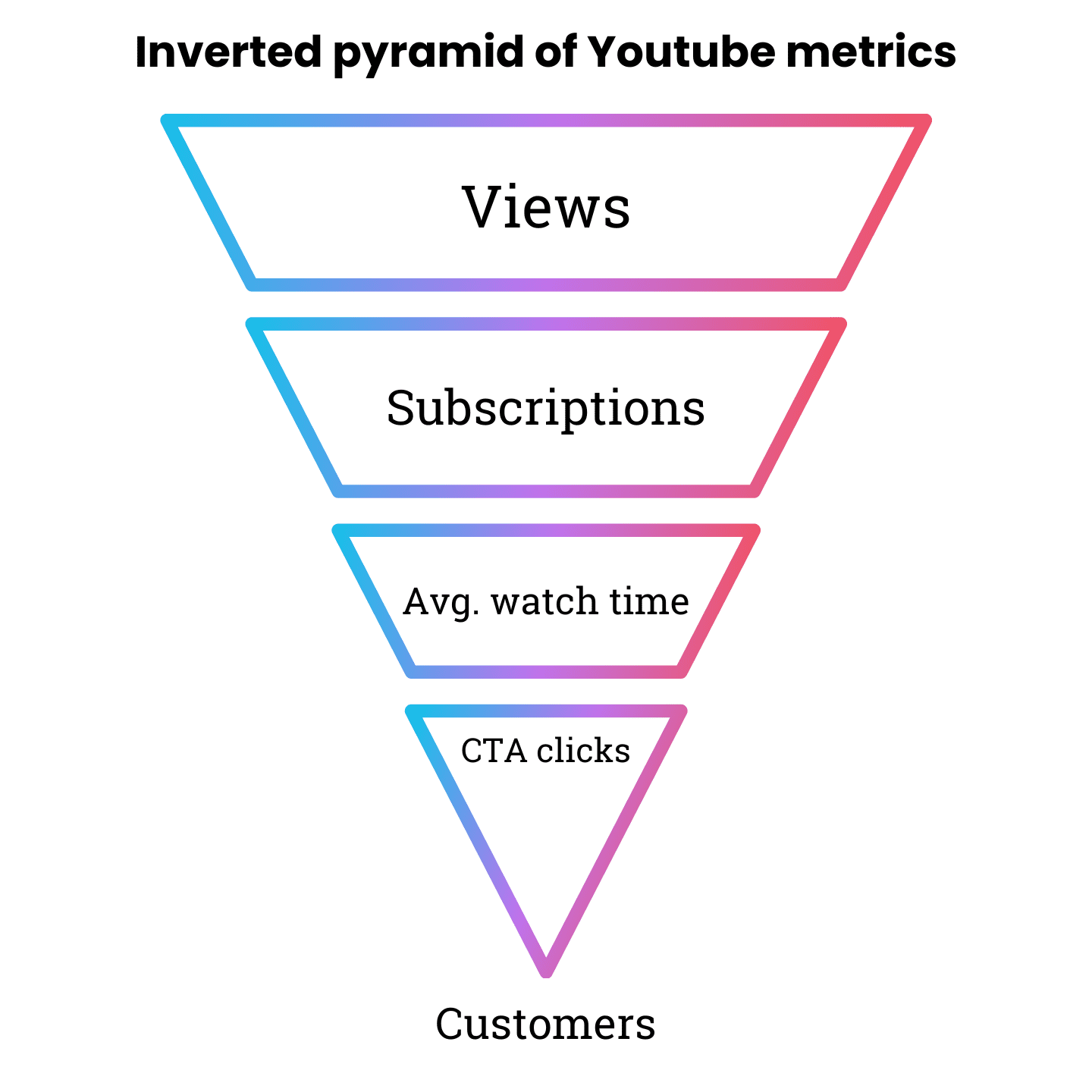
The answer is a set of cascading metrics that ladder up to customers. You might know this example from SEO, where you have leading indicators like impressions, ranks, and clicks and lagging indicators like conversions or revenue. The same is true for YouTube.

I call it the inverted pyramid of YouTube metrics. The leading indicators I recommend are views, subscriptions, average view duration, and CTA clicks.

Lagging indicators can be new customers or revenue from YouTube – again – measured through self-attribution.

The ladder works because leaders can trace the impact more easily over time. When views grow, so should subscriptions and average watch time, but with a time delay.

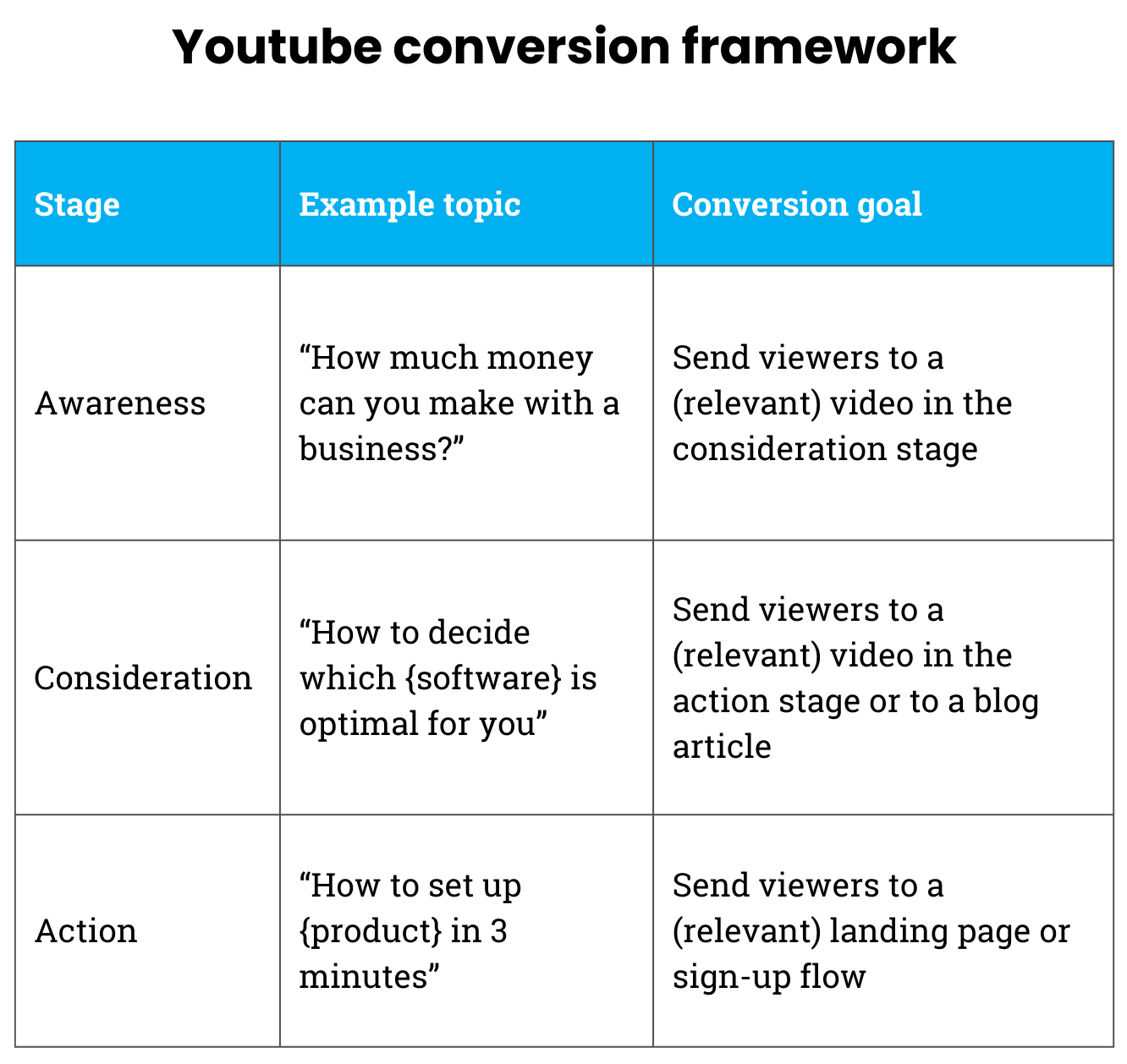
The Right Conversion Tactics

IMage Credit: Kevin Indig

There aren’t many known benchmarks for what you can expect from YouTube as a channel. One reference I found is that Ahrefs and Surfer convert about 12% of leads and 10% of sales from YouTube, measured by post-purchase attribution.3

YouTube is not a direct or linear conversion channel, but you can still maximize your chances of driving linear conversions.

The problem is that too many companies are very uncreative when it comes to converting viewers to customers on YouTube.

Here are some ideas:

  1. Try to get viewers to watch your other videos instead of getting them to click on your site for videos that don’t reflect a strong purchase intent.
  2. There are auditory and textual CTAs. The auditory ones are spoken or shown in the videos, as opposed to an overlay or text in the video description. Experiment with both.
  3. Incentive users to click a CTA with a lead magnet, like a pdf template or a calculator they can download or use on your site.

The Big Picture: The Big Swing Era

Image Credit: Lyna ™

The challenge with expanding from SEO to YouTube fits into a bigger picture: linear cross-channel attribution is eroding, so marketers need to take bigger swings based on judgment, logic, and qualitative signals.

I’m seeing the same trend across many organic channels: Reddit, podcasting, social media, and also YouTube. We all know there’s a lot of attention paid to them, but the impact is hard to measure unless you advertise.

Why is that?

  1. Privacy regulations like GDPR or CCPA and ad blockers limit tracking.
  2. Platforms like Google, YouTube, or Meta share less data with marketers and use more black box algorithms.
  3. Users use many devices to consume content.
  4. More content sharing happens in closed messaging apps like WhatsApp or email.
  5. Organic channels take a long time to show effect (often six months and longer) compared to advertising channels.

One thing companies can try to test the waters is to advertise on the platforms first, and then make a decision to create content for it. But apart from advertising, we’re back in the era when marketers need to take big swings to win.

But the biggest takeaway is that we have to take more big swings based on conviction, logic and qualitative data. Welcome to the big swing era.


1 49 YouTube stats 2024: Engagement, views, revenue (and more)

2 The Changing Face of B2B Marketing

3 Source


Featured Image: Paulo Bobita/Search Engine Journal

The One Thing SEO Agencies Need To Know About Winning Enterprise Clients via @sejournal, @danielkcheung

One of the first questions my boss would ask when I was agency-side was “What’s your budget?”

It’s an innocent enough question and one worth asking, but for enterprise clients, it’s putting the cart before the horse.

As an agency, managing cash flow is one of the most challenging aspects of the job.

Asking every lead for their budget is a practical way to plan for scalability. It allows you to compare your revenue runway against capacity and forecast when to scale headcount.

But here’s the thing: This approach doesn’t work for enterprise clients.

Here’s why:

  • You don’t understand how we budget internally (and when those conversations take place).
  • You don’t know how we orchestrate quarterly plans.
  • In some cases, we don’t know what we should do apart from knowing “SEO is important.”
  • And because of the above, the dependencies are unknown.

We’d often get feedback from unsuccessful pitches along the lines of:

  • “You were one of the most technical-oriented pitches; it was clear you know your stuff.”
  • “Your analysis went far deeper than anyone else’s.”
  • “We decided to go with someone else who’s done it before.”

We’d collectively put in 40-80 hours into a pitch and still lose out.

So, what went wrong?

  • Was it our positioning?
  • Were we just included in the Request for Proposal (RFP) to make the procurement process seem less biased?
  • Or was it something else?

The transition from agency-side to client-side opened my eyes to what I didn’t know. Unless you’ve worked in a large organization, you don’t know what you don’t know.

00Winning an enterprise SEO account is attractive for many reasons:

  • Great for cash flow: Enterprises tend to pay the entire quarter or year’s retainer in full and in advance.
  • Authority: An enterprise client strengthens your agency’s reputation.
  • Broader experience: Working with enterprises exposes your team to large-scale operations.
  • Future opportunities: Having an enterprise client attracts more mid-market and enterprise clients.

But winning the contract goes beyond a jazzy pitch deck, a well-practiced presentation, and impressive case studies.

Agencies that win and retain enterprise work have a competitive edge: They understand how enterprise planning and budget cycles work.

In other words, they have empathy.

And this is what we’ll cover today so you can waste less time and win more by speaking the language of enterprise SEO.

We’ll unpack why agencies miss the mark on enterprise RFPs, how enterprise budgets are finalized, and my 3A framework (Audit, Align, Advance) to position yourself as the right partner at the right time.

Why Agencies Lose Enterprise RFPs

You’ve poured 40-80 hours into crafting the perfect pitch. Your analysis was deeper than anyone else’s. Your technical expertise shone through.

The feedback? “You were one of the most knowledgeable agencies we saw.”

And yet, you didn’t win the deal.

It’s frustrating, but it often boils down to this: You were the right partner – but you missed the mark on timing or positioning.

Timing: It’s More Than Just Budget Cycles

Enterprise budgets are locked in during annual planning cycles, typically in Q3 or Q4 of the prior year.

If your pitch lands outside of these cycles, there’s no wiggle room for additional funding, no matter how compelling your proposal is.

However, timing isn’t just about budget. Quarterly planning sessions often dictate tactical shifts based on performance or changing priorities.

Agencies that fail to align with these rhythms miss the opportunity to position themselves as timely, relevant partners.

Positioning: Expertise Without Overwhelming

Winning an enterprise RFP isn’t just about showcasing your technical ability.

The people evaluating your pitch might include marketers, department heads, procurement specialists, and executives – each with different priorities and levels of SEO knowledge.

Agencies often stumble when they assume their technical brilliance will speak for itself. Overloading pitches with jargon or overly complex solutions can alienate decision-makers.

The key to positioning yourself as the right partner is to:

  • Simplify the message: Translate SEO strategies into business outcomes that resonate with different stakeholders.
  • Show empathy: Address challenges in their language, whether that’s return on investment (ROI) for executives or workload reduction for department heads.
  • Build trust: Demonstrate that you’re not just an SEO expert – you’re a partner who understands how to drive their broader goals.

By understanding these dynamics, you’ll not only craft pitches that resonate – you’ll avoid the frustration of hearing, “We went with someone else who’s done it before.”

Budget Conversations Happen The Year Prior

By the time you receive an RFP or Request for Quote (RFQ) from an enterprise, the budget is already set. Enterprises plan meticulously, typically finalizing budgets during Q3 or Q4 for the following fiscal year.

Every dollar is earmarked, and leadership has already approved how resources will be distributed.

The Anatomy Of Enterprise Budgeting

Enterprise SEO budgets don’t exist in a vacuum. They’re part of a broader conversation that aligns product, marketing, and sales goals with tactical activities.

For example:

  • Product teams: Prioritize new features or site enhancements.
  • Marketing teams: Focus on campaigns and content creation.
  • Sales teams: Push for lead generation and conversion support.

In-house SEO professionals must advocate for their initiatives by tying SEO outcomes to these larger objectives.

For agencies, this means stepping into a game that’s already in motion. If your pitch doesn’t align with these pre-established goals and budgets, it’s unlikely to succeed.

What This Means For You

Most agencies approach enterprise clients reactively, responding to RFPs after budgets are finalized. This is a missed opportunity.

To win enterprise clients, you need to:

  • Understand their planning cycles: Engage in Q2 or early Q3 to influence the next budget cycle.
  • Speak to strategic objectives: Show how SEO supports broader product, marketing, and sales goals.
  • Build relationships before the RFP: Regularly connect with key stakeholders to position yourself as a partner – not just a vendor.

How Quarterly Planning Fits In

While annual budgets set the high-level framework, enterprises adjust tactics during quarterly planning.

If your pitch aligns with a new quarterly priority – like shifting focus from content to technical SEO – you can insert yourself into the conversation even mid-year.

For example, an in-house SEO might discover a drop in organic visibility during Q1 and advocate for technical improvements in Q2. If you’ve positioned yourself as a trusted advisor, you’ll be their first call when an additional budget is freed up.

How To Win Enterprise Clients: My ‘3A’ Framework

Audit: Start With A Test Budget To Uncover Hidden Opportunities

Sometimes, enterprises come to you with a vague sense of urgency: “We know SEO is important, but we’re not sure where to start.” This isn’t a red flag – it’s an opportunity.

Instead of diving straight into a full proposal, suggest starting with an audit. A test budget for an SEO audit allows you to:

  1. Identify the pain points they haven’t articulated yet.
  2. Highlight quick wins to build immediate trust.
  3. Map the unknown dependencies that could derail a larger project later.

An audit positions you as a strategic advisor, not just a vendor. It shows that you understand the complexities of their business and want to align your recommendations with their priorities.

Plus, by starting small, you lower the perceived risk for stakeholders who may be hesitant to commit significant resources right away.

Here’s how you might pitch it:

“Before we make any big decisions, let’s start with an audit. This will give us a clear roadmap of what’s working, what’s not, and where the biggest opportunities lie. It’ll also help us figure out how to align with your broader business goals.”

Plus, you get paid.

Align: Build Trust And Solve Dependencies Before You Pitch

Enterprise RFPs often feel like a rush to the finish line: Deliver the pitch, seal the deal, and move on to execution. But rushing the pitch is one of the fastest ways to lose the deal.

Before you pitch, take the time to:

  • Build trust with key stakeholders. Spend time understanding their challenges, their team dynamics, and their priorities. This is especially important when stakeholders aren’t sure what they need.
  • Solve unknown dependencies. Use conversations, discovery calls, or smaller projects (like the audit) to uncover potential roadblocks, such as IT constraints, compliance requirements, or overlapping vendor responsibilities.
  • Align on the scope of work. Make sure everyone understands what success looks like. If different departments have conflicting expectations, address them now – not after the project has started.

Delaying the pitch isn’t about dragging your feet. It’s about doing the groundwork to ensure your proposal resonates.

When you take the time to do this, your pitch becomes less about selling your services and more about demonstrating how you’ll solve their problems.

Advance: Pitch With Confidence After Achieving Buy-In

The biggest mistake agencies make is pitching too soon. A great pitch delivered at the wrong time is still a losing pitch.

To win an enterprise client, wait until you’ve:

  • Mapped dependencies: Understand the internal and external factors that could impact your success, from IT limitations to stakeholder buy-in.
  • Understood the stakeholders: Know who needs to sign off on the project and what their priorities are. Tailor your pitch to address their specific concerns.
  • Aligned with the budget cycle: If you’ve done your homework, you’ll know whether the client has budget allocated – or if you need to position your work as a priority for the next cycle.

When you pitch, focus on delivering a solution – not just a service. Show them how your expertise fits into their broader goals, aligns with their budget, and resolves the challenges they’ve been grappling with.

Your pitch should feel like the natural conclusion of all the conversations you’ve had with them so far. It’s not about convincing them. It’s about confirming that you’re the right partner to help them achieve their goals.

In Closing

Winning enterprise SEO clients isn’t just about being the most technical or having the best case studies – it’s about timing, trust, and alignment.

Start small, align early, and always put yourself in their shoes. Empathy wins enterprise SEO.

More resources:


Featured Image: PeopleImages.com – Yuri A./Shutterstock

Studies Suggest How To Rank On Google’s AI Overviews via @sejournal, @AdamHeitzman

Google’s AI Overviews (AIOs) are AI-generated responses that appear at the top of the search engine results page (SERP).

Unlike traditional search results, AIOs summarize information from multiple sources to provide direct answers to user queries while offering relevant links.

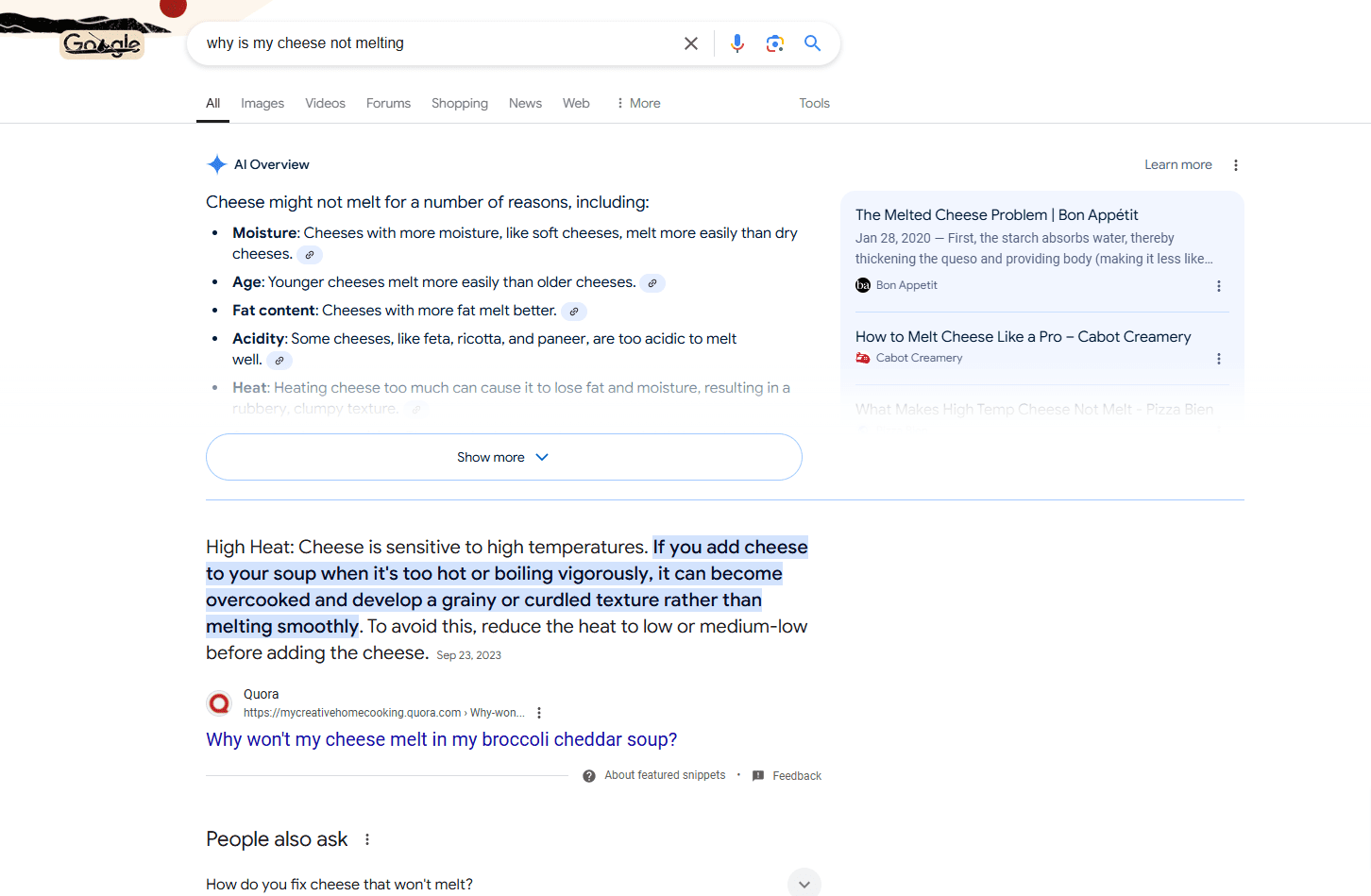
These overviews are displayed prominently: the AI Overview appears on the left, with relevant links to sources on the right.

Screenshot for search for [why is my cheese not melting], Google, November 2024

Google determines which sources to include based on their credibility and relevance to the user’s search intent. This is where SEO plays a critical role.

Why Are AI Overviews Important For SEO?

Being cited in an AI Overview boosts visibility since it’s the first result users see after their query. This positioning can significantly increase click-through rates (CTR), even for pages that aren’t ranked in the top 10 of the SERP.

Studies indicate that 52% of sources mentioned in AI Overviews rank in the top 10 results, meaning nearly half are pulled from beyond the first page.

This means that even if you don’t rank on the first page, you can still be featured on AI Overviews.

In addition to my own research with our clients, I studied different reports to better understand how you can rank on AI Overviews. Some of these reports include:

How To Rank In AI Overviews: 11 Tips For Organic Visibility

While you can’t directly control whether your pages are cited in an AI Overview, you can improve your chances by following these tips.

1. Add More Context To Your Articles

AI Overviews are designed to answer user queries directly. This means Google rewards content that is well-contextualized and written in a simple, easy-to-read format.

One thing to remember is that AIOs are triggered by informational search intent keywords 99.2% of the time, according to Ahrefs. If you’re writing an article on an informational keyword, focus on writing in a simple, easy-to-read format and add enough context to answer the query fully.

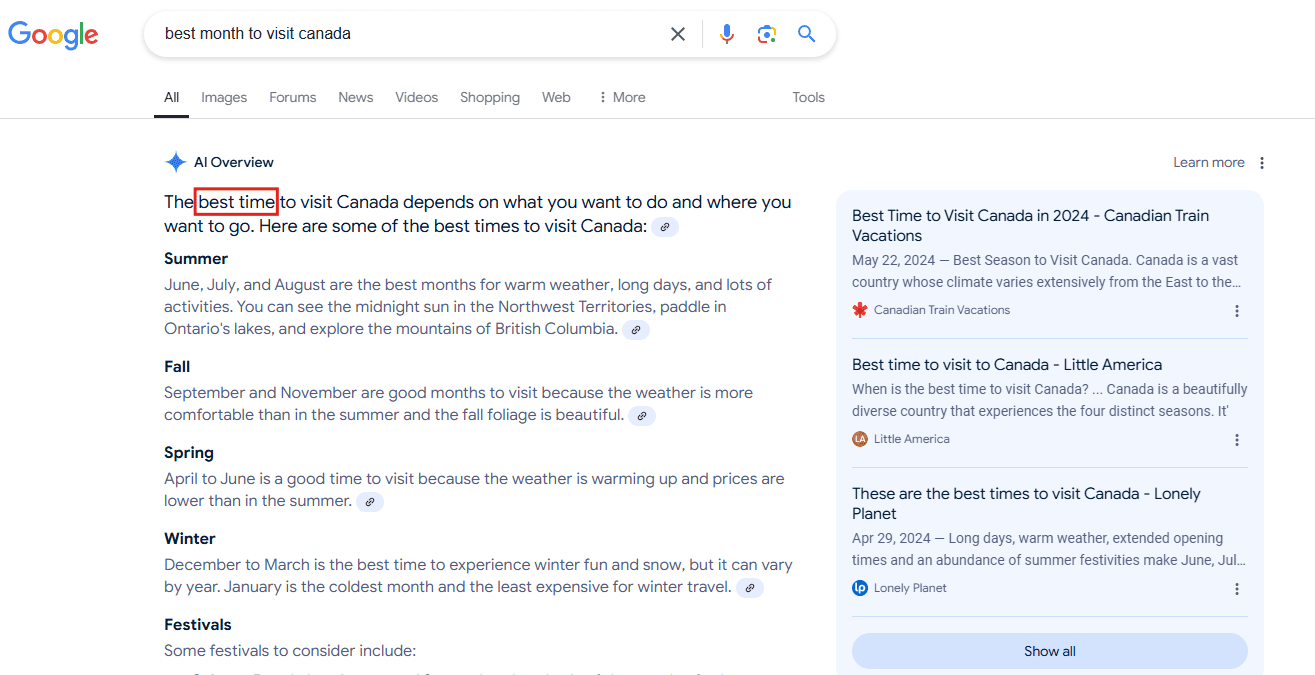
The Surfer SEO study shows that Google focuses on context over keywords. When AIOs show results to a user’s query, they mention exact keyword phrases only 5.4% of the time. Which means keywords are less important in AIOs.

In the example below, the query is [best month to visit Canada], but the AIO doesn’t emphasize the best month in its response. It’s the best time.

Screenshot from search for [best month to visit canada], Google, November 2024

Tips:

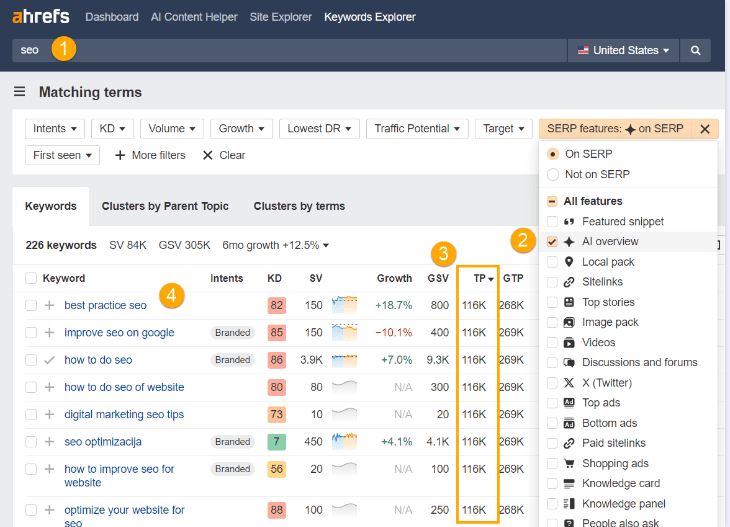
  • Use tools like Ahrefs to find AIO-triggering keywords with high-traffic potential. (Use the Ahrefs AI Overview SERP feature, and navigate to the intent filter to choose Informational as the search intent. It finds long-tail keywords for you, and you can write specific answers to these search queries.)
Screenshot from Ahrefs, November 2024
  • Structure your content to answer questions fully, incorporating related topics naturally.
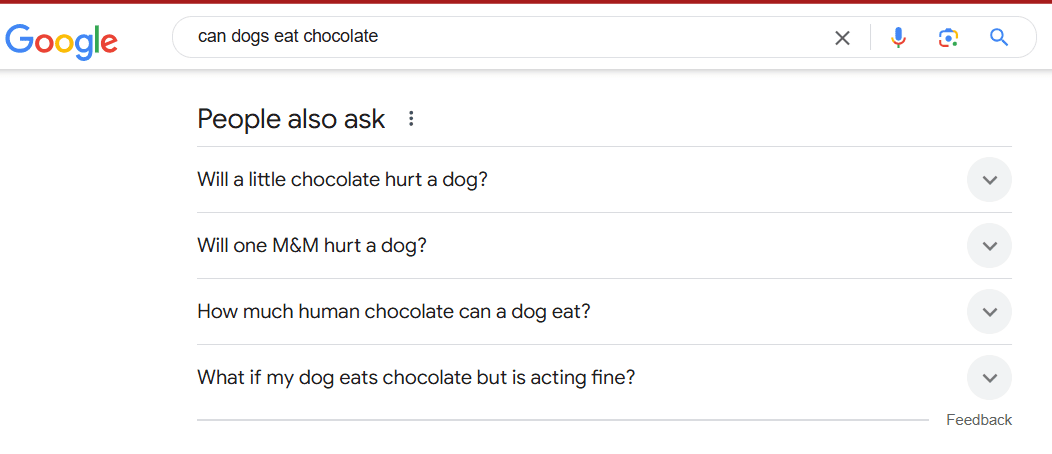
  • Use tools like Google Autocomplete or People Also Ask to identify common questions users have about your topic. (See example below.)
Screenshot from search for [can dogs eat chocolate], Google, November 2024

2. Use Long-Tail Keywords

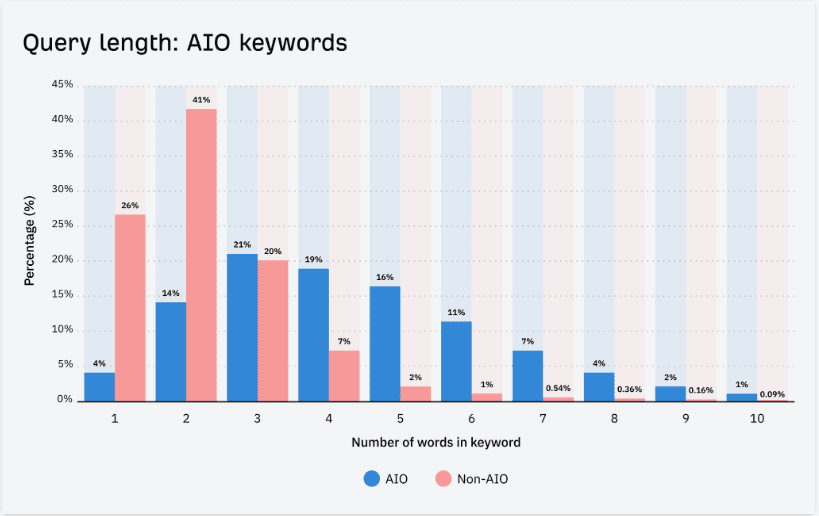
AI Overviews are more likely to be triggered by specific, long-tail keywords than by generic, short-tail ones.

According to Ahrefs, they’re triggered more for queries with three to four words than for queries with one- to three-word queries.

Screenshot from Ahrefs, November 2024

These keywords often align closely with user intent.

How To Find Them:

  • Use the “Questions” section in keyword tools like AnswerThePublic.
  • Leverage Google Autocomplete to identify conversational search terms.

3. Leverage Structured Markup

Implementing structured data, such as Schema.org markup, helps search engines understand the context and structure of your content. This makes your page more likely to be included in AI Overviews.

Key Markup Types To Use:

  • FAQ schema for question-based content.
  • Article schema for blog posts and informational pieces.
  • Breadcrumb schema to improve navigation signals.

4. Optimize On-Page SEO

On-page SEO remains foundational for ranking in both traditional SERPs and AI Overviews. 52% of AI Overviews sources come from the top 10 search results. This means you have a better chance of getting cited if your page ranks for that keyword.

Best Practices:

  • Use primary and secondary keywords in titles, headings, and subheadings.
  • Write compelling meta descriptions to boost CTR.
  • Ensure your content meets E-E-A-T (expertise, experience, authoritativeness, trustworthiness) guidelines.

5. Target Keywords With Low Difficulty

Focus on keywords with low competition (Keyword Difficulty < 20).

These are often high-intent, long-tail phrases that are easier to rank for and align well with informational search queries.

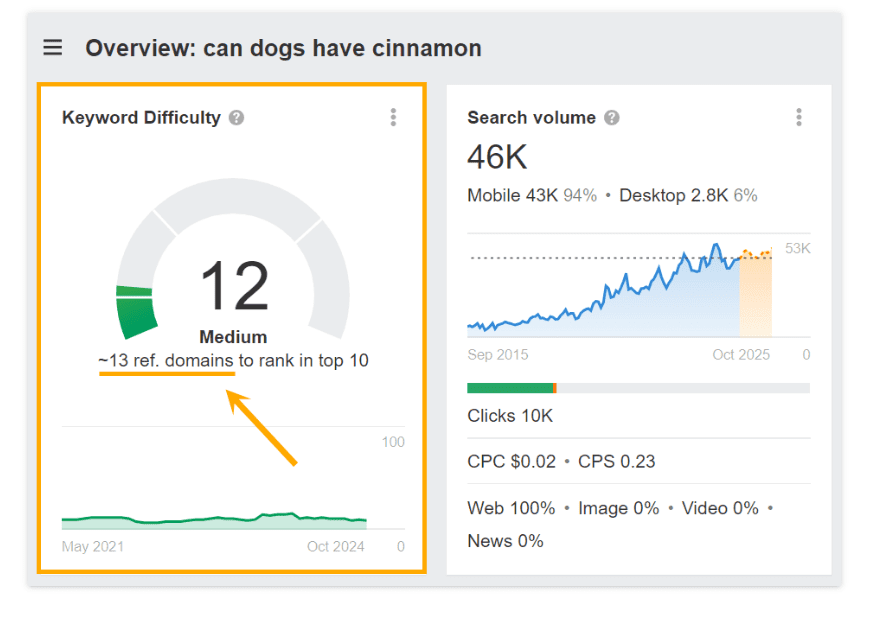
According to Ahrefs, AIO keywords have an average difficulty of 12. An example is the keyword phrase “Can dogs have cinnamon?” which has a KD of 12.

Screenshot from Ahrefs, November 2024

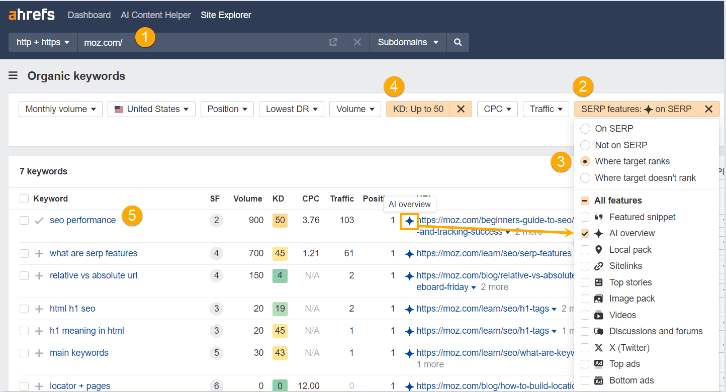
If you’re using Ahrefs, use the AI Overview SERP feature filter. Filter out keywords above 50 and go through keywords relevant to your topic.

Screenshot from Ahrefs, November 2024

6. Build Brand Credibility

From our experience optimizing content for AI Overviews, we’ve observed that sources frequently mentioned in authoritative publications or regularly cited by others are more likely to be included. While this aligns with Google’s emphasis on E-E-A-T, our firsthand results reinforce this approach.

Having a consistent presence in credible and trusted outlets has, in our experience, improved the likelihood of being featured in AI Overviews. Building this presence strengthens your site’s perceived authority.

Action Steps:

  • Engage in digital PR campaigns to secure mention in reputable publications.
  • Monitor mentions of your brand on platforms like Quora and Reddit to ensure positive associations.

7. Optimize For Mobile SEO

With mobile-first indexing, Google evaluates your site’s mobile performance when determining rankings.

According to Ahrefs study, mobile traffic accounts for 81% of AI Overview citations.

Tips:

  • Use responsive design to ensure your site displays well on all devices.
  • Improve page load speed for mobile users using tools like Google PageSpeed Insights.

8. Format Content For Easy Scanning

From firsthand analysis of sites that frequently rank in AI Overviews, we’ve found that well-structured content – using bullet points, lists, and clear sections – is often favored.

Formatting plays a critical role in helping AI parse information quickly.

Best Practices:

  • Use bullet points, numbered lists, and short paragraphs.
  • Structure content with clear headings and subheadings.
  • Break up long blocks of text with visual elements like charts or images.

9. Focus On Simplicity

Content written in plain, accessible language tends to perform better in AI Overviews. This is something we’ve consistently seen when optimizing content for diverse audiences and industries.

Tools:

  • Use Hemingway Editor or Grammarly to ensure your content is readable and concise.
Screenshot from Hemingway, November 2024

10. Acquire High-Quality Backlinks

While strong backlinks are widely recognized as important for SEO, our experience suggests they are equally critical for increasing the likelihood of being cited in AI Overviews.

Prioritizing quality over quantity in link building is key. Use strategic link building campaigns to improve your domain authority and visibility in AI Overviews.

11. Publish Timely, Relevant Content

AI Overviews often favor fresh, up-to-date information. Regularly update your articles and blog posts to ensure they remain current.

Do AI Overviews Affect SEO?

Yes, AI Overviews impact SEO strategies by shifting the focus from traditional rankings to citation opportunities.

While they can increase visibility and CTR for cited sources, they may also reduce traffic for pages that are not directly cited, even if they rank well organically.

FAQs About AI Overviews:

Are AI Overviews Accurate?

AI Overviews are generally reliable but not 100% accurate. These AI-generated summaries pull information from multiple web sources, which means their accuracy depends on the quality and timeliness of the source content.

Google has conducted extensive tests, though. It discovered that the accuracy rates of AI Overviews “is on par” with those of Featured Snippets, which is a trustworthy feature for quick information.

Where Do AI Overviews Get Their Information?

AI Overviews gather information from multiple credible sources across Google’s search results pages. It uses:

  • Top-ranking websites.
  • Authority websites.
  • Content relevance through sources that directly answer the user’s query, even if they don’t rank on the first page.
  • Recent content.

Key Takeaway For Ranking In Google’s AI Overviews

Ranking in Google’s AI Overviews requires a multi-faceted approach: creating well-structured, mobile-friendly content, targeting specific long-tail keywords, and building brand credibility.

Leveraging tools like structured markup and keeping your content updated can further boost your chances.

More Resources:


Featured Image: Roman Samborskyi/Shutterstock