Are you or your clients struggling to build trust and stand out in a crowded marketplace? Do you know what truly drives consumers to choose one business over another? Are you leveraging reviews effectively to enhance conversions?
If these questions resonate with you, then you’re in the right place.
In today’s digital-first world, consumers increasingly rely on reviews to guide their choices, making trust a vital currency in the success of local businesses.
As reviews shape perceptions and influence buying decisions, a poor reputation has become the number one driver of weak SEO and marketing performance. But it doesn’t have to be that way—we’ve got the tools and insights to help your business or agency turn the tide.
Exclusive Insights from GatherUp’s November 2024 Survey
Join us for an exclusive event where we’ll unveil groundbreaking findings from GatherUp’s November 2024 survey of over 1,200 Americans, revealing how attitudes toward reviews are reshaping the buyer’s journey. This fresh data provides a unique window into the critical role of reviews and their growing influence on consumer trust and behavior.
What You’ll Learn
During this session, we’ll take a deep dive into strategies that agencies and SEO professionals can use to drive trust and credibility. We’ll uncover where consumers are searching for reviews, why certain platforms dominate, and how elements like recency, detail, and personalization contribute to a compelling online reputation.
Key Topics We’ll Explore:
Understanding Consumer Trust: Gain insights into the review traits that consumers value most—such as authenticity, responsiveness, and depth—and how these factors can directly influence conversions.
Winning Across Review Platforms: Explore the platforms where consumers are turning for reviews and identify the rising stars reshaping the review landscape.
Responding to Reviews with Impact: Learn how strategic responses can transform even negative feedback into opportunities for customer retention and loyalty.
Navigating the Ethical Challenges of Review Management
Beyond actionable insights, we’ll also tackle critical ethical considerations in review management, including:
The role of AI in review responses and how to balance automation with authenticity.
The risks of review gating and how to navigate this practice ethically.
Effective strategies for combating review spam while maintaining consumer trust.
Agencies looking to help their clients build trust and improve local SEO through effective review management strategies.
SEO Experts aiming to stay ahead of trends in consumer behavior and learn how to leverage reviews to boost visibility and conversions.
Local business owners eager to understand how reviews impact their online reputation and how to respond effectively to drive loyalty and growth.
Reputation management professionals tasked with monitoring and managing online reviews to safeguard and enhance brand trust.
This presentation will provide actionable insights for anyone involved in building trust, credibility, and a strong local presence through effective review and reputation strategies.
LIVE Q&A
We’re also featuring a LIVE Q&A session with our presenters following the main presentation, giving you the chance to dive deeper into how you can use reviews to build your credibility and get tailored advice for your unique situations.
And don’t worry if you can’t join us live—simply save your seat, and we’ll send you a recording after the event so you won’t miss a thing.
Don’t Miss This Opportunity!
This is your chance to gain a competitive edge in building consumer trust and reputation. Save your seat today and take the first step toward a stronger, trust-driven strategy!
With the holiday approaching fast, it’s time to go through holiday SEO pitfalls and learn how to avoid and fix them.
Salesforce predicts a 2% year-over-year global sales growth for November and December, totaling $1.19 trillion, with U.S. sales expected to reach $277 billion – also up 2% from last year.
With people holding on to their wallets and watching every penny, you must fight for every dollar.
Make sure you have a solid holiday SEO strategy to win, especially since there are five fewer shopping days between Thanksgiving and Christmas compared to 2023.
Plus, Google is getting more competitive and pushing organic results further down the page.
Mistake #1: Late Planning And Implementation
Some businesses wait until November or December to start building their holiday SEO strategy, which does not leave a lot of time to get new content indexed and ranked.
The Solution
Start holiday SEO planning three to four months in advance.
If you’re planning your holiday content in November and expect to rank in December for “Christmas Holiday gifts” with a brand new page, it is not going to happen. You should build out a page way in advance.
Create a content calendar focusing on your top products, guides, and helpful content. Look at last year’s sales and analytics data to show you what products sold the most and bought in the most revenue.
This will also help your company decide what items you should keep in stock based on previous order history.
Implement technical SEO updates like making sure your pages load as quickly as possible and your shopping cart process is smooth, quick, and easy to add new products or delete old or out-of-stock items.
Use historical data and SEO tools like Exploding Topics and Google Trends to predict trending topics and make sure you have helpful and useful content that is original, unique, and engaging.
Mistake #2: Lack Of An Integrated Strategy
Some businesses rely on organic search as the only channel to bring traffic.
Unfortunately, organic search is getting pushed down the fold due to AI overviews, paid search, and other factors.
In order to be successful, you must have an integrated strategy that works with paid search, social, and video.
Also, start thinking of SEO as “search engine everywhere” to maximize your website’s visibility across all digital marketing channels. This can drive more organic traffic, better visibility, and a consistent brand message, boosting sales and leads across all platforms and customer touchpoints.
Share data and content plans. If you’re building content and new landing pages, let SEO optimize it, share learnings to incorporate into paid search ad copy, and vice versa. Also, the content should be shared on social channels to drive organic and social performance.
Plus, implement an omnichannel approach to show the value of an integrated strategy.
Mistake #3: Poor URL Structure For Seasonal Content
Some businesses create new URLs every year for holiday content, which is not a recommended practice because you will have to set up redirects, secure backlinks, and gain authority.
The Solution
Use evergreen URLs (e.g., /holiday-gift-guide instead of /holiday-gift-guide-2024), and do not change the URL strategy. Keep it consistent all the time.
Update existing content and landing pages rather than creating new URLs.
Implement 301 redirects from old holiday URLs to new URLs to transfer some equity to the new URLs.
Maintain consistent internal linking structure to reinforce important pages and help search engines understand your site structure.
Mistake #4: Poor Category And Filter Optimization
Do not allow Google and other search engines to index duplicate content from multiple filter combinations and category pages.
The Solution
Use canonical tags to inform Google that this is the specified version of the page or implement robots.txt directives for filtered pages for the search engines to ignore.
Update and optimize your titles and metadata with unique and original content.
Create unique content for the main category pages. Think outside the box and offer content that provides value to end users and meets their intent.
For example, if you have a category page about Christmas gifts for 5-year-olds, make sure you have a video, imagery, and questions that people are asking, and you’re optimized for shopping results since that is a transactional keyword.
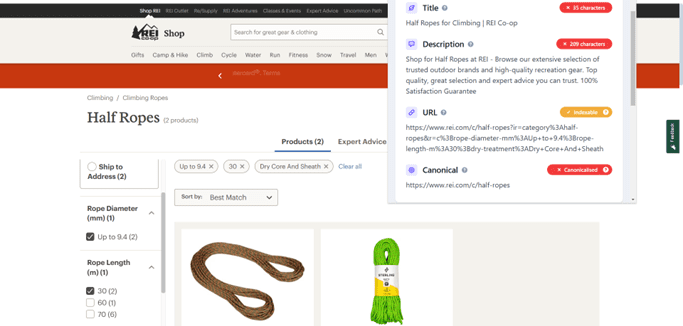
For instance, REI does a great job at making sure the filter content has a canonical tag on it.
Screenshot from REI Shop, November 2024
Mistake #5: Not Optimizing For Local
Local searches are particularly important, especially during the holidays, as 42% of Google searches have local intent.
Google places a strong emphasis on local relevance in its search results to provide users with the most helpful information based on their location.
If your local search is not optimized, you’re missing an opportunity to get in front of your local audience during the holiday season when local queries begin to spike.
The Solution
Optimize your local listings and make sure your local assets are filled out with detailed business information, high-quality photos, regular updates, and actively respond to customer reviews.
Update holiday business hours to make sure that customers know when you’re open and when you’re not.
Create location-specific landing pages to give your site a chance to rank for location-based searches (e.g., [Surprise dolls near Fargo North Dakota]).
Optimize local holiday keywords and maintain consistent NAP (Name, Address, Phone) information across search engines and directories.
Encourage holiday-specific reviews by asking customers if they like your product or the experience they had shopping at your online store.
Mistake #6: Lack Of High-Quality Content
If you’re a brand with thousands or millions of pages or working on a small team, you have a lot on your plate and may rush to create holiday content.
Additionally, if you do not have high-quality content that is people first, you run the risk of getting hit by a core algorithm update.
The Solution
Create comprehensive gift guides that are unique and offer value to end users. For example, you can break down gift guides for men, women, kids, grandparents, etc.
Develop unique product descriptions that are different from those of your competitors.
Oftentimes, when a brand sells the same product as competitors, the product description is identical. Search what questions people ask about that product and include it in your descriptions or your page.
Update existing content with fresh information, surveys, information, and links or mentions to high-authoritative sites. Always create people-first content that is helpful and useful as opposed to creating content that is not natural.
Prioritize and plan. You may not get to everything, but if you can cover off on the biggest money makers, you will be in decent shape if you move the needle and drive high-quality traffic that converts.
If you see that your top product page loads slowly, try to fix it right away to drive more sales and traffic.
Implement product and breadcrumb schema on your holiday products to give Google more information about your content.
Ensure proper handling of out-of-stock items so customers know what to expect and when the items will be back in stock.
If you have 404 error pages, fix them, make sure the URLs are 200, and load the content people came to your site for.
Mistake #8: Poor Internal Linking Strategy
Internal linking is essential during this season and can reinforce important pages, especially holiday-specific pages and promotions.
The Solution
Create a holiday hub page and update navigation to feature seasonal categories that do not change.
Mark it up using breadcrumb schema, so Google will understand your site navigation.
Have strong CTAs to drive more traffic and sales of your products, especially if you’re using discounts, e.g., Unlock 30% off just for you!
You may also link between holiday-related content. For example, red baseball hats can have an internal link to pink baseball hats because they are close enough in color.
Mistake #9: Ignoring Historical Data
Not utilizing last year’s data to inform your current holiday SEO strategy could lead to missed opportunities.
The Solution
Analyze last year’s top-performing pages using Google Analytics 4 or other analytics tools. This will help you prioritize your SEO efforts.
Review historical keyword trends. Make sure you have the content and assets to be relevant for those terms this year.
Identify successful promotional strategies used last year that you can incorporate this year to drive better engagement and more sales.
Use analytics data to predict inventory demands and have a strategy for out-of-stock items or a surge in sales.
Mistake #10: Inadequate Performance Monitoring
Some websites do not have proper tracking set up for the holiday season.
We all know that GA4 is cumbersome, so work with your analytics team to make sure GA4 is set up correctly, tracking events and attributing correctly to organic research.
The Solution
Conduct an analytics audit and data review with your team. Track performance metrics, monitor competitors’ activities, test your content, and have a plan in place for traffic spokes.
Mistake #11: Poor Mobile Optimization
With the majority of U.S. consumers using their mobile phones to shop on Amazon and other big box retailers, having a poorly optimized mobile site can hurt rankings and conversions.
The Solution
Make sure your site is optimized, provides a good mobile experience, loads quickly, and has a quick and easy checkout process.
Wrapping Up
With the holidays approaching, early planning is critical to SEO success.
Optimize for mobile and local, and make sure your site has a strong technical foundation.
SEO is not about rankings; it’s about providing users with useful content and a seamless user experience. Adopting these strategies will help convert seasonal traffic into sales while building long-term SEO value for your site.
Google announced an update to their crawler documentation, adding more information about caching which should help better understand how to optimize for Google’s crawler. By following the new guidelines on implementing proper HTTP caching headers, SEOs and publishers can improve crawling efficiency and optimize server resources.
Updated Crawler Documentation
The crawler documentation now has a section that explains how Google’s crawlers use HTTP caching mechanisms that help to conserve computing resources for both publishers and Google during crawling.
Additions to the documentation significantly expand on the prior version.
Caching Mechanisms
Google recommends enabling caching with headers like ETag and If-None-Match, as well as optionally Last-Modified and If-Modified-Since, to signal whether content has changed. This can help reduce unnecessary crawling and save server resources, which is a win for both publishers and Google’s crawlers.
The new documentation states:
“Google’s crawling infrastructure supports heuristic HTTP caching as defined by the HTTP caching standard, specifically through the ETag response- and If-None-Match request header, and the Last-Modified response- and If-Modified-Since request header.”
Google’s Preference For Preference for ETag
Google recommends using ETag over Last-Modified because ETag is less prone to errors like date formatting issues and provides more precise content validation. It also explains what happens if both ETag and Last-Modified response headers are served:
“If both ETag and Last-Modified response header fields are present in the HTTP response, Google’s crawlers use the ETag value as required by the HTTP standard.”
The new documentation also states that other HTTP caching directives are not supported.
Variable Support Across Crawlers
The new documentation explains that support for caching differs among Google’s crawlers. For example, Googlebot supports caching for re-crawling, while Storebot-Google has limited caching support.
Google explains:
“Individual Google crawlers and fetchers may or may not make use of caching, depending on the needs of the product they’re associated with. For example, Googlebot supports caching when re-crawling URLs for Google Search, and Storebot-Google only supports caching in certain conditions”
Guidance On Implementation
Google’s new documentation recommends contacting hosting or CMS providers for assistance. It also suggests (but doesn’t require) that publishers set the max-age field of the Cache-Control response header in order to help crawlers know when to crawl specific URLs.
Sundar Pichai, Google’s CEO, was interviewed by Andrew Ross Sorkin at the New York Times DealBook Summit, where he discussed what to expect from Google Search in 2025 but also struggled to articulate Google’s concern for content creators.
When asked to compare where Google is today relative to the rest of the industry and whether Google should be the “default winner” Pichai reminded the interviewer that these were “the earliest stages of a profound shift” and underlined that Google is a leader in AI and not the follower. The entire AI industry is built on top of Google research discoveries that were subsequently open sourced, particularly transformers, without which the AI industry would not exist as it is today.
Pichai answered:
“Look, it’s a such a dynamic moment in the industry. When I look at what’s coming ahead, we are in the earliest stages of a profound shift. We have taken such a deep full stack approach to AI.
…we do world class research. We are the most cited, when you look at gen AI, the most cited… institution in the world, foundational research, we build AI infrastructure and when I’m saying AI infrastructure all the way from silicon, we are in our sixth generation of tensor processing units. You mentioned our product reach, we have 15 products at half a billion users, we are building foundational models, and we use it internally, we provide it to over three million developers and it’s a deep full stack investment.
We are getting ready for our next generation of models, I just think there’s so much innovation ahead, we are committed to being at the state of the art in this field and I think we are. Just coming today, we announced groundbreaking research on a text and image prompt creating a 3D scene. And so the frontier is moving pretty fast, so looking forward to 2025.”
Blue Link Economy And AI
It was pointed out by the interviewer that Google was the first mover on AI and then it wasn’t (a reference to OpenAI’s breakout in 2022 and subsequent runaway success). He asked Pichai how much of that was Google protecting the “blue link economy” so as not “to hurt or cannibalize that business” which is worth hundreds of billions of dollars.
Pichai answered that out of all the projects at Google, AI was applied the most to Search, citing BERT, MUM and multimodal search as helping close the gaps in search quality. Something that some in the search industry fail to understand is that AI has has been a part of Google since 2012 when it used Deep Neural Networks for identifying images and speech recognition and in 2014 when it introduced the world to sequence to sequence learning (PDF) for understanding strings of text. In 2015 Google introduced RankBrain, an AI system directly related to ranking search results.
Pichai answered:
“The area where we applied AI the most aggressively, if anything in the company was in search, the gaps in search quality was all based on Transformers internally. We call it BERT and MUM and you know, we made search multimodal, the search quality improvements, we were improving the language understanding of search. That’s why we built Transformers in the company.
So and if you look at the last couple of years, we have with AI overviews, Gemini is being used by over a billion users in search alone.”
Search Will Change Profoundly In 2025
Pichai continued his answer, stating directly that Search will profoundly change not just in 2025, but in early 2025. He also said that progress is going to get harder because the easier things to innovate have been done (low hanging fruit).
He said:
“And I just feel like we are getting started. Search itself will continue to change profoundly in 2025. I think we are going to be able to tackle more complex questions than ever before. You know, I think we’ll be surprised even early in 2025, the kind of newer things search can do compared to where it is today… “
Pichai also said that progress wouldn’t be easy:
“I think the progress is going to get harder when I look at 2025, the low hanging fruit is gone.
But I think where the breakthroughs need to come from where the differentiation needs to come from is is your ability to achieve technical breakthroughs, algorithmic breakthroughs, how do you make the systems work, you know, from a planning standpoint or from a reasoning standpoint, how do you make these systems better? Those are the technical breakthroughs ahead.”
Is Search Going Away?
The interviewer asked Pichai if Google has leaned into AI enough, quoting an author who suggested that Google’s “core business is under siege” because people are increasingly getting answers from AI and other platforms outside of search, and that the value of search would be “deteriorating” because so much of the content online will be AI-generated.
He answered that it’s precisely in a scenario where the Internet is flooded with inauthentic content that search becomes even more valuable.
Pichai answered:
“In a world in which you’re flooded with like lot of content …if anything, something like search becomes more valuable. In a world in which you’re inundated with content, you’re trying to find trustworthy content, content that makes sense to you in a way reliably you can use it, I think it becomes more valuable.
To your previous part about there’s a lot of information out there, people are getting it in many different ways. Look, information is the essence of humanity. We’ve been on a curve on information… when Facebook came around, people had an entirely new way of getting information, YouTube, Facebook, Tik… I can keep going on and on.
…I think the problem with a lot of those constructs is they are zero sum in their inherent outlook. They just feel like people are consuming information in a certain limited way and people are all dividing that up. But that’s not the reality of what people are doing. “
Pichai Stumbles On Question About Impact On Creators
The interviewer next asked if content is being devalued. He used the example of someone who researches a topic for a book, reads twenty books, cites those sources in the bibliography and then gets it published. Whereas Google ingests everything and then “spits” out content all day long, defeating the human who in earlier times would write a book.
Andrew Ross Sorkin said:
“You get to spit it out a million times. A million times a day. And I just wonder what the economics of that should be for the folks that create it in the beginning.”
Sundar Pichai defended Google by saying that Google spends a lot of time thinking about the impact to the “ecosystem” of publishers and how much traffic it sends to them. The interviewer listened to Sundar’s answer without mentioning the elephant in the room, search results stuffed with Reddit and advertising that crowds out content created by actual experts, and the de-prioritization of news content which has negatively impacted traffic to news organizations around the world.
It was at this point that Pichai appeared to stumble as he tried to find the words to respond. He avoids mentioning websites, speaking in the abstract about the “ecosystem” and then when he runs out of things to say changes course and begins speaking about how Google compensates copyright holders who sign up for YouTube’s Content ID program.
He answered:
“Look I… uh… It’s a… very important question… uhm… look I… I… think… I think more than any other company… look you know… we for a long time through… you know… be it in search making sure… while it’s often debated, we spend a lot of time thinking about the traffic we send to the ecosystem.
Even through the moment through the transition over the past couple of years. It’s an important priority for us.”
At this point he started talking about Google’s content platform YouTube and how they use “Content ID” which is used to identify copyright-protected content. Content ID is a program that benefits the corporate music, film, and television industries, copyright owners who “own exclusive rights to a substantial body of original material that is frequently uploaded to YouTube.”
Pichai continued:
“In YouTube we put a lot of effort into understanding and you know identifying content and with content ID and uh creating monetization for creators.
I think… I think those are important principles, right. I think um… there’s always going to be a balance between understanding what is fair use uh… when new technology comes versus how do you… give value back proportionate to the value of the IP, the hard work people have put in.”
Insightful Interview Of Alphabet’s CEO
The interviewer did a great job at asking the hard questions but I think many in the search marketing community who are more familiar with the search results would have asked follow up questions about content creators who are not on Google’s YouTube platform or the non-expert content that pushes down content by actual experts.
Watch the New York Times Interview here:
Featured Image by Shutterstock/Shutterstock AI Generator (no irony intended)
Our question comes from Madeline, who asked during a recent webinar:
“How does the metadata on photos help increase rankings?”
That’s a great question, and it’s something that is overlooked in SEO.
What Is Image Metadata?
For anyone in SEO, the concept of “metadata” will be familiar to you – it’s information that describes aspects of the page.
In SEO, we talk about page titles, page descriptions, and other information in the
of the page as “metadata.”
Images also have metadata.
This information describes the aspects of the image. It includes the name of the image creator, credits, and any copyright associated with it.
People can use it to understand more about the image they are looking at. It also helps to convey that information to the search engines.
Types Of Metadata
There are several different ways to communicate information about the image. The following are methods of labeling or conveying information used specifically for images.
Structured Data
As with any structured data you would use for other elements on your webpages, image structured data can be in JSON-LD, Microdata, or RDFa format.
It is contained on the page itself, rather than the image, and should be used on every page the image is on.
Just using the structured data markup on one page does not guarantee that Google will know to use it again for another page where the image appears.
The type to use is ImageObject. From there, Google requires the following property to be used: contentURL.
In addition to this, you must use one of the following properties:
creator (or).
creditText (or).
copyrightNotice (or).
license.
Google also recommends using the following properties:
acquireLicensePage.
creator.
name.
creditText.
copyrightNotice.
license.
I want to clarify something about this structured markup information.
As with structured data used elsewhere on a page, it’s really not used for ranking purposes. It is used more to help search engines understand information about images so that they can enhance the image SERP results.
For example, the “licensable” label that appears over some images in Google’s Image SERPs. This allows Google to display the license conditions for that image.
When clicking on the image, the side panel then extends to give an opportunity for the user to visit the site and also find more information about this image. This information is captured through structured data.
According to The IPTC, the standard “is the most widely used standard because of its universal acceptance among photographers, distributors, news organizations, archivists, and developers. The schema defines metadata structure, properties, and fields, so that images are optimally described and easily accessed later.”
Google has announced in the past that it will use IPTC metadata to identify and signal that an image has been created using artificial intelligence.
Using this metadata could make an image eligible to display an “AI-generated” label in Google Images.
EXIF Data
EXIF (Exchangeable Image File Format) is a data standard covering more specific information about how an image was captured.
For example, the camera settings, pixel dimensions, location information, and the date/time the photo was captured.
In fact, if you look at the photos you have taken on your phone, you will likely see some of this EXIF data for yourself.
Back in 2014, Matt Cutts (then Google’s head of search spam) said Google “reserve the right to use [EXIF] in rankings.”
However, there is no evidence that it acted on that right to use it. In fact, over the years, nothing much has changed in terms of Google’s assertions about the use of EXIF in rankings.
However, reports from the SMX Advanced conference in September 2024 suggested that Martin Splitt of Google denied its use in rankings.
How Does It Affect Rankings?
So, now that we’ve covered what image metadata is, let’s get back to the question. Does metadata affect rankings?
No. Not directly.
But there is some nuance to that answer.
Because of the way metadata can enhance an image in Google Image SERPs, it may have an effect on click-through. That alone can be enough of a reason to utilize it.
After all, clicking on the website to view or license an image is likely the goal of optimizing it.
There is, of course, the suggestion that user behavior affects Google’s rankings. If the metadata-inspired labels on the images in the SERPs cause improved click-through, then arguably, there is a link to rankings improvements.
What Affects Image Ranking?
If you want to make the most of the images on your site, then utilizing metadata is a smart move – especially if your images are your products.
If you want your images to rank purely to give your product or service more exposure to potential customers, then you may want to focus more on aspects that will directly impact their ranking.
There are a range of factors that you will want to consider, including choosing the right image file type: JPEG, WebP, PNG, BMP, GIF, or SV.
For a full guide on how to optimize your images for ranking, take a look at these tips.
As an absolute minimum, the following aspects are worth considering whenever you add an image to a page.
Speed
As with everything on a webpage these days, load speed matters. If your image is slow to load and render, it is likely to affect the Core Web Vitals of the page on which it’s on.
Alt Text
The alt tag is a text alternative to an image. If the image doesn’t display, or a screen reader is used to understand the image, it can be read instead of the image being viewed.
Search engines have historically struggled to understand the content of images.
Although they have taken significant leaps forward in this regard, the alt tag is still used to explain what’s in an image that the search engines will definitely understand.
As such, it is a good place to accurately describe your image while using language that searchers will likely use.
File Name
Did you not expect that what name you save your photo as will have a ranking impact?
Well, surprisingly, it does.
Don’t settle for Helen-save-1 or IMG1239. Instead, consider using a similar file name to the alt text. Essentially, give the search bots another clue as to what the image is of.
In Summary: Image Metadata Matters For SEO
There is little to say that metadata has a direct ranking impact. However, as with any factor that may or may not have an impact, I suggest you test it where you can!
Although there may be little impetus to add metadata for ranking purposes, there are many other reasons, even SEO ones, why you should consider what metadata you are or aren’t using with your imagery.
Most marketers don’t realize that Google has been losing search market share in EU countries.
Image Credit: Kevin Indig
The drop in market share comes at a time when Google’s business is under siege:
The DoJ recommended separating Google from Chrome and Android amid a lawsuit against Alphabet. (I summarized the lawsuit and potential outcomes in Monopoly.)
The Justice Department runs a separate lawsuit against Google’s advertising business.
Canada just sued Google over anti-competitive practices in online ads.
ChatGPT, Perplexity & Co are growing mind and market share. (I covered the meteoric rise of ChatGPT in ChatGPT Search.)
Google faces heavy regulation in the EU from the DMA (Digital Marketing Act), which I wrote about in 2 Internets.
So, the question is two-fold: How much does the drop in market share matter, and what is the driver?
The short answer is that the drop matters more than Alphabet might like to admit.
It gives oxygen to competitors and weakens the body in the fight against external agents. Google’s revenue is still strong, but advertising market share is declining.
A mix of regulation, competitors, and negative sentiment toward Google seem responsible for the drop.
The implication is that marketers increasingly need to track and optimize for more search engines, but a more fragmented playing field could also be an opportunity for more referral traffic from search engines to websites.
What Is Going On With Google?
Image Credit: Kevin Indig
Google’s market share over the last 10 years dipped by -5.6 pp (percentage points) in France and -3.3 pp in Germany.
StatCounter has never recorded such a low share since measuring data in January 2009.
France and Germany are not the only ones. Most EU countries saw Google’s market share drip in the last five years (mobile):
Austria: -4.1 pp.
Poland: -3.1 pp.
Switzerland: -2.3 pp.
Netherlands: -2.1 pp.
Denmark: -1.5 pp.
Zooming further in also doesn’t change things. Google market share over the last 12 months (mobile):
France: -4.6 pp.
Austria: -3.2 pp.
Poland: -2.4 pp.
Germany: -2.1 pp.
Switzerland: -1.3 pp.
Netherlands: -1.0 pp.
Denmark: -1.0 pp.
What’s going on? The picture becomes clearer when we look at when the trend changes. There are two inflection points: November 2018 and April 2024.
Image Credit: Kevin Indig
The data shows a shift away from Google starting around April, a month after Android and Apple introduced choice screens for browsers and search engines.
In other words, Google can no longer be the default search engine on mobile and desktop devices. We’re starting to see the results.
However, not all countries see a dip. Why?
Why Are Some Countries Flat?
Google’s market share isn’t down in every EU country, e.g.:
Portugal.
Spain.
Italy.
Ireland.
How come? These countries are part of Europe, and users see a choice screen.
The answer is devices. The countries listed above lost market share on desktop but not mobile.
Image Credit: Kevin Indig
This happens everywhere in the EU. Over the last five years, Google lost -2.1% market share on mobile compared to -10% on desktop in the EU.
Why?
A big part of the reason is the exclusive distribution agreement with Apple.
Windows is the dominant desktop operating system, with +75% in the EU, largely because of its domination in corporate computing. MacOS has only 15.1%.
While Android (Google’s operating system) also has the majority market share on mobile with 66.5%, Apple’s iOS has 33%.
And since Google is the default search engine on Apple devices by paying a $20 billion fee, its position is more solid in the EU on mobile – until the DMA forced choice screens in March.
Image Credit: Kevin Indig
But what about countries that show a decline in Google’s market share before March? Way before!
Why Does The Dip Start Earlier In Some Countries?
Image Credit: Kevin Indig
Google lost market share in countries like Germany and Portugal as early as November 2018. So, there must be something else going on besides choice screens and device-specific dynamics.
Two things happened in 2018: First, GDPR, the European data protection law, came into effect in May 2018. Second, the EU fined Alphabet €4.34 billion for antitrust violations related to Android’s market dominance.
Both events didn’t directly decrease Google’s market share but set off a period of Google mistrust that gave space to smaller competitors like DuckDuckGo and Bing.
Europeans are much more privacy-sensitive, which means regulatory fines and privacy laws influence consumer behavior much more than the U.S.
For example, the European privacy search engine StartPage gets 56% of searches from the EU and 21% from the U.S.
Users visit Google less because of privacy concerns. France declared not to use Google as a default search engine for some ministries in November 2018.
Choice screens and public perception are the biggest drivers behind Google’s decline. Google sends less referral traffic to websites. So, what is the effect?
Who Wins What Google Loses?
Image Credit: Kevin Indig
The biggest winner of Google’s decline is Bing. The ever-second search engine is the biggest beneficiary of Google’s decline.
It’s very possible that ChatGPT and its close affiliation with Microsoft gave its search engine a bigger boost in Europe than originally assumed, but Bing is also the second choice in cons’ minds.
Now, these numbers are still peanuts, and search engines like DuckDuckGo, Ecosia, and QWANT license search results from Bing and Google. So, you could say that Google and Bing win, after all.
However, Ecosia and QWANT are working on a joint web index to become independent from other search engines.
How much longer until DuckDuckGo and others announce their own index as well? When the alpha gets weaker, the smaller animals smell the opportunity.
Despite the decline in market share, Google’s search revenue is still growing impressively fast at its scale. Why?
Market share doesn’t have to correlate with search volume or monetizable queries.
There are more mobile than desktop searches, and mobile searches drop to a smaller degree.
Google still dominates in other markets – the EU might not be enough to put a dent into Google’s revenue that the company couldn’t compensate.
Google has been more aggressive in search monetization than the drop in market share.
Relative ad revenue growth, which is predicted to fall below 50% next year, could be a better indicator than absolute growth.
I also want to point out a caveat in the data: StatCounter gathers data by measuring referral traffic on 1.5 million sites. There is a chance that Google sending out less traffic to websites and keeping it to themselves affects the numbers.
What Are The Implications?
Google’s dropping market share in the EU, combined with potential antitrust remedies (like a forced end to the distribution agreement with Apple) and more competition, will likely fragment Search further.
In other words, we might optimize for more search engines (again). Most of them might function similarly in ranking but might need site owners to take dedicated indexing actions, such as integrating with Bing’s IndexNOW.
We’ve already dusted off our Bing Webmaster Tools when it turned out ChatGPT is using Bing results for its search feature. What’s next? Perplexity webmaster tools? Boosted by growing market share, SEO professionals should pay more attention to Bing.
Other search engines don’t have webmaster tools yet – to my surprise. What better way to foster a relationship with site owners than a portal? But with increasingly independent indices, that could become a reality soon.
Ironically, the monopoly lawsuit against Google comes just as the company gets more competition. A 1% market share of a giant like Alphabet can create a unicorn with $1.75 billion in ARR.
Browsers play a critical role in the search engine wars. The DoJ is pushing for Chrome to divest from Google, and OpenAI is working on its own browser.
In my opinion, OpenAI should buy Arc. Either way, browsers are the ultimate internet user interface and offer more user information than search engines can chew.
I want to be clear that I don’t think Google is doomed to fail. Google has all the ingredients to come out on top in the “new AI world.” The only reason it will fail is by standing in its own way.
The structured data landscape has undergone significant transformation in 2024, driven by the rise of AI-powered search, the growing importance of machine-readable content, and the need to ground large language models in factual data.
According to the latest HTTP Archive’s Web Almanac, analyzing structured data across 16.9 million websites reveals a clear shift from traditional SEO implementation to more sophisticated knowledge graph development that powers AI discovery systems.
While Google deprecated certain rich results like FAQs and HowTos in 2023, it simultaneously introduced an unprecedented number of new structured data types, including vehicle listings, course info, vacation rentals, profile pages, and 3D product models.
This rapid evolution signals a maturing ecosystem where structured data serves not just search visibility but also forms the foundation for factual AI responses, training language models, and enhanced digital product experiences.
Analysis and Methodology
The insights presented in this article are based on the 2024 edition of the Structured Data chapter of the HTTP Archive’s Web Almanac. The annual report analyzes the state of the web by evaluating structured data implementation across 16.9 million websites. These datasets are publicly queryable on BigQuery in tables in the `httparchive.all.*` tables for the date date = '2024-06-01' and relies on tools like WebPageTest, Lighthouse, and Wappalyzer to capture metrics on structured data formats, adoption trends, and performance.
Structured Data Adoption Trends
The analysis reveals compelling growth across major structured data formats:
RDFa maintains leadership with 66% presence (+3% YoY).
Open Graph implementation grows to 64% (+5% YoY).
X (Twitter) meta tag usage increases to 45% (+8% YoY).
This widespread adoption indicates that organizations are investing in structured data not just for search visibility, but also to enable AI and crawlers to understand and enhance their digital experiences.
AI Discovery And Knowledge Graphs
The relationship between structured data and AI systems is evolving in complex ways.
While many generative AI search engines are still developing their approach to leveraging structured data, established platforms like Bing Copilot, Google Gemini, and specialized tools like SearchGPT already seem to demonstrate the value of entity-based understanding, particularly for local queries and factual validation.
Training And Entity Understanding
Generative AI search engines are trained on vast datasets that include structured data markup, influencing how they:
Recognize and categorize entities (products, locations, organizations).
Ground responses. We see this in systems like DataGemma that use structured data to ground responses in verifiable facts.
Understand relationships between different data points. This is particularly evident when schema.org is used for aggregating datasets from authoritative sources worldwide.
Process-specific query types like local business and product searches.
This training shapes how AI systems interpret and respond to queries, particularly visible in:
Local business queries where entity attributes match structured data patterns.
Product queries that reflect merchant-provided structured data.
Knowledge panel information that aligns with entity definitions.
Search Engine Integration
Different platforms demonstrate structured data influence through:
Traditional Search: Rich results and knowledge panels directly powered by structured data.
AI Search Integration:
Bing Copilot showing enhanced results for structured entities.
Google Gemini reflecting knowledge graph information.
Specialized engines like Perplexity.ai demonstrating entity understanding in location queries.
Latest Google’s experiment of an AI Sales Assistant integrated into the SERP for shopping queries (This is huge! Here is on X, spotted by SERP Alert).
WordLift’s Entity Knowledge Graph Panel on Google Search – Foundation Year.
Asking “When was WordLift founded?” to Google Gemini.
Here is an example of Gemini and Google Search sharing the same factoid.
AI Sales Assistant through a ‘Shop’ CTA on branded sitelinks.
Data Validation And Verification
Structured data provides verification mechanisms through:
Knowledge Graphs: Systems like Google’s Data Commons use structured data for fact verification.
Training Sets: Schema.org markup creates reliable training examples for entity recognition.
Validation Pipelines: Content generation tools, like WordLift, use structured data to verify AI outputs.
The key distinction is that structured data doesn’t directly influence LLM responses, but rather shapes AI search engines through:
Training data that includes structured markup.
Entity class definitions that guide understanding.
Integration with traditional search rich results.
This makes structured data implementation increasingly important for visibility across both traditional and AI-powered search platforms.
As we enter this new era of AI Discovery, investing in structured data isn’t just about SEO anymore – it’s about building the semantic layer that enables machines to truly understand and accurately represent who you are.
Semantic SEO Evolution: From Structured Data To Semantic Data
The practice of SEO has evolved into Semantic SEO, going beyond traditional keyword optimization to embrace semantic understanding:
Entity-Based Optimization
Focus on clear entity definitions and relationships.
Implementation of comprehensive entity attributes.
Strategic use of sameAs properties for entity disambiguation.
Content Networks
Development of interconnected content clusters.
Clear attribution and authorship markup.
Rich media relationship definitions.
Key Implementation Patterns In JSON-LD
Content Publishing
Analysis of structured data patterns across millions of websites reveals three dominant implementation trends for content publishers.
JSON-LD patterns for content publishers. (Image from author, November 2024)
Website Structure & Navigation (+6 Million Implementations)
The dominance of WebPage → isPartOf → WebSite (5.8 million) and WebPage → breadcrumb → BreadcrumbList (4.8 million) relationships demonstrates that major websites prioritize clear site architecture and navigation paths.
Site structure remains the foundation of structured data implementation, suggesting that search engines heavily rely on these signals for understanding content hierarchy.
Content Attribution & Authority
Strong patterns emerge around content attribution:
Article → author → Person (925,000).
Article → publisher → Organization (597,000).
BlogPosting → author → Person (217,000).
This focus on authorship and organizational attribution reflects the increasing importance of E-E-A-T signals and content authority in search algorithms.
Rich Media Integration
Consistent implementation of image markup across content types:
The high frequency of media relationships indicates that publishers recognize the value of structured visual content for both search visibility and user experience.
The data suggests publishers are moving beyond basic SEO markup to create comprehensive machine-readable content graphs that support both traditional search and emerging AI discovery systems.
Local Business & Retail
Analysis of local business structured data implementation reveals three critical pattern groups that dominate location-based markup.
JSON-LD patterns for local business and retail. (Image from author, November 2024)
Location & Accessibility (+1.4 Million Implementations)
High adoption of physical location markup demonstrates its fundamental importance:
While less frequently implemented, these trust-building elements create richer local business entities that support both search visibility and user decision-making.
Ecommerce (Expanded List)
Analysis of ecommerce structured data reveals sophisticated implementation patterns that focus on product discovery and conversion optimization.
JSON-LD patterns for ecommerce websites. (Image from author, November 2024)
Core Product Information (+4.7 Million Implementations)
The dominance of basic product markup shows its fundamental importance:
This layered approach to product attributes creates comprehensive product entities that support both search visibility and user decision-making.
Future Outlook
The role of structured data is expanding beyond its traditional function as an SEO tool for powering rich snippets and specific search features. In the age of AI discovery, structured data is becoming a critical enabler for machine understanding, transforming how content is interpreted and connected across the web. This shift is driving the industry to think beyond Google-centric optimization, embracing structured data as a core component of a semantic and AI-integrated web.
Structured data provides the scaffolding for creating interconnected, machine-readable frameworks, which are vital for emerging AI applications such as conversational search, knowledge graphs, and (Graph) retrieval-augmented generation (GraphRAG or RAG) systems. This evolution calls for a dual approach: leveraging actionable schema types for immediate SEO benefits (rich results) while investing in comprehensive, descriptive schemas that build a broader data ecosystem.
The future lies in the intersection of structured data, semantic modeling, and AI-driven content discovery systems. By adopting a more holistic view, organizations can move from using structured data as a tactical SEO addition to positioning it as a strategic layer for powering AI interactions and ensuring findability across diverse platforms.
Credits And Acknowledgements
This analysis wouldn’t be possible without the dedicated work of the HTTP Archive team and Web Almanac contributors. Special thanks to:
The complete Web Almanac Structured Data chapter offers even deeper insights into the evolving landscape of structured data implementation.
As we move toward an AI-powered future, the strategic importance of structured data will continue to grow.
An analysis of 140,000 sites hosted on managed WordPress host Kinsta revealed the WordPress plugins that users judge to be the best. These findings highlight how publishers prioritize performance, SEO, and user experience.
10. Schema.org Structured Data – Schema Pro – 1.75%
Adding structured data is critical for SEO and in general for making it clear for search engines and AI what the content is about. Only 1.75% of the 140,000 sites scanned by Kinsta use a standalone Schema plugin. The reason may be that users are satisfied with the structured data functionalities offered by SEO Plugins.
The Schema Pro WordPress plugin offers a wider selection of structured data types than most SEO plugins and it also offers the capability to add custom structured data automatically across the entire site targeted to specific kinds of posts or at the individual page level.
9. XML Sitemap Generator for Google Plugin – 2.17%
Sitemaps are helpful for encouraging search engines to crawl web pages efficiently in a timely manner. But only 2% of sites use it, likely because a basic version of this functionality is native to the WordPress core and it’s provided by all WordPress SEO Plugins.
Like the dedicated Schema Pro Structured Data plugin, the XML Sitemap Generator for Google Plugin offers greater flexibility than built-in XML site generators found in most SEO plugins but with only 2.17% use it’s clear that SEO plugins are a perfect fit for most WordPress users. The advantage of using Schema Pro Structured Data plugin is that it offers greater flexibility but that might be just for edge cases.
8. Broken Link Checker – 3.27%
The Broken Link Checker is a plugin that checks for broken links but is not commonly used in this sample of sites. Google Search Console offers a report of 404 errors discovered by Googlebot which indicates broken internal and external links. The broken link check can also be accomplished with a software app like Screaming Frog.
The Broken Link Checker plugin offers a cloud-based scanner and a local checker that uses website server resources to monitor the entire website for broken links.
7. SEOPress – 4.81%
SEOPress is the seventh most popular plugin in the sample of 140,000 sites that are hosted on Kinsta. It’s a fairly popular plugin with 300,000+ installations. all-in-one SEO plugin that facilitates content optimization, schema implementation, and redirection management.
6. All in One SEO – 5.11%
The sixth most popular plugin is highly popular online, with 3+ million installations. On Kinsta it’s installed on 5.11% of sites in this sample.
5. Imagify – 11.62%
Imagify is am image optimizer that reduces image file sizes to improve website loading time. The popularity of these kinds of plugins may reflect the lack of image optimizing skills of the average WordPress user as it’s an easy thing to optimize an image before uploading it. Less than 12% of sites on Kinsta have installed it.
4. Rank Math – 18.32%
Rank Math is a highly popular SEO plugin with over 3 million installations worldwide. So it’s not surprising to see that almost 20% of sites hosted on Kinsta use it.
3. WP Rocket – 19.10%
The #3 most popular plugin is for performance optimization, demonstrating how important website performance is for publishers. WP Rocket performs file minification (makes code smaller but removing blank spaces), lazy loading and database optimization. WP Rocket made their plugin compatible with Kinsta so that caching is handled at the server level by Kinsta instead of at the PHP level by the plugin. Handling caching at the server level is faster and uses less server resources. Caching at the server level is one of the benefits of a managed WordPress server.
2. Redirection – 26.85%
The Redirection plugin is used by almost 27% of users, which is curious because redirection is something that can be handled in the built-in redirection manager tool in Kinsta’s dashboard. I use the Redirection plugin on some of my sites and it does a lot more than redirects. The plugin features 404 error reporting which alerts users to a problem like a typo in the URL of an external or internal link, which can be fixed by redirecting the typo to the correct URL. The plugin can also set security headers, which is useful for strengthening site security.
1. Yoast – 57.95%
Yoast is the most popular plugin installed on sites according to the scan Kinsta performed on 140,000 sites. In a way it’s not surprising because Yoast is installed on over 10+ million websites and is a trusted brand.
Takeaways:
The choice of plugins suggest what concerns WordPress users the most, SEO, website performance, and proper site functioning.
Search Optimization
SEO is a strong concern to WordPress users, with a combined total of 86.19% of users employing an SEO plugin. The small percentage of users that install a dedicated structured data plugin (1.75%) or XML sitemap generator (2.17%) indicates that most users are satisfied with the built-in features of their SEO plugins.
Website Performance
Over 30% of managed WordPress host users in the surveyed sample of 140,000 sites are concerned enough about performance optimization to install plugins (WP Rocket 19.10% and Imagify 11.62%).
Site Health Maintenance
Over 30% of sites are concerned that their sites are working properly, as evidenced by the amount of users that install the Redirection and Broken Link Checker plugins.
Brand Trustworthiness
Over 95% of WordPress users turn to a name brand plugin:
Yoast 57.95%
WP Rocket 19.10%
Rank Math 18.32%
These findings suggest that trust and reliability, comprehensive functionality, and ease of use are important factors guiding the choice of WordPress plugins. It’s possible that trustworthy word of mouth recommendations and brand awareness also play a role in plugin choices.
Notable in this survey of plugins that users consider the best is that security plugins did not make the list. This is likely because Kinsta provides built-in WordPress security, including two firewalls and enterprise-level DDoS protection.
It’s a cornerstone of your business’s online success that impacts everything from site speed and uptime to customer trust and overall branding.
Yet, many businesses stick with subpar hosting providers, often unaware of how much it’s costing them in time, money, and lost opportunities.
The reality is that bad hosting doesn’t just frustrate you. It frustrates your customers, hurts conversions, and can even damage your brand reputation.
The good news?
Choosing the right host can turn hosting into an investment that works for you, not against you.
Let’s explore how hosting affects your bottom line, identify common problems, and discuss what features you should look for to maximize your return on investment.
1. Start By Auditing Your Website’s Hosting Provider
The wrong hosting provider can quickly eat away at your time & efficiency.
In fact, time is the biggest cost of an insufficient hosting provider.
To start out, ask yourself:
Is Your Bounce Rate High?
Are Customers Not Converting?
Is Revenue Down?
If you answered yes to any of those questions, and no amount of on-page optimization seems to make a difference, it may be time to audit your website host.
Why Audit Your Web Host?
Frequent downtime, poor support, and slow server response times can disrupt workflows and create frustration for both your team and your visitors.
From an SEO & marketing perspective, a sluggish website often leads to:
Increased bounce rates.
Missed customer opportunities.
Wasted time troubleshooting technical issues.
Could you find workarounds for some of these problems? Sure. But they take time and money, too.
The more dashboards and tools you use, the more time you spend managing it all, and the more opportunities you’ll miss out on.
Bluehost’s integrated domain services simplify website management by bringing all your hosting and domain tools into one intuitive platform.
2. Check If Your Hosting Provider Is Causing Slow Site Load Speeds
Your website is often the first interaction a customer has with your brand.
A fast, reliable website reflects professionalism and trustworthiness.
Customers associate smooth experiences with strong brands, while frequent glitches or outages send a message that you’re not dependable.
Your hosting provider should enhance your brand’s reputation, not detract from it.
How To Identify & Measure Slow Page Load Speeds
Identifying and measuring slow site and page loading speeds starts with using tools designed to analyze performance, such as Google PageSpeed Insights, GTmetrix, or Lighthouse.
These tools provide metrics like First Contentful Paint (FCP) and Largest Contentful Paint (LCP), which help you see how quickly key elements of your page load.
Pay attention to your site’s Time to First Byte (TTFB), a critical indicator of how fast your server responds to requests.
Regularly test your site’s performance across different devices, browsers, and internet connections to identify bottlenecks. High bounce rates or short average session durations in analytics reports can also hint at speed issues.
Bandwidth limitations can create bottlenecks for growing websites, especially during traffic spikes.
How To Find A Fast Hosting Provider
Opt for hosting providers that offer unmetered or scalable bandwidth to ensure seamless performance even during periods of high demand.
Cloud hosting is designed to deliver exceptional site and page load speeds, ensuring a seamless experience for your visitors and boosting your site’s SEO.
With advanced caching technology and optimized server configurations, Bluehost Cloud accelerates content delivery to provide fast, reliable performance even during high-traffic periods.
Its scalable infrastructure ensures your website maintains consistent speeds as your business grows, while a global Content Delivery Network (CDN) helps reduce latency for users around the world.
With Bluehost Cloud, you can trust that your site will load quickly and keep your audience engaged.
3. Check If Your Site Has Frequent Or Prolonged Downtime
Measuring and identifying downtime starts with having the right tools and a clear understanding of your site’s performance.
Tools like uptime monitoring services can track when your site is accessible and alert you to outages in real time.
You should also look at patterns.
Frequent interruptions or prolonged periods of unavailability are red flags. Check your server logs for error codes and timestamps that indicate when the site was down.
Tracking how quickly your hosting provider responds and resolves issues is also helpful, as slow resolutions can compound the problem.
Remember, even a few minutes of downtime during peak traffic hours can lead to lost revenue and customer trust, so understanding and monitoring downtime is critical for keeping your site reliable.
No matter how feature-packed your hosting provider is, unreliable uptime or poor support can undermine its value. These two factors are critical for ensuring a high-performing, efficient website.
What Your Hosting Server Should Have For Guaranteed Uptime
A Service Level Agreement (SLA) guarantees uptime, response time, and resolution time, ensuring that your site remains online and functional. Look for hosting providers that back their promises with a 100% uptime SLA.
Bluehost Cloud offers a 100% uptime SLA and 24/7 priority support, giving you peace of mind that your website will remain operational and any issues will be addressed promptly.
Our team of WordPress experts ensures quick resolutions to technical challenges, reducing downtime and optimizing your hosting ROI.
4. Check Your Host For Security Efficacy
Strong security measures protect your customers and show them you value their privacy and trust.
A single security breach can ruin your brand’s image, especially if customer data is compromised.
Hosts that lack built-in security features like SSL certificates, malware scanning, and regular backups leave your site vulnerable.
How Hosting Impacts Security
Security breaches don’t just affect your website. They affect your customers.
Whether it’s stolen data, phishing attacks, or malware, these breaches can erode trust and cause long-term damage to your business.
Recovering from a security breach is expensive and time-consuming. It often involves hiring specialists, paying fines, and repairing the damage to your reputation.
Is Your Hosting Provider Lacking Proactive Security Measures?
Assessing and measuring security vulnerabilities or a lack of proactive protection measures begins with a thorough evaluation of your hosting provider’s features and practices.
Review Included Security Tools
Start by reviewing whether your provider includes essential security tools such as SSL certificates, malware scanning, firewalls, and automated backups in their standard offerings.
If these are missing or come as costly add-ons, your site may already be at risk.
Leverage Brute Force Tools To Check For Vulnerabilities
Next, use website vulnerability scanning tools like Sucuri, Qualys SSL Labs, or SiteLock to identify potential weaknesses, such as outdated software, unpatched plugins, or misconfigured settings.
These tools can flag issues like weak encryption, exposed directories, or malware infections.
Monitor your site for unusual activity, such as unexpected traffic spikes or changes to critical files, which could signal a breach.
Make Sure The Host Also Routinely Scans For & Eliminates Threats
It’s also crucial to evaluate how your hosting provider handles updates and threat prevention.
Do they offer automatic updates to patch vulnerabilities?
Do they monitor for emerging threats and take steps to block them proactively?
A good hosting provider takes a proactive approach to security, offering built-in protections that reduce your risks.
Look for hosting providers that include automatic SSL encryption, regular malware scans, and daily backups. These features not only protect your site but also give you peace of mind.
Bluehost offers robust security tools as part of its standard WordPress hosting package, ensuring your site stays protected without extra costs. With built-in SSL certificates and daily backups, Bluehost Cloud keeps your site secure and your customers’ trust intact.
5. Audit Your WordPress Hosting Provider’s Customer Support
Is your host delivering limited or inconsistent customer support?
Limited or inconsistent customer support can turn minor issues into major roadblocks. When hosting providers fail to offer timely, knowledgeable assistance, you’re left scrambling to resolve problems that could have been easily fixed.
Delayed responses or unhelpful support can lead to prolonged downtime, slower page speeds, and unresolved security concerns, all of which impact your business and reputation.
Reliable hosting providers should offer 24/7 priority support through multiple channels, such as chat and phone, so you can get expert help whenever you need it.
Consistent, high-quality support is essential for keeping your website running smoothly and minimizing disruptions.
Bluehost takes customer service to the next level with 24/7 priority support available via phone, chat, and email. Our team of knowledgeable experts specializes in WordPress, providing quick and effective solutions to keep your site running smoothly.
Whether you’re troubleshooting an issue, setting up your site, or optimizing performance, Bluehost’s dedicated support ensures you’re never left navigating challenges alone.
Bonus: Check Your Host For Hidden Costs For Essential Hosting Features
Hidden costs for essential hosting features like:
Backups.
SSL certificates.
Additional bandwidth can quickly erode the value of a seemingly affordable hosting plan.
What Does This Look Like?
For example, daily backups, which are vital for recovery after data loss or cyberattacks, may come with an unexpected monthly fee.
Similarly, SSL certificates, which are essential for encrypting data and maintaining trust with visitors, are often sold as expensive add-ons.
If your site experiences traffic spikes, additional bandwidth charges can catch you off guard, adding to your monthly costs.
Many providers, as you likely have seen, lure customers in with low entry prices, only to charge extra for services that are critical to your website’s functionality and security.
These hidden expenses not only strain your budget but also create unnecessary complexity in managing your site.
A reliable hosting provider includes these features as part of their standard offering, ensuring you have the tools you need without the surprise bills.
Which Hosting Provider Does Not Charge For Essential Features?
Bluehost is a great option, as their pricing is upfront.
Bluehost includes crucial tools like daily automated backups, SSL certificates, and unmetered bandwidth in their standard plans.
This means you won’t face surprise fees for the basic functionalities your website needs to operate securely and effectively.
Whether you’re safeguarding your site from potential data loss or ensuring encrypted, trustworthy connections for your visitors, or need unmetered bandwidth to ensure your site can handle traffic surges without penalty, you’ll gain the flexibility to scale without worrying about extra charges.
We even give WordPress users the option to bundle premium plugins together to help you save even more.
By including these features upfront, Bluehost simplifies your WordPress hosting experience and helps you maintain a predictable budget, freeing you to focus on growing your business instead of worrying about unexpected hosting costs.
Transitioning To A Better Hosting Solution: What To Consider
Switching hosting providers might seem daunting, but the right provider can make the process simple and cost-effective. Here are key considerations for transitioning to a better hosting solution:
Migration Challenges
Migrating your site to a new host can involve technical hurdles, including transferring content, preserving configurations, and minimizing downtime. A hosting provider with dedicated migration support can make this process seamless.
Cost of Switching Providers
Many businesses hesitate to switch hosts due to the cost of ending a contract early. To offset these expenses, search for hosting providers that offer migration incentives, such as contract buyouts or credit for remaining fees.
Why Bluehost Cloud Stands Out
Bluehost Cloud provides comprehensive migration support, handling every detail of the transfer to ensure a smooth transition.
Plus, our migration promotion includes $0 switching costs and credit for remaining contracts, making the move to Bluehost not only hassle-free but also financially advantageous.
Your hosting provider plays a pivotal role in the success of your WordPress site. By addressing performance issues, integrating essential features, and offering reliable support, you can maximize your hosting ROI and create a foundation for long-term success.
If your current hosting provider is falling short, it’s time to evaluate your options. Bluehost Cloud delivers performance-focused features, 100% uptime, premium support, and cost-effective migration services, ensuring your WordPress site runs smoothly and efficiently.
In addition, Bluehost has been a trusted partner of WordPress since 2005, working closely to create a hosting platform tailored to the unique needs of WordPress websites.
Beyond hosting, Bluehost empowers users through education, offering webinars, masterclasses, and resources like the WordPress Academy to help you maximize your WordPress experience and build successful websites.
Take control of your website’s performance and ROI. Visit the Bluehost Migration Page to learn how Bluehost Cloud can elevate your hosting experience.
This article has been sponsored by Bluehost, and the views presented herein represent the sponsor’s perspective.
In the world of ecommerce platforms, plugins, and shopping carts, there are a lot of technology options. WooCommerce for WordPress leads the way in terms of market share.
All of the various ecommerce platforms have their own pros and cons in terms of features, content management, and overall integration with your business.
Many of the benefits of WooCommerce come from the fact that it is a plugin for WordPress, which is also the most popular website platform technology in the world as well.
My website team utilizes WooCommerce with WordPress for the work we do for clients, and we continue to invest in our processes centered around that technology for digital marketing and driving sales for our clients’ businesses.
We’ve used it for over a decade, and while other popular platforms have emerged, we find that it has the flexibility and opportunities we need to implement the SEO tactics we need in alignment with our broader SEO strategies.
Why Does Any Of This Matter?
You may already be using WooCommerce or another ecommerce platform.
I’m all for whatever platform works best for you. There are definite SEO ceilings that you’ll hit in what you can do on different platforms.
WooCommerce will have ceilings, too, if you aren’t leveraging how you can set it up, how you handle your WordPress optimization as a whole, and how your overall SEO strategy is defined.
I hope that if you’re in WooCommerce or are deciding which platform to choose and have SEO in mind, this article will help you on that journey.
What Makes WooCommerce SEO Unique
WooCommerce SEO is unique because it is within WordPress. Much of what you’ll do to optimize a WooCommerce ecommerce site falls in line with what you’d do for a WordPress site overall.
Overall, SEO-friendly benefits of WooCommerce within WordPress out of the box or with light configuration include:
Analytics: WooCommerce has extensive analytics and connects easily to Google Analytics, so you can blend first and third-party visitor data.
That includes managing the technical, on-page, and off-page aspects of ecommerce SEO within an overall strategy and at a tactical level.
If you’re new to SEO or want to ensure you’re not missing anything, I recommend checking out SEJ’s SEO intro guide.
Getting Started
Before you optimize, you’ll want to ensure you’re ready.
I highly recommend working on developing your action plan and goals before you start.
Knowing your current performance and researching what keywords and topics you want to target are big parts of both.
WooCommerce Analytics
I recommend using Google Analytics (GA4) as your primary analytics data source and platform for WordPress.
Going deeper and specifically into ecommerce analytics that you can integrate into GA4 from WooCommerce, the GTM4WP plugin is a great way to get that data.
Don’t skip out on measuring the data you want and need from your site for your SEO and broader marketing goal tracking.
I recommend prioritizing data before you get deep into optimizing so you can capture baseline data to measure against if you don’t already have it in a good place.
Transactional Emails
Another foundational thing you’ll want to do is set up transactional emails. Several email platforms integrate with WordPress and WooCommerce.
A favorite of my team’s for ease of use and doing the job well is Mailchimp’s transactional email functionality.
It was formerly called Mandrill and can handle post-purchase email communications like order and shipping confirmations.
Mailchimp can also be used to create automated email campaigns based on customer journey or shopping behavior, such as cart abandonment emails, win back, etc.
Functionality like this is essential to get the most out of our SEO investment, and for traffic, you work hard to drive to the site and into the shopping cart.
Keyword Research
Knowing what words, phrases, topics, and terms are related to the subject matter you want to rank for is critical. Beyond that, validate that people searching for those topics are your potential desired audience.
They are paid tools with varying subscription levels but are leaders. They have their respective strengths in helping you research topics that align with your content, products, and categories and dive deep into the right targets for your SEO plan.
Build your lists, map them out to your content, and use them as context as you work through the optimization best practices to follow.
Technical SEO
Like with any site, and to follow broader UX best practices, you want your site to load quickly, be indexable, and not have anything holding it back.
Several specific technical factors you need to consider, configure, and monitor can hold back or unlock your opportunity for rankings compared to peer sites.
Indexing
It is essential to have your content found.
That starts by ensuring you have a clean XML sitemap and robots.txt file. Plus, go into Google Search Console, Bing Webmaster Tools, and third-party validation tools to ensure everything is as intended.
Use the Yoast plugin (or similar) to adjust settings for your XML sitemap and robots.txt files.
Yoast is great at giving you options to include or remove from those files, so you don’t have to touch the code or manually adjust those files at all. You can get the settings to your liking and then submit them for validation through the Console/Webmaster Tools.
Image from author, November 2024
Page Experience
There are a lot of data points and best practices on page load times, site speed, and other factors that Google looks at for “page experience.”
Overall, you want to pay attention to core web vitals and page load times to ensure that you have fast-loading pages that don’t harm image quality and content richness for users.
Imagify and WP Rocket are recommended plugins for image optimization and caching to improve page load times and overall site performance.
Screenshot from Imagify, November 2024
Accessibility
Making your content accessible to all, including those with visual impairments, is important.
That includes coding to common ADA standards and ensuring that alt attributes and other cues are included.
Not a plugin recommendation here – I recommend using a third-party tool like PowerMapper.com to audit pages to get the helpful information you need to adjust page elements to meet the standard that your legal counsel advises (I’m not a lawyer).
Structured Data
Using extra context cues and opportunities to categorize, catalog, and mark up your subject matter is important. Leverage it where possible to get specific information for your industry, especially using specific product attributes.
Again, you can tap into the power of the Yoast plugin to add basic schema markup to pages on your site.
I recommend reading more about Schema and how it works before diving into the implementation if it is a new concept.
Screenshot from WordPress, November 2024
Canonical URLs And Permalinks
Web stores inherently can have complexities and struggles with duplicate content.
Whether you have a product that appears in multiple categories or are just dealing with the “out of the box” way that WordPress and WooCommerce generate many separate URLs for a single page, you need to include a single “canonical” version for the search engines to index, show in the search results, and aggregate all link value to.
I recommend Yoast here again for handling canonicals.
I also recommend the Redirection plugin if you have pages that move, discontinued products, or need to permanently 301 redirect a specific page to another.
Be mindful of how you use canonicals and redirects, and always validate with tools like Screaming Frog or other lightweight redirect testing tools.
You want to avoid conflicts between multiple plugins that can send the wrong signal to the search engines or provide a bad experience for your users (sending to 404s, redirect loops, etc.).
Screenshot from WordPress, November 2024
Breadcrumbs
Breadcrumbs are links on interior pages that show a user (as well as a search engine) where they are on a site in terms of the navigational path or depth.
They allow users to see how far they are drilled down into a specific product category, blog category, or other interior section and a way to click to go back upstream.
They are typically coded into your WordPress site theme as a default element. The Yoast plugin is great for adding schema markup to them for WordPress/WooCommerce.
Screenshot from WordPress, November 2024
On-Page SEO
On-page ranking factors and SEO aspects for ecommerce SEO that you’ll want to have covered in your WooCommerce site include:
URLs
Beyond the technical aspects of implementing canonical tags and trying to manage duplicate content to get the search engines to index and rank a single version of your pages – including categories and products – you don’t want to miss the opportunity to include important contextual keywords in your URLs.
Use WordPress’ native page naming conventions and tools to put meaningful keywords (without going overboard or stuffing) into the URL string.
Like any large or enterprise site, if you have many products, find ways to scale tag creation with data-driven content where possible.
Use Yoast to create custom titles and meta descriptions on each page.
Much like copy and URLs, though, also look at how the defaults are set up to pull in dynamic elements and set any that you can use.
That way, you can build formulas for how the tags will be created that don’t require you to write custom tags for each page to reach your unique tags per page goals.
Screenshot from WordPress, November 2024
Copy
A unique, optimized copy can be a challenge for ecommerce sites.
Much like tags, you might have trouble doing it at scale. Or, you may have a lot of similar products.
Find ways to invest in the manual time to write to best practices, avoid duplicate content, and scale it programmatically where possible while maintaining high quality.
Images
Image file attributes are an area where you can include relevant, contextual keywords describing the image’s subject matter.
This is important for product images, product category-level images, and any content on your site.
They are important in terms of meeting accessibility standards – and also, to the search engines – to understand the context of an image.
Manage these in the media center in WordPress at upload or later by editing images through the media tab or going into the page and clicking on the image to review and edit properties.
Screenshot from WordPress, November 2024
Product Reviews
User-generated, unique content can help add contextual copy, supplementing the copy on a product page.
Added context and another type of potential schema element can be added to product reviews.
My team leverages and recommends the stamped.io plugin for easy management and implementation of reviews.
However, many great review management plugins are available, and they vary in cost, implementation ease, and complexity.
As a bonus, Stamped will also send out post-purchase requests for reviews.
Screenshot from WordPress, November 2024
Screenshot from WordPress, November 2024
Off-Page SEO
Ecommerce SEO, like most SEO, requires off-page factors to build upon your technical and on-page/content-focused tactics.
These factors are more general and least tied specifically to WooCommerce, but shouldn’t be left out of your SEO plan:
Links
Seek high-quality, industry/context-relevant inbound links to your products, categories, and content.
That includes natural associations like manufacturers, partners, affiliates, PR-related mentions, and other quality natural sources.
Regardless, link to your site from social media content to build context and connections and seek out areas of opportunity across the social media landscape to gain links and mentions.
Engagement
Seek out other opportunities for engagement and mentions online.
Whether part of a PR plan, influencer strategy, or other ways your brand gets mentioned, leverage them.
Seek them out, and look for high-quality content to reference yours.
Popular SEO Plugins For WooCommerce
You can boost WooCommerce with other WordPress plugins, many of which are free.
Here’s a recap of the plugins I noted that are related to individual items you’ll want to optimize.
My team’s recommended WordPress plugins to use with WooCommerce (and in many cases in general for WordPress) SEO include:
Yoast: SEO plugin that will create an editable sitemap and robots.txt files, help you change product metadata from product pages, add basic schema, handle canonicalization, breadcrumbs, etc.
Imagify: For image optimization for page load time and site speed optimization.
WP Rocket: For caching to improve site performance.
Redirection: For creating any 301 redirects you need as part of an SEO strategy.
Stamped.io (Or similar service): For managing customer product reviews.
GTM4WP: Allowing you to implement enhanced ecommerce tracking for Google Analytics.
The great thing, for the most part, about these plugins is that if you have some WordPress experience, you may not need a developer to set them up.
Like any plugin, your WordPress infrastructure might impact your access level and any custom aspects required to implement depending on how they interact with other plugins or functionality.
Wrapping Up
At this point, it is probably pretty clear that a lot of the great things about SEO that we can manage in WordPress also translate over to WooCommerce.
And more broadly, you can implement ecommerce SEO best practices in WooCommerce as a whole.
I made it clear that my team uses WordPress and WooCommerce pretty exclusively right now.
We have had plenty of experiences with Magento, Shopify, and other platforms that left us frustrated as there were things locked down that we couldn’t control or optimize.
Or, as an admin or user, we weren’t able to edit content and manage the site as efficiently as we could with the more user-friendly controls within WordPress.
I’m not saying the other platforms aren’t right for you and your business. I would put each of them through an honest test before you create a new store or consider re-platforming.
There are definitely pros and cons to any platform, and my goal is for you to find the right one. If it is WooCommerce, great – and happy optimizing with the information I shared in this guide!