Core Web Vitals: WordPress, Wix, Squarespace, Joomla, Duda, & Drupal via @sejournal, @martinibuster

The Core Web Vitals technology report shows that five out of six of the most popular content management systems performed worse in April 2024 when compared to the beginning of the year. The real-world performance data collected by HTTPArchive offers some clues about why performance scores are trending downward.

Core Web Vitals Technology Report

The rankings for Core Web Vitals (CWV) are a mix of real-world and lab data. The real-world data comes from the Chrome User Experience Report (CrUX) and the lab data is from an HTTP Archive public dataset (lab data based on the websites included in the CrUX report).

The data is used to create the Core Web Vitals technology report which can be sliced and diced to measure the mobile and desktop performances for a wide variety of content management systems in any combination, as well as provide data on JavaScript, CSS HTML and image weight data.

The data reported in the Search Engine Journal articles are based on measurements of mobile data. The scores are in the form of percentages which represent the percentages of website visits that resulted in a good Core Web Vitals (CWV) score.

This is the background on the HTTP Archive scoring for CWV:

“Core Web Vitals
There may be different approaches to measure how well a website or group of websites performs with CWV. The approach used by this dashboard is designed to most closely match the CWV assessment in PageSpeed Insights”

This is the background information about the HTTP Archive lab data:

“HTTP Archive measures individual web pages, not entire websites. And due to capacity limitations, HTTP Archive is limited to testing one page per website. The most natural page to test for a given website is its home page, or the root page of the origin.”

Source of quotes, HTTP Archive.

Top Core Web Vitals Performance

The highest performing content management system (CMS) of the six CMS under comparison is Duda, a closed-source website builder platform that is used by agencies and developers for creating and managing large portfolios of client sites. 71% of website visits resulted in a good core web vitals score. Duda’s score is 13 percentage points ahead of the second place winner, Squarespace, another closed source website building platform.

Sites built with Duda consistently have higher CWV performance rates than any other CMS, by a wide margin. Squarespace, Drupal and Wix are bunched together with similar performance scores, with the Joomla and WordPress scoring in fifth and sixth place.

WordPress Is Faster But Other Factors Slowing It Down

Although WordPress is ranked in sixth place, it’s performance did not drop as much as the other leading content management systems, quite possibly reflecting the many performance improvements in
present in each new version of WordPress. WordPress 6.5, released in early April 2024, featured over 100 performance improvements to the backend and the front end.

The performance score for WordPress was slightly lower in April 2024 than in the beginning of the year, but less than one percentage point. However, that percentage drop is lower than the top ranked CMS, Duda, which experienced a drop of 5.41 percentage points.

Chrome Lighthouse is an automated tool for measuring website performance. The Lighthouse scores for WordPress in January of this year was 35%, which means that 35% of measured WordPress sites had a good Lighthouse CWV score. The CWV score took a dip in February and March but it zipped back to 35% in April, perhaps reflecting the many performance improvements in WordPress version 6.5.

The scores for the average Page Weight is likely where the performance lagged. Page Weight is the average number of bytes sent over the network, which could be compressed. The average Page Weight of WordPress sites started out at 568.48 in January and increased to 579.92, an increase of 11.44.

The average download size of images when compared from January to April 2024 increased by 49.5 Kilobytes but that’s something that has more to do with how publishers use WordPress and not how WordPress is being used. These could be contributing to the essentially flat performance change this year. But again, virtually no change in performance is better than what’s going on with other content management systems which experienced larger drops in their performance rates.

Top CWV Performance By CMS

The list of CWV performance represents the percentage of sites using a given CMS that has a good CWV score. Here is the list of the top performers with their respective percentage rates:

  1. Duda 71%
  2. Squarespace 58%
  3. Drupal 54%
  4. Wix 52%
  5. Joomla 43%
  6. WordPress 38%

Performance Drops By CMS

Comparing the performance drop by CMS shows a weird trend in that four out of six content management systems had relatively high drops in performance. The following is a comparison of performance drops by percentage points, indicated with a minus sign.

List By Performance Change

  • Wix -7.11
  • Duda -5.41
  • Joomla -2.84
  • Drupal -2.58
  • WordPress -0.71

As can be seen above, WordPress had the lowest drop in performance. Wix and Duda had the steepest drops in performance while Squarespace was the only CMS with an increase in performance, with a positive score of +3.92.

Core Web Vitals Scores – Takeaways

Duda is clearly the Core Web Vitals performance champ, outscoring every content management system in this comparison. Squarespace, Wix and Drupal are close behind in a tight pack.  Out of the six platforms in this comparison only Squarespace managed to improve their scores this year.

All of the other platforms in this comparison scored less well in April compared to the beginning of the year, possibly due to increases in page weight, particularly in images but there might be something else that accounts for this anomaly that isn’t accounted for  in the HTTP Archive reports.

The WordPress performance team continues to score notable improvements to the WordPress core and the slight performance drop of less than one percent may be because of how publishers are using the platform.

It’s safe to say that all the platforms in this comparison are winners because all of them show steady improvements in general.

Explore the HTTP Archive Core Web Vitals report here.

Featured Image by Shutterstock/Roman Samborskyi

Why Do I Need A Privacy Statement? via @sejournal, @DrSScheuing

This edited extract is from How to Use Customer Data by Sachiko Scheuing ©2024 and reproduced with permission from Kogan Page Ltd.

Do you use personal data?

I bet you do because otherwise, you would not be reading this book. If your company uses personal data for marketing, accounting, HR, or whatever other purposes, you need a privacy policy.

The traditional approach to data protection and informational self-determination suggests that meaningful control of your own data is only possible if you were informed about how the data will be used.

One of the first rules GDPR lays down in its text, after clarifying the scope of the law and the different definitions, is Article 5 (legislation.gov.uk, 2016):

1. Personal data shall be:

(a) processed lawfully, fairly and in a transparent manner in relation to the data subject (‘lawfulness, fairness and transparency’)

This very requirement triggers the need for a privacy statement.

Companies, in particular, when they are data controllers, must be accountable for their data use and have a privacy statement. This requirement is also spelled out in Article 24(2) of the GDPR (legislation.gov.uk, 2016).

This article covers the topic of automated individual decision-making, including profiling – not profiling for marketing that automates the selection of ads to be shown and so on, but profiling that can have a serious impact on people.

Article 24(2) says such profiling can only be compliant if an appropriate data protection policy, which includes a privacy statement, is implemented (legislation.gov.uk, 2016).

In any event, a privacy statement is an important document. GDPR dedicates two articles to list out the precise information you need to post on your privacy policy; Article 13 sets out the requirements in case you collect data directly from consumers, and Article 14 those for situations where data is collected indirectly (legislation.gov.uk, 2016).

Who Will Read Your Privacy Statement?

In the case of food labelling, it was me as a customer checking for a particular ingredient that read this. Have you ever wondered who reads your privacy statement?

Customers and prospects are one obvious group of stakeholders who are concerned about what is happening with their data once it’s in your hands. Privacy activists and consumer protection organizations may also be going through your privacy statement.

Authors and academic researchers in the field of data protection find it a great source of information, learning how companies are using personal data. Regulators, judges, and lawyers who are working on a case that involves your company also take great interest in your privacy notice.

Your corporate image is shaped by how your privacy statement reads. Customers, both in business-to-business as well as business-to-consumer markets, pay great attention to your privacy practice.

Business partners and suppliers to your company often formalize the review of your company’s data protection compliance, asking questions about your privacy statement in their due diligence questionnaires.

Whoever the readers are, it is another “touch-point” for a variety of stakeholders, including revenue-generating parties like customers and partners.

You want them to have a good impression of your privacy practices, and the first chance you have to showcase this may be your privacy statement. Borrowing the words of the ICO, a good privacy statement “helps build trust, avoids confusion, and lets everyone know what to expect.” (ICO, 2023)

How Long Should My Privacy Statement Be?

GDPR expects you to draw up a privacy statement long enough so that you can properly explain which data is collected, used, and stored. This makes your privacy statement transparent.

At the same time, your privacy statement must be concise, according to Article 12(1) of GDPR (legislation.gov.uk, 2016). These two requirements seem to contradict each other at first glance. The EU regulators, therefore, give some explanations in their guidelines on transparency (Art 29 WP, 2018).

While a privacy statement aims to give necessary information so that consumers can make decisions about their personal data, regulators are also aware of the phenomena known as “information fatigue” or “information overload.” The hypothesis is that human beings have a limited capacity to digest information.

When too much information is presented, people become overwhelmed and either ignore the information or make illogical decisions to cope with the psychological stress they experience (Simmel, 1950; Milgram, 1969).

There are two strategies to avoid this that can, at the same time, still provide all the details required.

Have A Clear Structure

Before starting to write a privacy notice, list out all the information you need to provide in it. Then, think about how you want to present it to your customers and other data subjects in a logical manner.

In doing so, you might want to read the privacy statements of big consumer brands and governmental organizations and find out how their privacy statements are structured.

There is a good chance that their privacy notices are prepared by experienced in-house lawyers or by law firms that specialize in data protection. The idea is to get the feeling of what great privacy statements look like.

You might also want to read up on the privacy statements of your competitors, as well as those of your partners in your business field.

Ask your privacy person which competitors have good reputations with regard to their data protection practices, or perhaps you already know who they are. Just take a look at how their privacy notices are structured. You can also simply adopt the structure of ICO’s privacy policy template.

Whatever you do, the key is to improve the readability of your privacy statement by giving it a logical structure.

Prepare Privacy Notices In Layers

Another approach, endorsed by the regulators, is the so-called layered approach (Art 29 WP, 2018).

Assuming that the privacy notice is going to be online, you can make your privacy policy interactive by using links, so that users can click on them when they want more information, or skip them and stay on the first-level summary information if they so wish, just as you would use an online encyclopedia.

This way, the key messages are simplified, and readers of your privacy statement will have a good overview of the first layer of the statement.

Regulators recommend the following information should be visible on the first layers of the privacy notice (Art 29 WP, 2018, p 19, para 36):

  1. Details of the purposes of processing
  2. The identity of the data controller
  3. Description of the data subjects’ rights
  4. Information on the processing which has the most impact on the data subject
  5. Information on the processing which could surprise them.

When Do I Have To Present The Privacy Statement?

Consumers must be informed what data is collected for, for instance marketing purposes, as early as possible.

When you are collecting data directly from your customers, you must present your privacy notice the moment you are collecting the data (see Article 13(1) GDPR; legislation.gov.uk, 2016).

In a scenario where you license the data from other organizations, such as from public sources or marketing data providers, Article 14(3)a and b require the privacy information to be provided in the following manner (legislation.gov.uk, 2016):

  • within a reasonable period after obtaining the personal data, but at the latest within one month, having regard to the specific circumstances in which the personal data are processed;
  • if the personal data are to be used for communication with the data subject, at the latest at the time of the first communication to that data subject; or
  • if a disclosure to another recipient is envisaged, at the latest when the personal data are first disclosed.

In short, for licensed data that is not contact detail data, the privacy notice must be communicated within a month.

If you are using contact data like names, telephone numbers, email addresses, and physical addresses, you need to communicate the privacy statement the first time you send a commercial message to them.

In practice, companies embed a link to the privacy statement in email messages or print that link on direct mail pieces to fulfill this requirement.

References:

  • Art 29 WP (2018) Article 29 Data Protection Working Party, WP260 rev.01 Guidelines on transparency under Regulation 2016/679, adopted on 29 November 2017, last revised and adopted on 11 April 2018, https://ec.europa.eu/newsroom/article29/items/622227 (archived at https://perma.cc/4HWYURKL)
  • ICO (2023) UK Information Commissioner’s Office: Transparency direct marketing detailed guidelines, https://ico.org.uk/for-organisations/advice-for-smallorganisations/frequently-asked-questions/transparency-cookies-and-privacynotices/ (archived at https://perma.cc/K3ZR-T7E5)
  • legislation.gov.uk (2016)‘Regulation (EU) 2016/679 of the European Parliament and of the Council, 27 April 2016, www.legislation.gov.uk/eur/2016/679/contents (archived at https://perma.cc/NVG6-PXBQ)
  • Milgram, S (1969) The experience of living in cities, Science 167, 1461–1468
  • Simmel, G (1950) The metropolis and mental life, in K H Wolff (ed.), The Sociology of Georg Simmel, Free Press, New York, USA.

To read the full book, SEJ readers have an exclusive 25% discount code and free shipping to the US and UK. Use promo code SEJ25 at koganpage.com here.

More resources: 


Featured Image: Rawpixel.com/Search Engine Journal

How To Find Competitors’ Keywords: Tips & Tools

This post was sponsored by SE Ranking. The opinions expressed in this article are the sponsor’s own.

Wondering why your competitors rank higher than you?

The secret to your competitors’ SEO success might be as simple as targeting the appropriate keywords.

Since these keywords are successful for your competitors, there’s a good chance they could be valuable for you as well.

In this article, we’ll explore the most effective yet simple ways to find competitors’ keywords so that you can guide your own SEO strategy and potentially outperform your competitors in SERPs.

Benefits Of Competitor Keyword Analysis

Competitor keywords are the search terms your competitors target within their content to rank high in SERPs, either organically or through paid ads.

Collecting search terms that your competitors rely on can help you:

1. Identify & Close Keyword Gaps.

The list of high-ranking keywords driving traffic to your competitors may include valuable search terms you’re currently missing out on.

To close these keyword gaps, you can either optimize your existing content with these keywords or use them as inspiration for creating new content with high traffic potential.

2. Adapt To Market Trends & Customer Needs.

You may notice a shift in the keywords your competitors optimize content for. This could be a sign that market trends or customer expectations are changing.

Keep track of these keywords to jump on emerging trends and align your content strategy accordingly.

3. Enhance Visibility & Rankings.

Analyzing your competitors’ high-ranking keywords and pages can help you identify their winning patterns (e.g., content format, user intent focus, update frequency, etc).

Study what works for your rivals (and why) to learn how to adapt these tactics to your website and achieve higher SERP positions.

How To Identify Your Competitors’ Keywords

There are many ways to find keywords used by competitors within their content. Let’s weigh the pros and cons of the most popular options.

Use SE Ranking

SE Ranking is a complete toolkit that delivers unique data insights. These insights help SEO pros build and maintain successful SEO campaigns.

Here’s the list of pros that the platform offers for agency and in-house SEO professionals:

  1. Huge databases. SE Ranking has one of the web’s largest keyword databases. It features over 5 billion keywords across 188 regions. Also, the number of keywords in their database is constantly growing, with a 30% increase in 2024 compared to the previous year.
  2. Reliable data. SE Ranking collects keyword data, analyzes it, and computes core SEO metrics directly from its proprietary algorithm. The platform also relies on AI-powered traffic estimations that have up to a 100% match with GSC data.

Thanks to SE Ranking’s recent major data quality update, the platform boasts even fresher and more accurate information on backlinks and referring domains (both new and lost).

As a result, by considering the website’s backlink profile, authority, and SERP competitiveness, SE Ranking now makes highly accurate calculations of keyword difficulty. This makes it easy to see how likely your own website or page is to rank at the top of the SERPs for a particular query.

  1. Broad feature set. Beyond conducting competitive (& keyword) research, you can also use this tool to track keyword rankings, perform website audits, handle all aspects of on-page optimization, manage local SEO campaigns, optimize your content for search, and much more.
  2. Great value for money. The tool offers premium features with generous data limits at a fair price. This eliminates the need to choose between functionality and affordability.

Let’s now review how to use SE Ranking to discover the keywords your competitors are targeting for both organic search and paid advertising.

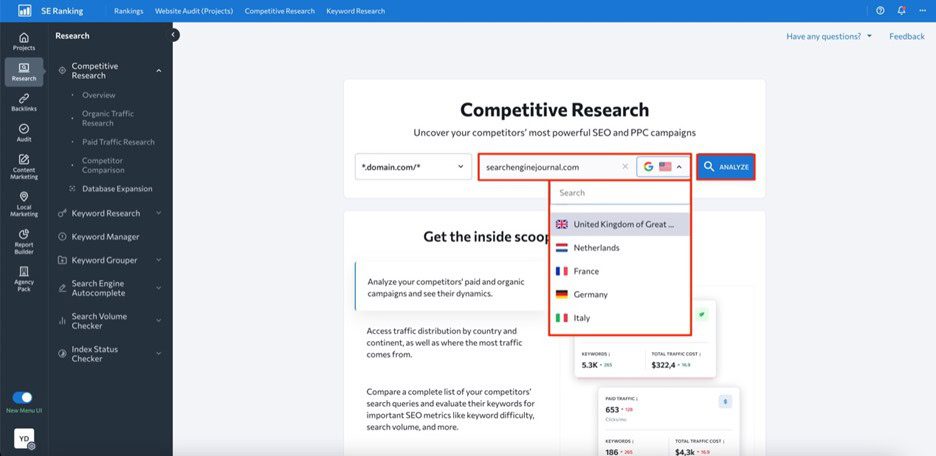
First, open the Competitive Research Tool and input your competitor’s domain name into the search bar. Select a region and click Analyze to initiate analysis of this website.

Image created by SE Ranking, May 2024

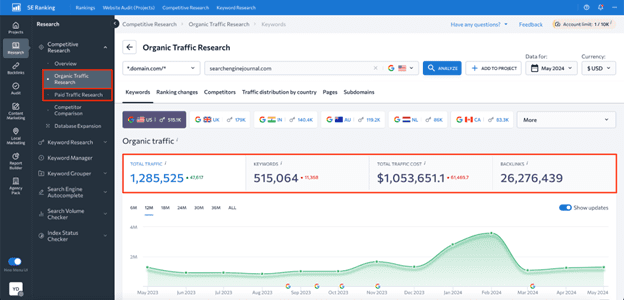
Depending on your goal, go either to the Organic Traffic Research or Paid Traffic Research tab on the left-hand navigation menu.

Here, you’ll be able to see data on estimated organic clicks, total number of keywords, traffic cost, and backlinks.

Image created by SE Ranking, May 2024

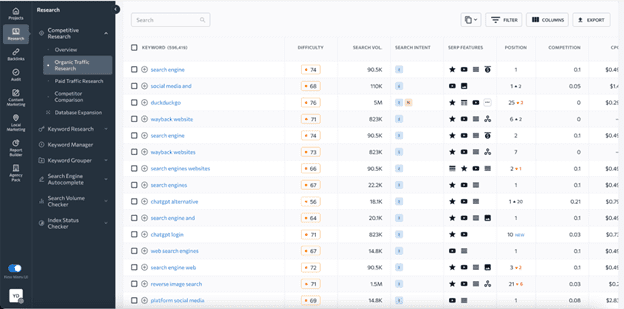
Upon scrolling this page down, you’ll see a table with all the keywords the website ranks for, along with data on search volume, keyword difficulty, user intent, SERP features triggered by keywords, ranking position, URLs ranking for the analyzed keyword, and more.

Image created by SE Ranking, May 2024

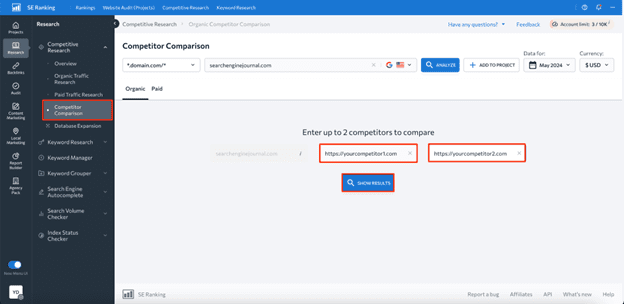
What’s more, the tool allows you to find keywords your competitors rank for but you don’t.

To do this, head to the Competitor Comparison tab and add up to two websites for comparison.

Image created by SE Ranking, May 2024

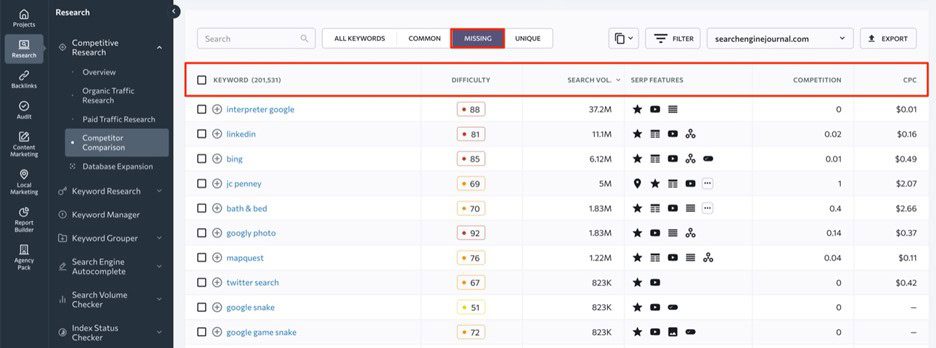
Within the Missing tab, you’ll be able to see existing keyword gaps.

Image created by SE Ranking, May 2024

While the platform offers many benefits, there are also some downsides to be aware of, such as:

  1. Higher-priced plans are required for some features. For instance, historical data on keywords is only available to Pro and Business plan users.
  2. Data is limited to Google only. SE Ranking’s Competitor Research Tool only provides data for Google.

Use Google Keyword Planner

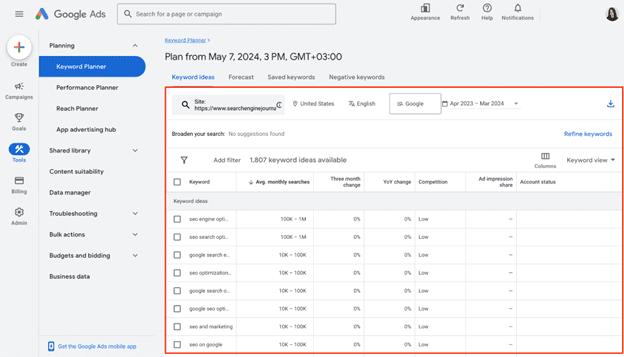
Google Keyword Planner is a free Google service, which you can use to find competitors’ paid keywords.

Here’s the list of benefits this tool offers in terms of competitive keyword analysis:

  1. Free access. Keyword Planner is completely free to use, which makes it a great option for SEO newbies and businesses with limited budgets.
  2. Core keyword data. The tool shows core SEO metrics like search volume, competition, and suggested bid prices for each identified keyword.
  3. Keyword categorization. Keyword Planner allows you to organize keywords into different groups, which may be helpful for creating targeted ad campaigns.
  4. Historical data. The tool has four years of historical data available.

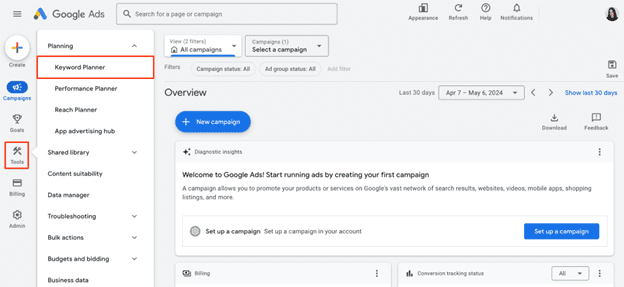
Once you log into your  Google Ads account, navigate to the Tools section and select Keyword Planner.

Screenshot from Google Ads, May 2024

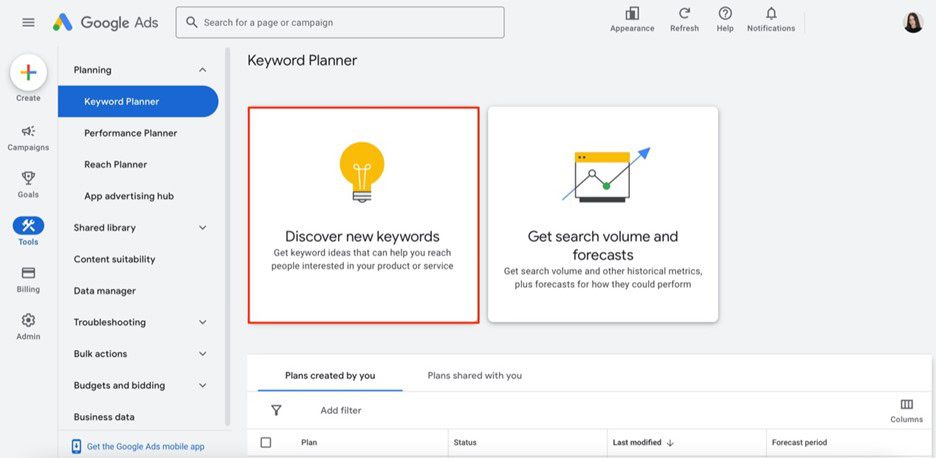
Now, click on the Discover new keywords option.

Screenshot from Google Ads, May 2024

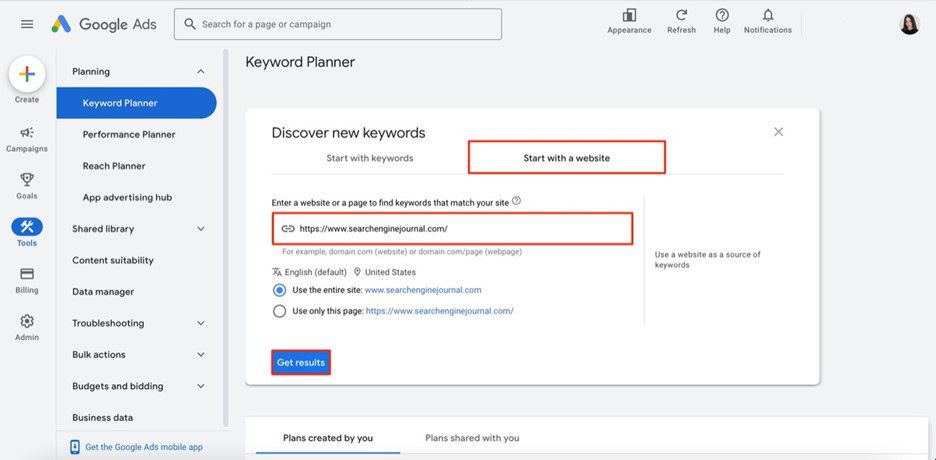
Choose Start with a website option, enter your competitor’s website domain, region, and language, then choose to analyze the whole site (recommended for deeper insights) or a specific URL.

Screenshot from Google Ads, May 2024

And there you have it — a table with all keywords that your analyzed website uses in its Google Ads campaigns.

Screenshot from Google Ads, May 2024

Although Keyword Planner can be helpful, it’s not the most effective and data-rich tool for finding competitors’ keywords. Its main drawbacks are the following:

  1. No organic data. The tool offers data on paid keywords, which is mainly suitable for advertising campaigns.
  2. Broad search volume data. Since it’s displayed in ranges rather than exact numbers, it might be difficult to precisely assess the demand for identified keywords.
  3. No keyword gap feature. Using this tool, you cannot compare your and your competitors’ keywords side-by-side and, therefore, find missing keyword options.

So, if you want to access more reliable and in-depth data on competitors’ keywords, you’ll most likely need to consider other dedicated SEO tools.

Use SpyFu

SpyFu is a comprehensive SEO and PPC analysis tool created with the idea of “spying” on competitors.

Its main pros in terms of competitor keyword analysis are the following:

  1. Database with 10+ years of historical data. Although available only in a Professional plan, SpyFu offers long-term insights to monitor industry trends and adapt accordingly.
  2. Keyword gap analysis. Using this tool, you can easily compare your keywords to those of your competitors using metrics like search volume, keyword difficulty, organic clicks, etc.
  3. Affordability. It’s suitable for businesses on a tight budget.

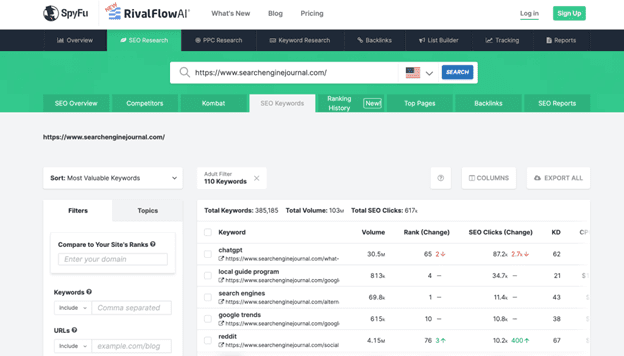
To explore competitor data, simply visit their website and enter your competitor’s domain in the search bar.

You’ll be presented with valuable insights into their SEO performance, from estimated traffic to the list of their top-performing pages and keywords. Navigate to the Top Keywords section and click the View All Organic Keywords button to see the search terms they rank for.

Screenshot of SpyFu, May 2024

Yet, this free version provides an overview of just the top 5 keywords for a domain along with metrics like search volume, rank change, SEO clicks, and so on. To perform a more comprehensive analysis, you’ll need to upgrade to a paid plan.

When it comes to the tool’s cons, it would be worth mentioning:

  1. Keyword data may be outdated. On average, SpyFu updates data on keyword rankings once a month.
  2. Limited number of target regions. Keyword data is available for just 14 countries.

Wrapping Up

There’s no doubt that finding competitors’ keywords is a great way to optimize your own content strategy and outperform your rivals in SERPs.

By following the step-by-step instructions described in this article, we’re sure you’ll be able to find high-value keywords you haven’t considered before.

Ready to start optimizing your website? Sign up for SE Ranking and get the data you need to deliver great user experiences.


Image Credits

Featured Image: Image by SE Ranking. Used with permission.

Doubts Emerge Over Alleged Google Data Leak via @sejournal, @martinibuster

Many SEOs are coming to the conclusion that the alleged Google data leak was not a leak, did not contain ranking algorithm secrets, was five years out of date and it did not show anything new. While that’s not how everyone feels about it, SEOs in general don’t tend to agree about anything.

As SEJ reported yesterday, there were signs that this was not a ranking algorithm data dump and that there were many unanswered questions.

Our take about the alleged leak was:

“At this point in time there is no hard evidence that this “leaked” data is actually from Google Search… and not related in any way to how websites are ranked in Google Search.”

At this point we have more information and many SEOs are saying that the information is not an algorithm data dump.

Some SEOs Urged Caution

While many in the search community were quick to accept the claims of a data leak at face value, others who care about actual facts cautioned to slow down and think first and to be open minded to all possibilities.

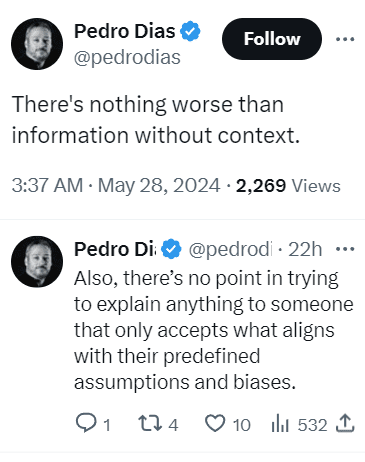
Tweet By Ex-Googler Pedro Dias

Tweet with the following words: There's nothing worse than information without context. Also, there’s no point in trying to explain anything to someone that only accepts what aligns with their predefined assumptions and biases.

Ryan Jones was the first to offer a modest note of caution, advising people in a tweet to view the information objectively and without preconceived ideas.

Ex-Googler Pedro Dias tweeted:

“Have no issues with the shared data. And advising caution on the interpretation of some items.”

Pedro followed up with another tweet to explain why he couldn’t comment on specifics:

“I can only speak for me. I think you understand why I can’t just correct specific items. What I’m saying is that context is needed and room should be given for interpretation.”

Someone tweeted that Pedro’s response didn’t add anything to the discussion.

Pedro responded:

“I didn’t say that. All I’ve been saying is please be careful jumping to conclusions. If you think that’s not helpful, than I’m sorry.”

The ex-Googler later tweeted about the importance of having discussions:

“Let’s remind everyone:
– It’s healthy to bring logical arguments to a discussion.

– It’s not healthy to expect everyone to buy opinions without discussing. Especially when it comes from data sources lacking context.”

Search marketing expert Dean Cruddance tweeted:

“There isn’t anything that gives away the secret sauce.”

To which ex-Googler Pedro Dias responded:

“100%
But the impact of this, fuels a lot of tinfoil hattery and simplistic takes on search, which is suboptimal.

In the end, I believe it’s more detrimental than beneficial. Not for the information it contains, but by how it’s gonna be spun and interpreted.”

This SEO Is Not Buying It

As the day passed more and more SEOs began openly doubting the leak. Twenty-year search marketing expert Trevor Stolber (LinkedIn profile) posted his observations about the alleged leak, indicating that he wasn’t “buying it.”

Some of what he posted on LinkedIn:

  • “It’s from a deprecated code base (still very interesting – but old and not used)
  • It’s not actually from their ranking algorithm, it is an API used internally
  • We already knew most of the things that are in there
  • Good production code documentation would specify ranges and values – I see none of that here
  • Google doesn’t use DA (Domain Authority) – DA is an analog to PR (Page Rank) which was Google’s stand-out differentiator – I am not sure why so much attention is being paid to these nuances.”

Kristine Schachinger, another SEO who I personally know to be an expert, commented in that discussion that the information in the so-called leak dated from 2019.

“I have been reading the raw dump and they are all dated 2019 and there is literally nothing you can gather from 90% of the pages — I so agree. “

Others in that discussion openly questioned if it was actually a leak and most everyone agreed that there was nothing new in it and advised it was better to focus on Google’s new AI Overviews, particularly because AI doesn’t follow ranking factors.

This Was Not A Leak?

Out of all the people in SEO, the person who can most be described as the father of modern SEO is Brett Tabke. He is the founder of PubCon search marketing conference and also the founder of WebmasterWorld, which in the early days of SEO was the largest and most important SEO forum in the world. Brett is also the person who coined the acronym SERPs (for search engine results pages).

Brett devoted five hours to studying the data leak and then posted his observations on Facebook.

Among his observations (paraphrased):

  • This is not a leak
  • There is zero in it that’s directly algorithm related but rather they are API calls.
  • He found nothing that points to how any of the data could be used as part of a ranking algorithm.

Ash Nallawalla, an enterprise SEO with over 20 years experienced commented:

“Like I said a few times, it is merely an API document with a list of calls and not an algo code dump. At the most, we can learn some more internal Google terminology.”

Google Data Leak: Where Are The Facts?

It’s sinking in within the SEO community that this wasn’t the Google algorithm data leak that some expected it to be. In fact, it wasn’t even a leak by a Googler. And far from being algorithm secrets many are agreeing that there is nothing new in there and that it’s just a distraction.

Google Ads Now Being Mixed In With Organic Results via @sejournal, @brodieseo

Google has an incentive to encourage users to click its sponsored ads – but this should not be to the detriment of user experience.

This aspect of Search seems to have gone awry in recent years, with Google engaging in activities that negatively impacted users.

Historically, search engine users are accustomed to ads either being placed at the top or the bottom of a SERP, with the page itself either being purely organic results or having the organic results placed in between the ads. Search features are often mixed in, too.

This has now changed.

A change was recently added to Google’s documentation, stating that:

“Top ads may show below the top organic results on certain queries.”

Detailing how placement for top ads is dynamic and may change.

In this article, we explore this change and its impact on users and organic search results.

Timeline Of Changes

Leading up to the change, Google had been testing mixing sponsored ads within organic listings in various capacities over a 10-month period.

Here is a timeline of the changes leading up to the official launch.

June 17th, 2023: Initial Testing

This was the first time the test appeared in Google’s search results, only showing on mobile devices at the time. Within this initial testing period, it was showing for very few users with more discrete inclusion only on mobile, easily being mistaken for an organic listing for users.

October 23rd, 2023: Heavier Testing

Within this testing period, it was the first time that the broader SEO community started to notice the ad labels appearing within organic listings, being visible across both mobile and desktop.

This testing period was more prolonged in the lead-up to launch.

March 28th, 2024: Launch

On this date, Google’s Ads Liaison announced that the change would be a permanent one, with a new definition being added to the “top ads” documentation. From this date, users were then to expect an official change where ads would be mixed in with organic results beyond limited testing.

Different Types Of Placements

Now that Google has been mixing sponsored ads within organic results for almost two months, we’re able to gain a better understanding of the extent of the change and how the sponsored ads are appearing.

Based on my research, there are two common situations where Google is presenting ads within organic listings.

Mixed With Organic Results

The standard approach involves a simple ad placement within the top organic results.

Based on my experience, it is common for there to be one or two ads that are placed together in this situation. It is rare for there to be a maximum of four ads in a row.

An example of this can be found below:

Screenshot from search for seo expert melbourneScreenshot from search for [seo expert melbourne], Google, May 2024

In this example, the sponsored ad technically appears in position #2 on the page. Normally, the ad would have appeared above my page, but in this instance, it is below.

For the Semrush page, the visibility on the SERP would be unchanged if they were above, but for my page it is at an advantage in terms of ranking visibility.

Directly Below Featured Snippets

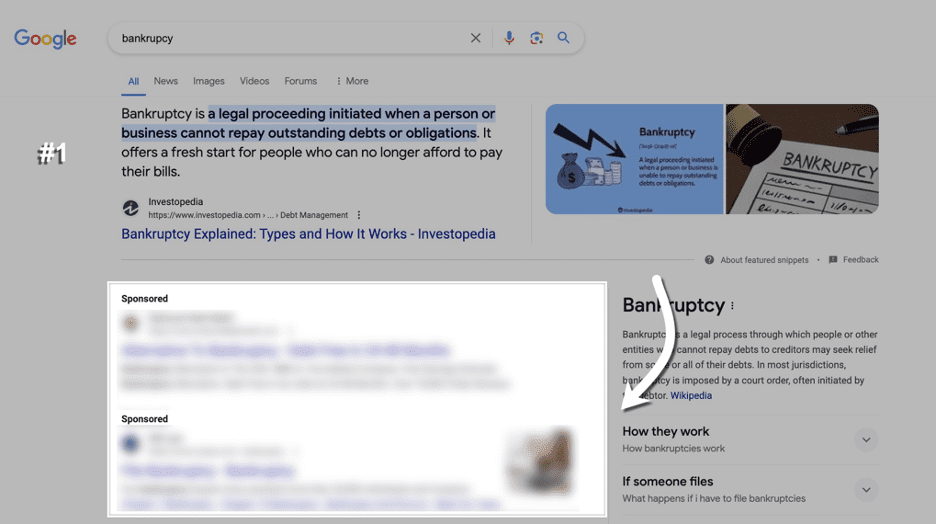
What seems to be the most common way ads are mixed in with organic listings is by placing them directly below a featured snippet.

In cases like this, it is common for there to be a full lot of four ads that appear below the featured snippet. In this example, there are two ads that are appearing.

2 sponsored ads appearing in the SERPsScreenshot from search for [backruptcy], Google, May 2024

In the past, and still having the ability to show right now, ads would always be placed directly above the featured snippet.

This could have been perceived as a poor user experience, considering featured snippets tend to show when an answer to a query can be explained with a short description from the page.

What Are Google’s Intentions?

Each of the situations explained in the previous section could be interpreted differently.

The first situation (mixed within organic results) is pretty clear about Google’s intentions: to encourage more clicks on ads and desensitize users to ads appearing at the top, with users mistaking ads for organic listings.

In contrast, the second situation with featured snippets could be perceived differently. While ads continue to appear in the viewport on desktop, the answer to the user’s query is prominently displayed at the top of search results without ads getting in the way.

I can’t see this being a bad thing for users or SEO, as Google is making the organic listing more visible across these instances.

In general, I’m aware of Google’s need to prioritize ad revenue with changes to ad placement. While there are certainly arguments to be made from both angles with this change, my perception is that the outcome is fairly neutral from both sides.

Ads mixed in with organic results are still exceptionally rare, but featured snippet placements are a more common use case, and there are some clear upsides to this.

How To Analyze With Semrush

analyze ads top featureScreenshot from Semrush, May 2024

While Semrush does have an Advertising Research tool that shows you the position of your ads across various queries, I found that the data wasn’t being collected in a way that allows you to compare ad position relative to organic listings.

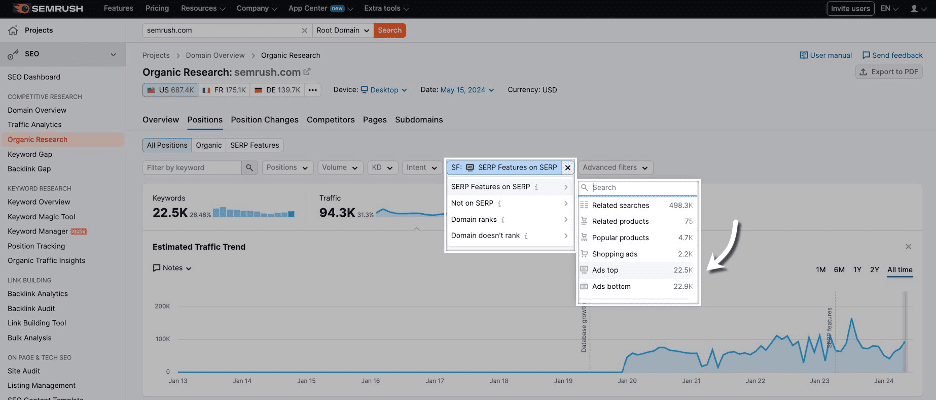
As an alternative, I found the best approach for analysis to be through using “Ads top” as a SERP feature filter through Organic Research to locate instances where ads were being mixed with organic listings.

Here’s where this filter is located:

This filtering doesn’t allow you to filter by URLs for a specific domain, with it instead showing instances where “top ads” are a SERP feature across the Semrush index.

Using this method, I’m able to review historical top ad inclusions since the launch in March and conclude that ads being mixed in with organic results is still exceptionally rare.

Final Thoughts

Overall, based on how Google currently operates, I’m not particularly concerned about this ad placement change from Google.

While the change is an official one based on the update to Google’s documentation, it still operates more like a test, where ads are continuing to appear in normal positions in the vast majority of instances.

Based on my research, I believe the change should be perceived as neutral for Google users and SEO. If you see ads being mixed with organic listings in the wild, keep your wits about you.

I’ll be keeping an eye on this change to make sure Google’s ad placements don’t get too carried away.

Google’s ad testing has more recently reverted back to using the “ad” labeling instead of “sponsored” on mobile, which was the previous treatment up until recent years.

We can certainly expect these types of tests to continue into the future, with there never being a boring day within our industry.

More resources: 


Featured Image: BestForBest/Shutterstock 

Why Using A Log Analyzer Is A Must For Big Websites

This post was sponsored by JetOctopus. The opinions expressed in this article are the sponsor’s own.

If you manage a large website with over 10,000 pages, you can likely appreciate the unique SEO challenges that come with such scale.

Sure, the traditional tools and tactics — keyword optimization, link building, etc. — are important to establish a strong foundation and maintain basic SEO hygiene.

However, they may not fully address the technical complexities of Site Visibility for Searchbots and the dynamic needs of a large enterprise website.

This is where log analyzers become crucial. An SEO log analyzer monitors and analyzes server access logs to give you real insights into how search engines interact with your website. It allows you to take strategic action that satisfies both search crawlers and users, leading to stronger returns on your efforts.

In this post, you’ll learn what a log analyzer is and how it can enable your enterprise SEO strategy to achieve sustained success. But first, let’s take a quick look at what makes SEO tricky for big websites with thousands of pages.

The Unique SEO Challenges For Large Websites

Managing SEO for a website with over 10,000 pages isn’t just a step up in scale; it’s a whole different ball game.

Relying on traditional SEO tactics limits your site’s potential for organic growth. You can have the best titles and content on your pages, but if Googlebot can’t crawl them effectively, those pages will be ignored and may not get ranked ever.

Image created by JetOctopus, May 2024

For big websites, the sheer volume of content and pages makes it difficult to ensure every (important) page is optimized for visibility to Googlebot. Then, the added complexity of an elaborate site architecture often leads to significant crawl budget issues. This means Googlebot is missing crucial pages during its crawls.

Image created by JetOctopus, May 2024

Furthermore, big websites are more vulnerable to technical glitches — such as unexpected tweaks in the code from the dev team — that can impact SEO. This often exacerbates other issues like slow page speeds due to heavy content, broken links in bulk, or redundant pages that compete for the same keywords (keyword cannibalization).

All in all, these issues that come with size necessitate a more robust approach to SEO. One that can adapt to the dynamic nature of big websites and ensure that every optimization effort is more meaningful toward the ultimate goal of improving visibility and driving traffic.

This strategic shift is where the power of an SEO log analyzer becomes evident, providing granular insights that help prioritize high-impact actions. The primary action being to better understand Googlebot like it’s your website’s main user — until your important pages are accessed by Googlebot, they won’t rank and drive traffic.

What Is An SEO Log Analyzer?

An SEO log analyzer is essentially a tool that processes and analyzes the data generated by web servers every time a page is requested. It tracks how search engine crawlers interact with a website, providing crucial insights into what happens behind the scenes. A log analyzer can identify which pages are crawled, how often, and whether any crawl issues occur, such as Googlebot being unable to access important pages.

By analyzing these server logs, log analyzers help SEO teams understand how a website is actually seen by search engines. This enables them to make precise adjustments to enhance site performance, boost crawl efficiency, and ultimately improve SERP visibility.

Put simply, a deep dive into the logs data helps discover opportunities and pinpoint issues that might otherwise go unnoticed in large websites.

But why exactly should you focus your efforts on treating Googlebot as your most important visitor?

Why is crawl budget a big deal?

Let’s look into this.

Optimizing Crawl Budget For Maximum SEO Impact

Crawl budget refers to the number of pages a search engine bot — like Googlebot — will crawl on your site within a given timeframe. Once a site’s budget is used up, the bot will stop crawling and move on to other websites.

Crawl budgets vary for every website and your site’s budget is determined by Google itself, by considering a range of factors such as the site’s size, performance, frequency of updates, and links. When you focus on optimizing these factors strategically, you can increase your crawl budget and speed up ranking for new website pages and content.

As you’d expect, making the most of this budget ensures that your most important pages are frequently visited and indexed by Googlebot. This typically translates into better rankings (provided your content and user experience are solid).

And here’s where a log analyzer tool makes itself particularly useful by providing detailed insights into how crawlers interact with your site. As mentioned earlier, it allows you to see which pages are being crawled and how often, helping identify and resolve inefficiencies such as low-value or irrelevant pages that are wasting valuable crawl resources.

An advanced log analyzer like JetOctopus offers a complete view of all the stages from crawling and indexation to getting organic clicks. Its SEO Funnel covers all the main stages, from your website being visited by Googlebot to being ranked in the top 10 and bringing in organic traffic.

Image created by JetOctopus, May 2024

As you can see above, the tabular view shows how many pages are open to indexation versus those closed from indexation. Understanding this ratio is crucial because if commercially important pages are closed from indexation, they will not appear in subsequent funnel stages.

The next stage examines the number of pages crawled by Googlebot, with “green pages” representing those crawled and within the structure, and “gray pages” indicating potential crawl budget waste because they are visited by Googlebot but not within the structure, possibly orphan pages or accidentally excluded from the structure. Hence, it’s vital to analyze this part of your crawl budget for optimization.

The later stages include analyzing what percentage of pages are ranked in Google SERPs, how many of these rankings are in the top 10 or top three, and, finally, the number of pages receiving organic clicks.

Overall, the SEO funnel gives you concrete numbers, with links to lists of URLs for further analysis, such as indexable vs. non-indexable pages and how crawl budget waste is occurring. It is an excellent starting point for crawl budget analysis, allowing a way to visualize the big picture and get insights for an impactful optimization plan that drives tangible SEO growth.

Put simply, by prioritizing high-value pages — ensuring they are free from errors and easily accessible to search bots — you can greatly improve your site’s visibility and ranking.

Using an SEO log analyzer, you can understand exactly what should be optimized on pages that are being ignored by crawlers, work on them, and thus attract Googlebot visits. A log analyzer benefits in optimizing other crucial aspects of your website:

Image created by JetOctopus, May 2024
  • Detailed Analysis of Bot Behavior: Log analyzers allow you to dissect how search bots interact with your site by examining factors like the depth of their crawl, the number of internal links on a page, and the word count per page. This detailed analysis provides you with the exact to-do items for optimizing your site’s SEO performance.
  • Improves Internal Linking and Technical Performance: Log analyzers provide detailed insights into the structure and health of your site. They help identify underperforming pages and optimize the internal links placement, ensuring a smoother user and crawler navigation. They also facilitate the fine-tuning of content to better meet SEO standards, while highlighting technical issues that may affect site speed and accessibility.
  • Aids in Troubleshooting JavaScript and Indexation Challenges: Big websites, especially eCommerce, often rely heavily on JavaScript for dynamic content. In the case of JS websites, the crawling process is lengthy. A log analyzer can track how well search engine bots are able to render and index JavaScript-dependent content, underlining potential pitfalls in real-time. It also identifies pages that are not being indexed as intended, allowing for timely corrections to ensure all relevant content can rank.
  • Helps Optimize Distance from Index (DFI): The concept of Distance from Index (DFI) refers to the number of clicks required to reach any given page from the home page. A lower DFI is generally better for SEO as it means important content is easier to find, both by users and search engine crawlers. Log analyzers help map out the navigational structure of your site, suggesting changes that can reduce DFI and improve the overall accessibility of key content and product pages.

Besides, historical log data offered by a log analyzer can be invaluable. It helps make your SEO performance not only understandable but also predictable. Analyzing past interactions allows you to spot trends, anticipate future hiccups, and plan more effective SEO strategies.

With JetOctopus, you benefit from no volume limits on logs, enabling comprehensive analysis without the fear of missing out on crucial data. This approach is fundamental in continually refining your strategy and securing your site’s top spot in the fast-evolving landscape of search.

Real-World Wins Using Log Analyzer

Big websites in various industries have leveraged log analyzers to attain and maintain top spots on Google for profitable keywords, which has significantly contributed to their business growth.

For example, Skroutz, Greece’s biggest marketplace website with over 1 million sessions daily, set up a real-time crawl and log analyzer tool that helped them know things like:

  • Does Googlebot crawl pages that have more than two filters activated?
  • How extensively does Googlebot crawl a particularly popular category?
  • What are the main URL parameters that Googlebot crawls?
  • Does Googlebot visit pages with filters like “Size,” which are typically marked as nofollow?

This ability to see real-time visualization tables and historical log data spanning over ten months for monitoring Googlebot crawls effectively enabled Skroutz to find crawling loopholes and decrease index size, thus optimizing its crawl budget.

Eventually, they also saw a reduced time for new URLs to be indexed and ranked — instead of taking 2-3 months to index and rank new URLs, the indexing and ranking phase took only a few days.

This strategic approach to technical SEO using log files has helped Skroutz cement its position as one of the top 1000 websites globally according to SimilarWeb, and the fourth most visited website in Greece (after Google, Facebook, and Youtube) with over 70% share of its traffic from organic search.

Image created by JetOctopus, May 2024

Another case in point is DOM.RIA, Ukraine’s popular real estate and rental listing website, which doubled the Googlebot visits by optimizing their website’s crawl efficiency. As their site structure is huge and elaborate, they needed to optimize the crawl efficiency for Googlebot to ensure the freshness and relevance of content appearing in Google.

Initially, they implemented a new sitemap to improve the indexing of deeper directories. Despite these efforts, Googlebot visits remained low.

By using the JetOctopus to analyze their log files, DOM.RIA identified and addressed issues with their internal linking and DFI. They then created mini-sitemaps for poorly scanned directories (such as for the city, including URLs for streets, districts, metro, etc.) while assigning meta tags with links to pages that Googlebot often visits. This strategic change resulted in a more than twofold increase in Googlebot activity on these crucial pages within two weeks.

Image created by JetOctopus, May 2024

Getting Started With An SEO Log Analyzer

Now that you know what a log analyzer is and what it can do for big websites, let’s take a quick look at the steps involved in logs analysis.

Here is an overview of using an SEO log analyzer like JetOctopus for your website:

  • Integrate Your Logs: Begin by integrating your server logs with a log analysis tool. This step is crucial for capturing all data related to site visits, which includes every request made to the server.
  • Identify Key Issues: Use the log analyzer to uncover significant issues such as server errors (5xx), slow load times, and other anomalies that could be affecting user experience and site performance. This step involves filtering and sorting through large volumes of data to focus on high-impact problems.
  • Fix the Issues: Once problems are identified, prioritize and address these issues to improve site reliability and performance. This might involve fixing broken links, optimizing slow-loading pages, and correcting server errors.
  • Combine with Crawl Analysis: Merge log analysis data with crawl data. This integration allows for a deeper dive into crawl budget analysis and optimization. Analyze how search engines crawl your site and adjust your SEO strategy to ensure that your most valuable pages receive adequate attention from search bots.

And that’s how you can ensure that search engines are efficiently indexing your most important content.

Conclusion

As you can see, the strategic use of log analyzers is more than just a technical necessity for large-scale websites. Optimizing your site’s crawl efficiency with a log analyzer can immensely impact your SERP visibility.

For CMOs managing large-scale websites, embracing a log analyzer and crawler toolkit like JetOctopus is like getting an extra tech SEO analyst that bridges the gap between SEO data integration and organic traffic growth.


Image Credits

Featured Image: Image by JetOctopus Used with permission.

Google Data Leak Clarification via @sejournal, @martinibuster

Over the United States holidays some posts were shared about an alleged leak of Google ranking-related data. The first posts about the leaks focused on “confirming” beliefs that were long-held by Rand Fishkin but not much attention was focused on the context of the information and what it really means.

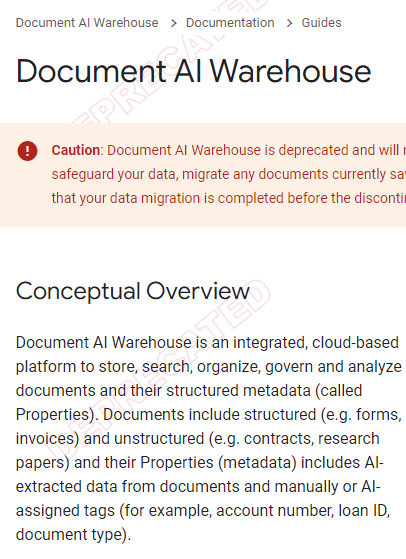
Context Matters: Document AI Warehouse

The leaked document shares relation to a public Google Cloud platform called Document AI Warehouse which is used for analyzing, organizing, searching, and storing data. This public documentation is titled Document AI Warehouse overview. A post on Facebook shares that the “leaked” data is the “internal version” of the publicly visible Document AI Warehouse documentation. That’s the context of this data.

Screenshot: Document AI Warehouse

Screenshot

@DavidGQuaid tweeted:

“I think its clear its an external facing API for building a document warehouse as the name suggests”

That seems to throw cold water on the idea that the “leaked” data represents internal Google Search information.

As far we know at this time, the “leaked data” shares a similarity to what’s in the public Document AI Warehouse page.

Leak Of Internal Search Data?

The original post on SparkToro does not say that the data originates from Google Search. It says that the person who sent the data to Rand Fishkin is the one who made that claim.

One of the things I admire about Rand Fishkin is that he is meticulously precise in his writing, especially when it comes to caveats. Rand precisely notes that it’s the person who provided the data who makes the claim that the data originates from Google Search. There is no proof, only a claim.

He writes:

“I received an email from a person claiming to have access to a massive leak of API documentation from inside Google’s Search division.”

Fishkin himself does not affirm that the data was confirmed by ex-Googlers to have originated from Google Search. He writes that the person who emailed the data made that claim.

“The email further claimed that these leaked documents were confirmed as authentic by ex-Google employees, and that those ex-employees and others had shared additional, private information about Google’s search operations.”

Fishkin writes about a subsequent video meeting where the the leaker revealed that his contact with ex-Googlers was in the context of meeting them at a search industry event. Again, we’ll have to take the leakers word for it about the ex-Googlers and that what they said was after carefully reviewing the data and not an informal comment.

Fishkin writes that he contacted three ex-Googlers about it. What’s notable is that those ex-Googlers did not explicitly confirm that the data is internal to Google Search. They only confirmed that the data looks like it resembles internal Google information, not that it originated from Google Search.

Fishkin writes what the ex-Googlers told him:

  • “I didn’t have access to this code when I worked there. But this certainly looks legit.”
  • “It has all the hallmarks of an internal Google API.”
  • “It’s a Java-based API. And someone spent a lot of time adhering to Google’s own internal standards for documentation and naming.”
  • “I’d need more time to be sure, but this matches internal documentation I’m familiar with.”
  • “Nothing I saw in a brief review suggests this is anything but legit.”

Saying something originates from Google Search and saying that it originates from Google are two different things.

Keep An Open Mind

It’s important to keep an open mind about the data because there is a lot about it that is unconfirmed. For example, it is not known if this is an internal Search Team document. Because of that it is probably not a good idea to take anything from this data as actionable SEO advice.

Also, it’s not advisable to analyze the data to specifically confirm long-held beliefs. That’s how one becomes ensnared in Confirmation Bias.

A definition of Confirmation Bias:

“Confirmation bias is the tendency to search for, interpret, favor, and recall information in a way that confirms or supports one’s prior beliefs or values.”

Confirmation Bias will lead to a person deny things that are empirically true. For example, there is the decades-old idea that Google automatically keeps a new site from ranking, a theory called the Sandbox. People every day report that their new sites and new pages nearly immediately rank in the top ten of Google search.

But if you are a hardened believer in the Sandbox then actual observable experience like that will be waved away, no matter how many people observe the opposite experience.

Brenda Malone, Freelance Senior SEO Technical Strategist and Web Developer (LinkedIn profile), messaged me about claims about the Sandbox:

“I personally know, from actual experience, that the Sandbox theory is wrong. I just indexed in two days a personal blog with two posts. There is no way a little two post site should have been indexed according to the the Sandbox theory.”

The takeaway here is that if the documentation turns out to originate from Google Search, the incorrect way to analyze the data is to go hunting for confirmation of long-held beliefs.

What Is The Google Data Leak About?

There are five things to consider about the leaked data:

  1. The context of the leaked information is unknown. Is it Google Search related? Is it for other purposes?
  2. The purpose of the data. Was the information used for actual search results? Or was it used for data management or manipulation internally?
  3. Ex-Googlers did not confirm that the data is specific to Google Search. They only confirmed that it appears to come from Google.
  4. Keep an open mind. If you go hunting for vindication of long-held beliefs, guess what? You will find them, everywhere. This is called confirmation bias.
  5. Evidence suggests that data is related to an external-facing API for building a document warehouse.

What Others Say About “Leaked” Documents

Ryan Jones, someone who not only has deep SEO experience but has a formidable understanding of computer science shared some reasonable observations about the so-called data leak.

Ryan tweeted:

“We don’t know if this is for production or for testing. My guess is it’s mostly for testing potential changes.

We don’t know what’s used for web or for other verticals. Some things might only be used for a Google home or news etc.

We don’t know what’s an input to a ML algo and what’s used to train against. My guess is clicks aren’t a direct input but used to train a model how to predict clickability. (Outside of trending boosts)

I’m also guessing that some of these fields only apply to training data sets and not all sites.

Am I saying Google didn’t lie? Not at all. But let’s examine this leak objectionably and not with any preconceived bias.”

@DavidGQuaid tweeted:

“We also don’t know if this is for Google search or Google cloud document retrieval

APIs seem pick & choose – that’s not how I expect the algorithm to be run – what if an engineer wants to skip all those quality checks – this looks like I want to build a content warehouse app for my enterprise knowledge base”

Is The “Leaked” Data Related To Google Search?

At this point in time there is no hard evidence that this “leaked” data is actually from Google Search. There is an overwhelming amount of ambiguity about what the purpose of the data is. Notable is that there are hints that this data is just “an external facing API for building a document warehouse as the name suggests” and not related in any way to how websites are ranked in Google Search.

The conclusion that this data did not originate from Google Search is not definitive at this time but it’s the direction that the wind of evidence appears to be blowing.

Featured Image by Shutterstock/Jaaak

Google Search Leak: Conflicting Signals, Unanswered Questions via @sejournal, @MattGSouthern

An apparent leak of Google Search API documentation has sparked intense debate within the SEO community, with some claiming it proves Google’s dishonesty and others urging caution in interpreting the information.

As the industry grapples with the allegations, a balanced examination of Google’s statements and the perspectives of SEO experts is crucial to understanding the whole picture.

Leaked Documents Vs. Google’s Public Statements

Over the years, Google has consistently maintained that specific ranking signals, such as click data and user engagement metrics, aren’t used directly in its search algorithms.

In public statements and interviews, Google representatives have emphasized the importance of relevance, quality, and user experience while denying the use of specific metrics like click-through rates or bounce rates as ranking-related factors.

However, the leaked API documentation appears to contradict these statements.

It contains references to features like “goodClicks,” “badClicks,” “lastLongestClicks,” impressions, and unicorn clicks, tied to systems called Navboost and Glue, which Google VP Pandu Nayak confirmed in DOJ testimony are parts of Google’s ranking systems.

The documentation also alleges that Google calculates several metrics using Chrome browser data on individual pages and entire domains, suggesting the full clickstream of Chrome users is being leveraged to influence search rankings.

This contradicts past Google statements that Chrome data isn’t used for organic searches.

The Leak’s Origins & Authenticity

Erfan Azimi, CEO of digital marketing agency EA Eagle Digital, alleges he obtained the documents and shared them with Rand Fishkin and Mike King.

Azimi claims to have spoken with ex-Google Search employees who confirmed the authenticity of the information but declined to go on record due to the situation’s sensitivity.

While the leak’s origins remain somewhat ambiguous, several ex-Googlers who reviewed the documents have stated they appear legitimate.

Fishkin states:

“A critical next step in the process was verifying the authenticity of the API Content Warehouse documents. So, I reached out to some ex-Googler friends, shared the leaked docs, and asked for their thoughts.”

Three ex-Googlers responded, with one stating, “It has all the hallmarks of an internal Google API.”

However, without direct confirmation from Google, the authenticity of the leaked information is still debatable. Google has not yet publicly commented on the leak.

It’s important to note that, according to Fishkin’s article, none of the ex-Googlers confirmed that the leaked data was from Google Search. Only that it appears to have originated from within Google.

Industry Perspectives & Analysis

Many in the SEO community have long suspected that Google’s public statements don’t tell the whole story. The leaked API documentation has only fueled these suspicions.

Fishkin and King argue that if the information is accurate, it could have significant implications for SEO strategies and website search optimization.

Key takeaways from their analysis include:

  • Navboost and the use of clicks, CTR, long vs. Short clicks, and user data from Chrome appear to be among Google’s most powerful ranking signals.
  • Google employs safelists for sensitive topics like COVID-19, elections, and travel to control what sites appear.
  • Google uses Quality Rater feedback and ratings in its ranking systems, not just as a training set.
  • Click data influences how Google weights links for ranking purposes.
  • Classic ranking factors like PageRank and anchor text are losing influence compared to more user-centric signals.
  • Building a brand and generating search demand is more critical than ever for SEO success.

However, just because something is mentioned in API documentation doesn’t mean it’s being used to rank search results.

Other industry experts urge caution when interpreting the leaked documents.

They point out that Google may use the information for testing purposes or apply it only to specific search verticals rather than use it as active ranking signals.

There are also open questions about how much weight these signals carry compared to other ranking factors. The leak doesn’t provide the full context or algorithm details.

Unanswered Questions & Future Implications

As the SEO community continues to analyze the leaked documents, many questions still need to be answered.

Without official confirmation from Google, the authenticity and context of the information are still a matter of debate.

Key open questions include:

  • How much of this documented data is actively used to rank search results?
  • What is the relative weighting and importance of these signals compared to other ranking factors?
  • How have Google’s systems and use of this data evolved?
  • Will Google change its public messaging and be more transparent about using behavioral data?

As the debate surrounding the leak continues, it’s wise to approach the information with a balanced, objective mindset.

Unquestioningly accepting the leak as gospel truth or completely dismissing it are both shortsighted reactions. The reality likely lies somewhere in between.

Potential Implications For SEO Strategies and Website Optimization

It would be highly inadvisable to act on information shared from this supposed ‘leak’ without confirming whether it’s an actual Google search document.

Further, even if the content originates from search, the information is a year old and could have changed. Any insights derived from the leaked documentation should not be considered actionable now.

With that in mind, while the full implications remain unknown, here’s what we can glean from the leaked information.

1. Emphasis On User Engagement Metrics

If click data and user engagement metrics are direct ranking factors, as the leaked documents suggest, it could place greater emphasis on optimizing for these metrics.

This means crafting compelling titles and meta descriptions to increase click-through rates, ensuring fast page loads and intuitive navigation to reduce bounces, and strategically linking to keep users engaged on your site.

Driving traffic through other channels like social media and email can also help generate positive engagement signals.

However, it’s important to note that optimizing for user engagement shouldn’t come at the expense of creating reader-focused content. Gaming engagement metrics are unlikely to be a sustainable, long-term strategy.

Google has consistently emphasized the importance of quality and relevance in its public statements, and based on the leaked information, this will likely remain a key focus. Engagement optimization should support and enhance quality content, not replace it.

2. Potential Changes To Link-Building Strategies

The leaked documents contain information about how Google treats different types of links and their impact on search rankings.

This includes details about the use of anchor text, the classification of links into different quality tiers based on traffic to the linking page, and the potential for links to be ignored or demoted based on various spam factors.

If this information is accurate, it could influence how SEO professionals approach link building and the types of links they prioritize.

Links that drive real click-throughs may carry more weight than links on rarely visited pages.

The fundamentals of good link building still apply—create link-worthy content, build genuine relationships, and seek natural, editorially placed links that drive qualified referral traffic.

The leaked information doesn’t change this core approach but offers some additional nuance to be aware of.

3. Increased Focus On Brand Building and Driving Search Demand

The leaked documents suggest that Google uses brand-related signals and offline popularity as ranking factors. This could include metrics like brand mentions, searches for the brand name, and overall brand authority.

As a result, SEO strategies may emphasize building brand awareness and authority through both online and offline channels.

Tactics could include:

  • Securing brand mentions and links from authoritative media sources.
  • Investing in traditional PR, advertising, and sponsorships to increase brand awareness.
  • Encouraging branded searches through other marketing channels.
  • Optimizing for higher search volumes for your brand vs. unbranded keywords.
  • Building engaged social media communities around your brand.
  • Establishing thought leadership through original research, data, and industry contributions.

The idea is to make your brand synonymous with your niche and build an audience that seeks you out directly. The more people search for and engage with your brand, the stronger those brand signals may become in Google’s systems.

4. Adaptation To Vertical-Specific Ranking Factors

Some leaked information suggests that Google may use different ranking factors or algorithms for specific search verticals, such as news, local search, travel, or e-commerce.

If this is the case, SEO strategies may need to adapt to each vertical’s unique ranking signals and user intents.

For example, local search optimization may focus more heavily on factors like Google My Business listings, local reviews, and location-specific content.

Travel SEO could emphasize collecting reviews, optimizing images, and directly providing booking/pricing information on your site.

News SEO requires focusing on timely, newsworthy content and optimized article structure.

While the core principles of search optimization still apply, understanding your particular vertical’s nuances, based on the leaked information and real-world testing, can give you a competitive advantage.

The leaks suggest a vertical-specific approach to SEO could give you an advantage.

Conclusion

The Google API documentation leak has created a vigorous discussion about Google’s ranking systems.

As the SEO community continues to analyze and debate the leaked information, it’s important to remember a few key things:

  1. The information isn’t fully verified and lacks context. Drawing definitive conclusions at this stage is premature.
  2. Google’s ranking algorithms are complex and constantly evolving. Even if entirely accurate, this leak only represents a snapshot in time.
  3. The fundamentals of good SEO – creating high-quality, relevant, user-centric content and promoting it effectively – still apply regardless of the specific ranking factors at play.
  4. Real-world testing and results should always precede theorizing based on incomplete information.

What To Do Next

As an SEO professional, the best course of action is to stay informed about the leak.

Because details about the document remain unknown, it’s not a good idea to consider any takeaways actionable.

Most importantly, remember that chasing algorithms is a losing battle.

The only winning strategy in SEO is to make your website the best result for your message and audience. That’s Google’s endgame, and that’s where your focus should be, regardless of what any particular leaked document suggests.

The Traffic Impact Of AI Overviews via @sejournal, @Kevin_Indig

Boost your skills with Growth Memo’s weekly expert insights. Subscribe for free!

Two weeks after Google rolled out AI Overviews (AIOs), we can analyze early data to gauge the impact on organic traffic.

I wanted to understand the impact and implications of AIOs, especially after many reports of misinformation and sometimes harmful recommendations from Google’s AI answers.

I found that AIOs can hurt organic traffic, especially when queries indicate that users want quick answers. However, there might be a chance that some AIOs deliver more traffic to cited sites.

When AIOs Show Up

I used ZipTie to crawl the search results for 1,675 queries in the health vertical on May 22 to understand how, when, and maybe why Google shows AIOs.

I mixed ZipTie’s data with Search Console and Ahrefs to understand the implications for organic traffic, the influence of backlinks, and estimated domain traffic.

42% Of Queries Show AIOs

AIOs showed up 42% of the time (704/1,675 queries), which is much more than the 16% found in ecommerce by ZipTie or the 15% found by SEO Clarity.

The higher rate makes sense since Google announced to show AIOs for complex queries, which are more likely to occur in health than ecommerce.

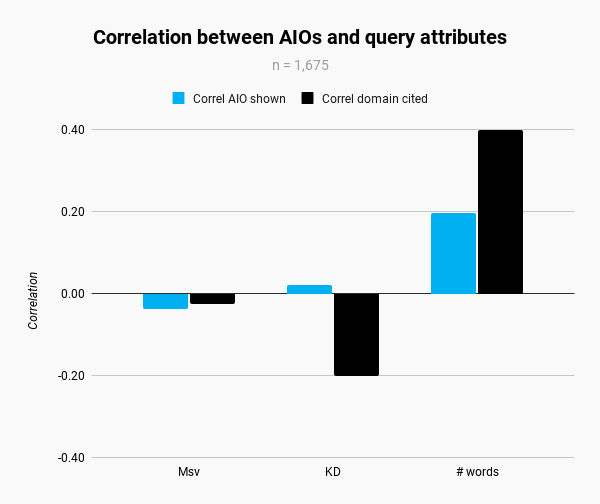
I found a weak relationship with the number of words, indicating that longer queries are more likely to trigger AIOs. Yet, I’m surprised to find so many AIOs in a sensitive space like health, where wrong information is so much more risky.

Bar graph titled Image Credit: Kevin Indig

There seems to be no relationship between keyword difficulty or search volume, even though the domain I have GSC access to is more likely to be cited for low-difficulty queries.

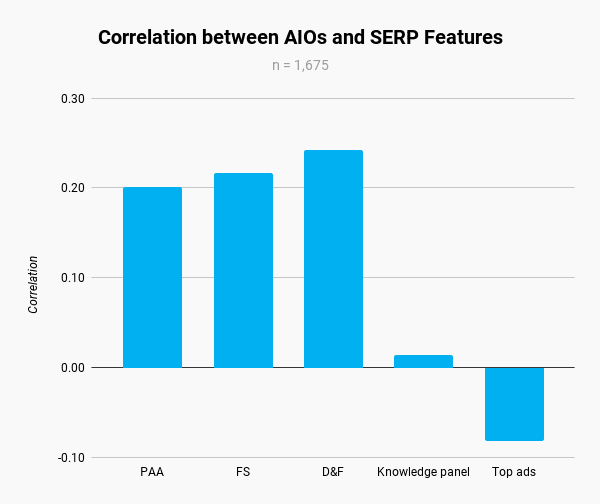
AIOs are more likely to show up alongside People Also Ask (PAA), Featured Snippets (FS), and Discussions & Forums modules (D&F), which makes sense since those SERP features indicate informational searches.

Knowledge Panels and Top Ads showed no correlation, but also showed up less often than other SERP features.

Bar graph displaying the correlation between AI-driven AIOs and SERP features.Image Credit: Kevin Indig

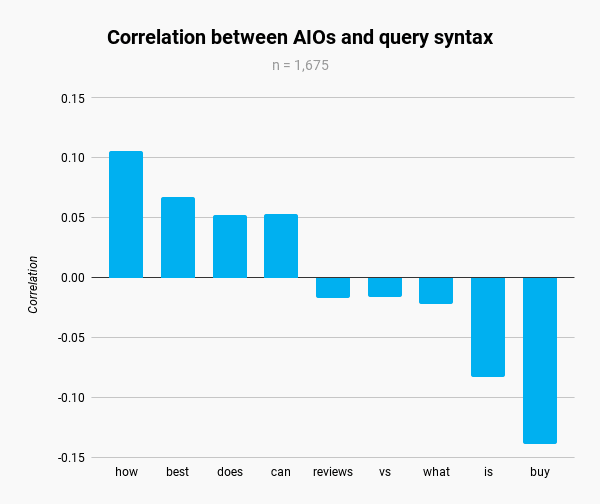
Though correlations are weak, the data indicates that AIOs are more likely to appear for queries related to questions and comparisons.

Bar chart showing correlation between AIOs and query syntax for terms.Image Credit: Kevin Indig

Who Shows Up In AIOs

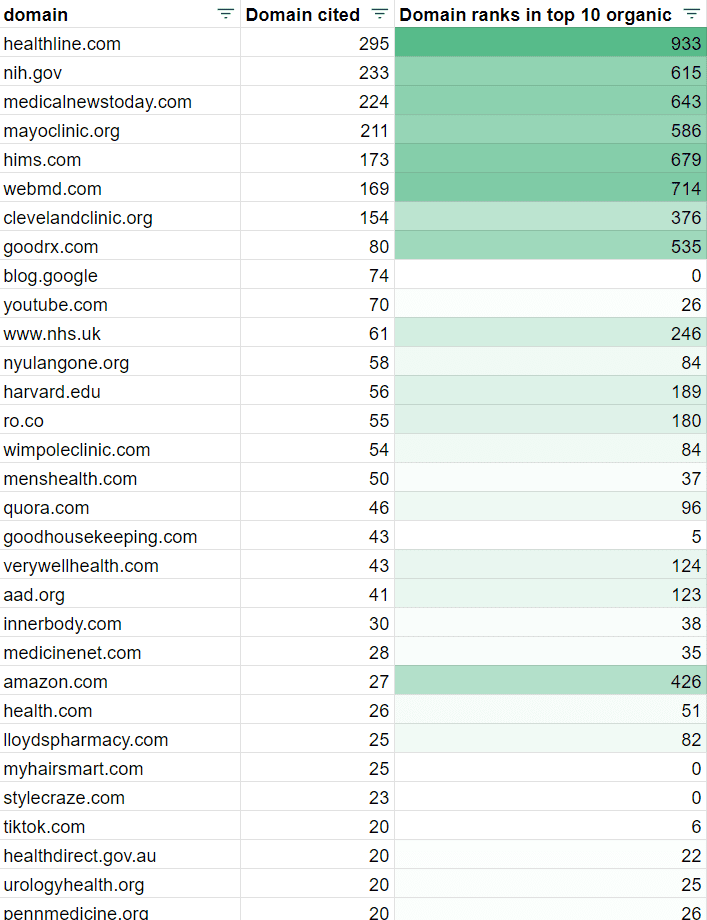
The 704 AIOs in the dataset cited 4,493 sites, which is an average of 6.3 links per AIO.

I found a very strong correlation (0.917) between sites that show up in the top 10 organic results and sites cited in AIOs for the 1,675 keywords.

Surprisingly, Reddit (No. 92 on the list) and Quora (No. 17) barely contributed to citations.

A table showing various domains, the number of times each domain is cited, and their rankings in the top 10 organic search results.Image Credit: Kevin Indig

I found no strong relationships between domains that get a lot of AIO citations and their organic traffic, backlinks (referring domains), or ranking keywords.

Sites that rank well for keywords are more likely to be cited in AIOs, but it’s still unclear when Google decides to cite a site that doesn’t rank well for a keyword.

Traffic Impact Of AIOs

The most important question is how AIOs impact organic traffic of cited and uncited URLs.

To get to the ground of things, I compared organic clicks from Search Console for a domain across 1,675 non-branded keywords (US) in the week of May 7 with the week of May 14.

After excluding low-traffic keywords, 560 AIOs showed up for 1,344 keywords, of which the target domain was cited 171 times with 461 different URLs.

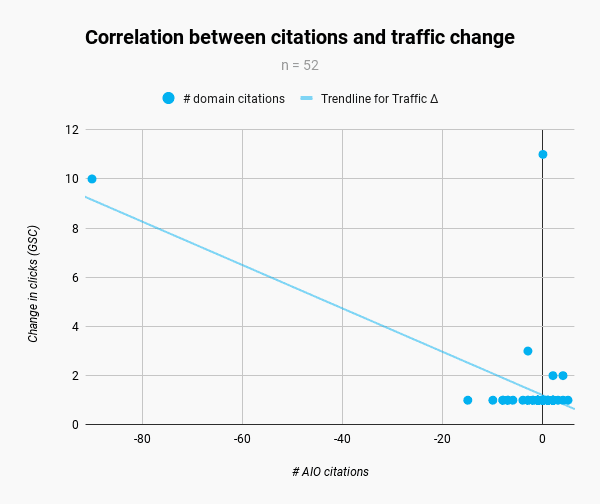
To make sure rank changes don’t influence the results, I excluded keywords with a higher rank change than 0.9 and lower than -0.9, after which 52/521 URLs remained.

I found a strong negative correlation of -0.61 between cited URLs and traffic change, indicating that AIO citations send fewer clicks to cited URLs. In this case, the domain received -8.9% fewer clicks when cited in AIOs.

Scatter plot showing the correlation between AI citations and traffic impact. Image Credit: Kevin Indig

However, results can vary by user intent. Most URLs that lost clicks, most likely due to AIOs, targeted questions like “how to get viagra without prescription.”

AIOs seem comparable to Featured Snippets, which can send more or fewer clicks based on whether the keyword is shallow or complex.

Also, note that a big chunk of the traffic losses was caused by a few URLs. Correlating the data without outlier URLs actually resulted in a slightly positive correlation of 0.1, indicating that there might be a chance that some AIOs send more traffic to URLs based on whether users want more information.

When AIOs show up, and a site isn’t cited, I found an average loss of -2.8% organic traffic, indicating that users might still click organic results. But to really make sure, we have to measure the impact on organic clicks for the same keywords. Take this result with a grain of salt.

Caveats

  • AIOs can change, and it’s not clear how often. There does not seem to be a normal change rate over time, but it seems Google has pulled back a lot of AIOs. I wasn’t able to recreate most AIOs five days after the initial crawl. Google might have pulled back due to the numerous reports of misleading and sometimes harmful answers.
  • 1,675 queries are a good start, but we need 100 times as many to make more robust statements.
  • We also need a lot more traffic data than n=1.

Canary In The Coal Mine

In aggregate, strong SEO performance seems the best way to appear in AI Overviews, even though Google will also cite URLs that don’t perform well. We still don’t know enough about the content features that make it more likely to be cited in AIOs.

Broadly speaking, AI overviews have a bigger impact than “just” Google Search. They’re the first AI feature that significantly changes the cash cow of one of the most valuable companies in the world.

AI has been undergoing a massive hype cycle since the launch of ChatGPT3 in November 2022. Lately, we’ve been asking ourselves more and more how big the actual incremental value of AI is.

AIOs are the canary in the coal mine. They could prove the value of AI in products or even pop the AI bubble we’re in.


X (Twitter) of Bartosz Góralewicz

AI Overviews: Measuring the Impact on SEO


Featured Image: Paulo Bobita/Search Engine Journal

New WordPress Plugin Solves Site Navigation Problem via @sejournal, @martinibuster

Joost de Valk, the creator of Yoast SEO plugin, has created a new (and free) plugin for solving a site architecture problem that can silently diminish a website’s ability to rank.

Site Architecture

Site architecture is an important SEO factor because a well-organized website with clear navigation helps users quickly get to the content and products they’re looking for. Along the way it also helps Google find the most important pages and rank them.

The normal and common sense way to organize a website is by topic categories. While some newbie-SEOs believe that organizing a site by topic is an SEO strategy, it’s really just plain old common sense. Organizing a site by topic categories organizes a site in a way that makes it easy to drill-down and find specific things.

Tags: Contextual Site Navigation

Another way to organize a website is through contextual navigation. Contextual navigation is a way to offer a site visitor links to more webpages that are relevant to the webpage and to their interests in the moment. The way to provide a contextual link is through the concept of Tags. Tags are strongly relevant links to content that site visitors may find interesting.

For example, if someone is on a webpage about a new song by a pop star they may in that moment may be interested in reading more articles about that singer. A publisher can create a tag which links to a page that collects every article about that specific pop singer. Ordinarily it doesn’t make sense to create an entire category for hundreds of musical artists because that would defeat the purpose of a hierarchical site navigation (which is to make it easy to find content).

Tags solve the problem of making it easy to navigate to more content that one site visitor is specifically interested in at that moment. It’s contextually relevant navigation.

Too Many Good Things Isn’t Always Good

Creating a long-range plan for organizing a website can be undone by time as a website grows and trends wane. An artist that was trending several years ago may have dropped out of favor (as they often do) and people lose interest. But those tags remain, linking to content that isn’t important anymore, defeating the purpose of internal site navigation, which is to link to the most important content.

Joost de Valk researched a (very small) sample of WordPress sites and discovered that about two thirds of the websites contained overlapping tags, multiple tags linking to the same content while also generating thin content pages, which are webpages with little value.

A blog post sharing his findings noted:

“Tags are not used correctly in WordPress. Approximately two-thirds of WordPress websites using tags are using (way) too many tags. This has significant consequences for a site’s chances in the search engines – especially if the site is large. WordPress websites use too many tags, often forget to display them on their site, and the tag pages do not contain any unique content.”

The sample size was small and a reasonable argument can be made that his findings aren’t representative of most WordPress sites. But the fact remains that websites can be burdened by overlapping and outdated tags.

Here are the three main tag navigation problems that Joost identified:

1. Too Many Tags
He found that some publishers add a tag to an article with the expectation that they will add more articles to that tags when those articles are written which in many cases doesn’t happen, resulting in tags that link to just a few articles, sometimes only to one article.

2. Some Themes Are Missing The Tag Functionality
The next issue happens when websites upgrade to a new theme (or a new version of a theme) that doesn’t have the tag functionality. This creates orphaned tag pages, pages that site visitors can’t reach because the links to those tag pages are missing. But because those pages still exist the search engines will find them through the autogenerated XML sitemaps.

3. Tag Pages Can Become Thin Content
The third issue is that many publishers don’t take the time to add meaningful content to tag pages, they’re just pages of links with article excerpts that are also reproduced on category pages.

Use Fewer Tags

This is where Joost de Valk’s new WordPress plugin comes in handy. What it does is to automatically remove tags that aren’t linking to enough pages, which helps to normalize internal linking. This new plugin is called, The Fewer Tags WordPress Plugin. There’s a free version and a paid Pro version.

The free version of the plugin works automatically to remove all tag pages that contain less than ten posts, which can be adjusted to remove pages with five posts or less.

Added functionality of the Pro version allows greater control over tag management so that a publisher can merge tag pages, automatically create redirects or send a 404 Page Not Found server response.

These are the list of benefits for the Pro version:

  • “Merge & delete unneeded tag pages quickly & easily.
  • Creates redirects for removed tag pages on the fly, in your SEO plugin of choice.
  • Includes an online course in which Joost explains what you should do!
  • Fix a site’s tag issues long-term!
  • Uninstall the plugin when you’re done!”

Where To Download Fewer Tags Plugin

The free version of the plugin can be downloaded here:

Fewer Tags Free By Joost de Valk

Read more about the Pro version here.

Featured Image by Shutterstock/Simple Line