A meta description summarizes the content on a web page. Google has long stated that meta descriptions do not impact rankings, yet business execs often misunderstand their function.
Here’s what to know about meta descriptions from a search engine optimization perspective.
Not a ranking factor
When ranking web pages, Google doesn’t consider meta descriptions, although they can appear in the snippets of organic listings, informing searchers of what the page is about.
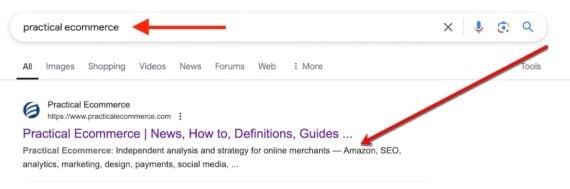
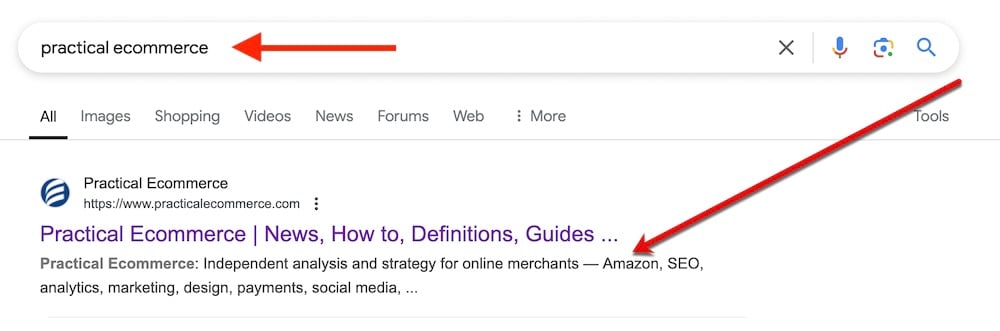
Note the example below for a Google search of “practical ecommerce.” The snippet shows the query (“practical ecommerce”) in bold text, likely increasing the clicks on the listing. Thus meta descriptions containing popular keywords typically attract more attention — and clicks.
A search for “practical ecommerce” produces a snippet using the page’s meta description.
Not always in search results
Nonetheless, Google usually ignores a page’s meta description and uses body content in the search snippet. Google confirms this in a “Search Central” blog post:
Google primarily uses the content on the page to automatically determine the appropriate snippet. We may also use descriptive information in the meta description element when it describes the page better than other parts of the content.
A search snippet is query-dependent — Google attempts to generate a snippet relevant to the searcher’s word or phrase. Including all potential queries in a meta description is impossible, but a couple of tactics apply:
Include the page’s primary keyword. Google will likely display the meta description for those queries, giving page owners control over what searchers see on popular terms.
Use variations of the brand name. Optimize brand searches with common deviations, such as one word or two. Each option will appear in bold, driving clicks to the page.
Low priority
Unlike other on-page elements, meta descriptions are not user-facing or ranking-driven. In its Search Central post, Google even encourages machine-generated versions provided they are aimed at humans and relevant to the page:
…programmatic generation of the descriptions can be appropriate and is encouraged. Good descriptions are human-readable and diverse. Page-specific data is a good candidate for programmatic generation. Keep in mind that meta descriptions comprised of long strings of keywords don’t give users a clear idea of the page’s content and are less likely to be displayed as a snippet.
ChatGPT and Gemini can generate meaningful meta descriptions. Here’s my go-to prompt:
My target keyword is [KEYWORD]. Here’s my page copy: [TEXT]. Generate a meta description containing my keyword in the first sentence. Make the description engaging — for example, include a call-to-action.
Countless search-engine tools will claim a meta description is too long or short. Always ignore them. Google continually experiments with the length and content of search snippets, such as showing the date and rich elements. Most snippets in 2025 will be just one sentence (roughly 140 characters), although that will likely change.
Insert top keywords at the beginning of a meta description instead of guessing the length. This will ensure Google uses it more often and displays those queries in bold text.
Google has released a new episode of its Search Central Lightning Talks, which focuses on rendering strategies, an important topic for web developers.
In this video, Martin Splitt, a Developer Advocate at Google, explains the intricacies of different rendering methods and how these approaches impact website performance, user experience, and search engine optimization (SEO).
This episode also connects to recent discussions about the overuse of JavaScript and its effects on AI search crawlers, a topic previously addressed by Search Engine Journal.
Splitt’s insights offer practical guidance for developers who want to optimize their websites for modern search engines and users.
What Is Rendering?
Splitt begins by explaining what rendering means in the context of websites.
He explains rendering in simple terms, saying:
“Rendering in this context is the process of pulling data into a template. There are different strategies as to where and when this happens, so let’s take a look together.”
In the past, developers would directly edit and upload HTML files to servers.
However, modern websites often use templates to simplify the creation of pages with similar structures but varying content, such as product listings or blog posts.
Splitt categorizes rendering into three main strategies:
Pre-Rendering (Static Site Generation)
Server-Side Rendering (SSR)
Client-Side Rendering (CSR)
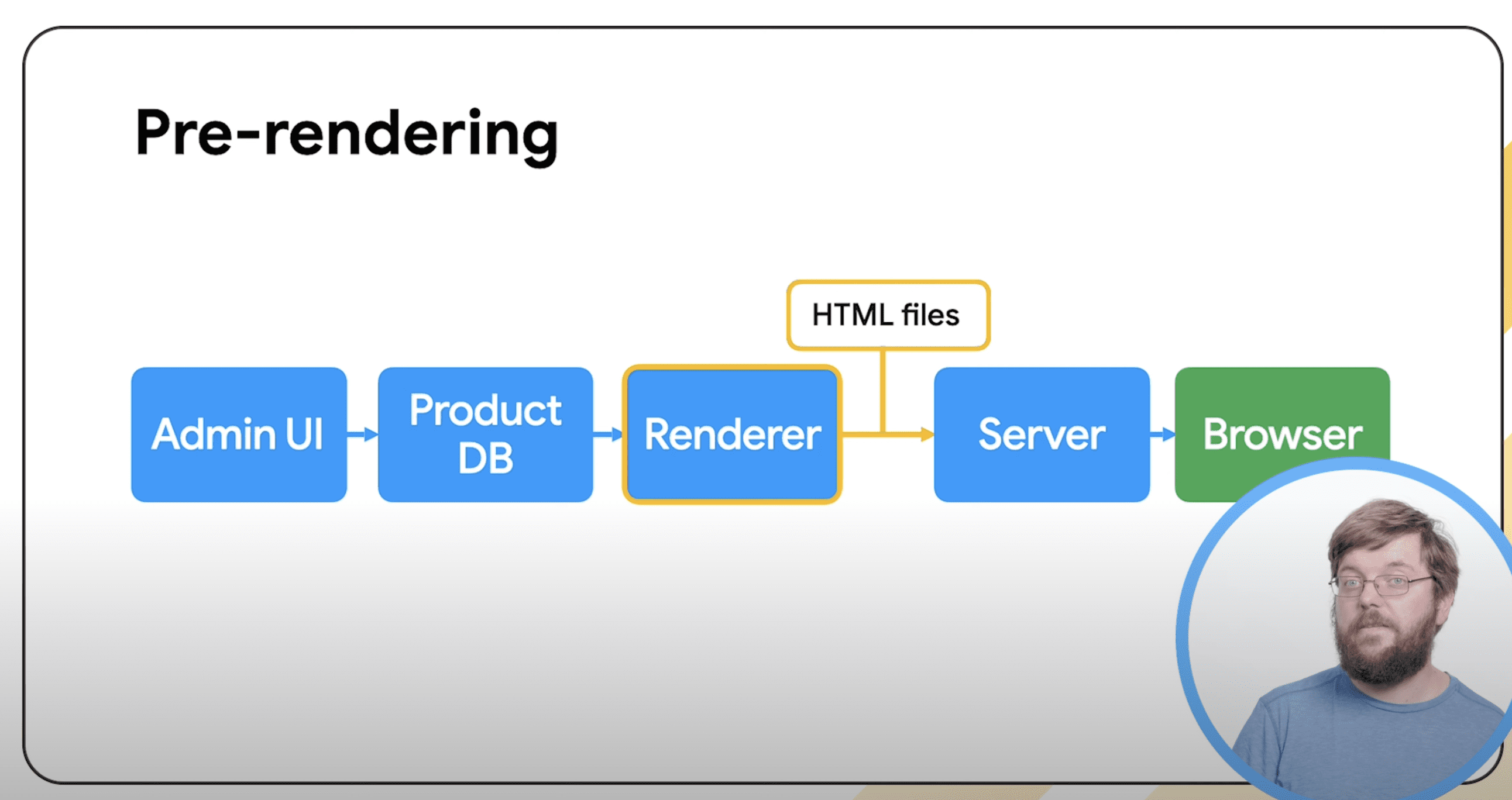
1. Pre-Rendering
Screenshot from: YouTube.com/GoogleSearchCentral, January 2025.
Pre-rendering, also known as static site generation, generates HTML files in advance and serves them to users.
Splitt highlights its simplicity and security:
“It’s also very robust and very secure, as there isn’t much interaction happening with the server, and you can lock it down quite tightly.”
However, he also notes its limitations:
“It also can’t respond to interactions from your visitors. So that limits what you can do on your website.”
Tools such as Jekyll, Hugo, and Gatsby automate this process by combining templates and content to create static files.
Advantages:
Simple setup with minimal server requirements
High security due to limited server interaction
Robust and reliable performance
Disadvantages:
Requires manual or automated regeneration whenever content changes
Limited interactivity, as pages cannot dynamically respond to user actions
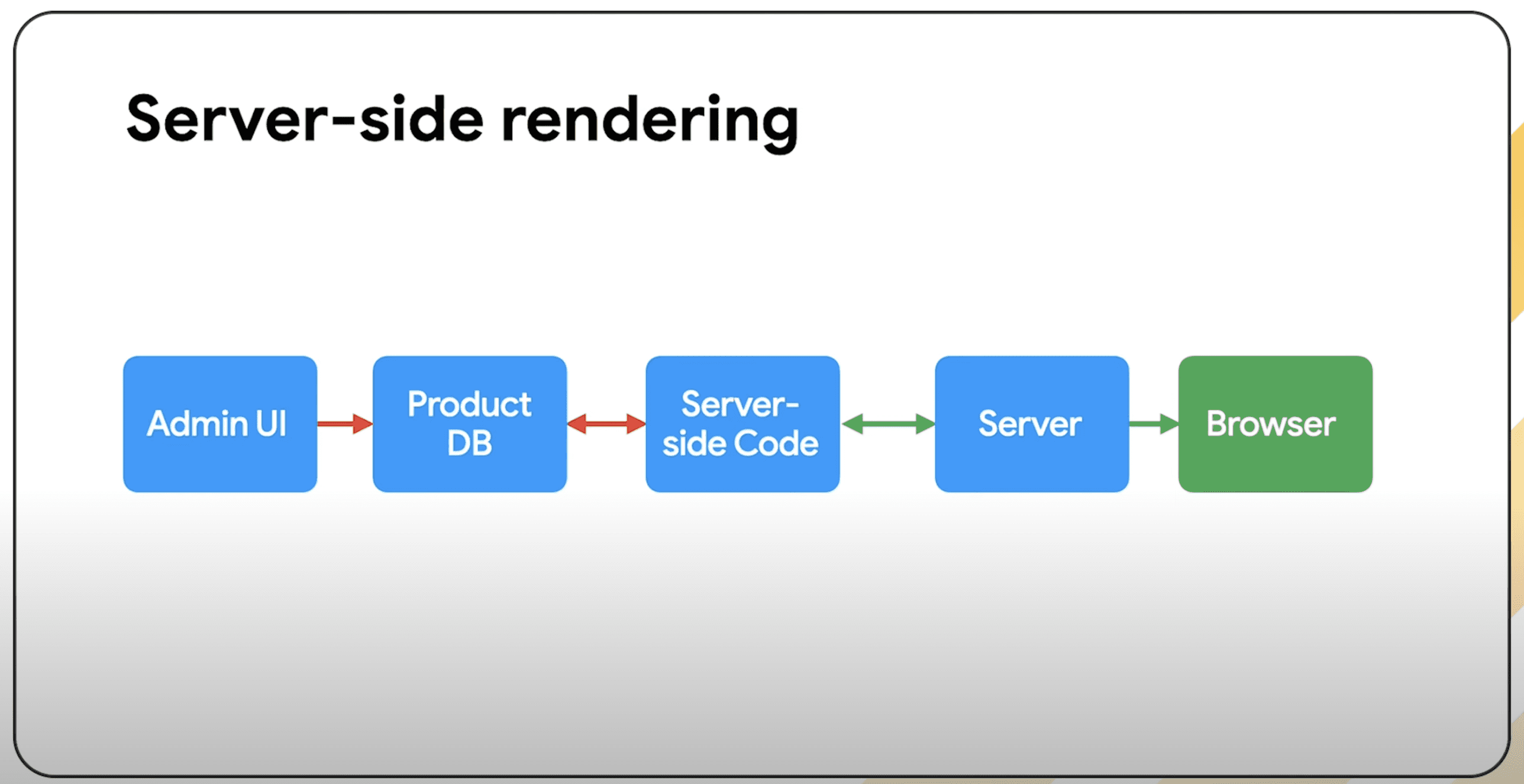
2. Server-Side Rendering (SSR): Flexibility with Trade-Offs
Screenshot from: YouTube.com/GoogleSearchCentral, January 2025.
Server-side rendering dynamically generates web pages on the server each time a user visits a site.
This approach enables websites to deliver personalized content, such as user-specific dashboards and interactive features, like comment sections.
Splitt says:
“The program decides on things like the URL, visitor, cookies, and other things—what content to put into which template and return it to the user’s browser.”
Splitt also points out its flexibility:
“It can respond to things like a user’s login status or actions, like signing up for a newsletter or posting a comment.”
But he acknowledges its downsides:
“The setup is a bit more complex and requires more work to keep it secure, as users’ input can now reach your server and potentially cause problems.”
Advantages:
Supports dynamic user interactions and tailored content
Can accommodate user-generated content, such as reviews and comments
Disadvantages:
Complex setup and ongoing maintenance
Higher resource consumption, as pages are rendered for each visitor
Potentially slower load times due to server response delays
To alleviate resource demands, developers can use caching or proxies to minimize redundant processing.
3. Client-Side Rendering (CSR): Interactivity with Risks
Screenshot from: YouTube.com/GoogleSearchCentral, January 2025.
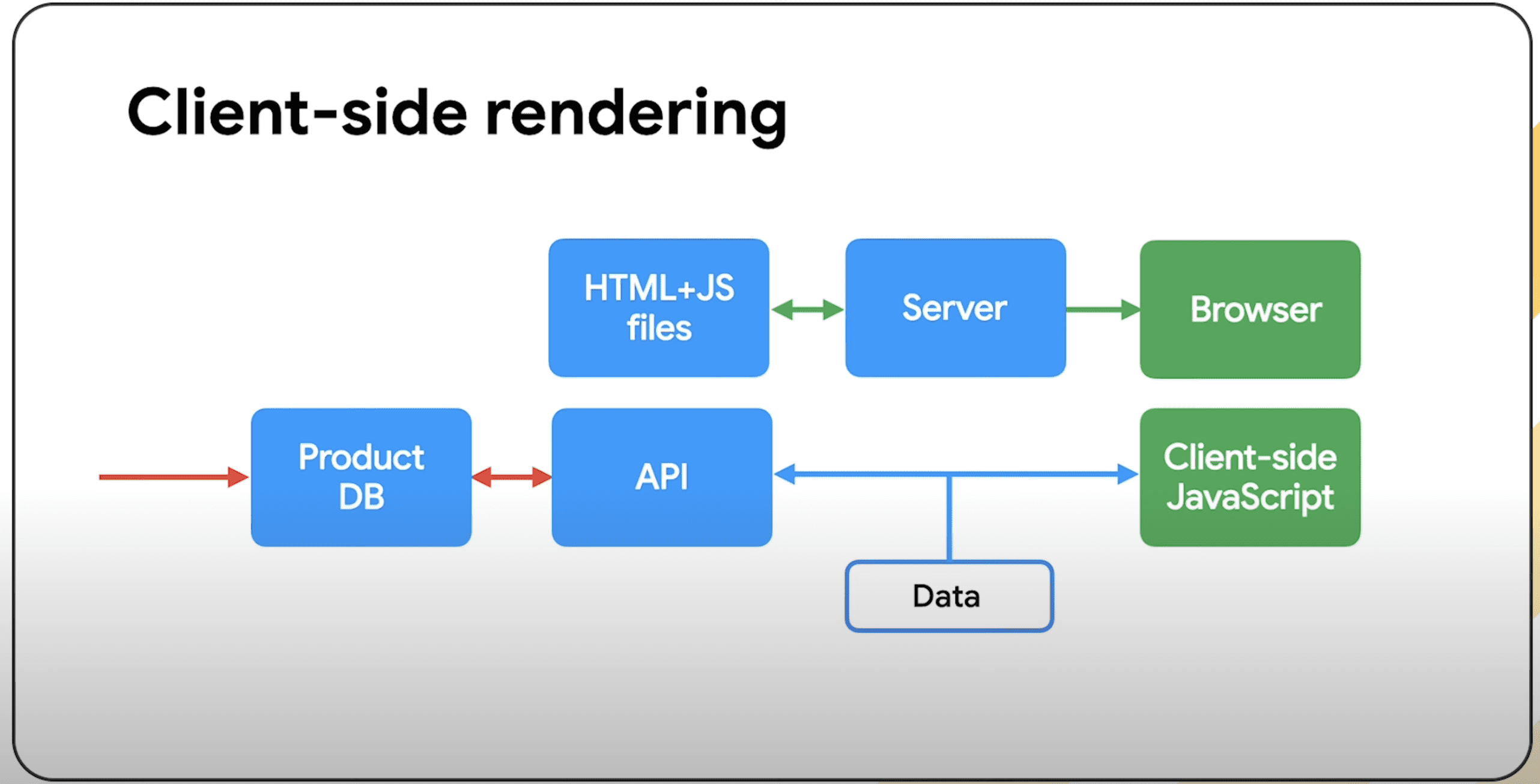
Client-side rendering uses JavaScript to fetch and display data in the user’s browser.
This method creates interactive websites and web applications, especially those with real-time updates or complex user interfaces.
Splitt highlights its app-like functionality:
“The interactions feel like they’re in an app. They happen smoothly in the background without the page reloading visibly.”
However, he cautions about its risks:
“The main issue with CSR usually is the risk that, in case something goes wrong during transmission, the user won’t see any of your content. That can also have SEO implications.”
Advantages:
Users enjoy a smooth, app-like experience without page reloads.
It allows features like offline access using progressive web apps (PWAs).
Disadvantages:
It depends heavily on the user’s device and browser.
Search engines may have trouble indexing JavaScript-rendered content, leading to SEO challenges.
Users might see blank pages if JavaScript fails to load or run.
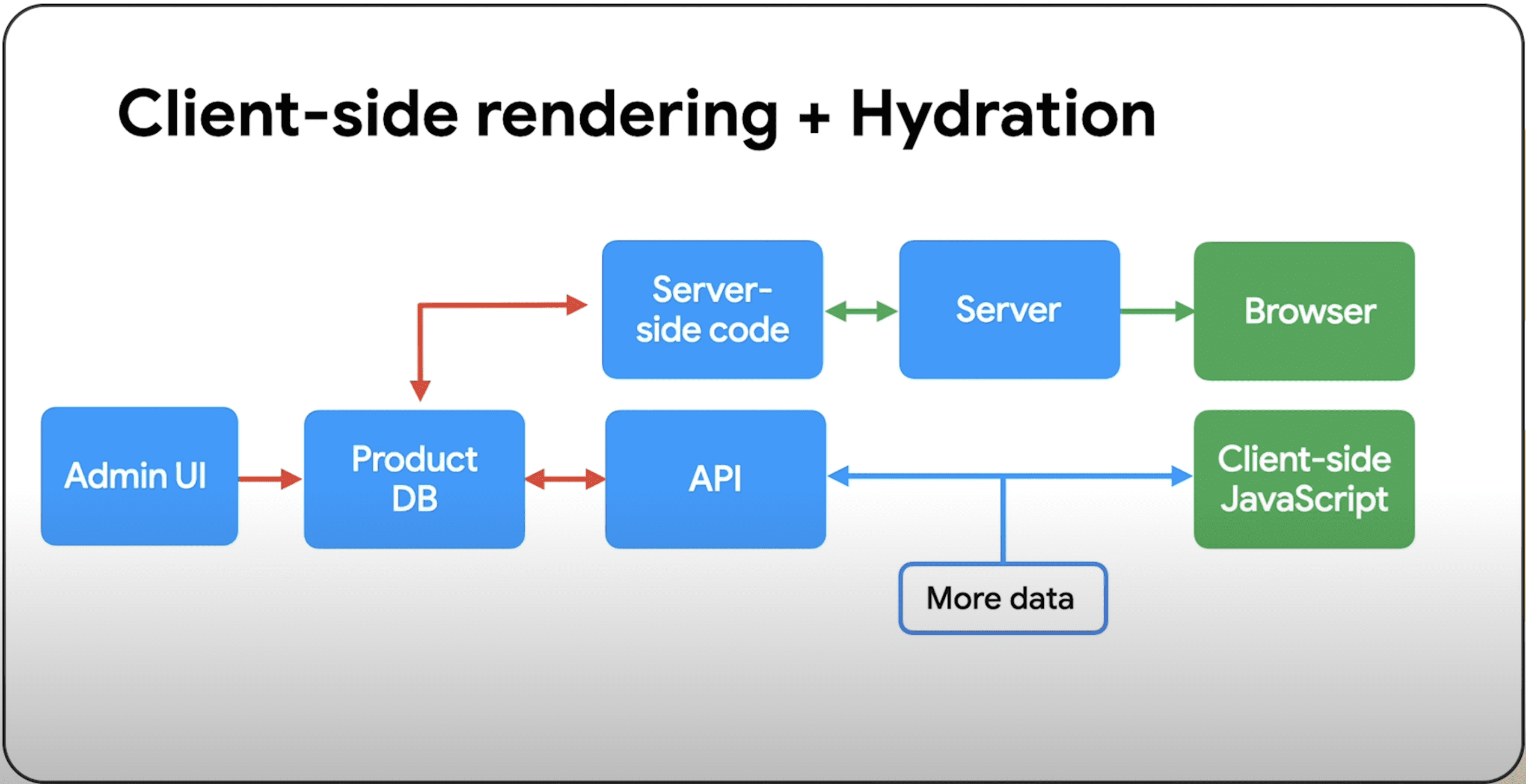
Splitt suggests a hybrid approach called “hydration ” to improve SEO.
In this method, the server initially renders the content, and then client-side rendering handles further interactions.
Screenshot from: YouTube.com/GoogleSearchCentral, January 2025.
How to Choose the Right Rendering Strategy
Splitt points out that there is no one-size-fits-all solution for website development.
Developers should consider what a website needs by looking at specific factors.
Splitt says:
“In the end, that depends on a bunch of factors, such as what does your website do? How often does the content change? What kind of interactions do you want to support? And what kind of resources do you have to build, run, and maintain your setup?”
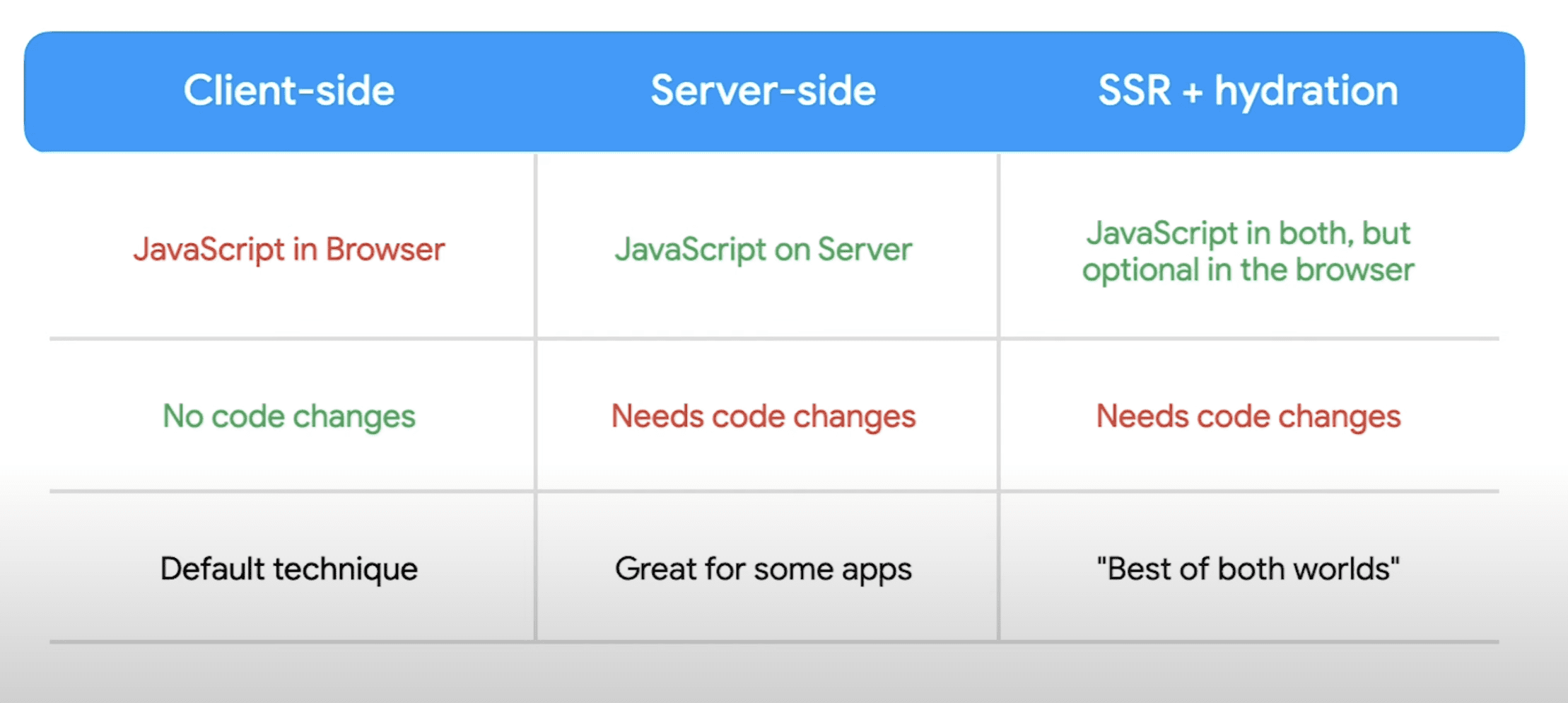
He provides a visual summary of the pros and cons of each approach to help developers make informed choices.
Screenshot from: YouTube.com/GoogleSearchCentral, January 2025.
Connecting the Dots: Rendering and JavaScript Overuse
This episode continues earlier discussions about the drawbacks of excessive JavaScript use, especially regarding SEO in the age of AI search crawlers.
As previously reported, AI crawlers like GPTBot often have difficulty processing websites that rely heavily on JavaScript, which can decrease their visibility in search results.
To address this issue, Splitt recommends using server-side rendering or pre-rendering to ensure that essential content is accessible to both users and search engines. Developers are encouraged to implement progressive enhancement techniques and to limit JavaScript usage to situations where it genuinely adds value.
See the video below to learn more about rendering strategies.
Featured Image: Screenshot from: YouTube.com/GoogleSearchCentral, January 2025
The myth of a duplicate content penalty has existed for years. Google seeks diverse search results and must choose when two or more pages are the same or similar, resulting in the others losing organic traffic — different from a penalty.
Google’s “Search Central” blog includes a guide on ranking systems that describes deduplication:
Searches on Google may find thousands or even millions of matching web pages. Some of these may be very similar to each other. In such cases, our systems show only the most relevant results to avoid unhelpful duplication.
Yet the guide doesn’t specify how the deduplication system chooses a page. In my experience, duplication occurs in four ways.
Similar pages
When a site has similar product or category pages or syndicates content (knowingly or not), Google will likely show only one page in search results. It’s not a penalty, but it does dilute traffic among the identical pages. Thus, ensure Google ranks the original, up-to-date, detailed, and relevant page (not a syndicated or scraped version).
Canonical tags and 301 redirects can point Google to the best page. Neither is foolproof, as Google views them as suggestions. The only way to force the best page is to avoid duplicating it.
The danger of duplicate content is when a third-party scraped version overranks the original. Google can usually identify scraped content, which is typically on low-quality sites with few or no authority signals. Thus a higher-ranking scraped version implies a problem with the original site.
Featured snippets
Featured snippets appear above organic search results and provide a quick answer to a query. Google removes featured snippet URLs from lower organic positions to avoid duplication.
The purpose of featured snippets is to answer queries, removing the need to click. Thus a featured snippet page likely receives less organic traffic, and there is no surefire method to prevent it. If a page suddenly loses traffic, check Search Console to see if it’s featured.
Google will likely deduplicate AI Overviews in the same way.
Top stories
“Top stories” is a separate search-result section for breaking or relevant news. A URL in top stories typically loses its organic position.
Domains
Domain names trigger a different type of duplication beyond content. Google won’t typically show the same domain in top results, even for brand name queries. Keep an eye on queries for your brand to know other domains that rank for it and how to combat them.
Google’s Search Advocate, John Mueller, has provided insights into Search Console’s validation process, addressing how it handles 404 errors and redirects during site migrations.
Key Points
A Reddit user shared their experience with a client’s website migration that led to a loss in rankings.
They explained that they took several steps to address the issues, including:
Fixing on-site technical problems.
Redirecting 404 pages to the appropriate URLs.
Submitting these changes for validation in Google Search Console.
Although they confirmed that all redirects and 404 pages were working correctly, they failed to validate the changes in Search Console.
Feeling frustrated, the user sought advice on what to do next.
This prompted a response from Mueller, who provided insights into how Google processes these changes.
Mueller’s Response
Mueller explained how Google manages 404 errors and redirect validations in Search Console.
He clarified that the “mark as fixed” feature doesn’t speed up Google’s reprocessing of site changes. Instead, it’s a tool for site owners to monitor their progress.
Mueller noted:
“The ‘mark as fixed’ here will only track how things are being reprocessed. It won’t speed up reprocessing itself.”
He also questioned the purpose of marking 404 pages as fixed, noting that no further action is needed if a page intentionally returns a 404 error.
Mueller adds:
“If they are supposed to be 404s, then there’s nothing to do. 404s for pages that don’t exist are fine. It’s technically correct to have them return 404. These being flagged don’t mean you’re doing something wrong, if you’re doing the 404s on purpose.”
For pages that aren’t meant to be 404, Mueller advises:
“If these aren’t meant to be 404 – the important part is to fix the issue though, set up the redirects, have the new content return 200, check internal links, update sitemap dates, etc. If it hasn’t been too long (days), then probably it’ll pick up again quickly. If it’s been a longer time, and if it’s a lot of pages on the new site, then (perhaps obviously) it’ll take longer to be reprocessed.”
Key Takeaways From Mueller’s Advice
Mueller outlined several key points in his response.
Let’s break them down:
For Redirects and Content Updates
Ensure that redirects are correctly set up and new content returns a 200 (OK) status code.
Update internal links to reflect the new URLs.
Refresh the sitemap with updated dates to signal changes to Google.
Reprocessing Timeline
If changes were made recently (within a few days), Google will likely process them quickly.
For larger websites or older issues, reprocessing may take more time.
Handling 404 Pages
If a page is no longer meant to exist, returning a 404 error is the correct approach.
Seeing 404s flagged in Search Console doesn’t necessarily indicate a problem, provided the 404s are intentional.
Why This Matters
Website migrations can be complicated and may temporarily affect search rankings if not done correctly.
Google Search Console is useful for tracking changes, but it has limitations.
The validation process checks if fixes are implemented correctly, not how quickly changes will be made.
Practice patience and ensure all technical details—redirects, content updates, and internal linking—are adequately addressed.
A recent discussion among the Google Search Relations team highlights a challenge in web development: getting JavaScript to work well with modern search tools.
In Google’s latest Search Off The Record podcast, the team discussed the rising use of JavaScript, and the tendency to use it when it’s not required.
Martin Splitt, a Search Developer Advocate at Google, noted that JavaScript was created to help websites compete with mobile apps, bringing in features like push notifications and offline access.
However, the team cautioned that excitement around JavaScript functionality can lead to overuse.
While JavaScript is practical in many cases, it’s not the best choice for every part of a website.
The JavaScript Spectrum
Splitt described the current landscape as a spectrum between traditional websites and web applications.
He says:
“We’re in this weird state where websites can be just that – websites, basically pages and information that is presented on multiple pages and linked, but it can also be an application.”
He offered the following example of the JavaScript spectrum:
“You can do apartment viewings in the browser… it is a website because it presents information like the square footage, which floor is this on, what’s the address… but it’s also an application because you can use a 3D view to walk through the apartment.”
Why Does This Matter?
John Mueller, Google Search Advocate, noted a common tendency among developers to over-rely on JavaScript:
“There are lots of people that like these JavaScript frameworks, and they use them for things where JavaScript really makes sense, and then they’re like, ‘Why don’t I just use it for everything?’”
As I listened to the discussion, I was reminded of a study I covered weeks ago. According to the study, over-reliance on JavaScript can lead to potential issues for AI search engines.
Given the growing prominence of AI search crawlers, I thought it was important to highlight this conversation.
While traditional search engines typically support JavaScript well, its implementation demands greater consideration in the age of AI search.
The study finds AI bots make up an increasing percentage of search crawler traffic, but these crawlers can’t render JavaScript.
That means you could lose out on traffic from search engines like ChatGPT Search if you rely too much on JavaScript.
Things To Consider
The use of JavaScript and the limitations of AI crawlers present several important considerations:
Server-Side Rendering: Since AI crawlers can’t execute client-side JavaScript, server-side rendering is essential for ensuring visibility.
Content Accessibility: Major AI crawlers, such as GPTBot and Claude, have distinct preferences for content consumption. GPTBot prioritizes HTML content (57.7%), while Claude focuses more on images (35.17%).
New Development Approach: These new constraints may require reevaluating the traditional “JavaScript-first” development strategy.
The Path Foward
As AI crawlers become more important for indexing websites, you need to balance modern features and accessibility for AI crawlers.
Here are some recommendations:
Use server-side rendering for key content.
Make sure to include core content in the initial HTML.
Apply progressive enhancement techniques.
Be cautious about when to use JavaScript.
To succeed, adapt your website for traditional search engines and AI crawlers while ensuring a good user experience.
A report released by Vercel highlights the growing impact of AI bots in web crawling.
OpenAI’s GPTBot and Anthropic’s Claude generate nearly 1 billion requests monthly across Vercel’s network.
The data indicates that GPTBot made 569 million requests in the past month, while Claude accounted for 370 million.
Additionally, PerplexityBot contributed 24.4 million fetches, and AppleBot added 314 million requests.
Together, these AI crawlers represent approximately 28% of Googlebot’s total volume, which stands at 4.5 billion fetches.
Here’s what this could mean for SEO.
Key Findings On AI Crawlers
The analysis looked at traffic patterns on Vercel’s network and various web architectures. It found some key features of AI crawlers:
Major AI crawlers do not render JavaScript, though they do pull JavaScript files.
AI crawlers are often inefficient, with ChatGPT and Claude spending over 34% of their requests on 404 pages.
The type of content these crawlers focus on varies. ChatGPT prioritizes HTML (57.7%), while Claude focuses more on images (35.17%).
Geographic Distribution
Unlike traditional search engines that operate from multiple regions, AI crawlers currently maintain a concentrated U.S. presence:
ChatGPT operates from Des Moines (Iowa) and Phoenix (Arizona)
Claude operates from Columbus (Ohio)
Web Almanac Correlation
These findings align with data shared in the Web Almanac’s SEO chapter, which also notes the growing presence of AI crawlers.
According to the report, websites now use robots.txt files to set rules for AI bots, telling them what they can or cannot crawl.
GPTBot is the most mentioned bot, appearing on 2.7% of mobile sites studied. The Common Crawl bot, often used to collect training data for language models, is also frequently noted.
Both reports stress that website owners need to adjust to how AI crawlers behave.
3 Ways To Optimize For AI Crawlers
Based on recent data from Vercel and the Web Almanac, here are three ways to optimize for AI crawlers.
1. Server-Side Rendering
AI crawlers don’t execute JavaScript. This means any content that relies on client-side rendering might be invisible.
Recommended actions:
Implement server-side rendering for critical content
Ensure main content, meta information, and navigation structures are present in the initial HTML
Use static site generation or incremental static regeneration where possible
2. Content Structure & Delivery
Vercel’s data shows distinct content type preferences among AI crawlers:
ChatGPT:
Prioritizes HTML content (57.70%)
Spends 11.50% of fetches on JavaScript files
Claude:
Focuses heavily on images (35.17%)
Dedicates 23.84% of fetches to JavaScript files
Optimization recommendations:
Structure HTML content clearly and semantically
Optimize image delivery and metadata
Include descriptive alt text for images
Implement proper header hierarchy
3. Technical Considerations
High 404 rates from AI crawlers mean you need to keep these technical considerations top of mind:
Maintain updated sitemaps
Implement proper redirect chains
Use consistent URL patterns
Regular audit of 404 errors
Looking Ahead
For search marketers, the message is clear: AI chatbots are a new force in web crawling, and sites need to adapt their SEO accordingly.
Although AI bots may rely on cached or dated information now, their capacity to parse fresh content from across the web will grow.
You can help ensure your content is crawled and indexed with server-side rendering, clean URL structures, and updated sitemaps.
By removing barriers and ensuring inclusive digital experiences, you can tap into this 1 billion-person market and drive substantial economic growth.
Digital accessibility helps to increase employment opportunities, education options, and simple access to various banking and financial services for everybody.
In fact, they often enhance overall website performance, which leads to:
Better user experience.
Higher rankings.
Increased traffic.
Higher conversion rates.
Ensures Your Websites Are Compliant
Increasing lawsuits against businesses that fail to comply with accessibility regulations have imposed pressure on them to implement accessibility in their digital assets.
Compliance with ADA, WCAG 2.0, 2.1, 2.2, Section 508, Australian DDA, European EAA EN 301 549, UK Equality Act (EA), Indian RPD Act, Israeli Standard 5568, California Unruh, Ontario AODA, Canada ACA, German BITV, Brazilian Inclusion Law (LBI 13.146/2015), Spain UNE 139803:2012, France RGAA standards, JIS X 8341 (Japan), Italian Stanca Act, Switzerland DDA, Austrian Web Accessibility Act (WZG) guidelines aren’t optional. Accessibility solution partnerships ensure to stay ahead of potential lawsuits while fostering goodwill.
6 Steps To Boost Your Growth With Accessibility
To drive growth, your agency should prioritize digital accessibility by following WCAG standards, regularly testing with tools like AXE, WAVE, or Skynet Technologies Website Accessibility Checker, and addressing accessibility gaps. Build accessible design frameworks with high-contrast colors, scalable text, and clear navigation.
Integrate assistive technologies such as keyboard navigation, screen reader compatibility, and video accessibility. Focus on responsive design, accessible forms, and inclusive content strategies like descriptive link text, simplified language, and alternative formats.
Providing accessibility training and creating inclusive marketing materials will further support compliance and growth.
To ensure the website thrives, prioritize mobile-first design for responsiveness across all devices, adhere to WCAG accessibility standards, and incorporate keyboard-friendly navigation and alt text for media.
Optimize page speed and core web vitals while using an intuitive interface with clear navigation and effective call-to-action buttons, and use SEO-friendly content with proper keyword optimization and schema markups to boost visibility.
Ensure security with SSL certificates, clear cookie consent banners, and compliance with privacy regulations like GDPR and CCPA. Finally, implement analytics and conversion tracking tools to gather insights and drive long-term growth.
We know this is a lot.
If this sounds good to you, let us help you get set up.
How Can Digital Accessibility Partnerships Supercharge Your Clients’ SEO?
Partnering for digital accessibility isn’t just about inclusivity — it’s a game-changer for SEO, too!
Accessible websites are built with cleaner code, smarter structures, and user-friendly features like alt text and clear headings that search engines love.
Plus, faster load times, mobile-friendly designs, and seamless navigation keep users engaged, reducing bounce rates and boosting rankings. When you focus on making a site accessible to everyone, you’re not just widening your audience—you’re signaling to search engines that the website is high-quality and relevant. It’s a win-win for accessibility and SEO!
12 Essential Factors To Consider For Successful Accessibility Partnerships
Expertise: Look for a provider with a proven track record in digital accessibility, including knowledge of relevant global website accessibility standards and best practices.
Experience: Consider their experience working with similar industries or organizations.
Tools and technologies: Evaluate their use of automated and manual testing tools to identify and remediate accessibility issues.
Price Flexibility: Explore pricing models that align with both the budget and project requirements. Whether for a single site or multiple sites, the service should be compatible and scalable to meet the needs.
Platform Compatibility: Ensure seamless accessibility integration across various platforms, providing a consistent and accessible experience for all users, regardless of the website environment.
Multi-language support: Enhance user experience with global language support, making websites more inclusive and accessible to a global audience.
Regular check-ins: Schedule regular meetings to discuss project progress, address any issues, and make necessary adjustments.
Clear communication channels: Establish clear communication channels (for example: email, and project management tools) to facilitate efficient collaboration.
Transparent reporting: Request detailed reports on the progress of accessibility testing, remediation efforts, and overall project status.
KPIs to measure success: Review the partner’s historical data, especially those similar projects in terms of scale, complexity, and industry.
Evaluate technical expertise: Assess their proficiency in using various accessibility testing tools and ability to integrate different APIs.
Long-term partnership strategy: Compare previous data with the current one for improvement and optimization process. It is crucial for a long-term partnership that there is a specific interval of review and improvements.
Scaling Accessibility With Smart Partnerships
All in One Accessibility®: Simplicity meets efficiency!
The All in One Accessibility® is an AI-powered accessibility tool that helps organizations to enhance their website accessibility level for ADA, WCAG 2.0, 2.1, 2.2, Section 508, Australian DDA, European EAA EN 301 549, UK Equality Act (EA), Indian RPD Act, Israeli Standard 5568, California Unruh, Ontario AODA, Canada ACA, German BITV, Brazilian Inclusion Law (LBI 13.146/2015), Spain UNE 139803:2012, France RGAA standards, JIS X 8341 (Japan), Italian Stanca Act, Switzerland DDA, Austrian Web Accessibility Act (WZG), and more.
It is available with features like sign language LIBRAS (Brazilian Portuguese Only) integration, 140+ multilingual support, screen reader, voice navigation, smart language auto-detection and voice customization, talk & type, Google and Adobe Analytics tracking, along with premium add-ons including white label and custom branding, VPAT/ACR reports, manual accessibility audit and remediation, PDF remediation, and many more.
Quick Setup: Install the widget to any site with ease—no advanced coding required.
Feature-Rich Design: From text resizing and color contrast adjustments to screen reader support, it’s packed with tools that elevate the user experience.
Revenue Opportunities: Agencies can resell the solution to clients, adding a high-value service to their offerings while earning attractive commissions through the affiliate program.
Reduced development costs: Minimizes the financial impact of accessibility remediation by implementing best practices and quick tools.
Agency Partnership: Scaling accessibility with ease!
Extended Service Offerings: The All in One Accessibility® Agency Partnership allows agencies to offer a powerful accessibility widget – quick accessibility solution into their services, enabling them that are in high demand.
White Label: As an agency partner, you can offer All in One Accessibility® under their own brand name.
Centralized Management: It simplifies oversight by consolidating accessibility data and reporting, allowing enterprises to manage multiple websites seamlessly.
Attractive Revenue Streams: Agencies can resell the widget to clients, earning significant revenue through competitive pricing structures and repeat business opportunities.
Boost Client Retention: By addressing accessibility needs proactively, agencies build stronger relationships with clients, fostering long-term loyalty and recurring contracts.
Increase Market Reach: Partnering with All in One Accessibility® positions agencies as leaders in inclusivity, attracting businesses looking for reliable accessibility solutions.
NO Investment, High Return: With no setup costs, scalable features, and up to 30% commission, the partnership enables agencies to maximize profitability with their clients.
Affiliate Partnership: A revenue opportunity for everyone!
The All in One Accessibility® Affiliate Partnership program is for content creators, marketers, accessibility advocates, web professionals, 501 (c) organizations (non-profit), and law firms.
Revenue Growth through Referrals: The All in One Accessibility® affiliate partnership allows affiliates to earn competitive commissions by promoting a high-demand accessibility solution, turning referrals into consistent revenue.
Expanding Market Reach: Affiliates can tap into a diverse audience of businesses seeking ADA and WCAG compliance, scaling both revenue and the adoption of accessibility solutions.
Fostering Accessibility Awareness: By promoting the All in One Accessibility® widget, affiliates play a pivotal role in driving inclusivity, helping more websites become accessible to users with disabilities.
Leveraging Trusted Branding: Affiliates benefit from partnering with a reliable and recognized quick accessibility improvement tool, boosting their credibility and marketing impact.
Scaling with Zero Investment: With user-friendly promotional resources and a seamless onboarding process, affiliates can maximize returns without any costs.
Use Accessibility As A Growth Engine
Endeavoring for strategic partnerships with accessibility solution providers is a win-win for agencies aiming to meet the diverse needs of their clients. These partnerships not only enhance the accessibility of digital assets but also create opportunities for growth, and loyalty, top search engine rankings, boost revenue, improve compliance with legal standards, and make you to contribute into digital accessibility world.
With Skynet Technologies USA LLC, Transform accessibility from a challenge into a revenue-driving partnership. Let inclusivity power the success.
Ready to get started? Embarking on a digital accessibility journey is simpler than you think! Take the first step by evaluating the website’s current WCAG compliance with a manual accessibility audit.
Google has updated its guidelines on faceted navigation by turning an old blog post into an official help document.
What started as a blog post in 2014 is now official technical documentation.
This change reflects the complexity of ecommerce and content-heavy websites, as many sites adopt advanced filtering systems for larger catalogs.
Faceted Navigation Issues
Ever used filters on an e-commerce site to narrow down products by size, color, and price?
That’s faceted navigation – the system allowing users to refine search results using multiple filters simultaneously.
While this feature is vital for users, it can create challenges for search engines, prompting Google to release new official documentation on managing these systems.
Modern Challenges
The challenge with faceted navigation lies in the mathematics of combinations: each additional filter option multiplies the potential URLs a search engine might need to crawl.
For example, a simple product page with options for size (5 choices), color (10 choices), and price range (6 ranges) could generate 300 unique URLs – for just one product.
According to Google Analyst Gary Illyes, this multiplication effect makes faceted navigation the leading cause of overcrawling issues reported by website owners.
The impact includes:
Wasting Server Resources: Many websites use too much computing power on unnecessary URL combinations.
Inefficient Crawl Budget: Crawlers may take longer to find important new content because they are busy with faceted navigation.
Weakening SEO Performance: Having several URLs for the same content can hurt a website’s SEO.
Google’s Developer Advocate, Martin Splitt, warns website owners to be cautious of traffic that appears to come from Googlebot. Many requests pretending to be Googlebot are actually from third-party scrapers.
He shared this in the latest episode of Google’s SEO Made Easy series, emphasizing that “not everyone who claims to be Googlebot actually is Googlebot.”
Why does this matter?
Fake crawlers can distort analytics, consume resources, and make it difficult to assess your site’s performance accurately.
Here’s how to distinguish between legitimate Googlebot traffic and fake crawler activity.
Googlebot Verification Methods
You can distinguish real Googlebot traffic from fake crawlers by looking at overall traffic patterns rather than unusual requests.
Real Googlebot traffic tends to have consistent request frequency, timing, and behavior.
If you suspect fake Googlebot activity, Splitt advises using the following Google tools to verify it:
URL Inspection Tool (Search Console)
Finding specific content in the rendered HTML confirms that Googlebot can successfully access the page.
Provides live testing capability to verify current access status.
Rich Results Test
Acts as an alternative verification method for Googlebot access
Shows how Googlebot renders the page
Can be used even without Search Console access
Crawl Stats Report
Shows detailed server response data specifically from verified Googlebot requests
Helps identify patterns in legitimate Googlebot behavior
There’s a key limitation worth noting: These tools verify what real Googlebot sees and does, but they don’t directly identify impersonators in your server logs.
To fully protect against fake Googlebots, you would need to:
Compare server logs against Google’s official IP ranges
Implement reverse DNS lookup verification
Use the tools above to establish baseline legitimate Googlebot behavior
Monitoring Server Responses
Splitt also stressed the importance of monitoring server responses to crawl requests, particularly:
500-series errors
Fetch errors
Timeouts
DNS problems
These issues can significantly impact crawling efficiency and search visibility for larger websites hosting millions of pages.
Splitt says:
“Pay attention to the responses your server gave to Googlebot, especially a high number of 500 responses, fetch errors, timeouts, DNS problems, and other things.”
He noted that while some errors are transient, persistent issues “might want to investigate further.”
Splitt suggested using server log analysis to make a more sophisticated diagnosis, though he acknowledged that it’s “not a basic thing to do.”
However, he emphasized its value, noting that “looking at your web server logs… is a powerful way to get a better understanding of what’s happening on your server.”
Potential Impact
Beyond security, fake Googlebot traffic can impact website performance and SEO efforts.
Splitt emphasized that website accessibility in a browser doesn’t guarantee Googlebot access, citing various potential barriers, including:
Robots.txt restrictions
Firewall configurations
Bot protection systems
Network routing issues
Looking Ahead
Fake Googlebot traffic can be annoying, but Splitt says you shouldn’t worry too much about rare cases.
Suppose fake crawler activity becomes a problem or uses too much server power. In that case, you can take steps like limiting the rate of requests, blocking specific IP addresses, or using better bot detection methods.