WordPress.com, the Automattic web hosting platform, just announced that the free and open source Sync local development app can now integrate directly with WordPress.com hosting. The new synchronization feature streamlines the process of developing a website on the desktop then pushing it live when it’s ready for deployment.
WordPress.com Hosting
WordPress.com is a WordPress web hosting and publishing platform that offers a free and paid tier, plus bargain-priced domain name registrations. WordPress.com is a for-profit company that’s owned by Automattic. Their slogan is “Everything you need to build and grow any website—all in one place” and with this new feature that slogan has never been more true.
The new feature is available to WordPress.com users on the paid Business plan level or higher.
According to the announcement, the new features bring the following benefits to users:
“Push and Pull with Ease: You can keep your local Studio sites connected to your WordPress.com site, so pushing or pulling will be as easy as clicking a button.
Flexible Syncing: Having complete freedom, you can connect a WordPress.com site to multiple Studio sites.
Team Collaboration: Multiple developers can connect a local Studio site to a shared WordPress.com site, making it easy to push and pull changes as a team.
Sync To and From Staging: If using staging sites are part of your development workflow, you can now easily push from your local Studio site to your WordPress.com staging site.
One-Click Bliss: No need to worry yourself with database dumps, manually syncing files over SFTP, or performing other monotonous manual steps. Synchronize your local and hosted sites at any time with just one click.”
Studio is available for both the Mac and Windows desktop environments.
Wix and WordPress are both solid options for building a website that ranks on Google – but which one is actually better for SEO and why?
According to BuiltWith, WordPress dominates the market with over 34 million websites and controls 44% of the content management system (CMS) market. Wix runs just over 8 million sites with an 11% market share.
But here’s the thing: These platforms aren’t as different as you might think.
Wix is built as an all-in-one solution. You get your hosting, build your website, and manage everything in one place.
You can connect all your SEO tools like Google Analytics and Search Console, link your social media, and handle email lists right from one dashboard.
For small business owners, especially those who aren’t super technical, this setup makes a lot of sense.
WordPress works differently. As an open-source CMS, it lets you build your site exactly how you want. You get complete control over your site structure, theme, and content – but you’ll need to find your own hosting provider.
While WordPress isn’t going anywhere as the market leader, Wix keeps getting better.
In this guide, we’ll break down the pros and cons of both platforms for SEO, and help you figure out which one makes the most sense for your website.
Why Wix Deserves A Second Look
Remember when WordPress was the only real choice for SEO? Those days are gone. New website builders have changed the game, and Wix should be a major consideration.
Wix started out as just an easy way to build good-looking websites. Tech-savvy users usually passed it by because they wanted more control over their sites. But that’s changed in a big way over the last few years.
Wix has been rolling out serious improvements, with a lot of focus on SEO tools. Here’s what they’ve added:
Custom URL Control: You can now change your URL structure however you want, add or remove prefixes, and create flat URLs that look clean and professional.
Smart Sitemap Management: The platform automatically updates sitemaps when you set up 301 redirects or change canonical tags.
Real-Time Tracking: You can see how search engines interact with your site through Bot Traffic reports that show you activity over time and by page.
AI-Powered SEO Help: Its new assistant analyzes your pages and suggests specific improvements.
Built-In Structured Data: Product pages and blog posts automatically get the right markup to help you show up in rich results.
Server Side Rendering: This helps search engines read and index your content more effectively.
Developer Tools: The Velo API lets developers customize things on the technical side.
SEO Checklist: A built-in guide helps you optimize your site step by step.
Back in the day, you’d need a bunch of different tools to handle all this. Getting accurate reports was especially tricky. Having everything built into Wix makes life much easier.
The Drawbacks Of Wix For SEO
Of course, Wix isn’t perfect. Here are the main SEO drawbacks from customers:
Code bloat is still a problem, which can slow down your pages.
Even with recent updates, you’re still somewhat limited in how much you can customize your site’s structure. Plus, since hosting and building are tied together, moving your site elsewhere can be a headache.
Some developers aren’t happy with Wix Studio, its new platform for high-end projects. One Reddit user recently called it “completely unreliable.”
The Argument For WordPress
WordPress started by making it relatively easy to build a website. Its open-source nature means it’s theoretically getting better thanks to its huge community of developers.
While the basic platform is free, you’ll probably need to pay for some plugins to get modern features.
These plugins are how you’ll handle most of your SEO work. WordPress also has more users than any other platform, which means more help is available when you need it.
The WordPress SEO Challenges
WordPress isn’t without its problems:
Plugins don’t always play nice together. While Yoast SEO might be the most popular tool, there are tons of options – and they can conflict with each other and cause issues.
Like any plugin, security vulnerabilities can pop up, and updates sometimes break other parts of your site.
Some people think WordPress has lost touch with what publishers need, pointing to bloated code in themes and plugins that make it harder to score well on Core Web Vitals.
That said, the huge number of available plugins is still a major plus. New ones come out daily, making it possible to build highly optimized sites.
Easy connection to Google Search Console, Analytics, and Bing Webmaster Tools.
The real differences show up when you need more advanced SEO features. That’s where WordPress’s flexibility gives it the edge.
But, for many small businesses that just need the basics, either platform will do the job.
Making SEO Work
Both platforms have their own way of handling SEO tasks you’ll need to tackle:
Content Management
While WordPress gives you more control over your content structure with custom post types and taxonomies, Wix makes it simple with built-in blog and product page tools that come pre-optimized.
Both platforms handle the basics well – like meta descriptions, title tags, and image optimization.
Speed And Mobile
WordPress lets you fine-tune your site’s performance through hosting choices and optimization plugins.
Wix handles this differently, with built-in mobile optimization and automatic speed improvements, though you have less control over the technical details.
Ecommerce SEO
If you’re selling online, both platforms can handle product schema and category structure.
WordPress + WooCommerce gives you more flexibility but requires more setup, while Wix’s e-commerce tools come ready to go with built-in SEO features.
Wix Vs. WordPress: The Verdict
Wix has come a long way. Many old complaints about lack of control don’t hold up anymore, and their basic SEO setup rivals WordPress.
For small businesses and online stores, Wix might be exactly what you need.
“Wix is fine for SEO. A few years back, it was pretty bad, but they’ve made fantastic progress. The old reputation lingers, but don’t let that sway you. They’ve done great work recently, including making it easy to have a fast site. If Wix works for you and meets your needs, there’s no reason to switch.”
Your choice really comes down to what matters most for your business. If you need deep customization and complete control over your website’s technical setup, WordPress is your best bet.
But if you want a simpler path to getting online while still maintaining strong SEO capabilities, Wix could be perfect – especially with its all-in-one approach that handles the technical details for you.
Matt Mullenweg cited a Reddit thread on X to promote the idea that WP Engine makes it difficult to cancel accounts. Turns out that his own hosting company does the exact same thing.
“Money Grab” Post By Redditor
Someone posted that they cancelled a WP Engine account on Friday December 6th. They subsequently learned that WP Engine has a 30 day advance notice cancellation policy so they called customer service and was assured they wouldn’t be charged, despite not giving 30 days advance notice.
They wrote:
“On Dec 6th, I cancelled my WPEngine service that I’ve had since 2015. …That’s when I discovered that WPEngine requires 30 days notice to cancel. An obvious money-grab. A user should be able to cancel a single-site hosting environment instantly with one click of a button. In fact, this will be the law soon, created because of unscrupulous cancellation tactics like this.
WPEngine support informed me that my site would be cancelled on Jan 3rd. …Surprise, surprise… it’s Jan 5th. My account hasn’t been cancelled, and I was charged $300 today for another year of service.”
Hours after starting the Reddit post to complain about WP Engine they updated it to say that WP Engine had refunded their money.
They posted:
“UPDATE: WP Engine support got back to me, cancelled the account today, and initiated a refund that’ll take up to 10 business days.”
Mullenweg Dumps On WP Engine
Mullenweg posted on X to compare WP Engine to an unscrupulous gym, accompanying his post with a screenshot of the Reddit post:
“One way @wpengine juices its profits at the expense of its customers is by making it hard to export or cancel your plan, like one of those bad gyms.”
He followed that up with another post touting that WordPress.com has a flexible cancellation policy:
“The WordPress philosophy is to make it easy for people to leave, so they’re more likely to stay. Give freedom and choice.”
“You must cancel at least one month before the scheduled end date of any annual subscription…”
What’s Going On?
WP Engine’s contract is clear that they require 30 days notice to cancel a service. But it’s not like once you pay you’re committed to a whole year of hosting. The contract enables customers to cancel their yearly hosting plan at any time (with 30 days notice) and the difference for any remaining months will be refunded.
The Redditor cancelled their account with less than 30 days notice (on a Friday), got charged 24 days later and then refunded on a Sunday, before the weekend was over.
Response On Reddit
While many Redditors were supportive of the person who started the discussion, others pointed out the obvious that it’s a weekend and they failed to give adequate notice.
An advisory has been issued about a high-severity WordPress vulnerability that makes it possible for attackers to inject arbitrary shortcodes into sites using the WordPress Popular Posts plugin. Attackers do not need a user account to launch an attack.
WordPress Popular Posts is installed in over 100,000 websites enables websites to display the most popular posts within any given time period and has been translated into sixteen different languages to extend its use around the world. It comes with caching features to improve performance and an admin console that allows website administrators to view popularity statistics.
WordPress Shortcode Vulnerability
Shortcodes is a feature that allows users to insert functionalities within a web page by inserting a predefined snippet within brackets that automatically inserts a script that performs a function, like adding a contact form with a shortcode that looks like this: [add_contact_form].
WordPress is gradually evolving away from the use of shortcodes in favor of blocks with specific functionalities. The official WordPress developer site encourages plugin and theme developers to discontinue using shortcodes in favor of dedicated blocks, with the main reason being that it’s a smoother workflow for a user to select and insert a block rather than configure a shortcode within a plugin then manually inserting the shortcode into a webpage.
“We would recommend people eventually upgrade their shortcodes to be blocks.”
The vulnerability discovered in the WordPress Popular Posts plugin is due to the implementation of the shortcode functionality, specifically a part called do_shortcode(), which is a WordPress function for processing and executing shortcodes that requires input sanitization and other standard WordPress plugin and theme security practices.
According to an advisory published by Wordfence:
“The WordPress Popular Posts plugin for WordPress is vulnerable to arbitrary shortcode execution in all versions up to, and including, 7.1.0. This is due to the software allowing users to execute an action that does not properly validate a value before running do_shortcode. This makes it possible for unauthenticated attackers to execute arbitrary shortcodes.”
That part about “validating a value” generally means checking to ensure that what the user inputs (the “value”), such as the content of a shortcode, is validated to confirm that it’s safe and conforms to expected inputs before being passed along for use by the website.
Official Plugin Changelog
A changelog is the documentation of what’s being updated, which for users of the plugin provides them an opportunity to understand what is being updated and to make decisions about whether to update their installation or not, thus transparency is important.
The WordPress Popular Posts plugin is responsibly transparent in their documentation of the update.
“Fixes a security issue that allows unintended arbitrary shortcode execution (props to mikemyers and the Wordfence team!)”
Recommended Actions
All versions of the WordPress Popular Posts plugin up to and including version 7.1.0 are vulnerable. Wordfence recommends updating to the latest version of the plugin, 7.2.0.
A high severity vulnerability in a popular WordPress backup plugin allows unauthenticated attackers to exploit the flaw. The vulnerability is rated 8.8 on a scale of 0.0 to 10.
UpdraftPlus: WP Backup & Migration Plugin
The vulnerability affects the popular Updraft Plus WordPress plugin, installed in over 3 million websites. Updraft Plus comes in a free and paid version that allows users to upload backups to a user’s cloud storage or to email the files. The plugin allows users to manually backup the website or schedule it for automatic backups. It offers a tremendous amount of flexibility of what can be backed up and can make a huge difference for recovering from a catastrophic server issue and is also useful for migrating to a different server altogether.
Wordfence explains the vulnerability:
“The UpdraftPlus: WP Backup & Migration Plugin plugin for WordPress is vulnerable to PHP Object Injection in all versions up to, and including, 1.24.11 via deserialization of untrusted input in the ‘recursive_unserialized_replace’ function. This makes it possible for unauthenticated attackers to inject a PHP Object.
No known POP chain is present in the vulnerable software. If a POP chain is present via an additional plugin or theme installed on the target system, it could allow the attacker to delete arbitrary files, retrieve sensitive data, or execute code. An administrator must perform a search and replace action to trigger the exploit.”
The Updraft Plus changelog seems to minimize the vulnerability, it doesn’t even call the update a security patch, it’s labeled as a “tweak.”
“TWEAK: Complete the review and removal of calls to the unserialize() PHP function allowing class instantiation begun in 1.24.7. (The final removal involved a theoretical security defect, if your development site allowed an attacker to post content to it which you migrated to another site, and which contained customised code that could perform destructive actions which the attacker knew about, prior to you then cloning the site. The result of this removal is that some search-replaces, highly unlikely to be encountered in practice, will be skipped).”
Updraft Plus Vulnerability Patched
Users are recommended to consider updating their installations of Updraft Plus to the latest version, 1.24.12. All versions prior to the latest version are vulnerable.
A prolific WordPress plugin publisher who has created over three dozen free plugins has released code that other plugin and theme publishers can use to block client’s of Matt Mullenweg’s WordPress.com commercial web hosting platform from using them.
What The Plugin & Theme Code Does
The plugin was created so that other plugin and theme makers can prevent websites hosted on WordPress.com from activating or using them. The code detects whether it is being used within the WordPress.com environment and if discovers that it is then plugin will display a message to the users advising them that the functionality is blocked. The developer who created the code explains exactly how it works and walks plugins and theme makers through the code.
It does three main things:
Environment Detection
Plugin Deactivation
Admin Context Only (deactivates it on the admin side)
Reason For Creating The Code
Robert DeVore, the developer who created the code, explained in a tweet that it’s a way to flip the bird at Matt, a way to send a statement to Matt Mullenweg expressing disapproval for his actions, specifically the leadership “overreach.”
He wrote:
“Take a Stand for the Community This script isn’t just about restricting your plugin.
It’s a statement against the centralization and overreach demonstrated by WordPress.com and Automattic’s (lack of) leadership.
WordPress® developers deserve a level playing field – free from monopolistic B.S. that stifles innovation and community growth.”
Matt Mullenweg started a Reddit discussion in the r/WPDrama subreddit asking what kind of drama he can create in 2025, sparking an avalanche of responses that subsequently generated a spinoff discussion about one of his responses to another Redditor.
The public r/WPDrama subreddit was created in October 2024 as a place to discuss the fallout from Mullenweg’s conflict with WP Engine. It currently has over 1,300 members.
Mullenweg And Drama
Matt Mullenweg, co-founder of the WordPress CMS (Content Management System), was involved in a self-described “nuclear” war with WP Engine in the latter half of 2024. The conflict has generally caused a negative backlash against Mullenweg and has led to a call for a restructuring of the governance of the open source WordPress project by Joost de Valk (co-founder of the Yoast SEO Plugin).
So it was somewhat surprising that he showed up on Reddit asking what further drama could he stir up in 2025. The post was provocatively titled: What drama should I create in 2025?
His intent for the post was not about creating actual drama but rather it was about what changes could be made to WordPress. The post title appeared to be a tongue in cheek but provocative choice for the Reddit discussion.
Mullenweg posted:
“I’m very open to suggestions. Should we stop naming releases after jazz musicians and name them after Drake lyrics? Eliminate all dashboard notices? Take over any plugins into core? Change from blue to purple?
I think we can brainstorm together and come up with way better things than I could on my own. ☺️ Also, Merry Christmas!”
His discussion starter generated nearly 600 responses, seemingly all of them negative.
The moderator of the subreddit pinned their response to the top of the discussion, which partially reads:
“I have a fantastic idea for some drama we can get up to. Why don’t we create a charitable foundation governing our open source software product, instead of our for-profit company. Why don’t we also operate our main website as its own separate entity, with employees and volunteers provided by yet another entity. Then, why dont we have all of these entities take action against one of our competitors and their entire customer base, refusing to do business with any customers until they stop working with our competitor. Why don’t we ban ALL of those people from our services, and try to compel them to use our service instead?”
That pretty much set the tone for the entire discussion.
“Hi Ryan, freelance WordPress developer. I’m glad that WordPress and WooCommerce have been tools that have provided you some utility and economic benefit in the past, and hopefully again in the future. Your profile notes your strong religious belief, I’d ask before you post something like this again you ask: WWJD?”
WWJD is an acronym for “What Would Jesus Do?” Redditors responded with riffs on that comment.
His response received 85 downvotes, representing the displeasure and unpopularity of his post with other Redditors. One of the responses to his WWJD post referenced the federal judge who granted WP Engine’s request for a preliminary injunction.
“He either thinks it’s funny, likes the attention, or is so far gone psychologically it doesn’t event register in his mind that your / our views matter at all. I’d guess it’s a combination of all of the above.
The best thing we can all do is break from WP completely and withdraw all volunteering, all financial interactions, cut using it, stop recommending it, and use something else for clients, or use a fork.
He was enjoying being a bully before he picked on WP Engine and now is losing the plot as they say and hopefully Joost can start his own fork that will finally be supported and marketed well enough to get going or can arrange some kind of ouster of spoiled baby MM.”
Matt Mullenweg’s Response To The Negativity
The response to his discussion was overwhelmingly negative. Nevertheless Mullenweg ended his participation by wishing everyone a Merry Christmas.
“I’m signing off for the night, it’s time for family movie time. Thank you for the conversation everyone. 🙂 I really do enjoy talking with people on the internet, even if we don’t always agree, and I appreciate everyone taking the time to share their perspective. Forums like this is how I got my start as a teenager. If you think Reddit is spicy, you should have seen Usenet and IRC back in the day! I hope you all have an amazing Christmas and very happy new year.”
That relatively upbeat post received seven down votes.
Joost de Valk, co-founder of the Yoast SEO plugin, called for a change in WordPress governance that removes Mullenweg as the sole decision maker, offering to lead the transition to a more democratic and diverse board that is representative of WordPress stakeholders. Matt Mullenweg disagreed.
Critique Of Mullenweg’s Leadership
Joost says that he was prompted to speak out after Matt Mullenweg’s decision to pause WordPress services over the holidays which inadvertently caused an issue with WordCamp registrations, forcing Joost to open a GitHub ticket to fix the problem. The holiday pause made it clear to Joost one-person control of the WordPress project had become problematic.
Mullenweg’s leadership style was called into question, with Joost characterizing him as a Benevolent Dictator For Life (BDFL) whose rule was no longer benevolent. He cited Mullenweg from an interview where he states he doesn’t identify as a dictator and suggested the phrase “enlightened leader.” Joost scoffed at the idea, stating that many in the WordPress community would disagree with the self-description of “enlightened leader.”
WordPress Community Lacks Democracy
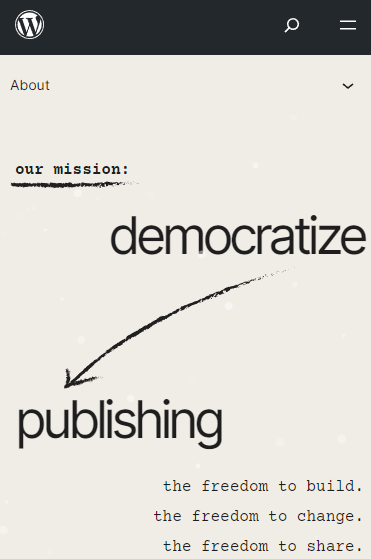
The blog post notes the irony the WordPress Project’s mission is to democratize publishing but the WordPress project itself far from democratic, essentially controlled by one person. He expressed the belief that the current governance structure doesn’t allow for diversity of opinions and that his restrictive control over the WordPress trademark is stifling growth.
Screenshot Of WordPress’s Mission Statement
On the lack of diversity of opinions he writes:
“You need many voices, many ideas, many backgrounds. You need to embrace diversity. Unfortunately, those with ideas that don’t follow the same direction as our current leader, are being shut down, quite a few even banned…”
One of the changes Joost proposes is a loosening of Mullenweg’s grip on the WordPress trademark to allow for more growth:
“The WordPress trademark is given to the public domain or otherwise dealt with in such a way that every company can freely say that they do ‘WordPress hosting’, ‘WordPress support’ etc. Not just because that’s the right thing to do in my mind, but because doing so means we allow growth of the terms and the concepts.”
Joost’s Role and Vision For Change
Lastly, Joost volunteers to lead the change at WordPress so that it becomes a truly democratic foundation with a governing board representing all the stakeholders.
He writes:
“Taking back the commons means that we try to hear every voice, be considerate of all the different use cases of that commons and bring us all forward.
…I’m here, and willing to lead through this transition.”
Among the changes that Joost proposes is a “federated” WordPress repository, a way for multiple plugin and theme directories can curate reviews and addition which then update to the other directories, decentralizing the official WordPress theme and plugin repositories.
He expects to enter discussions with others sometime in the middle of January 2025 to come up with a plan for how to move forward.
Mullenweg Rejects Joost’s Proposals
Matt Mullenweg commented on Joost’s blog post, offering a passive-aggressive dismissal of everything he proposed. His comment was veiled in politeness while handing out indirect criticism and a recommendation that Joost should leave the WordPress community.
These parts of Mullenweg’s response suggest that Joost should start his own community outside of WordPress:
“I think this is a great idea for you to lead and do under a name other than WordPress… There’s really no way to accomplish everything you want without starting with a fresh slate…”
Here is Mullenweg’s full response:
“I think this is a great idea for you to lead and do under a name other than WordPress. There’s really no way to accomplish everything you want without starting with a fresh slate from a trademark, branding, and people point of view.”
The Internal Struggle Is Already Happening
If Mullenweg resists change, an internal struggle within the WordPress community seems inevitable. In fact, momentum for this has already begun; a group of WordPress contributors recently signed an open letter seeking governance reform.
The open letter was written by:
“Core committers and contributors
Make/WordPress team elders and contributors
Others serving in various community roles”
They wrote:
“We object to the status quo, and believe the WordPress project’s current internal operating structure threatens the health and sustainability of the project and its community.
We object to the continued opaqueness of the WordPress governance model.
We object to one person, Matt Mullenweg, controlling all official infrastructure, including the project’s website, email systems, support forums, core, plugin, and theme repositories, update systems, security tools, communication channels, and other technical assets.
We object to major decisions being made without community input, advice, or support.”
Change is coming. Joost’s proposal is a way to accomplish that change in a manner that protects the core principles and community of the WordPress open source project.
Matt Mullenweg recently paused multiple WordPress.org services for a holiday break but unintended effects started almost immediately, affecting the attendance of future WordPress conferences taking place around the world. Joost de Valk requested a fix on GitHub.
Mullenweg’s Pause In Services
Mullenweg’s unexpected pause in WordPress services affected new account registrations on WordPress.org, new plugin, theme and photo directory submissions and reviews of new plugins. Mullenweg did not set a time for the return of those services, only saying that they’ll return once he has the “time, energy, and money” sometime in 2025. So the pause in WordPress.org services is for an indeterminate amount of time.
Unintended Consequences Of WordPress Pause
Joost de Valk filed a GitHub ticket calling attention to a serious issue affecting WordCamp registration for new community members. The GitHub ticket foregrounds the problem inherent in Mullenweg’s unilateral decision to pause certain WordPress.org services.
Mullenweg’s dramatic pause in services had the unintended consequence of diminishing the growth, energy and momentum of the WordPress community itself.
Joost’s GitHub ticket explains why Mullenweg’s holiday break is disruptive:
“Recently, a change was made to require people to have a WordPress.org account to buy a ticket for a WordCamp. Because of that change, the new Holiday Break imposed by Matt causes issues. Because of that imposed holiday break, people can no longer sign up for a WordPress.org account and thus can no longer do that before buying a WordCamp ticket.
There are several, large and small, WordCamps that might be affected by this, as can be seen from the list on Central, and probably including WordCamp Asia 2025.”
Members of the WordPress community agreed. These are a sample of the comments representative of WordPress community members’ concerns:
MakarandMane shared:
“Following 2 weeks there are two Wordcamp Kolhapur & Kolkata.. After 2 weeks another WordCamp in pune. Kolhapur is new community which focus totally on new attendee who don’t have an account. This will affect our tickets sales and contributor day.”
A concern about WordCamp EU was also raised:
“And WCEU has just opened their ticket sales… In the WordCamp rules, we have to be inclusive…. refusing to sell a WordCamp ticket is not really…. welcoming to new community members”
Solution Found
A solution was proposed to fix the issue caused by Mullenweg’s pause in services.
WordPress community member dd32 posted:
“It’s been agreed to re-open the registration for WordCamp purposes, that’s been done in https://meta.trac.wordpress.org/changeset/14325”
Community members were grateful for the fix although some reported that they were still blocked from registering a new account for WordPress but that was a glitch in their browser, fixed by switching to a new browser or a new IP address.
Concern Raised About Solution
Not everyone agreed that the solution was ideal. One WordPress community member posted their concern and received four likes from other members, indicating that others agreed with them.
decodekult wrote:
“I would suggest reconsidering this solution. It addresses the urgent thing here (people could not buy ticket!) but it ignores the primary petition: remove wordpress.org login requirement for buying WordCamp tickets.
The change that closed this ticket does not do that: it guesses where you came from, and if it contains the magic words, then you are lucky enough as to create an account on wordpress.org.
Given that the primary reason for requiring a wordpress.org account that the owner can log into for buying WordCamp tickets was precisely preventing specific people from buying WordCamp tickets, because they could not log into their accounts due to their relationship with a specific company, and given that this ban was legally lifted by a court decision, I raise my hand here and request, as this ticket did from its own title, that the wordpress.org login requirement be removed for buying WordCamp tickets.”
What Happens When Decisions Are Imposed
The importance of what happened is not just about the inability of new community members to register for local WordCamps. The issue is one of decisions and control. One person, Matt Mullenweg, appears to have made the unilateral decision to pause WordPress.org services. Joost de Valk himself uses the word “imposed” to characterize the pause, writing:
“…the new Holiday Break imposed by Matt causes issues. Because of that imposed holiday break, people can no longer sign up for a WordPress.org account…”
The word “imposed” in this context means a unilateral decision made by one person without consultation or choice from community members. Imposed is a strong (and appropriate) word because it conveys that the holiday break was not optional or voluntary but mandated by Matt Mullenweg.
Although this issue was solved by the WordPress community, it would never had happened if the decision had been made with input from stakeholders across the entire WordPress community, from developers, core contributors to WordCamp organizers. This is what happens when decision-making lacks community input and accountability.
WordPress and Squarespace both provide tools to create professional, visually appealing websites suited to ecommerce, article publishing, and corporate and non-profit needs.
What should you consider when choosing between them? Let’s identify the key differences between these platforms to help you determine which one best fits your goals.
Here are seven factors to consider when choosing between WordPress and Squarespace for building a professional website:
Evaluation of WordPress and Squarespace for non-coders.
Comparison of design options between both platforms.
SEO features.
Real-world website performance comparison.
Support for blogging and article publishing.
Suitability for ecommerce and business websites.
Limitations and strengths of WordPress and Squarespace.
Functionality
Key Features
Squarespace
WordPress
SEO Features
Easy to use integrated SEO tools and functionality; good for small businesses and individuals.
Advanced SEO options via plugins; greater flexibility for complex websites.
Performance
Strong Core Web Vitals performance.
Performance is entirely up to users. Plugins and themes can degrade performance.
Customization
Templates are user-friendly for beginners. It can be customized with custom code.
Virtually unlimited customization via plugins, themes, and code modifications.
Usability
Key Features
Squarespace
WordPress
Ease of Use
Simple drag-and-drop interface; ideal for non-coders.
Requires learning individual themes, plugins, and hosting.
WordPress is designed to be easy to install and set up a basic website.
Its “Decisions, not options” software design philosophy means that users are not required to choose technical options and configurations. All features within the core WordPress installation must be useful to at least 80% of users.
WordPress sites can be designed using the native Gutenberg blocks system, which allows non-coders to create websites from scratch without any coding knowledge.
Users can select from pre-made block patterns (page layouts) to create their website designs. It sounds simple, but a user needs to “read the manual” to understand how to navigate to the different parts of their WordPress installation to make all that happen.
Some web hosts integrate a step-by-step page-building experience that makes building a website as easy as answering questions.
Squarespace is a point-and-click solution for creating a website with zero coding knowledge.
The advantage of Squarespace is that it’s “out of the box” and easy to make a website without having to research plugins or web hosts.
Squarespace offers templates that serve as starting points for creating a website and a Build With AI feature that helps users customize their site.
Creating a WordPress website from scratch with zero coding knowledge takes a minimal amount of research about plugins, themes, and web hosting.
The benefit is full ownership of the developed website and control over the associated costs.
But if all you want to do is create a professional website and get going, then Squarespace is an obvious choice.
Both WordPress and Squarespace excel as platforms for creating professional websites.
Squarespace offers non-coders options for easily creating websites. Customers who require a more unique web presence can hire Squarespace experts – independent design professionals vetted by Squarespace – who can apply custom code and extend what is possible with the templates alone.
WordPress offers thousands of templates, plugins, and themes that publishers at all skill levels can use to create literally any kind of website. The design options offered through the WordPress ecosystem are unparalleled by any other platform.
Squarespace provides tools and templates for easy customization to beginners with no coding abilities. Users with advanced needs can choose vetted Squarespace experts for custom coding or customize it themselves.
WordPress provides a vast ecosystem of plugins, themes, and templates, supporting users at all skill levels to create any type of website with virtually unlimited design options.
For example, there are website builders like Elementor that provide a drag-and-drop site creation interface where page elements are simply placed on a page.
Other page builders like Blocksy make it easy to design high-performance websites using WordPress’s native Gutenberg block design system.
SEO Features
WordPress contains all the fundamentals of optimization for search engines without the need for SEO plugins in its original configuration.
It ships with the ability to make XML sitemaps, configure title tags and meta descriptions, generate clean URLs with permalinks, and rewrite URLs automatically when they change.
Its SEO functionality can be extended with plugins that automate technical tasks that make the site more easily discoverable and crawled.
For example, SEO plugins add Bing’s IndexNow technology, add structured data, embed Google Search Console data with the admin panel, add local search optimizations, image optimization, keyword tracking, and more.
Squarespace offers similar SEO functionalities that are integrated with every website.
If there’s a difference between WordPress and Squarespace, it’s that Squarespace offers virtually everything necessary to handle SEO within one unified interface.
Whereas in WordPress, SEO can be split between what’s in the core, built into a theme, provided by an SEO, and plugins.
Squarespace is an SEO winner because of its ease of use and simple implementation.
It offers a unified and organized approach to SEO that’s helpful for small businesses and individuals with limited coding experience. It’s also useful for agencies that manage clients on Squarespace.
WordPress offers more choices and greater freedom to extend a site and is capable of optimizing the most complex web presences.
How Each Platform Handles Structured Data
Lastly, adding Schema.org structured data to webpages makes them eligible for rich results in Google, which prominently highlight websites and draw extra attention to ranked pages.
WordPress doesn’t natively support Schema.org structured data within the core CMS installation. However, it is widely available through third parties as a standalone plugin and a feature of SEO plugins.
Most publishers who are concerned about SEO will install an SEO plugin and benefit from the built-in Schema.org structured data support.
According to the HTTPArchive Web Almanac, 41% of websites now use JSON-LD structured data, and 60% of pages use RDFa and Open Graph.
That relatively low usage percentage falls short of the 80% usage threshold required for WordPress to add a feature, which may explain why Schema.org structured data is not a built-in CMS feature.
Squarespace generates six kinds of structured data:
Blog post.
Event.
Local business.
Organization.
Product.
Website.
While the above structured data cannot be edited or removed, any other structured data not provided can also be manually inserted by page or on a sitewide basis if applicable. For example, recipe bloggers can manually add Recipe structured data.
Squarespace users with more complex needs can take advantage of the ability to leverage “coding blocks” to directly add HTML to the webpage.
Structured data deployment on WordPress is more flexible and comprehensive than Squarespace, and it has significantly more SEO options because of third-party plugins and themes.
Website Performance
Website performance influences the user experience, which, in time, can result in signals of satisfaction, helpfulness, and popularity that search engines look for as part of their ranking algorithms.
The WordPress CMS core is coded to high-performance standards and improves with virtually every new version release.
The WordPress Core Performance Team monitors and works with different developer teams to ensure that best practices are followed, resulting in faster-performing websites.
While the WordPress core is fast and high-performing, advertising scripts, tracking apps, and third-party themes and plugins can degrade core web vital scores.
Squarespace is a closed platform with code that is tightly controlled, more so than WordPress.
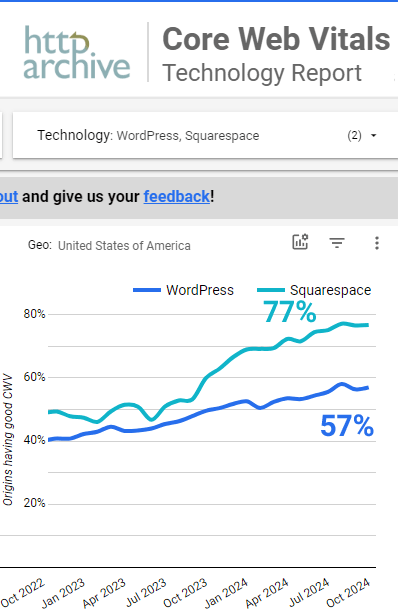
As a consequence, a higher percentage of sites created with Squarespace tend to have good core web vitals scores than sites created with WordPress, according to real-world data collected by HTTPArchive through the Chrome User Experience.
Squarespace, however, takes the crown when it comes to website performance for both global and USA-based origins.
The latest real-world data from HTTPArchive data shows that globally, 42% of WordPress sites had good core web vitals compared to 60% of Squarespace sites with good CWV scores.
The performance data for websites based in the United States shows WordPress scores rise to 57% of sites with good CWV, while 77% of Squarespace sites scored passing marks.
Screenshot of CWV Scores WordPress Vs. Squarespace from HTTPArchive, November 2024
While WordPress has more SEO options, Squarespace is the clear winner in terms of website speed metrics, as measured by core web vitals.
What’s Best For Blogging And Article Publishing
Blogging and publishing articles on Squarespace is simple.
Squarespace supports adding videos, images, galleries, and custom code within articles. Social sharing, post scheduling, article excerpt summaries, tags, and categories are fully built-in, no special configuration is necessary.
Publishing articles is a core functionality of WordPress. Millions of websites worldwide have successfully used it for blogging and article publishing.
Third-party themes and plugins extend WordPress with seemingly limitless options. While options specialized to recipe, news, or travel-related sites are not built-in to WordPress, the available options far exceed what’s available on Squarespace.
User Opinions About WordPress
I asked Adam J. Humphreys, a WordPress developer and search marketer, about his opinion of WordPress as a platform for ecommerce sites.
Adam shared:
“Yes, it’s easy to create an online store presence with WordPress. You can deploy WordPress instantly from most hosts in a few minutes with no technical knowhow. Some web hosts offer WooCommerce pre-built, enabling users to launch prebuilt stores seamlessly.
Third-party website builders greatly improve the ability to launch an online store. Blocksy Pro allows you to build custom polished ecommerce sites quickly using WooCommerce. Astra has prebuilt designs for those who don’t have the technical know how.
I prefer Blocksy Pro because custom and intentional design specific to your online customers always converts best. When you use prebuilt templates you spend as much time removing what you don’t want as you would to just do it quickly from scratch.
Fortunately, these systems like Blocksy Pro come with simple sections and easily connect with popular website builders like Elementor.
Using a managed WordPress host is useful because they supply critical updates automatically, which helps keep ecommerce stores secure and running trouble-free.
That said, there are some WordPress themes and website builders create complex code that results in slower performance, reduced sales from a poor user experience, and often lower rankings.”
User Opinions About Squarespace
A recent discussion on Reddit highlighted five reasons why many people, including web developers, prefer WordPress over Squarespace:
Requires no maintenance effort.
Launching a website is fast and effortless.
All-in-one cost is economical.
More secure than WordPress.
Squarespace is scalable (to a point).
These are the opinions of actual Squarespace users and Redditors in the discussion:
“I know both platforms. Squarespace is the Apple of website builders. WordPress is the PC. WordPress has more powerful abilities with plugins, but maintaining the updates and security is nerd-level and a constant treadmill of tasks. Squarespace ‘just works’ – with limitations on what you can do.”
“I think if you’re not prepared to manage or pay for someone to manage WordPress then having an all in one solution like Squarespace is a good way to go. It’s very hands off as they take care of all the security in the back end. There are extensions you can add for certain things but not needed to keep your website going.”
“I recently built my own website, and chose Squarespace so that I could get it done quickly and launched. The cost is very low, and I can get things done quickly and easily. I integrated my website with Google Analytics and GTM in 30 minutes.”
“I dropped WordPress for the same reason – various plugins kept getting hacked. I’ve really enjoyed Squarespace and it’s been easy to use.”
“Unpopular opinion here, Squarespace IS scalable. I spent 10 years building on WP and refuse to work with it anymore. Consists of nothing but nightmares lol. And I’m a web developer.”
While Squarespace can scale to handle high traffic, sites requiring complex functionality, such as server-side scripting, should consider alternatives like WordPress.
Squarespace wins on ease of use for blogging and article publishing, while WordPress scores higher for customization for every kind of site.
Ecommerce Solution
Squarespace is not just a website platform; it’s also an ecommerce platform specifically designed to make it easy to set up and run an online store.
Squarespace makes it easy to design an ecommerce website with a shopping cart and checkout. It also includes the ability to allow customers to leave reviews.
Shipping options, tax payment calculations, easy checkout options for customers, and order management are all handled within a unified Squarespace user interface.
As with everything else about WordPress, flexibility and the availability of third-party plugins and themes can both simplify creating an online shopping store and scale with a more complex ecommerce store.
Both platforms deliver a professional ecommerce experience, and both can be easily deployed, with a slight edge toward simplicity going to Squarespace because everything is integrated into one interface.
However, deploying a WordPress ecommerce store with a managed WordPress host simplifies the process of getting an online store up and running. The best part is that the WordPress platform enables it to be ready to grow with the business.
Final Takeaway: Limitations And Strengths Of WordPress And Squarespace
Squarespace is appealing because it’s an easy-to-use platform for creating websites that can also be extended with custom code.
It’s suitable for a wide range of sites that publish articles or sell services and products. Its templates can be extensively modified with custom CSS. Plus, the Squarespace Blueprint AI allows for the creation of unique professional websites.
A weakness of closed-source solutions is that they aren’t as flexible and customizable as websites built on the WordPress platform.
The convenience of Squarespace comes with a cost that can’t be mitigated by switching to a different web host. It’s a compromise between cost and convenience.
Meanwhile, WordPress isn’t generally as easy or convenient as Squarespace.
Getting the best experience with WordPress takes research to choose the right web hosting platform and the best and most trustworthy template and plugins that serve your needs.
Some web hosts make it easier to get online with WordPress, and page builders greatly improve the ease of creating beautiful websites.
Both platforms are top choices for building an online presence.
Choosing which one is the best depends on how much time you’re willing to put into researching options and how important flexibility and controlling costs are.
Squarespace is an excellent choice for those who want to focus on their business without worrying about technology or site security.
WordPress is a perfect solution for those who enjoy the freedom, scalability, and cost efficiency that comes with using an open-source solution.