WP Engine Escalates Legal Battle With Automattic and Mullenweg via @sejournal, @martinibuster

WP Engine escalated its Federal complaint by citing Automattic’s publication of the WP Engine Tracker website as evidence of intent to harm WP Engine and exposing customers to potential cybercrimes. The updated complaint incorporates recent actions by Mullenweg to further strengthen their case.

A spokesperson for WP Engine issued a statement to Search Engine Journal about the WP Engine Tracker website:

“Automattic’s wrongful and reckless publication of customer’s information without their consent underscores why we have moved for a preliminary injunction. WP Engine has requested the immediate takedown of this information and looks forward to the November 26th hearing on the injunction.”

Legal Complaint Amended With More Evidence

WP Engine (WPE) filed a complaint in Federal court seeking a preliminary injunction to prevent Matt Mullenweg and Automattic from continuing actions that harm WPE’s business and their relationships with their customers. That complaint was amended with further details to support their allegations against Mullenweg and Automattic.

The legal complaint begins by stating in general terms what gives rise to their claim:

“This is a case about abuse of power, extortion, and greed.”

It then grows progressively specific by introducing evidence of how Automattic and Mullenweg continue their “bad acts unabated” for the purpose of harming WP Engine (WPE).

The amended claim adds the following, quoting Mullenweg himself:

“Since then, Defendants have continued to escalate their war, unleashing a campaign to steal WPE’s software, customers and employees. Indeed, just days ago, Defendants were unambiguous about their future plans:”

This is the statement Mullenweg made that is quoted in the amended complaint:

“[S]ince this started [with WPE] they’ve had uh, we estimate tens of thousands of customers leave. . . . So, um you know, I think over the next few weeks, they’re actually gonna lose far more than 8% of their business . . . we’re at war with them. We’re . . . going to go brick by brick and take . . . take every single one of their customers . . . if they weren’t around guess what? . . . We’d happily have those customers, and in fact we’re getting a lot of them.”

WP Engine Tracker Site Used As Evidence

Automattic recently created a website on the WordPressEngineTracker.com domain called WP Engine Tracker that encourages WordPress Engine customers to leave, offering links to promotions that offer discounts and promise a smooth transition to other web hosts.

WPE states that the WP Engine Tracker website is part of a campaign to encourage WPE customers to abandon it, writing:

“Defendants also created a webpage at wordpress.org offering “Promotions and Coupons” to convince WPE customers to stop doing business with WPE and switch over to Automattic’s competitor hosting companies like wordpress.com and Pressable; they later added links to other competitors as well.”

The WordPress Engine Tracker website calls attention to the number of sites that have abandoned WP Engine (WPE) since Matt Mullenweg’s September 21st public denunciation of WP Engine and the start of his “nuclear” war against the web host. The amended Federal lawsuit points to the September 21st date listed on that site as additional evidence tying Automattic to a campaign to harm WP Engine’s business.

The legal document explains:

“Just last week, in an apparent effort to brag about how successful they have been in harming WPE, Defendants created a website—www.wordpressenginetracker.com—that “list[s] . . . every domain hosted by @wpengine, which you can see decline every day. 15,080 sites have left already since September 21st.

September 21 was not selected randomly. It is the day after Defendants’ self-proclaimed nuclear war began – an admission that these customer losses were caused by Defendants’ wrongful actions. In this extraordinary attack on WPE and its customers, Defendants included on their disparaging website a downloadable file of ‘all [WPE] sites ready for a new home’—that is, WPE’s customer list, literally inviting others to target and poach WPE’s clients while Defendants’ attacks on WPE continued..”

The purpose of the above allegations are to build as much evidence that lend credence to WP Engine’s claim that Automattic is actively trying to cause harm WP Engine’s business.

WPE Accuses Automattic Of Additional Harms

Another new allegation against Automattic is that the spreadsheet offered for download on the WP Engine Tracker website includes sensitive information that is not publicly available and could cause direct harm to WPE customers.

The amended Federal lawsuit explains:

“Worse, this downloadable file contains private information regarding WPE’s customers’ domain names, including development, test, and pre-production servers—many of which are not intended to be accessed publicly and contain sensitive or private information. Many of these servers are intentionally not indexed or otherwise included in public search results because the servers are not safe, secure or production-ready and not intended to be accessed by the general public.

By disclosing this information to the general public, Defendants put these development, test, and pre-production domains at risk for hacking and unauthorized access.”

WP Engine Tracker Site Part Of A Larger Strategy

WPE’s amended complaint alleges that the WP Engine Tracker site is one part of a larger strategy to cause harm to WP Engine’s business that includes encouraging WPE employees to resign. The legal document adds new information of how the WP Engine Tracker website is just one part of a larger strategy to harm WPE’s business.

The updated document adds the following new allegations as evidence of WPE’s claims:

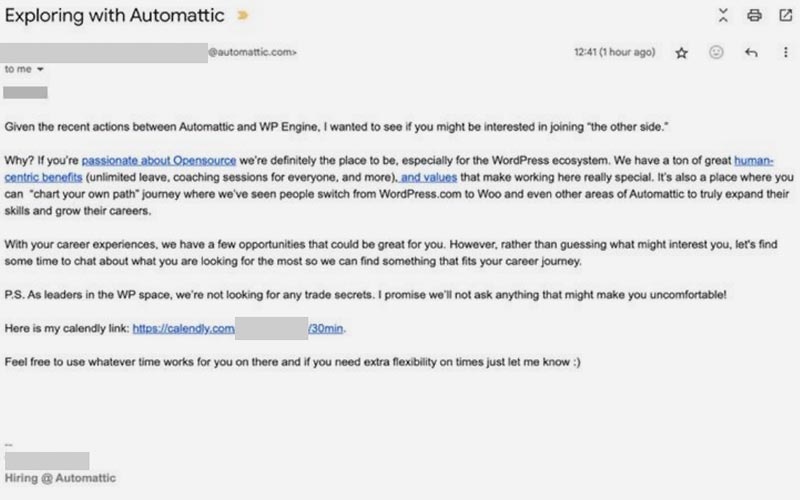
“Not content with interfering with WPE’s customer relations, Automattic has recently escalated its tactics by actively recruiting hundreds of WPE employees, in an apparent effort to weaken WPE by sowing doubts about the company’s future and enticing WPE’s employees to join Automattic:”

The document includes a screenshot of an email solicitation apparently sent to an employee that encourages them to join Automattic.

Screenshot Of Evidence Presented In Amended Complaint
Escalation Of Federal Complaint

WP Engine’s amended complaint against Mullenweg and Automattic invokes the Sherman Act (prohibiting monopolization to maintain a competitive marketplace), the Lanham Act (governing trademarks, false advertising, and unfair competition), and the Computer Fraud and Abuse Act (addressing unauthorized computer access and cybercrimes). The amendments tie recent actions by Mullenweg and Automattic—such as the creation of the WP Engine Tracker website—directly to their claims, turning Mullenweg’s attacks on WP Engine into evidence.

Read the amended Federal complaint here: (PDF).

Featured Image by Shutterstock/chaiyapruek youprasert
WordPress Security Plugin Vulnerability Endangers 4 Million+ Sites via @sejournal, @martinibuster

A critical vulnerability was discovered in a popular WordPress security plugin with over 4 million installations. The flaw allows attackers to log in as any user, including administrators, and gain full access to their site-level permissions. Assigned a threat score of 9.8 out of 10, it underscores the ease of exploitation and the potential for full site compromise, including malware injection, unauthorized content changes, and attacks on site visitors.

Really Simple Security

Really Simple Security is a WordPress plugin that was developed to improve resistance of WordPress sites against exploits (called security hardening), enable two-factor authentication, detect vulnerabilities and it also generates an SSL certificate. One of the reasons it promotes itself as lightweight is because it’s designed as a modular software that allows users to choose what security enhancements to enable so that (in theory) the processes for disabled capabilities don’t load and slow down the website. It’s a popular trend in WordPress plugins that allows a software to do many things but only do the tasks that a user requires.

The plugin is promoted through affiliate reviews and according to Google AI Overview enjoys highly positive reviews. Over 97% of reviews on the official WordPress repository are rated with five stars, the highest possible rating, with less than 1% rating the plugin as 1 star.

What Went Wrong?

A security flaw in the plugin makes it vulnerable to authentication bypass, which is a flaw that allows an attacker to access areas of a website that require a username and a password without having to provide credentials. The vulnerability specific to Really Simple Security allows an attacker to acquire access of any registered user of the website, including the administrator, simply by knowing the user name.

This is called an Unauthenticated Access Vulnerability, one of most severe kinds of flaws because it is generally easier to exploit than an “authenticated” flaw which requires an attacker to first attain the user name and password of a registered user.

Wordfence explains the exact reason for the vulnerability:

“The Really Simple Security (Free, Pro, and Pro Multisite) plugins for WordPress are vulnerable to authentication bypass in versions 9.0.0 to 9.1.1.1. This is due to improper user check error handling in the two-factor REST API actions with the ‘check_login_and_get_user’ function. This makes it possible for unauthenticated attackers to log in as any existing user on the site, such as an administrator, when the “Two-Factor Authentication” setting is enabled (disabled by default).

Wordfence blocked 310 attacks targeting this vulnerability in the past 24 hours.”

Recommended Course Of Action:

Wordfence encourages users of the plugin to update to Really Simple Security version 9.1.2 (or higher version).

The Really Simple Security plugin’s changelog responsibly announces the reason for the updated software:

“Changelog
9.1.2
security: authentication bypass”

Read the Wordfence security advisory:

Really Simple Security (Free, Pro, and Pro Multisite) 9.0.0 – 9.1.1.1 – Authentication Bypass

Featured Image by Shutterstock/Tithi Luadthong

WordPress 6.7 Released – This Is Why It’s A Winner via @sejournal, @martinibuster

WordPress has released version 6.7, codenamed Rollins. This update introduces better font controls, a new default theme, enhanced design tools for easier page creation, 65 accessibility improvements, and performance optimizations. Version 6.7 focuses on making it easy to build attractive, high-performance websites.

Twenty Twenty-Five Theme

Twenty Twenty-Five is the new default theme that ships with WordPress. Twenty Twenty-Five was purpose intentionally built to offer users an easier and more intuitive experience for creating websites.

The official WordPress Twenty Twenty-Five documentation explains:

“While ideating Twenty Twenty-Five, one recurring idea was that simple things should be intuitive while complex things should be possible. This concept of simplicity and complexity leads to a reliable foundation for extending a default WordPress experience to make it yours.

Twenty Twenty-Five embodies ultimate flexibility and adaptability, showcasing the many ways WordPress enables people to tell their stories with many patterns and styles to choose from.”

The key improvements are:

  • Better Patterns
    WordPress patterns are pre-designed ready to use blocks for different parts of a page. This allows users to choose from pre-made sections of a web page like the header, call-to-actions, pricing tables and on. Twenty Twenty-Five ships with a wide range of patterns that are appropriate for different kinds of sites.
  • Improved Styles
    Better support for fonts in multiple languages plus bundled color variations.

New Templates
There are three base templates that can serve as a starting point for creating a website.

The new template versions are:

  • Personal Blog (Default)
    The Personal Blog template is focused on simplicity and ease of use.
  • Photo Blog (Alternative)
    This template has multiple layouts that are suitable for image heavy sites.
  • Complex Blog (Alternative)
    This template is intended for complex websites, offering more design flexibility.

Typography

As part of the emphasis on a better design experience, WordPress 6.7 features better font management that allows users to more control over fonts.

The WordPress announcement explains:

“Create, edit, remove, and apply font size presets with the next addition to the Styles interface. Override theme defaults or create your own custom font size, complete with fluid typography for responsive font scaling.”

New Zoom Out Feature

WordPress 6.7 has a new design feature that lets users zoom out from the details and see what the site looks like as a whole so that users can swap out block patterns and see what it looks like in macro view. This is in keeping with the focus on making it easy to design attractive websites.

Accessibility Improvements

The documentation for WordPress 6.7 was not as organized as it usually is, making it difficult to navigate to the documentation for the 65 improvements to accessibility are. WordPress documentation is usually better but it seems less organized this time.

This is what the announcement said about the accessibility improvements:

65+ accessibility fixes and enhancements focus on foundational aspects of the WordPress experience, from improving user interface components and keyboard navigation in the Editor, to an accessible heading on WordPress login screens and clearer labeling throughout.”

Performance Updates

The latest version of the WordPress core ships with faster pattern loading and better PHP 8+ support. Old code (deprecated) is removed to create a more lightweight theme, plus a new auto size component that improves lazy-loading images.

That last improvement to lazy loading should help improve core web vitals scores because the Auto Sizes feature helps the browser select the right image size from the CSS and use that to build the web page, rather than using the image size itself. CSS is usually downloaded before images, so having to depend on image size is redundant and slower. Chrome shipped with this ability last year, December 2023.

Engineering lead at Google Chrome Addy Osmani tweeted about it last year:

“Chrome is shipping support for lazy-loaded images with srcset, this allows the browser to use the layout width of the image in order to select the source url from the srcset.

For lazy-loaded images, CSS is often available before the image load begins. The browser can take the actual width of the image from CSS and use that as if it was the image’s sizes.”

The official WordPress announcement for the auto sizes for lazy loading explains:

WordPress documentation for the auto sizes feature explains:

“WordPress 6.7 adds sizes=”auto” for lazy-loaded images. This feature, which was recently added to the HTML specification, allows the browser to use the rendered layout width of the image when selecting a source from the srcset list, since lazy loaded images don’t load until after the layout is known.”

Is It Safe To Download WordPress 6.7?

Most developers discussing the latest version of WordPress in the private Dynamic WordPress Facebook group report that updating to the latest version is easy and trouble-free.

But some developers reported maintenance mode errors that were easily resolved by deleting the .maintenance file (maintenance mode file. The .maintenance mode error doesn’t happen because there’s something wrong with the update, it’s usually because there’s something going on with the upstream server that’s providing the update. The WordPress.org 6.7 documentation page was temporarily down so maybe the WordPress servers were experiencing too much traffic.

Featured Image by Shutterstock/Asier Romero

WordPress Elementor Addons Vulnerability Affects 400k Sites via @sejournal, @martinibuster

Wordfence issued an advisory on a vulnerability patched in the popular Happy Addons for Elementor plugin, installed on over 400,000 websites. The security flaw could allow attackers to upload malicious scripts that execute when browsers visit affected pages.

Happy Addons for Elementor

The Happy Addons for Elementor plugin extends the Elementor page builder with dozens of free widgets and features like image grids, a user feedback and reviews function, and custom navigation menus. A paid version of the plugin offers even more design functionalities that make it easy to create functional and attractive WordPress websites.

Stored Cross-Site Scripting (Stored XSS)

Stored XSS is a vulnerability typically occur when a theme or plugin doesn’t properly filter user inputs (called sanitization), allowing malicious scripts to be uploaded to the database and stored on the server itself. When a user visits the website the script downloads to the browser and executes actions like stealing browser cookies or redirecting the user to a malicious website.

The stored XSS vulnerability affecting the Happy Addons for Elementor plugin requires a hacker acquiring Contributor-level permissions (authentication), making it harder to take advantage of the vulnerability.

WordPress security company Wordfence rated the vulnerability 6.4 on a scale of 1 – 10, a medium threat level.

According Wordfence:

“The Happy Addons for Elementor plugin for WordPress is vulnerable to Stored Cross-Site Scripting via the before_label parameter in the Image Comparison widget in all versions up to, and including, 3.12.5 due to insufficient input sanitization and output escaping. This makes it possible for authenticated attackers, with Contributor-level access and above, to inject arbitrary web scripts in pages that will execute whenever a user accesses an injected page.”

Plugin users should consider updating to the latest version, currently 3.12.6, which contains a security patch for the vulnerability.

Read the Wordfence advisory:

Happy Addons for Elementor <= 3.12.5 – Authenticated (Contributor+) Stored Cross-Site Scripting via Image Comparison

Featured Image by Shutterstock/Red Cristal

Automattic Faces Irony Of New WPEngineTracker Protest Site via @sejournal, @martinibuster

In an ironic twist to the ongoing dispute between Automattic and WP Engine, a newly published website on WPEngineTracker.com is displaying a protest message against CEO Matt Mullenweg.

Copycat Domain Name Registered

Someone registered the domain name WPEngineTracker.com using the words that Automattic’s WordPressEngineTracker.com domain uses to describe itself  (WP Engine Tracker) . If people who are looking for Automattic’s WP Engine Tracker domain navigate to WPEngine.com they will land on the variant website which is currently publishing a protest message against Matt Mullenweg.

Screenshot of Typosquat Domain

The above domain name was only registered a few days ago on November 7th. The Internet being what it is, it was arguable inevitable that someone would register the typosquat domain name variant.

Registration Of Domain Announced On GitHub

Someone posted a comment in the official WordPressEngineTracker.com GitHub repository to announce that they registered the domain name variant. The post was met with approval as evidenced by the 15 likes and 18 laughing emojis it received.

Screenshot Of Announcement In GitHub Repository

Domain Registration Announced On Reddit

The person who made the announcement on GitHub appears to have posted a discussion on the WordPress subreddit announcing that they have registered the domain name variant. The Reddit member who made the announcement is a 16 year member.

They posted:

“I found it odd that Matt registered wordpressenginetracker.com when the thingamajig isn’t called “WordPress Engine Tracker” – it’s “WP Engine Tracker”
Thought I should try to be helpful so I bought https://wpenginetracker.com”

That post was also met with positive reactions, receiving 138 upvotes three days later.

Matt Mullenweg’s Dispute With WPEngine

Disputes can appear different depending on who is telling the story. Automattic’s recent motion to dismiss WP Engine’s lawsuit offers details from its side, providing insight into the situation. Despite multiple opportunities to share its perspective, Automattic has received limited approval from WordPress users on social media. The registration of the WP Engine Tracker domain name variant could be said to be a manifestation of that negative sentiment toward Automattic and Mullenweg.

Featured Image by Shutterstock/Vulp

Cloudflare Blocks Automattic’s WP Engine Tracker For Phishing via @sejournal, @martinibuster

Automattic’s WP Engine Tracker website was temporarily blocked by Cloudflare over the weekend as a suspected phishing site, sparking cheers from members of the WordPress subreddit. Meanwhile, someone registered the typosquatting domain WPEngineTracker.com to protest against Matt Mullenweg.

Automattic, presumably under the direction of Matt Mullenweg, recently created a website called WP Engine Tracker on the WordPressEngineTracker.com domain name that lists how many WordPress sites have moved away from managed web host WP Engine. It also recommends web hosts that current customers can move to and offers a download of all domains that are hosted on WP Engine.

An Automattic emailed Search Engine Journal offered background information about the WP Engine Tracker website:

“The beauty of open source software is that everyone is able to access data on a granular level, because it’s all publicly available information. That public data has shown that ever since WP Engine filed its lawsuit – making it clear that they do not have an official association with WordPress and attracting greater attention to the company’s poor service, modifications to the WordPress core software, increasing and convoluted pricing structure, and repeated down times – their customers have left their platform for other hosting providers. WP Engine can and always has been able to access the WordPress software and plugins available on WordPress.org, as can anyone.”

Cloudflare Blocks WP Engine Tracker Website

Sometime on November 9th Cloudflare blocked access to Automattic’s WP Engine Tracker website with a message alerting Internet users that the website has been reported for phishing attempts.

The Cloudflare warning said:

“Warning

Suspected Phishing

This website has been reported for potential phishing.

Phishing is when a site attempts to steal sensitive information by falsely presenting as a safe source.”

WordPress Subreddit Cheers The Blocking

A Reddit discussion appeared soon after the site was blocked with the headline: Cloudflare is showing a phishing warning on wordpressenginetracker.com

Typical comments:

“Wow I’ve actually never seen that screen before. That’s hilarious.”

“As it should. Chrome should give it the red screen of death”

“It’s an interesting development, which made me wonder: Are people reporting phishing to Cloudflare just to mess with Mr. Mullenweg or is there something the site does that can actually be considered phishing?

Cloudflare’s report form has another type of abuse to select, which, in this case, is as obvious as the sun on the sunniest day: Trademark infringement. Why are people reporting phishing?”

One commenter noted the website was displaying a “403 Forbidden” error message if a site visitor ignored the warning and clicked through to the site. A 403 server response means that the server acknowledges the browser request but is denying access to the website.

Screenshot Of Blocked Website

Typosquatting Domain Name Registered

Typosquatting is when someone registers a domain name that is similar to a brand name and that users may type to visit. In this case, someone registered the domain name WPEngineTracker.com to take advantage of the fact that Automattic had registered the domain name WordPressEngineTracker.com but was calling it WP Engine Tracker. When people try to reach the Automattic site by typing in the name of the site as the domain they then arrive at the typosquat domain.

Screenshot of Typosquat Domain

The above domain name was only registered a few days ago on November 7th. The Internet being what it is, it was inevitable that someone would register the typosquat domain name variant.

WordPressEngineTracker.com Is Back Online

After a few hours of downtime Cloudflare removed the phishing block and the Automattic WordPress Engine Tracker website was restored.

Featured Image by Shutterstock/santypan

Automattic Taunts WP Engine With Provocative Website via @sejournal, @martinibuster

Automattic appears to have created a site that draws attention to the number of customers that have left WP Engine for another web host. The site includes a searchable database of websites hosted on WP Engine that can also be downloaded as a CSV spreadsheet.

The name of the website is WP Engine Tracker, it features a prominent Automattic logo and a link to an associated GitHub  repository that shows an Automattic employee is the developer of the website.

Ongoing Dispute Between Automattic And WP Engine

The website is the latest escalation in a dispute initiated by Matt Mullenweg, WordPress co-founder and CEO of Automattic, who argues that WP Engine’s contributions to WordPress development fall short. WordPress relies on contributions and sponsorships from volunteers, businesses, and individuals who benefit from the platform. The underlying principle is that the more everyone contributes the more the entire community benefits, strengthening WordPress’s position as the world’s most popular content management system.

The text of the website features a number representing the websites that have left WP Engine and an explanation:

“This is the number of websites that have left WP Engine and found a new home since Sep 21, 2024.

Search below to see if a site is still hosted by WP Engine”

Comments Left On WP Engine Tracker GitHub Repository

The website links to a GitHub repository that lists the author of the WP Engine Tracker website as being someone who works for Automattic.

Screenshot Of Author Listed On GitHub Repository

The Issues tab of the official GitHub repository contains critiques of the project and some criticism.

The first comment notes that the counter is incorrect because it claims to count websites that have left WP Engine but that it should be saying how many domains have left. The reason is because of the “websites” listed redirect to one domain, which means that the count is inflated.

Another person commented:

“It’s possible some folks have left WordPress as well, so saying sites have left WP Engine doesn’t necessarily mean they’ve gone to another web host that supports WordPress. This is a really tacky endeavor. I am not impressed at all.”

The latest comment calls the website “amateurish”:

“Also the check, if a domain is hosted by WPE, is quite amateurish.

https://github.com/wordpressenginetracker/wordpressenginetracker.github.io/blob/trunk/index.js#L118

missing dot at beginning for some
only checks subdomains
I’m not sure what the goal of this website is and what Matt tries to achieve. But the community is getting increasingly annoyed of such unprofessional behavior of Matt and in the security community some also think about dropping 0days for WordPress and related plugins / themes due to this whole situation.

The feedback under the tweet from the official WordPress account and in the reddit community shows, what most of us think.

The whole situation hurts everyone more than needed.”

Screenshot Of GitHub Repository For WP Engine Tracker

What Is The Point Of The Website?

It’s unclear what the purpose of the WP Engine Tracker website is other than the stated purpose of tracking sites that have left WP Engine.

The website draws attention to the specific domains of websites that have moved away from WP Engine but what purpose does that serve? Is the purpose is to draw attention to sites that could be solicited to move away from WP Engine? If so, there’s nothing on the website that encourages that use of the information.  The WP Engine Tracker website is silent about what site visitors should do with the data.

Visit the WP Engine Tracker site here

Visit the WP Engine Tracker GitHub Repository here.

Featured Image by Shutterstock/Wirestock Creators

Automattic’s Response To WP Engine Lawsuit Reframes Narrative via @sejournal, @martinibuster

Lawyers for Matt Mullenweg and Automattic filed a motion to dismiss the lawsuit from WP Engine, offering a different perspective on the dispute’s underlying causes.

The motion to dismiss claims that the one causing harm isn’t Mullenweg and Automattic but WP Engine, asserting that WP Engine is compelling the defendant to provide resources and support free of charge as well as to restrict the Mullenweg’s ability to express his opinions about WP Engine’s practices.

The motion to dismiss begins by accuses WP Engine of selectively choosing recent events as basis for their complaint. It then fills in the parts that were left out, beginning with the founding of WordPress over two decades ago when Matt co-founded a way to create websites that democratized Internet publishing in the process. The motion outlines how his organization devoted thousands of person-years to growing the platform, eventually getting it to a point where it now generates an estimated $10 billion dollars per year for thousands of companies and freelancers.

The point of the first part of the motion is to explain that Mullenweg and Automattic support the open source WordPress project because the project depends on a “symbiotic” relationship between the WordPress community and those who are a part of it, including web hosts like WP Engine.

“But the success and vitality of WordPress depends on a supportive and symbiotic relationship with those in the WordPress community.”

After establishing what the community is, how it was founded and the role of Mullenweg and Automattic as a strongly supportive of the community, it then paints a picture of WP Engine as a company that reaps huge benefits from the volunteer work and donated time without adequately giving back to the community. This is the part that Mullenweg and Automattic feel is left out of WP Engine’s complaint, that Mullenweg was expressing his opinion that not only should WP Engine should provide more support to the community and that Mullenweg was responding to the threat posed by the plaintiff’s behavior.

The motion explains:

“Plaintiff WP Engine’s conduct poses a threat to that community. WP Engine is a website hosting service built on the back of WordPress software and controlled by the private equity firm Silver Lake, which claims over $100B of assets under management.

…In addition to WordPress software, WP Engine also uses various of the free resources on the Website, and its Complaint alleges that access to the Website is now, apparently, critical for its business.”

Lastly, the beginning part of the motion, which explains the defendant’s side of the dispute, asserts that the defendant’s behavior was entirely within their legal right because no agreement exists between WordPress and WP Engine that guarantees them access to WordPress resources and that WP Engine at no time tried to secure rights to access.

The document continues:

“But the Complaint does not (and cannot) allege that WP Engine has any agreement with Matt (or anyone else for that matter) that gives WP Engine the right to use the Website’s resources. The Complaint does not (and cannot) allege that WP Engine at any time has attempted to secure that right from Matt or elsewhere.

Instead, WP Engine has exploited the free resources provided by the Website to make hundreds of millions of dollars annually. WP Engine has done so while refusing to meaningfully give back to the WordPress community, and while unfairly trading off the goodwill associated with the WordPress and WooCommerce trademarks.”

Accusation Of Trademark Infringement

The motion to dismiss filed by Mullenweg and Automattic accuse WP Engine of trademark infringement, a claim that has been at the heart of of Mullenweg’s dispute, which the legal response says is a dispute that Mullenweg attempted to amicably resolve in private.

The legal document asserts:

“In 2021, for the first time, WP Engine incorporated the WordPress trademark into the name of its own product offering which it called “Headless WordPress,” infringing that trademark and violating the express terms of the WordPress Foundation Trademark Policy, which prohibits the use of the WordPress trademarks in product names. And, over time, WP Engine has progressively increased its use and prominence of the WordPress trademark throughout its marketing materials, ultimately using that mark well beyond the recognized limits of nominative fair use.”

What Triggered The Dispute

The defendants claim that WP Engine benefited from the open source community but declined to become an active partner in the open source community. The defendants claim that they tried to bring WP Engine into the community as part of the symbiotic relationship but WP Engine refused.

The motion to dismiss is interesting because it first argues that WP Engine didn’t have an agreement with Automattic for use of the WordPress trademark nor did it had an agreement for the rights to have access to WordPress resources. Then it shows how the defendants tried to reach an agreement and that it was WP Engine’s refusal to “meaningfully give back to the WordPress community” and come to an agreement with Automattic is what triggered the dispute.

The document explains:

“Matt has attempted to raise these concerns with WP Engine and to reach an amicable resolution for the good of the community. In private, Matt also has encouraged WP Engine to give back to the ecosystem from which it has taken so much. Preserving and maintaining the resources made available on the Website requires considerable effort and investment—an effort and investment that Matt makes to benefit those with a shared sense of mission. WP Engine does not
embrace that mission.

WP Engine and Silver Lake cannot expect to profit off the back of others without carrying some of the weight—and that is all Matt has asked of them. For example, Matt suggested that WP Engine either execute a license for the Foundation’s WordPress trademarks or dedicate eight percent of its revenue to the further development of the open source WordPress software.”

Mullenweg Had Two Choices

The above is what Mullenweg and Automattic claim is at the heart of the dispute, the unwillingness of WP Engine to reach an agreement with Automattic and become a stronger partner with the community. The motion to dismiss say that WP Engine’s refusal to reach an agreement left Mullenweg few choices of what to do next, as the motion explains:.

“When it became abundantly clear to Matt that WP Engine had no interest in giving back, Matt was left with two choices: (i) continue to allow WP Engine to unfairly exploit the free resources of the Website, use the WordPress and WooCommerce trademarks without authorization, which would also threaten the very existence of those trademarks, and remain silent on the negative impact of its behavior or (ii) refuse to allow WP Engine to do that and demand publicly that WP Engine do more to support the community.”

Disputes Look Different From Each Side

Matt Mullenweg and Automattic have been portrayed in an unflattering light since the dispute with WP Engine burst into public. The motion to dismiss communicates that Mullenweg’s motivations were in defense of the WordPress community, proving that every dispute looks different depending on who is telling the story. Now it’s up to the judge to decide.

Featured Image by Shutterstock/santypan

Favicons and your online brand: Make sure you stand out!

Favicons are those little icons you see in your browser tabs. When you have many open tabs in your browser, they help you recognize and find the page you were looking for. They are important for your branding because Google shows them in the mobile and desktop search results. So, let’s take a closer look at those little icons and your branding here!

What is a favicon?

A favicon is a tiny, square image that represents a website. You see it in your browser’s address bar, open tabs, and bookmarks. Its main job is to help users quickly identify and find a site among many open tabs or results. Often, these match a website’s logo or theme, making it instantly recognizable. For consistency, favicons follow certain size and format rules to look good on different devices and platforms.

Favicon in your browser bar

The above example is in a browser bar, but we also see these in the search results. For some time, Google has shown them in its search results.

an example of a search result with the yoast favicon located in the top left corner
The Yoast logo is an example of a favicon in Google search

If your favicon represents a trustworthy brand, it can help people recognize your brand through this little icon, boosting your site’s click-through rate. After all, a picture says more than a thousand words!

Make your favicon stand out

You should make sure your favicon stands out, whether from that long list of tabs or the search results. Check if it matches your logo and website well. Especially when you are not one of the big brands and want people to recognize this little icon. Some tips directly related to that are:

  • Avoid too many details in your icon;
  • Please use the right colors so the favicon doesn’t blend in with the gray of your browser tab;
  • Test it at various sizes to ensure it remains clear and recognizable.

Everything is about branding. Your brand should be recognizable. Proper branding ensures that people will immediately relate your favicon to your website.

Follow Google’s guidelines regarding which format and size to use for your favicon. Google’s latest guidelines require favicons to maintain a 1:1 aspect ratio and a minimum size of 8×8 pixels. While the minimum size offers a baseline, Google strongly recommends using a resolution of at least 48×48 pixels to ensure clarity and visual appeal across various devices.

You should review and adjust your favicons to align with these guidelines. Make sure that your brand remains effectively represented in search results.

an example of a site might look on google as shown in the search appearance section of yoast seo
Yoast SEO shows your favicon in the Search Appearance section

Do these have SEO benefits?

Are there real SEO benefits? The importance of these icons certainly increased since they are present in the search results. While adding a favicon won’t directly make your page rank higher, it might increase the click-through rate to your page when it is shown next to your URL in the search results. It adds professionalism to your site, enhancing user perception and trust. This might indirectly contribute to better engagement metrics.

Of course, this only works if people feel positively about your brand or website. In practice, you should invest time in holistic SEO: making your website (and product/service) awesome in every way!

Favicons in WordPress

If you use WordPress, you might know that there’s a favicon functionality in WordPress. You can use this default functionality without hassle. It’s located in the General Settings and is called Site Icon. Here, you can read step-by-step instructions on how to change your site’s favicon in WordPress.

Set your favicon in the WordPress General Settings

These icons are small powerhouses

Favicons might be small, but they impact how people see your website. Your favicon can represent your brand by keeping your design simple and following the latest guidelines. It helps attract attention and makes your site look more professional. While they don’t directly boost search rankings, they can lead to higher click-through rates and better brand recognition. These benefits can support your overall SEO strategy. Spending a little time on a great icon can strengthen your connection with visitors.

Read more: 5 tips on branding »

Coming up next!

The SEO Agency Guide To Efficient WordPress Hosting & Management via @sejournal, @kinsta

This post was sponsored by Kinsta. The opinions expressed in this article are the sponsor’s own.

Managing client sites can quickly become costly in terms of time, money, and expertise, especially as your agency grows.

You’re constantly busy fixing slow WordPress performance, handling downtime, or regularly updating and backing up ecommerce sites and small blogs.

The solution to these challenges might lie in fully managed hosting for WordPress sites.

Opting for a fully managed hosting provider that specializes in WordPress and understands agency needs can save you both time and money. By making the switch, you can focus on what truly matters: serving your current clients and driving new business into your sales funnel.

WordPress Worries & How To Keep Clients Happy

For SEO agencies managing multiple client sites, ensuring consistently fast performance across the board is essential. Websites with poor performance metrics are more likely to see a dip in traffic, increased bounce rates, and lost conversion opportunities.

Managed hosting, especially hosting that specializes and is optimized for WordPress, offers agencies a way to deliver high-speed, well-performing sites without constantly battling technical issues.

Clients expect seamless performance, but handling these technical requirements for numerous websites can be a time-consuming process. While WordPress is versatile and user-friendly, it does come with performance challenges.

SEO agencies must deal with frequent updates, plugin management, security vulnerabilities, and optimization issues.

Challenges like bloated themes, inefficient plugins, and poor hosting infrastructure can lead to slow load times. You also need to ensure that client WordPress sites are secured against malware and hackers, which requires regular monitoring and updates.

With managed hosting, many of these tasks are automated, significantly reducing the workload on your team.

Managed hosting for WordPress simplifies the process by providing a full suite of performance, security, and maintenance services.

Instead of spending valuable time on manual updates, backups, and troubleshooting, you can rely on your hosting provider to handle these tasks automatically, resulting in reduced downtime, improved site performance, and a more efficient use of resources.

Ultimately, you can focus your energy on SEO strategies that drive results for your clients.

Basics Of Managed Hosting For WordPress

Managed hosting providers like Kinsta take care of all the technical aspects of running WordPress websites, including performance optimization, security, updates, backups, and server management.

We take over the responsibilities ensure the platform runs smoothly and securely without the constant need for manual intervention.

Kinsta also eliminates common performance bottlenecks in WordPress include slow-loading themes, outdated plugins, inefficient database queries, and suboptimal server configurations.

Key Benefits Of Efficient Managed Hosting For SEO

1. Performance & Speed

Core Web Vitals, Google’s user experience metrics, play a significant role in determining search rankings. Managed hosting improves metrics like LCP, FID, and CLS by offering high-performance servers and built-in caching solutions.

CDNs reduce latency by serving your website’s static files from servers closest to the user, significantly improving load times.

Kinsta, for example, uses Google Cloud’s premium tier network and C2 virtual machines, ensuring the fastest possible load times for WordPress sites. We also provide integrated CDN services, along with advanced caching configurations, which ensure that even resource-heavy WordPress sites load quickly.

And the benefits are instantly noticeable.

Before the switch, Torro Media faced performance issues, frequent downtimes, and difficulties scaling their websites to handle traffic growth. These issues negatively affected their clients’ user experience and SEO results.

After migrating to Kinsta, Torro Media saw noteable improvements:

  • Faster website performance – Site load times significantly improved, contributing to better SEO rankings and overall user experience.
  • Reduced downtime – Kinsta’s reliable infrastructure ensured that Torro Media’s websites experienced minimal downtime, keeping client websites accessible.
  • Expert support – Our support team helped Torro Media resolve technical issues efficiently, allowing the agency to focus on growth rather than troubleshooting.

As a result, Torro was able to scale its operations and deliver better results for its clients.

2. WP-Specific Security

Security is a critical component of managed hosting. Platforms like Kinsta offer automatic security patches, malware scanning, and firewalls tailored specifically for WordPress.

These features are vital to protecting your clients’ sites from cyber threats, which, if left unchecked, can lead to ranking drops due to blacklisting by search engines.

Downtime and security breaches negatively impact SEO. Google devalues sites that experience frequent downtime or security vulnerabilities.

Managed hosting providers minimize these risks by maintaining secure, stable environments with 24/7 monitoring, helping ensure that your clients’ sites remain online and safe from attacks.

3. Automatic Backups & Recovery

Automatic daily backups are a standard feature of managed hosting, protecting against data loss due to server crashes or website errors. For agencies, this means peace of mind, knowing that they can restore their clients’ sites quickly in case of a problem. The ability to quickly recover from an issue helps maintain SEO rankings, as prolonged downtime can hurt search performance.

Managed hosting providers often include advanced tools such as one-click restore points and robust disaster recovery systems. Additionally, having specialized support means that you have access to experts who understand WordPress and can help troubleshoot complex issues that affect performance and SEO.

Importance Of An Agency-Focused Managed WordPress Hosting Provider

For SEO agencies, uptime guarantees are essential to maintaining site availability. Managed hosting providers, like Kinsta, who specialize in serving agencies, offer a 99.9% uptime SLA and multiple data center locations, ensuring that websites remain accessible to users across the globe.

Scalability and flexibility matter, too. As your agency grows, your clients’ hosting needs may evolve. Managed hosting platforms designed for agencies offer scalability, allowing you to easily add resources as your client portfolio expands.

With scalable solutions, you can handle traffic surges without worrying about site downtime or slowdowns.

Agency Dashboard - Managed Hosting for WordPress

1. The Right Dashboards

A user-friendly dashboard is crucial for managing multiple client sites efficiently. Kinsta’s MyKinsta dashboard, for example, allows agencies to monitor performance, uptime, and traffic across all sites in one centralized location, providing full visibility into each client’s website performance.

Hosting dashboards like Kinsta’s MyKinsta provide real-time insights into key performance metrics such as server response times, resource usage, and traffic spikes. These metrics are essential for ensuring that sites remain optimized for SEO.

2. Balance Costs With Performance Benefits

For agencies, managing hosting costs is always a consideration. While managed hosting may come with a higher price tag than traditional shared hosting, the benefits, such as faster performance, reduced downtime, and enhanced security, translate into better client results and long-term cost savings.

Kinsta offers flexible pricing based on traffic, resources, and features, making it easier for agencies to align their hosting solutions with client budgets.

By automating tasks like backups, updates, and security management, managed hosting allows agencies to significantly reduce the time and resources spent on day-to-day maintenance. This frees up your team to focus on delivering SEO results, ultimately improving efficiency and client satisfaction.

Don’t think it makes that big of a difference? Think again.

After migrating to Kinsta, 5Tales experienced:

  • Improved site speed – Load times dropped by over 50%, which enhanced user experience and SEO performance.
  • Better support – Kinsta’s specialized support team helped troubleshoot issues quickly and provided expert-level advice.
  • Streamlined management – With our user-friendly dashboard and automated features, 5Tales reduced the time spent on maintenance and troubleshooting.

Overall, 5Tales saw an increase in both client satisfaction and SEO rankings after moving to Kinsta.

3. Managed Hosting & Page Speed Optimization

Tools like Kinsta’s Application Performance Monitoring (APM) provide detailed insights into website performance, helping agencies identify slow-loading elements and optimize them. This level of transparency enables faster troubleshooting and more precise optimization efforts, which are critical for maintaining fast page speeds.

It’s also easy to integrate managed hosting platforms with your existing tech stack. Kinsta works seamlessly with SEO tools like Google Analytics, DebugBear, and others, allowing agencies to track site performance, analyze traffic patterns, and ensure sites are running at peak efficiency.

Conclusion

Managed hosting is not just a convenience. It’s a critical component of success for SEO agencies managing WordPress sites.

By leveraging the performance, security, and time-saving benefits of a managed hosting provider like Kinsta, agencies can improve client results, enhance their relationships, and streamline their operations.

When it comes to SEO, every second counts. A fast, secure, and well-maintained website will always perform better in search rankings. For agencies looking to deliver maximum value to their clients, investing in managed hosting is a smart, long-term decision.

Ready to make the switch?

Kinsta offers a guarantee of no-shared hosting, 99.99% uptime guarantee, and 24/7/365 support, so we’re here when you need us. Plus, we makes it easy, effortless, and free to move to Kinsta.

Our team of migration experts have experience switching from all web hosts. And when you make the switch to Kinsta, we’ll give you up to $10,000 in free hosting to ensure you avoid paying double hosting bills.


Image Credits

Featured Image: Image by Kinsta. Used with permission.

In-Post Image: Images by Kinsta. Used with permission.