A small US city experiments with AI to find out what residents want

Bowling Green, Kentucky, is home to 75,000 residents who recently wrapped up an experiment in using AI for democracy: Can an online polling platform, powered by machine learning, capture what residents want to see happen in their city?

When Doug Gorman, elected leader of the county that includes Bowling Green, took office in 2023, it was the fastest-growing city in the state and projected to double in size by 2050, but it lacked a plan for how that growth would unfold. Gorman had a meeting with Sam Ford, a local consultant who had worked with the surveying platform Pol.is, which uses machine learning to gather opinions from large groups of people. 

They “needed a vision” for the anticipated growth, Ford says. The two convened a group of volunteers with experience in eight areas: economic development, talent, housing, public health, quality of life, tourism, storytelling, and infrastructure. They built a plan to use Pol.is to help write a 25-year plan for the city. The platform is just one of several new technologies used in Europe and increasingly in the US to help make sure that local governance is informed by public opinion.

After a month of advertising, the Pol.is portal launched in February. Residents could go to the website and anonymously submit an idea (in less than 140 characters) for what the 25-year plan should include. They could also vote on whether they agreed or disagreed with other ideas. The tool could be translated into a participant’s preferred language, and human moderators worked to make sure the traffic was coming from the Bowling Green area. 

Over the month that it was live, 7,890 residents participated, and 2,000 people submitted their own ideas. An AI-powered tool from Google Jigsaw then analyzed the data to find what people agreed and disagreed on. 

Experts on democracy technologies who were not involved in the project say this level of participation—about 10% of the city’s residents—was impressive.

“That is a lot,” says Archon Fung, director of the Ash Center for Innovation and Democratic Governance at the Harvard Kennedy School. A local election might see a 25% turnout, he says, and that requires nothing more than filling out a ballot. 

“Here, it’s a more demanding kind of participation, right? You’re actually voting on or considering some substantive things, and 2,000 people are contributing ideas,” he says. “So I think that’s a lot of people who are engaged.”

The plans that received the most attention in the Bowling Green experiment were hyperlocal. The ideas with the broadest support were increasing the number of local health-care specialists so residents wouldn’t have to travel to nearby Nashville for medical care, enticing more restaurants and grocery stores to open on the city’s north side, and preserving historic buildings. 

More contentious ideas included approving recreational marijuana, adding sexual orientation and gender identity to the city’s nondiscrimination clause, and providing more options for private education. Out of 3,940 unique ideas, 2,370 received more than 80% agreement, including initiatives like investing in stormwater infrastructure and expanding local opportunities for children and adults with autism.  

The volunteers running the experiment were not completely hands-off. Submitted ideas were screened according to a moderation policy, and redundant ideas were not posted. Ford says that 51% of ideas were published, and 31% were deemed redundant. About 6% of ideas were not posted because they were either completely off-topic or contained a personal attack.

But some researchers who study the technologies that can make democracy more effective question whether soliciting input in this manner is a reliable way to understand what a community wants.

One problem is self-selection—for example, certain kinds of people tend to show up to in-person forums like town halls. Research shows that seniors, homeowners, and people with high levels of education are the most likely to attend, Fung says. It’s possible that similar dynamics are at play among the residents of Bowling Green who decided to participate in the project.

“Self-selection is not an adequate way to represent the opinions of a public,” says James Fishkin, a political scientist at Stanford who’s known for developing a process he calls deliberative polling, in which a representative sample of a population’s residents are brought together for a weekend, paid about $300 each for their participation, and asked to deliberate in small groups. Other methods, used in some European governments, use jury-style groups of residents to make public policy decisions. 

What’s clear to everyone who studies the effectiveness of these tools is that they promise to move a city in a more democratic direction, but we won’t know if Bowling Green’s experiment worked until residents see what the city does with the ideas that they raised.

“You can’t make policy based on a tweet,” says Beth Simone Noveck, who directs a lab that studies democracy and technology at Northeastern University. As she points out, residents were voting on 140-character ideas, and those now need to be formed into real policies. 

“What comes next,” she says, “is the conversation between the city and residents to develop a short proposal into something that can actually be implemented.” For residents to trust that their voice actually matters, the city must be clear on why it’s implementing some ideas and not others. 

For now, the organizers have made the results public, and they will make recommendations to the Warren County leadership later this year. 

Spring Books on B2B, Nvidia, Bill Gates, More

Seven new and upcoming books offer practical advice on bold marketing, global branding, and growing from a startup to a multi-million-dollar company, including honest portrayals of lessons learned by brilliant business leaders.

Courageous Marketing: The B2B Marketer’s Playbook for Career Success

Cover of Courageous Marketing

Courageous Marketing

by Udi Ledergor

Author Udi Ledergor is the chief evangelist and former CMO at Gong, an AI SaaS platform to monitor sales decisions that has grown to a $7 billion valuation in just 10 years. His just-published book advocates making bold and risky moves to grab attention and create loyal fans. It garnered blurbs from prominent authors Daniel Pink, Robert Cialdini, and Nir Eyal. It is already in the top 10 for three Amazon book categories.

Build a Business You Love

Cover of Build a Business You Love

Build a Business You Love

by Dave Ramsey

Ramsey built a one-man consulting business into a $250 million empire and authored eight books, notably the New York Times bestseller “Total Money Makeover.” This new title aims to be a “road map that takes the guesswork out of growth for business owners.” Ramsey breaks growth into five stages — Treadmill Operator, Pathfinder, Trailblazer, Peak Performer, and Legacy Builder — and advises on the unique challenges of each.

How Not to Invest

Cover of How Not to Invest

How Not to Invest

by Barry Ritholz

Asserting that “avoiding errors is much more important than scoring wins,” Ritholz, co-founder of a prominent wealth management firm, aims to help readers evade the most common mistakes people make with their money. “Shark Tank” host Mark Cuban and Nobel-winning economist Richard Thaler call it a fun read.

The Thinking Machine: Jensen Huang, Nvidia, and the World’s Most Coveted Microchip

Cover of The Thinking Machine

The Thinking Machine

by Stephen Witt

Hot on the heels of February’s “The Nvidia Way” comes a new biography of Nvidia founder Jensen Huang, “a determined entrepreneur who defied Wall Street to push his radical vision for computing.” Read it to learn how the company morphed from video games to a leader in AI.

Source Code: My Beginnings

Cover of Source Code

Source Code

by Bill Gates

With its black and white youth cover image, this memoir by Microsoft founder and philanthropist Bill Gates isn’t the usual portrait of an entrepreneur’s path to success. Instead, it recounts the early life experiences that shaped his character before starting that journey.

Shoveling $h!t: A Love Story About the Entrepreneur’s Messy Path to Success

Cover of Shoveling $h!t

Shoveling $h!t

by Kass and Mike Lazerow

As the irreverent title suggests, the serial entrepreneur power couple who founded Golf.com and Buddy Media (acquired by Salesforce) promise a “brutally honest take” in their forthcoming book. Admitting that entrepreneurship is hard, they share personal stories and the strategies they’ve learned.

Brand Global, Adapt Local: How to Build Brand Value Across Cultures

Cover of Brand Global, Adapt Local

Brand Global, Adapt Local

by Katherine Melchior Ray and Nataly Kelly

Two experts share their global experiences with Nestlé, Nike, and others on how to build an international marketing and localization mindset. They explore how companies balance preserving brand identity with exploring new markets.

LinkedIn Study Finds Adding Links Boosts Engagement By 13% via @sejournal, @MattGSouthern

A new study of over 577,000 LinkedIn posts challenges common marketing advice. It finds that posts with links get 13.57% more interactions and 4.90% more views than posts without links.

The LinkedIn study by Metricool analyzed nearly 48,000 company pages over three years. The findings give marketers solid data to rethink their LinkedIn strategies.

Link Performance Contradicts Common Advice

For years, social media experts have warned against adding links in LinkedIn posts.

Many claimed the platform would show these posts to fewer people to keep users on LinkedIn.

This new research says that’s wrong.

The data shows that about 31% of LinkedIn posts contained links to other websites. These posts consistently did better than posts without links.

Image Credit: Metricool LinkedIn Study 2025.

Content Format Performance Reveals Unexpected Winners

The study also found big differences in how content types perform.

Carousels (document posts) work best for engagement, with the highest engagement rate (45.85%) of any format. People on LinkedIn are willing to spend time clicking through multiple slides.

Polls are a missed opportunity. They make up only 0.00034% of all posts analyzed but got 206.33% more reach than average posts. Almost no one uses them, but they perform well.

Text-only posts performed worse than visual content across all metrics. Despite being common, they received the fewest interactions.

Video Content Shows Remarkable Growth

LinkedIn video content grew by 53% last year, with engagement up by 87.32%. This growth is faster than on TikTok, Reels, and YouTube.

The report states:

“Video posting may have increased by 13.77%, but the real story is in the rise of impressions (+73.39%) and views (+52.17%). Users are engaging more with video content, which indicates that LinkedIn is prioritizing this format in its algorithm.”

Industry-Specific Insights

The research broke down performance by industry. Surprisingly, sectors with smaller followings often get better engagement.

Manufacturing and utilities companies had fewer followers than education or retail companies, yet they received more engagement per post.

This challenges the idea that having more followers automatically means better results.

Practical Tips for Marketers

Based on these findings, here’s what LinkedIn marketers should do:

  • Don’t avoid links: Include links when they add value. They help, not hurt, your posts.
  • Mix up your content: Use more carousels and polls. They perform much better than other formats.
  • Send more traffic through LinkedIn: With clicks up 28.13% year-over-year, LinkedIn is better than many think for driving website traffic.
  • Be realistic about follower growth: Only 17.68% of accounts gained followers in 2024. Growing a LinkedIn following is harder than on other platforms.

Looking Ahead

The Metricool report challenges fundamental LinkedIn marketing beliefs with solid data. The most useful finding for SEO and content marketers is that adding links helps rather than hurts your posts.

Marketers should regularly test old advice against real performance data. What worked on LinkedIn in the past might not work in 2025.


Featured Image: Jartee/Shutterstock

Microsoft Monetize Gets A Major AI Upgrade via @sejournal, @brookeosmundson

Microsoft’s Monetize platform just received one of its biggest updates to date, and this one is all about working smarter, not harder.

Launched April 14, the new Monetize experience introduces AI-powered tools, a revamped homepage, and much-needed platform enhancements that give both publishers and advertisers more visibility and control.

This isn’t just a design refresh. With Microsoft Copilot now integrated, a new centralized dashboard, and a detailed history log, the platform is being positioned as a smarter command center for digital monetization.

Here’s what’s new and how it impacts your bottom line.

Copilot Is Now Built Into Monetize

Microsoft’s Copilot is now officially integrated into Monetize and available to all clients.

Copilot acts like a real-time AI assistant built directly into your monetization workflow. Instead of sifting through reports and data tables to figure out what’s wrong, Copilot surfaces insights automatically.

Think: “Why is my fill rate down?” or “Which line items are underperforming this week?”

Now, you’re able to ask and get answers without leaving the platform.

It’s designed to proactively alert users to revenue-impacting issues, like creatives that haven’t served, line items that didn’t deliver as expected, or unexpected dips in CPM.

For publishers who manage large volumes of inventory and multiple demand sources, this type of AI support can dramatically reduce troubleshooting time and help get campaigns back on track faster.

This allows monetization teams to shift their focus to revenue strategy, not just diagnostics.

A Smarter, Centralized Homepage

The new Monetize homepage is more than just a cosmetic update, it’s now the nerve center of the platform. It’s built around clarity and action.

Instead of bouncing between multiple tabs or reports, users now land on a central dashboard that shows performance highlights, revenue trends, system notifications, and even troubleshooting insights.

It’s designed to cut down the time spent navigating the platform and ramp up how quickly you can make revenue-driving decisions.

Microsoft Monetize homepage performance highlights example.Image credit: Microsoft Ads blog, April 2025

Some of the key features of the new homepage include:

  • Performance highlights: Get a high-level summary of revenue trends and your most important KPIs at the top of the screen.
  • Revenue and troubleshooting insights: What was originally in the Monetize Insights tool is now integrated into the homepage.
  • Brand unblock and authorized sellers insights: Brings visibility to commonly overlooked revenue blocks.

In short: you no longer need to click into five different tabs to piece together what’s going on. The homepage is designed to give a high-level pulse on your monetization performance, with quick pathways to dig deeper when needed.

It’s particularly helpful for teams managing multiple properties, as you can prioritize where to intervene based on the highest revenue impact.

A Simplified Navigation Experience

Another welcome change is the platform’s redesigned navigation. Microsoft has moved to a cleaner left-hand panel layout, consistent with its broader product ecosystem.

It may seem like a small thing, but this update removes a lot of the friction users previously experienced when trying to find specific tools or data. Now, when you hover over a section like “Line Items” or “Reporting,” all related sub-navigation options appear instantly, helping users get where they need to go faster.

For publishers who jump between Microsoft Ads, Monetize, and other tools like Microsoft’s Analytics offerings, this consistency in layout creates a smoother experience overall.

History Log Adds Transparency

One of the more functional (but underrated) updates is the new history change log.

This feature gives users the ability to view a running history of platform changes, whether it’s edits to ad units, campaign-level changes, or adjustments made by different team members.

You can now:

  • Filter changes by user, object type, or date range
  • View a summary of all edits made to a specific item over time
  • Compare and search up to five different objects at once
  • Spot which changes may have inadvertently affected revenue or delivery

The is such a time-saver for teams managing complex account structures or operating across multiple internal stakeholders.

Why Advertisers and Brands Should Care

While most of these updates are tailored to publishers, advertisers and brands also stand to benefit – especially those buying programmatically within Microsoft’s ecosystem.

Here’s a few examples of how brands and advertisers can benefit:

  • Cleaner inventory = better delivery. Copilot helps publishers resolve issues like broken creatives or poor match rates faster. That means your ads are more likely to show where and when they should.
  • More consistent pricing. With publishers better able to manage and optimize their inventory, the fluctuations in floor pricing and bid dynamics can become more predictable.
  • Better campaign outcomes. When ad operations run more smoothly, campaign metrics tend to improve.
  • Reduced latency. The homepage’s new alert system flags latency issues immediately, helping prevent delayed or missed ad requests that impact advertiser performance.

In short: a more efficient supply side leads to fewer wasted impressions and stronger results for advertisers across Microsoft inventory.

Looking Ahead

With this revamp, Microsoft is signaling that Monetize is no longer just an ad server: it’s becoming an intelligence hub for publishers.

Between the Copilot integration, the centralized homepage, and detailed change logs, the platform gives monetization teams tools to act faster, stay informed, and optimize proactively.

By improving the infrastructure on the publisher side, Microsoft is also improving the health and quality of its programmatic marketplace. That’s a win for everyone involved, whether you’re selling impressions or buying them.

If you’re a publisher already using Monetize, now’s the time to explore these new features. If you’re an advertiser, these updates may mean more reliable inventory and smarter campaign performance across Microsoft’s supply chain.

Google AI Overview Study: 90% Of B2B Buyers Click On Citations via @sejournal, @MattGSouthern

Google’s AI Overviews have changed how search works. A TrustRadius report shows that 72% of B2B buyers see AI Overviews during research.

The study found something interesting: 90% of its respondents said they click on the cited sources to check information.

This finding differs from previous reports about declining click rates.

AI Overviews Are Affecting Search Patterns in Complex Ways

When AI summaries first appeared in search results, many publishers worried about “zero-click searches” reducing traffic. Many still see evidence of fewer clicks across different industries.

This research suggests B2B tech searches work differently. The study shows that while traffic patterns are changing, many users in their sample don’t fully trust AI content. They often check sources to verify what they read.

The report states:

“These overviews cite sources, and 90% of buyers surveyed said that they click through the sources cited in AI Overviews for fact-checking purposes. Buyers are clearly wanting to fact-check. They also want to consult with their peers, which we’ll get into later.”

If this extends beyond this study, being cited in these overviews might offer visibility for specific queries.

From Traffic Goals to Citation Considerations

While still optimizing for organic clicks, becoming a citation source for AI overviews is valuable.

The report notes:

“Vendors can fill the gap in these tools’ capabilities by providing buyers with content that answers their later-stage buying questions, including use case-specific content or detailed pricing information.”

This might mean creating clear, authoritative content that AI systems could cite. This applies especially to category-level searches where AI Overviews often appear.

The Ungated Content Advantage in AI Training

The research spotted a common mistake about how AI works. Some vendors think AI models can access their gated content (behind forms) for training.

They can’t. AI models generally only use publicly available content.

The report suggests:

“Vendors must find the right balance between gated and ungated content to maintain discoverability in the age of AI.”

This creates a challenge for B2B marketers who put valuable content behind forms. Making more quality information public could influence AI systems. You can still keep some premium content gated for lead generation.

Potential Implications For SEO Professionals

For search marketers, consider these points:

  • Google’s emphasis on Experience, Expertise, Authoritativeness, and Trustworthiness seems even more critical for AI evaluation.
  • The research notes that “AI tools aren’t just training on vendor sites… Many AI Overviews cite third-party technology sites as sources.”
  • As organic traffic patterns change, “AI Overviews are reshaping brand discoverability” and possibly “increasing the use of paid search.”

Evolving SEO Success Metrics

Traditional SEO metrics like organic traffic still matter. But this research suggests we should also monitor other factors, like how often AI Overviews cite you and the quality of that traffic.

Kevin Indig is quoted in the report stating:

“The era of volume traffic is over… What’s going away are clicks from the super early stage of the buyer journey. But people will click through visit sites eventually.”

He adds:

“I think we’ll see a lot less traffic, but the traffic that still arrives will be of higher quality.”

This offers search marketers one view on handling the changing landscape. Like with all significant changes, the best approach likely involves:

  • Testing different strategies
  • Measuring what works for your specific audience
  • Adapting as you learn more

This research doesn’t suggest AI is making SEO obsolete. Instead, it invites us to consider how SEO might change as search behaviors evolve.


Featured Image: PeopleImages.com – Yuri A/Shutterstock

Beyond ROAS: Aligning Google Ads With Your True Business Objectives [Webinar] via @sejournal, @hethr_campbell

Are your paid campaigns delivering the results that really matter?

If your ad strategy is focused only on cost-per-acquisition, you might be leaving long-term growth on the table. It’s time to rethink how you measure success in Google Ads.

In this upcoming webinar, you’ll get:

  • Smarter ways to measure PPC success.
  • Tested, powerful bidding strategies.
  • Real, bigger business impact.

Why This Webinar Is a Must-Attend Event

This session is designed to help you move beyond ROAS and align your ad performance with actual business goals.

Join live and you’ll learn to:

Expert Insights From Justin Covington

Justin Covington, Director of Paid Channels Solutions at iQuanti, will walk you through the latest updates in Google Ads and how to use them to drive stronger results. You’ll leave with practical, ready-to-use strategies you can apply immediately.

From campaign structure to audience strategy, you’ll get practical steps to start optimizing your paid ads immediately.

Don’t Miss Out!

Save your spot now for clear, tactical guidance that helps your ad dollars go further.

Can’t Make It Live?

Register anyway, and we’ll send the full recording straight to your inbox.

How I Edit AI Content: A Workflow For The New Age Of Content Creation via @sejournal, @Kevin_Indig

In last week’s Memo, I explained how, just as digital DJing transformed music mixing, AI is revolutionizing how we create content by giving us instant access to diverse expressions and ideas.

Instead of fighting this change, writers should embrace AI as a starting point while focusing our energy on adding uniquely human elements that machines can’t replicate, like our personal experiences, moral judgment, and cultural understanding.

Last week, I identified seven distinctly human writing capabilities and 11 telltale signs of AI-generated content.

Today, I want to show you how I personally apply these insights in my editing process.

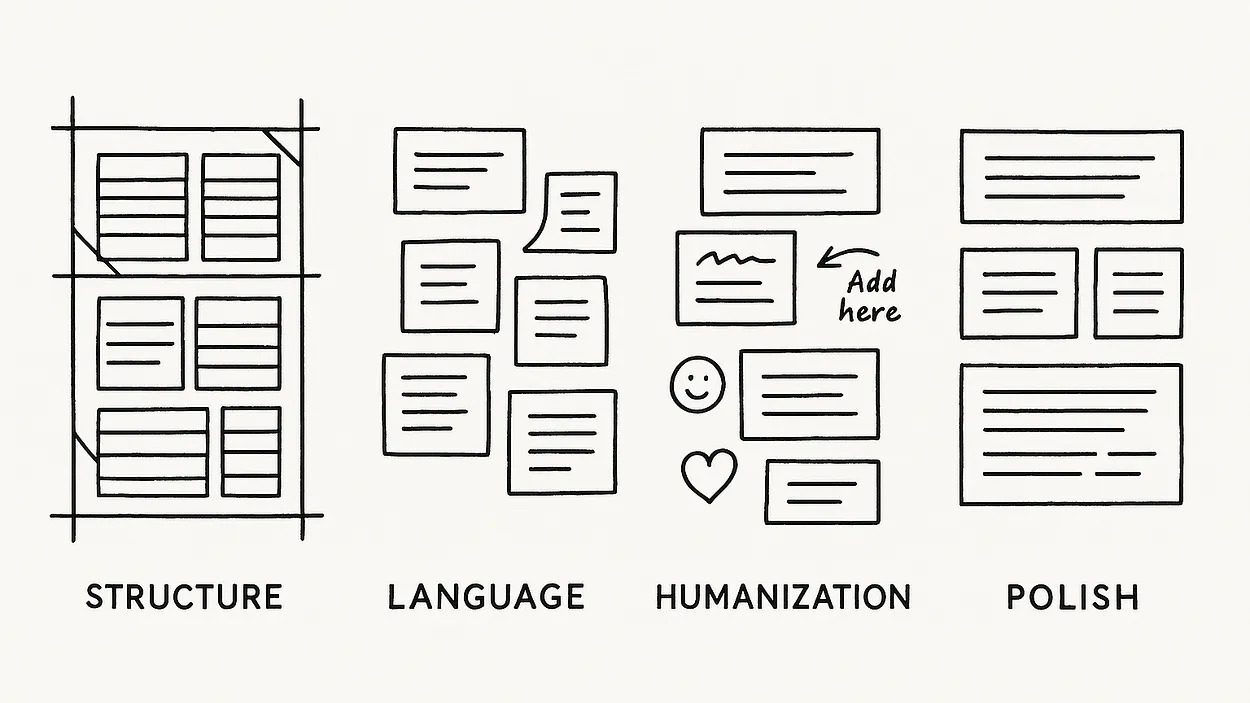
Image Credit: Lyna ™

Rather than seeing AI as my replacement, I advocate for thoughtful collaboration between human creativity and AI efficiency, much like how skilled DJs don’t just play songs but transform them through artistic mixing.

As someone who’s spent countless hours editing and tinkering with AI-generated drafts, I’ve noticed most people get stuck on grammar fixes while missing what truly makes writing connect with readers.

They overlook deeper considerations like:

  • Purposeful imperfection: Truly human writing isn’t perfectly polished. Natural quirks, occasional tangents, and varied sentence structures create authenticity that perfect grammar and flawless organization can’t replicate.
  • Emotional intelligence: AI content often lacks the intuitive emotional resonance that comes from lived experience. Editors frequently correct grammar but overlook opportunities to infuse genuine emotional depth.
  • Cultural context: Humans naturally reference shared cultural touchpoints and adapt their tone based on context. This awareness is difficult to edit into AI content without completely reframing passages.

In today’s Memo, I explain how to turn these edits into a recurring workflow for you or your team, so you can leverage the power of AI, accelerate content output, and drive more organic revenue.

Boost your skills with Growth Memo’s weekly expert insights. Subscribe for free!

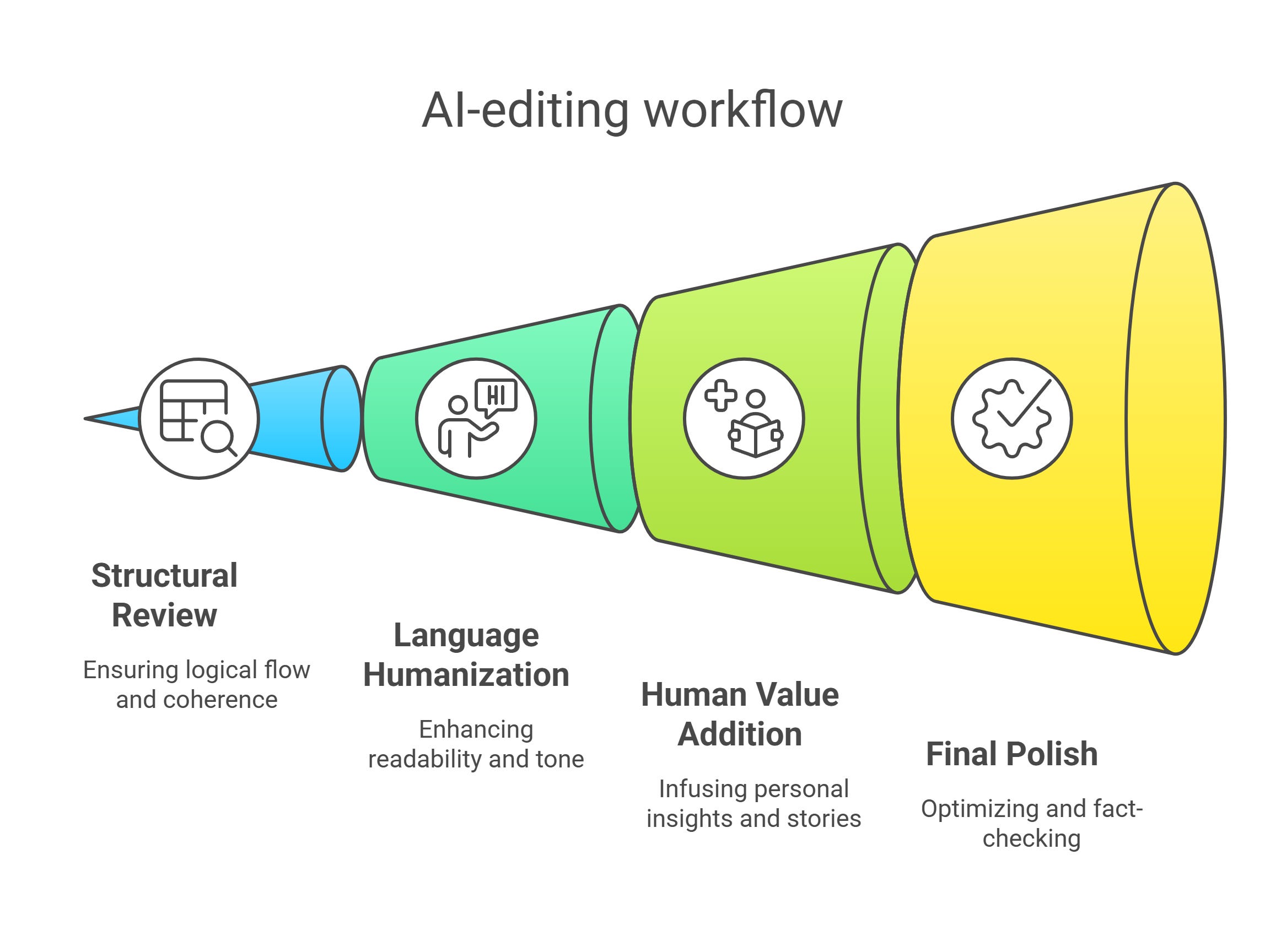
Turning AI-Editing Into A Workflow

AI Editing WorkflowImage Credit: Kevin Indig

I like to edit AI content in several passes, each with a specific focus:

  • Round 1: Structure.
  • Round 2: Language.
  • Round 3: Humanization.
  • Round 4: Polish.

Not every type of content needs the same amount of editing:

  • You can be more hands-off with supporting content on category or product pages, while editorial content for blogs or content hubs needs significantly more editing.
  • In the same way, evergreen topics need less editing while thought leadership needs a heavy editorial hand.

Round 1: Structure & Big-Picture Review

First, I read the entire draft like a skeptical reader would.

I’m looking for logical flow issues, redundant sections, and places where the AI went on unhelpful tangents.

This is about getting the bones right before polishing sentences.

Rather than nitpicking grammar, I ask: “Does this piece make sense? Would a human actually structure it this way?”

But, the most important question is: “Does this piece meet user intent?” You need to ensure that the structure optimizes for speed-to-insights and helps users solve the implied problem of their searches.

If sections feel out of order or disconnected, I rearrange them.

If the AI repeats the same point in multiple places (they love doing this), I consolidate.

Round 2: Humanize The Language & Flow

Next, I tackle that sterile AI tone that makes readers’ eyes glaze over.

I break up the robotic rhythm by:

  • Consciously varying sentence lengths (Watch this. I’m doing it right now. Different lengths create natural cadence.).
  • Replacing corporate-speak with how humans actually talk (“use” instead of “utilize,” “start” instead of “commence”).
  • Cutting those meaningless filler sentences AI loves to add (“It’s important to note that…” or “As we can see from the above…”).

For example, I’d transform this AI-written line:

Utilizing appropriate methodologies can facilitate enhanced engagement among target demographics.

Into this:

Use the right approach, and people will actually care about what you’re saying.

Round 3: Add The Human Value Only You Can Provide

Here’s where I earn my keep.

I infuse the piece with:

  • Opinions where appropriate.
  • Personal stories or examples.
  • Unique metaphors or cultural references.
  • Nuanced insights that come from my expertise.

One of the shifts we have to make – and that I made – is to be more deliberate about collecting stories and opinions that we can tell.

In his book “Storyworthy,” Matthew Dicks shares how he saves stories from everyday life in a spreadsheet. He calls this habit Homework For Life, and it’s the most effective way to collect relatable stories that you can use for your content. It’s also a way to slow down time:

As you begin to take stock of your days, find those moments — see them and record them — time will begin to slow down for you. The pace of your life will relax.

Round 4: Final Polish & Optimization

Finally, I do a last pass focusing on:

  • A punchy opening that hooks the reader.
  • Removing any lingering AI patterns (overly formal language, repetitive phrases).
  • Search optimization (user intent, headings, keywords, internal links) without sacrificing readability.
  • Fact-checking every statistic, date, name, and claim.
  • Adding calls to action or questions that engage readers.

I know I’ve succeeded when I read the final piece and genuinely forget that an AI was involved in the drafting process.

The ultimate test: “Would I be proud to put my name on this?”

AI Content Editing Checklist

Before you hit “Publish,” run through this checklist to make sure you’ve covered all bases:

  • User Intent: The content is organized logically and addresses the intended topic or keyword completely, without off-topic detours.
  • Tone & Voice: The writing sounds consistently human and aligns with brand voice (e.g., friendly, professional, witty, etc.).
  • Readability: Sentences and paragraphs are concise and easy to read. Jargon is explained or simplified. The formatting (headings, lists, etc.) makes it skimmable.
  • Repetition: No overly repetitive phrases or ideas. Redundant content is trimmed. The language is varied and interesting.
  • Accurate: All facts, stats, names, and claims have been verified. Any errors are corrected. Sources are cited for important or non-obvious facts, lending credibility. There are no unsupported claims or outdated information.
  • Original Value: The content contains unique elements (experiences, insights, examples, opinions) that did not come from AI.
  • SEO: The primary keyword and relevant terms are included naturally. Title and headings are optimized and clear. Internal links to related content are added where relevant. External links to authoritative sources support the content.
  • Polish: The introduction is compelling. The content includes elements that engage the reader (questions, conversational bits) and a call to action. It’s free of typos and grammatical errors. All sentences flow well.

If you can check off all (or most) of these items, you’ve likely turned the AI draft into a high-quality piece that can confidently be published.

AI Content Editing = Remixing

We’ve come full circle.

Just as digital technology transformed DJing without eliminating the need for human creativity and curation, AI is reshaping writing while still requiring our uniquely human touch.

The irony I mentioned at the start of this article – trying to make AI content more human – becomes less ironic when we view AI as a collaborative tool rather than a replacement for human creativity.

Just as DJs evolved from vinyl crates to digital platforms without losing their artistic touch, writers are adapting to use AI while maintaining their unique value.

You can raise the chances of creating high-performing content that stands out by selecting the right models, inputs, and direction:

  • The newest models lead to exponentially better content than older (cheaper) ones. Don’t try to save money here.
  • Spend a lot of time getting style guides and examples right so the models work in the right lanes.
  • The more unique your data sources are, the more defensible your AI draft becomes.

The key insight is this: AI content editing is about enhancing the output with the irreplaceable human elements that make content truly engaging.

Whether that’s through adding lived experience, cultural understanding, emotional depth, or purposeful imperfection, our role is to be the bridge between AI’s computational efficiency and human connection.

The future belongs not to those who resist AI but to those who learn to dance with it, knowing exactly when to lead with their uniquely human perspective and when to follow the algorithmic beat.

Back in my DJ days, the best sets weren’t about the equipment I used but about the moments of unexpected connection I created.

The same holds true for writing in this new era.


Featured Image: Paulo Bobita/Search Engine Journal

Ask An SEO: My Content Can’t Be Seen When I Disable JavaScript – Will This Affect My SEO? via @sejournal, @HelenPollitt1

This week’s question comes from Thomas, who asks:

I disabled the JavaScript just to check the content of my webpage, but unfortunately I could not see any content except the banner H1 tag.

Will it hurt my SEO? If yes, what are the advisable solutions for this?

This is a great question – it’s something that all SEO professionals need to be aware of.

We spend so much time trying to create interesting, engaging content that it would be heartbreaking to think that it isn’t visible to search engines.

However, given the recent advancements in Google’s ability to render JavaScript content, is that something we still need to be concerned about?

The short answer is yes.

Why JavaScript Can Be A Problem

We know that to ingest information, Googlebot will discover a page, crawl it, parse and index it. For JavaScript, the crawler needs to “render” the code. The rendering stage is where JavaScript problems can occur.

JavaScript has to be downloaded and executed in order for the content to be parsed. This takes more resources than the bot parsing content in HTML.

As such, sometimes Google will defer the rendering stage and come back to a page to render it at a later date.

Most websites these days will use some JavaScript – that’s absolutely fine.

However, if your website requires JavaScript to load important content that is crucial to the page, then it might be a risk.

If, for some reason, a search bot does not render the JavaScript on a page, then it will not have any context as to what the page is about.

It is crucial to remember that not every search engine can render JavaScript. This is becoming increasingly important in the era of generative search engines – very few of which render JavaScript.

Diagnosing A Problem

You’ve done the right thing by starting to investigate the effect JavaScript rendering might be having on your site.

Turning off the JavaScript and seeing what content remains, and what is still interactive without it, is important.

I suggest going a step further and looking at what is available to the search bots to read on a page’s first load. This will help you identify content accessible without JavaScript rendering.

Check Google Search Console

First off, use Google Search Console URL Inspection tool and look at the rendered HTML. If the content is present in the rendered HTML then Google should be able to read the content.

Check Chrome Browser

You can go to “View Source” in Chrome to see what the pre-rendered HTML looks like. If the content is all there, you don’t need to worry any further.

However, if it’s not, then you can use the Developer Tools in Chrome for further diagnostics. Look in the “Elements” tab. If you can see your content, then again, you are probably OK.

Check The Robots.txt

Sometimes, developers may choose to block specific JavaScript files from being crawled by disallowing them in the robots.txt.

This isn’t necessarily an issue unless those files are needed to render important information.

It’s always worth checking your robots.txt file to see if there are any JavaScript files blocked that could prevent the bots, in particular, from accessing the content of the page.

Next Steps

JavaScript tends to worry a lot of people when it comes to SEO. It’s a significant part of the modern web, however. There’s no escaping the use of JavaScript.

We need to ensure that our websites utilize JavaScript so that both popular and emerging search engines can find and read our content.

You don’t need to worry but be diligent.

If you have developer resources at hand, you can work with them to identify the most applicable solution.

Here are some checks you may want to make:

Are We Using Client-Side Rendering Or Server-Side Rendering?

Client-side rendering essentially utilizes the browser to render the JavaScript of a page.

When a page is visited, the server responds by sending the HTML code and the JavaScript files. The browser then downloads those files and generates the content from the JavaScript.

This is counter to server-side rendering, where the content is rendered by the server and then sent to the browser with the data provided.

In general, server-side rendering is easier for bots, can be a quicker experience for users, and tends to be the default recommendation for SEO.

However, it can be more costly for the websites and, therefore, isn’t always the default choice for developers.

Is Our Main Content Able To Be Rendered Without JavaScript?

The most important content on your page, the main content, needs to be possible to parse without JavaScript rendering.

That is always the safest way to ensure that bots can access the content.

Are We Using JavaScript Links?

A further consideration is whether your links can be crawled easily by the search bots.

It’s not always an issue to have links generated through JavaScript. However, there is a risk that bots might not be able to resolve them unless they are properly contained in HTML element with an href attribute.

Google states it “can’t reliably extract URLs from elements that don’t have an href attribute or other tags that perform as links because of script events.”

Remember, though, it’s not just Google that you need to be conscious of. It’s always better to err on the side of making your links easy to follow.

In Summary

It is crucial to make sure your content is accessible to bots, now and in the future.

That means that if your website relies heavily on JavaScript to load content, you may struggle to communicate that information to some search engines.

It’s true that Google is much better at rendering JavaScript-heavy sites than it used to be, but the SEO playing field is not just Google.

To make sure your website can perform well in search platforms beyond Google, you may want to change how your website renders content, making sure your main content is in HTML.

More Resources:


Featured Image: Paulo Bobita/Search Engine Journal

Google Confirms That Structured Data Won’t Make A Site Rank Better via @sejournal, @martinibuster

Google’s John Mueller answered a question on Bluesky about whether structured data helps with SEO, which may change how some people think about it.

Schema.org Structured Data

When SEOs talk about structured data they’re talking about Schema.org structured data. There are many kinds of structured data but for SEO purposes only Schema.org structured data matters.

Does Google Use Structured Data For Ranking Purposes?

The person starting the discussion first posted that they were adding structured data to see if it helps with SEO.

Mueller’s first post was a comment about the value of preparation:

“Yes, and also no. I love seeing folks stumble into the world of online marketing, search engines, and all that, but reading up on how things technically work will save you time & help you focus.”

The original poster responded with a question:

“In your experience, how has it helped?”

That’s when Mueller gave his answer:

“(All of the following isn’t new, hence the meme.) Structured data won’t make your site rank better. It’s used for displaying the search features listed in developers.google.com/search/docs/… . Use it if your pages map to & are appropriate for any of those features.”

Google Only Uses Structured Data For Rich Results

It might seem confusing that structured data doesn’t help a site rank better but it makes more sense to think about it as something that makes a site eligible for rich results. In the context of AI Search results, Google uses regularly indexed data from websites and because AI search results are a search feature, it may rely on the documented structured data for search related features (read more about that here: Google Confirms: Structured Data Still Essential In AI Search Era.)

The main points about structured data in the context of AI search is that according to what was shared at a recent Search Central Live (hat tip to Aleyda Solis):

“Structured data is critical for modern search features

Check the documentation for supported types

Structured data is efficient,
…for computers easy to read,
… and very precise”

In a nutshell, for the context of AI Search:
Structured data supports search features and AI Search is an AI feature. AI search also relies on the regular search index apart from the Schema.org structured data.

How Google Uses Structured Data In Search Features

Google uses only a fraction of the available Schema.org structured data. There are currently over 800 Schema.org structured data types and Google only uses around 30 types for which it publishes structured data documentation for required properties for each structured data type and other guidelines and requirements.

The only use Google has for structured data is to collect information in a machine readable format so that it can then use the information for displaying rich results, which can be seen for recipes, reviews, displaying website information in carousel format, and even to enable users to buy books directly from the search results.

Adding Schema.org structured data doesn’t guarantee that Google will display the site with a rich results feature in search. It only makes a site eligible to be displayed in rich results. Adding non-documented forms of Schema.org structured data won’t affect search optimization for a site because Google ignores all but the roughly thirty structured data types.

Read the original discussion on Bluesky:

Adding structured data to see if it helps with SEO

Featured Image by Shutterstock/ViDI Studio

AI & SEO-Driven Content Marketing: How To Calculate True ROI for B2B Companies in 2025

This post was sponsored by Heeet. The opinions expressed in this article are the sponsor’s own.

How do you calculate the true cost of SEO content production?

Are you overspending or underspending on SEO compared to performance?

Can you connect SEO-driven awareness to pipeline and revenue?

How do you make SEO efforts more visible to your C-suite?

If you aren’t sure, that’s okay.

You may simply lack the tools to measure the actual impact of SEO on revenue.

So, let’s dive in and:

  • Break down the true steps to B2B conversion.
  • Highlight the tools to calculate the true ROI of your SEO-driven content in 2025.
  • Look past the simplified first and last-touch approach to attribution.
  • Leverage the need for multitouch solutions that track engagement with SEO content throughout the buyer’s journey.

Can I Connect SEO To Revenue?

Yes, you can connect SEO to revenue.

Why Should I Connect SEO To Revenue?

SEO plays a large role in future conversions.

In fact, SEO helps prospects discover your brand, tool, or company.

SEO also helps provide easy-to-discover content with informational intent, which helps to nurture a prospective lead into a sale.

Your prospect’s journey:

  1. Starts at the first time they find your optimized webpage on the search engine results page (SERP).
  2. Moves into nurture, where your B2B prospects typically perform months of extensive product research via traditional searches and AI results before a sale is closed.

The fact that informative content is found on SERPs is due to SEO.

But how is this tracked? How do you know which non-conversion pages are:

  • Part of the user journey?
  • Part of the overall ROI?

How Do I Tie SEO To Company Revenue?

Luckily, your C-suite likely recognizes the need for SEO content.

They are prepared to invest in a strategy incorporating AI search.

However, you need tools that validate the investment and clearly showcase it for your higher-ups.

How To Keep Revenue High When SERPs Are Changing

Gartner predicts that traditional search engine volume will drop 25% by 2026 and flow directly to AI chatbots and agents.

As AI continues to accelerate the evolution of SEO, it’s critical to ensure that high-performing pages:

  • Continue to rank in traditional SERPs.
  • Appear in Google’s AI overviews.
  • Get referenced by the Gen AI tools your audience relies on.
  • They are tracked, so these visits are attributed to a sale.

That’s why you need to understand why certain content is picked up by AI tools and the cost of generating the content to calculate the true ROI of your SEO.

Step 1. How To Create Content That Gets Seen In Traditional Search & AI Overviews

With the shift in consumer search behavior, your first step is to create, optimize, and measure the ROI of content sourced by leading AI tools.

That means appearing in AI Overviews and AI Answers that contain list-based content and product comparisons.

Search Your Brand & See What Each AI Tool Recommends

That’s the first step to determining whether your content or your competitor’s stands out.

Give these prompts a try:

  • What is the best solution for…
  • Give me the top tools for…
  • Best alternative to…
  • Is [competitor] solution better than…

Optimize Your Existing Content & Strategy To Feed AI’s Answer Base

The next step is optimizing existing content and adjusting your strategy so that you write copy that gives AI the answers it’s looking for.

With that said, following traditional SEO strategies and best practices championed by Google should help.

Just like traditional search, AI tools also favor:

  • Proper site and article structure with explicit metadata and semantic markup.
  • Content with lists and bullet points that are easier to scan.
  • Websites optimized for speed.
  • Updated content, keeping things fresh with context.
  • Content with backlinks from high-quality publications.
  • FAQ sections.
  • Mobile-responsive websites with indexable content when pulling sources to provide an answer.

These factors give your content more authority in your industry, just like the content outside your website that Google and LLMs look for to find answers from, such as videos on YouTube, reviews on G2, and conversations on Reddit forums.

Publishing enough quality content for all those channels to optimize for AI and be visible in traditional search is no small task. It requires substantial human resources, SEO tools, and time.

Step 2. Understand All Aspects Of The Real Cost Of SEO Content In 2025

SEO is a long game, especially in B2B, where the path from first click to purchase can span weeks or months and involve multiple touchpoints.

And now, with AI influencing how content is discovered, the cost of doing SEO well has increased.

To accurately assess the cost of SEO-driven content in 2025, you need to go beyond production budgets and organic traffic. Here’s how:

Break Down Your True SEO Investment

Start by identifying all the resources that go into content creation and maintenance:

  • People: Writers, designers, SEOs, developers, and editors.
  • Tools: SEO platforms, content optimization tools, keyword research databases, analytics software.
  • Distribution: Paid support for SEO content, social promotion, and email newsletters.
  • Maintenance: Refreshing old content, updating links, and improving page experience.

Monitor Content Performance Over Time

Track the performance of each piece of content using more than just rankings:

  • Organic traffic (from both traditional search and AI surfaces).
  • Time on page and engagement metrics.
  • Cost per lead and pipeline contribution (if possible).
  • Assisted conversions across all touchpoints.

Map Content to Buyer Journey Stages

Content doesn’t just convert, it nurtures. Tie content assets to specific stages:

  • Top-of-funnel (education, discovery).
  • Mid-funnel (comparison, product evaluation).
  • Bottom-of-funnel (case studies, demos).

Even if content isn’t the final touchpoint, it plays a role. Traditional tools miss this.

Adjust, Monitor & Pivot

No single metric will tell the full story. Instead:

  • Adjust: Re-optimize content based on AI overview visibility, CTR, and engagement.
  • Monitor: Watch how users arrive from search vs. AI sources.
  • Pivot: Invest more in formats and topics that show traction across both human and AI audiences.

Without full-funnel attribution, even the most engaged content may look like a cost center instead of a revenue driver.

That’s why accurate measurement, aligned with total investment and the full buyer journey, is critical to understanding the real ROI of your SEO content in 2025.

However, we know that:

  • AI Overviews and similar answer engines also play a big role in education and nurturing.
  • Attributing a sale to content read on an untrackable AI Overview is impossible, but it’s happening.

This is where the calculation gets difficult.

Step 3. Incorporate Multi-Touch Attribution To Your Revenue Calculations

Now that we’re here, you’re beginning to understand how tricky it is to tie ROI to AI Overview responses that nurture your prospects.

How do you accurately determine the cost?

Some people are creating their own attribution models to calculate ROI.

Most people are using tools that are built specifically for this new calculation.

The only way to accurately calculate cost in B2B SEO is to capture the engagement with content throughout the buyer journey, which conventional attribution models don’t credit.

Incorporate These Blindspots: Pre-Acquisition & The Post-Lead Journey

Another substantial blind spot in SEO measurement occurs when companies focus exclusively on pre-acquisition activities, meaning everything that happens before a lead is added to your CRM.

Consider the typical journey enterprise clients take in an account-based marketing approach:

  1. After multiple organic searches, a prospect converts into a lead from direct traffic.
  2. After being qualified as an SQL, they’re included in an email sequence that they never respond to, but return through a Google Ads campaign promoting a white paper.
  3. They download it from an organic search visit and continue reading more blog articles to understand your product and the outcomes they hope to achieve.

Can your marketing team track how each channel (direct, paid search, and organic) influenced the deal throughout the sales process?

Multitouch attribution tools allow marketers to finally link SEO content to tangible business outcomes by tracking what SEO-driven content leads interacted with before a sale.

Heeet Makes SEO ROI Calculations Easy

After years of wrestling with these challenges, we built Heeet to fill the void: an end-to-end attribution solution that connects SEO efforts and interactions generated from content marketing to revenue by highlighting their impact throughout the sales cycle within Salesforce.

Our proprietary cookieless tracking solution collects more data, ensuring your decisions are based on complete, unbiased insights rather than partial or skewed information.

Traditional SEO measurement often relies on first-click or last-click attribution, which fails to capture SEO’s entire influence on revenue. Heeet places SEO on a level playing field by providing full-funnel attribution that tracks SEO’s impact at every customer journey stage.

We help marketers determine whether SEO-driven content is the first touchpoint, one of the many intermediary interactions along the lengthy B2B sales cycle, or the final conversion leading to a sale to pinpoint SEO’s cumulative influence on your pipeline.

Screenshot from Google, April 2025

Heeet actively tracks every touchpoint, ensuring that the actual impact of SEO is neither underestimated nor misrepresented.

Rather than neglecting SEO’s role when a prospect converts through another channel, Heeet delivers a complete view of how different personas in the buying committee interact with each piece of content and where they’re converting. This empowers businesses to make informed, data-driven SEO strategies and investment decisions.

Screenshot from Heeet, April 2025

Measuring ROI is non-negotiable and hinges on precise revenue tracking and a thorough understanding of costs. Heeet streamlines this process by directly integrating SEO costs into Salesforce, covering all production expenses such as software, human resources, design, and other strategic investments.

Screenshot from Heeet, April 2025

Businesses can accurately evaluate SEO profitability by linking these costs to SEO-driven revenue. Heeet delivers a straightforward, unified view of previously fragmented data within Salesforce, empowering marketing and finance teams to confidently assess SEO ROI with a single tool.

Screenshot from Heeet, April 2025

SEO is more than ranking on Google; it’s about driving impactful engagement with quality content referenced in the multiple search tools buyers use. Heeet tracks which content prospects engage with and ties it directly to revenue outcomes, providing marketing and sales teams with critical insights that propel them forward. With our Google Search Console integration, we’re helping marketers draw more data into Salesforce to get the unified view of their content’s performance in a single place and connect search intents with business outcomes (leads, converted leads, revenue,…). This enables marketers to align ranking position with search intent and revenue, enhancing content strategy and tracking performance over time.

Screenshot from Heeet, April 2025

For B2B marketers pairing their SEO content with a paid strategy, our latest Google Ads update allows users to see the exact search query that prospects typed before clicking on a search result. This allows SEO experts and copywriters to gain the intel they need to reduce their cost per lead by creating content they know their audience is searching for.

Screenshot from Heeet, April 2025

Ready to enhance your marketing ROI tracking and connect every marketing activity to revenue?

From SEO to events, paid ads, social organic, AI referrals, webinars, and social ads, Heeet helps you uncover the real performance of your marketing efforts and turn revenue data into actionable insights.


Image Credits

Featured Image: Image by Shutterstock. Used with permission.

In-Post Image: Images by Heeet. Used with permission.