A search marketing professional from India wrote a blog post about how she feels about seeing the word guru used within the SEO community in a way that’s different from its meaning in India. Several people, including Google’s John Mueller, agreed with her and shared how they felt when people self-identify as SEO gurus.
The Word Guru Is Misused
Preeti Gupta wrote a blog post titled, I don’t like how the word ‘Guru’ is misused in the SEO industry, in which she shared what the word guru actually means and how it’s misused in the SEO industry in a way that trivializes a word that in India holds special meaning.
She wrote that in India the word guru has a deep meaning and that they hold great respect for actual gurus.
Her blog post shared a Sanskrit mantra about it:
“The Guru is like Brahma (the creator). They create the desire for knowledge. The Guru is like Vishnu (The preserver). They help the student keep and use the knowledge. The Guru is like Maheshwara (Shiva, the Destroyer). They destroy ignorance and bad habits. The Guru is the supreme reality itself, standing right before your eyes. I bow and offer my respects to that great teacher.”
She then contrasted that profound meaning of the word guru with the trivialization of it within the context of self-described SEO gurus, who she regards as shady types who engage in unethical SEO practices. She said that it’s not her intention to tell people what words to use, but she did express the hope that people would use the word in the right context.
The phrase SEO guru is used in both contexts, as a derogatory phrase to paint someone as a false leader with naïve followers and also as someone who is highly regarded. However, I think an argument can be made that using that phrase for oneself is immodest, self-aggrandizing, and simply isn’t a good look.
AlexHarford-TechSEO responded to her post on Bluesky:
“It puts me off when I see an SEO self-describe themselves as a “Guru.” I’ve never come across anyone who does so who is a good and ethical SEO.
A lot of words are losing meaning in today’s world, though there can’t be many that were as special to you as Guru.”
Words are always in a state of change, and the way people speak not only changes from region to region but also from decade to decade. The meaning of words does change, especially when they jump continents and languages.
Self-Declared SEO Gurus
It was at this point that John Mueller responded to share what he thinks about self-described SEO gurus:
“To me, when someone self-declares themselves as an SEO guru, it’s an extremely obvious sign that they’re a clueless imposter. SEO is not belief-based, nobody knows everything, and it changes over time. You have to acknowledge that you were wrong at times, learn, and practice more.”
Mueller is right that nobody knows everything and that SEO changes over time, and for a long time many SEOs didn’t keep up with how Google ranks websites. The industry has largely shed that naivete, and yet nobody really agrees on what to do to rank better in search engines and AI search.
SEO Is A Belief System
Although I know there are some SEOs who firmly believe that SEO is a set of universally agreed upon practices and that that is all there is, unaware that the history of SEO is one of constant change. How SEO is practiced today is quite different from how it was practiced eight years ago. There is no set of practices to be agreed on except Google’s best practices, which are less about do this and you will rank better and more about do this and you may have a chance to rank better.
So yes, to a certain extent, SEO is a belief system and will continue to be a belief system so long as Google’s search ranking algorithms remain a black box algorithm that people can see what goes in and what comes out but not what happens in the middle. That part remains a mystery. So when you don’t know for sure that what you do will guarantee better rankings, the only thing left is to believe, hope, and even have faith that the rankings will happen. Faith, after all, is belief in something that does not provide definitive proof. You don’t need faith to believe in a fact, right?
And that last part, the mystery of what happens in the black box, is why nobody can really call themselves a guru in the sense of being all-knowing. Nobody outside of Google knows everything that’s going on within that part in the middle where the rankings “magic” happens.
Given all that, who can truly call themselves a guru in SEO?
This post was sponsored by Alli AI. The opinions expressed in this article are the sponsor’s own.
Everyone assumes Googlebot is the dominant crawler hitting their website. That assumption is now wrong.
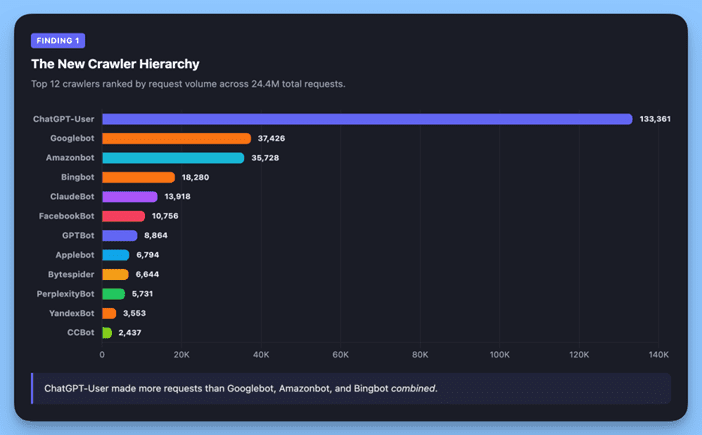
We analyzed 24,411,048 proxy requests across 78,000+ pages on 69 customer websites on Alli AI’s crawler enablement platform over a 55-day period (January to March 2026). OpenAI’s ChatGPT-User crawler made 3.6x more requests than Googlebot across our data sample. And that’s not even counting GPTBot, OpenAI’s separate training crawler.
A note on methodology: Crawler identification used user agent string matching, verified against published IP ranges. Request metrics are measured at the proxy/CDN layer. The dataset covers 69 websites across a variety of industries and sizes, predominantly WordPress-based. Full methodology is detailed at the end.
Finding 1: AI Crawlers Now Outpace Google 3.6x & ChatGPT Leads the Pack
Image created by Alli AI, April 2026.
When we ranked every identified crawler by request volume, the results were unambiguous:
Rank
Crawler
Requests
Category
1
ChatGPT-User (OpenAI)
133,361
AI Search
2
Googlebot
37,426
Traditional Search
3
Amazonbot
35,728
AI / E-Commerce
4
Bingbot
18,280
Traditional Search
5
ClaudeBot (Anthropic)
13,918
AI Search
6
MetaBot
10,756
Social
7
GPTBot (OpenAI)
8,864
AI Training
8
Applebot
6,794
AI Search
9
Bytespider (ByteDance)
6,644
AI Training
10
PerplexityBot
5,731
AI Search
ChatGPT-User made more requests than Googlebot, Amazonbot, and Bingbot combined.
Image created by Alli AI, April 2026.
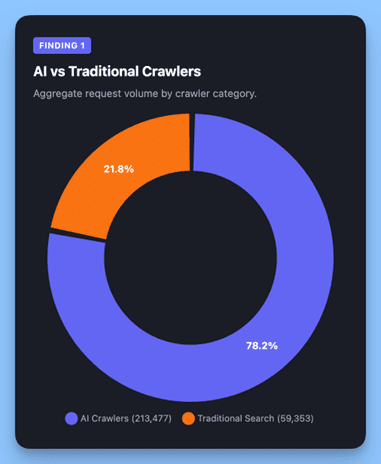
Grouped by purpose, AI-related crawlers (ChatGPT-User, GPTBot, ClaudeBot, Amazonbot, Applebot, Bytespider, PerplexityBot, CCBot) made 213,477 requests versus 59,353 for traditional search crawlers (Googlebot, Bingbot, YandexBot). AI crawlers are now making 3.6x more requests than traditional search crawlers across our network.
Finding 2: OpenAI Uses 2 Crawlers (And Most Sites Don’t Know the Difference)
Image created by Alli AI, April 2026.
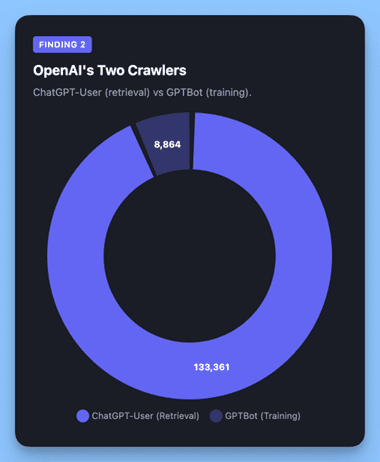
OpenAI operates two distinct crawlers with very different purposes.
ChatGPT-User is the retrieval crawler. It fetches pages in real time when users ask ChatGPT questions that require up-to-date web information. This determines whether your content appears in ChatGPT’s answers.
GPTBot is the training crawler. It collects data to improve OpenAI’s models. Many sites block GPTBot via robots.txt but not ChatGPT-User, or vice versa, without understanding the distinct consequences of each.
Combined, OpenAI’s crawlers made 142,225 requests: 3.8x Googlebot’s volume.
The robots.txt directives are separate:
User-agent: GPTBot      # Training crawler — feeds OpenAI's models
User-agent: ChatGPT-User # Retrieval crawler — fetches pages for ChatGPT answers
Finding 3: AI Crawlers Are Faster & More Reliable, But Their Volume Adds Up
Image created by Alli AI, April 2026.
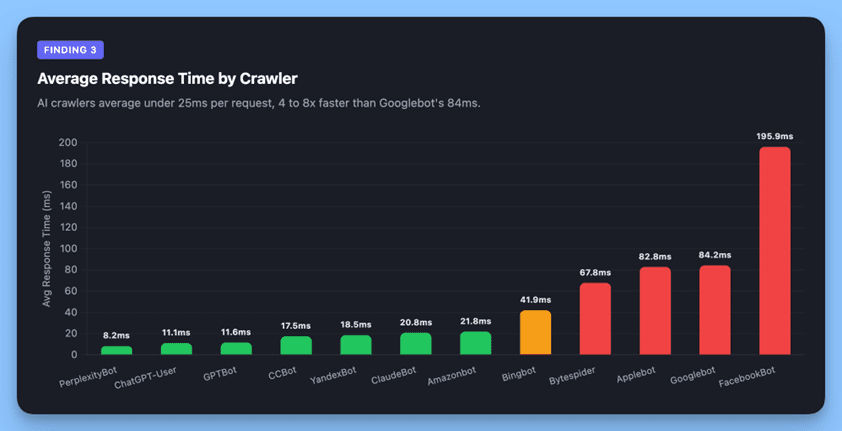
AI crawlers are significantly more efficient per request:
Crawler
Avg Response Time
200 Success Rate
PerplexityBot
8ms
100%
ChatGPT-User
11ms
99.99%
GPTBot
12ms
99.9%
ClaudeBot
21ms
99.9%
Bingbot
42ms
98.4%
Googlebot
84ms
96.3%
Two likely reasons. First, AI retrieval crawlers are fetching specific pages in response to user queries, not exhaustively discovering site architecture. They know what they want, they grab it, and they leave. Second, while all crawlers on our infrastructure receive pre-rendered responses, Googlebot’s broader crawl pattern means it requests a wider range of URLs, including stale paths from sitemaps and its own legacy index, which adds latency from redirect chains and error handling that retrieval crawlers avoid entirely.
But there’s a catch: while each individual request is lightweight, the sheer volume means aggregate server load is substantial. ChatGPT-User at 11ms × 133,361 requests is still a real infrastructure cost, just distributed differently than Googlebot’s fewer, heavier requests.
Finding 4: Googlebot Sees a Different (Worse) Version of Your Site
Image created by Alli AI, April 2026.
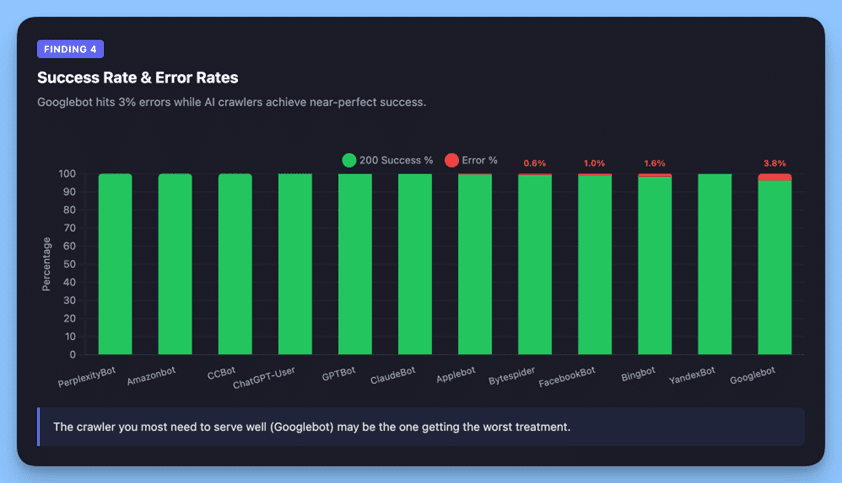
Googlebot’s 96.3% success rate versus near-perfect rates for AI crawlers reveals an important structural difference.
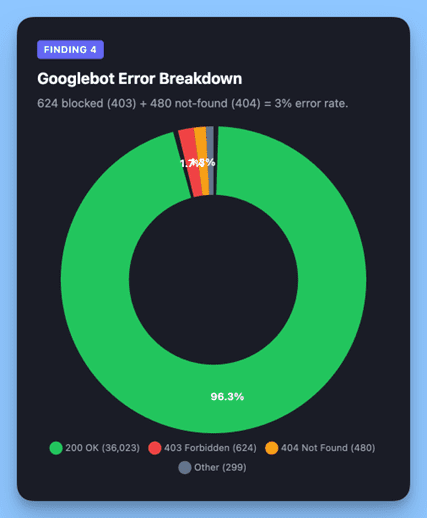
Googlebot received 624 blocked responses (403) and 480 not found errors (404), accounting for 3% of its requests. Meanwhile, ChatGPT-User achieved 99.99% success. PerplexityBot hit a perfect 100%.
Image created by Alli AI, April 2026.
Why the gap? The most likely explanation is index age and crawl behavior, not site misconfiguration.
Googlebot maintains a massive legacy index built over years of continuous crawling. It routinely re-requests URLs it already knows about — including pages that have since been deleted (404s) or restructured (403s). This is normal behavior for a search engine maintaining an index of this scale, but it means a meaningful percentage of Googlebot’s requests are directed at URLs that no longer exist.
AI crawlers don’t carry that baggage. ChatGPT-User fetches specific pages in response to real-time user queries, targeting content that’s currently relevant and linked. That’s a structural advantage that produces near-perfect success rates.
Industry Reports Confirm AI Crawling Surged 15x in 2025
Our data shows this crossover may already be happening at the site level for properties that actively enable AI crawler access.
Your New SEO Strategy: How To Audit, Clean Up & Optimize For AI Crawlers
1. Audit your robots.txt for AI crawlers today
Most robots.txt files were written for a Googlebot-first world. At minimum, have explicit directives for ChatGPT-User, GPTBot, ClaudeBot, Amazonbot, PerplexityBot, Applebot, Bytespider, CCBot, and Google-Extended.
Our recommendation: Most businesses benefit from allowing both retrieval crawlers (ChatGPT-User, PerplexityBot, ClaudeBot) and training crawlers (GPTBot, CCBot, Bytespider), training data is what teaches these models about your brand, products, and expertise. Blocking training crawlers today means AI models learn less about you tomorrow, which reduces your chances of being cited in AI-generated answers down the line.
The exception: if you have content you specifically need to protect from model training (proprietary research, gated content), use granular Disallow rules for those paths rather than blanket blocks.
2. Clean up stale URLs in Google Search Console
Our data shows Googlebot hits a 3% error rate, mostly 403s and 404s, while AI crawlers achieve near-perfect success rates. That gap likely reflects Googlebot re-crawling legacy URLs that no longer exist. But those failed requests still consume the crawl budget.
Audit your GSC crawl stats for recurring 404s and 403s. Set up proper redirects for restructured URLs and submit updated sitemaps.
3. Treat AI crawler accessibility as a distinct SEO channel
Ranking in ChatGPT’s answers, Perplexity’s results, and Claude’s responses is emerging as a distinct visibility channel. If your content isn’t accessible to these crawlers, particularly if you’re running JavaScript-heavy frameworks, you’re invisible in AI search.
We’ve published a live dashboard showing how AI crawler traffic breaks down across a real site: which platforms are visiting, how often, and their share of total traffic; if you want to see what this looks like in practice.
4. Plan for volume, not just individual request weight
AI crawlers send light, fast requests, but they send many of them. ChatGPT-User alone accounted for more than 133,000 requests in 55 days. The aggregate server load from AI crawlers is now likely exceeding your Googlebot load. Make sure your hosting and CDN can handle it, the low per request response times in our data reflect the fact that Alli AI serves pre-rendered static HTML from the CDN edge, which is exactly the kind of architecture that absorbs this volume without taxing your origin server.
Methodology
This analysis is based on 24,411,048 HTTP proxy requests processed through Alli AI’s crawler enablement platform between January 14 and March 9, 2026, covering 69 customer websites.
Crawler identification used user agent string matching, verified against published IP ranges. For OpenAI crawlers specifically, every request was cross-referenced against OpenAI’s published CIDR ranges. This confirmed 100% of GPTBot requests and 99.76% of ChatGPT-User requests originated from OpenAI’s infrastructure. The remaining 0.24% (requests from spoofed user agents) were excluded.
Limitations: The dataset is scoped to Alli AI customers who have opted into crawler enablement. Crawlers that don’t self-identify via user agent are not captured. Response time measurements are at the proxy layer, not the origin server.
About Alli AI
Alli AI provides server-side rendering infrastructure for AI and search engine crawlers. This analysis was produced using data from our proxy infrastructure to help the SEO community better understand the evolving crawler landscape.
Want to see this data in action? See the breakdown firsthand by visiting our AI visibility dashboard.
For years Mike McClary sold the Guardian LTE Flashlight, a heavy-duty black model, online through his small outdoor brand. The product, designed for brightness and durability, became one of his most popular items ever. Even after he stopped offering it around 2017, customers kept sending him emails asking where they could buy it.
When McClary decided to revisit the Guardian flashlight in 2025, he didn’t begin the way he might have in the past, by combing through supplier listings and sending inquiries to factories. Instead, he opened Accio, an AI sourcing and researching tool on Alibaba.com.
For small entrepreneurs in the US, deciding what to sell and where to make it has traditionally been a slow, labor-intensive process that can take months. Now that work is increasingly being done by AI tools like Accio, which help connect businesses with manufacturers in countries including China and India. Business owners and e-commerce experts told MIT Technology Review that these AI tools are making sourcing more accessible and significantly shortening the time it takes to go from product idea to launch.
McClary, 51, who runs his business from his Illinois living room, has sold products ranging from leather conditioner to camping lights, including one rechargeable lantern that brought in half a million dollars. Like many small online merchants, he built his business by being extremely scrappy—spotting demand for a product, tweaking existing designs, finding a factory, doing modest marketing, and getting the goods in front of customers fast.
This time, though, he began by telling Accio about the flashlight’s original design, production cost, and profit margin. Then Accio suggested several changes, making it smaller and slightly less bright and switching its charging method to battery power. It also identified a manufacturer in Ningbo, China, that McClary said could cut the manufacturing cost from $17 to about $2.50 per unit.
McClary took the process from there, contacting the supplier himself to discuss the revised design. Within a month, the new version of the Guardian flashlight was back up for sale on Amazon and on his brand’s website.
The new factory hunt
Although Alibaba is better known for owning Taobao, the biggest shopping site in China, its first business was Alibaba.com, the primary website that lists Chinese factories open for bulk orders. Placing an order with a manufacturer usually requires far more than clicking “Buy.” Sellers often spend days or weeks browsing listings, comparing suppliers’ reviews and manufacturing capacities, asking about minimum order quantities, requesting samples, and negotiating timelines and customization options.
But Accio has gained significant momentum by changing how that sourcing gets done. Launched in 2024, Accio exceeded 10 million monthly active users in March 2026, according to the company. That means about one in five Alibaba users consults with AI about product sourcing.
Accio’s interface looks a lot like ChatGPT or Claude: Users type a question into an empty box and choose between “fast” and “thinking” modes. But when asked about products, the tool returns more than text, offering charts, links, and visuals and asking follow-up questions to clarify the buyer’s needs. It then narrows the field to one or a handful of suppliers that appear capable of delivering. After that, the human work begins: Users still have to reach out to suppliers themselves and negotiate the details.
Zhang Kuo, the president of Alibaba.com, told MIT Technology Review that the tool is built on multiple frontier models, including the company’s own Qwen series, a popular family of open-source large language models. The system is able to pull from the site’s millions of supplier profiles and is trained on 26 years of proprietary transaction data.
For tasks like product research and sourcing analysis, the tool “blows it away” compared with general AI tools like ChatGPT, says Richard Kostick, CEO of the beauty brand 100% Pure.
Many websites have tried using AI to assist shopping, but Alibaba has been one of the most aggressive. In March, Eddie Wu, CEO of the site’s parent company Alibaba Group, told managers that integrating the company’s core services with Qwen’s AI capabilities is a top priority. During a Chinese New Year promotion of Qwen’s personal shopping AI agent, where the company gave away cash, customers placed 200 million orders, the firm says.
Vincenzo Toscano, an e-commerce seller and consultant, recommended Accio to his clients before deciding to try it himself for a new sunglasses brand. He came in with a rough vision: a brand shaped by his Italian heritage, his personal style, and a boutique aesthetic. He says the AI helped turn that concept into something more concrete, suggesting materials, refining the look, and pointing to design ideas that felt current.
But the tool has clear limits. McClary, who uses AI tools regularly, says Accio is strongest when it comes to product ideation, but less helpful on marketing questions such as advertising and social media outreach. To use it well, he says, buyers still need to challenge its recommendations, since some can be generic.
The rest of the business
As platforms become more AI-driven, manufacturers are adjusting too. Sally Li, a representative at a makeup packaging company in Wuhan, China, says her firm has started writing more detailed product descriptions and adding information about its equipment and manufacturing experience on Alibaba.com because it suspects those details make its listings more likely to be surfaced by AI.
Yan says manufacturers cannot tell whether an inquiry from a customer was generated or guided by AI, and that her firm is not using AI to negotiate pricing or product details.
“AI agents are increasingly used by people to assist purchase decisions and even directly making transactions, and with clear guardrails, they can become extremely useful,” says Jiaxin Pei, a research scientist at the Stanford Institute for Human-Centered AI, “but agents need to act transparently, securely, and in the customer’s best interest.” Pei says developers of these tools should disclose the data they collect and the incentives built into them to ensure that the marketplace remains fair.
Zhang, of Alibaba.com, says Accio currently does not include advertising. Suppliers can pay for higher placement in Alibaba.com’s regular search results, but Zhang says Accio is “not integrated” with that system. “We haven’t had a clear answer in terms of how to monetize this tool,” he says. For now, users can pay for additional tokens to continue chatting with the agent after their free queries run out.
Sellers say that while AI tools have made it easier to come up with ideas and get a business off the ground, they do not replace the core skills that make someone good at e-commerce. McClary believes that even when sellers have access to the same market information, some are still better at making decisions, acting quickly, and actually delivering on orders. Those differences, he says, still go a long way.
Toscano, the brand founder and e-commerce consultant, feels good about officially launching his new brand of sunglasses in just a few months: “We [small business owners] always have to bootstrap a lot of decisions. Deciding what to sell often comes down to an educated guess,” he says, “And we’re now in an era when making those decisions is easier than ever.”
This story originally appeared in The Algorithm, our weekly newsletter on AI. To get stories like this in your inbox first, sign up here.
Within Silicon Valley’s orbit, an AI-fueled jobs apocalypse is spoken about as a given. The mood is so grim that a societal impacts researcher at Anthropic, responding Wednesday to a call for more optimistic visions of AI’s future, said there might be a recession in the near term and a “breakdown of the early-career ladder.” Her less-measured colleague Dario Amodei, the company’s CEO, has called AI “a general labor substitute for humans” that could do all jobs in less than five years. And those ideas are not just coming from Anthropic, of course.
These conversations have unsurprisingly left many workers in a panic (and are probably contributing to support for efforts to entirely pause the construction of data centers, some of which gained steam last week). The panic isn’t being helped by lawmakers, none of whom have articulated a coherent plan for what comes next.
Even economists who have cautioned that AI has not yet cut jobs and may not result in a cliff ahead are coming around to the idea that it could have a unique and unprecedented impact on how we work.
Alex Imas, based at the University of Chicago, is one of those economists. He shared two things with me when we spoke on Friday morning: a blunt assessment that our tools for predicting what this will look like are pretty abysmal, and a “call to arms” for economists to start collecting the one type of data that could make a plan to address AI in the workforce possible at all.
On our abysmal tools: consider the fact that any job is made up of individual tasks. One part of a real estate agent’s job, for example, is to ask clients what sort of property they want to buy. The US government chronicled thousands of these tasks in a massive catalogue first launched in 1998 and updated regularly since then. This was the data that researchers at OpenAI used in December to judge how “exposed” a job is to AI (they found a real estate agent to be 28% exposed, for example). Then in February, Anthropic used this data in its analysis of millions of Claude conversations to see which tasks people are actually using its AI to complete and where the two lists overlapped.
But knowing the AI exposure of tasks leads to an illusory understanding of how much a given job is at risk, Imas says. “Exposure alone is a completely meaningless tool for predicting displacement,” he told me.
Sure, it is illustrative in the gloomiest case—for a job in which literally every task could be done by AI with no human direction. If it costs less for an AI model to do all those tasks than what you’re paid—which is not a given, since reasoning models and agentic AI can rack up quite a bill—and it can do them well, the job likely disappears, Imas says. This is the oft-mentioned case of the elevator operator from decades ago; maybe today’s parallel is a customer service agent solely doing phone call triage.
But for the vast majority of jobs, the case is not so simple. And the specifics matter, too: Some jobs are likely to have dark days ahead, but knowing how and when this will play out is hard to answer when only looking at exposure.
Take writing code, for example. Someone who builds premium dating apps, let’s say, might use AI coding tools to create in one day what used to take three days. That means the worker is more productive. The worker’s employer, spending the same amount of money, can now get more output. So then will the employer want more employees or fewer?
This is the question that Imas says should keep any policymaker up at night, because the answer will change depending on the industry. And we are operating in the dark.
In this coder’s case, these efficiencies make it possible for dating apps to lower prices. (A skeptic might expect companies to simply pocket the gains, but in a competitive market, they risk being undercut if they do.) These lower prices will always drive some increase in demand for the apps. But how much? If millions more people want it, the company might grow and ultimately hire more engineers to meet this demand. But if demand barely ticks up—maybe the people who don’t use premium dating apps still won’t want them even at a lower price—fewer coders are needed, and layoffs will happen.
Repeat this hypothetical across every job with tasks that AI can do, and you have the most pressing economic question of our time: the specifics of price elasticity, or how much demand for something changes when its price changes. And this is the second part of what Imas emphasized last week: We don’t currently have this data across the economy. But we could.
We do have the numbers for grocery items like cereal and milk, Imas says, because the University of Chicago partners with supermarkets to get data from their price scanners. But we don’t have such figures for tutors or web developers or dietitians (all jobs found to have “exposure” to AI, by the way). Or at least not in a way that’s been widely compiled or made accessible to researchers; sometimes it’s scattered across private companies or consultancies.
“We need, like, a Manhattan Project to collect this,” Imas says. And we don’t need it just for jobs that could obviously be affected by AI now: “Fields that are not exposed now will become exposed in the future, so you just want to track these statistics across the entire economy.”
Getting all this information would take time and money, but Imas makes the case that it’s worth it; it would give economists the first realistic look at how our AI-enabled future could unfold and give policymakers a shot at making a plan for it.
Reddit is courting businesses. The social media giant provides commercial users with on-platform analytics, visibility tools, and advertising options.
Reddit Pro is free for businesses that provide their name, URL, category, and number of employees. Approval is instant and requires no paperwork.
The Pro dashboard includes an underrated section called Trends for tracking any topic or keyword. Trends lists recent threads mentioning your keyword(s) and provides an AI-generated analysis of the context and sentiment of the discussions. A weekly email summarizes that activity.
Here’s how to use the Trends data for off-site organic search optimization.
Reddit Trends for SEO
Topic ideas
Tracking relevant (to your industry) Reddit conversations is a helpful content idea generator to know the interests of your target audience.
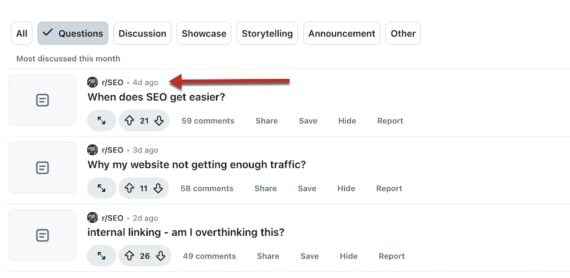
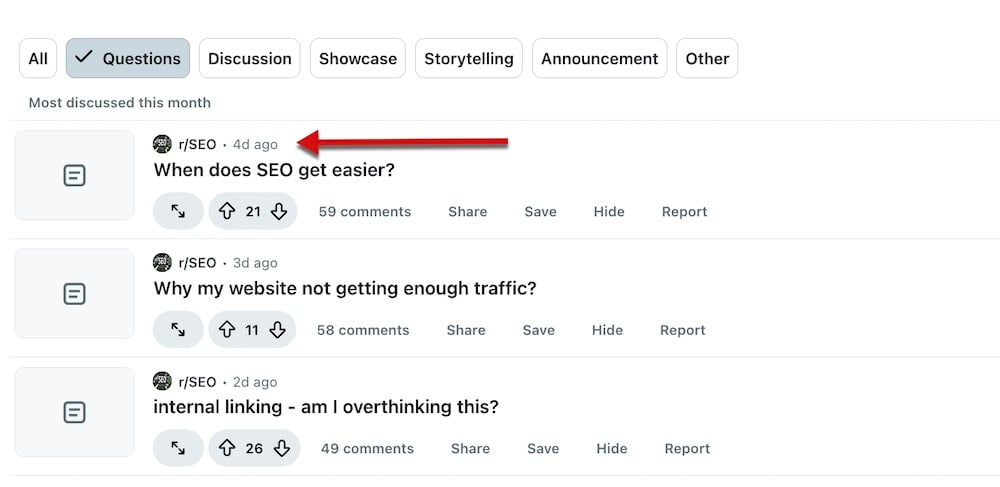
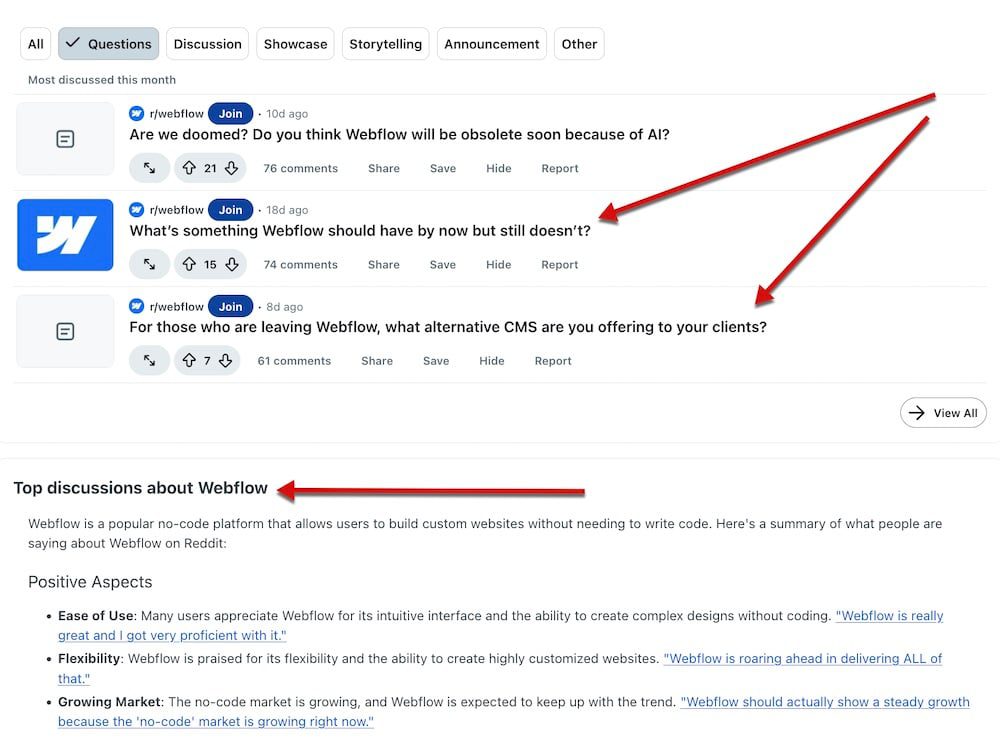
Trends’ “questions” tab is especially useful for fresh ideas, as it reveals popular threads (within a week, month, or 3 months) phrased or implied as questions.
Trends’ “Questions” tab reveals popular threads phrased or implied as questions. Click image to enlarge.
Brand sentiment
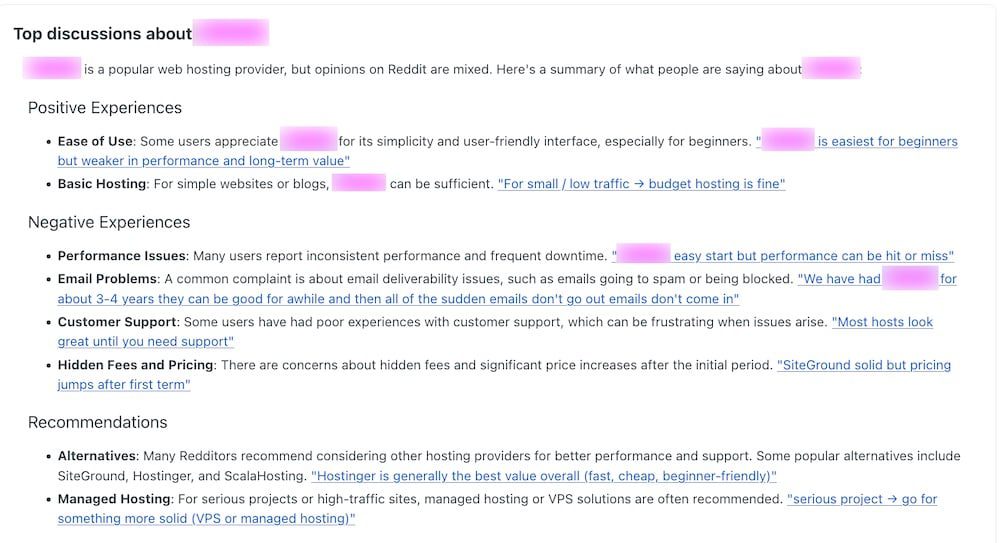
Reddit Pro’s AI analysis of any keyword context (i) identifies how redditors are discussing your brand, and (ii) highlights negative and positive experiences. Businesses can then address common concerns on their own sites (optimized for organic search visibility on Google) and across all social media.
Over time, the negative experiences should lessen, and branded search results on Google and elsewhere should increase.
Reddit Pro’s AI analysis identifies how Redditors are discussing your brand. Click image to enlarge.
Monitor competitors
Tracking competitors on Reddit:
Identifies their customers’ frustrations, to adjust your own content and emphasize your brand’s solutions.
Shows their product positioning and target audience based on the discussions.
Reveals previously unknown competing brands.
Pro users can monitor competitors on actual conversations as well as on Reddit’s AI analysis.
Users of Reddit Pro can monitor competitors via on-site discussions or from the platform’s AI analysis. Click image to enlarge.
Trends and popularity
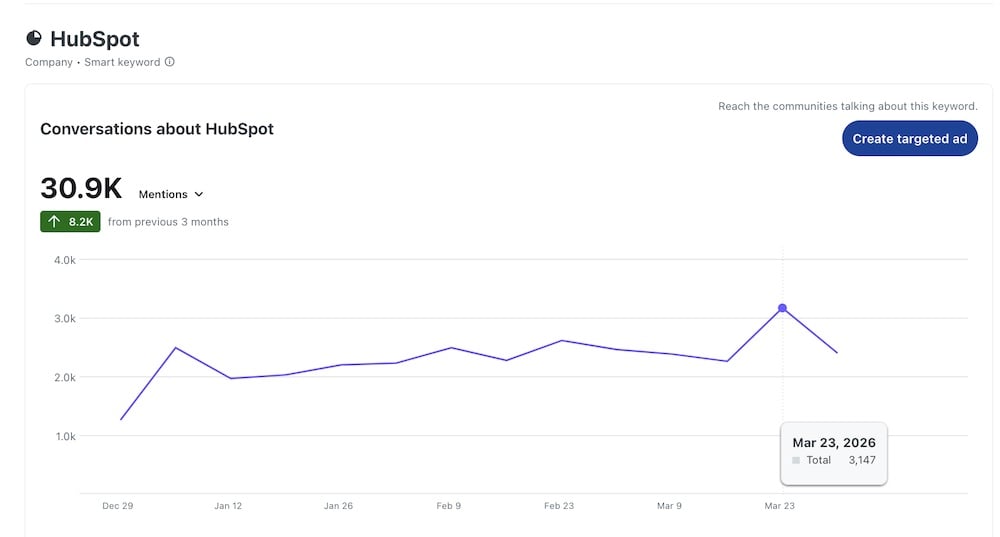
Charts on Reddit Pro show trends in topics and “smart keywords” (i.e., high-volume) to quickly see what’s rising or falling, as well as seasonal interests.
Pro users can filter charts by date range to identify when discussions spiked around their target audience.
The filter is limited to 3 prior months, however, which is too restrictive.
Charts on Reddit Pro reveal trends in topics and “smart keywords.” This example shows discussions about HubSpot. Click image to enlarge.
Resoneo says ChatGPT responses began referencing about 20% fewer websites after what it identifies as the early-March transition to GPT-5.3 Instant.
The analysis comes from the French SEO consultancy and draws on data from Meteoria, an AI visibility-tracking platform that monitored 400 prompts daily over 14 weeks, producing 27,000 comparable responses.
Average unique domains per response dropped from 19 before the transition to 15 after. Average unique URLs per response fell from 24 to 19.
The URLs-per-domain ratio remained at 1 throughout the tracking period. The data suggests ChatGPT isn’t visiting as many sites per response, but it’s going just as deep into each one.
Fewer domains now share the same citation surface in each response, meaning the sites that do get cited take up a larger share of each answer.
Server Logs Back Up The Pattern
Independent log analysis from Jérôme Salomon at Oncrawl supports the findings. Tracking ChatGPT-User bot activity across multiple websites, his data shows crawl volume has settled at a lower level. Some pages aren’t being crawled at all anymore, and the crawl frequency for pages still being visited has dropped.
Resoneo links the change to ChatGPT’s default experience now being driven more heavily by GPT-5.3 Instant, which the company says triggers fewer web searches and citations than earlier behavior. Oncrawl’s server log data shows the lower crawl pattern over the same period.
A 20% drop in cited domains per response means fewer websites competing for visibility inside each ChatGPT answer. The total citation surface shrank, but the sites that kept appearing maintained their same crawl depth.
For anyone tracking referral traffic from ChatGPT, the early-March model transition is a date range worth checking in your analytics.
Looking Ahead
Resoneo’s analysis notes that GPT-5.4 Thinking reintroduces search fan-outs and uses site: operators to target trusted domains, but these behaviors weren’t captured in the quantitative dataset, which covers GPT-5.3 Instant and below.
Whether the citation surface continues to narrow or widens again with newer models isn’t yet clear.
For more than a decade, Google’s share of global search traffic barely moved. It hovered between 91% and 93%, and the SEO industry built its workflow around that reality.
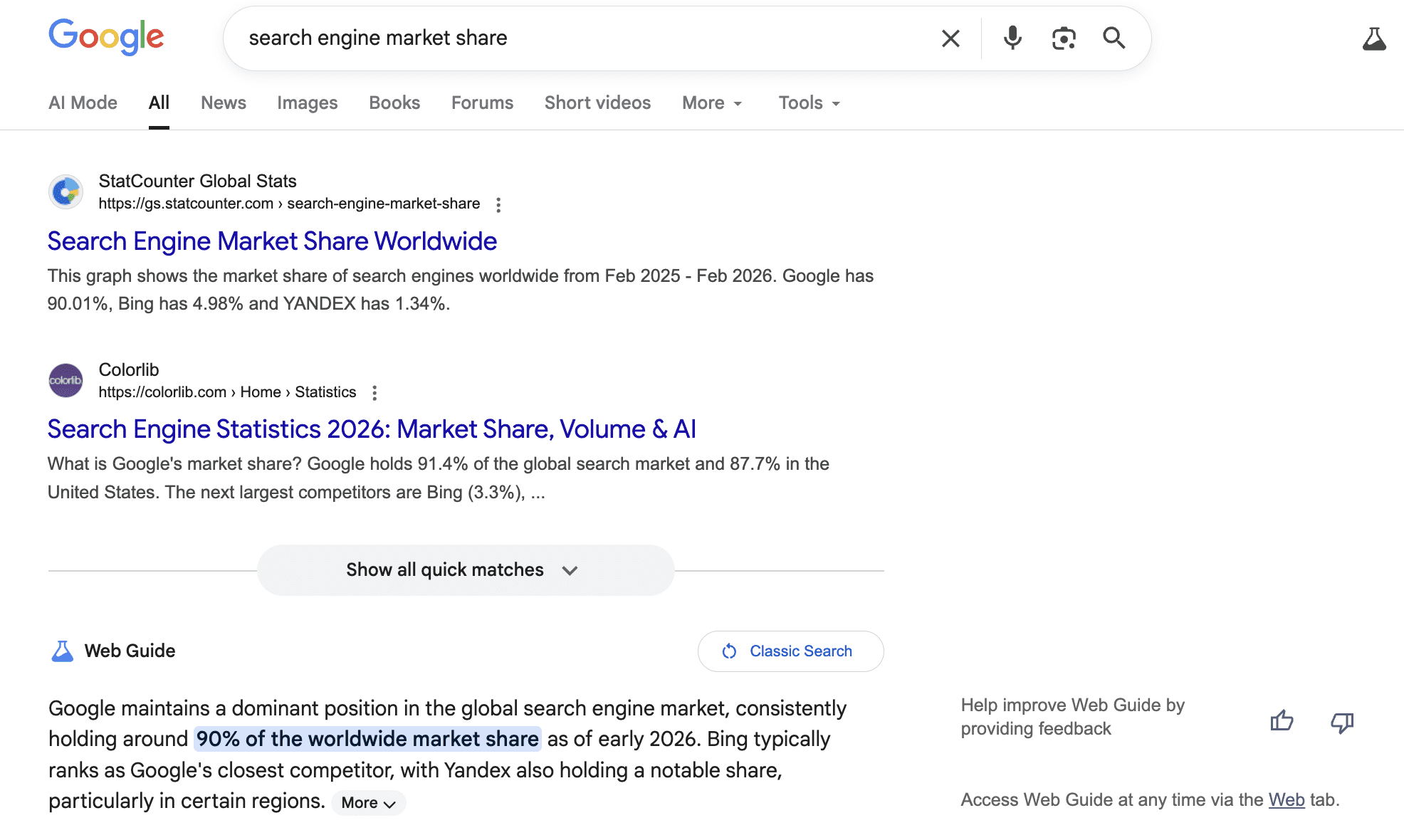
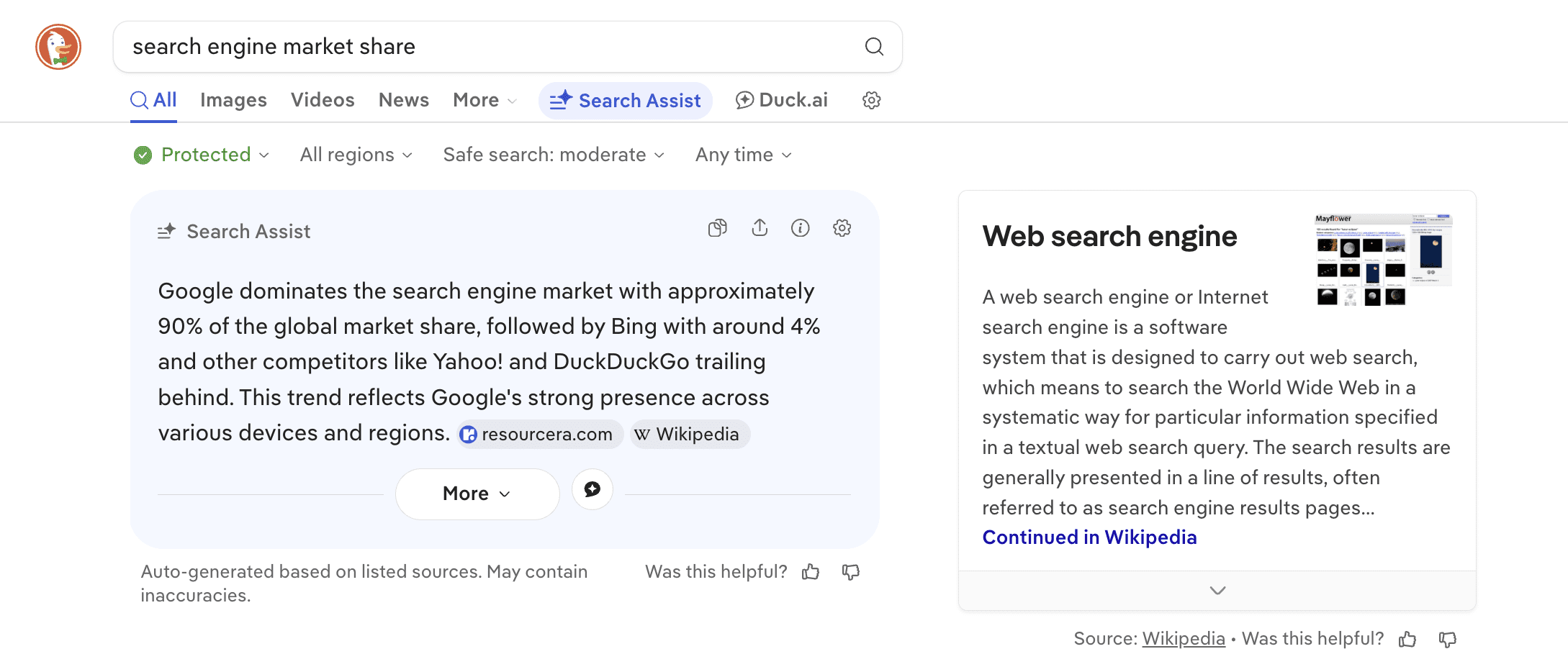
As of March 2026, StatCounter data shows Google at 90.01% of worldwide search traffic, with Bing at 4.98%, Yahoo at 1.39%, Yandex at 1.34%, DuckDuckGo at 0.76%, and Baidu at 0.55%.
Google’s share has fluctuated between roughly 89% and 93% since 2015. It dipped below 90% in each of the final three months of 2024 and again in February 2026 before ticking back above that line in March. At Google’s scale, every tenth of a percent represents millions of searches.
Meanwhile, AI search tools like ChatGPT and Perplexity are growing fast outside of traditional measurement, and platforms like Amazon and TikTok continue to capture search behavior that never touches a traditional engine.
Here we will walk through the top six search engines that account for the measurable search market. I’ll also explain where AI search engines fits into the picture and what all of this means for where you invest resources.
1. Google
Google still leads by a wide margin, with nine out of every 10 searches worldwide running through its engine, according to StatCounter. Alphabet, Google’s parent company, generates most of its revenue from search advertising and continues to invest in AI-powered features.
Google search, March 2026.
The numbers look different by market and device. In the United States, Google holds 84.13%, with Bing at 10.52% and Yahoo at 2.86%. On desktop globally, Google’s share drops to roughly 82%, while Bing picks up over 10%. Mobile is still Google’s strongest position at over 94%.
The biggest change to Google’s search results over the past year has been the expansion of AI Overviews. These AI-generated summaries appear directly on the results page and answer the query before a user clicks anything. Several studies suggest rising rates of zero-click searches on Google. For SEO professionals, this means competition for clicks is intensifying even as Google’s overall share holds steady.
The challenge is familiar to anyone who has optimized for Google over the past few years. The traffic potential is still unmatched, but earning clicks means competing against Google’s own SERP features. Featured Snippets, People Also Ask boxes, local packs, shopping carousels, and AI-generated summaries all sit above or alongside organic results. Paid search costs continue to rise in competitive verticals. And even ranking in the top three organic positions doesn’t guarantee a click the way it once did.
None of that changes the math. Google is still where the traffic is. If you are going to invest in one search engine, it should be this one. But the cost of competing keeps rising, and the share of clicks reaching external sites is being squeezed by more on-SERP answers. Diversification is worth serious consideration.
→ Further reading:
2. Microsoft Bing
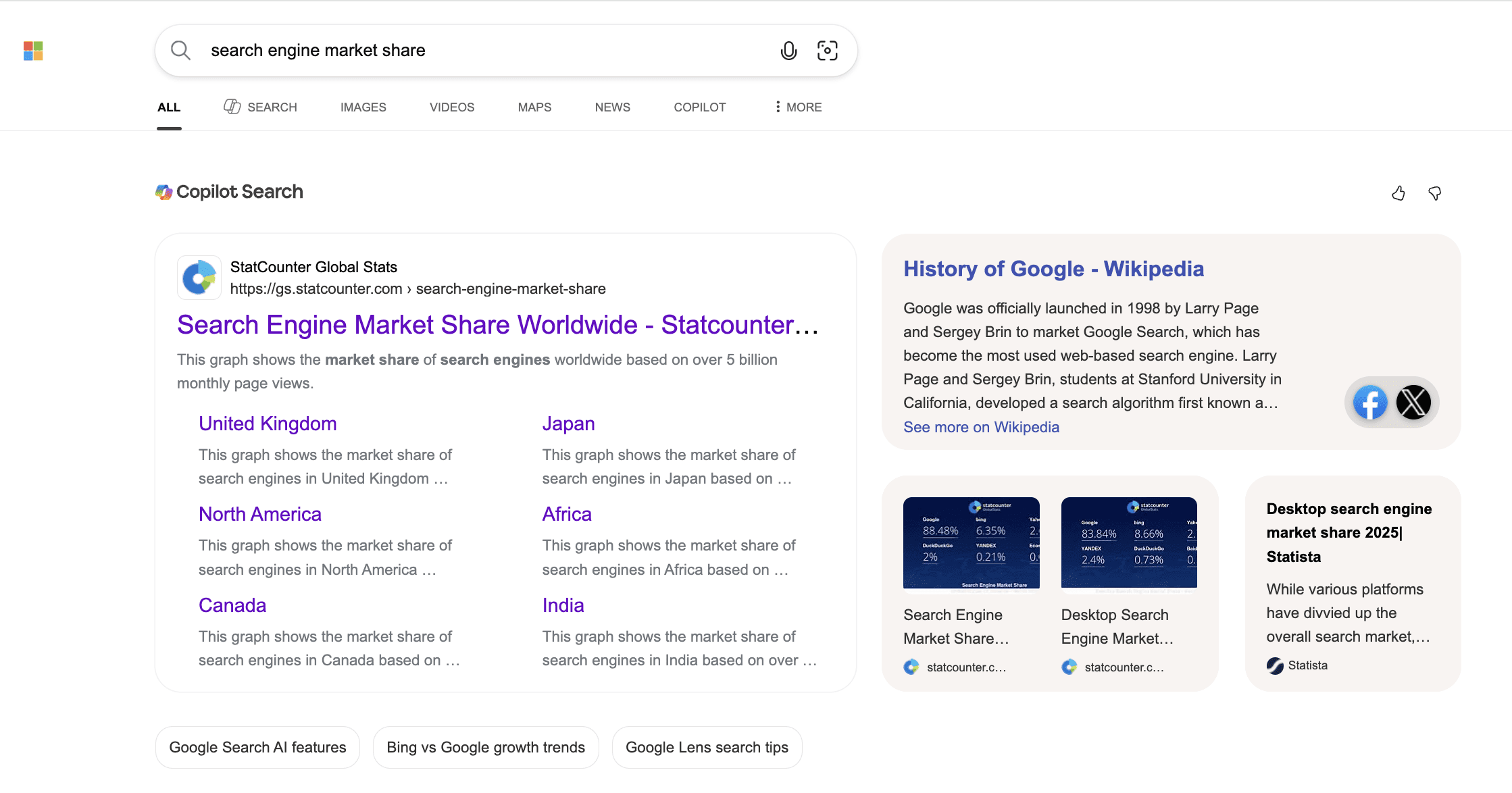
Bing has posted the most notable gains in market share among traditional search engines over the past two years. Its 5.01% global share may look small, but in the U.S., it climbs past 10%, and on desktop it’s even higher.
Bing search with Copilot integration, March 2026.
Microsoft has paired Bing’s existing distribution advantages with Copilot integration, adding a conversational AI layer alongside traditional search results.
The volume gap between Google and Bing is obvious. But that gap also means fewer brands competing for the same positions, which is worth considering when you are deciding where to allocate budget.
There’s a strategic reason beyond market share to pay attention to Bing. ChatGPT’s search functionality relies on Bing’s index for retrieving web results. If that connection holds, content that performs well in Bing has an additional path to being surfaced through AI-generated answers in ChatGPT.
Optimizing for Bing overlaps with Google in many areas. The Bing Webmaster Guidelines cover familiar ground, such as content quality, backlinks, and page speed. Where SEO professionals who work across both engines tend to notice differences is in how each engine weighs keyword specificity, how each handles mobile versus desktop indexing, and how social signals factor into results. If you are optimizing for Google already, much of that work carries over to Bing, but reviewing Bing’s own guidelines is worth the time to catch the gaps.
For teams already running Google Ads, testing Microsoft Ads is a low-friction starting point. Microsoft Ads supports direct campaign imports from Google Ads, which reduces the setup time. From there, you can evaluate performance independently and adjust bids and targeting for Bing’s audience.
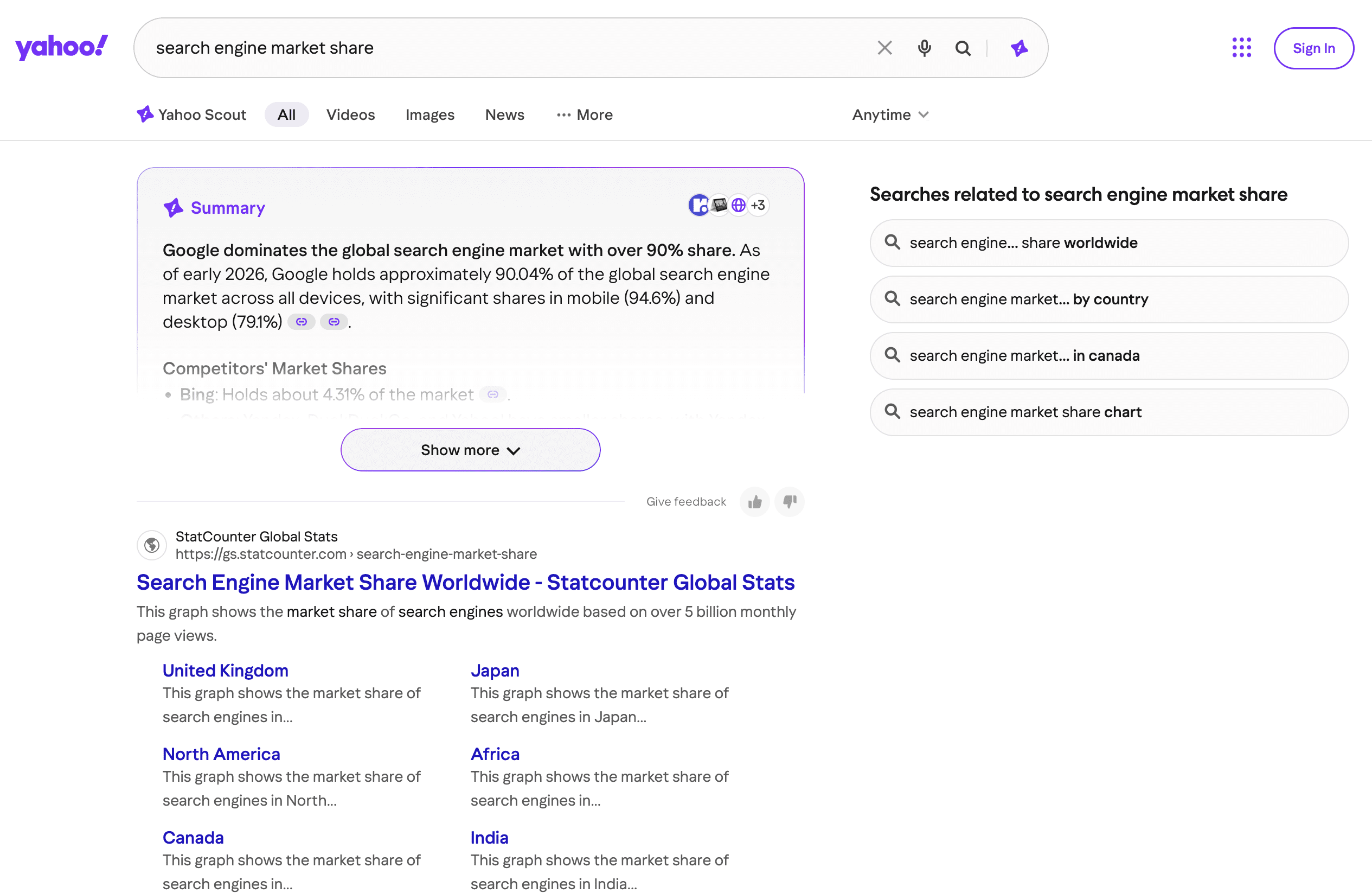
Yahoo’s search results are powered by Bing through a long-standing partnership. The index and ranking algorithms are the same, where Yahoo differs is in its ecosystem. Yahoo Mail, Yahoo Finance, and Yahoo News still draw audiences, and those users often search within the Yahoo environment rather than switching to Google.
Yahoo search, March 2026.
If you are optimizing for Bing, you are also reaching Yahoo’s audience. The combined Bing-Yahoo share in the U.S. is over 13%, which represents a pool of traffic that most SEO strategies ignore. There’s no separate Yahoo optimization playbook. The work you do for Bing carries over.
Where Yahoo becomes strategically relevant is in paid search. Microsoft Ads campaigns serve across both Bing and Yahoo properties. This means a single paid search setup gives you access to the combined audience without additional management overhead.
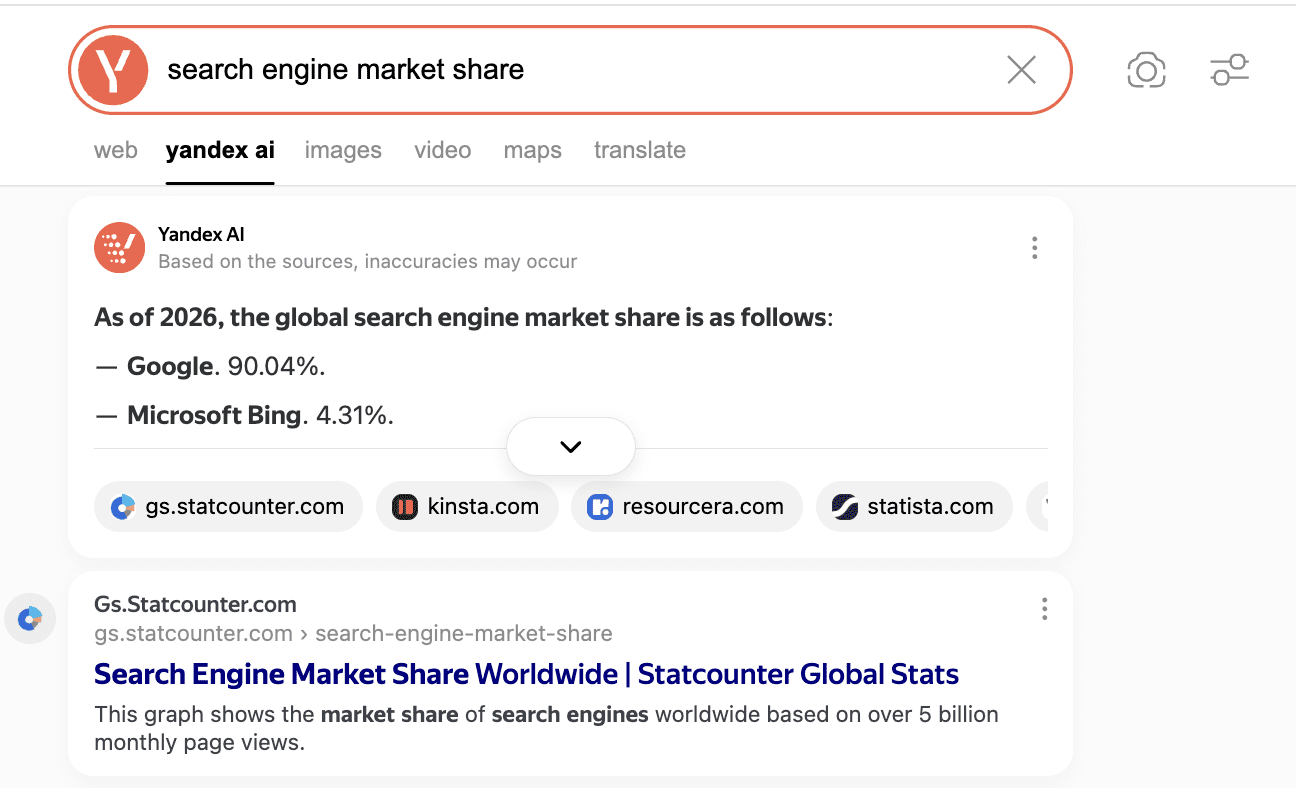
Yandex holds 1.34% of the global search market share, but that number undersells its importance in one region. In Russia, Yandex powers roughly 72% of all searches, according to StatCounter. If your business operates in or sells to the Russian market, Yandex is the primary search engine, not an alternative.
Yandex search, March 2026.
A leak of approximately 44 GB of Yandex source code in 2023 exposed over 17,800 ranking factors. The leak gave the SEO community an unprecedented look at how a search engine’s algorithms work. Yandex’s algorithms differ from Google’s, but the leak provided useful insights into ranking signal categories that many SEO professionals have incorporated into their broader thinking.
The leaked code confirmed that Yandex’s algorithms place greater weight on geolocation than Google’s, making local optimization especially important. Domain age, content freshness, and user behavior signals like click-through rate and dwell time all carried weight in the leaked ranking factors. Because of lower competition, paid search on Yandex can be less expensive per click than on Google or Bing. But success requires native-language content and cultural fluency that goes well beyond translation.
Yandex also offers its own webmaster tools, advertising platform (Yandex Direct), and analytics suite (Yandex Metrica), all designed for Russian-language users. Most English-language SEO teams can safely skip Yandex, but international teams working in Russian-speaking markets can’t.
DuckDuckGo holds 0.76% of the global search market share and 1.84% in the U.S. Its growth has been steady rather than explosive, driven by users who prioritize privacy.
DuckDuckGo search, March 2026.
Unlike Google, DuckDuckGo doesn’t track users or build advertising profiles based on search history. This privacy-first positioning has attracted a consistent user base. In Europe, where data privacy regulations like GDPR have raised awareness of tracking practices, DuckDuckGo and similar engines like Ecosia have picked up small but steady gains.
DuckDuckGo’s search results draw from multiple sources, including Bing’s index and its own web crawler. There’s no need to optimize for DuckDuckGo separately. Strong performance on Bing generally translates to visibility here as well.
DuckDuckGo does offer its own advertising platform, which serves keyword-based ads through a partnership with Microsoft Advertising. Brands in privacy-sensitive verticals like healthcare, financial services, or cybersecurity may find that visibility on a privacy-focused engine resonates with their audience.
→ Further reading:
6. Baidu
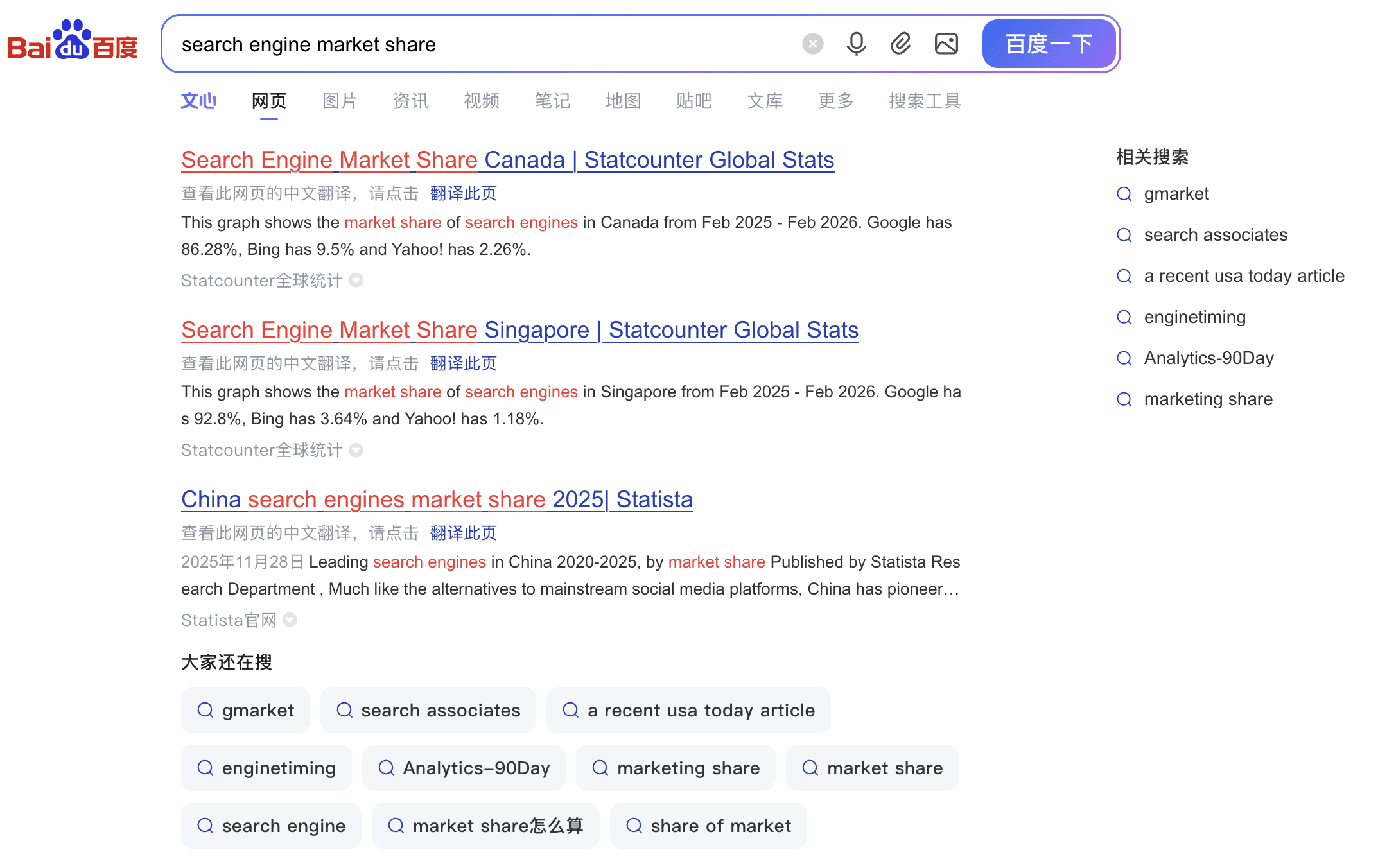
Baidu holds 0.55% of the global search market share, a number that reflects its almost exclusively Chinese user base rather than a lack of scale. Within China, Baidu commands over 53% of the search market according to StatCounter and processes billions of searches daily.
Baidu search, March 2026.
Baidu has invested in AI through its ERNIE large language model series. The company’s AI assistant reached 200 million monthly active users by January 2026, according to the South China Morning Post, and Baidu unveiled its latest model, ERNIE 5.0, in November 2025. The company also made ERNIE Bot free for individual users starting April 2025. Baidu is integrating AI-generated answers into search results in ways similar to Google’s AI Overviews.
For businesses targeting Chinese consumers, Baidu isn’t optional. But the optimization work looks different than what you do for Google. Content must be in Mandarin, hosted on servers accessible within China, and compliant with Chinese internet regulations. The algorithms also differ. SEO guides for the Chinese market typically emphasize domain age, meta tags, and page load speed as ranking factors that carry more weight on Baidu.
Baidu operates its own advertising platform (Baidu Tuiguang), webmaster tools, and analytics suite. Setting up these tools from outside China adds complexity. Most teams will need a partner or team member with direct experience in the Chinese market. Unless you have a specific China market strategy with native-language resources, Baidu is unlikely to be part of your SEO roadmap.
The market share numbers above don’t capture what may be the most important change in search behavior over the past two years. AI search engines like ChatGPT Search and Perplexity don’t appear in StatCounter’s data. They don’t function as traditional search referral sources that tracking scripts measure in the same way.
The usage numbers are growing fast. ChatGPT has reached 900 million weekly active users, OpenAI reported in late February 2026. That is up from 800 million in October 2025. Perplexity CEO Aravind Srinivas said at Bloomberg’s Tech Summit in June 2025 that the platform processed 780 million search queries in May 2025, up from 230 million less than a year earlier.
In terms of traffic sent to websites, AI platforms are still small. Conductor’s 2026 AEO/GEO Benchmarks Report found that AI referral traffic accounts for 1.08% of total web traffic across 10 industries it studied. ChatGPT drives 87.4% of that AI referral traffic. An SE Ranking study found that AI traffic to websites grew roughly sevenfold between early 2024 and mid-2025.
These tools work differently from traditional search engines. Instead of returning a list of links, they provide synthesized answers with source citations. Users can ask follow-up questions, refine their research, and get summaries without clicking through to individual pages.
For SEO professionals, this creates a new optimization challenge. Appearing as a cited source in ChatGPT or Perplexity answers is becoming a separate discipline from ranking in Google’s organic results. The SEO industry has started calling this “Generative Engine Optimization,” or GEO, though the field is still young and best practices are evolving.
Early data from Conductor’s benchmarks offers some initial signals about Google’s AI Overviews, specifically. In Conductor’s analysis of over 21 million Google searches in September 2025, 25.11% triggered an AI Overview, with rates varying widely by industry. The types of pages cited in those overviews also varied by sector. Whether those patterns hold across ChatGPT, Perplexity, and other AI platforms is less clear, which means tracking your visibility across multiple AI surfaces is becoming necessary.
The first step is to start monitoring whether your content appears in AI responses. Several SEO platforms have added AI visibility tracking tools. From there, the optimization work resembles what has always worked in SEO. Clear, authoritative content with well-organized data and transparent sourcing is the foundation.
Amazon doesn’t appear in StatCounter’s search engine rankings, but it’s one of the most important search platforms for anyone selling products online. Survey-based research has consistently found that a large share of online product searches begin on Amazon (56%, according to Jungle Scout) rather than on a traditional search engine.
Amazon’s search algorithm, originally known as A9 and widely referred to as A10 in the seller community, is built around purchase intent. Amazon has not officially confirmed an algorithm version change, but third-party sellers and agencies have documented differences from earlier versions, including greater weight on external traffic and seller authority.
For ecommerce brands, the key is balancing Amazon marketplace investment with direct-to-consumer search traffic. Amazon gives you access to buyers at the point of purchase, but the platform controls the customer relationship and takes a cut of every sale. Brands that invest only in Amazon search lose the ability to build direct relationships with their customers, while brands that ignore Amazon miss the audience that starts their product research there.
Amazon also offers its own paid advertising through Sponsored Products, Sponsored Brands, and Sponsored Display campaigns. These ads appear within Amazon’s search results and on product detail pages, and they run on a cost-per-click model. For product-focused businesses, Amazon advertising is a separate budget line from Google or Microsoft Ads, and it requires its own keyword research and bid management.
TikTok’s regulatory path in the United States went through a turbulent period. Congress passed legislation in 2024 requiring ByteDance to divest its U.S. operations or face a ban. TikTok briefly went dark in January 2025. Following multiple executive order extensions, a deal was finalized on January 22, 2026. The resulting TikTok USDS Joint Venture LLC put US operations under majority control of American investors, including Oracle and Silver Lake, with ByteDance retaining a 19.9% minority stake.
With the ownership question resolved for now, TikTok is still a growing discovery platform. Its recommendation algorithm surfaces content based on engagement signals rather than keywords, which means optimization for TikTok search looks nothing like traditional SEO. Content format, hook quality, and engagement metrics matter more than backlinks or domain authority.
For brands, TikTok’s search function is most relevant as a discovery channel. Users search TikTok for product recommendations, restaurant reviews, travel ideas, and tutorials. The content that performs well in TikTok search tends to be short, visually engaging, and structured around a specific question or problem. If your audience skews younger and your content lends itself to video, TikTok search is worth testing as a supplementary channel.
→ Further reading:
What Market Share Changes Mean for Your SEO Strategy
Google is still the leader of search, but its share is dropping while AI search tools are growing fast, and alternative platforms serve specific audiences that Google doesn’t reach as effectively.
Here’s how to think about resource allocation.
Google should get the majority of your SEO investment, because it’s where most of your audience searches. But the expansion of AI Overviews means you need to optimize for visibility within Google’s AI-generated feature as well.
Bing deserves more attention than most teams give it. Between Bing, Yahoo, and the reported connection to ChatGPT’s web search, Bing’s reach is wider than its global share suggests. On the organic side, reviewing your Bing Webmaster Tools data and ensuring your site is properly indexed is a quick win most teams skip.
The traffic volume for AI search engines is small, but the growth rate is steep. Start tracking whether your content appears in ChatGPT and Perplexity responses. If you aren’t being cited, start with the same content fundamentals that drive good SEO.
Vertical platforms matter for specific audiences. If you sell products, Amazon search optimization isn’t optional. If you target younger demographics, TikTok search and discovery behavior is a factor you can’t ignore. Neither of these platforms runs on traditional SEO signals, so they require dedicated strategy and budget.
Regional engines serve their markets. Yandex and Baidu are essential for Russia and China, respectively, but require native-language teams, localized hosting, and familiarity with platform-specific tools and regulations.
The data makes a case for diversifying beyond Google. The harder decision is how much to invest in each channel based on your specific audience, market, and goals. The answer will be different for every business, but the days of building an entire search strategy around a single engine are over.
WordPress delayed the release of the highly anticipated version 7.0 of the CMS because the real-time collaboration (RTC) feature was not yet stable. The delay has caused some to question whether the feature is necessary in the core, while others say that the delay is a symptom of deeper issues within WordPress itself.
Real-Time Collaboration (RTC)
The Gutenberg project has been on a four-phase development track: Gutenberg block editor (phase 1), Full Site Editing (phase 2), Collaboration (phase 3), and multilingual capabilities within core (phase 4).
WordPress 7.0, initially due to be released on April 9, was supposed to be the rollout of phase 3, as well as other important features that make it easier to use AI within WordPress.
RTC enables multiple users to simultaneously edit content and block-based design within the block editor, a functionality that will be useful to publishers and agencies.
RTC Has Been Tested
The commercial side of WordPress, Automattic’s WordPress.com, has made RTC available to beta testers since October 2025. These beta testers are enterprise-level customers of WordPress VIP. WordPress’s documentation states that RTC works best with native WordPress blocks and implies that the feature could be buggy with blocks that don’t strictly abide by best practices.
A post on the official WordPress.org site provides this information about RTC performance:
“The most consistent feedback: real-time collaboration works seamlessly when sites are built for modern WordPress. Organizations using the block editor with native WordPress blocks and custom blocks developed using best practices reported smooth experiences with minimal issues.
One technical lead at a major research institution noted their team has invested in a deep understanding of Gutenberg and, as a result, “…have not run into any issues.”
…Multiple teams tested the limits by:
Adding dozens of blocks simultaneously.
Copying large amounts of existing content in parallel.
Having entire teams edit the same post together (one team specifically noted “this is so fun”).
In these stress tests with native blocks and modern custom blocks, real-time collaboration held up remarkably well.”
Those tests were with a version that reused existing tables to store the editing events. That method resulted in multiple bugs, leading to a delay after it was decided to create a dedicated table for the RTC feature in the database used by WordPress sites in order to improve stability.
The beta-tested version of RTC had to limit the number of users who could simultaneously edit together.
A GitHub issue ticket explains what’s wrong with the old version of RTC:
“It is known to be limited on a performance and scaling basis, but provides an easy way to see collaboration working.
By limiting the provider to a set low number of collaborators by default, the chance of overloading is reduced.”
So that’s one of the issues being solved by introducing a new database table. Once that is done, the RTC feature will need to be tested, and this is the area that WordPress web hosts will be concerned about.
Symptom Of Deeper Issues?
Joost de Valk, founder of Yoast SEO, recently published a blog post that made the case that WordPress is in need of rewriting existing code to make it more secure, modern, and efficient. He called attention to the troubled state of real-time collaboration as a symptom of the problems with the core itself.
“The recent deferral of WordPress 7.0 illustrates the problem in real time. The release was delayed because the team needs to revisit how real-time collaboration data is stored — the initial approach of stuffing it into postmeta wasn’t going to hold up. They’re now considering a custom table. This is exactly the pattern: a new feature runs into the limits of the existing data model, and the team has to work around it or pause to rethink.”
That’s one person’s opinion, and not everyone shares it. A lively discussion on the Post Status Slack channel showed that some in the WordPress community strongly disagreed that WordPress needs to be refactored.
Impact To WordPress Hosts
A concern I have heard privately is that RTC could have a negative impact on shared hosting providers. But it’s hard to know because the RTC feature is still evolving from what was tested on WordPress.com, which is supposed to make it more stable.
Shared hosting environments will have to make a decision as to how to accommodate this feature.
How will the hosting environment be affected by thousands of RTC customers editing all at once?
Will they need to limit how many users can edit within the block editor?
Will they have to place an upper limit of simultaneous editors for one tier of customers and a higher limit for other customers?
Should RTC Be A Plugin?
WordPress professional Matt Cromwell (LinkedIn profile) recently published an opinion piece that called attention to whether RTC should even be in the WordPress core and should instead be developed as a plugin. His reasoning is based on WordPress’s core philosophy that any new feature introduced into the core should be something that the majority of WordPress users will need.
The reason for that design philosophy is to make WordPress usable for the majority of users and not ship with features that most will not use. This keeps WordPress lean. His article quotes the official WordPress design philosophy:
“Design for the majority Many end users of WordPress are non-technically minded. They don’t know what AJAX is, nor do they care about which version of PHP they are using. The average WordPress user simply wants to be able to write without problems or interruption. These are the users that we design the software for as they are ultimately the ones who are going to spend the most time using it for what it was built for.”
Cromwell writes:
“If a feature isn’t needed by the vast majority, it belongs in a plugin. It is the reason WordPress remains lean enough to power 43% of the web.
Real-time collaboration fails this test spectacularly.”
Although Cromwell insists that this feature wouldn’t be used by the majority, an argument could be made that this is a feature that people want. For example, the Atarim collaboration plugin, with the free version currently installed on over 1,000 websites, states that the plugin has been used on over 120,000 websites by agencies and freelancers.
It could be that RTC is indeed an important feature, especially to designers, agencies, and editorial teams working together on articles.
AI In WordPress
The four-stage WordPress roadmap was created six years ago in 2018, and there was no way to know then how important AI would be today. Yet arguably it’s AI, not collaboration, that’s the most anticipated integration for WordPress 7.0. Nevertheless, real-time collaboration will very likely land in WordPress 7.0, enabling freelancers and agencies to work together with clients as well as with internal teams spread out across countries. That seems like a valid reason to ship a stable feature within core as opposed to within a plugin.
Featured Image by Shutterstock/Summit Art Creations
1. Identify Which AI Platforms Are Driving Your Visitors
Each LLM and answer engine has different logic, leading to different outputs for the same prompts. It’s important to understand which AI chatbots are aligned with your brand before making decisions that inform a larger AI search or SEO strategy.
Different LLMs Are Driving Leads In Different Industries
Not all AI platforms send leads the same way.
ChatGPT = Speed. ChatGPT dominates overall lead volume at 90.1% of AI-referred leads, with especially strong numbers in healthcare and automotive industries, where people want instant options.
Perplexity = Research. Perplexity accounts for 6.3%, but it punches well above its weight in high-consideration sectors. In Travel & Hospitality and Manufacturing, nearly one in ten AI leads comes from Perplexity, roughly ten times the rate seen in other industries.
Google’s Gemini holds 2.4% of AI-referred leads and is gaining traction in Business Service and Manufacturing, likely because users lean on its Google Workspace integration.
Claude, with 1.2% of lead generation, is carving out a niche in both Real Estate verticals and also with Marketing Agencies. Especially in areas where consumers tend to do more specific and detailed research before reaching out.
How To Accurately Track AI Prompt Visibility
AI search isn’t one channel. It’s a set of distinct platforms, each with different behaviors and industry strengths. So, repeat this AI prompt research phase for each LLM.
Identify the LLMs that matter most for your vertical. Use the data above as a starting point. If you’re in healthcare or automotive, prioritize ChatGPT visibility. High-consideration service? Pay attention to Perplexity. B2B or manufacturing? Gemini should be on your radar.
Test how each platform describes your business. Go to ChatGPT, Perplexity, Gemini, and Claude and ask them questions your customers would ask. “Who’s the best [your service] in [your market]?” See if you’re being recommended. If not, note who is and what content those competitors have that you don’t.
Create content that answers the questions AI platforms are fielding. LLMs favor well-structured, authoritative, fact-rich content. Publish service pages, FAQs, comparison guides, and local content that directly answer the kinds of questions consumers ask these platforms.
2. Connect AI Traffic To Actual Conversions
Connecting AI-driven leads to actual revenue in your reporting is key to understanding how to prioritize your marketing activities. Without visibility into AI lead attribution, you’re making decisions in the dark, which is an expensive place to be.
However, if you can identify AI as the source of your best leads, you instantly know how to pivot your SEO strategy.
How To Track AI Traffic & Attribute Conversions Across ChatGPT, Gemini, and Perplexity
As more money flows through AI search, the ability to attribute leads from specific LLMs isn’t a nice-to-have. It’s the difference between knowing what’s working and throwing budget at a black box.
What you need is the ability to trace a lead from the AI platform where it originated, through the call, form, or chat where it converted, all the way to the revenue it generated. That full-funnel visibility is what separates data-driven teams from everyone else.
ImplementLLM-specific attribution. Use a platform that can identify which AI model referred each lead. CallRail’s AI search engine attribution, for example, automatically tags whether an inbound call came from ChatGPT, Perplexity, Gemini, or Claude, not just “AI.” That level of granularity is what makes it possible to actually optimize by channel.
Create custom GA4 channel groups for AI traffic. In Google Analytics, go to Admin > Data Display > Channel Groups and create a custom channel group that isolates AI referral traffic by source. This lets you compare AI-driven sessions and conversions against your other channels.
Add “How did you hear about us?” to your intake process. Self-reported attribution (SRA) is a simple but powerful complement to digital tracking. Add it to your intake forms and train front-desk or sales staff to ask on calls. CallRail’s SRA feature lets you capture this data at the conversation level, so you can compare what callers say against what your analytics show. The gaps will reveal exactly where your tracking is falling short.
Connect AI Traffic to Calls, Forms & Sales Pipelines
Call tracking lives in one platform. Form submissions in another. Text conversations somewhere else entirely. Sound familiar?
When your lead data is fragmented like that, it’s surprisingly hard to answer basic questions. Which campaigns drive your best leads? Is AI search actually improving results? Where are leads falling off between first contact and conversion?
Make sure you are monitoring every lead interaction for complete funnel visibility. Teams need clear insight into every conversation-whether it comes through calls, forms, texts, or chats. And by channel- Paid Search, Video, SEO, Paid Social, and Content, for example.
Unifying those touchpoints isn’t just a reporting upgrade. It’s the foundation for any AI-ready lead strategy. Without it, every optimization decision you make is based on an incomplete picture. And in a landscape moving this fast, incomplete data leads to costly missteps.
How To Attribute Calls & Form Fills To AI Search
Take a good look at what is happening with your Voice Assistants. Are forms going to a shared inbox and being missed? Are calls not being answered while another line is in use or after business hours? How long is it taking to follow up with leads? Are those leads going to the competition after you miss the first call?
Consolidate your lead tracking into one platform. If calls, forms, texts, and chats are living in separate tools, you’re creating blind spots. CallRail’s unified lead intelligence platform captures every touchpoint in a single dashboard, so you can see the full customer journey from first AI search to closed deal, and finally answer the question: which channels are actually driving revenue?
Map every conversion point to a marketing source. For each way a lead can reach you -phone call, web form, text, live chat- make sure you can trace it back to the campaign, channel, or keyword that drove it. Use dynamic number insertion for calls and hidden fields on forms to capture source data automatically.
Build a weekly reporting cadence around lead quality, not just volume. Don’t just count leads, score them. Review which sources produce leads that actually convert to appointments and revenue. This is the reporting your clients care about, and it’s how you prove the value of your work
28% of business calls go unanswered. Many of those leads never call back.
Take a good look at your Voice Assistants here. Are your forms going to a shared inbox where they sit unread? Are calls going unanswered because another line is busy or it’s after hours? How long does it take your team to follow up with a new lead? And if you miss that first call from an AI-referred prospect who already has high intent and is ready to buy. Are they going straight to your competitor?
Right now, AI search can understand your customers in real time and answer any question they need, making them perfectly ready to convert into a lead.
Think about how the traditional funnel used to work. Someone searches, browses a few sites, reads some reviews, maybe sleeps on it, then reaches out. There were days, sometimes weeks, of consideration built into the process.
AI has collapsed that timeline dramatically, and AI-directed callers skip the browsing phase entirely.
They’ve already done their research inside the LLM. By the time they call, they’re ready to make a decision. And they expect you to be ready, too. When a prospect has been pre-qualified by an AI recommendation, every minute of delay costs you revenue.
And the stakes go beyond individual calls.
On platforms like Google, answer speed directly impacts your ad rankings. Faster response times earn better placements on Local Service Ads and PPC -meaning slow follow-up doesn’t just lose you a lead, it quietly erodes your visibility and drives up your cost per lead over time. The agencies winning in an AI-search world aren’t just the ones showing up in LLM recommendations. They’re the ones ready to convert the moment the phone rings -day or night.
Apply AI Where Your Team Is Stretched Thinnest: Use AI to Capture & Qualify Leads Automatically
You can’t automate everything. But knowing where to apply AI, specifically, where your agency or internal team is most stretched, is the difference between using it effectively and adding technology for its own sake.
For most agencies and SMBs, the highest-impact bottleneck is follow-up.
If your clients are missing calls, responding slowly, or losing leads somewhere between the first touch and a booked appointment, that’s exactly where AI can deliver immediate, measurable value.
The key to success here is utilizing AI-powered platforms that can answer inbound calls around the clock, qualify leads in real time, capture intake details, and even book appointments automatically. Early adopters have seen answered calls increase by 44%. That’s not a marginal improvement. It’s the kind of shift that directly impacts revenue and client retention.
How To Set Up AI-Assisted Lead Handling
When you can connect your AI-assisted lead handling back to attribution data and revenue outcomes, you’re no longer just reporting on activities. You’re proving ROI. And that’s what earns long-term client trust- and moves agencies from being seen as just a lead source to being a true growth partner.
Deploy an AI voice agent for after-hours and overflow calls. Start with the windows where your team is least available -evenings, weekends, and lunch hours. CallRail’s Voice Assist answers, qualifies, and captures lead details automatically, so no high-intent caller falls through the cracks. Early adopters have seen answered calls increase by 44%.
Automate follow-up texts immediately after missed calls. If a call does go unanswered, trigger an automatic text within seconds: “Hi, we just missed your call -how can we help?” This simple automation recovers a meaningful percentage of leads that would otherwise be lost.
Connect your AI lead handling back to attribution. Make sure the leads captured by AI tools feed into the same reporting dashboard as your other channels. If your AI agent books an appointment at 9 pm on a Saturday, you should be able to trace that back to the Google Ad or AI search referral that started the journey.
The shift isn’t on the horizon. It’s already here.
It’s time to build AI-aware attribution so you can see what’s actually driving leads, unify your data so you can act on it, and respond fast enough to capture the high-intent leads AI search is already sending your way.